seats AUDI Q2 2021 Owner´s Manual
[x] Cancel search | Manufacturer: AUDI, Model Year: 2021, Model line: Q2, Model: AUDI Q2 2021Pages: 364, PDF Size: 87.77 MB
Page 65 of 364
Seats and storage
CO
<
O
rN
rN
•-i
00
• Use the fastening rings to secure the load
-arrows-.
• Please refer to the safety notes
^page
273.
Stretch net/storage net
Applies to: vehicles with stretch net/storage net
The
stretch net can be used to secure and hold
light items in the luggage compartment.
ri
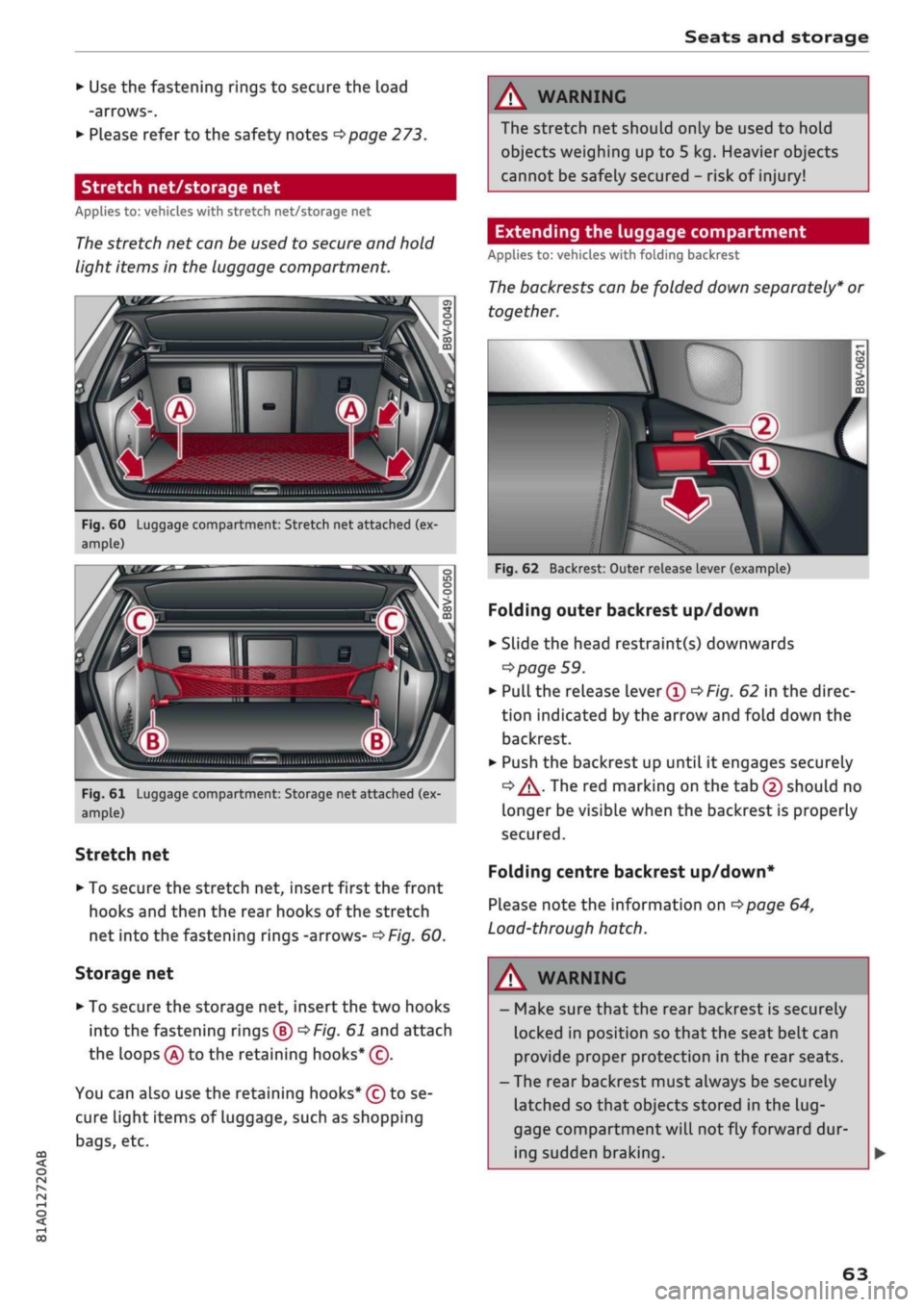
Fig.
60 Luggage compartment: Stretch net attached (ex
ample)
A
Q
"
Fig.
61 Luggage compartment: Storage net attached (ex
ample)
Stretch net
• To secure the stretch net, insert first the front
hooks and then the rear hooks of the stretch
net into the fastening rings -arrows-
^>Fig.
60.
Storage net
• To secure the storage net, insert the two hooks
into the fastening rings®
^F/g.
61 and attach
the loops
(A)
to the retaining hooks* (c).
You can also use the retaining hooks* (ç) to se
cure light items of luggage, such as shopping
bags,
etc.
A WARNING
The stretch net should only be used to hold
objects weighing up to 5 kg. Heavier objects
cannot be safely secured - risk of injury!
Extending the luggage compartment
Applies to: vehicles with folding backrest
The
backrests can be folded down separately* or
together.
\v
Fig.
62 Backrest: Outer release lever (example)
Folding outer backrest up/down
• Slide the head restraint(s) downwards
=>
page 59.
•
Pull
the release lever®
^Fig.
62 in the direc
tion indicated by the arrow and fold down the
backrest.
• Push the backrest up until it engages securely
<=» A-
The red marking on the tab (2) should no
Longer be visible when the backrest is properly
secured.
Folding centre backrest
up/down*
Please note the information on
^>page
64,
Load-through hatch.
WARNING
- Make sure that the rear backrest is securely
locked in position so that the seat belt can
provide proper protection in the rear seats.
- The rear backrest must always be securely
latched so that objects stored in the
lug
gage compartment will
not
fly forward dur
ing sudden braking.
63
Page 66 of 364
Seats and storage
© CAUTIOI
- If
you
need to adjust the front seats when
either of the rear backrests is folded for
wards, please take care to avoid damaging
the rear head restraints. If necessary, re
move the appropriate head restraints be
fore you slide back the front seats.
- Lower the rear head restraints before you
fold down the backrest
•=>
A in Rear head
restraints on page 59 - risk of damage!
- When returning the backrest to an upright
position,
make sure that the seat belts for
the outer rear seats are not caught up and
damaged in the catches for the backrest.
Load-through hatch
Applies to: vehicles with load-through hatch
ft
•
/ Bsa-1
j^^V^il
n^B
iV^yM
•
in
H o
• CD •
O
• >
CO
CD
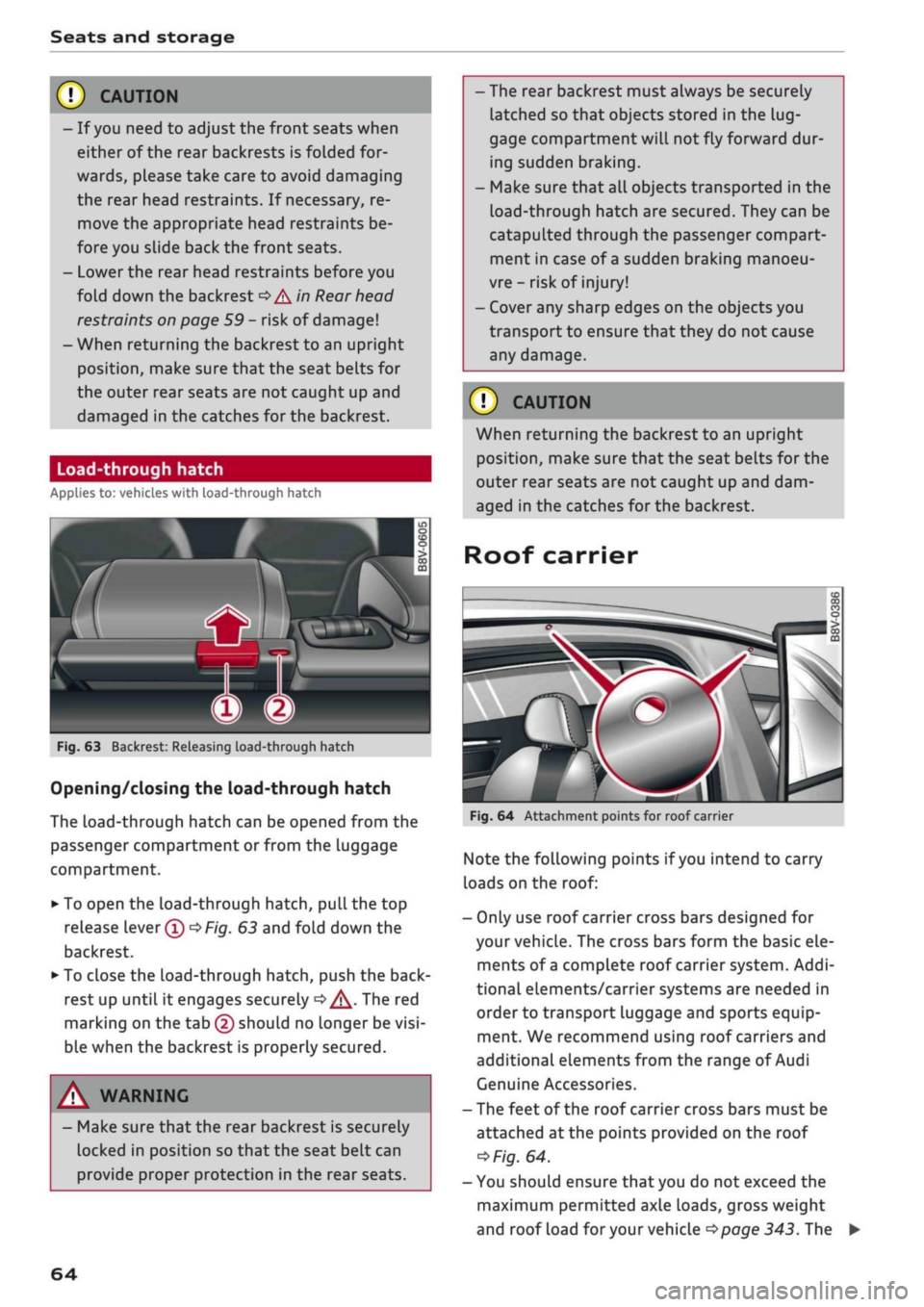
Fig.
63 Backrest: Releasing load-through hatch
Opening/closing the load-through hatch
The
Load-through
hatch can be opened from the
passenger compartment or from the luggage
compartment.
• To open the load-through hatch, pull the top
release lever®
OF/g.
63 and fold down the
backrest.
• To close the load-through hatch, push the
back
rest up until it engages securely
d>^.
The red
marking on the tab (2) should no longer be
visi
ble when the backrest is properly secured.
A WARNING
- Make sure that the rear backrest is securely
locked in position so that the seat belt can
provide proper protection in the rear seats.
- The rear backrest must always be securely
latched so that objects stored in the
lug
gage compartment
wilL
not fly forward dur
ing sudden braking.
- Make sure that all objects transported in the
Load-through
hatch are secured. They can be
catapulted through the passenger compart
ment in case of
a
sudden braking manoeu
vre - risk of injury!
- Cover any sharp edges on the objects you
transport to ensure that they do not cause
any damage.
© CAUTION
When returning the backrest to an upright
position,
make sure that the seat belts for the
outer rear seats are not caught up and dam
aged in the catches for the backrest.
Roof carrier
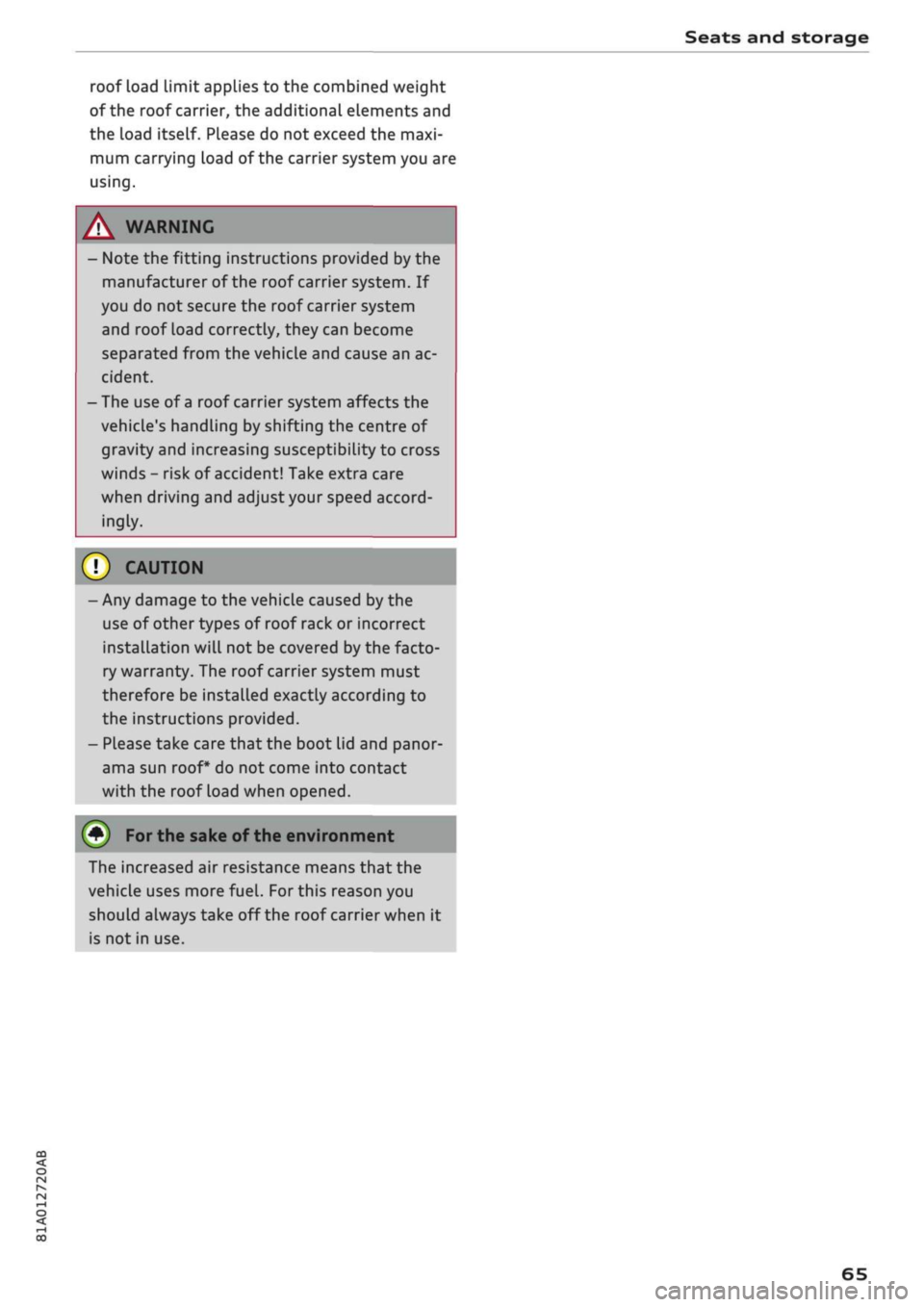
Fig.
64 Attachment points for roof carrier
Note the folLowing points if
you
intend to carry
loads on the roof:
- Only use roof carrier cross bars designed for
your vehicle. The cross bars form the basic ele
ments of
a
complete roof carrier system. Addi
tional elements/carrier systems are needed in
order to transport luggage and sports equip
ment. We recommend using roof carriers and
additional elements from the range of Audi
Genuine Accessories.
- The feet of the roof carrier cross bars must be
attached at the points provided on the roof
*>Fig.
64.
- You should ensure that you do not exceed the
maximum permitted axle loads, gross weight
and roof load
for
your vehicle
•=>page
343. The
64
Page 67 of 364
Seats and storage
CO
rN
rN
•-i
00
roof load limit applies to the combined weight
of the roof carrier, the additional elements and
the Load itself. Please do not exceed the maxi
mum carrying load of the carrier system you are
using.
A WARNIN
- Note the fitting instructions provided by the
manufacturer of the roof carrier system. If
you do not secure the roof carrier system
and roof load correctly, they can become
separated from the vehicle and cause an ac
cident.
- The use of
a
roof carrier system affects the
vehicle's handling by shifting the centre of
gravity and increasing susceptibility to cross
winds - risk of accident! Take extra care
when driving and adjust your speed accord
ingly.
CAUTION
- Any damage to the vehicle caused by the
use of other types of roof rack or incorrect
installation will not be covered by the facto
ry warranty. The roof carrier system must
therefore be installed exactly according to
the instructions provided.
- Please take care that the boot lid and panor
ama sun roof* do not come into contact
with the roof load when opened.
(•)
For
the sake of the environment
The increased air resistance means that the
vehicle uses more
fuel.
For this reason you
should always take off the roof carrier when it
is not in use.
65
Page 69 of 364
Heating and cooling
Heating/ventilation system or manual air conditioner
Applies to: vehicles with heating/ventilation system or manual air conditioner
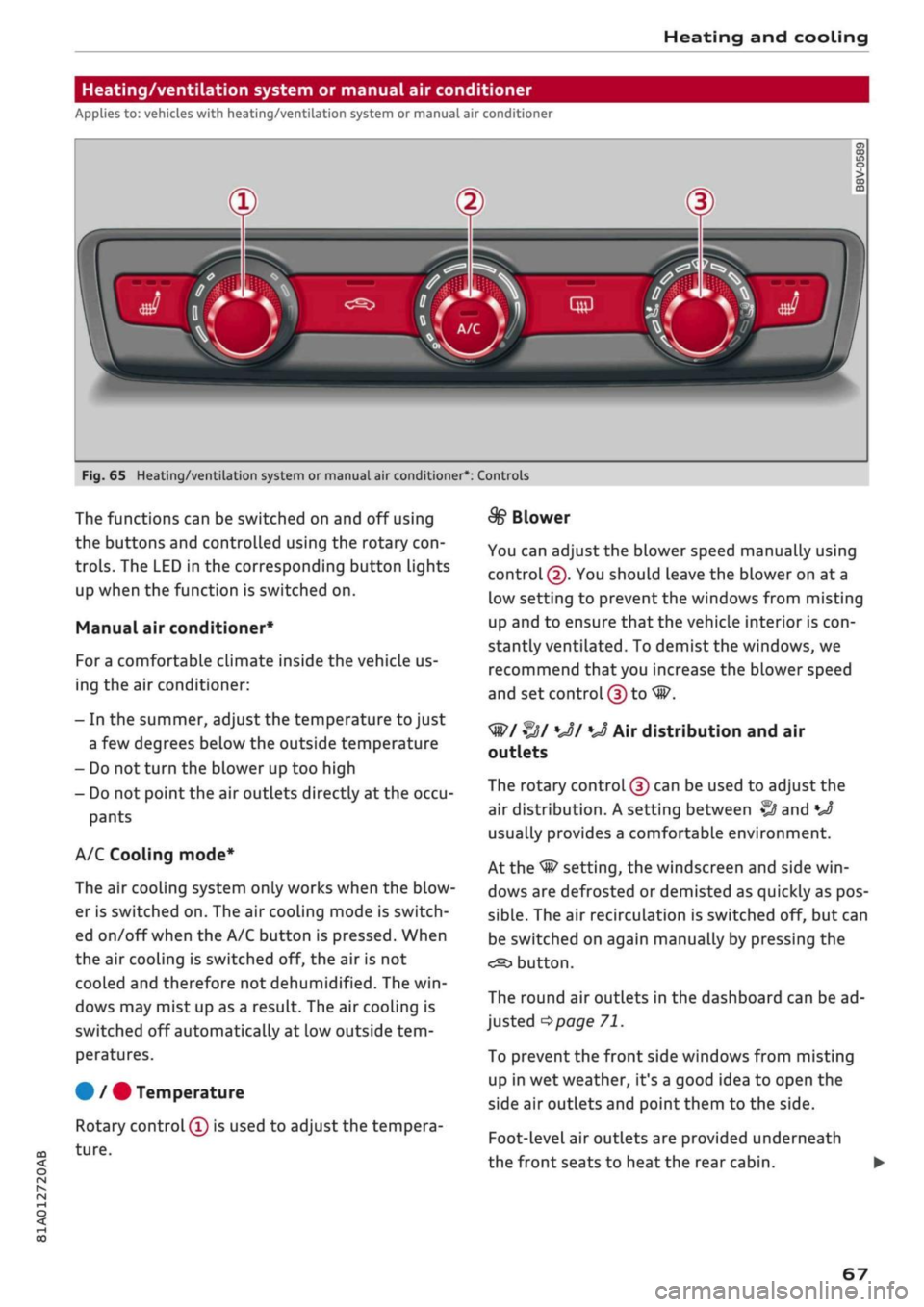
Fig.
65 Heating/ventilation system or manual air conditioner*: Controls
CO
<
O
rN
IV
rN
•-i
00
The functions can be switched on and off using
the buttons and controlled using the rotary
con
trols.
The LED in the corresponding button lights
up when the function is switched on.
Manual air conditioner*
For
a
comfortable climate inside the vehicle us
ing the air conditioner:
- In the summer, adjust the temperature to just
a few degrees below the outside temperature
- Do not turn the blower up too high
- Do not point the air outlets directly at the occu
pants
A/C Cooling mode*
The air cooling system only works when the blow
er is switched on. The air cooling mode is switch
ed on/off when the A/C button is pressed. When
the air cooling is switched off, the air is not
cooled and therefore not dehumidified. The
win
dows may mist up as a result. The air cooling is
switched off automatically at low outside
tem
peratures.
#
/ # Temperature
Rotary control ® is used to adjust the tempera
ture.
%
Blower
You can adjust the blower speed manually using
control®.
You should leave the blower on at a
low setting to prevent the windows from misting
up and to ensure that the vehicle interior is
con
stantly ventilated. To demist the windows, we
recommend
that
you increase the blower speed
and set control ® to
W/
v?/
*JI
*J Air distribution and air
outlets
The rotary control ® can be used to adjust the
air distribution. A setting between
f£j
and
*J
usually provides a comfortable environment.
At the
^
setting, the windscreen and side
win
dows are defrosted or demisted as quickly as pos
sible.
The air recirculation is switched off, but can
be switched on again manually by pressing the
The round air outlets in the dashboard can be ad
justed
^page
71.
To prevent the front side windows from misting
up in wet weather, it's a good idea to open the
side air outlets and point them to the side.
Foot-level air outlets are provided underneath
the front seats to heat the rear cabin.
67
Page 72 of 364
Heating and cooling
%
Blower
You can adjust the blower speed manually using
the control
%.
You should leave the blower on at
a low setting to prevent the windows from mist
ing up and to ensure that the vehicle interior is
constantly ventilated. Press the AUTO button for
automatic control of the blower speed.
%£/
%8/
'J Air distribution and air outlets
The buttons can be used to adjust the air distri
bution.
Press the AUTO button for automatic air
distribution.
The round air outlets in the dashboard can be ad
justed
^>page
71.
To prevent the front side windows from misting
up in wet weather, it's a good idea to open the
side air outlets and point them to the side.
Foot-Level
air outlets are provided underneath
the front seats to heat the rear cabin.
1
Defroster
The windscreen and side windows are defrosted
or demisted as quickly as possible. The air output
is increased to maximum and most of the air
comes out of the outlets below the windscreen.
The air recirculation mode is deactivated. The
temperature should be set to 22 °C or higher.
The temperature is regulated automatically. At
setting
$&
the A/C cooling mode is automatically
activated depending on the ambient tempera
ture.
The defroster is switched off when the AUTO but
ton is pressed.
<^>
Air recirculation mode
The air recirculation mode can be switched on
manually or automatically*.
- To switch the manual air recirculation mode
on/off, press the
button.
-The automatic* air recirculation function must
be activated on the infotainment system. Se
lect the following on the infotainment system:
|MENU|
button > Car > left control button > A/C
> Auto recirculation. The air quality sensor,
which is designed for the detection of diesel
and petrol exhaust fumes, automatically
switches the air recirculation mode on or off
depending on the
level
of pollution in the out
side air.
In air recirculation mode, the air from the interi
or of the vehicle is filtered and recirculated. This
setting prevents fumes etc. from entering the in
terior. We recommend switching on the air recir
culation mode when driving through a tunnel or
in traffic queues
•=>
A-
The air recirculation mode is switched off when
the
<^>
or AUTO or
M.
button is pressed.
If the engine is
cold,
the air conditioner will auto
matically switch to air recirculation mode when
the vehicle is reversing.
$tr
Rear window heating
If the rear window heating is activated with the
ignition switched on, the battery management
determines whether or not the battery charge
level is sufficient for the rear window heating to
be switched on. Otherwise the rear window heat
ing operates when the engine is running, and
switches off automatically after about
10 - 20 minutes, depending on the outside
tem
perature.
To switch on the rear window heating perma
nently, press and hold the
S
button for at least
2 seconds. This setting will be stored for approxi
mately 15 minutes after the ignition is switched
off.
^
Seat heating*
When you press the
«r
button, the seat heating is
switched on at level 3 (the highest level). The
LEDs indicate the temperature level. To reduce
the temperature, press the button again. To
switch off the seat heating, press the button re
peatedly until all the LEDs have gone out.
The seat heating automatically switches from
level 3 to level 2 after about 10 minutes.
A WARNING
For reasons of safety you should not leave
the air recirculation switched on for too
long.
This mode prevents fresh air from en
tering the vehicle, so the windows can mist
70
Page 122 of 364
Driver assist systems
This message appears if the radar sensor vision is
impaired,
e.g. by leaves, snow, heavy road spray
or dirt. Clean the sensor
<^>page
112, Fig. 101.
Distance warning: currently unavailable. See
owner's manual
This driver message will appear if the system
fails temporarily. If the fault occurs repeatedly,
drive to a qualified workshop and have the fauLt
rectified.
Fasten seat belt
The system is not fully available when the driver's
seat belt is unfastened.
Stationary object ahead
This message appears if
you
try to switch on the
system when a stationary object is located imme
diately in front of your car.
Door open
The system is not available when the vehicle is
stationary and the driver's door is open.
Audi pre sense
Introduction
Applies to: vehicles with Audi pre sense
The pre sense functions can take action to pro
tect the vehicle occupants and other road users in
certain hazardous conditions within the system
limits.
- Because the different on-board systems are
networked,
pre sense basic can detect critical
situations and take preventive action to protect
the occupants.
- The pre sense front uses the data of the radar
sensor to calculate the probability of an
acci
dent
opage
112. It can detect an impending
collision with vehicles or
pedestrians1^
(subject
to general system limitations). In this case, the
system warns the driver visually, acoustically
and,
if necessary, with a short, sharp brake ap
plication.
If necessary, it can initiate a partial or
fuLl
brake application in order to reduce the im
pact speed or, in certain circumstances, to
avoid a collision. In conjunction with pre sense
basic, the reversible tensioners on the front
seat belts are also applied if necessary. Pre
sense front is active even when the adaptive
cruise control* is switched off.
Please observe the general safety warnings
•=>
A in General notes on page 112.
© Note
- Certain pre sense functions are deactivated
when reversing.
- The functions of the pre sense system may
also be unavailable if
a
fault develops in the
ESC
system or airbag control unit.
- Please note that, if the front passenger's
airbag has been deactivated, the reversible
belt tensioner on the passenger's side will
be deactivated as
well.
- Switch off pre sense on private roads and
while the vehicle is being loaded onto a car
transporter, train or ferry, etc. This prevents
the pre sense system from taking action in
an inappropriate situation.
Audi pre sense basic
Description
Applies to: vehicles with Audi pre sense basic
The pre sense basic functions are activated at
speeds above approximately 30 km/h.
The system can activate the following functions
in certain situations:
- Seat belt tensioning (e.g. during hard braking):
The seat belts on the front seats have reversi
ble tensioners. Provided an accident does not
occur, the belts are loosened again slightly and
kept ready for activation.
- Initiation of the closure process for the
win
dows and panorama sun roof* (e.g. if the
vehi
cLe understeers or oversteers).
Audi drive select*: the activation threshold
dif
fers according to the mode selected.
x)
Not available on vehicles for some markets.
120
Page 202 of 364
Audi connect (infotainment)
- Audi connect (infotainment) enables you to
access the Twitter service. Audi cannot
guarantee that these services will be availa
ble indefinitely; this is the responsibility of
Twitter.
Travel guide
Applies to: vehicles with Audi connect (infotainment)
Using the Audi MMI connect app, you can store
special destinations
on
your mobile device (e.g.
smartphone) and
use
them for route guidance
on the MMI.
Important:
The Audi MMI connect app must have been in
stalled and started on your mobile device.
You must be logged in to your myAudi account in
the Audi MMI connect app and must have selec
ted your vehicle.
The Wi-Fi function must be activated on your mo
bile device and on the MMI.
A network connection must be set up on the MMI
opage
203.
*•
Select:
|MENU|
button
>
Audi connect
>
left
control button > Category Information
>
Trav
el.
After you call up the travel guide, you will be
shown travel tips for the area you are currently
in.
These include current ratings and the category
they belong to.
•
Press the left control button to change the cat
egory (e.g. bars nearby).
A WARNING
- MobiLe devices, tablet and laptop computers
and devices of
a
similar weight can only be
operated safely when the vehicle is station
ary. Like any loose object, they can be cata
pulted through the vehicle in an accident
and cause serious injuries. Always make sure
that such devices are securely stowed while
you are driving.
- No Wi-Fi devices may be used from the front
seats in the areas around the airbags while
the vehicle is being driven. Please also ob
serve the safety warnings in the chapter on
tapage
282, Front airbags.
® CAUTION
Please always observe the information
•=>©
in
Wi-Fi hotspot on page 202.
© Note
- Measurement units, language settings and
times are displayed on the infotainment dis
play according to the how they are set in the
system settings
^>page
255.
Audi connect (infotainment) in the
navigation system
Applies to: vehicles with navigation system and Audi connect
(infotainment)
•
Select:
|MENU|
button
>
Audi connect
>
left
control button > Navigation.
The following Audi connect infotainment services
are currently available:
- Navigation with Google Earth and Google
Street View
opage
222.
- Online point of interest search with speech
dialogue system (e.g. restaurants): For
plan
ning a route using the MMI control console
^page
212 and the speech dialogue system
^>page
164.
- Adding a destination to your MMI via your
myAudi account or Google Maps
^>page
222.
- Online traffic information: Up-to-the-minute
reception of information on accidents,
road
works and other incidents
^>page
226.
- myAudi special destinations: Personal special
destinations can be imported to your MMI di
rectly in the vehicle as an online update
•=>
page 224.
- Map update: Navigation map updates can be
imported directly into the vehicle via SD card or
as an online update*
ipage
223.
© Note
- The Audi connect infotainment map update
service using an SD card allows you to find
out which software version is installed in
your vehicle. You can then check whether a
200
Page 203 of 364
Audi connect (infotainment)
CO
< o rN
IN
rN
•-H
00
new version is available at my.audi.com.
You can also have the new navigation data
installed by an Audi deaLer (carries addition
al charges).
- Further information on the myAudi special
destinations and the map update can be
found online at my.audi.com.
Audi connect (infotainment) for telephones
Applies
to: vehicles with Audi connect (infotainment)
© CAUTION
•
Select: |MENU| button
>
Audi connect
>
left
control button
>
Communication.
The following Audi connect infotainment services
are currently available:
- Creating contacts on your
PC
via your myAudi
account and loading the contacts into the di
rectory of your MMI system
^>page
187.
- Dictating text messages or e-mails and having
them read out*
^>page
182, Messages.
Audi connect (infotainment) in the media
menu
Applies
to: vehicles with Wi-Fi audio player and Audi connect
(infotainment)
*•
Select: |MENU| button
>
Audi connect
>
left
control button > Entertainment.
- Wi-Fi audio player: To access the media centre
of your player (e.g. smartphone) connected via
Wi-Fi
<=>
page 238.
- Online media and Internet radio: With assis
tance from the Audi MMI connect app, this
function allows you to access and operate
vari
ous online media services using the MMI.
A WARNING
Mobile devices, tablet and Laptop computers
and devices of
a
similar weight can only be
operated safely when the vehicle is stationary.
Like any Loose object, they can be catapulted
through the vehicle in an accident and cause
serious injuries. Always make sure that such
devices are securely stowed while you are
driving.
Please always observe the information
=>®
in
Wi-Fi hotspot on page 202.
- Also refer to
opage
204, General notes on
Audi connect (infotainment).
- Please contact an Audi dealer for more in
formation on Wi-Fi audio players and for a
list of supported devices.
Further options
Applies
to: vehicles with Audi connect (infotainment)
•
Select: |MENU| button
>
Audi connect
>
right
control button.
The following options are available in the over
view of the Audi connect infotainment services:
Login*
Refer to
^>page
196, Logging into myAudi in the
vehicle.
Connection manager
Refer to
^>page
257.
Licence periods
The validity and the time remaining on your licen
ces is displayed. If the Licence expiry warning
function is switched on
(vj,
a message will be dis
played before the licence expires.
Refresh
The content of the Audi connect infotainment
service selected or the entire Audi connect (info
tainment) list is updated.
Wi-Fi hotspot
Applies
to: vehicles with Wi-Fi hotspot
You
can
use
your MMI system as a Wi-Fi hotspot
for connecting to the Internet on up to eight Wi-
Fi
devices.
Small, light Wi-Fi
devices
that are not
permanently attached to the vehicle must only
be operated from the rear seats while the vehicle
is moving.
Important: The ignition must be switched on.
201
Page 206 of 364
Audi connect (infotainment)
•
Select:
1MENU[
button
>
Telephone
>
right
con
trol button
>
Wi-Fi settings.
The following settings can be made:
Wi-Fi
The Wi-Fi hotspot is deactivated when the vehicle
leaves the factory. Switch the Wi-Fi hotspot on
before establishing an Internet connection be
tween your vehicle and your Wi-Fi device.
-
on:
The
MMI's
Wi-Fi hotspot is activated and
visible to other devices. You can connect your
Wi-Fi device to the MMI.
- off: The MMI's Wi-Fi hotspot is deactivated.
Wi-Fi devices will not be able to connect to the
Internet.
Network
key
The Wi-Fi connection between your vehicle and
the Wi-Fi device (laptop or mobile phone) is en
crypted.
Before a connection can be established,
you must enter the following values/settings
when setting up your Wi-Fi device (these values
can be edited as required):
-Access point
(SSID):
Name of the Wi-Fi net
work.
- Password: A random MMI password is set at
the factory. This password can be changed. The
encryption type WPA2 requires the password to
be at least 8 characters
long.
Please select
a
se
cure password.
- Discoverability: To switch the discoverability of
your Wi-Fi network on
([vj)
or off.
Network
search15
A list of the Wi-Fi networks available near you is
displayed.
Connection to personal hotspot15
The Wi-Fi hotspot of the MMI is activated. The
MMI can establish an Internet connection to a
personal Wi-Fi hotspot (e.g. smartphone). You
can search for your personal hotspot and connect
to the MMI using Network search. For more in
formation,
please refer to
^>page
195.
Not available in all markets.
This mode is not available if your own mini SIM
card is inserted in the SIM card reader.
A<
i
WARNING
- The Audi connect infotainment services
should only be used via a Wi-Fi hotspot
when the vehicle is stationary or from the
rear seats if the vehicLe is in motion - risk of
accident!
- Mobile devices, tablet and laptop computers
and devices of
a
similar weight can only be
operated safely when the vehicle is station
ary. Like any loose object, they can be cata
pulted through the vehicle in an accident
and cause serious injuries. Always make sure
that such devices are securely stowed while
you are driving.
- No Wi-Fi devices may be used from the front
seats in the areas around the airbags while
the vehicLe is being driven. Please also ob
serve the safety warnings in the chapter on
<3>page
282, Front airbags.
- Do not allow the features of the Wi-Fi hot-
spot to distract you from watching the traf
fic - taking your eyes off the road can cause
an accident.
© CAUTION
- Depending on the configuration of the Wi-Fi
device you are using (refer to the operating
manual of your Wi-Fi device for more de
tails),
the SIM card of the device may be
used in certain cases to provide the data
connection for Internet-supported apps and
services which use the MMI Wi-Fi hotspot.
Depending on your network provider, you
may be charged for this service, especially if
you are using the system abroad. We there
fore strongly recommend that you use an
unlimited data
plan.
For more information,
contact your service provider. Some exam
ple cases are described below:
- Data plan expired/used up
- Data plan not valid abroad •
202
Page 208 of 364
Audi connect (infotainment)
Audi connect (MMI)
With the Audi connect (MMI) function, you can
allow or deny the use of Audi connect infotain
ment services if the connection is
set
to no re
quest or with request.
Wi-Fi devices*
You can use the Wi-Fi devices function to allow
or deny a connection to the Internet.
Connection settings
Depending on the SIM card used, the connection
may be configured automatically. However, these
settings can be changed. For more information,
contact your service provider.
- APN: The system access point depends on your
mobile network service provider and is assigned
automatically.
- User name: The user name for your online pro
file is assigned by your mobile network service
provider.
- Password: The password for your online profile
is assigned by your mobile network service pro
vider.
- Use settings: The changed connection settings
are
stored.
Reset configuration
An online profile is created and configured auto
matically. The Connection settings you have
changed manually are reset to the default set
tings.
/Sy
WARNING
- Do not allow the features of the Wi-Fi hot-
spot to distract you from watching the traf
fic - taking your eyes off the road can cause
an accident.
- Mobile devices, tablet and laptop computers
and devices of a similar weight can only be
operated safely when the vehicle is station
ary. Like any loose object, they can be cata
pulted through the vehicle in an accident
and cause serious injuries. Always make sure
that such devices are securely stowed while
you are driving.
- No Wi-Fi devices may be used from the front
seats in the areas around the airbags while
the vehicle is being driven. Please also ob
serve the safety warnings in the chapter on
^>page
282, Front airbags.
© CAUTION
Please always observe the information
•=>©
in
Wi-Fi hotspot on page 202.
© Note
- According to the factory settings, the data
connection will be interrupted initially when
you travel abroad to protect you from unex
pected roaming charges. If you want to use
Audi connect infotainment services abroad,
you must first activate the Data roaming
option.
- For more information on roaming charges,
contact your service provider.
- Further information can be found on the In
ternet at www.audi.com.
General notes on Audi
connect (infotainment)
Audi connect infotainment services
Applies to: vehicles with Audi connect (infotainment)
-The mobile phone standard LTE* is not
available for use in all countries. For further
information, please consult an Audi dealer
or your mobile network service provider.
- Whether Audi connect infotainment serv
ices can be used depends on the availability
of services provided by third parties.
- Audi connect infotainment services are only
available within the mobiLe network area
covered
by
your network provider.
- The availability, scope, provider and price of
the services offered can vary, as can the way
in which the services are displayed on the
screen.
These variations depend on your
country, model, model year, device and mo
bile phone contract.
204