weight AUDI Q2 2021 Owner´s Manual
[x] Cancel search | Manufacturer: AUDI, Model Year: 2021, Model line: Q2, Model: AUDI Q2 2021Pages: 364, PDF Size: 87.77 MB
Page 202 of 364
Audi connect (infotainment)
- Audi connect (infotainment) enables you to
access the Twitter service. Audi cannot
guarantee that these services will be availa
ble indefinitely; this is the responsibility of
Twitter.
Travel guide
Applies to: vehicles with Audi connect (infotainment)
Using the Audi MMI connect app, you can store
special destinations
on
your mobile device (e.g.
smartphone) and
use
them for route guidance
on the MMI.
Important:
The Audi MMI connect app must have been in
stalled and started on your mobile device.
You must be logged in to your myAudi account in
the Audi MMI connect app and must have selec
ted your vehicle.
The Wi-Fi function must be activated on your mo
bile device and on the MMI.
A network connection must be set up on the MMI
opage
203.
*•
Select:
|MENU|
button
>
Audi connect
>
left
control button > Category Information
>
Trav
el.
After you call up the travel guide, you will be
shown travel tips for the area you are currently
in.
These include current ratings and the category
they belong to.
•
Press the left control button to change the cat
egory (e.g. bars nearby).
A WARNING
- MobiLe devices, tablet and laptop computers
and devices of
a
similar weight can only be
operated safely when the vehicle is station
ary. Like any loose object, they can be cata
pulted through the vehicle in an accident
and cause serious injuries. Always make sure
that such devices are securely stowed while
you are driving.
- No Wi-Fi devices may be used from the front
seats in the areas around the airbags while
the vehicle is being driven. Please also ob
serve the safety warnings in the chapter on
tapage
282, Front airbags.
® CAUTION
Please always observe the information
•=>©
in
Wi-Fi hotspot on page 202.
© Note
- Measurement units, language settings and
times are displayed on the infotainment dis
play according to the how they are set in the
system settings
^>page
255.
Audi connect (infotainment) in the
navigation system
Applies to: vehicles with navigation system and Audi connect
(infotainment)
•
Select:
|MENU|
button
>
Audi connect
>
left
control button > Navigation.
The following Audi connect infotainment services
are currently available:
- Navigation with Google Earth and Google
Street View
opage
222.
- Online point of interest search with speech
dialogue system (e.g. restaurants): For
plan
ning a route using the MMI control console
^page
212 and the speech dialogue system
^>page
164.
- Adding a destination to your MMI via your
myAudi account or Google Maps
^>page
222.
- Online traffic information: Up-to-the-minute
reception of information on accidents,
road
works and other incidents
^>page
226.
- myAudi special destinations: Personal special
destinations can be imported to your MMI di
rectly in the vehicle as an online update
•=>
page 224.
- Map update: Navigation map updates can be
imported directly into the vehicle via SD card or
as an online update*
ipage
223.
© Note
- The Audi connect infotainment map update
service using an SD card allows you to find
out which software version is installed in
your vehicle. You can then check whether a
200
Page 203 of 364
Audi connect (infotainment)
CO
< o rN
IN
rN
•-H
00
new version is available at my.audi.com.
You can also have the new navigation data
installed by an Audi deaLer (carries addition
al charges).
- Further information on the myAudi special
destinations and the map update can be
found online at my.audi.com.
Audi connect (infotainment) for telephones
Applies
to: vehicles with Audi connect (infotainment)
© CAUTION
•
Select: |MENU| button
>
Audi connect
>
left
control button
>
Communication.
The following Audi connect infotainment services
are currently available:
- Creating contacts on your
PC
via your myAudi
account and loading the contacts into the di
rectory of your MMI system
^>page
187.
- Dictating text messages or e-mails and having
them read out*
^>page
182, Messages.
Audi connect (infotainment) in the media
menu
Applies
to: vehicles with Wi-Fi audio player and Audi connect
(infotainment)
*•
Select: |MENU| button
>
Audi connect
>
left
control button > Entertainment.
- Wi-Fi audio player: To access the media centre
of your player (e.g. smartphone) connected via
Wi-Fi
<=>
page 238.
- Online media and Internet radio: With assis
tance from the Audi MMI connect app, this
function allows you to access and operate
vari
ous online media services using the MMI.
A WARNING
Mobile devices, tablet and Laptop computers
and devices of
a
similar weight can only be
operated safely when the vehicle is stationary.
Like any Loose object, they can be catapulted
through the vehicle in an accident and cause
serious injuries. Always make sure that such
devices are securely stowed while you are
driving.
Please always observe the information
=>®
in
Wi-Fi hotspot on page 202.
- Also refer to
opage
204, General notes on
Audi connect (infotainment).
- Please contact an Audi dealer for more in
formation on Wi-Fi audio players and for a
list of supported devices.
Further options
Applies
to: vehicles with Audi connect (infotainment)
•
Select: |MENU| button
>
Audi connect
>
right
control button.
The following options are available in the over
view of the Audi connect infotainment services:
Login*
Refer to
^>page
196, Logging into myAudi in the
vehicle.
Connection manager
Refer to
^>page
257.
Licence periods
The validity and the time remaining on your licen
ces is displayed. If the Licence expiry warning
function is switched on
(vj,
a message will be dis
played before the licence expires.
Refresh
The content of the Audi connect infotainment
service selected or the entire Audi connect (info
tainment) list is updated.
Wi-Fi hotspot
Applies
to: vehicles with Wi-Fi hotspot
You
can
use
your MMI system as a Wi-Fi hotspot
for connecting to the Internet on up to eight Wi-
Fi
devices.
Small, light Wi-Fi
devices
that are not
permanently attached to the vehicle must only
be operated from the rear seats while the vehicle
is moving.
Important: The ignition must be switched on.
201
Page 206 of 364
Audi connect (infotainment)
•
Select:
1MENU[
button
>
Telephone
>
right
con
trol button
>
Wi-Fi settings.
The following settings can be made:
Wi-Fi
The Wi-Fi hotspot is deactivated when the vehicle
leaves the factory. Switch the Wi-Fi hotspot on
before establishing an Internet connection be
tween your vehicle and your Wi-Fi device.
-
on:
The
MMI's
Wi-Fi hotspot is activated and
visible to other devices. You can connect your
Wi-Fi device to the MMI.
- off: The MMI's Wi-Fi hotspot is deactivated.
Wi-Fi devices will not be able to connect to the
Internet.
Network
key
The Wi-Fi connection between your vehicle and
the Wi-Fi device (laptop or mobile phone) is en
crypted.
Before a connection can be established,
you must enter the following values/settings
when setting up your Wi-Fi device (these values
can be edited as required):
-Access point
(SSID):
Name of the Wi-Fi net
work.
- Password: A random MMI password is set at
the factory. This password can be changed. The
encryption type WPA2 requires the password to
be at least 8 characters
long.
Please select
a
se
cure password.
- Discoverability: To switch the discoverability of
your Wi-Fi network on
([vj)
or off.
Network
search15
A list of the Wi-Fi networks available near you is
displayed.
Connection to personal hotspot15
The Wi-Fi hotspot of the MMI is activated. The
MMI can establish an Internet connection to a
personal Wi-Fi hotspot (e.g. smartphone). You
can search for your personal hotspot and connect
to the MMI using Network search. For more in
formation,
please refer to
^>page
195.
Not available in all markets.
This mode is not available if your own mini SIM
card is inserted in the SIM card reader.
A<
i
WARNING
- The Audi connect infotainment services
should only be used via a Wi-Fi hotspot
when the vehicle is stationary or from the
rear seats if the vehicLe is in motion - risk of
accident!
- Mobile devices, tablet and laptop computers
and devices of
a
similar weight can only be
operated safely when the vehicle is station
ary. Like any loose object, they can be cata
pulted through the vehicle in an accident
and cause serious injuries. Always make sure
that such devices are securely stowed while
you are driving.
- No Wi-Fi devices may be used from the front
seats in the areas around the airbags while
the vehicLe is being driven. Please also ob
serve the safety warnings in the chapter on
<3>page
282, Front airbags.
- Do not allow the features of the Wi-Fi hot-
spot to distract you from watching the traf
fic - taking your eyes off the road can cause
an accident.
© CAUTION
- Depending on the configuration of the Wi-Fi
device you are using (refer to the operating
manual of your Wi-Fi device for more de
tails),
the SIM card of the device may be
used in certain cases to provide the data
connection for Internet-supported apps and
services which use the MMI Wi-Fi hotspot.
Depending on your network provider, you
may be charged for this service, especially if
you are using the system abroad. We there
fore strongly recommend that you use an
unlimited data
plan.
For more information,
contact your service provider. Some exam
ple cases are described below:
- Data plan expired/used up
- Data plan not valid abroad •
202
Page 208 of 364
Audi connect (infotainment)
Audi connect (MMI)
With the Audi connect (MMI) function, you can
allow or deny the use of Audi connect infotain
ment services if the connection is
set
to no re
quest or with request.
Wi-Fi devices*
You can use the Wi-Fi devices function to allow
or deny a connection to the Internet.
Connection settings
Depending on the SIM card used, the connection
may be configured automatically. However, these
settings can be changed. For more information,
contact your service provider.
- APN: The system access point depends on your
mobile network service provider and is assigned
automatically.
- User name: The user name for your online pro
file is assigned by your mobile network service
provider.
- Password: The password for your online profile
is assigned by your mobile network service pro
vider.
- Use settings: The changed connection settings
are
stored.
Reset configuration
An online profile is created and configured auto
matically. The Connection settings you have
changed manually are reset to the default set
tings.
/Sy
WARNING
- Do not allow the features of the Wi-Fi hot-
spot to distract you from watching the traf
fic - taking your eyes off the road can cause
an accident.
- Mobile devices, tablet and laptop computers
and devices of a similar weight can only be
operated safely when the vehicle is station
ary. Like any loose object, they can be cata
pulted through the vehicle in an accident
and cause serious injuries. Always make sure
that such devices are securely stowed while
you are driving.
- No Wi-Fi devices may be used from the front
seats in the areas around the airbags while
the vehicle is being driven. Please also ob
serve the safety warnings in the chapter on
^>page
282, Front airbags.
© CAUTION
Please always observe the information
•=>©
in
Wi-Fi hotspot on page 202.
© Note
- According to the factory settings, the data
connection will be interrupted initially when
you travel abroad to protect you from unex
pected roaming charges. If you want to use
Audi connect infotainment services abroad,
you must first activate the Data roaming
option.
- For more information on roaming charges,
contact your service provider.
- Further information can be found on the In
ternet at www.audi.com.
General notes on Audi
connect (infotainment)
Audi connect infotainment services
Applies to: vehicles with Audi connect (infotainment)
-The mobile phone standard LTE* is not
available for use in all countries. For further
information, please consult an Audi dealer
or your mobile network service provider.
- Whether Audi connect infotainment serv
ices can be used depends on the availability
of services provided by third parties.
- Audi connect infotainment services are only
available within the mobiLe network area
covered
by
your network provider.
- The availability, scope, provider and price of
the services offered can vary, as can the way
in which the services are displayed on the
screen.
These variations depend on your
country, model, model year, device and mo
bile phone contract.
204
Page 242 of 364
Media
Depending on the device you are using, the me
dia are started and operated using the mobile de
vice
or
the MMI.
©
i
Note
- Pay attention to any connection queries on
your Bluetooth device.
-You can bond several Bluetooth audio play
ers to the MMI system; however only one
connection can be active at
a
time.
- The system supports the Bluetooth proto
cols AVRCP (1.0/1.3/1.4) and A2DP.
- Please consider the volume control on your
Bluetooth device. Audi recommends setting
the volume of mobile devices to maximum
when they are being used as Bluetooth au
dio players.
- Which media functions (e.g. random play
back) are supported depends on the Blue
tooth device you are using.
- For more information on which devices are
supported,
please go online (e.g.
www.audi.com/bluetooth) or contact an
Audi dealer.
Wi-Fi audio players
Applies to: vehicles with Wi-Fi
The
MMI's Wi-Fi audio player media source al
lows you to connect and operate your Wi-Fi me
dia player (e.g. smartphone) to play music wire
lessly from your player's media centre.
The
me
dia player is connected via the vehicle's Wi-Fi
hotspot. A
UPnP
server app or an integrated
UPnP/DLNA
server on the media player is re
quired to
access
the media centre of your media
player.
Important: The Wi-Fi function of the media play
er must be switched on. The Audi MMI connect
app or
a
UPnP server app must be installed on
your media player. Or: You must be using a
UPnP/DLNA server integrated in the media play
er.
-
To
connect a media player: Select the |MEDIA|
button.
Press the left control button repeatedly
until the source overview
^>page
243 is dis
played.
Select and confirm Wi-Fi audio player
® tapage
243, Fig. 200.
- You may need to select and confirm Wi-Fi off >
Activate Wi-Fi to switch Wi-Fi on in the MMI.
Select Wi-Fi settings if necessary. Use the set
tings of the Wi-Fi hotspot for the media player
you are using.
- To start the Wi-Fi audio player: Start the Audi
MMI connect app or
a
UPnP server app, or ena
ble media sharing on your media player.
To use the media player: The media player is op
erated using the MMI.
- Press the left control button repeatedly until
the menu item Folders appears. Select and
con
firm Folders.
- To play music from a media player: Select and
confirm Media centre.
Internet radio: See
^>page
239.
(7) CAUTION
Please always observe the information
>=>©/n
Wi-Fi hotspot on page 202.
(T)
Note
- Inserting or removing the mini SIM card
from the SIM card reader* causes the Wi-Fi
connection to be reconfigured. This may •
A
WARNING
- Do not allow the features of the Wi-Fi hot-
spot to distract you from watching the traf
fic - taking your eyes off the road can cause
an accident.
- Mobile devices, tablet and Laptop computers
and devices of
a
similar weight can only be
operated safely when the vehicle is station
ary. Like any Loose object, they can be cata
pulted through the vehicle in an accident
and cause serious injuries. Always make sure
that such devices are securely stowed while
you are driving.
- No Wi-Fi devices may be used from the front
seats in the areas around the airbags while
the vehicle is being driven. Please also ob
serve the safety warnings on
^>page
282,
Front airbags.
238
Page 244 of 364
Media
The following options may be available depend
ing on the information displayed (e.g. the sta
tion/track currently playing):
- Sound settings: Refer to
^>page
260.
- Wi-Fi settings: Refer to
Opage
201, Wi-Fi hot-
spot.
- Connection manager: Refer to
<>page
257.
- Additional options may be available depending
on the active online media service or Internet
radio function.
A WARNING
- Mobile devices, tablet and laptop computers
and devices of
a
similar weight can only be
operated safely when the vehicle is station
ary. Like any Loose object, they can be cata
pulted through the vehicle in an accident
and cause serious injuries. Always make sure
that such devices are securely stowed while
you are driving.
- No Wi-Fi devices may be used from the front
seats in the areas around the airbags while
the vehicle is being driven. Please also ob
serve the safety warnings on
^>page
282,
Front airbags.
© CAUTION
- Please always observe the information
•=>©
in Wi-Fi hotspot on page 202.
- In order to use online media, you generally
have
to
set up an account with an online
media service, which may lead
to
additional
costs,
especially if
you
are using the service
abroad.
© Note
- Depending on the Internet connection and
network
load,
playback of the online media
services may be interrupted.
- Whether online media and Internet radio
can be used depends on the availability
of
services provided by third parties.
- AUDI AG only enables you
to
access online
media services via the MMI system and ac
cepts no responsibility for the content of
online media services.
- Please always note the information in the
chapter
^>page
204, General notes on Audi
connect (infotainment).
- Depending on the mobile device you are us
ing,
you may experience interruptions
in
media playback when using the Audi MMI
connect app. To avoid interruptions, keep
the Audi MMI connect app running in the
foreground and do not lock the screen on
your mobile device.
- Audi dealerships will be able
to
provide you
with further information on online media.
Multimedia connections
USB adapters for Audi music interface or
USB charging socket
Depending on the vehicle equipment, you may be
able
to
connect your mobile devices (e.g. smart-
phones, MP3 players)
to
the Audi music interface
or the
USB
charging socket using the special
USB
adapters.
<
Fig.
196 Audi USB adapters
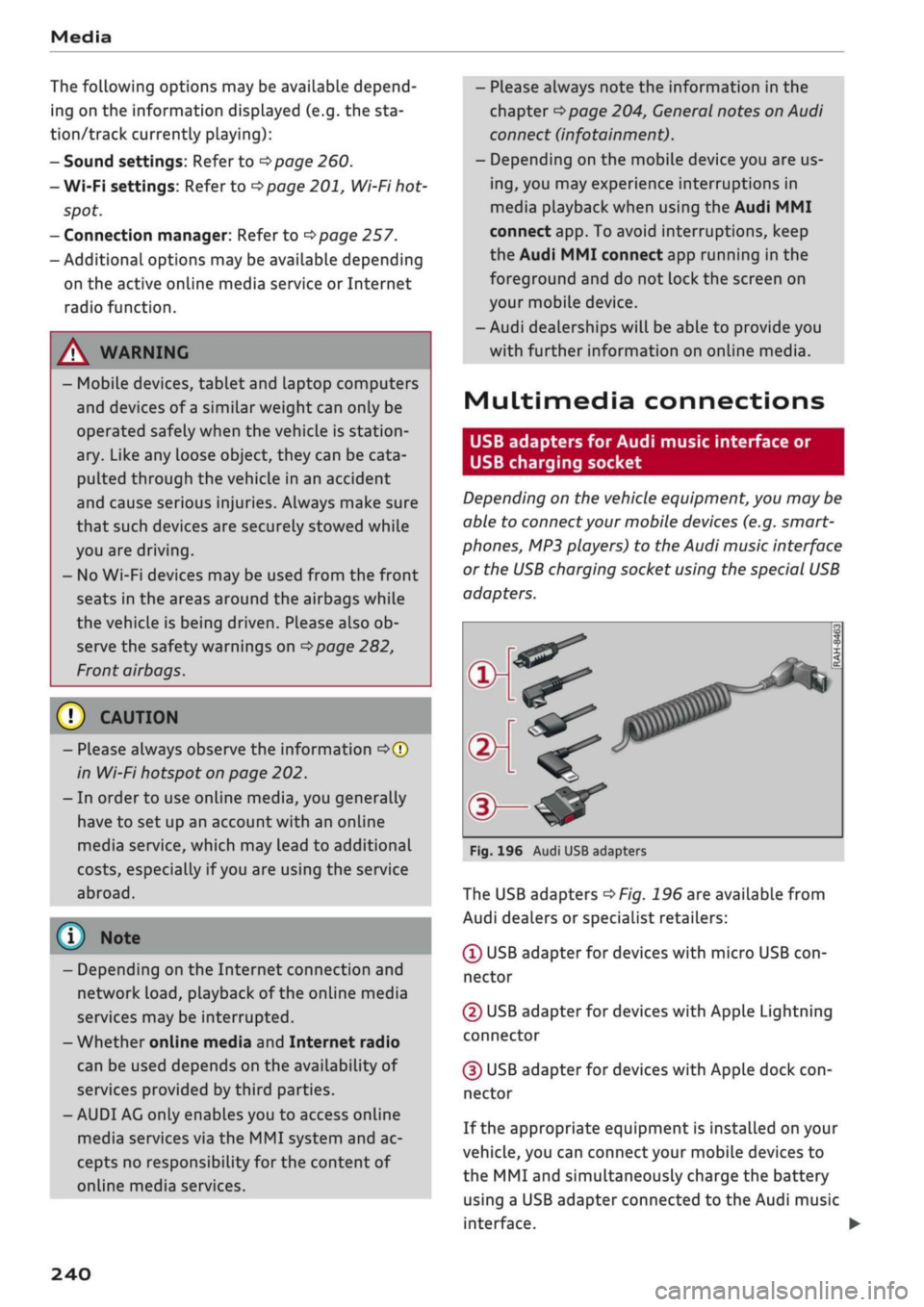
The USB adapters
^>Fig.
196 are available from
Audi dealers or specialist retailers:
® USB adapter for devices with micro USB
con
nector
© USB adapter for devices with Apple Lightning
connector
© USB adapter for devices with Apple dock
con
nector
If the appropriate equipment is installed on your
vehicle, you can connect your mobiLe devices
to
the MMI and simultaneously charge the battery
using a USB adapter connected
to
the Audi music
interface.
•
240
Page 272 of 364
Safe driving
A WARNING
To avoid serious or fatal injury, children trav
elling in the vehicle must always be protected
with child restraint systems appropriate to
their height, weight and age.
- Children under 1.50 m tall or younger than
12 must not travel in the vehicLe if there are
no suitable child seats. Please observe any
other applicable regulations in the country
in which you are travelling.
- Babies and children must never travel on an
other occupant's lap.
- Never allow more than one child to occupy
one child seat.
- Never leave a child without supervision in a
child seat.
- Never allow a child to travel unrestrained or
to stand up or kneel on a seat while the car
is moving. In an accident, the child could be
catapulted through the car, causing possibly
fatal injuries to itself and other occupants.
- To ensure proper protection by the child re
straint, it is important to wear the seat belts
in the correct position
^>page
277. Always
check that the belt is properly positioned ac
cording to the instructions provided by the
manufacturer of the child seat. Incorrectly
worn seat belts can give rise to injuries even
in a minor collision.
- If children are out of position when the car
is moving, they are at greater risk of injury
during a sudden braking manoeuvre or in an
accident. This is particularly the case if the
child is travelling on the front passenger's
seat and the airbag system is triggered in an
accident. This incorrect sitting position can
result in serious or even fatal injury.
- Make sure there is sufficient clearance in
front of the child sitting in the child seat. If
necessary, adjust the seat position and
backrest angle of the seat in front of the
child seat.
- If
you
are using a child seat on the front
passenger seat in which the child faces the
direction of
travel,
you should move the
front passenger seat as far back as possible.
- Child seats in which the child faces the rear
of the car are located directly in the path of
the front passenger's airbag if it inflates. In
this case, the child could sustain serious or
fatal injuries if the airbag were to be de
ployed.
- Applies to vehicles on which the front pas
senger's airbag cannot be deactivated: Do
NOT use a rearward-facing child seat on
the front passenger's seat.
- Applies to vehicles with key-operated
switch for deactivating the front passeng
er's airbag: Do NOT use a rearward-facing
child seat on the front passenger's seat
while the front passenger's airbag is ac
tive.
If
you
have no alternative but to use a
rearward-facing child seat on the front
passenger's seat, the front passenger's
airbag must be deactivated beforehand via
the key-operated switch*
^>page
288.
Make sure that the front passenger's air-
bag is reactivated by means of the key-op
erated switch* as soon as the child seat is
no Longer needed on the front passenger's
seat.
- Always replace the child seat with a new one
after an accident as damage not externally
visible may have occurred.
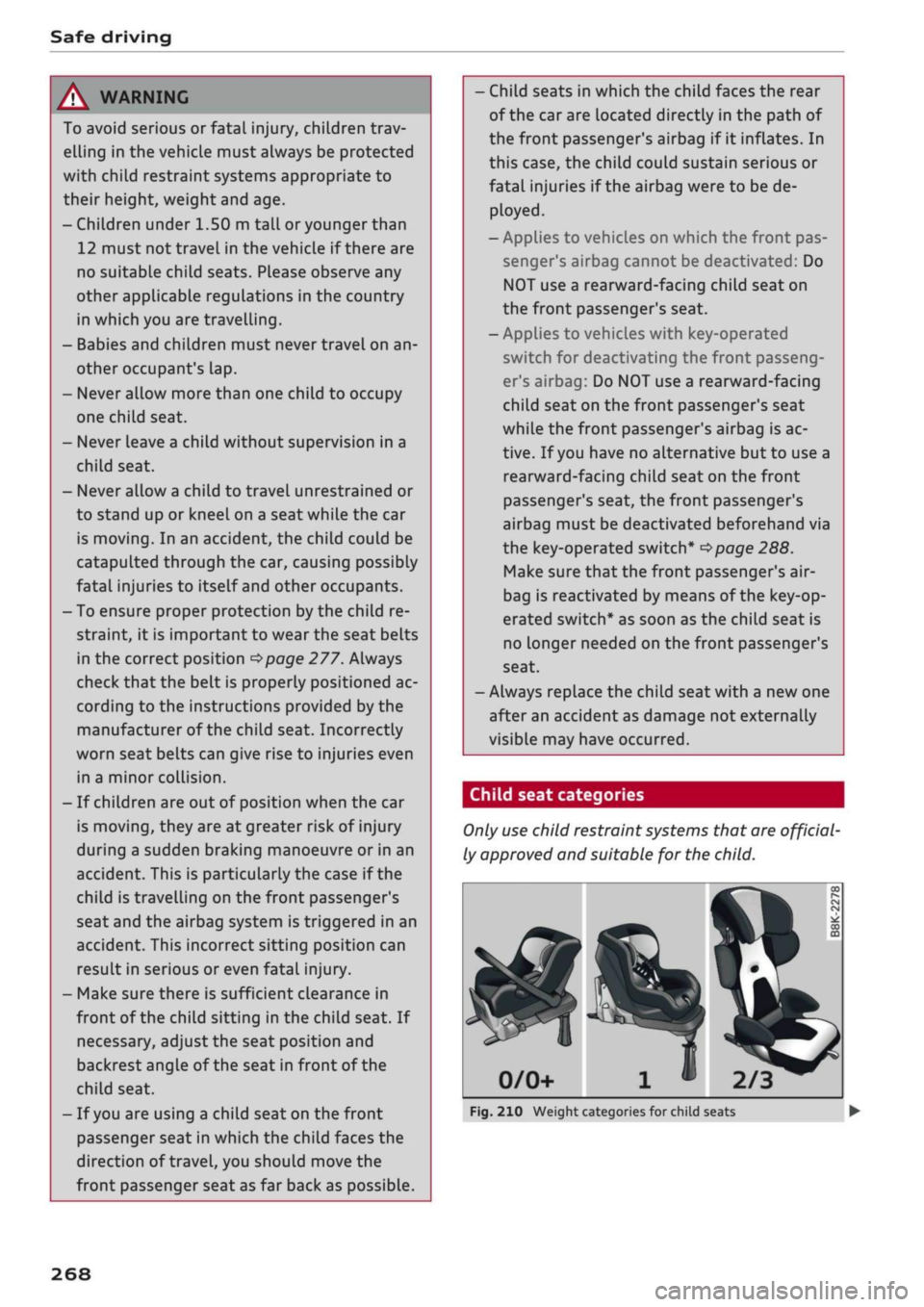
Child seat categories
Only
use
child restraint systems that are official
ly approved and suitable for the child.
2/3
Fig.
210 Weight categories for child seats
268
Page 273 of 364
Safe driving
CO
<
O
rN
iv
rN
t-H
o < 00
Child restraint systems are regulated by Europe
an standards ECE
R
44 or ECE-R
129x).
Both
standards apply in parallel. An orange label is
normally attached to child seats which have been
tested in accordance with these standards. Infor
mation on weight categories, ISOFIX size class
and the approval category of the child seat can
be found on this Label.
Weight categories for child seats
- Child seats: categories 0 and 0+: Rearward-
facing carry cots are most appropriate for these
categories (up to 13 kg). Our recommendation:
Audi carry cot with optional ISOFIX base.
- Child seats: category 1: In this category (9 to
18 kg), rearward or forward-facing child seats
with an integrated seat belt system are most
appropriate. Rearward-facing child seats
should be used for as long as safely possible.
Our recommendation: Audi child seat with ISO-
FIX base.
- Child seats: categories 2 and 3: Child seats
with backrests used in conjunction with seat
belts are most appropriate for these categories
(15 to 36 kg). Our recommendation: Audi child
seat "youngster plus".
Approval categories for child seats
Child seats can have the approval categories
uni
versal,
semi-universal, vehicle-specific (all ac
cording to the ECE-R 44 standard) or
i-Size
(ac
cording to the ECE-R 129 standard).
- Universal: Child seats approved for the univer
sal category are suitable for installation in any
vehicle. A model list is not required. Universal
category child seats for ISOFIX anchorages
must be secured additionally by
a
top tether
strap.
- Semi-universal: Safety appliances requiring ad
ditional tests are required for securing a child
seat with semi-universal approval. Child seats
with semi-universal approval have a model list
which must include your vehicle.
-Vehicle-specific: Vehicle-specific approval re
quires that the child seat undergo a separate
1)
The ECE-R 129 standard has not yet been implemented by
the national authorities in all countries.
dynamic test for each vehicle model. Child
seats with a vehicle-specific approval also have
a model List.
- i-Size: Child seats with
i-Size
approval must
comply with the installation and safety require
ments specified in the ECE-R 129 standard.
Your child seat manufacturer can inform you
which child seats with
i-Size
approval are ap
propriate for your vehicle.
A WARNING
- Rearward-facing child seats: Never install a
rearward-facing child seat on the front pas
senger's seat unless the front passenger's
airbag has been deactivated - this can result
in potentially fatal injuries to the
child.
If
you have no alternative but to let
a
child
travel on the front passenger's seat, the
front passenger's airbag must be deactiva
ted*
beforehand
^>page
288.
- Forward-facing child seats: The back of the
child seat should be flush with the backrest
of the vehicle seat. If the rear head restraint
obstructs you when installing the child seat,
adjust or remove it completely
^>page
59.
Install the head restraint again immediately
after removing the child seat. Adjust the
head restraint to the correct height for the
passenger. Travelling with the head re
straints removed or incorrectly adjusted in
creases the
risk
of severe injuries.
- Categories 2 and 3: The shoulder section of
the belt must be fitted across the centre of
the child's collar bone close to the torso. It
must never run against or across the neck.
The lap belt must be worn tightly across the
hips,
and not over the stomach or abdomen.
Pull the belt tight if necessary to take up
any slack.
- Wait for as long as possibLe before changing
up to the next child seat group.
© Note
We recommend child seats from the range of
Audi Genuine Accessories: www.audi.com.
269
Page 274 of 364
Safe driving
Fitting child seats
Securing child seats with ISOFIX
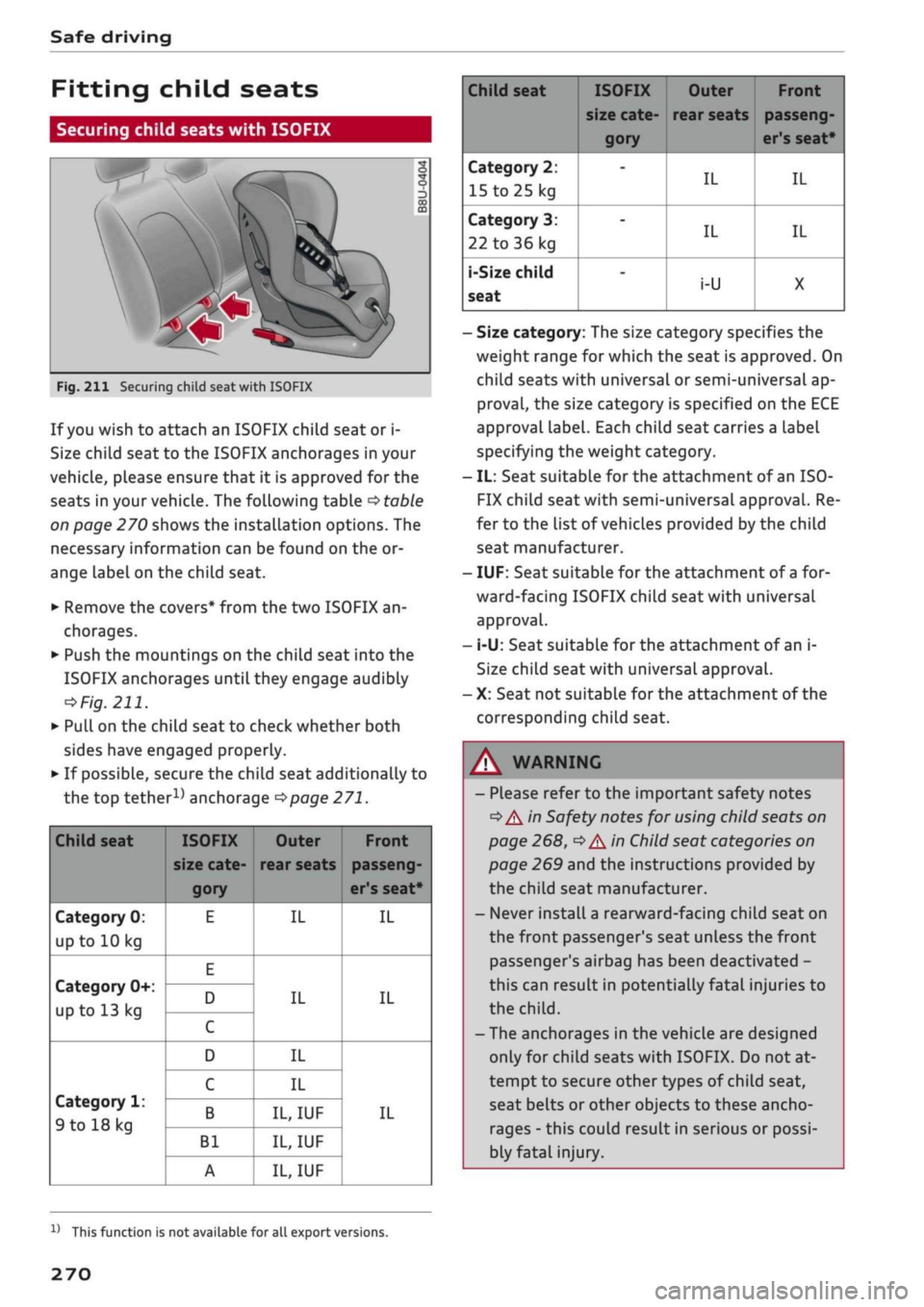
Fig.
211 Securing child seat with ISOFIX
If
you
wish to attach an ISOFIX child seat or i-
Size child seat to the ISOFIX anchorages in your
vehicle, please ensure that it is approved for the
seats in your vehicle. The following table
•=>
table
on page 270 shows the installation options. The
necessary information can be found on the or
ange label on the child seat.
• Remove the covers* from the two ISOFIX an
chorages.
•
Push the mountings on the child seat into the
ISOFIX anchorages until they engage audibly
=»
Fig.
211.
• PuLl
on the child seat to check whether both
sides have engaged properly.
•
If possibLe, secure the child seat additionally to
the top
tether1^
anchorage
^>page
271.
Child seat
Category 0:
up to 10 kg
Category 0+:
up to 13 kg
Category 1:
9 to 18 kg
ISOFIX
size cate
gory
E
E
D
C
D
C
B
Bl
A
Outer
rear seats
IL
IL
IL
IL
IL,
IUF
IL,
IUF
IL,
IUF
Front
passeng
er's seat*
IL
IL
IL
Child seat
Category 2:
15 to
25 kg
Category 3:
22 to 36 kg
i-Size
child
seat
ISOFIX
size cate
gory
-
-
-
Outer
rear seats
IL
IL
i-U
Front
passeng
er's seat*
IL
IL
X
- Size category: The size category specifies the
weight range for which the seat is approved. On
child seats with universal or semi-universal ap
proval,
the size category is specified on the ECE
approval Label. Each child seat carries a label
specifying the weight category.
- IL: Seat suitable for the attachment of an ISO-
FIX child seat with semi-universal approval. Re
fer to the list of vehicles provided by the child
seat manufacturer.
- IUF: Seat suitable for the attachment of
a
for
ward-facing ISOFIX child seat with universal
approval.
- i-U: Seat suitable for the attachment of an i-
Size child seat with universal approval.
- X: Seat not suitable for the attachment of the
corresponding child seat.
WARNING
- Please refer to the important safety notes
•=>
A in Safety notes for using child seats on
page 268,
•=>
A In Child seat categories on
page 269 and the instructions provided by
the child seat manufacturer.
- Never install
a
rearward-facing child seat on
the front passenger's seat unless the front
passenger's airbag has been deactivated -
this can result in potentially fatal injuries to
the
child.
- The anchorages in the vehicle are designed
only for child seats with ISOFIX. Do not at
tempt to secure other types of child seat,
seat belts or other objects to these ancho
rages - this could result in serious or possi
bly fatal injury.
l)
This function is not available for all export versions.
270
Page 275 of 364
Safe driving
Securing child seats with ISOFIX and top
tether
Applies to: vehicles with top tether
â
I
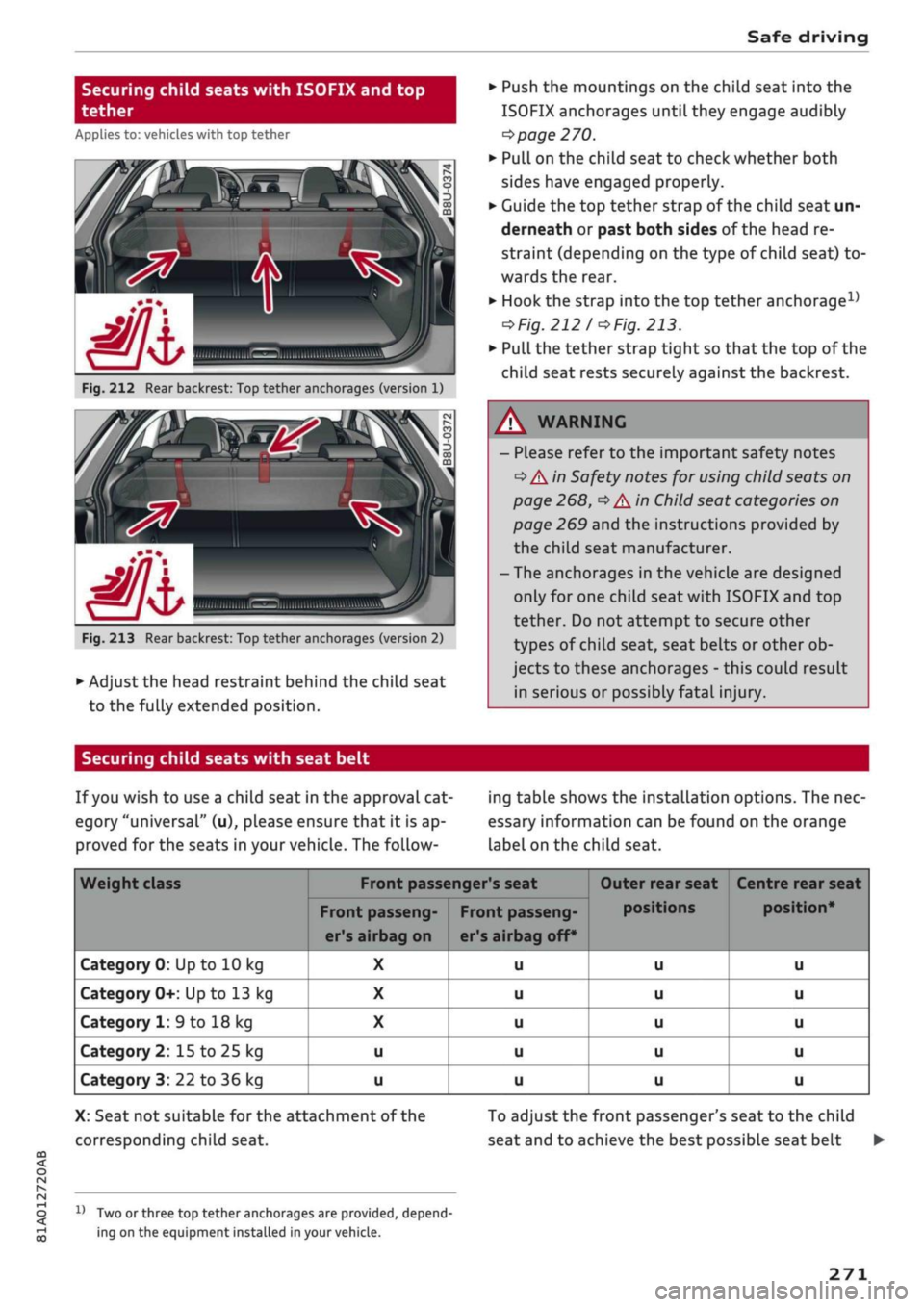
Fig.
212 Rear backrest: Top tether anchorages (version 1)
7k
C
Fig.
213 Rear backrest: Top tether anchorages (version 2)
•
Adjust the head restraint behind the child seat
to the fully extended position.
•
Push the mountings on the child seat into the
ISOFIX anchorages until they engage audibly
^> page
270.
*•
Pull on the child seat to check whether both
sides have engaged properly.
•
Guide the top tether strap of the child seat un
derneath or past both sides of the head re
straint (depending on the type of child seat) to
wards the rear.
•
Hook the strap into the top tether
anchorage15
=>
Fig.
212/o
Fig.
213.
•
Pull the tether strap tight so that the top of the
child seat rests securely against the backrest.
WARNING
- Please refer to the important safety notes
•=>
A in Safety notes for using child seats on
page 268,
•=>
A in Child seat categories on
page 269 and the instructions provided by
the child seat manufacturer.
- The anchorages in the vehicle are designed
only for one child seat with ISOFIX and top
tether. Do not attempt to secure other
types of child seat, seat belts or other ob
jects to these anchorages - this could result
in serious or possibly fatal injury.
CO
<
O
rN
iv
rN
t-H
o < 00
Securing child seats with seat belt
If
you
wish to use a child seat in the approval cat
egory "universal" (u), please ensure that it is ap
proved for the seats in your vehicle. The follow
ing table shows the installation options. The nec
essary information can be found on the orange
label on the child seat.
Weight class
Category 0: Up to 10 kg
Category 0+: Up to 13 kg
Category 1: 9 to 18 kg
Category 2: 15 to 25 kg
Category 3: 22 to 36 kg
Front passenger's seat
Front passeng
er's airbag on
X
X
X
u
u
Front passeng
er's airbag off*
u
u
u
u
u
Outer rear seat
positions
u
u
u
u
u
Centre rear seat
u
u
u
u
u
X: Seat not suitable for the attachment of the
corresponding child seat.
1}
Two or three top tether anchorages are provided, depend
ing on the equipment installed in your vehicle.
To adjust the front passenger's seat to the child
seat and to achieve the best possible seat belt •
271