change time AUDI Q2 2021 Owner´s Manual
[x] Cancel search | Manufacturer: AUDI, Model Year: 2021, Model line: Q2, Model: AUDI Q2 2021Pages: 364, PDF Size: 87.77 MB
Page 125 of 364

Driver assist systems
H
Audi pre sense: currently restricted. Sensor
view restricted due to surroundings.
This message appears if the radar sensor vision is
impaired,
e.g. by leaves, snow, heavy road spray
or dirt. If necessary, clean the sensor
*$
page 112, Fig. 101.
[^
Audi pre sense: currently restricted
This message appears in certain situations, e.g.
when the ESC is partially or fully deactivated.
Q
Audi pre sense: currently restricted. See
owner's manual
Applies to: vehicles with Audi side assist
If
you
operate the turn signals while the active
lane assist and side assist are active, the steering
will be corrected just before you cross the lane
demarcation if the side assist detects vehicles ap
proaching quickly or travelling at about the same
speed as your own vehicle and judges the situa
tion to be critical. This intervention is intended to
keep the vehicle in the Lane.
Applies to: vehicles without Audi side assist
The system does not warn you if
you
operate the
turn signal before crossing a Lane marking. In
this case, it assumes that you intend to change
lanes.
Applies to: vehicles with traffic jam assist
The traffic jam assist can be activated at speeds
below approximately 65 km/h if the correspond
ing conditions have been met
^page
117.
•
123
This driver message appears if one or more sub
systems, such as the
ESC,
fails temporarily. If the
message is displayed several times, drive to a
qualified workshop and have the fault rectified.
[g]
Audi pre sense: emergency braking system
off
This message appears if the functions of the pre
sense system are deactivated via the infotain
ment system or if the system is not available.
Audi active Lane assist
Description
Applies to: vehicles with Audi active lane assist
The active lane assist (lane departure warning
feature) uses a camera in the windscreen to de
tect lane markings (subject to general system
limitations). If
you
approach one of the detected
lane markings, the system corrects the steering
to warn you that the vehicle might be about to
cross one of the markings. You can override this
steering input at any time. The steering wheel vi
brates slightly if
you
cross a lane marking. The vi
bration warning must be activated beforehand on
the infotainment system. The active lane assist is
functional when it detects a demarcation line on
at least one side of the lane in which you are driv
ing.
As the system is designed for driving on motor
ways and other major roads, it is only active
§
above a speed of about 65 km/h (may vary in dif-
£
ferent export markets).
r\i
.-H
00
A WARNING
- The system initiates a corrective steering in
put to warn the driver that the vehicle is
about to leave the lane. As the driver you
are always responsible for staying in your
own lane.
- The system can assist you to keep the
vehi
cle in the lane, however it is not capable of
driving on its own. Never take your hands
off the steering wheel.
- In certain situations, e.g. during heavy brak
ing,
the system may not correct the steer
ing.
- In certain circumstances, not all of the lane
markings may be detected by the camera. A
corrective steering input can only be
initi
ated if the system detects a lane marking on
the side in question.
- Variations in the road surface or objects on
the road may be misinterpreted as lane
markings. In this case, the steering may be
corrected unexpectedly or not at all.
- The camera's view might be obstructed, for
example by vehicles travelling in front,
rain,
snow, a lot of water on the
road,
adverse
light
or
dirt on the windscreen. If this hap
pens,
the active lane assist may not detect
Page 128 of 364
Driver assist systems
Setting the steering input time and
vibration warning
Applies to: vehicles with Audi active lane assist
You
can change the Audi active lane assist
set
tings on the infotainment system to
suit
your in
dividual preferences.
•
Select the following on the infotainment sys
tem:
|MENU|
button > Car
>
left control button
> Driver assist
>
Audi active lane assist.
Steering
input1'
early: If this setting is selected, a continuous
steering input assists the driver to keep the
vehi
cle in the middle of the lane.
late:
If this setting is selected, the steering is not
corrected until just before a wheel crosses a de
tected Lane marking.
Vibration warning
You can switch the additional steering wheel vi
bration warning on/off.
A WARNING
When the vibration warning is switched off,
no visual warnings are given in the instrument
cluster display if
you
cross a lane marking.
Your personal settings are stored automati
cally and assigned to the remote control key
which is being used
W.
Emergency assist
Applies to: vehicles with emergency assist
The emergency assist takes over controL of the
vehicle in certain situations and can help to pre
vent accidents. It is an extension of the active
lane assist and can use the functions of the adap
tive cruise control system
<=>^.
The emergency
assist is activated when it detects that the driver
has stopped steering the vehicle.
Functions of the emergency assist
The emergency assist monitors the steering ac
tivity of the driver. It detects if the driver is inac
tive and gives repeated visual and audible warn
ings as well as brake jolts prompting the driver to
take proactive control of the vehicle again. The
hazard warning lights are also switched on when
the first sharp brake jolt is given below
a
speed of
80
km/h15.
If the driver does not take over, the system inter
venes by steering the vehicle (within the limita
tions of the system) to keep it in lane, and by ap
plying the brakes until the vehicle has stopped*.
In addition, the warning lamp || and a message
are displayed.
Requirements for using the emergency assist
- The active lane assist must be switched on and
ready to warn
^>page
124.
-The adaptive cruise controL must be switched
on and activated
^>page
113.
If any of the requirements for the active lane as
sist
^>page
123 or adaptive cruise control
tapage
112 are not met, the functionality of the
system may be restricted or it may be deactiva
ted automatically.
Interrupting the emergency assist
You can interrupt the emergency assist if it reacts
when it shouldn't
•=> A:
- Move the steering wheel. Or:
- Press the brake/accelerator. Or:
- Switch off the active lane assist via the button
<>
page 117, Fig. 110.
WARNING
- As the driver you are always responsible for
controlling the vehicle. Do not let the emer
gency assist tempt you into taking any risks
when driving - this can cause accidents.
l)
This function is not available on all export versions.
126
Page 129 of 364

Driver assist systems
CO
< o rN
r>
rN
t-H
o < 00
- The purpose of the emergency assist is to
assist the driver and to help prevent an
acci
dent in case of an emergency. The protec
tion provided by the system is still subject
to the prevailing physical limits - risk of
acci
dent!
- Due to inherent system Limitations, false ac
tivation of the system is possible - risk of ac
cident! Interrupt the emergency assist if
necessary.
- Please observe the warnings for the adap
tive cruise control
•=> A
in General notes on
page 112.
If the emergency assist is deployed, it will not
be available again until the next time the
igni
tion is switched on.
Audi side assist
Description
Applies to: vehicles with Audi side assist
/——s—a~-^r—"x.
o5
s
• x •
CO
Fig.
117 Area covered by the radar sensors
Fig.
118 Warning lamp on exterior mirror
The side assist function
(lane
change assist fea
ture) assists the driver in monitoring following
traffic and the blind spots on both sides of the
car. Within certain system limits, it warns you if
it detects vehicles approaching quickly or travel
ling at about the same speed as your own vehicLe
in the area covered by the sensors
©^Fig.
117.
If it judges a lane change to be critical, the warn
ing Lamp (5) on the exterior mirror lights up
^Fig.
118.
The warning lamp on the left-hand mirror assists
the driver when changing lane towards the left
and the warning Lamp on the right-hand mirror
assists the driver when changing lane towards
the right.
Information mode
As Long as you do not operate the turn signal, the
side assist will merely inform you of the presence
of vehicles that it has detected and judges to be
critical.
In this case, the warning lamp on the
rel
evant exterior mirror will Light up at low intensi
ty.
The intensity of the warning lamp in this infor
mation mode is kept relatively low, so that it
does not distract you while you are looking at the
road in front.
Warning mode
If
you
operate the turn signal and the warning
lamp on the relevant exterior mirror flashes
brightly, the side assist is warning you of what it
judges to be a critical vehicle. Please check the
situation in the exterior mirror and by looking
back over your shoulder
•=> A
in General notes on
page 128.
Applies to: vehicles with Audi active lane assist
The warning lamp on the relevant mirror may al
so flash when you have not operated the turn
sig
nal.
If
you
come close to a detected Lane marking
and are in danger of Leaving your lane, the side
assist warns you of what
it
judges to be a critical
vehicle.
®
Not
You can adjust the brightness of the warning
lamp on the exterior mirror
^page
129.
127
Page 131 of 364

Driver assist systems
CO
rN
r>
rN
•-i
00
- In certain situations, the system may not
function properly, or the functionality of the
system may be restricted. For example:
- If other vehicles are approaching very
quickly, or if
you
are overtaking other
vehicles quickly. The warning lamp may
not light up
intime.
- In poor weather conditions, such as heavy
rain,
snow or road spray.
- If
you
are travelling in very wide lanes, in
tight bends or over crests. The system
may not detect vehicles in the adjacent
lane because they are outside the area
covered by the sensors.
© CAUTION
Impacts or damage to the bumper, wheel
arches or underbody can cause misalignment
of the sensors. This can impair the functional
ity of the system. Have the systems checked
by
a
qualified workshop.
The warning lamps on the exterior mirrors
may not be properly visible if tinted foil is af
fixed to the side windows on the driver's or
passenger's side.
Switching on/off
Applies to: vehicles with Audi side assist
The
system can be switched on and off
on
the in
fotainment system.
The warning Lamps in the exterior mirrors light
up briefly each time the ignition is switched on to
indicate that the system is activated.
•
Select the following on the infotainment sys
tem:
|MENU|
button > Car
>
left control button
> Driver assist
>
Audi side assist. SeLect off to
switch off the system.
Adjusting brightness of warning lamp
Applies to: vehicles with Audi side assist
The
brightness of the warning lamp can be ad
justed on the infotainment system.
•
Select the following on the infotainment sys
tem:
|MENU|
button > Car
>
left controL button
> Driver assist
>
Audi side assist.
The brightness of the warning lamp in both the
information and warning modes is regulated au
tomatically according to the ambient Light Level.
If
you
are in very dark
or
very Light surroundings
when you adjust the brightness of the warning
lamp,
the automatic brightness control may al
ready have reached the lowest or the brightest
setting.
In such a case it is possible
that
you
won't notice a difference while you are adjusting
the brightness or that you will only notice it once
the light surroundings have changed.
Please adjust the brightness of the warning lamp
for the information mode so that it does not dis
tract you while you are looking at the road in
front. When you change the brightness, the
warning lamp on the exterior mirror will light up
briefly with the intensity set for the information
mode.
The intensity of the lamp in the warning
mode is Linked to the intensity in the information
mode and is adjusted automatically.
© Note
- The side assist is not active while the set
tings are being adjusted.
- Your personal settings are stored automati
cally and assigned to the remote control key
which is being used.
129
Page 133 of 364
Driver assist systems
CO
< o rN
r>
rN
t-H
o < 00
-The automatic brake application with in
creasing brake force can be cancelled by ap
plying the brakes yourself or by pressing the
accelerator firmly.
- In certain situations, a warning may be giv
en by the rear cross-traffic assist even if
there is no traffic in the critical zone, for in
stance when parking or manoeuvring the ve
hicle in reverse.
- The rear cross-traffic assist is deactivated
automatically if you deactivate the
ESC.
-The rear cross-traffic assist is switched on/
off via the parking aid
^>page
134.
-The system is not available in towing mode.
Driver messages
Applies to: vehicles with Audi side assist
Should the side assist be deactivated automati
cally, a driver message will appear in the instru
ment cluster display.
O
Audi side assist: system fault!
The system cannot detect vehicles reliably and
will be deactivated. The sensors are out of align
ment or defective. Have the system checked by a
qualified workshop soon.
O
Audi side assist: currently unavailable. No
sensor vision
O
Audi side assist: currently unavailable.
Sen
sor view restricted due to surroundings. See
owner's manual
The radar sensors are blocked. The area in front
of the sensors must not be obstructed by bicycle
racks,
stickers, deposits or any other substances.
If necessary, clean the area in front of the
sen
sors
^>page
128, Fig. 120.
O
Audi side assist: currently unavailable
The side assist is temporarily inoperative and
cannot be switched on (for instance if the battery
is not sufficiently charged).
O
Audi side assist: unavailable in towing mode
2
Audi side assist: unavailable in towing mode
The side assist function will be switched off auto
matically after a short time when the electrical
connector for the trailer socket is plugged in on
vehicles with a factory-fitted towing bracket. If
the towing bracket is not factory-fitted the side
assist function may not be switched off automat
ically. The side assist must not be used when
towing a trailer.
O Rear
parking aid: obstacle detection limited
The rear cross-traffic assist is not available. Ei
ther the ESC is switched off or the radar sensors
may be obstructed by a bicycle rack, stickers,
leaves, snow or similar objects. Switch on the ESC
or, if necessary, clean the area in front of the
sen
sors
<3page
128, Fig. 120. If this message re
mains displayed, drive to a qualified workshop
soon and have the fault rectified.
Audi drive select
Introduction
Applies to: vehicles with Audi drive select
Audi drive select alLows you to use different set
ups on your vehicle. The modes efficiency*, com
fort, auto and dynamic allow the driver, for ex
ample,
to change from a sporty mode to a more
comfortable one via the
&&
button in the centre
console or via the infotainment system. In
addi
tion,
the individual* mode allows you to adapt
the vehicle set-up to
suit
your personal driving
style.
For example, you might choose to combine
a more dynamic engine set-up with a lighter
steering response.
Description
Applies to: vehicles with Audi drive select
The possible vehicle set-up in each mode de
pends on which equipment is installed on your
vehicle. The engine and steering are basic parts
of your vehicle which are always included in the
set-up.
Engine and automatic gearbox*
The response of the engine and automatic
gear
box* to accelerator pedal movements will be
more spontaneous or balanced, depending on
131
Page 145 of 364

Parking aids
CO
<
o
rN
iv
rN
t-H
o
< 00
Park assist: currently unavailable. Continue
steering vehicle!
The park assist cannot be used to park the
vehi
cle.
Try repeating the parking manoeuvre or
switching the ignition off and on again.
3 Park assist: ended. Please take over steering
and continue driving
The park assist has finished manoeuvring the ve
hicle out of the parking space. Please take over
the steering.
Park assist: cancelled. Space too small. Con
tinue steering vehicle!
The park assist cannot be used to park the vehicle
in this space. Park the vehicle without using the
park assist or look for a bigger space.
Park assist: cancelled. Obstacle detected.
Please take over steering.
The park assist has interrupted the parking ma
noeuvre to avoid a collision between the vehicle
and an obstacLe.
Park assist: ended
3 Park assist: ended. Please take over steer
ing.
The park assist has finished the parking manoeu
vre.
Park assist: stabilisation control (ESC) input
The parking space indicated has been rejected be
cause the ESC has intervened.
Park assist: currently unavailable. Towing
mode
The park assist cannot be used to park the vehicle
when towing a trailer.
1
Park assist: not stopped long enough
After you select reverse gear, the vehicle has to
remain stationary for
a
moment so that the park
assist can activate the steering. Follow the direc
tions given in the display.
3
Park assist: cancelled. Assist function un
available for leaving parking space. Space too
small
The assist function is unable to automatically
steer the vehicle out of the parking space be
cause the space is too small. Manoeuvre the
vehi
cle out of the parking space without using the
park assist.
Park assist: cancelled. Continue steering ve
hicle!
The park assist has interrupted the parking ma
noeuvre.
Settings for parking aid
Applies
to: vehicles with rear parking aid/parking system
plus/reversing
camera/park assist
You
can change the settings for these functions
on the infotainment system.
•
Select the following on the infotainment sys
tem:
|MENU[
button > Car
>
left control button
> Driver assist
>
Parking aid. Or:
•
Select the right control button* on the infotain
ment system when the parking aid is activated.
End*
- To cancel the parking aid
Activate automatically - To switch automatic ac
tivation on/off
Front volume* - Volume for the front and side*
zones
Rear volume - Volume for the rear zone
In-car
entertainment fader - The volume of the
current audio or video source is reduced when the
parking aid is switched on.
You will hear
a
short test tone each time you
make a new setting.
Trailer view* - To display the trailer view
- Some of the menus can only be called up via
the right control button when the parking
aid is activated.
- The volume and automatic activation set
tings are automatically stored and assigned
to the remote control key in use.
143
Page 153 of 364
Intelligent technology
CO
< o rN
iv
rN
t-H
o < 00
event of faults or anomalies in the vehicLe data,
only these data are saved. As a rule, faults are
shown by the warning lamps in the instrument
cluster.
Data saved in the control units can only be read
and analysed with special equipment.
A qualified workshop is only able to recognise
and deal with faults by using the relevant saved
data.
Among other things, the saved data may
contain the following information:
- Data relating to the engine and the gearbox
-Speed
- Direction of travel
- Braking force
- Seat belt warning system data
The control units installed will not under any cir
cumstances record conversations in the vehicle.
Event data recorder
Your vehicLe is not equipped with an event data
recorder.
In an event data recorder, information about the
vehicle is temporarily saved. In the event of an
accident, you can therefore obtain detaiLed infor
mation about the course of events. On vehicles
with an airbag system, accident-related data
such as impact speed, seat belt status, seat
posi
tions and trigger times can be saved. The exact
information saved depends on the manufacturer.
The installation of an event data recorder is sub
ject to the agreement of the vehicle's owner. This
process is governed by legislation in some coun
tries.
Reprogramming control units
All data for controlling components are saved in
the control units. Some convenience features,
such as one-touch signalling, single door unlock
ing and display messages can be reprogrammed
using special workshop equipment. If any
con
venience features are reprogrammed, the infor
mation in this Owner's Manual will no longer be
accurate for the features that have been
changed.
We recommend having the reprogram
ming approved.
Your Audi dealer will be able to provide you with
information about possibLe reprogramming op
tions.
Event memory
There is a diagnostic connection for reading out
the event memory Located in the
footweLL
on the
driver's side of the vehicle. Information regard
ing the operation and status of the vehicle's elec
tronic control units is stored in the event memo
ry. The event memory should only be read out
and erased by
a
qualified workshop.
A WARNING
The diagnostic connection must not be used
for other purposes. Incorrect use can cause
malfunctions - risk of accident!
151
Page 166 of 364
Speech dialogue system
Speech dialogue system
How to use the speech
dialogue system
Applies to: vehicles with speech dialogue system
You
can operate many infotainment functions
conveniently by voice.
Important: The ignition and the MMI system
must be switched on
^>page
152, you must not
be talking on the phone, and the parking aid
must not be active.
•
To switch on: Briefly press the
0
button (J)
^>page
17, Fig. 12/(3)
^>page
18, Fig. 14 on
the multi-function steering wheel and give a
spoken command after the beep signal.
*•
To switch off: Press and hold the
0
button for
several seconds. Or: Press the
0
button.
•
To pause: Say the command Pause. To end the
pause,
press the
S
button.
•
To make a correction: Say the command Cor
rection.
Input help
The system guides you through the input routine
with cues and messages.
- Input help messages on screen: After the
speech dialogue system is switched on, a selec
tion of possible commands will be shown. The
command display can be switched on or off as
required.
Select:
|MENU|
button
>
Settings >
left control button > MMI settings
>
Speech
dialogue system.
- Spoken input help
cues:
To have the system
play the commands currently possible, switch
on the speech dialogue system and say Help.
How to help the system understand you
Speak clearly in a normal volume. Speak louder if
you are driving fast.
Speak in a normal tone without long pauses.
Close doors, windows and sun roof* to reduce
background noise. Make sure that passengers are
not talking when you say a command.
Keep the air outlets of the air distribution system
pointed away from the microphone, which is fit
ted in the vicinity of the front interior lights in
the headliner.
The system should only be operated by the driv
er, since the handsfree microphone is directed
towards the driver.
Other settings
Refer to
^>page
262.
© No
-The dialogue is paused when an incoming
telephone call is received; you can continue
the dialogue by ignoring the
call.
If
you
an
swer the
call,
the dialogue will be cancelled.
- No navigation cues* or traffic announce
ments are played when a dialogue is
run
ning.
- You can select an entry from a list both via
the speech dialogue system and using the
rotary pushbutton.
- The speech dialogue system does not sup
port commands in Arabic, Norwegian or
Hungarian.
Notes on the overviews
of commands
Applies to: vehicles with speech dialogue system
The following overviews show you the commands
that you can give to operate the MMI via the
speech dialogue system. •
A WARNING
- Please direct your full attention to the road
at all times! As the driver, you have full re
sponsibility for the safety of the vehicle and
other road users.
For
this reason, you should
only use the functions in a manner that al
lows you to maintain control of the vehicle
in all situations - accident risk!
- The speech dialogue system must not be
used in cases of emergency, since the voice
changes in stressful situations. This could
result in a failed or delayed telephone
con
nection.
Always dial emergency numbers
manually!
164
Page 171 of 364
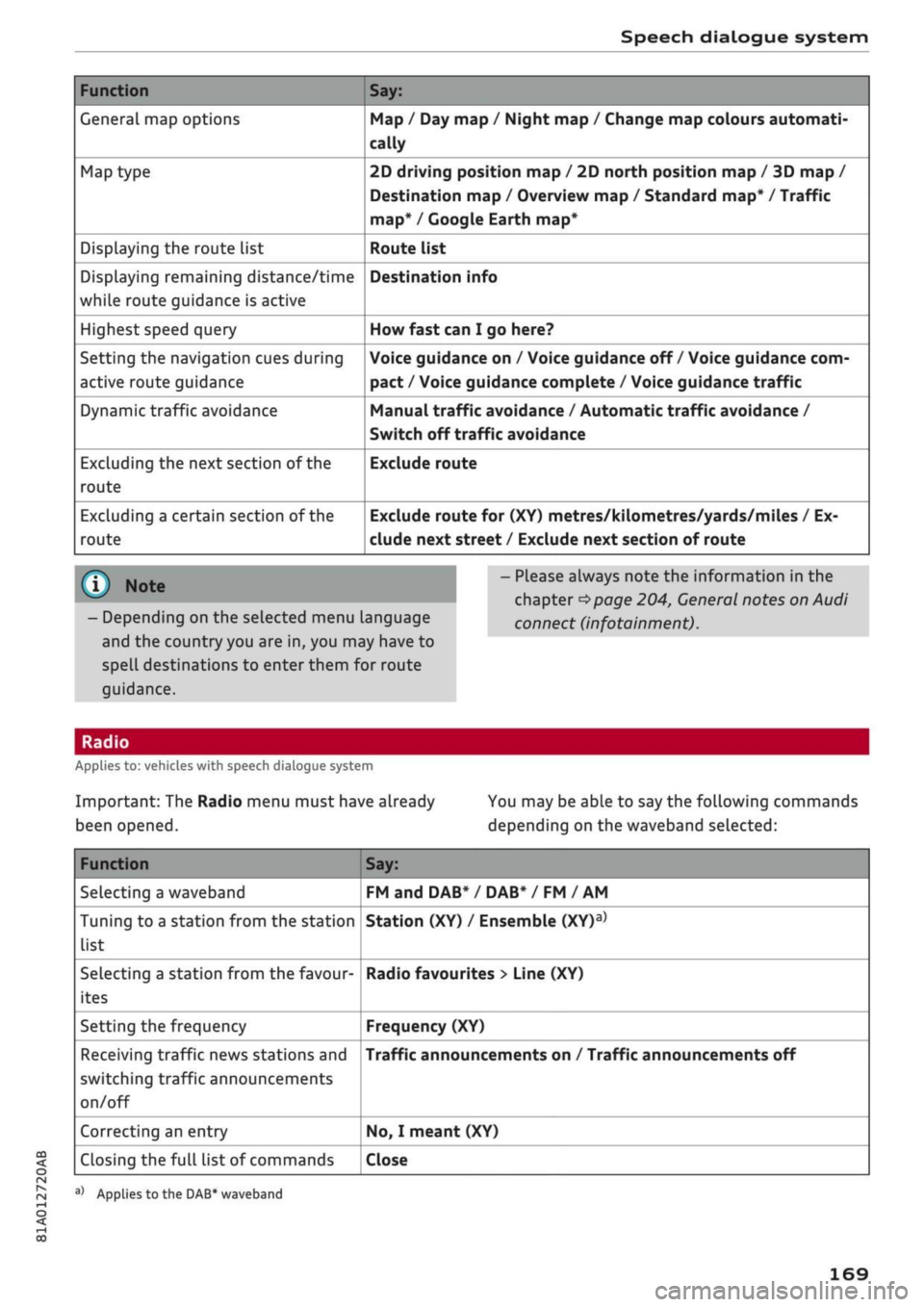
Speech dialogue system
Function
General map options
Map type
Displaying the route list
Displaying remaining distance/time
while route guidance is active
Highest speed query
Setting the navigation cues during
active route guidance
Dynamic traffic avoidance
Excluding the next section of the
route
Excluding a certain section of the
route
Say:
Map / Day map / Night map / Change map colours automati
cally
2D driving position map / 2D north position map / 3D map /
Destination map / Overview map / Standard map* / Traffic
map*
/ Google Earth map*
Route list
Destination info
How fast can I go here?
Voice guidance on / Voice guidance off / Voice guidance com
pact / Voice guidance complete / Voice guidance
traffic
Manual traffic avoidance / Automatic traffic avoidance /
Switch off traffic avoidance
Exclude route
Exclude route for (XY) metres/kilometres/yards/miles / Ex
clude next street / Exclude next section of route
© Note
- Depending on the selected menu language
and the country you are in, you may have to
spell destinations to enter them for route
guidance.
- Please always note the information in the
chapter
^>page
204, General notes on Audi
connect (infotainment).
CO
<
O
rN
IN
rN
•-i
00
Applies to: vehicles with speech dialogue system
Important: The Radio menu must have already
been opened.
You may be able to say the following commands
depending on the waveband selected:
Function
Selecting a waveband
Tuning to a station from the station
list
Selecting a station from the favour
ites
Setting the frequency
Receiving traffic news stations and
switching traffic announcements
on/off
Correcting an entry
Closing the full list of commands
Say:
FM and DAB* / DAB* / FM / AM
Station (XY) / Ensemble
(XY)a>
Radio favourites > Line (XY)
Frequency (XY)
Traffic announcements on / Traffic announcements off
No,
I meant (XY)
Close
a)
Applies
to
the DAB* waveband
169
Page 174 of 364

Telephone
- Do not carry a mobile phone in your breast
pocket directly over the pacemaker when
the phone is switched on.
-If you suspect interference, switch the
mobile phone off immediately.
- The speech dialogue system*
^>page
164
must not be used in cases of emergency,
since the voice changes in stressful situa
tions.
This could result in a failed or delayed
telephone connection. Always dial emergen
cy numbers manually!
- Switch off your mobile phones in all areas
where there may be a risk of explosion. Re
member that these areas may not always be
adequately marked. Such places are filling
stations, fuel and chemical storage facilities
or transport vehicles and other places where
fumes, chemicals (e.g. from leaking
pro
pane or fuel vapours in vehicles or build
ings) or large quantities of dust particles
(e.g.
from flour, wood or metal) could accu
mulate in the air. This warning also applies
to all other places where you would normal
ly switch off your engine.
- Today's driving conditions require the full
attention of drivers. Please always note the
information in the chapter
^>page
152,
Notes on traffic safety.
Telephone
Introduction
Applies to: vehicles with telephone
You have different options for making calls in
your vehicle via the MMI; this depends on your
vehicle's equipment and the features of your mo
bile phone.
Handsfree operation
After connecting your mobile phone to the MMI
system via Bluetooth, you can operate the hands-
free system and the telephone functions conven
iently via the MMI. Your phone calls will be made
via the antenna of your mobile phone.
With the Audi phone box*, you can use the
vehi
cle's external aerial to make calls. The use of the
external aerial reduces radiation in the vehicle
and also ensures better reception quality
^>page
177.
Car
phone#1)
As part of Audi connect (infotainment)*, the Audi
phone box* includes a car telephone function
which can be used via a separate mini SIM card in
the SIM card reader* or an
rSAP-enabled
mobile
phone.
With the car telephone function, you can
use the vehicle's external aerial to make calls.
The use of the external aerial reduces radiation in
the vehicle and also ensures better reception
quality
^>page
177.
Once a connection has been established success
fully, you can also change the profiles at a later
time.
Refer to
^>page
257, Connection manag
er.
/\
WARNING
-According to health organisations, mobile
phones may interfere with the function of
pacemakers. A minimum distance of 20 cm
should be kept between the mobile phone
aerial and the pacemaker.
Not available in all markets. On vehicles with Audi connect
(infotainment)* and Audi phone
box*
Please always observe the information
^>®in
Wi-Fi hotspot on page 202.
(T)
Note
-The maximum range of the Bluetooth
con
nection is limited to the interior of the
vehi
cle.
The connection can be susceptible to in
terference from other electronic devices.
- For information regarding which Bluetooth
connections and functions your mobile
phone supports, contact your mobile net
work service provider or consult the mobile
device database
at
www.audi.com/blue-
tooth.
•
172