change time AUDI Q2 2021 Owner´s Manual
[x] Cancel search | Manufacturer: AUDI, Model Year: 2021, Model line: Q2, Model: AUDI Q2 2021Pages: 364, PDF Size: 87.77 MB
Page 74 of 364
Driving
Driving
General notes
Running in
A new vehicle should be run in over
a
distance of
1,500 km. For the first 1,000 km the engine
speed should not exceed 2/3 of the maximum
permissible engine speed - do not use full throt
tle and do not tow a trailer or caravan. From
1,000 to 1,500 km you can gradually increase
the engine rpm and road speed.
During its first few hours of running, the internal
friction in the engine is greater than later on
when all the moving parts have bedded down.
How the vehicle is driven for the first 1,500 km
also influences the engine quality. After this
peri
od you should continue driving at moderate en
gine speeds, in particular when the engine is
cold.
This helps to reduce wear and tear on the
engine and increases the potential mileage which
can be covered by the engine.
You should also avoid driving with the engine
speed too low. Change down to a lower gear
when the engine no longer runs "smoothly". Ex
cessively high engine speeds are prevented by an
automatic rev limiter.
A WARNING
After driving through water, mud, sludge,
etc., the braking effect can be delayed slightly
due to moisture on the discs and brake pads.
Applying the brakes carefully several times
will remove the moisture and restore the full
braking effect.
© CAUTION
- Parts of the vehicle (e.g. engine, gearbox,
running gear or electrical components) can
be badly damaged when driving through
water.
- Always switch off the start/stop system*
^>page
79 before driving through water.
© ' Note
- It is advisable to check the depth at the
deepest point before approaching the wa
ter.
- Do NOT stop the vehicle, drive in reverse or
switch off the engine before you are out of
the water.
- Bear in mind that waves created by oncom
ing traffic could exceed the permissible
wading depth of your vehicle.
- Avoid driving through salt water (corrosion).
Avoiding damage to the car
© CAUTION
Take care not to damage
Low-mounted
parts
of the car (such as the spoiler or exhaust sys
tem) on steep ramps, uneven road surfaces or
roadside kerbs, etc. This applies especially to
vehicles with low ground clearance and to all
vehicles when fully laden.
Driving through water on roads
Please note the following in order to prevent
damage to the vehicle when driving through wa
ter (e.g. on flooded roads):
- The water level must not be higher than the ve
hicle's underbody.
- Do not drive faster than walking pace.
How to improve economy and minimise
pollution
Fuel economy, environmental impact and wear
on the engine, brakes and tyres depend largely
on the way you drive the vehicle. By adopting an
economical driving style and anticipating the
traffic situation ahead, you can reduce fuel
con
sumption by 10
-15
%. The following section
gives you some tips on Lessening the impact on
the environment and reducing your operating
costs at the same time.
Anticipate well in advance
A car uses most fuel when accelerating. If
you
an
ticipate hazards and speed changes well in ad
vance,
you will need to brake less and thus accel
erate Less. Wherever possible, Let the car slow
down gradually with a gear engaged, for •
72
Page 75 of 364

Driving
instance when you can see that the next traffic
lights are red. This takes advantage of the engine
braking effect, reducing wear on the brakes and
tyres.
Emissions and fuel consumption will drop
to zero due to the overrun fuel cut-off.
Change gear early to save fuel
An effective way of saving fuel is to change up
quickly through the gears. Running the engine at
high rpm in the lower gears uses an unnecessary
amount of
fuel.
Applies to: vehicles with manual gearbox
Shift up to second gear as soon as possible. If
possible, we recommend shifting up to the next
gear at approx. 2,000 rpm.
Applies to: vehicles with automatic gearbox
Press the accelerator slowly and avoid using the
"kick-down"
feature.
Avoid driving at high speed
Avoid travelling at top speed. Fuel consumption,
exhaust emissions and noise Levels all increase
very rapidly at higher speeds. Driving at moder
ate speeds will help to save
fuel.
Do not let the engine idle for longer than
necessary
Engine idling periods are automatically reduced
on vehicles with start/stop system*. On vehicles
without a start/stop system, it is worthwhile
switching off the engine at level crossings, for in
stance, or at traffic lights with a long red phase.
The fuel saved after about 5 seconds can be
greater than the amount of fuel needed to re
start a warm engine (the exact fuel saving de
pends on the engine version).
The engine takes a very long time to warm up
when it is running at idling speed. Mechanical
wear and pollutant emissions are also especially
high during this initial warm-up phase. It is
therefore best to drive off immediately after
starting the engine. Avoid running the engine at
high speed.
o
Regular servicing
Regular servicing can establish a basis for good
iS
fuel economy before you start driving. A
well-
serviced engine gives you the benefit of im
proved fuel efficiency as well as maximum relia
bility and an enhanced resale value. A poorly
maintained engine can consume up to ten per
cent more fuel than necessary.
Avoid short trips
The engine and emission control system need to
reach their proper working temperature in order
to minimise fuel consumption and emissions.
A cold engine uses disproportionately more
fuel.
The engine only reaches its working temperature
after about four kilometres, when fuel consump
tion will return to a normal level.
Check tyre pressures
Always make sure the tyres are inflated to the
correct pressures
•=>page
306 to save
fuel.
If the
tyre pressures
are
just 0.5
bar
too Low, this can
increase the fuel consumption by as much as 5
%. Due to the greater rolling resistance, under-
inflation also increases tyre wear and impairs
handling.
Do not use winter tyres all through the year; they
will increase fuel consumption by up to 10 %.
Avoid carrying unnecessary loads
Every kilo of extra weight will increase the fuel
consumption, so it is worth checking the Luggage
compartment occasionally to make sure that no
unnecessary loads are being transported.
The roof carrier increases the air resistance of the
vehicle and should be removed when not in use.
This will save about 12 % of fuel at speeds of be
tween 60 and 75
mph.
Save electrical energy
The engine drives the alternator to generate elec
tricity. This means that fuel consumption rises
when more power is required for electrical equip
ment. Switch off electrical equipment when it is
not needed. Electrical equipment which uses a
lot of electricity includes the blower (at a high
setting), the rear window heating and the seat
heating*.
73
Page 89 of 364
Driving
R - Reverse gear
Reverse gear should only be engaged when the
vehicle is stationary and the engine is idling
^A-
To move the selector lever to position R, release
the selector Lever lock and at the same time
press the brake pedal.
N - Neutral
In this position, the gearbox is in neutral.
D/S - Drive/Sport (standard position for
driving forwards)
In selector Lever position D/S, the gearbox can be
operated in either the standard drive mode (D) or
in sport mode (S). To select sport mode (S), brief
ly pull the selector lever back. The gearbox will
switch back to drive mode (D) if
you
pull the se
lector lever again. The selected driving mode is
shown in the instrument cluster display.
In the standard drive mode (D), the gearbox au
tomatically selects the best gear ratio. This de
pends on the engine
load,
the road speed and the
driving style.
In Sport mode S, the gearbox makes full use of
the engine power. When accelerating the gear
shifts may be noticeable.
Press the brake pedal when moving the selector
lever from N to D/S if the vehicle is stationary or
at speeds below 2 km/h
o A-
E - Efficiency*
In efficiency mode
^>page
131, Audi drive se
lect,
the gearbox selects the next gear at lower
engine speeds. Earlier upshifts give improved
fuel economy because the full power reserves of
the engine are not used.
In this mode, an
E
is shown on the instrument
cluster display instead of
a D
^>Fig.
75.
CO
< o rN
iv
rN
t-H
o < 00
A,
WARNING
- The car can roll away even if the ignition is
switched off.
- Never move the selector lever to
R
or P
when driving, as this could cause an
acci
dent.
- In all selector lever positions (except P) the
vehicle must always be held with the foot
brake when the engine is running. This is be
cause an automatic gearbox still transmits
power even at idling speed, and the vehicle
tends to "creep" - risk of accident!
- The accelerator pedal must on no account
be pressed inadvertently when a gear is en
gaged with the vehicle stationary. The
vehi
cle could otherwise start moving immedi
ately (in some cases even if the parking
brake is engaged) and possibly cause an ac
cident.
- Do not press the accelerator while selecting
a gear with the vehicle stationary and the
engine running, as this could cause an
acci
dent.
- The driver should never get out of the
vehi
cle when the engine is running and a gear is
engaged.
If
you
have to Leave your vehicle
while the engine is running, you must apply
the parking brake and engage the parking
lock P.
- To avoid accidents, apply the parking brake
and
put
the selector lever in position
P
be
fore opening the bonnet and working on the
vehicLe with the engine running. Please ob
serve the important safety warnings
^>page
295, Working on components in
the engine compartment.
© Note
- Audi drive select: You can select the sport
program for gear changes by activating the
dynamic mode
^>page
131. The instru
ment cluster display will show
S
instead of
D.
- If the lever is moved accidentally to
N
when
driving,
take
your
foot off the accelerator
and
let
the engine speed drop to idling be
fore selecting
D
or
S
again.
- It is not possible to move the selector lever
out of position
P
if the electrical power sup
ply fails. In this case, the selector lever can
be released manually. Left-hand drive
vehicles
^page
93, right-hand drive
vehicles
<^>page
94.
87
Page 100 of 364
Towing a trailer
Requirements for correct functioning of the
trailer stabilisation system
If these conditions are not met in
full,
the trailer
stabilisation system will only intervene to a
limi
ted extent or not at all
>=>
A-
- The electrical connection between the towing
vehicle and the trailer must be functioning cor
rectly.
- The load on the trailer must be properly se
cured.
- The tyre pressures on both the vehicLe and the
trailer must be adapted to the load that is be
ing carried.
- Where possible, operate the trailer with the
maximum permitted draw bar weight.
- The trailer overrun brake must be set correctly.
This is important to ensure that the trailer can
be braked correctly, to avoid the vehicle and
trailer "jack-knifing" and to prevent excess
braking of the trailer.
- At low outside temperatures, both the towing
vehicle and the trailer should be fitted with
winter tyres.
A WARNING
It is essential that you adjust your speed to
suit the weather, road and traffic conditions.
Do not let the trailer stabilisation system
tempt you into taking any risks when driving -
this can cause accidents.
- The ESC and trailer stabilisation system
can
not defy the Laws of physics. This should be
kept in mind, particularly on slippery and
wet roads and when towing a trailer with a
light Load.
- The trailer stabilisation system is function
al,
regardless of whether the trailer has a
mechanical overrun brake or not.
- The trailer stabilisation system is not always
able to detect swaying of trailers with a
light load and will therefore not intervene.
- A trailer can still "jack-knife" on slippery
roads with little grip, even if the towing ve
hicle is equipped with the trailer stabilisa
tion system.
-Trailers with a high centre of gravity may
even tip over before they start to sway
side
ways.
-If
you
are not towing a trailer,
but
the
trail
er socket is being used (e.g. for an illumina
ted bicycle rack), the trailer stabilisation
system may be activated in extreme driving
conditions.
- Please note the additional information and
warnings
^>page
98, Driving tips.
Driving tips
Driving with a trailer always requires extra care.
Weight distribution
Try to avoid towing a loaded trailer with an unla
den vehicle. If this cannot be avoided, drive extra
slowly to allow for the unbalanced weight distri
bution.
Speed
Normally, you must not exceed 80 km/h when
towing a trailer or caravan. However, if the
trail
er/caravan is equipped with a trailer stabilisation
system,
you can drive at max. 100 km/h. Please
observe any other regulations applicable in the
country in which you are travelling.
The stability of the car and trailer is reduced with
increasing speed. For this reason it is advisable
not to drive at the maximum permissible top
speed in unfavourable
road,
weather or wind
con
ditions. This applies especially on a downhill gra
dient.
You should always reduce speed immediately if
the trailer shows the slightest sign of swaying.
Never try to stop the swaying by accelerating fur
ther.
Always brake in good time. If the trailer has an
overrun brake, apply the brakes gently at first
and then firmly. This will prevent the jerking that
can be caused by the trailer wheels locking.
Change down in good time before going down a
steep hill so
that
you can use the engine braking
effect to slow down the vehicLe.
Swaying and pitching can be reduced by attach
ing an extra stabiliser to the trailer. It should •
98
Page 106 of 364

Driver assist systems
Driver assist systems Cruise
control,
system
Speed warning function
Applies to: vehicles with speed warning function
The speed warning function can
help
you keep
below a pre-set maximum speed. It can be set,
changed and deleted on the infotainment sys
tem.
The speed warning function will warn you if the
vehicle exceeds the pre-set maximum speed. The
system gives an audible warning signal if the set
speed is exceeded by a small amount. At the
same time, a warning lamp [5] and a message
will appear on the instrument cluster display.
The indicator Lamp [5] and the message will dis
appear when the road speed drops below the set
value.
You are recommended to store this speed limit
warning if you wish to be reminded of a particu
lar speed limit. This could be when driving in
countries with general speed limits, or if you
need to keep below a particular speed when
win
ter tyres are fitted, etc.
Setting speed limit warning
•
Select the following on the infotainment sys
tem:
IMENUI
button > Car > left control button
> Driver assist > Speed warning > manual.
© Note
- Please bear in mind that, even with the
speed warning function, it is still important
to keep a check on the car's speed with the
speedometer and to observe the statutory
speed limits.
- On vehicles for some markets, the speed
warning function warns you when you reach
a speed of 120 km/h. This speed limit warn
ing is preset at the factory.
Switching on
Applies to: vehicles with cruise control system
The cruise control system allows you to drive at a
constant speed of 20 km/h or
higher.
Fig.
94 Control lever for cruise control system
• Pull
the lever to position
®
<^>Fig.
94 to switch
on the system.
•
Drive at the speed you wish to set the system
to.
• Press the button marked ® to store the speed.
The indicator lamp
[3]
in the instrument cluster
will light up. Information is also provided in the
head-up display*.
The instrument cluster display will briefly
indi
cate the stored or
pre-selected
speed.
A constant speed is maintained by adjusting the
engine power or braking the vehicle accordingly.
WARNING
- Always direct your full attention to the
road,
even when you are using the cruise control
system.
It is always the driver who is re
sponsible for determining the speed and for
keeping a safe distance to the other vehicles
on the
road.
- For safety reasons, the cruise control sys
tem must not be used in city traffic, stop-
and-go traffic, on roads with a lot of bends
or in difficult or slippery driving conditions
(such as ice, fog, Loose grit or gravel, heavy
rain,
etc.) - risk of accident!
- When you take a turn-off, drive along a mo
torway exit lane or pass through roadwork
104
Page 107 of 364
Driver assist systems
CO
< o rN
iv
rN
•-i
00
sections, please temporarily switch off the
cruise control system.
- Make sure you do not unintentionally rest
your foot on the accelerator - this will over
ride the cruise control system which, as a re
sult, will not brake the vehicLe.
-The automatic braking function may be de
activated if
a
system fault occurs in the
brake system (e.g. if the brakes overheat)
while the cruise control system is activated.
All the other cruise control functions remain
activated as long as the indicator lamp
^
is
lit.
Before driving down a
long,
steep gradient, it
is advisable to reduce speed and select a low
er gear. In this way you will make use of the
engine braking effect and relieve the Load on
the brakes.
© Note
- Applies to vehicles with manual gearbox:
The set speed cannot be reached if the cur
rently selected gear is too high or too low or
if the engine would
overrevorfailto
run
smoothly at the target speed. Make sure to
change up or down a gear in good time.
- The brake lights come on when the system
brakes the vehicle.
Setting a new speed
Applies to: vehicles with cruise control system
• Briefly push the Lever towards
©/®
^>page
104, Fig. 94 to increase or reduce the
cruising speed in small steps.
•
To increase or reduce the speed quickly, hold
the lever towards
©/®
until you reach the de
sired cruising speed.
Overriding the set speed
Applies to: vehicles with cruise control system
You can use the accelerator pedal to increase
speed in the normal way, for example to overtake
another vehicle. Once you release the accelera
tor, the system will revert to the speed you stor
ed initially.
However, if the vehicLe exceeds the programmed
speed significantly for
a
long time, the cruise
control system will be deactivated temporarily.
The indicator lamp
El
in the instrument cluster
will go out, but the programmed speed will re
main stored.
Pre-selecting
a speed
Applies to: vehicles with cruise control system
You
can preselect a desired speed while the ve
hicle is stationary.
•
Switch on the ignition.
•
Pull the lever to position
® ^>page
104,
Fig. 94.
• Press the lever up towards © or down towards
0
in order to increase or reduce the cruising
speed setting.
This function allows you to enter the desired
cruise control setting speed ahead of
time,
for
example before joining a motorway.
Once
you are
on the motorway, you can activate the cruise
con
trol system by pulling the lever to position ®.
Switching off
Applies to: vehicles with cruise control system
Switching off temporarily
•
Press the brake pedal, or
•
Push the lever to position @ (click stop not en
gaged)
^>page
104, Fig. 94, or
Switching off completely
*•
Push the lever to position
©
(click stop engag
ed),
or
•
Switch off the ignition.
The speed setting will remain stored after the
system is temporarily deactivated. To resume the
programmed cruising speed, release the brake
pedal and pull the lever to position ®.
The stored speed will be deleted once the
igni
tion is switched off. •
105
Page 110 of 364
Driver assist systems
Camera-based traffic
sign recognition
Description
Applies to: vehicles with camera-based traffic sign recogni
tion
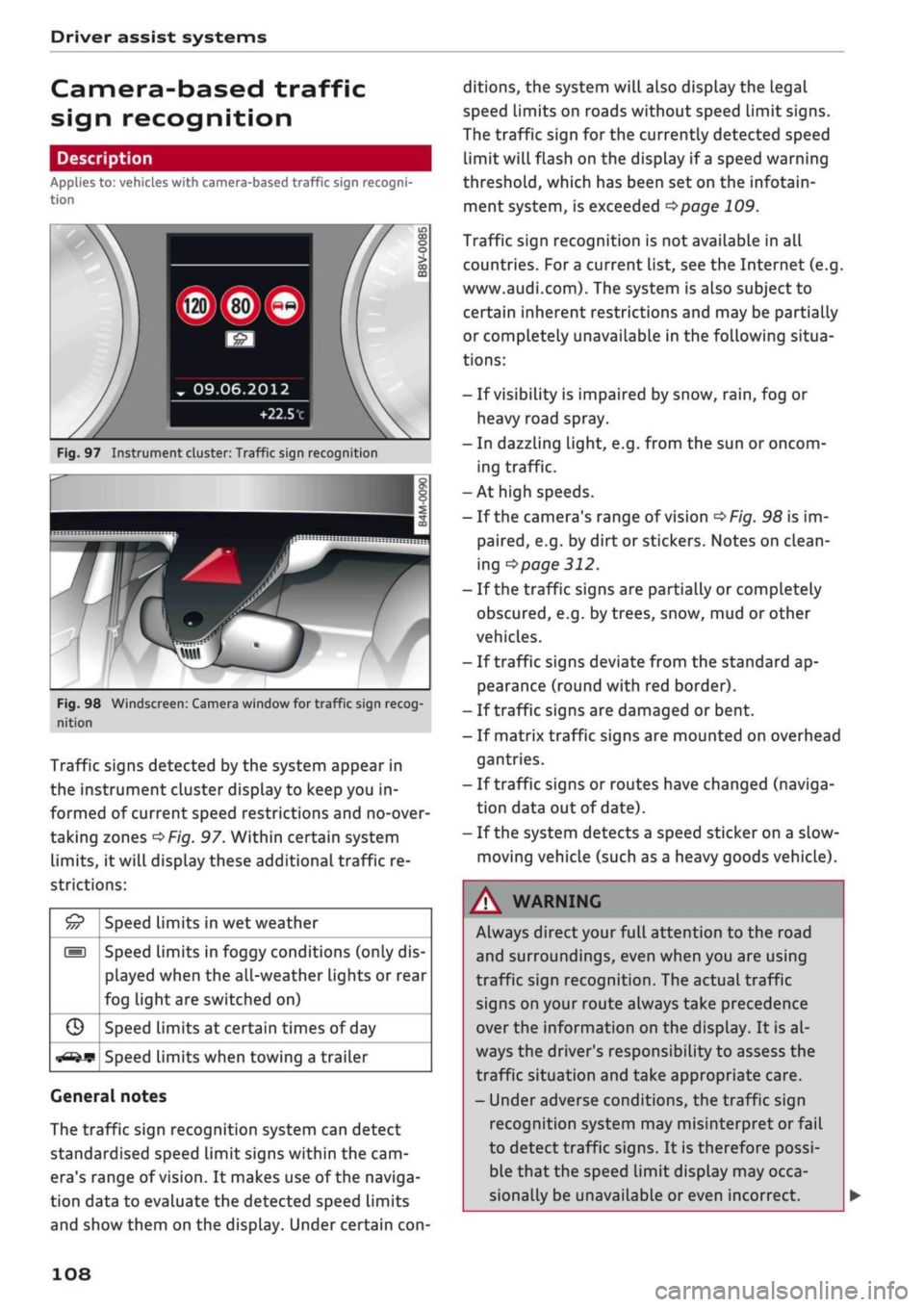
Fig.
97 Instrument cluster: Traffic sign recognition
Fig.
98 Windscreen: Camera window for traffic sign recog
nition
Traffic signs detected by the system appear in
the instrument cluster display to keep you in
formed of current speed restrictions and no-over
taking zones
^>Fig.
97. Within certain system
limits,
it will display these additional traffic re
strictions:
£5
///
s
G
^-if?
Speed limits in wet weather
Speed limits in foggy conditions (only dis
played when the all-weather lights or rear
fog light are switched on)
Speed limits at certain times of day
Speed limits when towing a trailer
General notes
The traffic sign recognition system can detect
standardised speed Limit signs within the cam
era's range of
vision.
It makes use of the naviga
tion data to evaluate the detected speed limits
and show them on the display. Under certain
con
ditions, the system will also display the legal
speed limits on roads without speed Limit signs.
The traffic sign for the currently detected speed
limit will flash on the display if
a
speed warning
threshold,
which has been set on the infotain
ment system, is exceeded
^page
109.
Traffic sign recognition is not available in all
countries. For
a
current list, see the Internet (e.g.
www.audi.com). The system is also subject to
certain inherent restrictions and may be partially
or completely unavailable in the following situa
tions:
- If visibility is impaired by snow,
rain,
fog or
heavy road spray.
- In dazzling light, e.g. from the sun or oncom
ing traffic.
-At high speeds.
- If the camera's range of vision
^>Fig.
98 is im
paired,
e.g. by dirt or stickers. Notes on clean
ing
•=>
page 312.
- If the traffic signs are partially or completely
obscured,
e.g. by trees, snow, mud or other
vehicles.
- If traffic signs deviate from the standard ap
pearance (round with red border).
- If traffic signs are damaged or bent.
- If matrix traffic signs are mounted on overhead
gantries.
- If traffic signs or routes have changed (naviga
tion data out of date).
- If the system detects a speed sticker on a slow-
moving vehicle (such as a heavy goods vehicle).
WARNING
Always direct your full attention to the road
and surroundings, even when you are using
traffic sign recognition. The actual traffic
signs on your route always take precedence
over
the information on the display. It is al
ways the driver's responsibility to assess the
traffic situation and take appropriate care.
- Under adverse conditions, the traffic sign
recognition system may misinterpret or fail
to detect traffic signs. It is therefore possi
ble that the speed limit display may occa
sionally be unavailable or even incorrect.
108
Page 113 of 364
Driver assist systems
CO
< o rN
iv
rN
•-i
00
- In certain situations, the system may misin
terpret driving manoeuvres and inappropri
ately recommend a break.
- No acute warning is given if the driver falls
into a microsleep.
Instrument cluster display
Applies to: vehicles with rest recommendation
H
Rest recommended
If the warning lamp lights up and the message
appears, the evaluation of the steering input has
resulted in a rest recommendation. This is also
indicated by a warning tone. Take a break as soon
as possible.
The message may be displayed again once if nec
essary.
Switching on/off
Applies to: vehicles with rest recommendation
Select the following on the infotainment system:
|MENU|
button > Car > left control button > Driv
er assist > Rest recommendation.
© Note
If you switch off the system,
it
will remain
switched off the next time you switch on the
ignition.
Audi adaptive cruise
control
Description
Applies to: vehicles with Audi adaptive cruise control
»
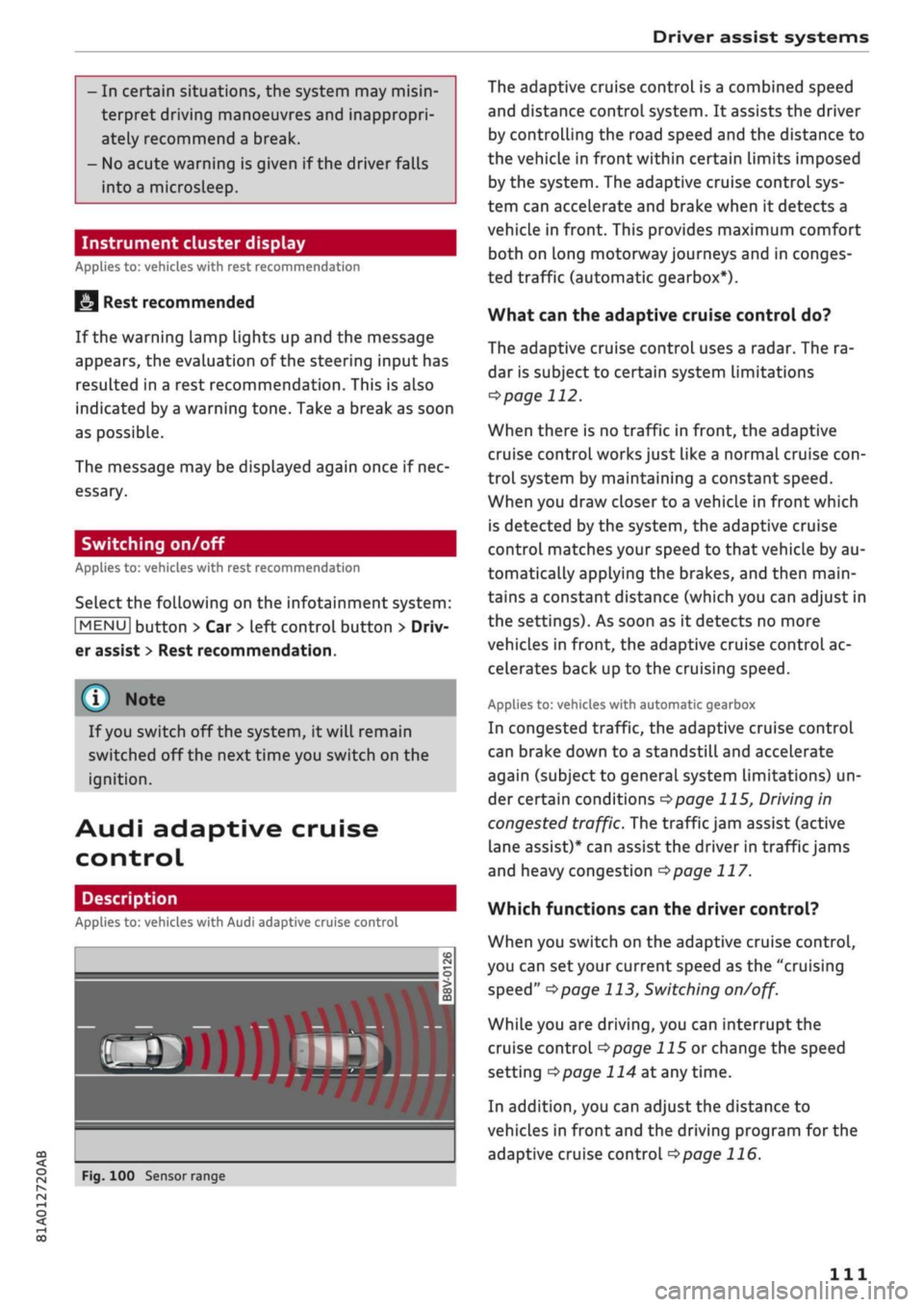
Fig.
100 Sensor range
The adaptive cruise control is a combined speed
and distance control system. It assists the driver
by controlling the road speed and the distance to
the vehicle in front within certain limits imposed
by the system. The adaptive cruise control sys
tem can accelerate and brake when it detects a
vehicle in front. This provides maximum comfort
both on long motorway journeys and in conges
ted traffic (automatic gearbox*).
What can the adaptive cruise control do?
The adaptive cruise control uses a radar. The ra
dar is subject to certain system limitations
opage
112.
When there is no traffic in front, the adaptive
cruise control works just like a normal cruise
con
trol system by maintaining a constant speed.
When you draw closer to a vehicLe in front which
is detected by the system, the adaptive cruise
control matches your speed to that vehicle by au
tomatically applying the brakes, and then main
tains a constant distance (which you can adjust in
the settings). As soon as it detects no more
vehicles in front, the adaptive cruise control ac
celerates back up to the cruising speed.
Applies to: vehicles with automatic gearbox
In congested traffic, the adaptive cruise control
can brake down to a standstill and accelerate
again (subject to general system limitations) un
der certain conditions
*$page
115, Driving in
congested traffic. The traffic jam assist (active
lane assist)* can assist the driver in traffic jams
and heavy congestion
<=>page
117.
Which functions can the driver control?
When you switch on the adaptive cruise control,
you can set your current speed as the "cruising
speed"
^>page
113, Switching
on/off.
While you are driving, you can interrupt the
cruise control
opage
115 or change the speed
setting
Opage
114 at any time.
In addition, you can adjust the distance to
vehicles in front and the driving program for the
adaptive cruise control
^>page
116.
Ill
Page 118 of 364
Driver assist systems
• To reactivate the cruise control and accelerate
back up to the target speed, move the lever to
position©.
Interrupting the cruise control while
stationary
Applies to: vehicles with automatic gearbox
•
Push the Lever away from you to position ©.
The message ACC: standby will appear.
•
To reactivate the cruise control, press the brake
pedal and pull the Lever towards you to position
©•
A WARNING
It is dangerous to activate the cruise control
and accelerate back up to a target speed
which is too high for the current
road,
traffic
or weather conditions - risk of accident!
Setting the distance
Applies to: vehicles with Audi adaptive cruise control
DISTAN»
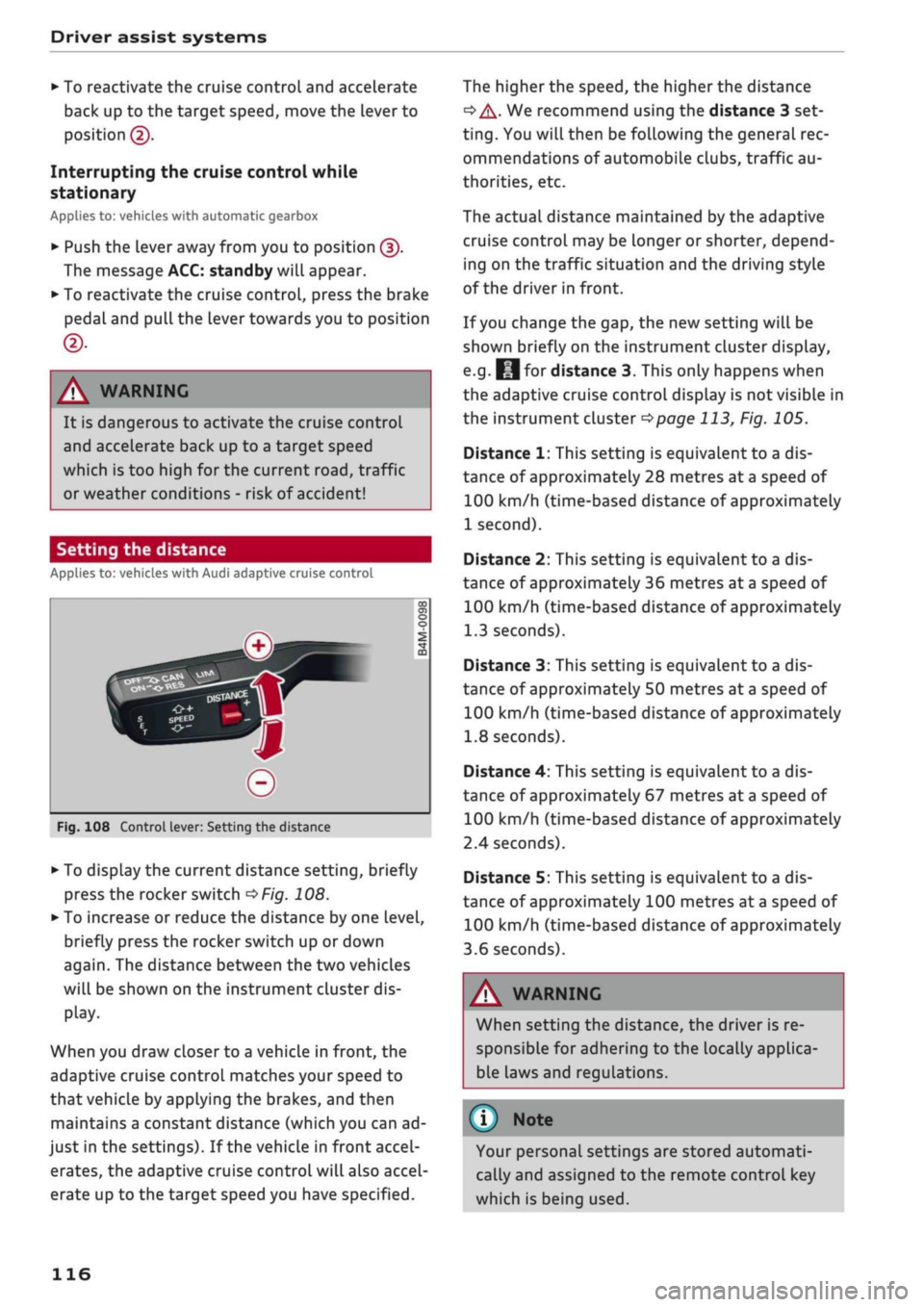
Fig.
108 Control lever: Setting the distance
*•
To display the current distance setting, briefly
press the rocker switch
OFig.
108.
>
To increase or reduce the distance by one level,
briefly press the rocker switch up or down
again.
The distance between the two vehicles
will be shown on the instrument cluster dis
play.
When you draw closer to a vehicle in front, the
adaptive cruise control matches your speed to
that vehicle by applying the brakes, and then
maintains a constant distance (which you can ad
just in the settings). If the vehicle in front accel
erates, the adaptive cruise control will also accel
erate up to the target speed you have specified.
The higher the speed, the higher the distance
•=> A-
We recommend using the distance 3 set
ting.
You will then be following the general rec
ommendations of automobile clubs, traffic au
thorities, etc.
The actual distance maintained by the adaptive
cruise control may be longer or shorter, depend
ing on the traffic situation and the driving style
of the driver in front.
If you change the gap, the new setting will be
shown briefly on the instrument cluster display,
e.g.
fcjfor distance 3. This only happens when
the adaptive cruise control display is not visible in
the instrument cluster
^>page
113, Fig. 105.
Distance 1: This setting is equivalent to a dis
tance of approximately 28 metres at a speed of
100 km/h (time-based distance of approximately
1 second).
Distance 2: This setting is equivalent to a dis
tance of approximately 36 metres at a speed of
100 km/h (time-based distance of approximately
1.3 seconds).
Distance 3: This setting is equivalent to a dis
tance of approximately
50
metres at a speed of
100 km/h (time-based distance of approximately
1.8 seconds).
Distance 4: This setting is equivalent to a dis
tance of approximately 67 metres at a speed of
100 km/h (time-based distance of approximately
2.4 seconds).
Distance 5: This setting is equivalent to a dis
tance of approximately 100 metres at a speed of
100 km/h (time-based distance of approximately
3.6 seconds).
A WARNING
When setting the distance, the driver is re
sponsible for adhering to the locally applica
ble laws and regulations.
©
Your personal settings are stored automati
cally and assigned to the remote control key
which is being used.
116
Page 121 of 364
Driver assist systems
© Note
The distance may be below the warning
threshold for a short time when overtaking or
approaching a slower vehicle quickly from be
hind.
In this case, no warning will be given. A
warning is only given if the distance is consis
tently below the threshold.
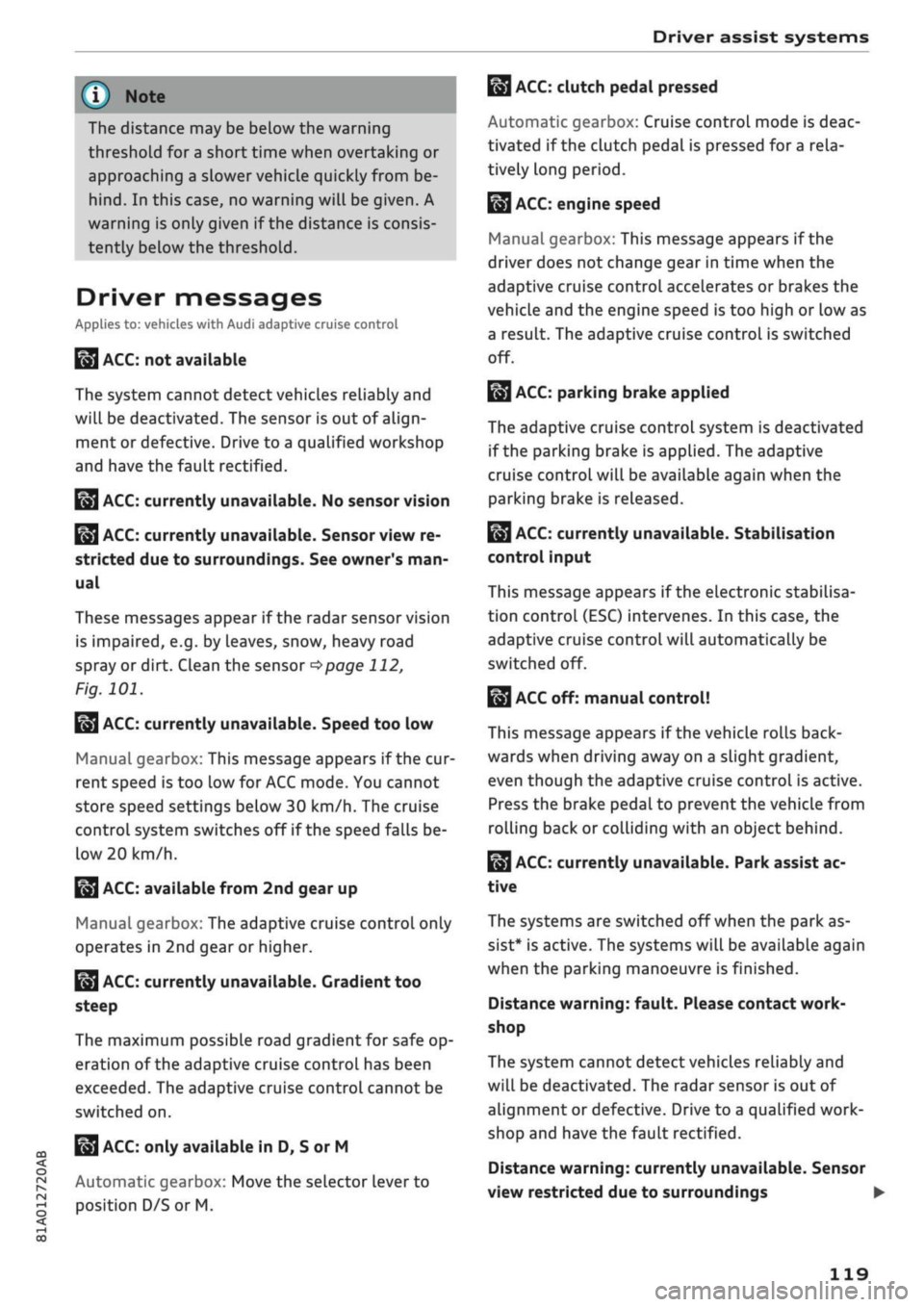
Driver messages
Applies to: vehicles with Audi adaptive cruise control
El
ACC:
not available
The system cannot detect vehicles reliably and
will be deactivated. The sensor is out of align
ment or defective. Drive to a qualified workshop
and have the fault rectified.
EH
ACC:
currently unavailable. No sensor vision
Eo3
ACC:
currently unavailable. Sensor view re
stricted due to surroundings. See owner's
man
ual
These messages appear if the radar sensor vision
is impaired, e.g. by leaves, snow, heavy road
spray or dirt. Clean the sensor
^>page
112,
Fig. 101.
E3
ACC:
currently unavailable. Speed too low
Manual gearbox: This message appears if the cur
rent speed is too low for
ACC
mode. You cannot
store speed settings below 30 km/h. The cruise
control system switches off if the speed falls
be
low 20 km/h.
Esi
ACC:
available from 2nd gear up
Manual gearbox: The adaptive cruise control only
operates in 2nd gear or higher.
B
ACC:
currently unavailable. Gradient too
steep
The maximum possible road gradient for safe op
eration of the adaptive cruise control has been
exceeded.
The adaptive cruise control cannot be
switched on.
ffl
Ea3
ACC:
only
available in D, S or M < o
PI
Automatic gearbox: Move the selector lever to
g
position D/S or M. <
00
Eol
ACC:
clutch pedal pressed
Automatic gearbox: Cruise control mode is deac
tivated if the clutch pedal is pressed for
a
rela
tively long period.
Bf
ACC:
engine speed
Manual gearbox: This message appears if the
driver does not change gear in time when the
adaptive cruise control accelerates or brakes the
vehicle and the engine speed is too high or low as
a result. The adaptive cruise control is switched
off.
EJACC:
parking brake applied
The adaptive cruise control system is deactivated
if the parking brake is applied. The adaptive
cruise control will be available again when the
parking brake is released.
Eo3
ACC:
currently unavailable. Stabilisation
control input
This message appears if the electronic stabilisa
tion control (ESC) intervenes. In this case, the
adaptive cruise control will automatically be
switched off.
Eo3 ACC
off: manual control!
This message appears if the vehicLe rolls back
wards when driving away on a slight gradient,
even though the adaptive cruise control is active.
Press the brake pedal to prevent the vehicle from
rolling back or colliding with an object behind.
EM
ACC:
currently unavailable. Park assist ac
tive
The systems are switched off when the park as
sist* is active. The systems will be available again
when the parking manoeuvre is finished.
Distance warning: fault. Please contact work
shop
The system cannot detect vehicles reliably and
will be deactivated. The radar sensor is out of
alignment or defective. Drive to a qualified work
shop and have the fault rectified.
Distance warning: currently unavailable. Sensor
view restricted due to surroundings •
119