door lock AUDI Q2 2021 Owner´s Manual
[x] Cancel search | Manufacturer: AUDI, Model Year: 2021, Model line: Q2, Model: AUDI Q2 2021Pages: 364, PDF Size: 87.77 MB
Page 86 of 364

Driving
Driving off with the hold assist
Applies to: vehicles with hold assist
The hold assist helps the driver if the vehicle is
stationary for a Long period or very often, for in
stance at traffic lights, on steep gradients or in
stop-and-go traffic.
Important: The driver's door must be closed and
the engine must be running.
• To switch the hold assist on/off, press the but
ton
«59 © ^>page
82, Fig. 74,
•=»^.
The LED in
the button will light up or go out.
•
Once it detects that the vehicle has stopped,
the hold assist keeps the vehicle stationary. In
this case, a green indicator Lamp
^
Lights up in
the instrument cluster. You can now take your
foot
off the brake pedal.
•
Drive off in the normal way: the brake will be
released automatically and the vehicle will
start moving.
In certain situations, the hold assist transfers the
job of holding the vehicle to the parking brake.
As soon as the parking brake is holding the
vehi
cle
still,
the warning lamp || appears in the in
strument cluster. In addition, the LED in the ®)
button will light up.
Driver messages in the instrument cluster
display
P.]
Hold assist: unavailable
If this message appears, the hold assist is un
available or the system requirements have not
been met.
A WARNING
Applies to: vehicles with hill hold assist
If
you
do not drive away immediately after re
leasing the brake pedal, or if the engine
stalls,
the vehicle could start to roll back. You
should therefore immediately press the brake
pedal or apply the parking brake.
A WARNING
The intelligent technology in the hold assist*
and hill hold assist functions cannot defy the
laws of physics. Do not let the extra conven
ience afforded by the hold assist* and hill
hold assist functions tempt you into taking
any risks when driving - this can cause
acci
dents.
- The hold assist* and hill hold assist func
tions cannot keep the vehicle stationary in
all conditions on a gradient (e.g. if the road
is slippery or icy).
- Always ensure that the vehicle is stopped
properly and safely - risk of accident!
(T)
CAUTION
Switch off the hold assist* function before
driving the vehicle into a car wash.
©
r
Note
Applies to: vehicles with automatic gearbox
When the hold assist* function is switched
on,
it stops the vehicle from creeping for
wards when you take
your
foot off the brake
pedal.
Off-road driving
General notes
The functions of the electronic stabilisation
con
trol (ESC) have been augmented to provide extra
assistance when driving off-road. The
ESC
off-
road mode can be activated in situations when it
would be advantageous for the wheels to lock, or
when a differential Lock would normally be re
quired
^>page
146.
This Audi model is not an off-road vehicle, how
ever. When driving off-road you are advised to
avoid tracks or terrain which are not suited to
the design of the car and your own driving skills
and experience. Do not take any risks.
After driving off-road
- After driving, remove any pieces of foliage or
other objects which may be caught in the radia
tor grille, under the car or in the wheels. In par
ticular, inspect the tyre treads for stones.
- Clean the bodywork and underside of the
vehi
cle and check the underside for possible dam
age.
- Remove dirt from the windows, headlight
len
ses and number plates. •
84
Page 90 of 364

Driving
©
y Note
If the selector lever does not lock automati
cally, a malfunction has occurred. In this case,
the power transmission is interrupted to pre
vent the vehicle from moving unintentionally.
Proceed as follows to engage the selector lev
er lock again:
- Applies to vehicles with 6-speed gearbox:
Briefly press the brake pedal.
- Applies to vehicles with 7-speed gearbox:
Press the brake pedal. Move the selector
lever to position
P
or
N
and then select a
gear.
- If the vehicle does not move forwards or
backwards even though a gear is selected,
proceed as follows:
- If the vehicle does not move in the desired
direction,
the system may have failed to en
gage the gear correctly. In this case, press
the brake pedal and select the gear again.
- If the vehicle still does not move in the de
sired direction, a system malfunction has
occurred.
Seek professional assistance and
have the system checked.
General notes on driving an automatic
Applies to: vehicles with automatic gearbox
Fig.
77 Detail of the centre console: Selector lever with in
terlock button
Starting the engine
•
Move the selector Lever to
P
or N. In the case of
Low outside temperatures (below -10 °C), the
engine can only be started when the selector
lever is in position P.
Driving away from a standstill
•
Press and hold the brake pedal.
•
Press and hold the interlock button (the button
in the selector lever handle), set the selector
lever to the desired position (e.g. D)
^>page
86
and release the interlock button.
•
Wait for the gearbox to engage the gear (a
slight movement can be felt).
•
Release the brake and press the accelerator
There are several convenient functions to help
you drive away on gradients
^page
83.
Stopping briefly
•
Press the brake pedal to hold the vehicLe when
stationary (for instance at traffic lights).
•
Do not press the accelerator.
•
To prevent the vehicLe from rolling away, apply
the parking brake before moving off on steep
gradients
•=>^
and
•=>(]).
• As soon as you acceLerate as normal, the park
ing brake will automatically be released and
the vehicLe will start moving. Important: The
driver's door must be closed.
Stopping/parking the car
If
you
open the driver's door while the selector
lever is not in position P, the vehicle can roll
away. The message Shift to P, otherwise vehicle
can roll away. Doors do not lock if lever is not in
P. appears on vehicles with convenience key*. A
buzzer will also sound.
•
Press and hold the brake pedal
<=>
A..
•
Apply the parking brake.
•
Move the selector Lever to P.
In some situations (such as on mountain roads or
when towing a trailer or caravan) it can be advan
tageous to switch temporarily to the manual
shift programme so that the gear ratios can be
selected manually to suit the driving conditions
^>page
90.
On level ground it is sufficient to move the selec
tor lever to P. On a gradient the parking brake
should be applied first and the selector Lever
should be moved to
P ^>page
82. This reduces
the load on the locking mechanism and makes it
easier to move the selector lever out of position
P. •
88
Page 91 of 364

Driving
A WARNING
- The driver should never get out of the
vehi
cle when the engine is running and a gear is
engaged.
If you have to leave your vehicle
while the engine is running, you must apply
the parking brake and engage the parking
lock P.
-If the engine is running and a gear is engag
ed (D/S or R) or the vehicle is in "tiptronic"
mode,
you will need to hold the car with the
footbrake. Otherwise, the car will "creep"
forwards as the power transmission is not
fully interrupted even when the engine is
idling.
- The accelerator pedal must on no account
be pressed inadvertently when the vehicle is
stationary. The vehicle could otherwise start
moving immediately (in some cases even if
the parking brake is engaged) and possibly
cause an accident.
- Do not press the accelerator while selecting
a gear with the vehicle stationary and the
engine running, as this could cause an
acci
dent.
- Never move the selector lever to R or P
when driving at normal speeds, as this could
cause an accident.
- Before you drive down a steep gradient, re
duce the speed and use "tiptronic" to select
a low gear.
- Never allow the brake to drag when driving
downhill and do not use the brake pedal too
often
or
for long periods. Constant braking
will cause the brakes to overheat and will
considerably reduce the effectiveness of the
brakes. It will increase the braking distance
and could cause the brake system to
fail.
- To avoid rolling back on gradients always
hold the vehicLe with the footbrake or park
ing brake if you have to stop.
- Never attempt to hold the vehicle with the
clutch when stopping on a gradient. The
clutch is disengaged automatically if it is
overloaded and becomes too hot - accident
risk! If the clutch is overloaded, the indica
tor lamp
0
will light up and a message will
appear
^>page
92.
© CAUTION
- When you have stopped on a gradient, do
not try to stop the vehicle rolling back by ac
celerating when a gear is engaged. This
could cause the automatic gearbox to over
heat and become damaged. Apply the park
ing brake or press the brake pedal in order
to prevent the vehicle from rolling back.
- If you allow the car to roll with the selector
lever in position N with the engine switched
off, the automatic gearbox will be damaged
as it will not be lubricated
^page
328,
Tow-starting / towing
away.
- In certain driving and traffic conditions, for
instance in stop-and-go traffic, if you have
to pull away frequently or if the vehicle
creeps forwards over a long distance, the
gearbox can overheat and become dam
aged.
If the indicator Lamp
[5J
or the warn
ing
lampH
Lights up, stop the vehicle at
the first opportunity and let the gearbox
cool down
^>page
92.
© Note
For safety reasons the parking brake will only
release automatically if the driver's door is
closed.
Downhill speed control
Applies to: vehicles with automatic gearbox
The downhill speed control function helps the
driver when driving down steep gradients.
Downhill speed control is activated on a downhill
gradient when the selector lever is in D/S and the
driver presses the brake pedal. The gearbox auto
matically selects a suitable gear for the gradient.
The downhill speed control function attempts to
maintain the speed at which the vehicLe was trav
elling when the foot brake was applied (subject
to the laws of physics and technical limitations of
the power train). It may be necessary to adjust
the speed again using the foot brake. The down
hill speed control can change down to 3rd gear
but no further, so it may be necessary to change
to tiptronic mode on very steep gradients. In this
case,
change down manually to 2nd or 1st gear in •
CO
89
Page 153 of 364
Intelligent technology
CO
< o rN
iv
rN
t-H
o < 00
event of faults or anomalies in the vehicLe data,
only these data are saved. As a rule, faults are
shown by the warning lamps in the instrument
cluster.
Data saved in the control units can only be read
and analysed with special equipment.
A qualified workshop is only able to recognise
and deal with faults by using the relevant saved
data.
Among other things, the saved data may
contain the following information:
- Data relating to the engine and the gearbox
-Speed
- Direction of travel
- Braking force
- Seat belt warning system data
The control units installed will not under any cir
cumstances record conversations in the vehicle.
Event data recorder
Your vehicLe is not equipped with an event data
recorder.
In an event data recorder, information about the
vehicle is temporarily saved. In the event of an
accident, you can therefore obtain detaiLed infor
mation about the course of events. On vehicles
with an airbag system, accident-related data
such as impact speed, seat belt status, seat
posi
tions and trigger times can be saved. The exact
information saved depends on the manufacturer.
The installation of an event data recorder is sub
ject to the agreement of the vehicle's owner. This
process is governed by legislation in some coun
tries.
Reprogramming control units
All data for controlling components are saved in
the control units. Some convenience features,
such as one-touch signalling, single door unlock
ing and display messages can be reprogrammed
using special workshop equipment. If any
con
venience features are reprogrammed, the infor
mation in this Owner's Manual will no longer be
accurate for the features that have been
changed.
We recommend having the reprogram
ming approved.
Your Audi dealer will be able to provide you with
information about possibLe reprogramming op
tions.
Event memory
There is a diagnostic connection for reading out
the event memory Located in the
footweLL
on the
driver's side of the vehicle. Information regard
ing the operation and status of the vehicle's elec
tronic control units is stored in the event memo
ry. The event memory should only be read out
and erased by
a
qualified workshop.
A WARNING
The diagnostic connection must not be used
for other purposes. Incorrect use can cause
malfunctions - risk of accident!
151
Page 277 of 364
Safe driving
•
Distribute the load evenly in the luggage com
partment.
•
Place heavy items as far forward as possible in
the luggage compartment and secure them
properly
<^>Fig.
214.
•
Secure the load with the stretch net* or with
non-elastic straps secured to the fastening
rings
^>page
62.
© CAUTION
A WARNING
- Loose items in the luggage compartment
are a safety hazard: they can move suddenly
and impair the handling of the vehicLe as a
result of the change in weight distribution.
- In an accident or a sudden manoeuvre, loose
objects in the passenger compartment can
be flung forward - risk of injury! Always
stow objects safely in the luggage compart
ment and secure them on the fastening
rings.
Use suitable securing straps, particu
larly when transporting heavy objects.
- Transporting heavy objects may affect the
vehicle's handling by shifting the centre of
gravity - this could cause an accident. Take
extra care when driving and adjust your
speed accordingly.
- Never exceed the maximum axle loads or
the maximum gross weight for the vehicLe
^>page
342. Exceeding the permitted axle
loads or gross weight Limit can affect the ve
hicle's handling characteristics, and increase
the risk of accidents, personal injuries or
damage to the vehicle.
- Never leave your vehicLe unattended when
the boot lid is open. Children could climb in
to the boot and close the boot lid from the
inside.
In this case the child would be un
able to get out of the vehicle without help.
This could have fatal consequences.
- Never allow children to play in or around the
vehicle. Always close and lock the boot lid
and all the doors when you leave the
vehi
cle.
- Never let passengers ride in the luggage
compartment. All occupants must be prop
erly restrained by the seat belts at all times
•=>
page
27'5.
Make sure that no hard objects chafe against
the wires of the heating element in the rear
window and damage them.
©
Note
- The tyre pressure must be adjusted accord
ing to the load the vehicle is carrying
<^>page
307.
- Air circulation in the vehicle helps reduce
fogging of the windows. Used air escapes
through ventilation slots in the rear of the
vehicle. Make sure that these ventilation
slots are not obstructed.
- Suitable belts for securing loads to the fas
tening rings* are commercially available.
Fastening rings
Unsecured loads are a hazard to all vehicle occu
pants.
There are fastening rings in the luggage com
partment which can be used to secure luggage
and other objects
^>page
62.
•
Use the fastening rings to secure items safely
in the luggage compartment
<=> A.
During a collision or an accident, even small and
light objects can possess so much energy that
they can cause very severe injuries. The amount
of this "kinetic energy" depends on the speed of
the vehicLe and the weight of the object. The
most significant factor, however, is the speed of
the vehicLe.
For example: an object weighing 4.5 kg is lying
unsecured in the vehicle. During a frontal
colli
sion at a speed of 50 km/h, this object generates
a force corresponding to 20 times its weight.
That means that the effective weight of the ob
ject increases to about 90 kg. You can imagine
the severity of the injuries which might be sus
tained if this "projectile" strikes an occupant as it
flies through the passenger compartment. •
00
273
Page 300 of 364
Checking and topping up fluids
- Never remove the engine cover panel - risk
of burns!
- If any tests have to be performed with the
engine running, there is an extra safety risk
from the rotating parts, such as the drive
belts,
alternator and radiator
fan,
etc., and
from the high-voltage ignition system.
- Never touch the radiator fan. The electric
additional fan is controlled by temperature
and can start running without warning.
- Applies to vehicles with automatic gearbox:
Never open the throttle inadvertently (for
instance by hand from the engine compart
ment) if
a
gear is engaged while the vehicle
is stationary with the engine running. The
vehicle will otherwise start moving immedi
ately and could cause an accident.
- Observe the following additional warnings if
work on the fuel system or the electrical
system is necessary:
- Do not smoke.
- Never work near naked flames.
- Always keep an approved fire extinguisher
immediately available.
- Any work on the batteries and electrical sys
tem in your vehicle entails a risk of injury
and chemical burns in addition to danger of
accident or fire.
For
this reason, you must
have the work carried out by
a
qualified
workshop.
© CAUTION
When topping up fluids make sure the correct
fluid is put into the correct filler opening. This
can otherwise cause serious malfunctions or
engine damage.
® For the sake of the environment
Inspect the ground underneath your vehicle
regularly so that any Leaks are detected at an
early stage. If
you
find spots of oil or other
fluids,
have your vehicle inspected in the
workshop.
© Note
located on the other side of the engine com
partment.
Opening/closing the bonnet
The
bonnet is released from inside the vehicle.
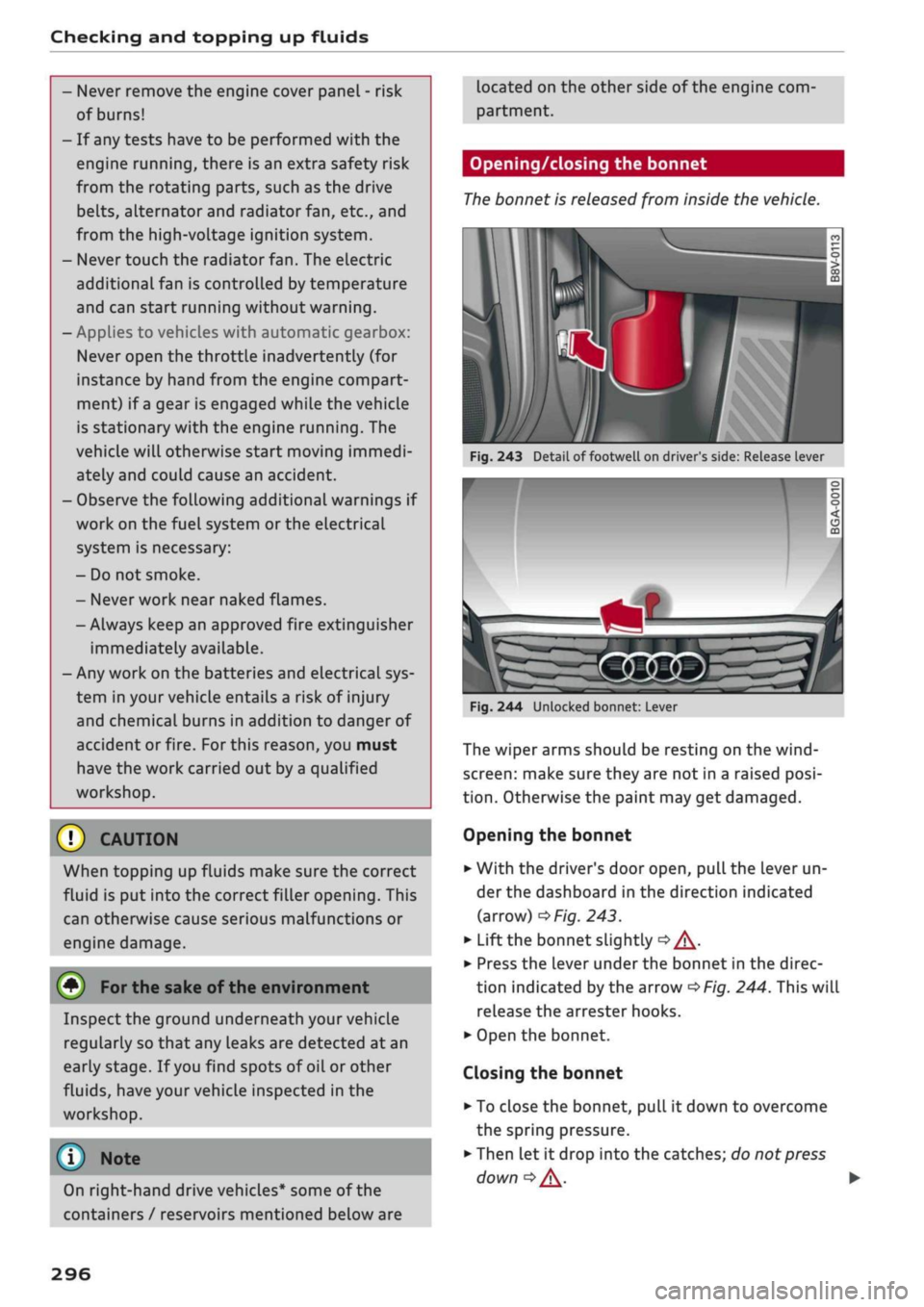
Fig.
243 Detail of footwell on driver's side: Release lever
I
On right-hand drive vehicles* some of the
containers / reservoirs mentioned below are
Fig.
244 Unlocked bonnet: Lever
The wiper arms should be resting on the
wind
screen:
make sure they are not in a raised
posi
tion.
Otherwise the paint may get damaged.
Opening the bonnet
•
With the driver's door open, pull the lever un
der the dashboard in the direction indicated
(arrow)
^>Fig.
243.
*•
Lift the bonnet slightly
•=> A-
•
Press the Lever under the bonnet in the direc
tion indicated by the arrow
^>Fig.
244. This will
release the arrester hooks.
•
Open the bonnet.
Closing the bonnet
• To close the bonnet, pull it down to overcome
the spring pressure.
•
Then let it drop into the catches; do not press
down
|=>^.
•
296
Page 326 of 364

Mobility
\J Note
Note the code number of the anti-theft wheel
bolt and keep it in a safe place - not in your
vehicle. If
you
need a replacement adapter,
give the code number to your Audi dealer.
Loosening the wheel bolts
Raising the vehicle
Fig.
261 Wheel: Loosening the wheel bolts
•
Fit
the box spanner (provided in the vehicle's
tool kit) as far as it will go over the wheeL
bolt1'.
• Turn the wheel bolt approx. one turn
anti
clockwise -arrow-. To apply the necessary tor
que,
hold the box spanner
near
the end. If the
wheel bolt is very tight, you may be able to
loosen it by pushing down the end of the span
ner carefully with your foot. Hold on to the car
for support and take care not to slip.
WARNING
To avoid accidents, the wheel bolts should on
ly be loosened slightly (one turn) before rais
ing the vehicle with the jack*.
:v<
:
Fig.
262 Sills: markings (example)
Fig.
263 Door
sill:
Applying the jack under the door sill
• Always provide a firm base for the jack* on the
ground.
(The jack can be found in the vehicle's
tool kit). If necessary use a large, strong board
or similar support. On a
hard,
slippery surface
(such as tiles) use a rubber mat or similar to
prevent
the
jack from slipping
^> /\.
• Locate the marking (recess or rib) on the door
sill closest to the wheel being changed
^>Fig.
262. The jacking point is located behind
the marking under the door
sill.
• Wind up
the
jack* under
the
jacking point until
the claw
(A)
•=>
Fig.
263 of the jack is directly
be
low the jacking point.
• Align
the
jack* so
that
the
claw
(A)
grips the
jacking point under the door sill and the mova
ble base plate of the jack
(B)
is flat on the
ground.
The base plate
(B)
must be positioned
vertically underneath
the
jacking point®.
• Raise the vehicle until the defective wheel is
clear of the ground.
11
An adapter is required to unscrew or tighten the anti-theft
wheel bolts
opage
321.
322
Page 337 of 364
Fuses and bulbs
: -•.
-
i:i
m
R2 R3
F22
F-XII
F31
F30
:-:-.'
'.,
FM F43
F49
F!)3
F52
F51
R!,
a
R6
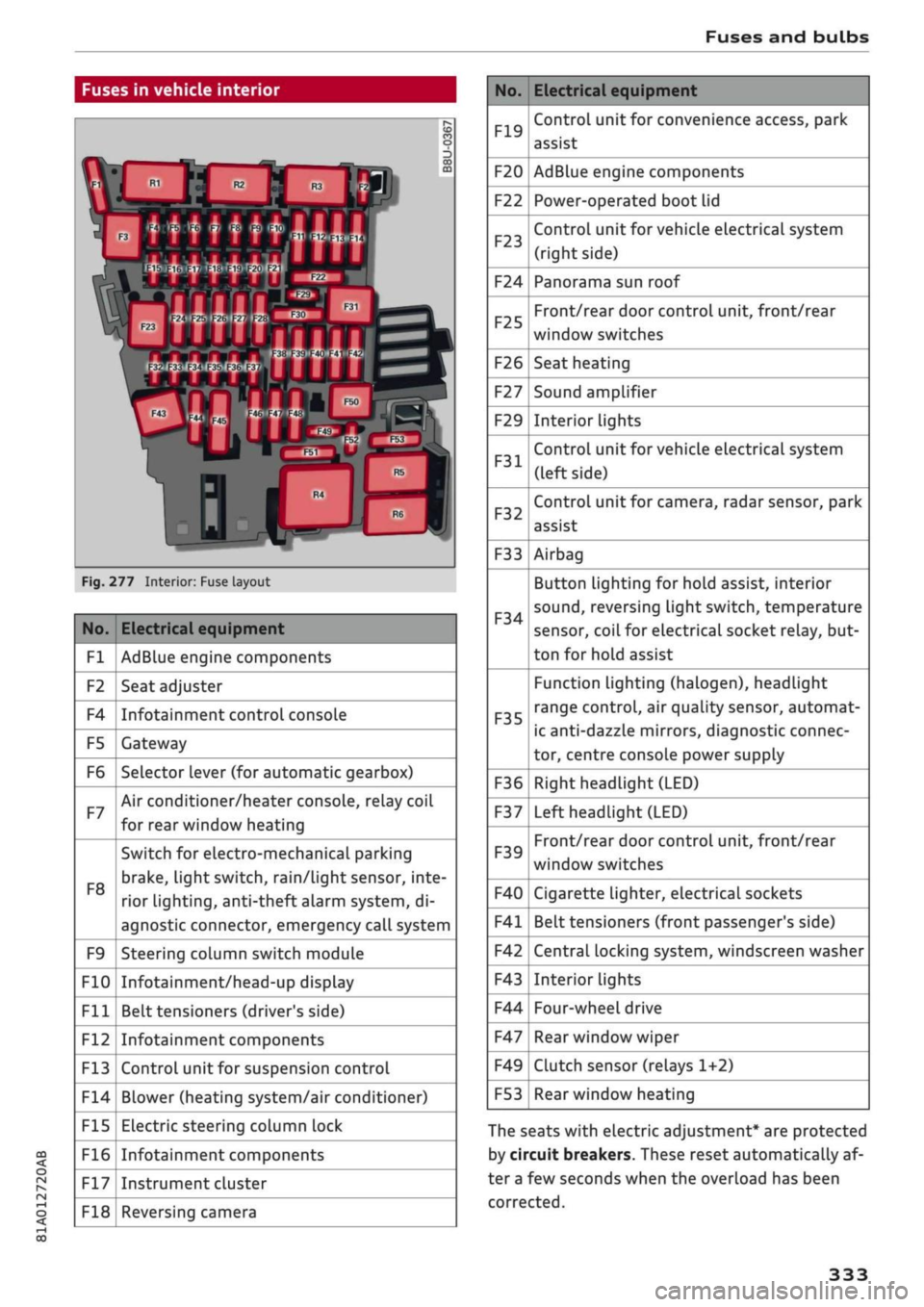
Fig.
277 Interior: Fuse layout
No.
Fl
F2
F4
F5
F6
F7
F8
F9
F10
Fll
F12
F13
F14
F15
F16
F17
F18
Electrical equipment
AdBlue engine components
Seat adjuster
Infotainment control console
Gateway
Selector lever (for automatic gearbox)
Air conditioner/heater console, relay coil
for rear window heating
Switch for electro-mechanical parking
brake,
light switch,
rain/Light
sensor, inte
rior lighting, anti-theft
aLarm
system, di
agnostic connector, emergency call system
Steering column switch module
Infotainment/head-up display
Belt tensioners (driver's side)
Infotainment components
Control unit for suspension control
Blower (heating system/air conditioner)
Electric steering column lock
Infotainment components
Instrument cluster
Reversing camera
No.
F19
F20
F22
F23
F24
F25
F26
F27
F29
F31
F32
F33
F34
F35
F36
F37
F39
F40
F41
F42
F43
F44
F47
F49
F53
Electrical equipment
Control unit for convenience access, park
assist
AdBlue engine components
Power-operated boot lid
Control unit for vehicle electrical system
(right side)
Panorama sun roof
Front/rear door control unit, front/rear
window switches
Seat heating
Sound amplifier
Interior lights
Control unit for vehicle electrical system
(left side)
Control unit for camera, radar sensor, park
assist
Airbag
Button Lighting for hold assist, interior
sound,
reversing light switch, temperature
sensor, coiL for electrical socket reLay, but
ton for hold assist
Function lighting (halogen), headlight
range control, air quality sensor, automat
ic anti-dazzle mirrors, diagnostic connec
tor, centre console power supply
Right headlight (LED)
Left headlight (LED)
Front/rear door control unit, front/rear
window switches
Cigarette lighter, electrical sockets
Belt tensioners (front passenger's side)
Central locking system, windscreen washer
Interior lights
Four-wheel drive
Rear window wiper
Clutch sensor (relays 1+2)
Rear window heating
The seats with electric adjustment* are protected
by circuit breakers. These reset automatically af
ter a few seconds when the overload has been
corrected.
333
Page 352 of 364
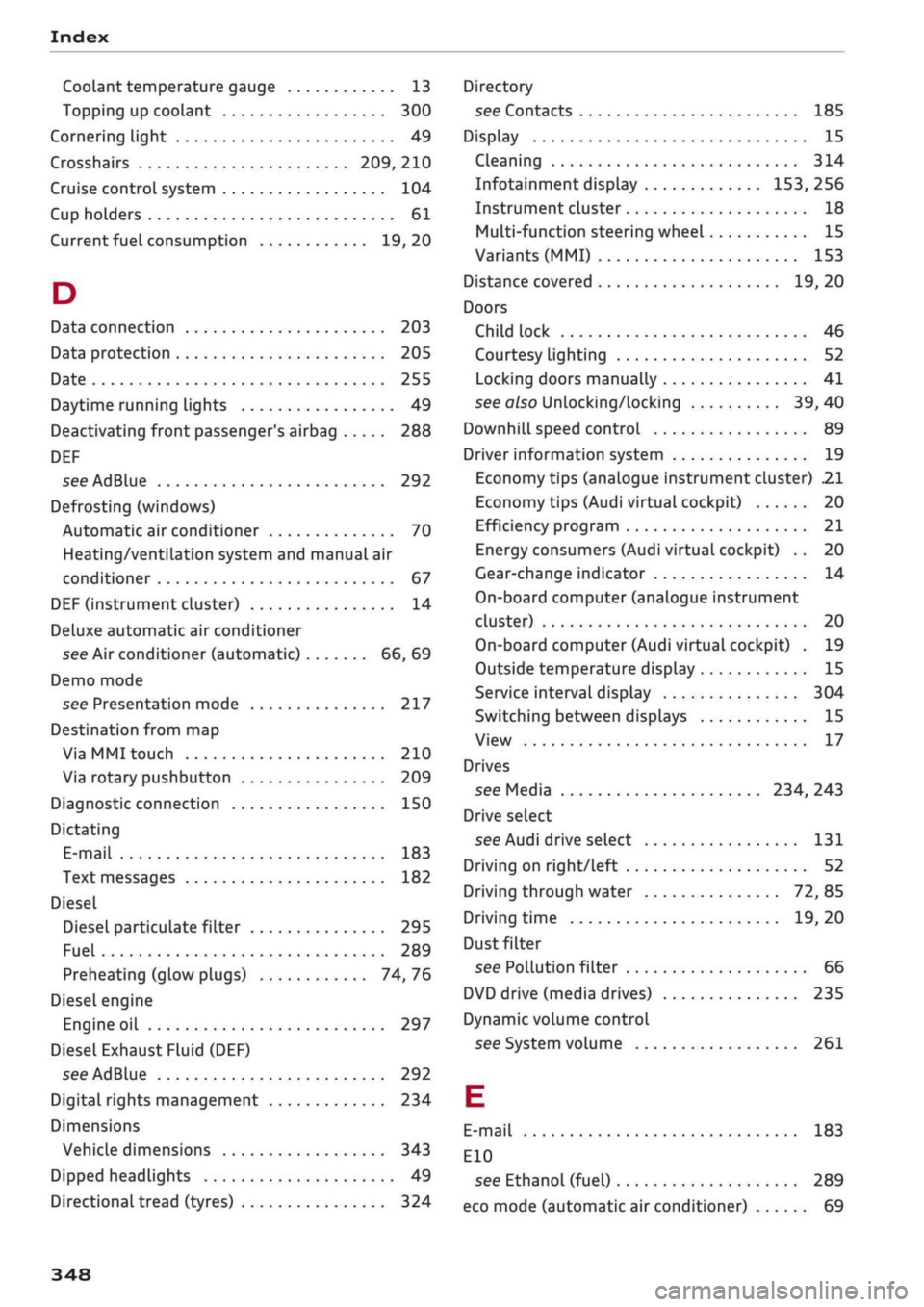
Index
Codant temperature
gauge 13
Topping up coolant 300
Cornering light 49
Crosshairs 209, 210
Cruise control system 104
Cup holders 61
Current fuel consumption 19,20
D
Data connection 203
Data protection 205
Date 255
Daytime running lights 49
Deactivating front passenger's airbag 288
DEF
see AdBlue 292
Defrosting (windows)
Automatic air conditioner 70
Heating/ventilation system and manual air
conditioner 67
DEF (instrument cluster) 14
Deluxe automatic air conditioner
see Air conditioner (automatic) 66, 69
Demo mode
see Presentation mode 217
Destination from map
Via
MMI touch 210
Via rotary pushbutton 209
Diagnostic connection 150
Dictating
E-mail
183
Text messages 182
Diesel
Diesel particulate filter 295
Fuel 289
Preheating (glow plugs) 74, 76
Diesel engine
Engine oil 297
Diesel Exhaust Fluid (DEF)
see AdBlue 292
Digital rights management 234
Dimensions
Vehicle dimensions 343
Dipped headlights 49
Directional tread (tyres) 324
Directory
see Contacts 185
Display 15
Cleaning 314
Infotainment display 153, 256
Instrument cluster 18
Multi-function steering wheel 15
Variants (MMI) 153
Distance covered 19, 20
Doors
Child lock 46
Courtesy lighting 52
Locking doors manually 41
see also Unlocking/locking 39, 40
Downhill speed control 89
Driver information system 19
Economy tips (analogue instrument cluster) 21
Economy tips (Audi virtual cockpit) 20
Efficiency program 21
Energy consumers (Audi virtual cockpit) .. 20
Gear-change indicator 14
On-board computer (analogue instrument
cluster) 20
On-board computer (Audi virtual cockpit) . 19
Outside temperature display 15
Service interval display 304
Switching between displays 15
View 17
Drives
see Media 234, 243
Drive select
see Audi drive select 131
Driving on right/left 52
Driving through water 72, 85
Driving time 19, 20
Dust filter
see Pollution filter 66
DVD drive (media drives) 235
Dynamic volume control
see System volume 261
E
E-mail
183
E10
see Ethanol (fuel) 289
eco mode (automatic air conditioner) 69
348
Page 356 of 364
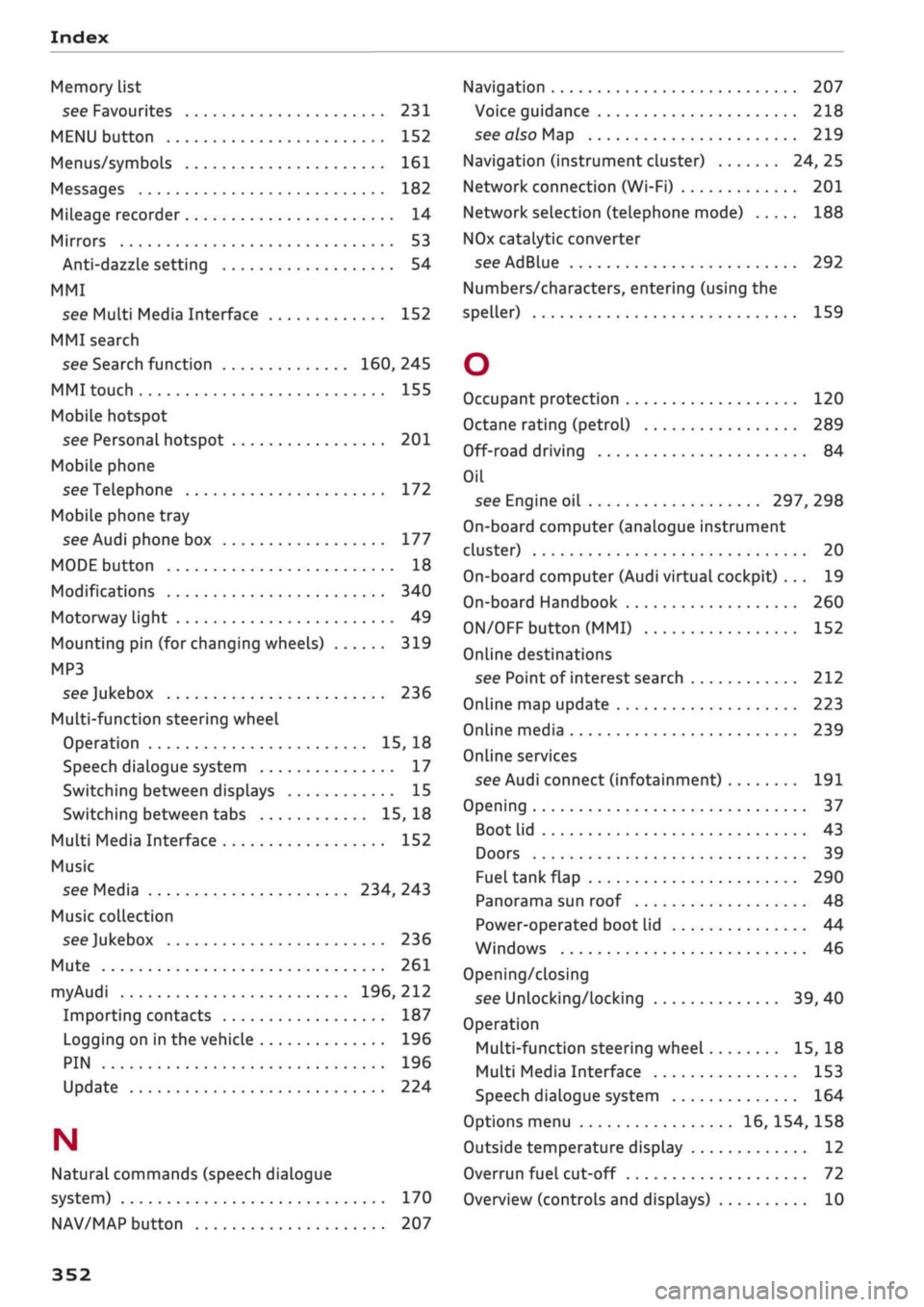
Index
Memory list
see Favourites 231
MENU button 152
Menus/symbols 161
Messages 182
Mileage recorder 14
Mirrors 53
Anti-dazzle setting 54
MMI
see Multi Media Interface 152
MMI search
see Search function 160, 245
MMI touch 155
Mobile hotspot
see Personal hotspot 201
Mobile phone
see Telephone 172
Mobile phone tray
see Audi phone box 177
MODE button 18
Modifications 340
Motorway light 49
Mounting pin (for changing wheels) 319
MP3
see
Jukebox 236
Multi-function steering wheel
Operation 15, 18
Speech dialogue system 17
Switching between displays 15
Switching between tabs 15, 18
Multi Media Interface 152
Music
see Media 234, 243
Music collection
see
Jukebox 236
Mute 261
myAudi 196, 212
Importing contacts 187
Logging on in the vehicle 196
PIN 196
Update 224
N
Natural commands (speech dialogue
system) 170
NAV/MAP button 207
Navigation 207
Voice guidance 218
see also Map 219
Navigation (instrument cluster) 24, 25
Network connection (Wi-Fi) 201
Network selection (telephone mode) 188
NOx
catalytic converter
see AdBlue 292
Numbers/characters, entering (using the
speller) 159
O
Occupant protection 120
Octane rating (petrol) 289
Off-road driving 84
Oil
see Engine oil 297, 298
On-board computer (analogue instrument
cluster) 20
On-board computer (Audi virtual cockpit) ... 19
On-board Handbook 260
ON/OFF button (MMI) 152
Online destinations
see Point of interest search 212
Online map update 223
Online media 239
Online services
see Audi connect
(infotainment)
191
Opening 37
Boot lid 43
Doors 39
Fuel tank flap 290
Panorama sun roof 48
Power-operated boot lid 44
Windows 46
Opening/closing
see Unlocking/locking 39, 40
Operation
Multi-function steering wheel 15, 18
Multi Media Interface 153
Speech dialogue system 164
Options menu 16, 154, 158
Outside temperature display 12
Overrun fuel cut-off 72
Overview (controls and displays) 10
352