door lock AUDI Q2 2021 Owner´s Manual
[x] Cancel search | Manufacturer: AUDI, Model Year: 2021, Model line: Q2, Model: AUDI Q2 2021Pages: 364, PDF Size: 87.77 MB
Page 46 of 364
Doors and windows
Power-operated boot lid
Applies to: vehicles with power-operated boot lid
The
boot lid can be opened and closed automati
cally.
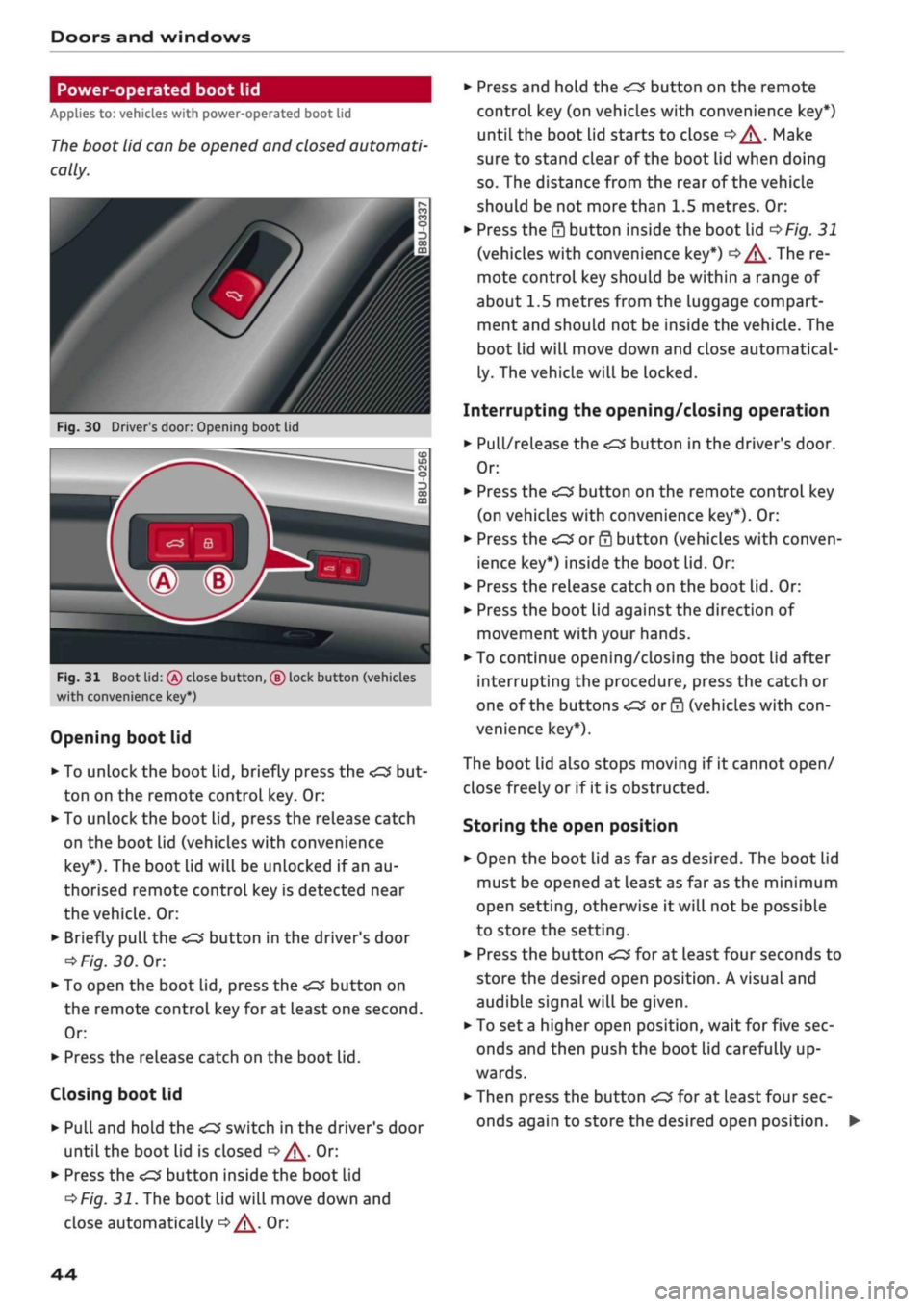
Fig.
30 Driver's door: Opening boot lid
Fig.
31 Boot lid:
(Â)
close button, ® lock button (vehicles
with convenience key*)
Opening boot lid
•
To unlock the boot lid, briefly press the
ton on the remote control key. Or:
•
To unlock the boot lid, press the release catch
on the boot Lid (vehicles with convenience
key*).
The boot lid will be unlocked if an au
thorised remote control key is detected near
the vehicle. Or:
•
Briefly
pulL
the
<£3
button in the driver's door
oFig.
30.
Or.
*•
To open the boot lid, press the
<^>'
button on
the remote control key for at least one second.
Or:
•
Press the release catch on the boot lid.
Closing boot lid
• Pull and hold the
<£3
switch in the driver's door
until the boot lid is closed
o/^.
Or:
•
Press the
«
button inside the boot lid
^>Fig.
31. The boot lid will move down and
close automatically
^^.
Or:
•
Press and hold the
<£3
button on the remote
control key (on vehicles with convenience key*)
until the boot lid starts to close
c>^.
Make
sure to stand clear of the boot lid when doing
so.
The distance from the rear of the vehicle
should be not more than 1.5 metres. Or:
•
Press the
0
button inside the boot lid
^>Fig.
31
(vehicles with convenience key*)
|=>^.
The re
mote control key should be within a range of
about 1.5 metres from the luggage compart
ment and should not be inside the vehicle. The
boot lid will move down and close automatical
ly. The vehicle will be locked.
Interrupting the opening/closing operation
•
Pull/release the
<£3
button in the driver's door.
Or:
•
Press the
^
button on the remote control key
(on vehicles with convenience key*). Or:
•
Press the
<£3
or
0
button (vehicles with conven
ience key*) inside the boot lid. Or:
•
Press the release catch on the boot lid. Or:
•
Press the boot lid against the direction of
movement with your hands.
•
To continue opening/closing the boot lid after
interrupting the procedure, press the catch or
one of the buttons
<£2
or 0 (vehicles with
con
venience key*).
The boot lid also stops moving if it cannot open/
close freely or if it is obstructed.
Storing the open position
•
Open the boot lid as far as desired. The boot Lid
must be opened at least as far as the minimum
open setting, otherwise it will not be possible
to store the setting.
•
Press the button
<£3
for at least four seconds to
store the desired open position. A visual and
audible signaLwill be given.
• To set
a
higher open position, wait for five sec
onds and then push the boot lid carefully up
wards.
•
Then press the button
«£3
for at least four sec
onds again to store the desired open position.
44
Page 47 of 364

Doors and windows
A WARNING
CO
s
rN rN
•-i
00
- After closing the boot lid, always check that
the catch has engaged properly. The boot lid
could otherwise open suddenly when the ve
hicle is moving - this could result in an
acci
dent.
- Always make sure that no-one is in the boot
lid's area of movement (especially near the
hinges) when it is moving. Risk of severe in
juries to fingers or hands!
- The boot lid must always be completely
closed when the vehicle is moving; other
wise toxic exhaust fumes can be drawn into
the interior.
- If
a
luggage rack (e.g. a bicycle carrier) is at
tached to the boot lid, the boot lid may not
open completely or may move downwards
by itself due to the added weight. For this
reason,
make sure you support the boot lid
or
take the luggage off the carrier before
opening the boot lid - risk of injury!
© Note
- When towing a trailer* the automatic open
function can only be operated via the re
lease catch on the boot lid.
- If the battery is low, the boot lid can still be
opened and closed manually; however, this
will require more effort. If
you
move the
boot lid slowly less effort will be required.
- When the vehicle is locked, you can unlock
the boot Lid separately by pressing the
button on the remote control key. The boot
lid will Lock automatically when you close it
again.
Releasing boot lid manually from inside
Applies to: vehicles with manual release on inside
The
boot lid can be released manually from the
inside.
Fig.
32 Detail of inside of boot lid: Access to manual re
lease
•
Fold the rear seat backrest forwards
opoge
63.
*•
Use the blade of the ignition key to prise off the
cover
(Tj^F/'g.
32.
•
Insert the key in the opening behind the cover
(D
and press the key in the direction of the ar
row until the boot is unlocked.
45
Page 48 of 364
Doors
and
windows
Child Locks
Applies to: vehicles with electric/mechanical child lock
The
child locks disable
the
rear windows and pre
vent the rear doors from being opened from
the
inside.
Driver message
in the
instrument cluster
display
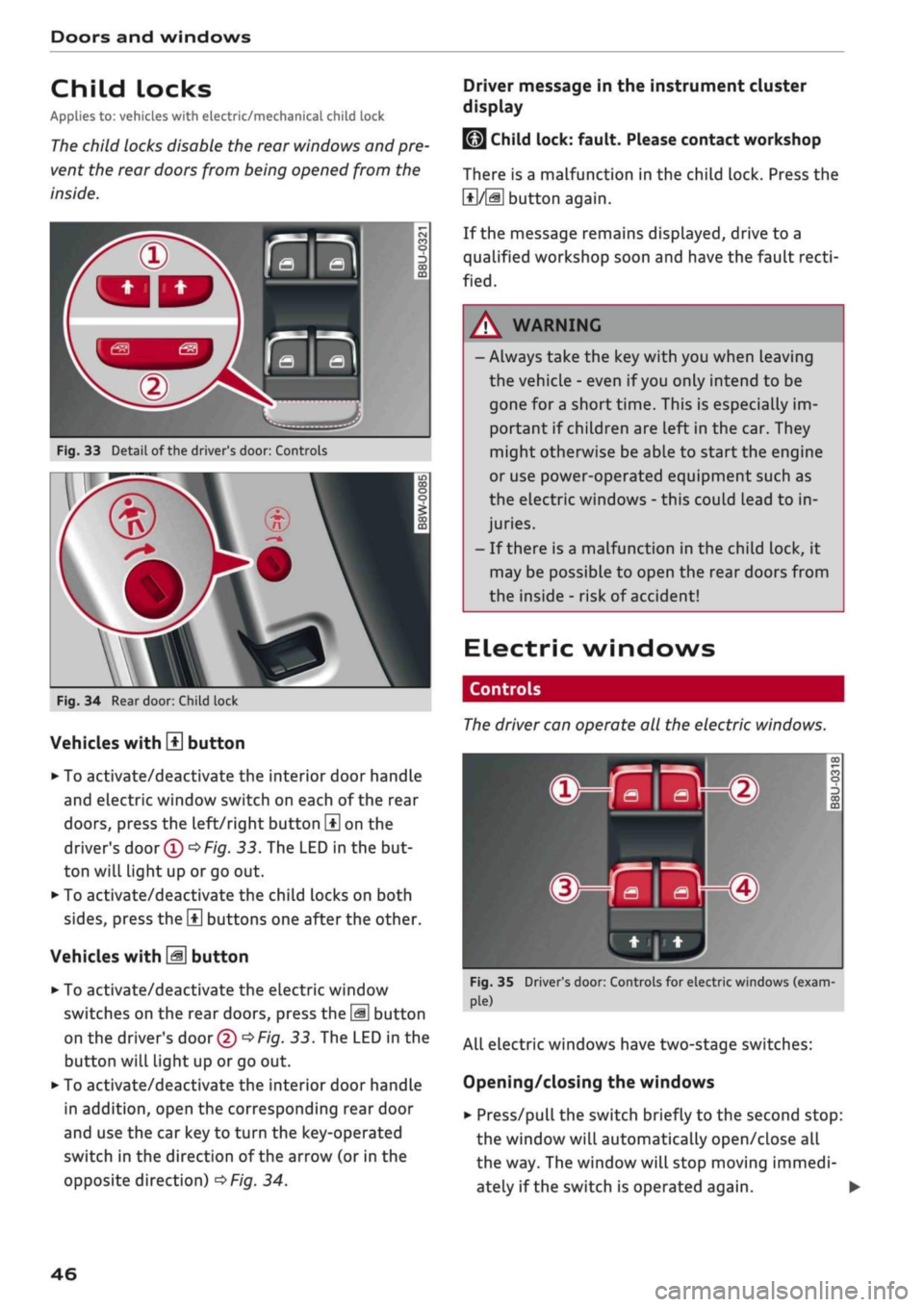
Fig.
33
Detail
of
the driver's door: Controls
Fig.
34
Rear door: Child lock
Vehicles with
H
button
• To activate/deactivate the interior door handle
and electric window switch on each
of
the rear
doors,
press the left/right button
\±\
on
the
driver's
door
(T)^Fig.
33.
The LED
in
the but
ton will light up
or
go out.
• To activate/deactivate the child locks on both
sides,
press the
B
buttons one after the other.
Vehicles with
M
button
•
To activate/deactivate the electric window
switches on the rear doors, press the
\M
button
on the driver's door
© •=>
Fig.
33.
The LED in
the
button will light up
or
go
out.
•
To activate/deactivate the interior door handle
in addition, open the corresponding rear door
and use the car key
to
turn the key-operated
switch
in
the direction
of
the arrow
(or
in
the
opposite direction)
^>Fig.
34.
LMJ
Child lock: fault. Please contact workshop
There
is
a malfunction
in
the child lock. Press
the
1*1/51
button again.
If the message remains displayed, drive
to a
qualified workshop soon and have the fault
recti
fied.
A WARNING
- Always take the key with you when Leaving
the vehicle
-
even
if
you
only intend
to be
gone
for
a short time. This
is
especially im
portant
if
children are left in the car. They
might otherwise be able
to
start the engine
or use power-operated equipment such
as
the electric windows
-
this could lead
to
in
juries.
-
If
there
is
a malfunction
in
the child lock,
it
may be possible
to
open
the
rear doors from
the inside
-
risk
of
accident!
Electric windows
Controls
The
driver can operate
all the
electric windows.
^^S
MB-®
hjHi)
Fig.
35 Driver's door: Controls for electric windows (exam
ple)
All electric windows have two-stage switches:
Opening/closing the windows
•
Press/pull the switch briefly
to
the second stop:
the window will automatically open/close
all
the way. The window will stop moving immedi
ately
if
the switch
is
operated again.
•
46
Page 49 of 364
Doors and windows
CO
s
rN rN
•-i
00
• To set an intermediate position,
press/pulL
the
switch to the first position until the window has
reached the desired position.
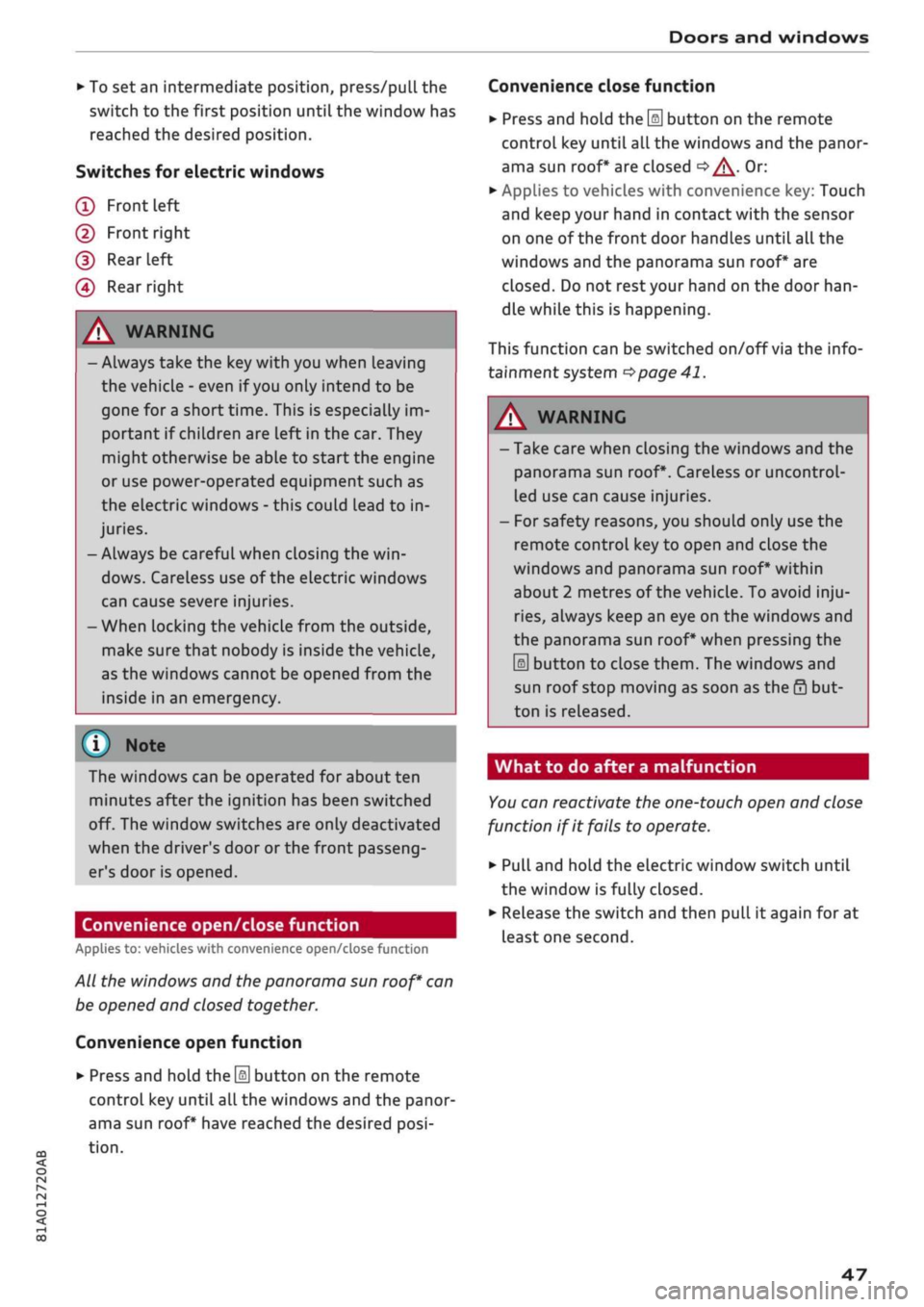
Switches for electric windows
(T)
Front left
(2) Front right
(D
Rear
left
(4) Rear right
/\
WARNING
- Always take the key with you when Leaving
the vehicle - even if
you
only intend to be
gone for a short time. This is especially im
portant if chiLdren are left in the car. They
might otherwise be able to start the engine
or use power-operated equipment such as
the electric windows - this could lead to in
juries.
- Always be careful when closing the
win
dows.
Careless use of the electric windows
can cause severe injuries.
- When locking the vehicle from the outside,
make sure that nobody is inside the vehicle,
as the windows cannot be opened from the
inside in an emergency.
© Note
The windows can be operated for about ten
minutes after the ignition has been switched
off. The window switches are only deactivated
when the driver's door or the front passeng
er's door is opened.
Convenience open/close function
Applies to: vehicles with convenience open/close function
All the windows and the panorama sun
roof*
can
be opened and closed together.
Convenience open function
•
Press and hold the
\§\
button on the remote
control key until all the windows and the panor
ama sun roof* have reached the desired
posi
tion.
Convenience close function
•
Press and hold the
\M
button on the remote
control key until all the windows and the panor
ama sun roof* are closed
c>^.
Or:
• Applies to vehicles with convenience key: Touch
and keep your hand in contact with the sensor
on one of the front door handles until
all
the
windows and the panorama sun roof* are
closed.
Do not
rest
your hand on the door
han
dle while this is happening.
This function can be switched
on/off
via the info
tainment system
•=>
page 41.
A WARNING
-Take care when closing the windows and the
panorama sun roof*. Careless or uncontrol
led use can cause injuries.
- For safety reasons, you should only use the
remote control key to open and close the
windows and panorama sun roof* within
about 2 metres of the vehicle. To avoid
inju
ries,
always keep an eye on the windows and
the panorama sun roof* when pressing the
m
button to close them. The windows and
sun roof stop moving as soon as the 0 but
ton is released.
What to do after a malfunction
You
can reactivate the one-touch open and close
function if it fails to operate.
•
Pull and hold the electric window switch until
the window is fully closed.
•
Release the switch and then pull it again for at
least one second.
47
Page 53 of 364
Lights and vision
CO
<
O
rN rN
•-i
00
• Press the lever forwards (3)
^>page
50,
Fig. 38
to activate the main beam assist. The indicator
lamp
^/fi8
will light up in the instrument
cluster display and the main beams will be
switched on/off automatically. An indicator
lampBS
lights up when the main beams are
switched on.
Switching the main beams on/off manually
If the main beams are not switched on or if the
headlights are not dipped as expected, you can
control the dip function manually:
• To switch on the main beams manually, push
the lever forwards
(3).
The indicator Lamp
g
will
Light
up. To dip the headlights again, pull
the lever towards you 0.
• To dip the headlights manually, pull the lever
towards you
@.
The main beam assist will be
deactivated.
Flashing the headlights
• Pull the lever towards you
@
to flash the
head
lights when the main beam assist is activated
and the main beams are dipped. The main
beam assist will remain activated.
Driver messages in the instrument cluster
display
13
Main beam assist: system fault!
1H
Main beam assist: fault. See owner's manual
Drive to a qualified workshop soon and have the
fault rectified. You can still switch the main
beam headlights on and off manually.
13
Main beam assist: currently unavailable. No
camera view
HI
Main beam assist: currently unavailable.
Camera view restricted due to surroundings.
See owner's manual
The camera vision is impaired, e.g. by stickers or
dirt. Please clean the windscreen.
The sensor is located in the mounting for the in
terior mirror. Do not affix any stickers on this sec
tion of the windscreen.
A WARNING
The main beam assist is only intended to as
sist the driver. The driver must always ensure
that the headlights are used when required,
and may have to switch them on or off
man
ually, e.g. when the Light conditions or visibili
ty are poor. In the following situations
man
ual intervention may be necessary:
- Hazardous weather conditions such as fog,
heavy rain and snow or water splashes
- Roads on which oncoming traffic is partially
concealed (e.g. on motorways)
- Indiscernible road users (e.g. cyclists with
poor lighting)
- Tight corners, steep hill crests or valleys
- Poorly lit towns
- Highly reflective objects, such as road signs
-Windscreen misted up, dirty, frosted or cov
ered by stickers in front of the sensor
Adjusting the settings for the exterior
lighting
You
can change the settings for these functions
on the infotainment system.
• Select the following on the infotainment sys
tem:
IMENUI
button > Car
>
left control button
> Vehicle settings > Exterior lighting.
Automatic headlights*
The following settings are available in the Auto
matic headlights menu:
Activation time* - You can determine how soon
the lights are switched on by using the settings
early*, medium* or late* to adjust the sensitivity
of the light sensor.
Main beam assist* - You can switch the main
beam assist* on/off.
Entry/exit
lights*
You can switch the entry/exit lights* on and off.
They illuminate the area around the vehicle after
dark when you unlock the vehicle or when the ig
nition has been switched off and the driver's door
opened.
•
51
Page 55 of 364
Lights and vision
CO
<
O
rN
iv
rN
i—i
o
< 00
Background lighting
Applies
to: vehicles with background lighting
The
background lighting can be adjusted via the
infotainment system.
• Select the following on the infotainment sys
tem:
|MENU| button > Car
>
left control button
> Vehicle settings > Background lighting.
It may be possible to adjust the brightness of the
individual zones, depending on the equipment
fitted in your vehicle:
• Press the right control button and select one of
the zones displayed.
The background lighting will be switched on
when you switch on the headlights with the
igni
tion on.
Instrument lighting
The
background lighting of the instruments and
displays (including the head-up display*) can be
adjusted as required.
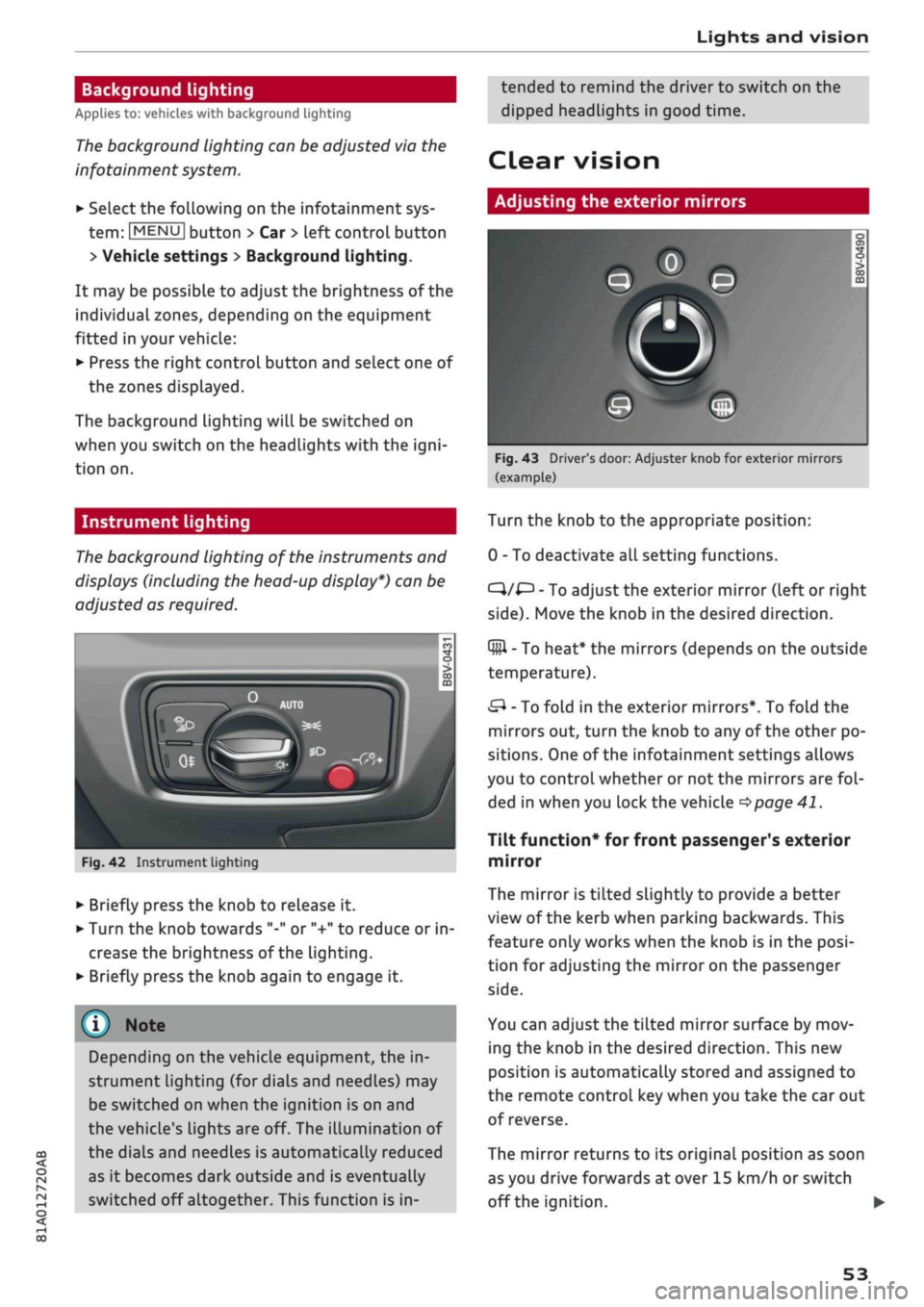
Fig.
42 Instrument lighting
• Briefly press the knob to release it.
• Turn the knob towards "-" or "+" to reduce or in
crease the brightness of the lighting.
• Briefly press the knob again to engage it.
Depending on the vehicle equipment, the in
strument lighting (for dials and needLes) may
be switched on when the ignition is on and
the vehicle's lights are off. The illumination of
the dials and needles is automatically reduced
as it becomes dark outside and is eventually
switched off altogether. This function is in
tended to remind the driver to switch on the
dipped headlights in good time.
dear
vision
Adjusting the exterior mirrors
Fig.
43 Driver's door: Adjuster knob for exterior mirrors
(example)
Turn the knob to the appropriate position:
0 - To deactivate all setting functions.
C}/^
- To adjust the exterior mirror (left or right
side).
Move the knob in the desired direction.
Q#l
- To heat* the mirrors (depends on the outside
temperature).
&
- To fold in the exterior mirrors*. To fold the
mirrors out, turn the knob to any of the other po
sitions. One of the infotainment settings allows
you to control whether or not the mirrors are
fol
ded in when you lock the vehicle
•=>page
41.
Tilt function* for front passenger's exterior
mirror
The mirror is tiLted slightly to provide a better
view of the kerb when parking backwards. This
feature only works when the knob is in the
posi
tion for adjusting the mirror on the passenger
side.
You can adjust the tilted mirror surface by mov
ing the knob in the desired direction. This new
position is automatically stored and assigned to
the remote control key when you take the car out
of reverse.
The mirror returns to its original position as soon
as you drive forwards at over 15 km/h or switch
off the ignition. •
53
Page 63 of 364
Seats and storage
CO
rN
•-i
00
children unsupervised in the vehicle with the
key.
© CAUTION
- To avoid damage, please take care when de
taching connectors from the electrical pow
er sources.
-To avoid damage to the vehicle's electrical
system,
never connect equipment that
gen
erates electrical current, such as a solar
panel or battery charger, to the power sour
ces in order to charge the vehicle's battery.
- Always use the correct type of plugs to
avoid damaging the power sources.
©
USB charging sockets marked "CHARGE ON
LY" cannot transfer data and are intended for
charging only.
Storage
Cup holders
/
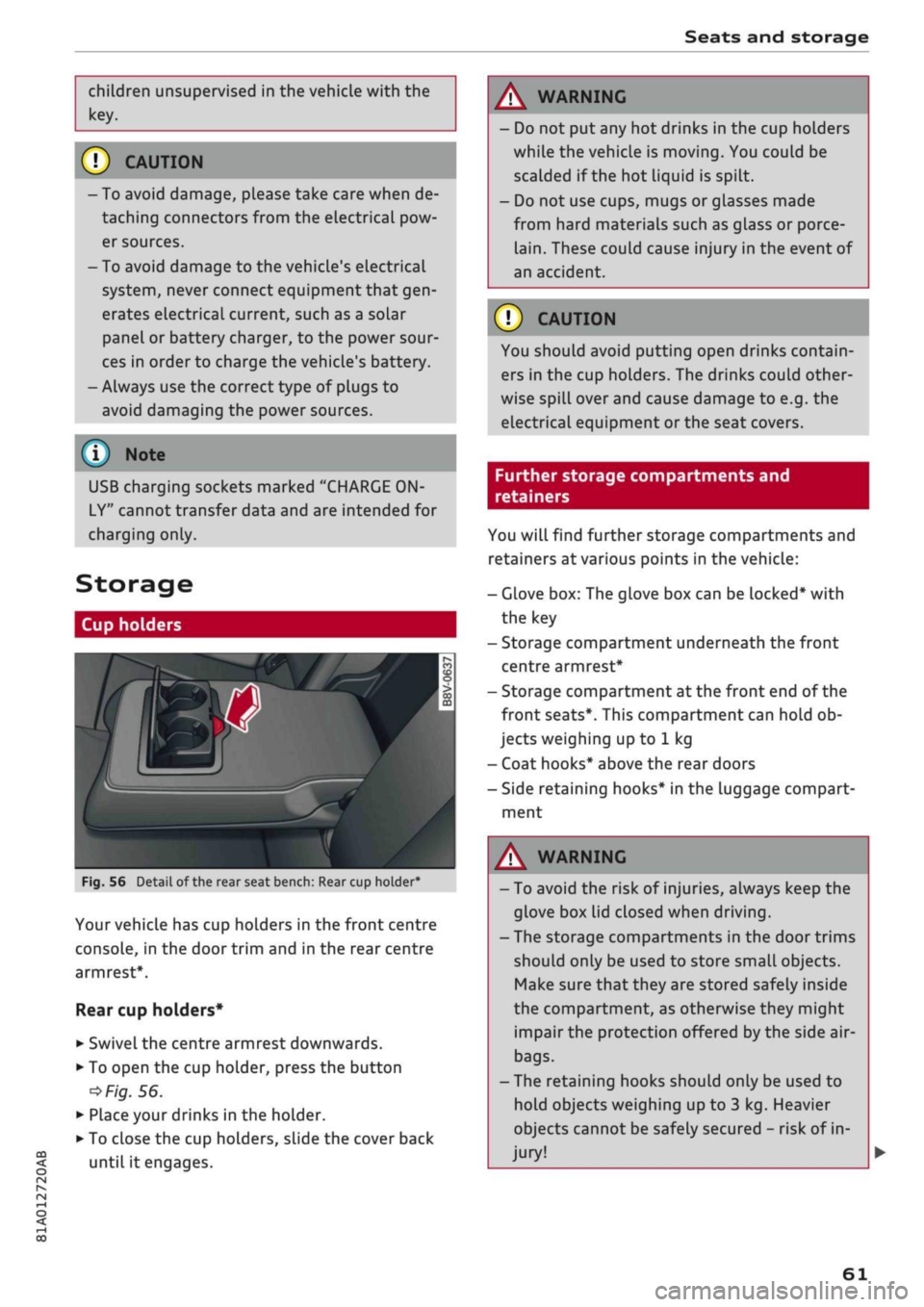
Fig.
56
BfT
^^—- j
^^ m /
Detail of the rear seat bench: Rear cup holder*
r^
n
co
3
>
CO
m
A
Your vehicle has cup holders in the front centre
console, in the door trim and in the rear centre
armrest*.
Rear cup holders*
• Swivel the centre armrest downwards.
• To open the cup holder, press the button
•=>
Fig.
56.
• Place your drinks in the holder.
• To close the cup holders, sLide the cover back
until it engages.
A WARNING
- Do not put any hot drinks in the cup holders
while the vehicle is moving. You could be
scalded if the hot liquid is spilt.
- Do not use cups, mugs or glasses made
from hard materials such as glass or porce
lain.
These could cause injury in the event of
an accident.
© CAUTION
You should avoid putting open drinks contain
ers in the cup holders. The drinks could other
wise spill over and cause damage to e.g. the
electrical equipment or the seat covers.
Further storage compartments and
retainers
You will find further storage compartments and
retainers at various points in the vehicle:
- Glove box: The glove box can be Locked* with
the key
- Storage compartment underneath the front
centre armrest*
- Storage compartment at the front end of the
front seats*. This compartment can hold ob
jects weighing up to 1 kg
- Coat hooks* above the rear doors
- Side retaining hooks* in the luggage compart
ment
A WARNING
- To avoid the risk of injuries, always keep the
glove box Lid closed when driving.
- The storage compartments in the door trims
should only be used to store small objects.
Make sure that they are stored safely inside
the compartment, as otherwise they might
impair the protection offered by the side air-
bags.
- The retaining hooks should only be used to
hold objects weighing up to 3 kg. Heavier
objects cannot be safely secured - risk of in
jury!
61
Page 79 of 364
Driving
CO
<
O
rN
IV
rN
t-H
o <
® For the sake of the environment
Do not warm up the engine by running it with
the car stationary. You should drive off imme
diately whenever possible. This will help avoid
unnecessary exhaust emissions.
© Note
- Any noises which may be heard when the
engine is started are quite normal and no
cause for concern.
- If
you
leave your vehicle with the ignition
switched on, it will be switched off auto
matically after
a
while. Please note that
electrical equipment such as the exterior
lighting will also be switched off.
Switching off the engine
Applies to: vehicles with convenience key
•
Stop the vehicle.
•
Automatic gearbox: Move the selector lever to
position P.
•
Press the ISTART ENGINE STOP| button
tapage
76, Fig. 70.
Steering
lock15
The steering will be locked if
you
switch off the
engine with the ISTART ENGINE STOP| button,
move the selector lever to position P (on vehicles
with automatic gearbox*) and open the driver's
door. The steering lock acts as a theft deterrent.
Emergency Off function
If necessary in an emergency, the engine can be
switched off while the vehicle is still moving at
speeds of 7 km/h and above. To switch off the
engine, press the ISTART ENGINE STOP| button
twice in quick succession or hold it in for longer
than two seconds.
A WARNING
- Never switch off the engine until the vehicle
is stationary. Otherwise you may not have
the full benefit of the brake servo and pow
er steering. You may need more strength to
steer and brake the vehicle than you nor
mally would. This would mean a greater risk
of accidents and serious injury, because you
cannot steer and brake in the normal
man
ner.
- Always take the key with you when you Leave
the vehicle. Otherwise the engine can be
started or power-operated equipment such
as the electric windows can be used. This
could result in serious injury.
- When parking, always move the selector
lever to position
P
to prevent the vehicle
from rolling back accidentally.
If the engine has been working hard for
a
long
time,
there is a risk of heat building up in the
engine compartment after the engine has
been switched off; this could cause engine
damage. For this reason, you should leave the
engine idling for about 2 minutes before
switching it off.
©
Note
After the engine is stopped, the radiator fan
may remain on or turn itself back on for up to
10 minutes, even if the ignition is switched
off. This may occur for the following reasons:
- Residual heat has raised the coolant
tem
perature.
- Direct sunlight has additionally heated up
the engine compartment while the engine is
warm.
- Applies to vehicles with diesel particulate
filter: The emission control system is hot
because of the regeneration process, even
though the engine has
not
yet reached oper
ating temperature.
Driver messages
Engine running. Warning! Switch off ignition
before leaving car
1J
This function is not available on all export versions.
77
Page 80 of 364

Driving
This message appears
and a
buzzer sounds
if
you
open
the
driver's door while
the
engine
is
run
ning.
Pressing start/stop button again will switch
off
engine.
This message appears
if
you press
the
ISTART
ENGINE
STOPI*
button while
the
vehicle
is moving
<^>page
77,
Emergency
Off
function.
Engine start system: fault. Please contact work
shop
A fault
has
occurred when starting
the
engine
au
tomatically (automatic start function). Drive
to a
qualified workshop soon
and
have
the
fault
recti
fied.
To
start
the
engine, turn
the
ignition
key to
position
@
^>page
74 or
press
the
ISTART
ENGINE
STOPl
button and hold the
key/button until
the
engine starts.
D
Key not
recognised. See owner's manual
This message appears
if
there
is no
convenience
key inside
the
vehicle
or if
the system cannot
de
tect
or
identify
the
key. This
can
happen,
for ex
ample,
if
the radio signal from
the key is
obstruc
ted
by a
metal briefcase
or
similar,
or if the key
battery
is
weak. Electronic equipment, such
as
mobile phones,
can
also interfere with
the
radio
signal from
the key.
The engine
can
still
be
started
or
stopped
if
this
happens (please refer
to
^page
79).
C]
Remote control key: hold back
of key
against marked area.
See
owner's manual
If
the
indicator lamp lights
up and the
message
appears,
a
malfunction
has
occurred
^>page
79.
3
Key not in
vehicle?
3
Remote control key:
key not
recognised.
Is
key still
in
vehicle?
If
the
indicator
lampGB
Lights
up and the
mes
sage appears,
the
convenience
key
was removed
from
the
vehicle while
the
engine
was
running.
If
the convenience
key is not in the
vehicle
you
will
not
be
able
to
switch
on the
ignition
or
restart
the engine after
it has
been switched
off. You
will
also
not be
able
to
lock
the
vehicle from
the
out
side.
Please press brake pedal
This message appears
on
vehicles with
an
auto
matic gearbox
if
you
try to
start
the
engine
with
out first pressing
the
brake pedal.
Please press clutch pedal
This message appears
if
you
try to
start
the en
gine without first pressing
the
clutch pedal.
The
engine will only start
if
you press
the
clutch
ped
al.
Please engage
N or P
This message will appear
if
you
try to
start
or
switch
off the
engine when
the
selector lever
is
not
in N or P. The
engine
can
then
not be
started
or switched
off.
Switch
off
ignition before leaving
car.
Battery
is
being discharged
This message appears
and the
buzzer sounds
if
you open
the
driver's door while
the
ignition
is
switched
on.
Switch
off
the ignition
to
prevent
the vehicle battery from being discharged.
Shift
to P,
vehicle can roll away. Doors can only
be locked
in P
For safety reasons, this message will appear
if
the selector Lever
of the
automatic gearbox
is not
in position P when
you
switch
off the
ignition.
Put
the selector lever
in
position
P;
otherwise
the ve
hicle
can
roll away
and
cannot
be
locked.
78
Page 85 of 364

Driving
start moving immediately and could cause
an accident.
- You should only use the emergency braking
function in a real emergency, for example if
the brake system were to fail or if the brake
pedal were to be obstructed. If
you
use the
emergency braking function by activating
the parking brake switch, this has the same
effect as heavy braking. Please remember
that the ESC (and the integrated ABS, EDL
and traction control functions) is still sub
ject to certain physical limits. In a corner or
in bad road or weather conditions an emer
gency stop can cause the vehicle to skid or
lose steering control.
- It is not possible to apply the parking brake
if the electrical power supply fails. In this
case,
park the vehicle on a
level
surface and
select 1st gear (manual gearbox) or move
the selector lever to position
P
(automatic
gearbox) to prevent
it
from rolling. Obtain
professional assistance.
- Always take the key with you when leaving
your
vehide
- even if
you
only intend to be
gone for
a
short time. This is especially im
portant if children are left in the car. They
might otherwise be able to start the engine,
release the parking brake or use power-op
erated equipment such as the electric
win
dows - this could lead to injuries.
- Do not leave anyone (especially children) in
the vehicle when it is locked. Locked doors
could delay assistance in an emergency, po
tentially putting lives at risk.
© Note
Applies to: vehicles with automatic gearbox
You can apply the parking brake manually or
switch on the hold assist* when stopping at
traffic lights, etc. You do not then have to
hold the car with the brake pedal, as the
brakes will stop it creeping forward while a
gear is engaged in the automatic transmis
sion.
When you drive off in the normal way,
co
the parking brake will be released automati-
<
° cally
and your vehicle will start moving
2 •=>
page 83. o < 00
O
Note
- Any slight noise which may be heard when
the parking brake is applied or released is
quite normal and no cause for concern.
- The parking brake runs an automatic test
cycle at regular intervals when the vehicle is
parked.
This may cause a slight noise, which
is normal.
- If the electrical power supply fails, it is not
possible to release the parking brake (if it
was applied) or to apply the parking brake
(if it was released)
•=> A-
Obtain professional
assistance.
Driving away from a
standstill
Various features and safety functions are availa
ble for driving off, depending on the equipment
in your vehicle.
Hill starting with the parking brake applied
Important: The driver's door must be closed.
•
To drive off more easily on a slope, apply the
parking brake and drive off just as you usually
would.
The parking brake will be released auto
matically, but not until there is enough power
at the wheels to make the vehicle move in the
desired direction.
Hill starting with the hill hold assist
The hill hold assist function makes it easier to
drive away on a slope.
Important: The driver's door must be closed and
the engine must be running.
•
To activate the hill hold assist, press and hold
the brake pedal for several seconds. The vehicle
must be on a slope and facing uphill.
When you release the brake pedal the braking
force will be maintained for
a
moment
^^
in
order to hold the vehicle and make it easier for
you to drive away. •
83