remote control AUDI Q2 2021 Owner´s Manual
[x] Cancel search | Manufacturer: AUDI, Model Year: 2021, Model line: Q2, Model: AUDI Q2 2021Pages: 364, PDF Size: 87.77 MB
Page 131 of 364

Driver assist systems
CO
rN
r>
rN
•-i
00
- In certain situations, the system may not
function properly, or the functionality of the
system may be restricted. For example:
- If other vehicles are approaching very
quickly, or if
you
are overtaking other
vehicles quickly. The warning lamp may
not light up
intime.
- In poor weather conditions, such as heavy
rain,
snow or road spray.
- If
you
are travelling in very wide lanes, in
tight bends or over crests. The system
may not detect vehicles in the adjacent
lane because they are outside the area
covered by the sensors.
© CAUTION
Impacts or damage to the bumper, wheel
arches or underbody can cause misalignment
of the sensors. This can impair the functional
ity of the system. Have the systems checked
by
a
qualified workshop.
The warning lamps on the exterior mirrors
may not be properly visible if tinted foil is af
fixed to the side windows on the driver's or
passenger's side.
Switching on/off
Applies to: vehicles with Audi side assist
The
system can be switched on and off
on
the in
fotainment system.
The warning Lamps in the exterior mirrors light
up briefly each time the ignition is switched on to
indicate that the system is activated.
•
Select the following on the infotainment sys
tem:
|MENU|
button > Car
>
left control button
> Driver assist
>
Audi side assist. SeLect off to
switch off the system.
Adjusting brightness of warning lamp
Applies to: vehicles with Audi side assist
The
brightness of the warning lamp can be ad
justed on the infotainment system.
•
Select the following on the infotainment sys
tem:
|MENU|
button > Car
>
left controL button
> Driver assist
>
Audi side assist.
The brightness of the warning lamp in both the
information and warning modes is regulated au
tomatically according to the ambient Light Level.
If
you
are in very dark
or
very Light surroundings
when you adjust the brightness of the warning
lamp,
the automatic brightness control may al
ready have reached the lowest or the brightest
setting.
In such a case it is possible
that
you
won't notice a difference while you are adjusting
the brightness or that you will only notice it once
the light surroundings have changed.
Please adjust the brightness of the warning lamp
for the information mode so that it does not dis
tract you while you are looking at the road in
front. When you change the brightness, the
warning lamp on the exterior mirror will light up
briefly with the intensity set for the information
mode.
The intensity of the lamp in the warning
mode is Linked to the intensity in the information
mode and is adjusted automatically.
© Note
- The side assist is not active while the set
tings are being adjusted.
- Your personal settings are stored automati
cally and assigned to the remote control key
which is being used.
129
Page 135 of 364
Driver assist systems
•
Select the following on the infotainment sys
tem:
|MENU|
button > Car
>
left control button
> Audi drive select.
•
Select and confirm the desired setting.
You can change the mode while the vehicle is sta
tionary or moving. If traffic conditions permit,
take
your
foot off the accelerator briefly after you
change the mode so that the new mode is also
activated for the engine.
efficiency* - trims the vehicle to a fuel-saving
set-up and helps the driver adopt an economical
driving style.
comfort - alters the vehicle set-up for a more
comfortable ride and is suitable for long motor
way trips, for instance.
auto - gives an overall impression of
a
comforta
ble but dynamic ride and is a good choice of set
up for everyday use.
dynamic - gives the vehicLe a tighter set-up and is
ideal for performance driving.
individual* -
^>page
133.
A WARNING
Always keep an eye on the traffic when using
the drive select controls - Risk of accident!
CO
rN
r>
rN
•-i
00
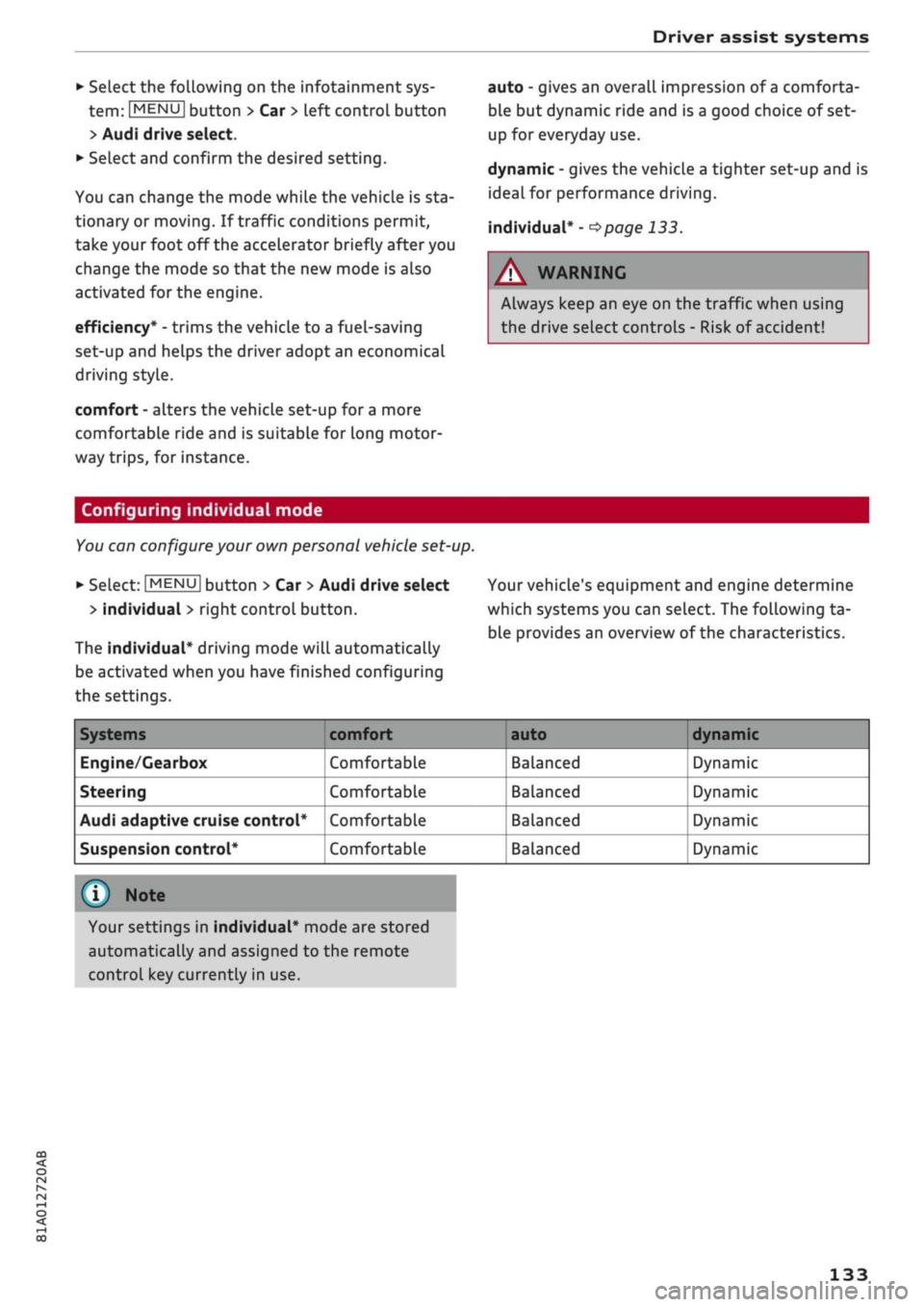
Configuring individual mode
You
can configure your own personal vehicle set-up.
*-
Select: |MENU| button > Car
>
Audi drive select
> individual
>
right control button.
The individual* driving mode will automatically
be activated when you have finished configuring
the settings.
Your vehicle's equipment and engine determine
which systems you can select. The following ta
ble provides an overview of the characteristics.
Systems
Engine/Gearbox
Steering
Audi adaptive cruise control*
Suspension control*
comfort
Comfortable
Comfortable
Comfortable
Comfortable
auto dynamic
Balanced
Balanced
Balanced
Balanced
Dynamic
Dynamic
Dynamic
Dynamic
© Note
Your settings in individual* mode are stored
automatically and assigned to the remote
control key currently in use.
133
Page 145 of 364

Parking aids
CO
<
o
rN
iv
rN
t-H
o
< 00
Park assist: currently unavailable. Continue
steering vehicle!
The park assist cannot be used to park the
vehi
cle.
Try repeating the parking manoeuvre or
switching the ignition off and on again.
3 Park assist: ended. Please take over steering
and continue driving
The park assist has finished manoeuvring the ve
hicle out of the parking space. Please take over
the steering.
Park assist: cancelled. Space too small. Con
tinue steering vehicle!
The park assist cannot be used to park the vehicle
in this space. Park the vehicle without using the
park assist or look for a bigger space.
Park assist: cancelled. Obstacle detected.
Please take over steering.
The park assist has interrupted the parking ma
noeuvre to avoid a collision between the vehicle
and an obstacLe.
Park assist: ended
3 Park assist: ended. Please take over steer
ing.
The park assist has finished the parking manoeu
vre.
Park assist: stabilisation control (ESC) input
The parking space indicated has been rejected be
cause the ESC has intervened.
Park assist: currently unavailable. Towing
mode
The park assist cannot be used to park the vehicle
when towing a trailer.
1
Park assist: not stopped long enough
After you select reverse gear, the vehicle has to
remain stationary for
a
moment so that the park
assist can activate the steering. Follow the direc
tions given in the display.
3
Park assist: cancelled. Assist function un
available for leaving parking space. Space too
small
The assist function is unable to automatically
steer the vehicle out of the parking space be
cause the space is too small. Manoeuvre the
vehi
cle out of the parking space without using the
park assist.
Park assist: cancelled. Continue steering ve
hicle!
The park assist has interrupted the parking ma
noeuvre.
Settings for parking aid
Applies
to: vehicles with rear parking aid/parking system
plus/reversing
camera/park assist
You
can change the settings for these functions
on the infotainment system.
•
Select the following on the infotainment sys
tem:
|MENU[
button > Car
>
left control button
> Driver assist
>
Parking aid. Or:
•
Select the right control button* on the infotain
ment system when the parking aid is activated.
End*
- To cancel the parking aid
Activate automatically - To switch automatic ac
tivation on/off
Front volume* - Volume for the front and side*
zones
Rear volume - Volume for the rear zone
In-car
entertainment fader - The volume of the
current audio or video source is reduced when the
parking aid is switched on.
You will hear
a
short test tone each time you
make a new setting.
Trailer view* - To display the trailer view
- Some of the menus can only be called up via
the right control button when the parking
aid is activated.
- The volume and automatic activation set
tings are automatically stored and assigned
to the remote control key in use.
143
Page 152 of 364
Intelligent technology
Dynamic power management
While the vehicle is moving, this function distrib
utes the available power to the various electrical
components and systems according to their re
quirements. It ensures that on-board systems do
not consume more electrical power than is being
generated,
and thus maintains the maximum
possible vehicle battery power level.
® Note
- The power management system is not able
to overcome the given physical limits.
Please remember that the power and life of
the vehicle battery are limited.
- If the indicator lamp
|3 ^page
31 appears,
the starting ability may be impaired.
Starting ability has first priority.
Short trips, city traffic and low temperatures all
place a heavy load on the vehicLe battery. In
these conditions a large amount of power is
con
sumed,
but only
a
small amount is supplied. The
situation is also critical if electrical equipment is
in use when the engine is not running. In this
case power is consumed when none is being
gen
erated.
In these situations you will be aware that the
power management system is intervening to
con
trol the distribution of electrical power.
When the vehicle is parked for long periods
If
you
do not drive your vehicle for a period of
several days or weeks, the power management
will gradually shut off the on-board systems one
by one, or reduce the amount of current they are
using.
This limits the amount of power consumed
and helps to ensure reliable starting even after a
long period. Certain convenience features, such
as remote controL unlocking, may not be availa
ble.
These functions will be restored when you
switch on the ignition and start the engine.
150
With the engine switched off
If
you
listen to the radio or use the other info
tainment functions when the engine is not
run
ning,
this will discharge the vehicle battery.
The infotainment display will show a warning
message before the battery power drops to a Lev
el where the starting ability is impaired. This
message warns you that the system you are using
will soon be switched off automatically. You
should therefore start the engine if
you
wish to
continue using the system.
When the engine is running
Although the alternator generates electrical
power, the vehicle battery can still become dis
charged while the vehicle is being driven. This can
occur when a lot of power is being consumed but
only
a
small amount supplied, especially if the
vehicle battery is not fully charged initially.
To restore the necessary energy balance, the sys
tem
will
then temporarily shut off the electrical
components that are using a lot of power, or re
duce the current they are consuming. Heating
systems in particular use a Large amount of elec
trical power. If
you
notice, for instance, that the
seat heating* or the rear window heater is not
working,
they may have been temporarily switch
ed off or regulated to a lower heat output. These
systems will be available again as soon as
suffi
cient electrical power is available.
You may also notice that the engine runs at a
slightly faster idling speed. This is quite normal,
and no cause for concern. The increased idling
speed allows the alternator to meet the greater
power requirement and charge the vehicLe bat
tery at the same time.
Information saved in the
control units
The vehicle is fitted in the factory with electronic
control units that, among other things, control
the engine and the gearbox. The controL units al
so monitor the exhaust system and the airbags.
The control units continually analyse data rele
vant to the vehicLe while you are driving. In the •
Page 175 of 364

Telephone
- We recommend using the vehicle's Wi-Fi
hotspot* when the car phone* is in use so
that
your mobile phone's apps retain access
to the Internet.
- When the car phone function* is active, Audi
connect (infotainment)* is only available us
ing
your
own SIM card
^>page
191.
Setting up
Connecting a mobile phone via Bluetooth
Applies
to: vehicles with telephone
Does
this PIN match the PIN on your
Bluetooth
device?
967536
Fig.
159
PIN display for entry on mobile phone
Important
The vehicle must be stationary, and the ignition
must be switched on.
The Bluetooth function and the discoverability
option of the MMI system
Opcge
258 and the
mobile phone must be activated.
The mobile phone you would like to connect must
not be connected to any other Bluetooth device.
The MMI must not be connected to a mobile
phone.
A mini SIM card must not be inserted in the SIM
card reader*.
Connecting a mobile phone
•
Select: |MENU| button
>
Telephone
>
Connect
mobile phone
>
Find new devices > Continue.
The available Bluetooth devices will be shown
on the infotainment display. Or: Select:
|MENU|
button > Settings > left control button > MMI
settings > Connection manager
^>page
257.
•
Select and confirm the desired mobile phone
from the list of Bluetooth devices shown.
• The MMI will generate a PIN for the connection
*Fig.
159.
•
Select and confirm Yes.
•
Enter the PIN to establish a connection on your
mobiLe phone. Or: If the PIN is already being
displayed on your mobile phone, confirm it on
the phone and on the MMI. You have about 30
seconds to enter the PIN.
•
You may need to enter the PIN for your SIM
card
intheMMl".
•
Please note any additional system queries on
your mobiLe phone, e.g. whether the phone
should connect automatically in the future. On
some mobiLe phones, you may also need to
download the directory and allow access to
your messages separately.
After connecting successfully
After the connection has been established suc
cessfully, you will be shown a short message
con
taining information on the profiles used to estab
lish the connection. You can also change the pro
files afterwards. Select: |MENU| button > Set
tings > left control button > MMI settings
>
Con
nection manager
<=$page
257.
In addition, the contacts on the mobile phone are
automatically loaded into the directory of the
MMI.
This may take several minutes, depending
on how many contacts are stored on the mobile
phone.
Applies
to: vehicles with Audi connect (infotainment)
•
If
you
have successfully connected your mobile
phone via the Bluetooth remote SIM Access
Profile, you can use either the embedded SIM
card
2)
or your own SIM card to use Audi
con
nect infotainment services.
•
Confirm the system query with either Yes or
No.
For more information on Audi connect (in
fotainment), please refer to
^>page
191.
*•
Yes:
All data connections for all Audi connect
infotainment services will be established by a
CO
<
o
rN
IN
rN
t-H
o
<
-1'
Not available in all markets. Applies to mobile phones
with
Bluetooth remote SIM Access Profile on vehicles with
Audi
connect (infotainment)* and Audi phone box*.
2)
SIM card installed in vehicle at factory.
173
Page 180 of 364
Telephone
A WARNING
- Loose objects can be flung around in the
passenger compartment in the event of
sud
den driving or braking manoeuvres. This
could result in serious injuries and also
cause you to lose control of the vehicle. Al
ways keep the centre armrest closed when
driving.
- The mobile phone may become hot while
charging wirelessly. Consider the tempera
ture of your mobile phone when removing
it.
Take the mobile phone out of the Audi
phone box carefully.
© Note
- The Audi phone box is not available in all
countries. Your Audi dealer will be able to
provide you with more detailed information.
- If the mobile phone is placed in the Audi
phone box in a bag or
a
protective case, this
may interfere with the connection to the ex
ternal aerial*.
- Any metal objects in the Audi phone box will
prevent the mobile phone from charging
wirelessly or being used to make calls via
the external aerial*.
- The charging time and the temperature vary
depending on the mobile phone being used.
-The ignition must be switched on to charge
a mobile phone in the Audi phone box.
- To avoid malfunctions, ensure that the mo
biLe phone is correctly placed inside the
Audi phone box.
-The maximum charging capacity is 5 W.
- An enhanced transmission quality cannot be
guaranteed if more than one mobile phone
is placed inside.*
-Audi recommends the use of Audi Genuine
Accessories. Audi has tested these products
for suitability, reliability and safety.
- USB adapters are available from Audi
deal
ers or specialist retailers.
- When you charge your mobile phone wire
lessly, the charging procedure may be inter
rupted if
you
place your remote control key
in the Audi phone box together with the
mobile phone.
Using the telephone
Calling up the telephone
Applies
to: vehicles with telephone
~~ .*|
Call
list
^^
•£?
Favourites
i
'^
Directory
y»
^ Enter
phone number
^^f
I
Text message (SIM card)
Fig.
162 Example: Telephone functions in the selection
menu
i\ï
Enter
number
SI
Text
message
(SIM
card)
I
Text message (MyPhone)
Text
message (Additional phone)
^mail
(MyPhone)
Fig.
163 Example: Further telephone functions in the se
lection
menu
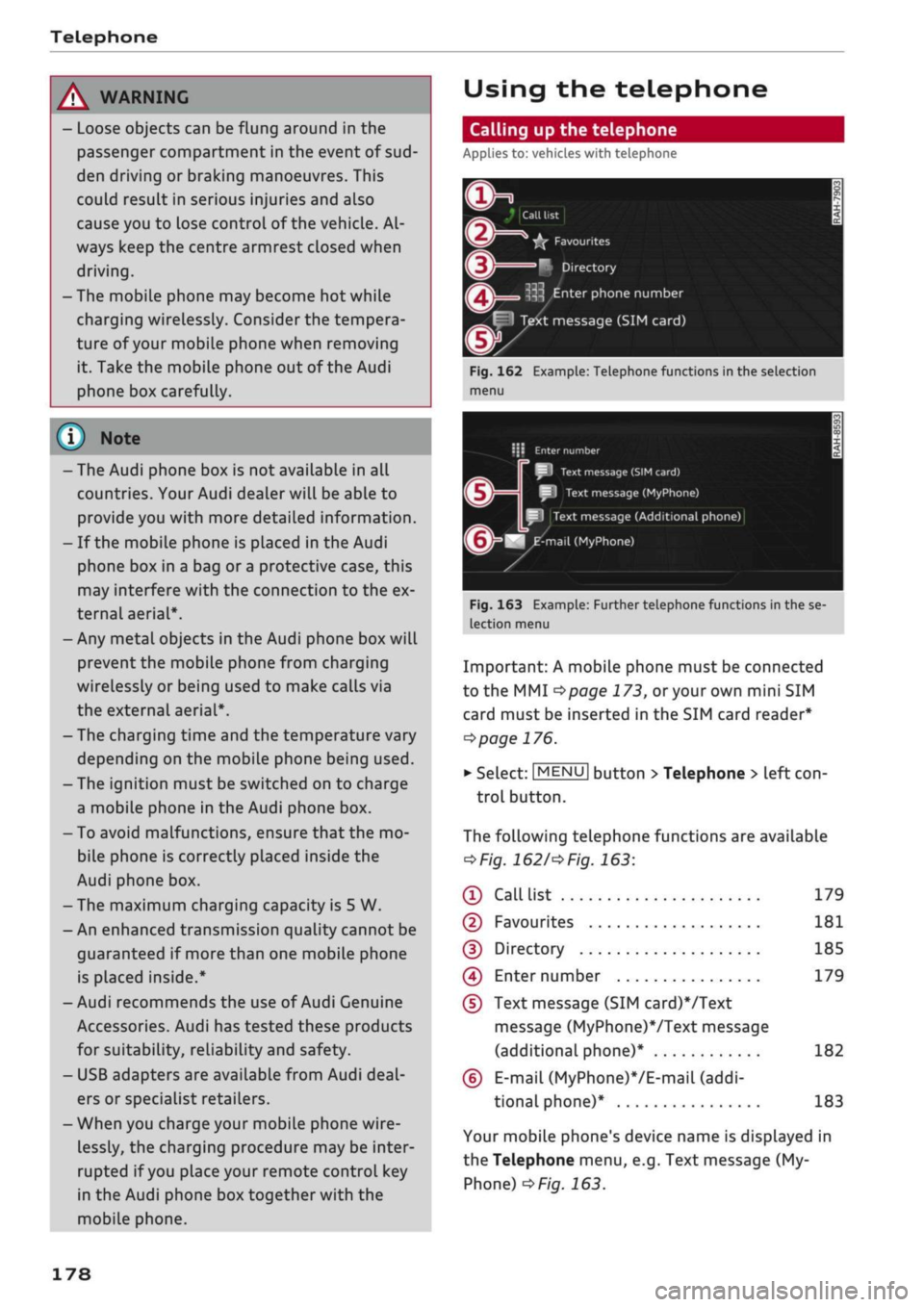
Important: A mobile phone must be connected
to the MMI
<^>page
173,
or
your own mini SIM
card must be inserted in the SIM card reader*
^>page
176.
• Select: |MENU| button
>
Telephone > left
con
trol button.
The following telephone functions are available
*Fig.
1621'*
Fig.
163:
® Call
list 179
©
Favourites 181
(D Directory 185
(4) Enter number 179
(D
Text message (SIM card)*/Text
message (MyPhone)VText message
(additional phone)* 182
(6)
E-mail
(MyPhone)*/E-mail
(addi
tional phone)* 183
Your mobile phone's device name is displayed in
the Telephone menu, e.g. Text message (My
Phone)
^>Fig.
163.
178
Page 191 of 364
Telephone
Import contacts/Export contacts
Refer to
^>page
187.
Download directory
To update the contacts in the MMI, you can
download the contacts from your mobile phone
manually. Depending on the mobile phone you
are using, the Bluetooth connection may have to
be disconnected and re-established before you
can update the contacts.
Hiding contacts without a number
If this function is switched on
0
and if no num
ber has been stored for
a
contact, the contact is
displayed greyed out in the directory.
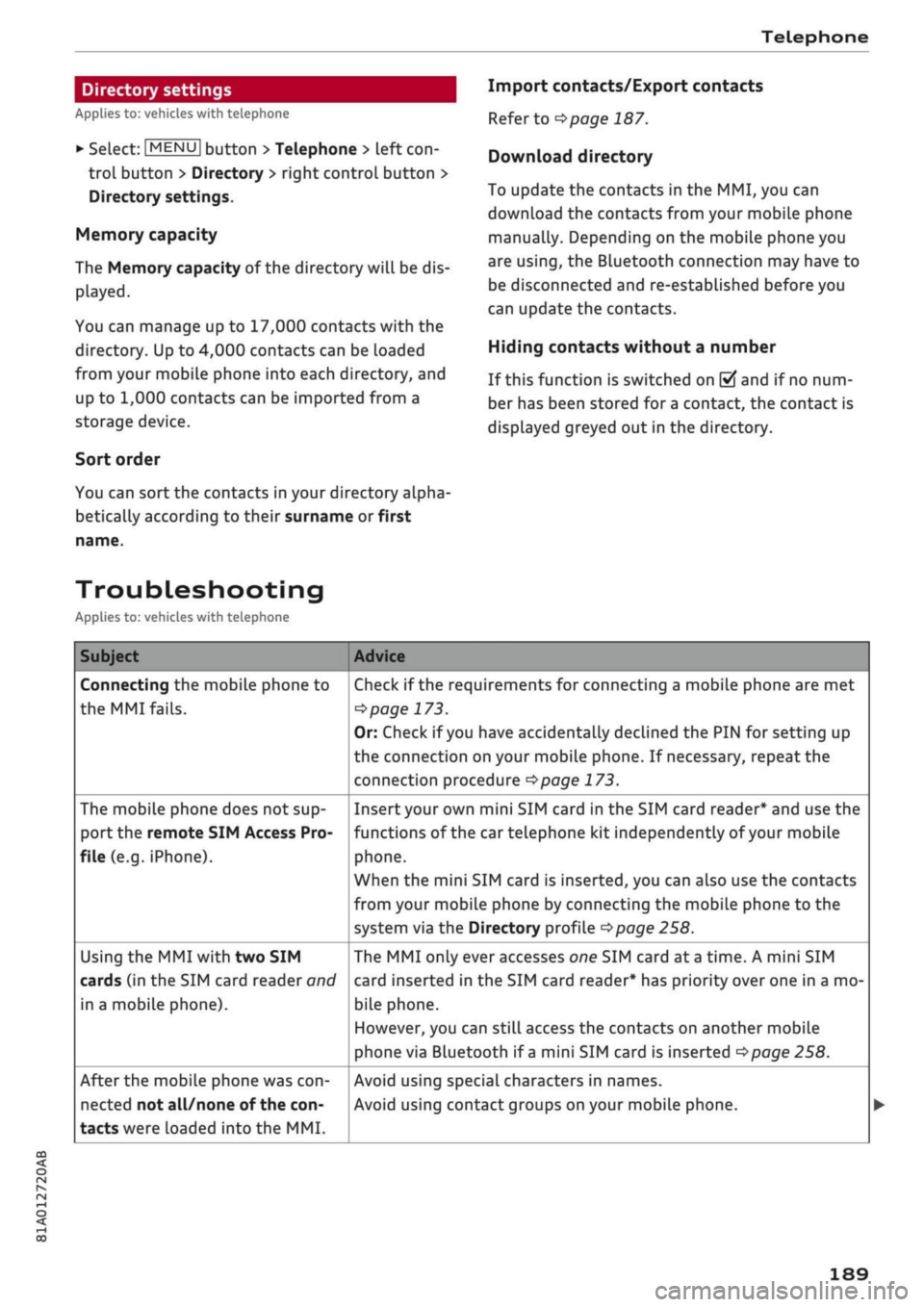
Troubleshooting
Applies to: vehicles with telephone
Subject
Connecting the mobile phone to
the
MMI fails.
The mobile phone does not sup
port the remote SIM Access Pro
file (e.g. iPhone).
Using the MMI with two SIM
cards (in the SIM card reader
oncf
in a mobile phone).
After the mobile phone was
con
nected not all/none of the
con
tacts were loaded into the MMI.
Advice
Check if the requirements for connecting a mobile phone are met
^>page
173.
Or: Check if
you
have accidentally declined the PIN for setting up
the connection on your mobile phone. If necessary, repeat the
connection procedure
^>page
173.
Insert your own mini SIM card in the SIM card reader* and use the
functions of the car telephone kit independently of your mobile
phone.
When the mini SIM card is inserted, you can also use the contacts
from your mobile phone by connecting the mobiLe phone to the
system via the Directory profile
^>page
258.
The MMI only ever accesses one SIM card at
a
time. A mini SIM
card inserted in the SIM card reader* has priority over one in a mo
bile phone.
However, you can still access the contacts on another mobile
phone via Bluetooth if
a
mini SIM card is inserted
^>page
258.
Avoid using special characters in names.
Avoid using contact groups on your mobile phone.
CO
rN
IN
rN
i-H
00
189
Directory settings
Applies to: vehicles with telephone
•
Select:
|MENU|
button
>
Telephone
>
left
con
trol button > Directory
>
right control button >
Directory settings.
Memory capacity
The Memory capacity of the directory will be dis
played.
You can manage up to 17,000 contacts with the
directory. Up to 4,000 contacts can be loaded
from your mobile phone into each directory, and
up to 1,000 contacts can be imported from a
storage device.
Sort order
You can sort the contacts in your directory alpha
betically according to their surname or first
Page 192 of 364
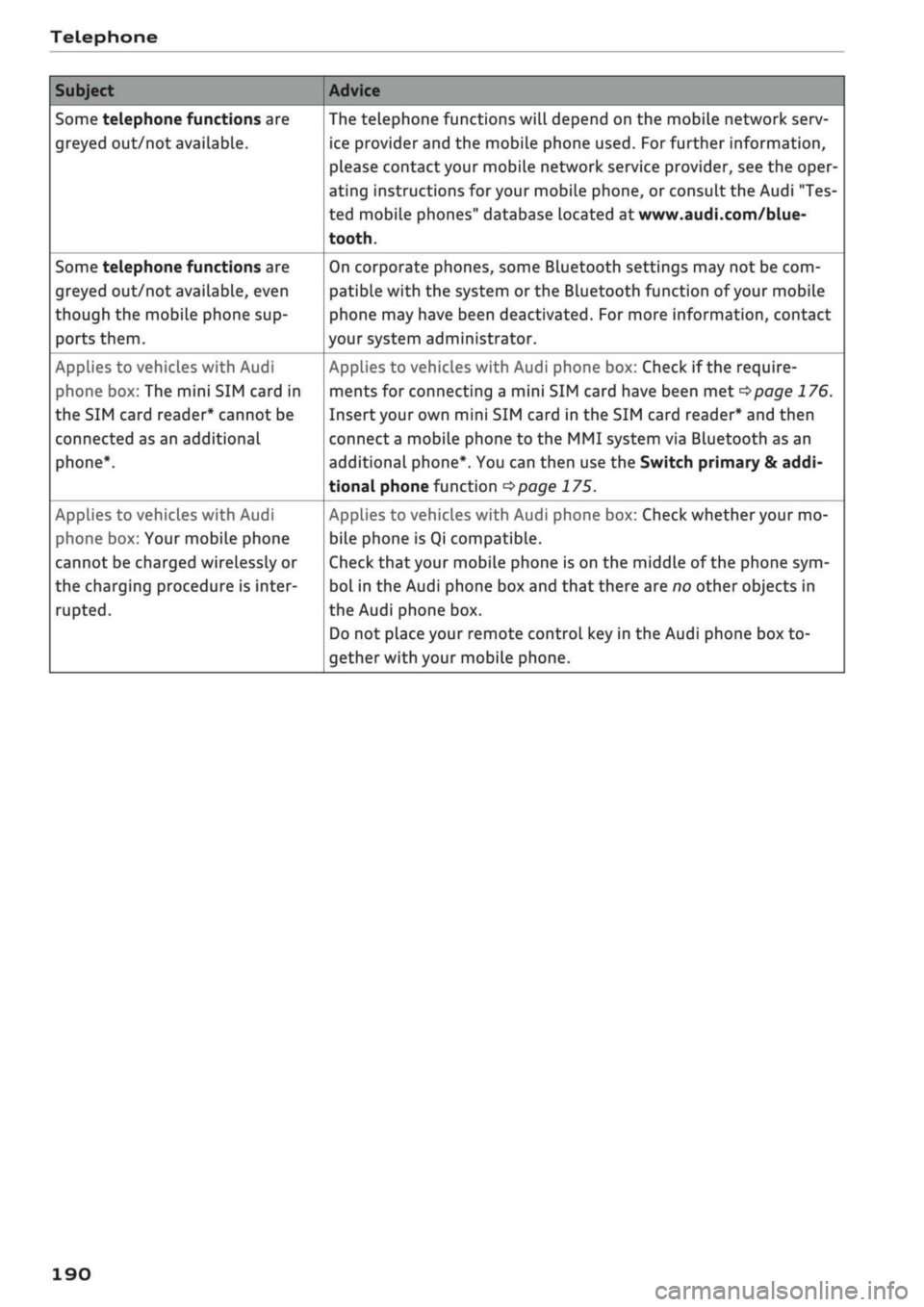
Telephone
Subject
Some telephone functions are
greyed out/not available.
Some telephone functions are
greyed out/not available, even
though the mobiLe phone sup
ports them.
Applies to vehicles with Audi
phone box: The mini SIM card in
the SIM card reader* cannot be
connected as an additional
phone*.
Applies to vehicles with Audi
phone box: Your mobile phone
cannot be charged wirelessly or
the charging procedure is inter
rupted.
Advice
The telephone functions will depend on the mobile network serv
ice provider and the mobile phone used. For further information,
please contact your mobile network service provider, see the oper
ating instructions for your mobile phone, or consult the Audi "Tes
ted mobile phones" database located at
www.audi.com/blue-
tooth.
On corporate phones, some Bluetooth settings may not be com
patible with the system or the Bluetooth function of your mobile
phone may have been deactivated. For more information, contact
your system administrator.
Applies to vehicles with Audi phone box: Check if the require
ments for connecting a mini SIM card have been met
^>page
176.
Insert your own mini SIM card in the SIM card reader* and then
connect
a
mobile phone to the MMI system via Bluetooth as an
additional phone*. You can then use the Switch primary & addi
tional phone function
<^>page
175.
Applies to vehicles with Audi phone box: Check whether your mo
bile phone is Qi compatible.
Check
that
your mobile phone is on the middle of the phone sym
bol in the Audi phone box and that there are no other objects in
the Audi phone box.
Do not place your remote control key in the Audi phone box to
gether with your mobile phone.
190
Page 196 of 364
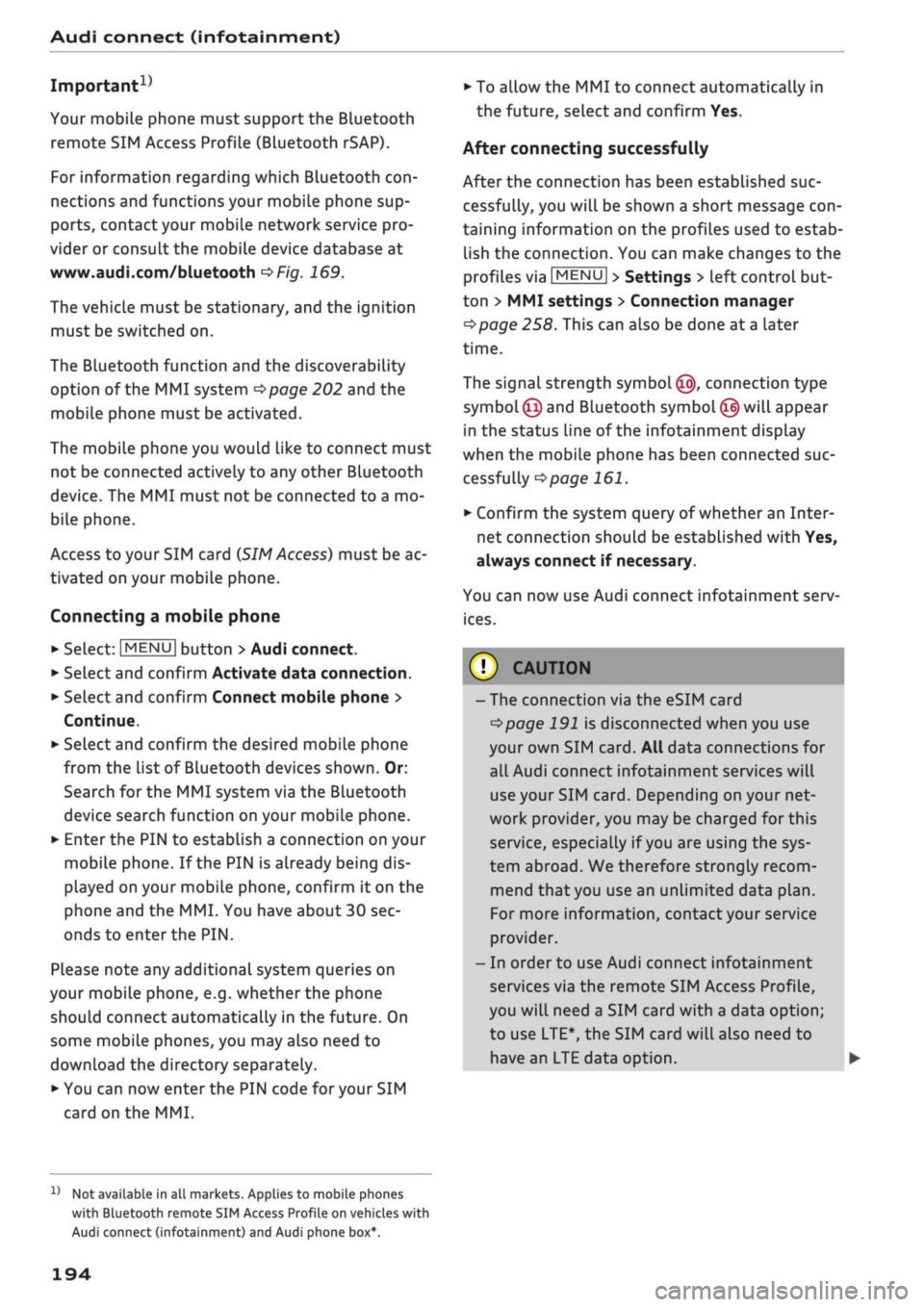
Audi connect (infotainment)
Important1'
Your mobile phone must support the Bluetooth
remote SIM Access Profile (Bluetooth rSAP).
For information regarding which Bluetooth
con
nections and functions your mobile phone sup
ports,
contact your mobile network service pro
vider or consult the mobile device database at
www.audi.com/bluetooth
oF/g.
169.
The vehicle must be stationary, and the ignition
must be switched on.
The Bluetooth function and the discoverability
option of the MMI system
•=>page
202 and the
mobile phone must be activated.
The mobile phone you would like to connect must
not be connected activeLy to any other Bluetooth
device. The MMI must not be connected to a mo
bile phone.
Access to your SIM card (SIM
Access)
must be ac
tivated on your mobile phone.
Connecting a mobile phone
•
Select:
|MENU|
button
>
Audi connect.
•
SeLect and confirm Activate data connection.
•
Select and confirm Connect mobile phone >
Continue.
•
Select and confirm the desired mobile phone
from the list of Bluetooth devices shown. Or:
Search for the MMI system via the Bluetooth
device search function on your mobile phone.
•
Enter the PIN to establish a connection on your
mobile phone. If the PIN is already being dis
played on your mobile phone, confirm it on the
phone and the MMI. You have about 30 sec
onds to enter the PIN.
Please note any additional system queries on
your mobile phone, e.g. whether the phone
should connect automatically in the future. On
some mobiLe phones, you may aLso need to
download the directory separately.
•
You can now enter the PIN code for your SIM
card on the MMI.
Not available in all markets. Applies to mobile phones
with Bluetooth remote SIM Access Profile on vehicles with
Audi connect (infotainment) and Audi phone box*.
•
To allow the MMI to connect automatically in
the future, select and confirm Yes.
After connecting successfully
After the connection has been established suc
cessfully, you will be shown a short message
con
taining information on the profiles used to estab
lish the connection. You can make changes to the
profiles via
|MENU|
>
Settings > left control but
ton > MMI settings > Connection manager
ï>page
258. This can also be done at
a
later
time.
The signal strength symbol ©, connection type
symbol®
and Bluetooth
symbol
© will appear
in the status line of the infotainment dispLay
when the mobiLe phone has been connected suc
cessfully
^>page
161.
•
Confirm the system query of whether an Inter
net connection should be established with Yes,
always connect if necessary.
You can now use Audi connect infotainment serv
ices.
(7) CAUTION
- The connection via the eSIM card
^>page
191 is disconnected when you use
your own SIM
card.
All data connections for
all Audi connect infotainment services will
use your SIM
card.
Depending on your net
work provider, you may be charged for this
service, especially if
you
are using the sys
tem abroad. We therefore strongly recom
mend
that
you use an unlimited data
plan.
For more information, contact your service
provider.
- In order to use Audi connect infotainment
services via the remote SIM Access Profile,
you will need a SIM card with a data option;
to use LTE*, the SIM card will also need to
have an LTE data option. •
194
Page 262 of 364

System settings
- To connect a new device: Press the rotary push
button.
Select Bluetooth audio player. Search
for and connect a mobile device.
- List of devices already bonded: Select a Blue
tooth device from the list of all devices which
have already been bonded.
Wi-Fi audio player*
Important: The Wi-Fi hotspot* on the MMI sys
tem
<=>page
201 and your mobiLe phone must be
activated.
- To connect a new device: Press the rotary push
button.
Search for and connect
a
Wi-Fi enabled
device.
- To disconnect a Wi-Fi audio player: Deactivate
Wi-Fi on your Wi-Fi enabled device. The device
will be removed from the list automatically.
© CAUTION
Please always observe the information
•=>©
in
Wi-Fi hotspot on page 202.
Directory
Applies to: vehicles with telephone
You
can display the contacts from (other) mobile
phones.
Important: No mobiLe phones are connected to
the MMI via the Bluetooth remote SIM Access
Profile or the Handsfree profile.
- Connect new device: You can search for and
connect
a
new mobile phone. Or: Slide your
own mini SIM card into the slot in the SIM card
reader* until you feel it engage
^>page
176,
Fig. 160.
- List of devices already bonded: Select your mo
bile phone from the list of all mobiLe phones
which have already been bonded.
Audi smartphone
Applies to: vehicles with Audi smartphone interface
-
Connect
your mobile phone to the Audi music
interface
^>page
241 via a USB adapter
•=>page
240, Fig. 196.
- SeLect your mobile phone from the List of mo
bile phones already connected.
Further options
Further options may be available in the connec
tion manager via the right control button de
pending on the function selected.
Delete Bluetooth device*
The selected mobile phone/mobile device will be
disconnected from the MMI system and removed
from the list of devices already connected.
Display Bluetooth profiles*
You can Connect or Disconnect the Handsfree,
Car phone*, Messages*, Directory/contacts and
Bluetooth audio player profiles individually.
Bluetooth settings*
- Bluetooth: Select and confirm a discoverability
setting
for
the Bluetooth connection. Select
visible to make the MMI visible to other
devi
ces.
Select invisible to make the MMI invisible
to other devices. Devices which have already
been bonded can connect via Bluetooth even
when discoverability is deactivated. Select off
to switch discoverability off. It is then not pos
sible to establish a Bluetooth connection.
- Bluetooth audio player: When this function is
switched on
(vf,
the Bluetooth audio player is
available as a source in the Media menu.
- Bluetooth name: The Bluetooth name of the
MMI system (e.g. "AUDI MMI 2017") is dis
played and can be changed.
Online settings*
- Data connection settings: Refer to
^>page
203,
Configuring the data connection.
- Data usage meter: The number of the data
packets sent/received via the MMI system is
displayed.
Select Reset data meter to reset the
usage statistics to zero.
- Connection status: The mobiLe network provid
er for data services and the network status are
displayed.
Wi-Fi settings*
Refer to
^>page
201, Wi-Fi hotspot.
258