Temperature AUDI Q2 2021 Owner´s Manual
[x] Cancel search | Manufacturer: AUDI, Model Year: 2021, Model line: Q2, Model: AUDI Q2 2021Pages: 364, PDF Size: 87.77 MB
Page 238 of 364
Media
Media
Introduction
The MMI system includes various media drives
and provides various options for connecting
devi
ces.
For example, you can play audio/video* files
from the jukebox* or connect mobile devices to
the Audi music interface* and operate it via the
MMI.
Notes
General information
Media and format limitations: The MMI system
(including the SD card reader and the connection
for
the USB mass storage device*) has been tes
ted for use with many of the products and media
currently available on the market. However,
there may be some devices/media and audio/vid
eo*
files that are not supported or cannot be
played,
or the functionality may be limited under
certain circumstances.
Digital rights management: Please note that
copyright Law applies to audio/video* files.
The MMI media drives do not support DRM-pro-
tected files; these files are marked with the sym
bol S.
Data storage: Never store important data on SD
cards,
the jukebox*, CDs/DVDs or mobile devices.
AUDI AC shall not accept any liability whatsoever
for
the loss of files and media.
Loading times: The more files, folders or play
lists are stored on a storage device, the longer it
will take to load the audio files/video* files. We
recommend using a storage device which
con
tains only audio/video* files. If
you
want to re
duce the time it takes to load the audio/video*
files,
you can create subfolders (e.g. for an artist
or album). The loading time will be extended ad
ditionally if
you
are importing data.
Metadata: Metadata stored on audio files (e.g.
artists, tracks, album covers) will be displayed
automatically when the files are played. If this
information is not stored on the relevant medi
um,
the MMI system will use the database of
metadata from Gracenote. Nevertheless, meta
data may not be displayed in some cases.
Restricted performance: If
you
experience re
stricted performance, reset the Media settings
to the factory defaults
^page
256.
If
you
experience restricted performance from
the Jukebox*, reset it to the factory settings
<=>
page 256.
For information on the characteristics of the sup
ported media and file formats, please refer to
opage
249 onwards.
CAUTION
Please always observe the information
<=>(J)in
Wi-Fi hotspot on page 202.
CD/DVD mode
CD/DVD and format limitations: In view of the
variety of CDs/DVDs and the difference in memo
ry capacities, the functionality may be restricted
in the case of some storage devices. Under cer
tain circumstances, audio CDs/video DVDs that
are copy-protected or CDs/DVDs that do not com
ply with the standard audio format, and multi-
session CDs cannot be played at all, or the func
tionality may be limited. We recommend always
finalising the burning process when creating
multisession
CDs. Multisession is not supported
for DVDs.
Handling CDs/DVDs, the CD drive or the DVD
drive:
To ensure perfect, high-quality playback
and avoid scanning errors or damage to the me
dia drive, always store CDs/DVDs in a suitable
case and do not expose them to direct sunlight.
Do not use:
- Damaged, dirty or scratched CDs/DVDs
- Single CDs/DVDs (diameter 8 cm)
- Non-circular CDs/DVDs (shape CDs)
- CDs/DVDs with stickers
- Protective rings
- Cleaning discs
Thermal cut-out: In the case of unusually hot or
cold outside temperatures, it is possible that CD/
DVD playback will temporarily not be possible. A •
234
Page 245 of 364
Media
CO
< o rN
IV
rN
•-H
•H
00
Applies to: vehicles with Audi music interface
- Audi music interface: See
^>page
241.
Applies to: vehicles with AUX input/USB charging socket
- AUX input/USB charging socket: See
•=>
page 242.
© CAUTION
Please handle the USB adapters with care.
Make sure the cable does not become pinched
or trapped.
Audi music interface
Applies to: vehicles with Audi music interface
You
can connect your mobile devices via the Audi
music interface in order to charge the battery
and operate the devices via the MMI.
Fig.
197 Connecting mobile devices
The Audi music interface consists of
a
USB
con
nection,
an AUX input in the centre console under
the
armrest (f|) ^>page
10, Fig. 2 and another
USB connection in the centre console
©
<=>page
10, Fig. 2.
- To connect a mobile device using a USB adapt
er: Connect the corresponding USB adapter©
^>Fig.
197 to an Audi music interface connec
tion
©^F/'g.
197 or @ •=>page
10, Fig. 2 and
then connect it to the mobile device ® (e.g.
iPod).
- To charge a mobile device using a USB adapt
er: When you connect
a
mobile device to an
Audi music interface connection @
^>Fig.
197
or ©o
page 10, Fig. 2 using an appropriate
USB adapter ©
•=>
Fig.
197 the device's battery
is charged automatically.
- To disconnect a mobile device from the Audi
music interface: Detach the USB adapter©
^>Fig.
197
from
the Audi music interface.
-
To
disconnect mobile devices with Apple dock
connector: With the release tabs ©
^>page
240, Fig. 196 pressed, detach the Apple
dock connector from the Apple device.
Depending on the device you are using, the me
dia are started and operated using the mobile de
vice or the MMI
^page
243.
To connect two mobile devices: If two mobile
devices (e.g. an iPod and a smartphone) are
con
nected at the same time, both devices can be
used as a pLayback source.
You can connect mobile devices via the analogue
AUX interface:
-
To
connect a mobile device to the AUX input:
Connect the cable ©
^Fig.
197 to the AUX in
put © on the Audi music interface before
con
necting the mobile device
©
(e.g. MP3 player,
smartphone).
- To disconnect the mobile device from the AUX
input: Detach the cable©
^Fig.
197
from
the
AUX input©
^Fig.
197.
- Operation: Select and confirm the source Ex
ternal audio player ©
Opage
243, Fig. 199.
Media are started and operated using the mo
bile device©
^F/'g.
197.
A WARNING
Today's driving conditions require your full at
tention.
As the driver, you have full responsi
bility for the safety of the vehicle and other
road users. Never operate mobile devices
while the vehicle is moving - risk of accident!
©
!)
CAUTION
-To avoid damaging the connection, please
take care when detaching the connector
from the Audi music interface.
- Use a USB extension cable to connect
devi
ces with an integrated USB connector (e.g.
USB sticks). This will heLp to avoid damage
to your USB device and the Audi music inter
face.
- Very high or very Low temperatures (a com
mon occurrence in a car's interior) can cause
damage to mobile devices and/or impair
their performance. Please do not leave your •
241
Page 247 of 364
Media
CO
<
o
rN
IV
rN
i—i
o
<
•H
00
- To charge a mobile device using
a
USB adapt
er: Connect your mobile device®
^>Fig.
198
to
the charging socket® using
the
appropriate
USB adapter©.
- To disconnect
the
USB adapter from
the
charging socket: Detach
the
USB adapter©
^Fig.
198
from
the
USB charging socket.
- To disconnect mobile devices with Apple dock
connector: With
the
release tabs
©
^>page
240,
Fig.
196
pressed, detach
the
Apple
dock connector from
the
Apple device.
A WARNING
Today's driving conditions require your full
at
tention.
As
the
driver, you have full responsi
bility
for
the
safety
of
the vehicle
and
other
road users. Never use mobile devices while
the vehicle
is
moving
-
risk
of
accident!
!
)
CAUTION
-To avoid damaging
the
connection
on the
Audi music interface, please take care when
unplugging
the
connector from
the
AUX
in
put
or the
USB charging socket.
- Very high
or
very
low
temperatures
(a
com
mon occurrence
in a
car's interior)
can
cause
damage
to
mobile devices and/or impair
their performance. Please
do not
leave your
mobile devices
in the
vehicle when
the
tem
perature
is
very high
or
very
low.
© Note
- When you switch
off
the ignition,
the
USB
ports will continue
to be
supplied with pow
er as Long as
the
energy management sys
tem does
not
intervene.
- USB charging sockets marked
ICHARGEONLYI
cannot transfer data
and
are intended
for
charging only.
-
Do not
use
any
additional USB extension
ca
bles
or
adapters when connecting mobile
devices which must
be
connected
to the USB
charging
socket
©^F/g.
198
via
a USB
adapter
(^>page
240);
this could cause per
formance issues.
- The AUX adapter cable
is
available from
Audi dealers
or
specialist retailers.
- USB hubs
are not
supported.
- Please refer
to the
operating instructions
of
your mobile device
for
important informa
tion
on its
operation.
-
It
cannot
be
guaranteed that
all
mobile
de
vices will function without
any
problems.
- Using
a
mobile device with
the
engine
switched
off
will drain
the
vehicle's battery.
- Audi recommends setting
the
volume
of
a
mobile device connected
to the
AUX input
to
about
70 % of
maximum.
Playing media
Calling
up
media
You
can start
and
operate various types
of
media
via
the MMI
control console.
| Jukebox
I
Q
DVD
Audi
music interface
Xux
^external
audio player
Fig.
199
Illustration:
Possible sources
in the
media menu
3H
BT
audio
playe
Ç"
WI-FI
audio player
• Online media
Fig.
200
Illustration:
Possible sources
in the
media menu
Important:
A
media source must contain audio/
video*
files
^>page
235.
*•
Press
the
I
MEDIA|
button. Press
the
left control
button repeatedly until
the
source overview
is
displayed.
•
Select and confirm
the
desired source.
Or:
Press
the|MEDIA|
button repeatedly until
the
desired source
is
selected.
You
can
select
the
following sources
in the
Media
menu,
depending
on the
vehicle equipment:
•
243
Page 259 of 364

System settings
System settings
Setting the time and
date
The
time can be set manually or via
GPS*
• Select:
|MENU|
button > Settings
>
left control
button > MMI settings > Date & time.
•
Or: Select:
|MENU|
button > Car
>
left control
button
>
Vehicle settings > Date & time.
Set automatically
The time and date are automatically updated
when this function is switched on
0.
Time
Important: The Set automatically function must
be deactivated.
Press the rotary pushbutton. You can adjust the
time manually by turning and pressing the rotary
pushbutton.
Date
Important: The Set automatically function must
be deactivated.
Press the rotary pushbutton. You can adjust the
date manually by turning and pressing the rotary
pushbutton.
Time zone
When selecting the correct time zone, a list of
corresponding countries is displayed as an exam
ple.
Automatic time zone*
When this function is activated
(vf,
the time is au
tomatically adjusted to the relevant time zone.
Automatic summer time*
When this function is activated
0,
the time is au
tomatically adjusted from normal time to sum
mer time.
Time format
When this option is set to 24h, for example
13:00 will be displayed as the time. When
it
is
set to AM/PM, for example 1:00 PM will be dis
played.
Date format
When this option is set to DD.MM.YYYY, for ex
ample
31.08.2017
will be displayed as the date.
When
it
is set to MM/DD/YYYY, for example
08/31/2017
will be displayed. When
it
is set to
YYYY-MM-DD, for example
2017-08-31
will be
displayed.
MMI settings
•
Select:
|MENU|
button > Settings > left control
button > MMI settings.
Language
You can change the language of the display along
with the language of the navigation cues* and
the speech dialogue system*.
The number of languages available depends on
the market.
Measurement units
The following measurement units are available:
- Speed (km/h or
mph)
- Distance (km or miles)
- Temperature (°C or °F)
- Consumption
(ltr/100
km,
mpg
(US),
mpg
(UK)
or
km/ltr)
- Capacity (litres, gallons)
Reminder signal
Applies to: vehicles with Audi phone box
Important: Your mobile phone must be Qi com
patible1^,
or
it
must be connected to the Audi
music interface
(l) ^page
177, Fig. 161 using a
USB adapter cable.
You can use the reminder signal to keep yourself
informed of the charging status of the mobile
•
CO
<
O
rN
iv
rN
t-H
o < 00
1}
The Qi standard enables you to charge your mobile phone
wirelessly.
255
Page 293 of 364
Checking and topping up fluids
CO
<
O
rN
iv
rN
t-H
o < 00
Checking and topping up
fluids
Fuel
Petrol grade
Applies to: vehicles with petrol engine
The
correct grade of petrol is listed inside the
fuel tank flap.
The vehicle is equipped with a catalytic converter
and must only be run on unleaded petrol. Petrol
must be sulphur-free and must comply with the
EN 228 standard. You can fuel your vehicle with
fuels containing a maximum of 10%
ethanol
(E10). The petrol grades have different octane
ratings (RON).
The following headings relate to the sticker on
the inside of your vehicle's tank flap:
Unleaded fuel only RON/ROZ
95
Super,
Premium or
min.
RON/ROZ 91 Normal
The use of premium petrol (95 RON) is recom
mended.
If
that
type of fuel is not available,
reg
ular petrol (RON 91) can be used with a slight
loss of power.
Unleaded fuel only, min. RON/ROZ
95
Super, Premium
Premium petrol (at least 95 RON) must be used.
If premium petrol is not available, the engine can
be run on regular petrol with 91 RON as an
emer
gency measure. In this case only use moderate
engine speeds and a light throttle. Fill up with
premium or Super Plus petrol as soon as possi
ble.
Unleaded fuel only RON/ROZ 98 Super Plus
or min. RON/ROZ 95 Super, Premium
The use of Super Plus petrol (98 RON) is recom
mended.
If
that
type of fuel is not available, pre
mium petrol (RON 95) can be used with a slight
loss of power.
If premium petrol is not available, the engine can
be run on regular petrol with 91 RON as an
emer
gency measure. In this case only use moderate
engine speeds and a light throttle. Fill up with
premium or Super Plus petrol as soon as possi
ble.
© CAUTION
- Do
NOT fuel
your vehicle with
high-ethanol
fuel blends (e.g. E50 or E85). This will dam
age the fuel system.
- just one tank of leaded fuel or fuel with
metallic additives will permanently impair
the efficiency of the catalytic converter.
- You should use only petrol additives which
have been approved by Audi. Additives with
so-called octane boosters or antiknock
addi
tives can contain metallic additives that
cause significant damage to the engine and
the catalytic converter. Do not use such ad
ditives.
- Metal-based fuels, which can be identified
from the marking on the fuel dispenser,
must not be used. LRP fuel (lead replace
ment petrol) also contains high concentra
tions of metallic additive. Risk of engine
damage!
- High engine speed and full throttle can
damage the engine when using petrol with
an octane rating lower than the correct
grade for the engine.
- You can use higher octane fuel than your en
gine requires.
- In countries where sulphur-free fuel is not
available, you may use low-sulphur fuel in
stead.
Diesel fuel
Applies to: vehicles with diesel engine
Please note the information on the inside of the
fuel tank flap.
The use of sulphur-free diesel complying with
the EN 590 standard is recommended.
Diesel can thicken at very low temperatures,
which can result in problems starting the engine
or prevent the engine from running smoothly.
For this reason, filling stations in some countries
offer winter-grade diesel fuel during the cold
289
Page 294 of 364
Checking and topping up fluids
months so that you can continue to operate your
vehicle reliably. Ask at your filling station wheth
er the diesel fuel available there is suitable for
the current conditions and for the temperatures
which could potentially occur.
© CAUTION
- Never use FAME fuels (biodiesel), petrol,
heating oil, thinners or any other fuels or
additives, as these could cause serious dam
age to the fuel system and the engine.
- Never start the engine if
you
fill up with the
wrong type of
fuel,
as this could damage
the fuel system and the engine. Obtain pro
fessional assistance.
Filling the tank
Procedure for filling the tank
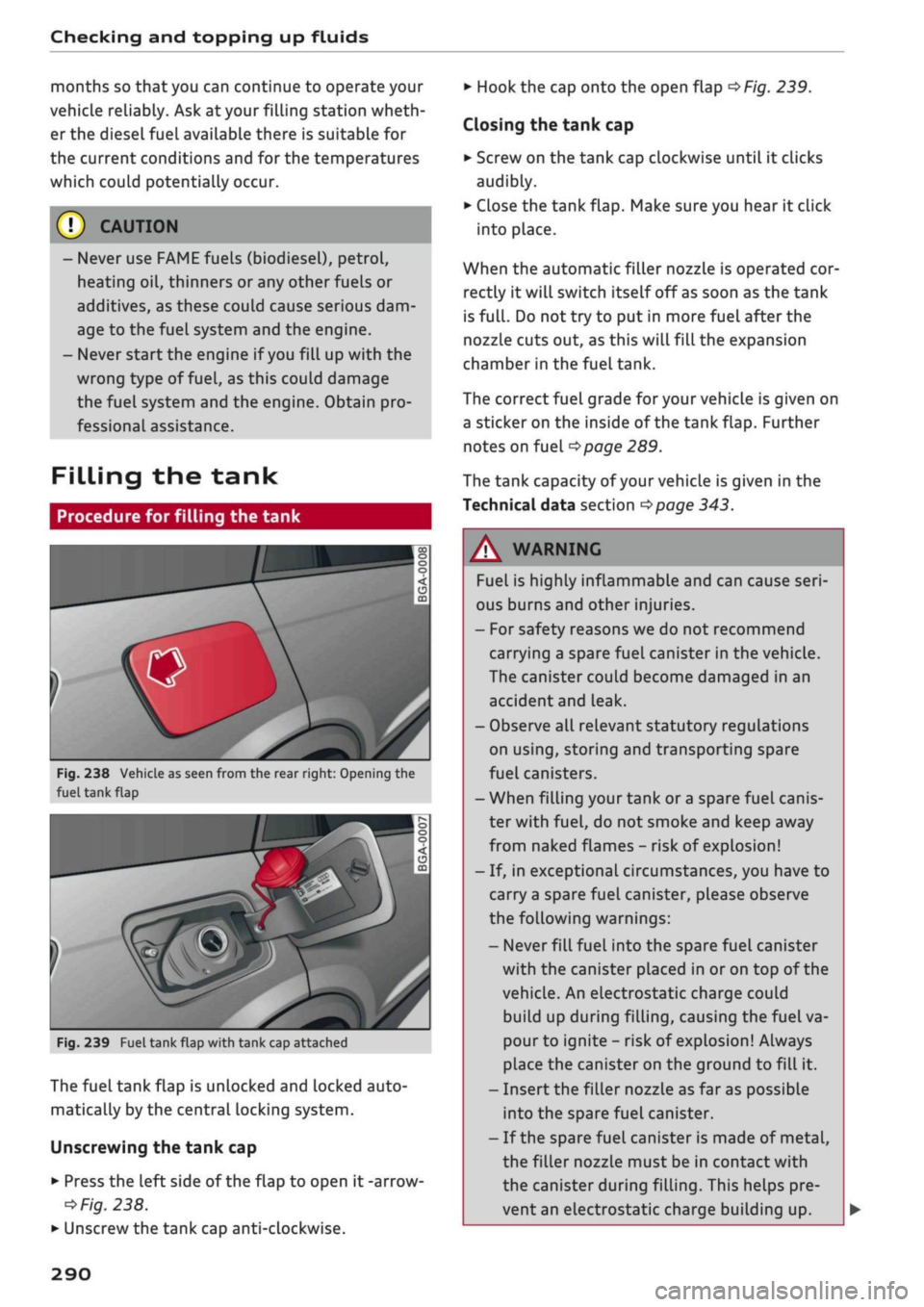
Fig.
238 Vehicle as seen from the rear right: Opening the
fuel tank
flap
fe
Fig.
239 Fuel tank flap with tank cap attached
The fuel tank flap is unlocked and locked auto
matically by the central locking system.
Unscrewing the tank cap
•
Press the left side of the flap to open
it
-arrow
ed
Fig.
238.
•
Unscrew the tank cap anti-clockwise.
•
Hook the cap onto the open flap
•=>
Fig.
239.
Closing the tank cap
•
Screw on the tank cap clockwise until
it
clicks
audibly.
•
Close the tank flap. Make sure you hear
it
click
into place.
When the automatic filler nozzle is operated cor
rectly
it
will switch itself off
as
soon as the tank
is
fulL.
Do not try to put in more fuel after the
nozzle cuts out, as this will fill the expansion
chamber in the fuel tank.
The correct fuel grade for your vehicle is given on
a sticker on the inside of the tank flap. Further
notes on fuel
^>page
289.
The tank capacity of your vehicLe is given in the
Technical data section
^>page
343.
A WARNING
Fuel is highly inflammable and can cause
seri
ous burns and other injuries.
- For safety reasons we do not recommend
carrying a spare fuel canister in the vehicle.
The canister could become damaged in an
accident and Leak.
- Observe all relevant statutory regulations
on using, storing and transporting spare
fuel canisters.
- When filling your tank or
a
spare fuel canis
ter with
fuel,
do not smoke and keep away
from naked flames
-
risk of explosion!
- If, in exceptional circumstances, you have
to
carry
a
spare fuel canister, please observe
the following warnings:
- Never
filL
fuel into the spare fuel canister
with the canister placed in or on top of the
vehicLe. An electrostatic charge could
build up during filling, causing the fuel va
pour to ignite
-
risk of explosion! Always
place the canister on the ground to fill
it.
- Insert the filler nozzle as far as possibLe
into the spare fuel canister.
-
If
the spare fuel canister is made of metal,
the filler nozzle must be in contact with
the canister during filling. This helps pre
vent an electrostatic charge building up.
290
Page 299 of 364

Checking and topping up fluids
CO
rN
IV
rN
•-i
00
Emission controL
systems
Catalytic converter
Applies to: vehicles with petrol engine
The vehicle must only be used with unleaded pet
rol,
otherwise the catalytic converter will be ir
reparably damaged.
Never allow the fuel tank to run completely dry,
as the irregular supply of fuel can cause misfir
ing.
This allows unburnt fuel to enter the exhaust
system,
which can cause overheating and dam
age to the catalytic converter.
Diesel particulate filter
Applies to: vehicles with diesel engine
The diesel particulate filter can filter out almost
all soot particles contained in the exhaust gas. In
normal driving conditions the filter is self-clean
ing.
Should the self-cleaning function of the filter
not be able to operate, e.g. when the vehicle is
continuously used only for short trips, the filter
becomes obstructed with soot and the indicator
lampnf°r
the
diesel particulate filter Lights up
cépage
34.
A WARNING
The exhaust system is very hot when the
vehi
cle is being driven and after the engine has
been switched off.
- Never touch the tailpipes when they are hot
- risk of burns!
- Because of the high temperatures which can
occur in the emission controL system, do not
park the vehicle where the exhaust can
come into contact with flammable materials
under the car (e.g. on grass or at the forest
edge) - risk of fire!
- Do not apply any underseal agents in the
area around the exhaust system - risk of
fire!
Engine compartment
Working on components in the engine
compartment
Extra caution is necessary when working on com
ponents in the engine compartment.
Always be aware of the danger of injury and
scalding as well as the risk of accident or fire
when working in the engine compartment (e.g.
when checking and refilling fluids). Always ob
serve the warnings listed below and follow all
normal safety precautions. The engine compart
ment of any motor vehicle is a potentially haz
ardous area
oA-
A WARNING
- Switch off the engine.
-Switch off the ignition.
-Applythe
parking brake.
- On vehicles with manual gearbox place the
gear lever in neutral, on vehicles with auto
matic gearbox move the selector lever to
position P.
- To avoid the risk of being scalded, never
open the bonnet if
you
see steam or coolant
escaping from the engine compartment.
Wait until no steam or coolant can be seen
before opening the bonnet.
- Wait for the engine to cool down.
- Keep children away from engine compart
ment.
- Never spill fluids on a hot engine. These
flu
ids can cause a fire (e.g. radiator
anti
freeze).
- Take care not to cause short circuits in the
electrical system.
- When working in the engine compartment
be aware that the radiator fan may start
running suddenly, even if the ignition is
switched off - risk of injury!
- Do not unscrew the cap on the expansion
tank when the engine is hot. The cooling
system is under pressure.
- Protect face, hands and arms by covering
the cap with a large, thick rag to protect
against escaping coolant and steam.
295
Page 300 of 364
Checking and topping up fluids
- Never remove the engine cover panel - risk
of burns!
- If any tests have to be performed with the
engine running, there is an extra safety risk
from the rotating parts, such as the drive
belts,
alternator and radiator
fan,
etc., and
from the high-voltage ignition system.
- Never touch the radiator fan. The electric
additional fan is controlled by temperature
and can start running without warning.
- Applies to vehicles with automatic gearbox:
Never open the throttle inadvertently (for
instance by hand from the engine compart
ment) if
a
gear is engaged while the vehicle
is stationary with the engine running. The
vehicle will otherwise start moving immedi
ately and could cause an accident.
- Observe the following additional warnings if
work on the fuel system or the electrical
system is necessary:
- Do not smoke.
- Never work near naked flames.
- Always keep an approved fire extinguisher
immediately available.
- Any work on the batteries and electrical sys
tem in your vehicle entails a risk of injury
and chemical burns in addition to danger of
accident or fire.
For
this reason, you must
have the work carried out by
a
qualified
workshop.
© CAUTION
When topping up fluids make sure the correct
fluid is put into the correct filler opening. This
can otherwise cause serious malfunctions or
engine damage.
® For the sake of the environment
Inspect the ground underneath your vehicle
regularly so that any Leaks are detected at an
early stage. If
you
find spots of oil or other
fluids,
have your vehicle inspected in the
workshop.
© Note
located on the other side of the engine com
partment.
Opening/closing the bonnet
The
bonnet is released from inside the vehicle.
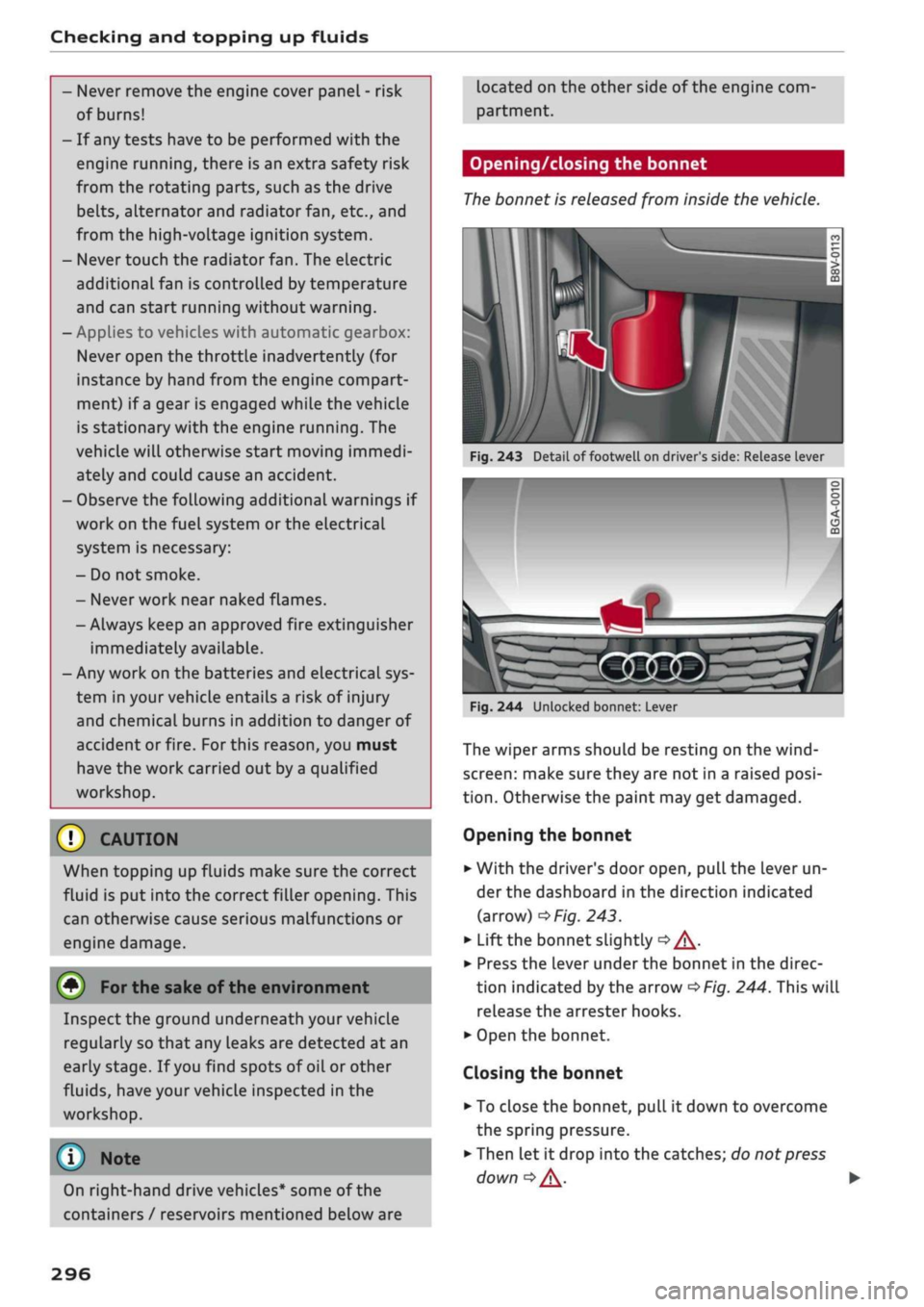
Fig.
243 Detail of footwell on driver's side: Release lever
I
On right-hand drive vehicles* some of the
containers / reservoirs mentioned below are
Fig.
244 Unlocked bonnet: Lever
The wiper arms should be resting on the
wind
screen:
make sure they are not in a raised
posi
tion.
Otherwise the paint may get damaged.
Opening the bonnet
•
With the driver's door open, pull the lever un
der the dashboard in the direction indicated
(arrow)
^>Fig.
243.
*•
Lift the bonnet slightly
•=> A-
•
Press the Lever under the bonnet in the direc
tion indicated by the arrow
^>Fig.
244. This will
release the arrester hooks.
•
Open the bonnet.
Closing the bonnet
• To close the bonnet, pull it down to overcome
the spring pressure.
•
Then let it drop into the catches; do not press
down
|=>^.
•
296
Page 307 of 364
Checking and topping up fluids
Charging the vehicle battery
CO
< o rN
iv
rN
t-H
o < 00
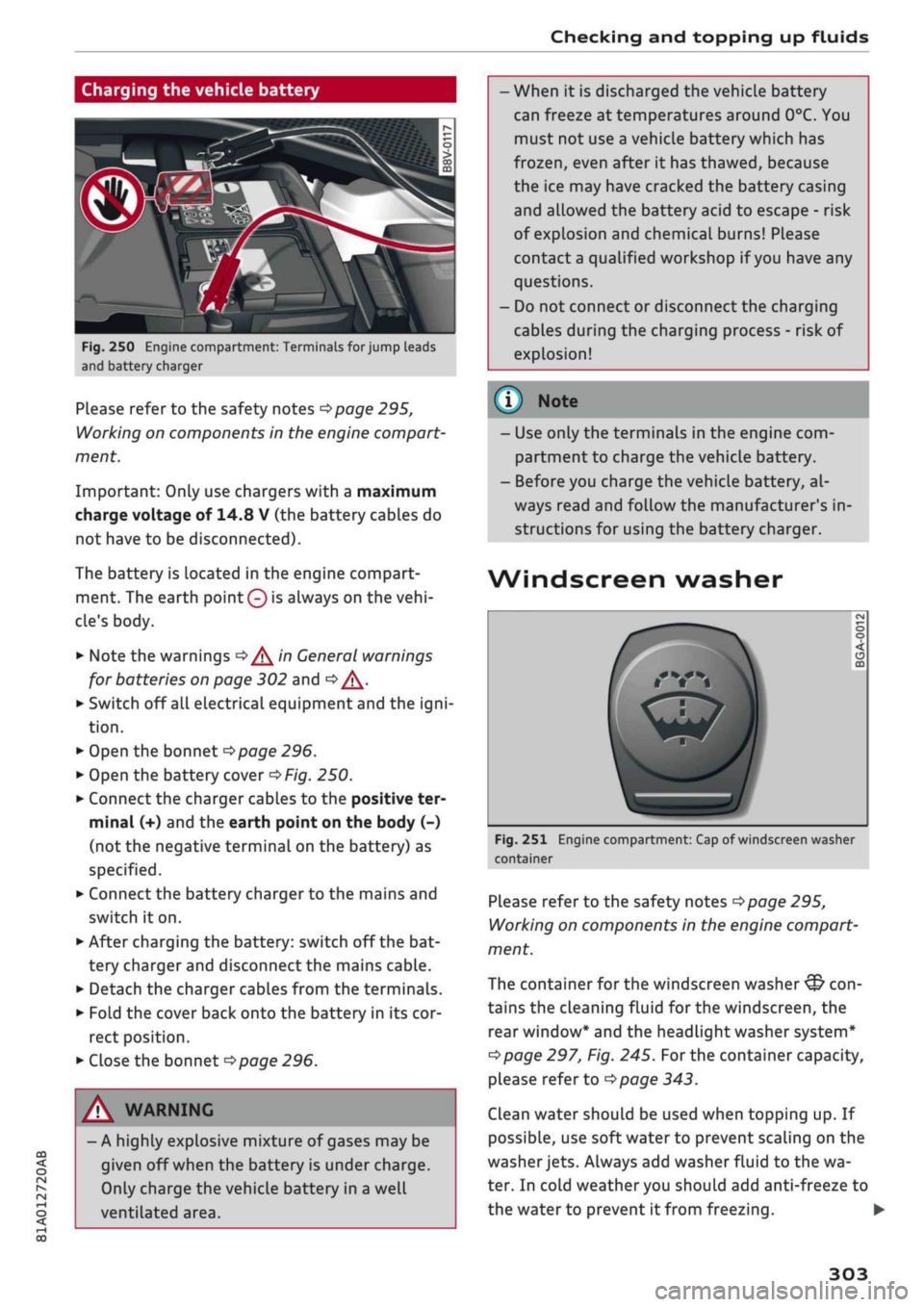
Fig.
250 Engine compartment: Terminals for jump leads
and battery charger
Please refer to the safety notes
^>page
295,
Working on components in the engine compart
ment.
Important: Only use chargers with a maximum
charge voltage of 14.8 V (the battery cables do
not have to be disconnected).
The battery is Located in the engine compart
ment. The earth
point 0
is always on the
vehi
cle's body.
•
Note the warnings
•=>/^
in General warnings
for batteries on page 302 and
Q/\.
•
Switch off all electrical equipment and the
igni
tion.
•
Open the bonnet
^>page
296.
•
Open the battery cover
^Fig.
250.
•
Connect the charger cables to the positive ter
minal (+) and the earth point on the body (-)
(not the negative terminal on the battery) as
specified.
•
Connect the battery charger to the mains and
switch it on.
•
After charging the battery: switch off the bat
tery charger and disconnect the mains cable.
•
Detach the charger cables from the terminals.
•
Fold the cover back onto the battery in its cor
rect position.
•
Close the bonnet
^>page
296.
A WARNING
- A highly explosive mixture of gases may be
given off when the battery is under charge.
Only charge the vehicle battery in a well
ventilated area.
- When it is discharged the vehicle battery
can freeze at temperatures around 0°C. You
must not use a vehicle battery which has
frozen,
even after it has thawed, because
the ice may have cracked the battery casing
and allowed the battery acid to escape - risk
of explosion and chemical burns! Please
contact
a
qualified workshop if
you
have any
questions.
- Do not connect or disconnect the charging
cables during the charging process - risk of
explosion!
© Note
- Use only the terminals in the engine com
partment to charge the vehicle battery.
- Before you charge the vehicle battery, al
ways read and follow the manufacturer's in
structions for using the battery charger.
Wind
screen washer
Fig.
251 Engine compartment: Cap of windscreen washer
container
Please refer to the safety notes
^>page
295,
Working on components in the engine compart
ment.
The container for the windscreen washer
&
con
tains the cleaning fluid for the windscreen, the
rear window* and the headlight washer system*
Opage
297, Fig. 245.
For
the container capacity,
please refer to
opage
343.
Clean water should be used when topping up. If
possible, use soft water to prevent scaling on the
washer
jets.
Always add washer fluid to the wa
ter. In cold weather you should add anti-freeze to
the water to prevent it from freezing. •
303
Page 309 of 364
Wheels
WheeLs
Tyres and rims
General notes
•
Inspect the tyres regularly for damage (cuts,
cracks or blisters, etc.). Remove any foreign
bodies embedded in the treads.
•
If
you
have to drive over
a
kerb or similar obsta
cle,
drive very slowly and as near as possible at
a right angle to the kerb.
• Damaged rims or tyres must be replaced imme
diately.
•
Keep grease, oil and fuel off the tyres.
•
Mark the wheels before taking them off so that
they rotate in the same direction when refitted.
•
When removed, the wheels should be stored
flat in a
cool,
dry and preferably dark place.
CO
<
O
rN
IV
rN
t-H
o <
(l)
CAUTION
- Please note that summer and winter tyres
are optimised for the prevailing road condi
tions at different times of
year.
We recom
mend that you use winter tyres during the
winter months. At low temperatures, sum
mer tyres lose their elasticity and grip, and
braking performance also suffers as a re
sult. Cracks can form in the tread block on
summer tyres if they are used at very cold
temperatures, and this can cause perma
nent damage to the tyres. An increase in
rolling noise and tyre imbalance may result
from this damage.
- Machined, polished or chrome-plated rims
must not be used in winter conditions. The
process used to manufacture these types of
wheel rim does not provide adequate sur
face protection against corrosion, and the
rims can be permanently damaged by road
salt or similar.
New wheels or tyres
It is best to have all servicing of wheels and tyres
performed by a qualified workshop, since they
have the necessary special tools and replacement
parts in addition to trained personnel.
•
New tyres do not yet give maximum grip. When
driving with new tyres, drive at moderate
speeds and be especially careful during the first
500 km.
•
All four wheels must be fitted with tyres of the
same type, size (rolling circumference) and
preferably the same tread pattern.
• Tyres should be replaced in pairs and not
indi
vidually (i.e. both front tyres or both rear tyres
together).
•
We recommend the use of Audi Genuine Tyres.
If
you
wish to use other tyres, please note that
the actual size can differ from the nominal size
marked on the tyre
•=> /\.
•
If
you
wish to purchase a different combination
of rims and tyres than the ones fitted on the ve
hicle during production, it is advisable to
con
sult
a
qualified workshop beforehand
<=> /\.
The sizes of the rims and tyres approved
for
your
vehicle are listed in the vehicle's documents (e.g.
EC
Certificate of Conformity or COC
document1)).
The vehicle documents vary depending on the
country in which the vehicle is registered.
If the spare wheel* is
not
the same type as the
tyres fitted on the car (for example if the car has
winter tyres or wide-section tyres) you should on
ly use the spare wheel* if
a
puncture occurs, and
then
only
for
a
short period of time. In this case,
please drive with extra care. Refit
a
normal road
wheel as soon as possible.
Applies to vehicles with four-wheel drive: All four
wheels must always be fitted with tyres of the
same type, make and tread pattern, as the drive-
line could otherwise be damaged by variations in
the wheel speeds. For the same reason, only use
a spare wheel* which has the same rolling cir
cumference as the normal road wheels.
Manufacturing date
The manufacturing date is indicated on the tyre
sidewall (possibly only on the inner side of the
wheel): •
15 COC
= Certificate of conformity
305