snow AUDI Q2 2021 Owner´s Manual
[x] Cancel search | Manufacturer: AUDI, Model Year: 2021, Model line: Q2, Model: AUDI Q2 2021Pages: 364, PDF Size: 87.77 MB
Page 329 of 364
Mobility
CO
rN
IV
rN
•-i
00
Removing the spare wheel
• Lift the floor panel up by the plastic handle un
til the panel is fixed in position behind the re
taining tabs on the two side sections
©
*
Fig.
266.
• Applies to vehicles with bass box in spare wheel
well:
Remove the bass box*. Please first check
the connector to establish which bass box is fit
ted in your vehicle: version 1)
*page
325 or
version 2)
*page
326.
• Turn the plastic knob anti-clockwise.
• Take out the spare wheel.
Snow chains
For technical reasons, snow chains must not be
used on the compact temporary spare wheel.
Should you have a puncture on one of the front
wheels when using snow chains, fit the compact
temporary spare wheel in place of one of the rear
wheels. You can then attach the snow chains to
the wheel taken from the rear and use this wheel
to replace the punctured front wheel.
A WARNING
- The tyre pressure must be checked as soon
as possible after fitting the spare wheel - an
incorrectly inflated tyre can increase the risk
of accident. You can find the tyre pressures
here
*page
307, Fig. 253.
- Do not drive faster than 80 km/h when the
compact temporary spare wheel is fitted -
higher speeds can cause an accident.
-Avoid heavy acceleration, hard braking and
fast cornering when the compact temporary
spare wheel is fitted - risk of accident!
- Never use two or more compact spare tyres
at the same time - risk of accident!
- No other type of tyre (normal summer or
winter tyres) may be fitted on the compact
temporary spare wheel.
Removing the bass box (version 1)
Applies to: vehicles with bass box in spare wheel well
You
must remove the bass box before you can
take out the spare wheel*.
«
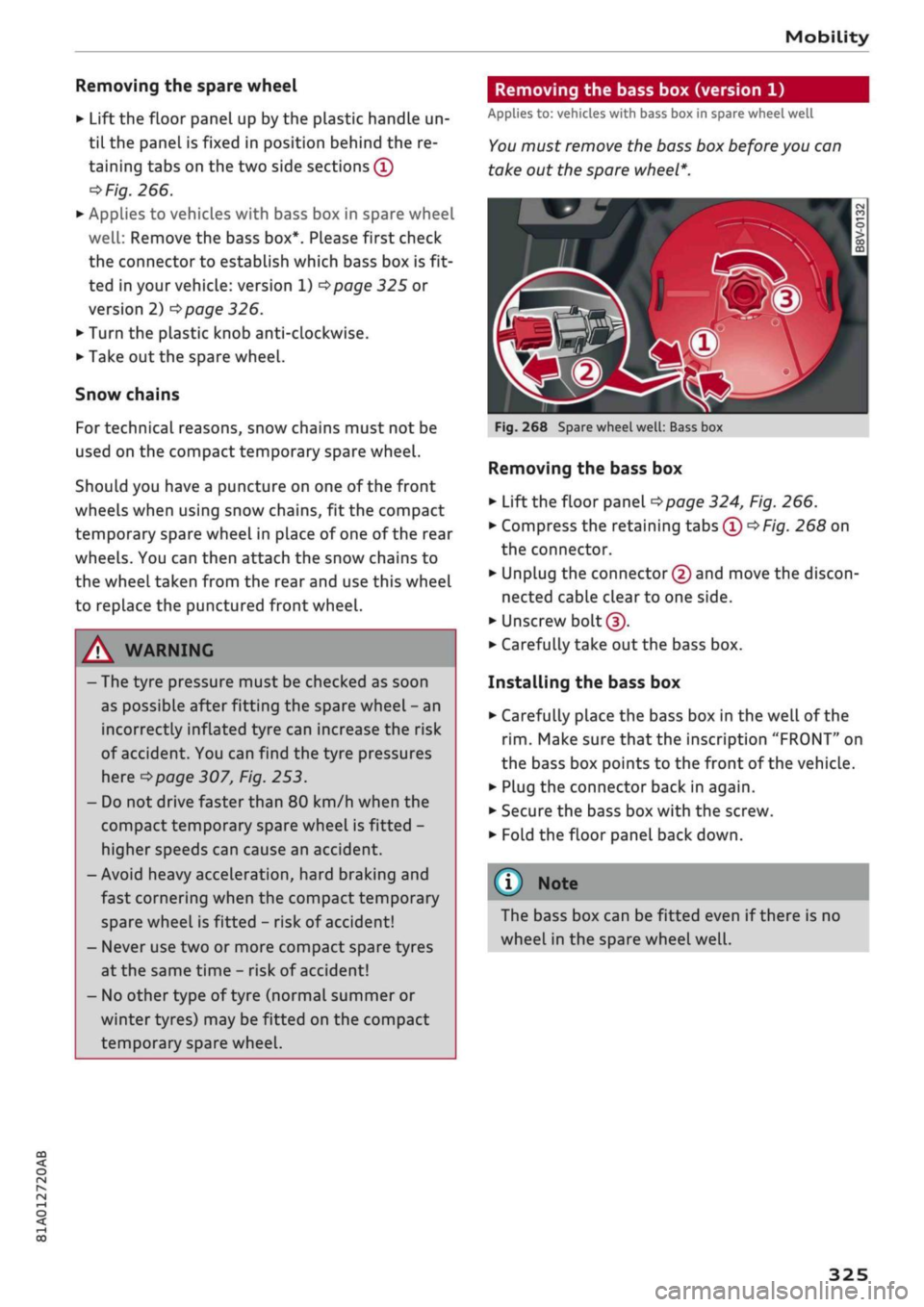
Fig.
268 Spare wheel
well:
Bass box
Removing the bass box
• Lift the floor panel
<=>page
324, Fig. 266.
• Compress the retaining
tabs©*Fig.
268 on
the connector.
• Unplug the connector © and move the discon
nected cable clear to one side.
• Unscrew
bolt©.
• Carefully take out the bass box.
Installing the bass box
• Carefully place the bass box in the well of the
rim.
Make sure that the inscription "FRONT" on
the bass box points to the front of the vehicle.
• Plug the connector back in again.
• Secure the bass box with the screw.
• Fold the floor panel back down.
(T) Note
The bass box can be fitted even if there is no
wheel in the spare wheel
well.
325
Page 359 of 364
Index
CO
< o rN
iv
rN
t-H
o <
•H
00
Navigation 217
Radio 231
Speech dialogue system 256
System
(MMI)
255
Telephone 187
Shuffle
see Random playback 246
Side airbag 285
Side assist
see Audi side assist 127
Sidelights
49
SIM card
see Embedded SIM card 191
SIM card reader 176, 191, 192
Smartphone
see Telephone 172
SMS
see Text messages 182
Snow chains 309
Software update
see Map update 200
see System update (MMI) 259
Software (MMI)
Licence conditions 262
Update 259
Version 259
Sound settings 260
Source overview 243
Spanner 319
Spare key 38
Spare wheel 324
Special destination 211
Speech dialogue system 164
Commands 165
External 170
Multi-function steering wheel 17
Operation 164
Settings 256
Volume 262
Speed-dependent volume control 261
Speed limit display
see Traffic sign recognition 108
Speed limiter 106
Speed limits
see Traffic sign recognition 108
Speedometer 12
Speed warning 104
Speller 159
Start/stop system 79
START ENGINE STOP (convenience key) . 76,77
Starting with jump leads 326
Station memory
see Favourites 231
Station search (radio)
see Updating station list (radio) 231
Steering 148
Locking (button) 77
Locking (ignition lock) 75
Steering wheel
Adjusting 74
Paddle levers (automatic gearbox) 90
see also Multi-function
steering wheel
15,17,
18
Stopover (navigation) 213
Storage compartments 61
Streaming
see Online media 239
S tronic (automatic gearbox) 85
Subtitles (DVD) 246
Subwoofer 261
Sun roof
see Panorama sun roof 48
Sun visors 54
Supplementary heater (vehicles with diesel
engine) 66
Surround sound 261
Suspension control 131
Switching between calls 180
Switching between tabs
see Multi-function steering wheel . 15, 17, 18
Switching character sets (MMI touch) 155
Symbols 161
Navigation 219
Traffic 225
System settings (MMI)
255
System update (MMI) 259
System volume 261
T
TDI clean diesel
see AdBlue 292
Page 361 of 364
Index
CO
< o rN
iv
rN
i—i
o <
•H
00
Voice guidance
see Multi-function steering wheel .
15,17,18
Volume 261
W
Warning lamps 26
Warning triangle 318
Wash/wipe 55
Washing 312
Washing ornamental trim/mouldings 313, 314
Washing rear lights 313
Washing tailpipes 313
Waveband 228, 230
see also Waveband 228
Weights 343
Wheel bolt caps
Removing 321
Wheel bolts 308
Anti-theft 321
Loosening 322
Torque 324
Wheel imbalance 306
Wheels 305
Changing 321, 323
Washing 313
Wi-Fi
Audi music stream 238
Audio players 238
Hotspot 201
Online media 239
see also Personal Wi-Fi hotspot 195
Windows 46
Cleaning/de-icing 314
Windscreen
Washing 55
Windscreen washer system 55, 303
Reservoir capacity 343
Windscreen wipers 55
Changing the wiper blades 56
Winter conditions
Cooling system 299
De-icing windows 314
Defrosting windows (automatic air condi
tioner) 70
Defrosting windows (heating/ventilation
system and manual air conditioner) 67
Diesel 289
Seat heating (automatic air conditioner) .. 70
Seat heating (heating/ventilation system
and manual air conditioner) 68
Snow chains 309
VehicLe battery 302
Washing the vehicle 312
Windscreen washer system 303
Winter tyres 308
Wiper blades, changing
57
WLAN
see Wi-Fi 238
Wrench 319
Z
Zooming (map) 209, 210, 219
357