towing AUDI Q2 2021 Owner´s Manual
[x] Cancel search | Manufacturer: AUDI, Model Year: 2021, Model line: Q2, Model: AUDI Q2 2021Pages: 364, PDF Size: 87.77 MB
Page 276 of 364
Safe driving
positioning, move the front passenger's seat as
far upwards as possibLe using the seat's height
adjustment. After installing the child seat on the
front passenger's seat, move the front passen
ger's backrest forward until it makes contact
with the child seat.
A WARNING
- Please refer to the important safety notes
•=>
A in Safety notes for using child seats on
page 268,
•=>
A in Child seat categories on
page 269 and the instructions provided by
the child seat manufacturer.
- Never install
a
rearward-facing child seat on
the front passenger's seat unless the front
passenger's airbag has been deactivated -
this can result in potentially fatal injuries to
the
child.
Pedal area
Pedals
The
pedals must always be free to move and
must never be obstructed by floor mats or any
objects in the footwell.
•
Make sure that none of the pedals is obstructed
and all of the pedals can be pressed all the way
down to the floor.
•
Make sure that all pedals are able to return
freely to their original positions.
Only use floor mats which Leave the pedal area
free and can be securely fastened in the footwell.
If one of the brake circuits should
fail,
increased
brake pedal travel will be required to bring the
vehicle safely to a stop.
A WARNING
Any obstructions that restrict pedal travel can
cause loss of vehicLe control and lead to
criti
cal traffic situations.
- Never place objects in the driver's footwell.
Such objects could move under the pedals
and interfere with their proper function. In
the event of sudden braking or
a
change of
direction,
you would not be able to use the
pedals. This could result in a loss of control
and possibly cause an accident.
Floor mats on the driver's side
Use
only floor mats which can be securely fas
tened in the footwell and do not obstruct the
pedals.
•
Make sure that floor mats are securely fastened
and cannot interfere with the pedals
o /\.
Use only floor mats that leave the pedal area un
obstructed and are firmly secured to prevent
them from slipping. You can obtain suitable floor
mats from your dealer or a specialist retailer.
A WARNING
Any obstructions that restrict pedal travel can
cause Loss of vehicle control and increase the
risk of serious personal injury.
- Always make sure that floor mats are prop
erly secured.
- Never lay or
instaLl
additional floor mats or
other floor coverings over the existing floor
mats;
this would restrict the pedal area and
possibly obstruct the pedals, which could
cause an accident.
Stowing Luggage
safely
Luggage compartment
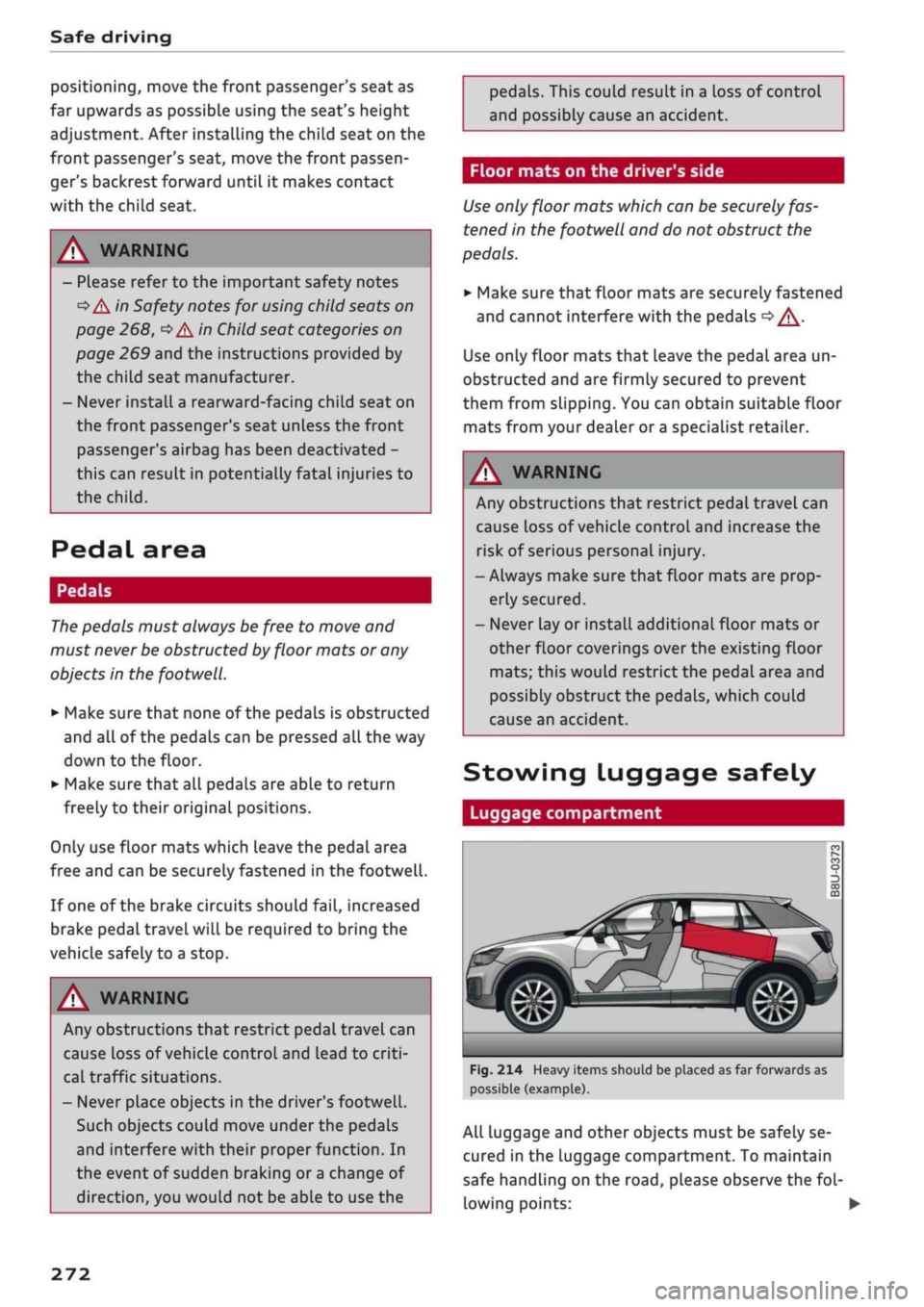
Fig.
214 Heavy items should be placed as far forwards as
possible (example).
All Luggage and other objects must be safely se
cured in the Luggage compartment. To maintain
safe handling on the
road,
please observe the
fol
lowing points: •
272
Page 314 of 364
Wheels
more tyres, the driver is alerted by an indicator
lamp
0H ar|d a
message in the instrument cluster
display. If only one tyre is affected, the display
will indicate its position.
Each time you change a tyre, change the wheels
round or change the tyre pressures on your
vehi
cle (e.g. when switching from partial load to full
load and vice-versa), you must store the new tyre
pressures in the menu display
<=>page
311.
Mon
itoring of the tyre pressures is based on the tyre
pressures you have stored. The inflation pres
sures recommended for your vehicle are given on
the tyre pressure sticker
opage
307, Fig. 253.
The rolling circumference and vibration can
change and cause a tyre pressure warning if:
- The inflation pressure in one or more tyres is
too low.
- The tyre has suffered structural damage.
- The wheels were changed or the tyre pressures
were changed and the new tyre pressures were
not stored
<>page
311.
- The vehicLe load is not balanced (more load on
one side).
- There is more load on the wheels of one of the
axles (e.g. when towing a trailer or driving up
or down a gradient).
- You are driving with snow chains.
- You are driving with the temporary spare
wheel*.
- Only one wheel of an axle has been changed.
Indicator lamps
flfl - Loss of pressure on one or more tyres
o
A-
Check and change or repair the tyre(s). Check and
adjust the tyre pressures again on all four
wheels. Then store the tyre pressures in the
menu dispLay
opage
311.
IIJ'f.1
(Tyre pressure loss indicator) Tyre pressure:
System fault!.
If llil'f>1
appears and the indicator
LampBH in the
instrument cluster dispLay flashes
for approx. one minute and then remains lit after
you have switched on the ignition or while you
are driving, there is a fault in the system. Check
and adjust the tyre pressures for all four tyres
and store the
new
tyre pressures
•=>page
311. If
the indicator lamp does not go out or if it comes
on again after
a
short time, drive to a qualified
workshop without delay and have the fault
recti
fied.
®
No
- If
a
malfunction occurs in the ESC/ABS sys
tem,
the tyre pressure loss indicator may al
so be out of action.
-When driving with snow chains, a system
malfunction can occur.
-The tyre pressure Loss indicator on your Audi
is specially matched to "Audi Genuine Tyres"
^>page
305. We recommend that you use
these tyres.
- The tyre pressure Loss indicator can only
monitor the pressures of the tyres fitted on
the car. For this reason please regularly
check the tyre pressure of the spare wheel
in the luggage compartment so it can be
used if required.
A
WARNING
- If the tyre pressure loss indicator appears in
the instrument cluster display, slow down
immediately and avoid any severe braking or
steering manoeuvres. As soon as you can do
so safely, stop and check the tyres and the
tyre pressures.
- It is the driver's responsibility to ensure that
the tyre pressures are correct. For this rea
son you must check the tyre pressures
regu
larly.
- Under certain conditions (e.g. driving at
high speeds, on ice and snow or on poor
road surfaces) the tyre pressure loss indica
tor may not appear immediately.
- The use of run-flat tyres on your vehicLe is
NOT authorised! Unauthorised use can cause
an accident or damage your vehicle.
310
Page 322 of 364
Mobility
Mobility
General notes
•
If your vehicle experiences technical problems,
stop the car well away from moving traffic. If
you have a flat tyre, you should park the car on
a level surface. Be particularly careful if you are
on a slope.
•
Apply the parking brake.
•
Switch the hazard warning lights on.
•
Put on a high-visibility vest if one is available.
•
Place the warning triangle in a visible location
tapage
318.
•
Instruct all passengers to leave the car when it
is safe to do so. They should wait in a safe place
(for instance behind the roadside crash barrier).
A
WARNING
You should note the procedure described
above for your own safety and that of other
road users.
Equipment
Warning triangle
Applies to: vehicles with warning triangle
w®
Fig.
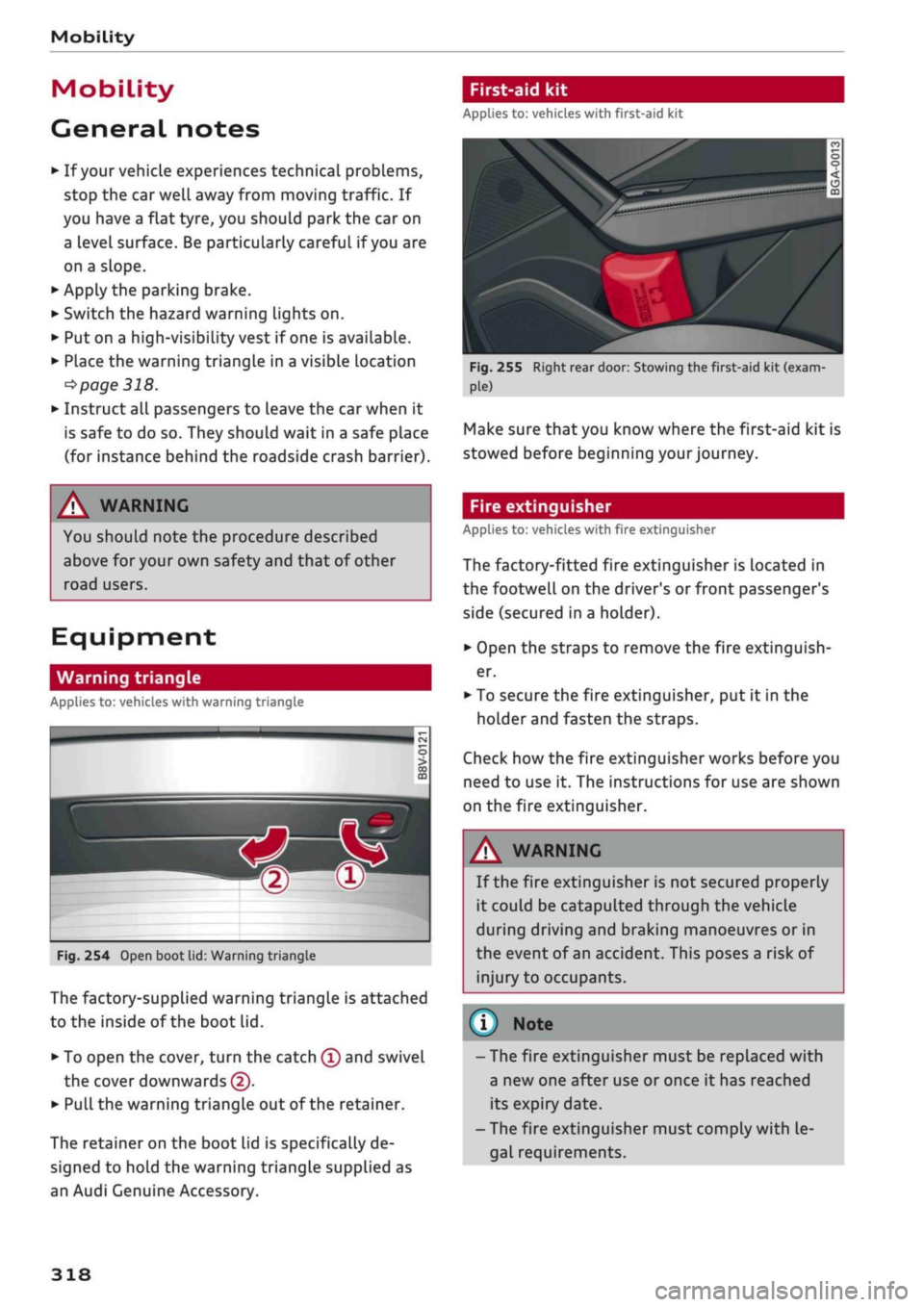
254 Open boot lid: Warning triangle
The factory-supplied warning triangle is attached
to the inside of the boot lid.
• To open the cover, turn the catch
©
and swivel
the cover downwards (5).
• Pull
the warning triangle out of the retainer.
The retainer on the boot lid is specifically de
signed to hold the warning triangle supplied as
an Audi Genuine Accessory.
First-aid kit
Applies to: vehicles with first-aid kit
V
Fig.
255 Right rear door: Stowing the first-aid kit (exam
Make sure that you know where the first-aid kit is
stowed before beginning your journey.
Fire extinguisher
Applies to: vehicles with fire extinguisher
The factory-fitted fire extinguisher is located in
the footwell on the driver's or front passenger's
side (secured in a holder).
•
Open the straps to remove the fire extinguish
er.
•
To secure the fire extinguisher, put it in the
holder and fasten the straps.
Check how the fire extinguisher works before you
need to use it. The instructions for use are shown
on the fire extinguisher.
A WARNING
If the fire extinguisher is not secured properly
it could be catapulted through the vehicle
during driving and braking manoeuvres or in
the event of an accident. This poses a risk of
injury to occupants.
© Note
- The fire extinguisher must be replaced with
a new one after use or once it has reached
its expiry date.
- The fire extinguisher must comply with le
gal requirements.
318
Page 325 of 364
Mobility
CO
rN
IV
rN
•-i
00
- Do not drive faster than 80 km/h.
- Avoid heavy acceleration, hard braking and
fast cornering.
-Vehicle handling could be impaired.
- If the tyre is too badly damaged, you should
seek professional assistance.
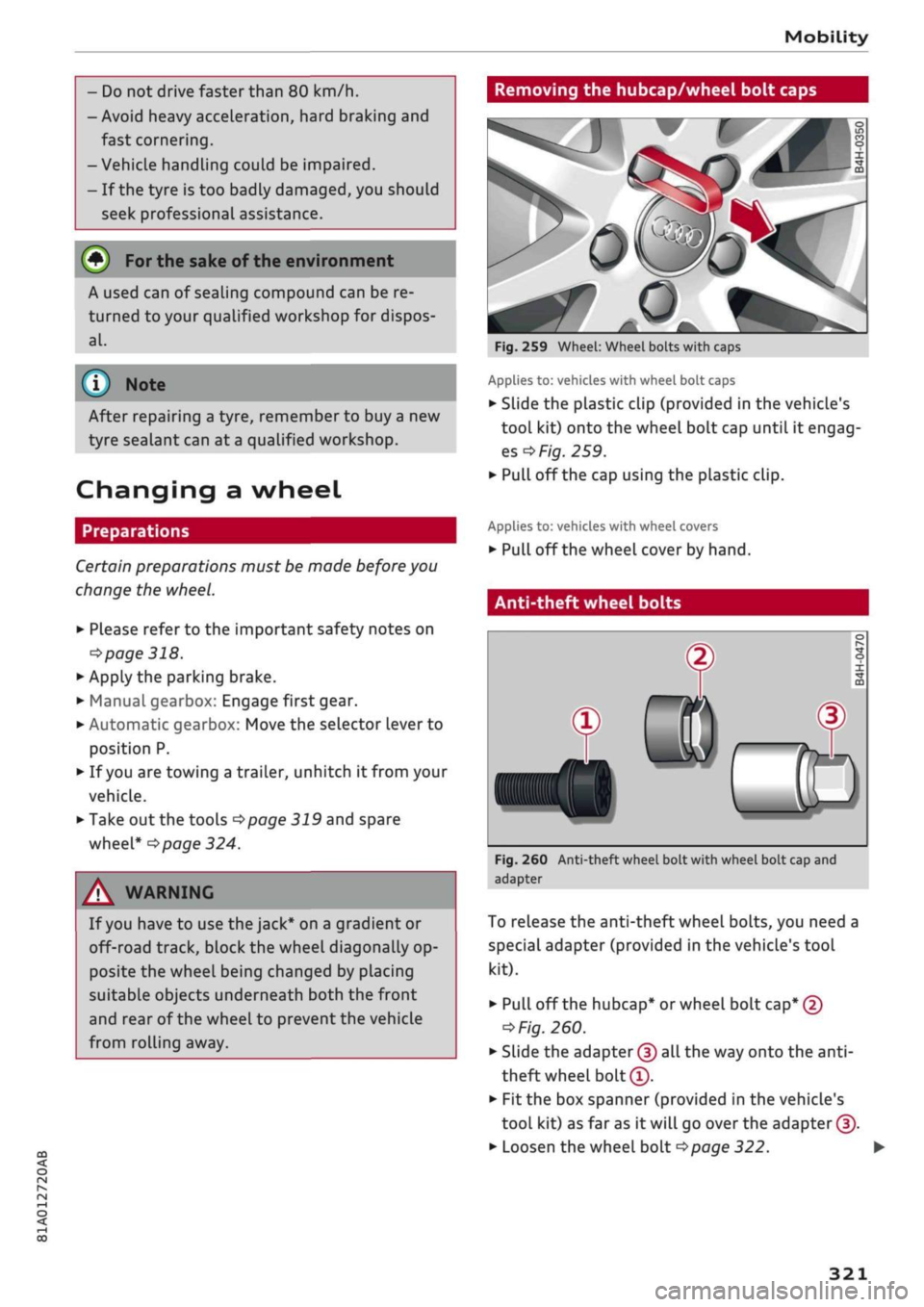
Removing the hubcap/wheel bolt caps
(#) For
the sake of the environment
A used can of sealing compound can be re
turned to your qualified workshop for dispos
al.
Note ©
After repairing a tyre, remember to buy
a
new
tyre sealant can at
a
qualified workshop.
Changing a wheel
Preparations
Certain preparations must be made before you
change the wheel.
• Please refer to the important safety notes on
^page
318.
• Apply the parking brake.
• Manual gearbox: Engage first gear.
• Automatic gearbox: Move the selector Lever to
position P.
• If
you
are towing a trailer, unhitch
it
from your
vehicle.
• Take out the tools
^>page
319 and spare
wheel*
^>page
324.
A WARNING
If
you
have to use the jack* on a gradient or
off-road track, block the wheel diagonally op
posite the wheel being changed by placing
suitable objects underneath both the front
and rear of the wheel to prevent the vehicle
from rolling away.
0
Fig.
259 Wheel: Wheel bolts with caps
Applies to: vehicles with wheel bolt caps
• Slide the plastic clip (provided in the vehicle's
tool kit) onto the wheel bolt cap until it engag
es
^F/'g.
259.
• Pull off the cap using the plastic clip.
Applies to: vehicles with wheel covers
• Pull off the wheel cover by hand.
Anti-theft wheel bolts
T
0)
®
Fig.
260 Anti-theft wheel bolt with wheel bolt cap and
adapter
To release the anti-theft wheel bolts, you need a
special adapter (provided in the vehicle's tool
kit).
• Pull off the hubcap* or wheel bolt
cap*
@
^>
Fig.
260.
• Slide the adapter
©
all the way onto the
anti-
theft wheel bolt®.
• Fit the box spanner (provided in the vehicle's
tool kit) as far as it will go over the adapter ©.
• Loosen the wheel bolt
^>page
322.
321
Page 332 of 364

Mobility
7. Connect one end of the black lead preferably
to the earth point or alternatively to the
neg
ative battery terminal © on the vehicle pro
viding assistance®.
8. Connect the other end of the
black
jump lead
only to the earth point © of the jump-start
connection on your vehicle ©
<=>(£).
9. Position the jump leads in such a way that
they cannot come into contact with any mov
ing parts in the engine compartment.
Starting the engine
10.
Start the engine of the vehicle with the
boosting battery and let it run at idling
speed.
11.
Start the engine of the
car
with the dis
charged battery and wait two or three mi
nutes until the engine is running smoothly.
12.
If the engine fails to start: do not operate the
starter for longer than 10 seconds. Wait for
about 30 seconds and try again.
13.
Switch on the blower and the rear window
heating on the vehicle which has been jump-
started in order to offset excessive voltage
which may occur when disconnecting the
leads.
The headlights must be switched off!
14.
Disconnect the leads in exactly the opposite
sequence to that described in
*page
327
with the engines running. Make sure that the
Leads cannot come into contact with any
moving parts in the engine compartment.
15.
Fold the cover back onto the battery in its
correct position.
16.
Switch off the blower and the rear window
heating again.
PLease refer to
<=>
A in Before starting the engine
on page 326 and
•=>©
in Before starting the en
gine on page 327.
© CAUTION
Do not use the negative battery terminal
when jump-starting (this could cause a
mal
function in the on-board electrical system).
- Connect the battery clamps so they have
good metal-to-metal contact with the bat
tery terminals.
- The vehicle battery is vented to the outside
to prevent gases entering the vehicle's inte
rior.
Tow-
start
ing / towing
away
General notes
Some experience is required to tow or tow-start a
vehicle, especially when using a tow-rope. Both
drivers should be familiar with the technique re
quired for towing. Inexperienced drivers should
not attempt to tow-start or tow away another ve
hicle.
Do not pull too hard with the towing vehicle and
take care to avoid jerking the tow-rope. When
towing off-road, there is aLways a risk that the
anchorage points may be overloaded.
Tow-bar / tow-rope
It is easier and safer to tow the vehicle with a
tow-bar. You should only use a tow-rope if you do
not have a tow-bar. It is advisable to use a tow-
rope made of elastic synthetic fibre or similarly
elastic material.
Notes on towing vehicles
The vehicle can be towed with a tow-bar or tow-
rope.
When the engine is not running, the
gear
box will not be adequately lubricated if the
fol
lowing speed/distance restrictions are not ob
served:
- The vehicle must not be towed faster than
50 km/h.
- The vehicle must not be towed further than
50 km. •
328
Page 333 of 364

Mobility
CO
rN
IV
rN
•-i
00
Additional notes on towing by breakdown
truck
If one of the axles has to be raised in order to
tow the vehicLe, please refer to the following ta
ble to determine the appropriate axle
for
your
gearbox/drive combination:
Manual
gearbox
Automatic
gearbox
Front-wheel
drive
Front or rear
axle
Front axle
Four-wheel
drive
Front or rear
axle
Front axle
Applies to vehicles with four-wheel drive: If the
vehicle is to be towed with one of the axles
raised,
the ignition must be switched off; other
wise the drive train can be damaged.
Notes on tow-starting
Applies to vehicles with automatic gearbox: For
technical reasons, your vehicle must not be tow-
started.
Applies to vehicles with manual gearbox: As a
general rule, tow-starting is not recommended.
If the engine will not start, it is best to try start
ing it using the battery of another vehicle
*>page
326 before attempting to tow start. If
this is not possible, you can try to push-start or
tow-start the vehicle
*page
330, Tow-starting.
A WARNING
There is a high risk of accidents when towing/
tow-starting, as the towed vehicle can easily
be driven into the towing vehicle.
UTION
- If it is not possible to tow the vehicle as de
scribed above (e.g. due to a gearbox failure
or if the vehicle has to be towed further
than 50 km), it must be transported on a
special car transporter or trailer.
- Towing a vehicle with the wrong axle raised
can cause serious damage to the gearbox.
- Applies to vehicles with automatic gearbox:
It is not possible to move the selector lever
out of position
P
if the electrical power sup
ply fails. Before the vehicle can be recov
ered/manoeuvred you must manually re
lease the selector lever; left-hand drive
vehicles
*page
93, right-hand drive
vehicles
*page
94.
- Please observe the relevant regulations
when towing or tow-starting.
Towing away
Please observe the important safety warnings on
*
page 328.
Preparations
• Attach the tow-rope or the tow-bar only to the
towing anchorages provided
for
this purpose
opage
330,
*page
331.
• Please ensure that the tow-rope is not twisted
as it could otherwise unscrew the towline an
chorage while the vehicle is being towed.
• The hazard warning lights of both vehicles
must normally be switched on
*page
52. How
ever, observe any regulations to the contrary.
Towing vehicle (front)
• Ensure that the tow-rope is taut before you
drive off.
• Manual gearbox: Engage the clutch very gently
when starting to move and accelerate with par
ticular care.
• Automatic gearbox: Accelerate slowly and
grad
ually.
• Avoid unnecessary braking and manoeuvres.
Vehicle being towed (rear)
• Ensure that the ignition is switched on, the
steering wheel is not locked, and
that
you can
operate the turn signals, horn or windscreen
wipers if necessary
<=>/t\-
• The brake servo only works when the engine is
running.
The power steering only works when
329
Page 334 of 364

Mobility
the ignition is on and the vehicle is moving1'.
Otherwise you will need to press the brake
ped
al significantly harder and apply more force to
move the steering wheel.
• Please ensure that the steering wheel is un
locked and that it moves freely.
• Release the parking brake
*page
82.
• Applies to vehicles with manual gearbox: Put
the gear lever in neutral.
• Applies to vehicles with automatic gearbox:
Move the selector lever to position N.
• Ensure that the tow-rope remains taut at all
times when towing.
© CAUTION
A WARNING
If the vehicle has no electrical power, do NOT
use a tow-bar or tow-rope to tow the vehicle
© Note
You can use the turn signals to indicate a
change of direction (or lane) even when the
hazard warning lights are on. The hazard
warning lights will be interrupted temporari-
Ly.
Tow-starting
Please observe the important safety warnings on
*page
328.
Important: Your vehicle must be fitted with a
manual gearbox. If your vehicle has a petrol en
gine,
it must not be towed further than 50 me
tres
*(J).
• Attach the tow-rope or the tow-bar only to the
towing anchorages provided
for
this purpose
*page
330,
*
page 331.
• Engage second or third gear before moving off.
• Press the clutch and hold the pedal down.
• Switch on the ignition.
• Once both vehicles are moving, release the
clutch.
• As soon as the engine starts, press the clutch
pedal and put the gear lever in neutral.
When tow-starting the vehicle, do not tow it
further than 50 metres; otherwise the cata
lytic converter could be damaged.
Front towline anchorage
»
Fig.
271 Front bumper (right side): Removing cover cap
Fig.
272 Front bumper (right side): Towline anchorage
screwed in
The screw connection for the towline anchorage
is located behind a cover cap on the right side of
the front bumper.
• Take the towline anchorage out of the vehicle's
tool kit
*
page 319.
• Press the cover cap briefly but firmly inwards
-arrow-, detach it from the bumper and take it
out*Fig.
271.
• Screw the towline anchorage into the screw
connection as far as
it
will go
*Fig.
272 and
tighten it with the box spanner.
• Put the towline anchorage back in the tool kit
after use.
11
Important: The vehicle battery must be adequately charg
ed.
330
Page 335 of 364
Mobility
CO
< o rN
iv
rN
•-i
00
A WARNING
If the towline anchorage is not screwed in as
far as the stop, there is a risk of the screw
connection shearing off during towing - risk
of accident!
Rear towline anchorage
&
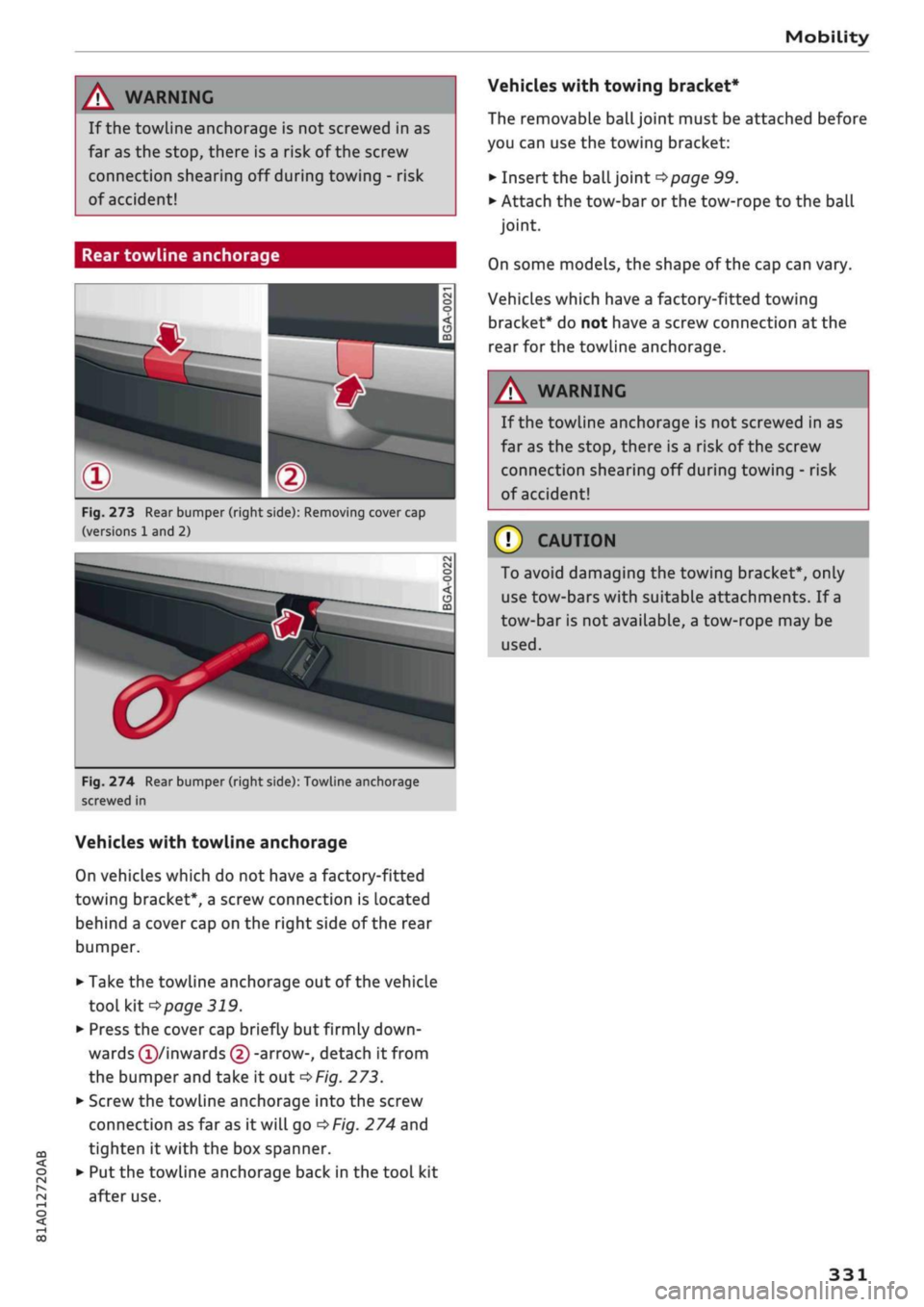
Fig.
273 Rear bumper (right side): Removing cover cap
(versions 1 and 2)
Si
Fig.
274 Rear bumper (right side): Towline anchorage
screwed in
Vehicles with towline anchorage
On vehicles which do not have a factory-fitted
towing bracket*, a screw connection is located
behind a cover cap on the right side of the rear
bumper.
• Take the towline anchorage out of the vehicle
tool kit
*page
319.
• Press the cover cap briefly but firmly
down
wards
(T)/inwards
© -arrow-, detach it from
the bumper and take it out
*Fig.
273.
• Screw the towline anchorage into the screw
connection as far as it will go
*Fig.
274 and
tighten it with the box spanner.
• Put the towline anchorage back in the tool kit
after use.
Vehicles with towing bracket*
The removable
ball
joint must be attached before
you can use the towing bracket:
• Insert the ball joint
*page
99.
• Attach the tow-bar or the tow-rope to the ball
joint.
On some models, the shape of the cap can vary.
Vehicles which have a factory-fitted towing
bracket* do not have a screw connection at the
rear for the towline anchorage.
WARNING
If the towline anchorage is not screwed in as
far as the stop, there is a risk of the screw
connection shearing off during towing - risk
of accident!
© CAUTION
To avoid damaging the towing bracket*, only
use tow-bars with suitable attachments. If
a
tow-bar is not available, a tow-rope may be
used.
331
Page 348 of 364
Technical data
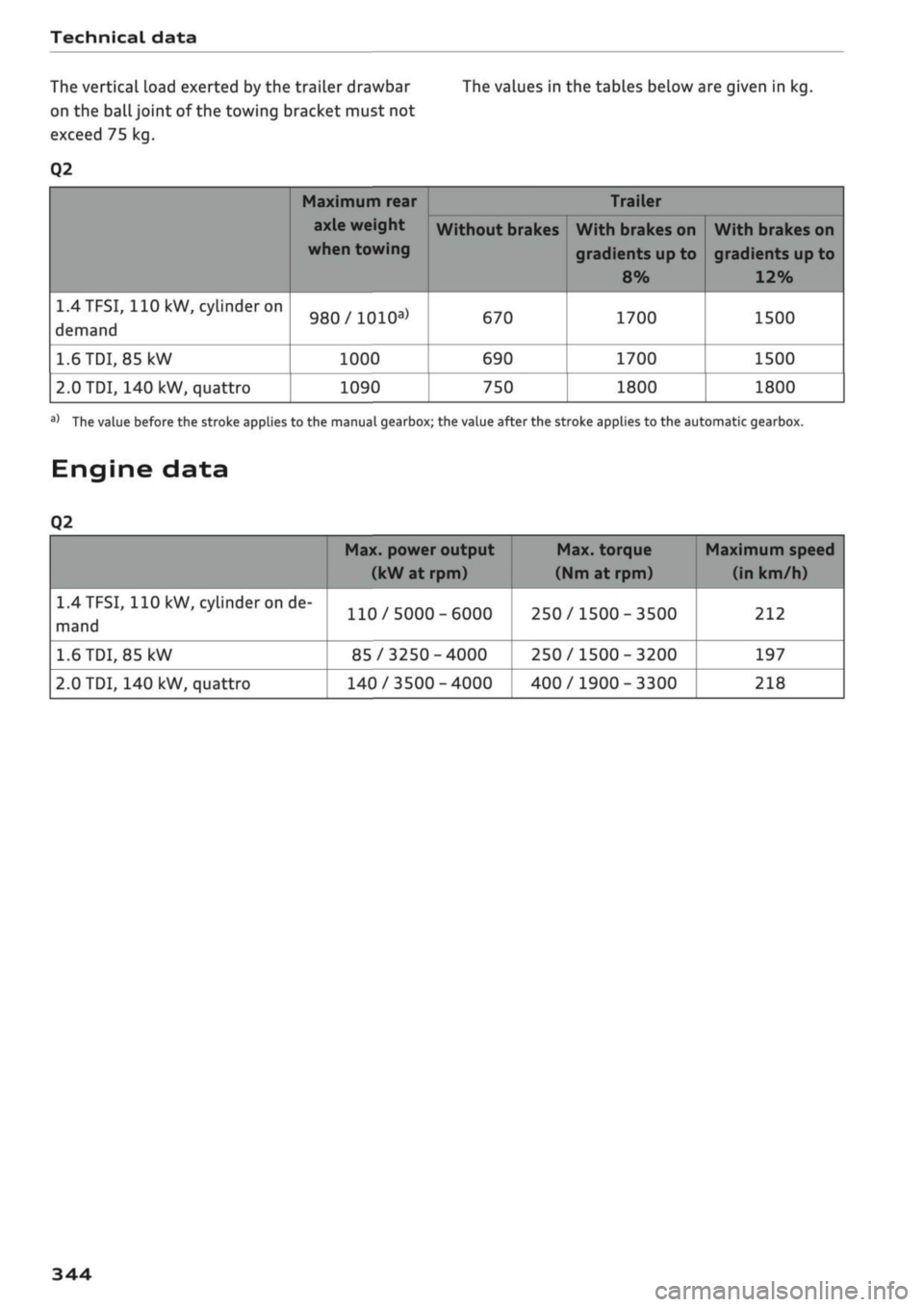
The vertical load exerted by the trailer drawbar The values in the tables below are given in kg.
on the
ball
joint of the towing bracket must not
exceed 75 kg.
Q2
1.4TFSI,
110
kW, cylinder on
demand
1.6
TDI,
85 kW
2.0
TDI, 140 kW, quattro
Maximum rear
axle weight
when towing
980/1010a)
1000
1090
Without brakes
670
690
750
Trailer
With brakes on
gradients up to
8%
1700
1700
1800
With brakes on
gradients
up
to
12%
1500
1500
1800
a)
The value before the stroke applies to the manual gearbox; the value after the stroke applies to the automatic gearbox.
Engine data
Q2
1.4
TFSI,
110 kW, cylinder on de
mand
1.6
TDI,
85
kW
2.0
TDI, 140 kW, quattro
Max. power output
(kW at rpm)
110/5000-6000
85/3250-4000
140/3500-4000
Max. torque
(Nm
at rpm)
250/1500-3500
250/1500-3200
400/1900-3300
Maximum speed
(in km/h)
212
197
218
344
Page 355 of 364
Index
CO
< o rN
iv
rN
t-H
o <
•H
00
Instruments
Adjusting brightness 53
Interior lights 52
Interior mirror 54
Interior monitor 42
Intermittent wipe (windscreen wipers) 55
Internet
see Audi connect (infotainment) 191
Internet radio 239
iPod
see Audi music interface 240, 241
ISOFIX (securing child seats) 270
iTunes tagging 228
]
Jack 319,322
Jacking points 322
Jack plug (3.5 mm)
see AUX input 241, 242
Jukebox 236
Jump-starting 326
K
Key-operated switch for front passenger's air-
bag 288
Keys 38
Driver messages 77
Key-coded settings 66
Key not recognised 79
Kick-down (automatic gearbox) 90
L
Lane assist
see Audi active lane assist 123
Lane change assist feature
see Audi side assist 127
Language, setting 255
Launch control programme 91
Left-hand traffic 52
Left control button 16
Letters, entering (using the speller) 159
Licence conditions (MMI) 262
Lights 49
Changing bulbs 334
Exterior 49
Interior 52
Interior/reading Lights 52
Right-hand traffic 52
Light sensor/rain sensor
Automatic headlights 49
Switching rain sensor on/off 55
Load-through hatch 64
Locking/unlocking
see Unlocking/locking 39, 40
Low-profile tyres 309
Luggage compartment 62
Boot Lid 43
Power sources 60
Stowing luggage safely 272
Lumbar support 58
M
Magnetic ride
see Suspension control 131
Mailbox 185
Main beam headlights 50
Main beam assist 50
Maintenance intervals 304
Make-up mirrors 54
Map
Display 225
How to use 219
Settings 221
Update 207
Map scale, changing 16
Map update 223
Matt paintwork, washing
312
Maximum speed 344
Media 234
Drives 235
Media centre 244
Media drives
Formats supported 249
Memory capacity
Directory 187
Jukebox 236
Memory card
Navigation 207
SD card readers (MMI) 235
Types/formats supported 249