warning lights AUDI Q2 2021 Owner´s Manual
[x] Cancel search | Manufacturer: AUDI, Model Year: 2021, Model line: Q2, Model: AUDI Q2 2021Pages: 364, PDF Size: 87.77 MB
Page 111 of 364
Driver assist systems
CO
<
O
rN rN
t-H
o <
- The traffic sign detection system does not
adjust the speed of your vehicle to the speed
limits.
The speed limit displayed in the instrument
cluster is given in the units applicable in a
particular country.
Controls
Applies to: vehicles with camera-based traffic sign recogni
tion
-22.0-C
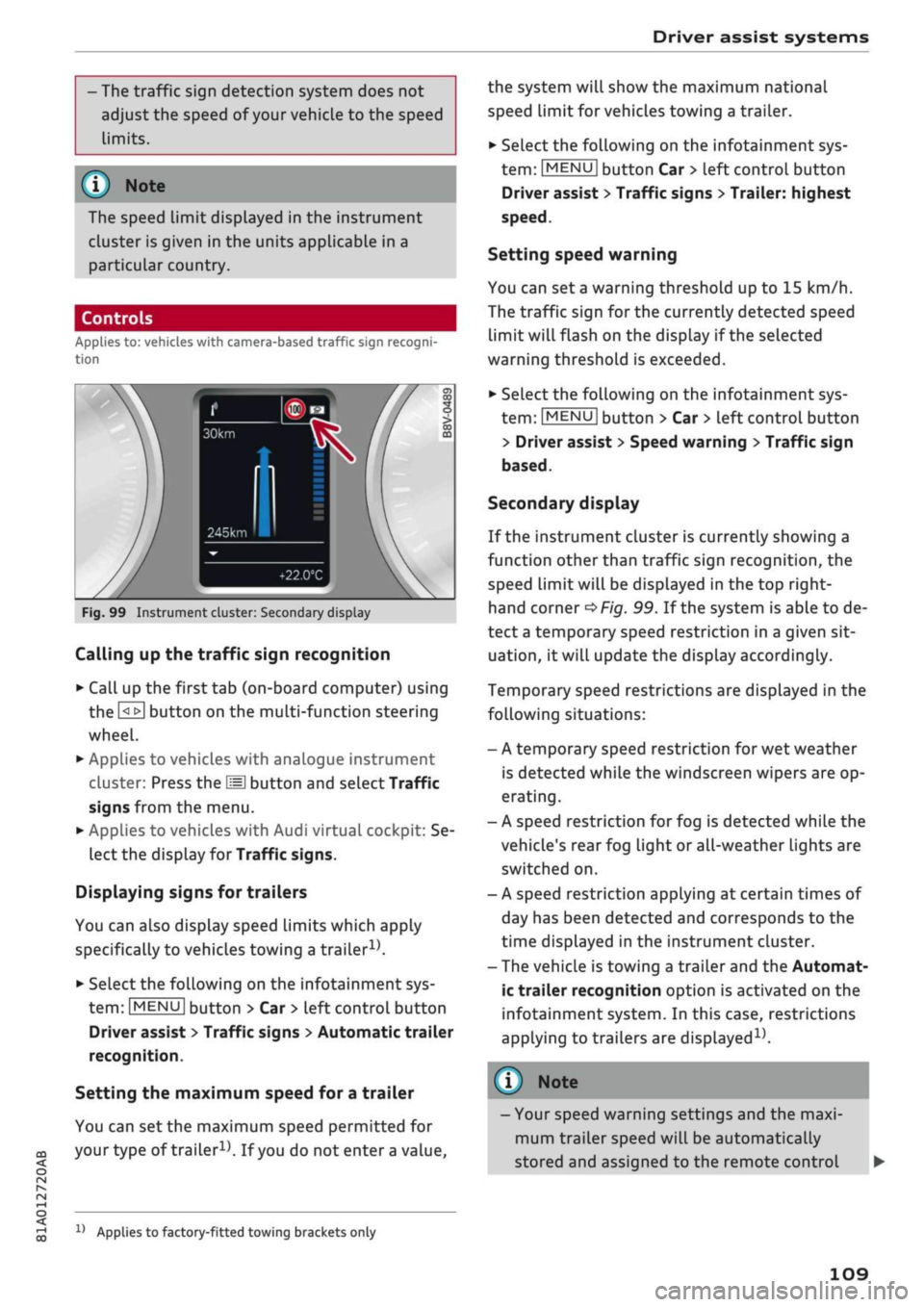
Fig.
99 Instrument cluster: Secondary display
Calling up the traffic sign recognition
•
Call up the first tab (on-board computer) using
the
GL>]
button on the multi-function steering
wheel.
•
Applies to vehicles with analogue instrument
cluster: Press the
LU]
button and select Traffic
signs from the menu.
•
Applies to vehicles with Audi virtual cockpit: Se
lect the display for Traffic signs.
Displaying signs for trailers
You can also display speed limits which apply
specifically to vehicles towing a trailer1).
•
Select the following on the infotainment sys
tem:
|MENU|
button > Car
>
left control button
Driver assist
>
Traffic signs
>
Automatic trailer
recognition.
Setting the maximum speed for a trailer
You can set the maximum speed permitted for
your
type of
trailer15.
If
you
do not enter
a
value,
x)
Applies to factory-fitted towing brackets only
the system will show the maximum national
speed limit for vehicles towing a trailer.
•
Select the following on the infotainment sys
tem:
|MENU|
button Car
>
left control button
Driver assist
>
Traffic signs
>
Trailer: highest
speed.
Setting speed warning
You can set a warning threshold up to
15
km/h.
The traffic sign for the currently detected speed
limit will flash on the display if the selected
warning threshold is exceeded.
•
Select the following on the infotainment sys
tem:
IMENU|
button > Car
>
left control button
> Driver assist
>
Speed warning
>
Traffic sign
based.
Secondary display
If the instrument cluster is currently showing a
function other than traffic sign recognition, the
speed limit will be displayed in the top right-
hand corner
^Fig.
99. If the system is able to de
tect
a
temporary speed restriction in a given sit
uation,
it will update the display accordingly.
Temporary speed restrictions are displayed in the
following situations:
- A temporary speed restriction for wet weather
is detected while the windscreen wipers are op
erating.
- A speed restriction for fog is detected while the
vehicle's rear fog light or all-weather lights are
switched on.
- A speed restriction applying at certain times of
day has been detected and corresponds to the
time displayed in the instrument cluster.
- The vehicle is towing a trailer and the Automat
ic trailer recognition option is activated on the
infotainment system. In this case, restrictions
applying to trailers are
displayed15.
© Note
- Your speed warning settings and the maxi
mum trailer speed will be automatically
stored and assigned to the remote control
109
Page 113 of 364
Driver assist systems
CO
< o rN
iv
rN
•-i
00
- In certain situations, the system may misin
terpret driving manoeuvres and inappropri
ately recommend a break.
- No acute warning is given if the driver falls
into a microsleep.
Instrument cluster display
Applies to: vehicles with rest recommendation
H
Rest recommended
If the warning lamp lights up and the message
appears, the evaluation of the steering input has
resulted in a rest recommendation. This is also
indicated by a warning tone. Take a break as soon
as possible.
The message may be displayed again once if nec
essary.
Switching on/off
Applies to: vehicles with rest recommendation
Select the following on the infotainment system:
|MENU|
button > Car > left control button > Driv
er assist > Rest recommendation.
© Note
If you switch off the system,
it
will remain
switched off the next time you switch on the
ignition.
Audi adaptive cruise
control
Description
Applies to: vehicles with Audi adaptive cruise control
»
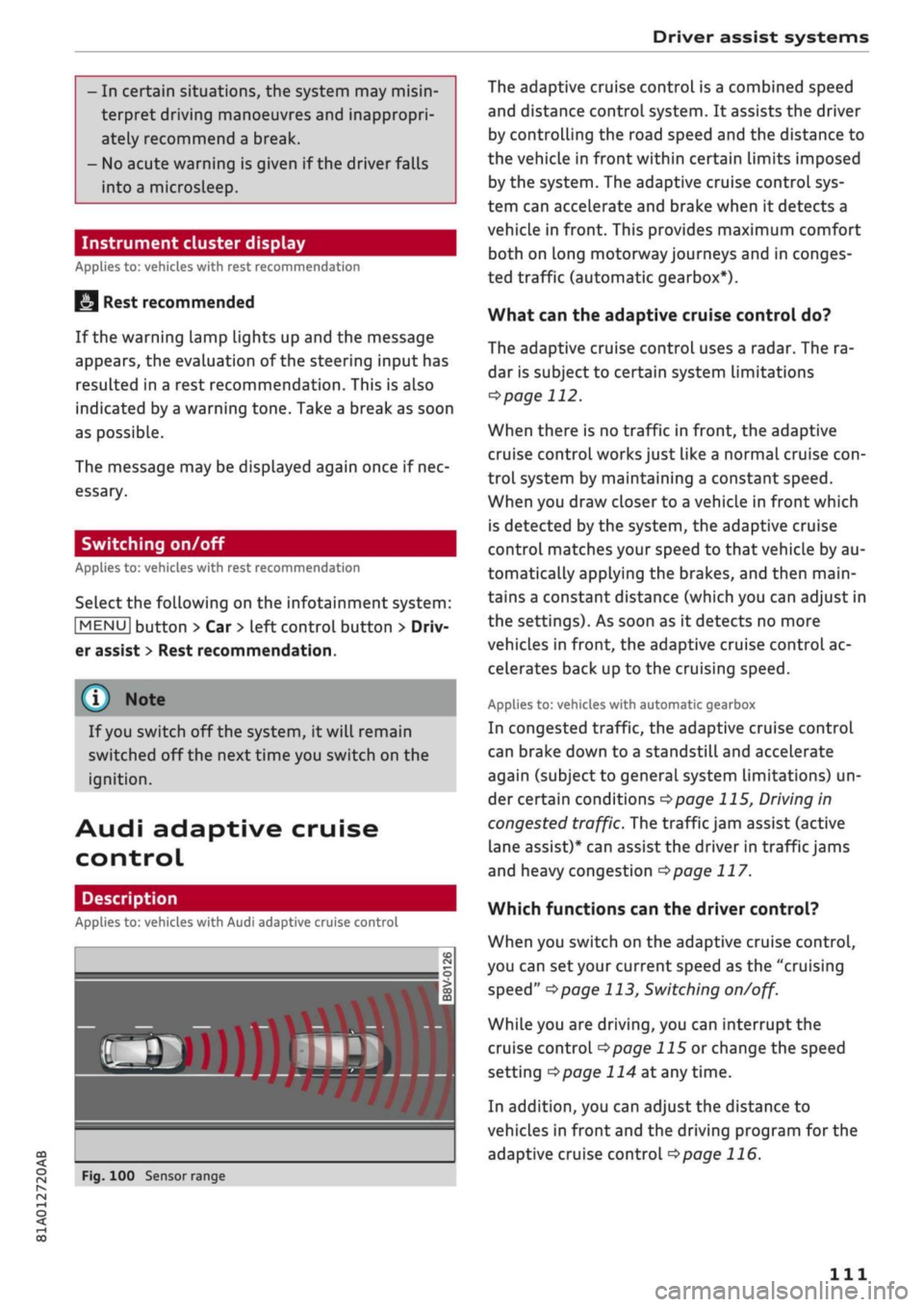
Fig.
100 Sensor range
The adaptive cruise control is a combined speed
and distance control system. It assists the driver
by controlling the road speed and the distance to
the vehicle in front within certain limits imposed
by the system. The adaptive cruise control sys
tem can accelerate and brake when it detects a
vehicle in front. This provides maximum comfort
both on long motorway journeys and in conges
ted traffic (automatic gearbox*).
What can the adaptive cruise control do?
The adaptive cruise control uses a radar. The ra
dar is subject to certain system limitations
opage
112.
When there is no traffic in front, the adaptive
cruise control works just like a normal cruise
con
trol system by maintaining a constant speed.
When you draw closer to a vehicLe in front which
is detected by the system, the adaptive cruise
control matches your speed to that vehicle by au
tomatically applying the brakes, and then main
tains a constant distance (which you can adjust in
the settings). As soon as it detects no more
vehicles in front, the adaptive cruise control ac
celerates back up to the cruising speed.
Applies to: vehicles with automatic gearbox
In congested traffic, the adaptive cruise control
can brake down to a standstill and accelerate
again (subject to general system limitations) un
der certain conditions
*$page
115, Driving in
congested traffic. The traffic jam assist (active
lane assist)* can assist the driver in traffic jams
and heavy congestion
<=>page
117.
Which functions can the driver control?
When you switch on the adaptive cruise control,
you can set your current speed as the "cruising
speed"
^>page
113, Switching
on/off.
While you are driving, you can interrupt the
cruise control
opage
115 or change the speed
setting
Opage
114 at any time.
In addition, you can adjust the distance to
vehicles in front and the driving program for the
adaptive cruise control
^>page
116.
Ill
Page 128 of 364
Driver assist systems
Setting the steering input time and
vibration warning
Applies to: vehicles with Audi active lane assist
You
can change the Audi active lane assist
set
tings on the infotainment system to
suit
your in
dividual preferences.
•
Select the following on the infotainment sys
tem:
|MENU|
button > Car
>
left control button
> Driver assist
>
Audi active lane assist.
Steering
input1'
early: If this setting is selected, a continuous
steering input assists the driver to keep the
vehi
cle in the middle of the lane.
late:
If this setting is selected, the steering is not
corrected until just before a wheel crosses a de
tected Lane marking.
Vibration warning
You can switch the additional steering wheel vi
bration warning on/off.
A WARNING
When the vibration warning is switched off,
no visual warnings are given in the instrument
cluster display if
you
cross a lane marking.
Your personal settings are stored automati
cally and assigned to the remote control key
which is being used
W.
Emergency assist
Applies to: vehicles with emergency assist
The emergency assist takes over controL of the
vehicle in certain situations and can help to pre
vent accidents. It is an extension of the active
lane assist and can use the functions of the adap
tive cruise control system
<=>^.
The emergency
assist is activated when it detects that the driver
has stopped steering the vehicle.
Functions of the emergency assist
The emergency assist monitors the steering ac
tivity of the driver. It detects if the driver is inac
tive and gives repeated visual and audible warn
ings as well as brake jolts prompting the driver to
take proactive control of the vehicle again. The
hazard warning lights are also switched on when
the first sharp brake jolt is given below
a
speed of
80
km/h15.
If the driver does not take over, the system inter
venes by steering the vehicle (within the limita
tions of the system) to keep it in lane, and by ap
plying the brakes until the vehicle has stopped*.
In addition, the warning lamp || and a message
are displayed.
Requirements for using the emergency assist
- The active lane assist must be switched on and
ready to warn
^>page
124.
-The adaptive cruise controL must be switched
on and activated
^>page
113.
If any of the requirements for the active lane as
sist
^>page
123 or adaptive cruise control
tapage
112 are not met, the functionality of the
system may be restricted or it may be deactiva
ted automatically.
Interrupting the emergency assist
You can interrupt the emergency assist if it reacts
when it shouldn't
•=> A:
- Move the steering wheel. Or:
- Press the brake/accelerator. Or:
- Switch off the active lane assist via the button
<>
page 117, Fig. 110.
WARNING
- As the driver you are always responsible for
controlling the vehicle. Do not let the emer
gency assist tempt you into taking any risks
when driving - this can cause accidents.
l)
This function is not available on all export versions.
126
Page 129 of 364

Driver assist systems
CO
< o rN
r>
rN
t-H
o < 00
- The purpose of the emergency assist is to
assist the driver and to help prevent an
acci
dent in case of an emergency. The protec
tion provided by the system is still subject
to the prevailing physical limits - risk of
acci
dent!
- Due to inherent system Limitations, false ac
tivation of the system is possible - risk of ac
cident! Interrupt the emergency assist if
necessary.
- Please observe the warnings for the adap
tive cruise control
•=> A
in General notes on
page 112.
If the emergency assist is deployed, it will not
be available again until the next time the
igni
tion is switched on.
Audi side assist
Description
Applies to: vehicles with Audi side assist
/——s—a~-^r—"x.
o5
s
• x •
CO
Fig.
117 Area covered by the radar sensors
Fig.
118 Warning lamp on exterior mirror
The side assist function
(lane
change assist fea
ture) assists the driver in monitoring following
traffic and the blind spots on both sides of the
car. Within certain system limits, it warns you if
it detects vehicles approaching quickly or travel
ling at about the same speed as your own vehicLe
in the area covered by the sensors
©^Fig.
117.
If it judges a lane change to be critical, the warn
ing Lamp (5) on the exterior mirror lights up
^Fig.
118.
The warning lamp on the left-hand mirror assists
the driver when changing lane towards the left
and the warning Lamp on the right-hand mirror
assists the driver when changing lane towards
the right.
Information mode
As Long as you do not operate the turn signal, the
side assist will merely inform you of the presence
of vehicles that it has detected and judges to be
critical.
In this case, the warning lamp on the
rel
evant exterior mirror will Light up at low intensi
ty.
The intensity of the warning lamp in this infor
mation mode is kept relatively low, so that it
does not distract you while you are looking at the
road in front.
Warning mode
If
you
operate the turn signal and the warning
lamp on the relevant exterior mirror flashes
brightly, the side assist is warning you of what it
judges to be a critical vehicle. Please check the
situation in the exterior mirror and by looking
back over your shoulder
•=> A
in General notes on
page 128.
Applies to: vehicles with Audi active lane assist
The warning lamp on the relevant mirror may al
so flash when you have not operated the turn
sig
nal.
If
you
come close to a detected Lane marking
and are in danger of Leaving your lane, the side
assist warns you of what
it
judges to be a critical
vehicle.
®
Not
You can adjust the brightness of the warning
lamp on the exterior mirror
^page
129.
127
Page 148 of 364
Intelligent technology
Remember that the accident risk always in
creases
if
you
drive fast, especially
in
cor
ners
or
on a wet
or
slippery
road,
or if
you
follow too close behind the vehicle in front
of
you.
Please bear
in
mind that even
the
ESC
and
the
integrated systems cannot
compensate
for
the increased accident risk.
When accelerating
on
a uniformly slippery
surface
(for
instance
all
four wheels on
ice
or snow), press the accelerator gradually
and carefully. The driven wheels may other
wise start
to
spin
(in
spite
of
the integrated
control systems), which would impair the
car's stability and could lead
to
an accident.
© Note
The ABS and ASR systems can only work
properly
if
a 11
four tyres have a similar de
gree
of
wear. Any differences
in the
rolling
radius
of
the tyres can cause the system
to
reduce engine power when this
is not
de
sired.
The systems can make noises when they in
tervene.
Switching on/off
The ESC
is switched on automatically when
the
engine is started.
^OFF
1
y
CO
5
3
CO
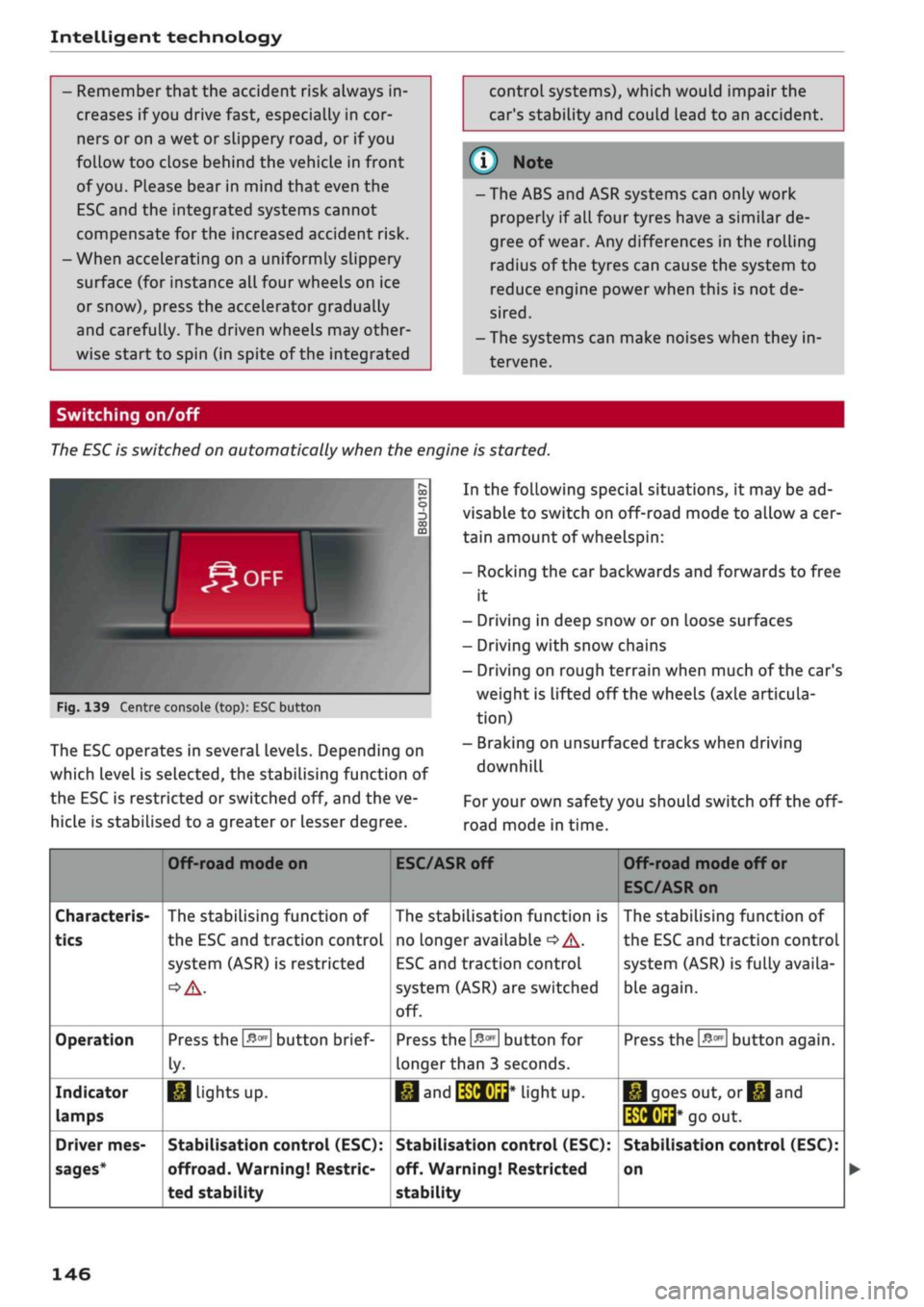
Fig.
139 Centre console (top): ESC button
The ESC operates
in
several levels. Depending
on
which Level
is
selected,
the
stabilising function
of
the ESC
is
restricted
or
switched
off,
and the ve
hicLe
is
stabilised
to
a greater
or
Lesser degree.
In the following special situations,
it
may be ad
visable
to
switch on off-road mode
to
allow a cer
tain amount
of
wheelspin:
- Rocking
the car
backwards and forwards
to
free
it
- Driving
in
deep snow
or
on Loose surfaces
- Driving with snow chains
- Driving
on
rough terrain when much
of
the car's
weight
is
lifted
off
the wheels (axle articula
tion)
- Braking
on
unsurfaced tracks when driving
downhill
For
your own safety you should switch
off
the
off-
road mode
in
time.
Characteris
tics
Operation
Indicator
lamps
Driver mes
sages*
Off-road mode
on
The stabilising function
of
the ESC and traction controL
system (ASR)
is
restricted
Press the
&m
button brief
ly-
1*1
Lights
up.
Stabilisation control (ESC):
offroad.
Warning! Restric
ted stability
ESC/ASR
off
The stabilisation function
is
no Longer available
•=>
A-
ESC
and traction controL
system (ASR) are switched
off.
Press
the
&m
button
for
longer than
3
seconds.
•M and
IWHUrt*
liant UP.
Stabilisation control (ESC):
off. Warning! Restricted
stability
Off-road mode
off
or
ESC/ASR on
The stabilising function
of
the ESC and traction control
system (ASR) is fully availa
ble again.
Press the
#*
button again.
|*|goes
out,
or^and
të&Éid*
go
out.
Stabilisation control (ESC):
on
146
Page 150 of 364
Intelligent technology
/K
WARNING
- When applying
the
brakes
to
clean
off
de
posits
on the
pads and discs, select
a
clear,
dry
road.
Be sure
not to
inconvenience
or
en
danger other road users;
do not
risk an
acci
dent.
- Never
let the car
coast with
the
engine
switched
off
(this can cause accidents).
(T)
CAUTION
- Never
let the
brakes "drag"
by
leaving your
foot on
the
pedal when you
do not
really
in
tend
to
brake. This overheats
the
brakes,
re
sulting
in
longer stopping distances
and
greater wear.
- Before driving down
a
long,
steep gradient,
it
is
advisable
to
reduce speed
and
select
a
lower gear.
In
this way you will make use
of
the engine braking effect and relieve
the
load
on the
brakes.
If
you
still have
to use
the brakes,
it is
better
to
brake firmly
at in
tervals than
to
apply
the
brakes continuous-
Ly
-
If
the brake servo
is out of
action,
you must
apply considerably more pressure
to the
brake pedal than you normally would.
-
If
you
wish
to
equip
the
car with accessories
such as a front spoiler
or
wheel covers,
it is
important that
the
flow
of air to the
front
wheels
is not
obstructed, otherwise
the
brakes can overheat.
Electro-mechanical
power steering
Electro-mechanical power steering assists
the
driver when steering.
The degree
of
power assistance
is
adapted elec
tronically,
depending
on the
speed.
Warning/indicator lamps
and
driver
messages
| Do not drive vehicle: steering defective
If the warning lamp lights
up
permanently
and
the message appears, there
may be
a power
steering failure.
Stop
the
vehicle
in a
safe place
as
soon
as
possi
ble.
Do
NOT drive on. Obtain professional assis
tance.
S
Steering malfunction: you can continue driv
ing
If the indicator Lamp Lights up,
the
steering
re
sponse
may be
heavier
or
lighter than usual.
In
addition,
it is
possible that
the
steering wheel
will
be off
centre when driving
in a
straight line.
Drive slowly
to
a qualified workshop and have
the
fault rectified.
Note
You
can
drive
on if
the warnina/indicator
g/
Lamp
||
or y
|
lights
up
only briefly
Four-wheel drive
(quattro)
Applies to: vehicles with four-wheel drive
On
quattro models
the
engine power is distrib
uted
to all
four wheels.
General notes
On four-wheel drive vehicles,
the
engine power
is
distributed
to all
four wheels. The distribution
of
power
is
controlled automatically according
to
your driving style and
the
road conditions. Also
refer
to
^>page
145,
Electronic stabilisation con
trol
(ESC).
The four-wheel drive
is
specially designed
to
complement
the
superior engine power
of
your
Audi.
This combination gives
the car
exceptional
handling
and
performance capabilities
-
both
on
normal roads and
in
more difficult conditions,
such
as
snow and
ice.
Even
so (or
perhaps espe
cially
for
this reason),
it is
important
to
observe
certain safety points
<=> A-
Winter tyres
Thanks
to its
four-wheel drive, your
car
will have
plenty
of
traction
in
winter conditions, even with
•
148
Page 166 of 364
Speech dialogue system
Speech dialogue system
How to use the speech
dialogue system
Applies to: vehicles with speech dialogue system
You
can operate many infotainment functions
conveniently by voice.
Important: The ignition and the MMI system
must be switched on
^>page
152, you must not
be talking on the phone, and the parking aid
must not be active.
•
To switch on: Briefly press the
0
button (J)
^>page
17, Fig. 12/(3)
^>page
18, Fig. 14 on
the multi-function steering wheel and give a
spoken command after the beep signal.
*•
To switch off: Press and hold the
0
button for
several seconds. Or: Press the
0
button.
•
To pause: Say the command Pause. To end the
pause,
press the
S
button.
•
To make a correction: Say the command Cor
rection.
Input help
The system guides you through the input routine
with cues and messages.
- Input help messages on screen: After the
speech dialogue system is switched on, a selec
tion of possible commands will be shown. The
command display can be switched on or off as
required.
Select:
|MENU|
button
>
Settings >
left control button > MMI settings
>
Speech
dialogue system.
- Spoken input help
cues:
To have the system
play the commands currently possible, switch
on the speech dialogue system and say Help.
How to help the system understand you
Speak clearly in a normal volume. Speak louder if
you are driving fast.
Speak in a normal tone without long pauses.
Close doors, windows and sun roof* to reduce
background noise. Make sure that passengers are
not talking when you say a command.
Keep the air outlets of the air distribution system
pointed away from the microphone, which is fit
ted in the vicinity of the front interior lights in
the headliner.
The system should only be operated by the driv
er, since the handsfree microphone is directed
towards the driver.
Other settings
Refer to
^>page
262.
© No
-The dialogue is paused when an incoming
telephone call is received; you can continue
the dialogue by ignoring the
call.
If
you
an
swer the
call,
the dialogue will be cancelled.
- No navigation cues* or traffic announce
ments are played when a dialogue is
run
ning.
- You can select an entry from a list both via
the speech dialogue system and using the
rotary pushbutton.
- The speech dialogue system does not sup
port commands in Arabic, Norwegian or
Hungarian.
Notes on the overviews
of commands
Applies to: vehicles with speech dialogue system
The following overviews show you the commands
that you can give to operate the MMI via the
speech dialogue system. •
A WARNING
- Please direct your full attention to the road
at all times! As the driver, you have full re
sponsibility for the safety of the vehicle and
other road users.
For
this reason, you should
only use the functions in a manner that al
lows you to maintain control of the vehicle
in all situations - accident risk!
- The speech dialogue system must not be
used in cases of emergency, since the voice
changes in stressful situations. This could
result in a failed or delayed telephone
con
nection.
Always dial emergency numbers
manually!
164
Page 267 of 364
Safe driving
Safe driving
General notes
Safety is the first priority
The safety features in your vehicle are harmon
ised to provide you and your passengers with the
best possible protection in accident situations.
However, they can only be effective if you and
your passengers sit in the correct position and
adjust and use the safety equipment properly.
For these reasons, this chapter explains why
these safety features are so important, how they
can protect you, what you need to remember
when using them, and
how
you and your passen
gers can gain the most benefit from them. There
are also a number of important safety warnings
which you and your passengers should always ob
serve in order to minimise the risk of injury.
WARNING
- The information in this chapter is important
for the driver of the vehicle and all passen
gers.
The other chapters in this manual
(and,
where applicable, in the other litera
ture supplied with the vehicle) contain fur
ther important notes which you should read
and observe for your own safety and that of
your passengers.
- Ensure that the complete vehicle wallet is
always in the vehicle. This is especially im
portant when you lend or sell the vehicle to
others.
CO
<
O
rN
iv
rN
i—i
o < 00
Before every trip
The driver is responsible for the safety of the
passengers and the safe operation of the vehicle
at all times.
For
your own safety and the safety of your pas
sengers, always note the following points before
every trip:
•
Make sure that all lights and turn signals are
working properly.
•
Check the tyre pressures.
•
Make sure that all windows are clean and give
good visibility to the outside.
•
Secure all luggage and other items carefully
•=>
page 272.
• Make sure that no objects can interfere with
the pedals.
•
Adjust the front seat, head restraint and mir
rors correctly.
• Applies to: adjustable head restraints: Make
sure that the front passenger's head restraint is
adjusted to the correct position.
• Applies to: adjustable head restraints: Make
sure that the head restraints for the rear pas
sengers are in the fully raised position.
•
Make sure that children are protected with suit
able safety seats and properly worn seat belts
•=>
page 267.
•
Sit in the correct position in your seat. Make
sure
that
your passengers are sitting in the cor
rect positions
^>page
58.
•
Fasten your seat belt correctly. Make sure that
your passengers do the same
^page
275.
What factors can impair your safety?
Safety on the road is directly related to
how
you
drive, and can also be affected by the passengers
in the vehicle.
• The driver is responsible for the safety of the
vehicle and all its occupants. If your ability to
drive is impaired in any way, you endanger
yourself and other road users
,=>^.
Therefore:
• Do not let yourself be distracted by passengers
or by using a mobile phone, etc.
•
Never drive when your driving ability is im
paired (by medication, alcohol, drugs, etc.).
• Obey all traffic regulations and speed limits
and always maintain a safe distance to the
vehi
cle in front.
•
Always adjust your speed to suit the
road,
traf
fic and weather conditions.
•
Take frequent breaks on long trips. Do not drive
for more than two hours without a stop.
•
If possible, avoid driving when you are tired or
stressed.
•
263
Page 292 of 364
Airbag system
Deactivating the front
passenger's airbag
Applies to: vehicles with key-operated switch for front pas
senger's airbag
If
an
airbag has been deactivated, it should be
reactivated as soon as possible so that it can
continue to give the required protection.
••
-,
CG
^
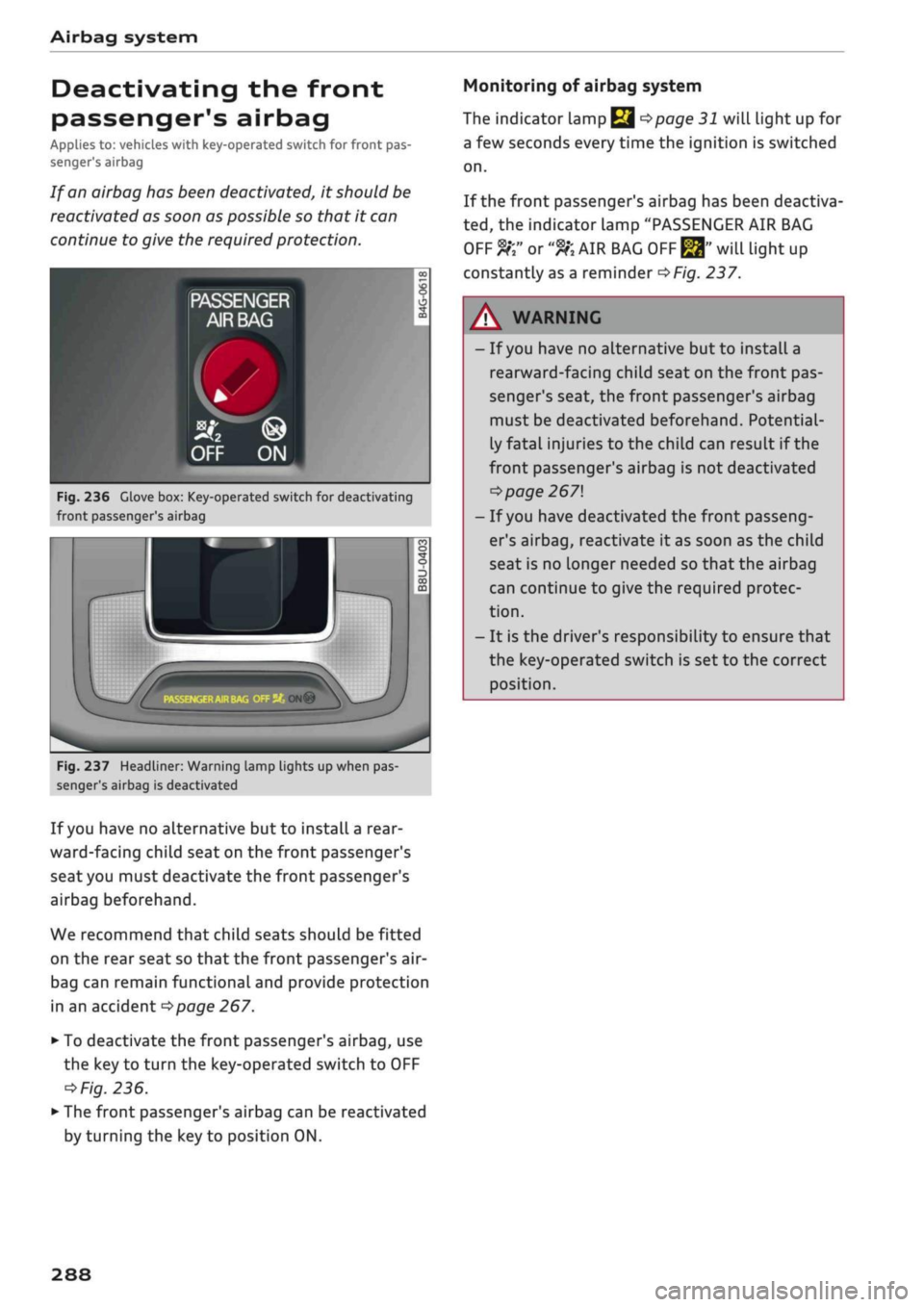
Fig.
236 Glove box: Key-operated switch for deactivating
front passenger's airbag
r
;•••;
:
m
^
hu
ON®
Fig.
237 Headliner: Warning lamp lights up when pas
senger's airbag is deactivated
If
you
have no alternative but to install
a
rear
ward-facing child seat on the front passenger's
seat you must deactivate the front passenger's
airbag beforehand.
We recommend that child seats should be fitted
on the rear seat so that the front passenger's air-
bag can remain functional and provide protection
in an accident
^>page
267.
•
To deactivate the front passenger's airbag, use
the key to turn the key-operated switch to OFF
=*
Fig.
236.
•
The front passenger's airbag can be reactivated
by turning the key to position ON.
Monitoring of airbag system
The indicator Lamp
Q ^>page
31 will light up for
a few seconds every time the ignition is switched
on.
If the front passenger's airbag has been deactiva
ted,
the indicator Lamp "PASSENGER AIR BAG
OFF ft" or
"9K
AIR BAG
OFF ^"
will light up
constantly as a reminder
^>Fig.
237.
A WARNING
- If
you
have no alternative but to install a
rearward-facing child seat on the front pas
senger's seat, the front passenger's airbag
must be deactivated beforehand. Potential
ly fatal injuries to the child can result if the
front passenger's airbag is not deactivated
•=>
page 267
- If
you
have deactivated the front passeng
er's airbag, reactivate it as soon as the child
seat is no longer needed so that the airbag
can continue to give the required protec
tion.
- It is the driver's responsibility to ensure that
the key-operated switch is set to the correct
position.
288
Page 299 of 364

Checking and topping up fluids
CO
rN
IV
rN
•-i
00
Emission controL
systems
Catalytic converter
Applies to: vehicles with petrol engine
The vehicle must only be used with unleaded pet
rol,
otherwise the catalytic converter will be ir
reparably damaged.
Never allow the fuel tank to run completely dry,
as the irregular supply of fuel can cause misfir
ing.
This allows unburnt fuel to enter the exhaust
system,
which can cause overheating and dam
age to the catalytic converter.
Diesel particulate filter
Applies to: vehicles with diesel engine
The diesel particulate filter can filter out almost
all soot particles contained in the exhaust gas. In
normal driving conditions the filter is self-clean
ing.
Should the self-cleaning function of the filter
not be able to operate, e.g. when the vehicle is
continuously used only for short trips, the filter
becomes obstructed with soot and the indicator
lampnf°r
the
diesel particulate filter Lights up
cépage
34.
A WARNING
The exhaust system is very hot when the
vehi
cle is being driven and after the engine has
been switched off.
- Never touch the tailpipes when they are hot
- risk of burns!
- Because of the high temperatures which can
occur in the emission controL system, do not
park the vehicle where the exhaust can
come into contact with flammable materials
under the car (e.g. on grass or at the forest
edge) - risk of fire!
- Do not apply any underseal agents in the
area around the exhaust system - risk of
fire!
Engine compartment
Working on components in the engine
compartment
Extra caution is necessary when working on com
ponents in the engine compartment.
Always be aware of the danger of injury and
scalding as well as the risk of accident or fire
when working in the engine compartment (e.g.
when checking and refilling fluids). Always ob
serve the warnings listed below and follow all
normal safety precautions. The engine compart
ment of any motor vehicle is a potentially haz
ardous area
oA-
A WARNING
- Switch off the engine.
-Switch off the ignition.
-Applythe
parking brake.
- On vehicles with manual gearbox place the
gear lever in neutral, on vehicles with auto
matic gearbox move the selector lever to
position P.
- To avoid the risk of being scalded, never
open the bonnet if
you
see steam or coolant
escaping from the engine compartment.
Wait until no steam or coolant can be seen
before opening the bonnet.
- Wait for the engine to cool down.
- Keep children away from engine compart
ment.
- Never spill fluids on a hot engine. These
flu
ids can cause a fire (e.g. radiator
anti
freeze).
- Take care not to cause short circuits in the
electrical system.
- When working in the engine compartment
be aware that the radiator fan may start
running suddenly, even if the ignition is
switched off - risk of injury!
- Do not unscrew the cap on the expansion
tank when the engine is hot. The cooling
system is under pressure.
- Protect face, hands and arms by covering
the cap with a large, thick rag to protect
against escaping coolant and steam.
295