park AUDI Q2 2021 Owner´s Manual
[x] Cancel search | Manufacturer: AUDI, Model Year: 2021, Model line: Q2, Model: AUDI Q2 2021Pages: 364, PDF Size: 87.77 MB
Page 142 of 364
Parking aids
- Please note that the park assist only
han
dles the steering. As the driver you are al
ways responsible for braking and accelerat
ing.
- It is the driver's responsibility to decide
whether a parking space shown in the dis
play is suitable for the vehicLe.
- The front of the vehicle swings out during
the parking manoeuvre. Please take all nec
essary measures to ensure that other road
users are not endangered.
- The steering wheel turns rapidly on its own
when parking the vehicle and leaving the
space.
Injury may result if
a
person reaches
between the spokes on the steering wheel
when it is turning.
(T)
CAUTION
- Please observe the safety warnings
•=>©
in
General notes on page 134.
- In certain situations, the park assist will
guide the vehicLe onto or across the kerb,
for instance if other vehicles are parked on
the kerb. You should always be ready to
take over the steering wheel in order to pre
vent damage to the tyres and/or wheel
rims.
- Certain conditions in and around the park
ing space can cause unexpected results
when parking.
- Pillars, posts, etc.
- Loose gravel, snow, ice, etc.
© Note
-The electronic stabilisation control (ESC)
must not be switched off during the parking
manoeuvre
^>page
146.
- The park assist cannot be used to park the
vehicle on tight bends.
- The park assist cannot be used to park the
vehicle if
a
trailer is attached and the elec
trical connector for the trailer socket is
plugged in.
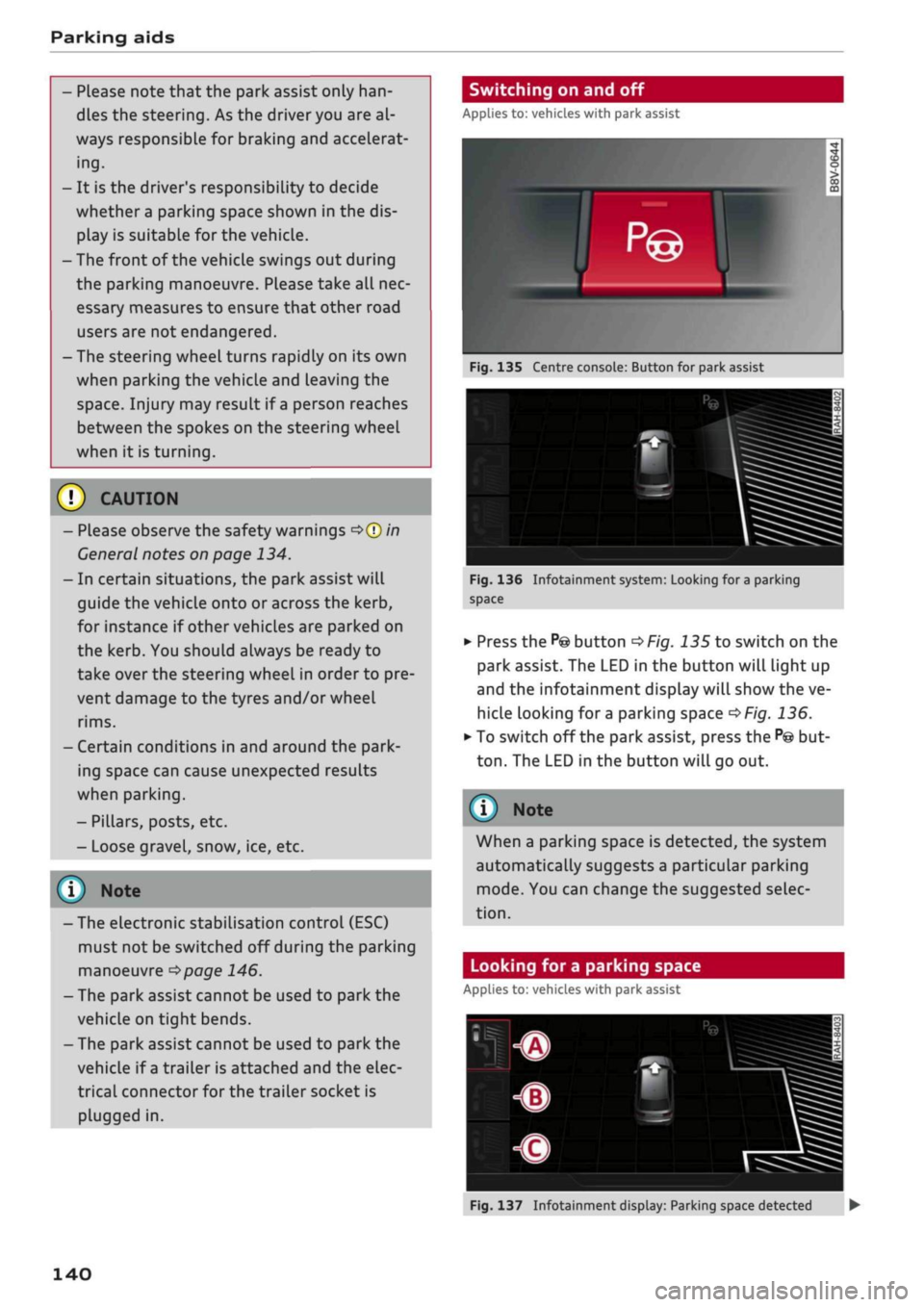
Switching on and off
Applies to: vehicles with park assist
Fig.
135 Centre console: Button for park assist
^^i=^k—
Bp-"1
Fig.
136 Infotainment system: Looking for
a
parking
space
•
Press the
P@
button
^>Fig.
135 to switch on the
park assist. The LED in the button will light up
and the infotainment display will show the ve
hicle looking for
a
parking space
^>Fig.
136.
• To switch off the park assist, press the
P@
but
ton.
The LED in the button will go out.
© Note
When a parking space is detected, the system
automatically suggests a particular parking
mode.
You can change the suggested selec
tion.
Looking for a parking space
Applies to: vehicles with park assist
140
Fig.
137 Infotainment display: Parking space detected •
Page 143 of 364
Parking aids
CO
< o rN
iv
rN
i—i
00
Important: For the best parking result, you
should maintain a distance of approx. 1 metre to
the row of parked cars.
•
To switch between parallel
(Â)
perpendicular
forwards
(B)
and perpendicular in reverse (?)
parking modes, turn the rotary pushbutton to
select the desired mode. The system only
shows parking modes that are currently possi
ble.
•
Operate the turn signal. The desired side of the
road will be scanned.
•
To park parallel to the roadside, drive forwards
at not more than 30 km/h. Or:
•
To park perpendicular to the roadside, drive
forwards at not more than 20 km/h.
•
The system will display
a
parking space when it
finds one
^Fig.
137. Please check that the
parking space is suitable for your vehicle.
•
To park using the system, follow the instruc
tions on the display.
If
you
exceed a speed of about 50 km/h, the park
assist will be switched off.
The park assist will display
a
parking space only if
it is Long and wide enough for the vehicLe.
© Note
-You can select any one of the parking op
tions found. The potential parking space is
displayed until you have driven too far away
from it.
- You can activate the park assist after you
have already driven past a parking space (as
long as you were driving slowly enough). To
do so, press the
P©
button and operate the
turn signal.
- The system displays the right or left side of
the
road,
depending on which turn signals
you operate.
- The best parking results will be achieved if
you position the vehicle as parallel as possi
ble to the line of parked cars or the kerb be
fore you start the actual parking manoeu
vre.
- If there are suitable parking spaces on both
sides of the road (for instance on a one-way
street), you can change the direction of the
turn signals to park on the other side, even
if
you
have already activated the park assist.
Starting a parking manoeuvre
Applies to: vehicles with park assist
The
driver is responsible for parking the vehicle.
Id it nl ila 1 i
L
ml\Jf '- ,H
i^*feâSi^T^,s*'ii^**£^B
'
1
Jr
r
i
fm
-
rf
"
!B—^-ASSL
^
tc^^^T-^T^^Tfr^a^j^
*
If*
Tf dl if
ïï
F ~"i
1VT"
•*-•.'' iiS^S
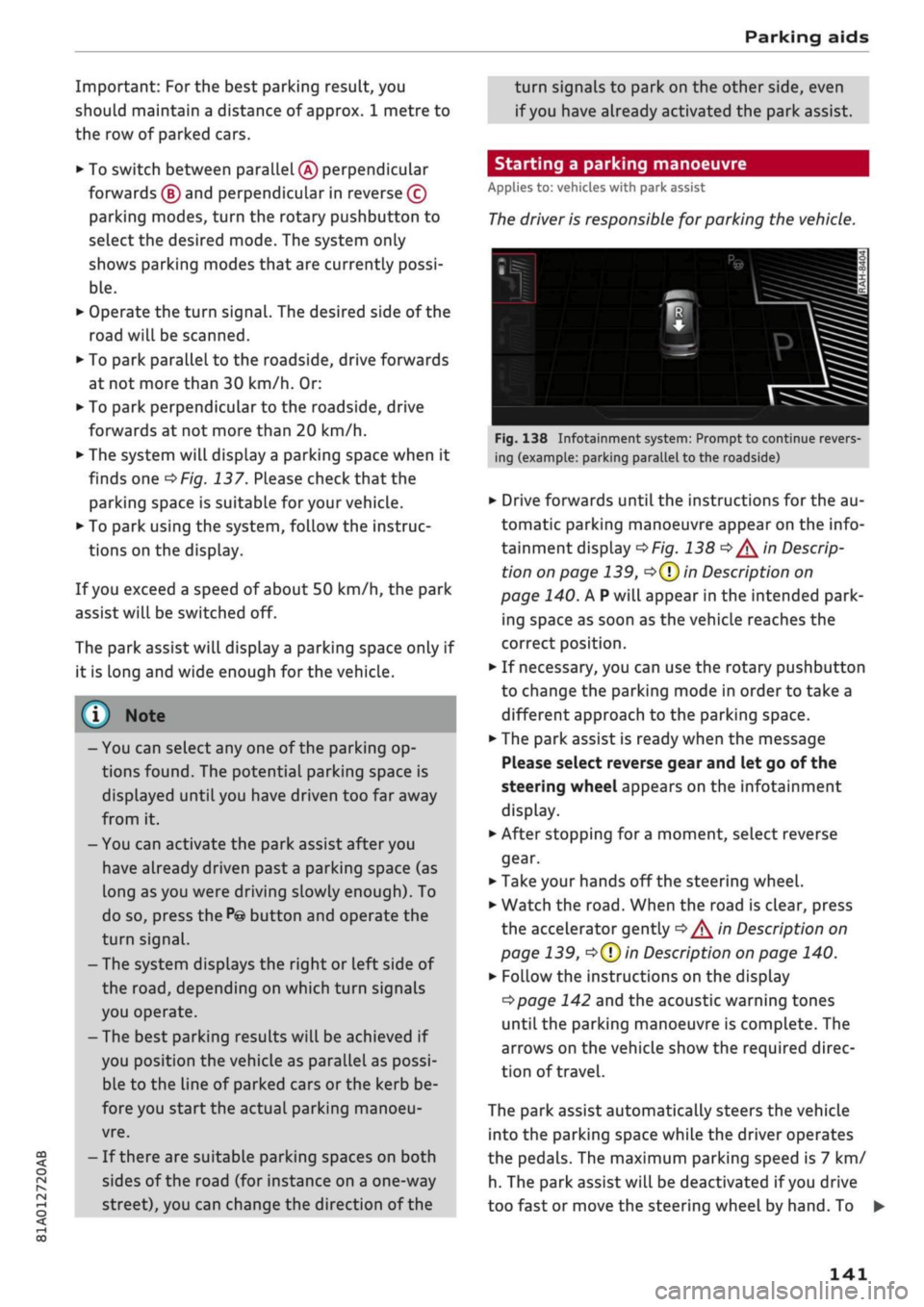
Fig.
138 Infotainment system: Prompt to continue revers
ing (example: parking parallel to the roadside)
•
Drive forwards until the instructions for the au
tomatic parking manoeuvre appear on the info
tainment display
^>Fig.
138
^/^
in Descrip
tion on page 139,
o(T)
in Description on
page 140. A
P
will appear in the intended park
ing space as soon as the vehicle reaches the
correct position.
•
If necessary, you can use the rotary pushbutton
to change the parking mode in order to take a
different approach to the parking space.
•
The park assist is ready when the message
Please select reverse gear and let go of the
steering wheel appears on the infotainment
display.
•
After stopping for
a
moment, select reverse
gear.
•
Take your hands off the steering wheel.
•
Watch the
road.
When the road is clear, press
the accelerator gently
^/^
in Description on
page 139,
•=>(?)
in Description on page 140.
•
Follow the instructions on the display
^>page
142 and the acoustic warning tones
until the parking manoeuvre is complete. The
arrows on the vehicLe show the required direc
tion of travel.
The park assist automatically steers the vehicle
into the parking space while the driver operates
the pedals. The maximum parking speed is 7 km/
h. The park assist will be deactivated if
you
drive
too fast or move the steering wheel by hand. To •
141
Page 144 of 364

Parking aids
continue the parking manoeuvre, press the
P© button again. The park assist will reappear on
the display.
You can cancel the direction of travel given by
the system before parking by shifting be
tween forwards/reverse gear. The system will
then calculate the further path and steering
directions for the manoeuvre based on the
position of the vehicle.
Driving out of a parking space parallel to
the roadside
Applies to: vehicles with park assist
The
driver is responsible for manoeuvring the ve
hicle out of the parking space.
If the vehicle is parked parallel to the roadside,
the park assist can help you to drive out of the
parking space.
•
Start the engine.
•
Press the
P©
button
^>page
140, Fig. 135.
•
Wait until the following text appears on the in
fotainment display: Specify direction with turn
signal to leave parking space.
*•
Operate the appropriate turn signal. The mes
sage Start automatic unparking procedure will
appear.
*•
Take your hands off the steering wheel.
•
Press the rotary pushbutton to start automatic
unparking.
•
Watch the
road.
When the road is clear, press
the accelerator gently
^ ^
in Description on
page 139,
^>(J)in
Description on page 140.
•
Follow the instructions on the display
^>page
142 and the acoustic warning tones
until you are
dear
to leave the parking space.
•
Drive in the direction specified by the arrows on
the vehicle.
•
The procedure is over when no more manoeu
vring is necessary in order to drive out of the
space.
Take over the steering.
The park assist automatically steers the vehicle
out of the parking space while the driver operates
the pedals. The maximum manoeuvring speed is
5 km/h. The park assist will be deactivated if you
drive too fast or move the steering wheel by
hand.
To continue the parking manoeuvre, switch
the engine off/on. Then press the
P@
button
again.
Alternatively, drive out of the parking
space without using the park assist.
Driver messages
Applies to: vehicles with park assist
Park assist: cancelled. Steering input detec
ted.
Continue steering vehicle!
The steering assistant has been deactivated be
cause the driver has intervened in the steering.
To continue the parking manoeuvre, press the
"©
button again.
Park assist: time limit exceeded
Park assist: cancelled. Time limit exceeded.
Continue steering vehicle!
The parking manoeuvre was not completed
with
in about six minutes after the park assist was ac
tivated.
To continue the parking manoeuvre,
press the P© button again.
Park assist: cancelled. Speed too high. Con
tinue steering vehicle!
You were driving too fast into the parking space.
Do not drive faster than 7 km/h.
i
Park assist: cancelled. Stabilisation control
(ESC) input. Continue steering vehicle!
The ESC has intervened. Take over the steering.
Finish parking without the park assist or drive out
of the parking space.
Park assist: currently unavailable. Stabilisa
tion control (ESC) off
The ESC has been switched off. The ESC must be
switched on before the park assist can be used.
| Park assist: fault. Please contact workshop
i Park assist: fault. Continue steering vehicle!
Please contact workshop
Please contact a qualified workshop. The park as
sist cannot be used to park the vehicLe if
a
system
fault occurs.
|
Park assist: currently unavailable
142
Page 145 of 364

Parking aids
CO
<
o
rN
iv
rN
t-H
o
< 00
Park assist: currently unavailable. Continue
steering vehicle!
The park assist cannot be used to park the
vehi
cle.
Try repeating the parking manoeuvre or
switching the ignition off and on again.
3 Park assist: ended. Please take over steering
and continue driving
The park assist has finished manoeuvring the ve
hicle out of the parking space. Please take over
the steering.
Park assist: cancelled. Space too small. Con
tinue steering vehicle!
The park assist cannot be used to park the vehicle
in this space. Park the vehicle without using the
park assist or look for a bigger space.
Park assist: cancelled. Obstacle detected.
Please take over steering.
The park assist has interrupted the parking ma
noeuvre to avoid a collision between the vehicle
and an obstacLe.
Park assist: ended
3 Park assist: ended. Please take over steer
ing.
The park assist has finished the parking manoeu
vre.
Park assist: stabilisation control (ESC) input
The parking space indicated has been rejected be
cause the ESC has intervened.
Park assist: currently unavailable. Towing
mode
The park assist cannot be used to park the vehicle
when towing a trailer.
1
Park assist: not stopped long enough
After you select reverse gear, the vehicle has to
remain stationary for
a
moment so that the park
assist can activate the steering. Follow the direc
tions given in the display.
3
Park assist: cancelled. Assist function un
available for leaving parking space. Space too
small
The assist function is unable to automatically
steer the vehicle out of the parking space be
cause the space is too small. Manoeuvre the
vehi
cle out of the parking space without using the
park assist.
Park assist: cancelled. Continue steering ve
hicle!
The park assist has interrupted the parking ma
noeuvre.
Settings for parking aid
Applies
to: vehicles with rear parking aid/parking system
plus/reversing
camera/park assist
You
can change the settings for these functions
on the infotainment system.
•
Select the following on the infotainment sys
tem:
|MENU[
button > Car
>
left control button
> Driver assist
>
Parking aid. Or:
•
Select the right control button* on the infotain
ment system when the parking aid is activated.
End*
- To cancel the parking aid
Activate automatically - To switch automatic ac
tivation on/off
Front volume* - Volume for the front and side*
zones
Rear volume - Volume for the rear zone
In-car
entertainment fader - The volume of the
current audio or video source is reduced when the
parking aid is switched on.
You will hear
a
short test tone each time you
make a new setting.
Trailer view* - To display the trailer view
- Some of the menus can only be called up via
the right control button when the parking
aid is activated.
- The volume and automatic activation set
tings are automatically stored and assigned
to the remote control key in use.
143
Page 146 of 364
Parking aids
Fault warnings
Applies to: vehicles with rear parking aid/parking system
plus/reversing camera/park assist
[3
Rear parking aid: fault. Obstacles cannot be
detected
O
Front parking aid: fault. Obstacles cannot be
detected
O
Parking aid: fault. Obstacles cannot be de
tected
If any of these messages appears, a system
mal
function has occurred. The LED in the
P*A
button
will flash in addition when the system is activa
ted.
The corresponding message will then only
appear when you activate the parking aid
man
ually with the button.
[3
Rear parking aid: obstacle detection limited
The rear cross-traffic assist*
^>page
130, Rear
cross-traffic assist is not available. Either the ESC
is switched off or the radar sensors may be ob
structed by a bicycle rack, stickers, leaves, snow
or similar objects. Switch on the ESC or, if neces
sary, clean the area in front of the sensors
^>page
128, Fig. 120. If this message remains
displayed,
drive to a qualified workshop soon and
have the fault rectified.
Parking system plus* / park assist*
If a sensor or loudspeaker malfunctions, the
f&L
symbol will be shown on the infotainment dis
play in front of or behind the vehicle. If
a
rear
sensor malfunctions, obstacles will only be dis
played in zones
(A)
and
(B)
<^>page
135, Fig. 124.
If a front sensor malfunctions, obstacles will only
be displayed in zones (?) and (5).
Towing bracket
Applies to: vehicles with rear parking aid/parking system
plus/reversing camera/park assist and towing bracket
When the trailer socket is connected, the rear
and side* parking sensors are NOT activated
when you select reverse gear or press the
P*A
but
ton.
This results in the following restrictions:
Rear parking
aid*
There is no distance warning.
Parking system plus* / park assist*
There is no rear or side* distance warning. How
ever, the system will still give a warning when
obstacles are detected while driving forwards.
The proximity graphic will switch over to towing
mode.
Reversing camera*
There is no rear or side* distance warning. How
ever, the system will still give a warning when
obstacles are detected while driving forwards.
The proximity graphic will switch over to towing
mode.
The image of the reversing camera will
then be shown without orientation lines and blue
area markings.
(T) Note
Towing brackets which are not factory-fitted
can restrict or impair the function of the park
ing aid.
144
Page 151 of 364
Intelligent technology
the standard tyres. Nevertheless, we still recom
mend that winter tyres or all-season tyres should
be fitted on all four wheels when winter road
conditions are expected, mainly because this will
give a better braking response.
Snow chains
On roads where snow chains are mandatory, this
also applies to cars with four-wheel drive
Opcrge
309, Snow chains.
Replacing tyres
On vehicles with four-wheel drive, all four tyres
must have the same rolling circumference. Also
avoid using tyres with varying tread depths
tapage
305,
New wheels or tyres.
Off-roader?
Some models do not have enough ground clear
ance to be used on rough tracks and uneven ter
rain,
so it is best to avoid off-road driving.
A WARNING
- Even with four-wheel drive, you should al
ways adjust your speed to suit the condi
tions.
Do not let the extra safety provided
tempt you into taking any risks when driving
- this can cause accidents.
- The braking ability of your car is limited by
the grip of the tyres. In this respect, your
car is no different from a car without four-
wheel drive. So do not be tempted to drive
too fast on icy or slippery roads just because
the car still has good acceleration in these
conditions - risk of accident!
- On wet roads bear in mind that the front
wheels may start to "aquaplane" and lose
contact with the road if the car is driven too
fast. If this should happen, there will be no
sudden increase in engine speed to warn the
driver, as with a front-wheel drive car. So do
not drive too fast in the wet: adjust your
speed to suit the conditions (accident risk).
CO
rN
IV
rN
•-i
00
Power management
This system helps to ensure reliable
starting
The
power management controls the distribu
tion of electrical energy and thus helps to ensure
that there is always enough power available to
start the engine.
If
a
vehicle with a conventional electrical system
is left parked for
a
long time, the vehicle battery
will gradually lose its charge because certain
electrical equipment (such as the immobiliser)
continues to draw current even when the ignition
is off. In some cases there may not be enough
power available to start the engine.
Your vehicLe is equipped with an intelligent pow
er management system to control the distribu
tion of electrical energy. This significantly im
proves reliability when starting the engine, and
also prolongs the life of the vehicle battery.
The main functions incorporated in the power
management system are battery diagnosis, re
sidual current management and dynamic power
management.
Battery diagnosis
The battery diagnosis function constantly regis
ters the condition of the vehicle battery. Sensors
detect the battery voltage, battery current and
battery temperature. This enables the system to
calculate the current power level and charge
con
dition of the vehicle battery.
Residual current management
The residual current management reduces power
consumption while the vehicle is parked. It
con
trols the supply of power to the various electrical
components while the ignition is switched off.
The system takes the battery diagnosis data into
consideration.
Depending on the power Level of the vehicle bat
tery, the individual electrical components are
switched off one after the other to prevent the
vehicle battery from losing too much charge and
to ensure that the engine can be started reliably. •
149
Page 152 of 364
Intelligent technology
Dynamic power management
While the vehicle is moving, this function distrib
utes the available power to the various electrical
components and systems according to their re
quirements. It ensures that on-board systems do
not consume more electrical power than is being
generated,
and thus maintains the maximum
possible vehicle battery power level.
® Note
- The power management system is not able
to overcome the given physical limits.
Please remember that the power and life of
the vehicle battery are limited.
- If the indicator lamp
|3 ^page
31 appears,
the starting ability may be impaired.
Starting ability has first priority.
Short trips, city traffic and low temperatures all
place a heavy load on the vehicLe battery. In
these conditions a large amount of power is
con
sumed,
but only
a
small amount is supplied. The
situation is also critical if electrical equipment is
in use when the engine is not running. In this
case power is consumed when none is being
gen
erated.
In these situations you will be aware that the
power management system is intervening to
con
trol the distribution of electrical power.
When the vehicle is parked for long periods
If
you
do not drive your vehicle for a period of
several days or weeks, the power management
will gradually shut off the on-board systems one
by one, or reduce the amount of current they are
using.
This limits the amount of power consumed
and helps to ensure reliable starting even after a
long period. Certain convenience features, such
as remote controL unlocking, may not be availa
ble.
These functions will be restored when you
switch on the ignition and start the engine.
150
With the engine switched off
If
you
listen to the radio or use the other info
tainment functions when the engine is not
run
ning,
this will discharge the vehicle battery.
The infotainment display will show a warning
message before the battery power drops to a Lev
el where the starting ability is impaired. This
message warns you that the system you are using
will soon be switched off automatically. You
should therefore start the engine if
you
wish to
continue using the system.
When the engine is running
Although the alternator generates electrical
power, the vehicle battery can still become dis
charged while the vehicle is being driven. This can
occur when a lot of power is being consumed but
only
a
small amount supplied, especially if the
vehicle battery is not fully charged initially.
To restore the necessary energy balance, the sys
tem
will
then temporarily shut off the electrical
components that are using a lot of power, or re
duce the current they are consuming. Heating
systems in particular use a Large amount of elec
trical power. If
you
notice, for instance, that the
seat heating* or the rear window heater is not
working,
they may have been temporarily switch
ed off or regulated to a lower heat output. These
systems will be available again as soon as
suffi
cient electrical power is available.
You may also notice that the engine runs at a
slightly faster idling speed. This is quite normal,
and no cause for concern. The increased idling
speed allows the alternator to meet the greater
power requirement and charge the vehicLe bat
tery at the same time.
Information saved in the
control units
The vehicle is fitted in the factory with electronic
control units that, among other things, control
the engine and the gearbox. The controL units al
so monitor the exhaust system and the airbags.
The control units continually analyse data rele
vant to the vehicLe while you are driving. In the •
Page 165 of 364
Speech dialogue system
• Telephone
• Audi connect
• Navigation
• Directory
• Radio
• Media
• Sound
• Help
• Help Speech Dialogue System
• Help Telephone
• Help Audi connect
• Help Navigation
• Help
Map
• Help Radio
• Help Media
SIIPCMI
Enter number
• Delete number
/
Correction
Directory
Call (XY)
• business
/
private
/
land line
/
mobile
NAVIGi
mm
• Navigate
to (XY)
• Start
/
stop route guidance
• Directory
• Last destinations
• Navigation favourites
• Drive home
• Enter address
• Enter country
/
town
/
street
• Exclude route
/
Exclude route
for
(XY)
km / m
• Favourites
• Call
(XY)
• Enter number
• Redial
• Read
new
text message
• Drive
me to (XY)
• Enter address
• Stop route guidance
•
Map
• Line
(XY)
• Next page
/
previous page
• Cancel
• Online destinations
•
No, I
meant
(XY)
• Correction
Call list
Redial
Call mailbox
Enter PIN
/
delete
PIN
Telephone favourites
Exclude next route section
/
Exclude
next street
Manual
/
Automatic traffic
avoidance
Route list
Calculate alternative routes
Online destinations
Special destinations
Map
Day
map /
Night
map
2D driving position
map / 2D
north position
map / 3D map /
Destination
map /
Overview
map
Flight information
/
Train information
City events
Online news
Twitter
^iuiDit(5.Q:NiNE:(aH
• Audi connect
• Travel information
/
Parking information
• Fuel prices
• Weather
RADIO MEDIA
RADIO MEDIA
• Radio favourites
• FM
and DAB
•FM/DAB/AM
• Station (XY)
/
Frequency
(XY)
• Ensemble
(XY)
• Traffic programme
on / off
Jukebox
CD/DVD
SD card
1 /
SD card
2
Audi music interface
/
iPod
/
USB
/
Bluetooth
/
Wi-Fi/Medium
(XY)
Media favourites
/
Artists
/
Albums
/
Genres
/
Tracks
/
Playlists
/
Videos
Folder
up
Random playback
on / off
Fig.
157
Overview
of
commands
00
163
Page 166 of 364
Speech dialogue system
Speech dialogue system
How to use the speech
dialogue system
Applies to: vehicles with speech dialogue system
You
can operate many infotainment functions
conveniently by voice.
Important: The ignition and the MMI system
must be switched on
^>page
152, you must not
be talking on the phone, and the parking aid
must not be active.
•
To switch on: Briefly press the
0
button (J)
^>page
17, Fig. 12/(3)
^>page
18, Fig. 14 on
the multi-function steering wheel and give a
spoken command after the beep signal.
*•
To switch off: Press and hold the
0
button for
several seconds. Or: Press the
0
button.
•
To pause: Say the command Pause. To end the
pause,
press the
S
button.
•
To make a correction: Say the command Cor
rection.
Input help
The system guides you through the input routine
with cues and messages.
- Input help messages on screen: After the
speech dialogue system is switched on, a selec
tion of possible commands will be shown. The
command display can be switched on or off as
required.
Select:
|MENU|
button
>
Settings >
left control button > MMI settings
>
Speech
dialogue system.
- Spoken input help
cues:
To have the system
play the commands currently possible, switch
on the speech dialogue system and say Help.
How to help the system understand you
Speak clearly in a normal volume. Speak louder if
you are driving fast.
Speak in a normal tone without long pauses.
Close doors, windows and sun roof* to reduce
background noise. Make sure that passengers are
not talking when you say a command.
Keep the air outlets of the air distribution system
pointed away from the microphone, which is fit
ted in the vicinity of the front interior lights in
the headliner.
The system should only be operated by the driv
er, since the handsfree microphone is directed
towards the driver.
Other settings
Refer to
^>page
262.
© No
-The dialogue is paused when an incoming
telephone call is received; you can continue
the dialogue by ignoring the
call.
If
you
an
swer the
call,
the dialogue will be cancelled.
- No navigation cues* or traffic announce
ments are played when a dialogue is
run
ning.
- You can select an entry from a list both via
the speech dialogue system and using the
rotary pushbutton.
- The speech dialogue system does not sup
port commands in Arabic, Norwegian or
Hungarian.
Notes on the overviews
of commands
Applies to: vehicles with speech dialogue system
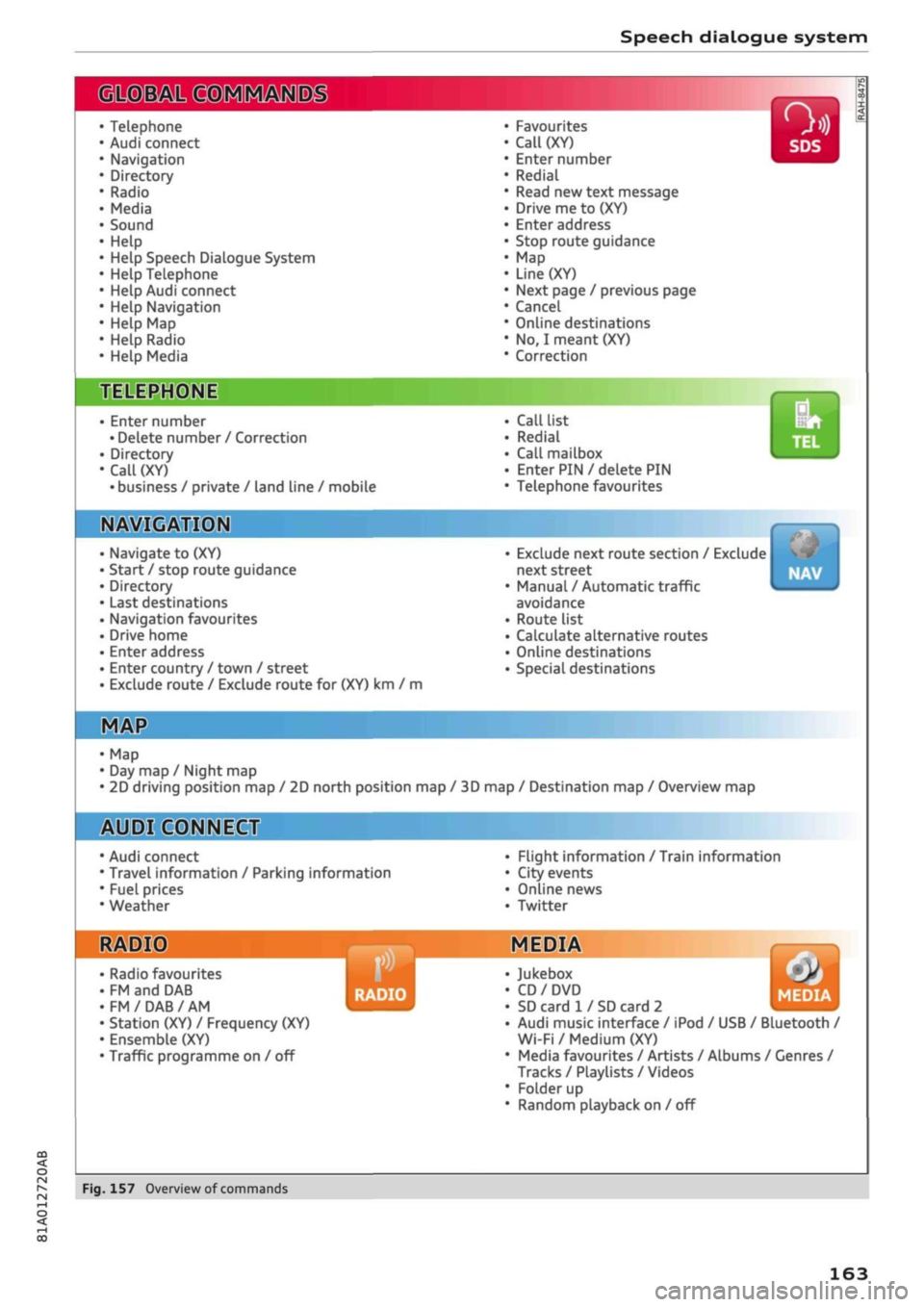
The following overviews show you the commands
that you can give to operate the MMI via the
speech dialogue system. •
A WARNING
- Please direct your full attention to the road
at all times! As the driver, you have full re
sponsibility for the safety of the vehicle and
other road users.
For
this reason, you should
only use the functions in a manner that al
lows you to maintain control of the vehicle
in all situations - accident risk!
- The speech dialogue system must not be
used in cases of emergency, since the voice
changes in stressful situations. This could
result in a failed or delayed telephone
con
nection.
Always dial emergency numbers
manually!
164
Page 168 of 364

Speech dialogue system
Function
Dialling a phone number when an
address card is open
Calling a contact from the favour
ites list
Displaying the call list
Calling the last number dialled
Dialling a telephone number
Correcting an entered phone num
ber
Displaying contact information
Listening to voice mail messages
Entering the SIM PIN code
Correcting an entered PIN
Correcting an entry
Closing the full List of commands
Say:
Call / Call business number / Call private number / Call land
line / Call business mobile
Telephone favourites
>
desired contact when requested
>
Dial
Call list
Redial
Enter number
>
enter phone number in blocks of individual dig
its when requested, e.g. 07441 234
567
> Dial
Correction / Delete number
Directory
>
desired contact when requested,
e.g.
John Smith
Call mailbox
Enter PIN
>
enter PIN in individual digits when requested >
Store
Correction / Delete PIN
No,
I meant (XY)
Close
© Note
- If
you
have a mobile phone that transmits
first names and surnames separately, you
can select directory contacts both by enter
ing the full name
("first
name, surname" or
"surname, first name") and by saying only
the first name or surname.
- Please note that commands can only be
spoken for the main teLephone*
^>page
173.
- For more information on which mobile
phones are supported, please go online
(e.g.
www.audi.com/bluetooth) or contact
an Audi dealer.
Audi connect (infotainment)
Applies to: vehicles with speech dialogue system and Audi connect (infotainment)
Important: The requirements for Audi connect
(infotainment) must be met
^>page
191.
Function
Calling up an Audi connect infotain
ment service
Audi connect infotainment services
Search areas for Audi connect info
tainment services
Correcting an entry
Say:
Audi connect
>
follow the directions given by the system
Weather / Online news / Fuel prices / Parking information /
Travel information / Twitter / Online traffic information / City
events / Flight information / Train information
In vicinity of destination / In immediate vicinity / In new town
No,
I meant (XY)
166