brake AUDI Q2 2021 Owner´s Manual
[x] Cancel search | Manufacturer: AUDI, Model Year: 2021, Model line: Q2, Model: AUDI Q2 2021Pages: 364, PDF Size: 87.77 MB
Page 123 of 364
Driver assist systems
Audi pre sense front
Description
Applies to: vehicles with Audi pre sense front
In certain situations and at certain speeds, pre
sense front can warn you if there is a danger of
collision with crossing
pedestrians1^
or station
ary, parked and moving vehicles, and can apply
the brakes if necessary.
Pre sense front will not react if it is not in a
posi
tion to detect the danger.
In conjunction with pre sense basic, the following
functions may be initiated, depending on how
fast the vehicle is travelling:
- Activation of reversible front seat belt tension
ers.
-Automatic closing of windows and panorama
sun
roof*.
Warnings and braking
Applies to: vehicles with Audi pre sense front
Audi
pre sense
CO
rN
rN
t-H
o <
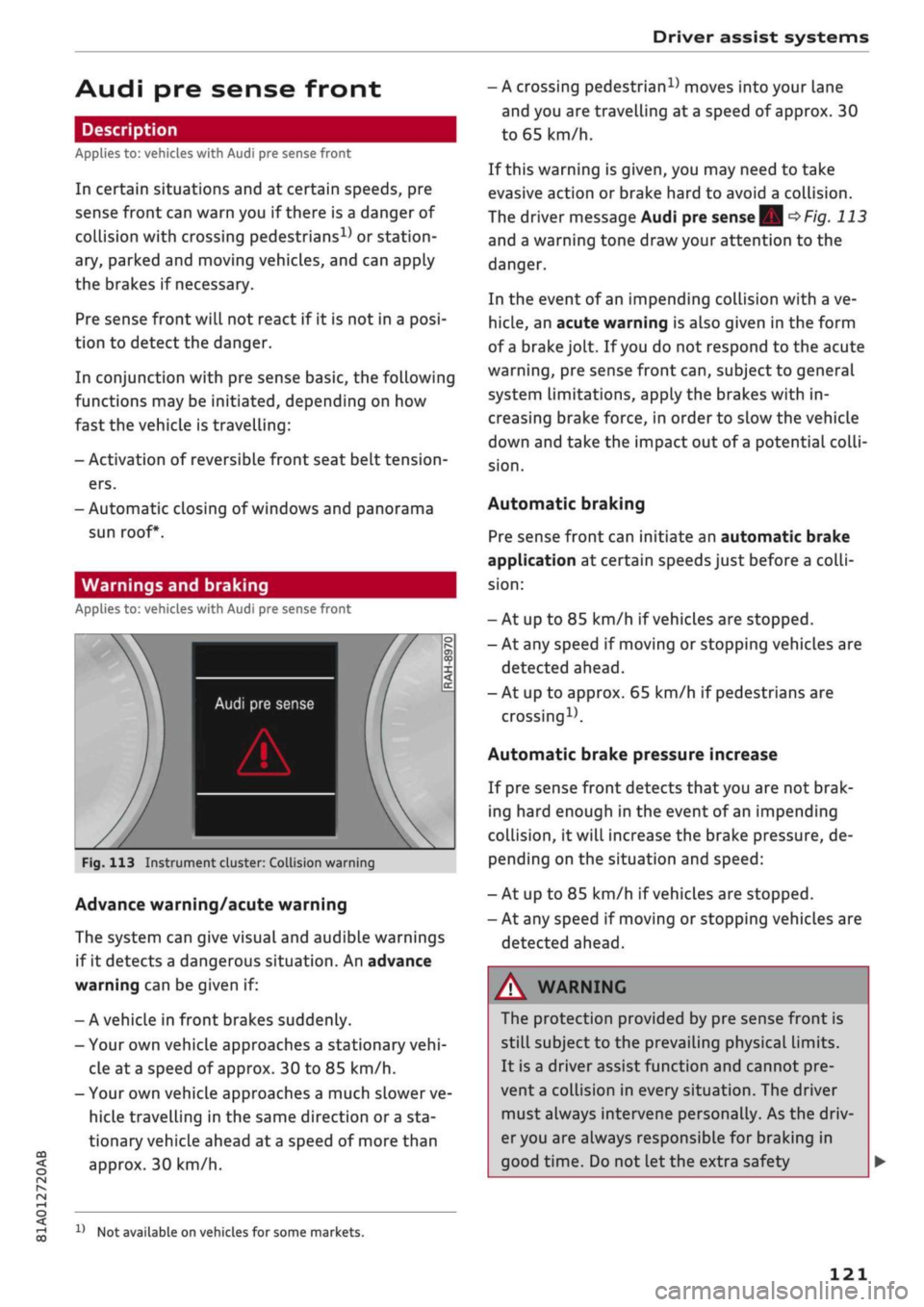
Fig.
113 Instrument cluster: Collision warning
Advance warning/acute warning
The system can give visual and audible warnings
if it detects a dangerous situation. An advance
warning can be given if:
- A vehicle in front brakes suddenly.
- Your own vehicle approaches a stationary
vehi
cle at
a
speed of approx. 30 to 85 km/h.
- Your own vehicLe approaches a much slower ve
hicle travelling in the same direction or
a
sta
tionary vehicle ahead at
a
speed of more than
approx. 30 km/h.
x)
Not available on vehicles for some markets.
- A crossing
pedestrian15
moves into your lane
and you are travelling at a speed of approx. 30
to 65 km/h.
If this warning is given, you may need to take
evasive action or brake hard to avoid a collision.
The driver message Audi pre sense
| Sj
^>Fig.
113
and a warning tone draw your attention to the
danger.
In the event of an impending collision with a ve
hicle,
an acute warning is also given in the form
of
a
brake jolt. If
you
do not respond to the acute
warning,
pre sense front
can,
subject to general
system limitations, apply the brakes with in
creasing brake force, in order to slow the vehicle
down and take the impact out of
a
potential
colli
sion.
Automatic braking
Pre sense front can initiate an automatic brake
application at certain speeds just before a
colli
sion:
- At up to 85 km/h if vehicles are stopped.
- At any speed if moving or stopping vehicles are
detected ahead.
- At up to approx. 65 km/h if pedestrians are
crossing15.
Automatic brake pressure increase
If pre sense front detects
that
you are not brak
ing hard enough in the event of an impending
collision,
it will increase the brake pressure, de
pending on the situation and speed:
- At up to 85 km/h if vehicles are stopped.
- At any speed if moving or stopping vehicles are
detected ahead.
WARNING
The protection provided by pre sense front is
still subject to the prevailing physical limits.
It is a driver assist function and cannot pre
vent
a
collision in every situation. The driver
must always intervene personally. As the driv
er you are always responsible for braking in
good time. Do not let the extra safety
121
Page 124 of 364
Driver assist systems
provided tempt you into taking any risks when
driving - this can cause accidents.
- Please note that pre sense front can give
warnings or apply the brakes unexpectedly.
Always secure your luggage to prevent dam
age and possible injury.
- Due to inherent system limitations, false ac
tivation of the system is possible.
- Please note that the sensor is not always
able to detect all objects which may repre
sent a potential hazard - risk of accident!
- Pre sense front does not react to the follow
ing:
oncoming traffic in the same lane, sta
tionary or stopped persons, pedestrians
crossing the road at an angle, groups of
people, animals, or objects that are hard to
recognise •=>
A in General notes on
page 112.
A WARNING
The pre sense front functions may be restric
ted or unavailable in situations such as the
following:
- If objects such as crash barriers or other
vehicles are reflecting additional light.
- At tunnel entrances.
- In heavy fog,
rain,
road spray or snow.
- If the radar sensor is dirty, frosted, dam
aged or covered.
- When driving through a corner.
-Applies to: front-wheel drive vehicles: If the
ESC system has been partially or fully deac
tivated.
© CAUTION
Impacts or damage to the bumper, wheel
arches or underbody can cause misalignment
of the sensor. This can impair the function of
the pre sense front system. Have the systems
checked by a
quaLified
workshop.
© Note
-The automatic brake application with in
creasing brake force can be cancelled by ap
plying the brakes yourself or by pressing the
accelerator firmly or by taking evasive ac
tion.
- Applies to: front-wheel drive vehicles: Cer
tain pre sense front functions are deactiva
ted when the ESC
offroad
mode is switched
on and when reversing.
- Applies to: front-wheel drive vehicles: The
pre sense is deactivated if you restrict or
switch off the ESC
^>page
146.
Settings on the infotainment system
Applies to: vehicles with Audi pre sense front/Audi adaptive
cruise control
•
Select the following on the infotainment sys
tem:
|MENU|
button > Car > left control button
> Driver assist > Audi pre sense.
System - The pre sense functions can be switched
on/off.
Advance
warning15
- You can switch the advance
warning off or set the warning time for pre sense
front (early/medium/late).
Start by setting the advance warning to early. If
you then find that the system warns you earlier
than desired, you can set the advance warning to
medium.
The advance warning should be set to
late only in exceptional cases, such as during very
dynamic driving.
If a system or the advance warning function is
switched off, it will be automatically activated
again the next time you switch on the
ignition15.
Driver messages
Applies to: vehicles with Audi pre sense
Audi pre sense: fault. Please contact work
shop
This message appears if the functions of the pre
sense system are impaired. An impairment can
occur, for example, if a sensor fails. If the mes
sage remains displayed permanently, drive to a
qualified workshop soon and have the fault
recti
fied.
•
x)
Not available on vehicles for some markets.
122
Page 127 of 364
Driver assist systems
CO
< o
rN
r>
rN
t-H
o < 00
- On vehicles for some export markets: once
the system is activated, it is "ready" each
time the ignition is switched on.
Instrument cluster display
Applies to: vehicles with Audi active lane assist
Drive to a qualified workshop soon and have the
fault rectified.
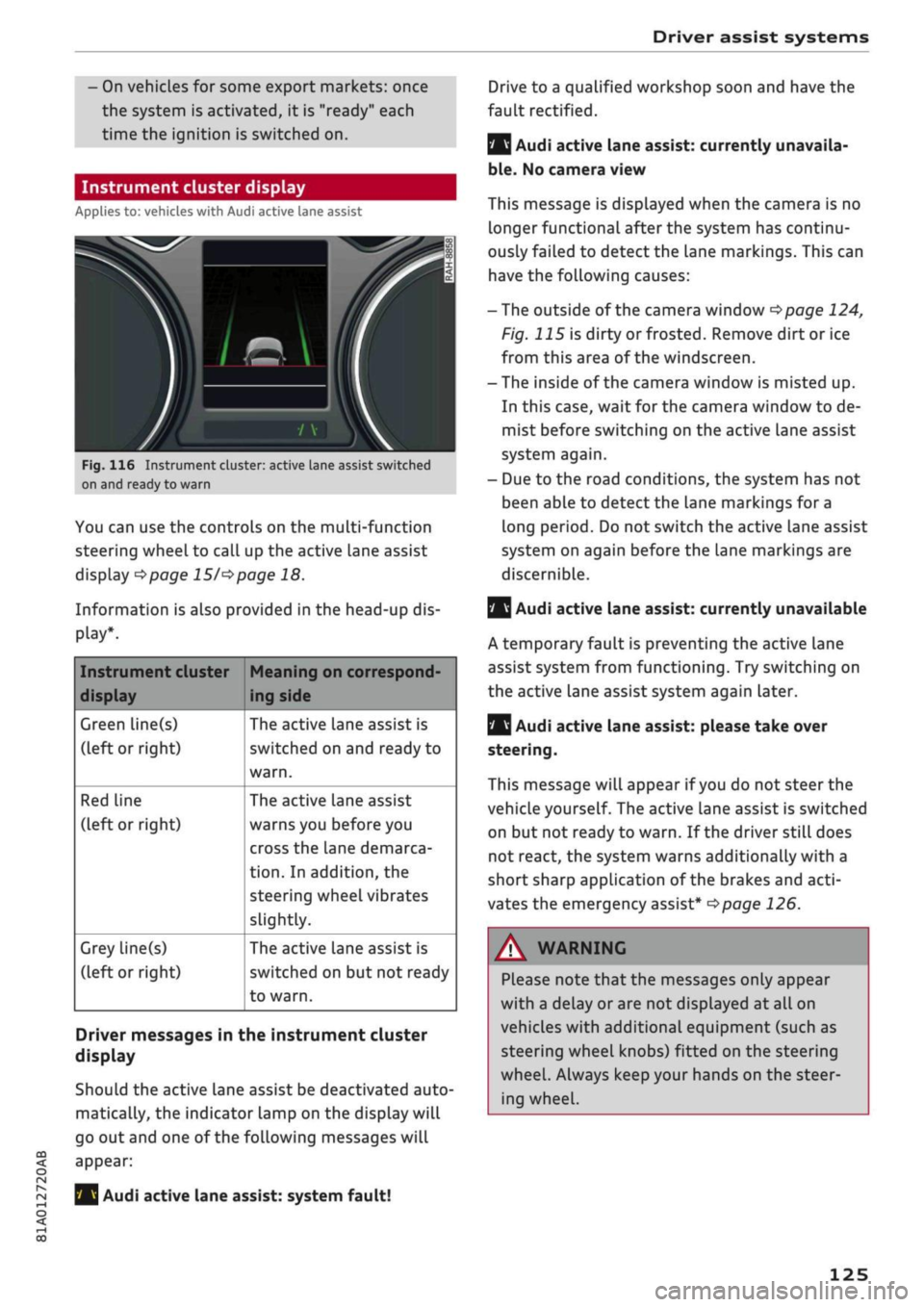
Fig.
116 Instrument cluster: active Lane assist switched
on and ready to warn
You can use the controls on the multi-function
steering wheel to call up the active lane assist
display
^>page 15/^>page
18.
Information is also provided in the head-up dis
play*.
Instrument cluster
display
Green line(s)
(left or right)
Red Line
(left or right)
Grey line(s)
(left or right)
Meaning on correspond
ing side
The active lane assist is
switched on and ready to
warn.
The active lane assist
warns you before you
cross the lane demarca
tion.
In addition, the
steering wheel vibrates
slightly.
The active lane assist is
switched on but not ready
to warn.
Driver messages in the instrument cluster
display
Should the active lane assist be deactivated auto
matically, the indicator lamp on the display will
go out and one of the following messages will
appear:
Audi active lane assist: system fault!
Audi active lane assist: currently unavaila
ble.
No camera view
This message is displayed when the camera is no
longer functional after the system has continu
ously failed to detect the lane markings. This can
have the following causes:
-The outside of the camera window
^page
124,
Fig. 115 is dirty or frosted. Remove dirt or ice
from this area of the windscreen.
- The inside of the camera window is misted up.
In this case, wait for the camera window to de
mist before switching on the active lane assist
system again.
- Due to the road conditions, the system has not
been able to detect the lane markings for a
long period. Do not switch the active Lane assist
system on again before the lane markings are
discernible.
Q
Audi active lane assist: currently unavailable
A temporary fault is preventing the active lane
assist system from functioning. Try switching on
the active lane assist system again later.
|
Audi active lane assist: please take over
steering.
This message will appear if
you
do not steer the
vehicle yourself. The active lane assist is switched
on but not ready to warn. If the driver still does
not react, the system warns additionally with a
short sharp application of the brakes and
acti
vates the emergency assist*
^>page
126.
A WARNING
Please note that the messages only appear
with a delay or are not displayed at all on
vehicles with additional equipment (such as
steering wheel knobs) fitted on the steering
wheel.
Always keep your hands on the steer
ing wheel.
125
Page 128 of 364
Driver assist systems
Setting the steering input time and
vibration warning
Applies to: vehicles with Audi active lane assist
You
can change the Audi active lane assist
set
tings on the infotainment system to
suit
your in
dividual preferences.
•
Select the following on the infotainment sys
tem:
|MENU|
button > Car
>
left control button
> Driver assist
>
Audi active lane assist.
Steering
input1'
early: If this setting is selected, a continuous
steering input assists the driver to keep the
vehi
cle in the middle of the lane.
late:
If this setting is selected, the steering is not
corrected until just before a wheel crosses a de
tected Lane marking.
Vibration warning
You can switch the additional steering wheel vi
bration warning on/off.
A WARNING
When the vibration warning is switched off,
no visual warnings are given in the instrument
cluster display if
you
cross a lane marking.
Your personal settings are stored automati
cally and assigned to the remote control key
which is being used
W.
Emergency assist
Applies to: vehicles with emergency assist
The emergency assist takes over controL of the
vehicle in certain situations and can help to pre
vent accidents. It is an extension of the active
lane assist and can use the functions of the adap
tive cruise control system
<=>^.
The emergency
assist is activated when it detects that the driver
has stopped steering the vehicle.
Functions of the emergency assist
The emergency assist monitors the steering ac
tivity of the driver. It detects if the driver is inac
tive and gives repeated visual and audible warn
ings as well as brake jolts prompting the driver to
take proactive control of the vehicle again. The
hazard warning lights are also switched on when
the first sharp brake jolt is given below
a
speed of
80
km/h15.
If the driver does not take over, the system inter
venes by steering the vehicle (within the limita
tions of the system) to keep it in lane, and by ap
plying the brakes until the vehicle has stopped*.
In addition, the warning lamp || and a message
are displayed.
Requirements for using the emergency assist
- The active lane assist must be switched on and
ready to warn
^>page
124.
-The adaptive cruise controL must be switched
on and activated
^>page
113.
If any of the requirements for the active lane as
sist
^>page
123 or adaptive cruise control
tapage
112 are not met, the functionality of the
system may be restricted or it may be deactiva
ted automatically.
Interrupting the emergency assist
You can interrupt the emergency assist if it reacts
when it shouldn't
•=> A:
- Move the steering wheel. Or:
- Press the brake/accelerator. Or:
- Switch off the active lane assist via the button
<>
page 117, Fig. 110.
WARNING
- As the driver you are always responsible for
controlling the vehicle. Do not let the emer
gency assist tempt you into taking any risks
when driving - this can cause accidents.
l)
This function is not available on all export versions.
126
Page 132 of 364
Driver assist systems
Rear cross-traffic assist
Applies to: vehicles with rear cross-traffic assist
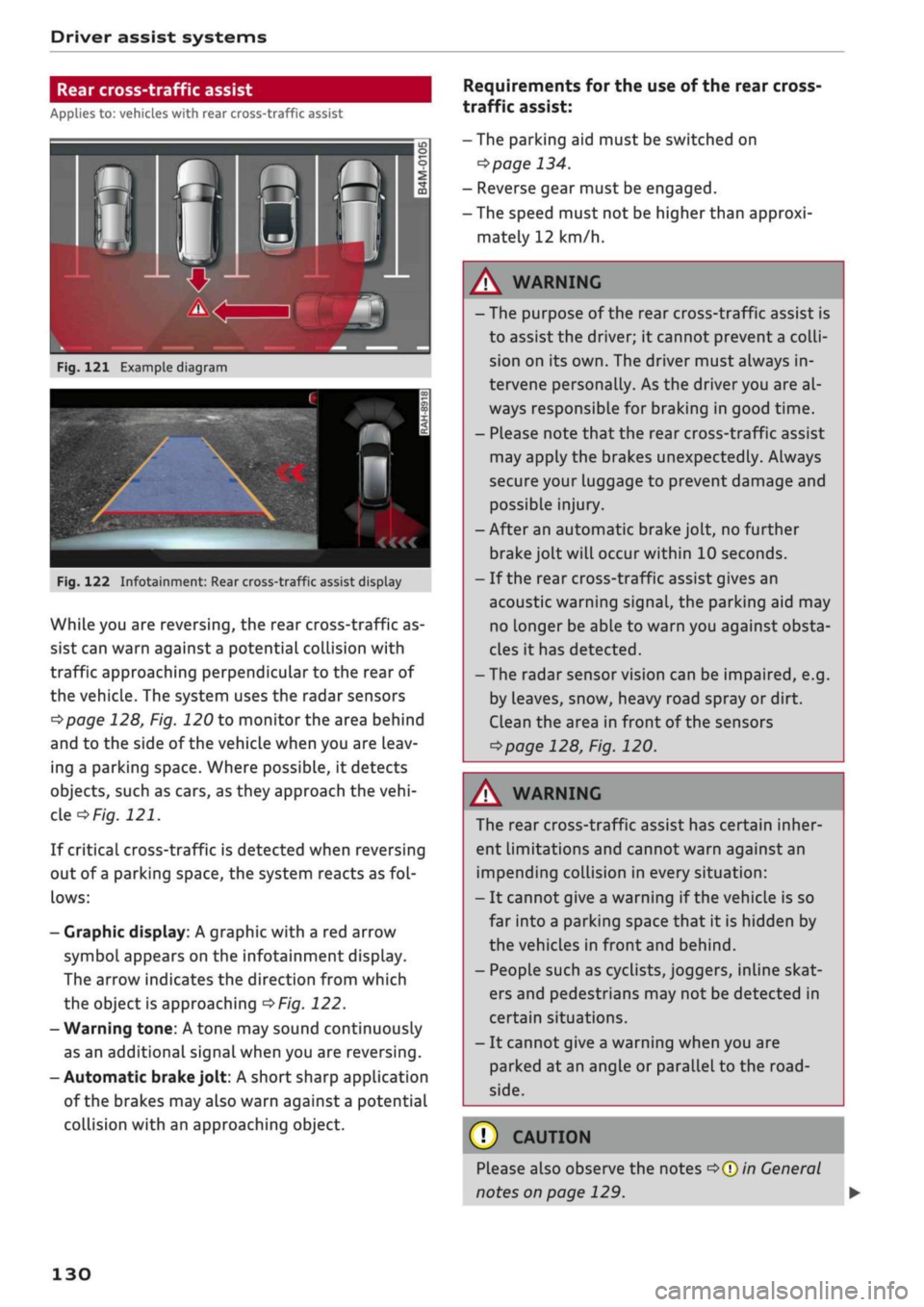
Fig.
121 Example diagram
Fig.
122 Infotainment: Rear cross-traffic assist display
While you are reversing, the rear cross-traffic as
sist can warn against a potential collision with
traffic approaching perpendicular to the rear of
the vehicle. The system uses the radar sensors
^page
128, Fig. 120 to monitor the area behind
and to the side of the vehicle when you are leav
ing a parking space. Where possible, it detects
objects, such as cars, as they approach the
vehi
cle
of/g.
121.
If critical cross-traffic is detected when reversing
out of a parking space, the system reacts as
fol
lows:
- Graphic display: A graphic with a red arrow
symbol appears on the infotainment display.
The arrow indicates the direction from which
the object is approaching
^>Fig.
122.
- Warning tone: A tone may sound continuously
as an additional signal when you are reversing.
-Automatic
brake
jolt: A short sharp application
of the brakes may also warn against a potential
collision with an approaching object.
Requirements for the use of the rear cross-
traffic assist:
-The parking aid must be switched on
^>page
134.
- Reverse gear must be engaged.
- The speed must not be higher than approxi
mately 12 km/h.
A
WARNING
- The purpose of the rear cross-traffic assist is
to assist the driver; it cannot prevent a
colli
sion on its own. The driver must always in
tervene personally. As the driver you are al
ways responsible for braking in good time.
- Please note that the rear cross-traffic assist
may apply the brakes unexpectedly. Always
secure your luggage to prevent damage and
possible injury.
-After an automatic brake jolt, no further
brake jolt will occur within 10 seconds.
- If the rear cross-traffic assist gives an
acoustic warning signal, the parking aid may
no Longer be able to warn you against obsta
cles it has detected.
- The radar sensor vision can be impaired, e.g.
by leaves, snow, heavy road spray or dirt.
Clean the area in front of the sensors
*>page
128, Fig. 120.
A
WARNING
The rear cross-traffic assist has certain inher
ent limitations and cannot warn against an
impending collision in every situation:
- It cannot give a warning if the vehicle is so
far into a parking space that it is hidden by
the vehicles in front and behind.
- People such as cyclists, joggers, inline skat
ers and pedestrians may not be detected in
certain situations.
- It cannot give a warning when you are
parked at an angle or parallel to the
road
side.
(T)
CAUTION
Please also observe the notes
^>©in
General
notes on page 129.
130
Page 133 of 364
Driver assist systems
CO
< o rN
r>
rN
t-H
o < 00
-The automatic brake application with in
creasing brake force can be cancelled by ap
plying the brakes yourself or by pressing the
accelerator firmly.
- In certain situations, a warning may be giv
en by the rear cross-traffic assist even if
there is no traffic in the critical zone, for in
stance when parking or manoeuvring the ve
hicle in reverse.
- The rear cross-traffic assist is deactivated
automatically if you deactivate the
ESC.
-The rear cross-traffic assist is switched on/
off via the parking aid
^>page
134.
-The system is not available in towing mode.
Driver messages
Applies to: vehicles with Audi side assist
Should the side assist be deactivated automati
cally, a driver message will appear in the instru
ment cluster display.
O
Audi side assist: system fault!
The system cannot detect vehicles reliably and
will be deactivated. The sensors are out of align
ment or defective. Have the system checked by a
qualified workshop soon.
O
Audi side assist: currently unavailable. No
sensor vision
O
Audi side assist: currently unavailable.
Sen
sor view restricted due to surroundings. See
owner's manual
The radar sensors are blocked. The area in front
of the sensors must not be obstructed by bicycle
racks,
stickers, deposits or any other substances.
If necessary, clean the area in front of the
sen
sors
^>page
128, Fig. 120.
O
Audi side assist: currently unavailable
The side assist is temporarily inoperative and
cannot be switched on (for instance if the battery
is not sufficiently charged).
O
Audi side assist: unavailable in towing mode
2
Audi side assist: unavailable in towing mode
The side assist function will be switched off auto
matically after a short time when the electrical
connector for the trailer socket is plugged in on
vehicles with a factory-fitted towing bracket. If
the towing bracket is not factory-fitted the side
assist function may not be switched off automat
ically. The side assist must not be used when
towing a trailer.
O Rear
parking aid: obstacle detection limited
The rear cross-traffic assist is not available. Ei
ther the ESC is switched off or the radar sensors
may be obstructed by a bicycle rack, stickers,
leaves, snow or similar objects. Switch on the ESC
or, if necessary, clean the area in front of the
sen
sors
<3page
128, Fig. 120. If this message re
mains displayed, drive to a qualified workshop
soon and have the fault rectified.
Audi drive select
Introduction
Applies to: vehicles with Audi drive select
Audi drive select alLows you to use different set
ups on your vehicle. The modes efficiency*, com
fort, auto and dynamic allow the driver, for ex
ample,
to change from a sporty mode to a more
comfortable one via the
&&
button in the centre
console or via the infotainment system. In
addi
tion,
the individual* mode allows you to adapt
the vehicle set-up to
suit
your personal driving
style.
For example, you might choose to combine
a more dynamic engine set-up with a lighter
steering response.
Description
Applies to: vehicles with Audi drive select
The possible vehicle set-up in each mode de
pends on which equipment is installed on your
vehicle. The engine and steering are basic parts
of your vehicle which are always included in the
set-up.
Engine and automatic gearbox*
The response of the engine and automatic
gear
box* to accelerator pedal movements will be
more spontaneous or balanced, depending on
131
Page 138 of 364
Parking aids
comes
closer than before, the tone will sound
again.
If the tone is muted and the obstacLe is
further away than before, no tone will sound.
Please watch the area surrounding the vehicle
when driving off.
©
Zone
(§)*
is detected and analysed as the
vehi
cLe is moving past. When you switch the
igni
tion off and on again or open the door, or af
ter the vehicle has been stationary for
a
while,
the ambient surroundings may have changed.
Zone
0*
is displayed in black on the infotain
ment display for this reason.
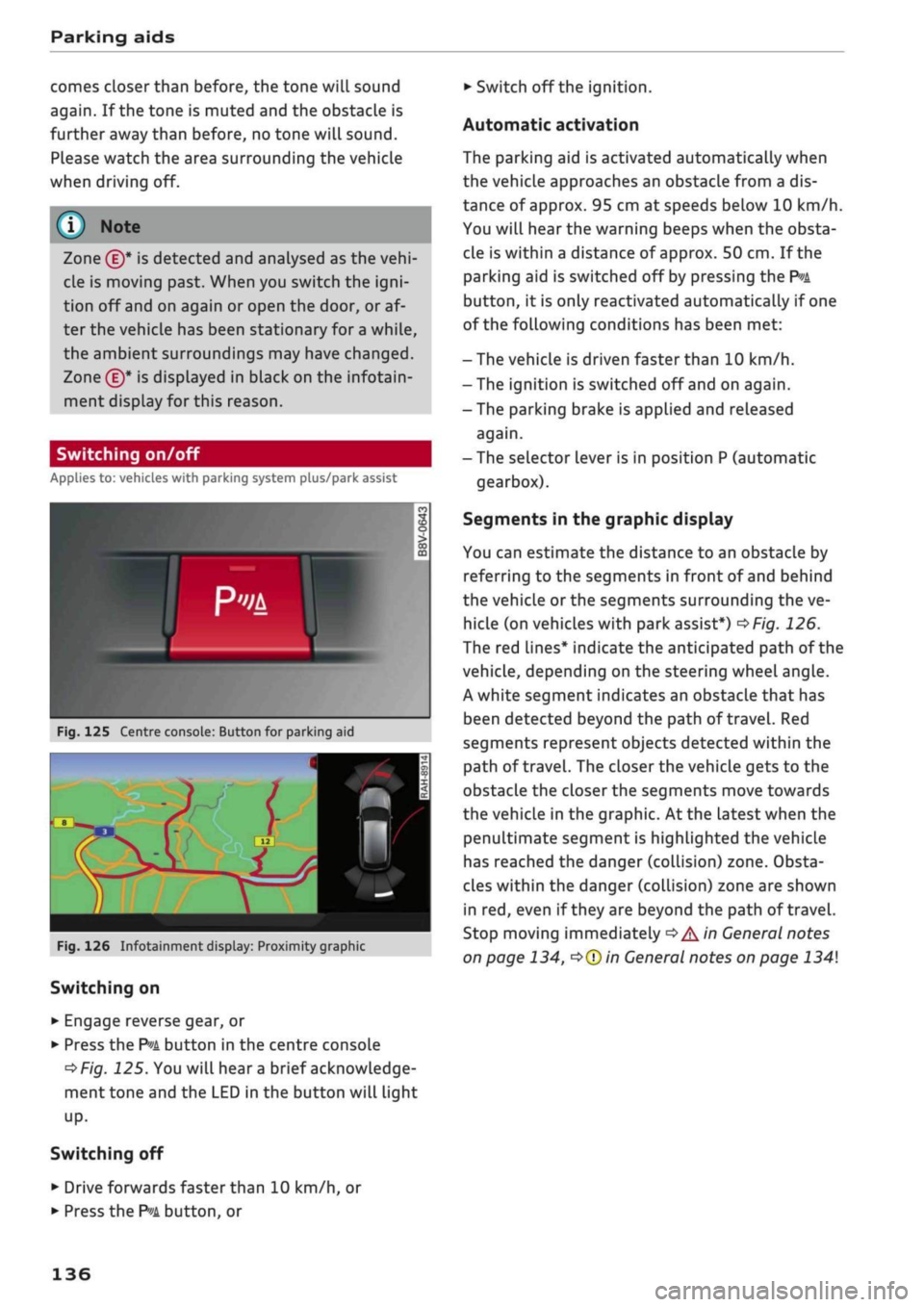
Switching on/off
Applies to: vehicles with parking system plus/park assist
Fig.
125 Centre console: Button for parking aid
^H i m
1 •rif/^^^y^H <
12|
1 )
'.•;"
•BiHiSi
-
Fig.
126 Infotainment display: Proximity graphic
Switching on
•
Engage reverse gear, or
•
Press the
P»i
button in the centre console
^>Fig.
125. You will hear
a
brief acknowledge
ment tone and the LED in the button will light
up-
Switching
off
• Drive forwards faster than 10 km/h, or
*•
Press the
?">k
button, or
•
Switch off the ignition.
Automatic activation
The parking aid is activated automatically when
the vehicLe approaches an obstacLe from a dis
tance of approx. 95 cm at speeds below 10 km/h.
You will hear the warning beeps when the obsta
cle is within a distance of approx. 50 cm. If the
parking aid is switched off by pressing the
P*A
button,
it is only reactivated automatically if one
of the following conditions has been met:
- The vehicle is driven faster than 10 km/h.
- The ignition is switched off and on again.
-The parking brake is applied and released
again.
- The selector lever is in position P (automatic
gearbox).
Segments in the graphic display
You can estimate the distance to an obstacle by
referring to the segments in front of and behind
the vehicLe or the segments surrounding the ve
hicle (on
vehicLes
with park assist*)
^>Fig.
126.
The red lines* indicate the anticipated path of the
vehicle, depending on the steering wheel angle.
A white segment indicates an obstacle that has
been detected beyond the path of
travel.
Red
segments represent objects detected within the
path of
travel.
The closer the vehicle gets to the
obstacLe the closer the segments move towards
the vehicLe in the graphic. At the Latest when the
penultimate segment is highlighted the vehicle
has reached the danger (collision) zone. Obsta
cles within the danger (collision) zone are shown
in red, even if
they
are beyond the path of travel.
Stop moving immediately
•=>
A in General notes
on page 134,
•=>©
in General notes on page 134
136
Page 147 of 364
Intelligent technology
CO
< o rN
iv
rN
t-H
o < 00
Intelligent technology
Electronic stabilisation
control (ESC)
Description
The electronic stabilisation control (ESC) increa
ses the car's stability. It reduces the tendency to
skid and improves the stability and roadholding
of the vehicle. The ESC detects critical handling
situations, such as understeer, oversteer and
wheelspin
on the driven wheels. It stabilises the
vehicle by braking individual wheels or by reduc
ing the engine torque. The indicator
lamp^
in
the instrument cluster starts flashing as soon as
the ESC intervenes.
The following systems are integrated in the ESC:
Anti-lock brake system (ABS)
ABS prevents the wheels from locking up under
braking until the vehicle has reached a virtual
standstill.
You can continue to steer the vehicle
even when the brakes are on
full.
Keep your foot
on the brake pedal and do not pump the brakes.
You will feel the brake pedal puLsate while the
anti-lock brake system is working.
Brake assist system
The brake assist system can shorten the braking
distance. The braking force is automatically boos
ted if
you
press the brake pedal quickly in an
emergency. You must keep pressing the brake
pedal until the danger has passed. On
vehides
with adaptive cruise control*, the response of the
brake assist system will be more sensitive if you
are too close to the vehicLe in front.
Traction control system (ASR)
In the event of
wheelspin,
the traction control
system reduces the engine torque to match the
amount of grip available. This helps the car to
start moving, accelerate or climb a gradient.
Electronic differential lock (EDL)
When the EDL detects wheelspin, it brakes the
spinning wheel and directs the power to the
oth
er driven wheel (or wheels on quattro* versions).
This function is not available at high speeds.
To prevent the disc brake of the braked wheel
from overheating, the EDL cuts out automatically
if subjected to excessive loads. The vehicLe can
still be driven. The EDL will switch on again auto
matically when the brake has cooled down.
Steering recommendation
The ESC helps to stabilise the vehicle by changing
the steering wheel torque.
Trailer stabilisation system
Applies to: vehicles with trailer stabilisation system
Trailers have a tendency to sway. If the
ESC
de
tects that the trailer is swaying and this is affect
ing the towing vehicLe, it will automatically brake
the vehicle in order to stabilise the trailer
^>page
97.
Selective wheel torque control
Selective wheel torque control intervenes when
cornering by braking the wheel(s) on the inside of
the bend individually as required. This enables
precision cornering.
Multicollision brake assist system
The "multicollision brake assist system" can help
to reduce the risk of skidding and further
colli
sions during an accident. If the airbag control
unit detects that
a
collision has taken place up
wards of
a
certain speed, the vehicle is braked by
the
ESC.
The vehicle will not be braked automatically if:
- the driver presses the accelerator,
- or the
ESC,
the brake system or the vehicle's
electrical system are not fully functional.
WARNING
- The grip provided by the ESC and the inte
grated systems is still subject to the physi
cal limits of adhesion. Always bear this in
mind,
especially on wet or sLippery roads. If
you notice the systems cutting in, you
should reduce your speed immediately to
suit the road and traffic conditions. Do not
let
the extra safety provided tempt you into
taking any risks when driving - this can
cause accidents.
145
Page 149 of 364
 only if your driving ability and the traf
fic conditions allow yo")
Intelligent technology
/r\
WARNING
You should switch on the off-road mode or
switch off the ESC/traction control system
(ASR) only if your driving ability and the traf
fic conditions allow you to do so safely -
dan
ger of skidding!
- The stabilising function is restricted when
off-road mode is switched on. The driven
wheels may start to
spin,
causing the
vehi
cle to lose grip, in particular on slippery or
wet roads.
- When the ESC/traction control system
(ASR) is switched off, the vehicle will not be
stabilised.
Brakes
New brake pads
New brake pads do not give full braking effect for
the first 400 km, they must first be "bedded in".
However, you can compensate for the slightly re
duced braking effect by applying more pressure
on the brake pedal. Avoid placing a heavy load on
the brakes during the running-in period.
Wear
The rate of wear on the brake pads depends a
great deal on how you drive and the conditions in
which the vehicLe is operated. Negative factors
are,
for instance, city traffic, frequent short trips
or hard driving with abrupt starts and stops.
Noises
Brake noise may develop in certain situations, de
pending on the speed, braking force and ambient
conditions (such as temperature and relative hu
midity).
Effect of moisture and salt
In certain conditions, such as in heavy
rain,
early
morning dew, or after washing the car or driving
through water, the full braking effect can be de
layed by moisture (or in winter by ice) on the
discs and brake pads. The brakes should be
< "dried" by pressing the pedal to restore full brak-
R
ing effect.
When you are driving at higher speeds with the
windscreen wipers on, the brake pads are very
briefly brought into contact with the brake discs.
This automatic process which goes unnoticed by
the driver is carried out at regular intervals and is
intended to improve braking response in wet
con
ditions.
The effectiveness of the brakes can also be
tem
porarily reduced if the car is driven for some dis
tance without using the brakes when there is a
lot of salt on the road in winter. The layer of salt
that accumulates on the discs and pads can be
removed with a few cautious brake applications.
Corrosion
There may be a tendency for dirt to build up on
the brake pads and corrosion to form on the discs
if the car is used infrequently, or if
you
only drive
low mileages without using the brakes very
much.
If the brakes are not used frequently, or if corro
sion has formed on the discs, it is advisable to
clean off the pads and discs by braking firmly a
few times from a moderately high speed
•=> A-
Faults in the brake system
If the brake pedal travel should ever increase
suddenly, this may mean that one of the two
brake circuits has failed. Drive immediately to the
nearest qualified workshop and have the fault
rectified.
On the way to the dealer, be prepared
to use more pressure on the brake pedal and al
low for longer stopping distances.
Low brake fluid level
Malfunctions can occur in the brake system if the
brake fluid level is too low. The brake fluid level
is monitored electronically.
Brake servo
The brake servo amplifies the pressure you apply
to the brake pedal. It only works when the engine
is running. •
147
Page 150 of 364
Intelligent technology
/K
WARNING
- When applying
the
brakes
to
clean
off
de
posits
on the
pads and discs, select
a
clear,
dry
road.
Be sure
not to
inconvenience
or
en
danger other road users;
do not
risk an
acci
dent.
- Never
let the car
coast with
the
engine
switched
off
(this can cause accidents).
(T)
CAUTION
- Never
let the
brakes "drag"
by
leaving your
foot on
the
pedal when you
do not
really
in
tend
to
brake. This overheats
the
brakes,
re
sulting
in
longer stopping distances
and
greater wear.
- Before driving down
a
long,
steep gradient,
it
is
advisable
to
reduce speed
and
select
a
lower gear.
In
this way you will make use
of
the engine braking effect and relieve
the
load
on the
brakes.
If
you
still have
to use
the brakes,
it is
better
to
brake firmly
at in
tervals than
to
apply
the
brakes continuous-
Ly
-
If
the brake servo
is out of
action,
you must
apply considerably more pressure
to the
brake pedal than you normally would.
-
If
you
wish
to
equip
the
car with accessories
such as a front spoiler
or
wheel covers,
it is
important that
the
flow
of air to the
front
wheels
is not
obstructed, otherwise
the
brakes can overheat.
Electro-mechanical
power steering
Electro-mechanical power steering assists
the
driver when steering.
The degree
of
power assistance
is
adapted elec
tronically,
depending
on the
speed.
Warning/indicator lamps
and
driver
messages
| Do not drive vehicle: steering defective
If the warning lamp lights
up
permanently
and
the message appears, there
may be
a power
steering failure.
Stop
the
vehicle
in a
safe place
as
soon
as
possi
ble.
Do
NOT drive on. Obtain professional assis
tance.
S
Steering malfunction: you can continue driv
ing
If the indicator Lamp Lights up,
the
steering
re
sponse
may be
heavier
or
lighter than usual.
In
addition,
it is
possible that
the
steering wheel
will
be off
centre when driving
in a
straight line.
Drive slowly
to
a qualified workshop and have
the
fault rectified.
Note
You
can
drive
on if
the warnina/indicator
g/
Lamp
||
or y
|
lights
up
only briefly
Four-wheel drive
(quattro)
Applies to: vehicles with four-wheel drive
On
quattro models
the
engine power is distrib
uted
to all
four wheels.
General notes
On four-wheel drive vehicles,
the
engine power
is
distributed
to all
four wheels. The distribution
of
power
is
controlled automatically according
to
your driving style and
the
road conditions. Also
refer
to
^>page
145,
Electronic stabilisation con
trol
(ESC).
The four-wheel drive
is
specially designed
to
complement
the
superior engine power
of
your
Audi.
This combination gives
the car
exceptional
handling
and
performance capabilities
-
both
on
normal roads and
in
more difficult conditions,
such
as
snow and
ice.
Even
so (or
perhaps espe
cially
for
this reason),
it is
important
to
observe
certain safety points
<=> A-
Winter tyres
Thanks
to its
four-wheel drive, your
car
will have
plenty
of
traction
in
winter conditions, even with
•
148