height AUDI Q2 2021 Owner´s Manual
[x] Cancel search | Manufacturer: AUDI, Model Year: 2021, Model line: Q2, Model: AUDI Q2 2021Pages: 364, PDF Size: 87.77 MB
Page 28 of 364
Instruments and controls
Height adjustment
The height of the head-up display can be adjus
ted to your individual requirements.
•
Sit in the correct position in your seat
•=>
page 265.
• Turn the
Settings on infotainment system
•
Select the following on the infotainment sys
tem:
IMENU|
button > Car
>
left control button
> Driver assist
>
Head-up display.
Display contents
The settings on the infotainment system allow
you to specify which information is shown in the
display. Possible options include navigation mes
sages*, adaptive cruise control* and camera-
based traffic sign recognition*.
The display of certain information and some of
the red warning lamps cannot be deactivated on
the infotainment system.
Brightness
You can adjust the brightness of the display via
the infotainment system. In addition, the display
brightness is reduced automatically as the
day
light starts to fade. The basic level of brightness
is determined by the instrument lighting setting
•=>
page 53.
© CAUTION
Do not place any objects over the opening for
the head-up display to avoid scratching the
glass cover.
© Note
- The display may be harder to see in unfav
ourable light conditions or if
you
are wear
ing polarised sunglasses.
- To be able to see the display as clearly as
possible, adjust the position of your seat
and the height setting for the head-up dis
play.
- Notes on cleaning
^tab.
Cleaning the inte
rior on page 314.
Warning and indicator
Lamps
Description
The warning and indicator lamps light up or flash
in the instrument cluster to indicate functions or
faults.
Some of the warning and indicator lamps may be
accompanied by a driver message. The warning
display will be accompanied by the corresponding
warning chime. The warning/indicator lamps and
driver messages on the instrument
duster
dis
play can be masked by further displays. You can
have them displayed again on the driver informa
tion system* by calling up the second tab (driver
messages) via the
\<±\
button on the multi-func
tion steering wheel. If several malfunctions have
occurred,
you can use the Left thumbwheel to
scroll through them on the display.
Some of the warning lamps may be displayed in
different colours.
âs
Central warning/indicator lamps
If the warning/indicator lamp
|g or pq
lights
up,
observe the additional information on the in
strument cluster display.
Applies
to: vehicles with monochrome display
If
a
driver message appears and a central warn
ing [amp
Kfl/central
indicator
lamp^S
lights up,
the central warning/indicator lamp indicates the
priority level of the warning. If
a
white indicator
lamp also appears, the central warning/indicator
lamp indicates its actual colour. For example, if
g
lights up with
H.
read the description for
Overview
When you switch on the ignition, some of the
warning and indicator lamps Light up briefly to
show that the associated systems are working
properly. These systems are marked with a
•/
in
the following tables. If one of these warning/in
dicator lamps does not light up, there is a fault in
the associated system. •
26
Page 60 of 364
Seats and storage
Seats and storage
General notes
A WARNING
The Safe driving chapter
^>page
263, Safe
driving contains important information, tips,
suggestions and warnings that you should
read and observe for your own safety and the
safety of your passengers.
Front seats
Manual adjustment of seats
Applies to: vehicles with manual seat adjustment
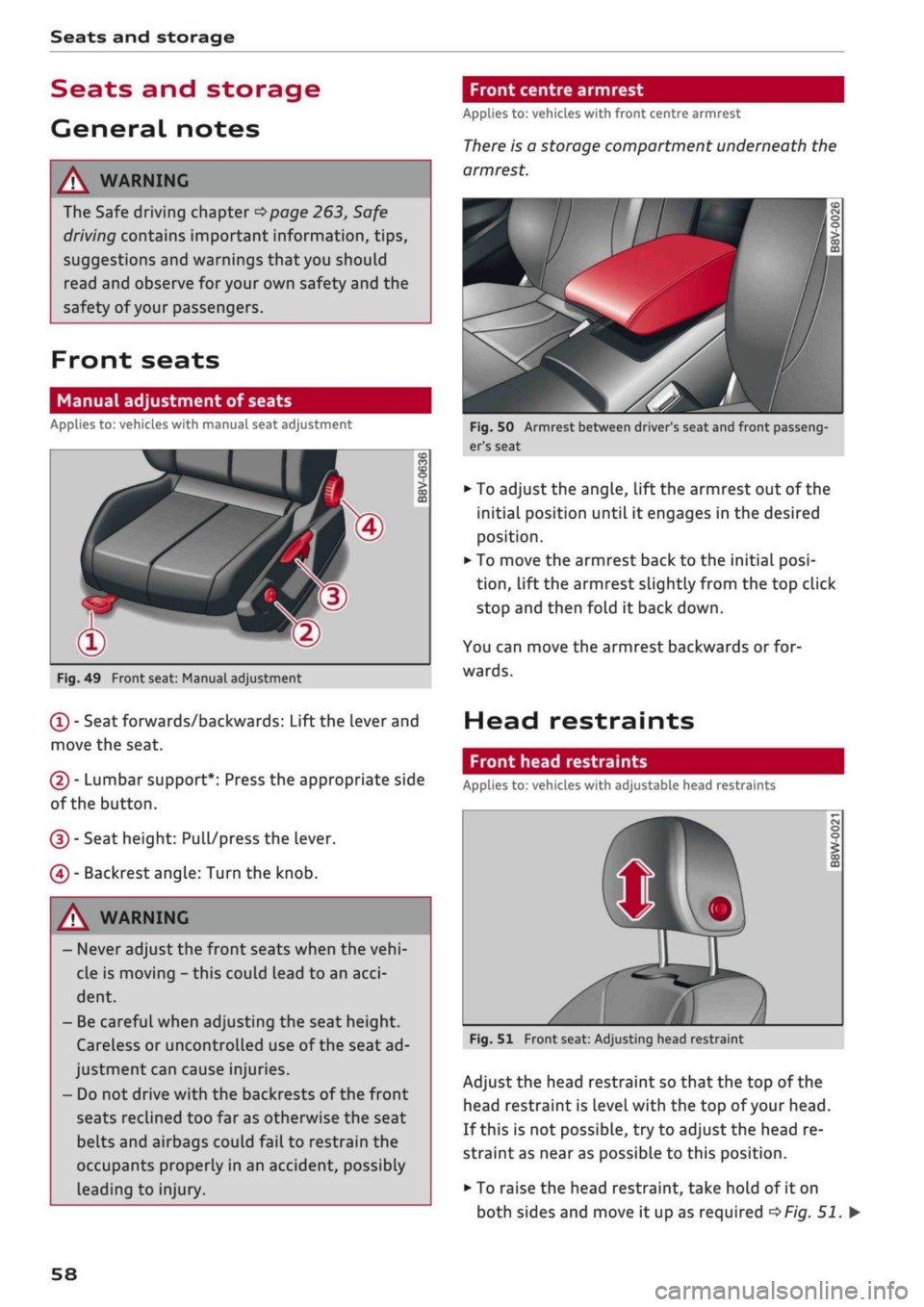
Fig.
49 Front seat: Manual adjustment
(T)
- Seat forwards/backwards: Lift the Lever and
move the seat.
(2) - Lumbar support*: Press the appropriate side
of the button.
(D - Seat height: Pull/press the lever.
(4) - Backrest angle: Turn the knob.
[A WARNING
- Never adjust the front seats when the
vehi
cle is moving - this could lead to an
acci
dent.
- Be careful when adjusting the seat height.
Careless or uncontrolled use of the seat ad
justment can cause injuries.
- Do not drive with the backrests of the front
seats reclined too far as otherwise the seat
belts and airbags could fail to restrain the
occupants properly in an accident, possibly
Leading to injury.
Front centre armrest
Applies to: vehicles with front centre armrest
There
is a storage compartment underneath the
armrest.
Fig.
50 Armrest between driver's seat and front passeng
er's seat
• To adjust the angle, lift the armrest out of the
initial position until it engages in the desired
position.
• To move the armrest back to the initial
posi
tion,
lift the armrest slightly from the top click
stop and then fold it back down.
You can move the armrest backwards or for
wards.
Head restraints
Front head restraints
Applies to: vehicles with adjustable head restraints
Fig.
51 Front seat: Adjusting head restraint
Adjust the head restraint so that the top of the
head restraint is
Level
with the top of your head.
If this is not possible, try to adjust the head re
straint as near as possible to this position.
• To raise the head restraint, take hold of it on
both sides and move it up as required
^>Fig.
51. •
58
Page 64 of 364
Seats and storage
A WARNING
Applies to: vehicles with coat hooks
- Make sure
that
any items of clothing hang
ing from the coat hooks do not obstruct
your view to the rear.
- Only use the coat hooks for light items of
clothing and make sure that there are no
heavy or sharp objects in the pockets.
- Do not use clothes hangers to hang up the
clothing,
as this could interfere with the
function of the head-protection airbags.
Luggage compartment
General notes
A
WARNING
Please refer to the important safety notes on
<=>page
272, Stowing luggage safely.
Luggage compartment cover
Applies to: vehicles with luggage compartment cover
The
luggage compartment cover blocks the view
into the luggage compartment.
c
Fig.
57
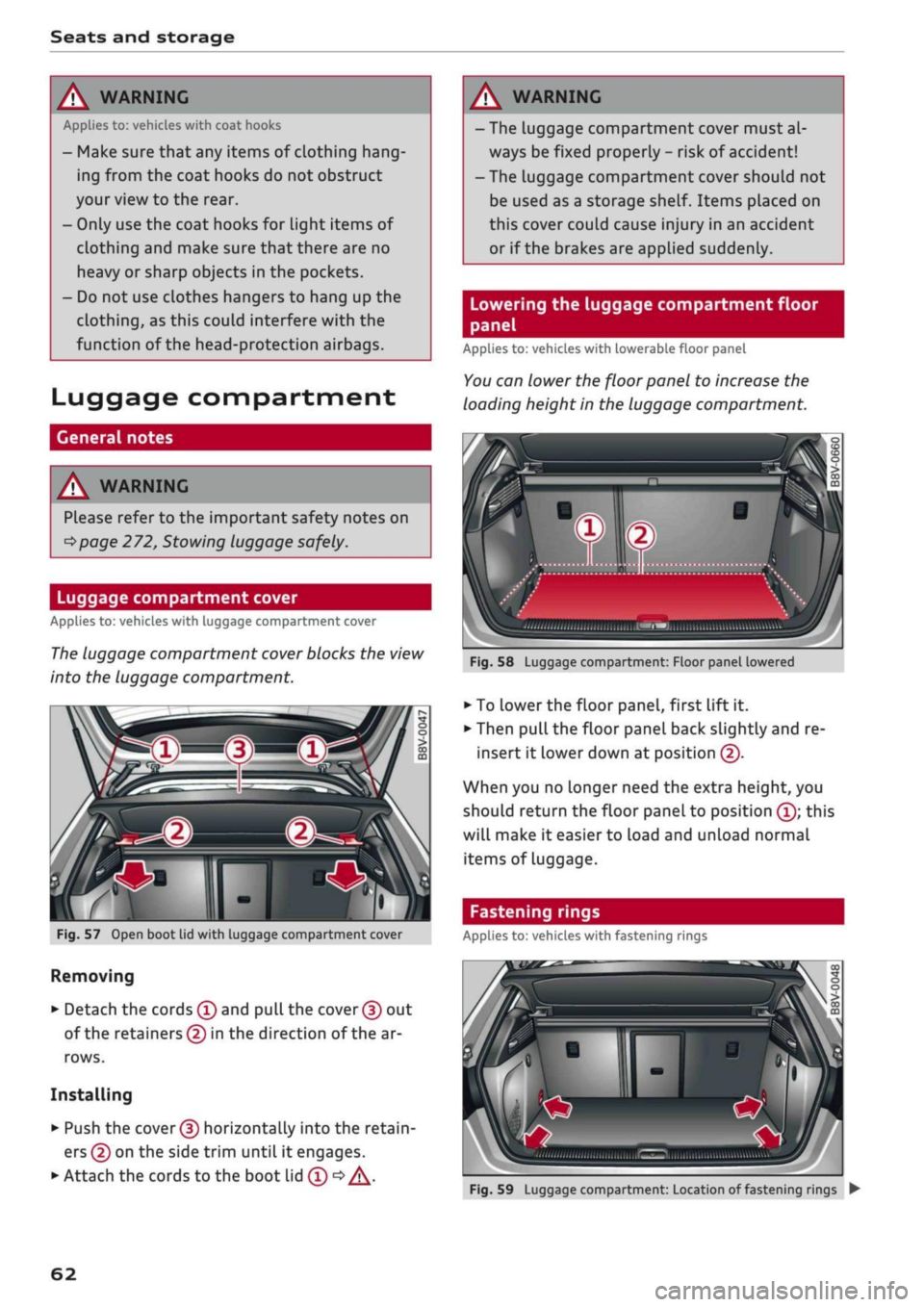
Open boot lid with luggage compartment cover
Removing
• Detach the cords
(f)
and
pull
the
cover (f)
out
of the retainers (5) in the direction of the ar
rows.
Installing
• Push the
cover (D
horizontally into the retain
ers
(?)
on the side trim until
it
engages.
• Attach the cords to the boot lid
(T) •=>
A.
A WARNING
- The luggage compartment cover must al
ways be fixed properly
-
risk of accident!
- The luggage compartment cover should not
be used as a storage shelf. Items placed on
this cover couLd cause injury in an accident
or if the brakes are applied suddenly.
Lowering the luggage compartment floor
panel
Applies to: vehicles with lowerable floor panel
You
can lower the floor panel to increase the
loading height in the luggage compartment.
'•iii.nii,,,,
,„„„
„„,,
iilSMBIiimi
ulwu'l
Fig.
58
Luggage compartment: Floor panel lowered
• To
Lower
the floor panel, first lift
it.
• Then pull the floor panel back slightly and re
insert
it
lower down at position
(f).
When you no longer need the extra height, you
should return the floor panel to position
(Î);
this
will make
it
easier to load and unload normal
items of Luggage.
Fastening rings
Applies to: vehicles with fastening rings
Fig.
59
Luggage compartment: Location of fastening rings
•
62
Page 76 of 364

Driving
Steering
Adjusting the steering wheel position
The height and reach of the steering wheel can
be adjusted as required to suit the
driver.
Fig.
68 Steering column: Lever for steering column adjust
ment
•
Push the Lever
^>Fig.
68 down
<=> /\.
•
Move the steering wheel to the desired
posi
tion.
•
Then push the lever towards the steering
col
umn until the catch engages.
WARNING
- Never adjust the position of the steering
wheel when the vehicle is moving - this
could cause an accident.
- Press the lever upwards so it is secure and
so that the position of the steering wheel
cannot shift unexpectedly while the vehicle
is moving - risk of accident!
Starting and stopping
the engine (vehicles with
ignition Lock)
Starting the engine
Applies to: vehicles with ignition lock
Insert the key in the ignition lock to switch on
the ignition and start the engine.
Fig.
69 Ignition lock: Ignition key positions
Switching the ignition on/off
•
To switch on the ignition, turn the ignition key
to position ®. Vehicles without start/stop sys
tem*:
The rev counter needle will move to the
READY position.
• To switch off the ignition, turn the ignition key
to position ©. The rev counter needle will
move to the OFF position.
Diesel engines are automatically preheated when
you switch on the ignition.
Starting the engine
•
Manual gearbox: Press the clutch pedal all the
way down and move the gear lever into neutral.
•
Automatic gearbox: Press the brake pedal and
move the selector lever to position P or N.
•
Turn the ignition key briefly to position @. The
ignition key automatically returns to position
®. Do not press the accelerator.
Applies to: vehicles with diesel engine
•
The engine may take a few seconds Longer than
usual to start on cold days. Please keep your
foot on the clutch pedal (manual gearbox) or
brake pedal (automatic gearbox) until the en
gine starts. The indicator Lamp
E g
lights up
while the glow plugs are preheating.
74
Page 252 of 364

Media
Display DVD menu
The DVD main menu will be called up on the info
tainment display.
- To select a menu option: Select and confirm a
menu option. Or: Move your finger on the MMI
touch
pad*
and press the rotary pushbutton.
Audio track1
'
You can adjust the audio track (language and au
dio format) manually. It depends on the video
DVD whether different languages and audio for
mats are available.
Subtitles1'
You can select subtitles manually. It depends on
the video DVD whether different languages are
available.
Picture format
We recommend using the automatic setting for
the picture format. Depending on the active file
or source (e.g. video file*, DVD*), you may be able
to adjust the picture format.
Picture for
mat
automatic
zoom
Description
The MMI detects the picture for
mat of the source and dispLays the
picture using the best possibLe
width-to-height ratio. Depending
on the source format and the info
tainment display installed, black
bars may be displayed on the edges
of the picture.
The picture is enlarged to fill the
infotainment display. Switch this
function off if the picture is distor
ted.
Picture for
mat
cinema
scope
original
4:3
16:9
Description
Use this setting for films in the
cin
ema format 21:9. Black bars will
be shown on the upper and Lower
edges of the infotainment display.
The picture will be displayed using
the picture ratio of the source for
mat. Select this option if the pic
ture shown with auto selected is
distorted or partially cut off.
The picture is set to a width-to-
height ratio of
4:3.
Black bars will
be shown on the edges of the info
tainment display.
The picture is set to a width-to-
height ratio of 16:9. Black bars will
be shown on the upper and lower
edges of the infotainment display.
(T)
Note
- Not all video DVDs have a child lock feature.
- The child lock safety levels comply with the
US standards of the Motion Picture Associa
tion of America (MPAA). Please note that
age ratings for DVDs may vary between
dif
ferent European countries.
- If
you
enter the wrong child lock password
three times in a row, you will not be able to
enter
a
password for approximately one mi
nute.
The password can only be reset by an
Audi workshop.
automatic
zoom
The MMI detects the picture for
mat of the source and dispLays the
picture using the best possibLe
width-to-height ratio. Depending
on the source format and the info
tainment display installed, black
bars may be displayed on the edges
of the picture.
The picture is enlarged to fill the
infotainment display. Switch this
function off if the picture is distor
ted.
May not be possible during playback (depends on the
DVD).
248
Page 269 of 364
Safe driving
CO
<
O
rN
iv
rN
•-i
00
Correct sitting positions
Correct driving position
The
correct driving position is important for safe
driving.
25cm
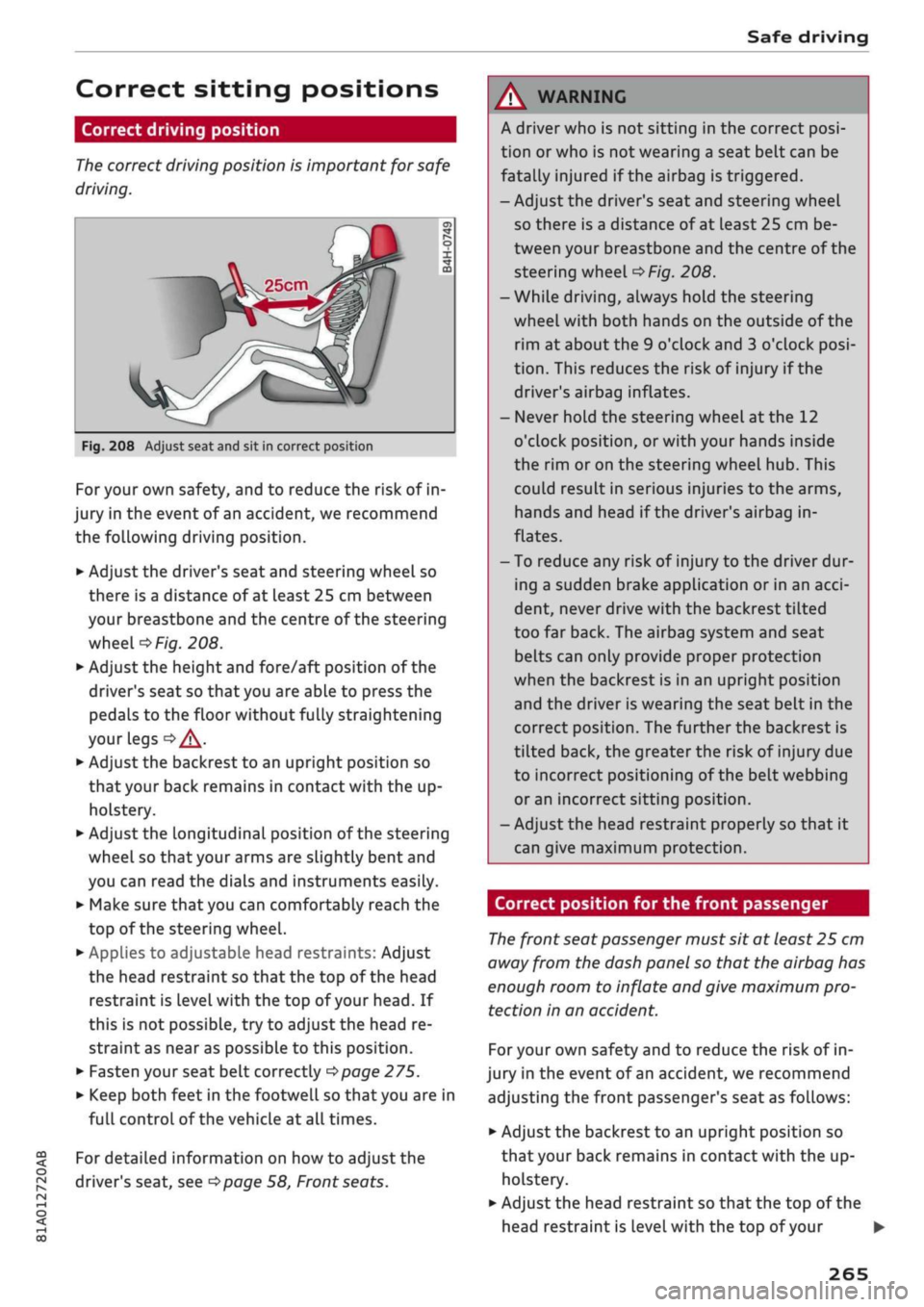
Fig.
208 Adjust seat and sit in correct position
For your own safety, and to reduce the risk of in
jury in the event of an accident, we recommend
the following driving position.
•
Adjust the driver's seat and steering wheel so
there is a distance of at least 25 cm between
your breastbone and the centre of the steering
wheel
o>F/g.
208.
•
Adjust the height and fore/aft position of the
driver's seat so that you are able to press the
pedals to the floor without fully straightening
your legs
oA.
•
Adjust the backrest to an upright position so
that your back remains in contact with the up
holstery.
*•
Adjust the longitudinal position of the steering
wheel so that your arms are slightly bent and
you can read the dials and instruments easily.
•
Make sure that you can comfortably reach the
top of the steering wheel.
•
AppLies to adjustable head restraints: Adjust
the head restraint so that the top of the head
restraint is
level
with the top of your head. If
this is not possible, try to adjust the head re
straint as near as possible to this position.
•
Fasten your seat belt correctly
^>page
275.
•
Keep both feet in the footwell so that you are in
full controL of the vehicle at all times.
For detailed information on how to adjust the
driver's seat, see
^>page
58, Front seats.
A WARNING
A driver who is not sitting in the correct
posi
tion or who is not wearing a seat belt can be
fatally injured
if
the airbag is triggered.
- Adjust the driver's seat and steering wheel
so there is a distance of at least 25 cm be
tween your breastbone and the centre of the
steering wheel
^>Fig.
208.
-While driving, always hold the steering
wheel with both hands on the outside of the
rim at about the 9 o'clock and 3 o'clock
posi
tion.
This reduces the risk of injury if the
driver's airbag inflates.
- Never hold the steering wheel at the 12
o'clock position, or with your hands inside
the rim or on the steering wheel hub. This
could result in serious injuries to the arms,
hands and head if the driver's airbag in
flates.
- To reduce any risk of injury to the driver dur
ing a sudden brake application or in an
acci
dent, never drive with the backrest tilted
too far back. The airbag system and seat
belts can only provide proper protection
when the backrest is in an upright position
and the driver is wearing the seat belt in the
correct position. The further the backrest is
tilted back, the greater the risk of injury due
to incorrect positioning of the belt webbing
or an incorrect sitting position.
- Adjust the head restraint properly so that it
can give maximum protection.
Correct position for the front passenger
The
front seat passenger must sit at least 25 cm
away from the dash panel so that the airbag has
enough room to inflate and give maximum pro
tection in an accident.
For your own safety and to reduce the risk of in
jury in the event of
an
accident, we recommend
adjusting the front passenger's seat as follows:
•
Adjust the backrest to an upright position so
that your back remains in contact with the up
holstery.
•
Adjust the head restraint so that the top of the
head restraint is level with the top of your
265
Page 272 of 364
Safe driving
A WARNING
To avoid serious or fatal injury, children trav
elling in the vehicle must always be protected
with child restraint systems appropriate to
their height, weight and age.
- Children under 1.50 m tall or younger than
12 must not travel in the vehicLe if there are
no suitable child seats. Please observe any
other applicable regulations in the country
in which you are travelling.
- Babies and children must never travel on an
other occupant's lap.
- Never allow more than one child to occupy
one child seat.
- Never leave a child without supervision in a
child seat.
- Never allow a child to travel unrestrained or
to stand up or kneel on a seat while the car
is moving. In an accident, the child could be
catapulted through the car, causing possibly
fatal injuries to itself and other occupants.
- To ensure proper protection by the child re
straint, it is important to wear the seat belts
in the correct position
^>page
277. Always
check that the belt is properly positioned ac
cording to the instructions provided by the
manufacturer of the child seat. Incorrectly
worn seat belts can give rise to injuries even
in a minor collision.
- If children are out of position when the car
is moving, they are at greater risk of injury
during a sudden braking manoeuvre or in an
accident. This is particularly the case if the
child is travelling on the front passenger's
seat and the airbag system is triggered in an
accident. This incorrect sitting position can
result in serious or even fatal injury.
- Make sure there is sufficient clearance in
front of the child sitting in the child seat. If
necessary, adjust the seat position and
backrest angle of the seat in front of the
child seat.
- If
you
are using a child seat on the front
passenger seat in which the child faces the
direction of
travel,
you should move the
front passenger seat as far back as possible.
- Child seats in which the child faces the rear
of the car are located directly in the path of
the front passenger's airbag if it inflates. In
this case, the child could sustain serious or
fatal injuries if the airbag were to be de
ployed.
- Applies to vehicles on which the front pas
senger's airbag cannot be deactivated: Do
NOT use a rearward-facing child seat on
the front passenger's seat.
- Applies to vehicles with key-operated
switch for deactivating the front passeng
er's airbag: Do NOT use a rearward-facing
child seat on the front passenger's seat
while the front passenger's airbag is ac
tive.
If
you
have no alternative but to use a
rearward-facing child seat on the front
passenger's seat, the front passenger's
airbag must be deactivated beforehand via
the key-operated switch*
^>page
288.
Make sure that the front passenger's air-
bag is reactivated by means of the key-op
erated switch* as soon as the child seat is
no Longer needed on the front passenger's
seat.
- Always replace the child seat with a new one
after an accident as damage not externally
visible may have occurred.
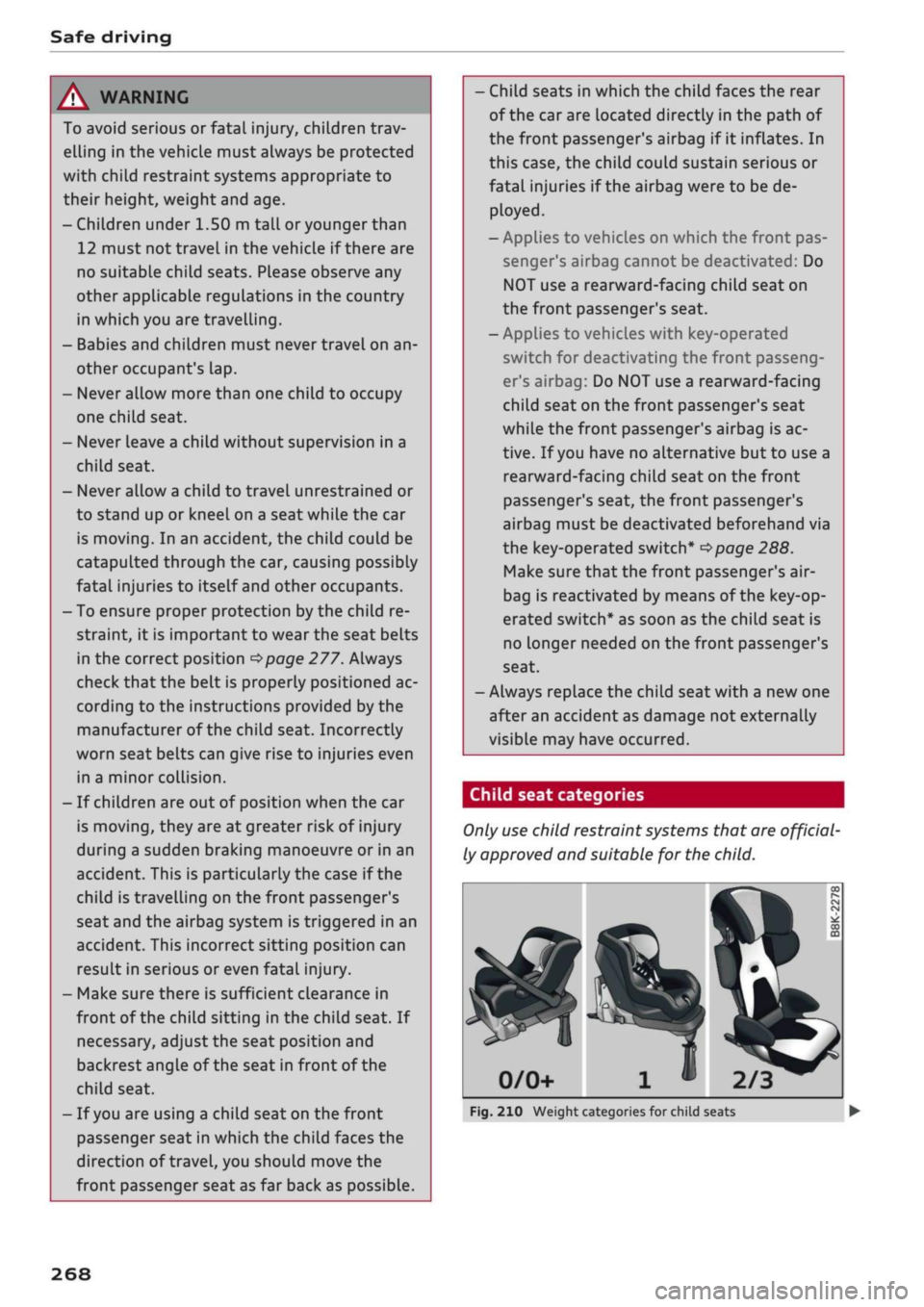
Child seat categories
Only
use
child restraint systems that are official
ly approved and suitable for the child.
2/3
Fig.
210 Weight categories for child seats
268
Page 273 of 364
Safe driving
CO
<
O
rN
iv
rN
t-H
o < 00
Child restraint systems are regulated by Europe
an standards ECE
R
44 or ECE-R
129x).
Both
standards apply in parallel. An orange label is
normally attached to child seats which have been
tested in accordance with these standards. Infor
mation on weight categories, ISOFIX size class
and the approval category of the child seat can
be found on this Label.
Weight categories for child seats
- Child seats: categories 0 and 0+: Rearward-
facing carry cots are most appropriate for these
categories (up to 13 kg). Our recommendation:
Audi carry cot with optional ISOFIX base.
- Child seats: category 1: In this category (9 to
18 kg), rearward or forward-facing child seats
with an integrated seat belt system are most
appropriate. Rearward-facing child seats
should be used for as long as safely possible.
Our recommendation: Audi child seat with ISO-
FIX base.
- Child seats: categories 2 and 3: Child seats
with backrests used in conjunction with seat
belts are most appropriate for these categories
(15 to 36 kg). Our recommendation: Audi child
seat "youngster plus".
Approval categories for child seats
Child seats can have the approval categories
uni
versal,
semi-universal, vehicle-specific (all ac
cording to the ECE-R 44 standard) or
i-Size
(ac
cording to the ECE-R 129 standard).
- Universal: Child seats approved for the univer
sal category are suitable for installation in any
vehicle. A model list is not required. Universal
category child seats for ISOFIX anchorages
must be secured additionally by
a
top tether
strap.
- Semi-universal: Safety appliances requiring ad
ditional tests are required for securing a child
seat with semi-universal approval. Child seats
with semi-universal approval have a model list
which must include your vehicle.
-Vehicle-specific: Vehicle-specific approval re
quires that the child seat undergo a separate
1)
The ECE-R 129 standard has not yet been implemented by
the national authorities in all countries.
dynamic test for each vehicle model. Child
seats with a vehicle-specific approval also have
a model List.
- i-Size: Child seats with
i-Size
approval must
comply with the installation and safety require
ments specified in the ECE-R 129 standard.
Your child seat manufacturer can inform you
which child seats with
i-Size
approval are ap
propriate for your vehicle.
A WARNING
- Rearward-facing child seats: Never install a
rearward-facing child seat on the front pas
senger's seat unless the front passenger's
airbag has been deactivated - this can result
in potentially fatal injuries to the
child.
If
you have no alternative but to let
a
child
travel on the front passenger's seat, the
front passenger's airbag must be deactiva
ted*
beforehand
^>page
288.
- Forward-facing child seats: The back of the
child seat should be flush with the backrest
of the vehicle seat. If the rear head restraint
obstructs you when installing the child seat,
adjust or remove it completely
^>page
59.
Install the head restraint again immediately
after removing the child seat. Adjust the
head restraint to the correct height for the
passenger. Travelling with the head re
straints removed or incorrectly adjusted in
creases the
risk
of severe injuries.
- Categories 2 and 3: The shoulder section of
the belt must be fitted across the centre of
the child's collar bone close to the torso. It
must never run against or across the neck.
The lap belt must be worn tightly across the
hips,
and not over the stomach or abdomen.
Pull the belt tight if necessary to take up
any slack.
- Wait for as long as possibLe before changing
up to the next child seat group.
© Note
We recommend child seats from the range of
Audi Genuine Accessories: www.audi.com.
269
Page 276 of 364
Safe driving
positioning, move the front passenger's seat as
far upwards as possibLe using the seat's height
adjustment. After installing the child seat on the
front passenger's seat, move the front passen
ger's backrest forward until it makes contact
with the child seat.
A WARNING
- Please refer to the important safety notes
•=>
A in Safety notes for using child seats on
page 268,
•=>
A in Child seat categories on
page 269 and the instructions provided by
the child seat manufacturer.
- Never install
a
rearward-facing child seat on
the front passenger's seat unless the front
passenger's airbag has been deactivated -
this can result in potentially fatal injuries to
the
child.
Pedal area
Pedals
The
pedals must always be free to move and
must never be obstructed by floor mats or any
objects in the footwell.
•
Make sure that none of the pedals is obstructed
and all of the pedals can be pressed all the way
down to the floor.
•
Make sure that all pedals are able to return
freely to their original positions.
Only use floor mats which Leave the pedal area
free and can be securely fastened in the footwell.
If one of the brake circuits should
fail,
increased
brake pedal travel will be required to bring the
vehicle safely to a stop.
A WARNING
Any obstructions that restrict pedal travel can
cause loss of vehicLe control and lead to
criti
cal traffic situations.
- Never place objects in the driver's footwell.
Such objects could move under the pedals
and interfere with their proper function. In
the event of sudden braking or
a
change of
direction,
you would not be able to use the
pedals. This could result in a loss of control
and possibly cause an accident.
Floor mats on the driver's side
Use
only floor mats which can be securely fas
tened in the footwell and do not obstruct the
pedals.
•
Make sure that floor mats are securely fastened
and cannot interfere with the pedals
o /\.
Use only floor mats that leave the pedal area un
obstructed and are firmly secured to prevent
them from slipping. You can obtain suitable floor
mats from your dealer or a specialist retailer.
A WARNING
Any obstructions that restrict pedal travel can
cause Loss of vehicle control and increase the
risk of serious personal injury.
- Always make sure that floor mats are prop
erly secured.
- Never lay or
instaLl
additional floor mats or
other floor coverings over the existing floor
mats;
this would restrict the pedal area and
possibly obstruct the pedals, which could
cause an accident.
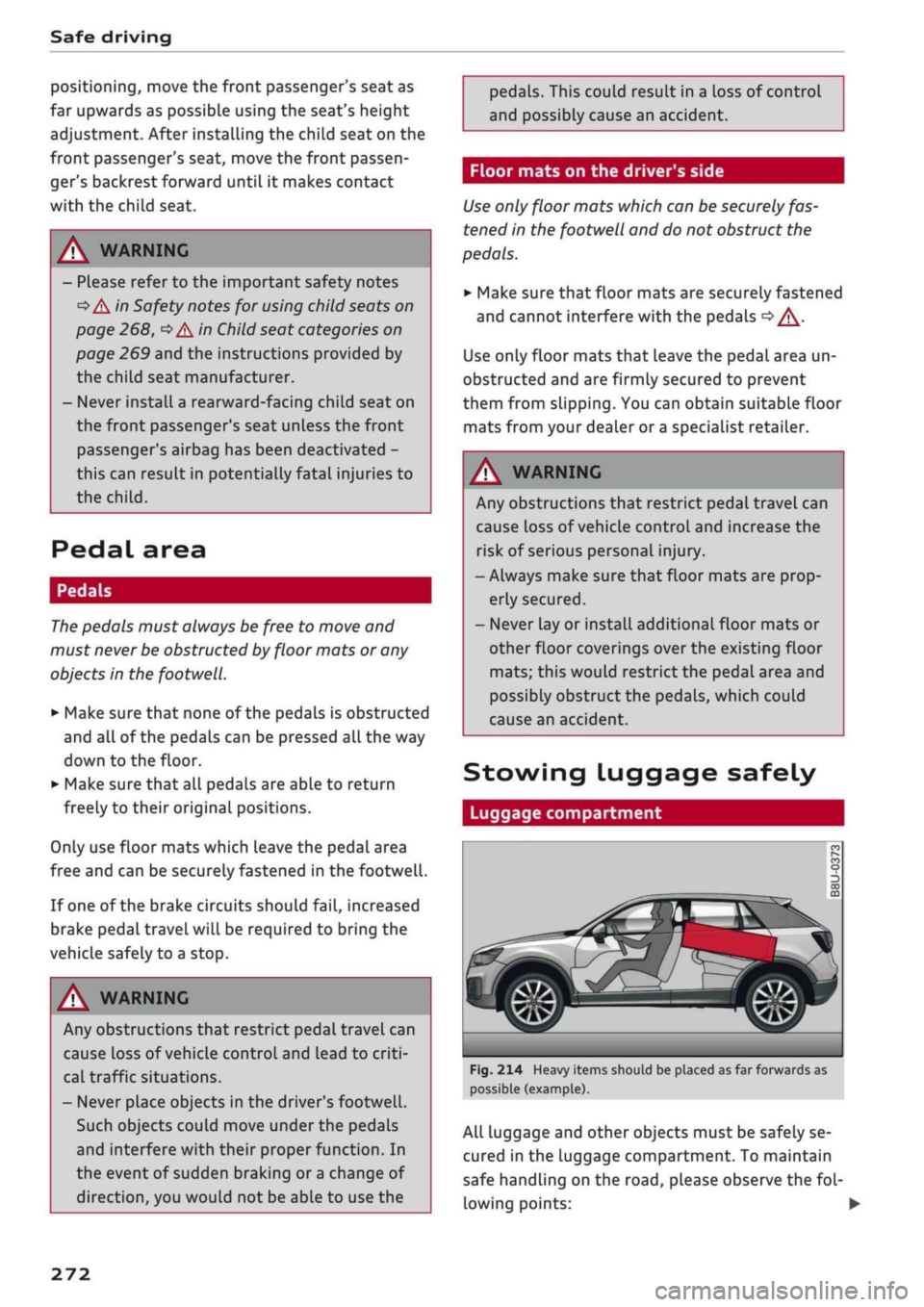
Stowing Luggage
safely
Luggage compartment
Fig.
214 Heavy items should be placed as far forwards as
possible (example).
All Luggage and other objects must be safely se
cured in the Luggage compartment. To maintain
safe handling on the
road,
please observe the
fol
lowing points: •
272
Page 282 of 364
Seat belts
•
Pull the belt to check that it is now securely fas
tened.
The three-point inertia reel belts are tensioned
automatically. The retractor system gives com
plete freedom of movement, as long as the pull
on the belt is slow. Hard braking locks the belt.
The belt will also lock when you accelerate, drive
up or down a steep hill or corner sharply.
A WARNING
- Always make certain that the belt is
posi
tioned properly
^>Fig.
220 - risk of injury
<=$page
278, Adjusting the seat belts.
- The latch plate of the belt must always be
engaged in the correct buckle for that seat.
Otherwise the belt will not be fully effective
and the danger of injury increases.
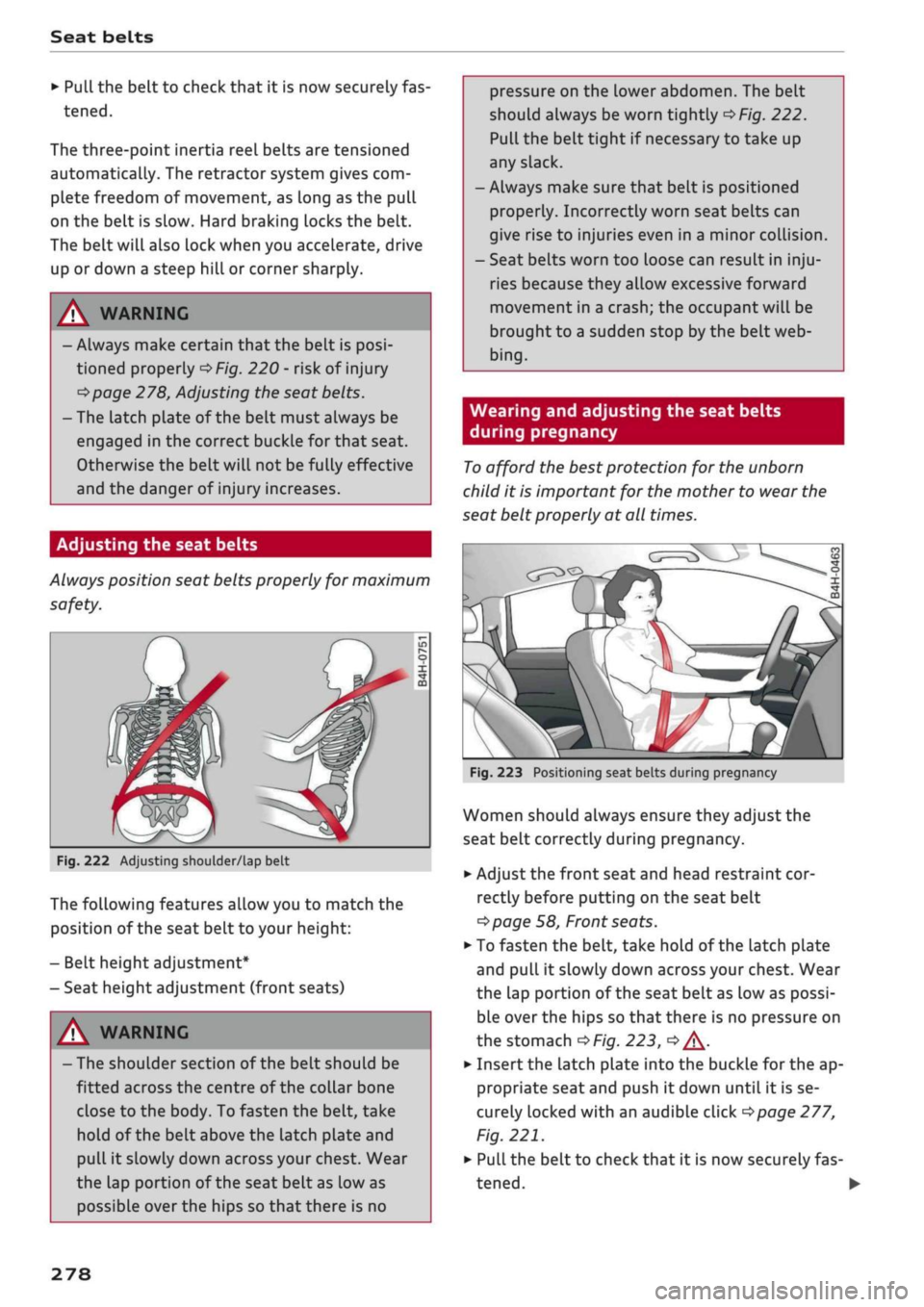
Adjusting the seat belts
Always position seat belts properly for maximum
safety.
Fig.
222 Adjusting shoulder/lap belt
The following features allow you to match the
position of the seat belt to your height:
- Belt height adjustment*
- Seat height adjustment (front seats)
/K WARNING
- The shoulder section of the belt should be
fitted across the centre of the collar bone
close to the body. To fasten the belt, take
hold of the belt above the latch plate and
pull it slowly down across your chest. Wear
the lap portion of the seat belt as low as
possibLe over the hips so that there is no
pressure on the lower abdomen. The belt
should always be worn tightly
^>Fig.
222.
Pull the belt tight if necessary to take up
any slack.
-Always make sure that belt is positioned
properly. Incorrectly worn seat belts can
give rise to injuries even in a minor coLlision.
- Seat belts worn too loose can result in
inju
ries because they allow excessive forward
movement in a crash; the occupant will be
brought to a sudden stop by the belt web
bing.
Wearing and adjusting the seat belts
during pregnancy
To
afford the best protection for the unborn
child it is important for the mother to wear the
seat belt properly at all times.
Fig.
223 Positioning seat belts during pregnancy
Women should always ensure they adjust the
seat belt correctly during pregnancy.
•
Adjust the front seat and head restraint cor
rectly before putting on the seat belt
tapage
58, Front seats.
•
To fasten the belt, take hold of the latch plate
and pull it slowly down across your chest. Wear
the lap portion of the seat belt as low as possi
ble over the hips so that there is no pressure on
the stomach
OF/'g.
223,
<=> A-
•
Insert the latch plate into the buckle for the ap
propriate seat and push it down until it is se
curely locked with an audible click
^>page
277,
Fig.
221.
•
Pull the belt to check that it is now securely fas
tened.
•
278