radiator AUDI Q2 2021 Owner´s Manual
[x] Cancel search | Manufacturer: AUDI, Model Year: 2021, Model line: Q2, Model: AUDI Q2 2021Pages: 364, PDF Size: 87.77 MB
Page 15 of 364
Instruments and controls
CO
<
O
rN
r>
I-I
00
19
26
14
14
- Driver information system (ana
logue instrument cluster)* ....
-Warning and indicator Lamps ..
(f)
Status line (displayed on one
or
two
lines)
(?) Reset button for trip recorder ...
(7) Speedometer/convenience display
(§)
Fuel gauge
(9) Speedometer
@
Additional display on left (two sep
arate sections in extended view)
Further warning/indicator lamps may appear in
the rev counter
(2),
in the speedometer
(f),
in the
status line (5) and above or below the central
area
@,
depending on the instrument cluster
version.
Most of the illustrations on the following pages
show the colour analogue instrument cluster*.
The display and position of the elements may be
different on the monochrome instrument cluster
or the Audi virtual cockpit*.
1) Note
- Depending on the vehicle equipment, the
instrument lighting (for dials and needles)
may be switched on when the ignition is on
and the vehicle's lights are off. The illumi
nation of the diaLs and needles is automati
cally reduced as it becomes dark outside
and is eventually switched off altogether.
This function is intended to remind the driv
er to switch on the dipped headlights in
good time.
- You can change the measurement units for
temperature or speed, etc. via the infotain
ment system
^>page
255.
Coolant temperature gauge
The coolant temperature gauge
(T) ^>page
12,
Fig.
41 ^>page
12, Fig. 3 only works when the ig
nition is switched on. In order to avoid possible
damage to the engine, please read the following
notes for the different temperature ranges.
Engine cold
If the LEDs are still in the lower range of the dis
play, this indicates that the engine has not yet
reached operating temperature. Avoid high en
gine speeds, full acceleration and heavy engine
loads.
Normal temperature
The LEDs will settle somewhere in the centre of
the display once the engine has reached operat
ing temperature. If the warning lamp || lights
up in the instrument cluster display, the coolant
temperature is too high
<^>page
30.
© CAUTIO
- Additional lights and other accessories in
front of the air inlet reduce the cooling ef
fect of the radiator. At high outside temper
atures and high engine loads, there is a risk
of the engine overheating.
- The front spoiler also ensures proper distri
bution of the cooling air when the vehicle is
moving.
If the spoiler is damaged this can
reduce the cooling effect, which could cause
the engine to overheat. Obtain professional
assistance.
® Note
Applies to: vehicles with diesel engine
These engines are so efficient that they may
not reach their full operating temperature in
very cold weather. This is quite normal and no
cause for concern.
Rev counter
The
rev counter indicates the number of engine
revolutions per minute.
The start of the red zone on the dial indicates the
maximum engine speed which may be used brief
ly in all gears when the engine is warm and after
it has been run in properly. However, it is advisa
ble to change up a gear or move the selector lev
er to D/S (or
lift your
foot
off
the accelerator) be
fore the needle reaches the red zone. •
13
Page 78 of 364
Driving
©
y
Note
After the engine is stopped, the radiator fan
may remain on or turn itself back on for up to
10 minutes, even if the ignition is switched
off. This may occur for the following reasons:
- Residual heat has raised the coolant
tem
perature.
- Direct sunlight has additionally heated up
the engine compartment while the engine is
warm.
- Applies to vehicles with diesel particulate
filter: The emission control system is hot
because of the regeneration process, even
though the engine has
not
yet reached oper
ating temperature.
Starting and stopping
the engine (vehicles with
convenience key)
Starting the engine
Applies to: vehicles with convenience key
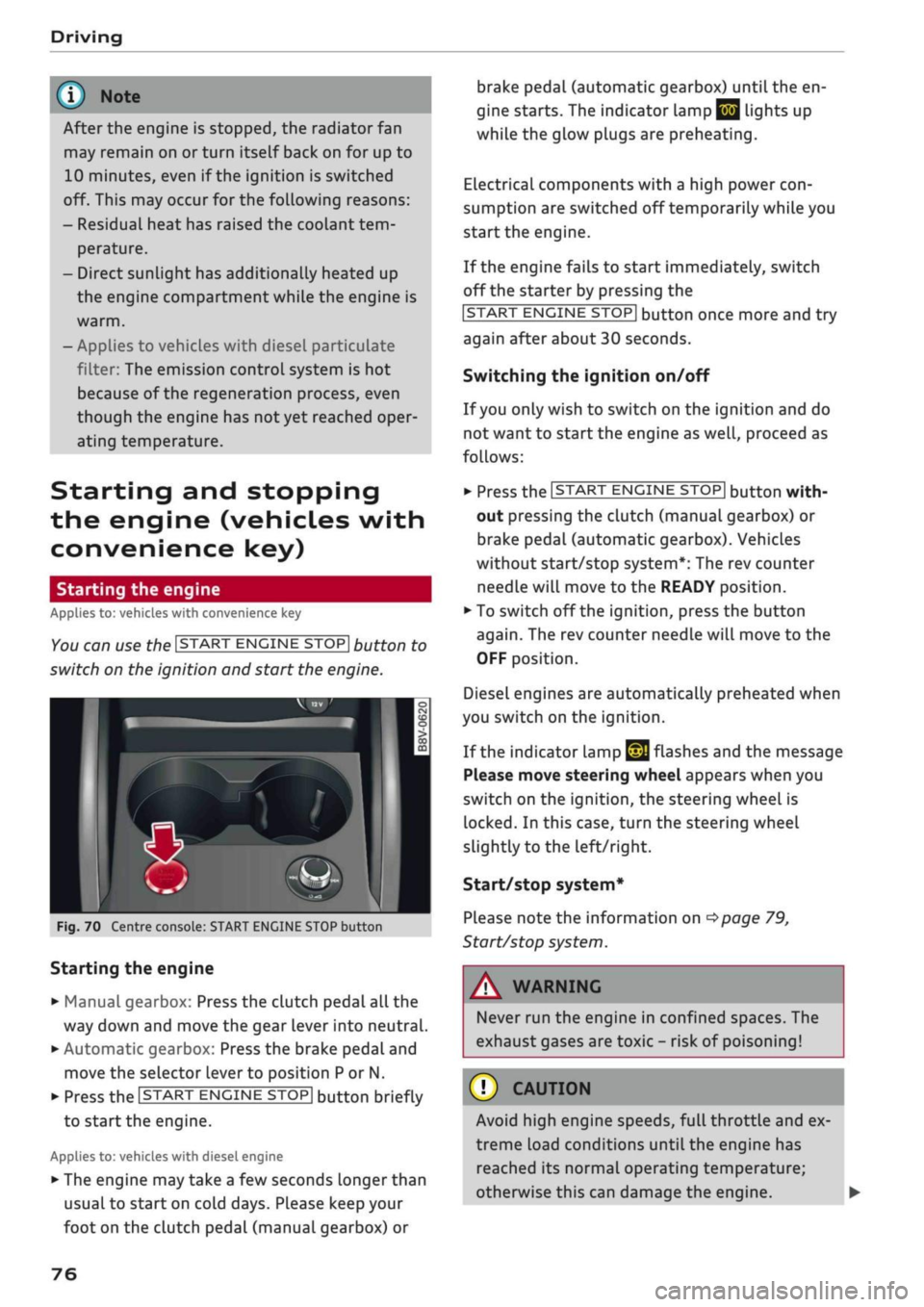
You can use the ISTART ENGINE STOP| button to
switch on the ignition and start the engine.
Fig.
70 Centre console: START ENGINE STOP button
Starting the engine
•
Manual gearbox: Press the clutch pedal all the
way down and move the gear lever into neutral.
•
Automatic gearbox: Press the brake pedal and
move the selector lever to position P or N.
•
Press the ISTART ENGINE
STOP!
button briefly
to start the engine.
Applies to: vehicles with diesel engine
•
The engine may take a few seconds longer than
usual to start on cold days. Please keep your
foot on the clutch pedal (manual gearbox) or
brake pedal (automatic gearbox) until the en
gine starts. The indicator Lamp
E 3
lights up
while the glow plugs are preheating.
Electrical components with a high power
con
sumption are switched off temporarily while you
start the engine.
If the engine fails to start immediately, switch
off the starter by pressing the
ISTART
ENGINE
STOPI
button once more and try
again after about 30 seconds.
Switching the ignition on/off
If you only wish to switch on the ignition and do
not want to start the engine as
well,
proceed as
follows:
•
Press the ISTART ENGINE STOP| button with
out pressing the clutch (manual gearbox) or
brake pedal (automatic gearbox). Vehicles
without start/stop system*: The rev counter
needle will move to the READY position.
•
To switch off the ignition, press the button
again.
The rev counter needle will move to the
OFF position.
Diesel engines are automatically preheated when
you switch on the ignition.
If the indicator lamp
£21
flashes and the message
Please move steering wheel appears when you
switch on the ignition, the steering wheel is
locked.
In this case, turn the steering wheel
slightly
to
the left/right.
Start/stop system*
Please note the information on
<^>page
79,
Start/stop system.
WARNING
Never run the engine in confined spaces. The
exhaust gases are toxic - risk of poisoning!
© CAUTION
Avoid high engine speeds, full throttle and ex
treme load conditions until the engine has
reached its normal operating temperature;
otherwise this can damage the engine. •
76
Page 79 of 364
Driving
CO
<
O
rN
IV
rN
t-H
o <
® For the sake of the environment
Do not warm up the engine by running it with
the car stationary. You should drive off imme
diately whenever possible. This will help avoid
unnecessary exhaust emissions.
© Note
- Any noises which may be heard when the
engine is started are quite normal and no
cause for concern.
- If
you
leave your vehicle with the ignition
switched on, it will be switched off auto
matically after
a
while. Please note that
electrical equipment such as the exterior
lighting will also be switched off.
Switching off the engine
Applies to: vehicles with convenience key
•
Stop the vehicle.
•
Automatic gearbox: Move the selector lever to
position P.
•
Press the ISTART ENGINE STOP| button
tapage
76, Fig. 70.
Steering
lock15
The steering will be locked if
you
switch off the
engine with the ISTART ENGINE STOP| button,
move the selector lever to position P (on vehicles
with automatic gearbox*) and open the driver's
door. The steering lock acts as a theft deterrent.
Emergency Off function
If necessary in an emergency, the engine can be
switched off while the vehicle is still moving at
speeds of 7 km/h and above. To switch off the
engine, press the ISTART ENGINE STOP| button
twice in quick succession or hold it in for longer
than two seconds.
A WARNING
- Never switch off the engine until the vehicle
is stationary. Otherwise you may not have
the full benefit of the brake servo and pow
er steering. You may need more strength to
steer and brake the vehicle than you nor
mally would. This would mean a greater risk
of accidents and serious injury, because you
cannot steer and brake in the normal
man
ner.
- Always take the key with you when you Leave
the vehicle. Otherwise the engine can be
started or power-operated equipment such
as the electric windows can be used. This
could result in serious injury.
- When parking, always move the selector
lever to position
P
to prevent the vehicle
from rolling back accidentally.
If the engine has been working hard for
a
long
time,
there is a risk of heat building up in the
engine compartment after the engine has
been switched off; this could cause engine
damage. For this reason, you should leave the
engine idling for about 2 minutes before
switching it off.
©
Note
After the engine is stopped, the radiator fan
may remain on or turn itself back on for up to
10 minutes, even if the ignition is switched
off. This may occur for the following reasons:
- Residual heat has raised the coolant
tem
perature.
- Direct sunlight has additionally heated up
the engine compartment while the engine is
warm.
- Applies to vehicles with diesel particulate
filter: The emission control system is hot
because of the regeneration process, even
though the engine has
not
yet reached oper
ating temperature.
Driver messages
Engine running. Warning! Switch off ignition
before leaving car
1J
This function is not available on all export versions.
77
Page 136 of 364
Parking aids
Parking aids
General notes
Applies to: vehicles with rear parking aid/parking system
plus/reversing camera/park assist
Various systems are available to help you when
parking or manoeuvring in tight spaces, depend
ing on the equipment fitted on your vehicLe.
The rear parking aid gives an acoustic warning if
there are any obstacles behind the car
cépage
135.
When you are parking, the parking system plus
warns you acoustically and optically about obsta
cles detected in front of and behind the vehicLe
^page
135.
The reversing camera uses the infotainment sys
tem display to show a picture of the area behind
the vehicle captured by the camera. This picture
helps you to park the vehicle parallel or perpen
dicular to the roadside. In addition, you are assis
ted by the functions of the parking system plus
^>page
137.
The park assist helps you to find suitable parking
spaces, to manoeuvre the vehicLe into spaces par
allel or perpendicular to the roadside and to drive
out of spaces parallel to the kerb
^>page
139. It
also includes the functions of the parking system
plus
^page
135 and additionally monitors the
area at the side of the vehicle
(f) ^page
135,
Fig. 124.
A
WARNING
- Always watch the road and the area sur
rounding the vehicLe. The electronic systems
cannot replace the full concentration of the
driver. The driver is always responsible for
safety during parking and all other manoeu
vres.
- Please note that certain surfaces, such as
clothing fabrics, cannot be detected or dis
played by the system - risk of accident!
- The sensors and cameras have bLind spots in
which neither people nor objects are regis
tered.
It is particularly important to ensure
that there are no small children or animals
near the vehicLe - risk of accident!
- Always keep a close watch on the area
around the vehicLe and make full use of the
rear-view mirrors.
- Impacts or damage to the radiator grille,
bumper, wheel arches or underbody can
cause misalignment of the sensors. This can
impair the effectiveness of the parking aids.
Have the systems checked by a qualified
workshop.
(T)
CAUTION
- The system may not always be able to de
tect objects such as the following:
- Chains, trailer draw bars, posts or fences
- Objects above the sensors, such as wall
protrusions, etc.
- Objects with certain surfaces or struc
tures,
such as wire fences or powder snow
- As your car moves closer to low obstacles,
they may disappear from the sensors' field
of vision. Please note
that
you will no longer
be warned about these obstacles.
- Remember to maintain sufficient clearance
from the kerb to avoid damaging the wheel
rims.
(T)
Note
- In certain situations, a warning may be giv
en by the system even if there is no obstacle
within range of the sensors. This can be
caused by the following, for instance:
- Certain road surfaces or long grass
- External ultrasound sources, e.g. from
street cleaning vehicles
- Heavy rain or snow or dense exhaust
fumes
-To familiarise yourself with the system, we
recommend
that
you practise parking in a
quiet location or a car park. The weather
and light conditions should be good.
- You can change the display and adjust the
volume and pitch of the beeps
^>page
143.
- Please refer to the notes on the use of a
towing bracket
^page
144.
- There is a slight delay in the picture dis
played on the infotainment display. •
134
Page 299 of 364

Checking and topping up fluids
CO
rN
IV
rN
•-i
00
Emission controL
systems
Catalytic converter
Applies to: vehicles with petrol engine
The vehicle must only be used with unleaded pet
rol,
otherwise the catalytic converter will be ir
reparably damaged.
Never allow the fuel tank to run completely dry,
as the irregular supply of fuel can cause misfir
ing.
This allows unburnt fuel to enter the exhaust
system,
which can cause overheating and dam
age to the catalytic converter.
Diesel particulate filter
Applies to: vehicles with diesel engine
The diesel particulate filter can filter out almost
all soot particles contained in the exhaust gas. In
normal driving conditions the filter is self-clean
ing.
Should the self-cleaning function of the filter
not be able to operate, e.g. when the vehicle is
continuously used only for short trips, the filter
becomes obstructed with soot and the indicator
lampnf°r
the
diesel particulate filter Lights up
cépage
34.
A WARNING
The exhaust system is very hot when the
vehi
cle is being driven and after the engine has
been switched off.
- Never touch the tailpipes when they are hot
- risk of burns!
- Because of the high temperatures which can
occur in the emission controL system, do not
park the vehicle where the exhaust can
come into contact with flammable materials
under the car (e.g. on grass or at the forest
edge) - risk of fire!
- Do not apply any underseal agents in the
area around the exhaust system - risk of
fire!
Engine compartment
Working on components in the engine
compartment
Extra caution is necessary when working on com
ponents in the engine compartment.
Always be aware of the danger of injury and
scalding as well as the risk of accident or fire
when working in the engine compartment (e.g.
when checking and refilling fluids). Always ob
serve the warnings listed below and follow all
normal safety precautions. The engine compart
ment of any motor vehicle is a potentially haz
ardous area
oA-
A WARNING
- Switch off the engine.
-Switch off the ignition.
-Applythe
parking brake.
- On vehicles with manual gearbox place the
gear lever in neutral, on vehicles with auto
matic gearbox move the selector lever to
position P.
- To avoid the risk of being scalded, never
open the bonnet if
you
see steam or coolant
escaping from the engine compartment.
Wait until no steam or coolant can be seen
before opening the bonnet.
- Wait for the engine to cool down.
- Keep children away from engine compart
ment.
- Never spill fluids on a hot engine. These
flu
ids can cause a fire (e.g. radiator
anti
freeze).
- Take care not to cause short circuits in the
electrical system.
- When working in the engine compartment
be aware that the radiator fan may start
running suddenly, even if the ignition is
switched off - risk of injury!
- Do not unscrew the cap on the expansion
tank when the engine is hot. The cooling
system is under pressure.
- Protect face, hands and arms by covering
the cap with a large, thick rag to protect
against escaping coolant and steam.
295
Page 300 of 364
Checking and topping up fluids
- Never remove the engine cover panel - risk
of burns!
- If any tests have to be performed with the
engine running, there is an extra safety risk
from the rotating parts, such as the drive
belts,
alternator and radiator
fan,
etc., and
from the high-voltage ignition system.
- Never touch the radiator fan. The electric
additional fan is controlled by temperature
and can start running without warning.
- Applies to vehicles with automatic gearbox:
Never open the throttle inadvertently (for
instance by hand from the engine compart
ment) if
a
gear is engaged while the vehicle
is stationary with the engine running. The
vehicle will otherwise start moving immedi
ately and could cause an accident.
- Observe the following additional warnings if
work on the fuel system or the electrical
system is necessary:
- Do not smoke.
- Never work near naked flames.
- Always keep an approved fire extinguisher
immediately available.
- Any work on the batteries and electrical sys
tem in your vehicle entails a risk of injury
and chemical burns in addition to danger of
accident or fire.
For
this reason, you must
have the work carried out by
a
qualified
workshop.
© CAUTION
When topping up fluids make sure the correct
fluid is put into the correct filler opening. This
can otherwise cause serious malfunctions or
engine damage.
® For the sake of the environment
Inspect the ground underneath your vehicle
regularly so that any Leaks are detected at an
early stage. If
you
find spots of oil or other
fluids,
have your vehicle inspected in the
workshop.
© Note
located on the other side of the engine com
partment.
Opening/closing the bonnet
The
bonnet is released from inside the vehicle.
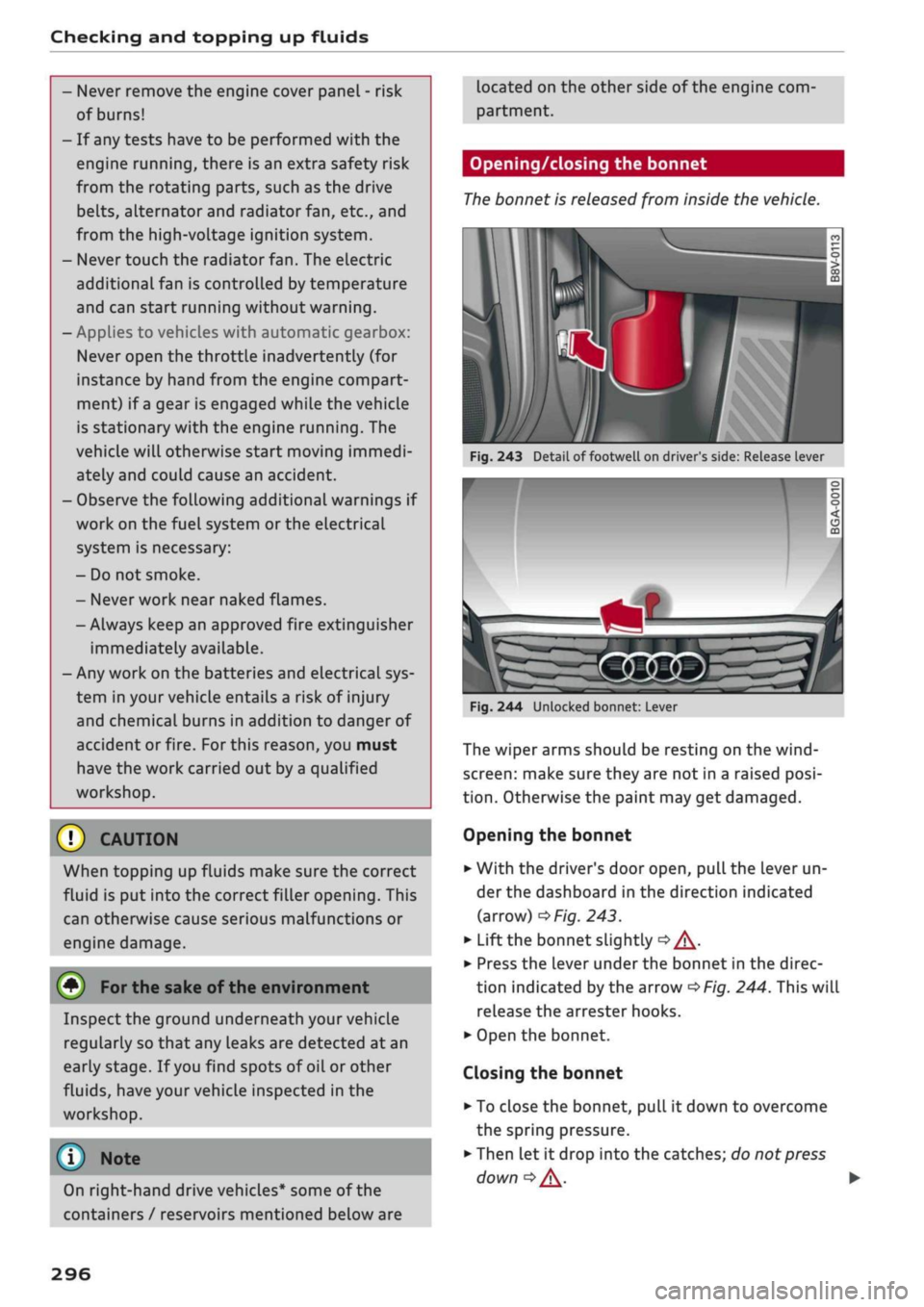
Fig.
243 Detail of footwell on driver's side: Release lever
I
On right-hand drive vehicles* some of the
containers / reservoirs mentioned below are
Fig.
244 Unlocked bonnet: Lever
The wiper arms should be resting on the
wind
screen:
make sure they are not in a raised
posi
tion.
Otherwise the paint may get damaged.
Opening the bonnet
•
With the driver's door open, pull the lever un
der the dashboard in the direction indicated
(arrow)
^>Fig.
243.
*•
Lift the bonnet slightly
•=> A-
•
Press the Lever under the bonnet in the direc
tion indicated by the arrow
^>Fig.
244. This will
release the arrester hooks.
•
Open the bonnet.
Closing the bonnet
• To close the bonnet, pull it down to overcome
the spring pressure.
•
Then let it drop into the catches; do not press
down
|=>^.
•
296
Page 304 of 364
Checking and topping up fluids
Coolant additive
The coolant additive contains anti-freeze and cor
rosion protection agent. Only use one of the
fol
lowing coolant additives. It is possible to mix
these additives.
Topping up coolant
Coolant additive
G13
G12++
Specification
TL774J
TL 774
G
The amount of coolant additive which needs to
be mixed with the water depends on the temper
atures to be expected in the winter season. If the
anti-freeze concentration is too Low, the coolant
can freeze and cause engine damage.
Hot regions
Cold regions
Coolant
additive
min.
40%
max. 45 %
min.
50%
max. 55 %
Frost protec
tion
min.-25°C
max. -40 °C
(T)
CAUTION
- Have your qualified workshop check the
cooling system before the winter season to
make sure that the anti-freeze concentra
tion is adequate for the conditions to be ex
pected.
This applies particularly if
you
drive
into a colder climate zone.
- To prevent damage to the engine, do not
use a different type of anti-freeze additive if
the approved type of additive is not availa
ble.
In this case use only water and bring
the coolant concentration back up to the
correct level as soon as possible by putting
in the specified additive.
- Always top up with fresh, unused coolant.
- Radiator sealants must not be added to the
coolant.
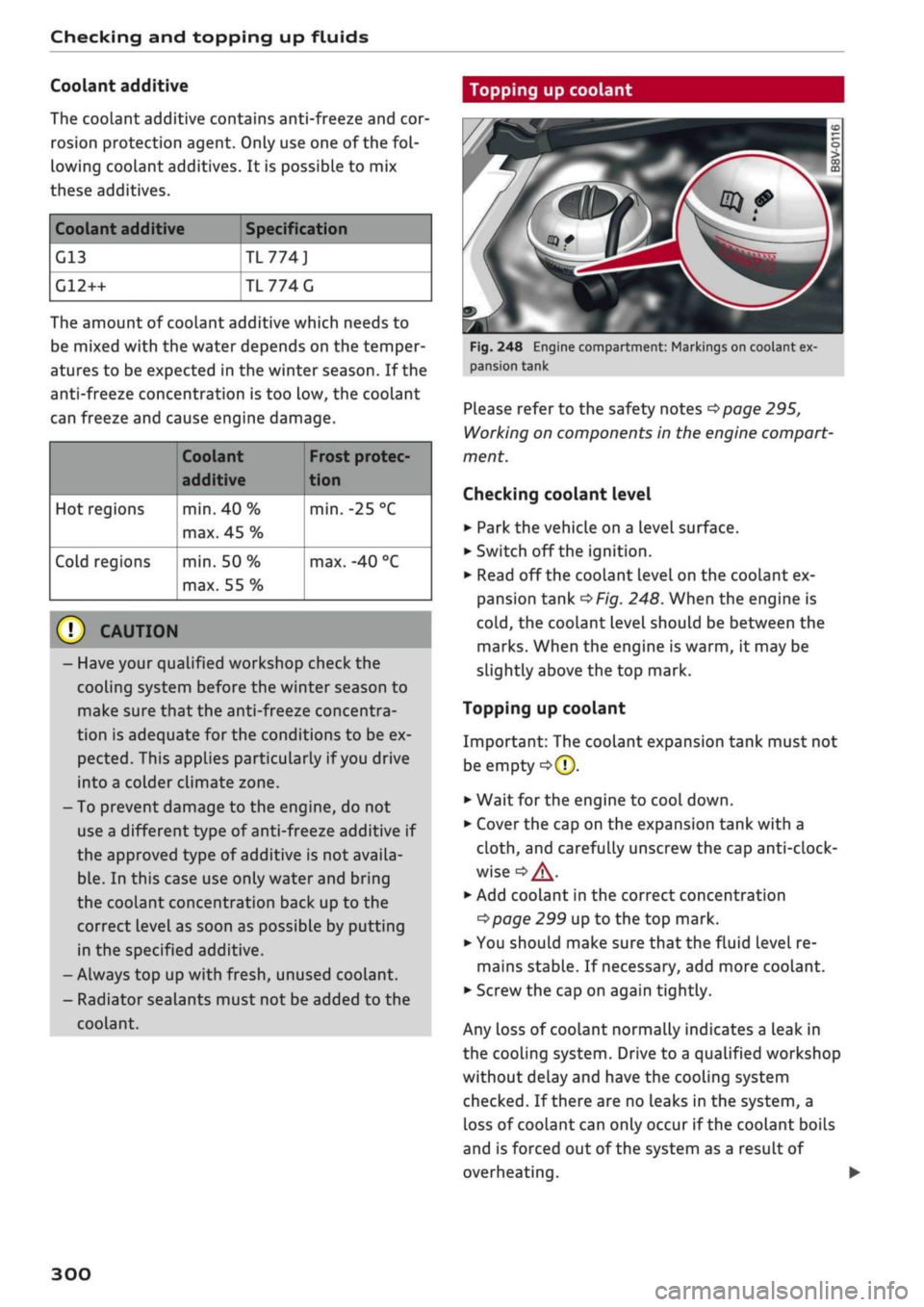
Fig.
248 Engine compartment: Markings on coolant ex
pansion tank
Please refer to the safety notes
^page
295,
Working on components in the engine compart
ment.
Checking coolant level
•
Park the vehicle on a level surface.
•
Switch off the ignition.
•
Read off the coolant level on the coolant ex
pansion tank
^>Fig.
248. When the engine is
cold,
the coolant level should be between the
marks. When the engine is warm, it may be
slightly above the top mark.
Topping up coolant
Important: The coolant expansion tank must not
be empty
•=>([).
•
Wait for the engine to cool down.
•
Cover the cap on the expansion tank with a
cloth,
and carefully unscrew the cap
anti-clock
wise
<=>
/K.
*-
Add coolant in the correct concentration
tapage
299 up to the top mark.
•
You should make sure that the fluid level re
mains stable. If necessary, add more coolant.
•
Screw the cap on again tightly.
Any loss of coolant normally indicates a Leak in
the cooling system. Drive to a qualified workshop
without delay and have the cooling system
checked.
If there are no leaks in the system, a
loss of coolant can only occur if the coolant boils
and is forced out of the system as a result of
overheating.
300
Page 305 of 364

Checking and topping up fluids
A WARNING
CO
rN
IV
rN
•-i
00
- The cooling system is under pressure. Do
not unscrew the cap on the expansion tank
when the engine is hot: you could be
scal
ded by escaping steam.
- The coolant and coolant additive can be a
health hazard. Store the coolant additive in
the original container in a safe place out of
reach of children - risk of poisoning.
- When working in the engine compartment
be aware that the radiator fan may start
running suddenly, even if the ignition is
switched off- risk of injury!
Brake fluid
© CAUTION
Do not add coolant if the expansion tank is
empty. Air could have got into the cooling
system - risk of engine damage! In this case,
do NOT drive on. Obtain professional assis
tance.
- Have your qualified workshop check the
cooling system before the winter season to
make sure that the anti-freeze concentra
tion is adequate for the conditions to be ex
pected.
This applies particularly if
you
drive
into a colder climate zone.
-To prevent damage to the engine, do not
use a different type of anti-freeze additive if
the approved type of additive is not availa
ble.
In this case use only water and bring
the coolant concentration back up to the
correct level as soon as possible by putting
in the specified additive.
- Always top up with fresh, unused coolant.
- Radiator sealants must not be added to the
coolant.
ëB
k
DOT
4
A
•9
o
o
:>
li-
Fig.
249 Engine compartment: Cap of brake fluid reservoir
Please refer to the safety notes
^page
295,
Working on components in the engine compart
ment.
Checking brake fluid level
Read off the brake fluid level on the brake fluid
reservoir
^>page
297, Fig. 245. The brake fluid
level must be between the MIN and MAX marks
<=>A.
The brake fluid
level
is also automatically moni
tored.
In right-hand drive vehicles the brake fluid reser
voir is on the other side of the engine compart
ment.
Changing brake fluid
Have the brake fluid changed regularly by a quali
fied workshop.
WARNING
-If the brake fluid Level is under the MIN
mark, the effectiveness of the brakes and
therefore the safety of the vehicle may be
impaired - risk of accident! Do not drive on.
Obtain professional assistance.
- Heavy use of the brakes may cause a vapour
lock if old brake fluid is left in the system.
This would seriously impair the effective
ness of the brakes and the safety of the car
- risk of accident!
© CAUTION
- If the brake fluid level is above the MAX
mark, brake fluid may escape via the cap on •
301
Page 308 of 364
Checking and topping up fluids
© CAUTIO
-The anti-freeze concentration must be
matched to the climate of the country in
which you are driving. If the concentration
is too
high,
damage to the car may result.
- Never put in radiator anti-freeze or other
additives.
- Never use washer fluid which contains paint
thinners or solvents as it can damage the
paintwork.
Service interval display
The
service interval display detects when the
next
service
is due
for
your vehicle.
There are two service interval dispLay levels:
- Inspection or oil change reminder: After a cer
tain mileage, a service reminder will appear in
the instrument cluster dispLay each time the ig
nition is switched on/off. The distance or time
remaining will be shown briefly.
- Inspection or oil change due: When your
vehi
cle is due for an inspection, oil change or
both,
the corresponding reminder Inspection
due!,
Oil change due! or Oil change and inspection
due!
will appear briefly after you switch the ig
nition on/off.
Checking the service intervals
On the infotainment system, you can look up the
distance and time remaining until the next oil
change or next service inspection. Select the
fol
lowing on the infotainment system:
|MENU|
but
ton > Car
>
left control button > Servicing &
checks
>
Service intervals.
Applies
to: vehicles with flexible oil change service
You cannot check the service interval on a new
vehicle until it has been driven for about 500 km.
Qualified workshops reset the service interval af
ter the oil is changed. The distance to the next oil
change is initially displayed based on the driving
profile prior to the oil change. Your own personal
driving profile is used subsequently to calculate
the remaining distance. Frequent cold starts or
short trips place extra demands on the engine oil
with the result that the oil has to be changed
more often.
Resetting the display
Your qualified workshop resets the service inter
val display after each service.
It is very important that you reset the oil change
dispLay if
you
change the oil yourself. The
next
oil
change will be due after
a
fixed service interval.
To reset the display, select the following on the
infotainment system:
|MENU|
button > Car
>
left
control button > Servicing & checks
>
Service in
tervals
>
Reset oil change interval.
(J) CAUTION
- Do not reset the oil change interval display
unless you have changed the oil.
- Keeping to the correct service intervals is
crucial for the operation, service life and re
sidual value of the vehicle (and especially
for the life of the engine). Services must al
ways be carried out promptly, even if the
mileage is Low.
304