Mmi AUDI Q3 2015 User Guide
[x] Cancel search | Manufacturer: AUDI, Model Year: 2015, Model line: Q3, Model: AUDI Q3 2015Pages: 258, PDF Size: 64.9 MB
Page 81 of 258
M N M N
0 ::i co
rl I.O
"' rl
"' rl
Audi drive select Driving settings
Introduction
App lies to vehicles: with Audi drive select
Drive select provides the possibility to experi
ence different types of vehicle sett ings in one
vehicle. For instance, using the three
Com
fort , Auto
and Dynamic modes, t he driver can
switch from a sporty to a comfortab le driving
mode with the press of a button.
Description
Applies to vehicles : with Audi drive select
The vehicle setup in each mode depends on
the vehicle's features. However, the engine,
automatic transmission and steering are al
ways involved .
Engine and automatic transmission
Depending on the mode, the engine and the
automatic transmission respond quicker or in
a more balanced manner to accelerator pedal
movements. In the sporty dynamic mode, the
automatic transmission shifts at higher RPMs.
Steering
The steering adapts in terms of steering ef
fort. Indirect steering that moves easily, like
the steering in comfort mode, is best suited
to long drives on a highway . In contrast, dy
namic mode provides sporty, direct steering .
Curve light*
The curve light adapts to driving on curves.
The pivot ing action and the lighting are also
adapted to the mode .
@ Tips
Selecting the Dynamic mode results in
sporty shift ing characteristics. The S gear
position engages automatically.
Audi drive select 79
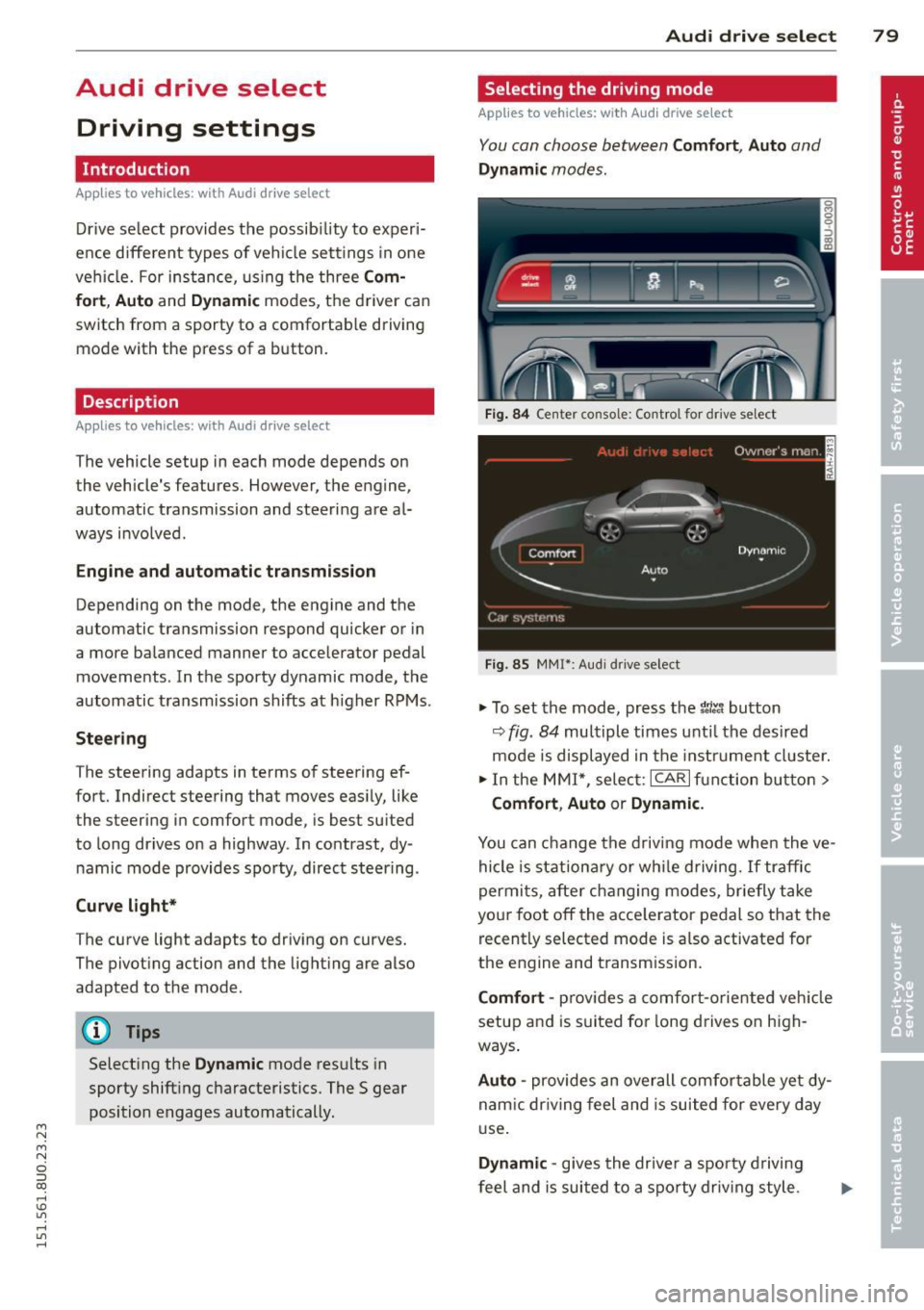
Selecting the driving mode
Applies to vehicles: with Aud i drive se lect
You can choose between Comfort, Auto and
Dynamic modes.
Fig. 84 Center console: Control for drive se lect
Fig . 85 MMI*: Aud i drive select
.,. To set the mode, press the t1ti button
9fig. 84 multiple times unti l the desired
mode is displayed in the instrument cluster.
.,. In the MMI*, select: ICARlfunction button>
Comfort, Auto or Dynamic.
You can change the driving mode when the ve
hicle is stationary or while driving. If traffic
permits, after changing modes, briefly take
your foot off the acce lerator pedal so that the
recently selected mode is a lso activated for
the engine and transm ission.
Comfort -provides a comfort-oriented vehicle
setup and is suited for long drives on high
ways .
Auto -provides an overall comfo rtable yet dy
nam ic dr iving feel and is suited for every day
use.
Dynamic -gives the drive r a sporty driving
feel and is suited to a sporty driving style.
Page 138 of 258
136 Child Safety
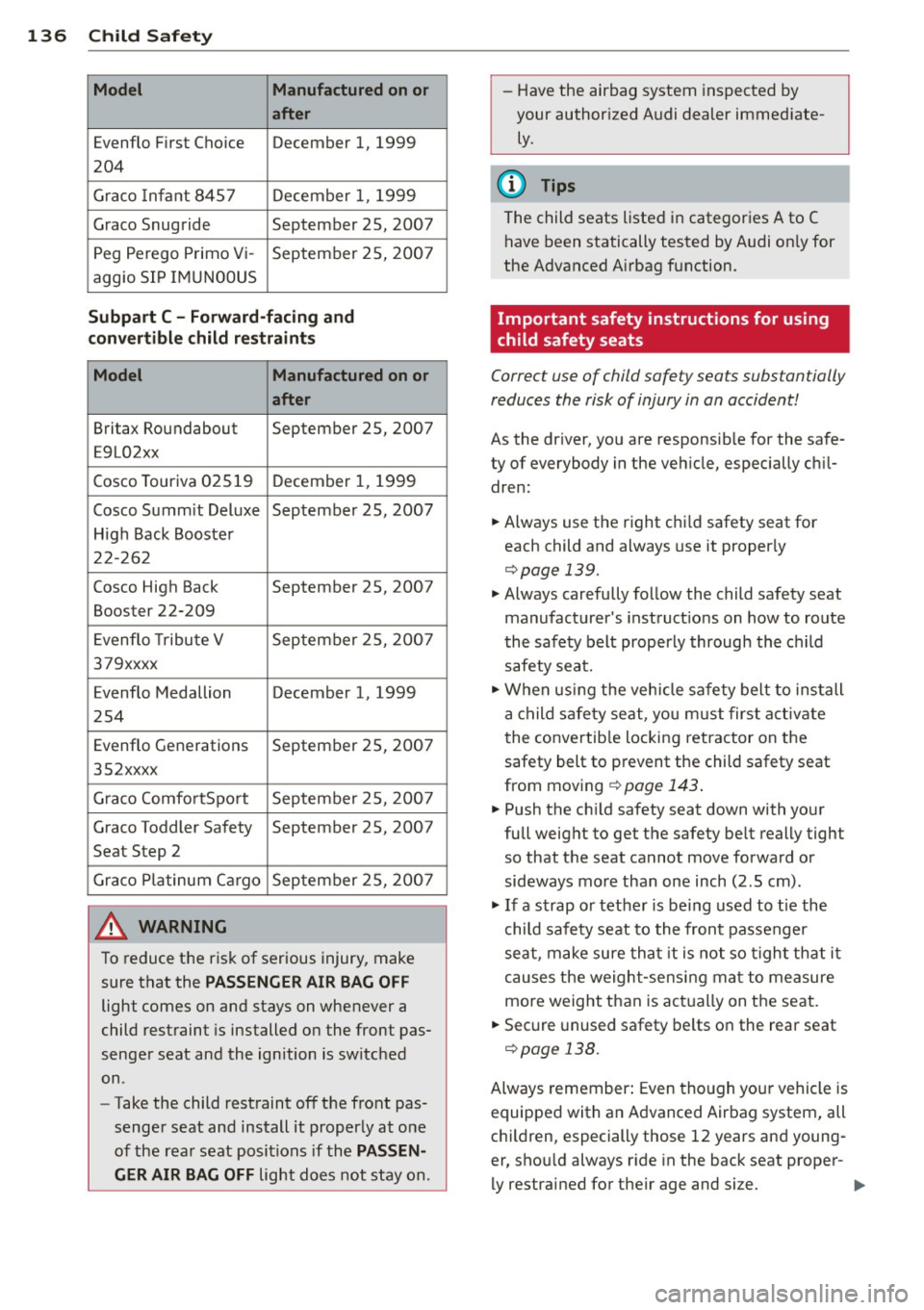
Model Manufactured on or
after
Evenflo First Choice December 1, 1999
204
Graco Infant 8457 December 1, 1999
Graco Snugride September 25, 2007
Peg Perego Primo Vi- September 25, 2007
aggio SIP IMUN00US
Subpart C - Forward-facing and
convertible child restraints
Model Manufactured on or
after
Britax Roundabout September 25, 2007
E9L02xx
Cosco Touriva 02519 December 1,
1999
Cosco Summit Deluxe September 25, 2007
High Back Booster
22-262
Cosco High Back September 25, 2007 Booster 22-209
Evenflo Tribute V September 25, 2007
379xxxx
Evenflo Medallion December 1, 1999
254
Evenflo Generations September 25, 2007
352xxxx
Graco Comfo rtSport September 25, 2007
Graco Toddler Safety September 25, 2007
Seat Step 2
Graco Platinum Cargo September 25, 2007
A WARNING
To reduce the risk of serious injury, make
sure that the
PASSENGER AIR BAG OFF
light comes on and stays on whenever a
child restraint is installed on the front pas
senger seat and the ignition is switched
on.
- Take the child restraint off the front pas
senger seat and install it properly at one
of the rear seat positions if the
PASSEN
GER AIR BAG OFF
light does not stay on. -
Have the airbag system inspected by
your authorized Audi dealer immed iate
ly.
@ Tips
The child seats listed in categories A to C
have been statically tested by Audi only for
the Advanced Airbag function.
Important safety instructions for using
child safety seats
Correct use of child safety seats substantially
reduces the risk of injury in an accident!
As the driver, you are responsib le for the safe
ty of everybody in the veh icle, especially chil
dren:
.. Always use the right chi ld safety seat for
each child and always use it properly
c::;,page 139.
.. Always carefully follow the child safety seat
manufacturer's instruct ions on how to route
the safety belt properly through the child
safety seat .
.. When using the vehicle safety belt to install
a child safety seat, you must first activate
the convertible locking retractor on the
safety belt to prevent the child safety seat
from moving
¢ page 143 .
.. Push the ch ild safety seat down with your
full weight to get the safety belt really tight
so that the seat cannot move forward or
sideways more than one inch (2 .5 cm) .
.,. If a strap or tether is be ing used to tie the
child safety seat to the front passenger
seat , make sure that it is not so tight that it
causes the weight-sensing mat to measure
more weight than is actually on the seat.
.. Secure unused safety belts on the rear seat
c::;, page 13 8.
Always remember: Even though your vehicle is
equipped with an Advanced Airbag system, all
children, especially those 12 years and young
er, shou ld always ride in the back seat proper-
ly restrained for their age and size . .,.
Page 155 of 258
M N
M N
0 ::i co ,...., \!) ..,.,
,...., ..,., ,....,
@ Tips
Your vehicle may be equipped with Audi
connect. Your use of certain Aud i connect
features req uires wireless serv ices that are
provided by a third party wireless telecom
municat ions provider. For details regard
ing how information obtained through
Aud i connect is collected, processed,
transmitted, used, and shared, please see
your contra ct w ith the wire less telecom
municat ions provider and the "About A udi
connect" tab in your vehicle's MMI:
!MENU !
button > Audi connect > About Audi con·
nect .
Electronic Stabilization
Control (ESC)
Description
ESC helps to improve road holding and vehicle
dynamics to help reduce the probability of
skidd ing and loss of veh icle control. It works
only when the eng ine is running. ESC detects
certain difficult driv ing s ituations, including
when the vehicle is beginning to spin (yaw) out of cont ro l and helps you to get the vehicle
back under control by select ively brak ing the
wheels, and/or red ucing engine powe r and
p roviding steering assistance to help hold the
ve hicle on the driver's intended course . The in
dicator light
m in the instrument cluster
blinks when ESC is taking action to help you
control the vehicle.
ESC has limitations.
It is important to remem
ber that ESC cannot overcome the laws of
phys ics. It will not a lways be able to help out
under all conditions you may come up against.
For example, ESC may not always be able to
h elp you master situat ions where there is a
sudden change in the coefficient of fr iction of
the road surface. When there is a sect io n of
d ry road that is s udden ly cove red with water,
slush o r snow, ESC canno t perform the same
way it would on the dry su rface.
If the vehicle
hydroplanes (rides on a c ush ion of wate r in
stead of the road surface), ESC wi ll not be
ab le to he lp you steer the veh icle because con-
Int ellig ent technolog y 153
tact with the pavement has been interrupted
and the vehicle cannot be braked or steered .
D uring fast corner ing, particular ly on wind ing
roads, ESC cannot always deal as effectively
with difficult dr iv ing s ituations than at lower
speeds. When towing a trailer, ESC is not able
to help you regain control as it would if you
were not tow ing a trailer.
Always adjust your speed and driving style to road, traffic and weather conditions . ESC can
not override the vehicle's physical lim its, in
crease the availab le tract ion, or keep a veh icle
o n the road if road departu re is a result of
driver ina ttent io n. Instead , ESC imp roves the
poss ibility of keep ing the vehicle under con
trol and on the road during extreme maneu
vers by using the driver's steering i nputs to
help keep the vehicle go ing in the intended di
rect ion. If you are traveling at a speed that
causes you to run off the road before ESC can
provide any assistance, you may not experi
ence the benefits of ESC.
ESC includes and/or works together with the
anti-lock brake system (ABS), brake ass ist sys
tem, ant i-slip regu lation (ASR), electron ic dif
ferential lock (EDL), electron ic interaxle d iffe r
ential lock*/se lective wheel torque co ntrol*
and hill descent assist. ESC is swit ched on a ll
the time. In ce rtain sit uat io ns when yo u need
less traction, you can sw itch off ASR by press
ing the b utton
[fil ¢ page 155, fig. 13 7. Be
s u re to switch ASR on again when you no lon
ger need less traction .
Anti-lock braking system (ABS )
ABS prevents the whee ls from locki ng up
when b raking. The vehicle can st ill be stee red
even during hard braking . App ly steady pres
su re to the brake peda l. Do not pump the ped
al. A pulsing in the brake pedal indicates that
the system is helping you to brake the vehicle.
Brake a ssis t sy ste m
The brake ass ist system can decrease braking
distance . It increases braking power when the
driver presses the brake peda l quickly in emer
gency s ituations. You must press and hold the
brake pedal unti l the situation is over. .,,.
•
•
Page 162 of 258
160 Intelligent technology
required, but on ly a little is generated. It is al
so critical if the engine is not running and
e lectrical components are turned on. In this
instance energy is being consumed but none
is being genera ted.
It is in precisely these situations that you wi ll
notice energy management actively regulat
ing the distrib ution of energy.
Vehicle stands fo r an e xte nded p eriod
If yo u do not drive you r vehicle over a pe riod
of severa l days or weeks, elect rical compo
nents are grad ually cut back or switched off.
This reduces energy consumption and main
tains starting capab ility over a longer period.
Some of the conven ience functions may not
operate, such as the inter ior lig hts or the
power seat adjustment . Th e conven ience
functions w ill be ava ilable again when you
switch on the igni tion and start the engine.
With the engine turned off
If you listen to the radio, for example, with
the eng ine turned off or use other MMI func
tions, the ba tte ry is being d ischarged .
If starting capability is jeopardi zed due to en
ergy consumpt ion, an error message appears
in the MMI display .
The warning message indicates that the sys
tem will be turned off automat ically. If you
wish to continue using the functions , you have
to start the engine .
With the engine running
Altho ugh electrical energy is generated when
the vehicle is being driven, the battery can be
come discharged . T hi s happens most ly when
little energy is be ing generated and a great
deal consumed and the battery 's state of
cha rge is not optimal.
To br ing the energy balance back into equili
brium, consumers which require especia lly
large amounts of energy are tem pora rily cut
back o r switched off . Heati ng sys tems in par
ticular requ ire a g reat dea l of energy. If you
n otice, fo r example , that the heated se ats* or
the heated re ar window are not hea ting, they have been tempora
rily cut back or switched
off. These systems wi ll be available again as
soon as the energy balance has been restored .
You w ill also no tice th at engine id le speed h as
been increased slightly. This is normal and not
a cause for concern . By inc reasing engine id le
speed the additional energy required is gener
ated and the battery is charged.
Page 186 of 258
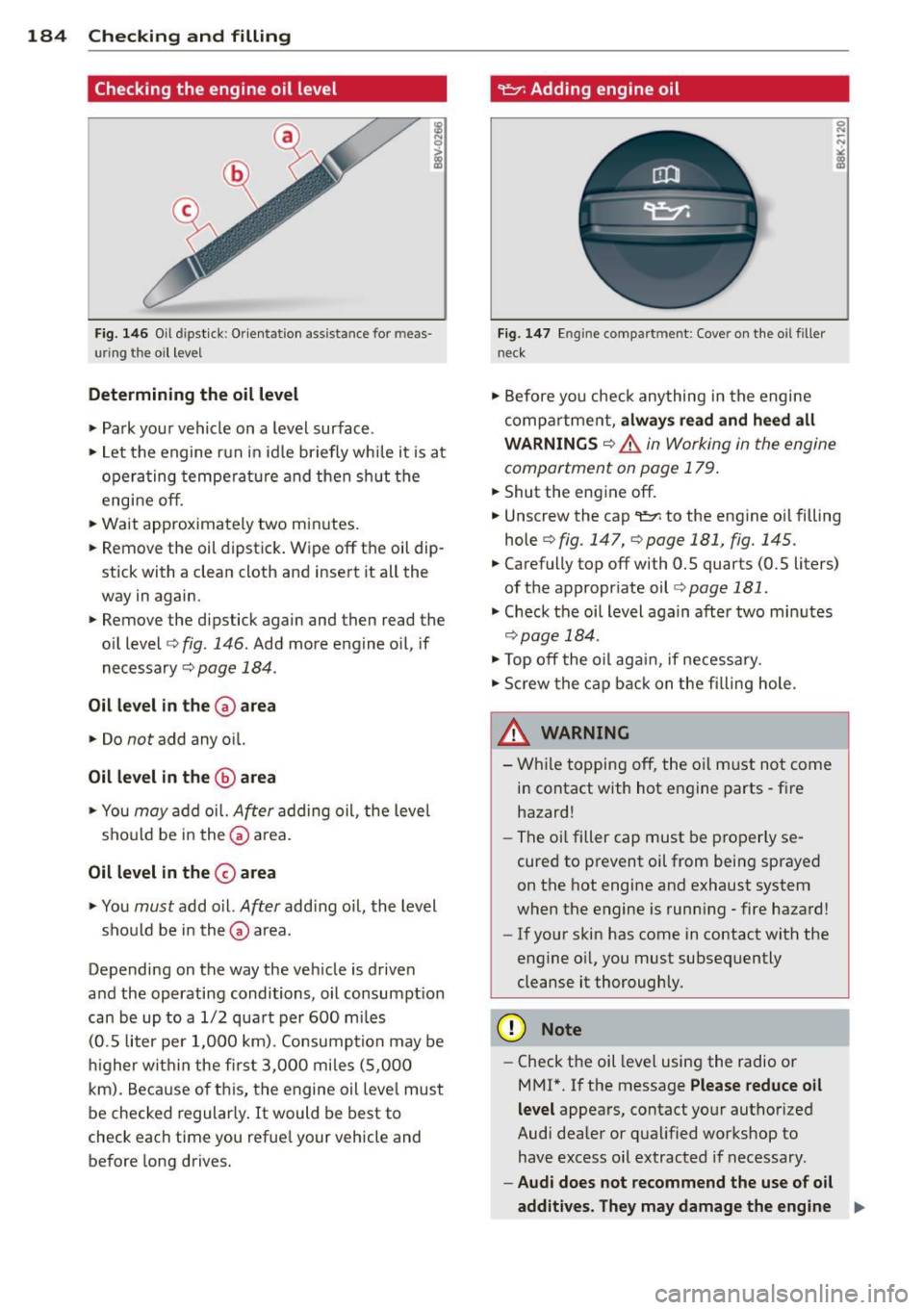
184 Checking and filling
Checking the engine oil level
Fig. 1 46 Oil d ipst ick : Or ientat ion ass ista nce for meas
u ri ng the oil level
Determining the oil level
.,. Park your vehicle on a level surface .
.,. Let the engine run in id le briefly while it is at
opera ting tempe ratu re and then sh ut the
engine off.
.,. Wait approximately two minutes .
.,. Remove the oil dipst ick. Wipe off the oil dip
stick with a clean cloth and insert it all the
way in again .
.,. Remove the dipstick again and then read the
oil level
c> fig. 146. Add more engine o il, if
necessary ~
page 184.
Oil level in th e (v are a
.,. Do not add any o il.
Oil level in the @area
.,. You may add oil. After adding oil, the level
sho uld be in the~ area .
Oil level in the 0 a rea
.,. You must add o il. After add ing o il, the level
should be in the~ area.
Depending on the way the vehicle is driven
and the operating conditions, oil consumpt ion
can be up to a 1/2 qua rt per 600 mi les
(0 .5 liter pe r 1,000 km) . Consumption may be
hi gher wit hin the fi rst 3,000 mi les (5,000
km) . Because of this, the engine oil leve l must
be checked regular ly. It would be best to
check each time you refue l your vehicle and
before long drives.
~ Adding engine oil
F ig. 147 En g in e compart ment: Cover on the o il filler
n eck
.,. Before yo u check anything in the engine
compa rtme nt,
alwa ys read and h eed all
WARNINGS ~ A in Working in the engine
compartment on page 179 .
.,. Shut the engine off.
.,. Unscrew the cap
't!::?: to the engine oi l filling
hole
c> fig . 147, c> page 181, fig. 145 .
.,. Carefully top off with 0.5 quarts (0.5 liters)
of the appropr iate oil
c> page 181 .
.,. Check the oi l level again after two mi nutes
c> page 184 .
.,. Top off the oil aga in, if necessary .
.,. Screw the cap back on the filling hole .
A WARNING
-Wh ile topping off, the oil m ust not come
in contact with hot engine parts -fire
hazard!
- The oi l filler cap must be properly se
cured to prevent oil from being sprayed
on the hot engine and exhaust system
when the engine is runn ing - fire hazard!
- If your skin has come in contact with the
engine o il, you must subsequently
cleanse it thoroughly.
(D Note
- Check the oil level using the radio o r
MMI*. I f the message
Please redu ce oil
level
appea rs, contact your authorized
Aud i dealer or qualified workshop to
have excess oil extracted if necessary .
-Audi does not recommend the use of o il
additives. They m ay damage the engine ..,.
Page 227 of 258
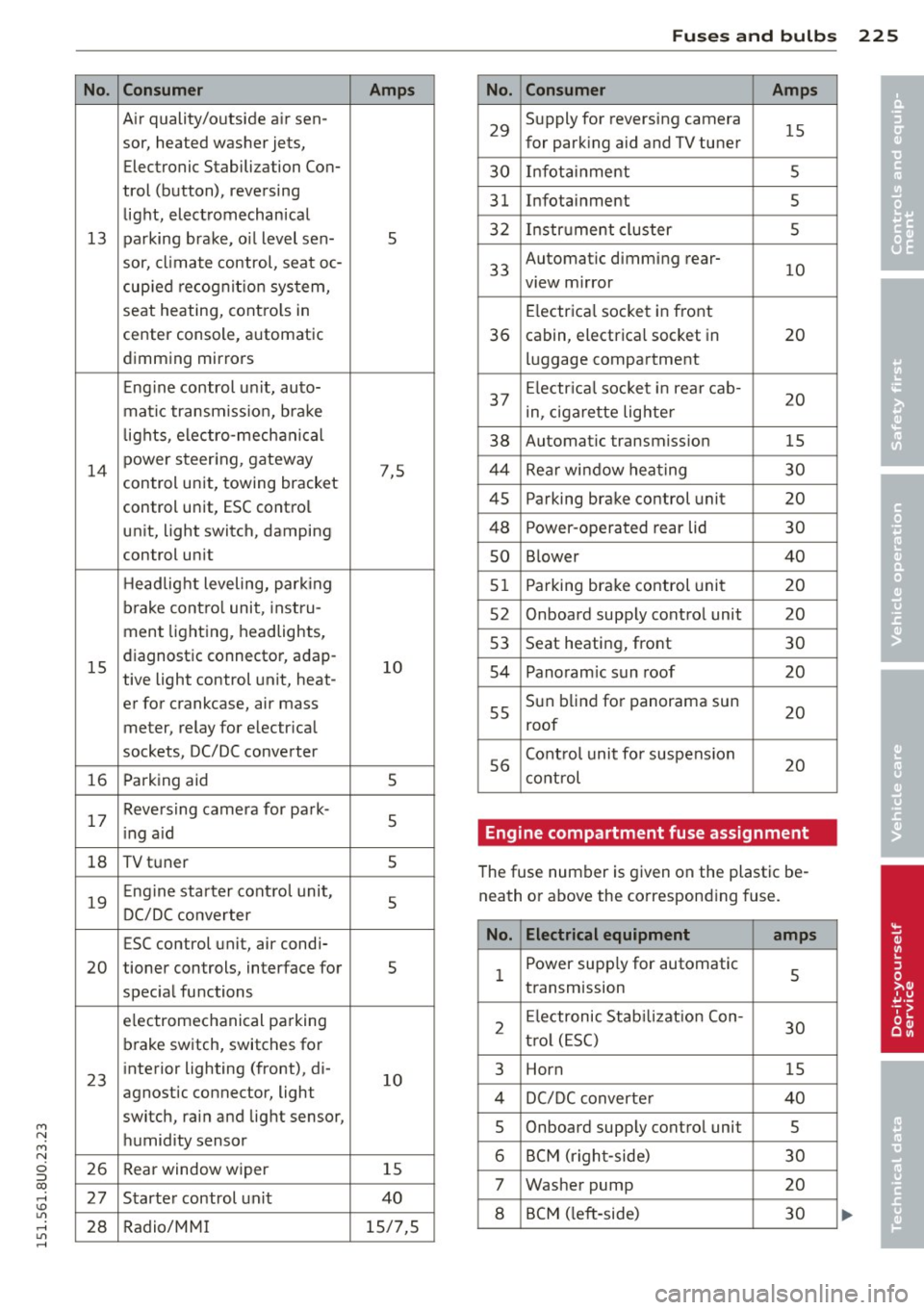
M N
M N
0 ::i co ,...., \!) 1.1'1 ,...., 1.1'1 ,....,
No.
13
14
15
16
17
18
19
20
23
26
27
28
Consumer
A ir quality/outside air sen-
sor, heated washer jets,
Electronic Stabilization Con-
trol (button), reversing
light, electromechanical
parking brake, o il level sen-
sor, climate control, seat oc-
cup ied recognit ion system,
seat heating, contro ls in
center console, automatic
dimming mirrors
Eng ine control u nit, auto-
matic transmiss ion, bra ke
l ights, electro-mechanical
power steer ing, gateway
control un it, towing bracket
control unit, ESC contro l
unit, light switch, damping
control un it
H eadlight leveling, park ing
brake contro l unit, inst ru-
men t lighting, headlights,
diagnostic connector, adap-
tive light control unit, heat-
er for crankcase, air mass
meter, relay for electr ical
sockets, DC/DC converter
Parking aid
Reversing camera for park-
i ng a id
TV tuner
Eng ine starter cont ro l unit,
DC/DC converter
ESC control unit, air condi-
tioner controls, interface for
spec ial functions
e lectromechanical parking
b rake switch, switches for
interior lighting (front), di-
agnostic connector, light
switch, rain and light sensor,
humidity sensor
Rear window wiper
Starter control un it
Radio/MM I
Amps
5
7,5 10 5
5
5 5
s
10
15
40
15/7,5
Fu ses and bulb s 225
No. Consumer Amps
29
Supply for reversing camera
15 for park ing aid and TV tuner
30 Infot ainment 5
31
Infotainment 5
32
Instr ument cluster 5
33
Automatic dimming rear-
view m irror
10
E lectrica l socket in front
36 cabin, electrical socket in 20
luggage compartment
37 Electr ica l soc ket i n rear cab-
20 in, ciga rette lighter
38 Automatic transmission 15
44
Rear window hea ting 30
45
Parking brake control unit 20
48
Power-operated rear lid 30
so B lower 40
51
Parking brake control unit 20
52
On board supply control unit 20
53
Seat heating, front 30
54
Panoram ic sun roof 20
55
Sun b lind for panorama sun 20
roof
56
Contro l unit fo r suspension
20 cont rol
Engine compartment fuse assignment
The fuse number is given on the plastic be
neath or above the correspond ing fuse.
No. Electrical equipment
amps
1 Power supply for automatic 5 transmission
2
E lectronic Stabilizat ion Con-
30 t ro l (E SC)
3 Horn 15
4
DC/DC converter 40
5
Onboard supply control unit 5
6
BCM (righ t-side) 30
7
Washer pump 20
8
BCM ( left -side) 30
•
•
Page 247 of 258
M N
M N
0 ::i co ,...., \!) 1.1'1 ,...., 1.1'1 ,....,
Dimming the rearview mirro r .. .. .. .. .. 45
Displays Cleaning . .. ............. .... .. ... 172
Doors Ch ild safety locks .. .... .... . .. .. .. .. 36
emergency locking ............ ... ... 33
Driver information system CD/radio display . . . . . . . . . . . . . . . . . . . . 20
Driver messages . . . . . . . . . . . . . . . . . . . . 20
Efficiency program . . . . . . . . . . . . . . . . . . 24
Open door/hood/rear lid warning . . . . . . 20
Operation by multifunction steering
wheel ... .. ................. .. .... 2 1
Opera tion by windsh ie ld wiper lever .. .. 2 1
Outside temperat ure display .. .. .. .. .. 20
Overv iew . . . . . . . . . . . . . . . . . . . . . . . . . . 20
Trip computer . . . . . . . . . . . . . . . . . . . . . . 22
Driver seat
refer to Seat ing pos ition ... .. .. .. .. .. 95
Drive se lect . . . . . . . . . . . . . . . . . . . . . . . . . 79
Dynamic steering .............. .... . 79
Sett ing the d riving mode ... .. .. .. .. .. 79
Driving offroad . . . . . . . . . . . . . . . . . . . . . 164
D riving safely . . . . . . . . . . . . . . . . . . . . . . . 94
Driving through water ...... .. .. .. .. . 165
D riving time ... ... ..... ... .. .. .. .... 22
Dust filter
refer to Po llutant filte r (au tomatic cli-
mate con trol) . . . . . . . . . . . . . . . . . . . . . . 63
Dynamic steering . . . . . . . . . . . . . . . . . . . . 79
E
Efficiency program . . . . . . . . . . . . . . . . . . . 24
Fuel economy messages . . . . . . . . . . . . . 25
Othe r equipment . . . . . . . . . . . . . . . . . . . 24
Elect rical accessories
refer to Socket . . . . . . . . . . . . . . . . . . . . . 54
E le ctr ical seat adjustment
refer to Seat ad justmen t ... .. ...... .. 51
Electromechanical parking b rake
E merg ency braking . . . . . . . . . . . . . . . . . 72
Par king .. .. ............. .... .. .... 7 1
Rele asing and clos ing ..... .. .. .. .. .. 70
S tart in g assis t . . . . . . . . . . . . . . . . . . . . . 7 1
S tarting from rest . . . . . . . . . . . . . . . . . . 71
Starting off with a trai le r . .. .. .. .. .. .. 72
Warn ing/ indicator lights . .. .. .. .. .. .. 14
Inde x 245
Electromechanical steer ing .... ... .. .. 158
Indicator lights .. .. . ... .... ... .. .. 158
El ectronic d ifferential lock
Wa rning/ind icator lights ........ .. .. . 16
E lectronic differential lock (EDL) . .. .. .. 153
E lectronic immob ilizer . .. ..... ... .. .. . 33
E lectronic power control
( EP C) warning/ indica to r ligh t .... .. .. . 17
E lectronic Stabilization Contro l (ESC) . .. 153
Hill descent assist .. .............. . 155
Offroad mode .. .. .. . .. .... .... .. .. 155
Warning/ind icator lights ........... .. 16
Emergency actuat ion
Doo~ ........ .. .................. 33
Panorama sunroof .. .............. .. 39
Rea r lid . . . . . . . . . . . . . . . . . . . . . . . . . . . 36
Su n shade (roof) ................. .. 39
Emergency brak ing . ............. .. .. . 72
Emergency fl ashe r .................. . 43
Warning/ind icator lights ..... ... .. .. . 19
Emergency key .. .... .. .. ...... ...... 29
Emergency operation Emergency brak ing funct ion (park ing
brake) .... .. .. .. ................. . 72
Emergency re lease
Se lector lever . . . . . . . . . . . . . . . . . . . . . . 86
E mergency starti ng ............. .. .. 228
Emergency towing . .. ........... .... 230
Energy management .. .. ..... ... .. .. 159
Battery power ..... . .. ..... ... .. .. . 15
Driver notification . . . . . . . . . . . . . . . . . . 15
E ngine
Comp artment . . . . . . . . . . . . . . . . . . . . . 181
Coolant ... .. .... .. . .. .. ..... ... .. 186
Data ... .. .. .... .. . .. .. ..... ... .. 236
Hood ... .. .. .. .... . ... ...... ... .. 179
Starting . . . . . . . . . . . . . . . . . . . . . . 66, 68
Starting with jumper cables ....... .. 228
Stopping .. .. .. .. .. . .. .. ..... .. 67, 69
Engine compartment Safety instr uctions . . . . . . . . . . . . . . . . . 179
Working the eng ine compartment 179
E ngine coolant
Indicator lig ht ... .. .. ...... ... .. .. . 14
Engine coolant system ............... 186
Adding coo lant . .................. . 187
Check ing coolant level . ......... .. .. 186
•
•
Page 250 of 258
248 Index
l
Jack . . . . . . . . . . . . . . . . . . . . . . . . . 216, 221
Jump-starting ... ... ... .... .. .. .. .. . 228
Jumper cables ............. .. .. .. ... 229
K
Key ..... .... ................ ..... .. 29
Battery replacement . . . . . . . . . . . . . . . . 30
Ignition/engine on/off . . . . . . . . . . . . . . . 66
Ignition key . . . . . . . . . . . . . . . . . . . . . . . 29
Key replacemen t . . . . . . . . . . . . . . . . . . . 29
removing .. ..... ........... ... .. .. 67
unlocking/locking ........ .. . 30, 31, 33
Keys No key identified . . . . . . . . . . . . . . . . . . . 69
Kick-down tiptronic . . . . . . . . . . . . . . . . . . . . . . . . . . 85
L
La ne Change Assistant
refer to Side assist .......... .. .... .. 75
LATCH .. .. .. ................ ... ... 146
Description ........... .... ... .. .. . 147
I nstall ing a chi ld restraint .. .. .. .... . 148
L ocat ion ..... ........... .. .. .. .. . 147
Mounting and releasing the anchorage
hook .... ................. .. .... . 148
Leather cleaning/protection ... .. .. .. . 173
Leaving home ............. .. .. .. .. .. 42
Lifting vehicle ... .......... .. .. .. .. . 232
Light adaptive light ............. ... .. .... 40
Adjusting exterior lighting . .. .. .. .. .. 42
ambience lighting . ... .. .. .. .. .. .. .. 44
Com ing/ Leaving home ....... .. .. .. . . 42
Daytime running lights ........ .... . . 40
Emergency flashers . . . . . . . . . . . . . . . . . 43
Exterior lighting .................... 40
Fog lights/rear fog lights .. .. .. .... .. 40
Headlight range control system ....... 40
High beam assist .... .... ... .. .. ... . 41
Interior/reading lights ..... .. .. .. .. . . 43
L ow beam .. ..... ........... ... .. .. 40
Side marker lights ........ .. .. .. .. .. 40 Light/rain
sensor
Headlights . ..... ................ .. 40
Intermittent (windshield w ipers) ...... 46
Sen sor defective .. ......... .... .... . 19
Lights High beam .... .. ................ .. 41
Turn signals ..... .................. 41
Loading the luggage compartment . .. .. 100
Locking Rear lid . . . . . . . . . . . . . . . . . . . . . . . . . . . 34
Locking/unlocking at the lock cylinder ................ .. 33
by remote control ............... .. . 30
with the central locking switch . .. .... . 32
wi th the convenience key ........ .. .. . 31
Low beams ..... .. ................ .. 40
Lower universal anchorages (Canada) ... 146
Luggage compa rtment . . . . . . . . . . . . . . . . 59
Cargo net . . . . . . . . . . . . . . . . . . . . . . . . . 60
Cover ...... ... .. .. ... ........... .. 59
Enlarging . . . . . . . . . . . . . . . . . . . . . . . . . 60
Floor ........ ... .. .............. .. 62
Lid ..... .. .. .. .. .. ........... .. .. . 34
Pass-through .. .. ............. .. .. . 61
Ski sack ... .. .. . ............ ...... . 61
Stowing .. .... .. .. .............. . 100
Tie-downs . . . . . . . . . . . . . . . . . . . . . . . . . 60
also r efe r to Loading the luggage com
partment . . . . . . . . . . . . . . . . . . . . . . . . 100
Lumbar support ... ............. .... . 51
M
Maintenance .. .. .. ... ... ... .... .... 237
Malfunc tion Indicator Lamp (MIL) . . 17, 26
Manual shift program ................. 84
Master key
Battery replacement . . . . . . . . . . . . . . . . 30
Matte finish paint cleaning ....... .. .. 170
Mileage Average ........................... 22
Instantaneous ... ................ .. 22
Mirrors Adjusting the exterior mirrors .. .. .... . 44
Compass .. .. .. .. ... .......... .... . 48
dimming . ..... .. ............. ..... 45
Vanity mirrors ... .................. 46