engine AUDI Q3 2015 User Guide
[x] Cancel search | Manufacturer: AUDI, Model Year: 2015, Model line: Q3, Model: AUDI Q3 2015Pages: 258, PDF Size: 64.9 MB
Page 23 of 258
M N M N
0 ::i co
rl I.O
"' rl
"' rl
@ Tips
If the vehic le is stationary, or if you are
driving at a very low speed, the tempera
ture shown in the d isplay might be slightly
higher than the actual outside tempera
ture. This is caused by the heat being radi
ated from the engine.
Operation
Operation by windshield wiper lever
Applies to vehicles: without multifu nct ion stee ring w heel
~------------------gi
0
x CX) a:,
'------ ®
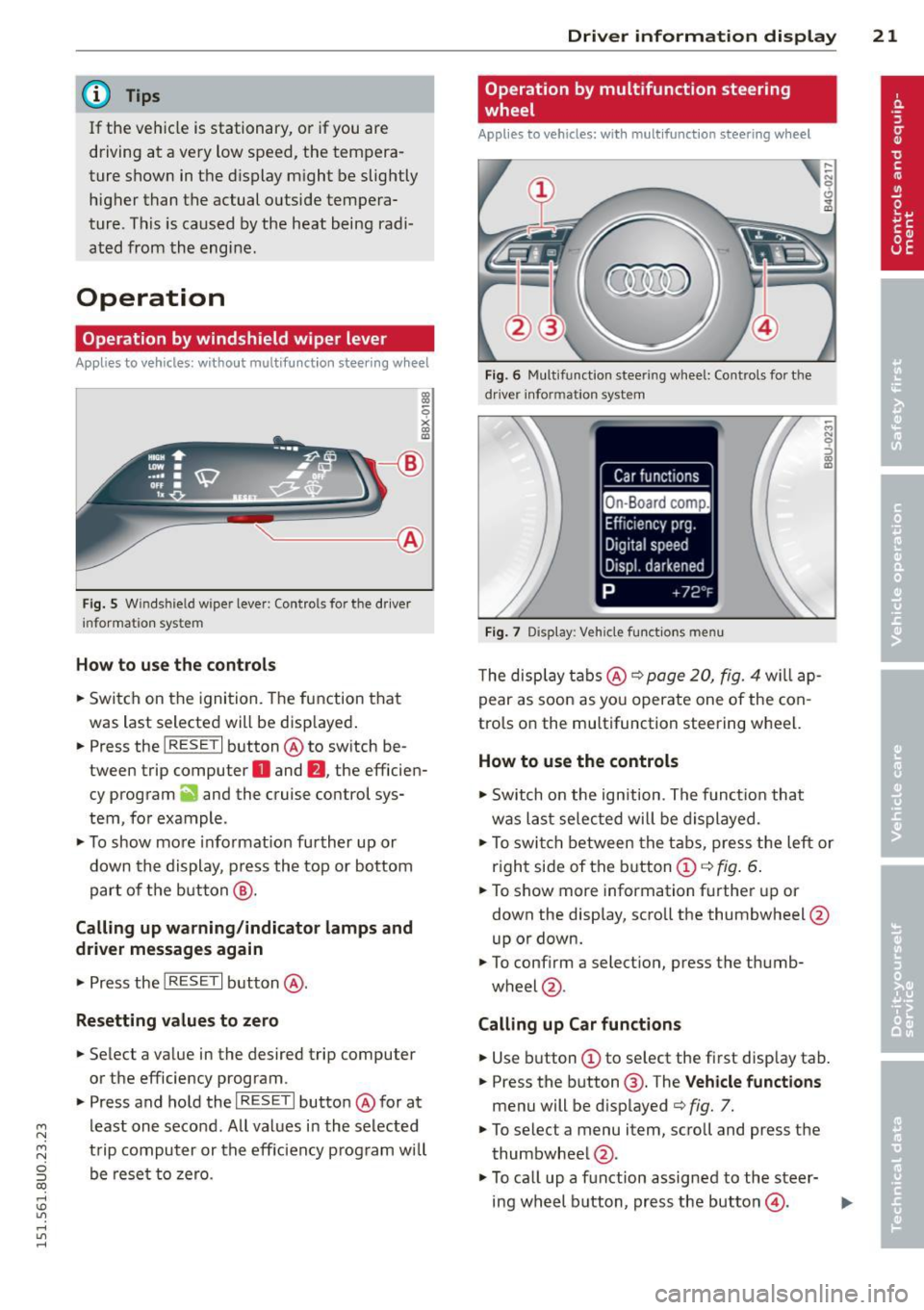
Fig . 5 Wi nds hield w ipe r lever : Contro ls fo r the d river
i nforma tion sy stem
H ow to use the control s
.. Switch on the ignition. The function that
was last selected will be disp layed .
.. Press the
I RESET I button @ to sw itch be
tween trip computer
O and fJ , the efficien
cy program
ii and the cruise control sys
tem, fo r example .
.,. To show more informat ion further up or
down the display , press the top or bottom
part of the button @.
Calling up warning /indicato r lamps and
driver messages again
.,. Press the I RES ET I button @.
Resetting values to zero
.. Select a value in the desired trip computer
or the efficiency program .
.. Press and hold the
I R ESET I butto n @ for at
least one second . All values in the se lected
trip computer or the eff iciency p rogram will
be rese t to zero.
Dri ver inform ation di spl ay 21
Operation by multifunction steering
, wheel
Appl ies to vehicles: with multifunction steering w heel
Fi g. 6 Mul tifu nct io n stee ring wheel: Co ntrols for t he
dr iv er info rmatio n sy stem
Fig . 7 D is play: Veh icle fun ctions men u
The disp lay t abs @ ¢ page 20, fig. 4 will ap
pear as soon as you operate one of the con
trols on the multifunction steering wheel.
How to use the controls
.,. Switch on the ign ition . The funct io n that
was last selec ted will be d isplayed.
M N
.,. To swi tch between the tabs, press the left or
r ight side of the b utton
CD ¢ fig . 6.
.. To show more information further up or
down the display, scroll the thumbwheel @
up or down.
.. To confirm a selection , press the thumb-
wheel @.
Calling up Car function s
.. Use button CD to select the first disp lay tab.
.. Press the button @. T he
V ehicle fun ctions
menu will be d isplayed ¢ fig. 7.
.,. To selec t a menu item, scroll and press the
thumbwheel @.
.,. To ca ll up a function assigned to the steer-
ing wheel button, press the button@.
IJ,-
Page 28 of 258
26 Drive r in form ation d ispl ay
(D Note
-Only reset the oi l change display when
you have completed an o il change .
- If you d isconnect the battery term inals,
no calculatio ns can be made for the serv
ice interval display during this time and
no service rem inder will appear . Remem
ber that observing the proper service in
tervals is vitally important to extending
the life of you r vehicle, particularly the
engine, and maintaining its value. Even if
the mileage dr iven is low, the max imum
period of one year from one serv ice to
the next must not be exceeded.
On-Board Diagnostic
system (OBD)
Malfunction Indicator Lamp (MIL)
The Malfunction Ind icator Lamp (MIL) ¢'4 i n
the instrument cluster is part of the On-Board
Diagnostic (OBD II) system.
The warning/indicator light illuminates when
the ign ition is switched on and goes o ut after
the engine starts and the idle has stabilized.
Th is indicates that the MIL is working proper
l y.
If the light doe s not go out after the eng ine
is started, or illuminates wh ile you are driv
ing, a ma lfunction may exist in the engine sys
tem . If the light illuminates, the catalytic con
verter cou ld be damaged.
Continue driving
w ith reduced pow er (avoid
ing sustained high speeds and/or rapid accel
erations) and have the condition corrected.
Contact your authorized Audi dealer .
If the light ill uminates, the electronic speed
limiter may also be ma lfunctioning . For more
information
¢ page 2 7, Electronic speed
limiter.
An imp roperly clo sed fuel filler c ap m ay als o
c a u se th e M IL l ight to illuminate
¢ page 177.
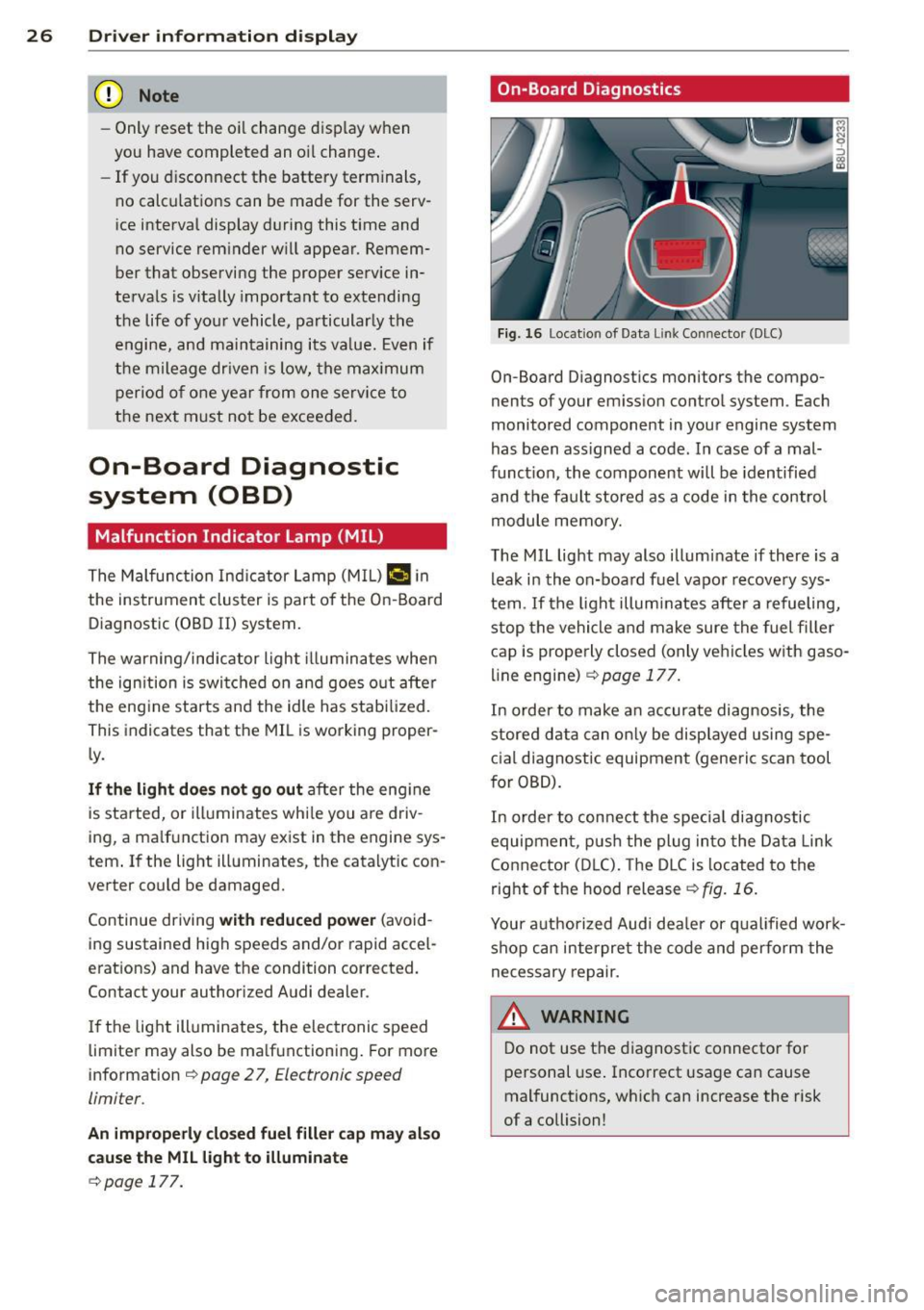
On-Board Diagnostics
Fig. 16 Locat io n of Data Li nk Conn ector (DLC)
On-Board D iagnostics monitors the compo
nents of your em ission contro l system . Each
monitored component in your engine system
has been ass igned a code . In case of a mal
funct ion, the component will be identified
and the fault stored as a code in the control
module memo ry.
The MIL light may also illuminate if there is a lea k in the on-board fuel vapor recove ry sys
tem . If the ligh t illuminates after a refueling,
stop the vehicle and make sure the fuel fille r
cap is prope rly closed (only vehicles w ith gaso
line engine) ¢
page 177.
In order to make a n accurate diagnosis, the
stored data can on ly be displayed using spe
c ial d iagnostic equipment (generic scan tool
for OBD).
In order to con nect t he special diagnostic
equipment, push the plug in to the Data Link
Connector (D LC). The D LC is located to the
right o f the hood release
<::!;> fig. 16.
Your a uthorized Audi dea le r or qua lified wor k
shop can interpret the code and perform the
necessary repair.
,&_ WARNING ~ -
Do not use t he diagnost ic connecto r fo r
personal use . Incorrect usage can cause
mal functions, wh ich can increase the risk
of a collision!
Page 29 of 258
M N
M N
0 ::i co ,...., \!) ..,.,
,...., ..,., ,....,
Electronic speed
limiter
Your vehicle may be factory equipped with tires that are rated for a maximum speed of
130 mph (210 km/h) . Th is is less than the
maximum speed of your vehicle. To reduce the
r isk of sudden tire failure and loss of control if
the veh icle is operated at excessive speeds,
your veh icle also has an elect ronic speed limit
er. The electronic speed limiter prevents yo ur
vehicle from going faster than the tire speed
rating. For more information~
page 206.
If the engine control unit receives fau lty vehi
cle road speed signals, the Malfunction Indi
cator Lamp (MIL)¢• will illuminate . If this
occ urs, contact the nearest authorized Audi
dealer for assistance.
A WARNING
-
Always observe the posted speed limits and adjust your speed to suit prevailing
road, t raff ic and weather conditions. Never
drive your vehicle faster than the maxi
mum speed rating of the tires insta lled.
Dri ver information di spla y 2 7
Page 31 of 258
M N M N
0 ::i co
rl I.O
"' rl
"' rl
-Do not leave children inside the vehicle
unsupervised. In an emergency it would
be impossible to open the doors from
the outside without the key.
(D Tips
- In the event of a crash with airbag de
ployment all locked doors will be auto
matically unlocked to give access to the
vehicle occupants from the outside .
- If the power lock ing system should mal
function, you can lock the driver's door
using the ign it ion key¢
page 33.
-If the power lock ing system should fail,
you can still open the fuel tank flap in an
emergency
c:> page 178.
- You are well advised not to keep valua
bles inside an unattended vehicle, visible
or not . Even a properly locked vehicle
cannot provide the security of a safe.
- If the LED in the upper edge of the driv
er's door panel comes on for about 30
seconds after the vehicle is locked, there
i s a ma lfunction in the power locking or
the anti-theft warning system. Have the
malfunction corrected by an authorized
Audi dealership or qualified repair facili
ty.
Key set
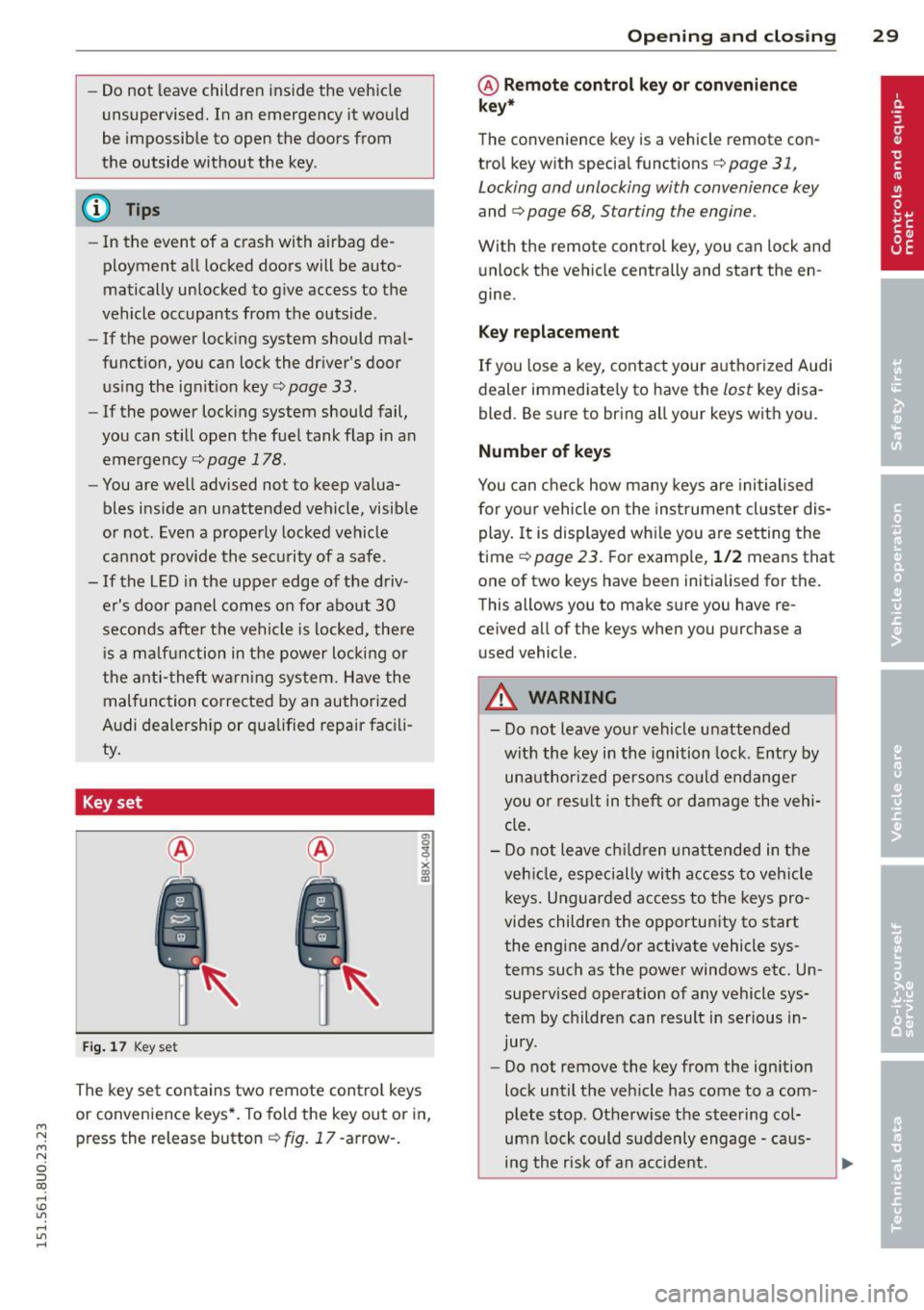
Fig. 17 Key set
The key set contains two remote control keys
or convenience keys*. To fold the key out or in,
press the release button¢
fig. 17 -arrow-.
Opening and closing 29
@ Remote control key or convenience
key*
The convenience key is a vehicle remote con
trol key with special functions
c> page 31,
Locking and unlocking with convenience key
and c> page 68, Starting the engine.
With the remote contro l key, you can lock and
unlock the vehicle centrally and start the en
gine.
Key replacement
If you lose a key, contact your authorized Audi
dealer immediate ly to have the
lost key disa
bled. Be sure to bring all your keys with you.
Number of keys
You can check how many keys are initialised
for yo ur vehicle on the instrument cluster dis
play. It is displayed wh ile you are setting the
time
c:> page 23. For example, 1/2 means that
one of two keys have been initialised for the.
This allows you to make sure you have re
ce ived all of the keys when you purchase a
u sed vehicle.
A WARNING
--
-Do not leave your vehicle unattended
with the key in the ignition lock. Entry by
unauthorized persons could endanger
you o r result in theft or damage the vehi
cle.
- Do not leave children unattended in the
veh icle, especially with access to vehicle
keys . Unguarded access to the keys pro
vides children the opportunity to start
the engine and/or activate vehicle sys
tems such as the power windows etc. Un
supervised operation of any vehicle sys
tem by children can result in serious in
jury .
- Do not remove the key from the ign ition
lock until the vehicle has come to a com
plete stop. Otherwise the steering col
umn lock could suddenly engage -caus
ing the risk of an accident.
Page 33 of 258
M N M N
0 ::i co
rl I.O
"' rl
"' rl
.. Press button @ III to unlock the vehicle
r=>fig. 20 .
.. Press button @ ffi to lock the vehicle r=> A
in General description on page 28.
.. Press button ©~ briefly to unlock the rear
l id .
.. Press button @~ for at least one second
to open the rear lid .
.,. Press button @ ~I P-A-N-IC~I to trigger the
alarm. The vehicle horn and emergency
flashers turn on .
.. Press button @IPANICI again to turn off the
alarm.
If the vehi cle is unlocked and no door, the rear
lid or the hood is opened within 45 seconds,
the vehicle locks itself agai n automatically.
This feature prevents the vehicle from being
accidentally left unlocked over a long period
of time. This does not apply when you pus h
the ©~button for at least one second .
It depends on the settings in the radio or
MMI* whether the entire vehicle is unlocked
or only certain doors
r=> page 32 .
A WARNING
Read and heed all WARNINGS c:> _.&. in Gen
eral description on page 28 .
@ Tips
-In order to make sure the locking func
tion is working, you should always keep
your eye on the vehicle to make sure it is
properly locked.
- Do not use the remote control if you are
inside the car, otherwise you may unin
tentiona lly lock the vehicle, and then you
would set off the anti-theft alarm when
you try to start the engine or open a
door. In case this happens anyhow, push
the un lock button
m .
- Use the panic f unc tion only if you are in
an emergency si tua tion.
- Additional remo te control key funct ions
r=>page37.
Op enin g an d clos ing 31
Locking and unlocking with convenience
key
Appl ies to veh icles: w ith conven ience key
The doors and the rear lid can be unlocked
and locked without operating the master key.
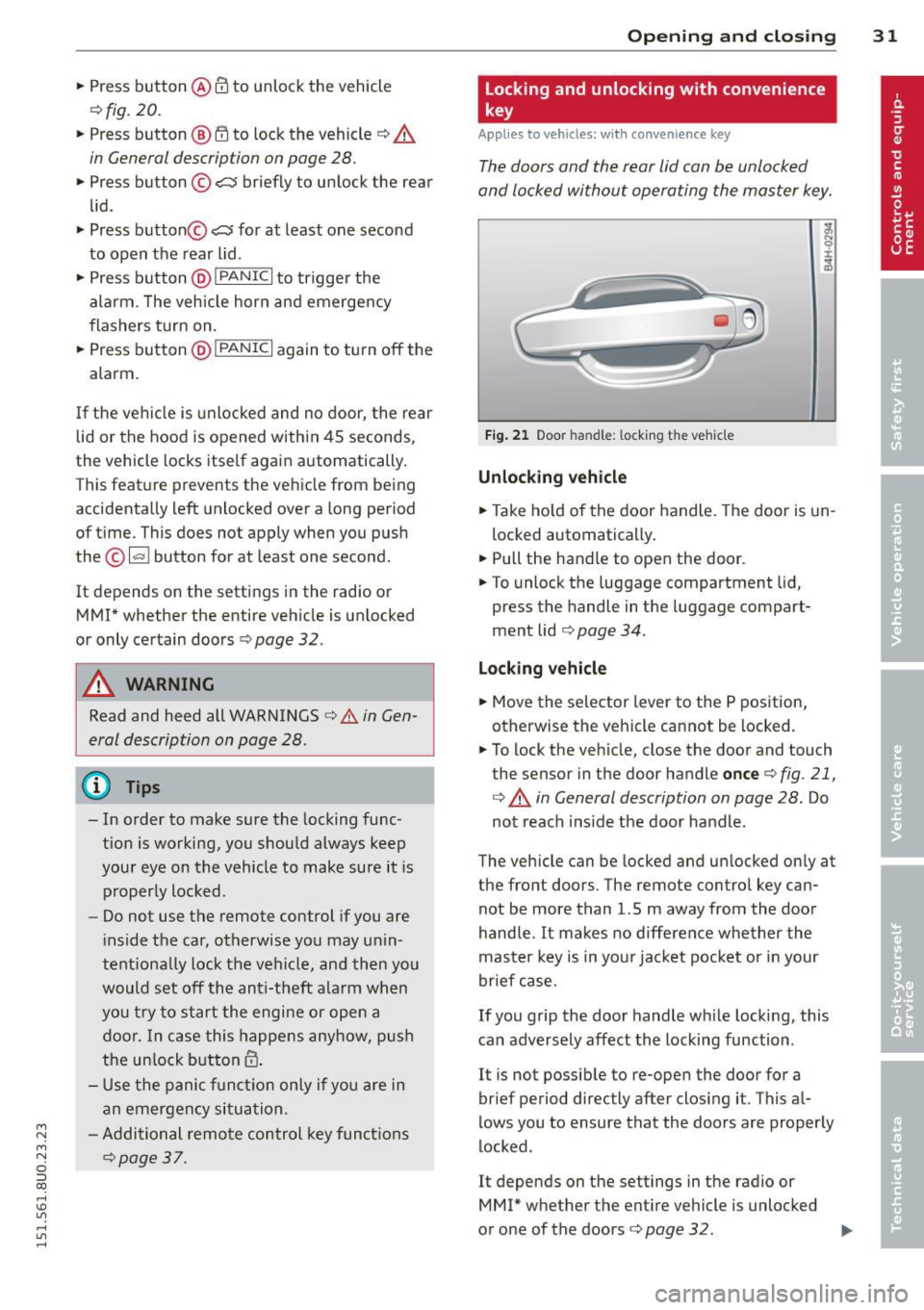
Fi g. 21 Door handle: l ocking t he veh icle
Unlocking vehicle
.. Take ho ld of the door handle. The door is un
locked automatically .
.. Pull the handle to open the door .
.. To unlock the luggage compartment lid,
press the handle in the luggage compart
ment lid
r=> page 34 .
Locking vehicle
.. Move the selector lever to the P position ,
otherwise the vehicle cannot be locked.
.. To lock the vehicle, close the door and touch
the sensor in the door handle
once c:> fig. 21,
c:> A in General description on page 28. Do
not reach ins ide the door handle .
The vehicle can be locked and unlocked only at
the front doors. The remote control key can
not be more than 1.5 m away from the door
handle .
It makes no difference whether the
master key is in you r jacket pocket or in your
brief case.
If you grip the door handle wh ile locking, this
can adversely affect the locking function .
It is not possible to re-open the door for a
brief period directly after closing it. This al
lows you to ensure that the doo rs are properly
locked .
It depends on the settings in the radio or
MM!* whether the entire vehicle is unlocked
or one of the doors
c:> page 32 . IJJ,
Page 35 of 258
M N M N
0 ::i co
rl I.O
"' rl
"' rl
Selecting All and pressing the~ button on
the remote control key unlocks the entire ve
hi cle.
Selec ting
Driver and pressing the~ button on
the remote cont ro l key once unlocks on ly the
dr iver's door . In veh icles with a convenience
k ey *, only the door w hose hand le you pull w ill
un lock. If you pre ss the ~ butto n tw ice, the
entire ve hicle w ill unlock.
If you press the~
button, the entire veh icle wi ll always lock.
Tone when locking
.. Se lect: I MENU I button > System s or Car sys
tems
> Vehicle settings > Cent ral locking >
Tone when locking
I f yo u select On , a to ne will sound when you
l ock the vehicle.
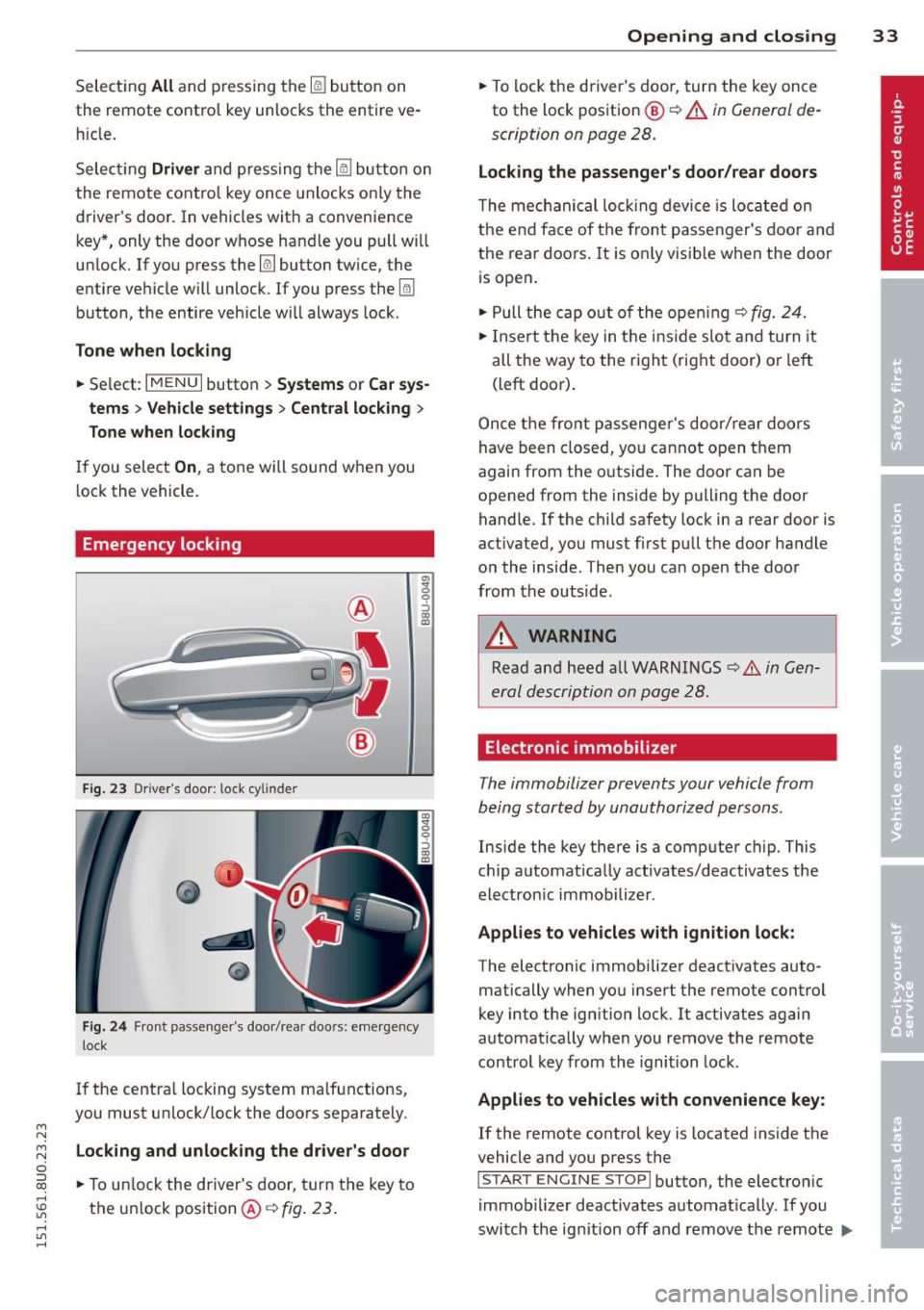
Emergency locking
F ig. 23 Dr iver 's doo r: 1.oc k cyl inde r
Fig . 24 Fron t pa sse nge r's doo r/rea r doo rs: em erge ncy
lock
I f the centra l locking system ma lfunctions,
you must unlock/ lock the doors separately.
Locking and unlock ing the driver's door
.. To u nlock the driver's door, turn the key to
the un lock position @¢
fig. 23 .
Opening and clo sin g 33
.. To lock the driver's door, turn the key once
to the lock pos ition
@ ¢ A in General de
scription on page 28 .
Locking the passenger's door/rear doors
The me chanical loc king device is lo cated on
the e nd face of the fron t passe nger's door a nd
the rear doors . It is o nly visible when the door
is open .
.. Pull the cap o ut of t he ope ning ¢
fig. 24.
.. In sert the key in t he inside slo t and turn it
all the way to the ri ght ( right door) or left
(left door).
Once the fro nt p assenge r's door/ rear d oo rs
have been closed, yo u ca nn ot open t hem
again from the o utsi de. The doo r can be
opened from the ins ide by pulling the door
handle.
If the child safety lock in a rear door is
activated, y ou must first pull t he door handle
o n the inside . T hen you can open the doo r
from the outside .
A WARNING
Read an d heed a ll W ARNI NGS ¢.& in Gen
er al des crip tion on page 28.
Electronic immobilizer
The immobilizer prevents your vehicle from
being start ed by unauthorized persons .
Inside the key there is a comp uter c hip. This
c hi p a utomat ically activates/deactivates the
electron ic immobilizer .
Applies to vehicles with ignition lock:
The electronic immobilize r deact ivates auto
matically when yo u inse rt the remote contro l
key into the ignition lock . It activates again
automat ica lly when you remove the remote
control key from th e i gnition lock.
Applies to vehicles with convenience key:
If the remote control key is located inside the
vehicle and you press the
I S TA RT ENGINE STOPI button, the electro nic
i mmob ilizer deactivates automat ica lly. If you
switch the ig nition off and remove the remote
IJ,,
Page 36 of 258
34 Openin g and clo sing
control key from the vehicle, the electronic
immobilizer activates again automatically.
.&_ WARNING -
Always take the key with you when you leave the vehicle. The key can disarm the
electronic engine immobilizer and permit
an unauthorized person to start the engine
and enable operat ion of the vehicle sys
tems such as power window or power sun
roo f leading to ser ious personal inju ry.
@ Tips
- The vehicle cannot be started if an unau
thorized key is used . The vehicle may not
start if another radio device such as a key
fo r another vehicle o r a transpo nder is
l oca ted on the key r ing.
- Fo r Decla rat ion of Compliance to United
States FCC and Indus try Canada regula
tions¢
page 240.
Rear Lid
Opening/closing rear lid
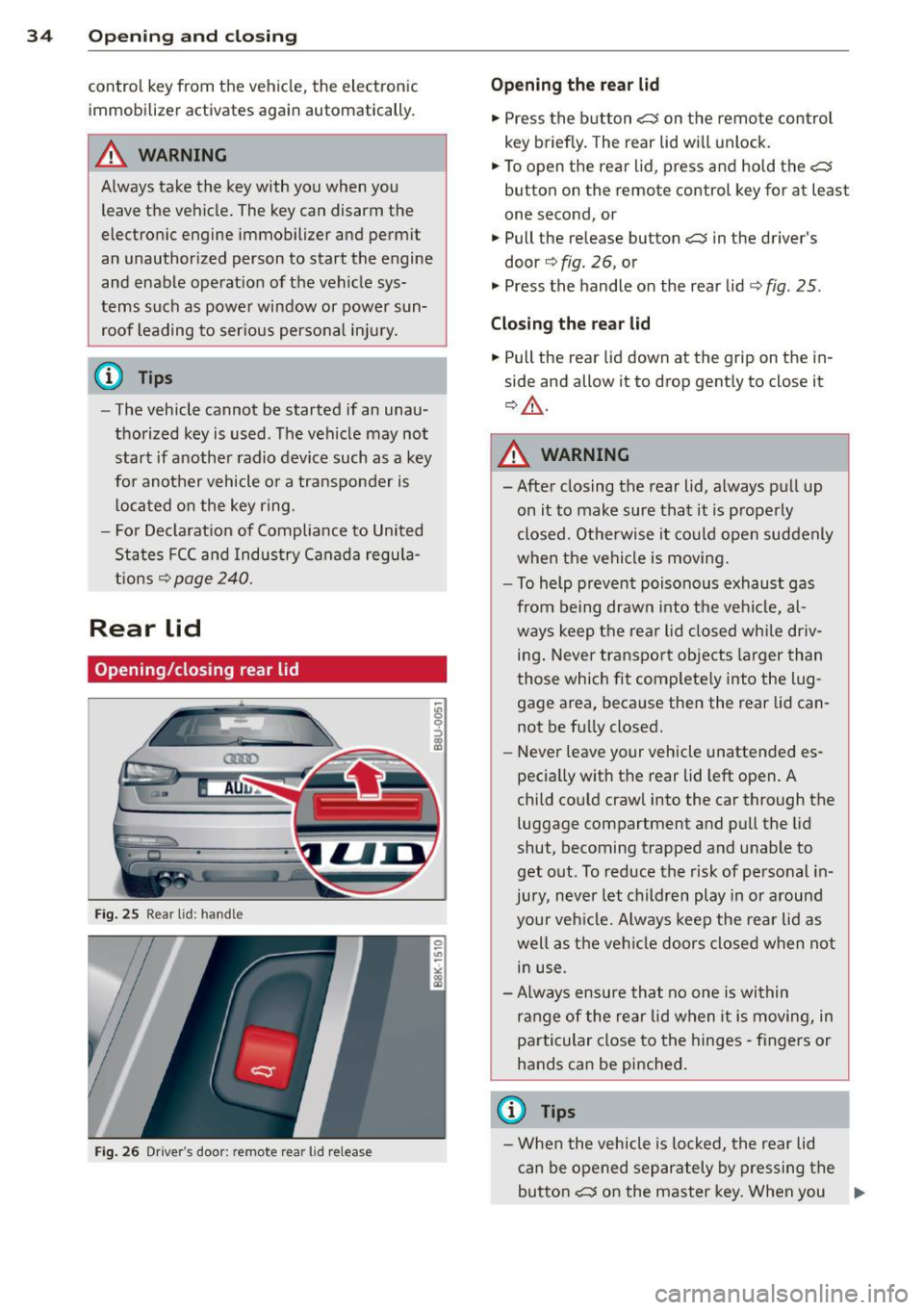
Fi g. 25 Rear lid : hand le
Fi g. 2 6 Driver 's door: remote rear lid release
9 ::> CD a,
Opening the rear lid
"' Press the b utton <::::::5 on the remo te control
key briefly. The rear lid wi ll unlock .
"' To open t he rear lid, press and hold the
<::::::5
button on the remote control key for at least
one second, or
"' Pull the release button
c:::5 in the driver's
door¢ fig. 26, or
"' Press the handle on the rear lid¢
fig. 25 .
Clo sing the rear lid
"' Pull the rear lid down at the grip on the in
side and allow it to drop gently to close it
¢ &_ .
.&_ WARNING
=
- Afte r closing the rear lid, always pull up
on it to make sure that it is p roperly
closed. Othe rwise it could ope n suddenly
when the vehicle is moving.
- To help pr eve nt poisono us exhaust gas
from be ing drawn into t he vehicle, al
ways keep the rear lid closed wh ile driv
ing . Never tra nsp o rt objects larger than
those which fit complete ly into the lug
gage area, beca use the n the rear lid can
not be f ully closed.
- Never leave your vehicle unattended es
pecia lly with the rear lid left open. A
chi ld cou ld craw l into the car through the
luggage compartment and pu ll the lid
shut, becoming trapped a nd unable to
get out. To reduce the risk of personal i n
jury, never let children play in or a round
your veh icle. Always keep the rea r lid as
well as the vehi cle doors closed when not
in use.
- A lways ensure that no one is wi thin
range of the re ar lid when it is moving, in
particular close to the hinges - fingers or
hands can be pinched .
a) Tips
-Whe n the vehicle is lo ck ed, the rear lid
can be opened separa tely by p ressing the
butto n
<::::::5 on the master key. When you ..,.
Page 56 of 258
54 Seats and storage
A WARNING
T he ciga rette lighter only works when the
ign ition is on . Improper use can cause seri
ous injury or start a fire. To avo id the r isk
of injury, nev er leave children unsupe r
vised in the vehicle with the key.
12-volt sockets
Ap plies to vehicles: with 12 -volt socket
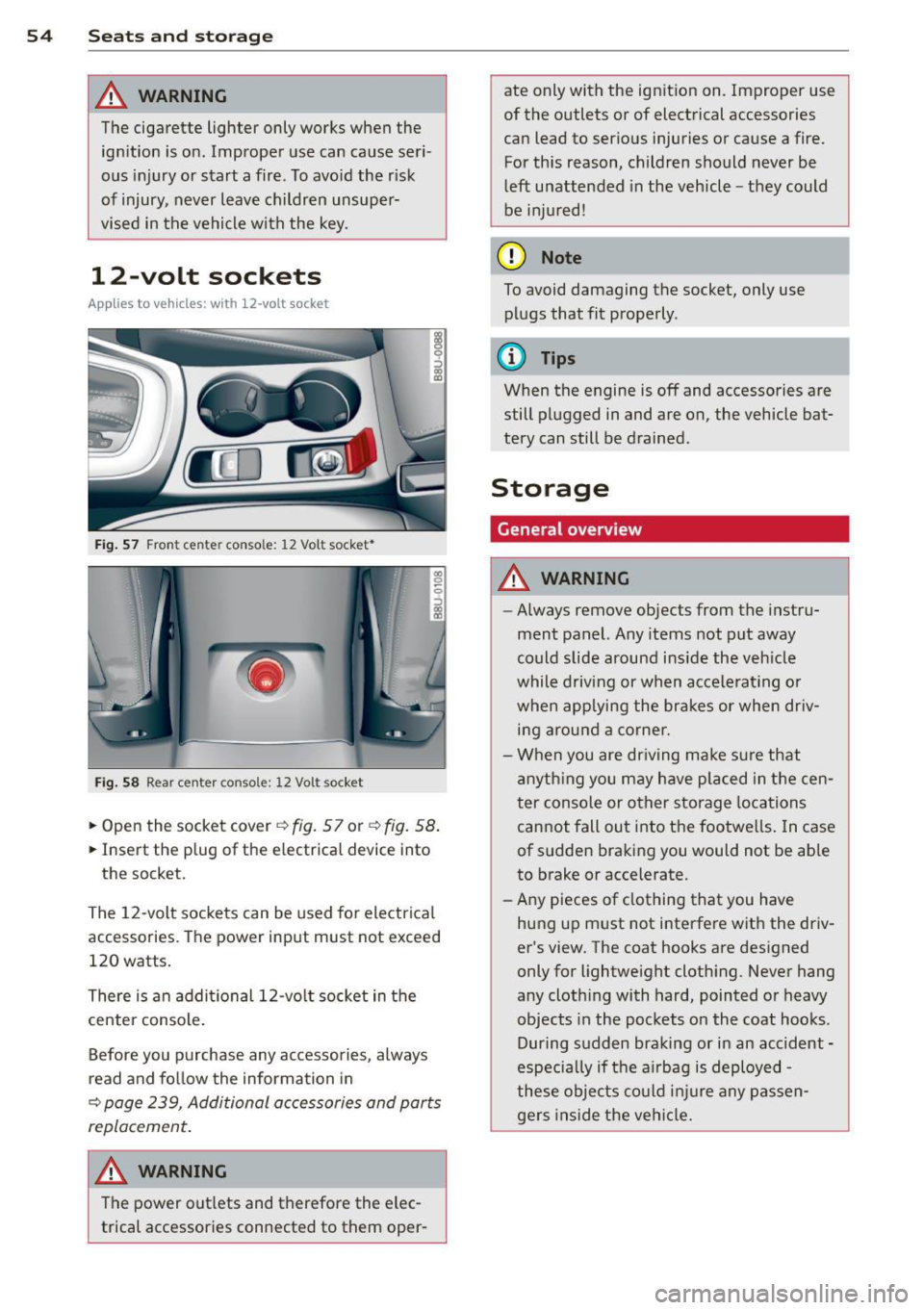
Fi g. 57 Fro nt cen ter conso le: 12 Vo lt socket •
Fig. 58 R ear ce nter c onso le: 12 Vo lt socket
.. Open the socket cover ¢ fig. 57 or¢ fig. 58 .
.. Insert the p lug of the e lectrica l device into
the socket.
The 12 -volt sockets can be used fo r electr ical
accessories. The power input must not exceed
120 watts.
There is an addi tional 12-vo lt socket in the
center console .
Before you purchase any accessories, always
read and fo llow the informa tion in
¢ page 239, Additional accessories and parts
r e plac em ent .
A WARNING
The power out lets and therefore the elec
trical accessories connected to them oper- ate only with the ignit
ion on. Improper use
of the outlets or of electrical accessories
can lead to ser ious injuries or cause a fire.
For this reason, children should never be
l eft unattended in the vehicle -they could
be injured!
(D Note
To avoid damaging the socket, only use plugs that fit properly .
(D Tips
When the engine is off and accessories are
still plugged in and are on , the vehicle bat
tery can still be drained .
Storage
General overview
A WARNING
--
-Always remove objects from the instru
ment panel. Any items not put away
could slide around ins ide the veh icle
while driving or when ac cele rat ing o r
when applying the brakes or when dr iv
ing arou nd a corne r.
- When you are dr iving make s ure that
an yth ing you may have pla ced in the cen
ter conso le or other storage loca tions
cannot fall out into the footwe lls . In case
of sudden braking you would not be able
to brake or accelerate.
- Any pieces of clothing that you have
hung up must not i nterfere with the dr iv
er's view. The coat hooks are des igned
only for lightweight cloth ing . Never hang
any cloth ing with hard, pointed o r heavy
objects in the pockets on the coat hoo ks .
During s udden braking or in an accident -
especia lly if t he a irbag is deployed -
these objec ts co uld in ju re any passen
ge rs inside the ve hicl e.
Page 66 of 258
64 Warm and cold
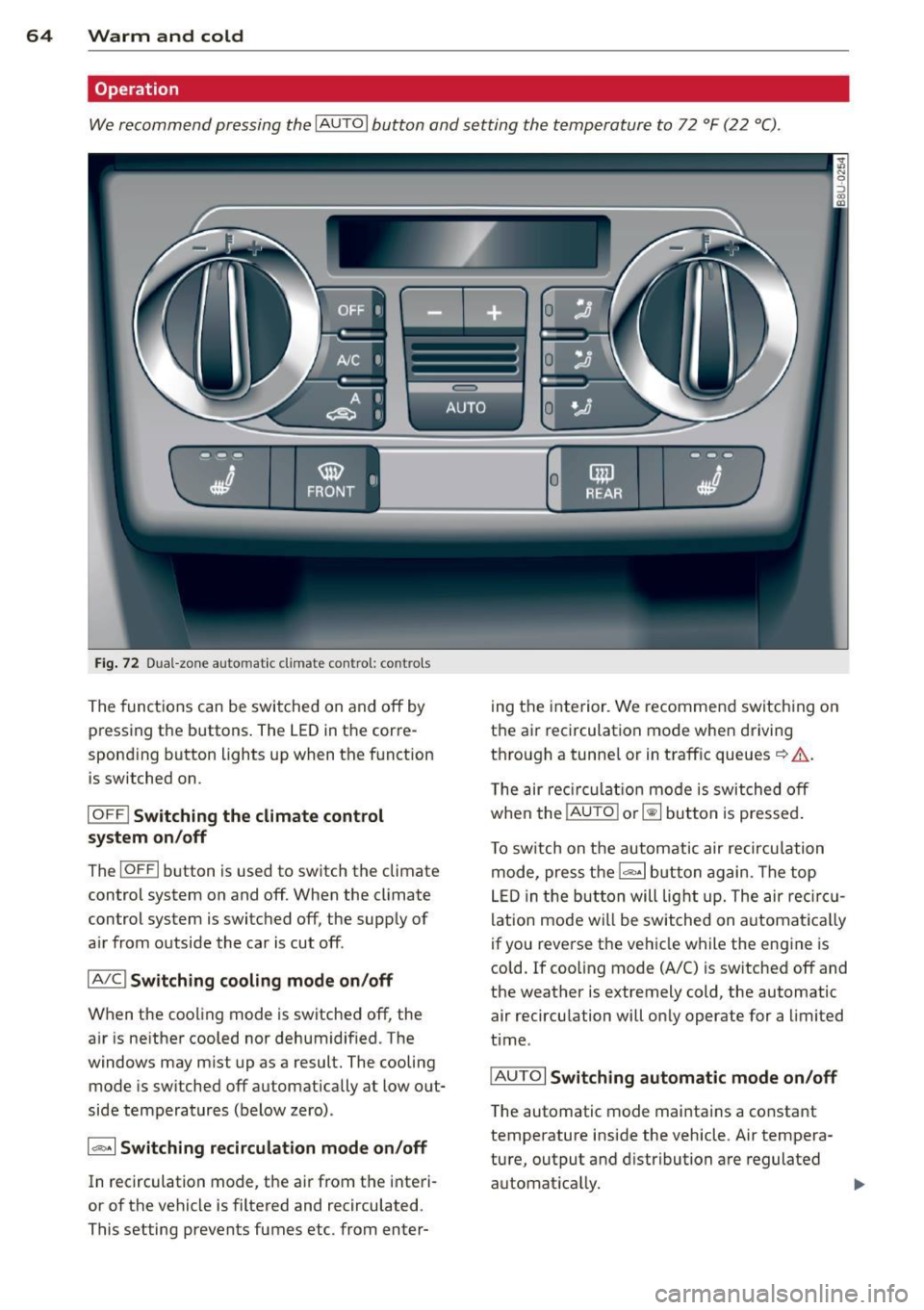
Operation
We recommend pressing the IAU TOI button and setting the temperature to 72 °F (22 °C) .
)-~~~
•I;. .. Q
Fig. 72 Dua l-zon e auto mat ic cl imate control: co ntrols
The functions can be switched on and off by
pressing the buttons . The LED in the corre
sponding button lights up when the function is switched on .
IOFFI Switching the climate control
sy stem on /off
ThelOFFI b utton is used to switch the climate
control system on and off . When the climate
control system is switched off, the supp ly of
a ir from outside the car is cut off .
IA/Cl Switching cooling mode on /off
When the cooling mode is switched off, the
a ir is ne ither cooled nor dehumidif ied. The
windows may m ist up as a result. The cooling
mode is sw itched off automatically at low o ut
side temperatures (below zero) .
1~ 1 Switching r ecirculat ion mod e on /off
In recirculation mode, the air from the interi
or of the vehicle is filtered and recirculated .
This setting prevents fumes etc. from enter- 0
mil
--f-~
REAR ~~ -=-
ing the inte rior . We recommend switch ing on
the ai r recirculation mode when driving
t h ro ugh a tunne l or in traff ic queues ~.&. .
T he air reci rcul atio n mo de is switched off
whe n the !AUTO
I o r~ button is pressed .
T o sw itch on the automatic air recircu lation
mode, press the
1 ""' ·1 b utt on again . The top
LE D in the but ton will lig ht up. The air reci rc u
lation mode wi ll be switched on automat ica lly
if you reverse the ve hicle while the engine is
cold. If coo ling mode (A/C) is sw itched off and
the weather is extremely c old, the automatic
air recircu lation will on ly operate for a limited
t ime .
IAU TOI
Switching automatic mode on /off
T he automatic mode maintains a constant
temperature inside the vehicle. Air tempera
ture, output and d istribution are regulated
automat ica lly. ..,.
Page 67 of 258
M N
M N
0 ::i co ,...., \!) 1.1'1 ,...., 1.1'1 ,....,
0 Adjusting the temperature
Separate temperatures can be selected for the
driver's and front passenger's side using the
left and right rotary controls . The tempera
ture can be adjusted between +60
°F (+16 °C)
and +84 °F (+28 °C) . Outside this range, LO or
HI will appear on the air conditioner display .
In the two extreme settings the air condition
er operates continuously with maximum cool
ing or heating output, and the temperature is
not regulated automatically.
[:]1 (±] Adjusting the airflow
You can adjust the volume of air delivery man
ually to suit your individual requirements.
Press the
IAUTOI button for automatic blower
regulat ion .
~/1 :J!/l~ I Adjusting the air distribution
You can direct the flow of air manually to se
lected outlets. The buttons can be operated
e ither separately or in combination . Press the
IAUTOI button for automat ic air distribution.
J Adjusting the seat heating
When you press the button, the seat heating
is switched on at level 3 (the highest level) .
The LEDs indicate the temperature level. To
reduce the temperature, press the button
again . T o switch off the seat heating, press
the button repeatedly unti l all the LEDs have
gone out.
The seat heating automatically switches from level 3 to level 2 after 10 minutes .
I@ F RON T! Switching the defroster on/off
The windscreen and s ide windows are defrost
ed or demisted as quickly as possible . The air
output is increased to maximum and most of
the air comes out of the outlets below the
windscreen . The air recirculation mode is de
activated. The temperature should be set to
+ 72
°F (22 °() or higher.
The defroster is switched off when the
I AUTO I
button is pressed .
Warm and cold 65
!iii! REAR ! Switching the rear window
heating on/off
The rear window heating operates only when
the engine is running and switches off auto
matically after about 10 minutes.
Synchronisat ion
By pressing and ho lding the IAU TO j button,
you can set the temperature of the front pas
senger's side to the temperature of the driv
er's side. The synchronisation is deactivated as
soon as the temperature on the front pas
senger's s ide is changed .
Air outlets
The thumbwhee ls can be used to open and
close the air outlets in the center and on ei
ther side of the dashboard and rear center
console . The lever in the center of the outlets
can be used to adjust the direction of air flow.
Changing the temperature units
The temperature display can be switched be
tween
° F and 0C. Press and hold the 1- ·1 but
ton ¢
fig. 72 and turn the rotary control on
the driver's s ide to+ for 3 seconds.
A WARNING
- Do not use the recirculation for extended
periods of time. The windows could fog
up since no fresh air can enter the vehi
cle. If the windows fog up, press the air
recir culation button again immediately
to switch off the air recirculation func
tion or se lect defrost .
- Individ uals w ith reduced sensitivity to
pain or temperature could develop burns
when using the seat heating function. To
red uce the risk of injury, these individu
als should not use seat heating .
(D Note
To avoid damage to the heating elements
in the seats, do not kneel on the seats or
place heavy loads on a small area of the
seat.