ignition AUDI Q3 2015 User Guide
[x] Cancel search | Manufacturer: AUDI, Model Year: 2015, Model line: Q3, Model: AUDI Q3 2015Pages: 258, PDF Size: 64.9 MB
Page 25 of 258
M N M N
0 ;::::, co
rl I.O
"' rl
"' rl
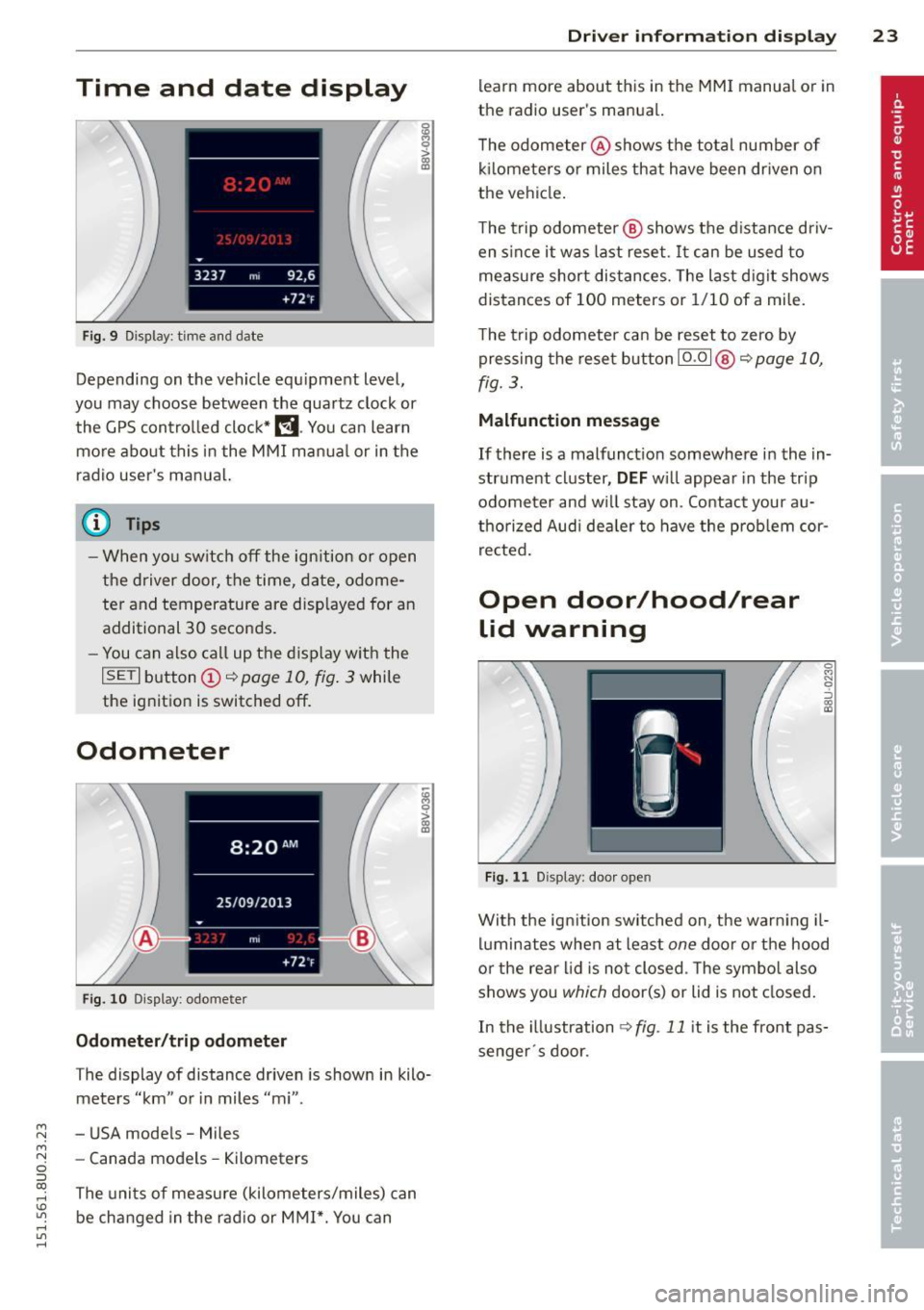
Time and date display
Fig. 9 Dis pl ay: time an d date
Depending on the veh icle equ ipment leve l,
you may choose between the quartz clock or
the GPS control led clock*
l!j . You can learn
more about this in the MMI manual or in the
radio user's ma nua l.
(D Tips
- When you switch off the ign ition or open
the driver door, the time, date, odome
ter and temperature are disp layed for an
additional 30 seconds.
- You can also call up the display w ith the
I SET I b utton (D ~ page 10, fig . 3 while
the ignition is switched off.
Odometer
F ig. 10 Dis play : odomete r
Odometer /trip odometer
The display of distance driven is shown in kilo
meters "km" or in miles "mi" .
- USA mode ls - Miles
- Canada models -Kilometers
The uni ts of me asure (kilometers/miles) can
be changed in the rad io or MMI*. You can
Dri ver inform ation di spl ay 23
learn more about this in the MM I manual o r in
the radio use r's manual.
T he odometer @shows the total number of
k il ometers o r miles that have been dr iven on
the vehicle.
The trip odometer @ shows the d istance driv
en since it was last reset . It can be used to
measure short distances. The last d igit shows
distances of 100 meters or 1/10 of a mi le.
The trip odometer can be reset to zero by pressing the reset button I
0.0 I @ ~ page 10,
fig. 3.
Malfunction message
If there is a malfunct ion somewhere in the in
strument cluster,
DEF w ill appear in the trip
odometer and w ill stay on . Contact your au
thorized Aud i dea le r to have the prob lem cor
r ected .
Open door/hood/rear
lid warning
F ig. 1 1 Dis play : door o pen
0
"' N 9 ::::, 0:, a,
With the ign ition sw itched on, the warn ing il
luminates when at least
one door o r the hood
or the rear l id is not closed . T he symbo l also
shows you
which door(s) or lid is not closed.
In the illustration
~ fig . 11 it is the front pas
senger · s door.
Page 27 of 258
M N M N
0 ::i co
rl I.O
"' rl
"' rl
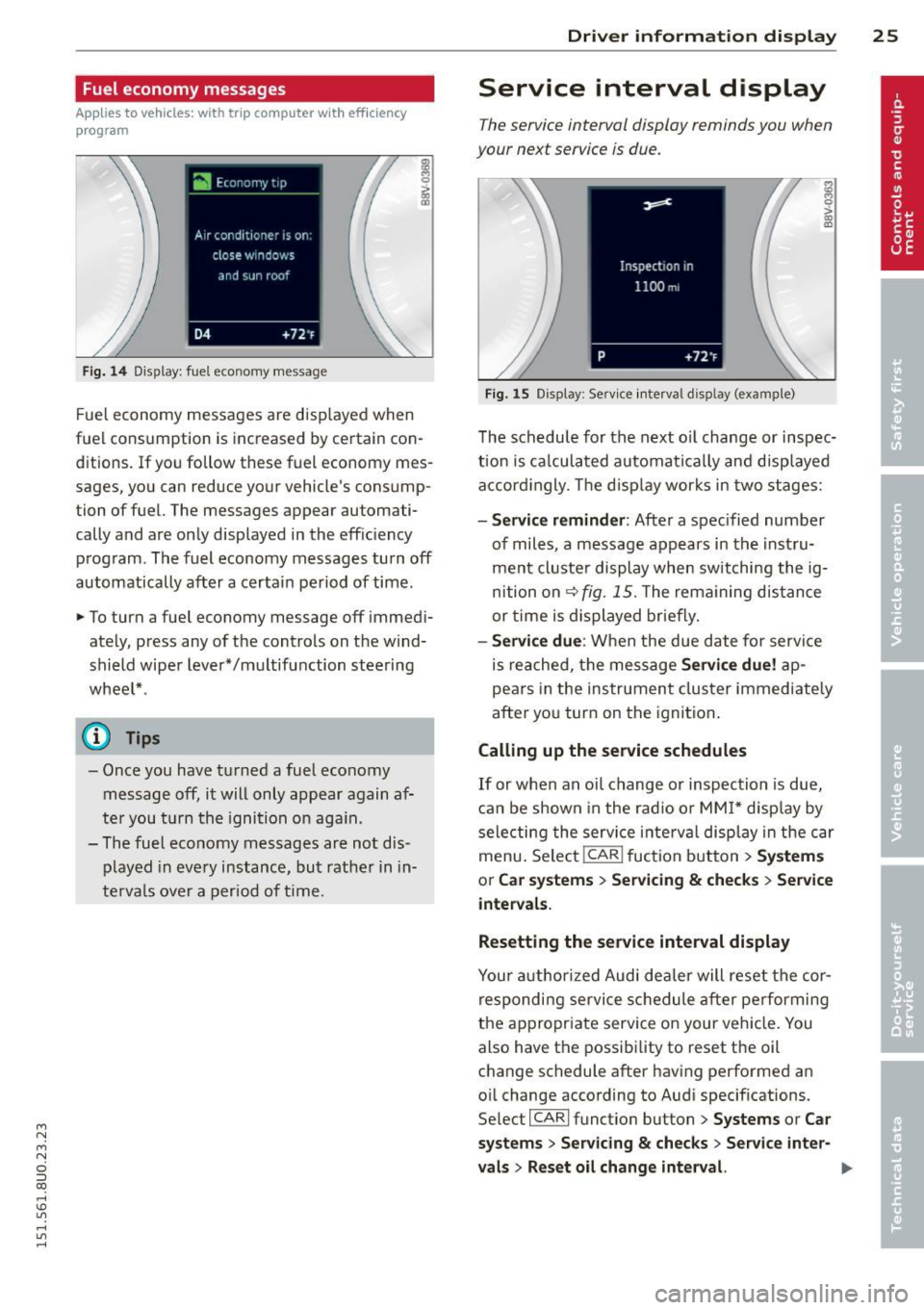
Fuel economy messages
App lies to vehicles: with trip computer w it h eff ic iency
p rogram
Fig . 14 Display: fuel economy message
Fue l economy messages are disp layed when
fuel consumption is increased by certain con
ditions. If you follow these fuel economy mes
sages, you can reduce your vehicle's consump
tion of fuel. The messages appear automati
cally and are only displayed in the effic iency
program. The fuel economy messages turn off
automatically after a certain period of time.
• To turn a fuel economy message off immedi
ately, press any of the controls on the wind
shield wiper lever*/multifunction steering
whee l* .
(D} Tips
- Once you have turned a fuel economy
message off, it will only appear again af
ter you t urn the ignition on aga in.
- The fuel economy messages are not dis
played in every instance, but rather in in
te rva ls over a period of time.
Dri ver inform ation di spl ay 25
Service interval display
The service interval display reminds you when
your next service is due.
Fig. 15 Display: Service interval display (example)
The schedule for the next o il change or inspec
t ion is ca lculated automatica lly and disp layed
accord ingly. The d isp lay works in two stages:
-Serv ice rem inder: After a spec ified number
of miles, a message appears in the instru
ment cluster display when switching the ig
nition on
¢fig. 15. The rema ining dis tance
or time is displayed br iefly.
- Se rvi ce due : When the due date for serv ice
is reached, the message
Se rvic e due! ap
pears in the instrument cluster immediate ly
after you turn on the ignition .
Calling up the service schedules
If or when an oil change or inspection is due,
can be shown in the rad io or MMI* disp lay by
selecting the service i nte rva l display in the car
menu . Selec t!CAR ! fuction button>
Sy ste m s
or C ar s ystem s > Ser vicing & check s > Service
intervals.
Resetting the service interval displa y
Your author ized Audi dealer will reset the cor
respondi ng service schedule after pe rforming
the appropr iate service on your veh icle. You
also have the possibi lity to reset the oil
change schedule after having performed an
oil change according to Audi specifications.
Se lect !CARI function button>
Sy stem s or Ca r
sy ste ms
> Servicing & checks > Service int er-
val s
> Reset oil cha nge int erval. ""
Page 30 of 258
28 Opening and closing
Opening and closing
Power locking system
General description
The power locking system locks or unlocks all
doors and the rear lid simultaneously.
You can lock and unlock the vehicle centrally.
You have the following choices:
- Remote master key~
page 30,
-Sensors in the front door handle on vehicles
with convenience key* ¢
page 31,
-Power locking switch ins ide¢ page 32,
oder
- Lock cylinder at the driver's door
~page 33.
Automatic locking
The automat ic locking feature locks all the ve
hicle doors and the rear lid when you drive
faster than 9 mph (15 km/h).
The car is unlocked again once the ignition key
is removed. In addition, the veh icle can be un
locked if the opening function in the power
locki ng system switch or at one of the door
levers is actuated.
Addit ionally, in the event of a crash with air
bag deployment the doors are automatically
un locked to all ow access to the vehicle.
Selective unlocking
When you lock the vehicle, the power locking
system w ill lock the doors and the rear lid.
When unlocking, you can set in the rad io or
MMI* whether only the driver's door or the
enti re vehicle should be unlocked
¢page 32.
Anti-theft alarm warning system
If the anti -theft alarm warning system de
tects a break- in into the vehicle, acoust ic and
visua l warning signals are triggered.
The anti-theft alarm system turns on auto matically when you lock the vehicle. It deacti
vates when unlocking using the remote con- trol key or by touching the sensor on the door
handle (convenience key) .
T o switch the alarm off, press the@ button on
the remote control key or conven ience key or
switch the ignition on. The a larm also stops
automatica lly after a certain amount of time .
You can also trigger the alarm by pressing the
PANIC button on your remote-control key.
This will alert other people in case of emer
gency. Press the
PANIC button again to turn
off the a larm .
Turn signals
When you unlock the vehicle, the turn sig nals
flash twice, when you lock it once. If they do
not flash, one of the doors or the luggage
compartment lid is not locked, the ignition is
sti ll switched on or the selector lever is not in
pos ition P.
Unintentionally locking yourself out
In the following cases there are safeguards to
prevent you from locking your remote master
key in the vehicle :
- The vehicle does not lock w ith the central
locking switch if the driver's door is open
~ page 32.
-On veh icles with convenience key*, if the
most recently used master key is in the lug
gage compartment, the rear lid is automati
cally un locked again after it is closed.
Do not lock your veh icle w ith the remote mas
ter key or convenience key* until all doors and
the rear lid are closed. In this way you avoid l ocking yourself out accidentally.
A WARNING
- When you leave the vehicle, always re
move the ignition key and take it with
you . This will prevent passengers (chil -
dren, for example) from accidentally be-
-
ing locked in the vehicle should they acci
denta lly press the power locking switch
in the front doors.
~
Page 31 of 258
M N M N
0 ::i co
rl I.O
"' rl
"' rl
-Do not leave children inside the vehicle
unsupervised. In an emergency it would
be impossible to open the doors from
the outside without the key.
(D Tips
- In the event of a crash with airbag de
ployment all locked doors will be auto
matically unlocked to give access to the
vehicle occupants from the outside .
- If the power lock ing system should mal
function, you can lock the driver's door
using the ign it ion key¢
page 33.
-If the power lock ing system should fail,
you can still open the fuel tank flap in an
emergency
c:> page 178.
- You are well advised not to keep valua
bles inside an unattended vehicle, visible
or not . Even a properly locked vehicle
cannot provide the security of a safe.
- If the LED in the upper edge of the driv
er's door panel comes on for about 30
seconds after the vehicle is locked, there
i s a ma lfunction in the power locking or
the anti-theft warning system. Have the
malfunction corrected by an authorized
Audi dealership or qualified repair facili
ty.
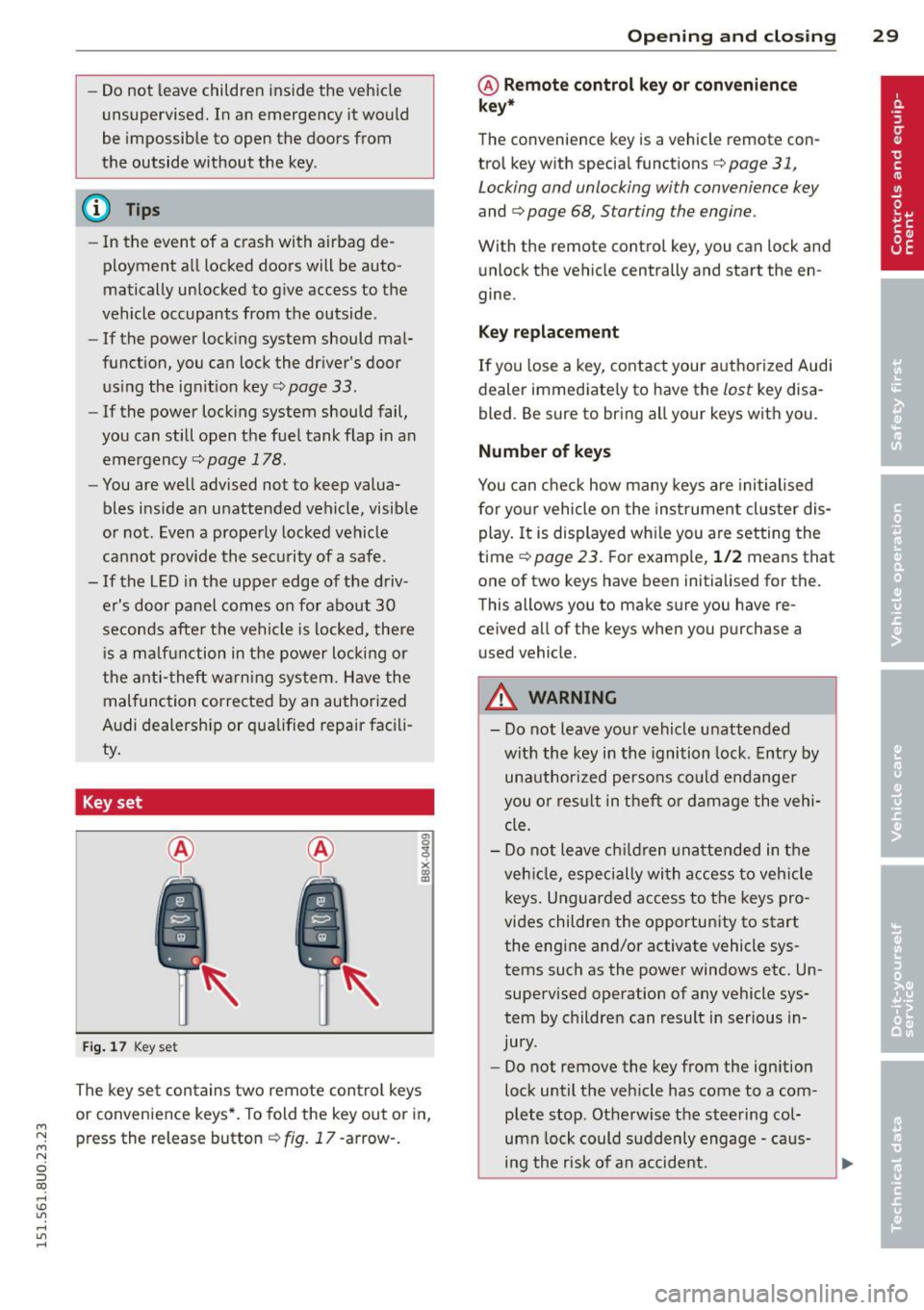
Key set
Fig. 17 Key set
The key set contains two remote control keys
or convenience keys*. To fold the key out or in,
press the release button¢
fig. 17 -arrow-.
Opening and closing 29
@ Remote control key or convenience
key*
The convenience key is a vehicle remote con
trol key with special functions
c> page 31,
Locking and unlocking with convenience key
and c> page 68, Starting the engine.
With the remote contro l key, you can lock and
unlock the vehicle centrally and start the en
gine.
Key replacement
If you lose a key, contact your authorized Audi
dealer immediate ly to have the
lost key disa
bled. Be sure to bring all your keys with you.
Number of keys
You can check how many keys are initialised
for yo ur vehicle on the instrument cluster dis
play. It is displayed wh ile you are setting the
time
c:> page 23. For example, 1/2 means that
one of two keys have been initialised for the.
This allows you to make sure you have re
ce ived all of the keys when you purchase a
u sed vehicle.
A WARNING
--
-Do not leave your vehicle unattended
with the key in the ignition lock. Entry by
unauthorized persons could endanger
you o r result in theft or damage the vehi
cle.
- Do not leave children unattended in the
veh icle, especially with access to vehicle
keys . Unguarded access to the keys pro
vides children the opportunity to start
the engine and/or activate vehicle sys
tems such as the power windows etc. Un
supervised operation of any vehicle sys
tem by children can result in serious in
jury .
- Do not remove the key from the ign ition
lock until the vehicle has come to a com
plete stop. Otherwise the steering col
umn lock could suddenly engage -caus
ing the risk of an accident.
Page 32 of 258
30 Opening and clo sing
@ Tips
- The operation of the remote contro l key
can be temporarily disrupted by interfer
ence from transmitters in the vicinity of
the veh icle work ing in the same frequen
cy range (e.g. a cell phone, radio equip
ment) .
- For security reasons, replacement keys
are on ly available from author ized Audi
dealer .
- For Decla ration of Compliance to United
States FCC a nd Industry Canada regula
t ions
9 page 24 0.
Check light and battery in remote
master key
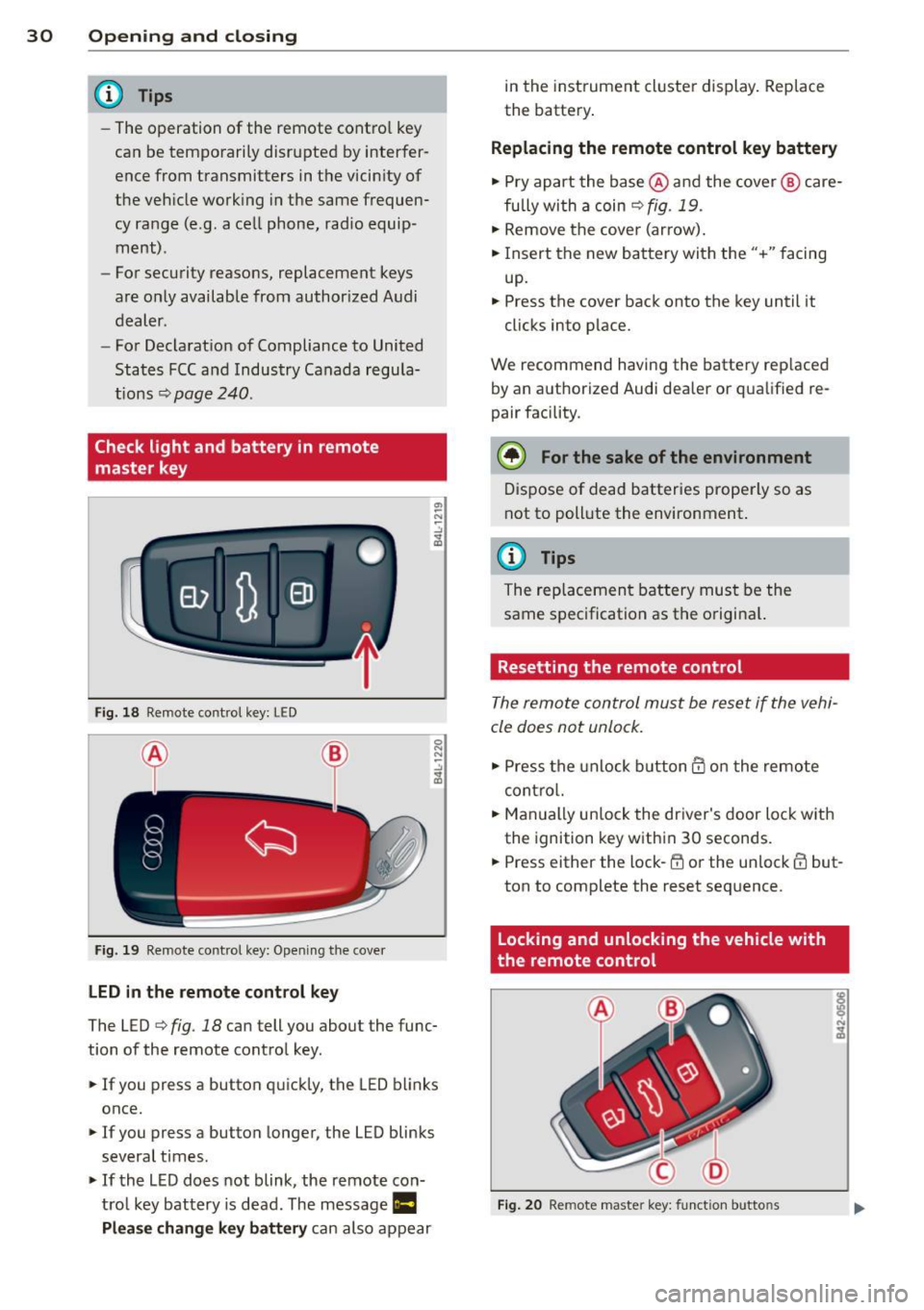
Fig . 18 Remote co nt rol key : LE D
Fi g. 19 Remote co ntrol key: Open in g the cove r
LED in the remote cont rol key
The LED 9 fig . 18 can tell you about the func
tion of the remote contro l key .
.. If you press a button q uickl y, the LED blinks
once.
1> If you press a button longer, the LED blinks
several times .
.. If the L ED does not blink, the remote con
tro l key battery is dead. The message
Ill
Plea se change key battery can also appear in
the instrument cluster display . Rep lace
the batte ry .
Replacing the remote control key battery
.. Pry apart the base @and the cover @ care
fu lly with a coin~
fig. 19.
.,. Remove the cove r (ar row) .
.. Insert the new battery with the" +" facing
up.
.. Press the cove r back onto the key until it
clicks into p lace.
We recommend having the battery rep laced
by an a uthorized Audi dea ler or qua lified re
pair facility .
$ For the sake of the environment
Dispose of dead batteries prope rly so as
not to poll ute the environment.
(D Tips
The rep lacemen t battery mus t be the
same spec ification as the origina l.
Resetting the remote control
The remote control must be reset if the vehi
cle does not unlock .
.. Press the unlock b utton @on the re mote
contro l.
.. Man ually un lock the dr iver's door loc k with
the ignition key w ith in 30 seconds .
.. Press either the lock-~ or the unlock @ but
ton to complete the reset seq uence.
Locking and unlocking the vehicle with
the remote control
Fig . 20 Remote maste r key: funct ion butto ns
Page 34 of 258
32 Opening and clo sing
A WARNING
Read and heed all WARNINGS¢.&. in Gen
eral description on page 28.
(D Tips
If your vehicle has been standing for an ex
tended period, please note the following :
- The proximity sensors are deactivated af-
ter a few days to save power. You then
have to pull on the door handle once to
unlock the vehicle and a second time to
open the veh icle .
- To prevent the battery from being dis
charged and to preserve your veh icle's
ability to start for as long as possible,
the ene rgy management system gradu
ally switches off unnecessary conven
i ence funct ions .
It is possible that you
will not be able to unlock your vehicle us
ing these convenience functions.
- For Declarat ion of Compliance to Uni ted
States FCC and Industry Canada regu la
tions ¢
page 240.
Locking and unlocking the vehicle from
inside
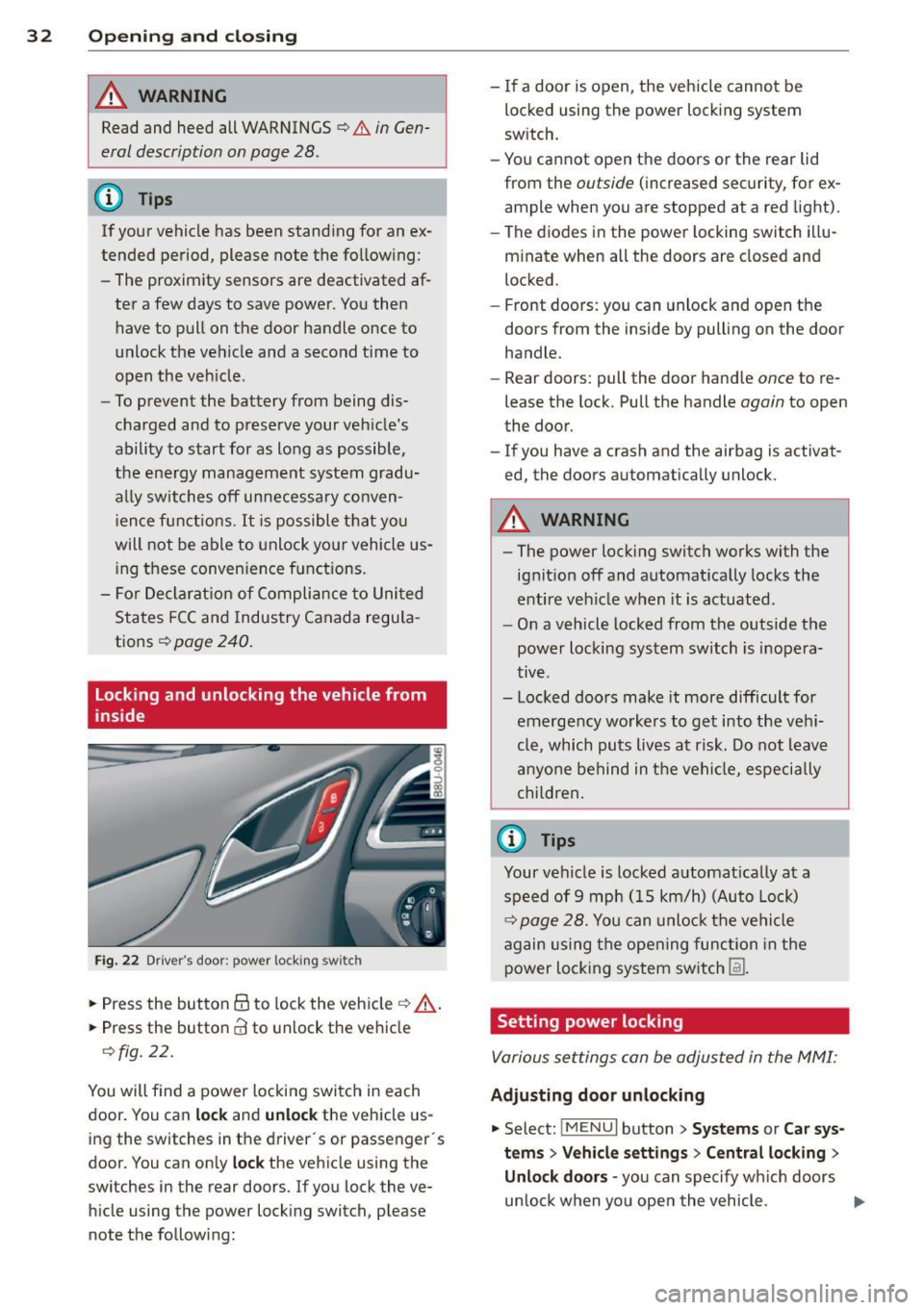
Fig. 22 Drive r's door ; p ow er lo ckin g sw it c h
.. Press the button @to lock the vehicle¢ A
.. Press the button CI! to unlock the vehicle
¢fig. 22.
You will f ind a power locking switch in each
door. You can
lock and unlock the vehicle us
ing the switches in the driver's or passenger 's
doo r. You can only
lock the vehicle using the
switches in the rear doors. If you lock the ve h icle using the power locking switch, please
note the following: -
If a door is open, the vehicle cannot be
locked using the power locking system
sw itch.
- You cannot open the doors or the rear lid
from the
outside ( increased security, for ex
ample when you are stopped at a red light).
- The diodes in the power locking switch illu
minate when all the doors are closed and
locked .
- Front doors: you can unlock and open the
doors from the inside by pulling on the door
handle.
- Rear doors: pull the door handle
once to re
lease the lock. Pull the handle
again to open
the door.
- If you have a crash and the ai rbag is activat
ed, the doors automatically unlock.
A WARNING
-
-The power locking switch works with the
ignition off and automatically locks the
entire veh icle when it is actuated .
- On a vehicle locked from the outside the
power locking system switch is inopera
tive .
- Locked doors make it more difficult for
emergency workers to get into the veh i
cle, which puts lives at risk. Do not leave
anyone behind in the vehicle, especia lly
children,
0) Tips
Your vehicle is locked automat ically at a
speed of 9 mph (15 km/h) (Auto Lock)
¢ page 28. You can unlock the vehicle
again using the opening function in the
power locking system sw itch
[fil .
Setting power locking
Various settings can be adjusted in the MMI:
Adjusting door unlocking
.. Select: iM ENUI button> Systems or Car sys
tems > Vehicle settings> Central locking>
Unlo ck doors -
you can spec ify which doors
un lock when yo u open the vehicle . ...
Page 35 of 258
M N M N
0 ::i co
rl I.O
"' rl
"' rl
Selecting All and pressing the~ button on
the remote control key unlocks the entire ve
hi cle.
Selec ting
Driver and pressing the~ button on
the remote cont ro l key once unlocks on ly the
dr iver's door . In veh icles with a convenience
k ey *, only the door w hose hand le you pull w ill
un lock. If you pre ss the ~ butto n tw ice, the
entire ve hicle w ill unlock.
If you press the~
button, the entire veh icle wi ll always lock.
Tone when locking
.. Se lect: I MENU I button > System s or Car sys
tems
> Vehicle settings > Cent ral locking >
Tone when locking
I f yo u select On , a to ne will sound when you
l ock the vehicle.
Emergency locking
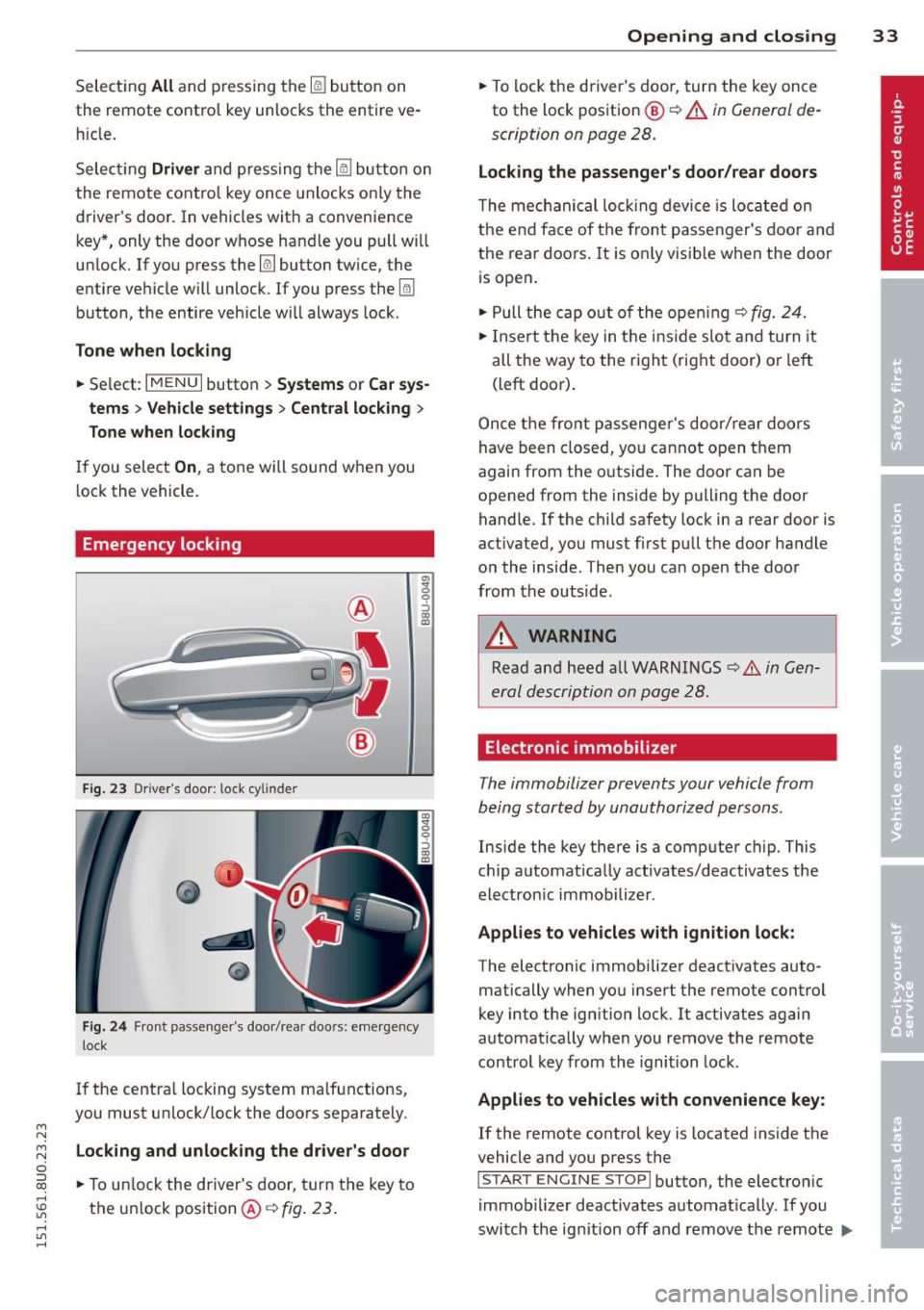
F ig. 23 Dr iver 's doo r: 1.oc k cyl inde r
Fig . 24 Fron t pa sse nge r's doo r/rea r doo rs: em erge ncy
lock
I f the centra l locking system ma lfunctions,
you must unlock/ lock the doors separately.
Locking and unlock ing the driver's door
.. To u nlock the driver's door, turn the key to
the un lock position @¢
fig. 23 .
Opening and clo sin g 33
.. To lock the driver's door, turn the key once
to the lock pos ition
@ ¢ A in General de
scription on page 28 .
Locking the passenger's door/rear doors
The me chanical loc king device is lo cated on
the e nd face of the fron t passe nger's door a nd
the rear doors . It is o nly visible when the door
is open .
.. Pull the cap o ut of t he ope ning ¢
fig. 24.
.. In sert the key in t he inside slo t and turn it
all the way to the ri ght ( right door) or left
(left door).
Once the fro nt p assenge r's door/ rear d oo rs
have been closed, yo u ca nn ot open t hem
again from the o utsi de. The doo r can be
opened from the ins ide by pulling the door
handle.
If the child safety lock in a rear door is
activated, y ou must first pull t he door handle
o n the inside . T hen you can open the doo r
from the outside .
A WARNING
Read an d heed a ll W ARNI NGS ¢.& in Gen
er al des crip tion on page 28.
Electronic immobilizer
The immobilizer prevents your vehicle from
being start ed by unauthorized persons .
Inside the key there is a comp uter c hip. This
c hi p a utomat ically activates/deactivates the
electron ic immobilizer .
Applies to vehicles with ignition lock:
The electronic immobilize r deact ivates auto
matically when yo u inse rt the remote contro l
key into the ignition lock . It activates again
automat ica lly when you remove the remote
control key from th e i gnition lock.
Applies to vehicles with convenience key:
If the remote control key is located inside the
vehicle and you press the
I S TA RT ENGINE STOPI button, the electro nic
i mmob ilizer deactivates automat ica lly. If you
switch the ig nition off and remove the remote
IJ,,
Page 39 of 258
M N M N
0 ::i co
rl I.O
"' rl
"' rl
.. To turn the child safety locks on , turn the ig
nition key in the direction of the arrow .
.. To turn
off , turn the ignition key opposite
the direction of the arrow.
When the child safety locks are activated, the
inside door handles do not work and the doors
can only be opened from the outside.
Power windows
Controls
The driver can control all power windows .
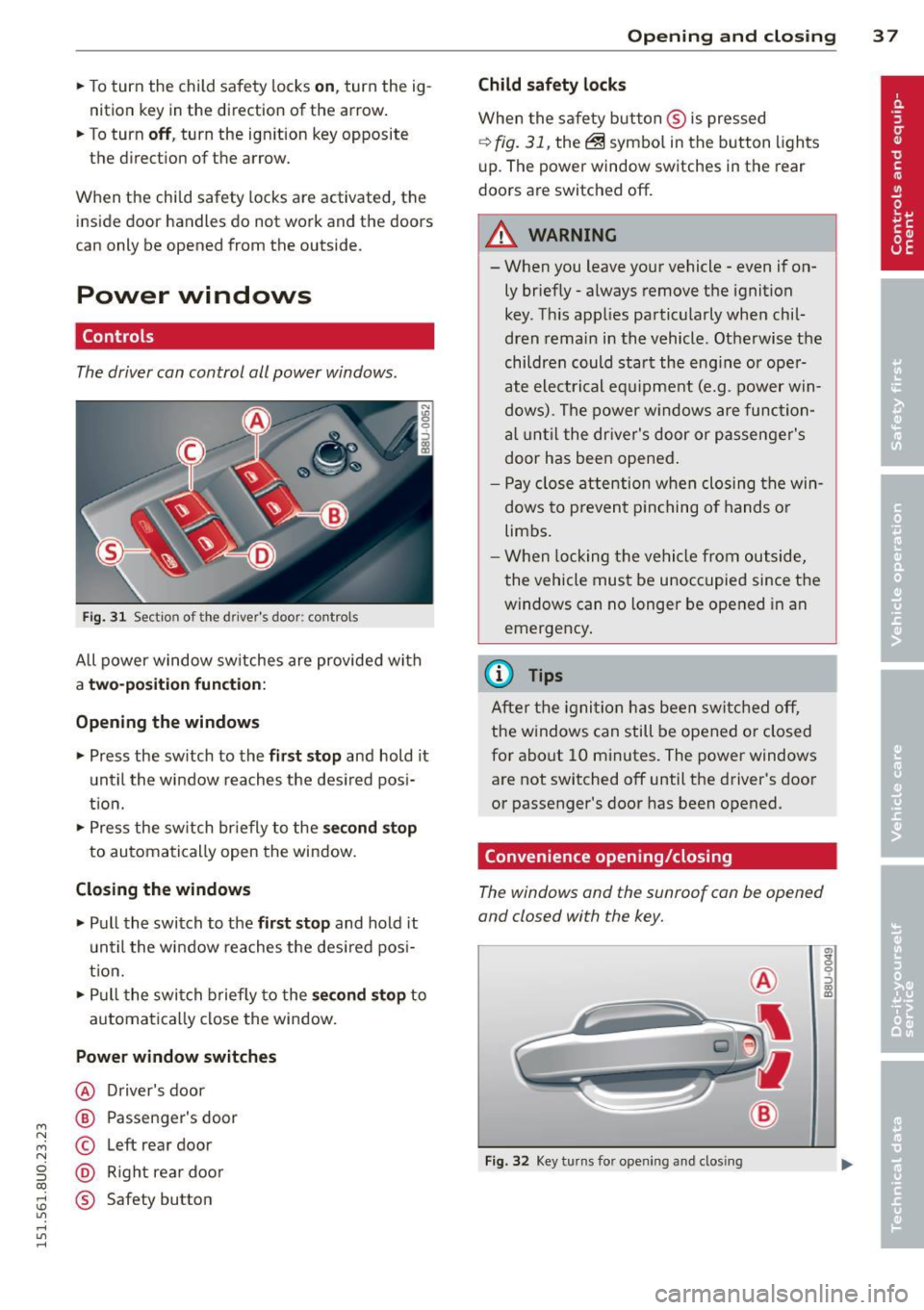
Fig. 31 Section of the driver's door: controls
All power window sw itches are provided with
a t w o-posi tion fun cti on:
Opening th e window s
.. Press the sw itch to the fi rs t sto p and hold it
until the window reaches the desired posi
t ion .
.. Press the sw itch br iefly to the
sec ond s top
to automatically open the window.
Closing th e windows
.. Pull the switch to the fir st stop and hold it
un til the window reaches the des ired pos i
tion.
.. Pull the switch briefly to the
se con d stop to
automatically close the window.
Power wind ow switche s
@ Driver's door
@ Passenger's door
© Left rear door
@ Right rea r doo r
® Safety button
Openin g an d clos ing 3 7
Child safety l ock s
When the safety button ® is pressed
¢ fig. 31, the~ symbol in the button lights
u p. The power window switches in the rear
doors are switched off.
&_ WARNING
--When you leave your vehicle -even if on-
ly briefly· always remove the ignition
key . Th is app lies particularly when chil·
dren remain in the vehicle. Otherwise the
children could start the eng ine or oper
ate electrical equ ipment (e.g. power w in
dows). The power windows are function
a l until the dr iver's door or passenger's
door has been opened.
- Pay close attention when closing the win
dows to prevent p inching o f hands o r
limbs.
- When locking the vehicle from outside,
the vehicle must be unoccupied since the
windows can no longer be opened in an
emergency.
(I} Tips
After the igni tion has been switched off,
the w indows can still be opened or closed
for about 10 minutes . The power windows
are not switched off until the driver's door
or passenger's door has been opened.
Convenience opening/closing
The windows and the sunroof can be opened
and closed with the key.
F ig. 32 Key turns for opening and closing
"' z 9 ::::, a, to
Page 43 of 258
M N M N
0 ::i co
rl I.O
"' rl
"' rl
(D Tips
-The light sensor* for headlight control is
located in the rear view mirror mount.
You should therefore not apply any stick
ers to the windshield in this area in order
to prevent malfunctions or failures.
- Some exterior lighting functions can be
ad justed
¢ page 42.
- When you switch off the ignition while
the vehicle's lights are turned on, a buz
zer sounds as long as the driver's door is
open .
- In cool or damp weather, the inside of
the headlights, turn signals and tail
lights can fog over due to the tempera
ture difference between the inside and
outside. They will clear shortly after
switching them on. This does not affect
the service life of the lighting.
- In the event of a light sensor malfunc
tion, the driver is notified in the instru
ment cluster display~
page 19 .
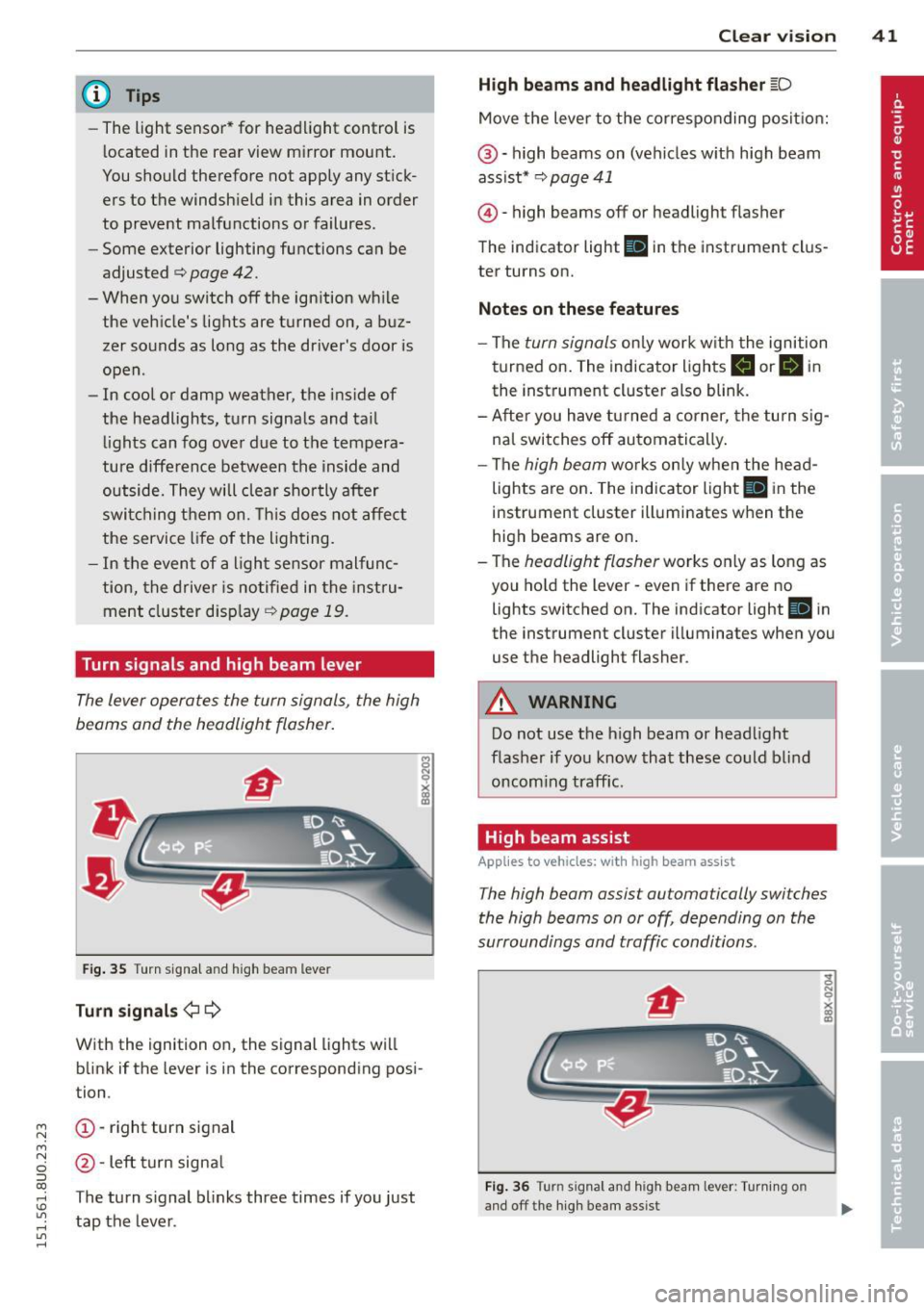
Turn signals and high beam lever
The lever operates the turn signals , the high
b eams and th e headlight flash er.
Fig. 35 Turn signal and high beam leve r
Turn signals ¢i ¢
With the ignition on, the signal lights will
blink if the lever is in the corresponding posi
tion .
(D-right turn signal
@-Left turn signal
T he turn signal blinks three times if you just
tap the lever. Clear
vision 41
High beams
and headlight flasher @:D
Move the lever to the corresponding position:
@-high beams on (vehicles with high beam
assist*
¢ page 41
@ -high be am s off or headligh t fla sher
The indicator light
Ill in the instrument clus
ter turns on.
Notes on these features
-The turn signals only work with the ignition
turned on. The indicator lights
II or Ill in
the instrument cluster also blink.
-After you have turned a corner, the turn sig
nal switches off automatically.
- The
high beam works only when the head
lights are on. The indicator light
El in the
instrument cluster illuminates when the
high beams are on.
- The
headlight flasher works only as long as
you hold the lever -even if there are no
lights switched on. The indicato r light
Iii in
the instrument cluster illuminates when you
use the headligh t flasher .
A WARNING
Do not use the high beam or headlight
flasher if you know that these could blind
oncoming traffic.
High beam assist
Applies to veh icles: w ith high beam assist
-
The high beam assist automatically switches
the high beams on or off, depending on the
surroundings and traffic conditions .
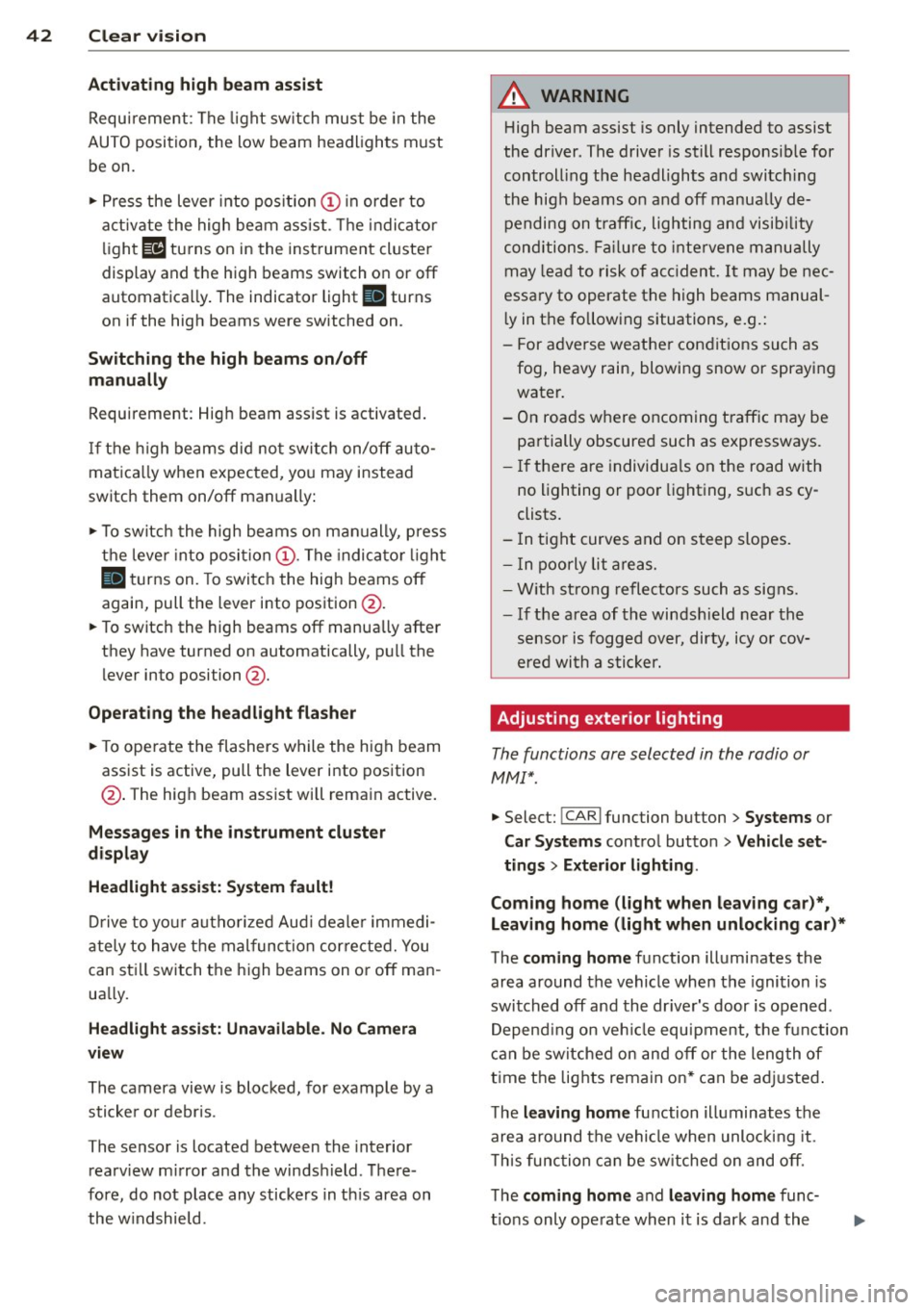
Fig. 36 Turn s ignal an d h igh beam lever : Turning o n
and off the high beam assist
Page 44 of 258
42 Clear vis ion
Activating high beam a ssi st
Requirement: The light sw itch must be in the
AUTO position, the low beam headlights must
be on.
• Press the lever into pos it ion (D in order to
activate the high beam assist . T he indicator
li gh t
IIJ turns on in the instrument cluster
display and the high b eams switch on or
off
automatica lly . The indicator light Bl turns
on if the high beams were switched on .
Switching the high beams on /off
m anuall y
Requir ement : Hig h beam assist is activated .
I f the h igh beams did not switch on/off auto
matica lly when expected, yo u may instead
switch them on/off manually:
• To switch the high beams on manually, press
the leve r into position (D. The indica tor light
El tu rns on. To switch the high beams off
again, pull the lever into position @.
• To switch the high beams
off manually after
th ey hav e tu rn ed on automatically, p ull the
lever into posi tion @.
Opera ting th e headlight fla sher
• To ope rate the flashers while the h igh beam
assist is active, pull the lever into position
@ . T he high beam assist will remain active.
Messages in the instrum ent cluster
displ ay
He adlight a ssis t: Sy stem f ault!
Drive to your a utho rized Aud i deale r immedi
ate ly to have the mal function corrected. You
can st ill switch the h igh beams on o r
off man
ua lly.
H eadlight a ssis t: Una vail able . N o C amera
v iew
The camera view is blocked, for examp le by a
sticke r or debris .
The sensor is located between the interior
rearv iew mirror and the winds hield . There
fore , do not place any stickers in th is area on
the w indshield .
A WARNING
High beam assist is only intended to assist
the driver. The drive r is still responsib le for
controll ing the headlights and switc hing
the high beams on and
off manually de
pending on t raff ic, lighting and visib ility
conditions. Fa ilu re to intervene manually
may lea d to risk of acc ident.
It may be nec
essary to operate the high beams manual
l y in the following situations, e.g.:
- For adverse weathe r condit ions such as
fog, heavy rain, blowing snow or spraying water.
- On roads where oncoming traff ic may be
partially obscured such as expressways .
- If there are individua ls on the road with
no lighting or poo r light ing, such as cy
clists.
- In tight curves and on steep slopes.
- In poorly lit are as.
- W ith st rong refle cto rs such as signs.
- If t he area of the winds hield near the
sensor is fogged ov er, dirty, icy o r cov
ered wi th a stic ker.
' Adjusting exterior lighting
The functions are selected in the radio or
MM!* .
• Select: !CARI func tion but ton > S ystems or
Car Syst ems contro l button > Ve hicle set
ting s> Exterior lighting .
Coming home (light when lea ving car )*,
Leav ing home (light when unlocking car) *
The coming home function illuminates the
area around the vehicle when the ignition is
switched
off and the dr ive r's door is open ed .
Depend ing on ve hicle equ ipment, the function
can be switched on and
off or the length of
t ime the lights remain on* can be ad justed .
T he
leaving home function illuminates the
area around the vehicle when unloc king it .
T h is func tion ca n be sw itche d on and
off .
The coming hom e and leaving home func
t ions only operate when it is dar k and the