mirror AUDI Q3 2015 User Guide
[x] Cancel search | Manufacturer: AUDI, Model Year: 2015, Model line: Q3, Model: AUDI Q3 2015Pages: 258, PDF Size: 64.9 MB
Page 79 of 258
M N M N
0 ::i co
rl I.O
"' rl
"' rl
-Improper reliance on the side assist sys
tem can cause collisions and serious
personal injury:
- Never rely only on side assist when
changing lanes.
- Always check rear view mirrors to make
sure that it is safe to change lanes.
- Side assist cannot detect all vehicles un
der all conditions- danger of accident!
- Please note that side assist indicates
there are approaching vehicles, or
vehicles in your blind spot, only after
your vehicle has reached a driving speed
of at least 19 mph (30 km/h).
- In certain situations, the system may not
function or its function may be limited.
For example:
- if vehicles are approaching or being left
behind very quickly. The display may
not turn on in time.
- in poor weather conditions such as
heavy rain, snow or heavy mist .
- on very wide lanes, in tight curves or if
there is a rise in the road surface .
Vehicles in the adjacent lane may not
be detected because they are outside
of the sensor range.
(D Note
The sensors can be displaced by impacts or
damage to the bumper, wheel housing and
underbody. This can affect the system .
Have your authorized Audi dealer or au
thorized Audi Service Facility check their
function.
(D Tips
- If the window glass in the driver's door
or front passenger's door has been tint
ed, the display in the exterior mirror may be misinterpreted.
- For Declaration of Compliance to United
States FCC and Industry Canada regula
tions~
page 240.
Audi side assist 77
Activating and deactivating
App lies to vehicles: wit h Aud i side ass ist
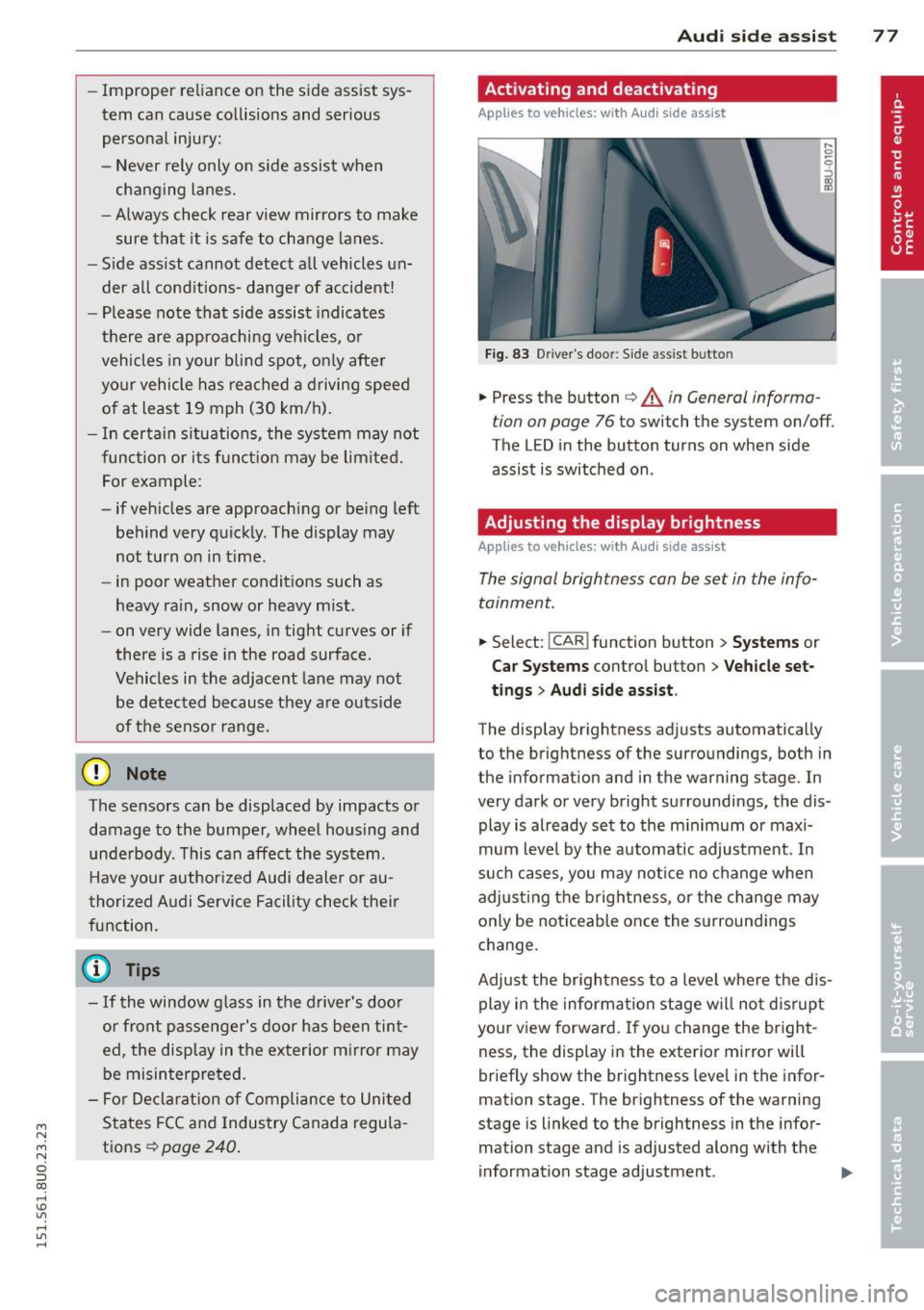
Fig. 83 Driver's door: Side assist bu tto n
.,. Press the button ~ A in General informa
tion on page 76
to switch the system on/off.
The LED in the button turns on when side
assist is switched on .
Adjusting the display brightness
Applies to vehicles: wit h Aud i side ass ist
The signal brightness can be set in the info
tainment.
.,. Select: !CAR ! function button > Systems or
Car Systems control button > Vehicle set
tings
> Audi side assist .
The display brightness adjusts automatically
to the brightness of the surroundings, both in
the information and in the warning stage . In
very dark or very bright surroundings, the dis play is already set to the minimum or maxi
mum level by the automatic adjustment. In
such cases, you may notice no change when
adjusting the brightness, or the change may
only be noticeable once the surroundings
change.
Adjust the brightness to a level where the dis
play in the information stage will not disrupt
your view forward.
If you change the bright
ness, the display in the exterior mirror will
briefly show the brightness leve l in the infor
mation stage. The brightness of the warning
stage is linked to the brightness in the infor
mation stage and is adjusted along with the
information stage adjustment . .,,.
Page 92 of 258
90 Parking systems
General information
Applies to vehicles: with park ing system p lus with rear
view camera
0
~ CX) ID
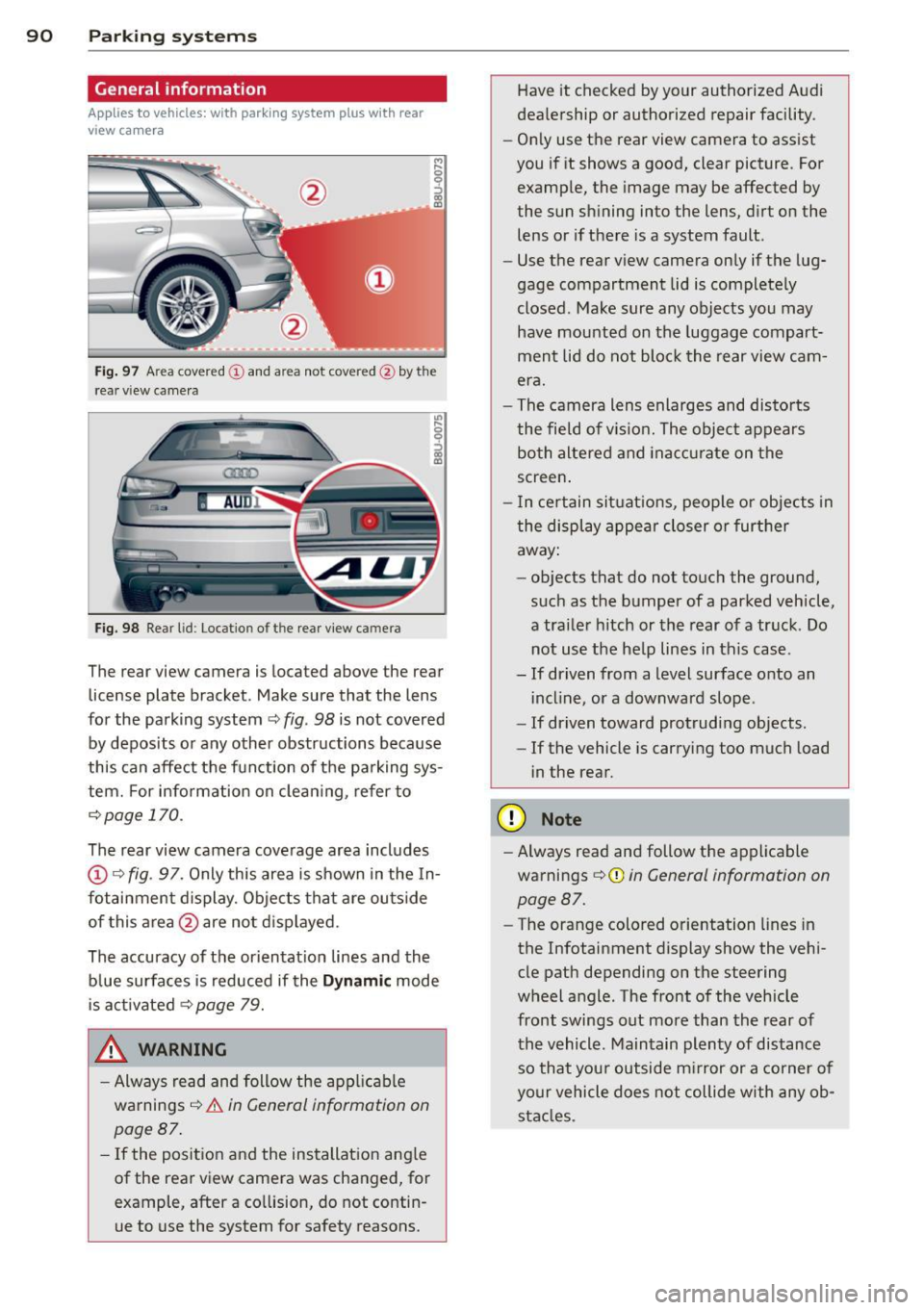
Fig. 97 Area covere d (!) and area not covered @by the
r ea r view came ra
Fig. 98 Re ar lid: Locatio n of the rear view camera
The rear view camera is located above the rear
license plate bracket . Make sure that the lens
for the parking system~
fig. 98 is not covered
by deposits or any other obstructions because
this can affect the function of the parking sys
tem. For info rmation on cleaning, refer to
¢page 170.
The rear view camera coverage area includes
@Q fig. 97. Only this area is shown in the In
fotainment display. Objects that are outside
of this area @are not displayed.
The accuracy of the orientation lines and the blue surfaces is reduced if the
Dynamic mode
is activated
~ page 79.
.&, WARNING
-Always read and follow the applicable
warnings ¢_&.
in General information on
page 87.
- If the position and the installation angle
of the rear view camera was changed, for example, after a collision, do not contin
ue to use the system for safety reasons. Have
it checked by your authorized Audi
dealership or authorized repair facility .
- Only use the rear view camera to assist
you if it shows a good, clear picture . For
example, the image may be affected by
the sun shining into the lens, dirt on the
lens or if there is a system fault.
- Use the rear view camera only if the lug
gage compartment lid is completely
closed . Make sure any objects you may
have mounted on the luggage compart
ment lid do not block the rear view cam
era.
- The camera lens enlarges and distorts
the field of vision. The object appears both altered and inaccurate on the
screen.
- In certain situations, people or objects in
the display appear closer or further
away:
- objects that do not touch the ground,
such as the bumper of a parked vehicle,
a trailer hitch or the rear of a truck . Do
not use the help lines in this case .
- If driven from a level surface onto an incline, or a downward slope .
- If driven toward protruding objects .
- If the vehicle is carrying too much load
in the rear.
(D Note
-Always read and follow the applicable
warnings ¢(I)
in General information on
page 87.
- The orange colored orientation lines in
the Infotainment display show the vehi
cle path depending on the steering
wheel angle . The front of the vehicle
front swings out more than the rear of
the vehicle . Maintain plenty of distance
so that your outside mirror or a corner of
your vehicle does not collide with any ob
stacles .
Page 96 of 258
94 Driving Safel y
Driving Safely
General notes
Safe driving habits
Please remember -safety first!
This chapter contains important information,
tips, instructions and warnings that you need
to read and observe for your own safety, the
safety of your passengers and others. We have
summarized here what you need to know
about safety belts, a irbags, ch ild restra ints as
well as child safety. Your safety is for us
priori
ty number 1.
Always observe the info rmat ion
and warn ings in th is sect ion -fo r yo ur own
safety as well as that of your passengers .
The information in this se ction app lies to all
model ve rsions of your veh icle. Some of the
feat ures described in this sec tions may be
standard equipment on some models, or may
be optional equipment on others . If you are
not sure, ask your authorized Audi dealer.
A WARNING
-Always make sure that you follow the in
struct ions and heed the WARNINGS in
this Manual. It is in your interest and in
the inte rest of you r passengers.
- Always keep the complete Owner's Liter
ature in your Audi when you lend or sell
your vehicle so that this important info r
mation will always be ava ilable to the
dr iver and passengers.
- Always keep the Owner's literature handy
so that you can find it eas ily if you have
ques tions.
Safety equipment
The safety features are part of the occupant
restraint system and work together to help
redu ce the risk of injury in a wide variety of
accident situations.
Your safety and the safety of your passenge rs
should not be left to chance. Advances in
technology have made a varie ty o f fea tures
avai la bl e to he lp re duce the risk of injury in an accident
. The following is a list of just a few of
the safety features in your Audi:
- sophis tic ated s afety be lts fo r drive r and a ll
passenger sea ting pos it ions,
- be lt fo rce limi ters fo r the front seats,
- belt p retensioners for the seats,
- be lt he ight adjustment for the front seats,
- head restra ints for each seating posit ion,
- front airbags,
- side airbags in the front seats,
- side curta in air bags w ith ejec tion mi tiga tion
features,
- speci al LATCH anchorages for child re-
st raints,
- adjustab le steeri ng colum n.
These ind iv idual safety features, can work to
gether as a system to help p rotect you and
you r passenge rs in a w ide range of accidents.
T hese features canno t work as a system if
they a re not always corre ct ly adjus ted and co r
rect ly used.
Safety is everybody' s respon sibil ity!
Important things to do before driving
Safety is everybody's job! Vehicle and occu
pant safety always depends on the informed
and careful driver.
For you r safety and the safety of your passen
gers,
b efore driv ing alway s:
.. Make sure that all lights and signals are op
erati ng correctly .
.. Make su re that the t ire p ressure is co rrect.
.. Make s ure that all windows are clean and af
ford good vis ibility to the outs ide .
.. Secure al l luggage and other items caref ully
qpage 100, qpage 54.
.. Ma ke s ure that nothing can interfe re wi th
the peda ls .
.. Adj ust front seat, head restraint and mirrors
co rrectly for your height.
.. Instruct passengers to adjust the head re
straints according to the ir height .
.. Make su re to use the r igh t child restraint
co rrectly to protect ch ildren
~ page 133,
~lld~~~-~
Page 168 of 258
166 Trailer towing
Trailer towing Driving with a trailer
General information
Your Audi was designed primarily for passen
ger transportation .
If you plan to tow a trai ler, p lease remember
that the additional load will affect durability,
economy and performance .
Trailer towing not on ly places more stress on
the vehicle, it also calls for more concentra
tion from the driver.
For this reason, always fo llow the operating
and driving instructions provided and use
common sense.
Technical requirements
Tr aile r hitch
Use a weight-carrying hitch conforming to the
gross trailer weight. The hitch must be suita
ble for your vehicle and trailer and mu st be
mounted securely on the veh icle's chassis at a
technically sound location. Use only a trailer
h itch with a removab le ball mount. A lways
check with the trai ler h itch manufact urer to
make sure that you are using the correct
hitch.
Do not use a bumper hi tch .
The hitch must be installed in such a way that
it does not interfere with the impact-absorb
ing bumper system . No modifications should
be made to the vehicle exhaust and brake sys
tems . From t ime to time, check that all hitch
mounting bo lts remain securely fastened.
When you are not towing a trailer, remove the
trailer h itch ball mount. This prevents the
h itch from causing damage should your veh i
cle be struck from behind
¢ A .
Traile r brak es
If your tra iler is equipped w ith a braking sys
tem, check to be sure that it conforms to a ll
regulat ions . The trailer hydraulic brake system must not be
direct ly connected to the vehicle's hydraulic
brake system
~ A .
Saf ety ch ain s
Always use safety chains between your veh icle
and the trai le r.
Trail er light s
Trailer lights must meet all regulations. Be
sure to check w ith your authorized Audi dealer
for correct wi ring, switches, and relays.
Mirrors
If you are unable to see the traffic behind you
us ing the regular outside mirrors, then you
must install extended mirrors .
It is important
that you always have clea r vis io n to the rear.
,8. WARNING
- I f a trai ler has electrical brakes p lease
note that these brakes are not activated
by the factory -fitted control unit -risk of
accident!
- Afte r removing the trailer hitch, do not
store it in your vehicle. In case of sudden
braking, the hitch could fly forward and
injure you or your passengers.
- Never install a "weight distributing" or
"load equalizing" trailer hitch on your ve
h icle. The vehicle was not designed for
these kinds of trailer h itches. The h itch
attachment can fail, caus ing the trailer
to tear loose from the veh icle.
- The Gross Vehicle Weight Rating for your
veh icle, found on the safety compliance
label on the driver's s ide B-pillar, must
never be exceeded under any c ircumstan
ces. Exceeding the Gross Vehicle Weight
Rating of yo ur vehicle is likely to damage
your vehicle, and such damage will not
be covered by yo ur Limited New Ve hicle
Warranty . Exceeding the Gross Vehicle
Weight Rating will a lso change the per
formance and handling characteristics of
your veh icle, wh ich could cause a crash
resulting in serious injury or death.
-
Page 173 of 258
M N
M N
0 ::i co ,...., \!) 1.1'1 ,...., 1.1'1 ,....,
Vehicle care and cleaning 171
Rinse the vehicle thoroughly again and let it
air dry. Remove any water residue using a
shammy .
A WARNING
- Only wash the vehicle when the ignition
is off and follow the instructions from
the car wash operator to reduce the risk
of accidents .
- To reduce the r isk of cuts, protect your
self from sharp metal components when
wash ing the underbody or the inside of
the wheel housings.
- After washing the vehicle, the braking ef
fect may be de layed due to moisture on
the brake rotors or ice in the winter. The
brakes must be dried first with a few
careful brake applications.
([) Note
-If you wash the vehicle in an automatic
car wash, you must fold the exterior m ir
rors in to reduce the ris k of damage to
the mirrors. Power folding exterior mir
rors* must only be folded in and out us
ing the power folding function. -
To prevent paint damage, do not wash
the vehicle in direct sunlight.
- To reduce the risk of damage to the sur
face, do not use insect removing spong
es, kitchen sponges or similar items.
- Matte finish painted vehicle compo
nents:
- To reduce the risk of damage to the
surface, do not use polishing agents or
hard wax.
- Never use car wash cycles that apply
protective wax.
It can destroy the
matte finish effect .
- Do not place any stickers or magnet ic
signs on vehicle parts painted w ith
matte fin ish paint. The paint could be
damaged when the stickers or magnets
are removed.
@ For the sake of the environment
Only wash the vehicle in facilities spec ially
designed for that purpose . This will red uce
the r isk of dirty water contam inated with
oil from entering the sewer system.
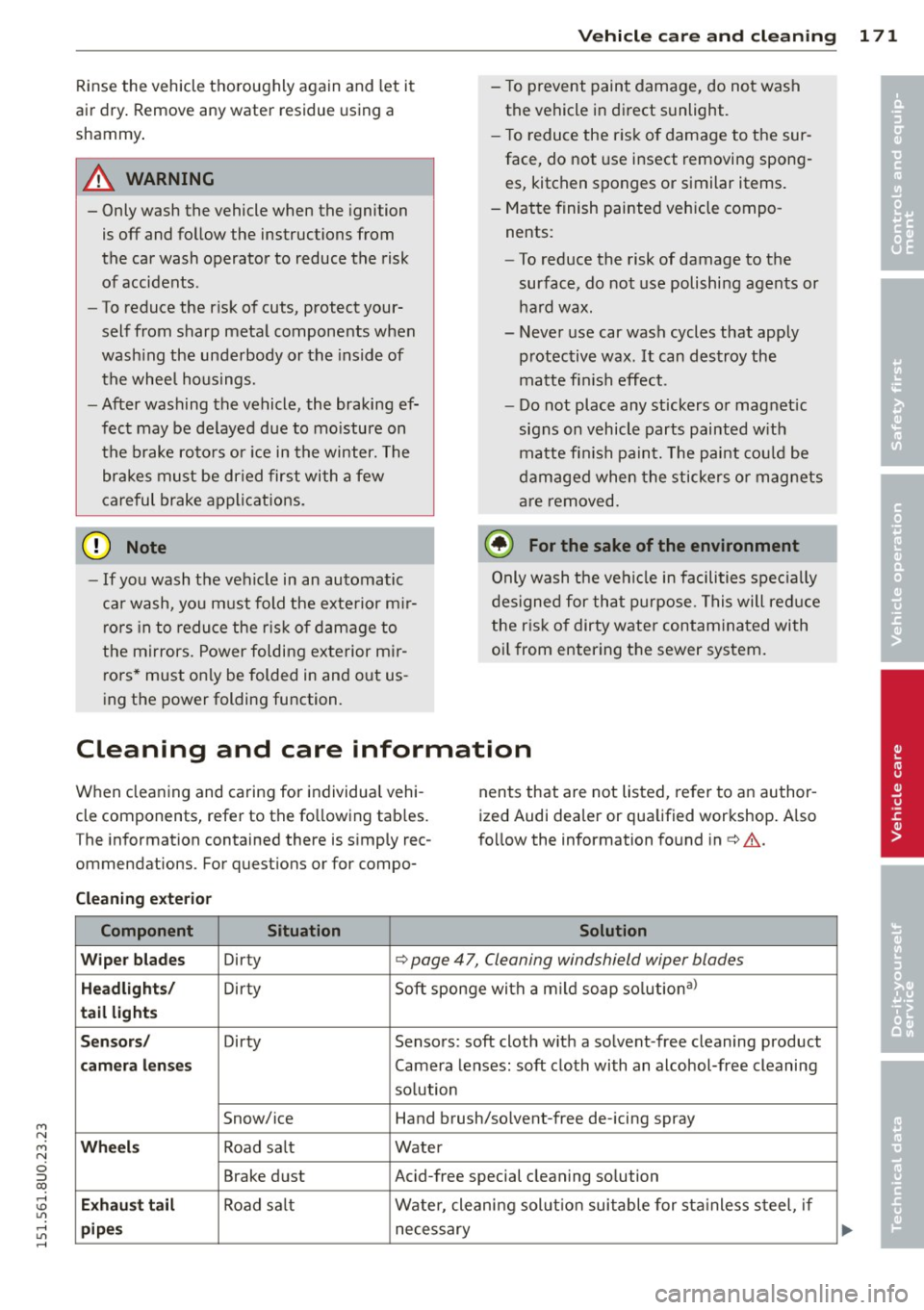
Cleaning and care information
When cleaning and caring for individual vehi
cle components, refer to the following tab les .
The information contained there is simply rec
ommendations . For questions or for compo- nents that are not listed,
refer to an author
ized Audi dealer or qualified workshop. A lso
follow the information found in ¢ ,& .
Cleaning exterior
Component Situation Solution
Wiper blades
Dirty Q page 4 7, Cleaning windshield wiper blades
Headlights/ Dirty Soft sponge with
a m ild soap solutiona>
tail lights
Sensors/
Dirty Sensors: soft cloth with a solvent -free cleaning product
camera lenses Camera lenses: soft cloth with an alcohol-free cleaning
solution
Snow/ice Hand brush/solvent-free de-icing spray
Wheels Road sa lt Water
Brake dust Acid-free special cleaning solution
Exhaust tail Road salt Water, cleaning solut ion suitable for stainless steel, if
pipes necessary
•
•
Page 176 of 258
174 Vehicle care and cleaning
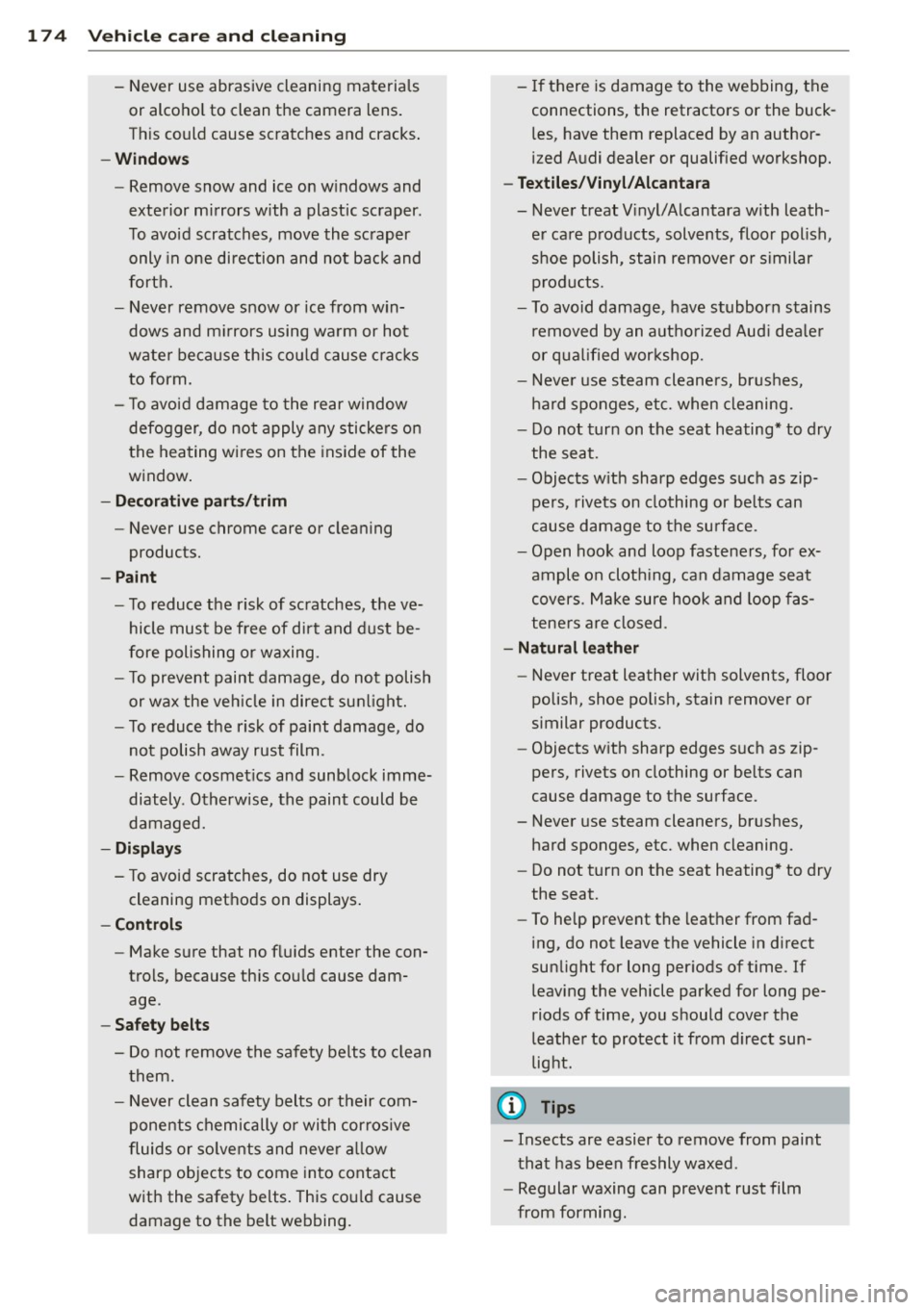
- Never use abrasive cleaning materials
or alcohol to clean the camera lens.
This could cause scratches and cracks.
- Windows
- Remove snow and ice on windows and
exterior mirrors with a plastic scraper.
To avoid scratches, move the scraper only in one direction and not back and
forth.
- Never remove snow or ice from win
dows and mirrors using warm or hot
water because this could cause cracks
to form .
- To avoid damage to the rear window
defogger, do not apply any stickers on
the heating wires on the inside of the
window.
- Decorative parts/trim
- Never use chrome care or cleaning
products.
- Paint
-To reduce the risk of scratches, the ve-
hicle must be free of dirt and dust be
fore polishing or waxing.
- To prevent paint damage, do not polish
or wax the vehicle in direct sunlight.
- To reduce the risk of paint damage, do
not polish away rust film .
- Remove cosmetics and sunblock imme
diately . Otherwise, the paint could be
damaged.
- Displays
- To avoid scratches, do not use dry
cleaning methods on displays.
- Controls
- Make sure that no fluids enter the con-
trols, because this could cause dam
age.
-Safety belts
- Do not remove the safety belts to clean
them.
- Never clean safety belts or their com
ponents chemically or with corrosive
fluids or solvents and never allow sharp objects to come into contact
with the safety belts. This could cause
damage to the belt webbing. - If there is damage to the webbing, the
connections, the retractors or the buckles, have them replaced by an author
ized Audi dealer or qualified workshop.
- Textiles/Vinyl/Alcantara
- Never treat Vinyl/Alcantara with leath-
er care products , solvents, floor polish,
shoe polish, stain remover or similar
products.
- To avoid damage, have stubborn stains
removed by an authorized Audi dealer
or qualified workshop.
- Never use steam cleaners, brushes,
hard sponges, etc. when cleaning.
- Do not turn on the seat heating* to dry
the seat.
- Objects with sharp edges such as zip
pers, rivets on clothing or belts can
cause damage to the surface .
- Open hook and loop fasteners, for ex
ample on clothing, can damage seat
covers . Make sure hook and loop fas
teners are closed.
- Natural leather
- Never treat leather with solvents, floor
polish, shoe polish, stain remover or
similar products.
- Objects with sharp edges such as zip
pers, rivets on clothing or belts can
cause damage to the surface.
- Never use steam cleaners, brushes,
hard sponges, etc. when cleaning.
- Do not turn on the seat heating* to dry
the seat.
- To help prevent the leather from fad
ing, do not leave the vehicle in direct
sunlight for long periods of time. If leaving the vehicle parked for long pe
riods of time, you should cover the
leather to protect it from direct sun
light.
(D Tips
- Insects are easier to remove from paint
that has been freshly waxed.
- Regular waxing can prevent rust film
from forming.
Page 227 of 258
M N
M N
0 ::i co ,...., \!) 1.1'1 ,...., 1.1'1 ,....,
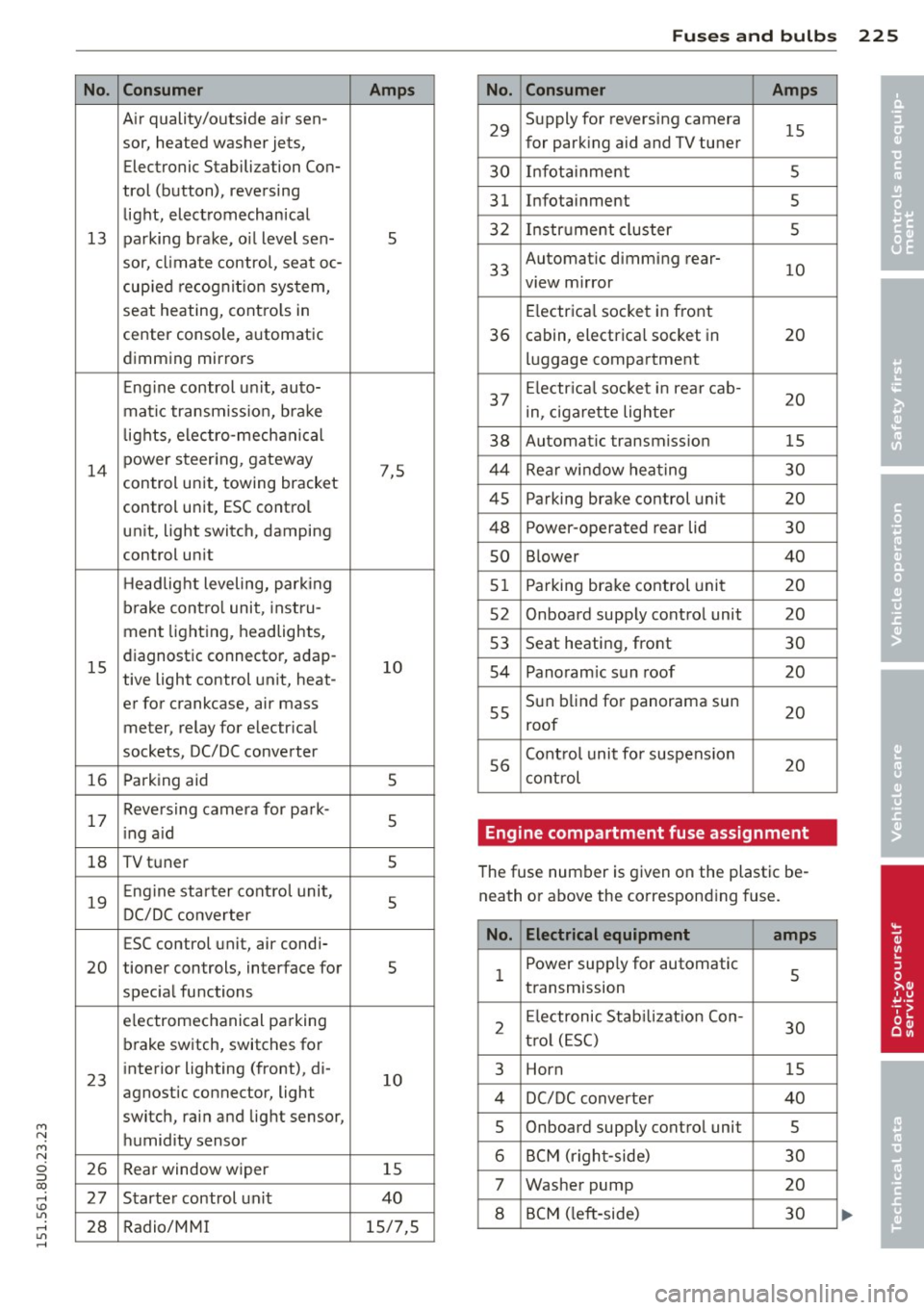
No.
13
14
15
16
17
18
19
20
23
26
27
28
Consumer
A ir quality/outside air sen-
sor, heated washer jets,
Electronic Stabilization Con-
trol (button), reversing
light, electromechanical
parking brake, o il level sen-
sor, climate control, seat oc-
cup ied recognit ion system,
seat heating, contro ls in
center console, automatic
dimming mirrors
Eng ine control u nit, auto-
matic transmiss ion, bra ke
l ights, electro-mechanical
power steer ing, gateway
control un it, towing bracket
control unit, ESC contro l
unit, light switch, damping
control un it
H eadlight leveling, park ing
brake contro l unit, inst ru-
men t lighting, headlights,
diagnostic connector, adap-
tive light control unit, heat-
er for crankcase, air mass
meter, relay for electr ical
sockets, DC/DC converter
Parking aid
Reversing camera for park-
i ng a id
TV tuner
Eng ine starter cont ro l unit,
DC/DC converter
ESC control unit, air condi-
tioner controls, interface for
spec ial functions
e lectromechanical parking
b rake switch, switches for
interior lighting (front), di-
agnostic connector, light
switch, rain and light sensor,
humidity sensor
Rear window wiper
Starter control un it
Radio/MM I
Amps
5
7,5 10 5
5
5 5
s
10
15
40
15/7,5
Fu ses and bulb s 225
No. Consumer Amps
29
Supply for reversing camera
15 for park ing aid and TV tuner
30 Infot ainment 5
31
Infotainment 5
32
Instr ument cluster 5
33
Automatic dimming rear-
view m irror
10
E lectrica l socket in front
36 cabin, electrical socket in 20
luggage compartment
37 Electr ica l soc ket i n rear cab-
20 in, ciga rette lighter
38 Automatic transmission 15
44
Rear window hea ting 30
45
Parking brake control unit 20
48
Power-operated rear lid 30
so B lower 40
51
Parking brake control unit 20
52
On board supply control unit 20
53
Seat heating, front 30
54
Panoram ic sun roof 20
55
Sun b lind for panorama sun 20
roof
56
Contro l unit fo r suspension
20 cont rol
Engine compartment fuse assignment
The fuse number is given on the plastic be
neath or above the correspond ing fuse.
No. Electrical equipment
amps
1 Power supply for automatic 5 transmission
2
E lectronic Stabilizat ion Con-
30 t ro l (E SC)
3 Horn 15
4
DC/DC converter 40
5
Onboard supply control unit 5
6
BCM (righ t-side) 30
7
Washer pump 20
8
BCM ( left -side) 30
•
•
Page 246 of 258
24 4 Index
Tether anchors ... ..... ... .. .. .... . 149
Tether straps . . . . . . . . . . . . . . . . . . . . . 149
Chi ld safety loc ks
Power windows ........ .. .. .. .. .. ..
37
Rear doors .............. .. .. .... .. 36
Ch ild safety seats ............... ....
139
Booster seats . . . . . . . . . . . . . . . . . . . . . 14 1
Conve rtible child seats ............. 140
Convertible locking retrac to r .. .. .... . 143
Danger of using c hild restra ints in the
front sea t .. ..... ..... ... .. .. .... .
114
How do I properly install a child safety
seat in my vehicle? ..... ... .. .. .... . 136
Infant seats ............. .. .. .. .. .
139
Install ing ................. .. .... . 143
LATCH system ............. .... .... 148
Lower anchorages ......... .... .... 147
Safety instructions ............ .. ... 136
Unused safety belts on the rea r seat ..
138
Cigarette lighter . . . . . . . . . . . . . . . . . . . . . 53
C leaning ..... .. .. ..... ... .. .. .... . 170
Climate control . . . . . . . . . . . . . . . . . . . . . . 63
C lock . .. .. .. ............. .. .. .. ... .
23
C losing
Panorama s unroof ........ .... .... .. 38
Power windows .. ..... ... .. .. .... ..
37
C losing/open ing
at the lock cylinde r ...... .. .. .. .. .. .. 33
b y remote con trol . . . . . . . . . . . . . . . . . .
30
with the cen tral locking switch .. .... .. 32
wi th the convenience key . . . . . . . . . . . . . 31
Cold tire inflat ion pressu re . ... .... ....
199
Com ing home ............... .. .... .. 42
Compact spare tire .................. 217
also refer to Spare tire ... .. .. .. .. .. . 21 7
Compartments ................. ..... 56
Compass in the mirror . ... .. .. .. .. .. ..
48
Compl iance ............... .. .. .. .. . 24 0
Computer
refer to Trip computer . . . . . . . . . . . . . . . 22
Consumer Info rmation . . . . . . . . . . 101, 237
Contac ting N HTSA .................. 101
Controls
Clean ing ... ... .... ...... .. .. .. .. .
172
Convenience key
Indicator lights .. .. ... ..... ... .. .. .
70
Starting engine (START E NGINE STOP
button) ... .... .. ............. ..... 68
Stopp ing the engine (START ENGINE
STOP button) . . . . . . . . . . . . . . . . . . . . . . 69
Switch ing on ignition ... ....... ... .. . 68
unlocking/loc king .......... ........
31
Convenience opening/clos ing ..... .. .. . 37
Convertib le child sa fe ty se ats ... .. .. .. 14 0
Co nvertib le locking retractor
Activati ng .... ....................
145
Deact ivat ing ... .. ... .......... .. .. 146
U sing to secu re a child safety seat
1.43, 145
Coolant system . . . . . . . . . . . . . . . . . . . . . 186
Cooling mode (automat ic climate control) 64
Cooling System Expans ion tank ... ............. .... 186
Cruise contro l system
Changi ng speed .................. ..
74
Description . . . . . . . . . . . . . . . . . . . . . . . . 73
Preselect ing speed . . . . . . . . . . . . . . . . . . 7 4
Switch ing off .. .. ... .......... .. .. .
74
swit ching on . .. .. ............. .. ... 74
Cruisi ng range . . . . . . . . . . . . . . . . . . . . . . . 22
(u pholders . . . . . . . . . . . . . . . . . . . . . 55, 56
D
D ata recorde r . . . . . . . . . . . . . . . . . . . . . . 152
Date d isp lay ...... ................ .. 23
Daytime running lights . .. ..... .... . .. . 40
De clarat io n of compliance
Audi s ide ass ist .. ............. .. ..
240
Cell phone package . . . . . . . . . . . . . . . . 2 4 0
Convenience key . ... ... ..... ... .. .. 240
Cruise contro l .... .. .... .... ... .. .. 240
E lectronic immob ilizer .......... .... 240
Remote contro l key . . . . . . . . . . . . . . . . 240
D ecorative p art s/tr im
Cleaning .. .... .. .. ... ..... ... .. ..
172
Defective light bu lb wa rni ng ......... .. 18
Defrost ing (windows) ................ . 65
Dete rm ining co rrec t load limit ........
204
Digital clock . . . . . . . . . . . . . . . . . . . . . . . . 23
Digital compass ... ... .. ..... ... .. .. . 48
D imens ions . ...... ............. .... 2 35
Page 248 of 258
246 Index
Checking the engine coolant leve l .... . 186
Radiator fan . . . . . . . . . . . . . . . . . . . . . . 188
E ng ine coolant temperature
Temperature gauge ..... .. .. .. .. .. .. 10
Eng ine hood
Closing .... .......... ...... ... .. . 179
H ow to release the hood . . . . . . . . . . . . 179
E ngine oi l ..... ........... .... .... . 181
Adding .. .. ............. .. .. .. ... 184
Addi tives . . . . . . . . . . . . . . . . . . . . . . . . . 184
Changing .. ................ ... .. . 185
Check oil level ............ ... .. .. . 184
Consumpt ion . ........... .. .. .... . 184
I ndicator light . . . . . . . . . . . . . . . . . 17, 18
O il consumption .......... .... .... . 183
Oil dipstick ............... ... .... . 184
Oil grades . ................. ..... . 181
Pressure malfunction ....... .... ... .. 15
Sensor defective . . . . . . . . . . . . . . . . . . . . 18
Specification and viscosity .. .. .. .. .. . 181
Engine speed limitation ......... .... . . 17
Environment Break-in period ... ..... ... .. .. .. .. . 161
Cata lytic converter ............ ..... 161
Disposing of your vehicle battery .. .. . 193
Driving at high speeds ......... .. .. . 163
Driving to minimize pollution and noise 162
Fuel ... .... ................ ..... . 177
Fue l economy .............. .. .... . 162
Leaks under your vehicle ... .. .. .... . 179
Le tting the vehicle stand and warm up . 163
Proper disposal of dra ined brake fluid . 189
Proper disposal of dra ined engine cool-
ant . .. .... ... .......... .. .. .. .. . 187
Proper disposal of dra ined engine
oil . . . . . . . . . . . . . . . . . . . . . . . . . 184, 185
Recycling used engine oil ......... .. . 184
Roof rack . . . . . . . . . . . . . . . . . . . . . . . . . 58
Unleaded fuel ..................... 175
What should I do with an old battery? 193
EPC
refer to Electronic power control . . . . . . 17
Event Data Recorder (EDR) . ........ .. . 152
Exhaust tail pipes Cleaning . ............... ........ . 171
Expansion tank ............ .. .. .. .. . 186
Exterior lighting ............ ... .. ... . 40 Exterior
mirrors
Adjusting ..... .. .. .............. .. 44
Dimm ing . ... .. .. .. .............. .. 45
Heating ... .... .. ............. .... . 44
F
Fan
Radiator
Fastening Booster seats .... ................ .
Convertib le child safety seats ..... .. .
Infant seats ..... ............. ... .
Flat tire 188
141
140
139
Changing . .... .. ............. .... 218
Floor .. .. .. .. .. .. .. ...... .... ..... . 62
Floor mats . . . . . . . . . . . . . . . . . . . . . . . . . . 99
Fog lights/rear fog lights ...... ... .. .. . 40
Folding chocks .. .. ... .......... .... 217
Folding the rear seat forward ... .. .. .. . 60
Foot pedals ..... .. .......... ...... .. 99
For the sake of the environment Gasoline fumes and the environment .. 177
Le tting the engine warm up . . . . . .
66, 68
Refueling . . . . . . . . . . . . . . . . . . . . . . . . 177
Sav ing fuel by early upshifting ........ 11
Front airbags Description . . . . . . . . . . . . . . . . . . . . . . . 116
How they work . .. ............. .... 121
Frontal collis ions and the laws of physics 105
Front passenger's door emergency lock ing 33
Front seats . . . . . . . . . . . . . . . . . . . . . . . . . 50
Adjusting . .... .. ............. .... . 96
Child restraints in the front seat .. .. .. 114
Fuel Additives . ..... .. ................ . 175
B lended gasoline ................. . 175
Consumption .. ... ................ . 22
Filler neck . .... .. ............. .... 176
Fuel gauge . . . . . . . . . . . . . . . . . . . . . . . . 11
Gasoline .. ... ... ................ . 175
Gasoline additives ................ . 176
Low fuel level symbol . . . . . . . . . . . . . . . 18
Octane rating .. .. ............. .... 175
Recommendation ... ........... .. .. 175
Refueling . . . . . . . . . . . . . . . . . . . . . . . . 177
Reserve ........................... 11
Tank capacity .. .. ... .......... .... 235
Page 250 of 258
248 Index
l
Jack . . . . . . . . . . . . . . . . . . . . . . . . . 216, 221
Jump-starting ... ... ... .... .. .. .. .. . 228
Jumper cables ............. .. .. .. ... 229
K
Key ..... .... ................ ..... .. 29
Battery replacement . . . . . . . . . . . . . . . . 30
Ignition/engine on/off . . . . . . . . . . . . . . . 66
Ignition key . . . . . . . . . . . . . . . . . . . . . . . 29
Key replacemen t . . . . . . . . . . . . . . . . . . . 29
removing .. ..... ........... ... .. .. 67
unlocking/locking ........ .. . 30, 31, 33
Keys No key identified . . . . . . . . . . . . . . . . . . . 69
Kick-down tiptronic . . . . . . . . . . . . . . . . . . . . . . . . . . 85
L
La ne Change Assistant
refer to Side assist .......... .. .... .. 75
LATCH .. .. .. ................ ... ... 146
Description ........... .... ... .. .. . 147
I nstall ing a chi ld restraint .. .. .. .... . 148
L ocat ion ..... ........... .. .. .. .. . 147
Mounting and releasing the anchorage
hook .... ................. .. .... . 148
Leather cleaning/protection ... .. .. .. . 173
Leaving home ............. .. .. .. .. .. 42
Lifting vehicle ... .......... .. .. .. .. . 232
Light adaptive light ............. ... .. .... 40
Adjusting exterior lighting . .. .. .. .. .. 42
ambience lighting . ... .. .. .. .. .. .. .. 44
Com ing/ Leaving home ....... .. .. .. . . 42
Daytime running lights ........ .... . . 40
Emergency flashers . . . . . . . . . . . . . . . . . 43
Exterior lighting .................... 40
Fog lights/rear fog lights .. .. .. .... .. 40
Headlight range control system ....... 40
High beam assist .... .... ... .. .. ... . 41
Interior/reading lights ..... .. .. .. .. . . 43
L ow beam .. ..... ........... ... .. .. 40
Side marker lights ........ .. .. .. .. .. 40 Light/rain
sensor
Headlights . ..... ................ .. 40
Intermittent (windshield w ipers) ...... 46
Sen sor defective .. ......... .... .... . 19
Lights High beam .... .. ................ .. 41
Turn signals ..... .................. 41
Loading the luggage compartment . .. .. 100
Locking Rear lid . . . . . . . . . . . . . . . . . . . . . . . . . . . 34
Locking/unlocking at the lock cylinder ................ .. 33
by remote control ............... .. . 30
with the central locking switch . .. .... . 32
wi th the convenience key ........ .. .. . 31
Low beams ..... .. ................ .. 40
Lower universal anchorages (Canada) ... 146
Luggage compa rtment . . . . . . . . . . . . . . . . 59
Cargo net . . . . . . . . . . . . . . . . . . . . . . . . . 60
Cover ...... ... .. .. ... ........... .. 59
Enlarging . . . . . . . . . . . . . . . . . . . . . . . . . 60
Floor ........ ... .. .............. .. 62
Lid ..... .. .. .. .. .. ........... .. .. . 34
Pass-through .. .. ............. .. .. . 61
Ski sack ... .. .. . ............ ...... . 61
Stowing .. .... .. .. .............. . 100
Tie-downs . . . . . . . . . . . . . . . . . . . . . . . . . 60
also r efe r to Loading the luggage com
partment . . . . . . . . . . . . . . . . . . . . . . . . 100
Lumbar support ... ............. .... . 51
M
Maintenance .. .. .. ... ... ... .... .... 237
Malfunc tion Indicator Lamp (MIL) . . 17, 26
Manual shift program ................. 84
Master key
Battery replacement . . . . . . . . . . . . . . . . 30
Matte finish paint cleaning ....... .. .. 170
Mileage Average ........................... 22
Instantaneous ... ................ .. 22
Mirrors Adjusting the exterior mirrors .. .. .... . 44
Compass .. .. .. .. ... .......... .... . 48
dimming . ..... .. ............. ..... 45
Vanity mirrors ... .................. 46