tow AUDI Q3 2015 User Guide
[x] Cancel search | Manufacturer: AUDI, Model Year: 2015, Model line: Q3, Model: AUDI Q3 2015Pages: 258, PDF Size: 64.9 MB
Page 78 of 258
76 Audi side assist
General information
A pplies to vehicles: with Audi side assist
®
©
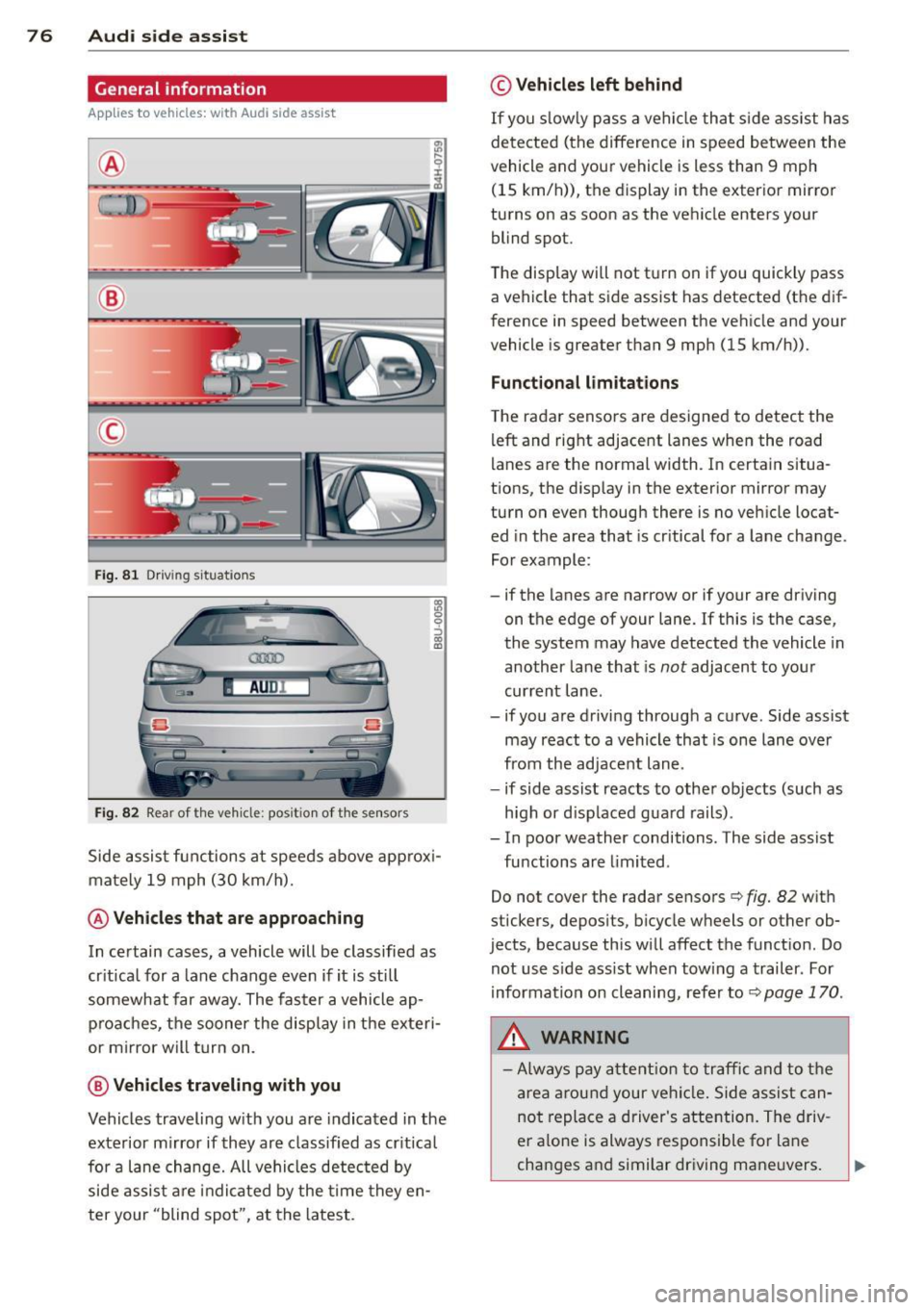
Fig. 81 Driving situations
AU Dr--
Fig. 82 Rear of the vehicle: posit ion of the sensors
1ll 0 0 :, a) a,
Side assist functions at speeds above approxi
mately 19 mph (30 km/h).
@ Vehicles that are approaching
In certain cases, a vehicle will be classified as
critical for a lane change
even if it is still
somewhat far away. The faster a vehicle ap
proaches, the sooner the display in the exteri
or mirror will turn on.
@ Vehicles traveling with you
Vehicles traveling with you are indicated in the
exterior mirror if they are classified as critical
for a lane change. All vehicles detected by
side assist are indicated by the time they en
ter your "blind spot", at the latest.
© Vehicles left behind
If you slowly pass a vehicle that side assist has
detected (the difference in speed between the
vehicle and your vehicle is less than 9 mph
(15 km/h)), the display in the exterior mirror
turns on as soon as the vehicle enters your blind spot.
The display wi ll not turn on if you quickly pass
a vehicle that side assist has detected (the dif
ference in speed between the vehicle and your
vehicle is greater than 9 mph (15 km/h)).
Functional limitations
The radar sensors are designed to detect the
left and right adjacent lanes when the road
lanes are the normal width. In certain situa
tions, the display in the exterior mirror may
turn on even though there is no vehicle locat ed in the area that is critical for a lane change.
For example:
- if the lanes are narrow or if your are driving
on the edge of your lane. If this is the case,
the system may have detected the vehicle in
another lane that is
not adjacent to your
current lane .
- if you are driving through a curve. Side assist may react to a vehicle that is one lane over
from the adjacent lane .
- if side assist reacts to other objects (such as
high or displaced guard rails).
- In poor weather conditions. The side assist
functions are limited.
Do not cover the radar sensors
c::> fig. 82 with
stickers, deposits, bicycle wheels or other ob
jects, because this will affect the function. Do
not use side assist when towing a trailer . For
information on cleaning, refer to
c::> page 170 .
&_ WARNING
-Always pay attention to traffic and to the
area around your vehicle. Side assist can
not replace a driver's attention. The driv
er alone is always responsible for lane
changes and similar driving maneuvers.
Page 80 of 258
78 Audi side assist
- Side assist is not active wh ile you are
making the adjus tment.
- Your settings are automatically sto red
and ass igned to the remote control key
being used.
Driver messages
App lies to vehicles: with Audi side assist
If s ide ass ist switches off by itse lf, t he LED in
the butto n tur ns off a nd a message will ap
pear in t he instr ume nt cl uster d is p lay:
Audi side assist: Unavailable. Sen sor view
The radar sensors' vision is affected. Do not
c o ver the area in fr ont of the senso rs with bike
wheels, stickers, dirt or other objects. Clean
the area in front of the sensors, if necessary
c::;, page 76, fig . 82.
Audi side as sist: Unavailable.
Side assist cannot be switched on tempo rari ly
beca use there is a malfunctio n (for example,
the battery charge leve l may be too low).
Aud i side assist: System fault!
The system ca nnot guara ntee that it w ill de
tect ve hicles co rrectly a nd it is switched off .
The sensors have been displaced or are faulty.
H ave the system checked by an authorized
Aud i dea le r or aut horized Aud i Service Fac ility
soon .
Audi side assist: Unavailable when
towing.
Side assist sw itches off automatically whe n a
factory -insta lled trailer hitch is connected to
the ele ct rical connector on t he trailer . There is
n o guara ntee the system will switc h off whe n
usi ng a retrofit ted traile r hi tch . D o not use
si de assis t whe n towing a trailer .
Page 89 of 258
M N
M N
0 ::i co ,...., \!) 1.1"1 ,...., 1.1"1 ,....,
Parking systems
General information
App lies to vehicles: with rea r parking sys te m /pa rk in g sys
tem plus w ith rear view camera
Depending on your vehicle's equipment, vari
ous parking a ids w ill help you when parking
and maneuvering.
The
r ea r pa rk ing sys te m is an audible parking
aid that warns you of obstacles
behind the ve
hicle
¢ page 88 .
The p ark in g syste m plus assists you when
parking by audibly and visually indicat ing ob
jects detected
in front of and behind the vehi
cle
¢ page 88.
The re ar view ca mera shows the area behind
the veh icle in the Infotainment d isplay. This
display assists you when you are c ross or par
allel parking ¢
page 89. In addition , you are
assisted by the functions from the parking
system plus
q pag e 88.
A WARNING
-Always look for traffic and check the area
around your vehicle by looking at it di
rect ly as well. The parking system cannot
replace the driver's attent ion. The driver
is always respons ible for safety during
park ing and for all other maneuvers .
- Please note that some surfaces, such as
clothing, are not detected by the system .
- Sensors and cameras have blind spots in
wh ich people and objects cannot be de
tected . Be especially cautious of children
and animals.
- The sensors can be displaced by impacts
or damage to the radiato r grille, bumper ,
wheel housing and the underbody . The
par king systems may become impaired
as a result. Have your authorized Audi
dealer or qualified workshop check their
function.
- Make su re the sensors are not covered by
stickers, deposits or any other obstruc
tions as it may impair the sensor func
tion . For information on cleaning, refer
to
¢ page 170.
Par king system s 87
@ Note
-Some objects are not detected by the
system under certain circumstances :
- Objects such as barrier chains, trailer draw bars, vertical poles or fences
- Objects above the sensors such as wall extensions
- Objects w ith specific surfaces or struc
tures such as chain link fences or pow
der snow .
- If you continue driving closer to a low -ly
ing object, it may disappear from the
sensor range. Note that you w ill no lon
ger be warned about this obstacle.
(D Tips
- T he system may provide a warning even
though there are no obstacles in the cov
erage area i n some situations, such as:
- certain road surfaces or for long grass.
- externa l ultrasonic sources e .g . from
cleaning vehicles.
- heavy rain, snow or thick vehicle ex
ha ust.
- We recommend tha t you prac tice park
ing in a traffic-free location or par king
lot to become familiar with the system.
When doing this, there should be good
light and weather cond itions.
- You can change the vo lume and pitch of
the signals as we ll as the disp lay
¢ page 93.
-Please refer to the instructions for tow
ing a trailer
¢ page 93.
-What appears in the infotainment dis
play is somewhat time-delayed .
Page 92 of 258
90 Parking systems
General information
Applies to vehicles: with park ing system p lus with rear
view camera
0
~ CX) ID
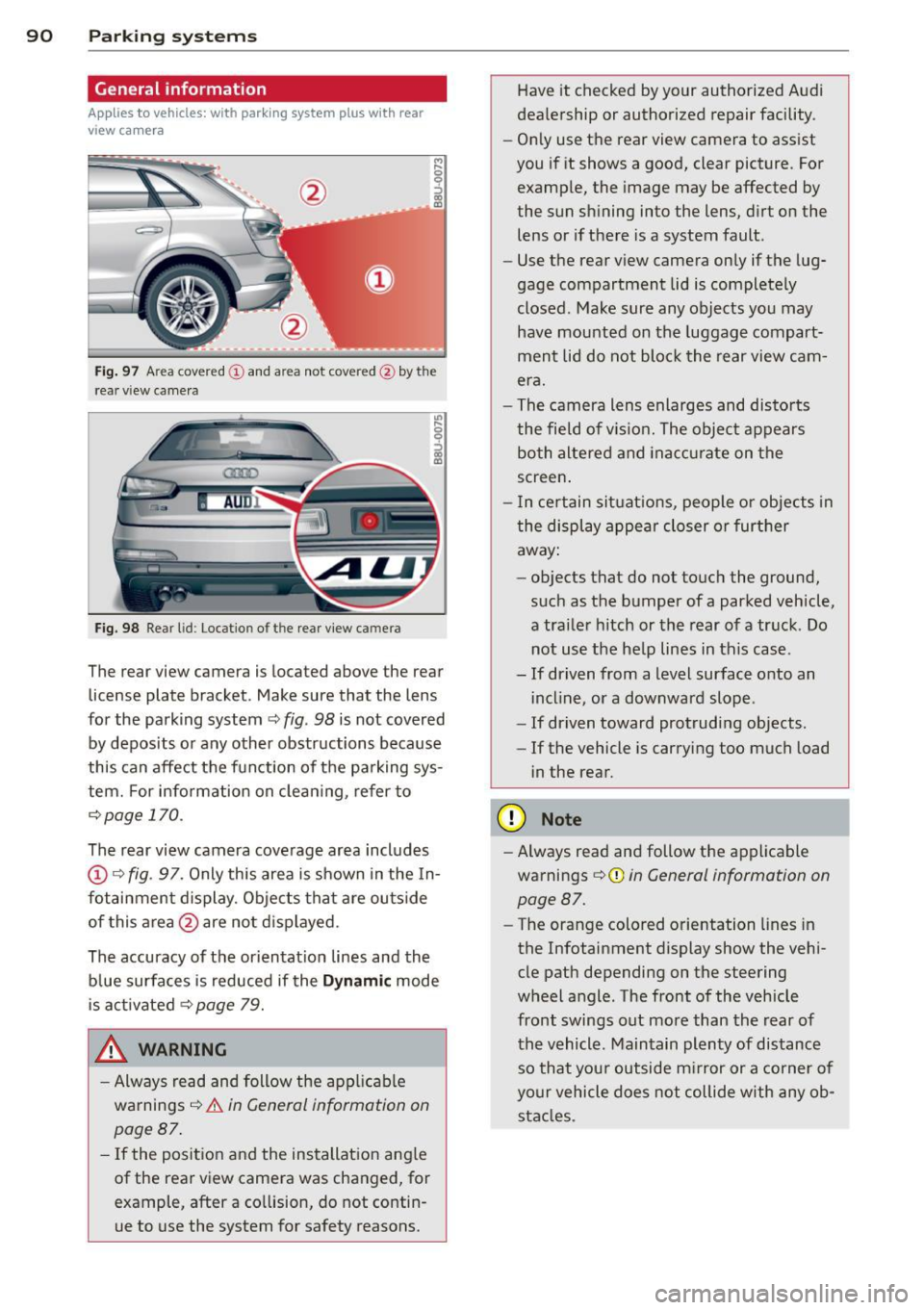
Fig. 97 Area covere d (!) and area not covered @by the
r ea r view came ra
Fig. 98 Re ar lid: Locatio n of the rear view camera
The rear view camera is located above the rear
license plate bracket . Make sure that the lens
for the parking system~
fig. 98 is not covered
by deposits or any other obstructions because
this can affect the function of the parking sys
tem. For info rmation on cleaning, refer to
¢page 170.
The rear view camera coverage area includes
@Q fig. 97. Only this area is shown in the In
fotainment display. Objects that are outside
of this area @are not displayed.
The accuracy of the orientation lines and the blue surfaces is reduced if the
Dynamic mode
is activated
~ page 79.
.&, WARNING
-Always read and follow the applicable
warnings ¢_&.
in General information on
page 87.
- If the position and the installation angle
of the rear view camera was changed, for example, after a collision, do not contin
ue to use the system for safety reasons. Have
it checked by your authorized Audi
dealership or authorized repair facility .
- Only use the rear view camera to assist
you if it shows a good, clear picture . For
example, the image may be affected by
the sun shining into the lens, dirt on the
lens or if there is a system fault.
- Use the rear view camera only if the lug
gage compartment lid is completely
closed . Make sure any objects you may
have mounted on the luggage compart
ment lid do not block the rear view cam
era.
- The camera lens enlarges and distorts
the field of vision. The object appears both altered and inaccurate on the
screen.
- In certain situations, people or objects in
the display appear closer or further
away:
- objects that do not touch the ground,
such as the bumper of a parked vehicle,
a trailer hitch or the rear of a truck . Do
not use the help lines in this case .
- If driven from a level surface onto an incline, or a downward slope .
- If driven toward protruding objects .
- If the vehicle is carrying too much load
in the rear.
(D Note
-Always read and follow the applicable
warnings ¢(I)
in General information on
page 87.
- The orange colored orientation lines in
the Infotainment display show the vehi
cle path depending on the steering
wheel angle . The front of the vehicle
front swings out more than the rear of
the vehicle . Maintain plenty of distance
so that your outside mirror or a corner of
your vehicle does not collide with any ob
stacles .
Page 95 of 258
M N
M N
0 ::i co ,...., \!) ..,.,
,...., ..,., ,....,
Adjusting the display and the warning tones
App lies to vehicles: with pa rking system p lus wit h rear
view ca mera
The display and warning tones con be adjust
ed in the Infotainment.
~ Se lect: I CARI f u nction button > System s or
Car systems contro l button > D riv er assi st >
Parking aid .
Display
On * -
optical d isplay is shown for the parking
system plus, rear view came ra image is shown
for parking system plus with rear view cam
era.
Off -when the park ing system is switched on,
on ly audib le signa ls are given.
Warning tones
Front volume -
Volume fo r the front area
Rear volume -Volume for the rear area
Front frequen c:y -Freq uency for the front area
Rear frequency -Frequency for the rear area
Music volume while parking -When the park
i ng system is turned on, the volume of the au
d io/v ideo source is lowered.
The new ly adjusted value is briefly heard from
the signal gene rator.
(0 Tips
- The warning tones can also be adjusted
direct ly from the visual display or the
r ear view camera image . Simply press
the
Settings cont ro l button .
- Changed settings are activated when the parking system is switched on aga in.
- The settings a re automatically stored
and ass igned to the remote control key
that is in use.
Parking systems 93
Error messages
App lies to vehicles: wi th parking syste m plus w ith rea r
v iew camera
T he re is an error i n the system if the LED i n
the
P' "A bu tton is bl ink ing and yo u hear a con
t inu ous alarm for a few seconds after sw itch
ing on the park ing system or when the park
ing system is already activated. If the error is
not co rrected before yo u switch off the ign i
tion, the LED in the
? 1J.A. button will blink the
next t ime you sw itch on the parking system by
shifting into reverse .
If a sensor is fa ulty, the~ symbol will appear
in front of/behind the vehicle in the Infota in
ment display. If a rear sensor is faulty, only
obstacles that are in areas @and @ are
shown
Q page 88, fig . 92. If a front senso r is
faulty, only obstacles that are in areas © and
@ are shown.
Drive to your authorized Audi dealer or au
t h orized repa ir facility immed iately to have
the malfunct ion corrected .
Trailer hitch
Applies to vehicles: wit h parking system pluswith rear
v iew camera a nd t railer hitch
For vehicles using the trailer socket, the park
ing system rear sensors do not turn on when
you shift into reverse gear or when you press
the
P, "~ button . This resu lts in the following re
str ictions:
There is no distance warn ing for the rear. The
front sensors remain act ivated . The visual dis
play sw itches to the trailer towing mode. The
rear view camera image will not show the or i
entat io n lines and the bl ue surfaces.
(D Tips
Trailer h itches that are not installed at the
factory may ca use the par king system to
malfunction or they may restr ict its func
tion.
Page 98 of 258
96 Driving Safely
• Always keep both feet in the footwell so
that you are in control of the vehicle at all
times.
For detailed information on how to adjust the
driver's seat, see
¢ page 51.
A WARNING
Drivers who are unbelted, out of position
or too close to the airbag can be seriously
injured by an airbag as it unfolds. To help
reduce the risk of serious personal injury:
- Always adjust the driver's seat and the
steering wheel so that there are at least
10 inches (25 cm) between your breast
bone and the steering wheel.
- Always hold the steering wheel on the
outside of the steering wheel rim with
your hands at the 9 o'clock and 3 o'clock positions to help reduce the risk of per
sonal injury if the driver's airbag inflates.
- Never hold the steering wheel at the
12 o'clock position or with your hands at
other positions inside the steering wheel
rim or on the steering wheel hub. Hold
ing the steering wheel the wrong way
can cause serious injuries to the hands,
arms and head if the driver's airbag de
ploys.
- Pointing the steering wheel toward your
face decreases the ability of the supple
mental driver's airbag to protect you in a
collision.
- Always sit in an upright position and nev
er lean against or place any part of your
body too close to the area where the air
bags are located.
- Before driving, always adjust the front
seats and head restraints properly and
make sure that all passengers are prop
erly restrained.
- Never adjust the seats while the vehicle
is moving . Your seat may move unexpect
edly and you could lose control of the ve
hicle.
- Never drive with the backrest reclined or
tilted far back! The farther the backrests
are tilted back, the greater the risk of in- jury due to incorrect positioning of the
safety belt and improper seating posi
tion.
- Children must always ride in child safety
seats ¢
page 133. Special precautions
apply when installing a child safety seat
on the front passenger seat¢
page 112.
Proper seating position for the front
passenger
The proper front passenger seating position
is important for safe, relaxed driving .
For your own safety and to reduce the risk of
injury in the event of an accident, we recom
mend that you adjust the seat for the front
passenger to the following position :
• Adjust the angle of the seatback so that it is
in an upright position and your back comes
in full contact with it whenever the vehicle is
moving .
• Adjust the head restraint so the upper edge
is as even as possible with the top of your
head. If that is not possible, try to adjust
the head restraint so that it is as close to
this position as possible ¢
page 52.
• Keep both feet flat on the floor in front of
the front passenger seat .
• Fasten and wear safety belts correctly
¢page 107.
For detailed information on how to adjust the
front passenger's seat, see
¢ page 51.
A WARNING
-Front seat passengers who are unbelted,
out of position or too close to the airbag
can be seriously injured or killed by the air
bag as it unfolds. To help reduce the risk of
serious personal injury:
- Passengers must always sit in an upright
position and never lean against or place
any part of their body too close to the
area where the airbags are located.
- Passengers who are unbelted, out of po
sition or too close to the airbag can be
seriously injured by an airbag as it
Page 102 of 258
100 Driving Safel y
Stowing luggage
Loading the luggage compartment
All luggage and other objects must be prop
erly stowed and secured in the luggage com
partment.
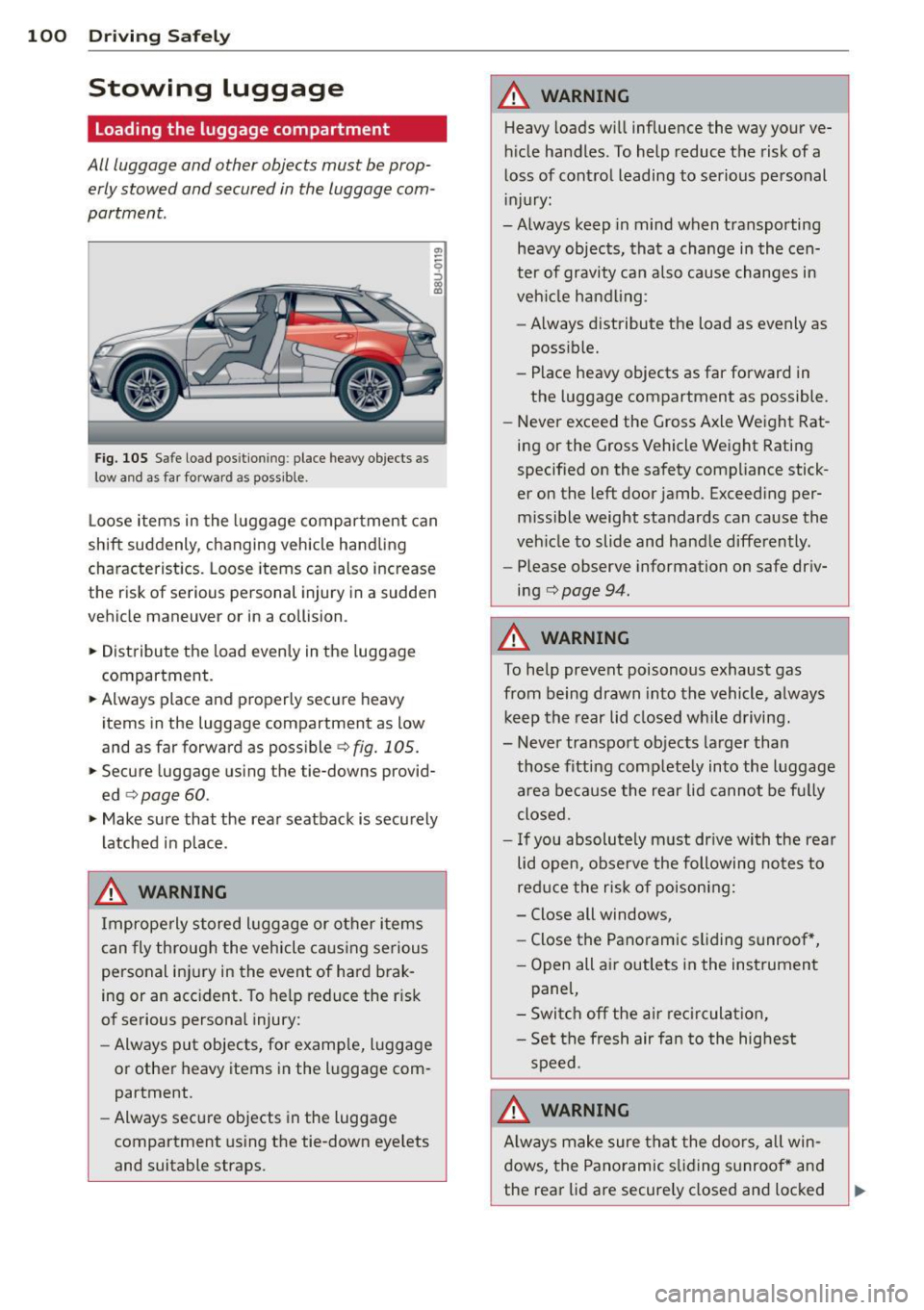
Fig. 105 S afe load pos itio nin g: place heavy objects as
low a nd as far forward as possible .
Loose items in the luggage compartment can
shift suddenly, changing vehicle hand ling
characteristics. Loose items can also increase
the risk of serious personal injury in a sudden
vehicle maneuver or in a collision .
.. Distribute the load evenly in the luggage
compartment .
.. Always place and properly secure heavy
items in the luggage compartment as low
and as far forward as possible
c> fig. 105.
.. Secure luggage using the tie-downs provid
ed
c> page 60.
.. Make sure that the rear seatback is securely
latched in place .
A WARNING
Improperly stored luggage or other items
can fly through the vehicle ca using serious
personal injury in the event of hard brak
ing or an accident. To help reduce the r isk
of serious personal injury:
- Always put objects, for examp le, luggage
or other heavy items in the luggage com
partment.
- Always secure objects in the luggage
compartment using the tie-down eye lets
and suitable straps.
A WARNING
-Heavy loads will influence the way your ve-
hicle handles. To help reduce the risk of a
loss of control leading to serious personal
injury:
-Always keep in mind when transporting
heavy objects, that a change in the cen
ter of gravity can also cause changes in
veh icle handling :
- Always distribute the load as evenly as
possible.
- Place heavy objects as far forward in
the luggage compartment as possible.
- Never exceed the Gross Axle Weight Rat
ing or the Gross Vehicle Weight Rating
specified on the safety compliance stick
er on the left door jamb. Exceeding per
missible weight standards can cause the
veh icle to slide and handle differently.
- Please observe information on safe driv
ing
c> page 94.
A WARNING
-
To help prevent poisonous exhaust gas
from being drawn into the vehicle, a lways
keep the rear lid closed while driving.
- Never transport objects larger than
those fitting comp letely into the luggage
area because the rear lid cannot be fully
closed .
- If you absolutely m ust dr ive with the rear
lid open, observe the following notes to
reduce the risk of poisoning:
- Close all windows,
- Close the Panoramic sliding sunroof *,
- Open all air outlets in the instrument
pane l,
- Switch off the air recirculat ion,
- Set the fresh air fan to the highest
speed.
A WARNING
A lways make sure that the doors, all win
dows, the Panoramic sliding sunroof * and
the rear lid are securely closed and locked
-
Page 112 of 258
110 Safet y belt s
• Let the belt wind up on the ret ractor as you
guide the belt tongue to its stowed position .
A WARNING
Never unfasten safety belt while the veh i
cle is moving. Doing so will increase your
r isk of being injured or killed .
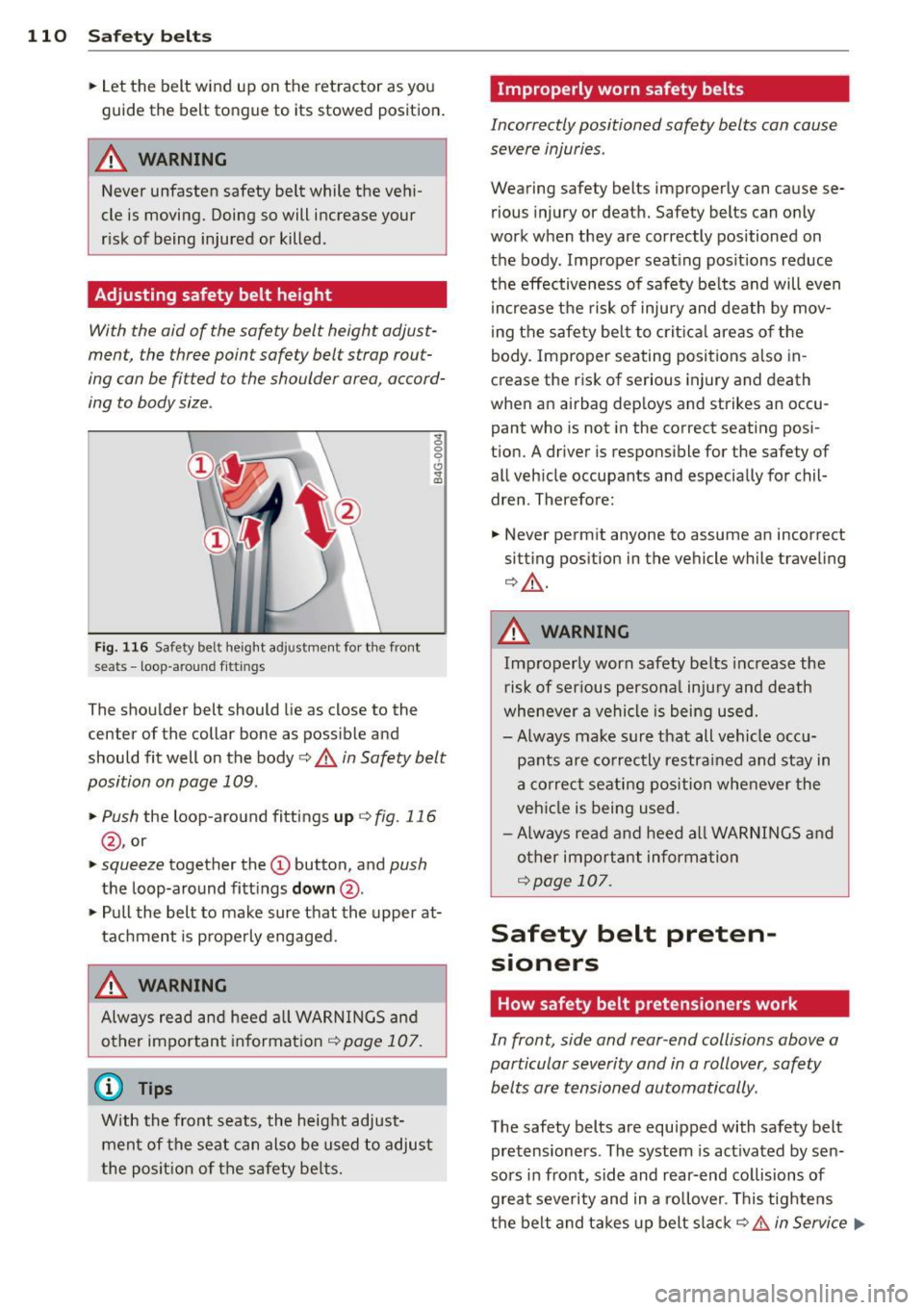
Adjusting safety belt height
-
With the aid of the safety belt height adjust
ment, the three point safety belt strap rout
ing can be fitted to the shoulder area, accord
ing to body size .
~ 0 0 6
Fig. 116 Safety belt heig ht adj ustme nt for th e fro nt
seats -loop -around fittings
.. (0
The shoulder belt should lie as close to the
center of the collar bone as possib le and
should fit well on the body
c:> .&. in Safety belt
position on page 109.
• Push
the loop-around fittings up c:> fig. 116
@, or
• squeeze together the(!) button, and push
the loop-around fitt ings do wn@ .
• Pull the belt to make sure that the upper at
tachment is properly engaged.
.&, WARNING
Alw ays read and heed a ll WARNINGS and
other impo rtant informat ion
¢ page 107.
(D Tips
With the front seats, the height adjust
ment of the seat can also be used to adjus t
the posit ion of the safety be lts.
Improperly worn safety belts
Incorrectly positioned safety belts can cause
severe injuries .
Wearing safety belts improperly can cause se
rious injury or death. Safety belts can o nly
work when they are correctly positioned on
the body . Improper seat ing pos itions reduce
the effectiveness of safety be lts and will even
i ncrease t he risk of inju ry and death by mov
ing the safety be lt to crit ica l areas o f the
body. Improper seating positions also in
crease the risk of serious injury and death
when an a irbag deploys and strikes an occu
pant who is not in the correct seating posi
tion. A driver is respons ible for the safety of
all veh icle occupants and especially for chil
dren . Therefore:
• Never permit anyone to assume an incorrect
sitting position in the vehicle while traveling
c:> ,&. .
.&, WARNING
Improperly worn safety be lts increase the
r isk of ser ious persona l injury and death
whenever a vehicle is being used.
- Always ma ke sure that all vehicle occ u
pants are co rrectly restra ined and stay in
a correc t seating position whe never the
veh icle is being used .
- Always read and heed all WAR NINGS a nd
o ther important inform ation
¢page 107.
Safety belt preten
sioners
How safety belt pretensioners work
In front, side and rear-end collisions above a
particular severity and in a rollover, safety
belts are tensioned automatically.
The safety belts are equipped with safety belt
pretensioners . The system is act ivated by sen
sors in front, side and rear-end collisions of
grea t severity and in a rollover. This tightens
the belt and t akes up belt slack¢.&.
in Service .,._
Page 122 of 258
120 Airbag sys te m
on the safety belt. The tension on the safety
belt and the weight registered by the
we ight-sensing mat help the control un it
"decide" whether the front a irbag for the
front passenger seat should be turned off or
not ¢
page 114, Child restraints on the
front seat -some important things to
know .
-A sensor in the safety belt latch for the dr iv
er and for the front seat passenger that
senses whether that safety belt is latched or
not and transm its this informa tion to the
electron ic cont ro l unit.
& WARNING
Damage to the front passenger seat can
prevent the front airbag from working
properly.
- Improper repair or disassembly of the front passenger and driver seat wi ll pre
vent the Advanced Airbag System from
functioning properly.
- Repairs to the front passenger seat must
be performed by q ualified and properly
trained workshop personnel.
- Never
remove the front passenger or
dr iver seat from the veh icle.
- Never
remove the upholstery from the
front passenger seat .
- Never disassemble or
remove parts from
the seat or disconnect wires from it .
- Never carry sharp objects in your pockets
or place them on the seat .
If the weight
sensing mat in the passenger seat is punctured it cannot work properly.
- Never carry things on your lap or carry
objects on the passenger seat. Such
items can increase the weight registered
by the weight-sens ing mat and send the
wrong information to the airbag control
unit.
- Never store items under the front pas senger seat. Parts of the Advanced Ai r
bag System under the passenge r seat
cou ld be damaged, prevent ing them and
t h e a irbag sys tem from wo rking proper
ly .
-
- Never p lace seat covers or rep lacement
upho lstery that have not been specifica l
ly approved by Audi on the front seats.
- Seat
covers can prevent the Advanced
Airbag System from recognizing chi ld re
straints or occupants on the front pas
senger seat and prevent the side airbag
in the seat backrest from deploying prop
erly.
- Never use cushions, pillows, blankets or similar items on the front passenger
seat. T he additional padding w ill prevent
the we igh t-sensing mat in the sea t from
accurately regis tering the child rest rain t
or pe rson on the seat and prevent the
Advanced Airbag System from function ing p roperly.
- If you m ust use a child restraint on the
front passenge r seat and the child re
straint manufacture r's instructions re
quire the use of a towel, foam cushion or
someth ing e lse to properly pos ition the
child restraint, make certain that the
PASSENGER AIR BAG OFF light comes
on and stays on whenever the ch ild re
s traint is i nstalled on the front passen
ge r seat.
- If the PASSENGER AIR BAG OFF light
does not come on and st ay on, immed i
ately install child rest raint in a rear seat
ing position and have the ai rbag system
inspected by your authorized Audi dealer.
How the Advanced Airbag System
components work together
The front Advanced Airbag System and the
s ide a irbags supp lement the protect ion of
fered by the front three-point safety belts
with pretensioners and load limiters a nd the
adjus table head rest rain ts to help reduce the
r isk of in jury in a wide range of accident and
c rash situations . Be s ure to read the impor
tant information about safety and heed the
WARNINGS in this chapter .
Deployment o f the Adv a need A irbag System
and the activation of the safety belt preten
sioners depend on the deceleration measured
1111-
Page 148 of 258
146 Child Saf ety
Deactivating the convertible locking
retractor
The convertible locking retractor for child re
straints will be deactivated automatically when the belt is wound all the way back into the retractor .
.,. Press the red button on the safe ty belt buck
le. The be lt tongue w ill pop out of the buck
le .
.. Guide the safety be lt all the way back into
its stowed position .
A lways le t the safety bel t retract comp lete ly
into its stowed posit ion . The sa fety belt can
now be used as an ordinary safety belt with
out the convert ib le locking ret ractor for chi ld
restra ints.
If the convertible locking retracto r shou ld be
activated inadvertently, the safety belt m ust
be unfastened and guided comp letely back in
to its stowed pos ition to deactivate th is fea
ture. If the convertib le locki ng retractor is not
deactivated, the safety be lt will gradually be
come tighter a nd u ncomfo rtable to wea r.
A WARNING
Imprope rly insta lled child saf ety seats in
crease t he risk of ser ious personal inju ry
a n d death in a collision .
- Never unfaste n the safety belt to deacti
vate the convert ible lo cking re tr actor fo r
ch ild rest rain ts while the veh icle is mov
ing. You would not be res trained and
cou ld be seriously injured in an accident.
- Always re ad and heed all WARN INGS
whenever using a child rest rained in ave
hicle is being used
¢page 133. Special
precautions apply when installing a ch ild
safety seat on the front passenge r seat
¢ page 114, Child restraints on the front
seat -some important things to know.
LATCH Lower
anchorages and tethers
for children
Child Restraint System anchors and how
are they related to child safety
T o p rov ide a simple r and more practicable way
to a ttach the child restra int on t he vehi cle
sea t, Federal regulat ions re quire spe cial lowe r
anchorages in vehicles and devices on new
c h ild restraints to attach to the vehicle ancho
rages.
T he comb inat io n of th e tether anc horages and
the lowe r anchorages is now genera lly c alled
t h e
LATCH system fo r "Lower Anchorages and
T ethers for Child ren."
F o rward-f ac ing ch ild res trai nts ma nufacture d
after September 1, 1999, are req uired by U .S .
f ede ra l regu lations to comply with new child
head movement performance req uirements.
These new performance req uirements make a
tether necessary on most new child seats.
Installing a child restraint that requires a top
tethe r without one can seriously impair the
performance of the c hild restra int and its abil
ity to protect the child in a coll is ion. Insta lling
a chi ld restrai nt that requires a top tether
without the top tether may be a violat ion of
state law.
Child rest raint manufacturers offer LATCH
lower anchorages on their child seats w ith
hook-on or push-on connectors attached to
adjustable straps .
In add ition to the LATCH lower anchorages,
t h ese chi ld restraint systems usually require
t h e use of tethe r straps to he lp keep the ch ild
rest raint fi rmly in place.
A WARNING
-Imp roper installat ion of ch ild restra ints
will i ncrease the r is k of injury a nd dea th i n
a cr ash.
-