warning lights AUDI Q3 2015 User Guide
[x] Cancel search | Manufacturer: AUDI, Model Year: 2015, Model line: Q3, Model: AUDI Q3 2015Pages: 258, PDF Size: 64.9 MB
Page 22 of 258
20 Driver in formation d ispl ay
Driver information
display
Overview
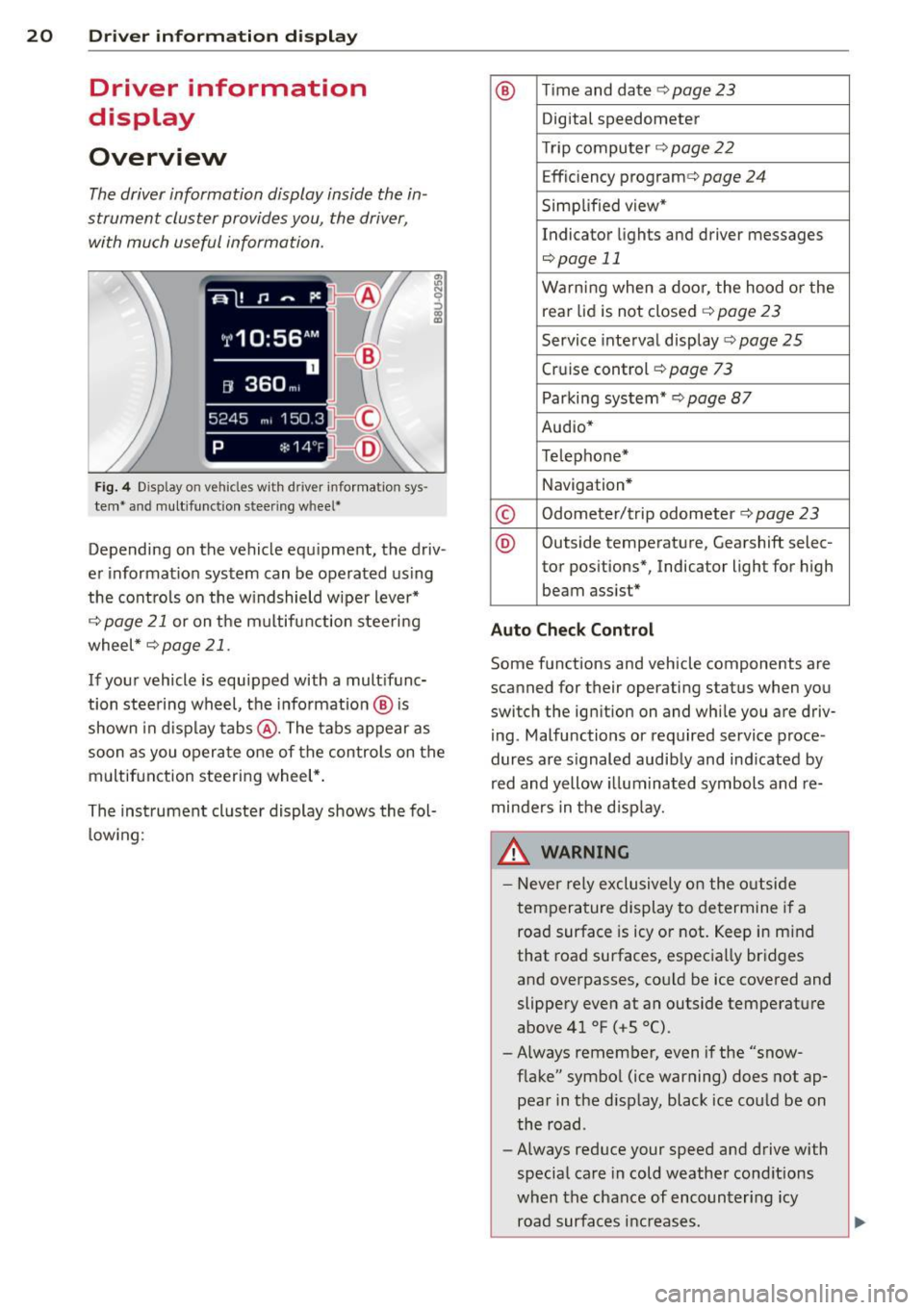
The driver information display inside the in
strument cluster provides you, the driver ,
with much useful information.
Fi g. 4 Dis play on vehicle s w it h dri ve r in fo rma tion sys
tem * and mult ifunc tion steering w hee l*
:ii N 9 ::> a, a,
Depending on the vehicle equ ipment, the driv
er informat ion system can be operated us ing
the cont rols on the w indshield wipe r lever*
¢
page 21 or on the m ultifunction steering
wheel *¢
page 21 .
If your vehicle is equ ipped with a mult ifunc
tion stee ring wheel, t he informat io n @ is
shown in d isplay tab s@ . The tabs appear as
soon as you opera te one of the controls on the
multif unction steering wheel* .
Th e inst rument cluster display shows the fol
l ow ing:
® T im e and date ¢ page23
Digital speedometer
Tr ip compu ter ¢
page 22
Effic iency program ¢ page 24
Simplified view*
Indicator lights and drive r me ssages
¢page 11
Warning when a door, the hood or the
rea r lid is not closed¢
page 23
Service inte rval display ¢ page 25
Cruise control ¢ page 73
Parking system* ¢page 87
Audio*
Telephone*
Navigation *
© Odometer/trip odometer ¢ page 23
® Outs ide temperature , Gearshift selec-
tor pos itions*, Indicator light for high
beam assist *
Auto Check Control
Some f unctions and vehicle components are
scanned for their operating status when yo u
switch the igni tion on and whi le you a re driv
i ng . Malfunctions or required service proce
dur es are s ignaled audib ly and ind icated by
red and yellow illuminated symbols and re
minders in the d isp lay.
8, WARNING -
- Never rely exclusively o n the o utside
t empera ture display to de termine i f a
road surface is icy or not. Keep in m ind
that road surfaces, espec ia lly bridges
and overpasses, co uld be ice
covered and
slippery
even at an outside tempe rature
above 41 °F ( +S 0
() .
-Always remember, even if the "snow
f lake" symbol (ice warning) does not ap
pear in the d isp lay, black ice cou ld be on
the road .
- Always reduce your speed a nd drive with
specia l care in cold weathe r cond itions
when the chance of encounter ing icy
road surfa ces inc reases .
Page 39 of 258
M N M N
0 ::i co
rl I.O
"' rl
"' rl
.. To turn the child safety locks on , turn the ig
nition key in the direction of the arrow .
.. To turn
off , turn the ignition key opposite
the direction of the arrow.
When the child safety locks are activated, the
inside door handles do not work and the doors
can only be opened from the outside.
Power windows
Controls
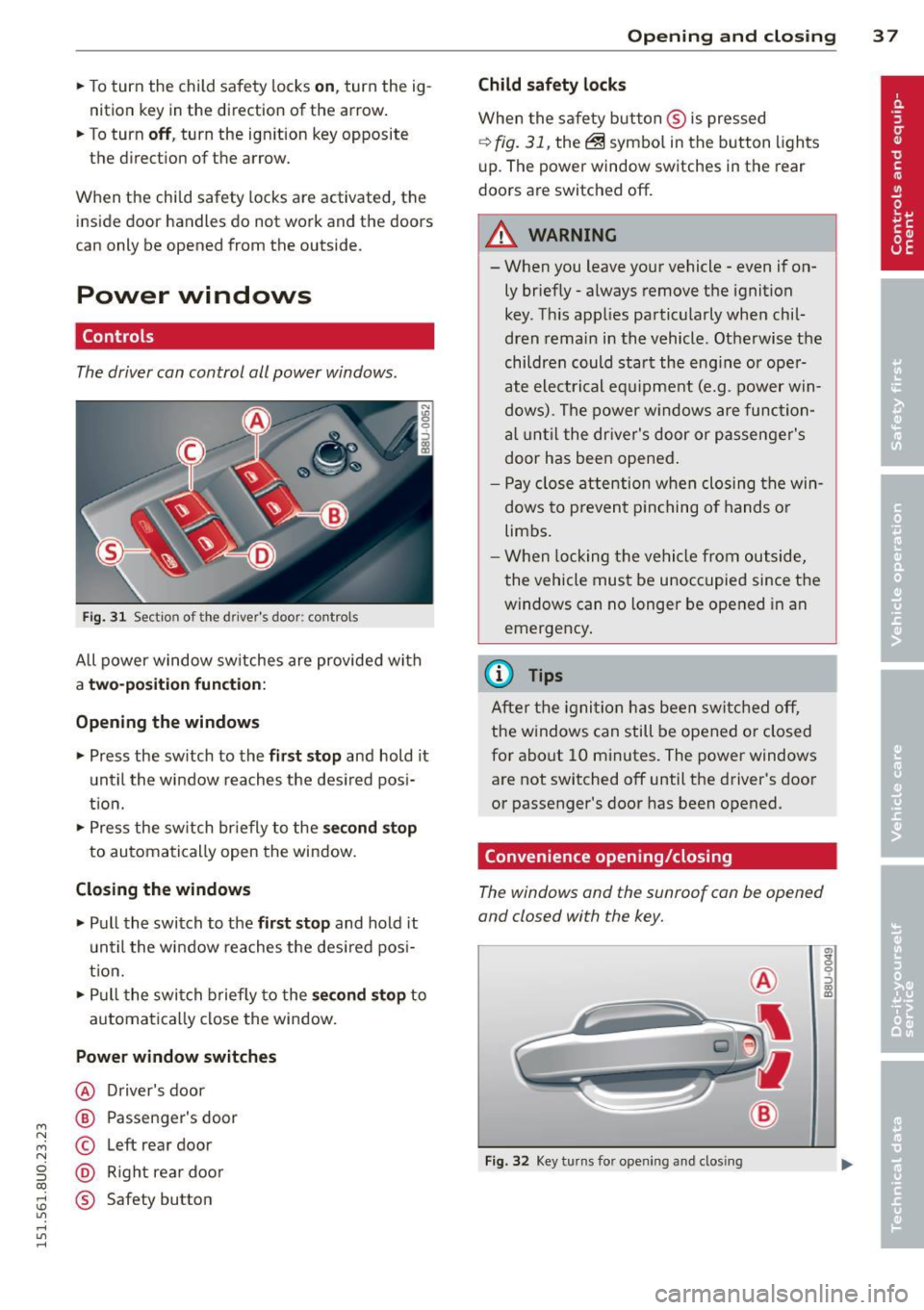
The driver can control all power windows .
Fig. 31 Section of the driver's door: controls
All power window sw itches are provided with
a t w o-posi tion fun cti on:
Opening th e window s
.. Press the sw itch to the fi rs t sto p and hold it
until the window reaches the desired posi
t ion .
.. Press the sw itch br iefly to the
sec ond s top
to automatically open the window.
Closing th e windows
.. Pull the switch to the fir st stop and hold it
un til the window reaches the des ired pos i
tion.
.. Pull the switch briefly to the
se con d stop to
automatically close the window.
Power wind ow switche s
@ Driver's door
@ Passenger's door
© Left rear door
@ Right rea r doo r
® Safety button
Openin g an d clos ing 3 7
Child safety l ock s
When the safety button ® is pressed
¢ fig. 31, the~ symbol in the button lights
u p. The power window switches in the rear
doors are switched off.
&_ WARNING
--When you leave your vehicle -even if on-
ly briefly· always remove the ignition
key . Th is app lies particularly when chil·
dren remain in the vehicle. Otherwise the
children could start the eng ine or oper
ate electrical equ ipment (e.g. power w in
dows). The power windows are function
a l until the dr iver's door or passenger's
door has been opened.
- Pay close attention when closing the win
dows to prevent p inching o f hands o r
limbs.
- When locking the vehicle from outside,
the vehicle must be unoccupied since the
windows can no longer be opened in an
emergency.
(I} Tips
After the igni tion has been switched off,
the w indows can still be opened or closed
for about 10 minutes . The power windows
are not switched off until the driver's door
or passenger's door has been opened.
Convenience opening/closing
The windows and the sunroof can be opened
and closed with the key.
F ig. 32 Key turns for opening and closing
"' z 9 ::::, a, to
Page 42 of 258
40 Clear vision
Clear vision
Lights
Switching the lights on and off
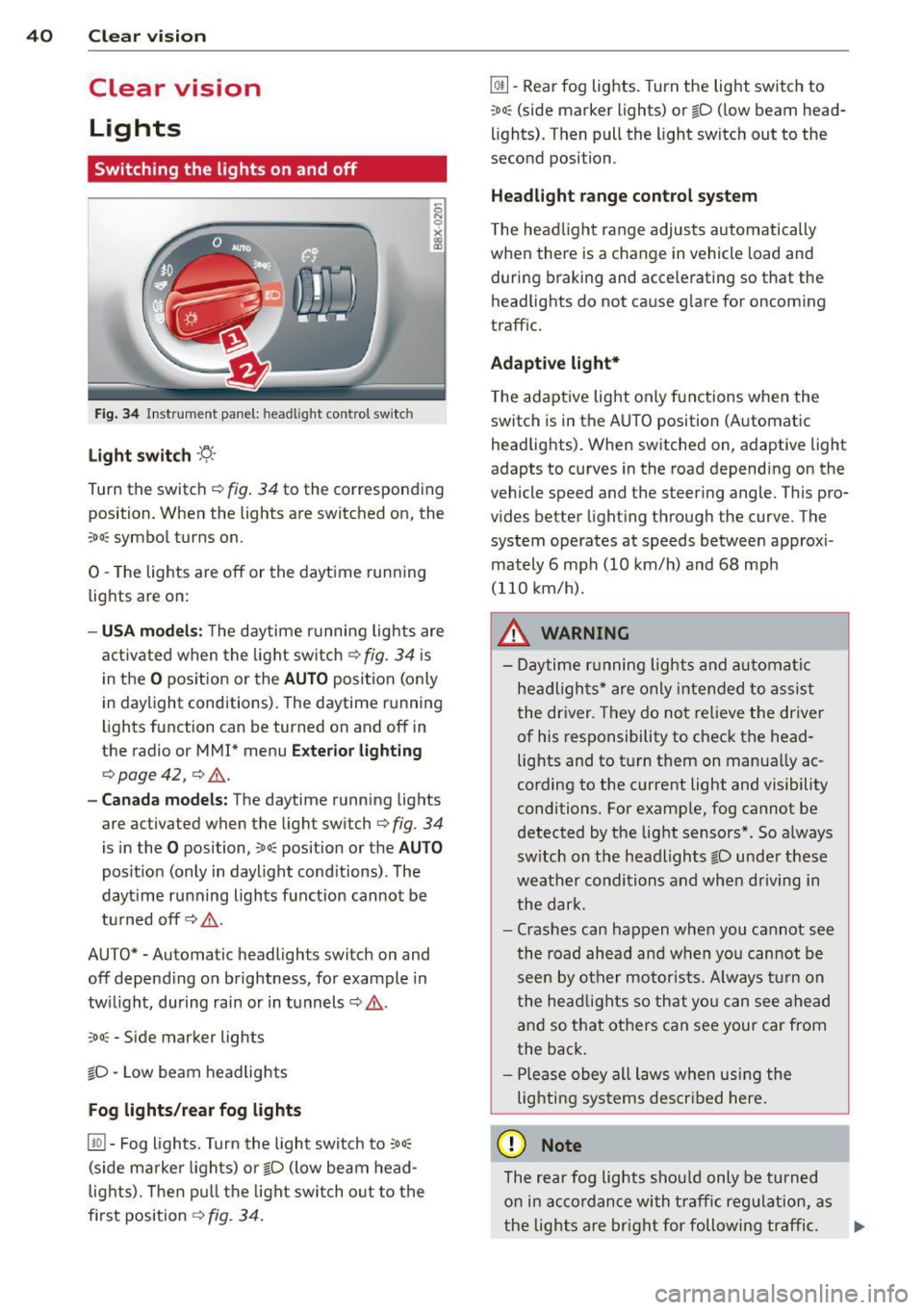
Fig . 34 Instrument panel: headlight control switch
Light switch -'t;. -
Tu rn the switch ¢ fig. 34 to the corresponding
position. When the lights are switched on, the
:oo : symbol turns on.
0 -The lights are off or the daytime running
lights are on:
- USA models: The daytime running lights are
activated when the light switch¢
fig. 34 is
in the
O position or the AUTO position (only
in daylight conditions). The daytime running
lights function can be turned on and off in
the radio or
MMI* menu Exterior lighting
¢ page 42, ¢ ,& .
-Canada models : The daytime running lights
are activated when the light switch¢
fig. 34
is in the O posi tion, co o: position or the AUTO
position (only in daylight conditions). The
dayt ime running lights function cannot be
turned off¢,& .
AUTO* -Automatic headligh ts swi tch on and
off depending on brightness, for example in
twilight, during rain or in tunnels¢,& .
:oo: -Side marker lights
io -Low beam headlights
Fog lights /rear fog lights
[!Q] -Fog lights. Turn the light switch to :oo:
(side marker lights) or io (low beam head
lights). Then pull the light switch out to the
first position ¢
fig. 34.
@I] -Rear fog lights. Turn the light switch to
:oo : (side marker lights) or io (low beam head
lights). Then pull the light switch out to the
second position .
Headlight range control system
The headlight range adjusts automatically
when there is a change in veh icle load and
during braking and accelerating so that the
headlights do not cause glare for oncoming
traffic.
Adaptive light*
The adaptive light only functions when the
switch is in the AUTO position (Automatic
headlights). When switched on, adapt ive light
adapts to curves in the road depending on the
vehicle speed and the steering angle. This pro
vides better lighting through the curve . The
system operates at speeds between approxi
mately 6 mph (10 km/h) and 68 mph
(110 km/h) .
_&. WARNING
- Daytime running lights and automatic
headlights* are only intended to assist
the driver. They do not relieve the driver
of his responsibility to check the head
lights and to turn them on manually ac
cording to the current light and visibility
conditions. For example, fog cannot be
detected by the light sensors*. So always
sw itch on the headlights
io under these
weather conditions and when driving in
the dark.
- Crashes can happen when you cannot see
the road ahead and when you cannot be
seen by other motorists. Always turn on
the headlights so that you can see ahead
and so that others can see your car from
the back.
- Please obey all laws when using the
lighting systems described here.
(D Note
The rear fog lights should only be turned
on in accordance with traffic regulation, as
-
the lights are bright for following traffic. .,._
Page 43 of 258
M N M N
0 ::i co
rl I.O
"' rl
"' rl
(D Tips
-The light sensor* for headlight control is
located in the rear view mirror mount.
You should therefore not apply any stick
ers to the windshield in this area in order
to prevent malfunctions or failures.
- Some exterior lighting functions can be
ad justed
¢ page 42.
- When you switch off the ignition while
the vehicle's lights are turned on, a buz
zer sounds as long as the driver's door is
open .
- In cool or damp weather, the inside of
the headlights, turn signals and tail
lights can fog over due to the tempera
ture difference between the inside and
outside. They will clear shortly after
switching them on. This does not affect
the service life of the lighting.
- In the event of a light sensor malfunc
tion, the driver is notified in the instru
ment cluster display~
page 19 .
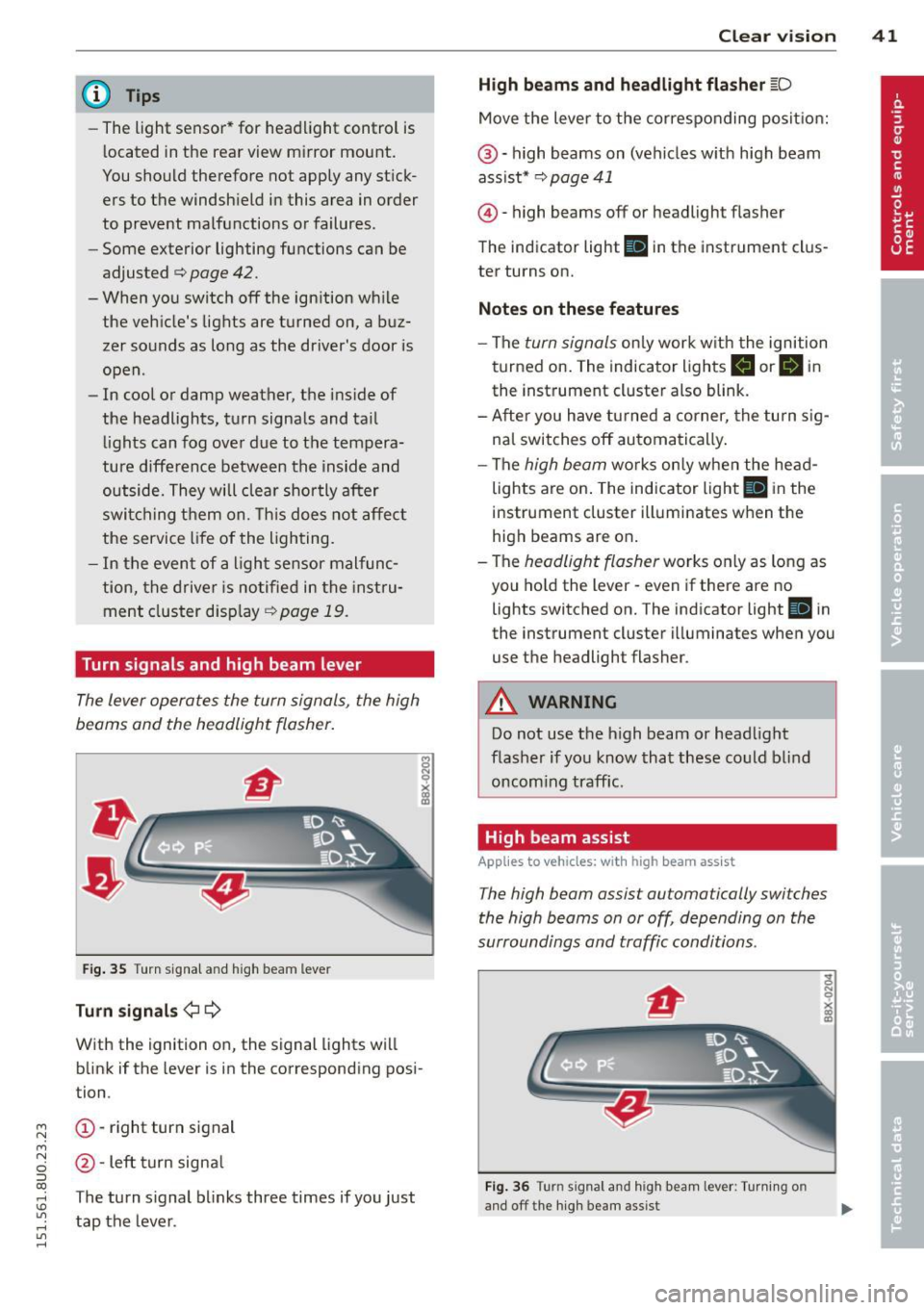
Turn signals and high beam lever
The lever operates the turn signals , the high
b eams and th e headlight flash er.
Fig. 35 Turn signal and high beam leve r
Turn signals ¢i ¢
With the ignition on, the signal lights will
blink if the lever is in the corresponding posi
tion .
(D-right turn signal
@-Left turn signal
T he turn signal blinks three times if you just
tap the lever. Clear
vision 41
High beams
and headlight flasher @:D
Move the lever to the corresponding position:
@-high beams on (vehicles with high beam
assist*
¢ page 41
@ -high be am s off or headligh t fla sher
The indicator light
Ill in the instrument clus
ter turns on.
Notes on these features
-The turn signals only work with the ignition
turned on. The indicator lights
II or Ill in
the instrument cluster also blink.
-After you have turned a corner, the turn sig
nal switches off automatically.
- The
high beam works only when the head
lights are on. The indicator light
El in the
instrument cluster illuminates when the
high beams are on.
- The
headlight flasher works only as long as
you hold the lever -even if there are no
lights switched on. The indicato r light
Iii in
the instrument cluster illuminates when you
use the headligh t flasher .
A WARNING
Do not use the high beam or headlight
flasher if you know that these could blind
oncoming traffic.
High beam assist
Applies to veh icles: w ith high beam assist
-
The high beam assist automatically switches
the high beams on or off, depending on the
surroundings and traffic conditions .
Fig. 36 Turn s ignal an d h igh beam lever : Turning o n
and off the high beam assist
Page 44 of 258
42 Clear vis ion
Activating high beam a ssi st
Requirement: The light sw itch must be in the
AUTO position, the low beam headlights must
be on.
• Press the lever into pos it ion (D in order to
activate the high beam assist . T he indicator
li gh t
IIJ turns on in the instrument cluster
display and the high b eams switch on or
off
automatica lly . The indicator light Bl turns
on if the high beams were switched on .
Switching the high beams on /off
m anuall y
Requir ement : Hig h beam assist is activated .
I f the h igh beams did not switch on/off auto
matica lly when expected, yo u may instead
switch them on/off manually:
• To switch the high beams on manually, press
the leve r into position (D. The indica tor light
El tu rns on. To switch the high beams off
again, pull the lever into position @.
• To switch the high beams
off manually after
th ey hav e tu rn ed on automatically, p ull the
lever into posi tion @.
Opera ting th e headlight fla sher
• To ope rate the flashers while the h igh beam
assist is active, pull the lever into position
@ . T he high beam assist will remain active.
Messages in the instrum ent cluster
displ ay
He adlight a ssis t: Sy stem f ault!
Drive to your a utho rized Aud i deale r immedi
ate ly to have the mal function corrected. You
can st ill switch the h igh beams on o r
off man
ua lly.
H eadlight a ssis t: Una vail able . N o C amera
v iew
The camera view is blocked, for examp le by a
sticke r or debris .
The sensor is located between the interior
rearv iew mirror and the winds hield . There
fore , do not place any stickers in th is area on
the w indshield .
A WARNING
High beam assist is only intended to assist
the driver. The drive r is still responsib le for
controll ing the headlights and switc hing
the high beams on and
off manually de
pending on t raff ic, lighting and visib ility
conditions. Fa ilu re to intervene manually
may lea d to risk of acc ident.
It may be nec
essary to operate the high beams manual
l y in the following situations, e.g.:
- For adverse weathe r condit ions such as
fog, heavy rain, blowing snow or spraying water.
- On roads where oncoming traff ic may be
partially obscured such as expressways .
- If there are individua ls on the road with
no lighting or poo r light ing, such as cy
clists.
- In tight curves and on steep slopes.
- In poorly lit are as.
- W ith st rong refle cto rs such as signs.
- If t he area of the winds hield near the
sensor is fogged ov er, dirty, icy o r cov
ered wi th a stic ker.
' Adjusting exterior lighting
The functions are selected in the radio or
MM!* .
• Select: !CARI func tion but ton > S ystems or
Car Syst ems contro l button > Ve hicle set
ting s> Exterior lighting .
Coming home (light when lea ving car )*,
Leav ing home (light when unlocking car) *
The coming home function illuminates the
area around the vehicle when the ignition is
switched
off and the dr ive r's door is open ed .
Depend ing on ve hicle equ ipment, the function
can be switched on and
off or the length of
t ime the lights remain on* can be ad justed .
T he
leaving home function illuminates the
area around the vehicle when unloc king it .
T h is func tion ca n be sw itche d on and
off .
The coming hom e and leaving home func
t ions only operate when it is dar k and the
Page 46 of 258
44 Clear vis ion
Inter ior lighting
There are other in ter ior light ing f unct ions
that are available. Individual functions can be
adj usted i n the MM I. Se lect: ICARlf unction
button >
Systems or Car Sy stems control but
ton>
Vehicle settings > Interior lighting .
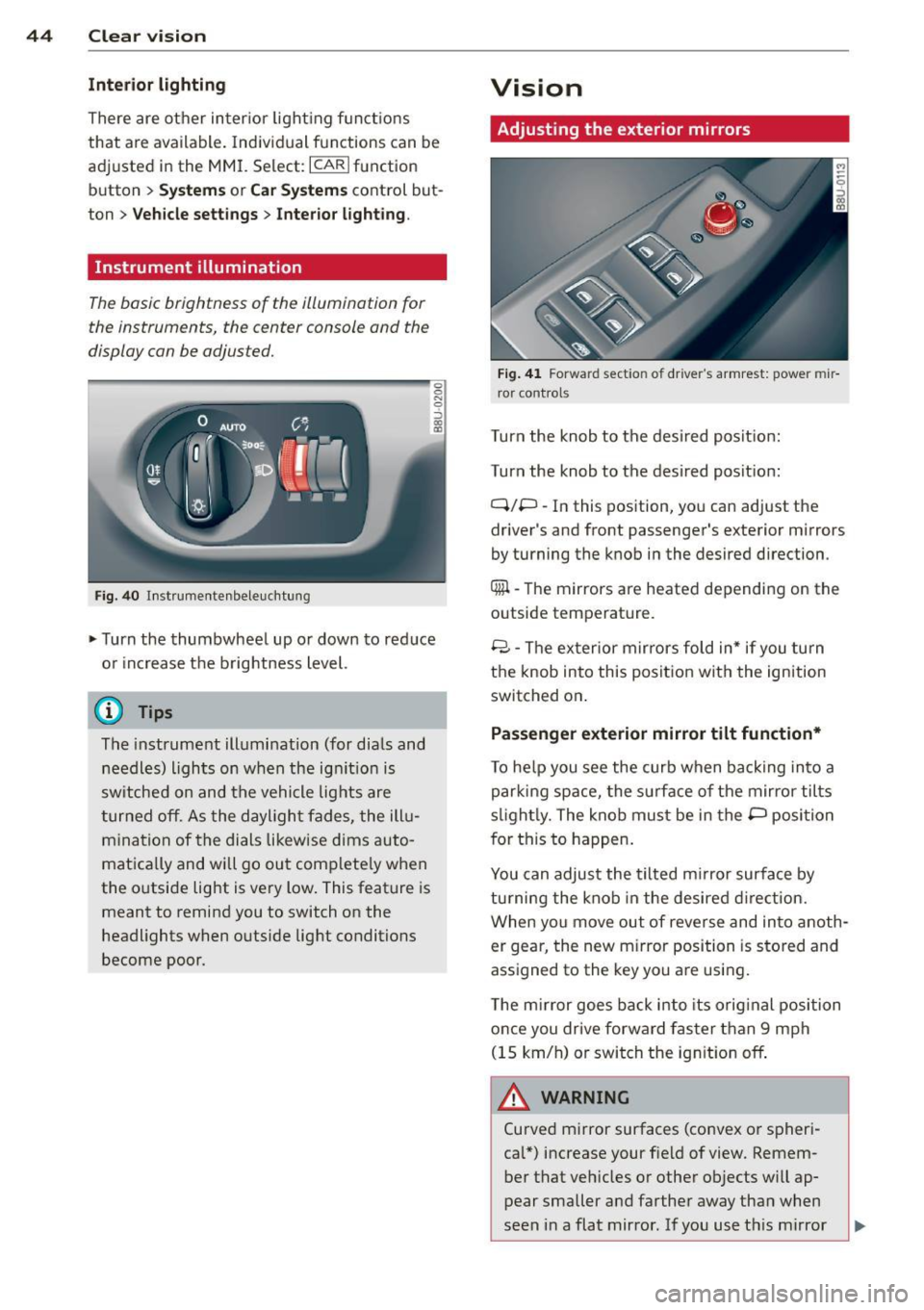
Instrument illumination
The basic brightness of the illum inat ion for
the instruments, the c enter console and the
display can be adjus ted.
F ig . 40 In st rumentenbeleu chtung
.,. Turn the thumbwhee l up or down to red uce
o r i ncrease t he brightness level.
(D Tips
The instrument ill umination (for dia ls and
needles) lights on when the ig nition is
sw itched on and the vehicle lig hts are
t urned off. As the dayligh t fades, the ill u
m ina tion of the dials likew ise dims auto
matically and will go out comp lete ly when
the outside light is very low . This feat ure is
meant to remind you to switch on the
headlights when outside lig ht conditions
become poor.
Vision
Adjusting the exterior mirrors
F ig. 41 Forwar d sect io n of dr ive r's armrest: powe r mir
r or control s
Turn the knob to the desired pos it io n:
Turn the knob to the des ired posit ion:
Q/P -In this position , yo u can adjust the
driver 's and front passenger's exterior mirrors
by turning the k nob i n the desired direction .
Qiil -The mirrors are heated depending on the
outside temperature .
8 -T he ex terior m ir rors fold in* if you turn
t h e knob into this position wit h the ignition
switched on .
Passenger exterior mirror tilt function*
To he lp you see the curb when ba ck ing into a
par king space, the surface of the mirror tilts
s li ght ly. The knob must be in the P posi tion
f or this to happen .
You can adjust the tilted m irror surface by
tu rning the knob in the desired direction.
When you move out of reverse and in to anoth
er gear, the new m irror position is s to red and
ass igned to the key you are using.
T he m irror goes ba ck i nto its orig inal position
once you dr ive forward faster than 9 mph
(15 km/h) o r swi tch the ig nition off .
A WARNING
Curved m irror surfaces (co nvex o r spheri
cal*) increase your f ie ld of view. Remem
ber that veh icles or other ob jects will ap
p ear smaller a nd farther away tha n when
seen in a flat mirror . If you use t his mi rror
-
Page 47 of 258
M N M N
0 ::i co
rl I.O
"' rl
"' rl
to estimate distances of following vehicles
when changing lanes, you could estimate incorrectly and cause an accident.
(D Note
- If the mirror housing is moved uninten
tionally (for example, while parking your
vehicle), then you must first fold the mir ror electrically. Do not readjust the mir
ror housing manually. You could damage
the motor which controls the mirror .
- If you wash the vehicle in an automatic
car wash, you must fold the exterior mir
rors in to reduce the risk of damage to
the mirrors. Never fold power folding ex
terior mirrors* by hand. Only fold them
in and out using the power controls.
@ Tips
If there should be a malfunction in the
electrical system, you can still adjust the
exterior mirrors by pressing the edge of
the mirror ..
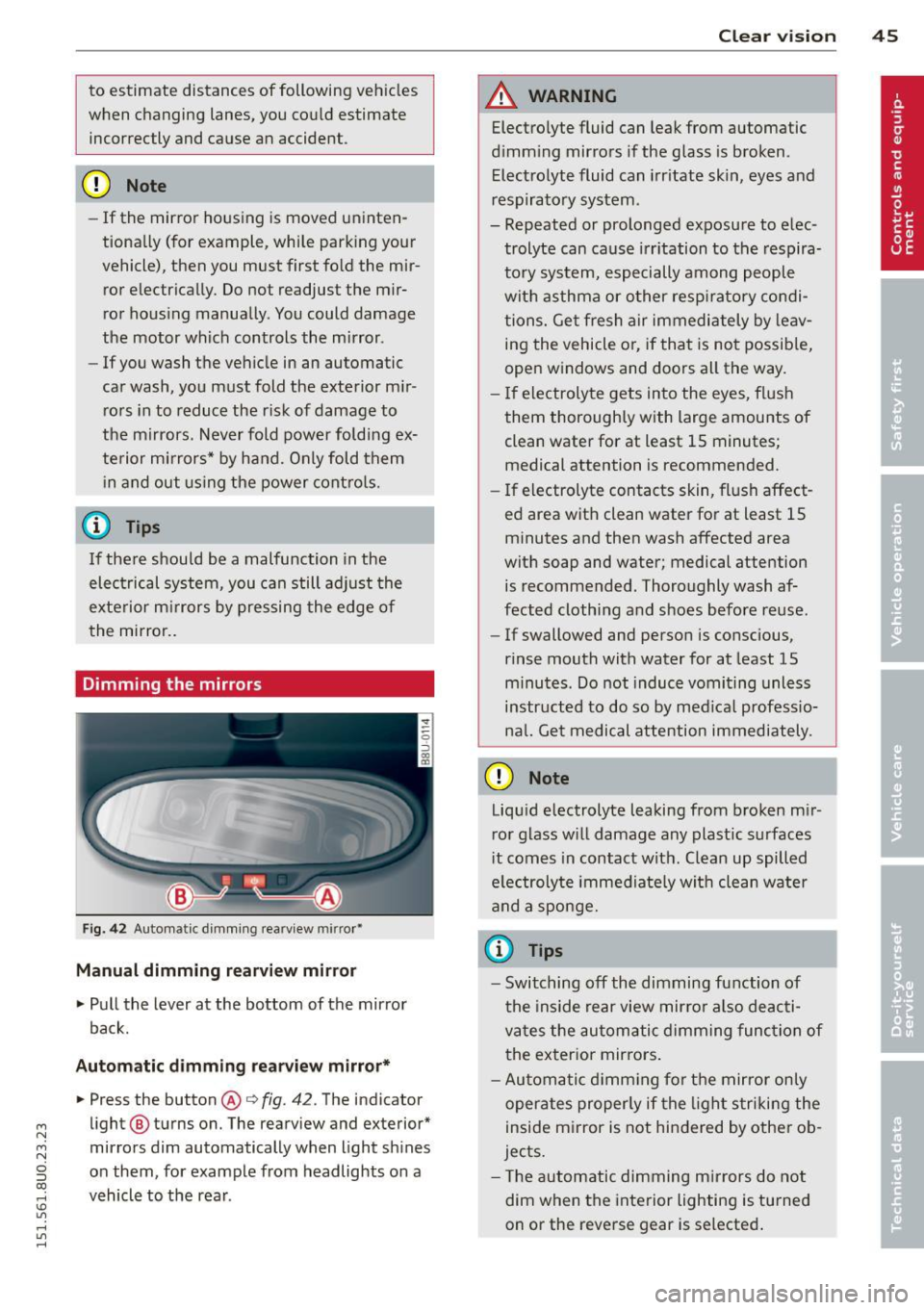
Dimming the mirrors
Fig. 42 Automatic dimming rearview mirror•
Manual dimming rearview mirror
.,. Pull the lever at the bottom of the mirror
back.
Automatic dimming rearview mirror* .,. Press the button
@r::;, fig. 42. The indicator
light @ turns on. The rearview and exterior*
mirrors dim automatically when light shines
on them, for example from headlights on a
vehicle to the rear .
Clear vision 45
A WARNING
Electrolyte fluid can leak from automatic
dimming mirrors if the glass is broken.
Electrolyte fluid can irritate skin, eyes and
respiratory system.
- Repeated or prolonged exposure to elec trolyte can cause irritation to the respira
tory system, especially among people
with asthma or other respiratory condi
tions. Get fresh air immediately by leav
ing the vehicle or, if that is not possible,
open windows and doors all the way.
- If electrolyte gets into the eyes, flush
them thoroughly with large amounts of clean water for at least 15 minutes; medical attention is recommended.
- If electrolyte contacts skin, flush affect
ed area with clean water for at least 15
minutes and then wash affected area
with soap and water; medical attention is recommended. Thoroughly wash af
fected clothing and shoes before reuse.
- If swallowed and person is conscious,
rinse mouth with water for at least 15
minutes. Do not induce vomiting unless
instructed to do so by medical professio
ncil. Get medical attention immediately.
(D Note
Liquid electrolyte leaking from broken mir
ror glass will damage any plastic surfaces
it comes in contact with. Clean up spilled
electrolyte immediately with clean water
and a sponge.
(D Tips
-Switching off the dimming function of
the inside rear view mirror also deacti
vates the automatic dimming function of
the exterior mirrors.
- Automatic dimming for the mirror only
operates properly if the light striking the
inside mirror is not hindered by other ob
jects.
- The automatic dimming mirrors do not
dim when the interior lighting is turned
on or the reverse gear is selected.
.
Page 73 of 258
M N
M N
0 ::i co ,...., \!) ..,.,
,...., ..,., ,....,
Emergency brake function
An emergency brake ensures that the vehicle
can be slowed down even if the
normal brakes
fail c::>
page 72, Emergency broking.
& WARNING
If a drive range is engaged with the vehicle
stat ionary and the engine running, you
must in no instance accelerate care lessly.
Otherw ise the vehicle will start to move
immediately -risk of an accident.
(D Tips
- If the parking brake is applied with the
i gnition switched off, the indicator lights
• in the switch and. (USA models) /
• (Canada models) in the instrument
cluster w ill go out after a certa in period
of time.
- Occasional noises when the park ing
brake is applied and re leased a re norma l
and are not a ca use for concern.
- When the vehicle is parked, the parking
brake goes through a se lf-test cycle at
regular intervals. Any assoc iated noises
are norma l.
Parking
~ Press the brake peda l to stop the vehicle.
~ Pull the switch@c::> page 70, fig . 77 to set
the parking brake.
~ Move the selector lever to P.
~ Turn the engine off c::> _&.
~ When on incl ines or declines, turn the steer
ing wheel so that the vehicle w ill roll i nto
the curb if it begi ns to move.
& WARNING
- When you leave your veh icle - even if on
ly b riefly- a lways remove the ign ition
key . This applies particularly when chil
dren remain in t he vehicle . Otherwise the
children co uld start the engine, release
the parking brake or operate electrical
equipment (e.g. power windows). There is the r isk of an accident .
On th e ro ad 71
-When the veh icle is locked, no one - par
ticularly not children should rema in in
the vehicle. Locked doors make it more
difficult for emergency wo rkers to get in
to the vehicle - putting lives at risk .
Starting from rest
The starting assist function ensures that the
parking broke is released automatically upon starting.
Stopping and applying park ing brak e
~ Pull the sw itch C®l to apply the pa rking
brake.
Starting and automatically releasing the parking brake
~ When you start to drive as usual, the park
ing brake is a utomatically released and your
veh icle begins to move.
When stopping at a traffic signal or stopping in city traff ic on vehicles with an automatic
transmission, the parking brake can be ap
plied. The vehicle does not have to be held
with the footbrake. The parking brake elimi
nates the tende ncy to creep w ith a dr ive range
engaged. As soon as you d rive off as usual,
t he pa rking bra ke is re leased automatically
and the veh icle s tarts to move.
St arting on slopes
When starting on inclines, the starting assist
prevents the vehicle from un intent io nally roll
ing back. The braking force of the parking
brake is no t re leased unt il su ff ic ient d riving
force has been built up a t the wheels.
(D Tips
Fo r safety reasons, the parking bra ke is re
l eased automatically o nly when the d riv
e r's safety belt is eng aged in the buckle.
Page 76 of 258
7 4 On the road
-The brake lights turn on when the brakes
are activated .
Switching on
0
f
®t
0
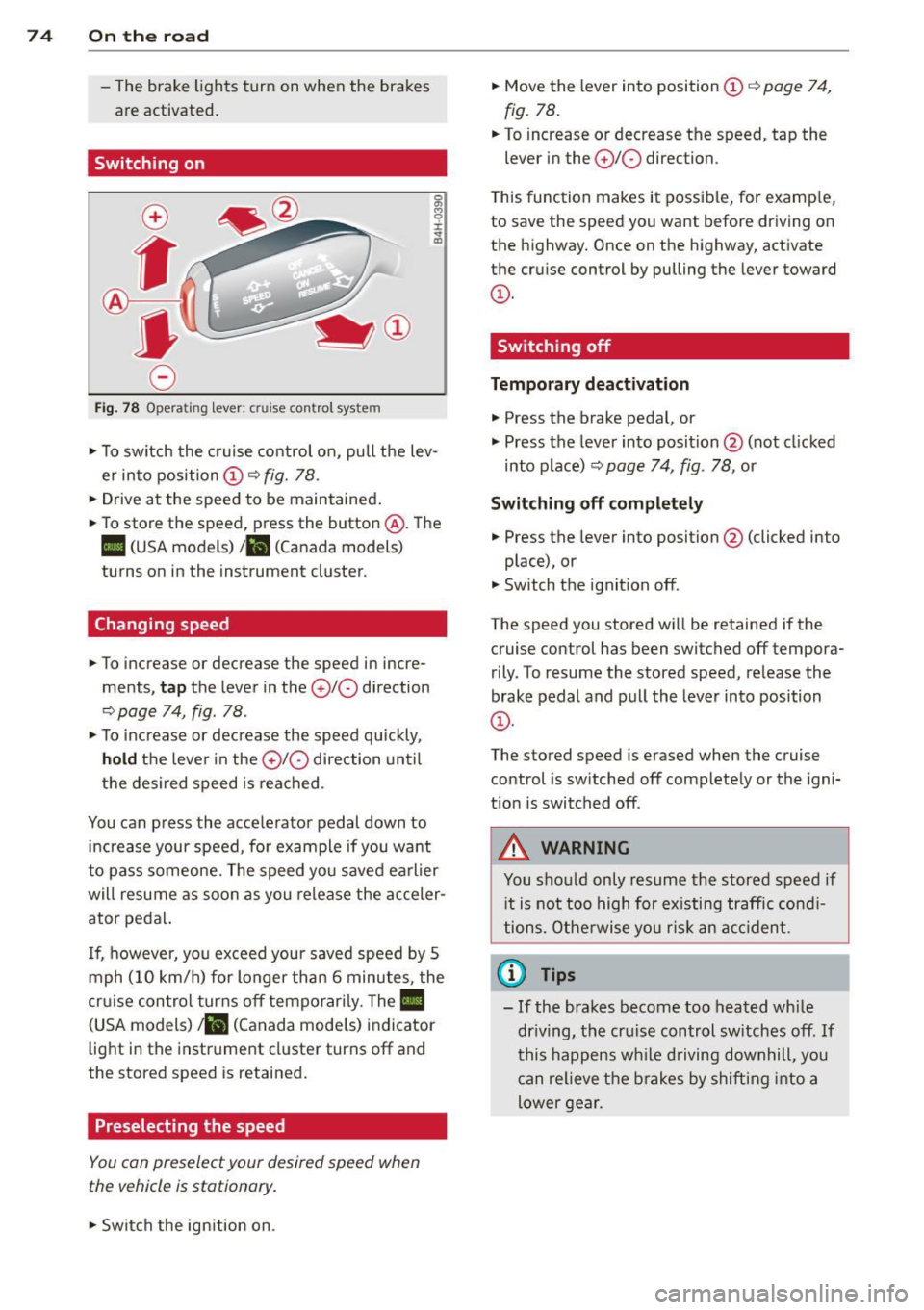
Fig. 78 Opera ting lever: crui se co ntro l system
0 O>
8
i
"' m
.,. To sw itch the cruise control on, pull the lev
er into position
CD c::> fig. 78 .
.,. Drive at the speed to be maintained .
.,. To store the speed, press the button @. The
II (USA models) Iii (Canada models)
turns on in the instrument cluster.
Changing speed
.,. To increase or decrease the speed in incre
ments,
tap the lever in the 010 direction
c::> page 74, fig. 78 .
.,. To increase or decrease the speed quickly,
hold the lever in the 0 10 direction until
the desired speed is reached.
You can press the acce lerator pedal down to
increase your speed, for example if you want
to pass someone. The speed you saved earlier
will resume as soon as you release the acceler
ator pedal.
I f, however, you exceed your saved speed by 5
mph (10 km/h) for longer than 6 minutes, the
cr uise contro l turns off temporarily. The
Ill
(USA models) ill (Canada mode ls) indicator
light in the instrument cluster turns off and
the stored speed is retained.
Preselecting the speed
You con preselect your desired speed when
the vehicle is stationary.
.,. Swi tch the ign ition on. .,.
Move the lever into position
CD c::> page 74,
fig. 78.
.,. To increase or decrease the speed, tap the
lever in the
0 10 direction.
T his function makes it possible, for examp le,
to save the speed you want before driving on
the highway. Once on the highway, activate
the cruise control by pulling the lever toward
CD-
Switching off
Temporary deactivation
.,. Press the brake pedal, or
.,. Press the lever into position @ (not cl icked
into p lace)
c::> page 74, fig. 78, or
Switching off completely
.,. Press the lever into position @(clicked into
place), or
.,. Switch the ignition off.
The speed you stored wi ll be retained if the
cruise control has been switched off tempora
rily . To resume the stored speed, release the
brake pedal and pull the lever into position
CD-
The stored speed is erased when the cruise
control is sw itched off complete ly or the igni
t ion is switched off .
A WARNING
-You should only resume the stored speed if
i t is not too high for existing traffic condi
tions. Otherwise you risk an accident.
(D Tips
-If the brakes become too heated while
dr iving, the cruise control switches off.
If
this happens while driving downhill, you
can relieve the brakes by shifting into a
lower gear.
Page 85 of 258
M N
M N
0 ::i co ,...., \!) 1.1'1 ,...., 1.1'1 ,....,
selector lever position such as D/S and re
lease the button.
~ Wait briefly until the transmission has shift
ed (you will feel a slight movement).
~ Remove your foot from the brake pedal and
accelerate.
St opp ing tem porar ily
~ Keep the vehicle stationary using the brak
ing peda l, for examp le at traffic lights.
~ Do not press the accelerator pedal when do
ing this.
~ To prevent the veh icle from roll ing when you
start driving, set the parking brake when
stopp ing on steep inclines
c::, ,& .
~ The parking brake will re lease automatically
and the vehicle will s tart moving once you
press the accelerator peda l.
Stopping/p ar king
If the selecto r lever is not in the P position
when you ope n the dr iver's door, the vehicle
could ro ll. The message
Shift to P and turn
off i gniti on, o therwi se vehicle ca n roll aw ay
appears.
~ Press and ho ld the brake pedal unt il the ve-
hicle has come to a complete stop.
~ Apply the parking brake c::, page 71, Parking.
~ Se lect the P selector leve r position c::, ,& .
Stopping on an incline
~ Always press the brake peda l to hold the ve
hicle i n place and prevent it from " rolling
back "
c::> &_. Do not try to prevent the vehi
cl e from "roll ing back" when a gea r is en
gaged by increasing the engine speed
c::> (D .
Starting on an incline
~ Activate the parking b rake .
~ With the d riving gea r se lected, press the ac
c e lerator pedal ca refully. The parking brake
will release automat ica lly if yo ur seat belt is
f astened.
Unde r ce rtain circumstances, such as dr iv ing
in the moun tains, it may be useful to swi tch
tempo rari ly to the manua l shift prog ram in o r-
Automa tic tran sm iss ion 83
der to ad just the gears to the driving condi
tions by hand
c::, page 84.
On s lopes, activate the parki ng b rake first and
then move the selec to r l ever to the P posi tion.
T his prevents too much stress from being
placed on the locking mechanism .
A WARNING
-The vehicle can also roll when the engine
is stopped.
- Unintended vehicle movement can cause
serio us injury.
- Never leave your vehicle with the engine
ru nning while in gear. If you must leave
your veh icle when the engine is running,
activate the parking brake and move the
selector lever to P.
- Power is still transm itted to the wheels
when the engine is runn ing at idle. To
prevent the vehicle from "creeping", you
must keep your foot on the brake when
the eng ine is ru nning and the se lector
leve r is in D/S o r R or "t ipt ron ic" mode is
selec ted .
-Do not press the accelerator pedal when
changing the se lector lever posi tion
while the veh icle is stationary and the
engine is running .
- Never sh ift into R or P wh ile driving.
- Before driving down a steep slope, re-
duce your speed and shift into a lowe r
gear wi th "tiptronic".
- Do not ride the bra kes o r press the bra ke
pe dal too often or too long when d riving
down a hi ll. Constant braking causes the
brakes to overheat and substantially re
duces braking performance, increases
brak ing distance or causes complete fa il
ure of the brake system .
- To prevent the vehicle from ro lling back
when stopp ing o n inclines, always ho ld it
in place with the brake pedal or parking
brake .
- Never hold the vehicle on an incline with
a slipping clutch. The clutch opens auto matically when it becomes too hot from