brake AUDI Q3 2015 Owner's Manual
[x] Cancel search | Manufacturer: AUDI, Model Year: 2015, Model line: Q3, Model: AUDI Q3 2015Pages: 258, PDF Size: 64.9 MB
Page 84 of 258
82 Autom atic tr an smi ssion
power . Shifting may become noticeable when
accelerat ing .
When the veh icle is stationary or at speeds
be low 1 mph (2 km/h), you must always apply
the foot brake before and while moving the lever to D/S out of N .
.&_ WARNING
Read and follow all WARNINGS c::> & in
Driving the automatic transmission on
page 83.
([) Note
Coasting downhi ll with the transmission in
N and the engine not running wi ll result in
damage to the automatic transmiss ion
and possibly the catalytic converter.
(D Tips
- If you accidentally select N while driv ing,
take your foot off the accelerator pedal i mmediately and wait for the engine to
s low down to idle before se lecting D/S.
- If there is a power failure, the selector
l ever will not move out of the P position.
The emergency release can be used if
this happens
c::> page 86 .
Automatic Shift Lock (ASL)
The Automatic Shift Lock safeguards you
against accidentally shifting into a forward or the reverse gear and causing the vehicle to
move unintentionally.
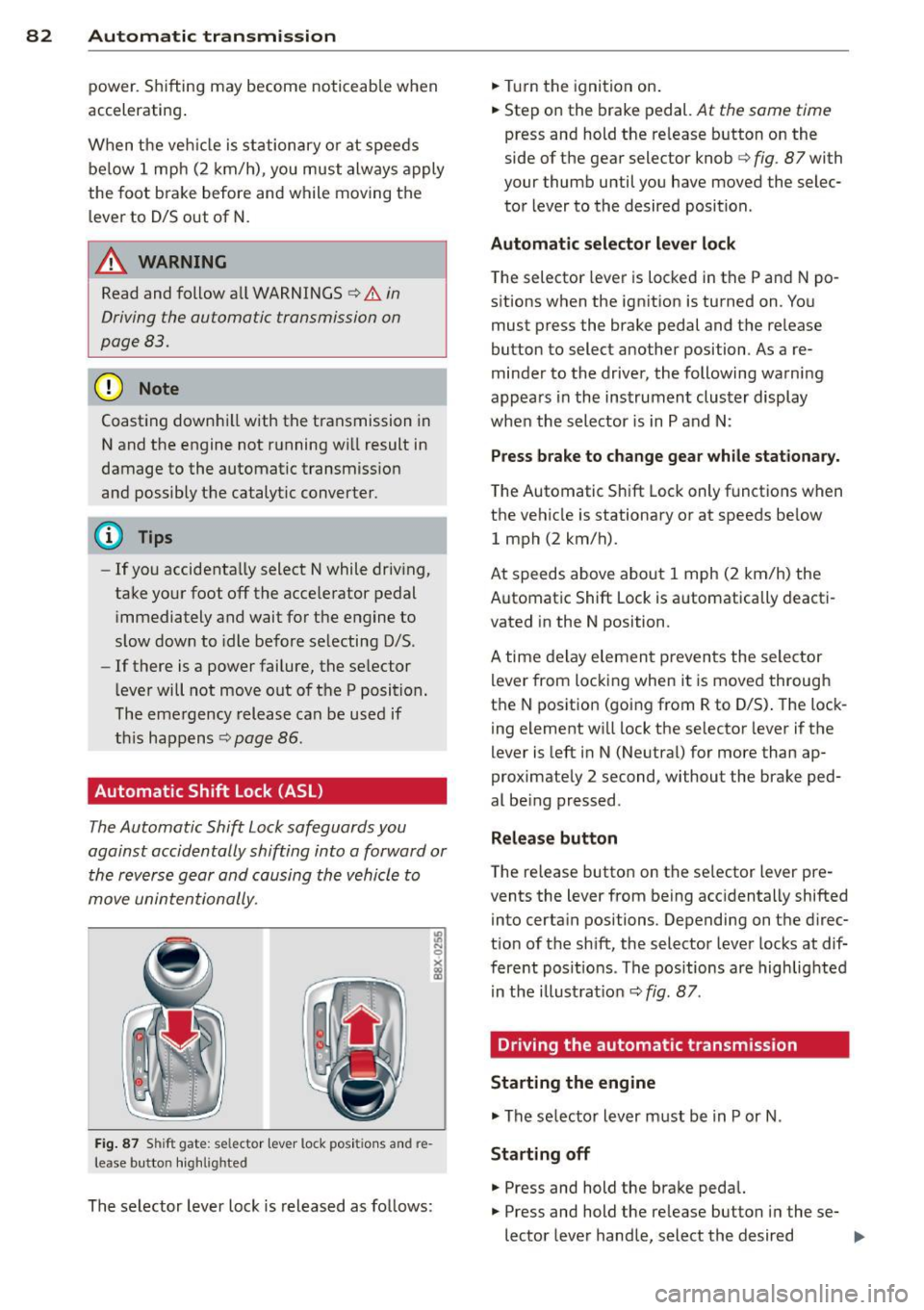
Fi g. 87 Shi ft gat e: selec tor lever lock posi tions and re
l ease button hig h lig hted
The selector lever lock is released as follows: .,.
Turn the ignition on .
.,. Step on the brake pedal.
At the same time
press and hold the re lease button on the
side of the gear selector knob
c::> fig . 87 with
your thumb until you have moved the selec
tor lever to the desired position .
Automatic sele cto r leve r lo ck
The selector lever is locked in the P and N po
sitions when the ignit ion is turned on . You
must press the brake pedal and the re lease
button to select another position . As a re
minder to the driver, the following warni ng
appears in the instrument cluster display
when the selector is in P and N:
Pre ss brake to change gear while stationary.
The Automatic Shift Lock only functions when
the vehicle is stationary or at speeds be low
1 mph (2 km/h).
At speeds above about 1 mph (2 km/h) the
Automat ic Shift Lock is automatically deact i
vated in the N position .
A time delay elemen t prevents the selector
lever from locking when it is moved through
the N posit ion (going from R to D/S) . The lock
i ng element w ill lock the selector lever if the
lever is left in N (Neutra l) for more than ap
proximately 2 second, without the brake ped
al be ing pressed.
Relea se button
T he release button on the se lector lever pre
vents the lever from being acc identally shifted
into certain positions. Depending on the d irec
t ion of t he sh ift, the selector lever locks at dif
fere nt posit ions . The positions are highlig hted
in the illust rat ion
c::> fig . 87.
Driving the automatic transmission
Starting the engine
.,. The se lector lever must be in P or N .
Starting off
.,. Press and hold the brake peda l.
.,. Press and hold the re lease button i n these-
lector lever handle, select the desired ..,_
Page 85 of 258
M N
M N
0 ::i co ,...., \!) 1.1'1 ,...., 1.1'1 ,....,
selector lever position such as D/S and re
lease the button.
~ Wait briefly until the transmission has shift
ed (you will feel a slight movement).
~ Remove your foot from the brake pedal and
accelerate.
St opp ing tem porar ily
~ Keep the vehicle stationary using the brak
ing peda l, for examp le at traffic lights.
~ Do not press the accelerator pedal when do
ing this.
~ To prevent the veh icle from roll ing when you
start driving, set the parking brake when
stopp ing on steep inclines
c::, ,& .
~ The parking brake will re lease automatically
and the vehicle will s tart moving once you
press the accelerator peda l.
Stopping/p ar king
If the selecto r lever is not in the P position
when you ope n the dr iver's door, the vehicle
could ro ll. The message
Shift to P and turn
off i gniti on, o therwi se vehicle ca n roll aw ay
appears.
~ Press and ho ld the brake pedal unt il the ve-
hicle has come to a complete stop.
~ Apply the parking brake c::, page 71, Parking.
~ Se lect the P selector leve r position c::, ,& .
Stopping on an incline
~ Always press the brake peda l to hold the ve
hicle i n place and prevent it from " rolling
back "
c::> &_. Do not try to prevent the vehi
cl e from "roll ing back" when a gea r is en
gaged by increasing the engine speed
c::> (D .
Starting on an incline
~ Activate the parking b rake .
~ With the d riving gea r se lected, press the ac
c e lerator pedal ca refully. The parking brake
will release automat ica lly if yo ur seat belt is
f astened.
Unde r ce rtain circumstances, such as dr iv ing
in the moun tains, it may be useful to swi tch
tempo rari ly to the manua l shift prog ram in o r-
Automa tic tran sm iss ion 83
der to ad just the gears to the driving condi
tions by hand
c::, page 84.
On s lopes, activate the parki ng b rake first and
then move the selec to r l ever to the P posi tion.
T his prevents too much stress from being
placed on the locking mechanism .
A WARNING
-The vehicle can also roll when the engine
is stopped.
- Unintended vehicle movement can cause
serio us injury.
- Never leave your vehicle with the engine
ru nning while in gear. If you must leave
your veh icle when the engine is running,
activate the parking brake and move the
selector lever to P.
- Power is still transm itted to the wheels
when the engine is runn ing at idle. To
prevent the vehicle from "creeping", you
must keep your foot on the brake when
the eng ine is ru nning and the se lector
leve r is in D/S o r R or "t ipt ron ic" mode is
selec ted .
-Do not press the accelerator pedal when
changing the se lector lever posi tion
while the veh icle is stationary and the
engine is running .
- Never sh ift into R or P wh ile driving.
- Before driving down a steep slope, re-
duce your speed and shift into a lowe r
gear wi th "tiptronic".
- Do not ride the bra kes o r press the bra ke
pe dal too often or too long when d riving
down a hi ll. Constant braking causes the
brakes to overheat and substantially re
duces braking performance, increases
brak ing distance or causes complete fa il
ure of the brake system .
- To prevent the vehicle from ro lling back
when stopp ing o n inclines, always ho ld it
in place with the brake pedal or parking
brake .
- Never hold the vehicle on an incline with
a slipping clutch. The clutch opens auto matically when it becomes too hot from
Page 86 of 258
84 Automatic tr an smis sion
the overload. An indicator lamp mJ illu
minates and a dr iver message appears
Q page 85 when the clutch is overload
ed .
- If the engine must remain running, never
have any driving pos ition engaged whe n
checking under the hood . Make sure the
selector lever has securely engaged and is locked in P with the parking brake set
c!:> page 179. Othe rwise, any inc rease in
eng ine speed m ay set the vehicle in mo
t io n, even wi th the park ing brake ap
plied.
(D Note
- When stopping on an i ncl ine, do not try
to hol d the veh icle in place by pressing
the accelerator peda l whi le a driving gear
is selected. This can cause the transmis
s ion to overheat and can damage it. Acti
vate the park ing brake or press the brake
pedal to prevent the vehicle from ro lling .
- Allow ing t he vehicle to roll when the en
gine is stopped and the selector lever is i n N will damage the transmiss ion be
cause it is not lub ricated under those cir
cumstances.
{DI Tips
For safety reasons, the park ing brake is re
leased automatically only when the dr iv
er 's safety belt is engaged in the buck le.
Hill descent control
The hill descent control system assists the
driver when driving down declines.
Hill descent control is activated when these
lector lever is in D/S and you press the brake
pedal. The transmission automatically se lects
a gea r that is suitable for the incline . Hill de
scent control tries to maintai n the speed ach
i eved at the time of bra king, within physical
an d techn ic al limita tio ns.
If may still be ne c
ess ary to adjust the speed with the bra kes . Hill descent contro
l sw itches off once the de
cline leve ls out or yo u press the acce lerator
peda l.
On vehicles wi th the cru ise contro l system
Q page 73, hill descent control is also activat
ed when the speed is set.
A WARNING
--
Hill descent control cannot overcome
physical lim itations, so it may not be ab le
to maintain a co nstant speed under a ll
conditions. A lways be ready to apply the
b rakes .
Manual shift program
Using the manual shift program you can
manually select gears .
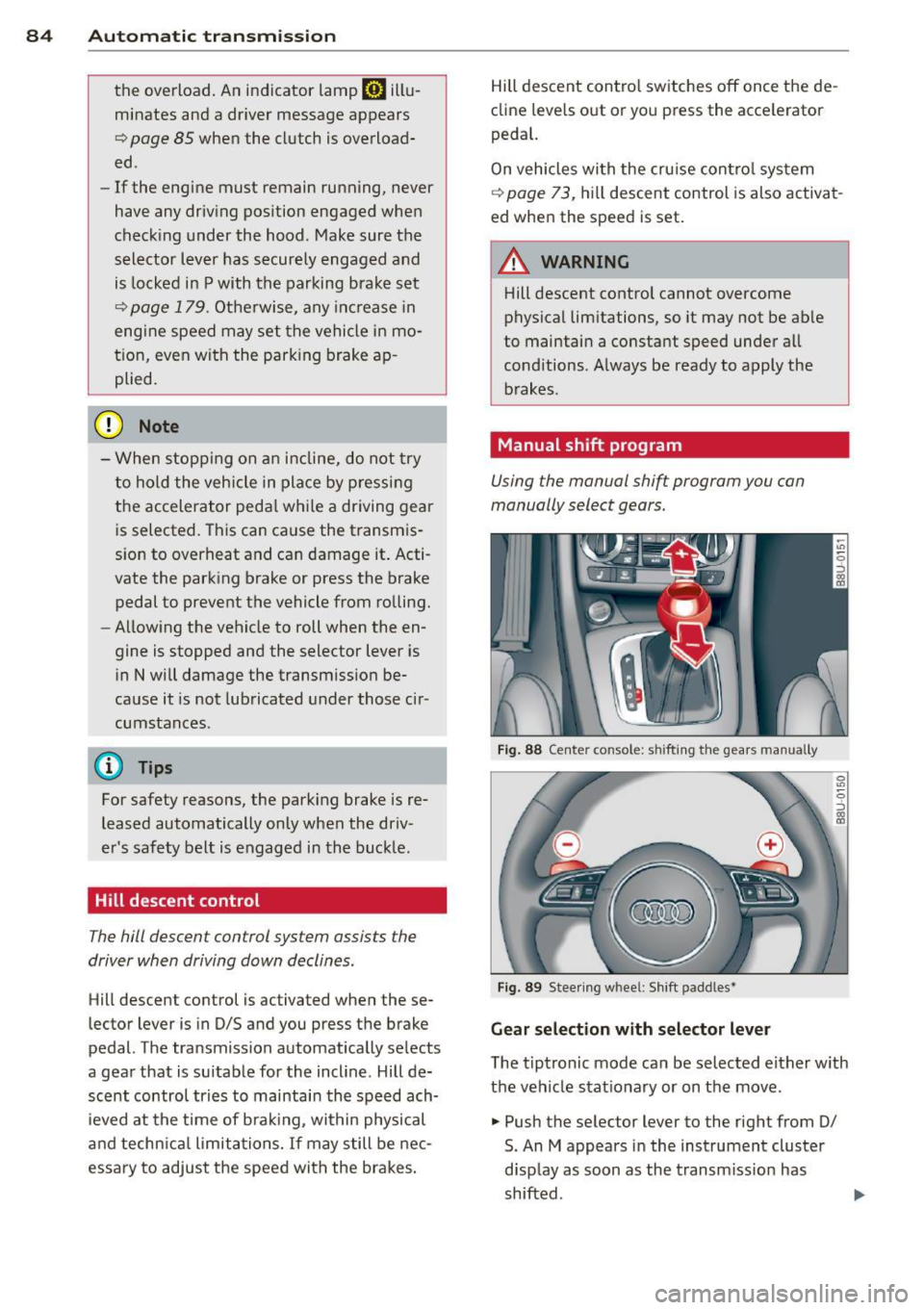
Fig. 88 Center co nsole: s hifti ng t he gears ma nually
Fig . 89 Stee ring w hee l: Shi ft padd les•
Gear selection w ith selector lever
T he t iptronic mode can be selected either w ith
the vehicle stat io nary or on the move .
.,. Push the selector lever to the right from 0/
S. An M appears in the instrument cluster
d isp lay as soon as the transm issio n has
shifted .
Page 88 of 258
86 Automatic transmis sion
Selector lever emergency re lease
If the vehicle's power supply fails , the selec
tor lever can be released in an emergency .
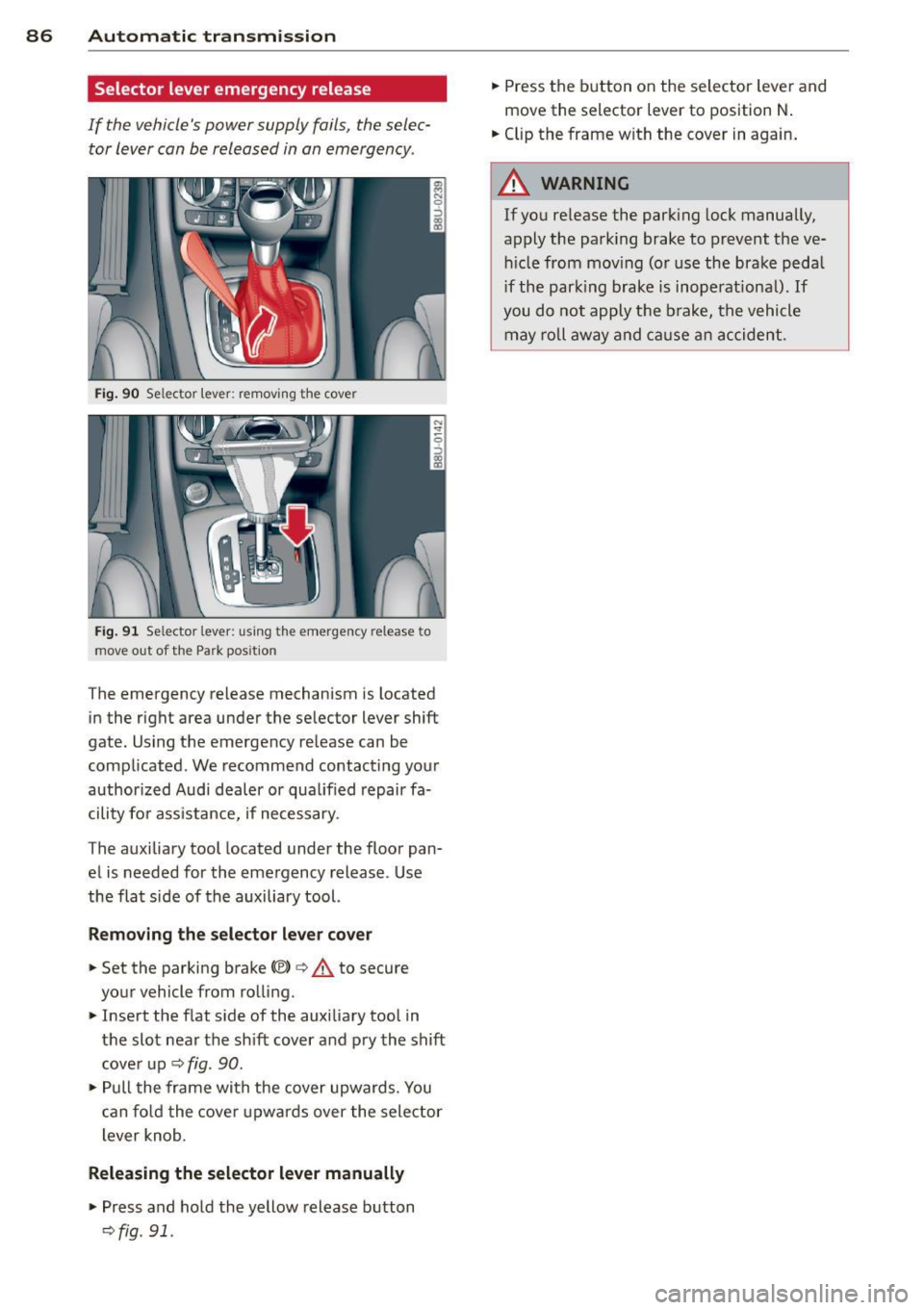
Fig. 90 Selector lever: remov ing the cove r
Fig. 9 1 Selecto r leve r: u sing th e em ergen cy release to
move out of the Pa rk pos iti on
T he emergency re lease mechanism is located
in the right area under the se lector lever shift
gate. Using the emergency release can be
complicated . We recommend contacting you r
author ized Audi dealer or qua lif ied repair fa
cility fo r ass istance, if necessary.
The auxiliary tool located under the floor pan
e l is needed for the eme rgency release . Use
the flat si de of the auxiliary tool.
Removing the selector lever cover
.,. Set the parking brake{®) 9 .&. to secure
your vehicle from ro lling .
.,. Insert the f lat s ide of the auxilia ry tool in
the slot nea r the sh ift cover a nd p ry the shift
cove r up
9 fig . 90 .
.,. Pull the frame with the cover upwards . You
c an fo ld the cove r upwa rds over the selec tor
l ever knob.
Releasing the selector lever manually
.,. Press and ho ld the yellow release b utton
9 fig . 91 .
.,. Press the b utton on the selector lever and
move the selector lever to position N .
.,. Clip the frame w ith the cover in again.
_& WARNING
-
If you re lease the parking lock manually,
apply the park ing brake to prevent the ve
h icle from mov ing (o r use the brake peda l
i f the park ing brake is inoperationa l).
If
you do not apply t he b rake, the vehicle
may r oll aw ay and ca use a n accident .
-
Page 101 of 258
M N
M N
0 ::i co ,...., \!) 1.1'1 ,...., 1.1'1 ,....,
Pedal area
Pedals
The pedals must always be free to move and
must never be interfered with by a floor mat
or any other object.
Make sure that all pedals move freely without
interference and that nothing prevents them
from returning to their original positions .
Only use floor mats that leave the pedal area
free and can be secured with floor mat fasten
ers .
If a brake circuit fails, increased brake pedal
travel is required to bring the vehicle to a
full
stop.
A WARNING
Pedals that cannot move freely can cause
loss of vehicle control and increase the risk
of serious injury.
- Never place any objects in the driver's
footwell. An object could get into the
pedal area and interfere with pedal func
tion. In case of sudden braking or an ac
cident, you would not be able to brake or
accelerate!
- Always make sure that nothing can fall
or move into the driver's footwell.
Floor mats on the driver side
Always use floor mats that can be securely
attached to the floor mat fasteners and do
not interfere with the free movement of the
pedals.
"' Make sure that the floor mats are properly
secured and cannot move and interfere with
the pedals ~
A,.
Use only floor mats that leave the pedal area
unobstructed and that are firmly secured so
that they cannot slip out of position. You can
obtain suitable floor mats from your author
ized Audi dealer.
Floor mat fasteners are installed in your Audi .
Driving Safely 99
Floor mats used in your vehicle must be at
tached to these fasteners. Properly securing
the floor mats will prevent them from sliding
into positions that could interfere with the
pedals or impair safe operation of your vehicle
in other ways.
A WARNING
Pedals that cannot move freely can result
in a loss of vehicle control and increase the
risk of serious personal injury.
- Always make sure that floor mats are
properly secured.
- Never place or install floor mats or other
floor coverings in the vehicle that cannot be properly secured in place to prevent
them from slipping and interfering with
the pedals or the ability to control the
vehicle.
- Never place or install floor mats or other
floor coverings on top of already instal
led floor mats. Additional floor mats and
other coverings will reduce the size of
the pedal area and interfere with the
pedals.
- Always properly reinstall and secure floor
mats that have been taken out for clean
ing.
- Always make sure that objects cannot
fall into the driver footwell while the ve
hicle is moving . Objects can become
trapped under the brake pedal and accel
erator pedal causing a loss of vehicle
control. •
•
Page 154 of 258
152 Intelligent technology
Intelligent technology
Notice about data
recorded by the Event
Data Recorder and
vehicle control modules
E ve nt Data Recorder
This vehicle is equipped with an Event Data
Recorder (EDR) . The main purpose of an EDR
is to record, in certain crash or near crash-like
situations, such as an airbag deployment or hitting a road obstacle, data that will assist in
understand ing how a veh icle's systems per
formed. The EDR is designed to record data
re lated to vehicle dynamics and safety sys
tems for a short period of time, typically
30 seconds or less. The EDR in this vehicle is
designed to record such data as:
- How various systems in you r vehicle were
operating;
- Whether or not the d river and passenger
safety belts were buckled/fastened;
- How far (if at all) the driver was dep ress ing
the accelerator and/or brake pedal; and,
- How fast the vehicle was traveling.
These data can help provide a better under
stand ing of the cir cumstances in which crash
es and injuries occur . NOTE : EDR data are re
corded by your vehicle only if a non-trivial
crash situation occurs; no data are recorded by
the EDR under normal driving conditions and
no personal data (e.g., name, gender, age,
and crash location) are recorded. However,
other parties, such as law enforcement, cou ld
comb ine the EDR data with the type of per
sonally identifying data routinely acquired
during a crash investigation.
To read data recorded by an EDR, special
equipment is required, and access to the vehi
cle or the EDR is needed. In addition to the ve hicle manufacturer, other parties, such as law
enforcement, that have the special equip
ment, can read the information if they have
access to the vehicle or the EDR. Some state
laws restrict the retrieval or down
loading of data stored by ED Rs installed in a
vehicle for the express purpose of retrieving
data after an accident or crash event without
the owner's consent .
Audi will not access the EDR and/or simi lar
data or g ive it to others -
- un less the vehicle owner (or lessee if the ve
hicle has been leased) agrees; or
- upon the official request by the police; or
- upon the ord er of a court of law or a govern-
ment agency; or
- for the defense of a lawsuit through the ju
dicia l discovery p rocess.
- Aud i may also use the data for research
about vehicle operat ion and safety perform
ance or provide the data to a third party for
research purposes without identifying the
specif ic vehicle or information about the
identity of its owner or lessee and only after
the recorded vehicle data has been ac
cessed.
Vehicle control modules
You r vehicle is also equ ipped with a number of
electron ic control modules for various vehicle
systems, such as engine management, emis
sion control, airbags, and safety belts.
T hese electronic control mod ules record data
during norma l vehicle operation that may be
needed by trained technicians for diagnostic
and repair purposes. The recording capability
of these modu les is limited to data (no sound
is recorded). Only a small amount of data is
actually recorded over a very lim ited period of
t ime, or stored when a system fault is detect
ed by a contro l modu le. Some of the data
stored may relate to vehicle speed, direction,
o r braking, as well as restraint system use and
performance in the event of a crash. Stored
data can also only be read and downloaded
with special equipment that is directly con-
nected to the vehicle. .,..
Page 155 of 258
M N
M N
0 ::i co ,...., \!) ..,.,
,...., ..,., ,....,
@ Tips
Your vehicle may be equipped with Audi
connect. Your use of certain Aud i connect
features req uires wireless serv ices that are
provided by a third party wireless telecom
municat ions provider. For details regard
ing how information obtained through
Aud i connect is collected, processed,
transmitted, used, and shared, please see
your contra ct w ith the wire less telecom
municat ions provider and the "About A udi
connect" tab in your vehicle's MMI:
!MENU !
button > Audi connect > About Audi con·
nect .
Electronic Stabilization
Control (ESC)
Description
ESC helps to improve road holding and vehicle
dynamics to help reduce the probability of
skidd ing and loss of veh icle control. It works
only when the eng ine is running. ESC detects
certain difficult driv ing s ituations, including
when the vehicle is beginning to spin (yaw) out of cont ro l and helps you to get the vehicle
back under control by select ively brak ing the
wheels, and/or red ucing engine powe r and
p roviding steering assistance to help hold the
ve hicle on the driver's intended course . The in
dicator light
m in the instrument cluster
blinks when ESC is taking action to help you
control the vehicle.
ESC has limitations.
It is important to remem
ber that ESC cannot overcome the laws of
phys ics. It will not a lways be able to help out
under all conditions you may come up against.
For example, ESC may not always be able to
h elp you master situat ions where there is a
sudden change in the coefficient of fr iction of
the road surface. When there is a sect io n of
d ry road that is s udden ly cove red with water,
slush o r snow, ESC canno t perform the same
way it would on the dry su rface.
If the vehicle
hydroplanes (rides on a c ush ion of wate r in
stead of the road surface), ESC wi ll not be
ab le to he lp you steer the veh icle because con-
Int ellig ent technolog y 153
tact with the pavement has been interrupted
and the vehicle cannot be braked or steered .
D uring fast corner ing, particular ly on wind ing
roads, ESC cannot always deal as effectively
with difficult dr iv ing s ituations than at lower
speeds. When towing a trailer, ESC is not able
to help you regain control as it would if you
were not tow ing a trailer.
Always adjust your speed and driving style to road, traffic and weather conditions . ESC can
not override the vehicle's physical lim its, in
crease the availab le tract ion, or keep a veh icle
o n the road if road departu re is a result of
driver ina ttent io n. Instead , ESC imp roves the
poss ibility of keep ing the vehicle under con
trol and on the road during extreme maneu
vers by using the driver's steering i nputs to
help keep the vehicle go ing in the intended di
rect ion. If you are traveling at a speed that
causes you to run off the road before ESC can
provide any assistance, you may not experi
ence the benefits of ESC.
ESC includes and/or works together with the
anti-lock brake system (ABS), brake ass ist sys
tem, ant i-slip regu lation (ASR), electron ic dif
ferential lock (EDL), electron ic interaxle d iffe r
ential lock*/se lective wheel torque co ntrol*
and hill descent assist. ESC is swit ched on a ll
the time. In ce rtain sit uat io ns when yo u need
less traction, you can sw itch off ASR by press
ing the b utton
[fil ¢ page 155, fig. 13 7. Be
s u re to switch ASR on again when you no lon
ger need less traction .
Anti-lock braking system (ABS )
ABS prevents the whee ls from locki ng up
when b raking. The vehicle can st ill be stee red
even during hard braking . App ly steady pres
su re to the brake peda l. Do not pump the ped
al. A pulsing in the brake pedal indicates that
the system is helping you to brake the vehicle.
Brake a ssis t sy ste m
The brake ass ist system can decrease braking
distance . It increases braking power when the
driver presses the brake peda l quickly in emer
gency s ituations. You must press and hold the
brake pedal unti l the situation is over. .,,.
•
•
Page 156 of 258
154 Intellig ent technolog y
Anti-slip r egulation (ASR )
ASR reduces engine power when the drive
wheels begin to spin and adapts the force to
the road conditions. This makes it easier to
start, accelerate and drive up hills.
Electronic diffe rential lock (EDL )
The ED L brakes wheels that are spinn ing and
transfers the drive power to the o ther d rive
wheel or whee ls if the vehicle is equipped with
all-wheel drive* . This function is available up
to about 60 mph (100 km/h).
I n extreme cases , ED L automat ica lly switches
off to help keep the brake on the braked whee l
from overheating . EDL wi ll switch on again au
tomatically when conditions have returned to normal.
El ectron ic inte ra xle diff ere ntial lock */
se lec tive wheel t orque contr ol*
The electronic interaxle differential lock (front
wheel drive) or the select ive wheel torque
control (all-wheel drive) operates when driv
ing through curves. The front wheel on the in·
side of the curve or both wheels on the inside
of the curve are braked select ively as needed .
This minimizes s lid ing in the front wheels a nd
allows for more p rec ise driving through
curves. The app licab le system may not acti
vate when driving in wet or snowy conditions .
A WARNING
-ESC, ABS, ASR, EDL, the electronic inter
axle differentia l lock* /selective whee l
torque control* and the hill descent as
sist cannot overcome the laws of physics.
Th is is especially important on slippery
o r wet roads . If the systems begin acting to stabilize your vehicle, you should im
mediately change your speed to match
the road and traffic conditions. Do not let the increased safety provided by
these systems tempt you to take r isks .
Doing so will increase the risk of a loss of
veh icle cont ro l, collision and ser ious per
sonal injur ies.
- Always adapt your speed to road, traffic
and weather conditions. The risk of los
ing control of the vehicle increases when
driving too fast , espec ially through
curves and on slippery or wet roads, and
when driving too close to vehicles up
ahead. ESC, ABS, the brake ass ist sys
tem, ASR, EDL and the electronic inter
axle d ifferential lock*/selective wheel
torque control* cannot prevent colli
sions .
- Always accelerate with special care on
even, smooth surfaces such as those that
are wet or covered with ice and snow .
The drive wheels can spin even w ith
these assistance systems t hat cannot al
ways he lp to reduce the risk of loss of ve
hicle control.
(D Tips
- ABS and ASR only wo rk correct ly when
all four wheels are equipped with identi
cal tires. D ifferent tire sizes can lead to a
reduction in engine power.
- You may hear noises when the systems
described are working .
-If the ind icator light DJ or Ell (USA
mode ls)/ lCO)J
page 16.
Page 158 of 258
156 Intellig ent technol ogy
Hill descent assist brakes a ll four wheels auto
matica lly in order to limit speed when driving
e ither forward or reverse on hills with a grade
up to approximately 50%.
When the hi ll descent assist is on, the current
driving speed, when your vehicle entered the incline is maintained . It is only possib le to
switch on the assist when driving slower than
37 mph (60 km/h). The assist works between
approximately 2 and 19 mph (4 and 30 km/ h) . T he driver can increase or decrease the ve
h icle speed w ith in these lim its by depressing
the accelerato r o r brake pedal In addition, ve
h icle steerability is increased d ue to the brak
ing d istribution when driving in reverse .
There must be however sufficient ground ad hes io n. The hill descent assis t can
no t do its
job if the incl ine is icy or if the incline ground
is loose¢ &..
The system does not work at speeds between 19 and 37 mph (30 and 60 km/h) . T he system
i s then in the ready-mode . The diode in the
button will come on. The system automatical
ly switched off when you drive faster than 37
mph (60 km/h). The diode will go out in this
case.
The flashing indicator lamp
-0-in the instru
ment cluster indicates whenever the driving
speed is being actively controlled to a certain
speed up to approximate ly 19 mph (30 km/h) .
The indicator lamp lights up continuously
when the system goes into standby mode.
Hill descent assist is automatically activated
under the fo llow ing cond itions:
- the d iode in the button illuminates,
- vehicle speed is be low approximately
19 mph (30 km/h)
- the in cl in e is 10%.
_&, WARNING
- Always adapt your speed to the weather,
road and traffic conditions . Do not let
the increased safety provided tempt you
into taking risks. -
The hill descent assist system cannot
overcome the laws of physics. Your dr iv
ing style must always be adapted to the
current road and traffic cond itions .
- The hill descent ass ist may not be ab le to
hold your vehicle at a constant speed un
de r all conditions while driv ing on an in
cline (for example if ground under the
veh icle is loose).
Braking
What affects braking efficiency?
New br ake p ad s
During the first 250 miles (400 km), new
brake pads do not possess the ir full brak ing
effect, they have to be "broken in" first ¢&. .
You can compensate for this slightly reduced
braking power by pushing harder on the brake
pedal. Avoid heavy b ra ki ng loads dur ing the
break-in pe riod.
Operating conditions and driving h abits
The brakes on today 's automobiles are still
subjec t to wear, depending largely on operat
i ng condit ions and driving hab its
~ &. -On
vehicles that are either dr iven mos tly in stop
and -go city t ra ffi c or are dr iven hard, the
brake pads should be chec ked by your author
ized Audi dea ler mo re often than specified in
the
Warranty & M aintenan ce booklet. Failure
to have your brake pads inspected can result in reduced brake performance.
On steep slopes, you sho uld use the braking
effect of the eng ine. This way, you prevent un
necessary wear on the brake system. If you
must use your brakes, do not hold the brakes
down cont inuous ly . Pump the brakes at inter
vals .
Oper ating n ois e
Noises may occur when braking depending on
the speed, braking force and outside condi-
tions such as temperature and humidity. .,,.
Page 159 of 258
M N
M N
0 ::i co ,...., \!) 1.1'1 ,...., 1.1'1 ,....,
Effect of w ate r and ro ad salt
In certain situa tions, for example after driving
through water, in heavy rain, after overnight
condensation or after washing your car, the braking effect can be reduced by moisture or
ice on the brake rotors and brake pads. The
brakes must be dried first with a few careful
brake applications.
At higher speeds and with the windshield wip
ers turned on, the brake pads press against
the brake rotors for a short amount of time.
This occurs at regular intervals w ithout the
driver noticing and provides for better brake response time under wet condit ions.
The effectiveness of the brakes can be reduced
when the vehicle is dr iven o n a salt-covered
road and the brakes are not used . Likewise,
you clean
off accumulated sa lt coating from
brake discs and pads with a few caut ious ap
p lications of the brake¢.&. -
Cor ro sion
There may be a tendency for dirt to build up
on the b rake pads and corrosion to form on
the discs if the car is not dr iven regular ly or
only for short t rips with little use of the
brakes.
If the brakes are not used frequently, or if cor rosion has formed on the discs, it is advisable
to clean
off the pads and discs by b rak ing
fi rm ly a few times from a modera tely high
speed¢ .&..
Faults in the brake system
If you should notice a sudden increase in
brake pedal travel, then one of the two brake
circu its may have failed¢&. -
Low brake fluid le vel
Malfunct ions can occur in the brake system if
the brake fluid level is too low. T he brake fluid
level is monitored electronically .
Brake boo ster
The brake booster increases the pressure that
you generate with the brake pedal. It works
only when the engine is running .¢ .&.
Int ellig ent technolog y 157
Brak e lining we ar status
B rake lining wear may be checked by visual in
spection o f the condition of the brake pads
thro ugh the openings in the wheel. If neces
sary, the wheel may be removed for this in
spection
¢ page 218, Changing a wheel.
A WARNING
-New brake pads don't have the best stop
ping power and must be "broken-in" dur
ing the initial 100 to 150 miles (150 to
200 kilometers) of normal c ity dr iving .
You can compensate for this by pressing
the brake pedal more firmly. This also
applies la ter when new pads are instal
led.
- You should perform braking maneuvers
for the purpose of cleaning the brake
system only if road conditions permit .
Other road users must not be put at risk -
you may cause an accident!
- Before descending a steep grade, reduce
speed and shift transmission into a lower
gea r or lower dr iving range. Do not ride
the brakes or hold the pedal down too
long or too often. This could cause the
brakes to get hot and diminish braking
efficiency.
- Do not "ride the brakes" by rest ing your
foot on the pedal when you do not intend
to brake. This may cause the brakes to overheat, p remature wear and increased
s topping distance.
- Unde r ce rtain cl imati c and ope rat ing
conditions such as passing thro ugh wa
ter, dr iv ing in heavy rain o r after washing
the vehicle, the effectiveness of the
brakes can be reduced. In winte r, ice can
accumu late on the brake pads, lin ings,
discs and drums. Carefully app ly brakes
for a test. Brakes w ill dry and ice coat
ings w ill be cleaned
off after a few care
ful brake applicat ions.
- Driving for an extended period of time on
salt-covered roads without using your brakes can a lso affect braking efficiency.
Clean
off accum ulated salt coating from
•
•