engine AUDI Q3 2016 User Guide
[x] Cancel search | Manufacturer: AUDI, Model Year: 2016, Model line: Q3, Model: AUDI Q3 2016Pages: 252, PDF Size: 62.81 MB
Page 20 of 252
Instruments and indicator lights
Drive to your authorized Audi dea ler immediately
to have the ma lfunction corrected .
c:> Windshield washer fluid level
Ill Please refill washer fluid.
If the symbol ill uminates, add w indshield was her
fluid to the w indshield washer system .
~ Engine start system
€·I ~ngine start system: Malfunction! Plea se
con tact dealer.
If th e indicator light t urns on and the message
appears, do
not switch the ign ition off because
you may not be ab le to sw itch it on again.
Drive to yo ur a uthorized Aud i dea le r i mmediately
to have the ma lf u nct ion corrected .
Engine start sy stem: Malfunction . Plea se con
tact dealer .
There is a malfunction in the eng ine start system .
Drive to you r authori zed Aud i dea ler immediately
to have the malfunct ion corrected.
~ Defective light bulb warning
If the rtl i ndicato r light turns on, a bulb has
fa iled. The message ind icates the location of the
bu lb.
V ehicle lights: Sy stem f ault!
If the message appears, there is a ma lfunction in
the headlights or light switch.
Drive to yo ur autho rized Audi dea le r i mmedia tely
to have the malf unction corrected .
A WARNING
-Light bu lbs are p ressurized and could ex
plode while they a re being changed caus ing
serious persona l injury.
- Work with due ca re when handling the high
vo ltage section of gas discharge (xenon)
lights* . Failure to do so could result in death
or serious injury.
18
(D Tips
Have the bu lb replaced or the connection re
paired by your authorized A udi Se rvice depart
ment.
i,0 Headlight range control
fl H ea dlight range control: Sy stem fault!
If the symbol II ill uminates, the dynamic head
li ght range contro l is no longer working properly.
Have the system checked and repaired at your au
thorized Audi dea ler .
~O Audi Adaptive Light
App lies to vehicles: wit h Audi adapt ive light
rlJ Audi adaptive light : System fault!
If the indicator light turns on and this message
appears, there is a ma lfunction in the adaptive
li ght system . The headlights still function .
Go to an authorized dealership to have the head
li ghts or the contro l unit for the adapt ive light re
paired.
@:) Light/rain sensor
App lies to vehicles : wit h lig ht/ ra in sensor
£1 Automat ic headlights /wipers: System fault!
If the indicator light turns on and this message
appears, the light/rain sensor is not functioning
correctly.
For safety reasons the low beams are turned on
permanently with the switch in
AUTO . However,
you can continue to turn the lights on and off us
i ng the lig ht switch . You can still contro l all func
tions that are independent of the rain sensor
through the windsh ield wiper lever .
Contact your authori zed Aud i dea ler as soon as
possible to have the problem corrected.
g Adaptive dampers
App lies to vehicles: wit h Audi drive se lect and a daptive damp
ers
R Suspension : System f ault!
The re is an adaptive dampe r mal func tion.
Page 22 of 252
Driver i nf orm ati on sy stem
Driver information
system
Overview
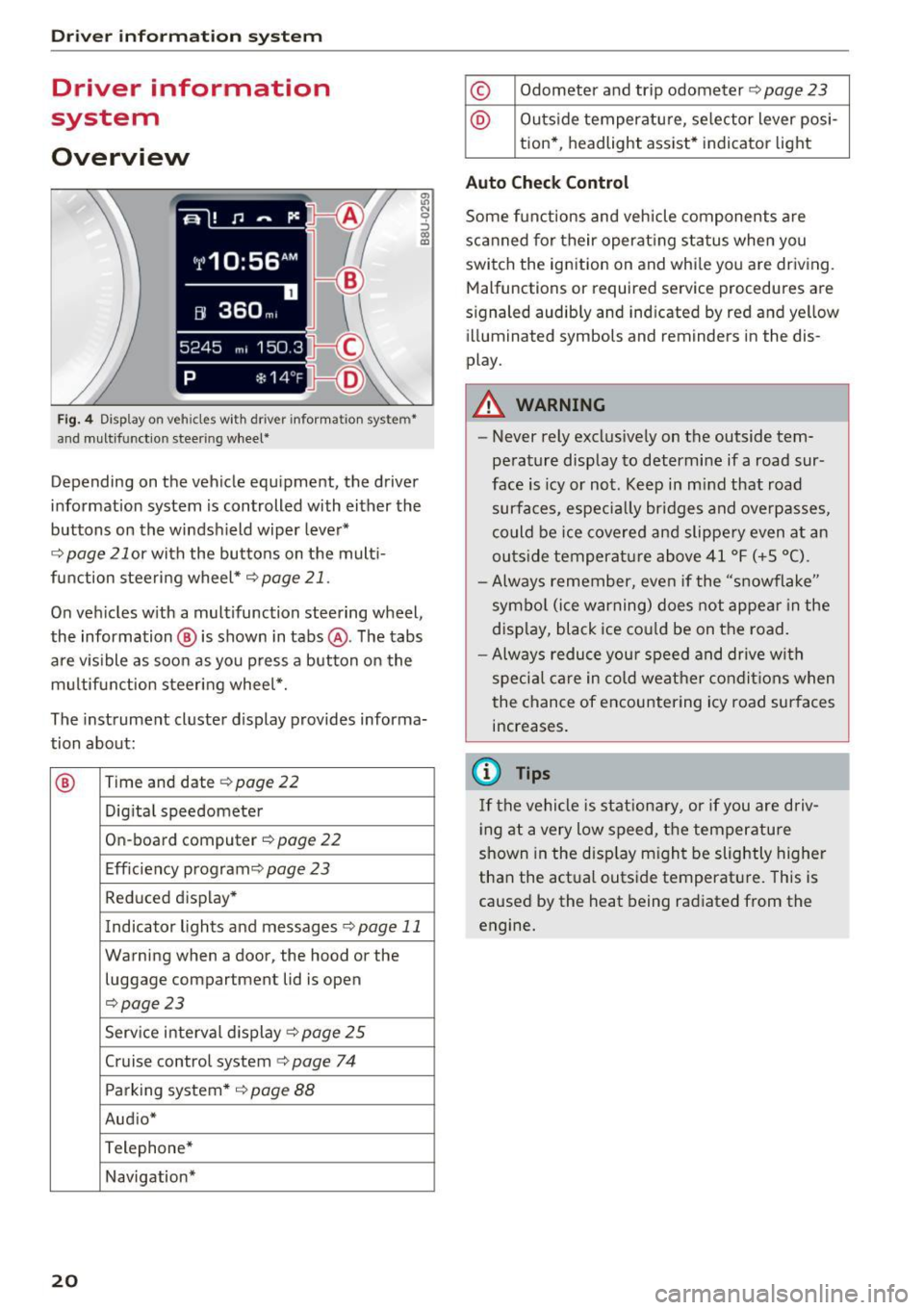
Fig. 4 Disp lay on vehicles with driver information system*
and multifunction steering wheel*
~ N 0 :::, 00 m
Depending on the vehicle equipment, the driver
information system is controlled with either the
buttons on the windshield wiper lever*
r='.> page 21 or wi th the buttons on the mult i
function steering wheel*
r='.> page 21 .
On vehicles w ith a multifunction steering wheel,
the information @ is shown in tabs @. The tabs
are v isible as soon as you press a button on the
multifunct ion steering wheel*.
The instrument cluster display provides informa
tion about:
® Time and date r='.> page 22
Digi tal speedometer
On-board computer
r='.> page 22
Eff iciency program ¢
page 23
Reduced display *
Indicator lights and messages
r='.>p age 11
Warning when a door, the hood or the
luggage compartment lid is open
r='.>page 23
Service interval display ¢ page 25
Cruise control system¢
page 74
Parking system* ¢
page 88
Aud io*
Telephone*
Navigation*
20
© Odometer and trip odometer r='.> page 23
@ Outside temperature, se lector lever posi -
tion* , headlight assist* indicator light
Auto Chec k Contro l
Some functions and vehicle components are
scanned for their operat ing status when you
switch the ignition on and while you are driving.
Malfunctions or requ ired service procedures are
s ignaled audibly and indicated by red and yellow
illuminated symbols and reminders in the dis
play.
A WARNING
-
- Never rely exclus ively on the outside tem
perature display to determine if a road sur
face is icy or not. Keep in m ind that road
surfaces, especially br idges and overpasses,
co uld be ice covered and slippe ry even at an
outs ide temperature above 41 °F (+ S °C).
- Always remember, even if the "snowflake"
symbol (ice warning) does not appear in the
display, black ice co uld be on the road.
- Always reduce you r speed and drive with
special care in cold weather condit ions when
the chance of encountering icy road surfaces
increases.
(D Tips
If the vehicle is stationary, or if you are driv
i ng at a very low speed, t he temperature
shown in the disp lay m ight be slightly higher
than the actual outside temperature. This is
caused by the heat being radiated from the
engine.
Page 28 of 252
Driver information system
On-Board Diagnostics
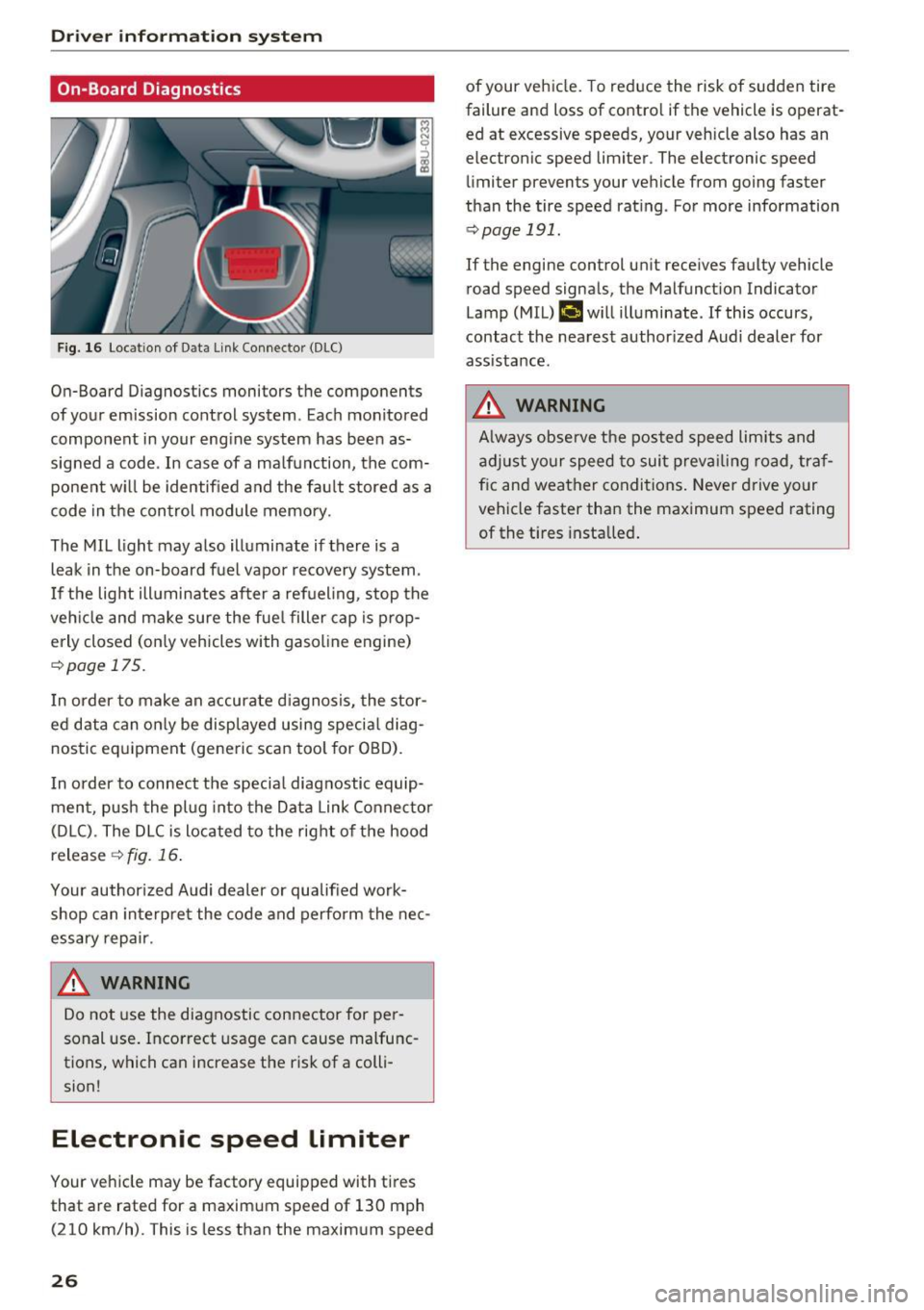
F ig. 16 Locat ion of Data Link Connector (DLC)
On-Board Diagnostics monitors the components
of your emission control system. Eac h monitored
component in your engine system has been as
signed a code. In case of a ma lfunction, the com
ponent w ill be identified and the fault stored as a
code in the control module memory.
The MIL light may also illuminate if there is a
leak in the on-board fuel vapor recovery system.
I f the light ill uminates after a refueling, stop the
veh icle and make sure the fuel filler cap is prop
erly closed (on ly vehicles with gasol ine engine)
r::!> page 17 5.
I n order to make an accurate diagnosis, the stor
ed data can only be displayed using special diag
nostic equipment (generic scan tool for OBD).
I n order to connect the specia l diagnostic equip
ment, push the plug into the Data Link Connector
(D LC). The DLC is located to the right of the hood
release
¢ fig. 16.
Your author ized Audi dealer or qualified work
shop can interpre t the code and perform the nec
essary repair .
.&_ WARNING
-
Do not use the diagnostic connector for pe r
sonal use. Incorrect usage can cause malfunc
tions, which can increase the risk of a colli
sion!
Electronic speed Limiter
Your vehicle may be factory equipped with tires
that are rated for a maximum speed of 130 mph (210 km/h). This is less than the maximum speed
26
of your veh icle. To reduce the risk of sudden tire
failure and loss of contro l if the vehicle is operat
ed at excessive speeds, your vehicle also has an
electronic speed limiter . The electronic speed
limiter prevents your vehicle from going faster
than the tire speed rating . For more information
r::!> page 191.
If the engine control un it receives faulty vehicle
road speed signals, the Malfunct ion Indicator
Lamp (MIL)
(,ij will illuminate. If this occurs,
contact the nearest author ized Audi dealer for
assistance.
.&_ WARNING
A lways observe the posted speed limits and
adjust your speed to suit prevailing road, traf
f ic and weather conditions. Never drive your
vehicle faster than the maximum speed rating
of the t i res installed .
-
Page 30 of 252
Opening and closin g
(D Tips
- In the event of a crash with airbag deploy
ment all locked doors will be automat ica lly
unlocked to give access to the vehicle occu
pants from the outside.
- If the power locking system should mal
funct ion, you can lock the driver's door us
ing the ignit ion key
¢ page 32.
- If the power lock ing system should fail, you
can still open the fuel tank flap in an emer
gency ¢
page 176.
-You are well adv ised not to keep valuables
i nside an unattended vehicle, vis ible or not.
Even a properly locked vehicle cannot pro
v ide the secur ity of a safe .
- If the LED in the upper edge of the driver's
door panel comes on for about 30 seconds
after the vehicle is locked, there is a mal
funct ion in the power lock ing o r the anti
theft warning system. Have the malfunct ion
correc ted by an authorized Audi dea lership
or q ualified repair facility .
Key set
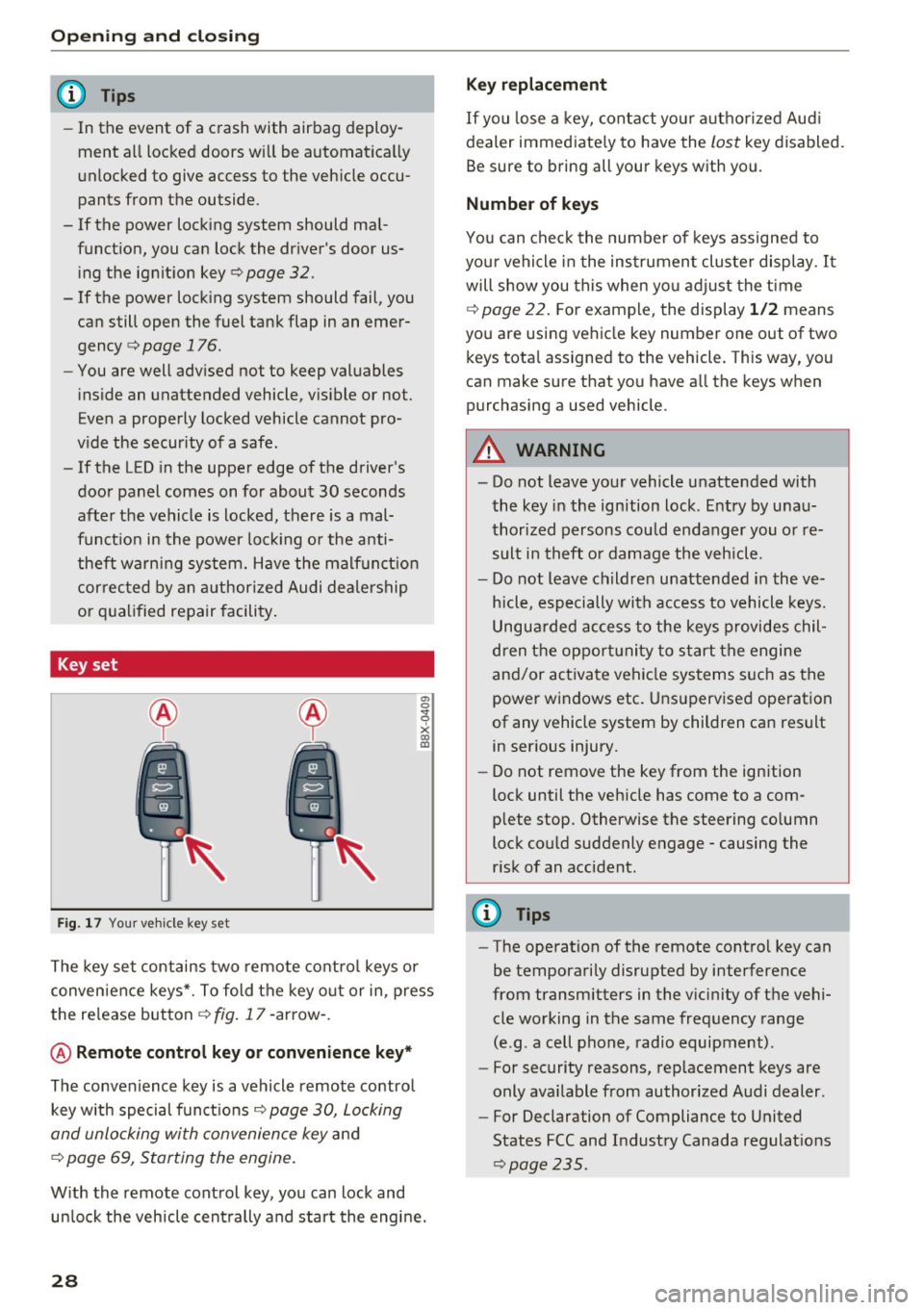
Fig . 17 You r ve hicle key set
a, 0
~
x (X) Cll
The key set contains two remote co ntro l keys or
conven ience keys*. To fold the key o ut or in, press
the re lease button
¢ fig . 17 -arrow -.
@ Remote control key or convenience key *
The convenience key is a vehicle remote contro l
key with special funct ions
Q page 30, Locking
and unlocking with convenience key
and
¢ page 69, Starting the engine .
With the remote control key, yo u can lock and
un lock the vehicle cent rally and start the engine.
28
Key replacement
If you lose a key, contact you r autho rized Aud i
dealer immed iate ly to have the
lost key disabled.
Be sure to bring all your keys w ith you.
Number of keys
You can chec k the numbe r of keys assigned to
you r vehicle in the ins trument cluster display .
It
will show you this when yo u adjust the t ime
¢
page 22. F or example, the display 1 /2 means
you are us ing vehicle key number one out of two
keys tota l assigned to the vehicle. This way, you
can make sure that you have a ll the keys when
purchasing a used vehicle .
.&, WARNING
-Do not leave your vehicle unatte nded with
the key in the ignition lock . E ntry by u nau
thori zed persons cou ld endanger you or re
sult in theft o r damage the vehicle.
- Do not leave childre n unattended i n the ve
h icle, especially with access to vehicle keys.
Ungua rded access to the keys provides chil
dren t he oppor tunity to start the engine
and/or activate vehicle systems s uch as the
power windows etc . Uns upervised ope ration
of any vehicle system by children can result in ser ious injury.
- Do not remove the key from the ign ition
lock until the veh icle has come to a com
plete stop. Otherwise the steering co lumn
lock cou ld suddenly engage -causing the
r isk of an accident.
(D Tips
- The operation of the remote contro l key can
be temporarily disrupted by interference
from transmitters in the v icinity of the vehi
cle working in the same frequency range
(e.g . a cell phone, radio equipment) .
- For security reasons, rep lacement keys are
only ava ilable from authorized Audi dealer .
- For Declaration of Compliance to United
States FCC and Industry Canada regulat ions
~ page 235.
Page 32 of 252
Opening and clo sin g
If the vehicle is unlocked and no doo r or the rear
lid is opened within 30 seconds, the vehicle locks
itself again automatically . This feature prevents
the vehicle from being accidentally left unlocked
over a long period of time. This does not apply
when you push the©~ button for at least one
second.
It depends on the settings in the radio or MM!*
whether the entire veh icle is unlocked or only cer
tain doors
¢ page 31.
A WARNING
Read and heed all WARNINGS c::> _.&. in General
description on page 2
7.
{!) Tips
- In order to make sure the locking function is
working, you should always keep your eye
on the vehicle to make sure it is properly l ocked.
- Do not use the remote co ntrol if you are in
side the car, otherwise you may un inten
tiona lly lock the veh icle, and then yo u wo uld
set off the anti-theft alarm when you try to
start the engine or open a doo r. In case this
happe ns anyhow, push the unlo ck button
cfi.
- Use t he panic funct ion only if you are in a n
emergency s ituation.
- Additional remote contro l key f unct ions
c::>page37.
Locking and unlocking with convenience
key
A ppl ies to veh icles: with conve nience key
The doors and the rear lid can be unlocked and
locked without operating the master key.
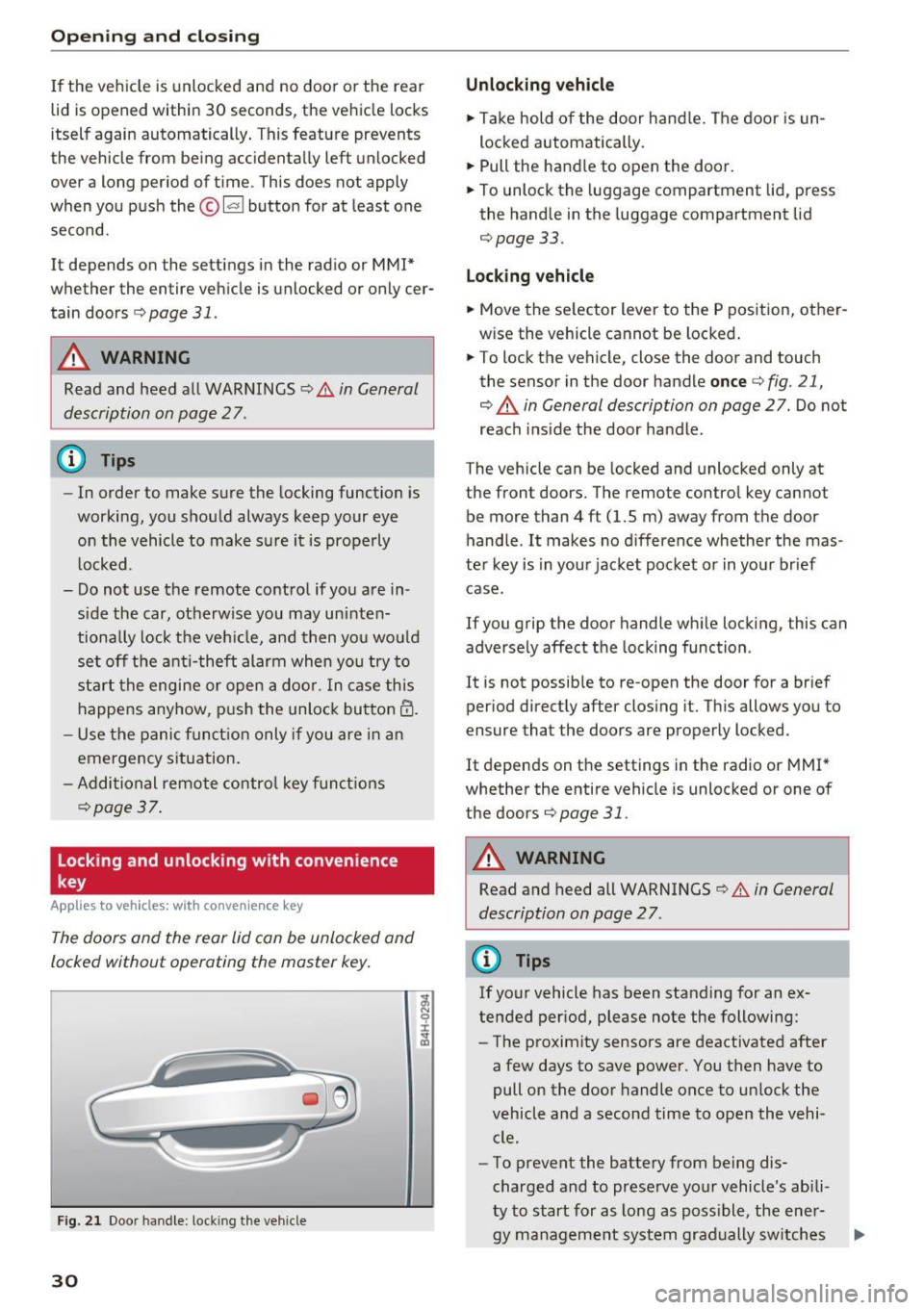
F ig . 2 1 Door handle: lock ing the vehicle
30
Unlocking vehicle
.. Ta ke hold of the door hand le. The door is un
lo cked automatically.
.. Pull the handle to open the door.
.. To unlock the luggage compartment lid, press
the handle in the luggage compartment lid
¢page 33.
Locking vehicle
.. Move the se lector lever to the P position, other
w ise the vehicle cannot be locked .
.. To lock the vehicle, close the door and touch
the senso r in the door handle
once ¢ fig. 21,
¢ .&. in General description on page
27. Do not
reach i nside the door handle .
The vehicle can be locked and unlocked only at
the front doors. The remote control key cannot
be more than
4 ft (1.5 m) away from the door
handle .
It makes no d ifference whether the mas
ter key is in you r jacket poc ket o r in you r brief
case.
If you grip the door handle whi le locking, this can
adversely affect the locking function .
It is not possib le to re-open the door for a br ief
period direct ly after closing it. Th is allows you to
ensure that the doors are properly locked.
It depends on the settings in the radio or MMI *
whether the entire vehicle is unlocked or one of
the doors
¢page 31.
A WARNING
Read and heed all WARNINGS¢.&. in General
description on page 2
7 .
(D Tips
If your vehicle has been standing for an ex
tended per iod, please note the following:
- The proximity sensors are deactivated after
a few days to save power. You then have to
pull on the door handle once to unlock the
vehicle and a second time to open the vehi cle.
- To prevent the battery from being dis
charged and to preserve your vehicle's abili
ty to start for as long as poss ible, the ener-
gy management system gradually sw itches .,..
Page 34 of 252
Opening and closing
Tone when locking
.. Select : ICARI button> (Car) Systems *> Vehicle
settings> Central locking > Tone when locking
If you select On , a tone will sound when you lock
the vehicle .
Emergency unlo cking /locking the door s
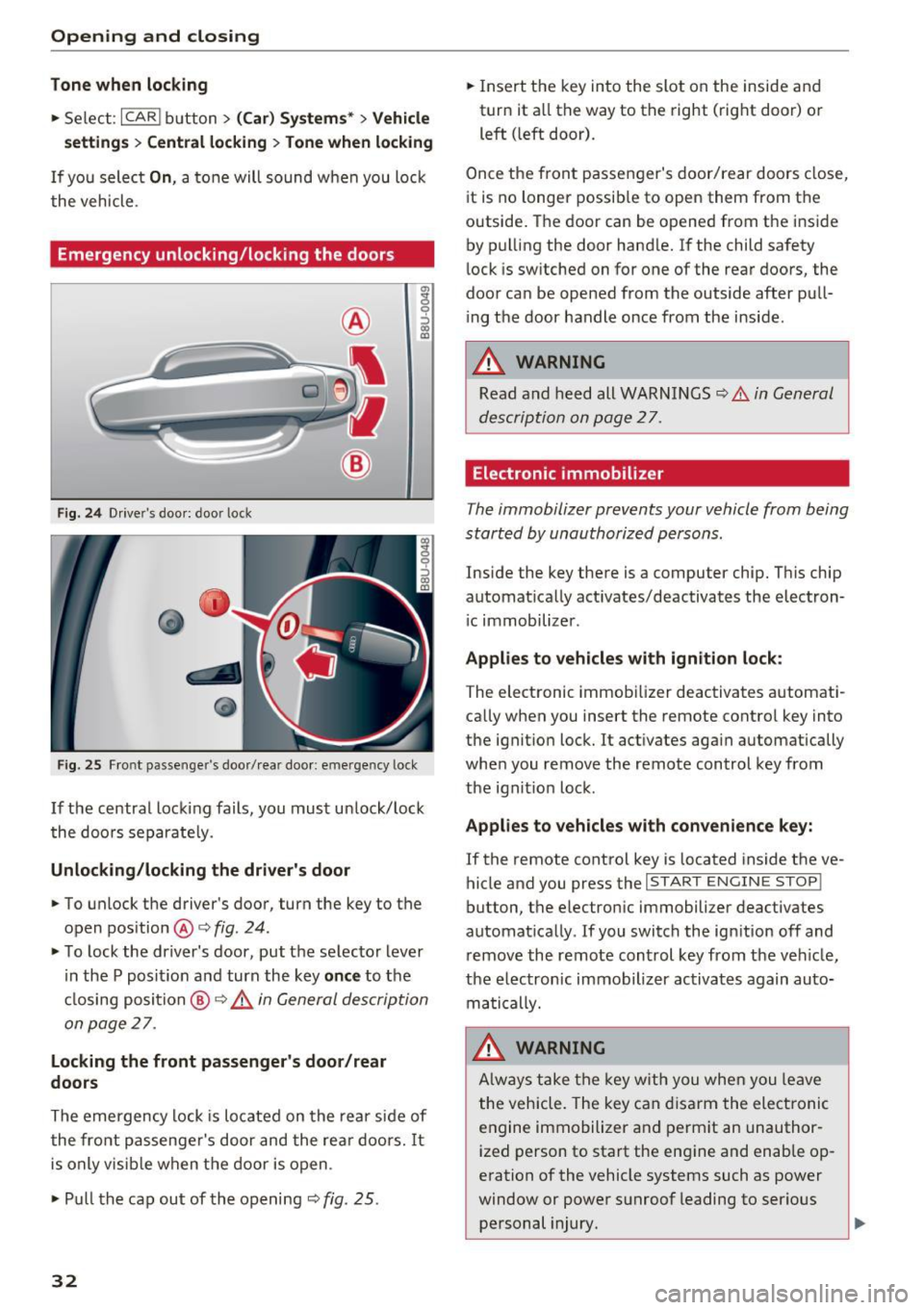
Fig. 24 Drive r's doo r: door lock
Fig . 25 Front passenger 's door/ rear door: emergency lock
g
9 :::> a, QJ
If the central locking fails, you must unlock/lock
the doors separate ly.
Unlocking/locking the driver's door
.,. To unlock the driver 's door, turn the key to the
open position @<=>
fig. 24.
.,. To lock the driver's door , put the selector lever
in the P posit ion and turn the key
once to the
cl osing position
@ ¢ &. in General description
on page
27 .
Locking the front passenger's door/rear
doors
The emergency lock is located on the rear side of
the front passenge r's door and the rear doors.
It
is only visible when the door is open .
.,. Pu ll the cap out of the opening ~
fig. 25.
32
.,. Insert the key into the slot on the inside and
turn it a ll the way to the right (right door) or
left ( left door).
Once the front passenger's door/rear doors close,
i t is no longer possible to open them from the
outside. The door can be opened from the inside
by pulling the door handle.
If the child safety
lock is switched on for one of the rear doors, the
door can be opened from the outside after pull
ing th e door handle once from the inside .
_&. WARNING
Read and heed all WARNINGS~ .&. in General
description on page
27.
Electronic immobilizer
The immobilizer prevents your vehicle from being
started by unauthorized persons.
Inside the key there is a computer chip. This chip
automatically act ivates/deactivates the electron
i c immobilizer .
Applies to vehicles with ignition lock:
The electronic immobilizer deactivates automat i
cally when you insert the remote control key into
the ignit ion lock. It act ivates again automatically
whe n you remove the remote control key from
the ignit ion lock .
Applies to vehicles with convenience key:
If the remote control key is located inside the ve
hicle and you press the
I START ENGINE STOP!
button, the e lectron ic immobilizer deactivates
automat ically .
If you switch the ign ition off and
remove the remote control key from the veh icle,
the electronic immobilizer activates again auto
matically.
_&. WARNING
Always take the key with you when you leave
the vehicle. The key can disarm the electronic
engine immobilizer and perm it an unauthor
ized person to start the eng ine and enab le op
eration of the vehicle systems such as power
window or power sunroof leading to serious personal injury.
Page 39 of 252
.... N
c:i ::J CX)
.... I.Cl U"I
N I.Cl ......
of time. This applies particularly when chil
dren rema in in the vehicle. Otherwise the
children could start the engine or operate
electrical equipment such as power win
dows. The power windows continue to func
tion until the driver's door or front passeng er's door has been opened.
- Pay carefu l attention when closing the win
dows.
It could cause injury by pinching.
- When locking the veh icle from outside, the
vehicle must be unoccupied since the win
dows can no longer be opened in an emer
gency.
@ Tips
After switch ing the ignit ion off, you can still
open and close the windows for approximate
ly 10 minutes. The power windows a re not
switched off until the driver's door or fron t
passenger's door has been opened.
Convenience opening/closing
All of the windows and the panorama roof can be opened/closed at the same time .
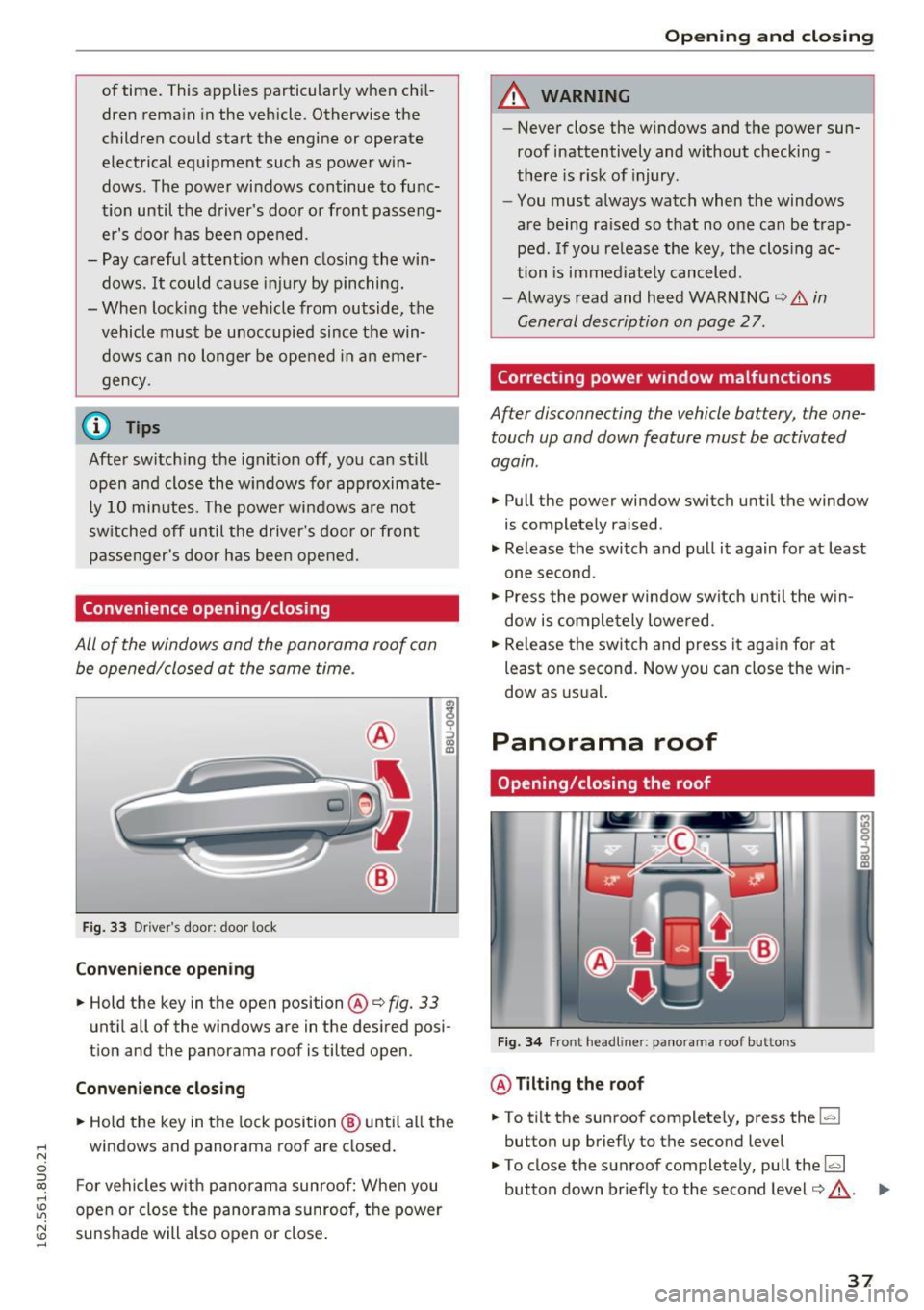
Fig. 33 Driver's door: door lock
Con venie nce op ening
.. Hold the key in the open position @Q fig. 33
until all of the windows are in the desired posi
tion and the panorama roof is tilted open.
Conveni enc e closi ng
.. Hold the key in the lock position ® until all the
windows and panorama roof are closed .
F or vehicles w ith panorama sunroof: When you
open or close the panorama sunroof, the power
sunshade will also open or close .
Openin g an d clos ing
A WARNING
--Never close the windows and the power sun-
roof inattentively and without checking -
there is risk of injury.
- You must always watch when the windows
are being raised so that no one can be trap
ped. If you release the key, the closing ac
tion is immed iate ly canceled.
-Always read and heed WARNING Q
& in
General description on page 2
7.
Correcting power window malfunctions
After disconnecting the vehicle battery, the one
touch up and down feature must be activated
again .
.. Pull the power window switch until the window
is completely raised .
"' Release the switch and pull it again for at least
one second.
"' Press the power window switch until the w in
dow is comple tely lowered .
.. Release the switch and press it again for at
least one second . Now you can close the w in
dow as usual.
Panorama roof
Opening/closing the roof
F ig. 3 4 Front headliner: panorama roof buttons
@ Tilting the roof
.. To tilt the sunroof complete ly, press the~
button up briefly to the second level
"' To close the sunroof completely, pull the~
button down briefly to the second level¢,&. . ...
37
Page 56 of 252
Sea ts and stor age
of injuries, never leave ch ildren unattended in
the vehicle with the veh icle key.
(D Note
- To reduce the risk of damage to the vehicle
electrica l system, never attempt to charge
the vehicle battery by connecting accesso
ries that prov ide power , such as solar panels
or battery chargers, to the 12 Volt sockets
or the cigarette lighter .
- To reduce the risk of damage to the sockets,
only use plugs that fit correct ly.
{!) Tips
The vehicle battery drains when accessories
are turned on but the engine is off.
Storage
General overview
A WARNING
- Always remove objects from the instrument panel. Any items not put away could slide
around inside the vehicle wh ile driving or
when accelerat ing or when applying the
brakes or when drivi ng a round a corner .
- When you are dr iving make sure that any
thing you may have placed in the center con
so le or othe r storage locations cannot fall
o ut into the footwells. In case of sudden
br ak in g you would not be able to brake or
acce lerate .
- Any pieces of cloth ing that you have hung
up mus t not in te rfe re with the driver 's view.
The coat hooks a re designed only fo r light
weight clothing. Never hang any clothing
with hard, pointed or heavy objects in the
pockets on the coat hooks. Dur ing sudden
braking or in an accident- especially if the
airbag is deployed -these objects could in
jure any passengers inside the vehicle .
54
Beverage holders
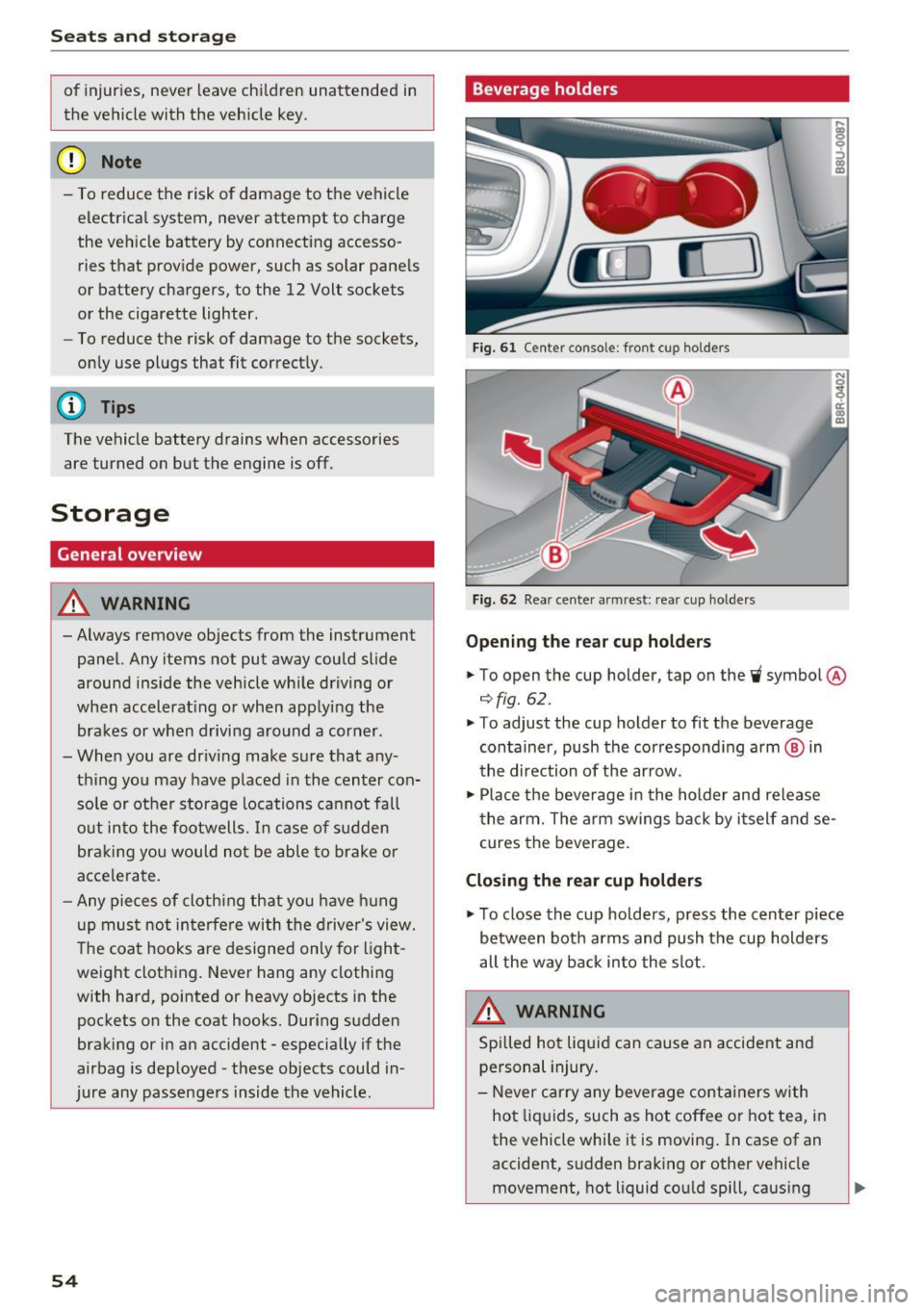
Fig. 61 Center consol e: fr ont cup holders
Fi g. 62 Rea r cen te r armrest : rea r cup ho lde rs
Opening the re a r cup ho lder s
.. To open the cup holder , tap on the~ symbol @
¢fig. 62.
.. To adjust the cup holder to fit the beverage
container, push the correspond ing arm ® in
the direction of the ar row .
.,. Place the beverage in the holder and release
t he arm. The a rm swings ba ck by i tself and se
cures the beverage .
Closing the rear cup holders
.,. To close the cup holders , press the center piece
between both arms and push the cup holders
all the way back into the slot.
A WARNING
Spilled ho t liqui d can cause a n accident and
personal injury .
- Never carry any beverage containers with
ho t liquids, such as hot coffee or hot tea, i n
the vehicle while it is moving . In case of an
accident, s udden braking or other vehicle
movement, hot liquid cou ld spill , causing
-
Page 66 of 252
Warm and cold
~ Switching the rear window defogger on
and off
The rear window defogger only operates when
the engine is running .
It switches off automati
cally after approximate ly 10 to 20 minutes, de
pending on the outside temperature.
Adjusting air distribution and air vents
You can adjust the vents where the air will flow
out of. The air distribution is easi ly adjusted be
tween the two symbols positioned next to each
other
(®/;J/ •,,J/ ~).
In the ~ setting, the windshield and side win
dows are defrosted or cleared of condensation as
quickly as possible . The maximum amount of air
f lows mainly from the vents below the wind
sh ield. Recircu lation mode switches off .
You can open or close the center and rear vents in the cockpit and the vents in the rear center con- sole
using the ridged thumbwheels . The levers
adjust the direction of the airflow from the vents.
A WARNING
- You shou ld not use the recirculation mode
for an extended period since no fresh air is
drawn in. With the a ir-conditioning switch
ed off, the windows can fog up, which in
creases the risk of an accident!
- Individuals w ith reduced sensit iv ity to pain
or temperature could develop burns when
using the seat heating* function . To reduce
the ris k of injur y, these individua ls should
not use seat heating*.
(D Note
To avoid damaging the seat heating* ele
ments, do not kneel on the seats or place
heavy pressure on one area of the seat.
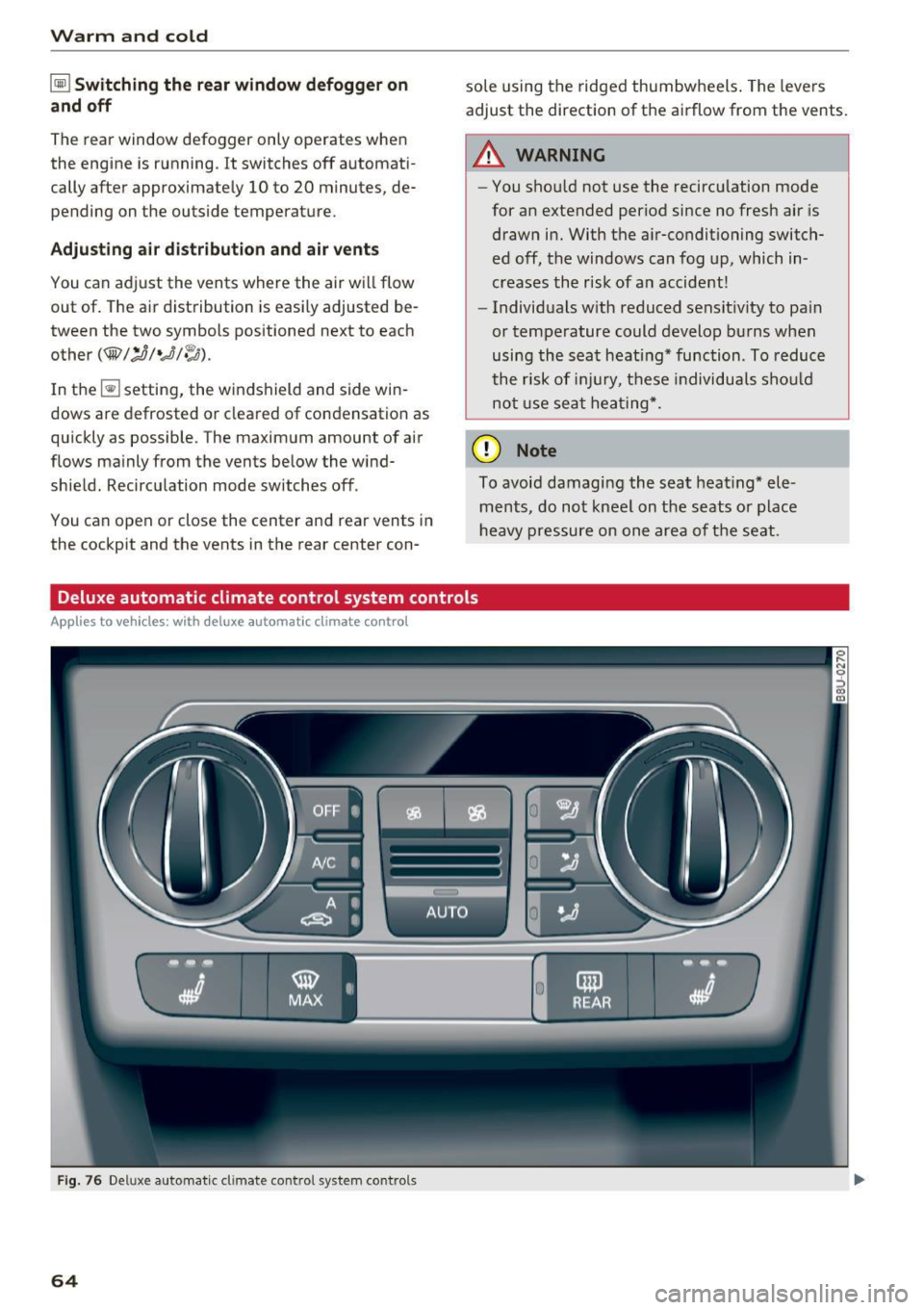
Deluxe automatic climate control system controls
Applies to vehicles: w ith deluxe automatic climate control
Fig. 76 Deluxe automatic climate control system co ntrol s
64
Page 67 of 252
Press the buttons to turn the functions on or off.
The LED in a button will light up when the func
tion is sw itched on.
IOF FI Switching the climate control system
on and off
The
I O FF I button switches the climate contro l
system on or off. Airflow from outside is b locked
when the climate control system is switched off .
IAJC! Switching the cooling mode on and off
The air is not cooled and humidity is not removed
when cooling mode is switched off. This can
cause fog on the windows. The cooling mode
switches off automatically when there are cold
outside temperatures .
l= I Switching the recirculation mode on and
off
To switch on the recirculat ion mode, press the
1 ... ,.1 button. The lower LED in the button turns on.
In recirculation mode, the air inside the vehicle is
circulated and filtered . This prevents the unfil
tered air outside the vehicle from entering the
vehicle interior. We recommend switching recir
culation mode on when dr iv ing th rough a tunnel
or when sitting in traffic~ ,&.
The
IAUTOI button or~ button switches recircu
l ation mode off .
To switch on the automatic recirculation mode,
press the
l""> •I button again . The upper LED in the
button turns on . Recirculation mode switches on
automatically when the engine is co ld, if you are
driving in reverse. The ai r quality sensor that is
des igned for diese l and gasoline exha ust auto
matica lly switches the recirculation mode on or
off depending on the leve l of pollutants in the
outside air. Automatic recirculation mode is time
restricted when cooling mode (A/C) is switched
off and frost temperatures are identified.
IAUTO I Switching automatic mode on and off
Automatic mode maintains a constant tempera
ture inside the vehicle. Air temperature, airflow
,....,
"' and air distribution are controlled automatically. ci ::, co ,....,
-I -Adjusting the temperature
T he vehicle inter ior temperature can be adjusted
f or the driver and the front passenger using the
left/right knob. Temperatures can be set be
tween a range of 60 ° F (+ 16 °C) and 84 ° F
(+28 °C). If outside of this range,
LO or HI will
appear in the climate contro l system display . In
both settings, the climate control runs with con
stantly at the maximum cooling or heating level.
The temperature is not regulated.
~ Adjusting air speed
You can adjust the volume of air generated by the blower to your preference . Use the left~ button
to decrease the air speed, and use the right~
button to increase the air speed . To have the air
flow regulated automatically, press the
!AUTOI
button.
[!il l~/~ Adjusting air distribution
You can manually select the vents where the air
will flow. The buttons can be pressed individually
or in comb ination with each other. To have the air
distribution regulated automatically, press the
IAUTOI button.
~ Adjusting seat heating*
Pressing the button switches the seat heating on
at the highest setting (level 3) . T he LEDs indicate
the temperature level. To reduce the tempera
ture, press the button again . T o switch the seat
hea ting off, press the button repeatedly until the
LED tur ns off.
After 10 minutes, the seat heating automatically
switches from level 3 to level 2.
IIIW MAX ! Switching the defroster on and off
The windshield and side windows are defrosted or cleared of condensat ion as quickly as poss ible.
The maximum amount of air flows mainly from
the vents below the windsh ield. Recirculation
mode switches off. The temperatu re should be
set at +72 °F (22 °() or h igher.
The
! AUTOI button switches the defroster off .
65