service AUDI Q3 2016 User Guide
[x] Cancel search | Manufacturer: AUDI, Model Year: 2016, Model line: Q3, Model: AUDI Q3 2016Pages: 252, PDF Size: 62.81 MB
Page 48 of 252
Lights and Vi sion
function . Check your windshield wiper
blades regularly.
- The washer fluid nozzles of the windshield
washer system are heated at low tempera
tures when the ignition is on.
- When stopping temporarily, such as at a
traffic light, the speed of the windshie ld
wipers automatically reduces by one level.
Cleaning windshield wiper blades
Clean the wiper blades when you see wiper
streaks. Use a sof t cloth and a glass cleaner .
Windshield wiper
~ Place the windshield wiper arms in the service
position ¢
page 46.
~ Fold the windshield wiper arm away from the
windshield.
Rear window wiper
~ Fold the windshield wiper arm away from the
rear window .
A WARNING
Dirty windshield wiper blades can impair vi
sion, which increases the risk of an accident .
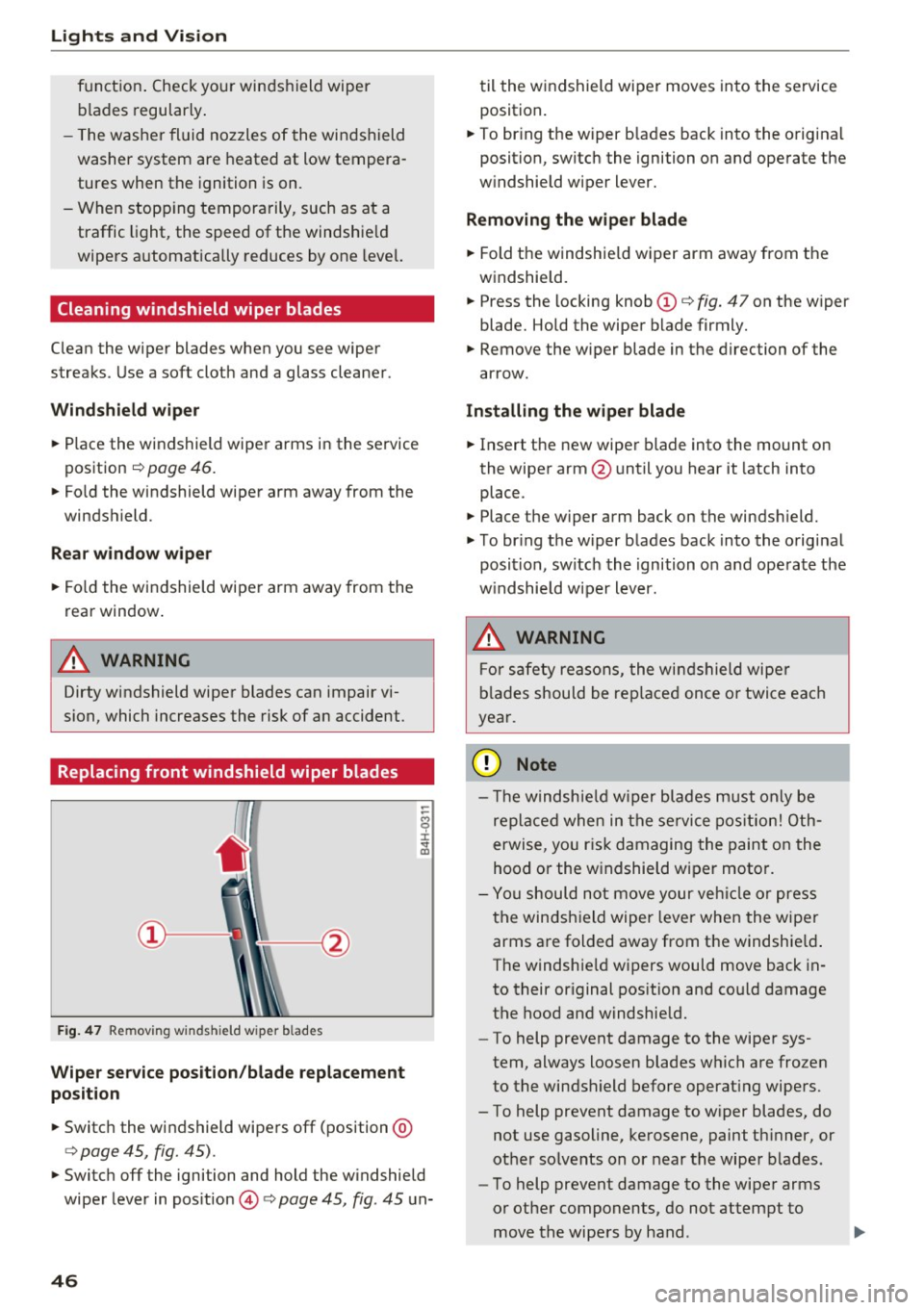
Replacing front windshield wiper blades
Fig. 47 Remov ing w inds hield w iper b lades
Wiper service position/blade replacement
position
~ Switc h the windshield wipers off (position @
¢ page 45, fig. 45).
-
~ Switch off the ignition and hold the w indshield
wiper lever in pos ition @¢
page 45, fig. 45 un-
46
til the windshield wiper moves into the service
position .
~ To bring the wiper b lades back into the origina l
position, switch the ignition on and operate the
w indshield wiper lever.
Removing the wiper blade
~ Fold the windshie ld wiper arm away from the
windshield.
~ Press the locking knob(!)¢ fig. 47 on the wiper
blade. Hold the wiper blade firmly.
~ Remove the wiper blade in the direction of the
arrow.
Installing the wipe r blade
~ Insert the new wiper blade into the mount on
the wiper arm @until you hear it latch into
place .
~ Place the wiper arm back on the windsh ield.
~ To bring the wiper blades back into the original
position, switch the ignition on and operate the
w indshield w iper lever.
.&_ WARNING
-
For safety reasons, the windshield wipe r
blades should be replaced once or twice each
year.
(UJ Note
- Th e windshie ld wiper blades must only be
replaced when in the service position! Oth
erwise, you ris k damaging the paint on the
hood or the windshield wiper moto r.
- You should not move your vehicle or press
the windsh ield wiper lever when the wiper
arms are folded away from the windshie ld.
The windshie ld wipers would move back in
to their original position and could damage
the hood and windshie ld.
- To help prevent damage to the wiper sys
tem, always loosen blades which are frozen
to the windshield before operating wipers.
- To help prevent damage to wiper blades, do
not use gasoline, kerosene, paint thinner, or
other so lvents on or near the wiper blades.
- To help prevent damage to the wiper arms
or other components, do not attempt to
move the wipers by hand .
Page 49 of 252
.... N
c:i ::J CX)
.... I.Cl U"I
N I.Cl ......
@ Tips
-Commercial hot waxes applied by automatic
car washes affect the how easi ly the glass
surface can be cleaned.
- You can also use the service position, for ex
ample, if you want to protect the windshield
from icing by using a cover.
- You cannot activate the service position
when the front lid is open.
Replacing rear windshield wiper blade
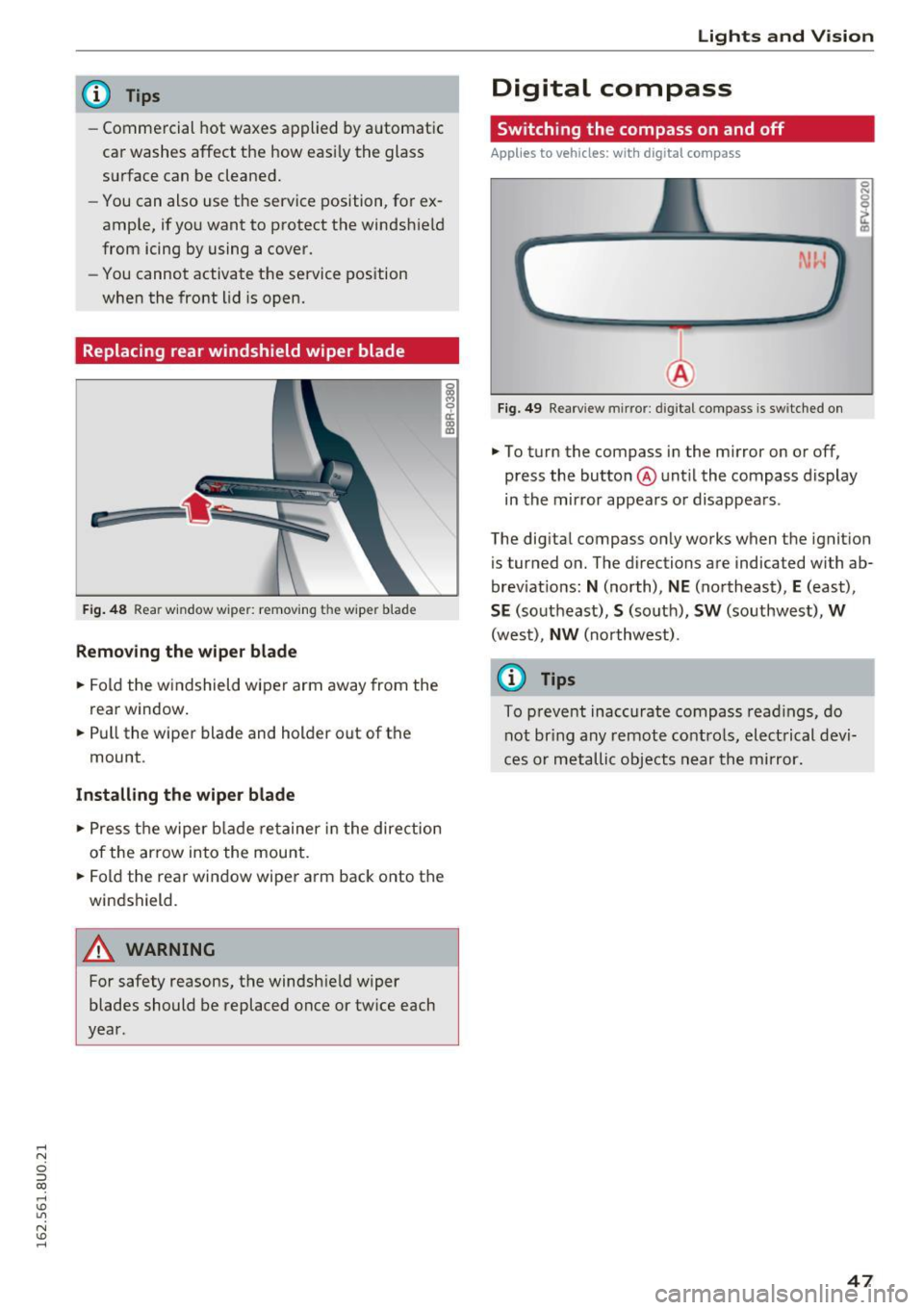
F ig . 48 Rear window wiper: remov ing the wiper blade
Removing the wiper blade
.. Fold the w indshield wiper arm away from the
rea r window .
.. Pull the wiper blade and holder out of the
mount .
Installing the wiper blade
.. Press the wiper blade retainer in the direction
of the arrow into the mount .
.. Fold the rear window wiper arm back onto the
windshield.
A WARNING
~ 9 a::
"' a,
-
For safety reasons, the windshield wiper
blades should be replaced once or tw ice each
year .
Lights and V ision
Digital compass
Switching the compass on and off
Applies to veh icles: w it h dig ita l compass
Fig . 49 Rearview mirror: digi tal compass is sw itched on
.. To turn the compass in the mirror on or off,
press the button @until the compass display
in the mirror appears or disappears .
The digital compass on ly works when the ignition
is tur ned on. The directions are indicated with ab
brev iat ions:
N (north), NE (northeast), E (east),
SE (southeast), S (so uth), SW (southwest), W
(west), NW (northwest).
(0 Tips
To prevent inaccurate compass readings, do
not br ing any remote controls, electrical devi
ces or metallic objects near the mirror.
47
Page 64 of 252
Warm and cold
Warm and cold
Climate control system
Description
Depending on the vehicle equ ipment, different
systems cou ld be installed:
- manual climate control system* or
- automatic climate control system*
The climate control system warms, coo ls and
adds humidity to the air in the vehicle interior. It
is the most effective when the windows and pan
orama roof are closed. If there is a build-up of
heat inside the vehicle, vent ilation can help to
speed up the cooling process.
Condensat ion from the cooling system can drip
and form a puddle of water under the vehicle.
This is normal and does not mean there is a leak.
Pollutant filt er
The po llutant filter removes pollutants such as
dust and po llen from the a ir .
The air pollutants filter must be changed at the intervals specified in your Warranty & Mainte
nance booklet, so that the air conditioner can
proper ly work.
I f you drive yo ur vehicle in an area wi th high air
pollut ion, the filter may need to be changed
more frequently than specified in your Audi War
ranty & Maintenance booklet. If in doubt, ask
your author iz ed Audi Service Advisor for advice.
K ey rec ognition *
The deluxe automati c climate control* settings
are stored and assigned to the remote contro l
key that is in use .
A WARNING
Reduced visibility is dangerous and can ca use
accidents.
62
- For safe driving it is very important that all
w indows be free of ice, snow and condensa
tion.
- Complete ly familiarize yourself with the
proper use and function of the heating and
ventilation system and espec ially how to de
fog and defrost the windows .
- Never use the windshield wiper/washer sys
tem in freezing weather until you have
warmed the windshield first, using the heat
ing and vent ilation system . The washe r so lu
tion may freeze o n the windshield and re
duce visibility.
(U;) Note
- If you suspect that the air conditioner has
been damaged, sw itch the system off to
avoid furthe r damage a nd have it inspected
by a q ualified deale rship .
- Repa irs to the Aud i ai r cond itione r requ ire
special techn ica l know ledge and spec ial
tools. Contact an authorized Audi dea le r fo r
assistance .
@ For the sake of the environment
By reducing t he amo unt of fuel you use, you
a lso red uce the amount of pollutan ts emitted
i nto the a ir.
(D Tips
- To prevent i nterference with the heating
and cooling ou tput and to prevent the win
dows from fogging over, the air intake in
front of the windshie ld must be free of ice,
snow or leaves.
- The energy management system may switch
t h e seat heating * or rear window defroster
o ff temporarily. These systems are available
again as soon as the energy supply has been
restored.
Page 73 of 252
.... N
c:i ::J CX)
.... I.Cl U"I
N I.Cl ......
.. Drive to an authorized A udi dealer or author
ized Audi Service Facility immediately to have
the malfunction corrected.
@ Tips
You can view the message again by pressi ng
the
I START E NGINE STOP! button.
Driver messages
Turn off ignit ion. Battery di scharging
This message appears and a war ning tone sounds
if you open the driver's doo r whe n the ignition is
sw itched on.
Pr ess brake pedal to start engine
This message appears if you do not step on the
brake pedal to start the eng ine on a vehicle with
a n automatic transm ission .
Please engage Nor P.
This message appears when starting or stopping
the eng ine and Nor Pis not engaged. The engine
will not start/stop.
Ill Is key in the vehicle ?
The indicator light turns on and this message ap
pea rs if the conven ience key* was removed from
the veh icle when the eng ine was runn ing. If t he
conven ience key is no longer in the vehicle, you
cannot switch the ignition on or start the engine
once yo u stop it. Yo u also ca nnot lock the vehicle
from the outside.
Shift to P , vehicle can roll away . Doors can only
be locked in P.
This message appea rs fo r safe ty re asons a long
with a warn ing sound if the se lector lever is not
e ng aged in P a fter swi tching the ignition off.
Move the selector lever to the P positio n. Other
wise the vehicle is not protected from rolling and
it cannot be loc ked.
DJ No key identified . See owner's manual.
This message appears if the re is no convenience
key * in side the veh icle or if the system does not
r ecognize the key. The conve nience key may not
be re cognized, for examp le, i f it is cove red by an
D rivi ng
obje ct that disrupts the signa l (such as a br ie f
case), or if the key battery is wea k. E lectronic de
vices such as cell phones can a lso inte rfere with
the signal.
T o still be able to start or stop the engine, re fer
to
¢ page 70.
Electromechanical
parking brake
Operating
The electromechanical parking brake replaces
the hand brake.
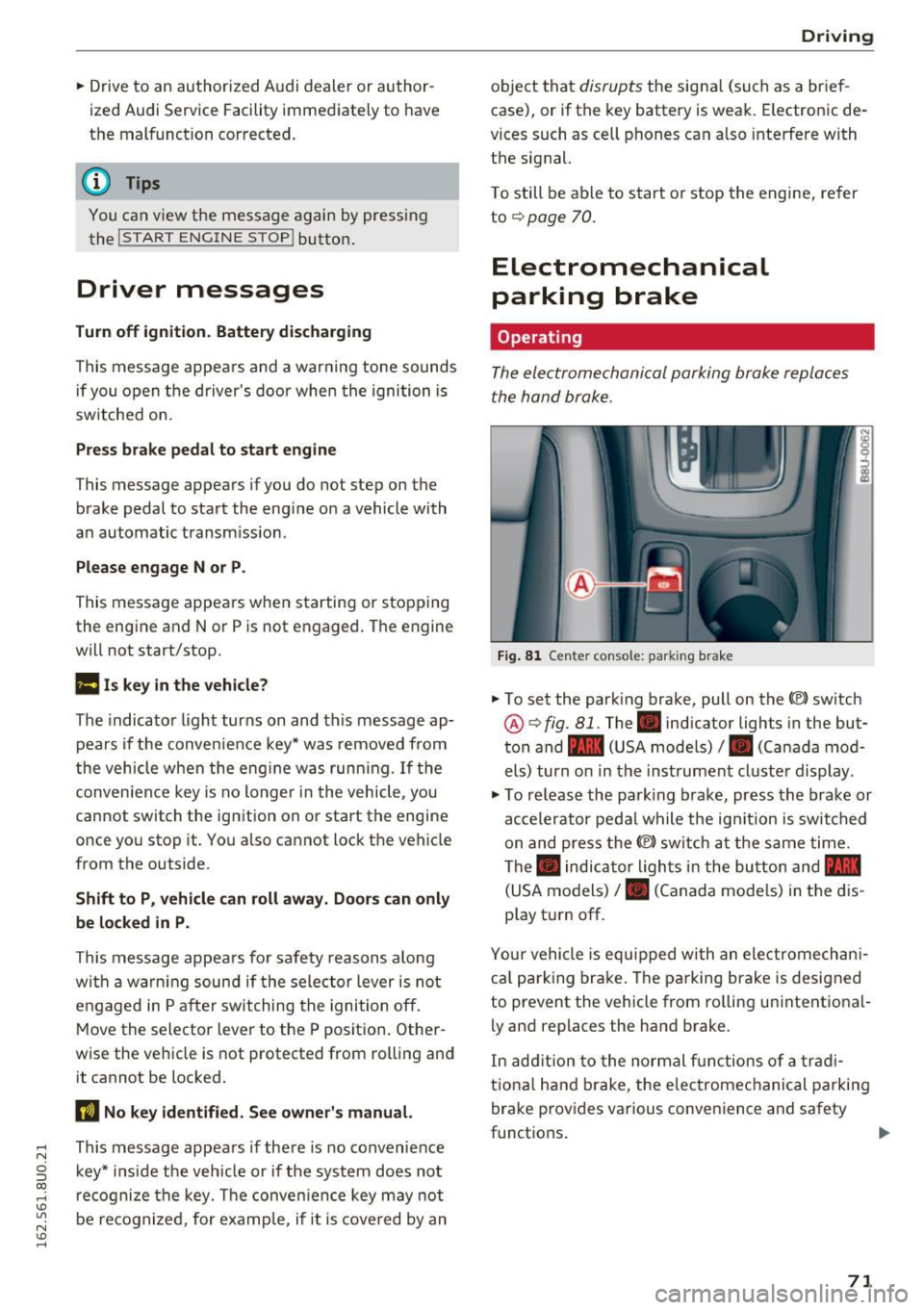
Fi g. 81 Center console: parking brake
.. To set the park ing brake, pull on the(®) switch
@¢ fig. 81. The . indicator lights in the but
ton and - (USA models)/ . (Canada mod
els) turn o n in the ins trument cluste r display.
.,. To re lease the park ing brake, press the brake or
ac celerator pedal w hile the ign it ion is switched
on and press the(®) switch at the s ame time.
The . indicator ligh ts in t he bu tton and -
(USA models)/ . (Canada mode ls) in the dis
play t urn off.
Yo ur vehicle is equipped with an elect romechan i
ca l p a rk ing brake . The pa rking brake is designed
to prevent the vehicle from ro lling un intent ional
ly and replaces the hand brake.
In add ition to the normal f unctions of a tra d i
t iona l h and b rake, t he elec tromec hanical parking
bra ke prov ides various conven ience and safety
functions .
71
Page 74 of 252
Driving
When start ing from a stop
- T he in tegr al hi ll sta rt as sis t helps y ou when
driving by automatically releasing the park ing
brake¢
page 72, Starting from a stop.
- When starting on incl ines, the hill start assist
prevents the vehicle from unintentionally roll
ing back . The braking force
of the parking brake
is only released if sufficient drive power has
been built up at the wheels.
Em erg enc y bra ke f unction
An emergency braking functions ens ures that the
vehicle can be s lowed down even if the
normal
brakes fail¢ page 73, Emergency braking
function.
,&. WARNING
- Do not press the accelerator pedal inadver
tently when the veh icle is stationary and the
engine is running and a gear is selected.
Otherwise t he vehicle w ill start to move im
med iate ly and could result in a c rash.
- If the power supply fa ils, the released park
ing bra ke can no longe r engage. In th is
case, pa rk the veh icle on leve l ground and
sec ure it by placing the selector lever in the
P position. See an author ized Audi dealer or
authorized Aud i Service Faci lity for assis
tance .
(D Tips
-If the parking b rake is set while the ignition
i s sw itched off, the. indicator light in the
b utton and -(USA models) /. (Cana
da models) will turn off after a certain
amount of time.
- Occasiona l noises when the parking brake is
set and re leased are normal and are not a
cause for concern.
- When the vehicle is parked, the parking
brake goes thro ugh a self-test cycle at reg u
l ar intervals. Any no ises assoc iated with this
are normal.
- If there is a power fa ilure, the parking brake
will not set if it is re leased, and it will not
release if it is set¢,&. See an authorized
72
-
Audi dealer or author ized Audi Service Fa
cility for assistance.
Parking
.. Press the brake pedal to stop the veh icle.
.. To set the park ing brake, pull on the© switch.
.. Select the P position .
.. Turn the engine off¢,& .
.. Turn the steering wheel when par king on in
cl ines so that the wheels w ill roll into the cu rb
if the vehicle starts moving.
,&. WARNING
- Always take the veh icle key with yo u when
leaving the vehicle, even for a short period
of time. This applies part icularly when chil
dren remain in the vehicle. Otherwise chil
dren could start the engine, release the
parking brake or operate electrical equip
ment such as power w indows, which in
creases the risk of an accident.
-
- No one should remain in the veh icle w hen it
is locked, especially ch ild ren. Locked doors
make it more difficult for emergency work
ers to get into the veh icle, wh ich puts lives
at risk.
Starting from a stop
The start assist function ensures that the park
ing broke is released automatically upon start
ing.
Stopping and setting the parking brake
.. To set the park ing brake, pull on the(®) switch.
Starting and automat ically r elea sing the
parking brake
.. When you press the acce lerator pedal, the
parking brake is automat ica lly re leased and
your vehicle beg ins to move .
When stopping at a traffic signa l or stopping in
c ity traff ic, the parking brake can be applied . The
vehicle does not have to be held with the brake pedal. The park ing brake elim inates the tendency
to c reep when a se lector lever position is engag-
ed. As soon as yo u press t he accelerator pedal,
1J1>
Page 75 of 252
the parking brake releases automatically and the
vehicle starts to move.
Starting on hills
When start ing on inclines, the hill start ass ist
prevents the vehicle from unintentionally roll ing
back. The braking force of the parking brake is
only released if sufficient drive power has been
bui lt up at the whee ls.
(D Tips
For safety reasons, the parking brake is re
leased automatically only when the driver's
safety belt is fastened and the driver's door is
locked.
Starting to drive with a trailer
To prevent rolling back unintentionally on an in
cline, do the following:
.. Keep pulling the<®> switch and press the acce l
erator pedal. The parking brake stays applied
and prevents the vehicle from ro lling backward.
.. You can re lease the<®> switch once you are sure
that you are transferring enough dr iving force
to the whee ls by pressing the accelerator pedal.
Depending on the weight of the rig (vehicle and
trailer) and the severity of the incline, you may
roll backwards as you start.
Hill hold
A ppl ies to vehicles: with H ill Hol d
Hill hold makes it easier to start on hills .
Requirement: The driver's door must be closed,
the seat belt must be buckled and the engine
must be running.
The system is activated when the brake pedal is
p ressed
for a few seconds.
To prevent the vehicle from roll ing back when
starting, the brake power is held for a brief mo
ment after releasing the brake pedal. During this
~ time, you can easi ly begin to move you r vehicle .
ci ::, co ,....,
A WARNING
- The intelligent technology of Hill Hold can
not overcome the limitat ions imposed by
natural physical laws. The increased comfort
offered by Hill Hold should not cause you to
take safety risks.
- Hill Hold cannot hold the vehicle in all hill
start situations (for example, if the g round
is slippery or icy).
- If you do not beg in moving immediately af
ter releasing the brake peda l, the vehicle
could begin to roll backward under certain
circumstances . Press the brake pedal or set
the parking brake immediately.
-If the engine "stalls", press the brake pedal
or set the parking bra ke immediate ly.
- To prevent the vehicle from roll ing back un
intentionally when starting in s top-and-go
traffic, keep the brake pedal pressed for a
few seconds before driving off .
(D Tips
You can find out if your vehicle is eq uipped
wi th Hill Hold by checking at an authorized
Audi dealer or authorized Audi Service Facili
ty.
Emergency braking function
This is used if the conventional brake system
fails or locks up.
.,. To brake your veh icle using the parking brake in
an emergency, pu ll the(®) switch and keep it
pulled.
.. The braking stops as soon as you release the<®>
switch or acce lerate .
If you pu ll the(®) switch and hold it above a
speed of about 5 mph (8 km/h) , the emergency
braking function is activated. The vehicle brakes
at all four whee ls by activating the braking hy
draulics. The brake performance is similar to
heavy brak ing .
c::> .&.
In order not to activate the emergency brake
function by mistake, a warning tone (buzzer)
sounds when the(®) switch is pulled. As soon as .,.
73
Page 81 of 252
@ Tips
-Side assist is not active whi le you are ma k
i ng the ad justment .
- Your settings are automatically stored and
ass igned to the remote control key being
u sed.
Driver messages
App lies to vehicles: with Audi side assist
If side ass ist switches off by itself, the LED in the
button turns off and a message will appear in the
i nstr ument cluster d is pl ay :
Audi side assist: Unavailable. Sensor view
The radar senso rs ' vision is affected. Do not cover
the area in front of the sensors with b ike wheels,
sticke rs, dirt or other ob jects . Clean the area in
front of the senso rs, if necessary
c:> page 77,
fig . 86 .
Aud i side assist: Unavailable
Side assist cannot be switched o n tempo rar ily be
cause there is a malfunction (for exam ple, the
battery charge level may be too low).
Audi side assist: Syst em fault!
The system cannot guarantee that it will detect
ve hicles co rrectly and it is switched off. The sen
sors have been d isp laced or are fa ulty. Have the
system checked by an authorized Audi dealer or
author ized Audi Service Facility soon.
Audi side as sist: Unavailable when towing
Side assist sw itches off automatically when a fac
tory-installed trailer hitch is connected to the
e lectrical connector on the trailer. T he re is no
gua rantee the system will sw itch off when using
a retrofi tted tra ile r hitch . Do not use s ide ass ist
when towing a trailer.
Aud i side assist
79
Page 88 of 252
Automatic transmission
Shifting with the shift paddle s*
You can operate the shift padd les in the D, Sor M
selector lever posit ions.
• To sh ift up one gear, tap the
0 shift paddle
¢fig. 93.
• To shift down one gea r, tap the O sh ift paddle.
• If you do not press a shift button within a short
time whi le in the D/S position, the transmission
will return to automatic mode. To keep shifting
using the shift buttons, move the selector lever
to the right out of the D/S position.
The transmission automatically shifts up or down
before critical engine speed is reached.
The transm ission only a llows manual shift ing
when the engine speed is within the permitted
range.
@ Tips
- When you shift into the next lower gear, the
transmission wi ll downshift only when there
is no possibility of over-revving the engine.
- When the kick-down comes on, the trans
mission will shift down to a lower gear, de
pending on vehicle and engine speeds.
- Tiptronic is inoperative when the transmis
sion is in the fai l-safe mode .
Kick-down
Kick-down enables maximum acceleration.
When you press the accelerator peda l down be
yond the resistance point (called kick-down), the
automatic transmission downshifts into a lower
gear, depending on vehicle speed and engine RPM. It shifts up into the next higher gear once
the maximum specified engine RPM is reached.
A WARNING
Please note that the wheels could spin on
slick or slippery roads when kick-down is ac
tive.
Transmission malfunction
• Transmission overheating! Please stop the
vehicle!
86
The transmission is too hot and can become dam
aged. Stop and let the transmission coo l with the
engine running (at idle) in the P se lector lever po
sition. Then the indicator light and the message
turn off, drive to an authorized Audi dealer or au
thorized Audi Service Facility immediately to have
the malfunct ion corrected.
If the indicator light
and the driver message do not turn off, do not
continue driving. See an authorized Audi dea ler
or authorized Audi Service Facility fo r assistance.
Selector lever emergency release
In order to tow a vehicle due to power failure,
the selector lever emergency release must be ac
tivated .
Fig. 94 Selector lever: remov ing t he cover
Fig. 95 Selector lever: emergency release
The emergency release mechanism is located in
the right area under the selector lever shift gate.
Using the emergency release can be complicated .
We recommend contacting an authorized Audi
dealer or authorized Audi Service Facility for as
s istance, if necessary.
A maintenance tool from the vehicle tool kit
must be used to release
¢ page 211 .
Page 93 of 252
can affect the function of the parking system. For information on cleaning, refer to¢
page 168.
The rearview camera coverage area includes (!)
¢ fig. 101. Only this area is shown in the Info
tainment display. Objects that are outside of this
area @are not displayed.
The accuracy of the orientation lines and blue
surfaces diminishes if the
Dynamic mode is acti
vated
¢ page 80.
~ WARNING
- Always read and follow the applicable warn
ings
¢ &. in General information on
page 88.
- If the position and the installation angle of
the rearview camera was changed, for ex ample, after a collision, do not continue to
use the system for safety reasons. Have it
checked by your authorized Audi dealer or
authorized Audi Service Facility .
- Only use the rearview camera to assist you if
it shows a good, clear picture. For example,
the image may be affected by the sun shin
ing into the lens, dirt on the lens or if there
is a defect.
- Use the rearview camera only if the luggage
compartment lid is completely closed. Make
sure any objects you may have mounted on
the luggage compartment lid do not block
the rearview camera.
- The camera lens enlarges and distorts the
field of vision. The object appears both al
tered and inaccurate on the screen.
- In certain situations, people or objects in
the display appear closer or farther away:
- For objects that do not touch the ground,
such as the bumper of a parked vehicle, a
trailer hitch or the rear of a truck . Do not
use the help lines in this case.
- If driven from a level surface onto an in
cline, or a downward slope.
- If driven toward protruding objects.
- If the vehicle is carrying too much load in
the rear .
Parking systems
(D Note
-Always read and follow the applicable warn
ings
¢ (D in General information on
page 88.
- Th e orange colored orientation lines in the
In fotainment display show the vehicle path
depending on the steering wheel angle. The
front of the vehicle swings out more than
the rear of the vehicle. Maintain plenty of
distance so that your outside mirror or a
corner of your vehicle does not collide with
any obstacles.
Switching on/off
Appl ies to vehicles: with parking system plus with rearview
camera
Switching on
• Shift into reverse, or
• Press the
PwA button in the center console
¢ page 89, fig. 97. A short confirmation tone
sounds and the LED in the button turns on.
Switching between the rearview camera and
optical display
• Press the Graphic control button ®
¢ page 92, fig. 103 to see the optical display.
• Press the
Rear view control button to see the
rearview camera image.
Switching off
• Drive faster than 6 mph (10 km/h), or
• press the
P•lj A button, or
• Switch the ignition off.
@ Tips
The visual display in the left part of the dis
play should help you detect the critical vehicle
areas.
91
Page 112 of 252
Safety belts
The shou lder belt should lie as close to the center
of the collar bone as possib le and should fit well
on the body
c::> A in Safety belt position on
page 108.
"' Push
the loop -around fittings up c::> fig. 120 @,
or
"'squeeze together the (D button, and push the
loop-around fittings down@.
"'Pull the belt to make sure that the upper at
tachment is properly engaged .
A WARNING
Always read and heed all WARNINGS and oth er important informat ion
c::> page 106.
(D Tips
With the front seats, the height adjustment of the seat can also be used to adjust the po
sition of the safety belts.
Improperly worn safety belts
Incorrectly positioned safety belts can cause se
vere injuries.
Wearing safety belts improperly can cause seri
ous injury or death. Safety belts can only work
when they are correctly positioned on the body.
Improper seating positions reduce the effect ive
ness of safety belts and will even inc rease the
risk of injury and death by mov ing the safety belt
to cr it ica l areas of the body. Improper seating
positions a lso increase the risk of serious injury
and death when an airbag deploys and strikes an
occupant who is not in the correct seating pos i
tion. A driver is responsible for the safety of all
veh icle occupants and especially for children.
Therefore:
"' Never permit anyone to assume an incorrect
sitting position in the vehicle while traveling
c>_& .
A WARNING
Improperly worn safety belts increase the risk
of serious personal injury and death whenever
a vehicle is being used.
110
- Always make sure that all vehicle occupants
are correctly restrained and stay in a correct
seating position whenever the vehicle is be
ing used.
- Always read and heed all WARNINGS and
other important information
c::> page 106.
Belt tensioners
How safety belt pretensioners work
In front, side and rear-end collisions above a
particular severity and in a rollover, safety belts ore tensioned automatically.
The safety belts are equipped w ith safety belt
pretensioners . The system is activated by sensors
i n front, side and rear-end collisions of great se
verity and in a rollover. This tightens the belt and
takes up belt slack
c::> & in Service and disposal of
safety belt pretensioner on page 111.
Taking up
the slack helps to reduce forward occupant
movement during a collision.
(D Note
Never let the belt remain over a rear seatback
that has been folded forward .
@ Tips
The safety belt pretensioner can only be acti
vated once.
- Th e safety belt pretensioners do not deploy
in minor frontal, side and rear-end colli
sions.
- When the safety belt pretensioners are acti
vated, a fine dust is released. This is normal
and is not caused by a fire in the vehicle.
- Th e relevant safety requirements must be
observed when the vehicle or components
of the system are scrapped. An authorized
Audi dealer or qualified workshop is familiar
with these regulations and will be pleased
to pass on the information to you.
- Be sure to observe all safety, environmental
and other regulations if the vehicle or indi
vidual parts of the system, particularly the
safety belt or airbag, are to be disposed. We
recommend you have your authorized Aud i
dealer perform this service for you.