warning lights AUDI Q3 2016 User Guide
[x] Cancel search | Manufacturer: AUDI, Model Year: 2016, Model line: Q3, Model: AUDI Q3 2016Pages: 252, PDF Size: 62.81 MB
Page 42 of 252
Lights and Vision
(D Tips
-The light sensor for the automatic head
lights* is in the rearview m irror mount.
Therefore, do not place any stickers in this
area on the windshield.
- Some of the exterior lighting functions can be adjusted
c:-page 41.
-If you turn off the ignition wh ile the exter ior
lights are on and open the door, you will
hear a warning tone.
- In cool or damp weather, the inside of the
headlights, turn s ignals and tail lights can
fog over due to the temperature d ifference
between the inside and outs ide . They will
clear short ly after sw itch ing them on . This
does not affect the serv ice life of the light
ing .
Turn signals and high beam lever
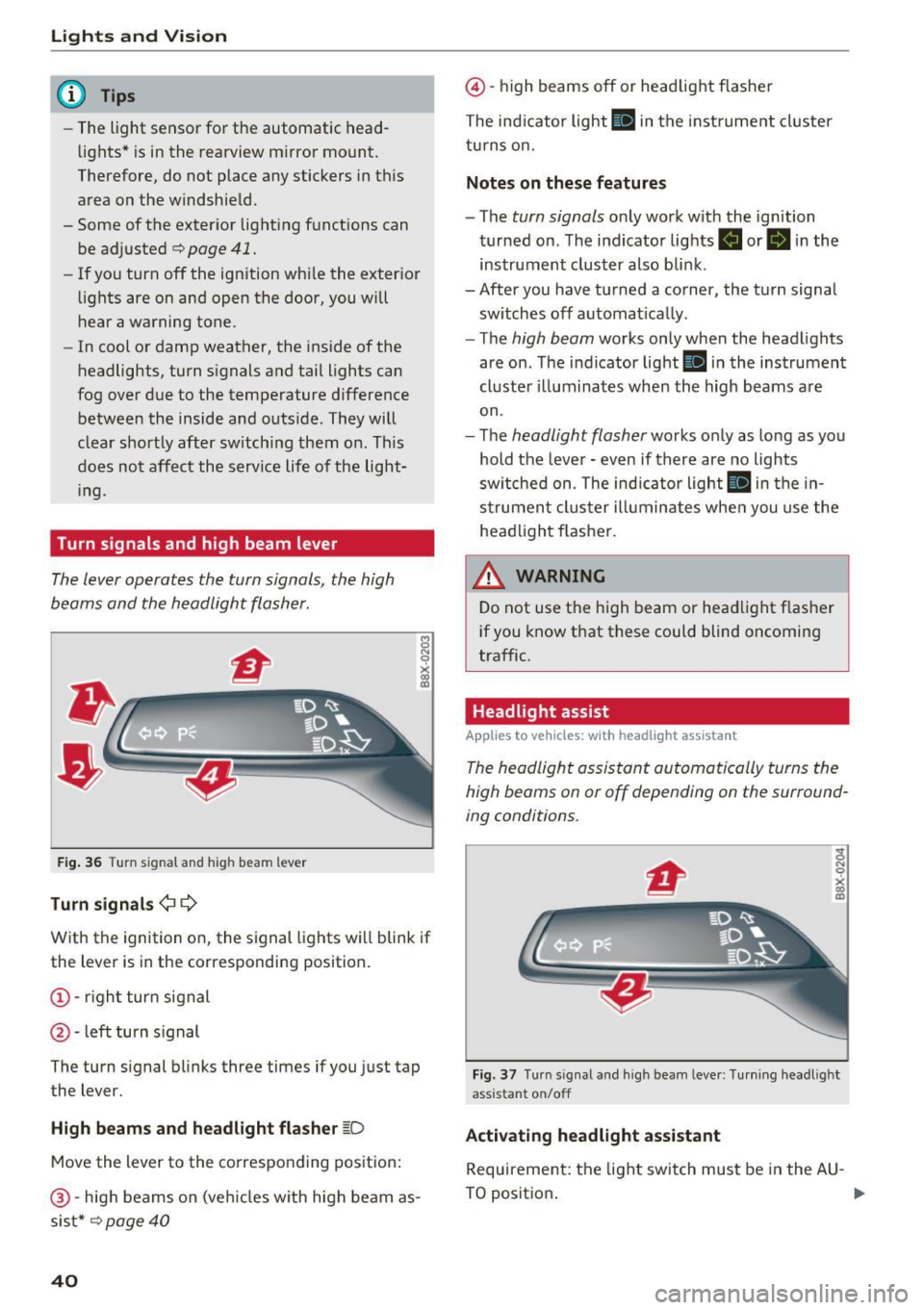
The lever operates the turn signals, the high
beams and the headlight flasher.
8 N 0
~
F ig . 36 Turn s ig nal and h ig h bea m lever
Turn signals ¢ Q
With the ignition on, the signal lights w ill blink if
the lever is in the corresponding position.
(!) -righ t turn signal
@ -left turn s ignal
The turn s ignal blinks three times if you just tap
the lever.
High beam s and headlight flasher ~D
Move the lever to the co rrespo nd ing posit ion:
@ -high beams on (ve hicles w ith high beam as
sis t*
c:-page 40
40
@ -high beams off or headlight flasher
The ind icator light
II in the instrume nt cl uster
turns o n.
Notes on these features
- The turn signals only work w ith the ignition
turned on . T he indicator lights . or
II in the
instrument cluster also bli nk.
- After you have tu rned a corner, the tu rn signa l
sw itches off automat ica lly .
- The
high beam works only when the head lights
are on . Th e ind icator light
Bl in the instrumen t
cl uste r ill um ina tes when the high beams a re
on.
- The
headlight flasher works o nly as long as yo u
hold the leve r - even if there are no lights
sw itched on . The ind icator light
II in the in
s trumen t clus te r i lluminates whe n you use the
head light flasher.
&_ WARNING
D o not use t he high beam or head light f lasher
if you know that these could blind oncoming
traffic.
Headlight assist
Applies to vehicles: wit h headlight assistant
The headlight assistant automatically turns the
high beams on or off depending on the surround
ing conditions .
Fig. 3 7 Turn s ig nal a nd hi gh beam lever: Tu rnin g headl ig ht
ass istant on/off
Activating headl ight assi stant
Requireme nt: the light sw itch must be in the AU -
TO positio n. .,.
Page 43 of 252
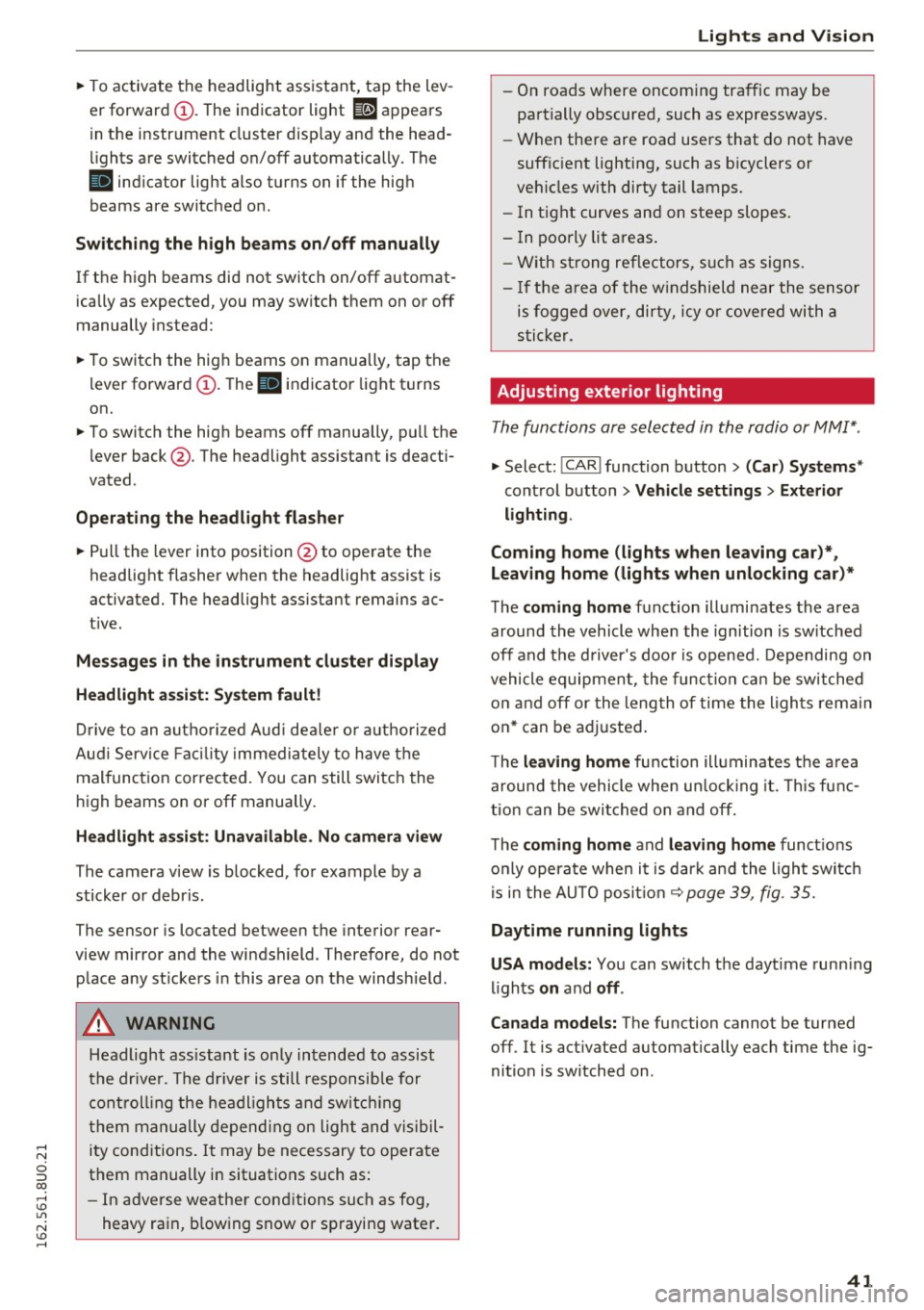
~ To activate the headlight assistant, tap the lev
er forward (!). The indicator light
ii appears
in the instrument cluster disp lay and the head
lights are switched on/off automatically. The
SI indicator light also turns on if the high
beams are switched on .
Switching the high beams on/off manually
If the high beams did not switch on/off automat
ically as expected, you may switch them on or off
manually instead:
~ To switch the high beams on manually, tap the
l ever forward (!). The
SI indicator light turns
on.
~ To switch the high beams off manually, pull the
lever back@. The headlight assistant is deacti
vated .
Operating the headlight flasher
~ Pull the lever into position @to operate the
headlight flasher when the headlight assist is
activated. The headlight ass istant remains ac
tive.
Messages in the instrument cluster display
Headlight assist: System fault!
Drive to an authorized Aud i dea ler or a uthorized
Aud i Serv ice Fac ility immediately to have the
malfunction corrected. You can still switch the
high beams on or off manually.
Headlight assist: Unavailable. No camera view
The camera view is blocked, for example by a
sticker or debris .
The sensor is located between the interior rear
view mirror and the windshield . Therefore, do not
place any st ickers in this area on the windshield .
A WARNING
Headlight assistant is only intended to assist
the driver. The driver is still responsible for
controlling the headlights and switching
them manually depending on light and visibil
ity conditions. It may be necessary to operate
them manually in situations such as:
- In adverse weather conditions such as fog,
heavy ra in, b lowing snow or spraying water.
Lights and Vision
-On roads where oncoming traffic may be
partially obscured, such as expressways.
- When there are road users that do not have
sufficient lighting, such as bicyclers or
veh icles with dirty tail lamps.
- In tight curves and on steep slopes.
- In poorly lit areas.
- With strong reflectors, such as signs .
- If the area of the windshield near the sensor
is fogged over, dirty, icy or covered with a
s ticker.
Adjusting exterior lighting
The functions are selected in the radio or MMI*.
~ Select: !CAR ! function button> (Car) Systems*
control button > Vehicle settings> Exterior
lighting .
Coming home (lights when leaving car}*,
Leaving home (lights when unlocking car)*
The coming home function illumi nates the area
around the vehicle when the ignition is switched
off and the driver's door is opened. Depending on
vehicle eq uipment, the function can be switched
on and off or the length of time the lights remain
on* can be adjusted .
T he
leaving home function illuminates the area
around the vehicle when unlock ing it. Thi s func
tion can be switched on and off.
The
coming home and leaving home functions
only operate when it is dark and the light switch
is i n the AUTO posit ion ~
page 39, fig. 35.
Daytime running lights
USA models:
You can switch the daytime running
l ights
on and off .
Canada models:
The function cannot be turned
off. It is activated automatically each time the ig
nition is switched on .
41
Page 45 of 252
.... N
c:i ::J CX)
.... I.Cl U"I
N I.Cl ......
Instrument illumination
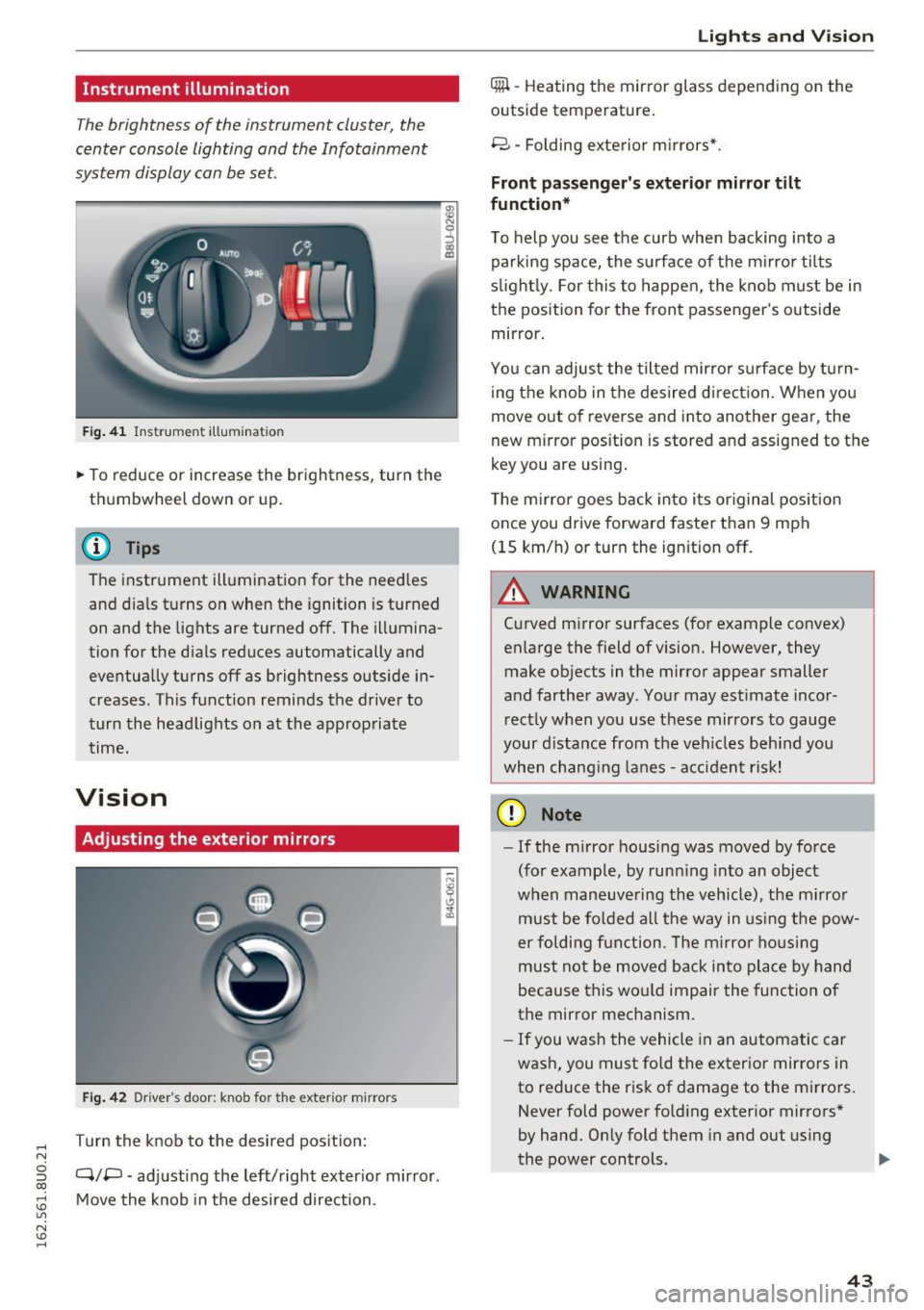
The brightness of the instrument cluster, the
center console lighting and the Infotainment
system display can be set.
F ig . 41 In strum ent illumina tion
• To reduce or increase the brightness, turn the
thumbwheel down or up.
(D Tips
The instrument illumination for the need les
and dia ls turns on when the ignition is turned
on and the lights are turned off. The illumina
tion for the d ials reduces automatically and
eventually turns off as brightness outside in
creases. This function reminds the driver to
turn the headlights on at the approp riate
time.
Vision
Adjusting the exterior mirrors
Fig . 42 D ri ver 's doo r: kn ob for t he ex te ri or m irro rs
T urn the knob to the desired pos it ion:
Q/P -adj usting the left/right exter ior mir ror.
Move the knob in the desired direction .
Lights and Vision
4iil -Heating th e mirror glass depending on the
outside temperature.
8 -Folding exte rior m irrors* .
Front passenger 's exterior mirror tilt
function *
To help you see the curb when backing into a
parking space, the su rface of the mi rro r tilts
s li ght ly. For this to happen, the knob must be in
the position for the front passenger 's outside
mirror.
You can adjust the tilted mirror s urfa ce by turn
i ng the knob in the desired d irect ion. When you
move out of reverse and into another gear, the
new m irror pos ition is stored and assigned to the
key you are using .
The m irror goes back into i ts or iginal pos ition
once you drive forward faster than 9 mph
(15 km/h) or turn the ignition off.
.&_ WARNING
=
C urved mirror surfaces (fo r example convex)
enlarge the field of vision. However, they
make objects in the mirror appear smaller
and farther away . You r may estimate inco r
r ect ly when you use these mirrors to gauge
your d ista nce from the veh icles beh ind you
when chang ing lanes -acciden t risk!
(D Note
- If the m irror housing was moved by force
(for example, by runn ing into an object
when maneuve ring the vehicle), the m irror
must be fo lded a ll the way in us ing the pow-
er folding fun ction . T he m irro r ho us ing
must not be moved back into place by hand
because this wo uld impair the function of
the mirror mechanism.
- If you wash the vehicle in an automatic car
wash, you must fold the exterior mirrors in
to reduce the r isk of damage to the mirro rs.
Never fold power fo ld ing exter ior mirrors *
by hand. Only fold them in and out using
the power controls. ..,.
43
Page 46 of 252
Lights and Vision
@ Tips
If the power adjusting function malfunctions,
the glass in both mirrors can be adjusted by
pressing on the edge of it by hand.
Dimming the mirror
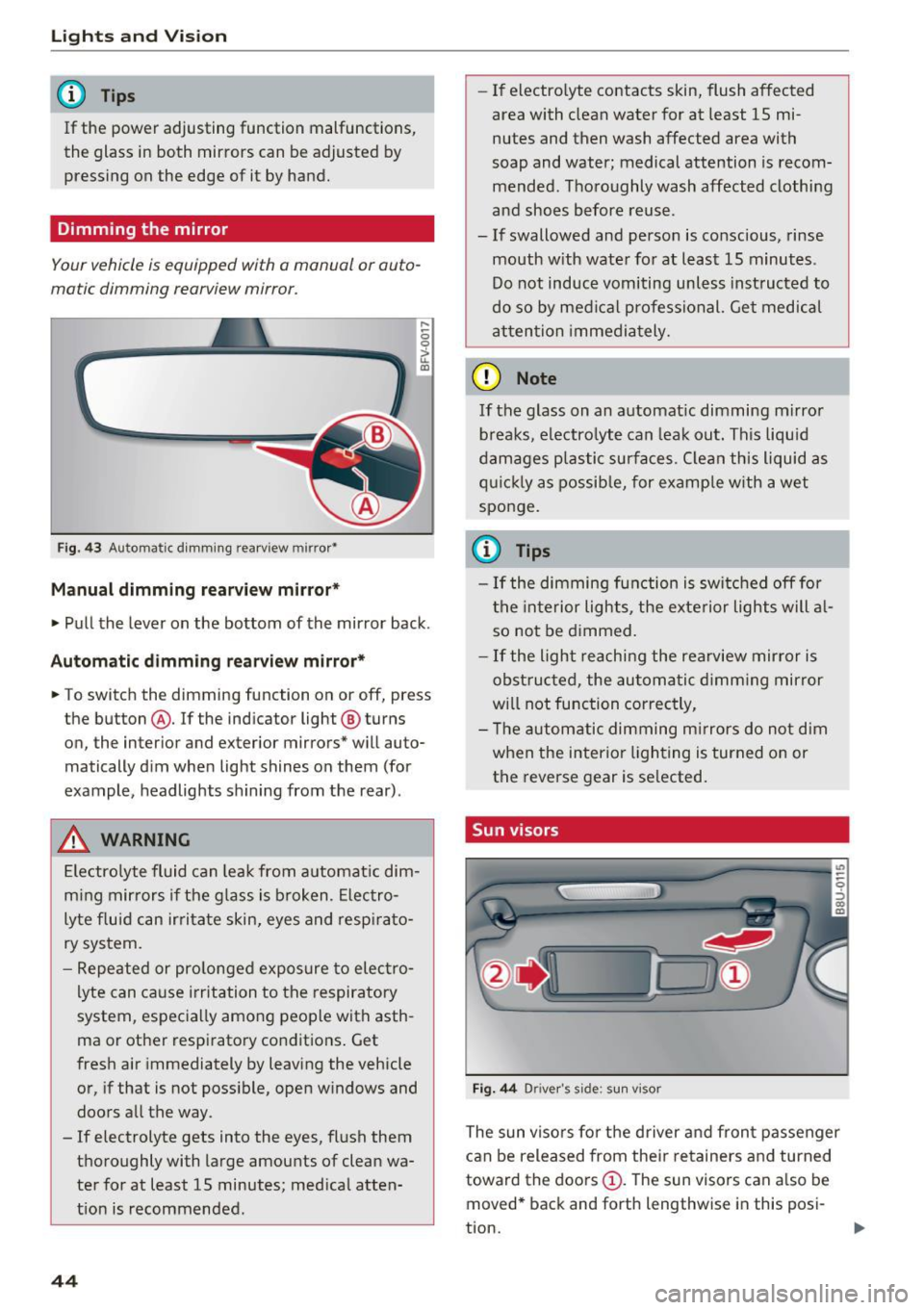
Your vehicle is equipped with o manual or auto
matic dimming rearview mirror.
Fig. 43 Automatic dimming rearview mirror•
Manual dimming rearview mirror*
....
0 0
> u. Ill
• Pull the lever on the bottom of the mirror back .
Automatic dimming rearview mirror*
• To switch the dimming function on or off, press
the button @. If the ind icator light @ turns
on, the inter ior and exterior mirrors* will auto
matically dim when light shines on them (for
example, headlights shining from the rear).
A WARNING
Electrolyte fluid can leak from automatic dim
ming mirrors if the glass is broken. Electro
lyte fluid can irritate skin, eyes and respirato
ry system.
- Repeated or prolonged exposure to electro
lyte can cause irritation to the respiratory
system, especially among people with asth
ma or other respiratory conditions. Get
fresh air immediately by leaving the vehicle
or, if that is not possible, open windows and
doors all the way.
- If electrolyte gets into the eyes, flush them
thoroughly with large amounts of clean wa
ter for at least 15 minutes; medical atten
tion is recommended.
44
- If electro lyte contacts skin, flush affected
area with clean water for at least 15 mi
nutes and then wash affected area with
soap and water; medical attention is recom mended . Thoroughly wash affected clothing
and shoes before reuse.
- If swallowed and person is conscious, rinse mouth with water for at least 15 minutes.
Do not induce vomiting unless instructed to
do so by medical professional. Get medical
attention immediately.
(D Note
If the glass on an automatic dimming mirror
breaks, electrolyte can leak out. This liquid
damages plastic surfaces. Clean this liquid as
quickly as possible, for example with a wet
sponge.
(0 Tips
- If the dimming function is switched off for
the interior lights, the exterior lights will al
so not be dimmed.
- If the light reaching the rearview mirror is
obstructed, the automatic dimming mirror
will not function correctly,
- The automatic dimming mirrors do not dim
when the interior lighting is turned on or
the reverse gear is selected.
Sun visors
Fig. 44 Drive r's side ; s un visor
The sun visors for the driver and front passenger
can be released from their retainers and turned
toward the doors
(D. The sun visors can also be
moved* back and forth lengthwise in this posi-
tion. ..,.
Page 47 of 252
The mirror lighting* switches on when the cover
over the vanity mirror@opens.
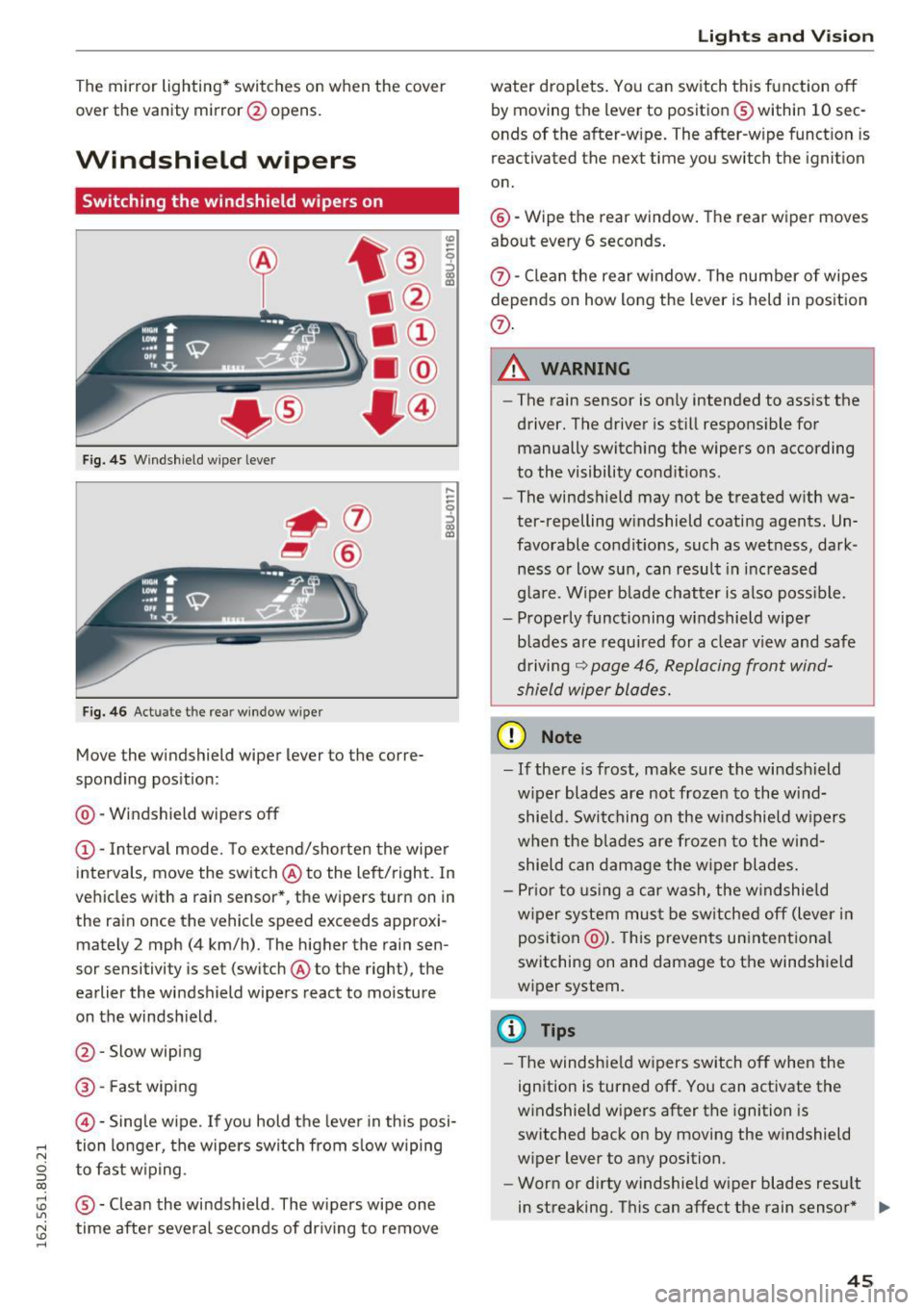
Windshield wipers
Switching the windshield wipers on
Fig. 45 Windshie ld wiper lever
Fig. 46 Act uate the re ar window w iper
Move the windshield wiper lever to the corre
sponding position:
@ -Windshield wipers off
@ -Interva l mode. To extend/shorten the wipe r
intervals, move the switch @to the left/right. In
vehicles with a rain sensor *, the wipers turn on in
the rain once the vehicle speed exceeds approxi mately 2 mph (4 km/h). The higher the rain sen
sor sensitivity is set (switch @to the right), the
earlier the windshield wipers react to moisture
on the windsh ield .
@ -Slow wiping
@ -Fast wiping
©-Sing le wipe. If yo u hold the leve r in th is posi-
,.... tion longer, the wipers switch from s low wiping
N
g to fast w ip ing.
CX)
~ ® -Clean the windshield . The wipers wipe one U"I
~ time afte r severa l seconds of dr iving to remove
......
Lights and V ision
water droplets . You can switch this function o ff
by moving the lever to position ® within 10 sec
onds of the after-w ipe. The after-wipe funct ion is
reactivated the next time you switch the ignit ion
on.
@ -Wipe the rear window . The rear wiper moves
about every 6 seconds .
{J)-Clean the rear w indow . T he number of wipes
depends on how long the lever is held in position
{J) .
.&_ WARNING
-
-The rain sensor is on ly intended to ass ist the
driver. The driver is still respons ible for
manually switch ing the wipers on according
to the visibility cond it ions .
- The winds hield may not be treated w ith wa
ter-repelling w indshield coating agents. Un
favorable condit ions, such as wet ness, dark
ness o r low sun, can result in inc reased
g lare. Wiper b lade chatter is also poss ible.
- Properly functioning windshield wiper
blades are requ ired for a clea r view and safe
d riving
~ page 46, Replacing front wind
shield wiper blades.
(D Note
- If there is frost, make sure the wi ndshield
w iper blades are not frozen to the wind
shield. Swi tching on the w indshield w ipers
when the blades are frozen to the wind shield can damage the w iper blades.
- Pr ior to using a car wash, the w indshield
w iper system mus t be sw itched off (lever in
position @). This prevents un intentional
switching on and damage to the windshield
wiper system.
(D Tips
- T he windshie ld w ipers switch off when the
ignition is turned off. You can activate the
w indshield wipers after the ignition is
switched back on by moving the w indshield
wiper lever to any position.
- Worn or dirty windshie ld wiper blades resu lt
in streaking. This can affect the rain sensor * .,.
45
Page 48 of 252
Lights and Vi sion
function . Check your windshield wiper
blades regularly.
- The washer fluid nozzles of the windshield
washer system are heated at low tempera
tures when the ignition is on.
- When stopping temporarily, such as at a
traffic light, the speed of the windshie ld
wipers automatically reduces by one level.
Cleaning windshield wiper blades
Clean the wiper blades when you see wiper
streaks. Use a sof t cloth and a glass cleaner .
Windshield wiper
~ Place the windshield wiper arms in the service
position ¢
page 46.
~ Fold the windshield wiper arm away from the
windshield.
Rear window wiper
~ Fold the windshield wiper arm away from the
rear window .
A WARNING
Dirty windshield wiper blades can impair vi
sion, which increases the risk of an accident .
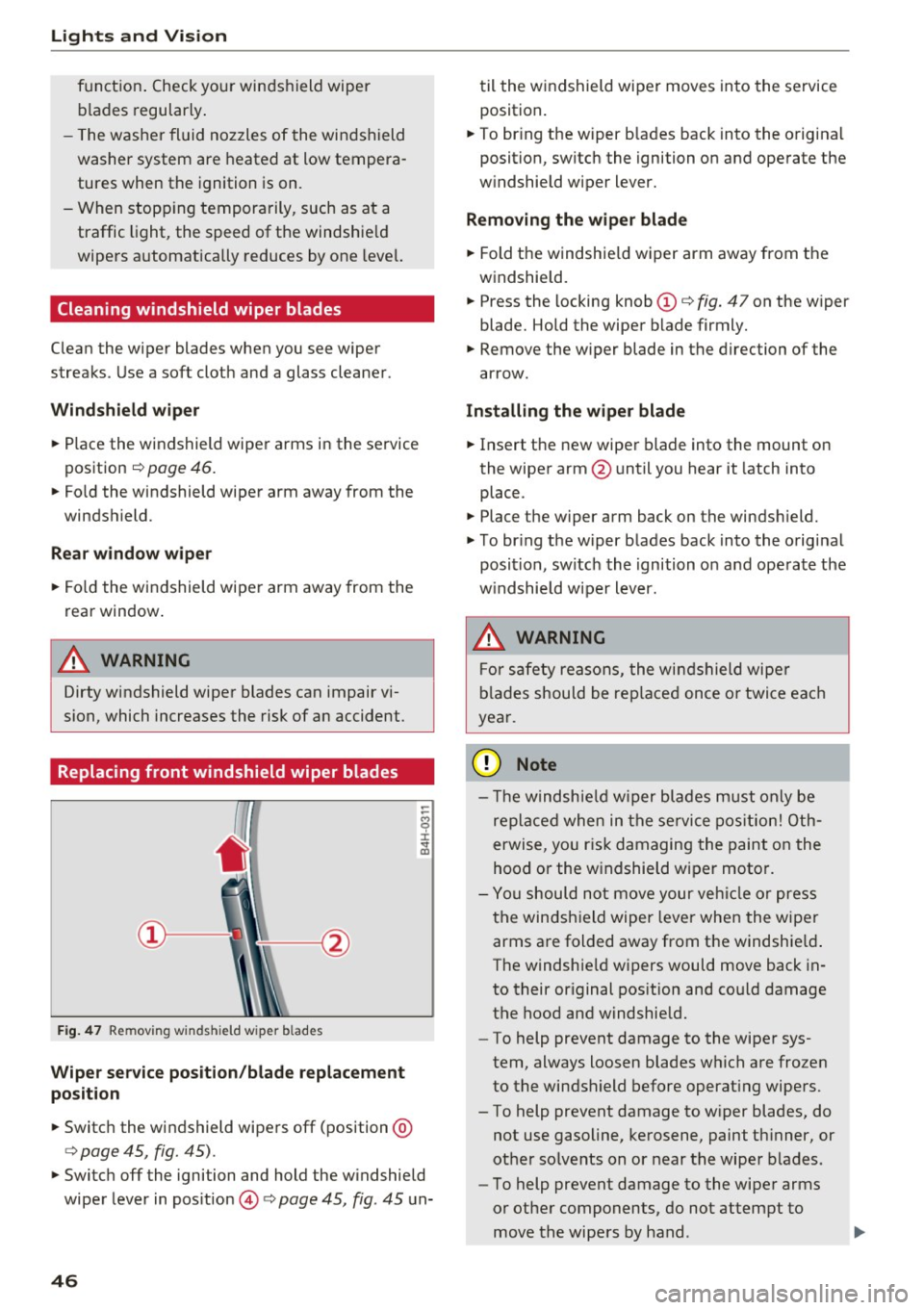
Replacing front windshield wiper blades
Fig. 47 Remov ing w inds hield w iper b lades
Wiper service position/blade replacement
position
~ Switc h the windshield wipers off (position @
¢ page 45, fig. 45).
-
~ Switch off the ignition and hold the w indshield
wiper lever in pos ition @¢
page 45, fig. 45 un-
46
til the windshield wiper moves into the service
position .
~ To bring the wiper b lades back into the origina l
position, switch the ignition on and operate the
w indshield wiper lever.
Removing the wiper blade
~ Fold the windshie ld wiper arm away from the
windshield.
~ Press the locking knob(!)¢ fig. 47 on the wiper
blade. Hold the wiper blade firmly.
~ Remove the wiper blade in the direction of the
arrow.
Installing the wipe r blade
~ Insert the new wiper blade into the mount on
the wiper arm @until you hear it latch into
place .
~ Place the wiper arm back on the windsh ield.
~ To bring the wiper blades back into the original
position, switch the ignition on and operate the
w indshield w iper lever.
.&_ WARNING
-
For safety reasons, the windshield wipe r
blades should be replaced once or twice each
year.
(UJ Note
- Th e windshie ld wiper blades must only be
replaced when in the service position! Oth
erwise, you ris k damaging the paint on the
hood or the windshield wiper moto r.
- You should not move your vehicle or press
the windsh ield wiper lever when the wiper
arms are folded away from the windshie ld.
The windshie ld wipers would move back in
to their original position and could damage
the hood and windshie ld.
- To help prevent damage to the wiper sys
tem, always loosen blades which are frozen
to the windshield before operating wipers.
- To help prevent damage to wiper blades, do
not use gasoline, kerosene, paint thinner, or
other so lvents on or near the wiper blades.
- To help prevent damage to the wiper arms
or other components, do not attempt to
move the wipers by hand .
Page 49 of 252
.... N
c:i ::J CX)
.... I.Cl U"I
N I.Cl ......
@ Tips
-Commercial hot waxes applied by automatic
car washes affect the how easi ly the glass
surface can be cleaned.
- You can also use the service position, for ex
ample, if you want to protect the windshield
from icing by using a cover.
- You cannot activate the service position
when the front lid is open.
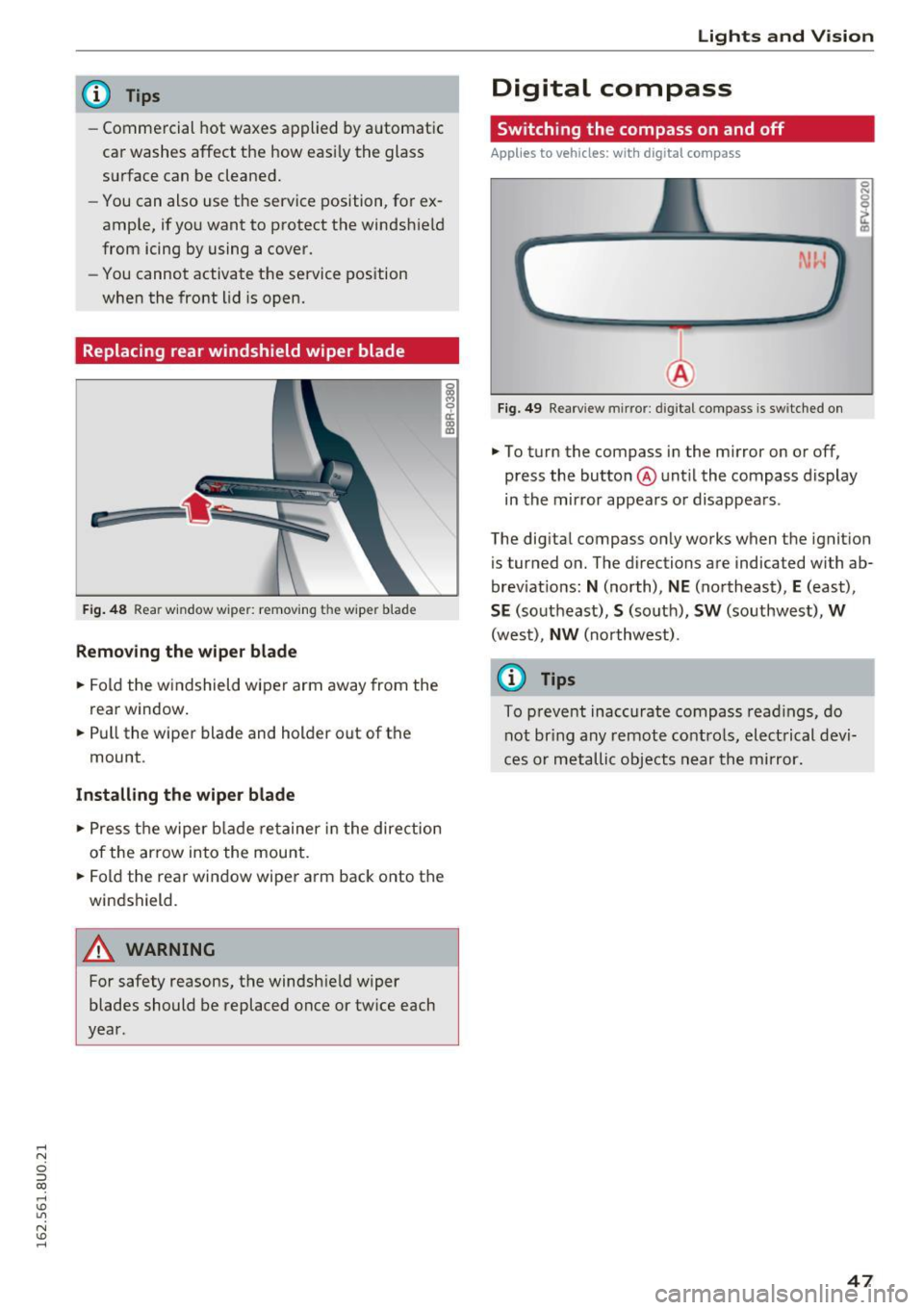
Replacing rear windshield wiper blade
F ig . 48 Rear window wiper: remov ing the wiper blade
Removing the wiper blade
.. Fold the w indshield wiper arm away from the
rea r window .
.. Pull the wiper blade and holder out of the
mount .
Installing the wiper blade
.. Press the wiper blade retainer in the direction
of the arrow into the mount .
.. Fold the rear window wiper arm back onto the
windshield.
A WARNING
~ 9 a::
"' a,
-
For safety reasons, the windshield wiper
blades should be replaced once or tw ice each
year .
Lights and V ision
Digital compass
Switching the compass on and off
Applies to veh icles: w it h dig ita l compass
Fig . 49 Rearview mirror: digi tal compass is sw itched on
.. To turn the compass in the mirror on or off,
press the button @until the compass display
in the mirror appears or disappears .
The digital compass on ly works when the ignition
is tur ned on. The directions are indicated with ab
brev iat ions:
N (north), NE (northeast), E (east),
SE (southeast), S (so uth), SW (southwest), W
(west), NW (northwest).
(0 Tips
To prevent inaccurate compass readings, do
not br ing any remote controls, electrical devi
ces or metallic objects near the mirror.
47
Page 50 of 252
Lights and Vision
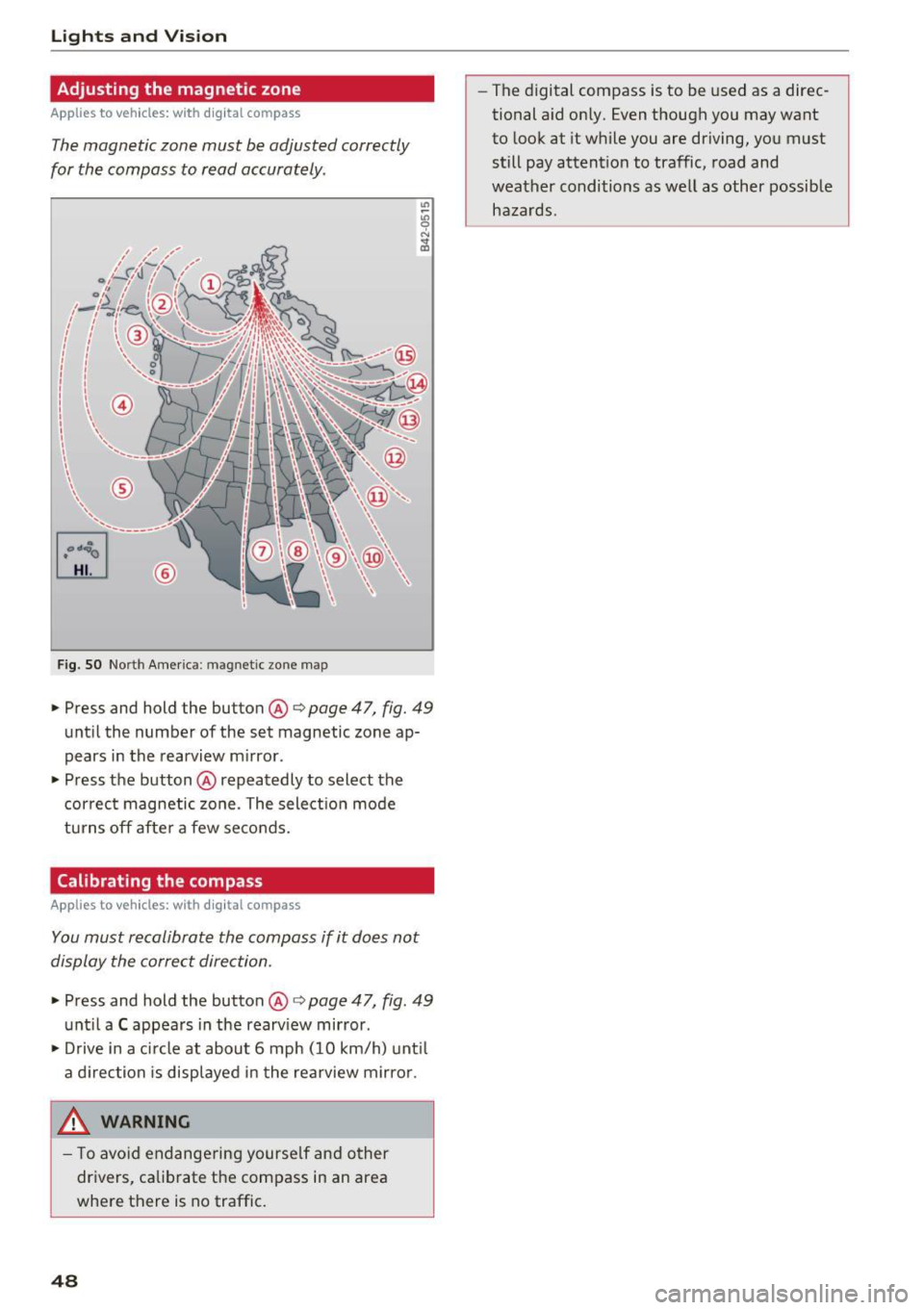
Adjusting the magnetic zone
Applies to vehicles: with digital compass
The magnetic zone must be adjusted correctly
for the compass to read accurately .
~
LIU ®
Fig . SO No rt h Amer ica : ma gnetic zo ne m ap
.. Press and hold the button @ q page 47, fig. 49
until the number of the set magnetic zone ap
pears in the rearview m irror .
.. Press the button @ repeatedly to select the
cor rec t magnetic zone . The select ion mode
turns off afte r a few seco nds.
Calibrating the compass
Applies to vehicles: with digital compass
You must recalibrate the compass if it does not
display the correct direction .
.. Press and hold the button @ q page 47, fig. 49
unt il a C appea rs in the rearv iew mirror .
.. Drive in a c ircle at about 6 mph ( 10 km/h) unt il
a d irection is displ ayed in the rea rview mirro r.
,8. WARNING
- T o avo id end ange ring yourse lf an d other
dr ivers, ca librate t he compass in an area
whe re there is no traffic.
48
- The digital compass is to be used as a direc
tional a id on ly. Even though you may want
to look at it while you are driving, you must
still pay attent ion to traffic, road and
weather conditions as well
as other possible
hazards .
Page 70 of 252
Driving
"'T o switch the ignition off, turn the ignition key
to position @.
Starting the engine
"' Press the b rake pedal and put the selector leve r
in to P or N.
"'T urn the key to pos it ion @. The ignition key au
tomatica lly returns to position
(I) . Do not press
the accelerator pedal when doing this.
If the engine does not sta rt immed iate ly, stop
the starting procedure and repeat after 30 sec
onds. To restart the engine, turn the ignition key
back to position @.
A WARNING
- Never allow the engine to run in confined
spaces -danger of asp hyxiation .
-
-Never remove the ignit ion key from the ign i
t ion look while the vehicle is moving . Other
wise , the steering lock cou ld sudden ly en
gage and you would not be able to stee r the
vehicle .
- Always take the key with you whenever you
leave your vehicle . Otherw ise, the engi ne
cou ld be sta rted o r electrical equ ipment
s uch as the power w indows co uld be operat
ed . This can lead to se rious i nju ry.
- Never leave children or pe rsons requiring as
sistance unattended i n the vehicle . The
doo rs c an be lo cked usi ng the remote trans
mit ter, preven ting people from escapin g
from the vehicle on thei r own in the event of
an emergency. Depending on the time of
year, people inside the vehicle can be ex
posed to very hig h or very low tempera
tures.
(D Note
Avoid high engine speed, full throttle, and heavy engine load as long as the engine has
not reached operat ing temperature yet. You
could damage the engi ne.
@ For the sake of the environment
Do not let the engine run while parked to
warm up. Begin dr iving immediately . This re
duces unnecessary emiss ions.
68
(D Tips
- Some noise after start ing the engine is nor
ma l and is no cause for concern.
- If you leave the ve hicle w ith the ignition
switched on, the ign ition wi ll switch off af
ter a certain amount of time. Make sure that
electrical equipment such as the exterior
lights are switched off.
- If it is d ifficult to turn the key to pos ition
(D , turn the steering wheel back and forth
slightly to release the steering wheel lock.
Stopping the engine
App lies to vehicles: with ignition lock
Stopping the engine
"' Bring the vehicle to a full stop .
"'T urn the key to posi tion @.
Engag ing the steering lock
Requi rement: the se lector lever must be in P.
"' Remove the ignition key in position @
c::> page 67, fig. 78 c::> &_ .
"'Tur n the steering whee l until you hear the
steer ing whee l lock .
The locke d steer ing helps prevent vehicle the ft.
A WARNING
-Never turn off the engine before the vehicle
has come to a complete stop. The full func
tion of the brake booster and the power
steer ing is not guaranteed. You must use
more force to turn or brake if necessary. Be
cause you cannot stee r and brake as you
usually would, this cou ld lead to crashes
a nd se rio us in juries.
- For safety reasons, yo u sh ould always park
your veh icle w ith the se lector lever i n P.
Othe rwise, the vehicle could inadve rten tly
roll aw ay.
- The rad iator fa n can cont in u e to run for up
t o 10 minutes even af ter yo u have turned
off the engine an d remove d the igni tion key.
The rad iator fan can also turn on again if the
eng ine coolant heats up because of intense .,._
Page 72 of 252
Driving
@ Tips
-Some noise after starting the engine is nor
mal and is no cause for concern.
- If you leave the vehicle with t he ignit ion
switched on, the ignition will switc h off af
ter a certain amount of time . Make sure that
electr ica l equipment suc h as the exterior
lights are switched off.
Stopping the engine
Appl ies to veh icles: w ith conve nien ce key
• Bring the vehicle to a full stop.
• Select the P or N selector lever position .
• Press the
I S TAR T ENGIN E STO PI button
¢ page 69, fig. 79.
Engaging the steering lock
The steering locks when you turn the engine off
using the
I START ENGINE STOP! button a nd
open the driver's door . The locked steering helps
p revent vehicle theft.
Emergency off function
If it is absolutely necessary, the engine can also
be turned off while driving at speeds lower than
6 mph (10 km/h) . To switch the engine off, press
the
I START ENGINE STOPI button twice in a row
briefly o r press and hold for longer than two sec
onds.
_& WARNING
- Never turn off the engine before the veh icle
has come to a comp lete stop . The full func
tion of the brake booster and the power
steering is not guaranteed. You must use more force to turn or brake if necessary. Be
cause you cannot steer and brake as you
usually would, this could lead to crashes
and serious injuries.
- For safety reasons, you should always park
yo ur vehicle with the selecto r lever in P .
Otherwise, the vehicle could inadvertently
roll away .
- The radiator fan can continue to r un for up
to 10 minutes even after you have turned
off the engine and removed the ignit ion key.
70
The radiator fan can also turn on again if the
engine coolant heats up because of intense
sunlight or heat build-up in the engine com
partment .
- Always take the key with you whenever you
leave your vehicle . Otherwise, the engine
could be started or electrical equipment
such as the power windows could be operat
ed. This can lead to serious injury.
(D Note
If the engine has been under heavy load for
an extended period of time, heat builds up in
the eng ine compartment after the engine is
switched off -there is a risk of damaging the
engine. For this reason, let the engine r un at
idle for approxi mately two minutes before
shutting it off.
Starting the engine when there is a
malfunction
App lies to vehicles: wit h co nvenience key
Other circumstances can cause the engine not to
start, such as the battery in the remote control
key has drained , there is interference with the
key or there is a system malfunction .
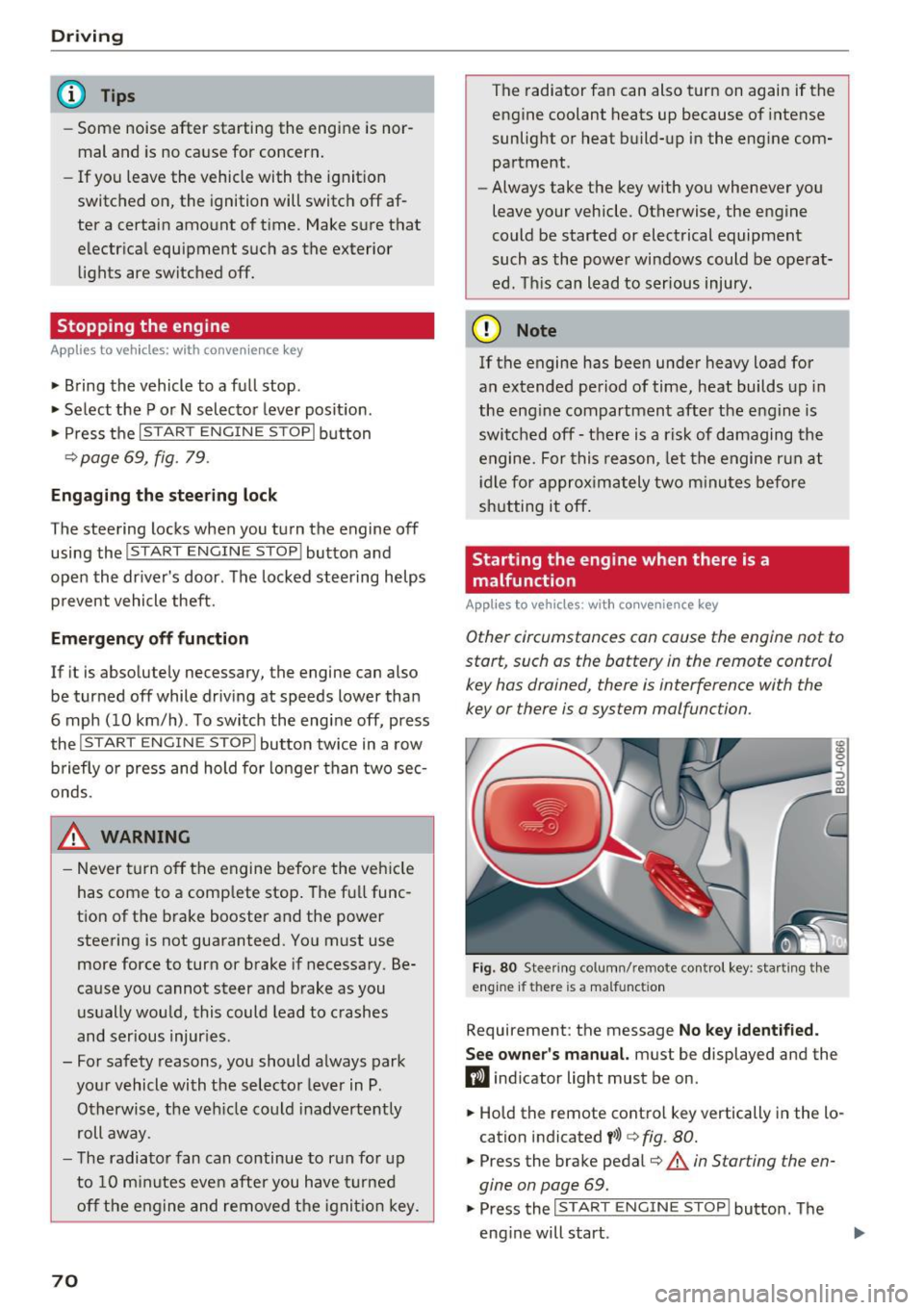
Fig. 80 Stee ring co lumn/ remo te cont rol key : sta rting t he
engine if th ere is a malfunct ion
Requirement: the message No key identified.
See owner's
manual. must be displayed and the
fl ind icator light must be on .
• Hold the remote control key vertically in the lo
cation indicated
t>>) ¢ fig. 80.
• Press the brake pedal¢.&. in Starting the en
gine on page
69.
• Press the ~IS_T_A_R_T_ E_N_ G_ I_ N_ E ~ s=T ~O ~ P~ I button. The
eng ine will start .