Door AUDI Q3 2016 Owner's Manual
[x] Cancel search | Manufacturer: AUDI, Model Year: 2016, Model line: Q3, Model: AUDI Q3 2016Pages: 252, PDF Size: 62.81 MB
Page 46 of 252
Lights and Vision
@ Tips
If the power adjusting function malfunctions,
the glass in both mirrors can be adjusted by
pressing on the edge of it by hand.
Dimming the mirror
Your vehicle is equipped with o manual or auto
matic dimming rearview mirror.
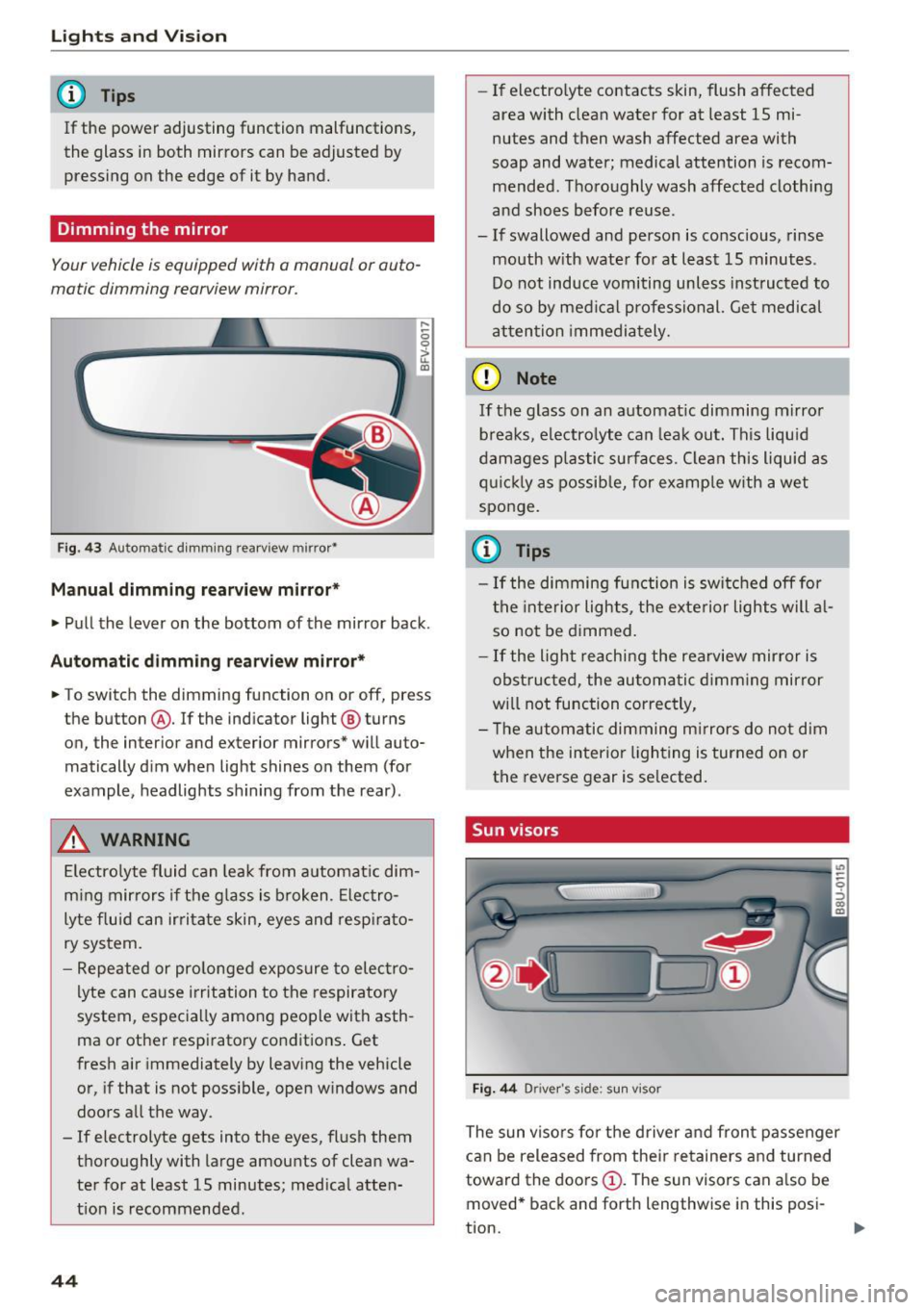
Fig. 43 Automatic dimming rearview mirror•
Manual dimming rearview mirror*
....
0 0
> u. Ill
• Pull the lever on the bottom of the mirror back .
Automatic dimming rearview mirror*
• To switch the dimming function on or off, press
the button @. If the ind icator light @ turns
on, the inter ior and exterior mirrors* will auto
matically dim when light shines on them (for
example, headlights shining from the rear).
A WARNING
Electrolyte fluid can leak from automatic dim
ming mirrors if the glass is broken. Electro
lyte fluid can irritate skin, eyes and respirato
ry system.
- Repeated or prolonged exposure to electro
lyte can cause irritation to the respiratory
system, especially among people with asth
ma or other respiratory conditions. Get
fresh air immediately by leaving the vehicle
or, if that is not possible, open windows and
doors all the way.
- If electrolyte gets into the eyes, flush them
thoroughly with large amounts of clean wa
ter for at least 15 minutes; medical atten
tion is recommended.
44
- If electro lyte contacts skin, flush affected
area with clean water for at least 15 mi
nutes and then wash affected area with
soap and water; medical attention is recom mended . Thoroughly wash affected clothing
and shoes before reuse.
- If swallowed and person is conscious, rinse mouth with water for at least 15 minutes.
Do not induce vomiting unless instructed to
do so by medical professional. Get medical
attention immediately.
(D Note
If the glass on an automatic dimming mirror
breaks, electrolyte can leak out. This liquid
damages plastic surfaces. Clean this liquid as
quickly as possible, for example with a wet
sponge.
(0 Tips
- If the dimming function is switched off for
the interior lights, the exterior lights will al
so not be dimmed.
- If the light reaching the rearview mirror is
obstructed, the automatic dimming mirror
will not function correctly,
- The automatic dimming mirrors do not dim
when the interior lighting is turned on or
the reverse gear is selected.
Sun visors
Fig. 44 Drive r's side ; s un visor
The sun visors for the driver and front passenger
can be released from their retainers and turned
toward the doors
(D. The sun visors can also be
moved* back and forth lengthwise in this posi-
tion. ..,.
Page 57 of 252
.... N
c:i ::J CX)
.... I.Cl U"I
N I.Cl ......
scald ing burns . Spilled hot liquid can also
cause an accident and personal injury .
- Use only soft c ups in the cupholder . Hard
c u ps and g lasses can cause injury in an acci
dent .
- Never use the cup holde r or adapter as an
ashtray -risk of fire.
CD Note
Ma ke sure your bever age container has a lid .
If not, yo ur beverage could spill a nd cause
damage to vehicle equipment or stain the
seat covers.
Cup holders in the door pockets
A cup hold er is located in all four doors.
F ig . 63 Sect io n of doo r trim : cup ho lde r
The cup holder in the door pockets can fit 1 to
1.5 liter bott les .
A WARNING
Spilled h ot l iquid can cause a n accident and
p ersonal i njury.
- Never carry any beverage con taine rs wi th
hot li quids, s uch as ho t coffee or ho t te a in
I
the ve hicle while it is moving. I n case of a n
acciden t, sud den braking or o ther vehi cle
movement, hot liq uid could s pill, causing
sca ld ing burns . Spilled hot liquid can also
cause an accident and perso nal in jury.
- Use only soft c ups in the c upholder . Hard
c u ps and g lasses can ca use inj ury in an acci
dent .
-
Seats and storag e
CD Note
Make su re your beverage contai ner has a lid.
If not, your beve rage co uld sp ill and cause
damage to vehicle eq uipment or sta in the
seat covers.
Glove compartment
T he glove compartment is illuminated*, cooled*
and can be locked* .
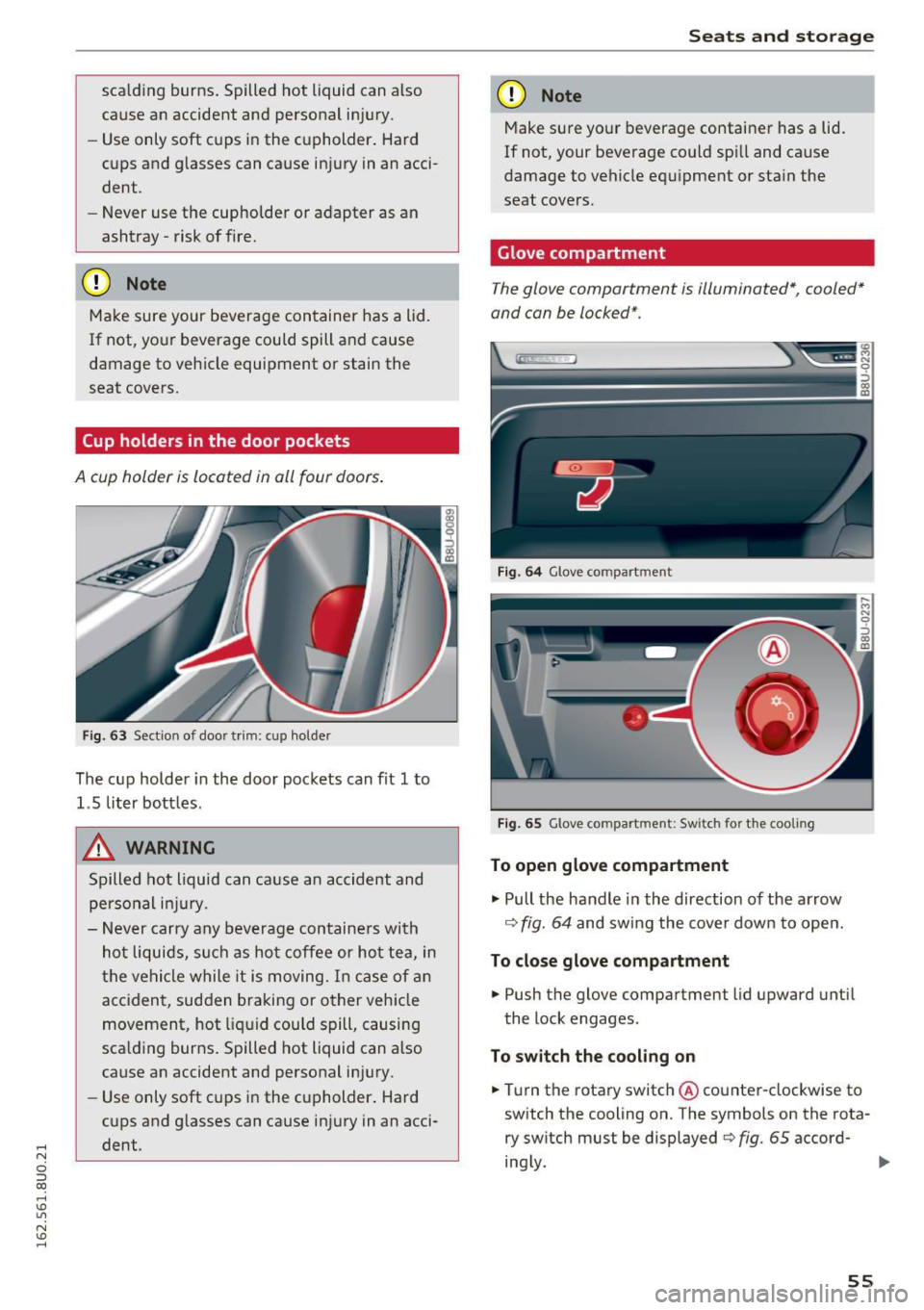
Fig. 64 Glove co mpart ment
Fig . 65 Glove co mpart ment: Sw itch for t he coo ling
To open glove compartment
"'Pull the handle in the direction of the arrow
¢ fig. 64 and swing the cover dow n to open.
To close glove compartment
"' Push the glove compartment lid upward unti l
the lock engages .
To switch the cooling on
"'Tu rn the rotary switch @ counter-clockwise to
sw itch the cooling on. The symbols on the rota
ry switch must be displayed c> fig . 65 accord-
ing ly.
Iii>
55
Page 58 of 252
Seats and storage
To switch the cooling off
.,. Turn the rotary switch @clockwise to switch
the cooling off.
The cooling box works only in the cooling mode.
If the climate control is in the heating mode, we
recommend switching the cooling box off.
& WARNING
To reduce the risk of personal injury in an acci
dent or sudden stop, always keep the glove
compartment closed while driving.
Additional storage
There are a variety of storage compartments and
fasteners in various places in the vehicle.
- In the front center console.
- At the front end of the front seats*. You can
store objects weighing up to 3.3 lbs (1.5 kg) in
the drawer and objects weighing up to 2.2 lbs (1 kg) in the hinged compartment.
- In the door trim.
- Coat hooks next to and above the rear doors.
- Nets* on the backrests of the front seats.
- Coat hooks/retaining hooks in the luggage
compartment.
& WARNING
- When driving, do not leave any hard objects
on the rear window shelf or allow your pet
to sit on the shelf. They could become a haz
ard for vehicle occupants in the event of
sudden braking or a crash.
- Always remove objects from the instrument
panel. Any items not stored could slide
around inside the vehicle while driving or
when accelerating or when applying the
brakes or when driving around a corner.
- When you are driving make sure that any
thing you may have placed in the center con
sole or other storage locations cannot fall
out into the footwells. In case of sudden
braking you would not be able to brake or
accelerate.
- Any articles of clothing that you have hung
up must not interfere with the driver's view.
56
The coat hooks are designed only for light
weight clothing. Never hang any clothing
with hard, pointed or heavy objects in the pockets on the coat hooks. During sudden
braking or in an accident - especially if the
airbag is deployed - these objects could in
jure any passengers inside the vehicle.
- To reduce the risk of personal injury in an
accident or sudden stop, always keep the
glove compartment closed while driving.
- Read and follow all WARNINGS
~ page 128, Important safety instructions
on the side airbag system.
-Hang clothes in such a way that they do not
impair the driver's vision.
- The coat hooks must only be used for light
weight clothing. Do not leave any heavy or
sharp edged objects in the pockets which
may interfere with the side curtain airbag
deployment and can cause personal injury in
a crash.
- Do not use coat hangers for hanging cloth
ing on the coat hooks as this can interfere
with proper deployment of the side curtain airbags in an accident.
- Do not hang heavy objects on the coat
hooks, as they could cause personal injury in
a sudden stop.
- Always keep the compartment above the
rearview mirror closed while driving to re
duce the risk of injury in the event of sudden
braking maneuvers or a collision.
(D Note
Objects located on the rear shelf that rub
against the rear window could damage the heating wires for the rear window defogger.
(D Tips
-A vent slot is located between the shelf and
the rear window. Do not block the vent with
any items you may place on the rear window
shelf.
- Do not place bulky items on the rear window shelf as they could restrict or block the driv
er's vision in the rear view mirror.
Page 61 of 252
Installing
• Place both sides of the cover into the mounts
on the side trim.
• Push the cover downward until both sides click
into place.
Storing*
Depending on the vehicle equipment, you can
store the cover under the cargo floor
¢page 61.
A WARNING
-To reduce the risk of accidents, the luggage
compartment cover should never be unse
cured under any circumstances .
- The luggage compartment cover is not a
surface for storing objects. Objects placed
on the cover could endanger all vehicle oc
cupants during sudden braking maneuvers
or in a crash.
CD Note
To avoid damage, let the luggage compart
ment cover roll up slowly after removing.
Increasing the size of the luggage
compartment
The rear seat backrests can be folded forward ei
ther separately or together .
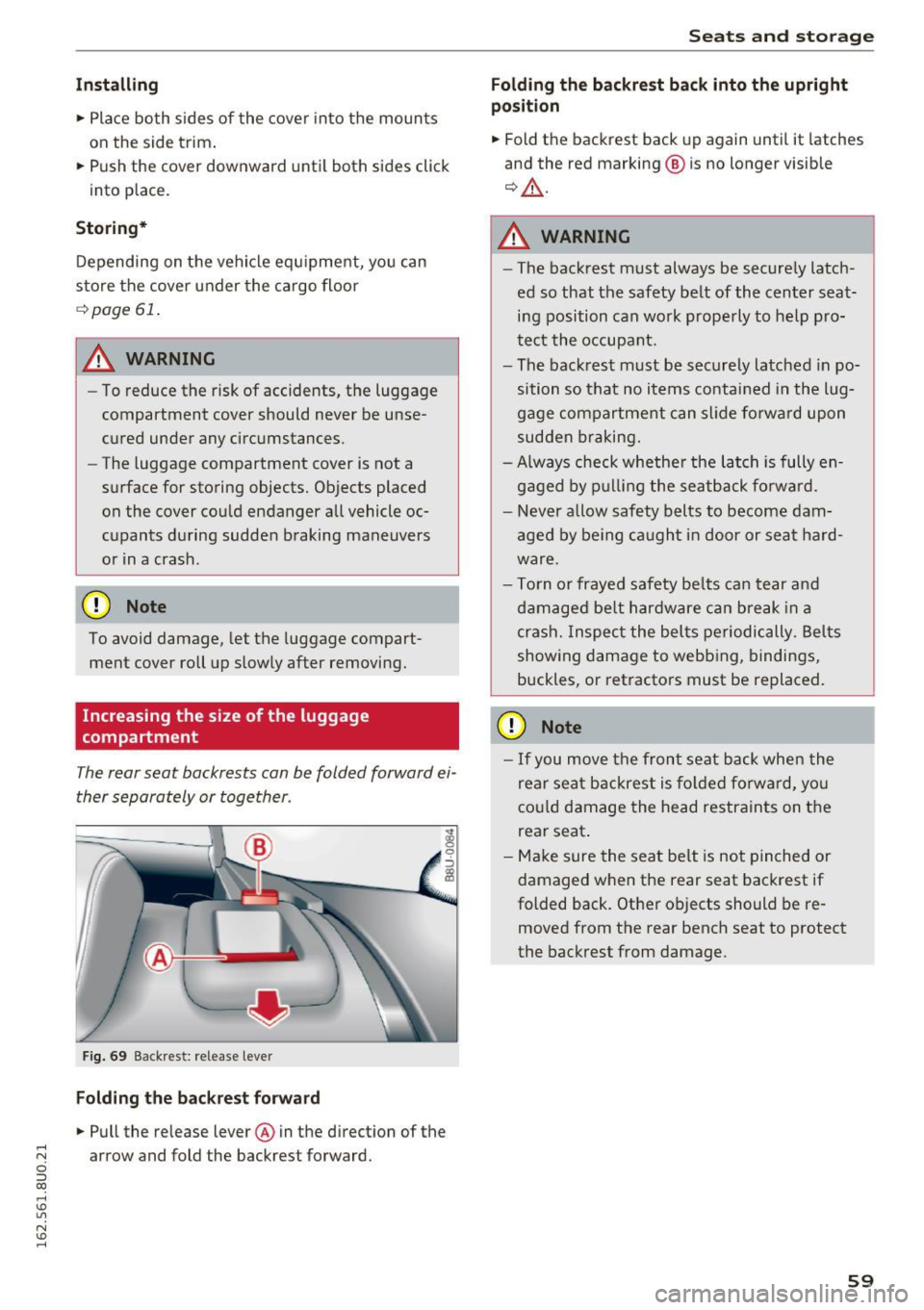
Fig. 69 Backrest: release lever
Folding the backrest forward
• Pull the release lever @in the direction of the .... N arrow and fold the backrest forward. c:i ::J CX)
.... I.Cl U"I
N I.Cl ......
Seats and storage
Folding the backrest back into the upright
position
• Fold the backrest back up again until it latches
and the red marking ® is no longer visible
¢ ,&..
A WARNING
--The backrest must always be securely latch-
ed so that the safety belt of the center seating position can work properly to help pro
tect the occupant.
- The backrest must be securely latched in po
sition so that no items contained in the lug
gage compartment can slide forward upon
sudden braking.
- Always check whether the latch is fully en
gaged by pulling the seatback forward.
- Never allow safety belts to become dam
aged by being caught in door or seat hard
ware.
- Torn or frayed safety belts can tear and
damaged belt hardware can break in a
crash. Inspect the belts periodically. Belts
showing damage to webbing, bindings,
buckles, or retractors must be replaced.
CD Note
- If you move the front seat back when the
rear seat backrest is folded forward, you
could damage the head restraints on the
rear seat.
- Make sure the seat belt is not pinched or
damaged when the rear seat backrest if
folded back. Other objects should be re
moved from the rear bench seat to protect
the backrest from damage.
59
Page 71 of 252
.... N
c:i ::J CX)
.... I.Cl U"I
N I.Cl ....
sunlight or heat build-up in the engine
compartment.
- Always take the key with you whenever you
leave your vehicle. Otherwise, the engine
could be started or electrical equipment
such as the power windows could be operat
ed . This can lead to serious injury.
- Never leave children or persons requiring as
sistance unattended in the vehicle. The
doors can be locked using the remote trans
mitter, preventing people from escaping
from the vehicle on the ir own in the event of
an emergency. Depend ing on the time of
year, people inside the vehicle can be ex
posed to very high or very low tempera
tures.
CD Note
If the engine has been under heavy load for
an extended per iod of t ime, heat builds up in
the engine compartment after the engine is
switched off -there is a risk of damaging the
engine. For this reason, let the engine run at
idle for approximately two minutes before
shutting it off.
Starting and stopping
the engine (vehicles with
a convenience key)
Starting the engine
A ppl ies to vehicles: with c onve nien ce key
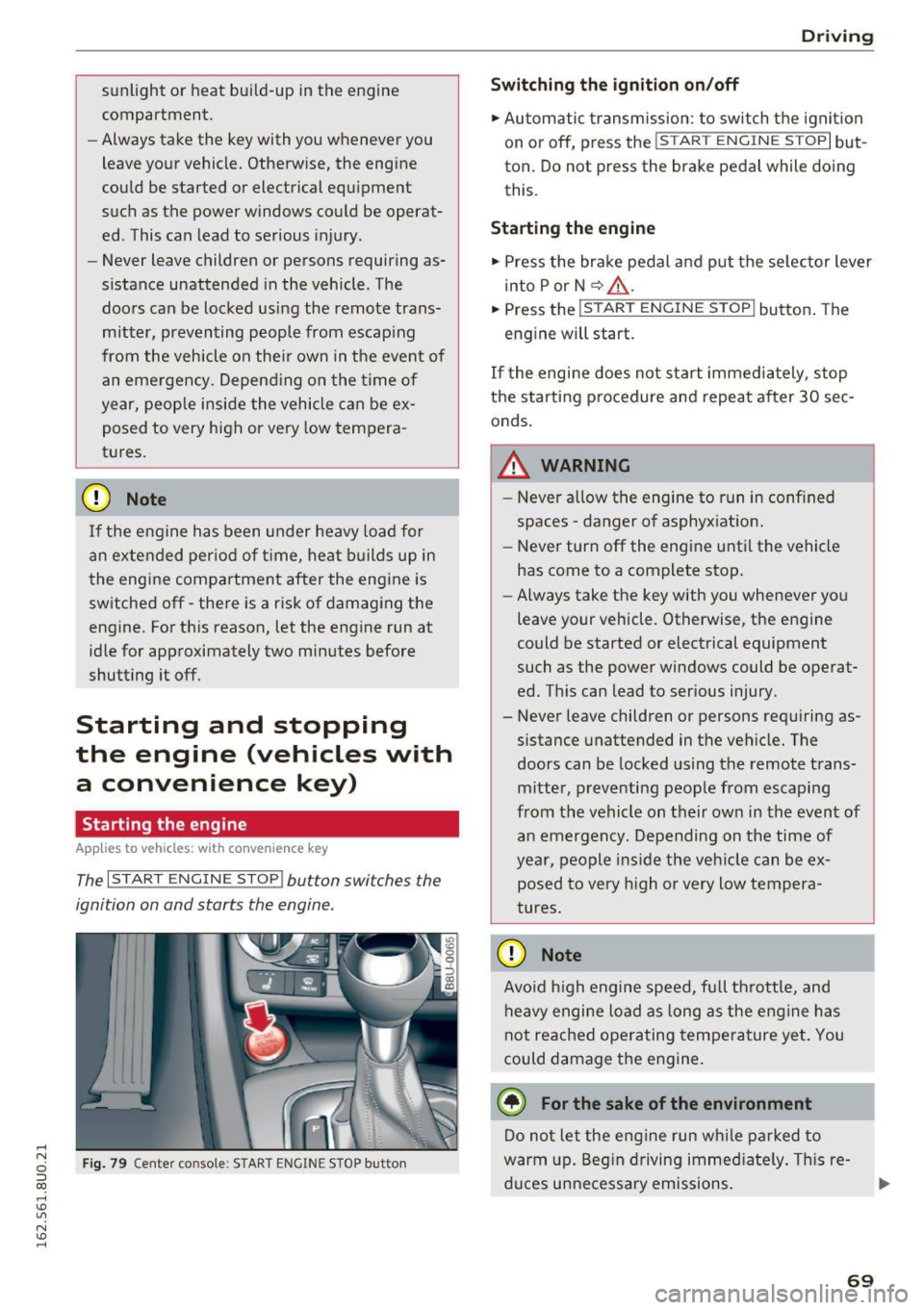
The I START ENGINE STOP! button switches the
ignition on and starts the engine.
Fig. 79 Center console : START ENGINE STOP button
Driving
Swi tching the ign ition on/o ff
.,. Automatic transmission: to switch the ignit ion
on or off, press the
I S T AR T ENGINE S TOPI but
ton. Do not press the brake pedal while doing
this.
Starting the engine
.,. Press the brake pedal and put the se lector lever
into P or N
~ A -
.,. Press the ~, s-T ~A - R- T~ E-N -G =r -N =E - S~ T= o- P-j button . The
engine will start.
If the engi ne does not start immediately , stop
the starting procedure and repeat after 30 sec
onds.
A WARNING
- Never allow the engine to run in confined
spaces -danger of asphyxiation.
- Never turn off the engine unti l the vehicle
has come to a complete stop.
- Always take the key with you whenever you
leave your vehicle. Otherwise, the engine
could be started or electrical equipment
such as the power windows could be operat
ed. This can lead to serious injury.
- Never leave children or persons requiring as
sistance unattended in the vehicle. The
doors can be locked using the remote trans
mitter, preventing people from escaping
from the vehicle on their own in the event of an emergency. Depending on the time of
year, people ins ide the veh icle can be ex
posed to very h igh or very low tempera
tures.
CD Note
Avo id high engine speed, full throttle, and
heavy engine load as long as the eng ine has
not reached operating temperature yet. You
could damage the engine.
@ For the sake of the environment
Do not let the engine run wh ile parked to
warm up. Beg in driving immed iate ly . T hi s re
duces unnecessa ry emissions.
-
69
Page 72 of 252
Driving
@ Tips
-Some noise after starting the engine is nor
mal and is no cause for concern.
- If you leave the vehicle with t he ignit ion
switched on, the ignition will switc h off af
ter a certain amount of time . Make sure that
electr ica l equipment suc h as the exterior
lights are switched off.
Stopping the engine
Appl ies to veh icles: w ith conve nien ce key
• Bring the vehicle to a full stop.
• Select the P or N selector lever position .
• Press the
I S TAR T ENGIN E STO PI button
¢ page 69, fig. 79.
Engaging the steering lock
The steering locks when you turn the engine off
using the
I START ENGINE STOP! button a nd
open the driver's door . The locked steering helps
p revent vehicle theft.
Emergency off function
If it is absolutely necessary, the engine can also
be turned off while driving at speeds lower than
6 mph (10 km/h) . To switch the engine off, press
the
I START ENGINE STOPI button twice in a row
briefly o r press and hold for longer than two sec
onds.
_& WARNING
- Never turn off the engine before the veh icle
has come to a comp lete stop . The full func
tion of the brake booster and the power
steering is not guaranteed. You must use more force to turn or brake if necessary. Be
cause you cannot steer and brake as you
usually would, this could lead to crashes
and serious injuries.
- For safety reasons, you should always park
yo ur vehicle with the selecto r lever in P .
Otherwise, the vehicle could inadvertently
roll away .
- The radiator fan can continue to r un for up
to 10 minutes even after you have turned
off the engine and removed the ignit ion key.
70
The radiator fan can also turn on again if the
engine coolant heats up because of intense
sunlight or heat build-up in the engine com
partment .
- Always take the key with you whenever you
leave your vehicle . Otherwise, the engine
could be started or electrical equipment
such as the power windows could be operat
ed. This can lead to serious injury.
(D Note
If the engine has been under heavy load for
an extended period of time, heat builds up in
the eng ine compartment after the engine is
switched off -there is a risk of damaging the
engine. For this reason, let the engine r un at
idle for approxi mately two minutes before
shutting it off.
Starting the engine when there is a
malfunction
App lies to vehicles: wit h co nvenience key
Other circumstances can cause the engine not to
start, such as the battery in the remote control
key has drained , there is interference with the
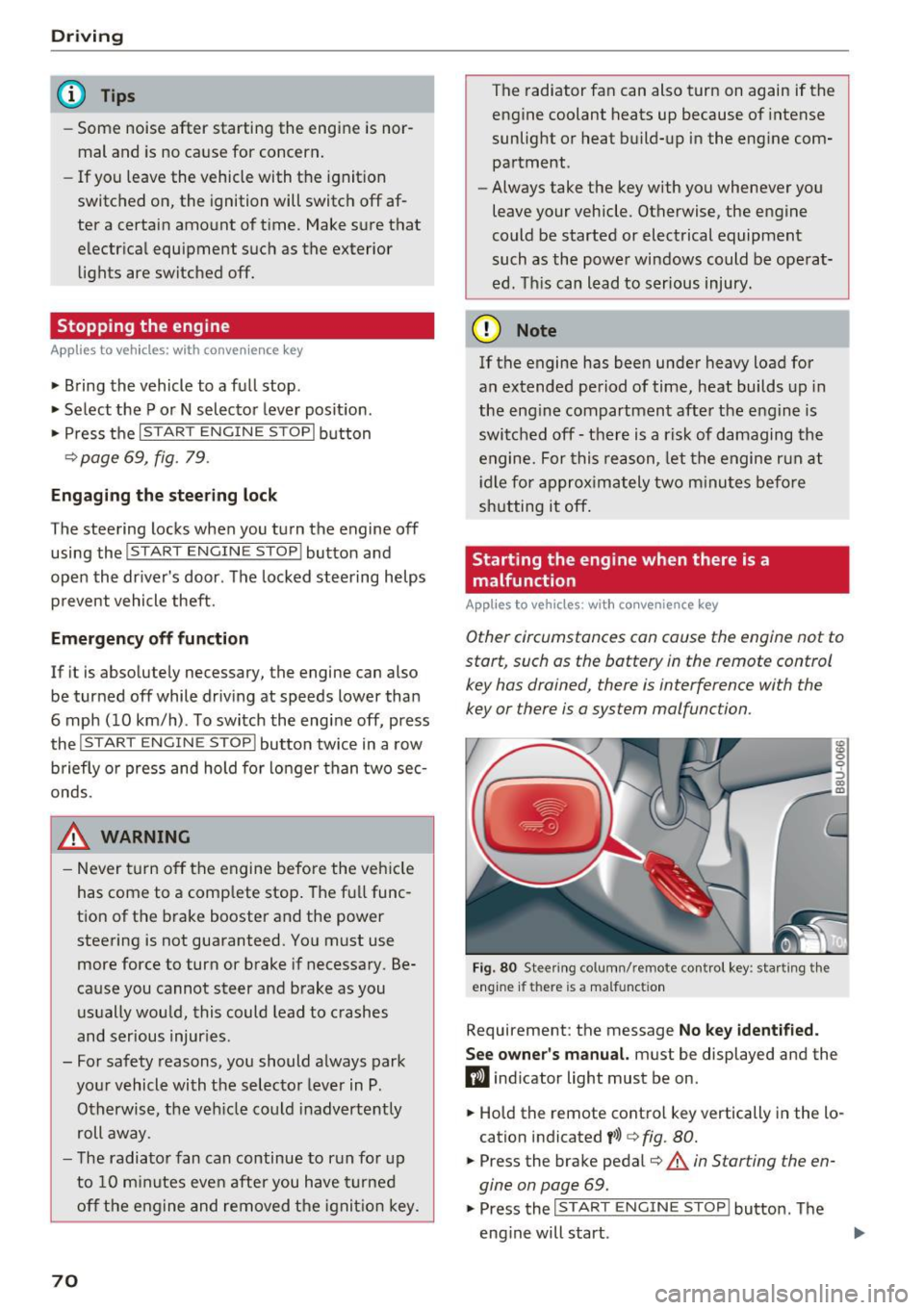
key or there is a system malfunction .
Fig. 80 Stee ring co lumn/ remo te cont rol key : sta rting t he
engine if th ere is a malfunct ion
Requirement: the message No key identified.
See owner's
manual. must be displayed and the
fl ind icator light must be on .
• Hold the remote control key vertically in the lo
cation indicated
t>>) ¢ fig. 80.
• Press the brake pedal¢.&. in Starting the en
gine on page
69.
• Press the ~IS_T_A_R_T_ E_N_ G_ I_ N_ E ~ s=T ~O ~ P~ I button. The
eng ine will start .
Page 73 of 252
.... N
c:i ::J CX)
.... I.Cl U"I
N I.Cl ......
.. Drive to an authorized A udi dealer or author
ized Audi Service Facility immediately to have
the malfunction corrected.
@ Tips
You can view the message again by pressi ng
the
I START E NGINE STOP! button.
Driver messages
Turn off ignit ion. Battery di scharging
This message appears and a war ning tone sounds
if you open the driver's doo r whe n the ignition is
sw itched on.
Pr ess brake pedal to start engine
This message appears if you do not step on the
brake pedal to start the eng ine on a vehicle with
a n automatic transm ission .
Please engage Nor P.
This message appears when starting or stopping
the eng ine and Nor Pis not engaged. The engine
will not start/stop.
Ill Is key in the vehicle ?
The indicator light turns on and this message ap
pea rs if the conven ience key* was removed from
the veh icle when the eng ine was runn ing. If t he
conven ience key is no longer in the vehicle, you
cannot switch the ignition on or start the engine
once yo u stop it. Yo u also ca nnot lock the vehicle
from the outside.
Shift to P , vehicle can roll away . Doors can only
be locked in P.
This message appea rs fo r safe ty re asons a long
with a warn ing sound if the se lector lever is not
e ng aged in P a fter swi tching the ignition off.
Move the selector lever to the P positio n. Other
wise the vehicle is not protected from rolling and
it cannot be loc ked.
DJ No key identified . See owner's manual.
This message appears if the re is no convenience
key * in side the veh icle or if the system does not
r ecognize the key. The conve nience key may not
be re cognized, for examp le, i f it is cove red by an
D rivi ng
obje ct that disrupts the signa l (such as a br ie f
case), or if the key battery is wea k. E lectronic de
vices such as cell phones can a lso inte rfere with
the signal.
T o still be able to start or stop the engine, re fer
to
¢ page 70.
Electromechanical
parking brake
Operating
The electromechanical parking brake replaces
the hand brake.
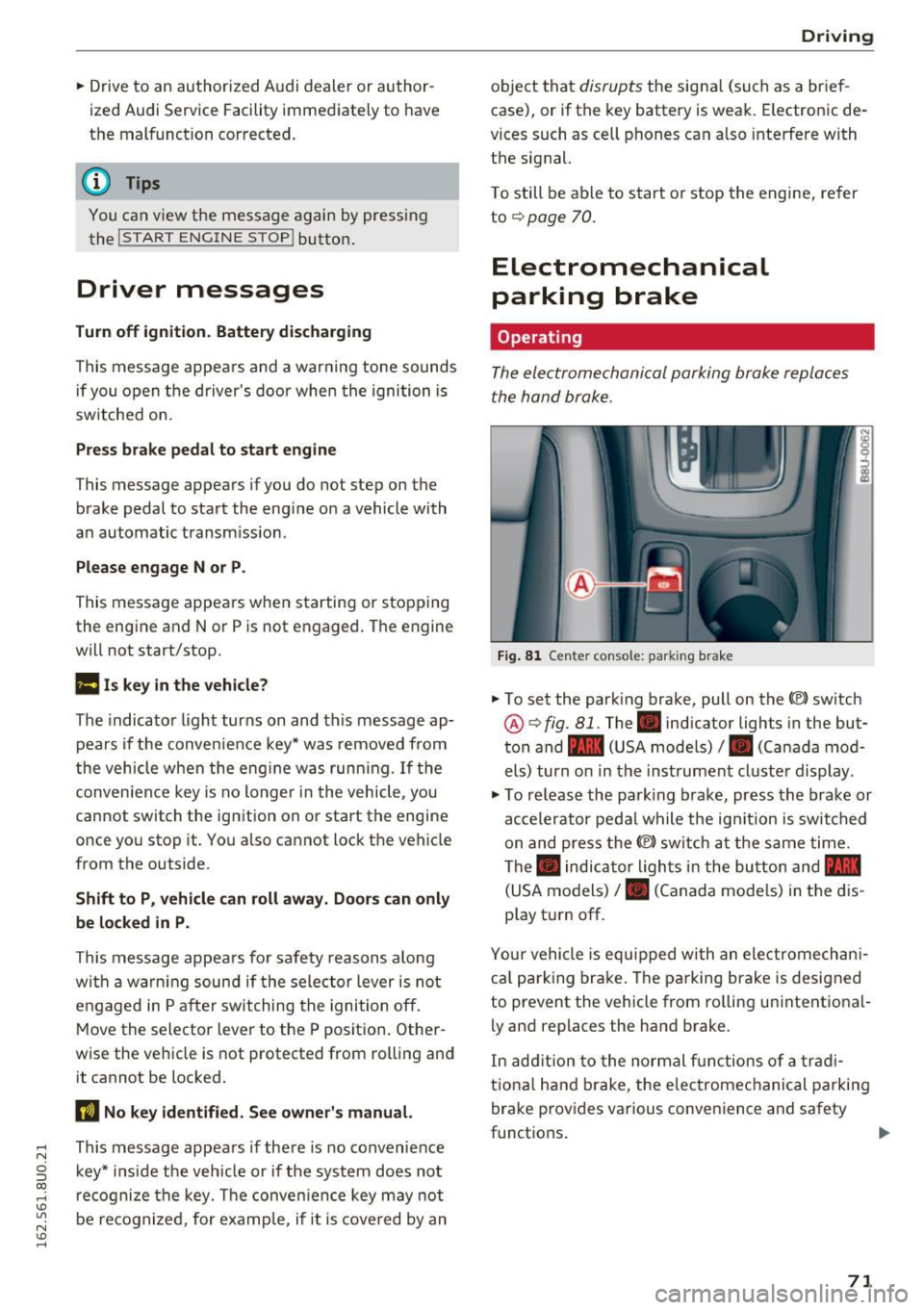
Fi g. 81 Center console: parking brake
.. To set the park ing brake, pull on the(®) switch
@¢ fig. 81. The . indicator lights in the but
ton and - (USA models)/ . (Canada mod
els) turn o n in the ins trument cluste r display.
.,. To re lease the park ing brake, press the brake or
ac celerator pedal w hile the ign it ion is switched
on and press the(®) switch at the s ame time.
The . indicator ligh ts in t he bu tton and -
(USA models)/ . (Canada mode ls) in the dis
play t urn off.
Yo ur vehicle is equipped with an elect romechan i
ca l p a rk ing brake . The pa rking brake is designed
to prevent the vehicle from ro lling un intent ional
ly and replaces the hand brake.
In add ition to the normal f unctions of a tra d i
t iona l h and b rake, t he elec tromec hanical parking
bra ke prov ides various conven ience and safety
functions .
71
Page 74 of 252
Driving
When start ing from a stop
- T he in tegr al hi ll sta rt as sis t helps y ou when
driving by automatically releasing the park ing
brake¢
page 72, Starting from a stop.
- When starting on incl ines, the hill start assist
prevents the vehicle from unintentionally roll
ing back . The braking force
of the parking brake
is only released if sufficient drive power has
been built up at the wheels.
Em erg enc y bra ke f unction
An emergency braking functions ens ures that the
vehicle can be s lowed down even if the
normal
brakes fail¢ page 73, Emergency braking
function.
,&. WARNING
- Do not press the accelerator pedal inadver
tently when the veh icle is stationary and the
engine is running and a gear is selected.
Otherwise t he vehicle w ill start to move im
med iate ly and could result in a c rash.
- If the power supply fa ils, the released park
ing bra ke can no longe r engage. In th is
case, pa rk the veh icle on leve l ground and
sec ure it by placing the selector lever in the
P position. See an author ized Audi dealer or
authorized Aud i Service Faci lity for assis
tance .
(D Tips
-If the parking b rake is set while the ignition
i s sw itched off, the. indicator light in the
b utton and -(USA models) /. (Cana
da models) will turn off after a certain
amount of time.
- Occasiona l noises when the parking brake is
set and re leased are normal and are not a
cause for concern.
- When the vehicle is parked, the parking
brake goes thro ugh a self-test cycle at reg u
l ar intervals. Any no ises assoc iated with this
are normal.
- If there is a power fa ilure, the parking brake
will not set if it is re leased, and it will not
release if it is set¢,&. See an authorized
72
-
Audi dealer or author ized Audi Service Fa
cility for assistance.
Parking
.. Press the brake pedal to stop the veh icle.
.. To set the park ing brake, pull on the© switch.
.. Select the P position .
.. Turn the engine off¢,& .
.. Turn the steering wheel when par king on in
cl ines so that the wheels w ill roll into the cu rb
if the vehicle starts moving.
,&. WARNING
- Always take the veh icle key with yo u when
leaving the vehicle, even for a short period
of time. This applies part icularly when chil
dren remain in the vehicle. Otherwise chil
dren could start the engine, release the
parking brake or operate electrical equip
ment such as power w indows, which in
creases the risk of an accident.
-
- No one should remain in the veh icle w hen it
is locked, especially ch ild ren. Locked doors
make it more difficult for emergency work
ers to get into the veh icle, wh ich puts lives
at risk.
Starting from a stop
The start assist function ensures that the park
ing broke is released automatically upon start
ing.
Stopping and setting the parking brake
.. To set the park ing brake, pull on the(®) switch.
Starting and automat ically r elea sing the
parking brake
.. When you press the acce lerator pedal, the
parking brake is automat ica lly re leased and
your vehicle beg ins to move .
When stopping at a traffic signa l or stopping in
c ity traff ic, the parking brake can be applied . The
vehicle does not have to be held with the brake pedal. The park ing brake elim inates the tendency
to c reep when a se lector lever position is engag-
ed. As soon as yo u press t he accelerator pedal,
1J1>
Page 75 of 252
the parking brake releases automatically and the
vehicle starts to move.
Starting on hills
When start ing on inclines, the hill start ass ist
prevents the vehicle from unintentionally roll ing
back. The braking force of the parking brake is
only released if sufficient drive power has been
bui lt up at the whee ls.
(D Tips
For safety reasons, the parking brake is re
leased automatically only when the driver's
safety belt is fastened and the driver's door is
locked.
Starting to drive with a trailer
To prevent rolling back unintentionally on an in
cline, do the following:
.. Keep pulling the<®> switch and press the acce l
erator pedal. The parking brake stays applied
and prevents the vehicle from ro lling backward.
.. You can re lease the<®> switch once you are sure
that you are transferring enough dr iving force
to the whee ls by pressing the accelerator pedal.
Depending on the weight of the rig (vehicle and
trailer) and the severity of the incline, you may
roll backwards as you start.
Hill hold
A ppl ies to vehicles: with H ill Hol d
Hill hold makes it easier to start on hills .
Requirement: The driver's door must be closed,
the seat belt must be buckled and the engine
must be running.
The system is activated when the brake pedal is
p ressed
for a few seconds.
To prevent the vehicle from roll ing back when
starting, the brake power is held for a brief mo
ment after releasing the brake pedal. During this
~ time, you can easi ly begin to move you r vehicle .
ci ::, co ,....,
A WARNING
- The intelligent technology of Hill Hold can
not overcome the limitat ions imposed by
natural physical laws. The increased comfort
offered by Hill Hold should not cause you to
take safety risks.
- Hill Hold cannot hold the vehicle in all hill
start situations (for example, if the g round
is slippery or icy).
- If you do not beg in moving immediately af
ter releasing the brake peda l, the vehicle
could begin to roll backward under certain
circumstances . Press the brake pedal or set
the parking brake immediately.
-If the engine "stalls", press the brake pedal
or set the parking bra ke immediate ly.
- To prevent the vehicle from roll ing back un
intentionally when starting in s top-and-go
traffic, keep the brake pedal pressed for a
few seconds before driving off .
(D Tips
You can find out if your vehicle is eq uipped
wi th Hill Hold by checking at an authorized
Audi dealer or authorized Audi Service Facili
ty.
Emergency braking function
This is used if the conventional brake system
fails or locks up.
.,. To brake your veh icle using the parking brake in
an emergency, pu ll the(®) switch and keep it
pulled.
.. The braking stops as soon as you release the<®>
switch or acce lerate .
If you pu ll the(®) switch and hold it above a
speed of about 5 mph (8 km/h) , the emergency
braking function is activated. The vehicle brakes
at all four whee ls by activating the braking hy
draulics. The brake performance is similar to
heavy brak ing .
c::> .&.
In order not to activate the emergency brake
function by mistake, a warning tone (buzzer)
sounds when the(®) switch is pulled. As soon as .,.
73
Page 80 of 252
Audi side assist
-Never rely only on side assist when chang
ing lanes.
- Always check rear view mirrors to make
sure that it is safe to change lanes.
- Side assist cannot detect a ll vehicles under
all conditions- danger of acc ident!
- Please note that side assist indicates there
are approaching vehicles, or vehicles in your blind spot, only after your vehicle has
reached a driving speed of at least 19 mph
(30 km/h).
- In certain situations, the system may not function or its funct ion may be limited. For
example:
- if veh icles are approaching or being left
behind very quickly. The display may not
turn on in time.
- in poor weather conditions such as heavy
rain, snow or heavy mist.
- on very w ide lan es, in tight curves or if
there is a rise in the road su rface. Vehicles
in the adjacent lane may not be detected
because they are outside of the sensor
range.
(D Note
The sensors can be displaced by impacts or
damage to the bumper, wheel housing and
underbody. This can affect the system. Have
your authorized Audi dealer or authorized
Audi Serv ice Facility check their function.
(D} Tips
- If the window glass in the driver 's door or
front passenger's door has been tinted, the
display in the exterior mirror may be misin
terpreted.
- For Declaration of Comp liance to United
States FCC and Industry Canada regu lations
c;, page235.
78
Switching on and off
App lies to vehicles: wit h Audi side assist
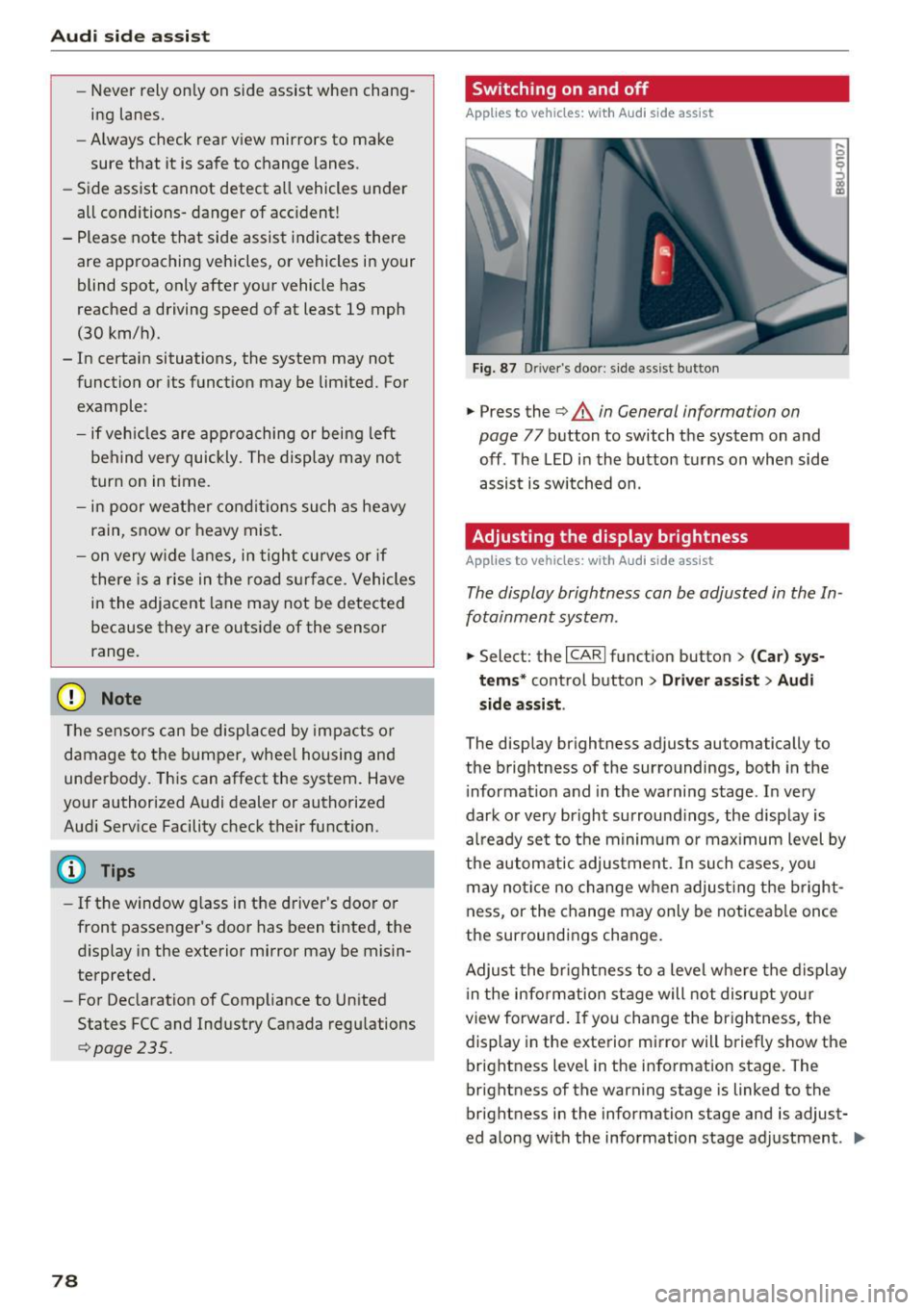
Fig. 87 D river's door: s ide assist button
.,. Press the c;, &. in General information on
page
77 button to switch the system on and
off . The LED in the button turns on when side
assist is switched on .
Adjusting the display brightness
Applies to vehicles: wit h Aud i side ass ist
! a,
The display brightness can be adjusted in the In
fotainment system .
.,. Select: the I CARI function button > (Car) sys
tems *
control button > Driver assist > Audi
side assis t.
The display brightness adjusts automatically to
the brightness of the surroundings, both in the
i nformation and in the warning stage . In very
dark or very bright surround ings, the display is
al ready set to the minimum or max imum level by
the automatic adjustment. In such cases, you
may notice no change when adjust ing the bright
ness, or the change may only be noticeable once
the surroundings change.
Adjust the br ightness to a level where the display
i n the information stage will not disrupt your
view forward. If you change the brightness, the
display in the exterior mirror will briefly show the
brightness level in the information stage. The
brightness of the warning stage is linked to the
brightness in the information stage and is adjust
ed along with the information stage adjustment . .,,.