lock AUDI Q3 2016 Owner's Manual
[x] Cancel search | Manufacturer: AUDI, Model Year: 2016, Model line: Q3, Model: AUDI Q3 2016Pages: 252, PDF Size: 62.81 MB
Page 58 of 252
Seats and storage
To switch the cooling off
.,. Turn the rotary switch @clockwise to switch
the cooling off.
The cooling box works only in the cooling mode.
If the climate control is in the heating mode, we
recommend switching the cooling box off.
& WARNING
To reduce the risk of personal injury in an acci
dent or sudden stop, always keep the glove
compartment closed while driving.
Additional storage
There are a variety of storage compartments and
fasteners in various places in the vehicle.
- In the front center console.
- At the front end of the front seats*. You can
store objects weighing up to 3.3 lbs (1.5 kg) in
the drawer and objects weighing up to 2.2 lbs (1 kg) in the hinged compartment.
- In the door trim.
- Coat hooks next to and above the rear doors.
- Nets* on the backrests of the front seats.
- Coat hooks/retaining hooks in the luggage
compartment.
& WARNING
- When driving, do not leave any hard objects
on the rear window shelf or allow your pet
to sit on the shelf. They could become a haz
ard for vehicle occupants in the event of
sudden braking or a crash.
- Always remove objects from the instrument
panel. Any items not stored could slide
around inside the vehicle while driving or
when accelerating or when applying the
brakes or when driving around a corner.
- When you are driving make sure that any
thing you may have placed in the center con
sole or other storage locations cannot fall
out into the footwells. In case of sudden
braking you would not be able to brake or
accelerate.
- Any articles of clothing that you have hung
up must not interfere with the driver's view.
56
The coat hooks are designed only for light
weight clothing. Never hang any clothing
with hard, pointed or heavy objects in the pockets on the coat hooks. During sudden
braking or in an accident - especially if the
airbag is deployed - these objects could in
jure any passengers inside the vehicle.
- To reduce the risk of personal injury in an
accident or sudden stop, always keep the
glove compartment closed while driving.
- Read and follow all WARNINGS
~ page 128, Important safety instructions
on the side airbag system.
-Hang clothes in such a way that they do not
impair the driver's vision.
- The coat hooks must only be used for light
weight clothing. Do not leave any heavy or
sharp edged objects in the pockets which
may interfere with the side curtain airbag
deployment and can cause personal injury in
a crash.
- Do not use coat hangers for hanging cloth
ing on the coat hooks as this can interfere
with proper deployment of the side curtain airbags in an accident.
- Do not hang heavy objects on the coat
hooks, as they could cause personal injury in
a sudden stop.
- Always keep the compartment above the
rearview mirror closed while driving to re
duce the risk of injury in the event of sudden
braking maneuvers or a collision.
(D Note
Objects located on the rear shelf that rub
against the rear window could damage the heating wires for the rear window defogger.
(D Tips
-A vent slot is located between the shelf and
the rear window. Do not block the vent with
any items you may place on the rear window
shelf.
- Do not place bulky items on the rear window shelf as they could restrict or block the driv
er's vision in the rear view mirror.
Page 67 of 252
Press the buttons to turn the functions on or off.
The LED in a button will light up when the func
tion is sw itched on.
IOF FI Switching the climate control system
on and off
The
I O FF I button switches the climate contro l
system on or off. Airflow from outside is b locked
when the climate control system is switched off .
IAJC! Switching the cooling mode on and off
The air is not cooled and humidity is not removed
when cooling mode is switched off. This can
cause fog on the windows. The cooling mode
switches off automatically when there are cold
outside temperatures .
l= I Switching the recirculation mode on and
off
To switch on the recirculat ion mode, press the
1 ... ,.1 button. The lower LED in the button turns on.
In recirculation mode, the air inside the vehicle is
circulated and filtered . This prevents the unfil
tered air outside the vehicle from entering the
vehicle interior. We recommend switching recir
culation mode on when dr iv ing th rough a tunnel
or when sitting in traffic~ ,&.
The
IAUTOI button or~ button switches recircu
l ation mode off .
To switch on the automatic recirculation mode,
press the
l""> •I button again . The upper LED in the
button turns on . Recirculation mode switches on
automatically when the engine is co ld, if you are
driving in reverse. The ai r quality sensor that is
des igned for diese l and gasoline exha ust auto
matica lly switches the recirculation mode on or
off depending on the leve l of pollutants in the
outside air. Automatic recirculation mode is time
restricted when cooling mode (A/C) is switched
off and frost temperatures are identified.
IAUTO I Switching automatic mode on and off
Automatic mode maintains a constant tempera
ture inside the vehicle. Air temperature, airflow
,....,
"' and air distribution are controlled automatically. ci ::, co ,....,
-I -Adjusting the temperature
T he vehicle inter ior temperature can be adjusted
f or the driver and the front passenger using the
left/right knob. Temperatures can be set be
tween a range of 60 ° F (+ 16 °C) and 84 ° F
(+28 °C). If outside of this range,
LO or HI will
appear in the climate contro l system display . In
both settings, the climate control runs with con
stantly at the maximum cooling or heating level.
The temperature is not regulated.
~ Adjusting air speed
You can adjust the volume of air generated by the blower to your preference . Use the left~ button
to decrease the air speed, and use the right~
button to increase the air speed . To have the air
flow regulated automatically, press the
!AUTOI
button.
[!il l~/~ Adjusting air distribution
You can manually select the vents where the air
will flow. The buttons can be pressed individually
or in comb ination with each other. To have the air
distribution regulated automatically, press the
IAUTOI button.
~ Adjusting seat heating*
Pressing the button switches the seat heating on
at the highest setting (level 3) . T he LEDs indicate
the temperature level. To reduce the tempera
ture, press the button again . T o switch the seat
hea ting off, press the button repeatedly until the
LED tur ns off.
After 10 minutes, the seat heating automatically
switches from level 3 to level 2.
IIIW MAX ! Switching the defroster on and off
The windshield and side windows are defrosted or cleared of condensat ion as quickly as poss ible.
The maximum amount of air flows mainly from
the vents below the windsh ield. Recirculation
mode switches off. The temperatu re should be
set at +72 °F (22 °() or h igher.
The
! AUTOI button switches the defroster off .
65
Page 69 of 252
..... N
c:i ::J CX)
..... I.Cl U"I
N I.Cl ......
Driving
Steering
Manually adjustable steering wheel
The steering wheel position is fully adjus table up
and down and forward and back .
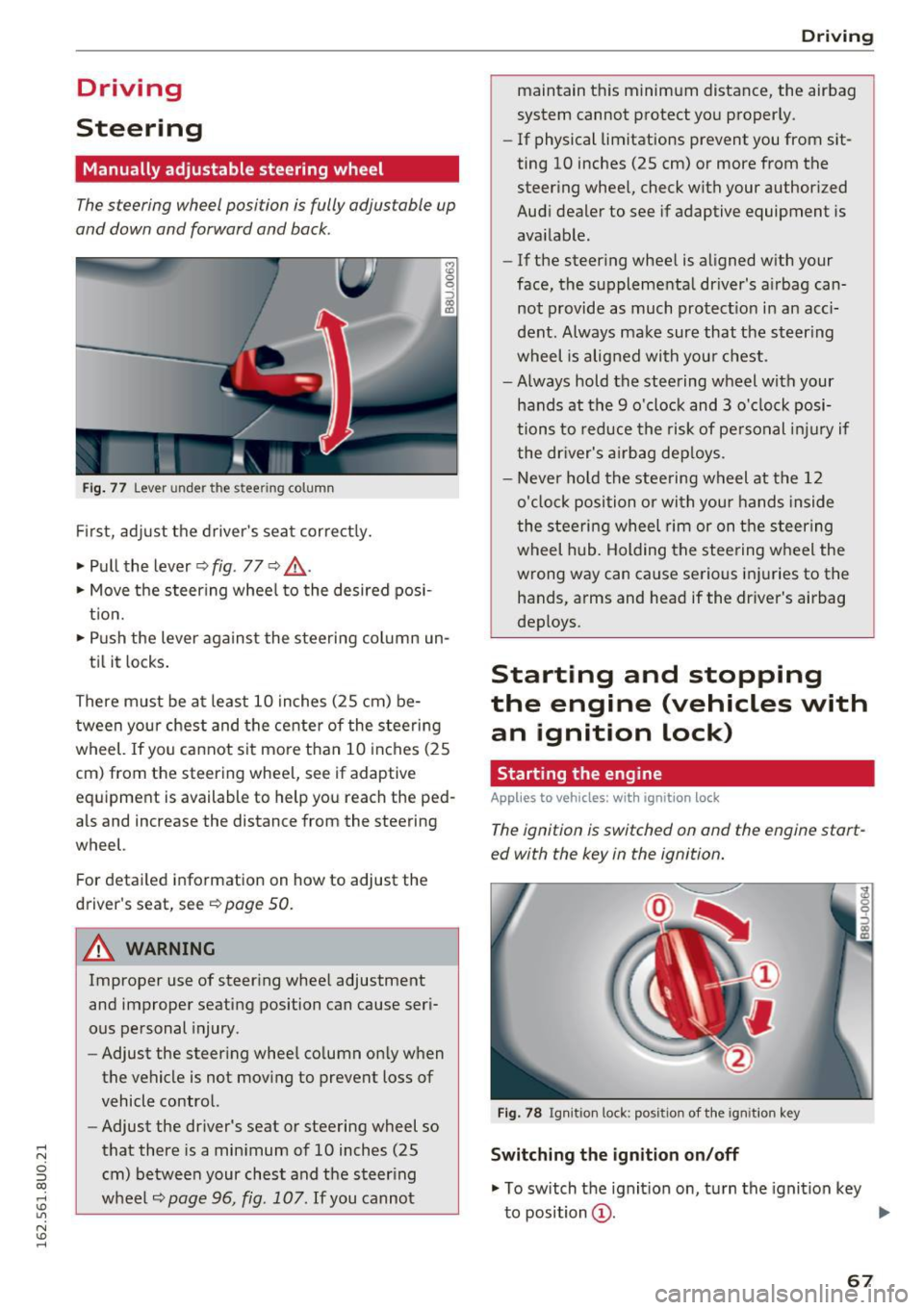
Fig. 77 Lever under the ste ering column
Fi rst, ad just t he driver 's sea t correct ly.
• Pull the lever ~
fig. 77 ~ .&,.
• Move the steer ing whee l to the desired posi
t ion.
• Push the lever against the steeri ng column un-
ti l it locks .
There must be a t least 10 inches (25 cm) be
tween your chest and the center of the stee rin g
wheel. If yo u cannot sit mo re than 10 inches (25
cm) from the steering whee l, see if adaptive
equipment is available to help you reach the ped
als and increase the distance from the steering
wheel.
F or detai led information on how to adjust the
driver's seat, see
~ page 50 .
.&_ WARNING
Improper use of steer ing whee l adjustment
and improper seating position can cause ser i
ous pe rsonal injury.
- Adjust the steer ing whee l co lumn on ly w hen
the vehicle is not mov ing to prevent loss of
vehicle control.
- Adjust the driver's seat or steering wheel so
that there is a min imum of 10 inches (25
cm) betwee n your chest and t he s teer ing
wheel
~page 96, fig. 107 . If you cannot
-
Drivi ng
maintain t his minim um distance, the airbag
system cannot p rotect yo u proper ly.
- If physical limitations prevent you from sit
ting 10 inches (25 cm) or more from the
steer ing whee l, check with your author ized
Audi dealer to see if adaptive equipment is
ava ilable.
- If the steer ing whee l is aligned w ith your
face, the supplementa l driver's a irbag can
not provide as much protect io n in an acc i
dent. Always make sure that the steer ing
wheel is aligned with you r chest.
- Always hold the steering wheel w ith your
hands at the 9 o'clock and 3 o' clock posi
tions to reduce the risk of pe rso nal injur y if
the dr iver's a irbag dep loys .
- Never ho ld the stee ring wheel at the 12
o'cl ock position or wi th you r hands inside
the stee rin g wheel rim or on the s teer ing
wheel h ub. Holding the stee ring w heel the
wrong way can cause serious inj uries to the
hands, arms and head if the driver's airbag
deploys .
Starting and stopping
the engine (vehicles with
an ignition lock)
Starting the engine
Applies to veh icles: w it h ign ition lock
The ignition is switched on and the engine start
ed with the key in the ignition.
Fig. 78 Ignit io n lock: positio n of th e ig ni tion key
Switching the ignition on /off
• To switch t he ignit ion on, t urn the igni tion key
to position
(D . ..,.
67
Page 70 of 252
Driving
"'T o switch the ignition off, turn the ignition key
to position @.
Starting the engine
"' Press the b rake pedal and put the selector leve r
in to P or N.
"'T urn the key to pos it ion @. The ignition key au
tomatica lly returns to position
(I) . Do not press
the accelerator pedal when doing this.
If the engine does not sta rt immed iate ly, stop
the starting procedure and repeat after 30 sec
onds. To restart the engine, turn the ignition key
back to position @.
A WARNING
- Never allow the engine to run in confined
spaces -danger of asp hyxiation .
-
-Never remove the ignit ion key from the ign i
t ion look while the vehicle is moving . Other
wise , the steering lock cou ld sudden ly en
gage and you would not be able to stee r the
vehicle .
- Always take the key with you whenever you
leave your vehicle . Otherw ise, the engi ne
cou ld be sta rted o r electrical equ ipment
s uch as the power w indows co uld be operat
ed . This can lead to se rious i nju ry.
- Never leave children or pe rsons requiring as
sistance unattended i n the vehicle . The
doo rs c an be lo cked usi ng the remote trans
mit ter, preven ting people from escapin g
from the vehicle on thei r own in the event of
an emergency. Depending on the time of
year, people inside the vehicle can be ex
posed to very hig h or very low tempera
tures.
(D Note
Avoid high engine speed, full throttle, and heavy engine load as long as the engine has
not reached operat ing temperature yet. You
could damage the engi ne.
@ For the sake of the environment
Do not let the engine run while parked to
warm up. Begin dr iving immediately . This re
duces unnecessary emiss ions.
68
(D Tips
- Some noise after start ing the engine is nor
ma l and is no cause for concern.
- If you leave the ve hicle w ith the ignition
switched on, the ign ition wi ll switch off af
ter a certain amount of time. Make sure that
electrical equipment such as the exterior
lights are switched off.
- If it is d ifficult to turn the key to pos ition
(D , turn the steering wheel back and forth
slightly to release the steering wheel lock.
Stopping the engine
App lies to vehicles: with ignition lock
Stopping the engine
"' Bring the vehicle to a full stop .
"'T urn the key to posi tion @.
Engag ing the steering lock
Requi rement: the se lector lever must be in P.
"' Remove the ignition key in position @
c::> page 67, fig. 78 c::> &_ .
"'Tur n the steering whee l until you hear the
steer ing whee l lock .
The locke d steer ing helps prevent vehicle the ft.
A WARNING
-Never turn off the engine before the vehicle
has come to a complete stop. The full func
tion of the brake booster and the power
steer ing is not guaranteed. You must use
more force to turn or brake if necessary. Be
cause you cannot stee r and brake as you
usually would, this cou ld lead to crashes
a nd se rio us in juries.
- For safety reasons, yo u sh ould always park
your veh icle w ith the se lector lever i n P.
Othe rwise, the vehicle could inadve rten tly
roll aw ay.
- The rad iator fa n can cont in u e to run for up
t o 10 minutes even af ter yo u have turned
off the engine an d remove d the igni tion key.
The rad iator fan can also turn on again if the
eng ine coolant heats up because of intense .,._
Page 71 of 252
.... N
c:i ::J CX)
.... I.Cl U"I
N I.Cl ....
sunlight or heat build-up in the engine
compartment.
- Always take the key with you whenever you
leave your vehicle. Otherwise, the engine
could be started or electrical equipment
such as the power windows could be operat
ed . This can lead to serious injury.
- Never leave children or persons requiring as
sistance unattended in the vehicle. The
doors can be locked using the remote trans
mitter, preventing people from escaping
from the vehicle on the ir own in the event of
an emergency. Depend ing on the time of
year, people inside the vehicle can be ex
posed to very high or very low tempera
tures.
CD Note
If the engine has been under heavy load for
an extended per iod of t ime, heat builds up in
the engine compartment after the engine is
switched off -there is a risk of damaging the
engine. For this reason, let the engine run at
idle for approximately two minutes before
shutting it off.
Starting and stopping
the engine (vehicles with
a convenience key)
Starting the engine
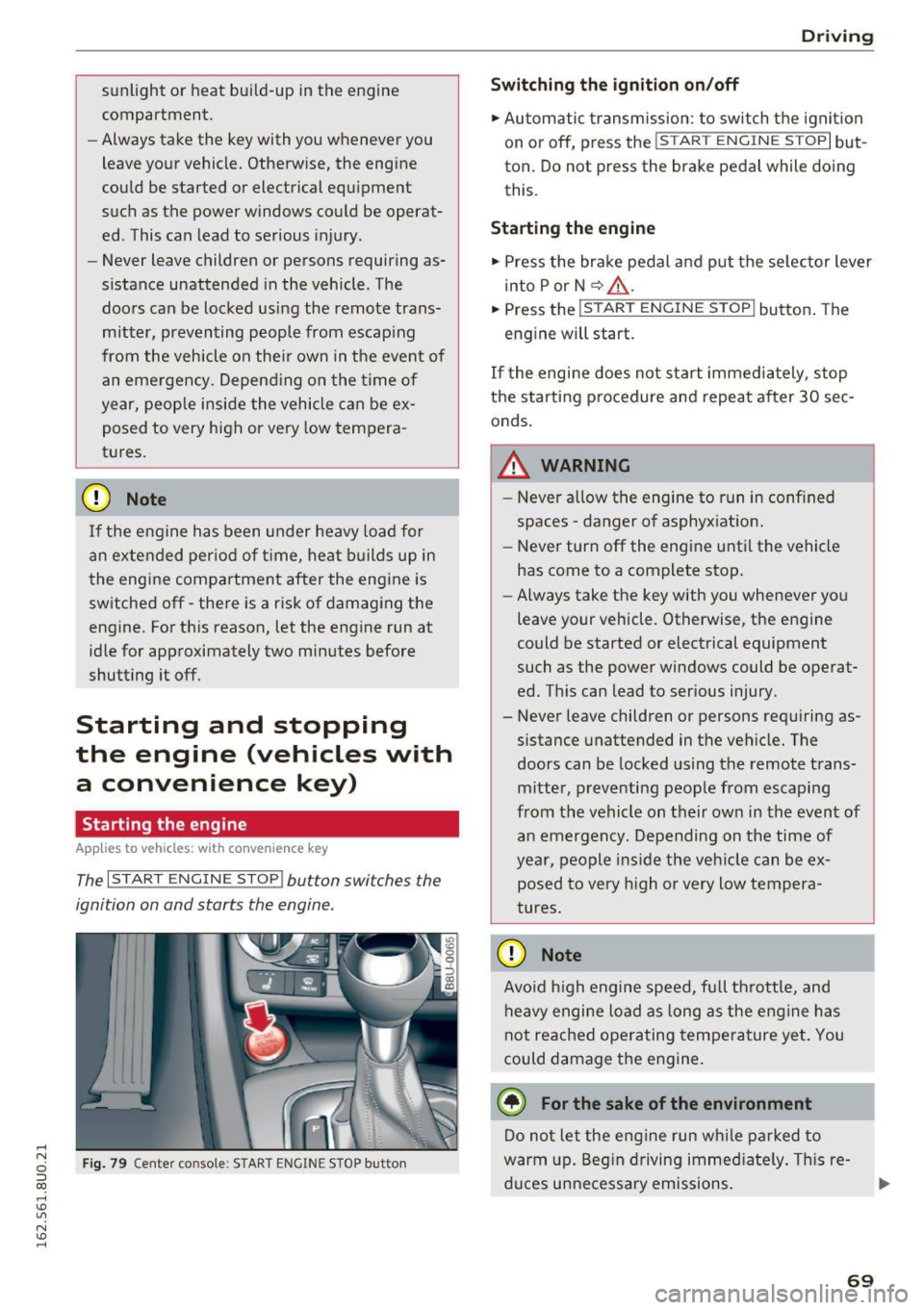
A ppl ies to vehicles: with c onve nien ce key
The I START ENGINE STOP! button switches the
ignition on and starts the engine.
Fig. 79 Center console : START ENGINE STOP button
Driving
Swi tching the ign ition on/o ff
.,. Automatic transmission: to switch the ignit ion
on or off, press the
I S T AR T ENGINE S TOPI but
ton. Do not press the brake pedal while doing
this.
Starting the engine
.,. Press the brake pedal and put the se lector lever
into P or N
~ A -
.,. Press the ~, s-T ~A - R- T~ E-N -G =r -N =E - S~ T= o- P-j button . The
engine will start.
If the engi ne does not start immediately , stop
the starting procedure and repeat after 30 sec
onds.
A WARNING
- Never allow the engine to run in confined
spaces -danger of asphyxiation.
- Never turn off the engine unti l the vehicle
has come to a complete stop.
- Always take the key with you whenever you
leave your vehicle. Otherwise, the engine
could be started or electrical equipment
such as the power windows could be operat
ed. This can lead to serious injury.
- Never leave children or persons requiring as
sistance unattended in the vehicle. The
doors can be locked using the remote trans
mitter, preventing people from escaping
from the vehicle on their own in the event of an emergency. Depending on the time of
year, people ins ide the veh icle can be ex
posed to very h igh or very low tempera
tures.
CD Note
Avo id high engine speed, full throttle, and
heavy engine load as long as the eng ine has
not reached operating temperature yet. You
could damage the engine.
@ For the sake of the environment
Do not let the engine run wh ile parked to
warm up. Beg in driving immed iate ly . T hi s re
duces unnecessa ry emissions.
-
69
Page 72 of 252
Driving
@ Tips
-Some noise after starting the engine is nor
mal and is no cause for concern.
- If you leave the vehicle with t he ignit ion
switched on, the ignition will switc h off af
ter a certain amount of time . Make sure that
electr ica l equipment suc h as the exterior
lights are switched off.
Stopping the engine
Appl ies to veh icles: w ith conve nien ce key
• Bring the vehicle to a full stop.
• Select the P or N selector lever position .
• Press the
I S TAR T ENGIN E STO PI button
¢ page 69, fig. 79.
Engaging the steering lock
The steering locks when you turn the engine off
using the
I START ENGINE STOP! button a nd
open the driver's door . The locked steering helps
p revent vehicle theft.
Emergency off function
If it is absolutely necessary, the engine can also
be turned off while driving at speeds lower than
6 mph (10 km/h) . To switch the engine off, press
the
I START ENGINE STOPI button twice in a row
briefly o r press and hold for longer than two sec
onds.
_& WARNING
- Never turn off the engine before the veh icle
has come to a comp lete stop . The full func
tion of the brake booster and the power
steering is not guaranteed. You must use more force to turn or brake if necessary. Be
cause you cannot steer and brake as you
usually would, this could lead to crashes
and serious injuries.
- For safety reasons, you should always park
yo ur vehicle with the selecto r lever in P .
Otherwise, the vehicle could inadvertently
roll away .
- The radiator fan can continue to r un for up
to 10 minutes even after you have turned
off the engine and removed the ignit ion key.
70
The radiator fan can also turn on again if the
engine coolant heats up because of intense
sunlight or heat build-up in the engine com
partment .
- Always take the key with you whenever you
leave your vehicle . Otherwise, the engine
could be started or electrical equipment
such as the power windows could be operat
ed. This can lead to serious injury.
(D Note
If the engine has been under heavy load for
an extended period of time, heat builds up in
the eng ine compartment after the engine is
switched off -there is a risk of damaging the
engine. For this reason, let the engine r un at
idle for approxi mately two minutes before
shutting it off.
Starting the engine when there is a
malfunction
App lies to vehicles: wit h co nvenience key
Other circumstances can cause the engine not to
start, such as the battery in the remote control
key has drained , there is interference with the
key or there is a system malfunction .
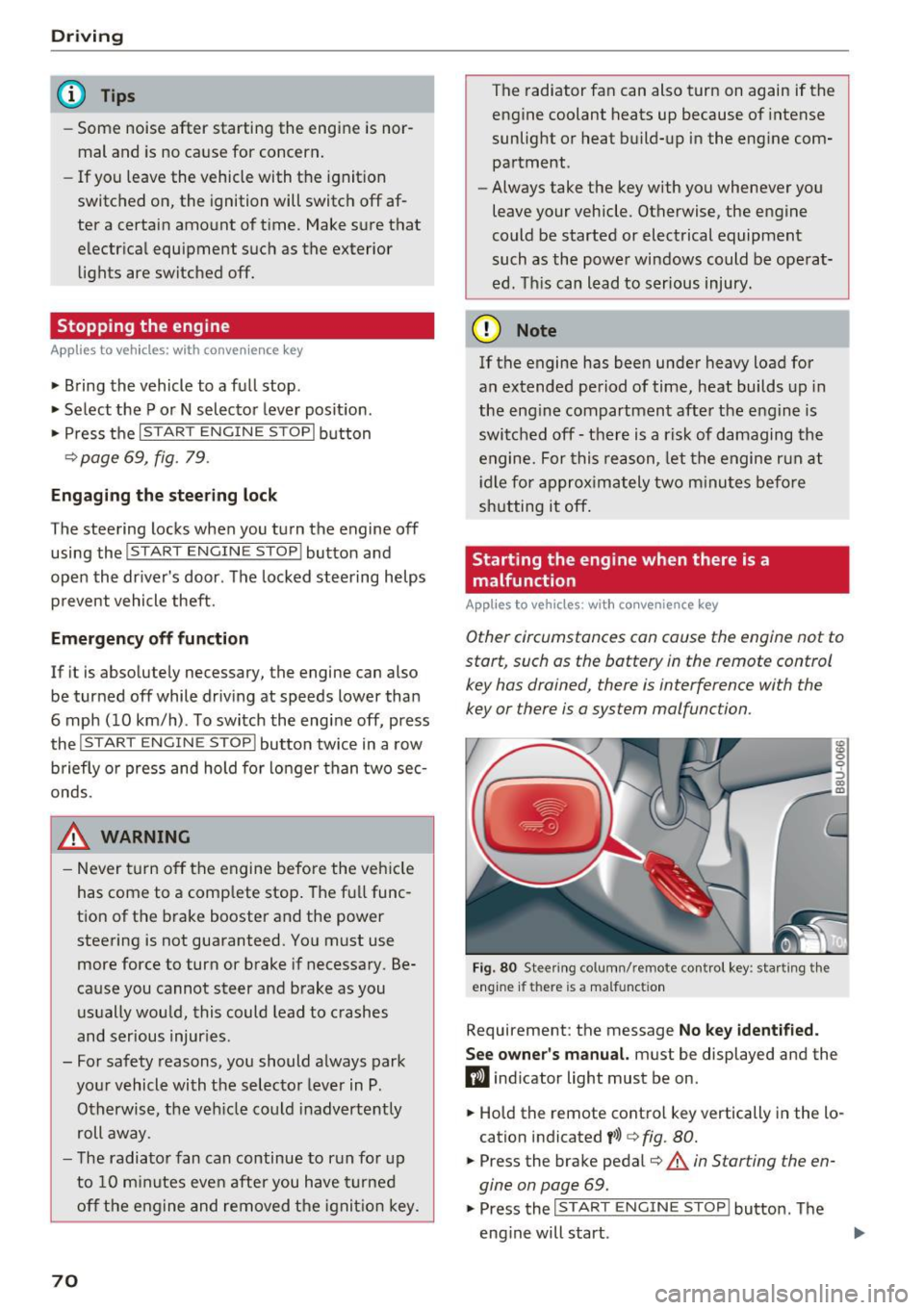
Fig. 80 Stee ring co lumn/ remo te cont rol key : sta rting t he
engine if th ere is a malfunct ion
Requirement: the message No key identified.
See owner's
manual. must be displayed and the
fl ind icator light must be on .
• Hold the remote control key vertically in the lo
cation indicated
t>>) ¢ fig. 80.
• Press the brake pedal¢.&. in Starting the en
gine on page
69.
• Press the ~IS_T_A_R_T_ E_N_ G_ I_ N_ E ~ s=T ~O ~ P~ I button. The
eng ine will start .
Page 73 of 252
.... N
c:i ::J CX)
.... I.Cl U"I
N I.Cl ......
.. Drive to an authorized A udi dealer or author
ized Audi Service Facility immediately to have
the malfunction corrected.
@ Tips
You can view the message again by pressi ng
the
I START E NGINE STOP! button.
Driver messages
Turn off ignit ion. Battery di scharging
This message appears and a war ning tone sounds
if you open the driver's doo r whe n the ignition is
sw itched on.
Pr ess brake pedal to start engine
This message appears if you do not step on the
brake pedal to start the eng ine on a vehicle with
a n automatic transm ission .
Please engage Nor P.
This message appears when starting or stopping
the eng ine and Nor Pis not engaged. The engine
will not start/stop.
Ill Is key in the vehicle ?
The indicator light turns on and this message ap
pea rs if the conven ience key* was removed from
the veh icle when the eng ine was runn ing. If t he
conven ience key is no longer in the vehicle, you
cannot switch the ignition on or start the engine
once yo u stop it. Yo u also ca nnot lock the vehicle
from the outside.
Shift to P , vehicle can roll away . Doors can only
be locked in P.
This message appea rs fo r safe ty re asons a long
with a warn ing sound if the se lector lever is not
e ng aged in P a fter swi tching the ignition off.
Move the selector lever to the P positio n. Other
wise the vehicle is not protected from rolling and
it cannot be loc ked.
DJ No key identified . See owner's manual.
This message appears if the re is no convenience
key * in side the veh icle or if the system does not
r ecognize the key. The conve nience key may not
be re cognized, for examp le, i f it is cove red by an
D rivi ng
obje ct that disrupts the signa l (such as a br ie f
case), or if the key battery is wea k. E lectronic de
vices such as cell phones can a lso inte rfere with
the signal.
T o still be able to start or stop the engine, re fer
to
¢ page 70.
Electromechanical
parking brake
Operating
The electromechanical parking brake replaces
the hand brake.
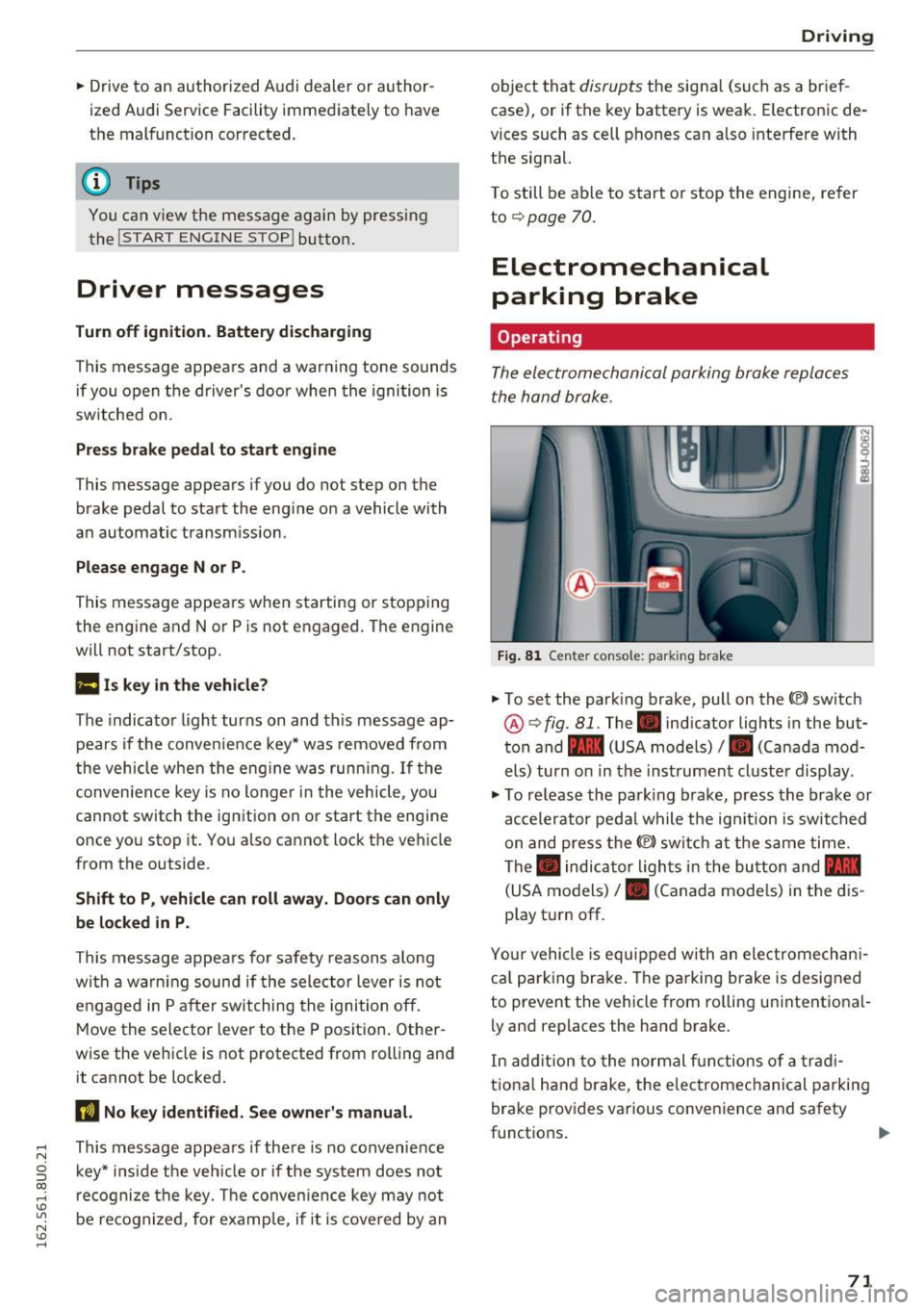
Fi g. 81 Center console: parking brake
.. To set the park ing brake, pull on the(®) switch
@¢ fig. 81. The . indicator lights in the but
ton and - (USA models)/ . (Canada mod
els) turn o n in the ins trument cluste r display.
.,. To re lease the park ing brake, press the brake or
ac celerator pedal w hile the ign it ion is switched
on and press the(®) switch at the s ame time.
The . indicator ligh ts in t he bu tton and -
(USA models)/ . (Canada mode ls) in the dis
play t urn off.
Yo ur vehicle is equipped with an elect romechan i
ca l p a rk ing brake . The pa rking brake is designed
to prevent the vehicle from ro lling un intent ional
ly and replaces the hand brake.
In add ition to the normal f unctions of a tra d i
t iona l h and b rake, t he elec tromec hanical parking
bra ke prov ides various conven ience and safety
functions .
71
Page 74 of 252
Driving
When start ing from a stop
- T he in tegr al hi ll sta rt as sis t helps y ou when
driving by automatically releasing the park ing
brake¢
page 72, Starting from a stop.
- When starting on incl ines, the hill start assist
prevents the vehicle from unintentionally roll
ing back . The braking force
of the parking brake
is only released if sufficient drive power has
been built up at the wheels.
Em erg enc y bra ke f unction
An emergency braking functions ens ures that the
vehicle can be s lowed down even if the
normal
brakes fail¢ page 73, Emergency braking
function.
,&. WARNING
- Do not press the accelerator pedal inadver
tently when the veh icle is stationary and the
engine is running and a gear is selected.
Otherwise t he vehicle w ill start to move im
med iate ly and could result in a c rash.
- If the power supply fa ils, the released park
ing bra ke can no longe r engage. In th is
case, pa rk the veh icle on leve l ground and
sec ure it by placing the selector lever in the
P position. See an author ized Audi dealer or
authorized Aud i Service Faci lity for assis
tance .
(D Tips
-If the parking b rake is set while the ignition
i s sw itched off, the. indicator light in the
b utton and -(USA models) /. (Cana
da models) will turn off after a certain
amount of time.
- Occasiona l noises when the parking brake is
set and re leased are normal and are not a
cause for concern.
- When the vehicle is parked, the parking
brake goes thro ugh a self-test cycle at reg u
l ar intervals. Any no ises assoc iated with this
are normal.
- If there is a power fa ilure, the parking brake
will not set if it is re leased, and it will not
release if it is set¢,&. See an authorized
72
-
Audi dealer or author ized Audi Service Fa
cility for assistance.
Parking
.. Press the brake pedal to stop the veh icle.
.. To set the park ing brake, pull on the© switch.
.. Select the P position .
.. Turn the engine off¢,& .
.. Turn the steering wheel when par king on in
cl ines so that the wheels w ill roll into the cu rb
if the vehicle starts moving.
,&. WARNING
- Always take the veh icle key with yo u when
leaving the vehicle, even for a short period
of time. This applies part icularly when chil
dren remain in the vehicle. Otherwise chil
dren could start the engine, release the
parking brake or operate electrical equip
ment such as power w indows, which in
creases the risk of an accident.
-
- No one should remain in the veh icle w hen it
is locked, especially ch ild ren. Locked doors
make it more difficult for emergency work
ers to get into the veh icle, wh ich puts lives
at risk.
Starting from a stop
The start assist function ensures that the park
ing broke is released automatically upon start
ing.
Stopping and setting the parking brake
.. To set the park ing brake, pull on the(®) switch.
Starting and automat ically r elea sing the
parking brake
.. When you press the acce lerator pedal, the
parking brake is automat ica lly re leased and
your vehicle beg ins to move .
When stopping at a traffic signa l or stopping in
c ity traff ic, the parking brake can be applied . The
vehicle does not have to be held with the brake pedal. The park ing brake elim inates the tendency
to c reep when a se lector lever position is engag-
ed. As soon as yo u press t he accelerator pedal,
1J1>
Page 75 of 252
the parking brake releases automatically and the
vehicle starts to move.
Starting on hills
When start ing on inclines, the hill start ass ist
prevents the vehicle from unintentionally roll ing
back. The braking force of the parking brake is
only released if sufficient drive power has been
bui lt up at the whee ls.
(D Tips
For safety reasons, the parking brake is re
leased automatically only when the driver's
safety belt is fastened and the driver's door is
locked.
Starting to drive with a trailer
To prevent rolling back unintentionally on an in
cline, do the following:
.. Keep pulling the<®> switch and press the acce l
erator pedal. The parking brake stays applied
and prevents the vehicle from ro lling backward.
.. You can re lease the<®> switch once you are sure
that you are transferring enough dr iving force
to the whee ls by pressing the accelerator pedal.
Depending on the weight of the rig (vehicle and
trailer) and the severity of the incline, you may
roll backwards as you start.
Hill hold
A ppl ies to vehicles: with H ill Hol d
Hill hold makes it easier to start on hills .
Requirement: The driver's door must be closed,
the seat belt must be buckled and the engine
must be running.
The system is activated when the brake pedal is
p ressed
for a few seconds.
To prevent the vehicle from roll ing back when
starting, the brake power is held for a brief mo
ment after releasing the brake pedal. During this
~ time, you can easi ly begin to move you r vehicle .
ci ::, co ,....,
A WARNING
- The intelligent technology of Hill Hold can
not overcome the limitat ions imposed by
natural physical laws. The increased comfort
offered by Hill Hold should not cause you to
take safety risks.
- Hill Hold cannot hold the vehicle in all hill
start situations (for example, if the g round
is slippery or icy).
- If you do not beg in moving immediately af
ter releasing the brake peda l, the vehicle
could begin to roll backward under certain
circumstances . Press the brake pedal or set
the parking brake immediately.
-If the engine "stalls", press the brake pedal
or set the parking bra ke immediate ly.
- To prevent the vehicle from roll ing back un
intentionally when starting in s top-and-go
traffic, keep the brake pedal pressed for a
few seconds before driving off .
(D Tips
You can find out if your vehicle is eq uipped
wi th Hill Hold by checking at an authorized
Audi dealer or authorized Audi Service Facili
ty.
Emergency braking function
This is used if the conventional brake system
fails or locks up.
.,. To brake your veh icle using the parking brake in
an emergency, pu ll the(®) switch and keep it
pulled.
.. The braking stops as soon as you release the<®>
switch or acce lerate .
If you pu ll the(®) switch and hold it above a
speed of about 5 mph (8 km/h) , the emergency
braking function is activated. The vehicle brakes
at all four whee ls by activating the braking hy
draulics. The brake performance is similar to
heavy brak ing .
c::> .&.
In order not to activate the emergency brake
function by mistake, a warning tone (buzzer)
sounds when the(®) switch is pulled. As soon as .,.
73
Page 84 of 252
Automatic transmissio n
Automatic transmission
tiptronic
Introduction
The automat ic transmission is controlled e lec
tron ically . The transmission upshifts or down
shifts automatically depending on wh ich dr ive
p rogram is selected.
When a
m oderate dri ving style is used, the
transmission se lects the most e conomical d riving
mode. The t ransm iss ion upshifts a t a lower RPM
and downshifts at a higher RPM to imp rove fuel
efficiency.
The transm ission switches to a spo rty mode afte r
a kick-down or when the drive r uses a
sport y
d riving sty le
charac ter ized by quick accelerator
pedal movements, heavy acce leration, frequent
changes in speed and traveling at the maximum
speed.
If desired, the dr iver can a lso select the gears
manually (tiptronic mod e) ¢ page 85.
In the tiptronic t ransmiss ion, power is trans fer
red by a torque converte r.
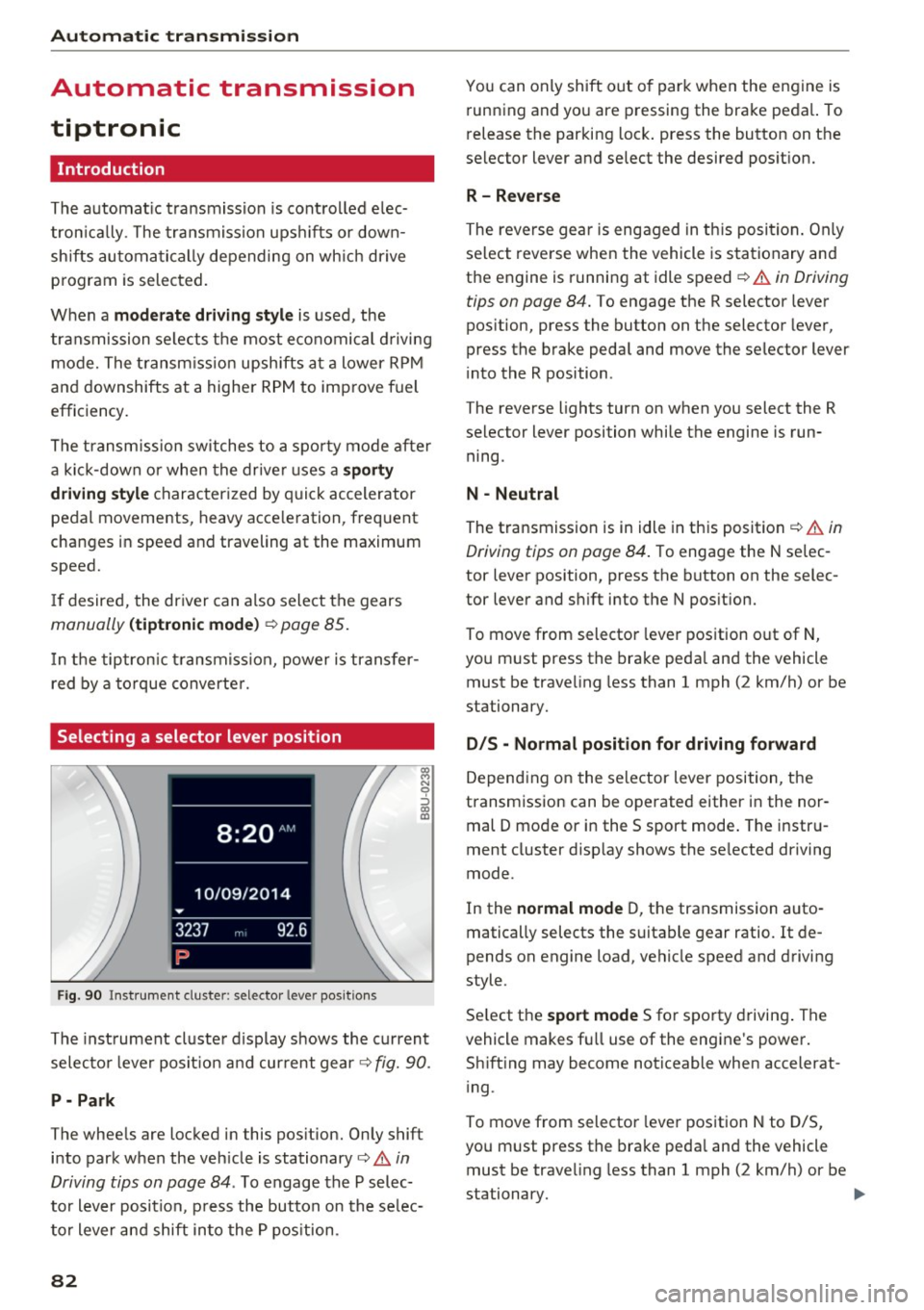
Selecting a selector lever position
F ig . 9 0 Inst rument cluste r: selecto r leve r pos itio ns
~ N 9 :, (X) a:,
The inst rument cl uste r d isplay shows the current
selec to r l ever posit ion a nd current gear¢
fig. 90.
P - Park
The whee ls are locked in this pos ition. On ly shift
into park when the veh icle is stationary¢
A in
Driving tips on page 84 .
To engage the P selec
to r lever position, p ress the button on the se lec
to r lever and shift into the P pos ition.
82
You can only shift out o f park when the engine is
running and you are pressing the brake peda l. To
release the parking lock . press the button on the
selector lever and select the desired pos it ion.
R- Reverse
The reverse gea r is engaged in th is position . Only
se lect reve rse when the vehicle is stationary and
the engine is running at idle speed
¢ .&. in Driving
tips on page 84.
To engage the R selector lever
pos ition, press the button on the selector lever,
press the brake peda l and move the selector lever
i nto the R position .
The reverse lights turn on when you select the R
selector lever position while the engine is run ning.
N -Neutral
The transmission is in idle in this position¢&. in
Driving tips on page 84 .
To engage the N selec
tor lever position, press the button on the selec
tor lever and s hift into the N pos ition.
To move from selector lever position out of N,
you must press the brake peda l and the vehicle
must be traveling less than 1 mph (2 km/h) or be
stationary.
D IS -Normal position for driving forward
Depending on the se lector lever position, the
transmission can be operated either in the nor
mal D mode or in the S sport mode . The instru
ment cluster disp lay shows the se lected driving
mode.
In the
normal mode D, the transmission auto
matically selects the suitable gear ratio. It de
pends on engine load, vehicle speed and driving
style.
Se lect the
sport mode S for sporty driving . The
vehicle makes f ull use of the engine's power.
Sh ift ing may become noticeable when accelerat
i ng .
To move from selector lever position N to D/S,
you m ust press the brake peda l and the vehicle
must be traveling less than 1 mph (2 km/h) or be
stationary.
ll-