rear view mirror AUDI Q3 2016 Owners Manual
[x] Cancel search | Manufacturer: AUDI, Model Year: 2016, Model line: Q3, Model: AUDI Q3 2016Pages: 252, PDF Size: 62.81 MB
Page 43 of 252
~ To activate the headlight assistant, tap the lev
er forward (!). The indicator light
ii appears
in the instrument cluster disp lay and the head
lights are switched on/off automatically. The
SI indicator light also turns on if the high
beams are switched on .
Switching the high beams on/off manually
If the high beams did not switch on/off automat
ically as expected, you may switch them on or off
manually instead:
~ To switch the high beams on manually, tap the
l ever forward (!). The
SI indicator light turns
on.
~ To switch the high beams off manually, pull the
lever back@. The headlight assistant is deacti
vated .
Operating the headlight flasher
~ Pull the lever into position @to operate the
headlight flasher when the headlight assist is
activated. The headlight ass istant remains ac
tive.
Messages in the instrument cluster display
Headlight assist: System fault!
Drive to an authorized Aud i dea ler or a uthorized
Aud i Serv ice Fac ility immediately to have the
malfunction corrected. You can still switch the
high beams on or off manually.
Headlight assist: Unavailable. No camera view
The camera view is blocked, for example by a
sticker or debris .
The sensor is located between the interior rear
view mirror and the windshield . Therefore, do not
place any st ickers in this area on the windshield .
A WARNING
Headlight assistant is only intended to assist
the driver. The driver is still responsible for
controlling the headlights and switching
them manually depending on light and visibil
ity conditions. It may be necessary to operate
them manually in situations such as:
- In adverse weather conditions such as fog,
heavy ra in, b lowing snow or spraying water.
Lights and Vision
-On roads where oncoming traffic may be
partially obscured, such as expressways.
- When there are road users that do not have
sufficient lighting, such as bicyclers or
veh icles with dirty tail lamps.
- In tight curves and on steep slopes.
- In poorly lit areas.
- With strong reflectors, such as signs .
- If the area of the windshield near the sensor
is fogged over, dirty, icy or covered with a
s ticker.
Adjusting exterior lighting
The functions are selected in the radio or MMI*.
~ Select: !CAR ! function button> (Car) Systems*
control button > Vehicle settings> Exterior
lighting .
Coming home (lights when leaving car}*,
Leaving home (lights when unlocking car)*
The coming home function illumi nates the area
around the vehicle when the ignition is switched
off and the driver's door is opened. Depending on
vehicle eq uipment, the function can be switched
on and off or the length of time the lights remain
on* can be adjusted .
T he
leaving home function illuminates the area
around the vehicle when unlock ing it. Thi s func
tion can be switched on and off.
The
coming home and leaving home functions
only operate when it is dark and the light switch
is i n the AUTO posit ion ~
page 39, fig. 35.
Daytime running lights
USA models:
You can switch the daytime running
l ights
on and off .
Canada models:
The function cannot be turned
off. It is activated automatically each time the ig
nition is switched on .
41
Page 46 of 252
Lights and Vision
@ Tips
If the power adjusting function malfunctions,
the glass in both mirrors can be adjusted by
pressing on the edge of it by hand.
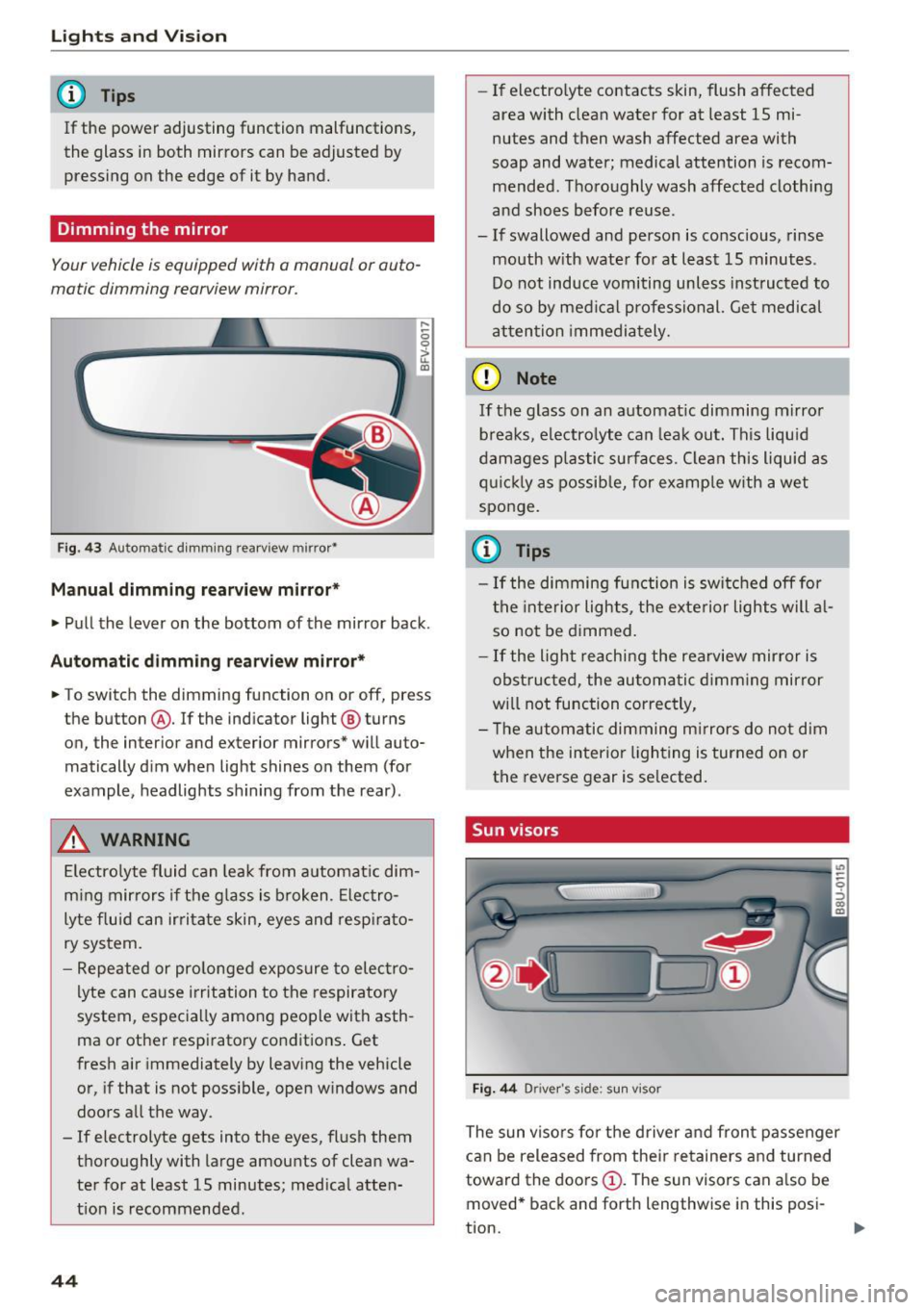
Dimming the mirror
Your vehicle is equipped with o manual or auto
matic dimming rearview mirror.
Fig. 43 Automatic dimming rearview mirror•
Manual dimming rearview mirror*
....
0 0
> u. Ill
• Pull the lever on the bottom of the mirror back .
Automatic dimming rearview mirror*
• To switch the dimming function on or off, press
the button @. If the ind icator light @ turns
on, the inter ior and exterior mirrors* will auto
matically dim when light shines on them (for
example, headlights shining from the rear).
A WARNING
Electrolyte fluid can leak from automatic dim
ming mirrors if the glass is broken. Electro
lyte fluid can irritate skin, eyes and respirato
ry system.
- Repeated or prolonged exposure to electro
lyte can cause irritation to the respiratory
system, especially among people with asth
ma or other respiratory conditions. Get
fresh air immediately by leaving the vehicle
or, if that is not possible, open windows and
doors all the way.
- If electrolyte gets into the eyes, flush them
thoroughly with large amounts of clean wa
ter for at least 15 minutes; medical atten
tion is recommended.
44
- If electro lyte contacts skin, flush affected
area with clean water for at least 15 mi
nutes and then wash affected area with
soap and water; medical attention is recom mended . Thoroughly wash affected clothing
and shoes before reuse.
- If swallowed and person is conscious, rinse mouth with water for at least 15 minutes.
Do not induce vomiting unless instructed to
do so by medical professional. Get medical
attention immediately.
(D Note
If the glass on an automatic dimming mirror
breaks, electrolyte can leak out. This liquid
damages plastic surfaces. Clean this liquid as
quickly as possible, for example with a wet
sponge.
(0 Tips
- If the dimming function is switched off for
the interior lights, the exterior lights will al
so not be dimmed.
- If the light reaching the rearview mirror is
obstructed, the automatic dimming mirror
will not function correctly,
- The automatic dimming mirrors do not dim
when the interior lighting is turned on or
the reverse gear is selected.
Sun visors
Fig. 44 Drive r's side ; s un visor
The sun visors for the driver and front passenger
can be released from their retainers and turned
toward the doors
(D. The sun visors can also be
moved* back and forth lengthwise in this posi-
tion. ..,.
Page 47 of 252
The mirror lighting* switches on when the cover
over the vanity mirror@opens.
Windshield wipers
Switching the windshield wipers on
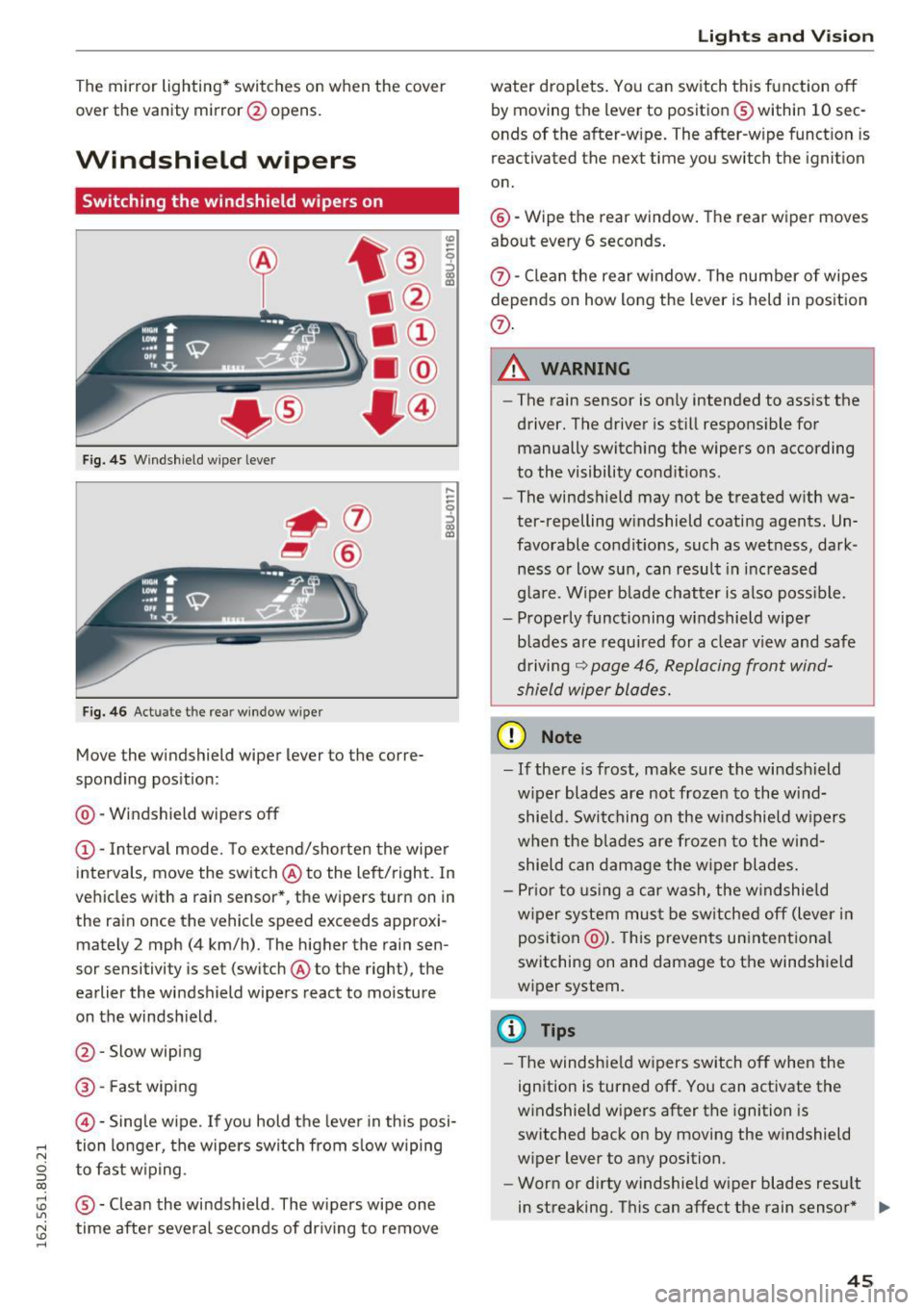
Fig. 45 Windshie ld wiper lever
Fig. 46 Act uate the re ar window w iper
Move the windshield wiper lever to the corre
sponding position:
@ -Windshield wipers off
@ -Interva l mode. To extend/shorten the wipe r
intervals, move the switch @to the left/right. In
vehicles with a rain sensor *, the wipers turn on in
the rain once the vehicle speed exceeds approxi mately 2 mph (4 km/h). The higher the rain sen
sor sensitivity is set (switch @to the right), the
earlier the windshield wipers react to moisture
on the windsh ield .
@ -Slow wiping
@ -Fast wiping
©-Sing le wipe. If yo u hold the leve r in th is posi-
,.... tion longer, the wipers switch from s low wiping
N
g to fast w ip ing.
CX)
~ ® -Clean the windshield . The wipers wipe one U"I
~ time afte r severa l seconds of dr iving to remove
......
Lights and V ision
water droplets . You can switch this function o ff
by moving the lever to position ® within 10 sec
onds of the after-w ipe. The after-wipe funct ion is
reactivated the next time you switch the ignit ion
on.
@ -Wipe the rear window . The rear wiper moves
about every 6 seconds .
{J)-Clean the rear w indow . T he number of wipes
depends on how long the lever is held in position
{J) .
.&_ WARNING
-
-The rain sensor is on ly intended to ass ist the
driver. The driver is still respons ible for
manually switch ing the wipers on according
to the visibility cond it ions .
- The winds hield may not be treated w ith wa
ter-repelling w indshield coating agents. Un
favorable condit ions, such as wet ness, dark
ness o r low sun, can result in inc reased
g lare. Wiper b lade chatter is also poss ible.
- Properly functioning windshield wiper
blades are requ ired for a clea r view and safe
d riving
~ page 46, Replacing front wind
shield wiper blades.
(D Note
- If there is frost, make sure the wi ndshield
w iper blades are not frozen to the wind
shield. Swi tching on the w indshield w ipers
when the blades are frozen to the wind shield can damage the w iper blades.
- Pr ior to using a car wash, the w indshield
w iper system mus t be sw itched off (lever in
position @). This prevents un intentional
switching on and damage to the windshield
wiper system.
(D Tips
- T he windshie ld w ipers switch off when the
ignition is turned off. You can activate the
w indshield wipers after the ignition is
switched back on by moving the w indshield
wiper lever to any position.
- Worn or dirty windshie ld wiper blades resu lt
in streaking. This can affect the rain sensor * .,.
45
Page 49 of 252
.... N
c:i ::J CX)
.... I.Cl U"I
N I.Cl ......
@ Tips
-Commercial hot waxes applied by automatic
car washes affect the how easi ly the glass
surface can be cleaned.
- You can also use the service position, for ex
ample, if you want to protect the windshield
from icing by using a cover.
- You cannot activate the service position
when the front lid is open.
Replacing rear windshield wiper blade
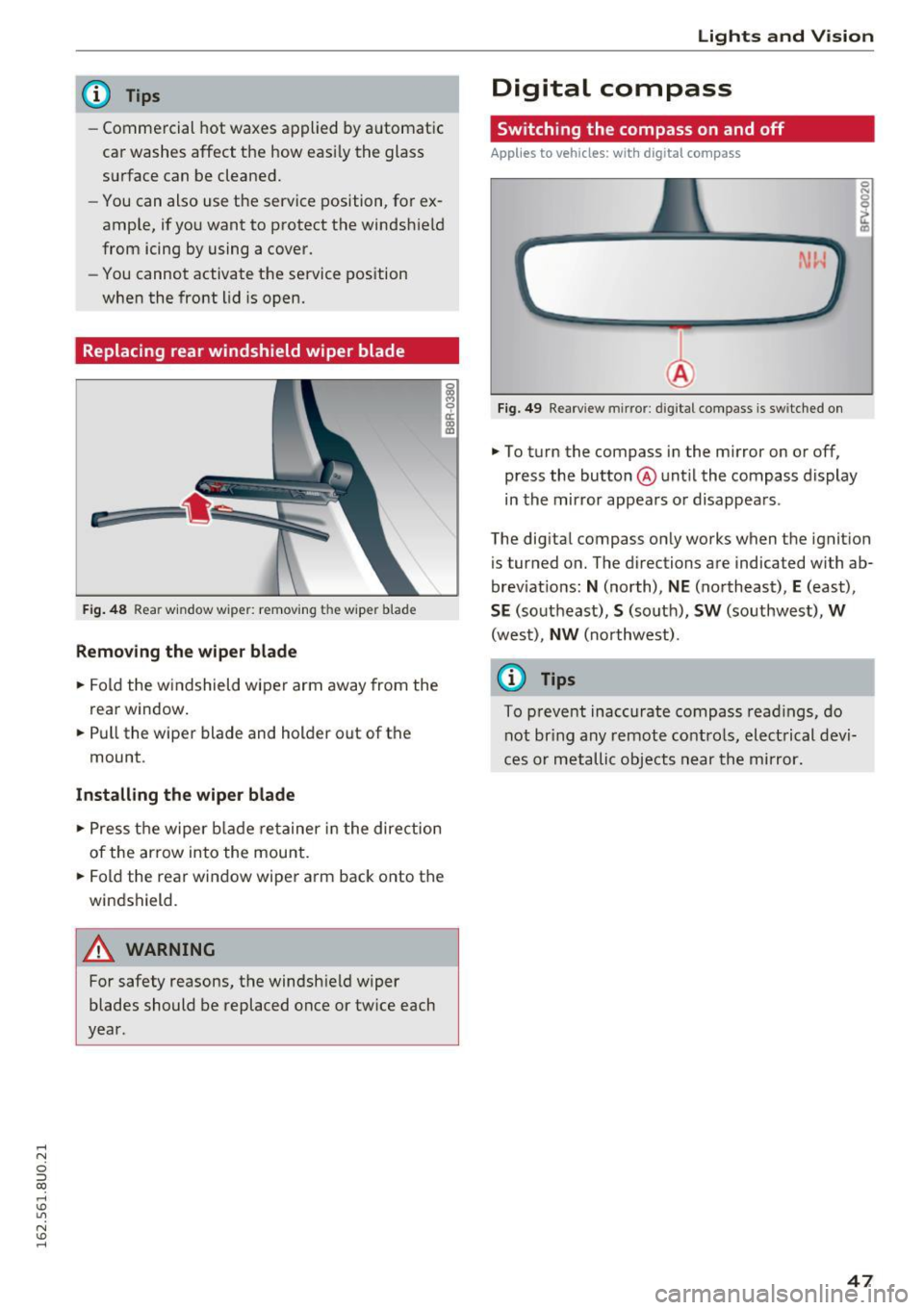
F ig . 48 Rear window wiper: remov ing the wiper blade
Removing the wiper blade
.. Fold the w indshield wiper arm away from the
rea r window .
.. Pull the wiper blade and holder out of the
mount .
Installing the wiper blade
.. Press the wiper blade retainer in the direction
of the arrow into the mount .
.. Fold the rear window wiper arm back onto the
windshield.
A WARNING
~ 9 a::
"' a,
-
For safety reasons, the windshield wiper
blades should be replaced once or tw ice each
year .
Lights and V ision
Digital compass
Switching the compass on and off
Applies to veh icles: w it h dig ita l compass
Fig . 49 Rearview mirror: digi tal compass is sw itched on
.. To turn the compass in the mirror on or off,
press the button @until the compass display
in the mirror appears or disappears .
The digital compass on ly works when the ignition
is tur ned on. The directions are indicated with ab
brev iat ions:
N (north), NE (northeast), E (east),
SE (southeast), S (so uth), SW (southwest), W
(west), NW (northwest).
(0 Tips
To prevent inaccurate compass readings, do
not br ing any remote controls, electrical devi
ces or metallic objects near the mirror.
47
Page 50 of 252
Lights and Vision
Adjusting the magnetic zone
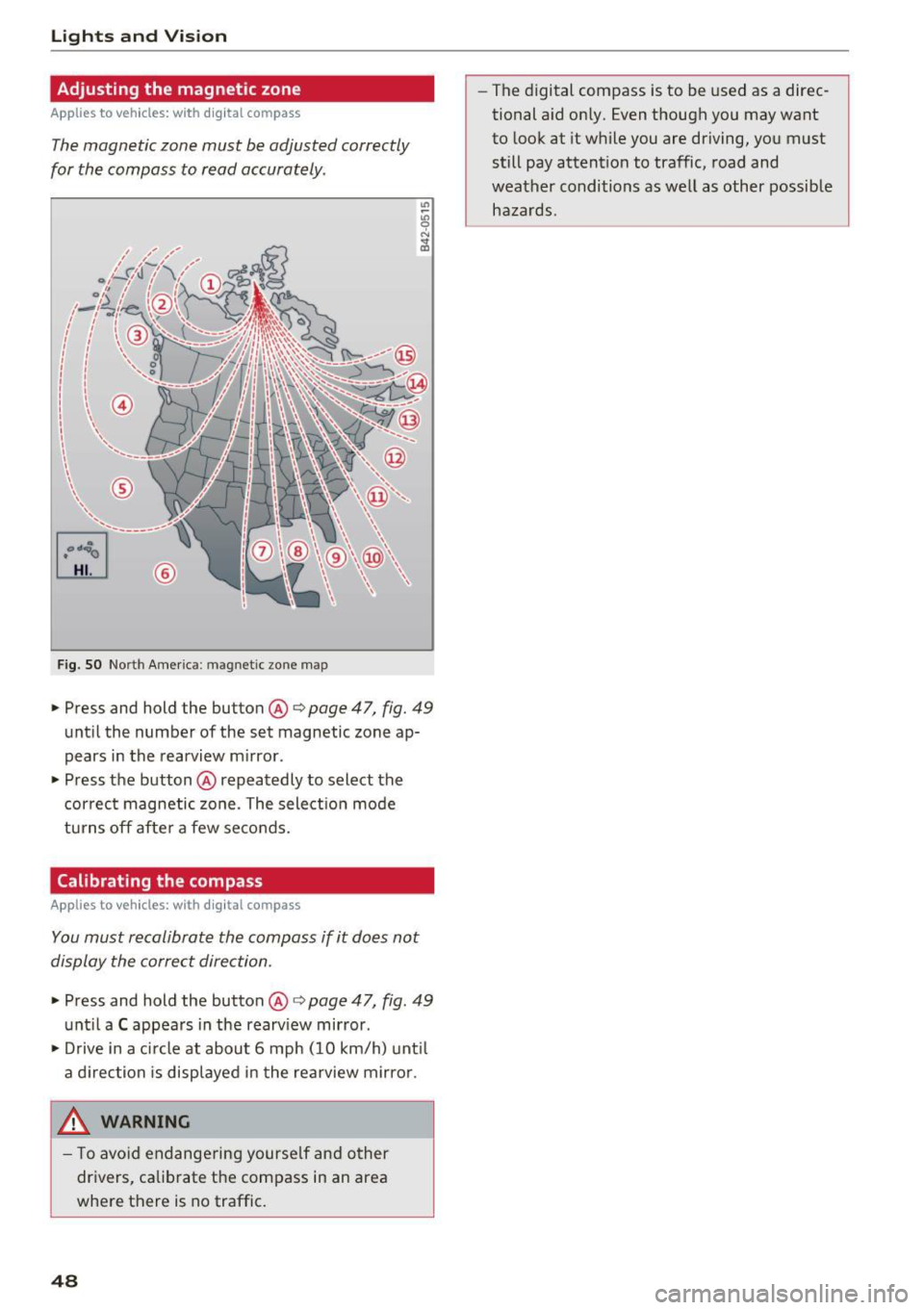
Applies to vehicles: with digital compass
The magnetic zone must be adjusted correctly
for the compass to read accurately .
~
LIU ®
Fig . SO No rt h Amer ica : ma gnetic zo ne m ap
.. Press and hold the button @ q page 47, fig. 49
until the number of the set magnetic zone ap
pears in the rearview m irror .
.. Press the button @ repeatedly to select the
cor rec t magnetic zone . The select ion mode
turns off afte r a few seco nds.
Calibrating the compass
Applies to vehicles: with digital compass
You must recalibrate the compass if it does not
display the correct direction .
.. Press and hold the button @ q page 47, fig. 49
unt il a C appea rs in the rearv iew mirror .
.. Drive in a c ircle at about 6 mph ( 10 km/h) unt il
a d irection is displ ayed in the rea rview mirro r.
,8. WARNING
- T o avo id end ange ring yourse lf an d other
dr ivers, ca librate t he compass in an area
whe re there is no traffic.
48
- The digital compass is to be used as a direc
tional a id on ly. Even though you may want
to look at it while you are driving, you must
still pay attent ion to traffic, road and
weather conditions as well
as other possible
hazards .
Page 58 of 252
Seats and storage
To switch the cooling off
.,. Turn the rotary switch @clockwise to switch
the cooling off.
The cooling box works only in the cooling mode.
If the climate control is in the heating mode, we
recommend switching the cooling box off.
& WARNING
To reduce the risk of personal injury in an acci
dent or sudden stop, always keep the glove
compartment closed while driving.
Additional storage
There are a variety of storage compartments and
fasteners in various places in the vehicle.
- In the front center console.
- At the front end of the front seats*. You can
store objects weighing up to 3.3 lbs (1.5 kg) in
the drawer and objects weighing up to 2.2 lbs (1 kg) in the hinged compartment.
- In the door trim.
- Coat hooks next to and above the rear doors.
- Nets* on the backrests of the front seats.
- Coat hooks/retaining hooks in the luggage
compartment.
& WARNING
- When driving, do not leave any hard objects
on the rear window shelf or allow your pet
to sit on the shelf. They could become a haz
ard for vehicle occupants in the event of
sudden braking or a crash.
- Always remove objects from the instrument
panel. Any items not stored could slide
around inside the vehicle while driving or
when accelerating or when applying the
brakes or when driving around a corner.
- When you are driving make sure that any
thing you may have placed in the center con
sole or other storage locations cannot fall
out into the footwells. In case of sudden
braking you would not be able to brake or
accelerate.
- Any articles of clothing that you have hung
up must not interfere with the driver's view.
56
The coat hooks are designed only for light
weight clothing. Never hang any clothing
with hard, pointed or heavy objects in the pockets on the coat hooks. During sudden
braking or in an accident - especially if the
airbag is deployed - these objects could in
jure any passengers inside the vehicle.
- To reduce the risk of personal injury in an
accident or sudden stop, always keep the
glove compartment closed while driving.
- Read and follow all WARNINGS
~ page 128, Important safety instructions
on the side airbag system.
-Hang clothes in such a way that they do not
impair the driver's vision.
- The coat hooks must only be used for light
weight clothing. Do not leave any heavy or
sharp edged objects in the pockets which
may interfere with the side curtain airbag
deployment and can cause personal injury in
a crash.
- Do not use coat hangers for hanging cloth
ing on the coat hooks as this can interfere
with proper deployment of the side curtain airbags in an accident.
- Do not hang heavy objects on the coat
hooks, as they could cause personal injury in
a sudden stop.
- Always keep the compartment above the
rearview mirror closed while driving to re
duce the risk of injury in the event of sudden
braking maneuvers or a collision.
(D Note
Objects located on the rear shelf that rub
against the rear window could damage the heating wires for the rear window defogger.
(D Tips
-A vent slot is located between the shelf and
the rear window. Do not block the vent with
any items you may place on the rear window
shelf.
- Do not place bulky items on the rear window shelf as they could restrict or block the driv
er's vision in the rear view mirror.
Page 78 of 252
Audi side assist
Audi side assist
Side assist
Description
Applies to vehicles: with Aud i side ass ist
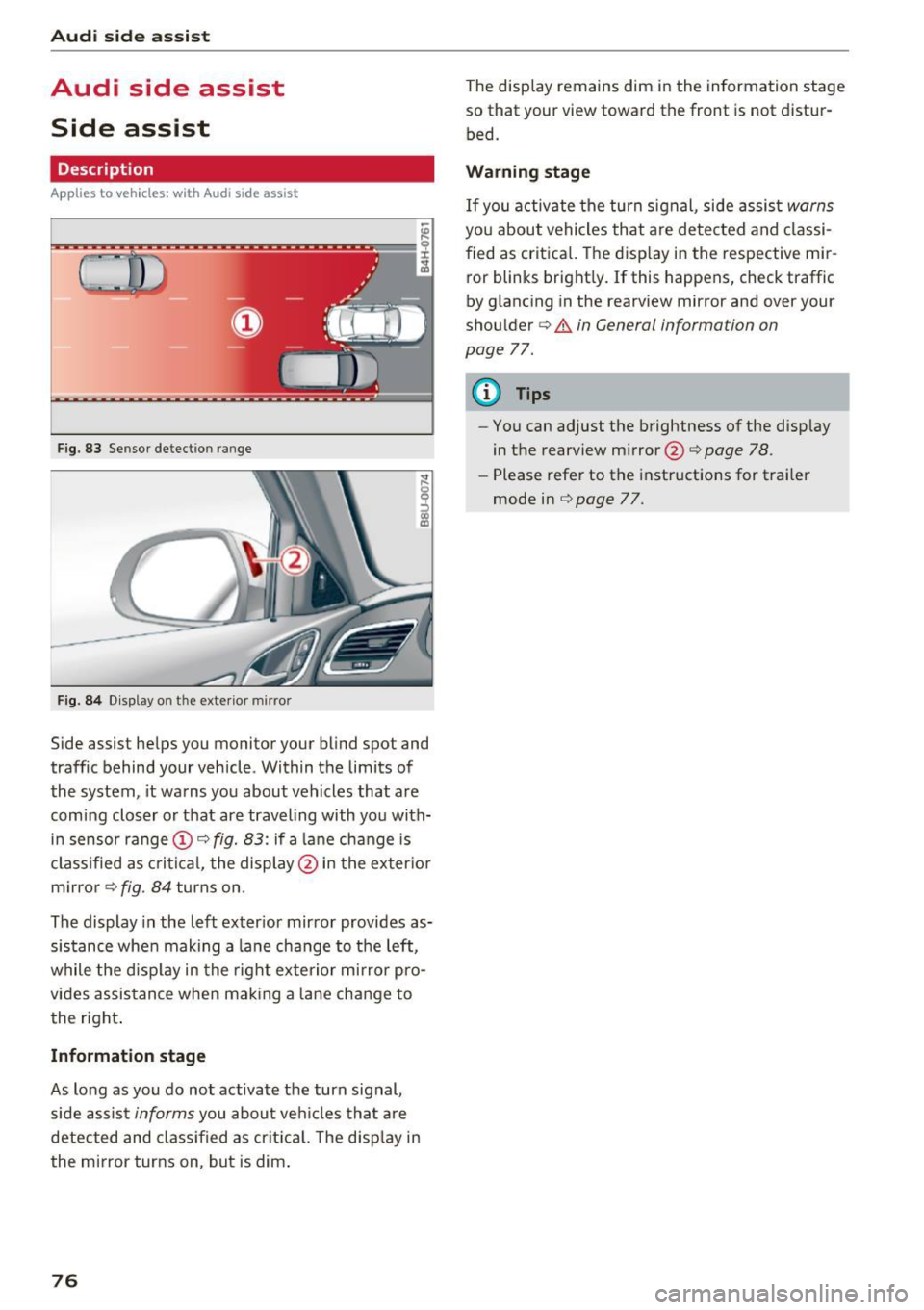
F ig. 83 Se nsor detec tion ran ge
Fig . 84 Display o n th e exter io r mirr or
Side assist he lps you monitor your bl ind spot and
traffic behind your vehicle . Within the limits of
the system , it warns you about vehicles that are
comi ng closer o r that are traveling with you with
i n sensor range
(D c:> fig. 83: if a lane change is
classified as cr itic al, the displ ay @ in the exter io r
m irro r
i=>fig . 84 turns on .
The display in the left exter ior mir ror provides as
sis tance whe n making a la ne change to the left,
while the disp lay in the rig ht exte rio r mi rror pro
vides assis tance when mak ing a lane chan ge to
the right .
Information stage
As long as you do no t activate the turn signal,
side assis t
informs you about ve hicles tha t are
detected and class if ied as crit ic al. T he disp lay in
the mirror turns on, but is dim .
76
The display remains dim in the information stage
so that your view toward the fron t is not distur
bed.
Warning stage
If you activate the turn signal, side assis t warns
you about vehicles tha t are detected and classi
fied as crit ica l. T he disp lay in the respective mir
ror blinks bright ly. If this happens, check traffic
by glancing in the rearview mi rror and ove r you r
shou lder c:>
.&. in General information on
page
77.
{!) Tips
- You can adjust the b rightness of the disp lay
in the rearview mirror @c:>
page 78 .
-Please refe r to the instructions for trai ler
mode in c:>
page 77.
Page 80 of 252
Audi side assist
-Never rely only on side assist when chang
ing lanes.
- Always check rear view mirrors to make
sure that it is safe to change lanes.
- Side assist cannot detect a ll vehicles under
all conditions- danger of acc ident!
- Please note that side assist indicates there
are approaching vehicles, or vehicles in your blind spot, only after your vehicle has
reached a driving speed of at least 19 mph
(30 km/h).
- In certain situations, the system may not function or its funct ion may be limited. For
example:
- if veh icles are approaching or being left
behind very quickly. The display may not
turn on in time.
- in poor weather conditions such as heavy
rain, snow or heavy mist.
- on very w ide lan es, in tight curves or if
there is a rise in the road su rface. Vehicles
in the adjacent lane may not be detected
because they are outside of the sensor
range.
(D Note
The sensors can be displaced by impacts or
damage to the bumper, wheel housing and
underbody. This can affect the system. Have
your authorized Audi dealer or authorized
Audi Serv ice Facility check their function.
(D} Tips
- If the window glass in the driver 's door or
front passenger's door has been tinted, the
display in the exterior mirror may be misin
terpreted.
- For Declaration of Comp liance to United
States FCC and Industry Canada regu lations
c;, page235.
78
Switching on and off
App lies to vehicles: wit h Audi side assist
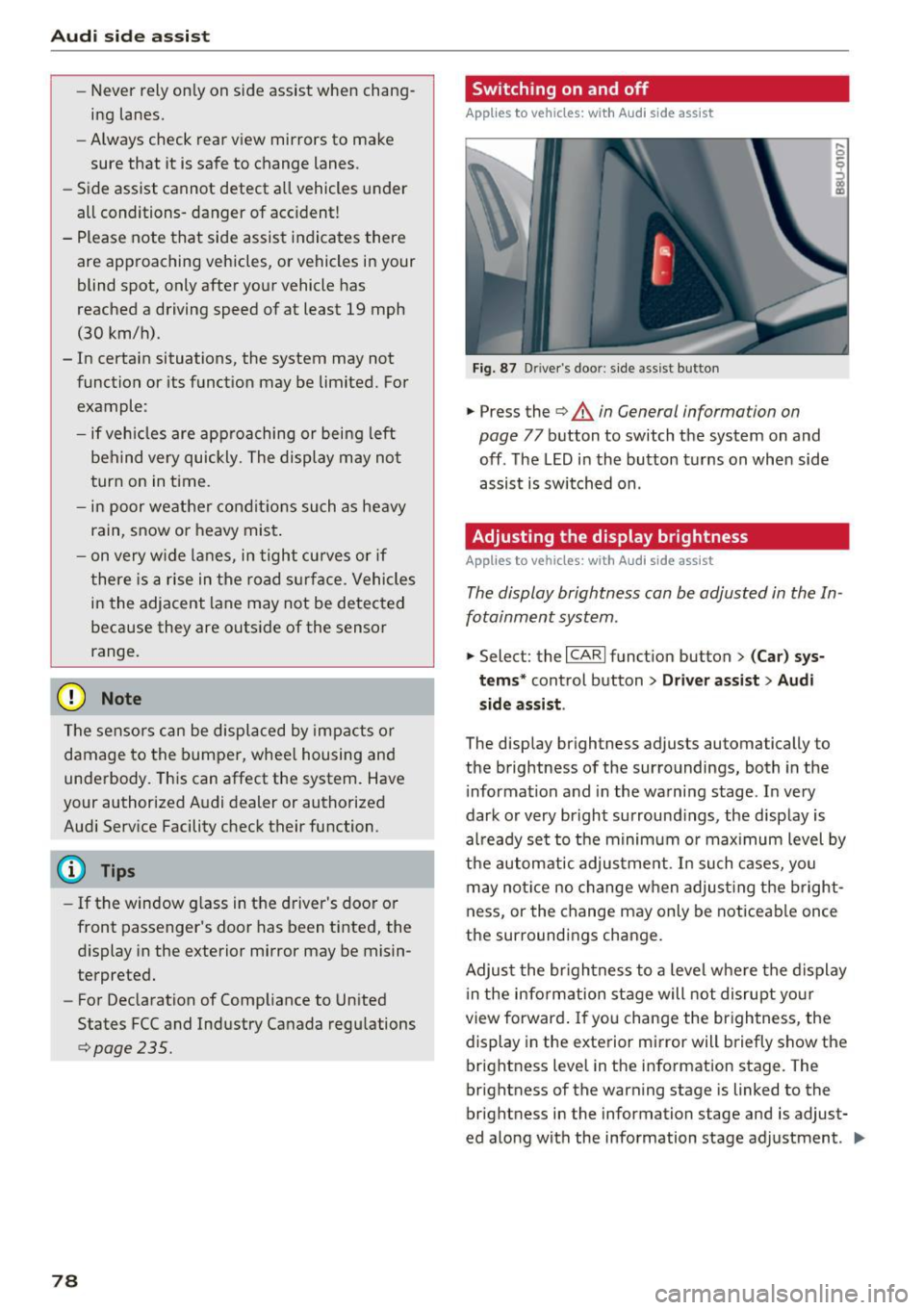
Fig. 87 D river's door: s ide assist button
.,. Press the c;, &. in General information on
page
77 button to switch the system on and
off . The LED in the button turns on when side
assist is switched on .
Adjusting the display brightness
Applies to vehicles: wit h Aud i side ass ist
! a,
The display brightness can be adjusted in the In
fotainment system .
.,. Select: the I CARI function button > (Car) sys
tems *
control button > Driver assist > Audi
side assis t.
The display brightness adjusts automatically to
the brightness of the surroundings, both in the
i nformation and in the warning stage . In very
dark or very bright surround ings, the display is
al ready set to the minimum or max imum level by
the automatic adjustment. In such cases, you
may notice no change when adjust ing the bright
ness, or the change may only be noticeable once
the surroundings change.
Adjust the br ightness to a level where the display
i n the information stage will not disrupt your
view forward. If you change the brightness, the
display in the exterior mirror will briefly show the
brightness level in the information stage. The
brightness of the warning stage is linked to the
brightness in the information stage and is adjust
ed along with the information stage adjustment . .,,.
Page 93 of 252
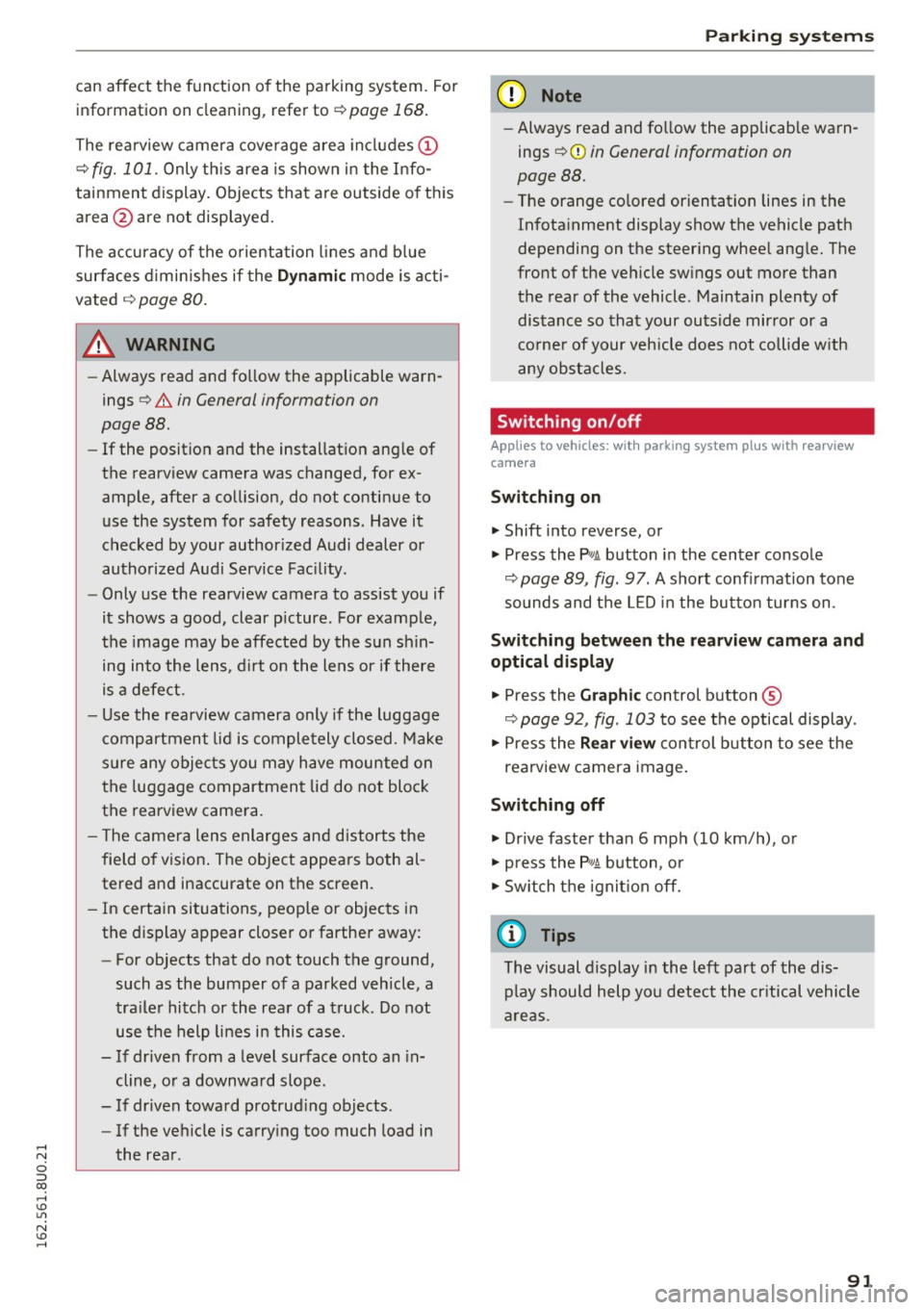
can affect the function of the parking system. For information on cleaning, refer to¢
page 168.
The rearview camera coverage area includes (!)
¢ fig. 101. Only this area is shown in the Info
tainment display. Objects that are outside of this
area @are not displayed.
The accuracy of the orientation lines and blue
surfaces diminishes if the
Dynamic mode is acti
vated
¢ page 80.
~ WARNING
- Always read and follow the applicable warn
ings
¢ &. in General information on
page 88.
- If the position and the installation angle of
the rearview camera was changed, for ex ample, after a collision, do not continue to
use the system for safety reasons. Have it
checked by your authorized Audi dealer or
authorized Audi Service Facility .
- Only use the rearview camera to assist you if
it shows a good, clear picture. For example,
the image may be affected by the sun shin
ing into the lens, dirt on the lens or if there
is a defect.
- Use the rearview camera only if the luggage
compartment lid is completely closed. Make
sure any objects you may have mounted on
the luggage compartment lid do not block
the rearview camera.
- The camera lens enlarges and distorts the
field of vision. The object appears both al
tered and inaccurate on the screen.
- In certain situations, people or objects in
the display appear closer or farther away:
- For objects that do not touch the ground,
such as the bumper of a parked vehicle, a
trailer hitch or the rear of a truck . Do not
use the help lines in this case.
- If driven from a level surface onto an in
cline, or a downward slope.
- If driven toward protruding objects.
- If the vehicle is carrying too much load in
the rear .
Parking systems
(D Note
-Always read and follow the applicable warn
ings
¢ (D in General information on
page 88.
- Th e orange colored orientation lines in the
In fotainment display show the vehicle path
depending on the steering wheel angle. The
front of the vehicle swings out more than
the rear of the vehicle. Maintain plenty of
distance so that your outside mirror or a
corner of your vehicle does not collide with
any obstacles.
Switching on/off
Appl ies to vehicles: with parking system plus with rearview
camera
Switching on
• Shift into reverse, or
• Press the
PwA button in the center console
¢ page 89, fig. 97. A short confirmation tone
sounds and the LED in the button turns on.
Switching between the rearview camera and
optical display
• Press the Graphic control button ®
¢ page 92, fig. 103 to see the optical display.
• Press the
Rear view control button to see the
rearview camera image.
Switching off
• Drive faster than 6 mph (10 km/h), or
• press the
P•lj A button, or
• Switch the ignition off.
@ Tips
The visual display in the left part of the dis
play should help you detect the critical vehicle
areas.
91
Page 222 of 252
Fuses and bulbs
(D Tips
- The following table does not list fuse loca
tions that are not used.
- Some of the equipment listed in the follow
ing tables applies only to certain model ver
sions or certain optional equipment.
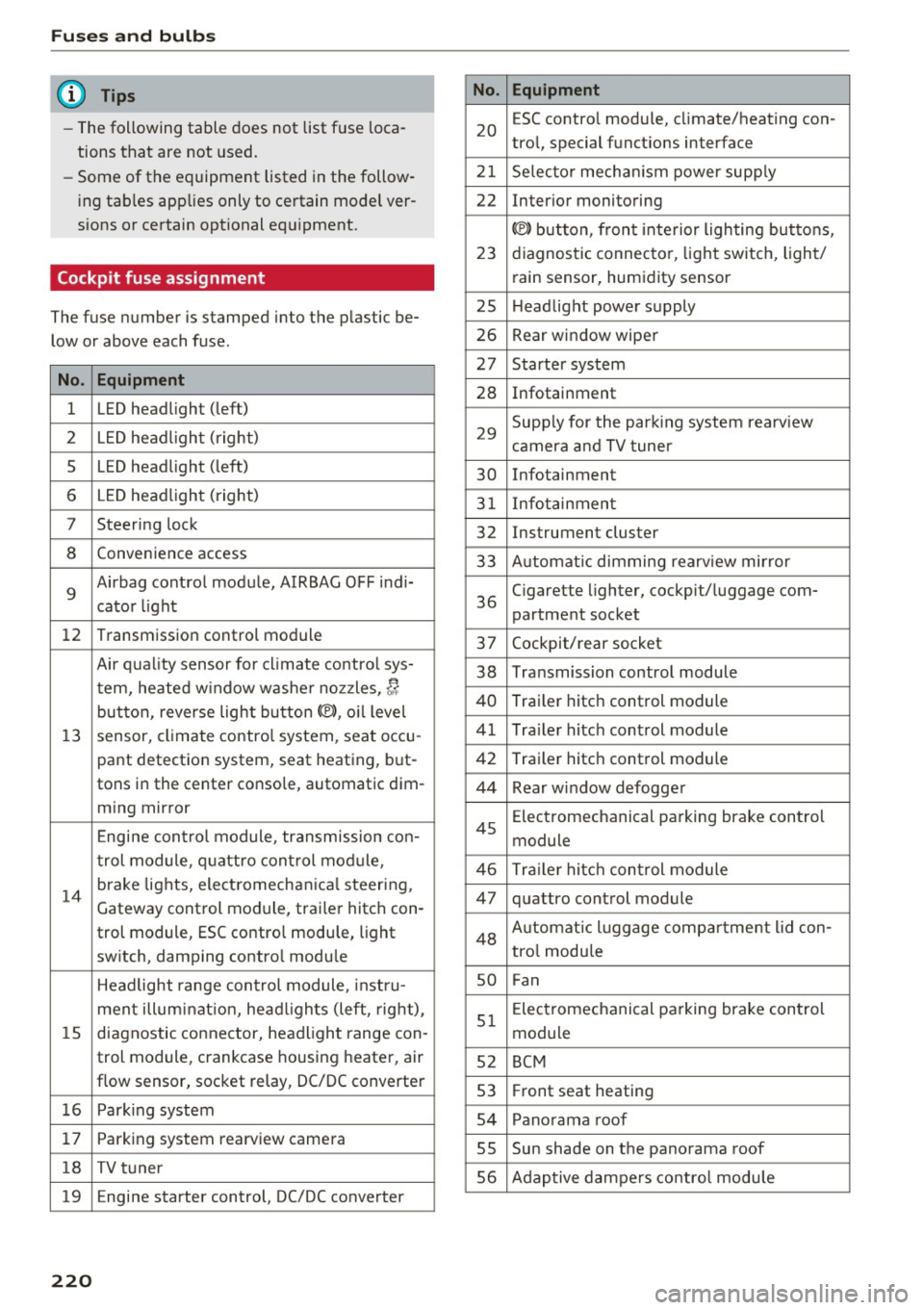
Cockpit fuse assignment
The fuse number is stamped into the plastic be
low or above each fuse.
No. Equipment
1 LED headlight (left)
2 LED headlight ( right)
5 LED headlight (left)
6 LED headlight (right)
7 Steering lock
8 Convenience access
9
Airbag control module, AIRBAG OFF indi-
cator light
12 Transmission control module
Air quality sensor for climate contro l sys-
tern, heated w indow washer nozzles,~
button, reverse light button<®>, oil level
13 sensor, climate control system, seat occu-
pant detection system, seat heating , but-
tons in the center console, automatic dim-
ming mirror
Engine control module, transmission con-
trol module, quattro control module,
14
brake lights, electromechanica l steering,
Gateway cont rol module, trailer hitch con-
trol module, ESC contro l module, light
switch, damping control module
Headlight range control module, instru-
ment illuminat ion, headl ights (left, right),
15 diagnostic connector, headlight range con-
trol module, crankcase housing heater, air
flow sensor, socket relay, DC/DC converter
16 Park ing system
17 Parking system rearview camera
18 TV tuner
19 E ngine starter control, DC/DC converter
220
No . Equipment
20
ESC contro l module, climate/heating con-
tro l, special functions interface
21 Selecto r mechanism power supply
22 Interior monitoring
© button, front interior lighting buttons,
23 diagnostic connector, light switch, light/
rain sensor, humidity sensor
25 Headlight power supply
26 Rear window wiper
27 Starter system
28 Infotainment
29
Supply for the park ing system rearv iew
camera and TV tuner
30 Infotainment
31 Infotainment
32 Instrument cluster
33 A utomat ic dimming rearview mirror
36
Cigarette lighter, cockpit/ luggage com-
partment socket
37 Cockpit/rear socket
38 Transmission control module
40 Trailer hitch control module
41 Trailer hitch control module
42 Trailer hitch control module
44 Rear window defogger
45
Electromechanical parking brake control
module
46 Trailer hitch control module
47 quattro control module
48 Aut omat ic lu ggage compartment lid con-
tro l module
so Fan
51
Electromechanical parking brake control
module
52 BCM
53 Fr ont seat heating
54 Panorama roof
55 Sun shade on the panorama roof
56 Adaptive dampers control module