ESP AUDI Q3 2017 Owner´s Manual
[x] Cancel search | Manufacturer: AUDI, Model Year: 2017, Model line: Q3, Model: AUDI Q3 2017Pages: 236, PDF Size: 58.93 MB
Page 42 of 236
Lights and Vision
Windshield wipers
Switching the windshield w ipers on
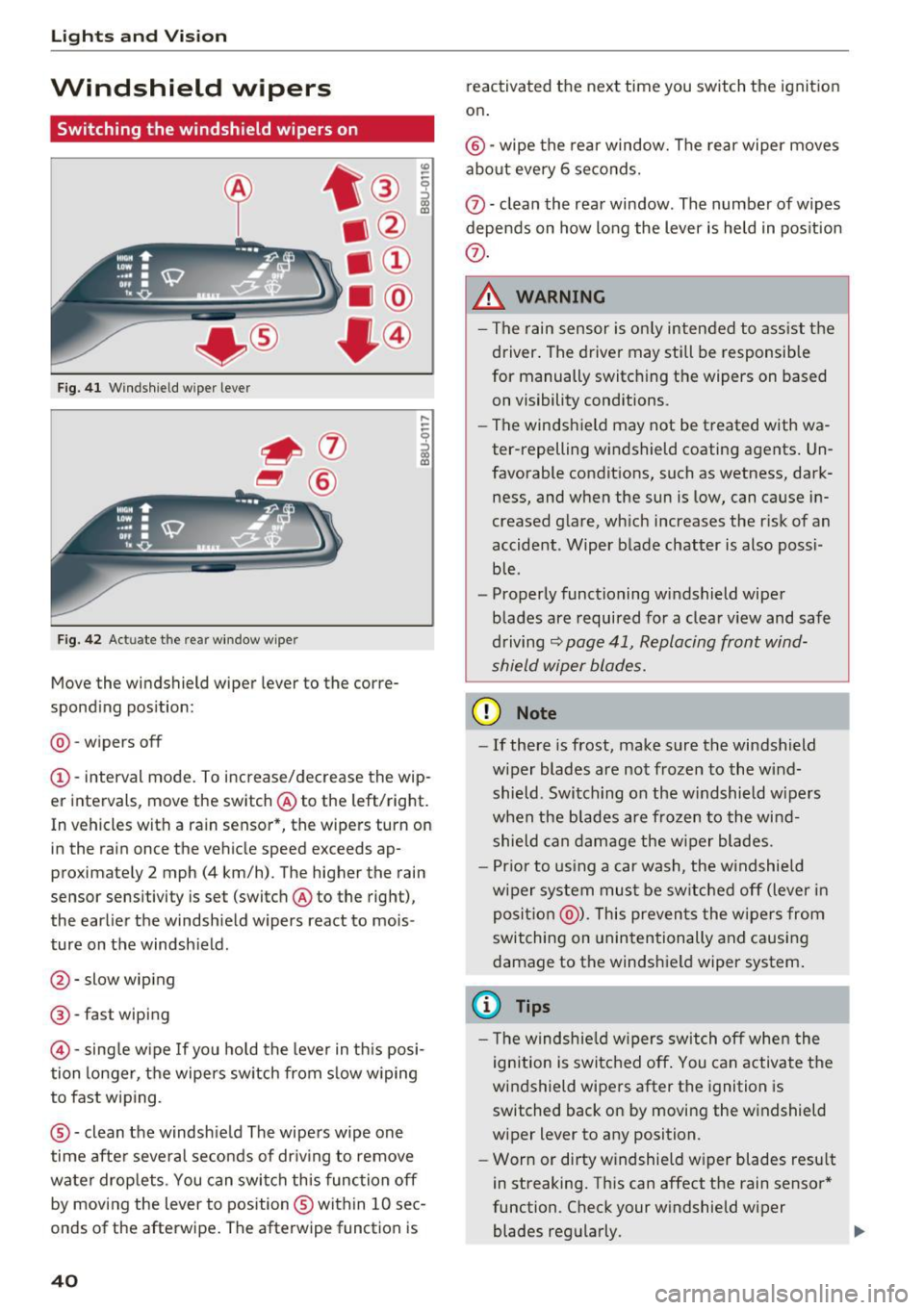
F ig. 4 1 Wind shield wiper le ver
F ig. 42 Act uate t he re ar windo w wipe r
Move the windshield wiper lever to the corre
spond ing pos ition:
@ -wipers off
(D -interval mode. To i ncrease/decrease the wip
er intervals, move the switch @ to the left/right.
In vehicles with a ra in sensor *, the wipers turn on
in the rain once the vehicle speed exceeds ap
proximate ly 2 mph (4 km/h) . The higher the rain
sensor sensitivity is set (switch @to the right),
the earlier the windshield wipers react to mois
ture on the windsh ield .
@-slow wiping
@-fast w iping
© -sing le w ipe If yo u hold the leve r in th is posi
tion longer, t he wipers sw itch from s low w iping
to fast wiping.
® -clean the windsh ie ld The wipe rs wipe one
time afte r several seconds of dr iv ing to remove
water drop lets . You can swi tch this func tion off
by moving the lever to position ® within 10 sec
onds of the afterwipe . The afterwipe function is
40
reactivated the next time you switch the ignit ion
on .
®-wipe the rea r window. The rear wiper moves
about every 6 seco nds.
0 -clean the rea r window . The number of wipes
depends on how long the lever is held in pos it ion
(i) .
& WARNING
-The rain sensor is on ly intended to ass is t th e
driver . The driver may still be responsible
for manually switch ing the wipers on based
on visibility conditions .
- Th e windsh ield may not be treated with wa
ter-repelling windshield coating agents . Un
favorable conditions, such as wetness, dark
ness, and when the sun is low, can ca use i n
creased glare, wh ich increases the r isk of an
accident . Wiper blade chatter is also possi
b le .
- Properly functioning windshield wipe r
blades are required for a clear v iew and safe
driving
~ page 41, Replacing front wind
shield wiper blades.
(D Note
- If there is frost, make sure the windshield
w iper blades are no t frozen to the wind
shield . Switch ing on the w indshield w ipers
when the blades are frozen to the win d
shield can dam age the w iper blades.
- Pr ior to using a car was h, the w indshie ld
w iper sys tem mus t be sw itche d off (lever in
posit ion @). This preven ts the w ipers from
switching on unin tentionally and causi ng
damage to the windsh ield wiper system .
(D Tips
- The windshie ld wipers switch off w hen the
ignition is switc hed off . You can activate t he
windshield wipe rs after the ignition is
switched back on by moving the w indshield
wiper lever to any position .
- Wor n or dirty w indshield w iper blades resu lt
in streaking. Th is can affect the rain senso r*
function. Check your w indshield wiper
blades reg ularly. .,.
Page 49 of 236
a:,
a:,
...... N r--. N
'"' 0 0 ::, a:,
.. Inse rt the plug for the e lectrical device into the
socket (Dc::>fig .
53 .
The 12 vo lt socket ca n be used for elec trical ac
cessories. The power cons umption at the o utlet
must not exceed 120 watts .
There is an additional 12V socket in the cen ter
console.
& WARNING
Th e sockets and the electrical accessories co n
nected to them only f unction when the igni
tion is switched on. Incorrect usage can lead
to ser ious injuries or b urns . To reduce the risk
of injur ies, never leave ch ild ren unattended in
the vehicle with the veh icle key .
CD Note
-To reduce t he risk of damage to the vehicle
electrical system, never attempt to charge
the veh icle battery by co nnect ing accesso
r ies that prov ide power, such as solar pa nels
or batte ry charge rs, to the 12 Volt sockets.
- To reduce the risk of damage to the sockets,
on ly use pl ugs that fit correct ly.
{!) Tips
The vehicle battery d rains when accessories
are turned on b ut the engine is off.
Storage
Cup holders
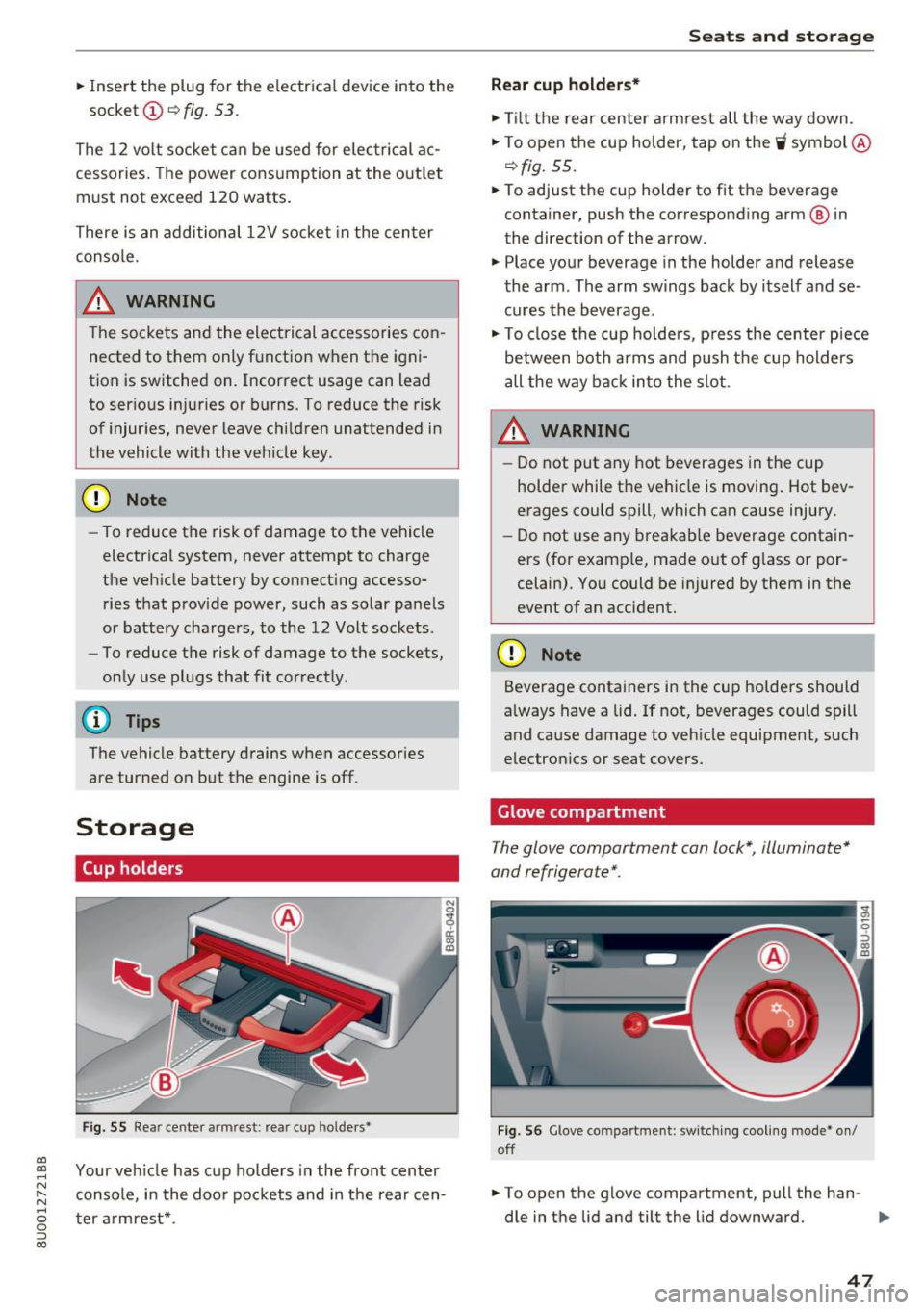
F ig . 55 Rea r cente r arm rest: rea r cup hol ders•
Your veh icle has c up holde rs in the front center
console, i n the doo r poc kets and in the rear cen
ter armrest *.
Seats and storag e
Rear cup holders*
.. Tilt t he rear ce nter arm rest all the way down .
.. To open the cup holder, tap on the
W symbol @
c::>fig. 55.
.. To adjust the cup holder to fit the beverage
container, push the correspond ing arm @ in
the direction of the arrow .
.. Place your beverage in the holder and release
the arm . The arm swings back by i tself and se
cures the beverage .
.. To close the cu p holde rs , p re ss the cen ter piece
between bot h arms and push t he cup holders
all the way bac k in to the slot .
& WARNING
-Do not put any hot beverages in the cup
holder while t he vehicle is movi ng . Hot bev
erages could spill , which can cause injury.
- Do not use any brea kab le beve rage contain
ers (for examp le, made o ut o f gl ass or por
celain). Yo u could be injured by them in the
event of an accident.
CD Note
Beve rage conta iners in the cup holders should
a lways have a lid . If not, beverages could s pill
and cause damage to veh icle equipment , such
electro nics or seat covers.
Glove compartment
The glove compartment can lock*, illuminate*
and refrigerate* .
Fig. 56 Glove compart ment : sw it ching coo ling m ode· on/
off
.. To open the glove compa rtment, pull the han -
dle in t he lid and tilt the lid downward.
IJi-
47
Page 55 of 236
00
00
......
"' ,-...
"' ...... 0 0 :::,
00
Warm and cold
Climate control system
Description
Depending on the vehicle equipment, different
systems could be installed:
- manual climate control system* or
- automatic climate control system"
The climate control system warms, cools and re moves humidity from the air in the vehicle interi
or.
It is the most effective when the windows and
panorama glass roof" are closed. If there is a
build-up of heat inside the vehicle, ventilation
can help to speed up the cooling process .
Pollutant filter
The pollutant filter removes pollutants such as
dust and pollen from the air.
Key recognition*
The automatic climate control* settings are stor
ed and assigned to the remote control key that is
in use.
A WARNING
Reduced visibi lity is dangerous and can cause
accidents.
- For safe driving it is very important that all
windows be free of ice, snow and condensa
tion.
- Completely familiarize yourself with the
proper use and function of the heating and
ventilation system and especially how to de
fog and defrost the windows.
- Never use the windshield wiper/washer sys
tem in freezing weather until you have
Warm and cold
warmed the windshield first, using the heat
ing and ventilation system. The washer solu
tion may freeze on the windshield and re
duce visibility .
(D Note
-If you suspect that the air conditioner has
been damaged, switch the system off to
avoid further damage and have it inspected
by a qualified dealership .
- Repairs to the Audi air conditioner require
special technical knowledge and special
tools. Contact an authorized Audi dealer for
assistance .
® For the sake of the environment
By reducing the amount of fuel you use, you
also reduce the amount of pollutants emitted
int o the air.
(D Tips
-To prevent interference with the heating
and cooling output and to prevent the win
dows from fogging over, the air intake in
front of the windshie ld must be free of ice,
snow or leaves.
- Condensation from the cooling system* can
dr ip and fo rm a pudd le of water under the
vehicle . T his is normal and does not mean
there is a leak.
- The energy management system may tem
porarily switch off certain functions, such as
the seat heating* or rear window defogger .
These systems are avai lable again as soon
as the energy supply has been restored .
53
Page 60 of 236
Driving
Driving
General information
Breaking in
A new vehicle must be broken in, and the break in distance should be 1,000 miles (1,500 km).
For the first 600 miles (1,000 km), do not drive
at speeds that are more than 2/3 of the maxi
mum permitted RPM, avoid full acceleration and
do not tow a trailer. You may gradually start in
creasing the RPM and the speed between 600 miles (1,000 km) and 1,000 miles (1,500 km) .
During the first hours of use, the engine has a
higher internal friction than later on when all
moving parts have settled into place with each
other.
How the vehicle is driven during the first 1,000
miles (1,500 km) also affects the engine quality.
Drive at moderate engine speeds after the initial
break-in period, particularly when running a cold
engine . This will reduce engine wear and improve
the mileage .
Do not drive at too
low of an engine speed (rpm).
Shift down if the engine stops running "smooth ly". Extremely high engine speeds are automati
cally reduced .
Avoid damaging the vehicle
When you are driving on poor roads, or over
curbs, steep ramps , etc., make certain that low
lying parts such as spoilers and exhaust system
parts do not bottom out and get damaged.
This is especially true for vehicles with low-slung
chassis (sports chassis)* and fully loaded
vehicles.
Driving through water on roads
Note the following to reduce the risk of vehicle
damage when driving through water, for example
on flooded roads:
- The water must not be any higher than the bot
tom of the vehicle body.
- Do not drive faster than walking speed.
58
A WARNING ,_
After driving through water or mud, the effec
tiveness of the brakes may be reduced due to
moisture on the brake rotors and brake pads.
A few careful brake applications should dry
off the brakes.
([) Note
Vehicle components such as the engine,
transmission, suspension or electrical system
can be severely damaged by driving through
water.
(D Tips
- Determine the depth before driving through
water.
- Do not stop the vehicle, drive in reverse or
switch the engine off when driving through
water.
- Keep in mind that oncoming vehicles may
create waves that raise the water level and
make it too deep for your vehicle to drive
through safely.
-Avoid driving through salt water, because
this can cause corrosion.
Economical and environmentally-friendly
driving
The amount of fuel consumption, the environ
mental impact and the wear to the engine,
brakes and tires depends mostly on your driving
style . With an anticipatory and economic driving
style, fuel consumption can be reduced by ap proximately 10-15%. The following tips will help
you conserve the environment and your money at
the same time.
Anticipatory driving
A vehicle uses the most fuel when accelerating .
When you drive with anticipation, you do not need to brake as often and so you accelerate less.
When possible , let your vehicle coast with a gear
engaged, for example, when you notice that the
next traffic light is red. This produces an engine
braking effect, which helps to protect the brakes
and tires and reduces the emissions and fuel
...
Page 61 of 236

00
00
......
"' ,....
"' ...... 0 0 :::,
00
consumption to zero (fuel shut-off during decel
eration).
Shift efficiently
An effective way to save fuel is to upshift earlier .
Staying in a gear too long uses fuel unnecessari
ly. Press down on the accelerator pedal slowly
and avoid "kick-down".
Avoid full acceleration
You should rarely travel at the maximum vehicle
speed. High speeds cause a disproportionately
high increase in fuel consumption, emissions and
traffic noise. Slower driving saves fuel.
Reduce idling time
There are benefits to stopping the engine, for ex
ample when at railroad crossings or traffic lights
with longer red lights. Stopping the engine for
30-40 seconds already saves more fuel than the
amount of extra fuel needed to restart the en
gine.
It takes a very long time in idle to warm the en
gine up to operating temperature . Wear and
emissions are especially high in the warm-up
phase. Therefore, you should begin driving im
mediately after starting the engine. Avoid high
RPMs while doing this.
Have maintenance performed regularly
By having maintenance performed regularly on
your vehicle, you can help to reduce fuel con
sumption before you even start to drive. The maintenance condition of your vehicle not only
affects traffic safety and long-term value but al
so impacts
fuel consumption. A poorly main
tained engine can lead to fuel consumption that
is 10% higher than normal.
Also check the
oil level when refueling. The oil
consumption
depends largely on the engine load
and speed . It is normal for the oil consumption
of a new engine to reach its lowest point only af
ter a certain amount of use. Therefore, the oil
consumption can only be properly judged after
approximately 3,000 miles (5,000 km) have been
driven.
Driving
Fewer short trips
The engine and catalytic converter have to reach
their optimal
operating temperature to reduce
fuel consumption and noxious emissions effec
tively.
Just after starting, a cold engine in a mid-size car
only achieves a fuel economy of 6-8 mpg
(30-40 l/100 km). After about a half a mile, fuel
economy climbs to 12 mpg (20 l/100 km). After
about 2.5 mi
(4 km), the engine is at its proper
operating temperature and fuel economy has
reached a normal level. So you can see that you
should avoid short trips whenever possible .
The
outside temperature is also critical in this re
gard. Your car consumes more fuel in the winter
than in the summer.
@ Note
Do not leave engine idling unattended after
starting. If warning lights should come on to indicate improper operation, they would go
unheeded. Extended idling also produces
heat, which could result in overheating or
other damage to the vehicle or other proper
ty.
(D Note
- Have your vehicle maintained properly and
in accordance with the service recommenda
tions in your Warranty & Maintenance book
let. Lack of proper maintenance as well as
improper use of the vehicle will impair the
function of the emission control system and could lead to damage.
- Do not alter or remove any component of
the Emission Control System unless ap
proved by the manufacturer.
- Do not alter or remove any device, such as
heat shields, switches, ignition wires,
valves, which are designed to protect your
vehicle's Emission Control System and other
important vehicle components .
(j) Tips
The consumption estimates as published by
ENVIRONMENTAL PROTECTION AGENCY
(EPA) and Transport Canada may not
59
Page 62 of 236
Driving
correspond to you r actua l consumption on the
road, which will vary depending upon vehicle
load and speed, road and weather conditions,
trip length, etc.
Steering
Adjusting the steering wheel position
The steering column can be adjusted up and
down and forward and back.
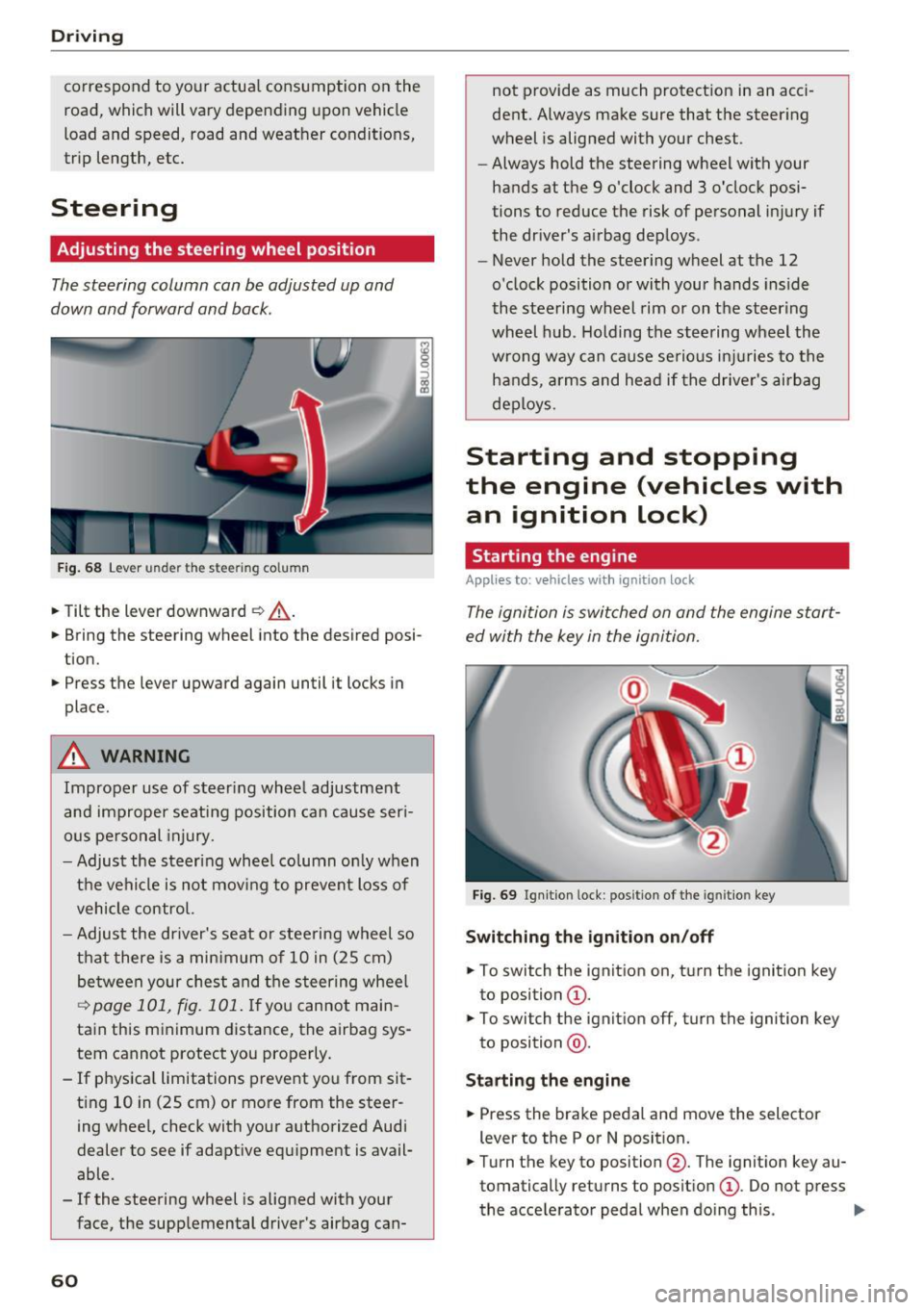
F ig . 68 Lever u nde r the stee ring column
.,. Tilt the lever downward ¢ _A.
.,. Bring the steering wheel into the desired posi
tion .
.,. Press the lever upward again until it locks in
place .
.&_ WARNING
Improper use of steer ing whee l adjustment
and improper seating position can cause ser i
ous pe rsonal injury.
- Adjust the steering wheel column on ly when
the vehicle is not mov ing to prevent loss of
vehicle control.
- Adjust the driver's seat o r steering wheel so
that there is a minimum of 10 in (25 cm)
be tween your chest and t he s teering wheel
~ page 101, fig. 101 . If yo u cannot main
tain this minimum distance, the airbag sys
tem cannot protect you properly.
- If physica l limitations prevent you from sit
t ing 10 in (25 cm)
or more from the steer
ing wheel, check with your authorized Audi
dealer to see if adaptive equipment is avail
able .
- If the steering wheel is aligned with your
face, the supplemental driver's airbag can-
60
not provide as much protect ion in an acci
dent. Always make sure that the steer ing
wheel is aligned with your chest.
- Always hold the steering wheel with your
hands at the 9 o'clock and 3 o'clock posi
tions to reduce the risk of personal in jury if
the driver's airbag deploys .
- Never hold the steering wheel at the 12
o'clock position or with your hands inside
the steering wheel rim or on t he steering
wheel hub . Holding the steering wheel the
wrong way can cause serious in juries to the
h an ds, arm s and head if the drive r's airbag
deploys.
Starting and stopping
the engine (vehicles with an ignition lock)
Starting the engine
Applies to: vehicles wit h ignition lock
The ignition is switched on and the engine start
ed with the key in the ignition.
Fig. 69 Ign it ion lock : pos ition of the ig ni tio n key
Switching the ignition on/off
.,. To switch the ignition on, turn the ignition key
to position
(D .
.,. To switch the ignit ion off, turn the ignition key
to position @.
Starting the engine
.,. Press the brake pedal and move the selector
lever to the P or N posit ion.
.,. Turn the key to position @. The ignit ion key au
tomatically returns to posit ion
(D . Do not press
the accelerator peda l when doing this . ..,.
Page 67 of 236

00
00
......
"' ,....
"' ...... 0 0 :::,
00
~ To prevent the parking brake from releasing au
tomatically, pull and hold the(®) switch and
press the accelerator pedal. The parking brake
remains set and prevents the vehicle from roll
ing backward .
~ You can release the(®) switch again once you
are sure that you are giving enough driving
force to the wheels by pressing the accelerator pedal.
Emergency braking function
You can use the emergency braking function in an
emergency situation, or if the standard brake op
eration malfunctions or is disabled.
~ Pull and hold the(®) switch.
~ As soon as you release the (®) switch or acceler-
ate, the braking stops .
Pulling and holding the(®) switch while driving
the vehicle activates the emergency braking func
tion . The vehicle is braked at all four wheels by
activating the hydraulic brake system. The brak
ing effect is similar to heavy braking
Q &_.
To reduce the risk of activating the emergency
braking by mistake, a warning tone (buzzer)
sounds when the(®) switch is pulled. Emergency
braking stops as soon as the (®) switch is released
or the accelerator pedal is pressed .
Parking
~ Press the brake pedal to stop the vehicle.
~ Pull the(®) switch to set the parking brake.
~ Place the selector lever in the P position .
~ Turn the engine off Q &_.
~ Turn the steering wheel when parking on in
clines so that the wheels will roll into the curb
if the vehicle starts moving.
WARNING
- Do not press the accelerator pedal inadver
tently if a gear is selected when the vehicle
is stationary and the engine is running. Oth
erwise, the vehicle will start to move imme
diately and this could result in an accident.
- Emergency braking should only be used in
an emergency, when the normal brake pedal
has failed or the brake pedal is obstructed .
Driving
During emergency braking, your vehicle will
brake similar to heavy braking. ESC and the
associated components (ABS, ASR, EDL)
cannot overcome the laws of physics . In cor
ners and when road or weather conditions
are bad, a full brake application can cause
the vehicle to skid or the rear end to swerve,
which increases the risk of an accident.
- If the power supply fails, you cannot set the
parking brake if it is released. In this case,
park the vehicle on level ground and secure
it by placing the selector lever in the P posi
tion. See an authorized Audi dealer or au
thorized Audi Service Facility for assistance.
- Always take the vehicle key with you when leaving your vehicle, even for a short period
of time. This applies particularly when chil
dren remain in the vehicle. Otherwise chil
dren could start the engine, release the
parking brake or operate electrical equip
ment such as power windows, which in
creases the risk of an accident .
- No one should remain in the vehicle when it
is locked -especially children . Locked doors
make it more difficult for emergency work
ers to get into the vehicle, which puts lives
at risk.
(D Tips
- When stopping at a traffic signal or stop
ping in city traffic, you can set the parking
brake manually . The vehicle does not have
to be held with the brake pedal. The parking
brake eliminates the tendency to creep
when a selector lever position is engaged.
As soon as you press the accelerator pedal,
the parking brake releases automatically
and your vehicle starts to move
Q poge
66 .
-Occasional noises when the parking brake is
set and released are normal and are not a
cause for concern .
- The parking brake goes through a self-test
cycle at regular intervals when the vehicle is
stopped . Any noises associated with this are
normal. .,.
65
Page 68 of 236
Driving
-If t here is a power fa ilure, the pa rking brake
will not set if it is re leased, and it will not
r elease i f it is set¢.&. . See an authorized
A udi dealer or authorized A udi Service Fa
cility for ass istance.
Starting from a stop
Vario us convenience and safety functions may be
ava ilable when the vehicle begins driving, de
pending on vehicle eq uipment .
Starting on hills with the parking brake set
R eq uir ement: the driver's door must be closed .
.,. To start dr iving co m fo rtab ly when o n a hill, set
t he parking brake and begin dr iv ing as usu al.
The brak ing force of the par king brake does not
release automatically until t he wheels build up
enough dr iv ing force .
Starting on hills with hill hold assist
Hill hold ass ist m akes i t ea sie r to st art on hills.
Re qui remen t: the driver's door must be closed
and the eng ine must be r unning .
.,. To activate hill ho ld assist, press a nd ho ld the
brake pedal for several seconds. The veh icle
must be i n an uph ill direction o f travel.
After releasing the brake peda l, the bra king pow
er is ma intained for a brief moment¢
A to pre
ve nt the vehicle from rolling back when starting.
D ur ing th is ti me, you can eas ily beg in to move
your ve hicle.
.8, WARNING
Appl ies to: ve hicles wit h hil l hol d ass ist
- If you do not begin dr iving immediately or
the engine sta lls after releas ing t he b rake
peda l, yo ur vehicle may begin to roll back
ward. P ress the brake pedal o r set the park
ing bra ke immed iate ly.
- The intelligent tec hno logy of hill hold assist
cannot overcome the lim itations imposed by
natura l phys ical laws . The incr eased comfo rt
of fered by h ill hold ass ist sho uld not cause
yo u to
ta ke safe ty risks.
66
- Hill hold ass ist cannot hold t he ve hicle in
place on a ll hills (for examp le, if the ground
is s lippery or icy).
- To reduce the r is k of an accident, always
make sure the veh icle is situated safely
w hile stationary .
Driving offroad
General information
Applies to: vehicles with offroad mode
The ele ct ronic st abiliz ation con trol ( ES C) f unc
tions we re enh ance d for driving off road. ESC o ff
road mode can be activated in driving sit uat ions
i n which a whee l lock o r a differential lock func
tion is needed ¢
page 93. The h ill descent as
s ist is a lso available , which automatically brakes
the ve hicle and main tains a constant speed as a
r esul t¢
pag e 94.
However , your Aud i is not an offroad vehicle .
Only drive in terrain that is suitable for the vehi
cle and your driving ability. Never take any un necessary risks!
After driving offroad
- After d riving off road, remove branches and
other deb ris from the rad iator g rille, under
body, and wheels. Look especially fo r fo reign
objects (such as stones) that may be st uck in
the t ire t read.
- Clean the vehicle body and u nderbody a nd i n
spect the veh icle for poss ible damage.
- Clean the windows, headlights, tail lights a nd
the license p late if they are dirty .
- Perform a brake test (espec ia lly after driving
throug h water) .
.8, WARNING
-Be especially aware a nd at tentive whe n driv
ing un der diff icu lt con ditions . Vehicl e dam
age a nd injuries may o ccur when driving at
e xc es sively high speed s or with i ncorr ec t
d riving maneuvers.
- Always a djust yo ur sp eed and drivi ng s ty le
to the roa ds, terr ain, tra ffi c and weat he r
condition s. Drive especi ally slowly if t here i s
low visibili ty when o ffroad .
~
Page 69 of 236
00
00
......
"' ,-...
"' ...... 0 0 :::,
00
- Please note that the wheels can spin more
and the vehicle can swerve when in ESC off
road mode, especially when the road is s lip
pery or has loose surface material.
- Driv ing stability is reduced in the ESC Off
road mode.
@ For the sake of the environment
Avoid harming the environment and show consideration for nature.
@ Tips
Only drive where it is a llowed and always stay
on the provided roads and paths.
Driving information
Applies to: ve hicles with offroad mode
There is only one right way to drive in difficult
conditions: slowly and with caution!
Observe the follow ing when driving on unpaved
roads:
"' Only drive in terrain that is suitable for the ve
hicle and your d riving ab ility. Never take any
unnecessary risks!
.,. Drive slowly and cautiously!
.,. Pay attention to the ground clearance of your
vehicle! The clearance may vary depending on
the load, ground composition and the environ
ment. The ground clearance is reduced for spe
cial suspension systems, such as sport suspen
s ion. The driver is therefore respons ible for de
c iding whether a vehicle can handle a specific
s ituation .
.,. Activate the ESC offroad mode as needed
¢page 93 .
.,. Use the hill descent assist when driving down
steep hills
¢page 94.
Difficult terrain
When driving in unfami liar a reas and offroad,
d rive slowly and keep on the watch for unexpect
ed obstacles (such as potholes, rocks, tree
stumps, etc.) .
To prevent the veh icle from bottoming out and to
reduce the risk of underbody damage, you shou ld
d rive across uneven ground on only one side of D
riving
the vehicle so that only two of your wheels cross
the uneven area, instead of driving across the
center of the uneven area with all four wheels.
Drive quickly thro ugh sandy o r marshy off-road
sections and do not stop, if at all possible.
Driving through water on roads
Also read the information found on
r::;, page 58.
Automatic transmission
Introduction
The automatic transmission is controlled elec
tronically. The transmission shifts up or down au
tomat ically depending on which dr ive program is
selected .
When a moderate driving style is used, the
transmission selects the most economical dr iving
mode . The transmission upshifts at a lower RPM
and downsh ifts at a higher RPM to improve fuel
efficiency .
The transmission switches to a sporty mode after a kick-down or when the driver uses a sporty
driving style characterized by quick accelerator
peda l movements, heavy acceleration, frequent
changes in speed and t raveli ng at t he maximum
speed.
If desired, the driver can also select the gears
manually (tiptronic mode) r::;, page 71, Manual
shifting (tiptronic mode).
Power is transferred using a torque converter .
67
Page 78 of 236
Trailer towing
Sp eed
The higher the speed, the more d ifficult it be
comes for the driver to contro l the rig. Do not
dr ive at the maximum permissible speed. Reduce
your speed even more if load, w eather or wind
conditions are unfavorable -particularly when
going downhill.
Red uce vehicle speed
immediatel y if the trai le r
shows the s lightest sign of swaying .
Do not try
to stop the swayin g by ac cele rating.
Observe speed limits . In some areas, speeds for
vehicles towing trailers are lower than for reg ular
ve hicles.
A lways apply b rakes early . When dr iving down
hi ll, shi ft into a lower gear to use the engine
braking effect to slow the vehicle. Use of the
brakes a lone can cause them to overheat and fail.
Coolant temperature
The coolant temperatu re gauge ¢ page 8 must
be observed ca refully . If the needle moves close
to the upper end of the scale, reduce speed im
mediately and/or turn off the air conditioner .
I f t he coolan t temperature warn ing light i n the
instr ument cluster s tarts flashing ., pull off
the road, stop and let the engine
idle for about
two minutes to prevent heat bu ild-up .
A WARNING
Anyone not properly restrained in a moving
vehicle is at a much greater risk in an acci
dent . Never let anyone ride in your car who is
not properly wearing the restraints provided
by Audi .
Trailer towing
information
Important to know
Your veh icle hand les different ly when tow ing a
tra iler because of the additional weight and dif
fe rent weight d istr ibut ion . Safety, performance
and economy w ill great ly depend on how careful
ly you load you r trailer and operate your rig .
76
Before you actually tow your trailer, practice
turning, stopping and backing up in an area away
from traffic . Keep pract icing unt il yo u h ave be
come comp lete ly familiar w ith the way your vehi
cle-tra iler combination behaves and responds.
Backing up is difficult and requires practice .
Backing up w ith a trailer generally req uires steer
i ng action opposite to that when backing up your
vehicle without a trailer.
Maintain a greater distance between your vehicle
and the one in front of you . You will need more
room to stop. To compensate for the trailer, you
will need a larger than normal turning radius.
When passing, remember that you cannot accel erate as fast as you normally wou ld because of
the added load. Make sure you have enough room
to pass. After passing, allow p lenty of room for
your trailer before changing lanes again.
Avo id jerky starts, sharp turns or rapid lane
changes.
(D Tips
- Do not tow a trailer during the break-in peri
od of your veh icle.
- If you tow a trai ler, your Audi may requi re
more frequent maintenance due to the ex
tra load
¢ page 218.
' Parking on a slope
Do not park on a slope with a trailer. If it cannot
be avoided, do so only after doing the following:
When parking:
.,. App ly the foot bra ke .
.,. Have someone place cho cks under bot h the ve
hicle and the trailer wheels .
.,. With choc ks in place, slowly release the brakes
until the wheel chocks absorb the load.
.,. Turn the wheels towards the curb .
.,. App ly the parking brake .
.,. Move the selector lever to P .
When restarting after parking :
.,. App ly the foot brake .
.,. Start the eng ine .
.,. Move the se lector lever to D/S.