sensor AUDI Q3 2017 Owner´s Manual
[x] Cancel search | Manufacturer: AUDI, Model Year: 2017, Model line: Q3, Model: AUDI Q3 2017Pages: 236, PDF Size: 58.93 MB
Page 84 of 236
Ass is t
@ Tips
- If the window g lass in the driver's door or
front passenger's door has been tinted, the
display in the exterior mirror may be incor rect.
- For an explanation on conformity with the FCC regulations in the United States and the
Industry Canada regu lations, see
¢ page 221.
Switching on and off
A pp lies to: ve hicles w ith Aud i side ass ist
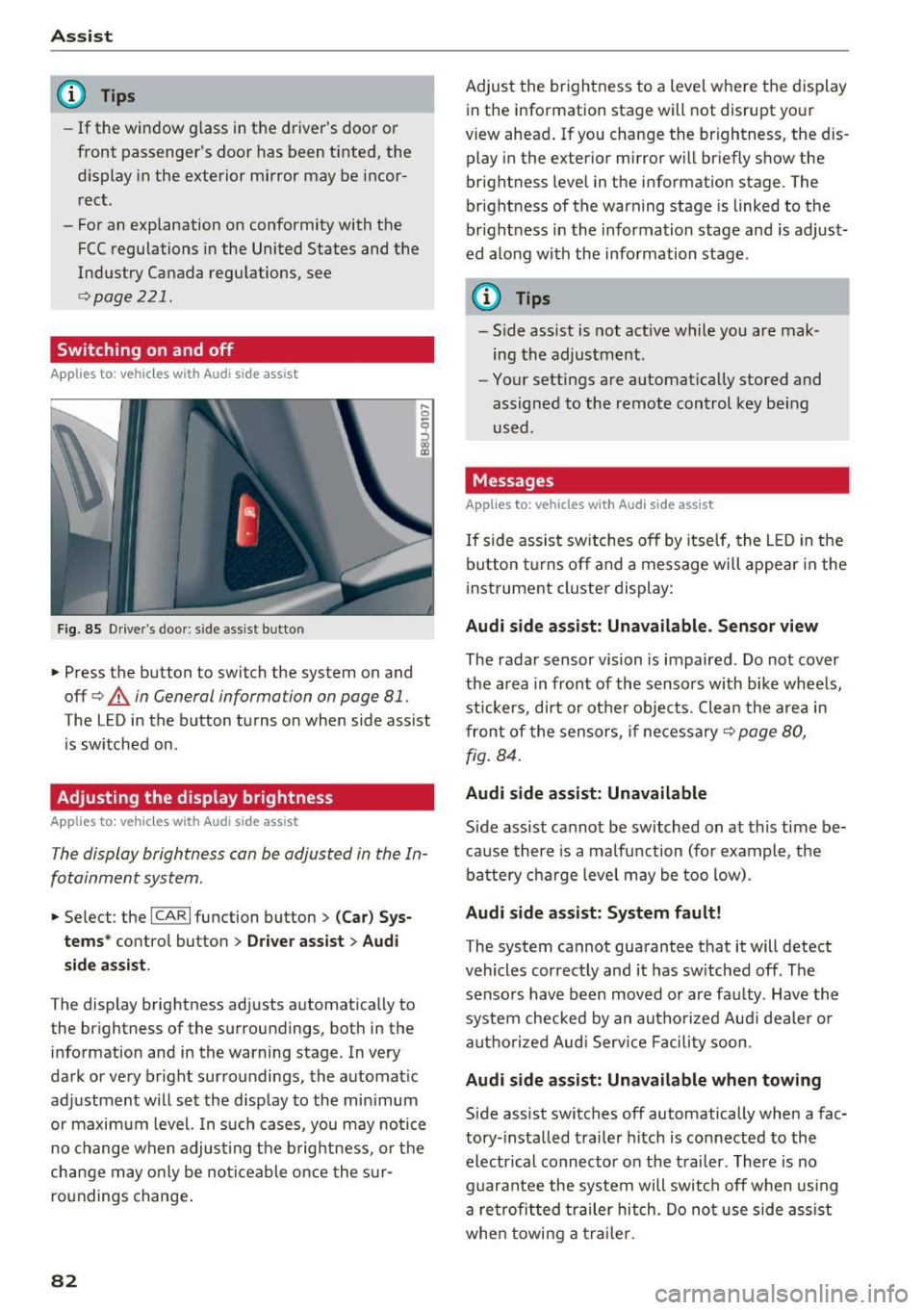
F ig. 85 Drive r's door : side assist b utto n
.... 0
I
.. Press the button to switch the system on and
off ¢
A in General information on page 81 .
The LED in the button turns on when side assist
is sw itched on .
Adjusting the display brightness
Applies to: ve hicles w ith Aud i side ass ist
The display brightness can be adjusted in the In
fotainment system .
.. Se lect : the ICARI function button> (Ca r) Sys
t e m s*
control button > Dr ive r assi st> Audi
sid e assi st.
The display brightness adjusts automatically to
the brightness of the surroundings, both in the
information and in the warning stage . In very
dark or very bright surroundings, the automat ic
adjustment will set the disp lay to the min imum
or maximum level. In such cases, you may notice
no change when adjust ing the b rightness, o r the
cha nge may only be no ticeable once the s ur
roundings change .
82
Adjust the brightness to a level where the display
in the information stage will not disrupt your
view ahead . If you change the br ightness, the dis
play in the exterior mirror w ill br iefly show the
brightness level in the information stage . The
brightness of the warning stage is linked to the
br ight ness in the information stage and is adjust
ed along with the information stage .
(D Tips
-Side ass ist is not act ive while you are mak
ing the adjustment .
- Your settings are automat ically stored and
assigned to the remote control key be ing
used .
Messages
Applies to : vehicles wi th Audi side ass ist
If side assist sw itches off by itse lf, the L ED in the
b utton t urns off and a message will appea r in the
i nstrument cluster display:
Audi s ide assi st: Unavailable. S ensor view
The radar sensor vision is impaired . Do not cover
the area in front of the sensors with bike whee ls,
stickers, dirt or other objects. Clean the a rea in
front of the sensors, if necessary¢
page 80,
fig . 84.
Audi side assist: Unavailable
Side assist cannot be switched on at this time be
ca use there is a ma lfunction (for example, the
battery c ha rge level may be too low).
Audi side assist: System f ault!
The system cannot guarantee that it will detect
vehicles correctly and it has sw itched off . The
sensors have been moved or are faulty . Have the
system checked by an autho rized Aud i dealer o r
aut ho rized Aud i Serv ice Facility soon.
Audi s ide assist: Unavailable when towing
Side assist switches off automatically when a fac
tory- installed trailer h itch is connected to the
electr ical connec tor on the t railer . There is no
guarantee the system will switc h off when using
a ret rofi tted trailer hitch . Do not use side assist
whe n towi ng a traile r.
Page 85 of 236
a:,
a:,
...... N r--. N .-< 0 0 ::, a:,
Audi drive select
Introduction
Applies to: vehicles with Audi drive select
Drive select makes it possible to experience dif
ferent types of vehicle settings in one vehicle.
The driver can selec t from three modes,
Comfort,
Auto
and Dynamic , using the ~:/:a button in the
center console or by using the Infotainment sys
tem . This allows yo u to switch between a sporty
and a comfortable driving mode, for example.
Description
App lies to: ve hicles with Audi drive select
The following systems, among other things , are
influenced by drive select:
Engine and automatic transmission
Depending on the mode, the engine and auto
matic transmission respond more quickly or in a
more balanced manner to accelerator pedal
movements. In the sporty dynamic mode, the
transmission shifts at higher speed ranges.
Suspension control*
The adaptive dampers use sensors to record in
formation regarding steering movements, brak ing and accelerat ion operations by the driver,
road surface, driv ing speed, and load . With dr ive
select, you can adjust the adaptive dampers to
sporty (dynamic), comfortable (comfort) or bal
anced (auto).
Steering
The steering adapts in terms of steering assis
tance . Indirect steering that moves easily as in
comfort mode is especially su ited to long drives
on a highway . In contrast, dynamic mode pro
vides sporty, direct steeri ng.
Cornering light*
The cornering light adapts to driving on curves .
The pivoting action and the lighting also adapt to
the mode.
Assist
(D Tips
The 5 selector lever position automatically en
gages if the dynamic mode is se lected.
Selecting the driving mode
Applies to: vehicles wit h Audi drive select
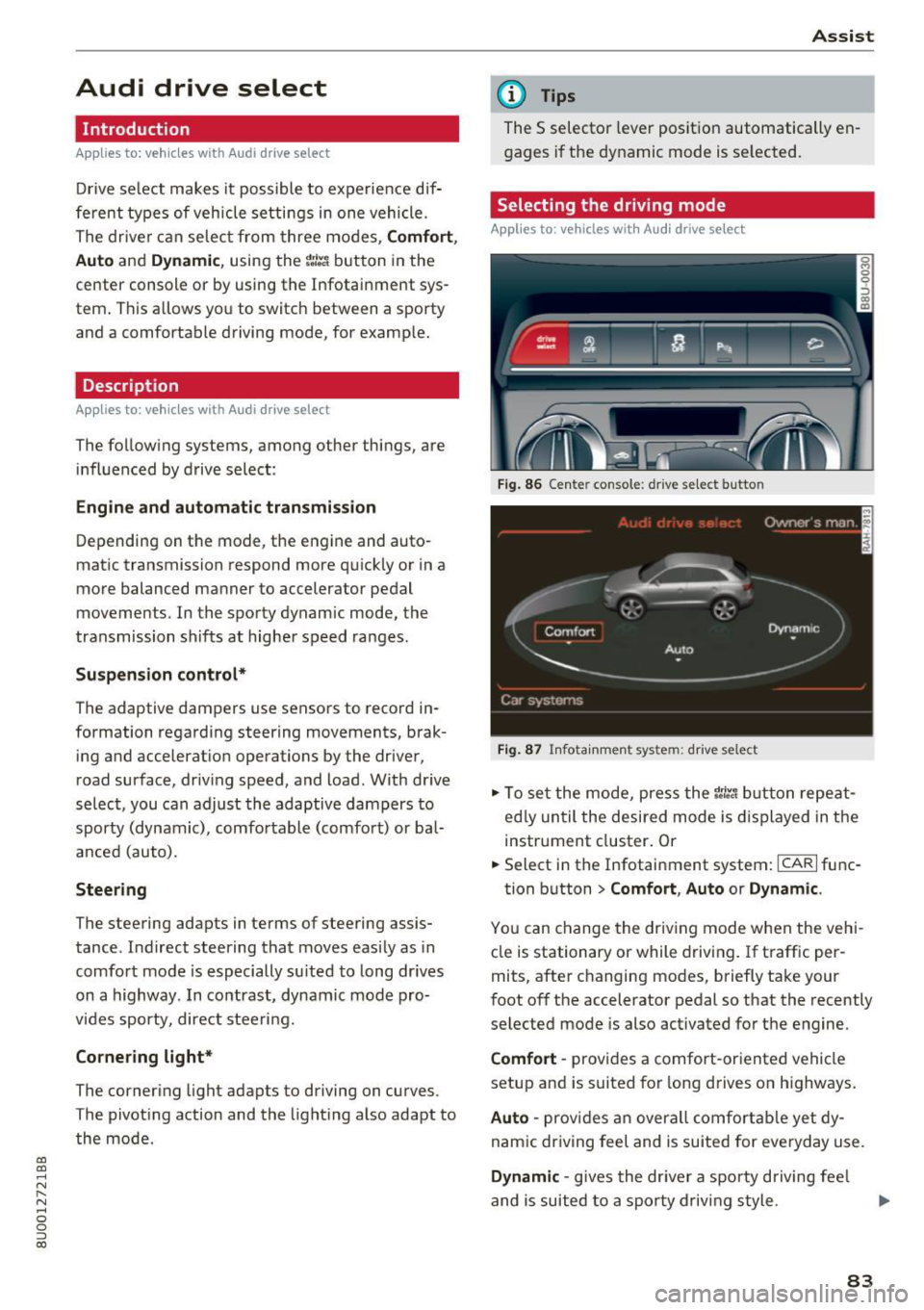
Fig. 86 Cente r console : dr ive se lect button
Fig. 87 Infota inment sys tem: drive select
" To set the mode, press the r:i:., button repeat
ed ly until the desired mode is displayed in the
instrument cluster. Or
" Select in the Infotainment system:
ICARI func-
tion button
> Comfort , Auto or Dynamic .
You can change the driving mode when the vehi
cle is stationary or while driving . If traffic per
mits, after changing modes, briefly take your
foot off the accelerator pedal so that the recently
selected mode is also activated for the engine.
Comfort -provides a comfort-oriented vehicle
setup and is suited for long drives on highways.
Auto -provides an overall comfortable yet dy
namic driving feel and is suited for everyday use .
Dynamic -gives the driver a sporty driving fee l
and is suited to a sporty driving style.
83
Page 87 of 236
00
00
....
"' ,....
"' .... 0 0 :::,
00
Parking systems
General information
Applies to: ve hicles with a rea r parking sys te m /pa rking sys
tem plus/rearv iew camera
Depending on your vehicle's equipment, va rious
pa rking aids wi ll help you when parki ng and ma
ne uveri ng.
The
r e ar parki ng sy stem is an a udible parking a id
that warns you of obstacles
behind t he vehicle
¢ page 85.
The parking sy stem plus ass ists you when park
i ng by aud ibly and v isually indicating objects de
tected
in front of and behind the veh icle
¢ page 86.
The re ar view camer a shows the area beh ind the
ve hicle in the Infotainment system d isplay . This
d isp lay assists you when you are cross or parallel
pa rking . Th e pa rking system pl us functions are
a lso available
¢ page 87.
A WARNING ,~ -
- Always look for traff ic and check the area
around your veh icle by looking at it directly
as well . The parking system cannot replace
the driver's attent ion. The driver is always
responsible when enter ing or leav ing a pa rk
ing space and dur ing similar maneuvers.
- Please note that some surfaces, such as
clothing, are not detected by the system .
- Senso rs and cameras have blind spots in
wh ich peop le and objects cannot be detect
ed . Be especia lly caut ious of small children
and animals .
- The sensors can be displaced by impacts or
damage to the radiator gr ille, bumper,
wheel housing and the unde rbody . The park
ing system may be impa ired as a result .
H ave an author ized Audi dealer or au thor
ized Audi Serv ice Facili ty check their func
t io n.
- Make s ure the senso rs a re not o bstruc ted by
st ickers, deposits o r othe r ma ter ial s. If they
are, the senso r funct ion could be impa ired.
F or additiona l information on cleaning, see
¢ page 191 .
Parking system s
(D Note
- Some objects are not detected or displayed
by the system under certain circumstances:
- Objects such as barrier chains, trailer draw
bars, vertical poles o r fe nces
- Objects above the sensors such as wall ex
tensions
- Objects w ith certai n surfaces or structures
such as c ha in li nk fe nces or powder snow
- If you conti nue driving closer to a low ob
ject , it may disappear from the sensor
range . Note that you will no longer be
wa rned about t his obstacle.
(D Tips
- The system may p rovide a warning even
tho ugh the re are no obstacles in the cover
age area in some situa tions, such as:
- certain road s urfaces or when there is tall
g rass.
- externa l ultrasonic sources such as from
clean ing vehicles .
- in heavy rain, snow, o r th ick vehicle ex
ha ust.
- We recommen d that you practice par king in
a traff ic -free loca tion or pa rking lot to be
come fam iliar with the system . When doing
this, there shou ld be good light and weath
er conditions .
- You can change the vol ume and pitch of the
signa ls as well as the display ¢
page 90.
- Please refer to the instructions for towing a
trai ler located in
¢ page 91.
-What appea rs in the infotainment display is
somewhat time- delayed.
Rear parking system
Description
Applies to : vehicles wit h rear parking system
The rear parking system is an audible parking
aid .
There is a sen sor in the rea r bumper cover. If
these detect an obstacle, audible s ignals warn
you .
85
Page 88 of 236
Parking system s
Make sure the sensors are not covered by stick
ers, deposits or any other obstructions as it may
impair the sensor function. For informat ion on
cleaning , refer to¢
page 191.
The range at which the sensors begin to measure
is approximate ly:
side 3 ft (0.90 m)
rear center 5.2 ft (1.60 m)
The closer you get to the obsta cle, the sho rter
the interval between the audible signals . A con
tinuous tone sounds when the obstacle is less
than approximately 1 foot (0 .30 meters) away .
Do not continue backing up¢.&
in General infor
mation on page 85,
¢ {!) in General information
on page
85!
If the d istance to an obstacle remains constant,
the volume of the distance warning gradually
drops after about four seconds (this does not ap
ply in the continuous tone range) .
The parking system activates automatically when
the reverse gear is selected. A brief confirmation
tone will sound.
Parking system plus
Description
App lies to : ve hicles with pa rking system plus
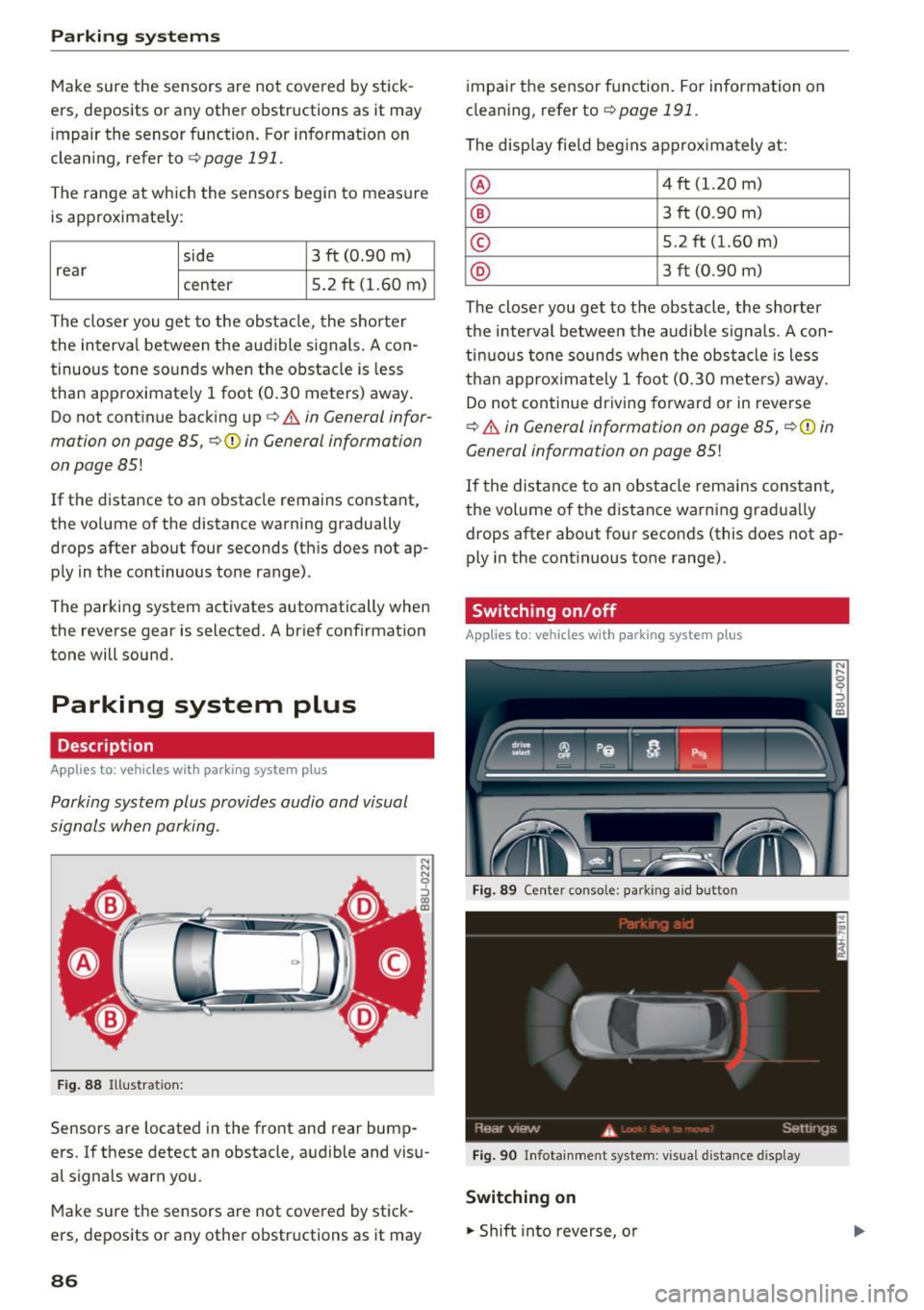
Parking system plus provides audio and visual
signals when parking .
Fig . 88 Illustrat ion:
Sensors are located in the front and rear bump
ers. If these detect an obstacle, audible and visu
al signals warn you.
Make sure the sensors are not covered by stick
ers, deposits or any other obstructions as it may
86
impai r the sensor function. For information on
cleaning, refer to ¢
page 191.
The display field beg ins approx imately at:
® 4 ft (1.20 m)
® 3 ft (0 .90 m)
© 5.2 ft (1.60 m)
@ 3 ft (0 .90 m)
The closer you get to the obstacle, the shorter
the interval between the audible signals . A con
tinuous tone sounds when the obstacle is less
than approx imately 1 foot (0.30 meters) away.
Do not continue driving forward or in reverse
¢.&. in General information on page 85, ¢(i) in
General information on page
85!
If the distance to an obstacle rema ins constant,
the volume of the distance warning gradua lly
drops after about four seconds (this does not ap
ply in the continuous tone range).
Switching on/off
App lies to: vehicles wit h parking system plus
Fig. 89 Center conso le: parkin g a id button
Fig . 90 Infotainment system: visual d istance d isplay
Switching on
.. Shift into reverse, o r
Page 93 of 236
00
00
......
"' ,-...
"' ...... 0 0 :::,
00
alarm for a few seconds after switching on the
parking system or when the parking system is al
ready act ivated. If the error is not corrected be
fore you switch off the ignit ion, the LED in the P'J/Ji
button will b link the next t ime you sw itch on the
parking system by s hift ing into reverse .
If a sensor is fau lty, the
J;l4 symbol will appear in
front of/behind the vehicle in the Infotainment d isplay. If a rear sensor is faulty, only obstacles
that are in areas @ and @ are displayed
c::> page 86, fig. 88. If a front se nsor is faulty , only
obstacles that a re in areas © and @are dis
p layed.
Drive to an authorized Aud i dealer or authorized
Aud i Service Facility immediately to have the
malfunct ion corrected .
Trailer hitch
Applies to: vehicles with parking system plus/rearview cam
era and trailer hitch
For vehicles using the trailer socket, the parking
system rear sensors are not activated when you
shift into reverse gear or when you press the P'J/Ji
button . This results in the follow ing restr ictions .
Parking sy stem plus *
There is no distance warning for the rear . The
front sensors remain activated . The visual display
switches to tra iler mode.
Par king sy ste m plus and rea rvie w camera*
There is no d istance warn ing fo r the rear. The
front sensors remain activated. The visual display
sw itches to tra iler mode. The rearview camera
image will not show the orientation lines and the
b lue surfaces.
(D Tips
Trailer h itches that are not installed at the
factory may cause the parking system to ma l
function or they may restrict its function.
Parking system s
91
Page 99 of 236
00
00
......
"' ,....
"' ...... 0 0 :::,
00
All wheel drive (quattro)
A ppl ies to: ve hicles wit h all wheel drive
In oil wheel drive, oil four wheels ore powered.
General info rmation
I n all wheel drive, t he driving power is divided be
tween all four wheels . This happens automatical
ly depending on your driving behavior as well as
the current road conditions. Also see
¢ page 92.
The a ll wheel d rive concept is designed for h igh
engine powe r. Your vehicle is exceptionally pow
erful and has excellent driving characteristics both under norma l driving conditions and on
snow and ice. Always read and fo llow safety pre
cautions ¢.&. .
Winter t ires
By using all wheel drive, yo ur vehicle has good
forward motion with standard tires in w inter con
ditions. However, we recommend using winter or
all season tires on
all four whee ls in the winter,
because this will improve the
broking effect.
Snow cha in s
If there are snow chain laws, snow chains must
a lso be used on vehicles with a ll wheel drive
¢ page 186, Snow chains.
Replacing t ires
F or vehicles w ith all wheel dr ive, only wheels w ith
the same ro lling circumference shou ld be used .
Avoid using tires with different tread depths
¢ page 178, New tires or wheels .
A WARNING
-Also, in vehicles with a ll wheel drive, adapt
your dr iv ing style to the current road and
traff ic conditions. Do not let the increased
safety provided tempt you into tak ing risks,
because th is increases the r is k of an acci
dent.
- The braking ability of your veh icle is limited
to the tract ion of the wheels . In this way, it
is not diffe rent from a two whee l dr ive vehi
cl e. Do not be tempted to accelerate to a
high speed when the road is slippe ry, be
cause this increases the risk of an accident .
Intellig ent Technology
- Note that on wet streets, the front wheels
can "hydrop lane" if dr iv ing at speeds that
are too high . Un like front wheel drive
veh icles, the engine does not rev higher sud
denly when the vehicle begins hydroplan ing .
For this reason, adapt yo ur speed to the
road conditions to red uce the risk of an acci
dent.
Energy management
The starting ability is optimized
The energy management system manages the
electrical energy distribution and optimizes the
availability of electrical energy for starting the
engine.
When a vehicle with a conventiona l energy sys
tem is not driven for a long time , the vehicle bat
tery is drained by equipment (for example, the
immobilizer). In certa in circumstances, there
could may not be enough energy to start the en
gine.
Yo ur vehicle is equipped with an intel ligent ener
gy management system for distributing electrici
ty . Th is sign ificantly improves the start ing ability
and increases the vehicle battery life .
The energy management system Is made up of
battery diagnosis , idling current manag em en t,
and dynamic energy manag ement .
Battery diagn osis
The battery diagnosis determines the vehicle bat
tery charge level. The sensors determine the bat
tery voltage, the battery current, and the battery
temperature. The current charge level and the
performance of the vehicle battery a re deter
mined based on this.
Idling current management
The idling current management decreases the energy used while parked. With the engine
switched off, it manages the energy dis tribution
to the d ifferent e lectr ica l components. Data from
the battery d iagnosis is taken into account for
t hi s.
97
Page 117 of 236
00
00
......
"' ,-...
"' ...... 0 0 :::,
00
The shou lder belt should lie as close to the center
of the collar bone as possib le and should fit well
on the bod y ¢
A in Safety belt position on
page 113.
.. Push
the loop- around fittings up ¢ fig. 114 @,
or
.. squeeze to gether the@ button, and push the
loop-around fittings
do wn@ .
.. Pull the belt to make sure that the upper at
tachment is p roperly engaged .
A WARNING
Always read and heed all WARNINGS and oth
er important informat ion
¢ page 111.
With the front seats, the height adjustment
of the seat can also be used to adjust the po
sition of the safety belts .
Improperly worn safety belts
Incorrectly positioned safety belts can cause se
vere injuries.
Wearing safety belts improperly can cause seri
ous injury or death . Safety belts can only work
when they a re correctly pos itioned on the body .
Improper seating positions reduce the effect ive
n ess of safety be lts and will even inc rease the
ris k of injury and death by mov ing the safety bel t
to cr it ica l areas of the body. Imp roper seating
positions also increase the risk of serious inj ury
and death when an airbag deploys and strikes an
occ upant who is not in the co rrect seat ing posi
tion . A driver is respons ible for the safety of all
vehicle occupants and espec ia lly for children.
Therefore:
.. Never permit anyone to ass ume an incorrect
s itting position in the veh icle wh ile traveling
¢ &, .
A WARNING
Improperly worn safety belts increase the risk
of serious personal injury a nd death wheneve r
a vehicle is be ing used.
S afet y be lts
- Always make sure that all veh icle occupants
are cor rectly restrained and stay in a correct
seating position whenever the vehicle is be ing used .
- Always read and heed all WARNINGS and
other important informat ion¢
page 111.
Belt tensioners
How safety belt pretensioners work
In front, side and rear-end collisions above a
particular severity and in a rollover, safety belts
are tensioned automatically.
The safety belts are equ ipped w it h safety belt
pretens ione rs . The system is activated by sensors
i n front, s ide and re a r-end collisions of great se
ver ity and in a ro llover. This tightens the bel t and
t a kes up belt slack¢.&.
in Service and disposal of
safety belt pretensioner on page 116.
Taking up
the slack he lps to reduce forward occupant
movement during a collision.
(D Note
Neve r let the belt remain over a rea r seatback
that has been folded forwar d.
{D Tips
The safety belt pretensioner can only be ac ti
vated once.
- T he safe ty be lt pretensione rs do no t de ploy
in minor fron tal, side a nd rear -end colli
sions .
- W hen the safe ty belt pretensioners are acti
vated, a fine dust is released . This is normal
and is not caused by a fire in the ve hicle .
- T he relevant safety requirements mus t be
observed when the vehicle or components
of the system are scrapped. An autho rize d
Audi dealer or qua lified workshop is familia r
w ith these reg ulations and will be pleased
to pass on the information to yo u.
- Be sure to observe all safety, environmenta l
and other regulat ions if the vehicle or indi
vidua l parts of the system, particularly the
safety belt or airbag, are to be disposed. We
recommend you have yo ur autho rized Aud i
dea ler perform t his service fo r you.
115
Page 126 of 236
Airbag syste m
adjustment range, as far away from the air
bag as possib le, before insta lling the
forward-facing ch ild restraint. The backrest
must be adjusted to an upright posit ion.
- Make sure that the
PAS SEN GER AIR BA G
OFF
light comes on and stays on all the time
whenever the ignition is switched on.
Advanced Airbag System components
The front passenger seat in your vehicle has a lot
of very important parts of the Advanced Airbag
System in it. These parts include the we ight
sensing mat, sensors, w iring, brac kets, and
mo re. The function of the system in the front
passenger seat is checked by the elec tronic con
trol unit when the ignition is on. The contro l unit
monitors the Advanced Airbag System and turns
the airbag indicator light on when a malfunct ion
in the system components is detected. The func
tion of the airbag indicator light is described in
greater detail below. Because the front passen
ge r seat contains important parts of the Ad
vanced A irbag System, you must take care to p re
vent i t from being damaged. Damage to the seat
may prevent the Advanced Airbag for the fron t
passenger seat from doing its job in a c rash.
The front Advanced Airbag System consists
of th e follow ing :
-Crash sensors in the front of the vehicle that
measure vehicle acceleration/deceleration to
provide information to the Advanced Airbag
System about the severity of the crash.
- An e lectronic control unit, with integrated
crash sensors for front and side impacts. The
contro l unit "decides" whether to fire the front
airbags based on the information received from
the crash sensors . The control unit also "de
c ides" whether the safety belt pretens ioners
sho uld be activated .
- An Advanced Airbag with gas generator and
contro l valve fo r the driver ins ide the steer ing
whee l hub.
-An Advanced Airbag with gas generator and contro l valve inside the instrument pane l for
the front passenger.
124
- A weight -sensing mat under the upholstery
padding of the front passenger seat cushion
that measures the total weight on the seat. The
information reg istered is sent cont inuous ly to
the electronic control unit to regulate deploy
ment of the front Advanced Airbag on the pas
senger s ide .
- An airbag monitoring system and ind icator
light in the instrument cluster
c::;,page 127.
-A sensor in each front seat registers the dis
tance between the respective seat and the
steer ing wheel or instrument panel. The infor
mat ion registered is sent cont inuously to the
elect ronic contro l unit to regu late dep loyment
of the fron t Advanced Airbags.
- The
PASSENGER AIR BAG OFF light comes on
and stays on in the cente r of the ins trument
pa nel
c::;, page 128, fig. 118 and te lls yo u when
the front Advanced Airbag on the passenger
side has been turned
off .
-A sensor below the safety be lt latch for the
front seat passenger to measure the tension on
the safety belt. The tension on the safety belt
and the weight registered by the weight-sens
ing mat help the control unit "decide" whether
the front airbag for the front passenger seat
should be turned off or not
c::;, page 118, Child
restraints on the front seat -some important
things to know.
- A sensor in the safety belt latch for the driver
and for the front seat passenger that senses
whether that safety be lt is latched o r not and
transmits this informa tion to the e lec tronic
cont rol un it.
_&. WARNING
D amage to the front passenger seat can pre
vent the front airbag from working prope rly .
- Improper repair or disassembly of the front
passenger and driver seat will prevent the
Advanced Airbag System from f unctioning
properly.
- Repairs to the front passenger seat must be
performed by qualified and proper ly trained
workshop personnel.
- Never remove the front passenger or driver
seat from the vehicle.
Page 127 of 236
00
00
......
"' ,....
"' ...... 0 0 :::,
00
- Never remove the upholstery from the front
passenger seat.
- Never disassemble or remove parts from the
seat or disconnect wires from it.
- Never carry sharp objects in your pockets or
place them on the seat. If the weight-sens
ing mat in the passenger seat is punctured
it cannot work properly.
- Never carry things on your lap or carry ob
jects on the passenger seat. Such items can increase the weight registered by the
weight-sensing mat and send the wrong in
formation to the airbag control unit.
- Never store items under the front passenger
seat. Parts of the Advanced Airbag System
under the passenger seat could be dam
aged, preventing them and the airbag sys
tem from working properly.
- Never place seat covers or replacement up
holstery that have not been specifically ap
proved by Audi on the front seats.
- Seat covers can prevent the Advanced Air
bag System from recognizing child re
straints or occupants on the front passenger
seat and prevent the side airbag in the seat
backrest from deploying properly.
- Never use cushions, pillows, blankets or
similar items on the front passenger seat.
The additional padding will prevent the
weight-sensing mat in the seat from accu
rately registering the child restraint or per
son on the seat and prevent the Advanced
Airbag System from functioning properly.
- If you must use a child restraint on the front
passenger seat and the child restraint man
ufacturer's instructions require the use of a
towel, foam cushion or something else to properly position the child restraint, make
certain that the
PASSENGER AIR BAG OFF
light comes on and stays on whenever the
child restraint is installed on the front pas
senger seat.
- If the
PASSENGER AIR BAG OFF light does
not come on and stay on, immediately in
stall child restraint in a rear seating position
and have the airbag system inspected by
your authorized Audi dealer.
Airbag system
How the Advanced Airbag System
components work together
The front Advanced Airbag System and the side
airbags supplement the protection offered by the
front three-point safety belts with pretensioners and load limiters and the adjustable head re
straints to help reduce the risk of injury in a wide
range of accident and crash situations. Be sure to
read the important information about safety and
heed the WARNINGS in this chapter .
Deployment of the Adv a need Airbag System and
the activation of the safety belt pretensioners de pend on the deceleration measured by the crash
sensors and registered by the electronic control
unit. Crash severity depends on speed and decel
eration as well as the mass and stiffness of the
vehicle or object involved in the crash.
On the passenger side, regardless of safety belt
use , the airbag will be turned
off if the weight on
the passenger seat is less than the amount pro
grammed in the electronic control unit. The front
airbag on the passenger side will also be turned
off if one of the child safety seats that has been
certified under Federal Motor Vehicle Safety
Standard 208 has been recognized on the seat.
The
PASSENGER AIR BAG OFF light comes on
and stays on to tell you when the front Advanced
Airbag on the passenger side has been turned off
¢page 118, Child restraints on the front seat
some important things to know .
_&. WARNING
To reduce the risk of injury when an airbag in
flates, always wear safety belts properly.
- If you are unrestrained, leaning forward, sit
ting sideways or out of position in any way,
your risk of injury is much higher.
- You will also receive serious injuries and
could even be killed if you are up against the
airbag or too close to it when it inflates -
even with an Advanced Airbag
¢page 117.
125
Page 129 of 236
00
00
......
"' ,....
"' ...... 0 0 :::,
00
against the backrest, cen ter armrest, door
or r oof.
- Always install rear-facing child safety seats
on the rear seat.
- If you must install a rearward facing child
safety seat on the front passenger seat be
cause of exceptional circumstances and the
PASSEN GER A IR BAG OFF light does not
come on and stay on, immed iate ly install
the rear-fac ing ch ild safety seat in a rear
seating pos it ion and have the airbag system
inspected by you r authorized Audi dea le r.
A WARNING
Objects between you and the a irbag will in
crease the risk of in jury in a crash by inte rfer
ing w ith the way the airbag unfolds or by be
ing pushed into you as the airbag inflates.
- Never hold th ings in your hands or on your
lap when the vehicle is in use .
- Never transport items on o r in the area of
the fron t passenger seat . Objec ts could
move into the area of the front airbags dur
ing brak ing or other sudden maneuver and
become dangerous projectiles that can
cause serious pe rsonal injury if the airbags
inflate.
- Never place or attach accessories or other objects (such as cupholders, telephone
brackets, large, heavy or bulky objects) on
the doors, over or near the area marked
"AIRBAG" on the steering wheel, instru
ment pane l, seat bac krests or between
those areas and you rself. These objects
cou ld cause injury in a c rash, especially
when the airbags infla te.
- Never recline the front passenge r's seat to
transport objects . Items can also move into
the area o f the side airbag or the front air
bag dur ing braking or in a sudden maneu
ver. Objects near the airbags can become
projectiles and cause in ju ry, particularly
when the seat is reclined.
A WARNING
The fine dust created when airbags deploy can
cause breathing problems for peop le w ith a
Airb ag sys tem
history of asthma or othe r breath ing cond i
tions .
- To reduce the r is k of breathing problems,
those with asthma or other respiratory con
ditions should get fresh a ir right away by
getting out of the vehicle or open ing win
dows or doors .
-If you are in a co llision in wh ich airbags de
p loy, wash your hands and face w ith m ild
soap and water be fore eating .
- Be carefu l not to get the dust into your eyes,
or into any cuts or scratches .
- If the residue sho uld get into your eyes,
f lush them w ith wate r.
Monitoring the
Advanced Airbag System
!I.' Airbag monitoring indicator light
Two separate indicators monitor the function of
the Advanced Airbag System: the airbag moni
toring indicator light and the
PASSENGER AIR
BAG OFF
light.
T he Advanced Airbag System as well as the side
airbags and side curtain airbags with ejection
mitigation features (including the electronic con
trol unit, sensors and system wiring) are all monitored cont inuously to make sure that they
are functioning properly w henever the ignition is
on . Each t ime you turn on t he ignition, the airbag
monitoring indicator light
El will come on fo r a
few seconds (se lf d iagnost ics) .
The system must be inspected when the
indicator light
E,I:
- does not come on when the ignition is sw itched
on,
- does not go out a few seconds afte r you have
sw itched on the ignition, or
- comes on while driv ing .
If an airbag system malfunction is detected, the
indicator light will come on to serve as a constant
rem inder to have the system inspected immedi
ately.
If a malfunction occurs that turns the front air-
bag on the passenger side off, the
PASSENGER IJl,
127