transmission AUDI Q3 2017 Owner´s Manual
[x] Cancel search | Manufacturer: AUDI, Model Year: 2017, Model line: Q3, Model: AUDI Q3 2017Pages: 236, PDF Size: 58.93 MB
Page 74 of 236
Driving Emergency mode
Applies to: ve hicles w ith a utomat ic t ransm iss io ns
In the event of a system malfunction, there is an
emergency program.
If all of the selector lever positions are highligh t
ed with a light background in the instrument
cluster display, there is a system malfunction and
the S tronic transmission is running in the emer
gency program. The vehicle can still be driven in
emergency mode, but only with reduced speed
and not in all gears. In some cases, the vehicle
cannot drive in reverse.
@) Note
If the transmission runs in emergency mode,
drive to an authorized Audi dealer or author
ized Audi Service Facility immediately to have
the malfunction corrected.
Transmission malfunction
A pp lies to: ve hicles w ith a uto mat ic t ra n smi ssio ns
• Transmission overheating! Please stop vehi
cle!
The transmission is too hot and can become dam
aged. Stop and let the transmission cool with the
engine running (at idle) in the P selector lever po
sition. Then the indicator light and the message
tur n off, drive to an authorized Audi dealer or au
thorized Audi Service Facility immediately to have
the malfunction corrected. If the indicator light
and the driver message do not turn off, do not
continue driving . See an authorized Audi dealer
or authorized Audi Service Facil ity for assistance.
72
Selector lever emergency release
App lies to : vehicles wi th automatic transm issions
If the vehicle's power supply fails, the selector
lever can be released in an emergency .
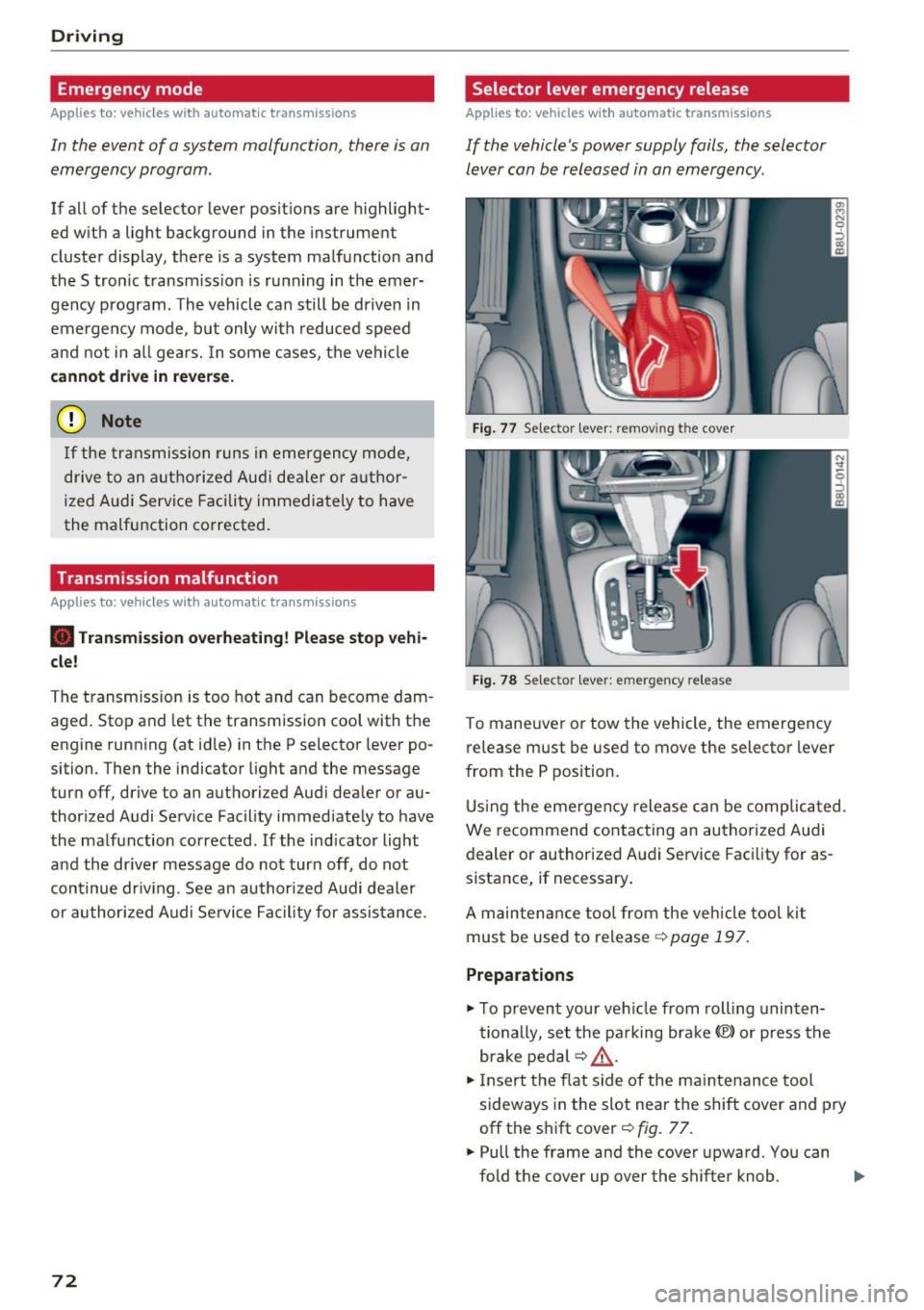
Fig. 77 Selector leve r: remov ing the cove r
Fig. 78 Selector leve r: emerge ncy release
To maneuver or tow the vehicle, the emergency
release must be used to move the selector lever
from the P position.
Using the emergency release can be complicated .
We r ecommend contacting an authorized Audi
dealer or authorized Audi Service Facility for as
sistance, if necessary .
A maintenance tool from the vehicle tool kit
must be used to release ¢
page 197.
Preparations
.,. To prevent your vehicle from rolling uninten
tionally , set the parking brake(®) or press the
brake pedal ¢
LD,. .
.,. Insert the flat side of the maintenance tool
sideways in the slot near the shift cover and pry
off the shift cover¢
fig. 77 .
.. Pull the frame and the cover upward. You can
fold the cover up over the shifter knob . ..,_
Page 85 of 236
a:,
a:,
...... N r--. N .-< 0 0 ::, a:,
Audi drive select
Introduction
Applies to: vehicles with Audi drive select
Drive select makes it possible to experience dif
ferent types of vehicle settings in one vehicle.
The driver can selec t from three modes,
Comfort,
Auto
and Dynamic , using the ~:/:a button in the
center console or by using the Infotainment sys
tem . This allows yo u to switch between a sporty
and a comfortable driving mode, for example.
Description
App lies to: ve hicles with Audi drive select
The following systems, among other things , are
influenced by drive select:
Engine and automatic transmission
Depending on the mode, the engine and auto
matic transmission respond more quickly or in a
more balanced manner to accelerator pedal
movements. In the sporty dynamic mode, the
transmission shifts at higher speed ranges.
Suspension control*
The adaptive dampers use sensors to record in
formation regarding steering movements, brak ing and accelerat ion operations by the driver,
road surface, driv ing speed, and load . With dr ive
select, you can adjust the adaptive dampers to
sporty (dynamic), comfortable (comfort) or bal
anced (auto).
Steering
The steering adapts in terms of steering assis
tance . Indirect steering that moves easily as in
comfort mode is especially su ited to long drives
on a highway . In contrast, dynamic mode pro
vides sporty, direct steeri ng.
Cornering light*
The cornering light adapts to driving on curves .
The pivoting action and the lighting also adapt to
the mode.
Assist
(D Tips
The 5 selector lever position automatically en
gages if the dynamic mode is se lected.
Selecting the driving mode
Applies to: vehicles wit h Audi drive select
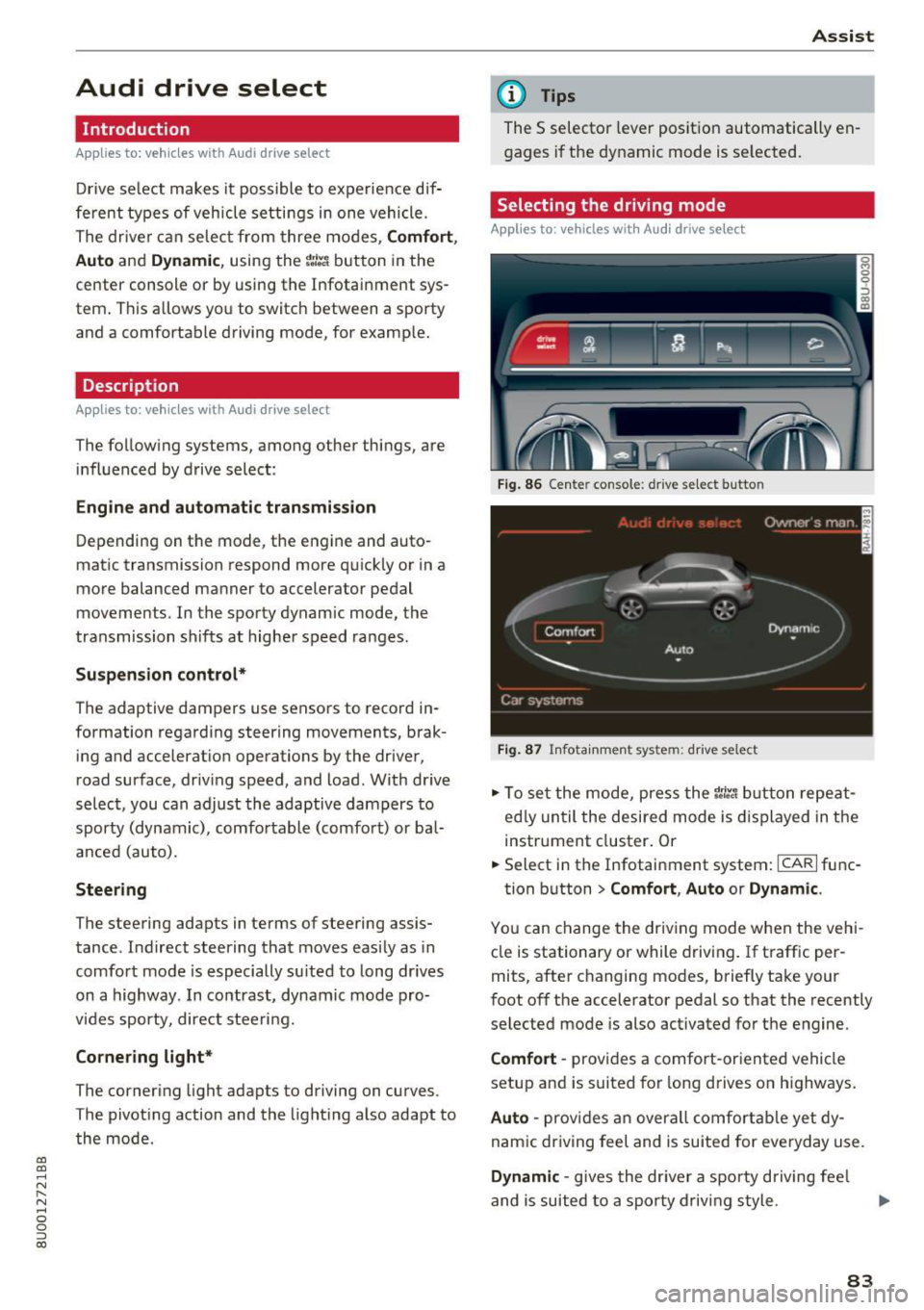
Fig. 86 Cente r console : dr ive se lect button
Fig. 87 Infota inment sys tem: drive select
" To set the mode, press the r:i:., button repeat
ed ly until the desired mode is displayed in the
instrument cluster. Or
" Select in the Infotainment system:
ICARI func-
tion button
> Comfort , Auto or Dynamic .
You can change the driving mode when the vehi
cle is stationary or while driving . If traffic per
mits, after changing modes, briefly take your
foot off the accelerator pedal so that the recently
selected mode is also activated for the engine.
Comfort -provides a comfort-oriented vehicle
setup and is suited for long drives on highways.
Auto -provides an overall comfortable yet dy
namic driving feel and is suited for everyday use .
Dynamic -gives the driver a sporty driving fee l
and is suited to a sporty driving style.
83
Page 97 of 236
00
00
......
"' ,....
"' ...... 0 0 :::,
00
compensate for the slightly reduced bra king
force by pressing firmly on the brake peda l. Avoid
heavy braking during the break -in period .
Operating condit ion s and dr iving habits
The brakes on today's automobiles a re sti ll s ub
ject to wear, depend ing largely on ope rating con
ditions and driving habits¢& . On vehicles that
are either driven most ly in stop-and -go city traf
fic or are driven hard, the brake pads should be
checked by your authorized Aud i dealer more of
ten than specified in the
Warran ty & Mainte
n anc e boo kle t .
Failure to have your brake pads
inspected can resu lt in reduced brake perform
ance.
On steep slopes, you should use the braking ef
fect of the eng ine. This way, you prevent unnec
essary wear on the brake system . If you must use
your brakes, do not hold the b rakes down cont in
uously. P ump t he b rakes at intervals.
Operating no ise
Noises may occur when braking depend ing on the
speed, braking force and outs ide cond itions such
as tempe rature and humidity .
Effect of water or road salt
In certain situations, for example after driving
through water, in heavy ra in, after overnight con
densat ion or after washing your car, the braking
effect can be reduced by mo isture or ice on the
brake rotors and brake pads . The brakes must be
"dr ied" fi rst w it h a few careful brake applica
tions .
At highe r speeds and with the windsh ield w ipers
turned on, the brake pads press aga inst the brake
rotors for a short amount of time. This action,
which is not felt by the d river, happens a t regular
i nte rvals and ens ures a better reaction time fo r
the brakes in wet weather.
The bra king effect can also be redu ced if you are
d riving on salted roads and you do not apply t he
b ra kes fo r long pe riods of time. The layer of sa lt
on the brake rotors and brake pads m ust be worn
off first when the b rakes are applied¢& .
Intellig ent Technology
Corrosion
Leaving t he vehicle pa rked fo r lo ng periods of
t ime, low mileage and avoiding heavy braking
can contrib ute to corrosion on the brake rotors
and to dirty brake pads .
If you usua lly avoid heavy bra king or if there is
corrosion present, occasiona l heavy braking at
high speeds is recommended to clean the brake
rotors and pads¢& .
Brake system malfunction
if you no tice that the b rake peda l t ravel has sud
denly
gotten larger, then a b rake c ircuit may have
f ailed ¢ & .
Low brake fluid level
When the brake fluid level is low, malfu nctions in
the b rake system may occur. The b rake fl uid level
is e lec tron ically moni tored.
Brake booster
The brake booster amplifies the pressure you ap
ply to the brake pedal.
It only works when the en
gine is running~ &.
Brake lining wear statu s
Brake lining wear may be checked by visual in
spect ion of the condition of the brake pads
t h rough the openings in the wheel. If necessary,
the wheel may be removed for this i nspection
¢ page 198, Replacing wheels .
,&. WARNING
-New brake pads don't have the bes t stop
ping power and m ust be "broken-in" during
the initial 250 mi (400 km) . You
can com
pensate for this by pressing the brake pedal
more firmly . This a lso applies later when
new pads are installed.
- You shou ld perform braking maneuvers for
the purpose of cleaning the brake system
only if road condit ions permit. Other road
users must not be put at r isk - you may
cause an accident!
- Before descending a steep grade, reduce
speed a nd sh ift transmission into a lower
95
Page 175 of 236
"' "' -N
" N
-0
0
::, a)
® Mud and snow capability
"M/5" or "M+S" indicates the tire
has properties making it suitable
to drive in mud or snow.~ indi
cates a winter tire .
@ Composition of the tire cord
and materials
The number of plies indicates the
number of rubber ized fabric lay
ers in the t ire. In general : the
more layers, the more weight a
tire can carry . Tire manufacturers
must also specify the materials
used in the tire . These incl ude
stee l, nylon, polyester and other
materials .
@Maximum permitted load
This number indicates the maxi
mum load in kilograms and
pounds that the tire can carry.
@ Uniform tire quality grade
standards for treadwear,
traction and temperature resistance
T read wear, trac tion and temper
ature ranges
¢ page 187.
@ Running direction
The arrows indicate the running
direction of un idirectional t ires.
You must always follow the speci- fied running direction
¢
page 202.
€3) Maximum permitted
inflation pressure
Wheels
T his number ind icates the max i
mum pressure to which a tire can
be inflated unde r normal operat
ing conditions.
Glossary of tire and loading
terminology
Accessory weight
means the combined we igh t (in
excess of those standard items
wh ich may be replaced) of auto
matic transmission, power steer
ing, power brakes, power win
dows, power seats, radio, and
heater, to the extent that these
items are available as factory-in
stalled equipment (whether in
stalled or not).
Aspect ratio
means the ratio of the height to
the w idth of the tire in percent .
Numbers of 55 or lower indicate a
low s idewall for improved steer
ing response and better overall
handling on dry pavement .
173
Page 200 of 236
Emerg ency assis ta nce
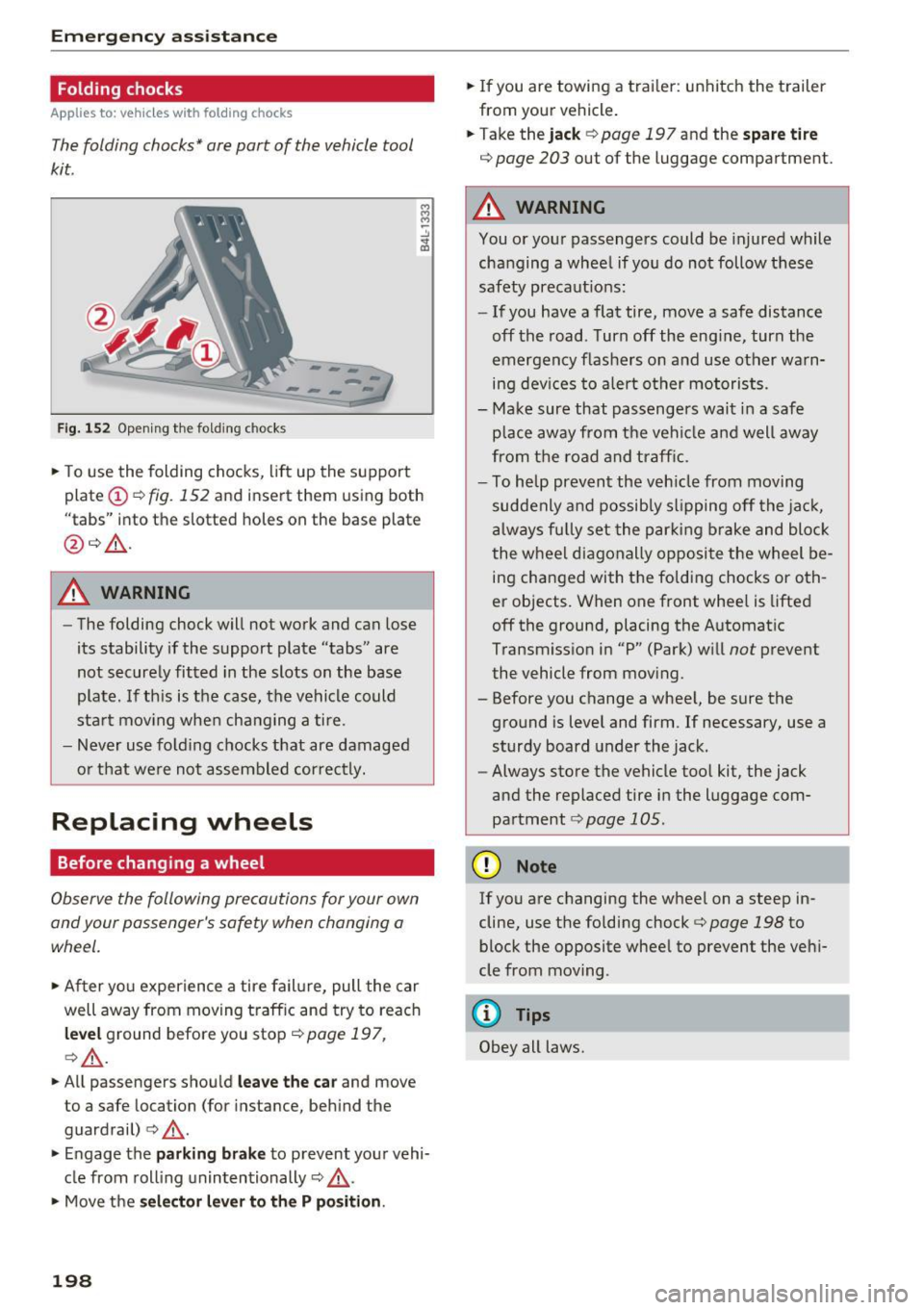
Folding chocks
Applies to: ve hicles w ith fol ding chocks
The folding chocks* are part of the vehicle tool
kit.
-- -,,,.
F ig. 152 Opening the fo lding chocks
• To use the folding chocks, lift up the support
plate (!)¢
fig. 152 and insert them using both
"tabs" into the slotted holes on the base plate
@ ¢_& .
A WARNING
-The folding chock will not work and can lose
its stability if the support plate "tabs" are
not securely fitted in the slots on the base
plate. If th is is the case, the vehicle could
start mov ing when changing a tire.
- Never use fo ld ing chocks that are damaged
o r that were not assembled cor rectly.
Replacing wheels
Before changing a wheel
Observe the following precautions for your own
and your passenger's safety when changing a
wheel.
• After you experience a tire failure, pull the car
well away from moving t raffic and try to reach
l ev el ground before you stop¢
page 197,
¢_& .
• All passengers shou ld leav e th e car and move
to a safe location (for instance, beh ind the
guardrail)
¢ _& .
• Engage the park in g br ake to prevent your vehi
cle from roll ing unintentionally ¢_& .
• Move the selec to r l eve r to the P po sition.
198
• If you are towing a trai ler : unhitch the t railer
from your veh icle.
• Take the jac k
¢page 197 and the sp are tire
¢
page 203 out of the luggage compartment.
A WARNING
You or your passengers could be injured while
changing a wheel if you do not follow these
safety precaut ions:
- If you have a flat tire, move a safe distance
off the road . Turn off the eng ine, turn the
emergency f lashers on and use other warn
ing dev ices to alert other motorists.
- Make sure that passengers wait in a safe
place away from the vehicle a nd well away
from the road and traff ic.
- To he lp prevent the veh icle from moving
suddenly and possib ly sl ipping off the jac k,
always fu lly set the par king b rake and block
the whee l diagonally opposite the wheel be
ing changed with the folding chocks or oth
er objects. When one front whee l is lifted
off the ground, placing the Automat ic
Transmission in "P" (Park) w ill
not prevent
the vehicle from moving.
- Before you change a whee l, be sure the
ground is level and firm . If necessary, use a
sturdy board under the jack.
- Always store the vehicle too l kit, the jack
and the replaced tire in the luggage com
partment
¢ page 105.
(D Note
If you are changing the wheel on a steep in
cline, use the folding chock¢
page 198 to
block the opposite whee l to prevent the vehi
cle from moving.
@ Tips
Obey all laws.
Page 208 of 236
Fuses and bulbs
(D Tips
- The following table does not list fuse loca
tions that are not used.
- Some of the equipment listed in the follow
ing tables applies only to certain model ver
sions or certain optional equipment.
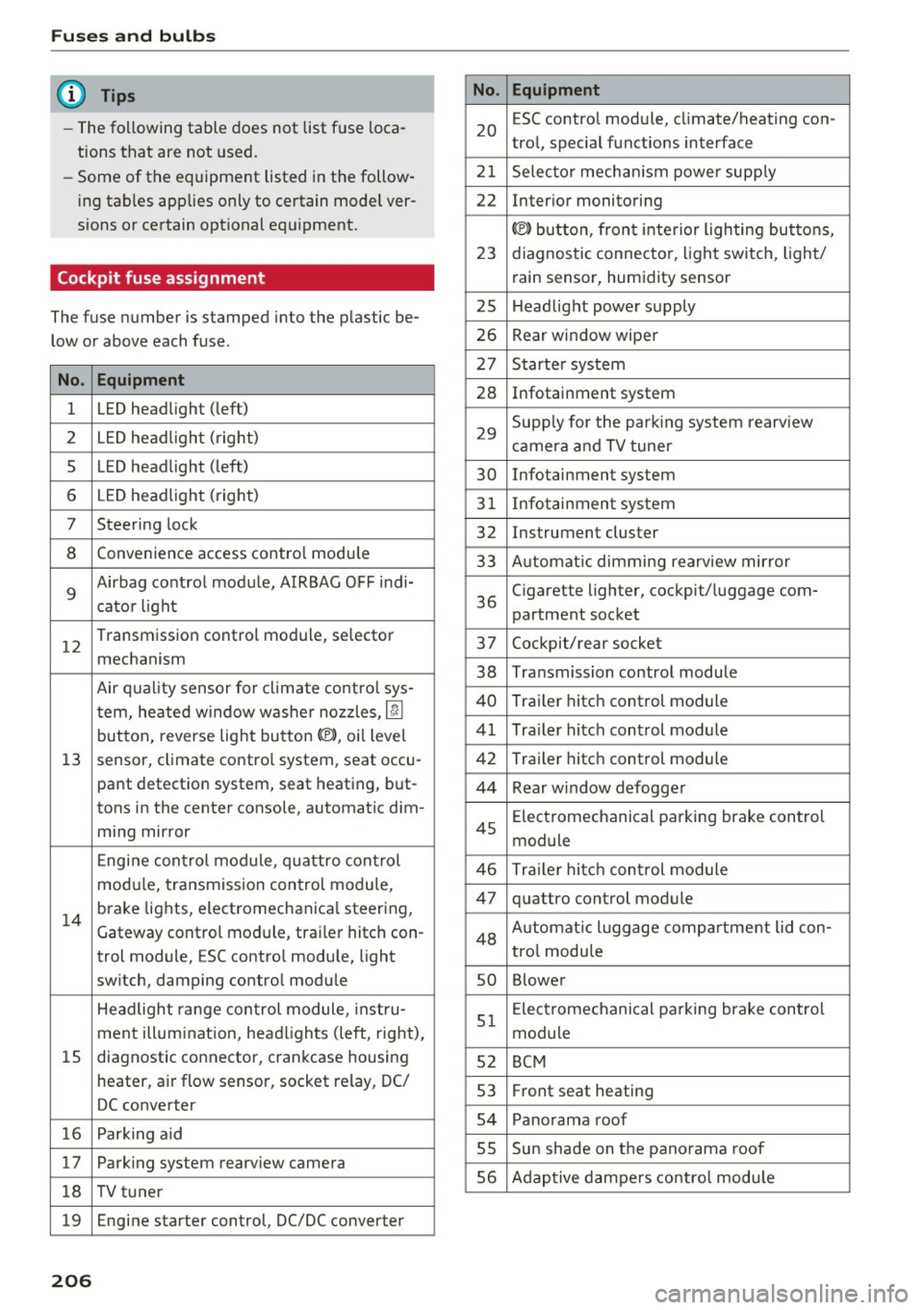
Cockpit fuse assignment
The fuse number is stamped into the plastic be
low or above each fuse.
No. Equipment
1 LED headlight (left)
2 LED headlight ( right)
5 LED headlight (left)
6 LED headlight (right)
7 Steering lock
8 Convenience access contro l module
9
Airbag control module, AIRBAG OFF indi-
cator light
12
Transmission control module, selector
mechanism
Air quality sensor for cl imate control sys-
tern, heated w indow washer nozzles ,
lj]
button, reverse light button<®>, oi l level
13 sensor, climate contro l system, seat occu-
pant detection system, seat heating, but-
tons in the center console, automatic dim-
ming mirror
Engine control module, quattro control
modu le, transmission control module,
14
brake lights, electromechanica l steering,
Gateway control module, trai ler hitch con-
trol module, ESC contro l module, light
switch, damping control module
Headlight range control module , instru-
ment illumination, headlights (left, right),
15 diagnostic connector, crankcase housing
heater, a ir flow sensor, socket relay, DC/
DC converter
16 Park ing aid
17 Parking system rearview camera
18 TV tuner
19 Engine starter control, DC/DC converter
206
No . Equipment
20
ESC contro l module, climate/heating con-
trol, special functions interface
21 Selector mechanism power supply
22 Interior monitoring
© button, front interior lighting buttons,
23 diagnostic connector, light switch, light/
rain sensor, humidity sensor
25 Headlight power supply
26 Rear window wiper
27 Starter system
28 Infotainment system
29
Supply for the parking system rearv iew
camera and TV tuner
30 Infotainment system
31 Infotainment system
32 Instrument cluster
33 A utomat ic dimming rearview mirror
36
Cigarette lighter, cockpit/luggage com-
partment socket
37 Cockpit/rear socket
38 Transmission control module
40 Trailer hitch control module
41 Tra iler hitch control module
42 Trailer hitch control module
44 Rear window defogger
45
Electromechanical parking brake control
module
46 Trailer hitch control module
47 quattro control module
48 Aut omat ic lu ggage compartment lid con-
tro l module
so Blower
51
Electromechanical parking brake control
module
52 BCM
53 Fr ont seat heating
54 Panorama roof
SS Sun shade on the panorama
roof
56 Adaptive dampers control module
Page 211 of 236
00
00
......
"' ,....
"' ...... 0 0 :::,
00
Emergency situations
General
This chapter is intended for trained emergency
crews and working personnel who have the nec
essary tools and equipment to perform these
operations.
Starting by pushing or
towing
CD Note
Vehicles with an automatic transmission
cannot be started by pushing or towing.
Starting with jumper
cables
If necessary, the engine can be started by con
necting it to the battery of another vehicle.
If the engine should fail to start because of a dis
charged or weak battery, the battery can be con
nected to the battery of
another vehicle, using a
pair of jumper cables to start the engine.
Jumper cables
Use only jumper cables of sufficiently large cross
section
to carry the starter current safely. Refer
to the manufacturer's specifications.
Use only jumper cables with
insulated terminal
clamps which are distinctly marked:
plus(+) cable in most cases colored red
minus(·) cable
in most cases colored black.
A WARNING
Batteries contain electricity, acid, and gas.
Any of these can cause very serious or fatal in
jury. Follow the instructions below for safe
handling of your vehicle's battery.
-Always shield your eyes and avoid leaning
over the battery whenever possible.
-A dead battery can freeze at temperatures
around 32 °F (0 °C). If the vehicle battery is
frozen, you must thaw it before connecting
the jump start cables. If you do not, this in-
Emergency situations
creases the risk of an explosion and chemi
cal burns. After jump starting the vehicle,
drive to an authorized Audi dealer or author
ized Audi Service Facility immediately to
have the vehicle battery checked.
- Do not allow battery acid to contact eyes or
skin . Flush any contacted area with water
immediately.
- Improper use of a booster battery to start a
vehicle may cause an explosion .
- Vehicle batteries generate explosive gases.
Keep sparks, flame and lighted cigarettes
away from batteries.
- Do not try to jump start any vehicle with a
low acid level in the battery .
- The voltage of the booster battery must also
have a 12-Volt rating. The capacity (Ah) of
the booster battery should not be lower
than that of the discharged battery. Use of
batteries of different voltage or substantial
ly different "Ah" rating may cause an explo
sion and personal injury.
- Never charge a frozen battery. Gas trapped
in the ice may cause an explosion.
- Never charge or use a battery that has been
frozen . The battery case may have be weak
ened.
- Use of batteries of different voltage or sub
stantially different capacity (Ah) rating may
cause an explosion and injury. The capacity (Ah) of the booster battery should not be
lower than that of the discharged battery.
- Before you check anything in the engine
compartment, always read and heed all
WARNINGS
qpage 159.
CD Note
-Applying a higher voltage booster battery
will cause expensive damage to sensitive electronic components, such as control
units, relays, radio, etc.
- There must be no electrical contact between
the vehicles as otherwise current could al
ready start to flow as soon as the positive
(+) terminals are connected.
209
Page 212 of 236
Emergency situations
@ Tips
The discharged battery must be properly con
nected to the vehicle's electrical system .
When jump starting or charging the battery,
never connect the negative ground cable to
the battery negative post because the battery
manager system must be able to detect the
battery's state of charge . Always connect the
negat ive ground cable to the negative ground
pos t of the battery manager control unit.
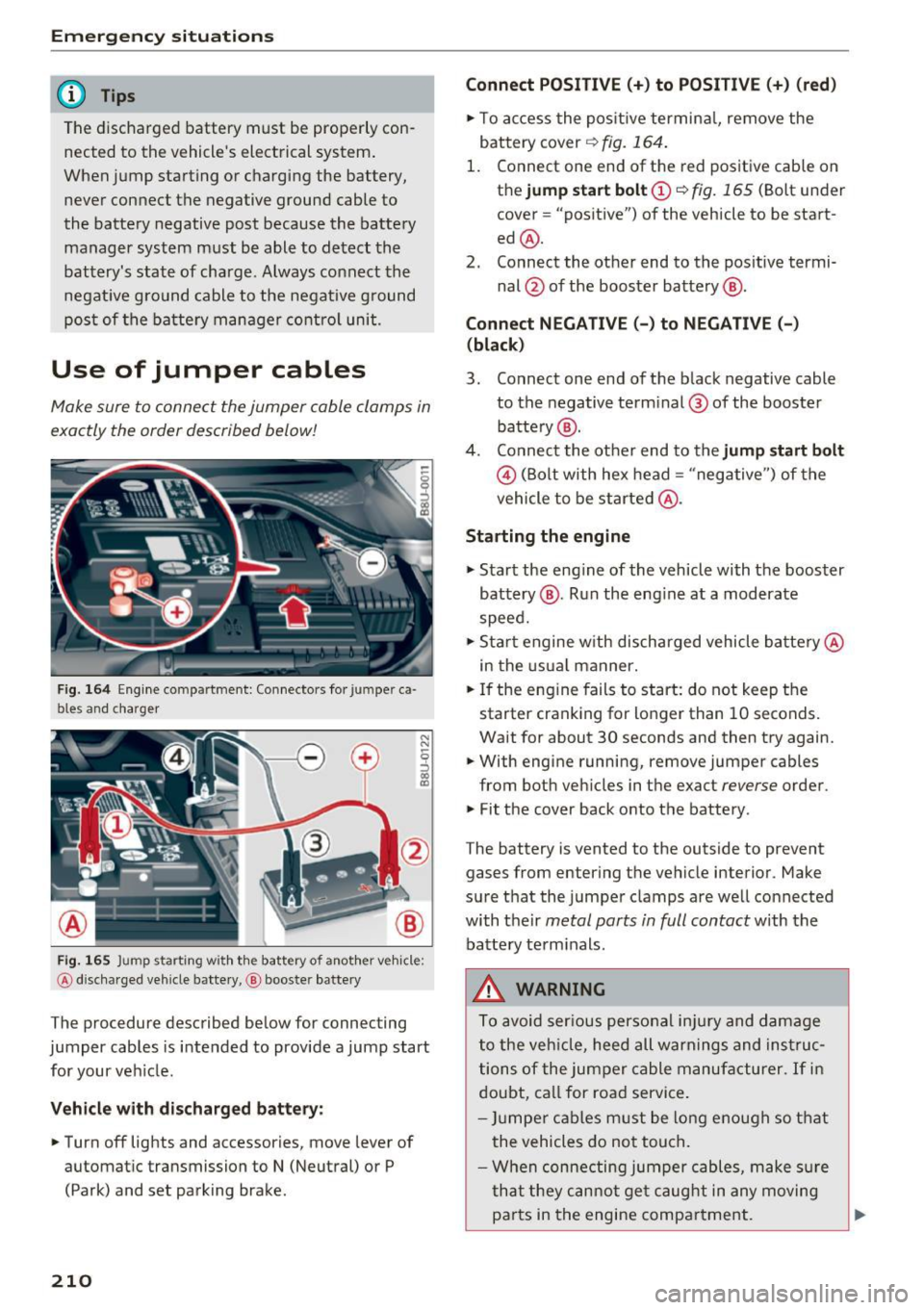
Use of jumper cables
Make sure to connect the jumper cable clamps in
exactly the order described below!
Fig. 164 Engine compartmen t: Connectors fo r ju m pe r ca
bles and charger
Fig. 165 J u mp starting w ith the battery of another vehicle :
@ discha rged vehicle bat te ry, @ booste r battery
The procedure described below for connecting
jumper cables is intended to provide a jump start
for your veh icle.
Vehicle with discharged battery:
.. Turn off lights and accessories, move lever of
automatic transmission to
N (Neutral) or P
(Park) and set park ing brake .
210
Connect POSITIVE(+) to POSITIVE (+) (red)
.. To access the positive terminal, remove the
battery cover
r:!) fig. 164.
1. Connect one end of the red positive cable on
the
jump start bolt (D ~ fig. 165 (Bolt under
cover= "positive") of the vehicle to be start
ed @.
2. Connect the other end to the positive termi-
nal@ of the booster battery @.
Connect NEGATIVE(-) to NEGATIVE(-)
(black)
3. Connect one end of the black negative cable
to the negative terminal ® of the booster
battery @.
4. Connect the other end to the
jump start bolt
© (Bolt with hex head= "negative") of the
vehicle to be started @.
Starting the engine
.,. Start the eng ine of the vehicle with the booster
battery @. Run the eng ine at a moderate
speed .
.,. Start engine w ith discharged vehicle battery@
in the usual manner.
.. If the engine fails to start: do not keep the
starter cranking for longer than 10 seconds.
Wait for about 30 seconds and then try again .
.. With engine running, remove jumper cables
from both vehicles in the exact
reverse order .
.,. Fit the cover back onto the battery .
The battery is vented to the outside to prevent gases from entering the vehicle interior . Make
sure that the jumper clamps are well connected
with their
metal parts in full contact with the
batte ry terminals.
A WARNING
To avoid serious personal inju ry and damage
to the veh icle, heed all warnings and instruc
tions of the jumper cable manufacturer.
If in
doubt, call for road service.
- Jumper cables must be long enough so that
the vehicles do not touch .
- When connecting jumper cables, make sur e
that they cannot get caug ht in any moving
pa rts in the engine compartment. ..,.
Page 213 of 236
-Do not b end over the batteries -danger of
chemical burns!
- The battery cell locking screws must be
tightened securely.
- Before you check anyth ing in the engine
compartment, a lways read and heed all
WARNINGS
¢ page 159.
(D Note
Improper hook-up of jumper cables can ruin
the generator.
- Always connect POSITIVE(+) to POSITIVE
( + ), and NEGATIVE(-) to NEGATIVE(-)
ground post of the battery manager contro l
unit.
- Check that all screw p lugs on the battery
cells are screwed in firmly . If not, tighten
plugs prior to connecting clamp on negative
battery terminal.
- Please note that the procedure for connect
ing a jumper cable as described above ap
plies specif ically to the case of your vehicle
being jump started. When you are giv ing a
jump start to another vehicle, do
not con
nect the negative( -) cab le to the negative
(-) terminal on the discharged battery@
¢ fig. 165. Instead, securely connect the
negative (-) cable to either a solid metal
component that is firm ly bolted to the en
gine block or to the engine block itself. If
the battery that is being charged does not
vent to the outs ide, escaping battery gas
could ignite and explode!
Towing with a tow truck
General hints
Your Audi requires special handling for towing .
The follow ing information is to be used by com
mercial tow tr uck operators who know how to op
erate their equipment safely .
-Never tow your Audi, towing will cause dam-
age to the engine and transmission .
a:, ~ -Never wrap the safety chains or winch cables
~ around the brake lines. N
"" 0 0 ::, a:,
Emergency situations
-To prevent unnecessary damage , your Audi
must be transported with a flat bed truck.
- To load the vehicle on to the flat bed, use the
towing loop found in the vehicle tools and at·
tach to the front or rear anchorage
¢ page 211 and ¢ page 212.
A WARNING ~ -
A veh icle being towed is not safe for passen
gers . Never allow anyone to ride in a vehicle
being towed, for any reason .
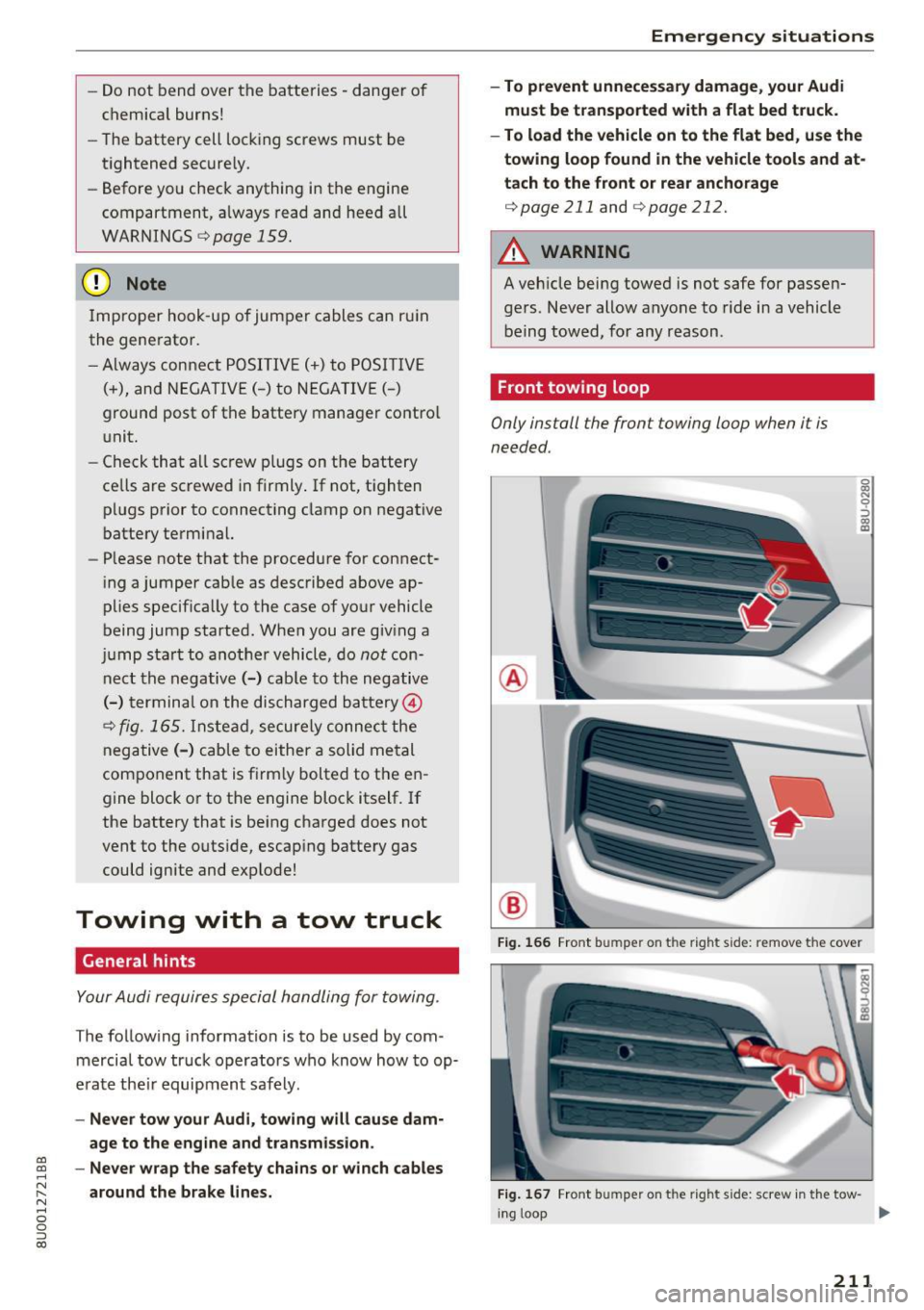
Front towing loop
Only install the front towing loop when it i s
needed.
®
®
0 0:, N 9 ::> 0:, a)
Fig. 166 Front bumpe r o n the right s ide: re move t he co ver
Fig. 167 Front bum pe r o n th e righ t side : screw in the tow-
in g loop ...
211
Page 216 of 236
Emergency situations
distribut ion and ba lance . This might hap
pen, for example, when heavy compo
nents such as the engine block or trans
miss io n are removed.
- When removing heavy components like
th ese, a nch or vehicle to ho ist o r add corre
sponding weights to maintain the cen ter of
gr avity. Otherwise , th e vehicle migh t ti lt or
s lip off the hoist, causing s erious p erso nal
rnJury.
0 Note
- Be aware of t he following poi nts before lift
i ng t he veh icle:
-The vehicle should never be lifted or
jacked up from underneath the engine oil
pan , the transmission housing, the front
or rear axle or the body side members.
This could lead to serious damage.
- To avoid damage to the underbody or
chassis frame, a rubber pad must be in·
serted between the floor jack and the lift points.
- Before driving over a workshop hoist,
check that the vehicle weight does not
exceed the permissible lifting capacity of
the hoist .
- Before driving over a workshop hoist, en
sure that there is sufficient clearance be
tween the hoist and low parts of the ve ·
hide .
214