warning light AUDI Q3 2017 Owner´s Manual
[x] Cancel search | Manufacturer: AUDI, Model Year: 2017, Model line: Q3, Model: AUDI Q3 2017Pages: 236, PDF Size: 58.93 MB
Page 25 of 236
Opening and closing
Central locking
Description
You can lock and unlock the veh icle centrally . You
have the following options:
- Remote control key
c> page 25,
-Sensors in the door handles* c> page 26,
-Inner central locking switch c> page 2 7, or
- Lock cylinder on the driver's door
c> page 28.
Turn signals
The turn s ignals flash tw ice when you un lock the
veh icle and flash once when you lock the vehicle.
If the vehicle is unlocked and the flashing contin
ues, then
- one of the doors or the luggage compa rtment
lid is open,
- the ignition is still switched on, or
- the P selector lever position (vehicles with au -
tomat ic transmission*) is not engaged.
Auto Lock
The Auto Lock function locks all doors and the
luggage compartment lid once the speed has ex
ceeded approximately 9 mph (15 km/h) .
T he vehicle can be unlocked if the opening func
tion in the central locking system switch is used,
one of the door handles is pulled or the ignition key is removed.
In the event of a crash with airbag deployment,
the doors will also automatically unlock to allow
access to the vehicle.
Selective door unlocking
The doors and luggage compartment lid will lock
when they close. You can set in the Infotainment
system if
only the driver's door or the entire vehi
cle shou ld unlock when unlocking
c> page 27 ,
Setting the central locking system.
Unintentionally locking yourself out
~ The following conditions prevent you from lock-.....,
~ ing your remote control key in the vehicle: N ...... 0 0
:::,
00
Opening and closing
- If the driver's door is open, the vehicle cannot
be locked by pressing the
fi'.J button on the re
mote contro l key or touching the locking sen
sor* on a door.
- When locking using the
ffi button in the central
locking switch, the vehicle will not lock if a door
is open
c> page 27.
- If the most recently used convenience key* is in
the luggage compartment, the luggage com
partment lid automatically unlocks again after
closing it
c> page 28. The emergency flashers
blink four times.
Do not lock your vehicle with the remote control
key or convenience key* until all doors and the
luggage compartment lid are closed . This helps
to prevent you from locking yourself out acc iden
tally .
A WARNING
- When you leave the vehicle, always remove
the ignition key and take it with you. This
will prevent passengers (children, for exam
ple) from accidenta lly being locked in the
vehicle should they accidentally press the
power locking switch in the front doors.
- Do not leave children inside the vehicle un
supervised. In an emergency it would be im
possible to open the doors from the outside
without the key.
(D Tips
- Do not leave valuables unattended in the ve
hicle. A locked vehicle is not a safe!
- The LED in the driver's door rail blinks when
you lock the vehicle . If the LED lights up for
approximately 30 seconds after locking,
there is a malfunction in the central locking
system . Have the problem corrected by an
authorized Audi dealer or authorized Audi
Service Facility.
23
Page 37 of 236
a:,
a:,
...... N r--. N
'"' 0 0 ::, a:,
Lights and Vision
Exterior Lighting
Switching lights on and off
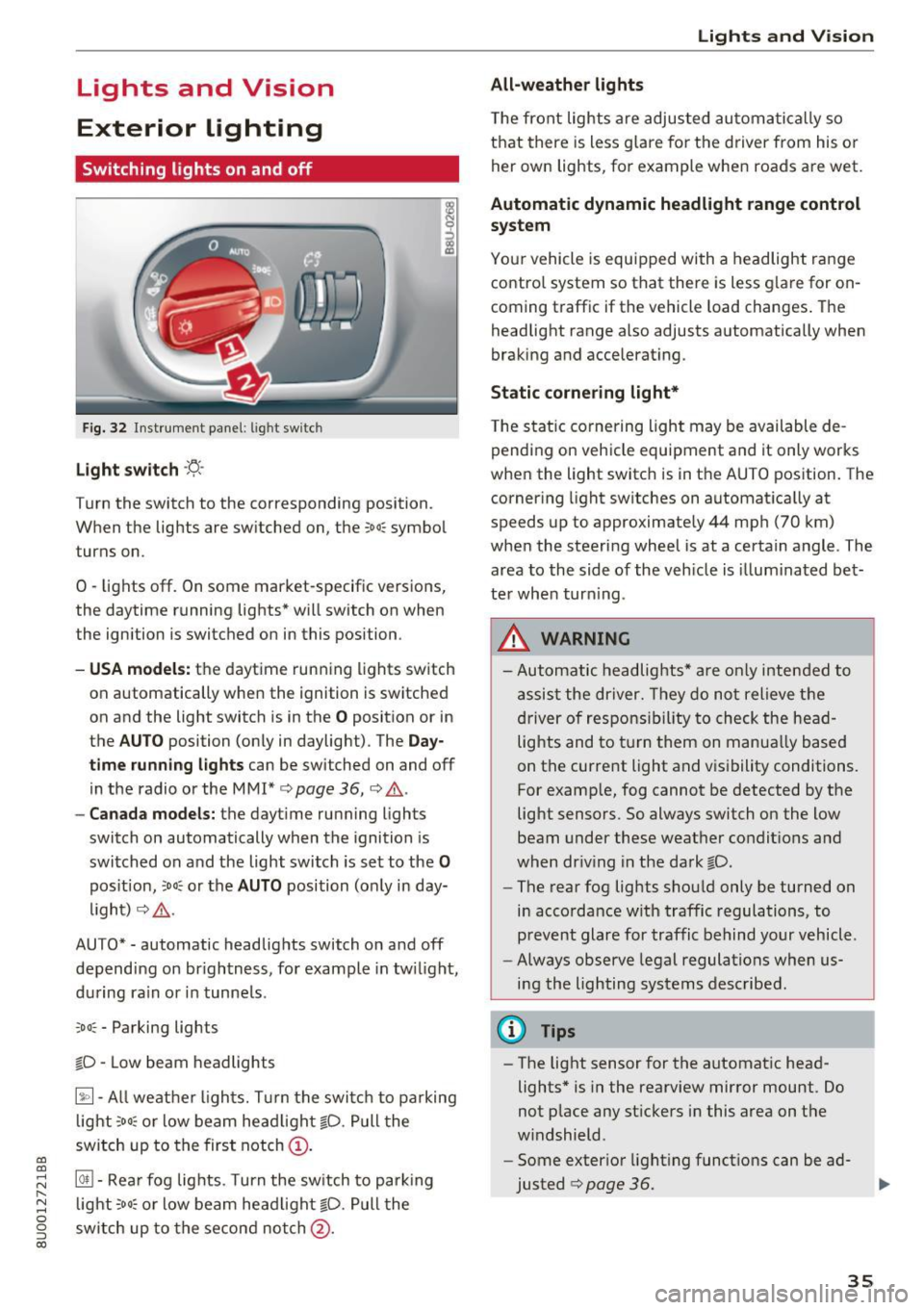
Fig. 32 Instrument panel: l ig ht switc h
Light switch ·'!;5- ·
Turn the switch to the corresponding position.
When the lights are sw itched on, the
;oo: symbol
turns on.
0 -lights off. On some market-specific vers ions,
the daytime running lights* will switch on when
the ign ition is switched on in this position .
-USA model s: the daytime running lights sw itch
on automatically when the ignition is switched
on and the light switch is in the
O position or in
the
AUTO position (on ly in daylight) . The Day
tim e running lights
can be switched on and off
in the radio or the MMI*
c:> page 36, c:> A.
-Canada models: the dayt ime running lights
switch on automatically when the ignition is
switched on and the light switch is set to the
0
pos ition, ;oo: o r the AUTO position (o nly in day
li gh t)
c::> A .
AUTO* -automatic headlig hts switch o n and off
dependi ng on br ightness, fo r example in tw ilight,
d ur ing ra in or in tunne ls .
::oo: -Parking lights
io -Low beam headlights
~- All weat he r ligh ts. T urn the swi tch to pa rking
light
; oo : or low beam head light io . Pull the
sw itch up to the first notch@.
@il -Rea r fog lig hts . T urn the sw itch to par king
l ight
;oo; o r low beam head lig ht gD. Pull the
sw itch up to the secon d no tch @.
Lights and V ision
All-weather lights
T he fro nt lights a re adju sted au to mat ic a lly so
t h at there is less g lare for the driver from his o r
her own lights, fo r example whe n roads a re wet.
Automatic dynamic headlight range control
system
Your vehicle is equip ped with a headlight r ange
contro l system so that there is less g lare for on
coming traff ic if the vehicle load changes . The
headlight range also adjusts automatically when
braking a nd accelerat ing .
Static cornering light*
The s tat ic co rnering light may be available de
pending on vehicle equipment and it only works
whe n the light switc h is in t he AUTO position. The
corner ing light sw itches on automat ically at
speeds up to approximately 44 mph (70 km)
whe n the steeri ng wheel is at a certain angle. The
area to the side of the veh icle is illuminated be t
te r when tur ning .
A WARNING
-Automatic headlights * are on ly inten ded to
assis t the driver. They do n ot relieve the
d river o f respons ibility to check the head
lights and to turn them on manua lly based
on the current light and vis ibility conditions.
For examp le, fog cannot be detected by the
light sensors . So always switch on the low
beam under these weat her condit ions an d
when dr iv ing in the da rk
gD .
-The rear fog lights shou ld only be turned on
in acco rdance w it h traffic regulations, to
p revent glare for traffic behind your vehicle.
- Always observe legal regulations when us
i n g the lighting systems desc ribed.
(D Tips
- The light sensor for the automat ic head
lights * is in the rearview mir ror mount. Do
not p lace any st ickers in this a rea on t he
w indshield.
- Some exter io r light ing funct ions can be ad
justed
c:> page 36.
35
Page 38 of 236
Lights and Vision
-If you turn off the ignition whi le the exter ior
lights are on and open the door, a warning
tone sounds.
- In cool o r damp weather, the inside of the
headlights, turn s ignals and tail lights can
fog over due to the temperature d if f erence
between the inside and outside. They will
clear short ly after switch ing them on. This
does not affect the serv ice life of the light
i ng .
Turn signal and high beam lever
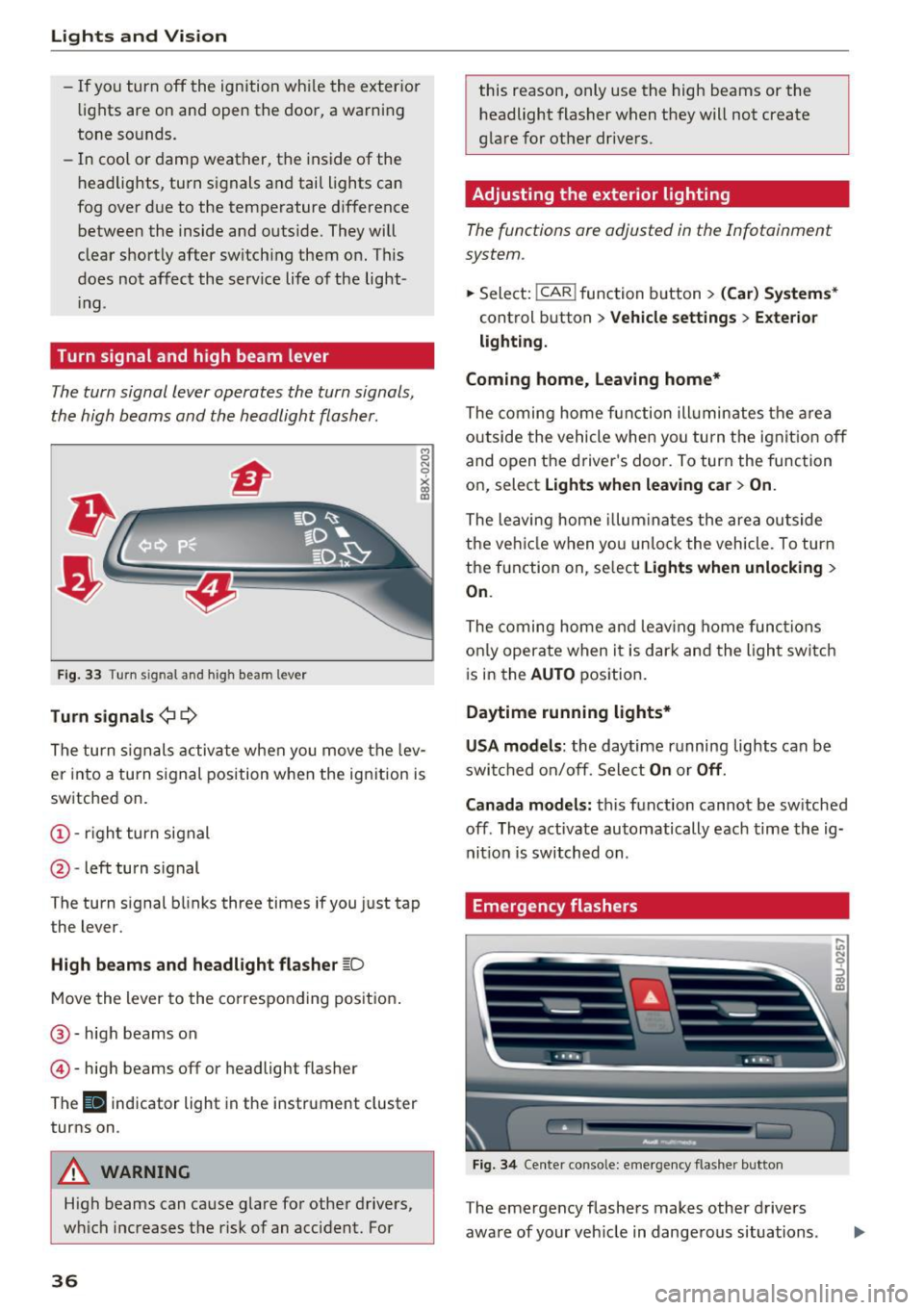
The turn signal lever operates the turn signals,
the high beams and the headlight flasher .
Fig. 33 Turn signal and high beam lever
Tu rn signals ¢ 9
The turn s ignals activate when you move the lev
er into a turn s ignal position w hen the ign ition is
sw itched on.
@ -righ t turn signal
@ -left turn s ignal
The turn signal blinks three times if you just tap
the lever.
High b eams and headl ight flasher ~D
Move the lever to the co rrespo nd ing pos it ion .
@ -high beams on
© -high beams off or headlight flasher
The
II indicator light in the instrument cluster
turns on .
A WARNING
High beams can cause glare fo r other drivers,
w hi ch increases the risk of an accident. For
36
this reason, only use the high beams or the
headlight flasher when they will not create
glare for other dr ivers.
Adjusting the exterior lighting
The functions are adjusted in the Infotainment
system .
.,.. Sele ct: !CAR ! function b utton> (Car ) Systems *
control button > Vehicle settings > Exte rior
lighti ng.
Coming home, Leaving home*
The coming home fun ction ill umin ates the a rea
outside the vehicle when you tu rn the ignit io n off
and open the driver's doo r. To turn the func tion
on, select
Light s when leaving car > On .
The leaving home illum ina tes the area ou tside
the ve hicle when yo u un lo ck the vehicle . To turn
the function on, se lect
Lights when unlocking >
On .
The coming home and leav ing home func tions
on ly opera te when it is dar k and the l ight switc h
i s in the
AUTO position.
Daytime running lights*
USA models :
the daytime running lights can be
swit ched on/off. Sele ct
On or Off .
Canada models:
this function cannot be sw itched
off . They activate automatically each time the ig
nit ion is switched on .
Emergency flashers
Fig. 3 4 Center conso le: emerge ncy flasher button
The emergency flashers makes other drivers
aware of your veh icle in dange rous situations.
In N 0
~ Cl) m
Page 40 of 236
Lights and Vision
and the ignition is switched on . The illum ina
tion reduces automatica lly and eventually
turns
off as brightness outs ide decreases.
This function reminds the driver to turn the
low beams on at the appropriate time .
Vision
Adjusting the exterior mirrors
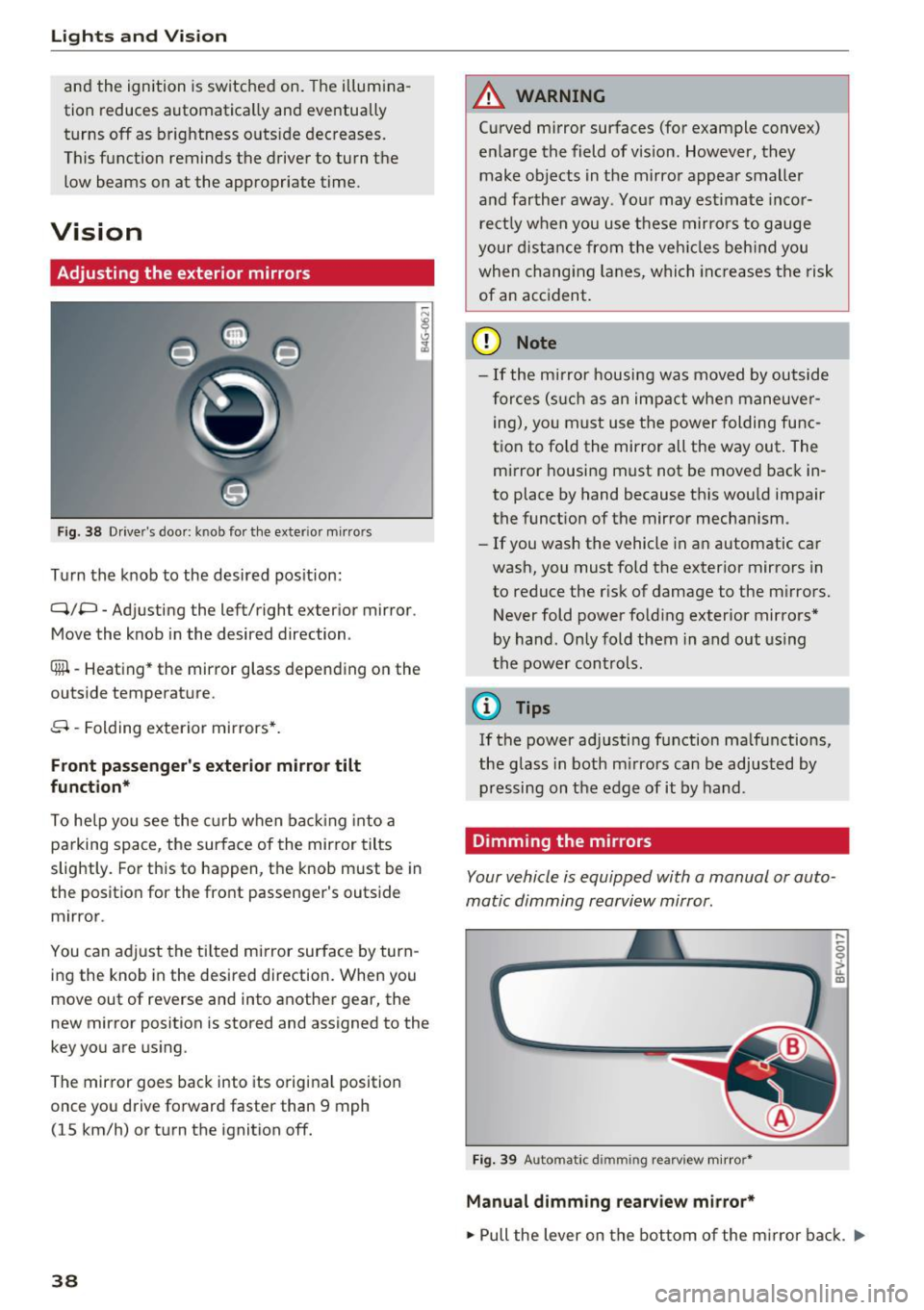
Fig . 38 D river's doo r: kn ob fo r th e ex te ri or m irrors
T u rn the knob to the desired pos ition:
Q/P -Adjus ting the left/ righ t exterior m irror .
Move the knob in the desired dire ction .
®l-Heating * th e mirror glass d epending on the
outs ide temperature .
8 -Folding exterior mirrors*.
Front passenger's exterior mirror tilt
function*
To he lp you see the curb w hen ba cking into a
parking space, the surface of the mirror tilts
slightly. For this to happen, the knob must be in
the position for the front passenger 's outs ide
mir ror .
You can adjust the tilted mirror surface by turn
ing the knob in the desired direction. When you
move out of r everse and into another g ear, the
new mirror position is stored and assigned to the
key you are us ing .
The mirror goes back into its origina l position
once yo u drive forward faster than 9 mph
( 1 5 km/h) or turn the ignition
off.
38
A WARNING
Curved mirror surfaces (for example convex)
e nla rge the field of vision. However, they
make ob jects in the mirro r appear smaller
a nd farther away . Your may est imate inco r
rect ly w hen you use these mirro rs to gauge
your dista nce from the veh icles beh ind you
when chang ing lanes , whi ch in cr eases the risk
of an acc ident .
(D Note
-If the m irror housing w as moved by outside
f o rces ( such as a n impac t when maneuve r
ing), yo u m ust use the power folding fu nc
tion to fo ld the mirror all the way out. The
mi rror housing must not be moved back in
to place by hand because t his wou ld impair
the funct ion of the mirror mechanism .
- If you wash the vehicle in an automatic ca r
wash, you must fold the exter ior mirrors in
to reduce the r isk of damage to the m irrors.
Never fold power fo ld ing exterior mirrors*
by hand . Only fold them in and out using
the power con trols.
(D Tips
If the power ad justing function ma lfunctions,
the glass in both m irrors can be adjusted by
pressing on the edge of it by hand .
Dimming the mirrors
Your vehicle is equipped with a manual or auto
matic dimming rearview mirror .
Fig. 39 A uto mat ic dimmin g rearview m irro r*
Manual dimming rearview mirror*
....
0 0
> ~ m
"" Pull the lever on the bot tom of the m irro r b ack . Ill-
Page 41 of 236
Automatic dimming rearview mirror*
• Press the button @to switch the dimming
function on the mirror on or off. If the indicator
light @ turns on, the interior and exterior mir
rors* are dimmed when light shines on them
(for example headlights shining from a vehicle
behind you) .
A WARNING
If the glass on an automatic dimming mirror
breaks, electrolyte can leak out . This liquid
can irritate the skin, eyes and respiratory sys
tem. If there is contact with the fluid, flush
immediately with plenty of water. Consult a
physician if necessary.
- Repeated or long-term exposure to electro
lyte fluid can lead to irritation of the air
ways, especially in people with asthma or
other respiratory conditions. Take deep
breaths immediately after leaving the vehi
cle or, if this is not possible, open all of the
doors and windows as wide as possible.
- If electrolyte fluid enters the eyes, flush
them thoroughly with a large amount of
clean water for at least 15 minutes and then
seek medical attention.
- If electrolyte fluid comes into contact with
the skin, flush the affected area with clean
water for at least 15 minutes and then clean
with soap and water and seek medical at
tention. Clean affected clothing and shoes
thoroughly before wear ing again .
- If the fluid was swallowed and the person is
conscious, flush the mouth with water for at
least 15 minutes. Do not induce vomiting
unless this is recommended by medical pro
fessionals. Seek medical attention immedi
ately.
(D Note
If the glass on an automatic dimming mirror
breaks, electrolyte can leak out. This liquid
damages plastic surfaces and paint. Clean
this liquid as quickly as possible, for example
a:,
~ with a wet sponge.
N r--. N .... 0 0 ::, a:,
Lights and Vision
(D Tips
-If the light reaching the rearview mirror is
obstructed, the automatic dimming mirror
will not function correctly,
- The automatic dimming mirrors do not dim
when the interior lighting is turned on or
the reverse gear is selected.
Sun visors
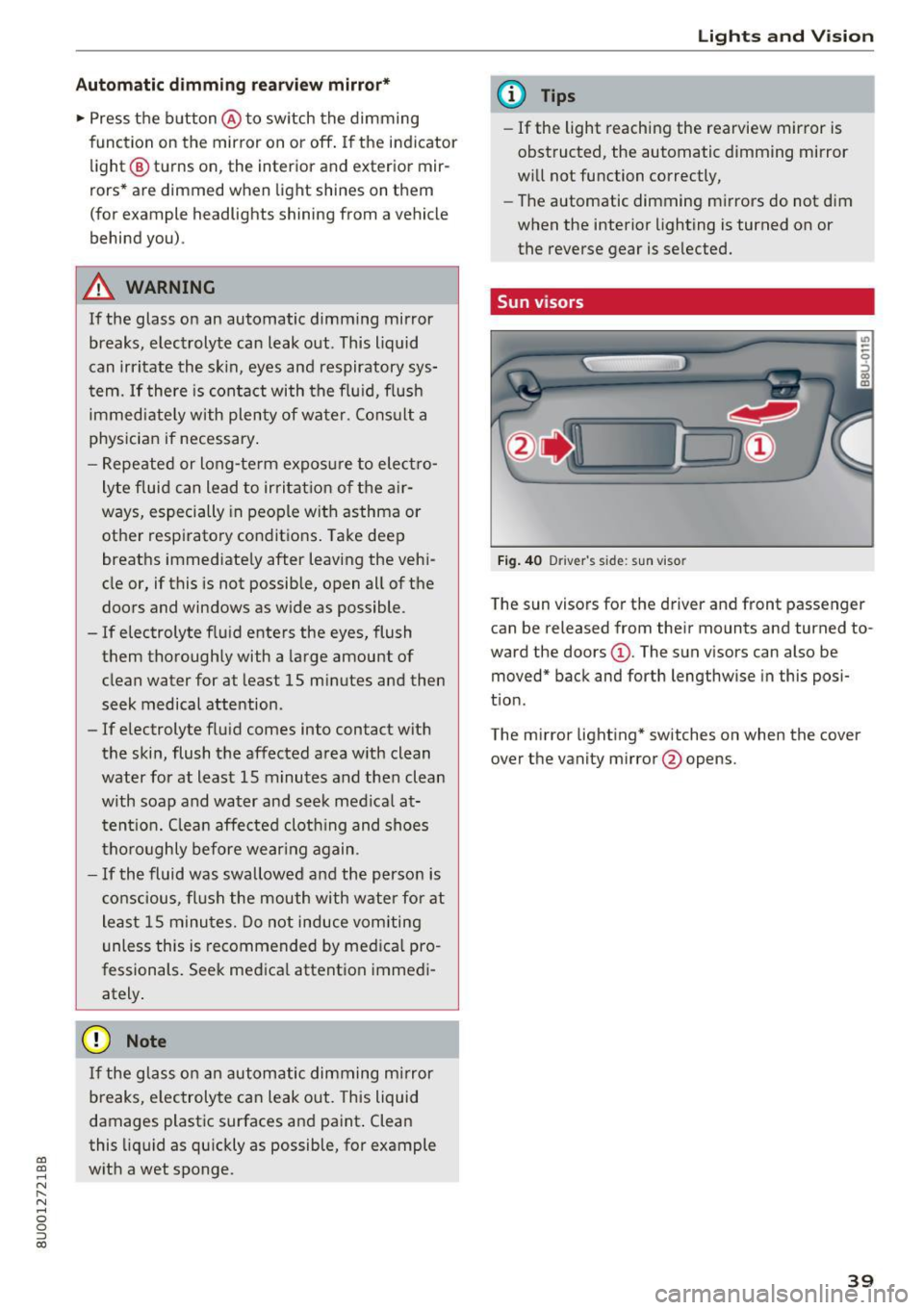
Fig. 40 Driver 's s ide: sun viso r
The sun visors for the driver and front passenger
can be released from their mounts and turned to
ward the doors
(D . The sun visors can also be
moved* back and forth lengthwise in this posi
tion.
The mirror lighting* switches on when the cover over the vanity mirror @opens.
39
Page 42 of 236
Lights and Vision
Windshield wipers
Switching the windshield w ipers on
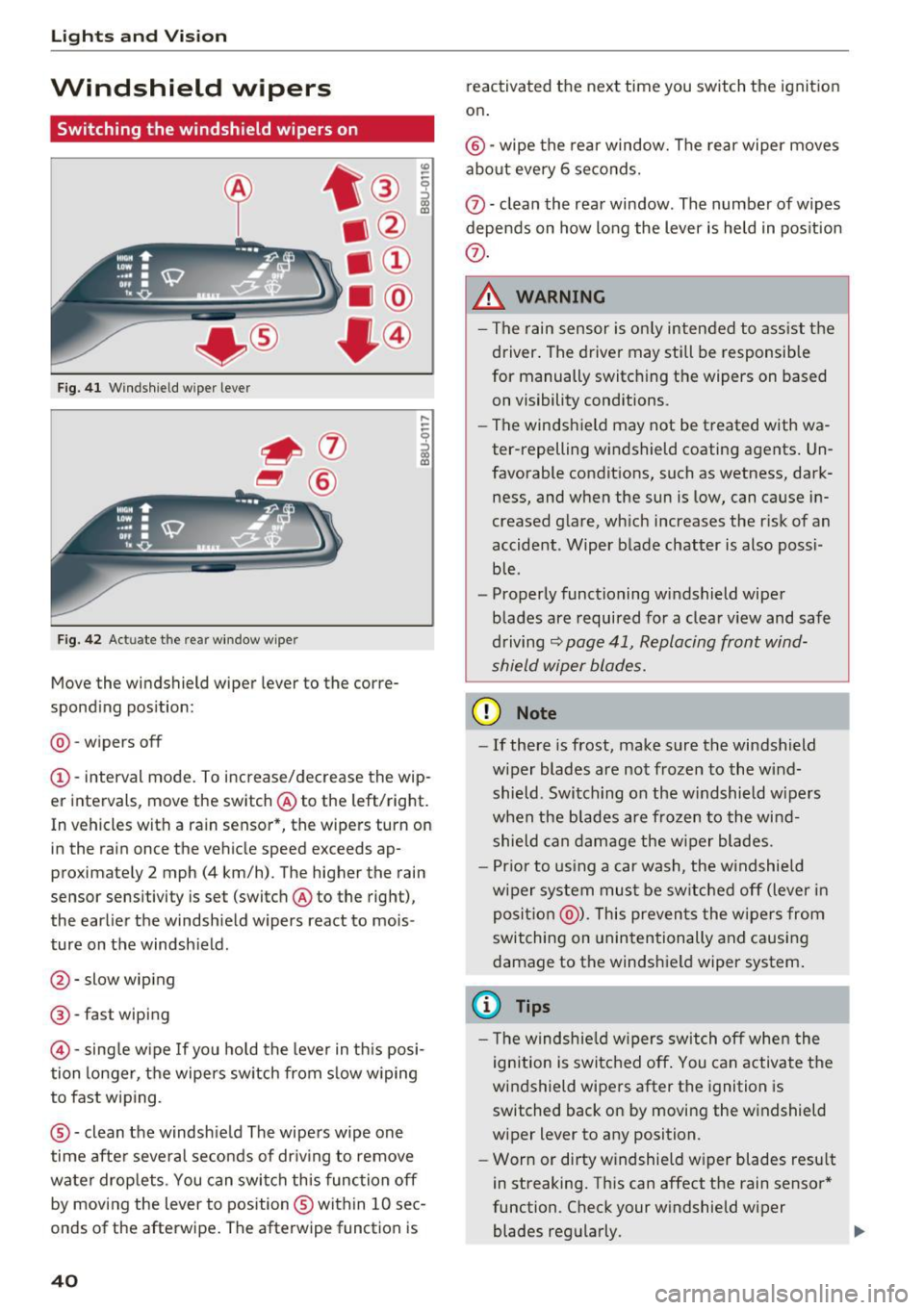
F ig. 4 1 Wind shield wiper le ver
F ig. 42 Act uate t he re ar windo w wipe r
Move the windshield wiper lever to the corre
spond ing pos ition:
@ -wipers off
(D -interval mode. To i ncrease/decrease the wip
er intervals, move the switch @ to the left/right.
In vehicles with a ra in sensor *, the wipers turn on
in the rain once the vehicle speed exceeds ap
proximate ly 2 mph (4 km/h) . The higher the rain
sensor sensitivity is set (switch @to the right),
the earlier the windshield wipers react to mois
ture on the windsh ield .
@-slow wiping
@-fast w iping
© -sing le w ipe If yo u hold the leve r in th is posi
tion longer, t he wipers sw itch from s low w iping
to fast wiping.
® -clean the windsh ie ld The wipe rs wipe one
time afte r several seconds of dr iv ing to remove
water drop lets . You can swi tch this func tion off
by moving the lever to position ® within 10 sec
onds of the afterwipe . The afterwipe function is
40
reactivated the next time you switch the ignit ion
on .
®-wipe the rea r window. The rear wiper moves
about every 6 seco nds.
0 -clean the rea r window . The number of wipes
depends on how long the lever is held in pos it ion
(i) .
& WARNING
-The rain sensor is on ly intended to ass is t th e
driver . The driver may still be responsible
for manually switch ing the wipers on based
on visibility conditions .
- Th e windsh ield may not be treated with wa
ter-repelling windshield coating agents . Un
favorable conditions, such as wetness, dark
ness, and when the sun is low, can ca use i n
creased glare, wh ich increases the r isk of an
accident . Wiper blade chatter is also possi
b le .
- Properly functioning windshield wipe r
blades are required for a clear v iew and safe
driving
~ page 41, Replacing front wind
shield wiper blades.
(D Note
- If there is frost, make sure the windshield
w iper blades are no t frozen to the wind
shield . Switch ing on the w indshield w ipers
when the blades are frozen to the win d
shield can dam age the w iper blades.
- Pr ior to using a car was h, the w indshie ld
w iper sys tem mus t be sw itche d off (lever in
posit ion @). This preven ts the w ipers from
switching on unin tentionally and causi ng
damage to the windsh ield wiper system .
(D Tips
- The windshie ld wipers switch off w hen the
ignition is switc hed off . You can activate t he
windshield wipe rs after the ignition is
switched back on by moving the w indshield
wiper lever to any position .
- Wor n or dirty w indshield w iper blades resu lt
in streaking. Th is can affect the rain senso r*
function. Check your w indshield wiper
blades reg ularly. .,.
Page 43 of 236
00
00
......
"' ,....
"' ...... 0 0 :::,
00
- The washer fluid nozzles for the windshie ld
washer system are heated at low tempera
tures when the ignition is on.
- When stopping temporarily, such as at a
traffic light, the speed of the windshie ld
wipers automatically reduces by one level.
Cleaning windshield wiper blades
Clean the wiper blades when you see wiper
streaks. Use a soft cloth and a glass cleaner .
Windshield wiper
.. Place the windshield wiper arms in the service
pos it ion ¢
page 41.
"' Fold the w indshield wiper arm away from the
windshield .
Rear window wiper
.. Fold the wiper arm away from the rear window .
.&_ WARNING
Dirty windshield wiper blades can impair vi
sion, which increases the risk of an accident.
Replacing front windshield wiper blades
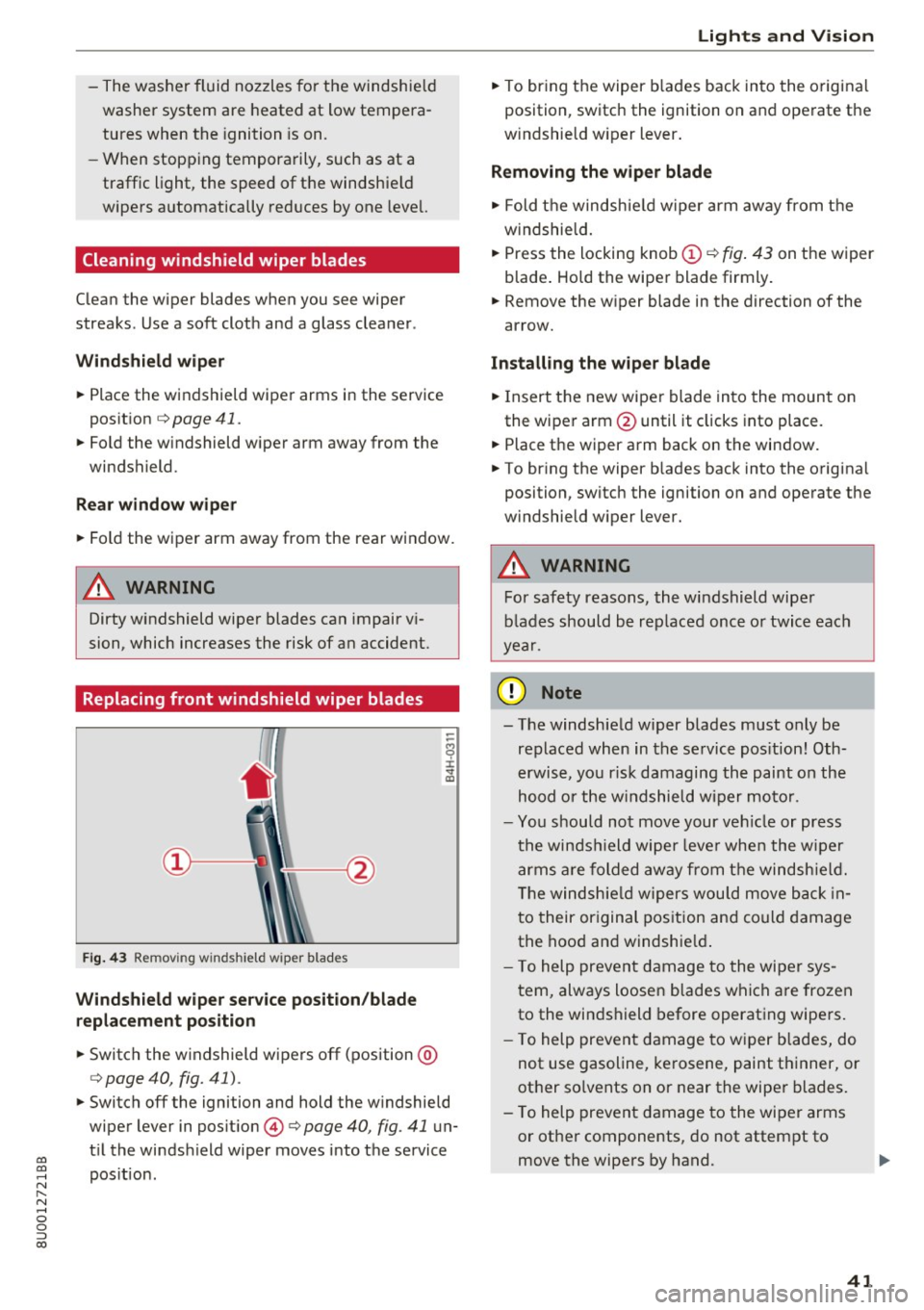
F ig . 43 Re mov ing w inds hield w iper blades
Windshield wiper service position/blade
replacement position
.. Switch the windshield wipers off (position @
¢ page 40, fig. 41).
-
"'Switch off the ignition and hold the windshield
wiper lever in position @¢
page 40, fig. 41 un
t il the windsh ield wiper moves into the service
pos ition .
Lights and Vision
"'To bring the wiper b lades back into the original
position, switch the ignition on and operate the
w indshield w iper lever .
Removing the wiper blade
"' Fold the windshie ld wiper arm away from the
windshield .
.. Press the locking knob
(D ~ fig. 43 on the wiper
blade . Hold the wiper blade firmly.
.. Remove the w iper blade in the direction of the
arrow.
Installing the wiper blade
"'I nsert the new wiper blade into the mount on
the wiper arm @until it clicks into place.
.. Place the wiper arm back on the window.
"' To bring the wiper b lades back into the original
position, switch the ignition on and operate the
windshield wiper lever.
.&_ WARNING
-
For safety reasons, the windshield wiper
blades should be replaced once or twice each
year .
([) Note
-The windshield wiper blades must only be
replaced when in the service pos ition! Oth
erwise, you ris k damaging the paint on the
hood or the windshield wiper motor.
- You should not move your vehicle or press
the windsh ield wiper leve r when the wiper
arms are folded away from the windshie ld.
T he windshie ld wipers wou ld move back in
to their original position and could damage
the hood and windshie ld.
- To help prevent damage to the wiper sys
tem, always loosen blades which are frozen
to the windshield before operating wipers.
- To help prevent damage to wiper blades, do
not use gasoline, kerosene, paint thinner, or
other so lvents on or near the wiper blades.
- To help prevent damage to the wiper arms
or other components, do not attempt to
move the wipers by hand.
41
Page 44 of 236
Lights and Vision
@ Tips
-You can also use the service position, for ex
ample, if you want to protect the windsh ield
from icing by using a cover.
- You cannot activate the service position
when the hood is open.
Replacing rear wiper blades
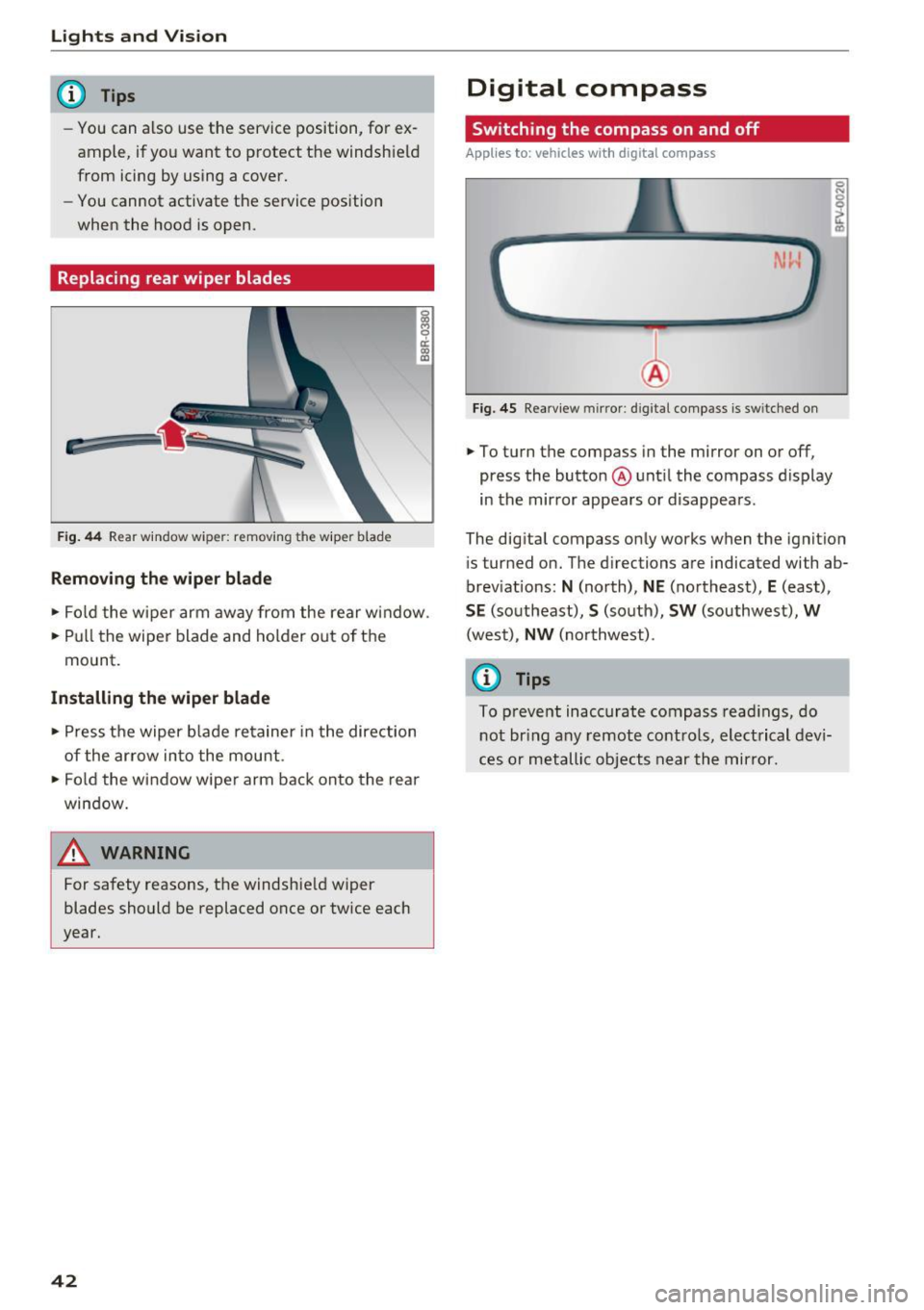
Fig . 44 Rear window wiper: removing the wiper blade
Removing th e wiper blade
16 M 0 ci: (X) a,
• Fo ld the w iper arm away from the rear window.
• Pull the wiper blade and holder out of the
mount.
Installing th e wiper blade
• Press the wiper b lade retainer in the direction
of the ar row into the mount.
• Fo ld the window wiper arm back onto the rear
window.
A WARNING
For safety reasons, the windshie ld wiper
blades should be replaced once or tw ice each
year.
42
Digital compass
Switching the compass on and off
App lies to: vehicles with digital compass
Fig. 45 Rearv iew m ir ror : d ig ita l compass is sw itched on
• To turn the compass in the mirror on or off,
press the butto n@ unt il the compass display
in the mir ror appears or d isappears.
0 N
I .,
The digital compass on ly works when the ignit ion
i s turned on. The directions are indicated with ab
brev iat ions:
N (north), NE (northeast), E (east),
S E (southeast), S (south), SW (southwest), W
(wes t), NW (no rthwest).
(D Tips
To preve nt inaccurate compass read ings, do
n ot br ing any remote cont ro ls, elect rical dev i
ces or metallic objects near the mirror.
Page 45 of 236
a:,
a:,
...... N r--. N
'"' 0 0 ::, a:,
Adjusting the magnetic zone
Applies to: vehicles with digital compass
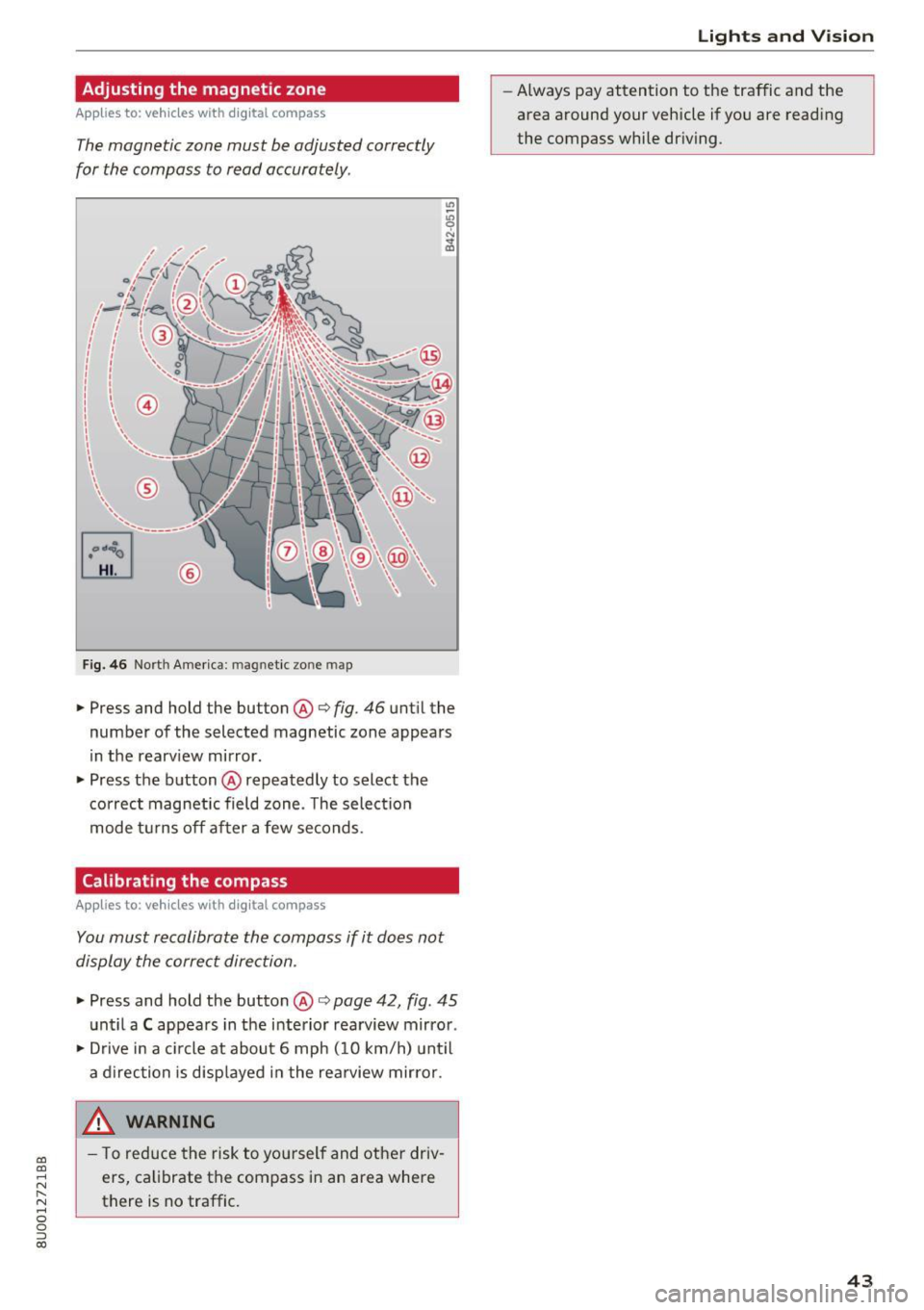
The magnetic zone must be adjusted correctly
for the compass to read accurately .
®
Fig. 46 Nort h Americ a: magn etic zone map
• Press and hold the button @i=> fig. 46 unt il the
number of the selected magnetic zone appears
in the rearv iew mirror.
• Press the button @repeatedly to select the
correct magnetic field zone . T he select io n
mode t urns off after a few seconds.
Calibrating the compass
Applies to: vehicles with digital compass
You must recalibrate the compass if it does not
display the correct direction .
• Press and hold the button @i=> page 42, fig . 45
unt il a C appears in the interior rearview mirror .
• Drive in a c ircle at about 6 mph ( 10 km/h) unt il
a d irection is disp layed in the rea rview mirror.
_& WARNING ,___
- T o reduce the risk to you rself and other driv
ers, calibrate the compass i n an area where
there is no traffic.
Lights and V ision
-Always pay attention to the traffic and the
area around your vehicle if you are read ing
the compass while dr iv ing .
43
Page 50 of 236
Sea ts and stor age
• To switch the cooling* on, turn the knob @
counter-clockwise. The symbo ls on the knob
must appear as they do in¢
fig. 56.
• To switch the cooling* off, turn the knob@
clockwise.
• To close the glove compartment, swing the lid
upwa rd unt il it clicks into place.
A WARNING
-
Always leave the lid on the glove compart
ment cover closed while drivi ng to reduce the
r isk of injury.
Additional compartments
You will find a variety of storage compartments
and holders at various locations in the vehicle .
- In the doo r trim pane ls.
- In the center console .
- On the side of the front seats*. The sliding com-
partment can hold a maximum of 3 .3 lbs (1.5
kg) and the folding compartment can ho ld 2.2
lbs (1 kg).
- Nets* on the backrests of the front seats
- Garment hooks next to and above the rear
doors.
- Bag/secur ing hooks in luggage compartment.
A WARNING
- Make sure that the view to the rear is not
obstructed by hanging garments.
- Hang only lightwe ight cloth ing and be sure
that there are no heavy or sharp-edged ob
jects in the pockets.
- Do not use coat hangers to hang the cloth
ing because t his could impair the effective
ness of the s ide air bags *.
- Only use the storage compartments in the
door trim panels to store small objects that
will not stick out of the compa rtment and
impa ir the range of the side a irbags.
- When driving, do not leave any hard objects
on the rear window shelf or a llow your pet
to sit on the she lf. They could restr ict o r
block the driver 's vision in the rear view mir
ror and become a hazard for vehicle occu-
48
pants in the event of sudden braking or a
crash.
(D Note
Objects located on the rear she lf that rub
against the rear window could damage the heating wires for the rear window defogger.
(D Tips
A vent slot is located between the shel f and
the rear window. Do not b lock the vent with
any items you may place on the rear window
shelf.
Luggage compartment
General information
A WARNING
Read and follow the important safety precau
tions in¢
page 105, Loading the luggage
compartment.
Luggage compartment cover
App lies to: vehicles with lu ggage compartment cover
Fig . 5 7 Luggage compartment: cover attac hed
Fig . 58 Right front section of the luggage compartment:
remov ing the luggage compartment cover
! co Cll