window AUDI Q3 2017 Owner´s Manual
[x] Cancel search | Manufacturer: AUDI, Model Year: 2017, Model line: Q3, Model: AUDI Q3 2017Pages: 236, PDF Size: 58.93 MB
Page 55 of 236
00
00
......
"' ,-...
"' ...... 0 0 :::,
00
Warm and cold
Climate control system
Description
Depending on the vehicle equipment, different
systems could be installed:
- manual climate control system* or
- automatic climate control system"
The climate control system warms, cools and re moves humidity from the air in the vehicle interi
or.
It is the most effective when the windows and
panorama glass roof" are closed. If there is a
build-up of heat inside the vehicle, ventilation
can help to speed up the cooling process .
Pollutant filter
The pollutant filter removes pollutants such as
dust and pollen from the air.
Key recognition*
The automatic climate control* settings are stor
ed and assigned to the remote control key that is
in use.
A WARNING
Reduced visibi lity is dangerous and can cause
accidents.
- For safe driving it is very important that all
windows be free of ice, snow and condensa
tion.
- Completely familiarize yourself with the
proper use and function of the heating and
ventilation system and especially how to de
fog and defrost the windows.
- Never use the windshield wiper/washer sys
tem in freezing weather until you have
Warm and cold
warmed the windshield first, using the heat
ing and ventilation system. The washer solu
tion may freeze on the windshield and re
duce visibility .
(D Note
-If you suspect that the air conditioner has
been damaged, switch the system off to
avoid further damage and have it inspected
by a qualified dealership .
- Repairs to the Audi air conditioner require
special technical knowledge and special
tools. Contact an authorized Audi dealer for
assistance .
® For the sake of the environment
By reducing the amount of fuel you use, you
also reduce the amount of pollutants emitted
int o the air.
(D Tips
-To prevent interference with the heating
and cooling output and to prevent the win
dows from fogging over, the air intake in
front of the windshie ld must be free of ice,
snow or leaves.
- Condensation from the cooling system* can
dr ip and fo rm a pudd le of water under the
vehicle . T his is normal and does not mean
there is a leak.
- The energy management system may tem
porarily switch off certain functions, such as
the seat heating* or rear window defogger .
These systems are avai lable again as soon
as the energy supply has been restored .
53
Page 56 of 236
Warm and cold
Manual climate control system
Applies to: vehicles with manual climate control system
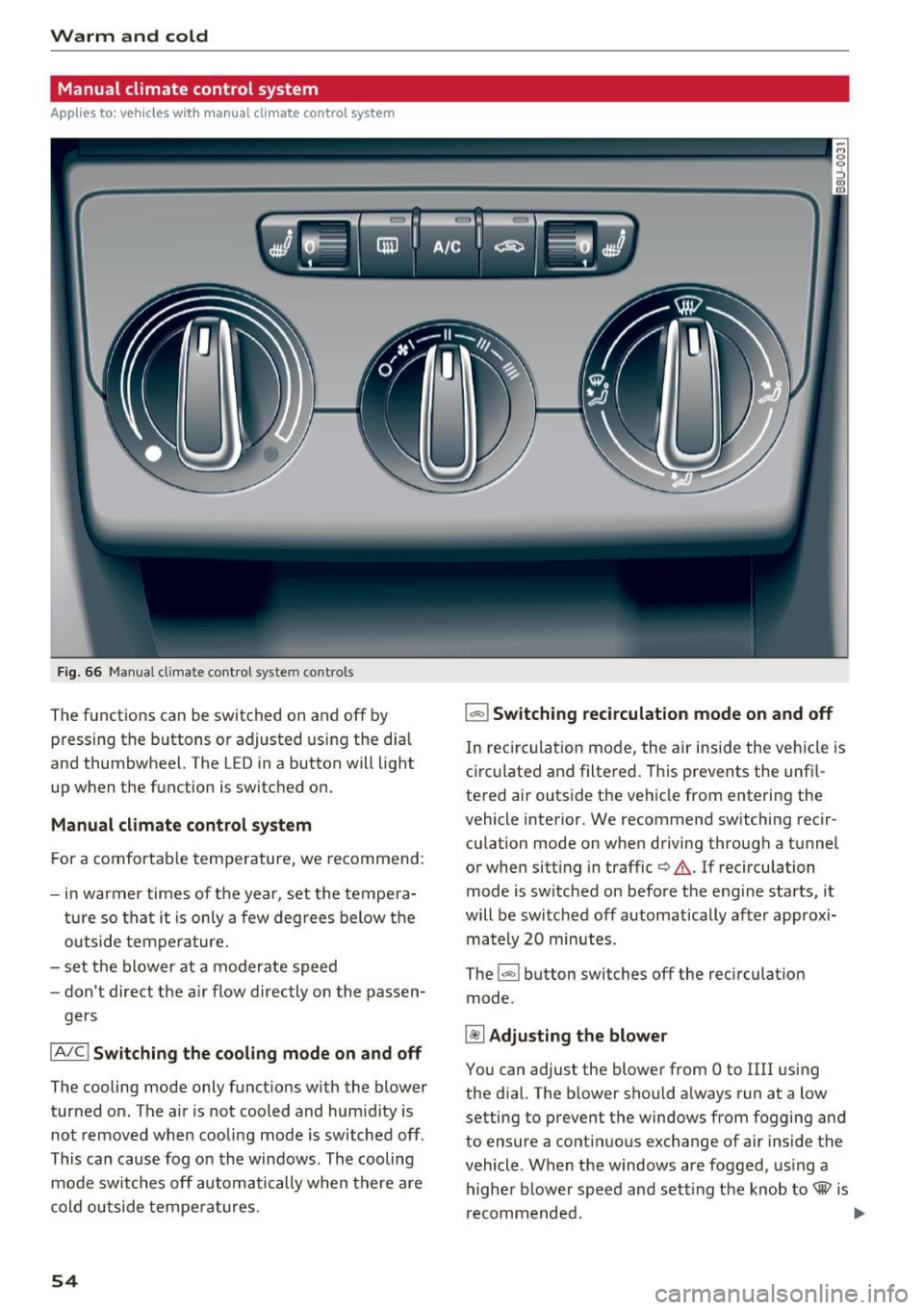
Fig. 66 Ma nua l climate control system controls
The functions can be switched on and off by
p ressing the buttons o r adjusted us ing the dia l
and thumbwheel. The LED in a button will light
up when t he f unction is switc hed on .
Manual climate control system
For a comfort able temperature, we recommend :
- in warmer times of t he yea r, set the tempe ra-
ture s o that it is only a few degree s below t he
o utsi de tem pera ture .
- set the blo wer at a moder ate speed
- don't direct t he a ir flow directly on the passen -
ger s
IA /C l Switching the cooling mode on and off
The cooling mode only funct ions w ith the blower
tur ned on. The air is not cooled and hum idity is
not removed when cooli ng mode is switched off.
This can caus e fog on the wi ndows. The cooling
mo de switc hes off automa tically w hen there are
cold ou tside tempe ratures.
54
1-1 Switching recirculation mode on and off
I n re circu lat io n mo de, the air ins ide the vehicle i s
c ir culated and filtered. This prevents the unf il
te red air ou ts ide t he ve hicle from enterin g the
vehicle inte rior. We recommen d sw itching rec ir
cu lation mode on when driving throug h a t unnel
or when sitt ing in traffic¢ &. If recircu lation
mode is switched on before t he eng ine sta rts, it
will be switched off automatically afte r approxi
ma tely 20 minu tes.
The
l"""I button switches off the recirculat io n
mode .
~ Adjusting the blower
You can adjust the blowe r from Oto III! usi ng
the dial. T he b lower sho uld a lways run at a low
setting to prevent t he windows from fogging and
to ensure a cont inuous exchange of a ir inside the
vehicle . When t he w indows are fogged, us ing a
higher blower sp eed and se tting the knob to® is
r ecommende d. ..,.
Page 57 of 236
00
00
......
"' ,-...
"' ...... 0 0 :::,
00
e / e Adju sting th e te mpe ratur e
The temperat ure can be free ly adjusted using the
l eft dial.
~ Ad justing the seat heating*
You can adjust the left and right heated seat
temperature using the left/ right t humbwheel.
The seat heating is switched off when the level is
set to 0.
~ Sw itching the rear window defogger on
and off
The rear window defogger only operates when
the eng ine is running. It switches off a utomati
cally after approximate ly 10 to 20 minutes, de
pending on the outside temperature.
Adjusting air d istribution and air vents
You can adjust the vents where the air wi ll flow
out of. The a ir distribution is eas ily adjusted be
tween the two symbols positioned next to each
other
(®/;J/~/ ~).
In the ~ setting, the windshield and side win
dows are defrosted or cleared of condensation as
q ui ckly as possible. The maxim um amount of a ir
Warm and c old
flows mainly from the vents below the wind
shield. Recirculation mode switches off .
You can open o r close the center a nd rear vents in
the co ckpit and the vents in the rear center con
sole using the ridged thumbwheels . The levers
adjust the direction of the airflow from the vents.
A WARNING
-- You shou ld not use the recircu lation mode
for an extended period since no fresh air is
drawn in. When the A/C system* is switched
off, the windows can fog up which increases
the risk of an accident.
- Individuals w ith reduced sensit ivity to pa in
or temperature could develop burns when
using the seat heat ing* function. To reduce
the risk of injury, these individua ls should
not use seat heating*.
0 Note
To avoid damaging the seat heat ing* ele
ments, do not kneel on the seats or place
heavy pressure on one area of the seat.
55
Page 58 of 236
Warm and cold
Automatic climate control system
Applies to: vehicles with automatic climate control
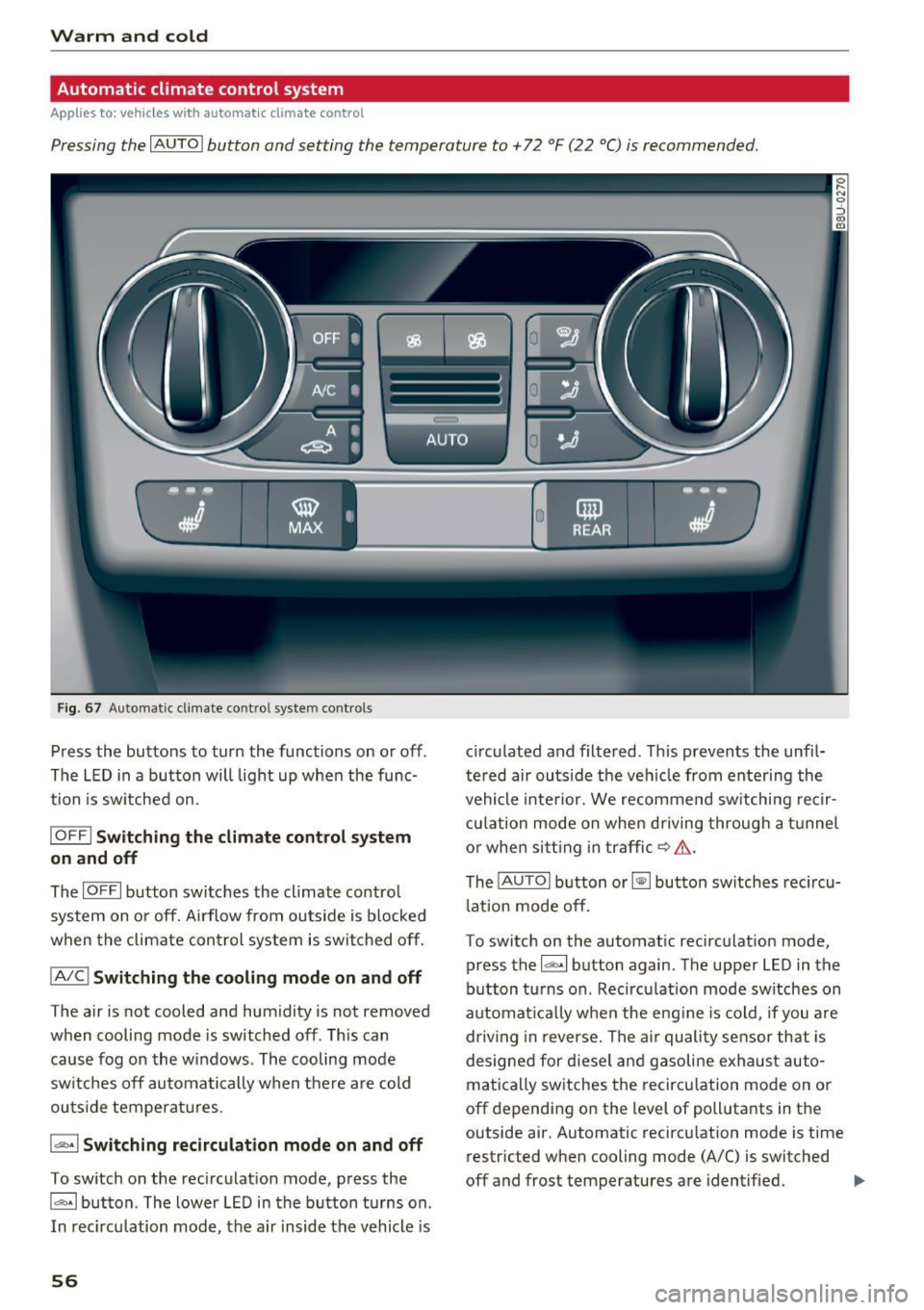
Pressing the IAU TO I button and setting the temperature to +72 °F (22 °C) is recommended.
Fig . 67 Au to m atic cli mate co ntrol system contro ls
Press the buttons to turn the functions on or off .
The LED in a button will light up when the func
tion is sw itched on.
IO FF ! Switching the climate cont rol s ystem
on and off
The IO FFI button switches the cl imate contro l
system on or off. Airflow from outside is b locked
when the climate con trol system is switched off .
IA/Cl Switching the cooling mode on and off
The air is not cooled and humidity is not removed
when cooling mode is switched off. This can
cause fog on the windows . The cooling mode
sw itches off automatically when the re are cold
ou tside temperat ures .
1.,,.,. 1 Switching recirculation mode on and off
To switch on the rec irculat ion mode, press the
ldb •I but ton . The lower LED in the button t urns on .
I n recirculation mode, the a ir inside the vehicle is
56
c irculated and filtered . This prevents the unf il
te red air outs ide the veh icle from entering the
vehicle inte rior. We recommend sw itching re cir
cu lation mode on when d riving through a t unnel
o r when si tt ing in traffic ~.&. .
The
! AUTO I b utton or~ button switches rec i rcu
l at ion mode off.
T o switc h on the automat ic recirculation mode,
press the
l dbA I button again . T he upper LED in the
button turns on . Recirculation mode sw itches on
automat ica lly when the eng ine is cold, if you are
dr iv ing in reverse. The a ir quality sensor that is
designed for d iesel and gasoline exhaust auto
matically sw itches the recircu lation mode on or
off depend ing on the level of pollutants in t he
outside air. Automatic recircu lation mode is time
restricted when cooling mode (A/C) is switched
off and frost temperatures are iden tified.
IJ,-
Page 59 of 236
IAUTOI Switching automatic mode on and off
Automatic mode ma inta ins a constant tempera
ture ins ide the vehicle. Air temperature, airflow
and air distribution are controlled automatically.
- I -Adjusting the temperature
The vehicle inte rior temperature can be adjusted
for the driver and the front passenger us ing the
l eft/rig ht knob. Temperatures can be set be
tween a range o f 60 °F ( +16 °() and 84 °F
(+28 °C) . Outside of this range,
LO or HI will ap
pear in the climate control system display. At
both of these settings, the climate contro l sys
tem runs continuously at maximum cooling or
heating power. There is no temperature regula
tion .
~ Adjust ing the blower
You can adjust the vo lume of air generated by the
blower to your preference. Use the left
l!:I button
to decrease the air speed, and use the right
lj]
button to increase the air speed . The blower
should always run at a low sett ing to prevent the
windows from fogging and to ensure a continu
ous exchange of air ins ide the veh icle. To have
the airflow regulated automatically, press the
IAUTO! button.
~/l;o!/ h0! Adjusting air distribution
You can manually select the vents where the air
will flow. The buttons can be pressed individually
or in combination with each other. To have the air
d is tribution regulated automatical ly, press the
IAUTO ! button.
~ Adjusting the seat heating*
Pressing the button switches the seat heating on
at the h ighest setting (level 3). The LEDs indicate
the temperature level. To reduce the tempera
ture, press the butto n again . To switch the seat
heating off, press the button repeatedly until the
LED turns off.
Afte r approximately 10 minutes, the seat heating
a utomatically switches from level 3 to level 2.
00
~ I@ MAXI Switching the defroster on and off
"' ,....
~ The windshield and s ide windows are defrosted 0
g or cleared of condensation as quickly as possible.
00
Warm and cold
The maximum amount of air flows mainly from
the vents below the windshield . Recirculation
mode switches off. The temperature should be
set at +72°F (22°() or higher.
T he
!AUTOI button switches the defroster off.
llilil REAR! Switching the rear window defogger
on and off
T he rear window defogge r on ly operates when
the engine is running and will be automatically
switched off after approximate ly 10 minutes .
Synchronization
If you press the
IAUTO I button longer, you can
transfe r the d river temperature setting to the
front passenger. Synchronization is switched off
as soon as the temperature for the front pas
senger's s ide is changed.
Air vents
You can open o r close the center and rear vents in
the cockpit and the vents in the rear center con
sole using the ridged thumbwheels . The levers
adjust the direction of the airflow from the vents.
Switching the temperature measurement
units
T he temperature display can be switched be
tween°( and °F. Press and hold the
l ,e,,: ,.I button
r=;, fig. 67 and turn the knob on the driver's side to
- for three seconds.
A WARNING
-
-You shou ld not use the recirculation mode
for an extended period of time since no
fresh air is drawn in. With the air-condition
ing switched off, the windows can fog up,
which increases the risk of an acc ident.
- Indiv iduals w ith reduced sensit iv ity to pain
or temperature could develop burns when
using the seat heating* function. To reduce
the risk of injur y, these individua ls should
not use seat heating*.
0 Note
To avoid damaging the seat heating* ele
ments, do not kneel on the seats or place
heavy pressure on one area of the seat.
57
Page 63 of 236
00
00
......
"' ,....
"' ...... 0 0 :::,
00
E quipment that uses a lot of electricity is switch
ed off temporari ly when you start the engine.
I f the engine does not start im mediately, stop
the s tart ing proced ure and repeat afte r 30 sec
onds. To restart the engine, t urn the ignition key
back to position @.
A WARNING
-Never allow the engine to run in confined
spaces -danger of asphyxiation .
- Never remove the ignition key from the igni
tion look while the vehicle is moving. Other
wise, the steering lock could suddenly en gage and you would not be able to steer the
vehicle .
- Always take the key with you whenever you
leave your vehicle. Otherw ise, the engine
could be started or electrical equ ipme nt
such as the power windows cou ld be operat
ed . T his can lead to serious injury.
- Never leave children or persons requiring as
sistance unattended in the vehicle. The
doo rs can be loc ked using the remote trans
mitter, preventing people from escap ing
from the vehicle on the ir own in the event o f
an emergency. Depend ing on the t ime of
year, peop le inside the vehicle can be ex
posed to very high or very low tempera
tures .
(D Note
Avoid high engine speed, full throttle, and
heavy engine load if the engine has not
reached operating temperature yet. You could
damage the engine.
@ For the sake of the environment
Do not let the engine run while parked to
warm up. Begin driving immediately . This re
duces unnecessary emissions.
(D Tips
- If it is difficu lt to turn the key to position
(D, turn the steering wheel back and forth
slightly to release the steering wheel lock .
- Some noise after starting the engine is nor
mal and is no cause for concern.
D riving
Stopping the engine
App lies to : vehicles wi th ignition lock
Stopping the engine
.,. Br ing the veh icle to a full stop.
.,. Tu rn the key to position @.
Engaging the steering lock
Requirement: the selector lever must be in P.
.,. Remove the ignition key in position @
¢ page 60, fig. 69 ¢ .&_.
.,. Turn the steering wheel until you hear the
steering whee l lock .
The locked steering helps prevent vehicle theft.
A WARNING ....._ --Never turn off the engine before the vehicle
has come to a complete stop. The full func
tion of the brake booster and the power
steer ing is not guaranteed. You must use
more force to turn or brake if necessary. Be
cause yo u cannot stee r and brake as you
usually would, th is could lead to crashes
and serious injuries .
- For safety reasons, you should always park
your veh icle w ith the selector lever in P.
Otherwise, the vehicle could inadvertently
ro ll away .
- The radiator fan can continue to run for up
to 10 minu tes even after you have turned
off the engine and removed the ignition key.
The radiator fan can also turn on again if the
engine coolant heats up because of intense
sunlight or heat build-up in the eng ine com
partment.
- Always take the key with you whenever you leave your vehicle. Otherwise, the engine
could be started or electrical equipment
such as the power windows could be operat
ed. This can lead to ser ious injury.
- Never leave children or persons requ iring as
sistance unattended in the vehicle . The
doors can be locked using the remote t rans
mitter, preventing people from escaping
from the vehicle on their ow n in the event of
an emergency . Depending on the time of
year, people inside the vehicle can be
61
Page 64 of 236
Driving
exposed to very high or very low tempera
tures.
CD Note
If the engine has been under heavy load for
an extended period of time, heat builds up in
the engine compa rtment after the engine is
sw itched off and there is a risk of damaging
the engine. For this reason, let the engine run
at idle for approximately two minutes before
shutt ing it off .
Starting and stopping
the engine (vehicles with
a convenience key)
Starting the engine
Applies to: vehicles with convenience key
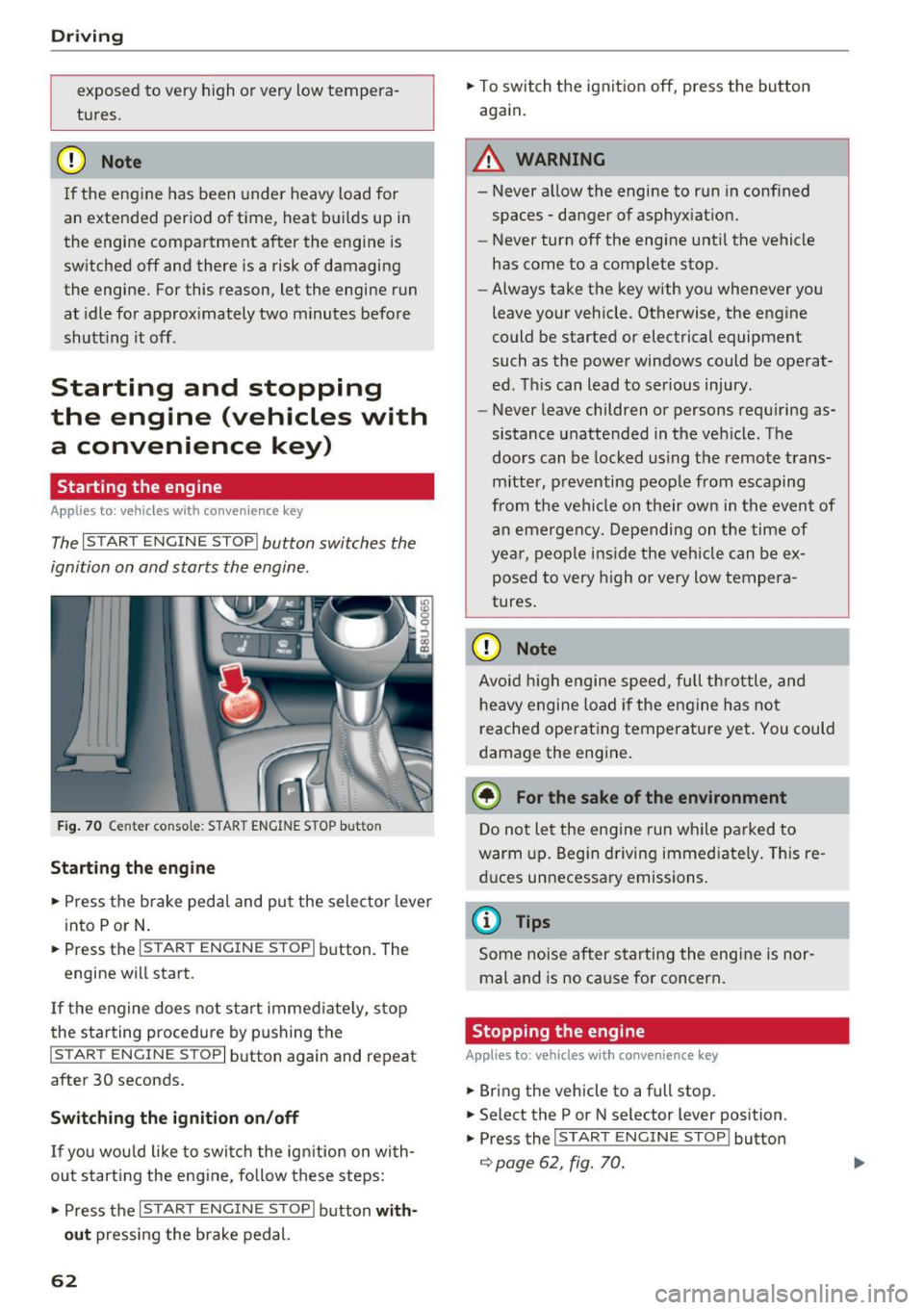
The I START E N GINE STOP I button switches the
ignition on and starts the engine .
Fig. 70 Center conso le : STAR T ENGINE S TOP b utt o n
Starting the engine
.,. Press t he b rake pedal and pu t the sele ctor leve r
into P or N .
.,. Press the
I S TART ENGINE STOPI button . The
engine wi ll start .
If the engine does not sta rt immed iate ly, stop
the starting procedure by pushing the
I START ENGINE STOP I button again and repeat
after 30 seconds.
Switch ing the ignition on/off
If you wou ld like to swi tch the ig nition on wi th
out starting the e ngine, fo llow these steps:
.,. Press the
I S TAR T ENGIN E STOPI button with
out
press ing the brake pedal.
62
.,. To switch the ignition off, press the button
again.
A WARNING
- Never a llow the engine to run in conf ined
spaces -danger of asphyx iat ion.
- Never turn off the engine until the vehicle
has come to a complete stop.
- Always take the key with you whenever yo u
leave your vehicle . Otherwise, the engine
could be started or electrical equipment
such as the powe r windows could be operat
ed. This can lead to serious injury .
- Never leave children o r persons requ iring as
sistance unattended in the ve hicle. The
doors can be locked us ing t he remote trans
m itter, p reventing peop le from escaping
from the vehi cle on their own in the even t of
an emergen cy. Depending on t he time of
year, peo ple ins ide the veh icle can be ex
posed to very high o r very low tempera
tures .
CD Note
Avoid high engi ne spee d, full t hrott le, and
h eavy engine load if the e ngine has not
reached operat ing temperatu re ye t. You could
d amage the eng ine.
@ For the sake of the environment
D o not le t the eng ine run wh ile parked to
warm up. Beg in driving immed iate ly . Th is re
d uces un necessa ry emissions .
@ Tips
Some noise after s tarting the eng ine is nor
mal and is no ca use for concern .
Stopping the engine
Applies to: vehicles with convenience key
.,. Bring the vehicle to a full stop .
.,. Select the P or N se lector lever position .
.,. Press the
I START E NGINE STOP I button
¢ page 62, fig. 70.
-
Page 67 of 236

00
00
......
"' ,....
"' ...... 0 0 :::,
00
~ To prevent the parking brake from releasing au
tomatically, pull and hold the(®) switch and
press the accelerator pedal. The parking brake
remains set and prevents the vehicle from roll
ing backward .
~ You can release the(®) switch again once you
are sure that you are giving enough driving
force to the wheels by pressing the accelerator pedal.
Emergency braking function
You can use the emergency braking function in an
emergency situation, or if the standard brake op
eration malfunctions or is disabled.
~ Pull and hold the(®) switch.
~ As soon as you release the (®) switch or acceler-
ate, the braking stops .
Pulling and holding the(®) switch while driving
the vehicle activates the emergency braking func
tion . The vehicle is braked at all four wheels by
activating the hydraulic brake system. The brak
ing effect is similar to heavy braking
Q &_.
To reduce the risk of activating the emergency
braking by mistake, a warning tone (buzzer)
sounds when the(®) switch is pulled. Emergency
braking stops as soon as the (®) switch is released
or the accelerator pedal is pressed .
Parking
~ Press the brake pedal to stop the vehicle.
~ Pull the(®) switch to set the parking brake.
~ Place the selector lever in the P position .
~ Turn the engine off Q &_.
~ Turn the steering wheel when parking on in
clines so that the wheels will roll into the curb
if the vehicle starts moving.
WARNING
- Do not press the accelerator pedal inadver
tently if a gear is selected when the vehicle
is stationary and the engine is running. Oth
erwise, the vehicle will start to move imme
diately and this could result in an accident.
- Emergency braking should only be used in
an emergency, when the normal brake pedal
has failed or the brake pedal is obstructed .
Driving
During emergency braking, your vehicle will
brake similar to heavy braking. ESC and the
associated components (ABS, ASR, EDL)
cannot overcome the laws of physics . In cor
ners and when road or weather conditions
are bad, a full brake application can cause
the vehicle to skid or the rear end to swerve,
which increases the risk of an accident.
- If the power supply fails, you cannot set the
parking brake if it is released. In this case,
park the vehicle on level ground and secure
it by placing the selector lever in the P posi
tion. See an authorized Audi dealer or au
thorized Audi Service Facility for assistance.
- Always take the vehicle key with you when leaving your vehicle, even for a short period
of time. This applies particularly when chil
dren remain in the vehicle. Otherwise chil
dren could start the engine, release the
parking brake or operate electrical equip
ment such as power windows, which in
creases the risk of an accident .
- No one should remain in the vehicle when it
is locked -especially children . Locked doors
make it more difficult for emergency work
ers to get into the vehicle, which puts lives
at risk.
(D Tips
- When stopping at a traffic signal or stop
ping in city traffic, you can set the parking
brake manually . The vehicle does not have
to be held with the brake pedal. The parking
brake eliminates the tendency to creep
when a selector lever position is engaged.
As soon as you press the accelerator pedal,
the parking brake releases automatically
and your vehicle starts to move
Q poge
66 .
-Occasional noises when the parking brake is
set and released are normal and are not a
cause for concern .
- The parking brake goes through a self-test
cycle at regular intervals when the vehicle is
stopped . Any noises associated with this are
normal. .,.
65
Page 68 of 236
Driving
-If t here is a power fa ilure, the pa rking brake
will not set if it is re leased, and it will not
r elease i f it is set¢.&. . See an authorized
A udi dealer or authorized A udi Service Fa
cility for ass istance.
Starting from a stop
Vario us convenience and safety functions may be
ava ilable when the vehicle begins driving, de
pending on vehicle eq uipment .
Starting on hills with the parking brake set
R eq uir ement: the driver's door must be closed .
.,. To start dr iving co m fo rtab ly when o n a hill, set
t he parking brake and begin dr iv ing as usu al.
The brak ing force of the par king brake does not
release automatically until t he wheels build up
enough dr iv ing force .
Starting on hills with hill hold assist
Hill hold ass ist m akes i t ea sie r to st art on hills.
Re qui remen t: the driver's door must be closed
and the eng ine must be r unning .
.,. To activate hill ho ld assist, press a nd ho ld the
brake pedal for several seconds. The veh icle
must be i n an uph ill direction o f travel.
After releasing the brake peda l, the bra king pow
er is ma intained for a brief moment¢
A to pre
ve nt the vehicle from rolling back when starting.
D ur ing th is ti me, you can eas ily beg in to move
your ve hicle.
.8, WARNING
Appl ies to: ve hicles wit h hil l hol d ass ist
- If you do not begin dr iving immediately or
the engine sta lls after releas ing t he b rake
peda l, yo ur vehicle may begin to roll back
ward. P ress the brake pedal o r set the park
ing bra ke immed iate ly.
- The intelligent tec hno logy of hill hold assist
cannot overcome the lim itations imposed by
natura l phys ical laws . The incr eased comfo rt
of fered by h ill hold ass ist sho uld not cause
yo u to
ta ke safe ty risks.
66
- Hill hold ass ist cannot hold t he ve hicle in
place on a ll hills (for examp le, if the ground
is s lippery or icy).
- To reduce the r is k of an accident, always
make sure the veh icle is situated safely
w hile stationary .
Driving offroad
General information
Applies to: vehicles with offroad mode
The ele ct ronic st abiliz ation con trol ( ES C) f unc
tions we re enh ance d for driving off road. ESC o ff
road mode can be activated in driving sit uat ions
i n which a whee l lock o r a differential lock func
tion is needed ¢
page 93. The h ill descent as
s ist is a lso available , which automatically brakes
the ve hicle and main tains a constant speed as a
r esul t¢
pag e 94.
However , your Aud i is not an offroad vehicle .
Only drive in terrain that is suitable for the vehi
cle and your driving ability. Never take any un necessary risks!
After driving offroad
- After d riving off road, remove branches and
other deb ris from the rad iator g rille, under
body, and wheels. Look especially fo r fo reign
objects (such as stones) that may be st uck in
the t ire t read.
- Clean the vehicle body and u nderbody a nd i n
spect the veh icle for poss ible damage.
- Clean the windows, headlights, tail lights a nd
the license p late if they are dirty .
- Perform a brake test (espec ia lly after driving
throug h water) .
.8, WARNING
-Be especially aware a nd at tentive whe n driv
ing un der diff icu lt con ditions . Vehicl e dam
age a nd injuries may o ccur when driving at
e xc es sively high speed s or with i ncorr ec t
d riving maneuvers.
- Always a djust yo ur sp eed and drivi ng s ty le
to the roa ds, terr ain, tra ffi c and weat he r
condition s. Drive especi ally slowly if t here i s
low visibili ty when o ffroad .
~
Page 84 of 236
Ass is t
@ Tips
- If the window g lass in the driver's door or
front passenger's door has been tinted, the
display in the exterior mirror may be incor rect.
- For an explanation on conformity with the FCC regulations in the United States and the
Industry Canada regu lations, see
¢ page 221.
Switching on and off
A pp lies to: ve hicles w ith Aud i side ass ist
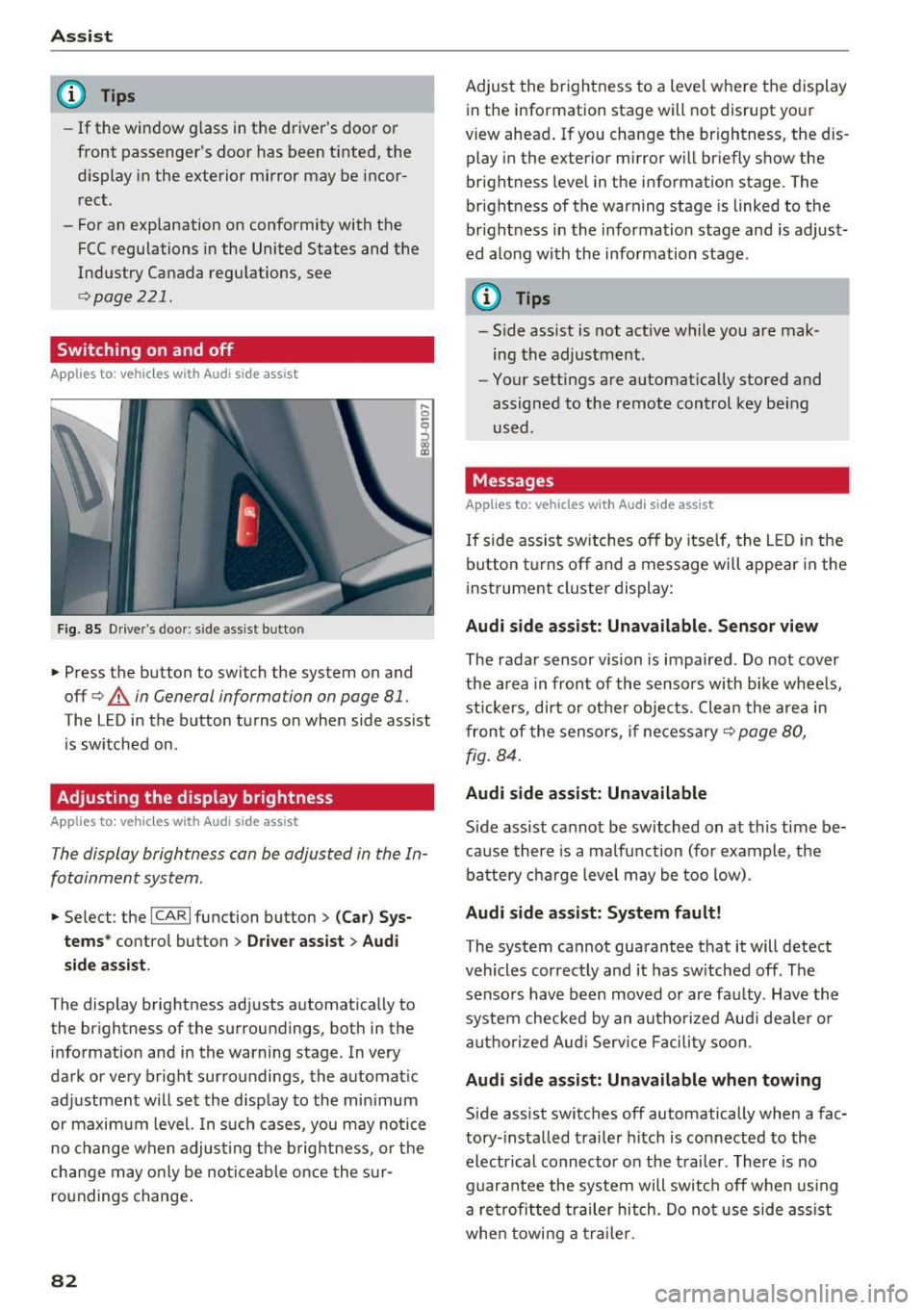
F ig. 85 Drive r's door : side assist b utto n
.... 0
I
.. Press the button to switch the system on and
off ¢
A in General information on page 81 .
The LED in the button turns on when side assist
is sw itched on .
Adjusting the display brightness
Applies to: ve hicles w ith Aud i side ass ist
The display brightness can be adjusted in the In
fotainment system .
.. Se lect : the ICARI function button> (Ca r) Sys
t e m s*
control button > Dr ive r assi st> Audi
sid e assi st.
The display brightness adjusts automatically to
the brightness of the surroundings, both in the
information and in the warning stage . In very
dark or very bright surroundings, the automat ic
adjustment will set the disp lay to the min imum
or maximum level. In such cases, you may notice
no change when adjust ing the b rightness, o r the
cha nge may only be no ticeable once the s ur
roundings change .
82
Adjust the brightness to a level where the display
in the information stage will not disrupt your
view ahead . If you change the br ightness, the dis
play in the exterior mirror w ill br iefly show the
brightness level in the information stage . The
brightness of the warning stage is linked to the
br ight ness in the information stage and is adjust
ed along with the information stage .
(D Tips
-Side ass ist is not act ive while you are mak
ing the adjustment .
- Your settings are automat ically stored and
assigned to the remote control key be ing
used .
Messages
Applies to : vehicles wi th Audi side ass ist
If side assist sw itches off by itse lf, the L ED in the
b utton t urns off and a message will appea r in the
i nstrument cluster display:
Audi s ide assi st: Unavailable. S ensor view
The radar sensor vision is impaired . Do not cover
the area in front of the sensors with bike whee ls,
stickers, dirt or other objects. Clean the a rea in
front of the sensors, if necessary¢
page 80,
fig . 84.
Audi side assist: Unavailable
Side assist cannot be switched on at this time be
ca use there is a ma lfunction (for example, the
battery c ha rge level may be too low).
Audi side assist: System f ault!
The system cannot guarantee that it will detect
vehicles correctly and it has sw itched off . The
sensors have been moved or are faulty . Have the
system checked by an autho rized Aud i dealer o r
aut ho rized Aud i Serv ice Facility soon.
Audi s ide assist: Unavailable when towing
Side assist switches off automatically when a fac
tory- installed trailer h itch is connected to the
electr ical connec tor on the t railer . There is no
guarantee the system will switc h off when using
a ret rofi tted trailer hitch . Do not use side assist
whe n towi ng a traile r.