key AUDI Q3 2017 Owner´s Manual
[x] Cancel search | Manufacturer: AUDI, Model Year: 2017, Model line: Q3, Model: AUDI Q3 2017Pages: 236, PDF Size: 58.93 MB
Page 64 of 236
Driving
exposed to very high or very low tempera
tures.
CD Note
If the engine has been under heavy load for
an extended period of time, heat builds up in
the engine compa rtment after the engine is
sw itched off and there is a risk of damaging
the engine. For this reason, let the engine run
at idle for approximately two minutes before
shutt ing it off .
Starting and stopping
the engine (vehicles with
a convenience key)
Starting the engine
Applies to: vehicles with convenience key
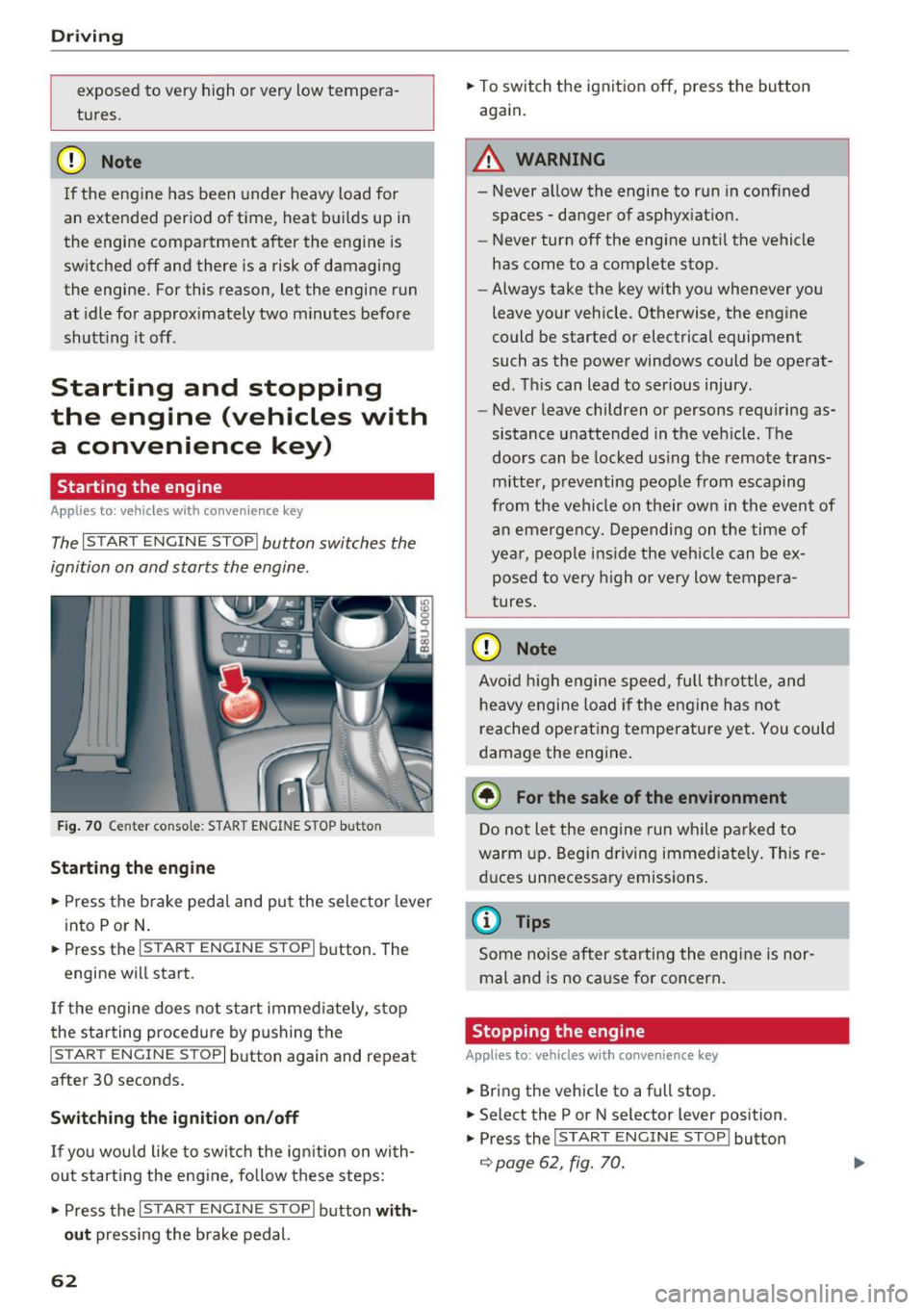
The I START E N GINE STOP I button switches the
ignition on and starts the engine .
Fig. 70 Center conso le : STAR T ENGINE S TOP b utt o n
Starting the engine
.,. Press t he b rake pedal and pu t the sele ctor leve r
into P or N .
.,. Press the
I S TART ENGINE STOPI button . The
engine wi ll start .
If the engine does not sta rt immed iate ly, stop
the starting procedure by pushing the
I START ENGINE STOP I button again and repeat
after 30 seconds.
Switch ing the ignition on/off
If you wou ld like to swi tch the ig nition on wi th
out starting the e ngine, fo llow these steps:
.,. Press the
I S TAR T ENGIN E STOPI button with
out
press ing the brake pedal.
62
.,. To switch the ignition off, press the button
again.
A WARNING
- Never a llow the engine to run in conf ined
spaces -danger of asphyx iat ion.
- Never turn off the engine until the vehicle
has come to a complete stop.
- Always take the key with you whenever yo u
leave your vehicle . Otherwise, the engine
could be started or electrical equipment
such as the powe r windows could be operat
ed. This can lead to serious injury .
- Never leave children o r persons requ iring as
sistance unattended in the ve hicle. The
doors can be locked us ing t he remote trans
m itter, p reventing peop le from escaping
from the vehi cle on their own in the even t of
an emergen cy. Depending on t he time of
year, peo ple ins ide the veh icle can be ex
posed to very high o r very low tempera
tures .
CD Note
Avoid high engi ne spee d, full t hrott le, and
h eavy engine load if the e ngine has not
reached operat ing temperatu re ye t. You could
d amage the eng ine.
@ For the sake of the environment
D o not le t the eng ine run wh ile parked to
warm up. Beg in driving immed iate ly . Th is re
d uces un necessa ry emissions .
@ Tips
Some noise after s tarting the eng ine is nor
mal and is no ca use for concern .
Stopping the engine
Applies to: vehicles with convenience key
.,. Bring the vehicle to a full stop .
.,. Select the P or N se lector lever position .
.,. Press the
I START E NGINE STOP I button
¢ page 62, fig. 70.
-
Page 65 of 236
a:,
a:,
...... N r--. N .-< 0 0 ::, a:,
Engaging the steering lock1
)
The steering locks when you tu rn the engine off
using the
! S TART ENGINE ST OP I butto n and
open the driver's door. The locked stee ring he lps
p revent vehicle theft .
Emergency off function *
If it is absolutely necessary, the engine can also
be turned off while driv ing at speeds starting at
4 mph (7 km/h). To switch the engine off, p ress
the
! STA RT ENGINE ST OP I button twice in a row
bri efly or press and hold for long er than two sec
onds.
A WARNING
- Never turn off the engine before the veh icle
has come to a complete stop. The f ull func
ti on of the brake booster and the power
steering is not gua ranteed. You must use
more fo rce to turn or b rake if necessary. Be
c a use you canno t steer and brake as you
usually wou ld, this could lead to c rashes
and serious injuries .
- For safety reasons, you should always par k
yo ur vehicle wi th the selector lever in P .
Otherwise, the vehicle could inadvertently
roll away .
- The radiator fan can continue to run for up
to 10 min utes even afte r you have turned
off the engine and removed the ignition key.
The radiator fan can also tu rn on again if the
engine coolant heats up because of intense
sunlight or heat bui ld -up in the engine com
partment.
- Always take the key with you whenever you
leave your vehicle. Otherw ise, the engine
cou ld be sta rted or electrical equ ipme nt
such as the power w indows cou ld be opera t
ed . T his can lead to se rious inj ury.
(D Note
If the eng ine has been under heavy load for
an extended per iod of t ime, heat builds up in
the engine compa rtme nt after the eng ine is
sw itched off and there is a risk of dam aging
ll Th is fun ctio n is not a vail able in al l countries .
Drivi ng
the engine. For th is reason, let the engine run
at idle for approximate ly two minutes before
shutting it off .
Starting the engine when there is a
malfunction
Applies to: vehicles with convenience key
Other circumstan ce s can cause the engine no t to
s tar t, such as the battery in the remote control
key has drained , there is interference with the
key or there is a system malfunction.
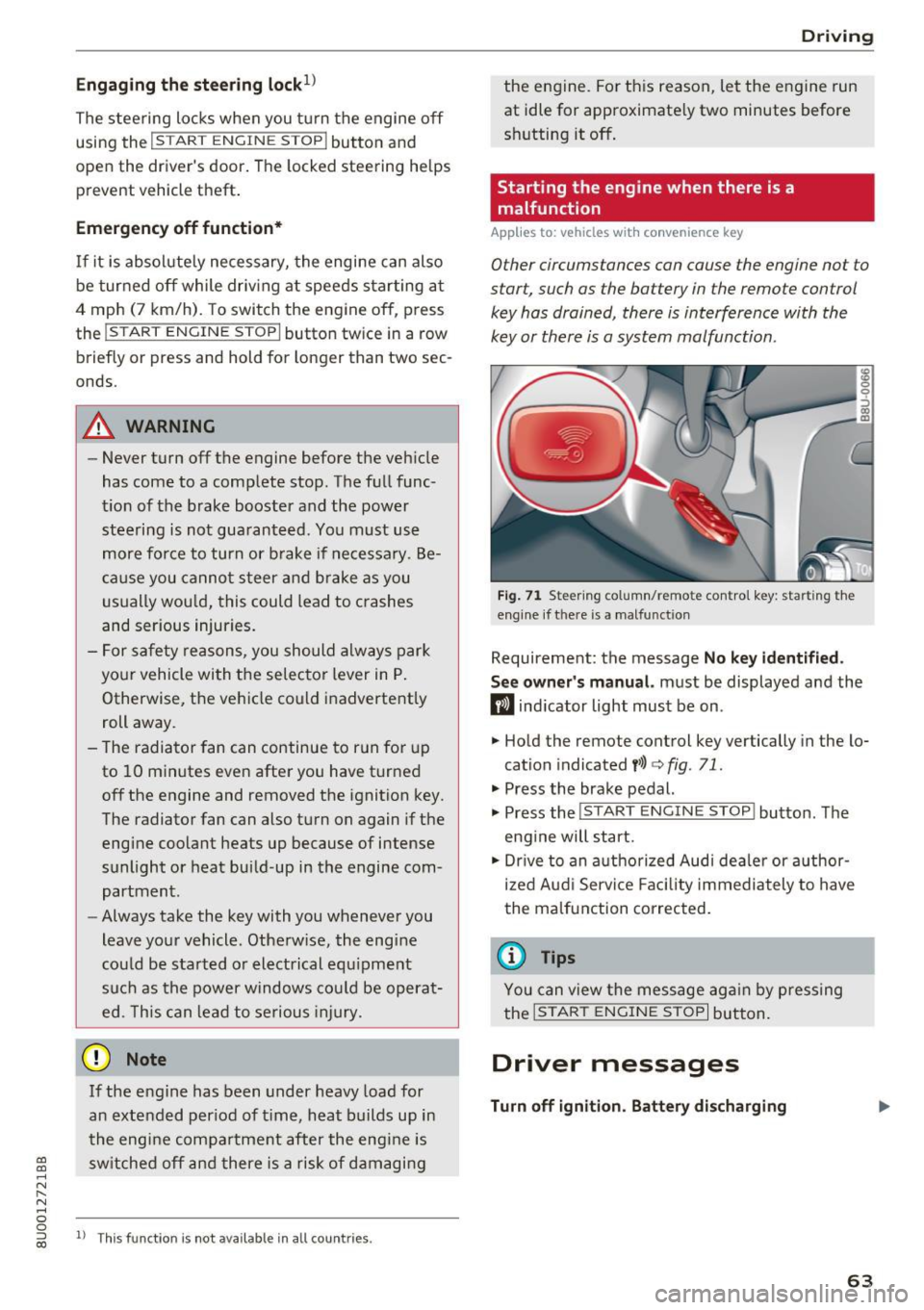
F ig . 7 1 Steer ing co lumn/remo te con trol k ey: star ting the
eng ine if t here is a ma lfun ction
Requirement: the message No key id entified .
S ee owner's manual.
must be displayed and the
m ind icator light must be on .
.,. Hold the remote control key vertically in the lo
cation indicated
y> l) q fig. 71 .
.,. Press the brake pedal.
... Press the
!START E NGINE STOP ! button. The
eng ine will start.
.,. Dr ive to an a uthorized Audi dea ler or a uthor
ized Aud i Servi ce Fa cili ty immediately to have
the malfunct ion correc ted.
(D Tips
You can view the message ag ai n by pressing
the
I START ENGI NE STOP I bu tton.
Driver messages
Turn off ignition . Battery discharging
63
Page 66 of 236
Driving
This message appea rs and a warning tone sounds
if you open the driver's door when the ignition is
sw itched on.
Pr es s brake pedal to start engine
This message appears if you do not step on the
brake pedal to sta rt the eng ine on a vehicle wi th
an automatic transm ission .
Please engage N or P
This message appears when starting or stopping
the engine and Nor Pis not engaged. The engine
will not start/stop .
Ill Key not in veh icl e?
The indica to r li ght tur ns on and this message ap
pears i f the convenience key* was removed from
the vehicle when the engine was running. If the
convenience key is no longer in the v ehicle, you
cannot switch the ignition on or start the engine
once you stop it . You also cannot lock the vehicle
from the outside.
Shift to P , vehicle can roll awa y. Doors can onl y
be locked in P .
This message appea rs for safe ty reasons a long
with a warning sound if the se lector lever is not
engaged in P after switching the ignition off .
Move the selector lever to the P position. Other
wise the vehicle is no t protected from rolling and
it cannot be locked .
II No key identified. See owner' s manual.
This message appe ars if the re is no convenience
key * ins ide the vehicle or if t he system does not
recognize the key . The convenience key may not
be recognized, for example, if it is covered by an
object that
disrupts the signal (such as a brief
case), or if the key batte ry is weak. Electronic de
vices suc h as cell phones can also interfere w it h
the s ignal.
To still be able to start or stop the engine, refer
to
c:::> page 63.
64
Electromechanical
parking brake
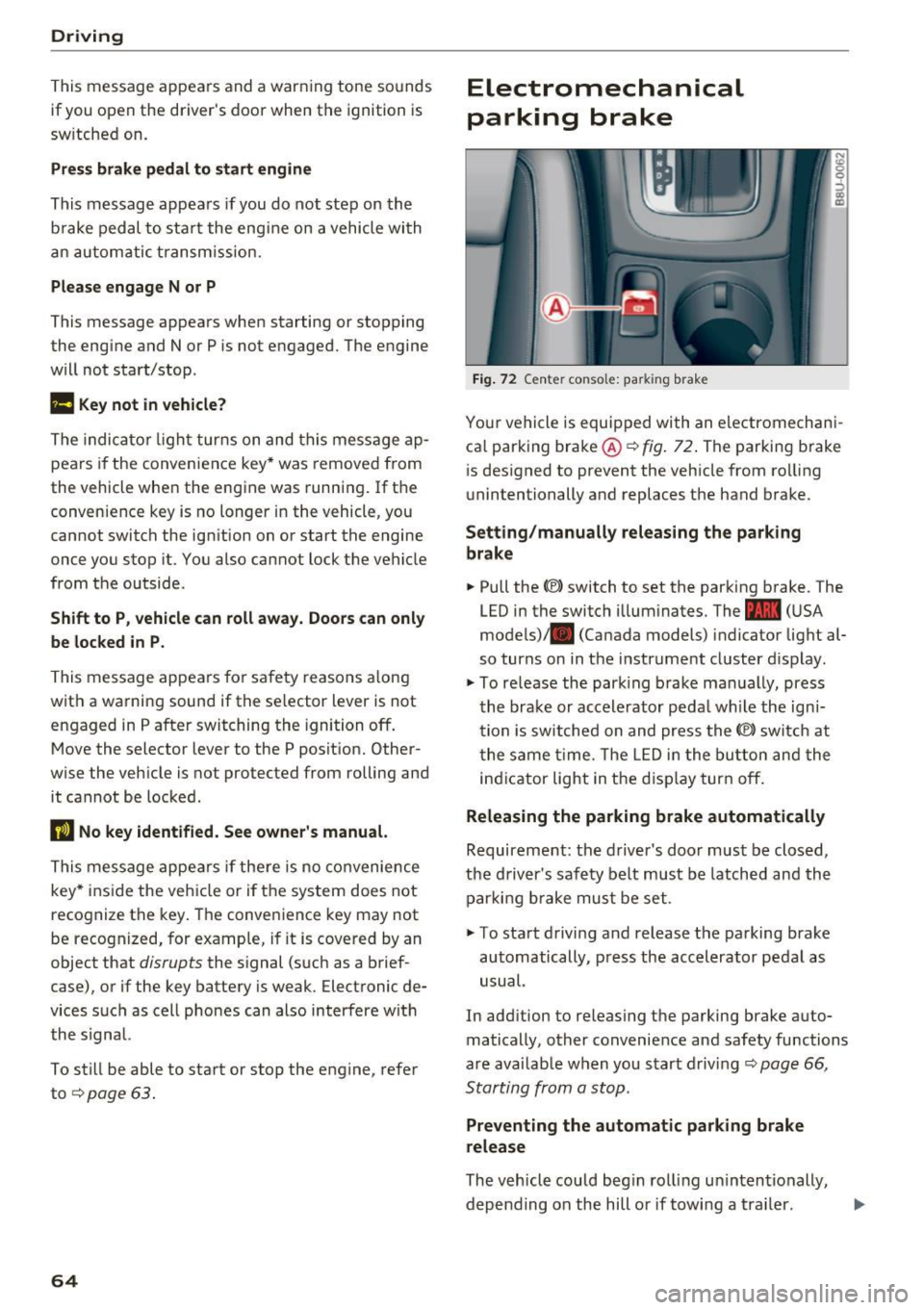
Fig . 7 2 Ce nter co nso le: pa rk in g brake
You r vehicle is equipped with an electromechani
ca l parking bra ke @
c:::> fig . 72. The parking brake
i s des igned to prevent the veh icle from ro lling
unintentionally and replaces the hand brake.
Setting /manually releasing the parking
brake
.. Pull the(®) switch to set the parking b rake . The
LED in the switch illum inates. The -
(U SA
mode ls)/ . (Canada models) indicator light al
so turns on in the instrument cluster d isplay .
.,. To re lease the par king brake ma nually, press
the brake or accele rator peda l w hile the ign i
tion is sw itched on and press the(®) switch at
t he same t ime. The L ED i n the bu tton and the
in dicator light in the d isp lay turn off.
Releasing the parking brake automatically
Requireme nt: the d river 's door must be closed,
the driver's saf ety be lt must be latched and the
par king b rake mus t be set .
.. To sta rt d riving and release the parking brake
automatically , press the accelerator pedal as
usual.
In add ition to releasing the parking brake auto
matically, other convenience and safety functions
a re availab le when you start driving
c:::> page 66 ,
Starting from a stop.
Preventing the automatic parking brake
release
The veh icle could beg in rol ling u ninten tionally,
depending on the hill or if towing a tra iler . .,..
Page 67 of 236

00
00
......
"' ,....
"' ...... 0 0 :::,
00
~ To prevent the parking brake from releasing au
tomatically, pull and hold the(®) switch and
press the accelerator pedal. The parking brake
remains set and prevents the vehicle from roll
ing backward .
~ You can release the(®) switch again once you
are sure that you are giving enough driving
force to the wheels by pressing the accelerator pedal.
Emergency braking function
You can use the emergency braking function in an
emergency situation, or if the standard brake op
eration malfunctions or is disabled.
~ Pull and hold the(®) switch.
~ As soon as you release the (®) switch or acceler-
ate, the braking stops .
Pulling and holding the(®) switch while driving
the vehicle activates the emergency braking func
tion . The vehicle is braked at all four wheels by
activating the hydraulic brake system. The brak
ing effect is similar to heavy braking
Q &_.
To reduce the risk of activating the emergency
braking by mistake, a warning tone (buzzer)
sounds when the(®) switch is pulled. Emergency
braking stops as soon as the (®) switch is released
or the accelerator pedal is pressed .
Parking
~ Press the brake pedal to stop the vehicle.
~ Pull the(®) switch to set the parking brake.
~ Place the selector lever in the P position .
~ Turn the engine off Q &_.
~ Turn the steering wheel when parking on in
clines so that the wheels will roll into the curb
if the vehicle starts moving.
WARNING
- Do not press the accelerator pedal inadver
tently if a gear is selected when the vehicle
is stationary and the engine is running. Oth
erwise, the vehicle will start to move imme
diately and this could result in an accident.
- Emergency braking should only be used in
an emergency, when the normal brake pedal
has failed or the brake pedal is obstructed .
Driving
During emergency braking, your vehicle will
brake similar to heavy braking. ESC and the
associated components (ABS, ASR, EDL)
cannot overcome the laws of physics . In cor
ners and when road or weather conditions
are bad, a full brake application can cause
the vehicle to skid or the rear end to swerve,
which increases the risk of an accident.
- If the power supply fails, you cannot set the
parking brake if it is released. In this case,
park the vehicle on level ground and secure
it by placing the selector lever in the P posi
tion. See an authorized Audi dealer or au
thorized Audi Service Facility for assistance.
- Always take the vehicle key with you when leaving your vehicle, even for a short period
of time. This applies particularly when chil
dren remain in the vehicle. Otherwise chil
dren could start the engine, release the
parking brake or operate electrical equip
ment such as power windows, which in
creases the risk of an accident .
- No one should remain in the vehicle when it
is locked -especially children . Locked doors
make it more difficult for emergency work
ers to get into the vehicle, which puts lives
at risk.
(D Tips
- When stopping at a traffic signal or stop
ping in city traffic, you can set the parking
brake manually . The vehicle does not have
to be held with the brake pedal. The parking
brake eliminates the tendency to creep
when a selector lever position is engaged.
As soon as you press the accelerator pedal,
the parking brake releases automatically
and your vehicle starts to move
Q poge
66 .
-Occasional noises when the parking brake is
set and released are normal and are not a
cause for concern .
- The parking brake goes through a self-test
cycle at regular intervals when the vehicle is
stopped . Any noises associated with this are
normal. .,.
65
Page 71 of 236
00
or in the 5 sport mode. The instrument cluster
display shows the selected driving mode.
In the
normal mode D, the transmission auto
matically selects the suitable gear ratio.
It de
pends on engine load, vehicle speed and driving
style.
Select the
sport mode 5 for sporty driving. The
vehicle makes full use of the engine's power.
Shifting may become noticeable when accelerat
ing.
To move from selector lever position N to D, you
must press the brake pedal and the vehicle must
be traveling less than 1 mph (2 km/h) or be sta
tionary ¢&. .
A WARNING
Read and follow all WARNINGS¢&. in Driv
ing tips on page
70.
@ Note
Coasting downhill with the transmission in N
and the engine not running will result in dam
age to the automatic transmission and possi
bly the catalytic converter.
(D Tips
- If you accidentally select N while driving,
take your foot off the accelerator pedal and
wait for the engine to slow down to idle be
fore selecting Dor 5.
- If there is a power failure, the selector lever
will not move out of the P position. The
emergency release can be used if this hap
pens ¢
page 72.
Driving tips
Starting the engine
.. The selector lever must be in the P or the N po
sition.
Starting from a stop
.. Press and hold the brake pedal.
~ .. Press and hold the interlock button in these-
"' ~ lector lever handle, select the desired selector .... 0 0
:::,
00
Driving
lever position such as D ¢ page 68 and release
the lock button.
.. Wait a moment until the transmission shifts.
You will notice a slight movement when the
gear engages.
.. Release the brake pedal and press the accelera
tor pedal ¢_& .
Stopping temporarily
.. Press the brake pedal to stop the vehicle, for
example at a traffic light. Do not press the ac
celerator pedal when doing this.
.. To prevent the vehicle from rolling when you
start driving, set the parking brake when stop
ping on steep inclines¢,& .
.. The parking brake will release automatically
and the vehicle will start moving once you press
the accelerator pedal.
Stopping/parking
If the selector lever is not in the P position when
you open the driver's door, the vehicle could roll.
In vehicles with a convenience key*, the message
Shift to P and turn off ignition, or vehicle can
roll away
appears.
.. Press and hold the brake pedal¢ _&.
.. Set the parking brake .
.. Select the P selector lever position.
Stopping on an incline
.. Always press the brake pedal to hold the vehi
cle in place and prevent it from "rolling back"
¢
&_ . Do not try to prevent the vehicle from
" rolling back" when a gear is engaged by in
creasing the engine speed
¢(D .
Starting on a hill
.. Set the parking brake .
.. Select the D position .
.. Press the accelerator pedal carefully. If your
safety belt is fastened, the parking brake is au
tomatically released and your vehicle begins to
move.
69
Page 84 of 236
Ass is t
@ Tips
- If the window g lass in the driver's door or
front passenger's door has been tinted, the
display in the exterior mirror may be incor rect.
- For an explanation on conformity with the FCC regulations in the United States and the
Industry Canada regu lations, see
¢ page 221.
Switching on and off
A pp lies to: ve hicles w ith Aud i side ass ist
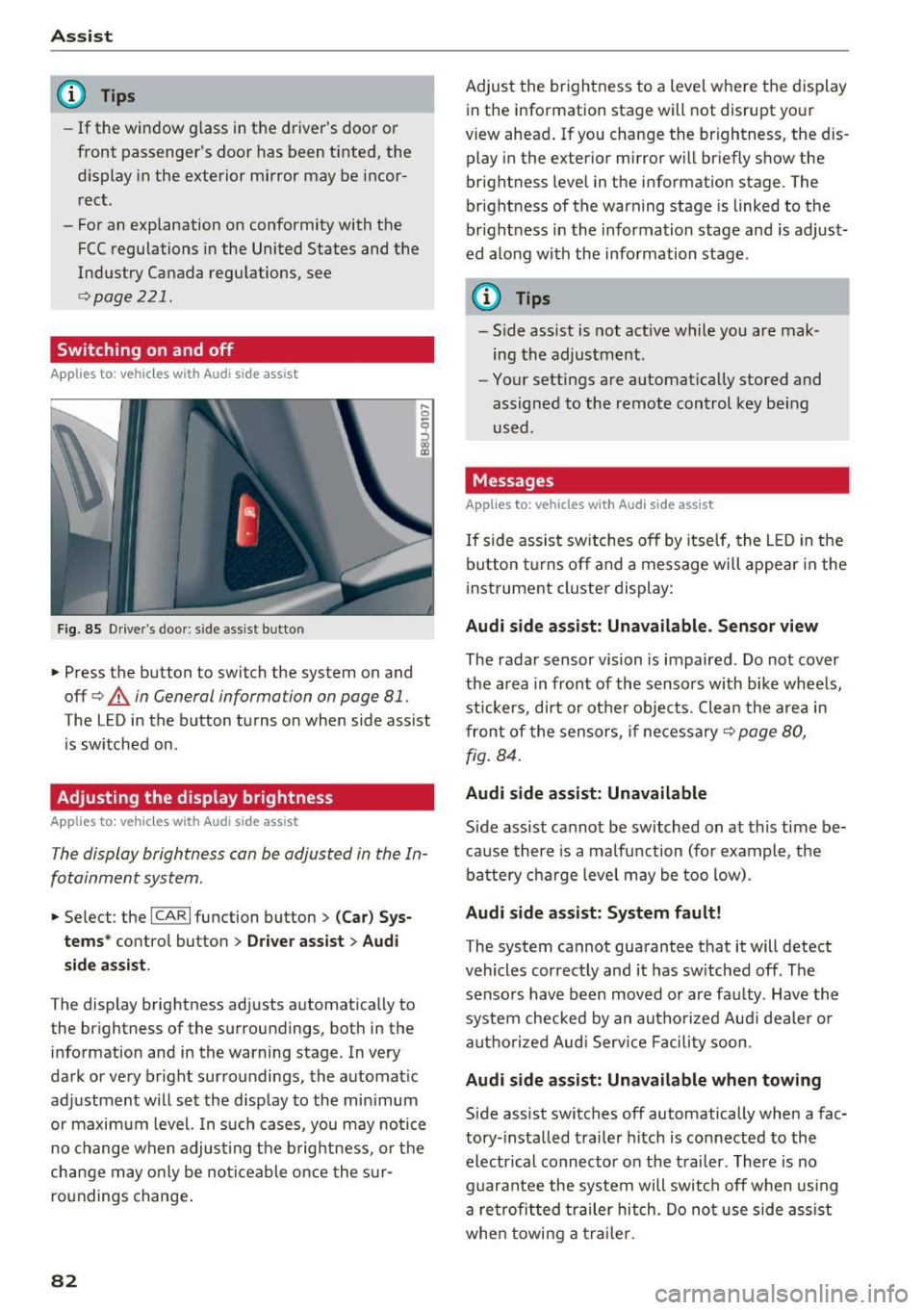
F ig. 85 Drive r's door : side assist b utto n
.... 0
I
.. Press the button to switch the system on and
off ¢
A in General information on page 81 .
The LED in the button turns on when side assist
is sw itched on .
Adjusting the display brightness
Applies to: ve hicles w ith Aud i side ass ist
The display brightness can be adjusted in the In
fotainment system .
.. Se lect : the ICARI function button> (Ca r) Sys
t e m s*
control button > Dr ive r assi st> Audi
sid e assi st.
The display brightness adjusts automatically to
the brightness of the surroundings, both in the
information and in the warning stage . In very
dark or very bright surroundings, the automat ic
adjustment will set the disp lay to the min imum
or maximum level. In such cases, you may notice
no change when adjust ing the b rightness, o r the
cha nge may only be no ticeable once the s ur
roundings change .
82
Adjust the brightness to a level where the display
in the information stage will not disrupt your
view ahead . If you change the br ightness, the dis
play in the exterior mirror w ill br iefly show the
brightness level in the information stage . The
brightness of the warning stage is linked to the
br ight ness in the information stage and is adjust
ed along with the information stage .
(D Tips
-Side ass ist is not act ive while you are mak
ing the adjustment .
- Your settings are automat ically stored and
assigned to the remote control key be ing
used .
Messages
Applies to : vehicles wi th Audi side ass ist
If side assist sw itches off by itse lf, the L ED in the
b utton t urns off and a message will appea r in the
i nstrument cluster display:
Audi s ide assi st: Unavailable. S ensor view
The radar sensor vision is impaired . Do not cover
the area in front of the sensors with bike whee ls,
stickers, dirt or other objects. Clean the a rea in
front of the sensors, if necessary¢
page 80,
fig . 84.
Audi side assist: Unavailable
Side assist cannot be switched on at this time be
ca use there is a ma lfunction (for example, the
battery c ha rge level may be too low).
Audi side assist: System f ault!
The system cannot guarantee that it will detect
vehicles correctly and it has sw itched off . The
sensors have been moved or are faulty . Have the
system checked by an autho rized Aud i dealer o r
aut ho rized Aud i Serv ice Facility soon.
Audi s ide assist: Unavailable when towing
Side assist switches off automatically when a fac
tory- installed trailer h itch is connected to the
electr ical connec tor on the t railer . There is no
guarantee the system will switc h off when using
a ret rofi tted trailer hitch . Do not use side assist
whe n towi ng a traile r.
Page 92 of 236
Parking sy stems
behind you o r on the parking space line c:> A in
General information on page 87 ,
c:>(D in Gen
eral information on page 88 .
The blue area rep
resents an extension of the vehicle 's outline by
approximately 16
ft (5 meters) to the rear . The
long side of the b lue area shou ld be on the
curb . T he entire blue area mus t fit into the
parking space .
• With the veh icle stopped, turn the steer ing
whee l to the right as far as it w ill go.
• Back into the par king space until the b lue curve
c:> fig. 98 touches the curb c:> A in General in
formation on page 87,
c:> (D in General infor
mation on page 88.
Stop the vehicle.
• With the veh icle stopped, turn the steer ing
whee l to the left as far as it will go.
• Cont inue to back into the pa rking space unt il
the ve hicle is parked parallel to the curb
c:> A
in General information on page 87, c:> (D in
General information on page 88. @
marks the
re ar bumpe r. At the ve ry latest, stop the vehicle
whe n the re d or ientat ion line @ borders an ob
ject. Keep an eye on the front of your vehicle whi le doing this.
Parking next to obstacles
I f t here is an obstacle (such as a wall) next to the
p ar king sp ace, pos ition the vehicle so there is
mo re spa ce on that side . Position the long s ide of
the blue surface so that there is sufficient space
from the obstacle. The s urface m ust not be
touch ing. Yo u wi ll also need to start turn ing the
steer ing whee l earlier. The blue curve
c:> fig. 98
must not to uch the obstacle and should have suf
ficient room .
(};) Note
Keep enough distance from the curb to re
duce the risk of damage to the rims.
(D Tips
The left or right orientation lines and s urfaces
w ill be displayed, depending on the turn sig
nal being used.
90
Adjusting the display and the warning tones
App lies to: vehicles with parking system plus/rearv iew cam
era
T he display and warning tones can be adjusted in
the Infotainment.
• Select: the I CAR I fu nct ion button > (Car) Sys
tems*
cont rol b utton > Driver assi st > Par king
system .
Display
On* -an optical display is shown for the park ing
system p lus, a rearview camera image is shown
fo r par kin g system p lus with rea rview camera*.
Off -When t he p arking system is sw itche d off,
on ly aud ible signals are g iven.
Signal tones
Front volume -volume for the front area
Rear vo lume -volume for the rear area
Front frequency -frequency for the front area
Rear frequency -frequency for the rear a rea
In -car entertainment fader -when the parking
system is tu rned on, the volume of the a udio/vid
eo source is lowe red .
The newly selected level is demonstrated briefly
by the sound generator .
(D Tips
-The warn ing tones can also be adjusted di
rectly from the vis ual d isp lay or the rearview
camera image* . Simply p ress t he
Settings
co ntrol button .
- Changed settings are activated w hen the
park ing system is switched on again .
- The settings are automatically sto red and
assigned to the remote con trol key that is in
use .
Error messages
Applies to: vehicles with parking system plus/rearv iew cam
era
There is an error in the system if the LED in the
P wJ\. button is blinking and you hear a contin uous .,.
Page 114 of 236
Safety belts
_&. WARNING
Not wearing safety belts or wearing them im
properly increases the risk of serious personal
injury and death . Safety belts can work only
when used correctly.
-Always fasten your safety belts correctly be fore driving off and make sure all passen
gers are correctly restrained.
- For maximum protection, safety belts must
always be positioned properly on the body.
- Never strap more than one person, includ
ing small children, into any belt.
- Never place a safety belt over a child sitting
on your lap.
- Always keep feet in the footwell in front of
the seat while the vehicle is being driven.
- Never let any person ride with their feet on
the instrument panel or sticking out the
window or on the seat.
- Never
remove a safety belt while the vehicle
is moving . Doing so will increase your risk of
being injured or killed .
- Never wear belts twisted.
- Never wear belts
over rigid or breakable ob-
jects in or on your clothing, such as eye
glasses, pens, keys, etc., as these may cause
injury.
- Never allow safety belts to become dam
aged by being caught in door or seat hard
ware .
- Do not wear the shoulder part of the belt
under your arm or otherwise out of position.
- Several layers of heavy clothing may inter
fere with correct positioning of belts and re
duce the overall effectiveness of the system.
- Always keep belt buckles free of anything
that may prevent the buckle from latching
securely .
- Never use comfort clips or devices that cre
ate slack in the shoulder belt. However, spe
cial clips may be required for the proper use
of some child restraint systems.
- Torn or frayed safety belts can tear, and
damaged belt hardware can break in an acci
dent . Inspect belts regularly.
If webbing,
bindings, buckles, or retractors are dam-
112
aged, have belts replaced by an authorized
Audi dealer or qualified workshop.
- Safety belts that have been worn and loaded
in an accident must be replaced with the
correct replacement safety belt by an au
thorized Audi dealer. Replacement may be
necessary
even if damage cannot be clearly
seen. Anchorages that were loaded must al
so be inspected.
- Never
remove, modify , disassemble, or try
to repair the safety belts yourself .
-Always keep the belts clean. Dirty belts may not work properly and can impair the func
tion of the inertia reel¢
table Interior
cleaning on page 193.
Safety belts
Fastening safety belts
Safety first -everybody buckle up!
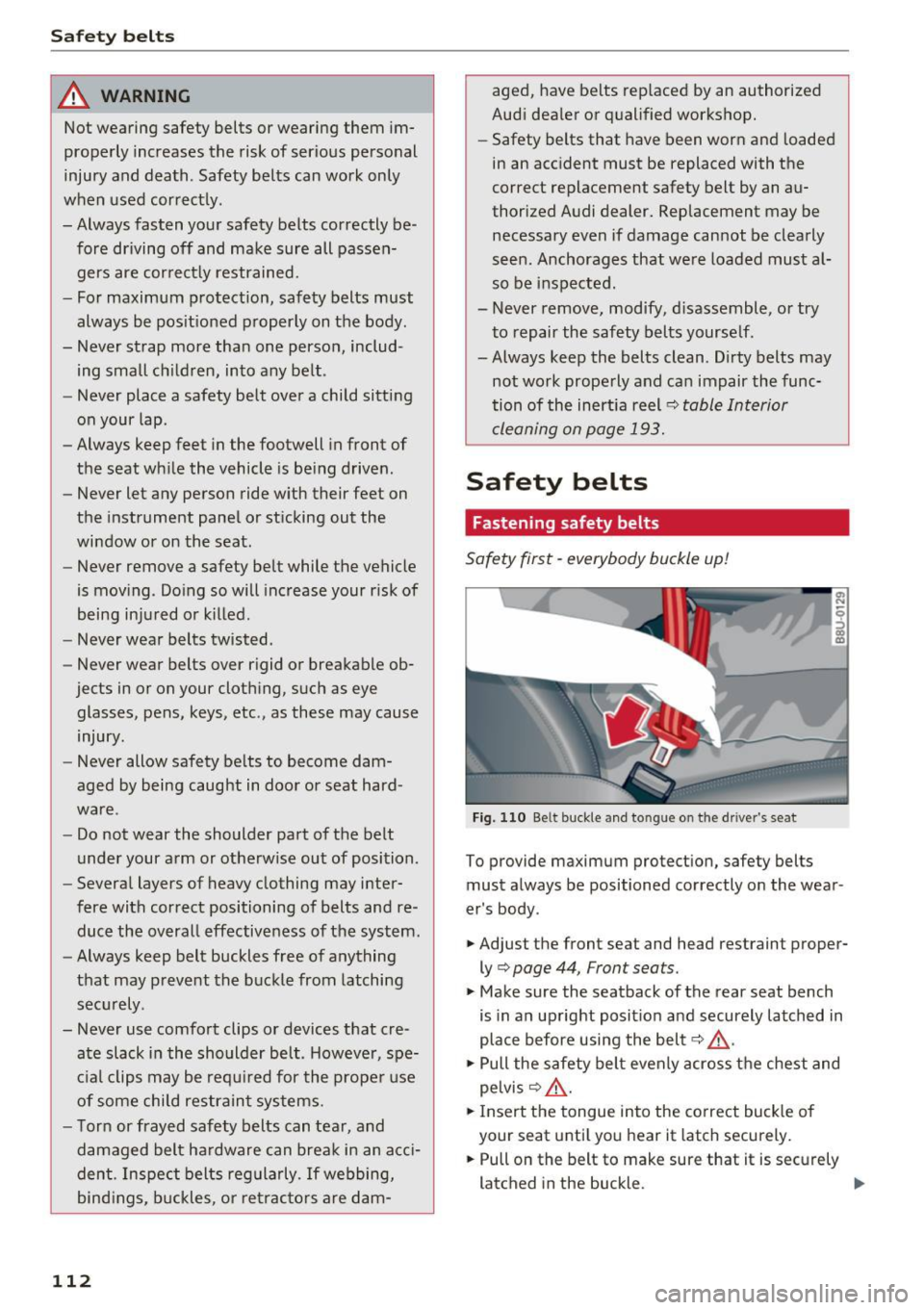
Fig. 110 Be lt buckle and tongue on the driver's seat
To provide maximum protection, safety belts
must always be positioned correctly on the wear
er's body .
.. Adjust the front seat and head restraint proper
ly¢
page 44, Front seats.
.. Make sure the seatback of the rear seat bench
is in an upright position and securely latched in
place before using the belt
q ,&. .
.. Pull the safety belt evenly across the chest and
pelvis¢ ,&. .
.. Insert the tongue into the correct buckle of
your seat until you hear it latch securely.
.. Pull on the belt to make sure that it is securely
latched in the buckle. .,,_
Page 115 of 236
a:,
a:,
...... N r--. N
"" 0 0 ::, a:,
Automatic safety belt r etractors
Every safety be lt is equ ipped wi th an automatic
be lt retractor on the shoulder belt. Th is feature
l ocks the belt when the belt is p ulled out fast,
during hard braking and in an accident. The belt
may also lock when you drive up or down a steep
h ill or through a sharp curve. During normal driv
ing the belt lets you move freely .
Safety be lt pret en sioner s
The safety belts are equipped with a belt preten
sioner that helps to tighten the safety belt and
remove slack when the pretensioner is activated.
The funct ion of the pretensioner is monitored by
a warning light
r::> page 14 .
Convertibl e loc king retract or
Every safety belt except the one on the driver
seat is equipped with a convertible locking retrac
tor that
must be used when the safety belt is
used to attach a child safety seat. Be sure to read
the important information about this feature
<::> page 147 .
& WARNING
Improperly posit ioned safety be lts ca n cause
ser ious injury in an accide nt
¢ page 113,
Safe ty belt position.
- Safety belts offer optimum protection only
when the seatback is upr ight and belts are
prope rly pos itioned on the body.
- Always ma ke sure tha t the rear sea t ba ck
rest to wh ic h t he cente r re ar safety be lt is
attached is secure ly latched whenever the
rear center safety belt is being used. If the
backrest is not securely latched, the passen
ger will move forward with the backrest dur
ing sudden braking, in a sudden maneuver
and especially in a cras h.
- Never attach the safety belt to the buckle
for another seat. Attaching the belt to the
wrong buckle w ill reduce safety belt effec
t iveness and can cause serious personal in
jury.
- A passenger who is not p roperly restrained
can be seriously in ju red by the safety be lt it
self when it moves from the stronger par ts
Safet y bel ts
of the body into critical areas like the abdo
men .
- Always lock the convertible locking retractor
when yo u are securing a child safety seat in
the vehicle
r::> page 149.
Safety belt position
Correct belt position is the key to getting maxi
mum protection from safety belts.
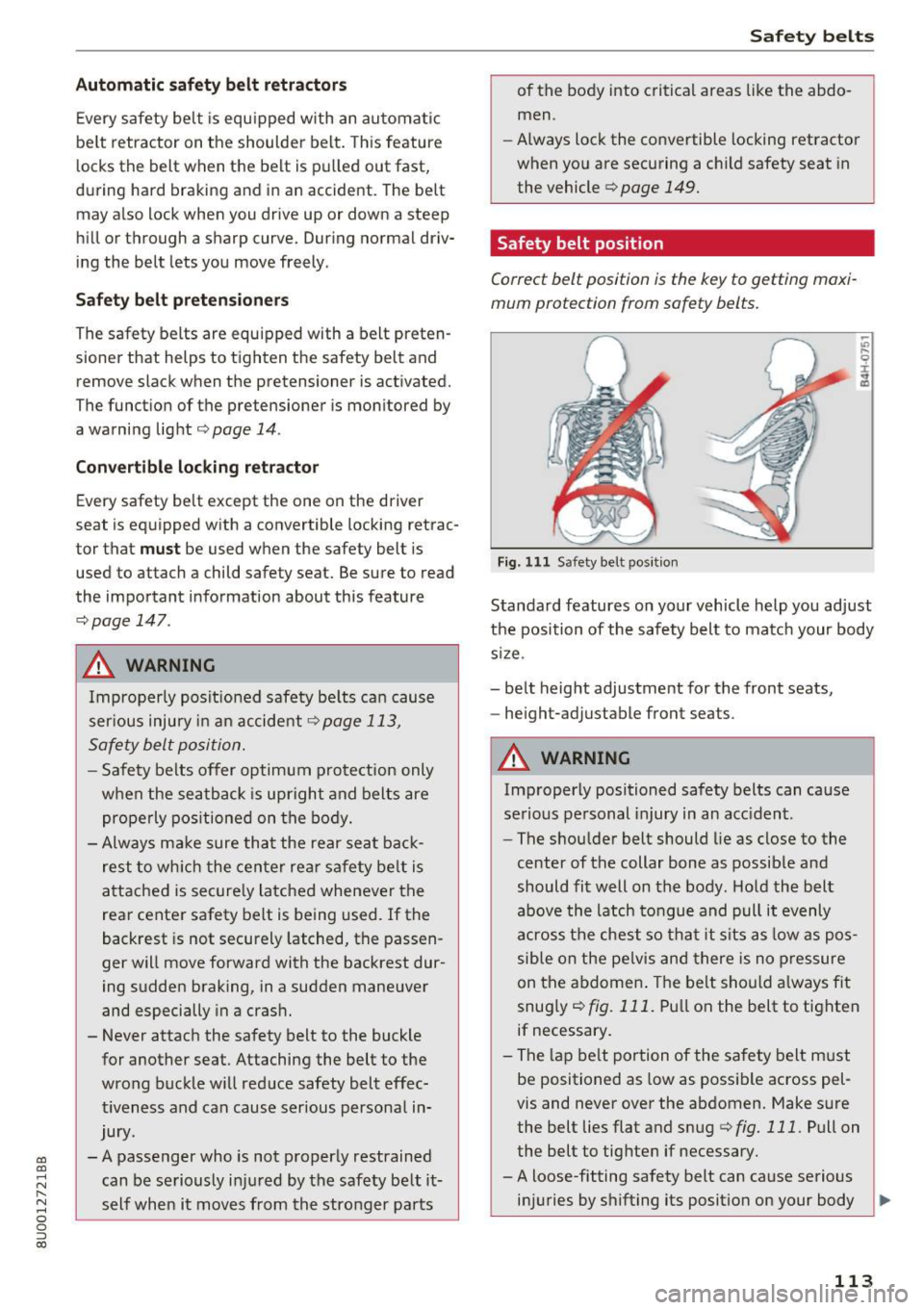
Fig. 111 Safety belt pos it ion
Standard features on your vehicle help you adjust
the position of the safety belt to ma tch your body
s iz e.
- be lt height adjustment for the front seats,
- he ight-adjustable front seats .
& WARNING
Improperly positioned safety belts can ca use
se rious personal injury in an acc ident.
- The shou lder belt should lie as close to the
center of the collar bone as possib le and
should fit well on the body . Ho ld the belt
above the latch to ngue and pull it evenly
across the chest so th at it sits as low as pos
sible on the pe lvis and there is no p ressure
on the abdomen . The belt should a lway s fit
snug ly
r::> fig. 111. Pu ll on the belt to tighten
if necessary .
- The lap be lt portion of the sa fety belt must
be positioned as low as possible across pel
vis and never over the abdomen. Make sure
the belt lies flat and snug
r::> fig. 111 . Pull on
the belt to tighte n if necessary.
- A loose-fitting safety belt can cause serious
in ju ries by shifting its position on your body
~
113
Page 221 of 236
00
00
......
"' ,....
"' ...... 0 0 :::,
00
today's a utomo biles, have steadily reduced the
scope of maintenance and repairs which can be
carried out by veh icle owners.
Also , sa fet y a nd
en vironmental
concerns place very strict limits
on the nature of repairs and adjustments to en
g ine and transm ission parts wh ich an owner can
pe rform .
Maintenance, adjustments and repairs usually re
qu ire special tools, test ing devices and other
equ ipment available to specially trained work
shop perso nnel i n order to assure proper per
formance, re liability a nd safety of the ve hicle and
its many systems.
Improper maintenance, adjustments and repairs
can impair the operation and re liab il ity of you r
vehi cle and eve n void your vehicle warra nty .
Therefo re, proof of se rvicing in accordance with
the m aintenance schedule may be a condition fo r
upho ld ing a possib le warranty claim made wi thin
the warranty period.
Above all , ope rational safety can be adversely af
fected, cre ating unnecessa ry risks fo r yo u and
your passengers.
I f in doubt about any se rvicing, have it done by
your author ized Audi dealer or any other prope rly
eq uipped and qua lified workshop. We strongly
urge you to g ive your author ized Audi dealer the
opportunity to perform a ll scheduled mainte
nance and necessary repairs. Your dealer has the
fac ilities, original parts and trained specialists to
keep your veh icle running properly .
Pe rforming limit ed ma intenance yourself
The fo llow ing pages describe a limited number of
procedures which can be performed on your vehi
cle with o rdinary tools, should the need arise and
tra ined personnel be unavailable. Before per
forming any of these procedures, always thor
ough ly read a ll of the app licab le text and careful
ly follow the instructions g iven . Always rigorously
observe the
WARNINGS prov ided .
Before you check an ything in the eng ine com
partment, alw ays read and heed all WARNINGS
c::> .&. and c::> .&. in Working in the engine compart
ment on page 159 .
Consumer inf ormation
A WARNING
- Ser ious personal in jury may occur as a result
of improperly performed maintenance, ad
justments or repairs .
- Always be extremely careful when work ing
on the vehicle. Always follow commonly ac
cepted safety practices and general com mo n sense. Never risk pe rsonal injury.
- Do not attempt any of the mai ntenance,
checks or repairs described on t he following
pages if you are not fu lly familiar wi th these
or other proce dures with respect to the ve
h icle, o r are uncerta in how to pro ceed.
- Do not do a ny work withou t the prope r tools
a nd eq uipment. H ave the necessary wo rk
done by your au thorized Audi dealer or an
other proper ly equipped and qualified work
shop.
- The engine compa rtment of any motor ve hi
cle is a potent ially hazardous area . Never
reach into the area around or touch the radi
ator fan.
It is temperature controlled and
can switch on suddenly - even when the en
g ine is off and the ignition key has been re
moved. The rad iator fan switches on au to
mat ica lly when the coo la nt reaches a certain
tem perature and will continue to r un until
the coolant tem pera ture drops.
- Always remove t he ignition key befo re any
one gets under the vehicle.
- Always support your veh icle with safety
s tands if i t is necessary to work u nder neat h
the vehicle . The jack* s upplied w ith the vehi
cle is not adequate fo r this purpose and
could collapse caus ing serious personal in
jury.
- If you m ust wor k unde rneath the vehicle
with the w heels on the g round, always make
sure the vehicle is on level ground, that the
wheels a re always sec urely blocked and that
the engine cannot be started.
- Always make sure the transmission se lector
lever (automatic transmiss ion) is in P (Park
position) and the park brake is applied.
219