wheel AUDI Q3 2017 Owner´s Manual
[x] Cancel search | Manufacturer: AUDI, Model Year: 2017, Model line: Q3, Model: AUDI Q3 2017Pages: 236, PDF Size: 58.93 MB
Page 79 of 236
00
00
......
"' ,....
"' ...... 0 0 :::,
00
~ Release the parking brake and slow ly pull out
and away from the whee l chocks.
~ Stop and have someone retrieve t he whee l
chocks .
(D Tips
If you move the selector lever of the a utomat
ic transm ission to P before applying the park
ing brake and before block ing the wheels, you
may have to use more force later to move the
lever out of the P position .
Trailer towing
77
Page 83 of 236
00
00
......
"' ,....
"' ...... 0 0 :::,
00
Side assist functions at speeds above approxi
mately 19 mph (30 km/h).
@ Vehicles that are approaching
In certain cases, a vehicle will be classified as
critical for a lane change even if it is still some
what far away. The faster a vehicle approaches,
the sooner the display in the exterior mirror will
turn on.
@ Vehicles traveling with you
Vehicles traveling with you are indicated in the
exterior mirror if they are classified as critical for
a lane change. All vehicles detected by side assist
are indicated by the time they enter your "blind
spot", at the latest.
© Vehicles you are passing
If
you slowly pass a vehicle that side assist has
detected (the difference in speed between the
vehicle and your vehicle is less than
9 mph (lS
km/h)), the display in the exterior mirror turns
on as soon as the vehicle enters your blind spot.
The
display will not turn on if you quickly pass a
vehicle that side assist has detected (the differ
ence in speed is greater than 9 mph (15 km/h)).
Functional limitations
The radar sensors are designed to detect the left
and right adjacent lanes when the road lanes are
the normal width . In some situations, the display
in the exterior mirror may turn on even though
there is no vehicle located in the area that is criti
cal for a lane change. For example:
-If the lanes are narrow or if your are driving on
the edge of your lane. If this is the case , the
system may have detected a vehicle in another
lane that is
not adjacent to your current lane.
-If you are driving through a curve. Side assist
may react to a vehicle that is one lane over
from the adjacent lane .
- If side assist reacts to other objects (such as
high or displaced guard rails).
- In poor weather conditions. The side assist
functions are limited.
Do not cover the radar sensors
c!:> fig. 84 with
stickers, deposits, bicycle wheels or other ob-
Assist
jects, because they will impair the function. Do
not use side assist when towing a trailer. For in
formation on cleaning, see
c!:>page 191.
A WARNING
-- Always pay attention to traffic and to the
area around your vehicle. Side assist cannot replace a driver's attention. The driver alone
is always responsible for lane changes and
similar driving maneuvers .
- Improper reliance on the side assist system can cause collisions and serious personal in
jury:
- Never rely only on side assist when chang
ing lanes.
- Always check rear view mirrors to make
sure that it is safe to change lanes.
- Side assist cannot detect all vehicles under
all conditions- danger of accident!
- Please note that side assist indicates there
are approaching vehicles, or vehicles in your
blind spot, only after your vehicle has
reached a driving speed of at least 19 mph
(30 km/h).
- In certain situations, the system may not
function or its function may be limited. For
example:
- if vehicles are approaching or being left
behind very quickly. The display may not
turn on in time.
- in poor weather conditions such as heavy
rain, snow or heavy mist.
- on very wide lanes, in tight curves or if
there is a rise in the road surface. Vehicles
in the adjacent lane may not be detected
because they are outside of the sensor
range.
(I) Note
The sensors can be displaced by impacts or
damage to the bumper, wheel housing and
underbody. This can impair the system. Have
an authorized Audi dealer or authorized Audi
Service Facility check their function.
-
81
Page 87 of 236
00
00
....
"' ,....
"' .... 0 0 :::,
00
Parking systems
General information
Applies to: ve hicles with a rea r parking sys te m /pa rking sys
tem plus/rearv iew camera
Depending on your vehicle's equipment, va rious
pa rking aids wi ll help you when parki ng and ma
ne uveri ng.
The
r e ar parki ng sy stem is an a udible parking a id
that warns you of obstacles
behind t he vehicle
¢ page 85.
The parking sy stem plus ass ists you when park
i ng by aud ibly and v isually indicating objects de
tected
in front of and behind the veh icle
¢ page 86.
The re ar view camer a shows the area beh ind the
ve hicle in the Infotainment system d isplay . This
d isp lay assists you when you are cross or parallel
pa rking . Th e pa rking system pl us functions are
a lso available
¢ page 87.
A WARNING ,~ -
- Always look for traff ic and check the area
around your veh icle by looking at it directly
as well . The parking system cannot replace
the driver's attent ion. The driver is always
responsible when enter ing or leav ing a pa rk
ing space and dur ing similar maneuvers.
- Please note that some surfaces, such as
clothing, are not detected by the system .
- Senso rs and cameras have blind spots in
wh ich peop le and objects cannot be detect
ed . Be especia lly caut ious of small children
and animals .
- The sensors can be displaced by impacts or
damage to the radiator gr ille, bumper,
wheel housing and the unde rbody . The park
ing system may be impa ired as a result .
H ave an author ized Audi dealer or au thor
ized Audi Serv ice Facili ty check their func
t io n.
- Make s ure the senso rs a re not o bstruc ted by
st ickers, deposits o r othe r ma ter ial s. If they
are, the senso r funct ion could be impa ired.
F or additiona l information on cleaning, see
¢ page 191 .
Parking system s
(D Note
- Some objects are not detected or displayed
by the system under certain circumstances:
- Objects such as barrier chains, trailer draw
bars, vertical poles o r fe nces
- Objects above the sensors such as wall ex
tensions
- Objects w ith certai n surfaces or structures
such as c ha in li nk fe nces or powder snow
- If you conti nue driving closer to a low ob
ject , it may disappear from the sensor
range . Note that you will no longer be
wa rned about t his obstacle.
(D Tips
- The system may p rovide a warning even
tho ugh the re are no obstacles in the cover
age area in some situa tions, such as:
- certain road s urfaces or when there is tall
g rass.
- externa l ultrasonic sources such as from
clean ing vehicles .
- in heavy rain, snow, o r th ick vehicle ex
ha ust.
- We recommen d that you practice par king in
a traff ic -free loca tion or pa rking lot to be
come fam iliar with the system . When doing
this, there shou ld be good light and weath
er conditions .
- You can change the vol ume and pitch of the
signa ls as well as the display ¢
page 90.
- Please refer to the instructions for towing a
trai ler located in
¢ page 91.
-What appea rs in the infotainment display is
somewhat time- delayed.
Rear parking system
Description
Applies to : vehicles wit h rear parking system
The rear parking system is an audible parking
aid .
There is a sen sor in the rea r bumper cover. If
these detect an obstacle, audible s ignals warn
you .
85
Page 90 of 236
Parking systems
-If the position and the installation angle of
the rearview camera was changed, for ex
ample after a collision, do not continue to
use the system for safety reasons . Have it
checked by an authorized Audi dealer or au
thorized Audi Service Facility.
- Only use the rearview camera to assist you if
it shows a good, clear picture. For example,
the image may be affected by the sun shin
ing into the lens, dirt on the lens, or if there
is a malfunction.
- Use the rearview camera only if the luggage
compartment lid is completely closed. Make
sure any objects you may have mounted on
the luggag e compartment lid do not block
the rearview camera.
- The camera lens enlarges and distorts the
field of vision. The object appears both al
tered and inaccurate on the screen.
- In certain situations, people or objects in the display appear closer or farther away:
- For objects that do not touch the ground,
such as the bumper of a parked vehicle, a
trailer hitch or the rear of a truck . Do not
use the orientation lines in this case.
- If driven from a level surface onto an in
cline, or a downward slope.
- If driven toward protruding objects .
- If the vehicle is carrying too much load in
the rear .
Q) Note
-Always read and follow the applicable warn
ings
¢ (I) in General information on
page 85.
- The orange-colored orientation lines in the
Infotainment display show the vehicle path
based on the steering wheel angle . The
front of the vehicle swings out more than
the rear of the vehicle. Maintain plenty of
distance so that an exterior mirror or a cor
ner of the vehicle does not collide with any
obstacles.
88
· Sw itching on /off
Applies to: vehicles with parking system plus with rearview
camera
Switching on
.. Shift into reverse, or
.. Press the
PwA button in the center console
¢ page 86, fig. 89. A short confirmation tone
sounds and the LED in the button turns on .
Switching between the rearview camera and
optical display
.. Press the Car graphic control button ®
c:> page 89, fig. 95 to see the optical display .
.,. Press the
Rearview control button to see the
rearview camera image.
Switching off
.. Drive faster than 6 mph (10 km/h), or
.,. Press the
PwA button, or
.. Switch the ignition off.
(D Tips
The visual display in the left part of the dis
play should help you detect the critical vehicle
areas .
Page 91 of 236
a:,
a:,
...... N r--. N
'"' 0 0 ::, a:,
Perpendicular parking
Applies to: vehicles with parking system plus wit h rearv iew
camera
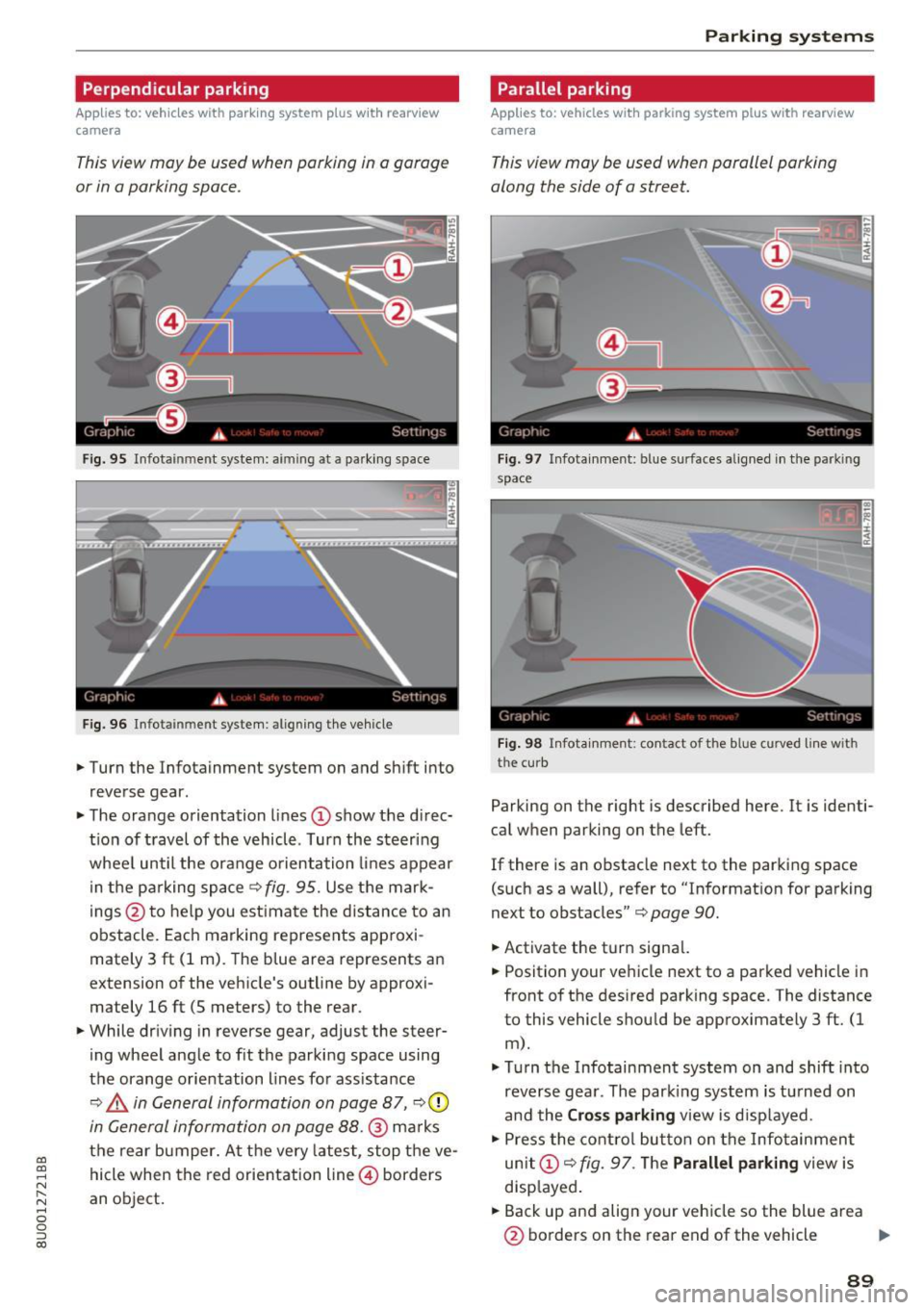
This view may be used when parking in a garage
or in a parking space .
Fig. 95 Infotainment system: aiming at a parking space
Fig. 96 Infota inment system : aligning the veh icle
.,. Turn the Infotainment system on and sh ift into
reverse gear.
.,. The orange orientation lines
CD show the di rec·
tio n of travel of the vehicle . Turn the steering
whee l until the orange orientation lines appear
in the parking space
c:> fig. 95. Use the mark
ings @to help you est imate the distance to an
obstacle. Each marking represents approxi
mately 3 ft (1 m). The b lue area represents an
extension of the vehicle's outline by approxi
mately 16 ft (5 meters) to the rear.
.,. While driv ing in reverse gear, adjust the steer
ing wheel angle to f it the parking space using
the orange orientation lines for assistance
¢ ,& in General information on page 87, c:>0
in General information on page 88.@ marks
the rear bumper. At the very latest, stop the ve
hicle when the red orientation line@ borders
an object.
Parking systems
Parallel parking
Applies to: vehicles with parking system pl us with rearview
came ra
This view may be used when parallel parking
along the side of a street.
Fig . 97 Infotainment: blue surfaces aligned in the park ing
space
Fig. 98 Infota inmen t: co ntact of the blue curved li ne w ith
the curb
Parking on the right is described here. It is identi·
cal when parking on the left.
If there is an obstacle next to the parking space
(such as a wall), refer to "Informat ion for parking
next to obstacles"
c:> page 90.
.,. Activate the turn signal.
.,. Position your vehicle next to a parked vehicle in
front of the desired parking space. The distance
to this vehicle shou ld be approximately 3 ft. (1
m).
.,. Turn the Infotainment system on and shift into
reverse gear. The par king system is turned on
and the
Cross parking view is displayed.
.,. Press the control button on the Infotainment
unit
CD ¢ fig. 97. The Parallel parking view is
disp layed .
.,. Back up and align your vehicle so the blue area
@ borders on the rear end of the vehicle .,,.
89
Page 94 of 236
Intelligent Technology
Intelligent Technology
Electronic Stabilization
Control (ESC)
Description
Elect ronic Stabilization Control (ESC) suppo rts
driver safety.
It red uces the risk of slipping and
improves dr iving stability. ESC detects crit ica l sit
uations such as the veh icle oversteering and un
dersteering or the wheels are sp inning. The vehi
cle is stabilized by app lying the brakes or reduc
ing engine torque. When ESC engages, the
G1 i n
d icator light blinks in the inst rument cluste r.
The fo llow ing systems are integrated in the ESC:
Anti -lock b raking system (ABS)
ABS prevents the whee ls from loc king when brak
i n g . The vehicle can sti ll be steered even d uring
hard brak ing. Apply steady press ure to the brake
pedal. Do not pump the pedal. A puls ing in the
brake pedal indicates that the system is acting to
stabilize the vehicle .
Brake assi st sy stem
The brake assist system can dec rease braking dis
tance. It increases brak ing power when the driver
presses the brake pedal quick ly in emergency sit
uations . You must press and hold the brake pedal
until the dangerous situat io n is over .
Anti- s lip regulation (ASR )
ASR reduces eng ine power when the drive w heels
begin spinning and adapts the force to the road
conditions. This makes it easier to start, acceler
ate and dr ive up h ills .
Electron ic differential lock (EDL)
The ED L bra kes wheels that a re spinning and
transfers the drive power to the other drive
wheel or wheels if the ve hicle is equipped with a ll
wheel drive*) . This funct ion is not ava ilable at
h igher speeds.
In extreme cases, EDL automatically switches off
to keep the brake on the braked wheel from over heating. The vehicle is still work ing correctly. EDL
92
will switch on again au tomatically when condi
tions have returned to normal.
Steering recommendation
The ESC he lps to s tabili ze the vehicle by cha ng ing
t h e s teer ing torque .
Selective wheel torque control
Selective wheel to rque cont rol is used when d riv
i ng o n curves . The front whee l on the inside of
t h e curve or both wheels on the i nside of th e
cu rve are braked se lective ly as needed. This al
l ows mo re pre cise driving in curves .
Automatic post -collision braking system
The "automat ic post -coll is io n braking system"
can help to reduce the risk of sl iding and of addi
tiona l co llisions after an acc ident. If the a irbag
c ontro l modu le detects a collision above a cert ain
vehicle speed, the veh icle is braked by the ESC.
The veh icle does n ot brake automatically if:
- the drive r presses the accelerator pedal, or
- the bra king force generate d by the pressed
brake pedal is greater than the b raking force
that would be in itiated by the system, or
- the ESC, the bra ke system or the vehicle elect ri
cal system are not functioning.
A WARNING
- The ESC and its integ rated systems can not
overcome the lim its imposed by natura l
p hys ica l laws. This is es pec ially impo rtan t
on sl ippery or wet roads. If the systems be
gi n a cting to stabili ze yo ur vehicle, you
s hould immedi ately alte r your speed to
match the road and tra ffic conditions . Do
not let t he in creased safety provi ded tempt
you into taking risks . This could increase
your r is k of a coll is ion.
- Please note the r is k of a coll is ion increases
when dr iv ing fast, especially th rough c urves
and on slippery or wet roa ds, and when dr iv
ing too close to objects ahead. The ESC and
its integrated systems cannot always pre
ve nt co llisions - there is st ill a risk of acci
dents!
Page 95 of 236
a:,
a:,
...... N r--. N .... 0 0 ::, a:,
-Press the accelerator pedal carefully when
accelerating on smooth, slippery surfaces
such as ice and snow. The drive wheels can
spin even when these control systems are
installed and this can affect driving stability
and increase the risk of a collision.
(D Tips
- The ABS and ASR only function correctly
when all four wheels have a similar wear
Switching on/off
Intelligent Technology
condition. Different tire sizes can lead to a
reduction in engine power.
- You may hear noises when the systems de
scribed are working .
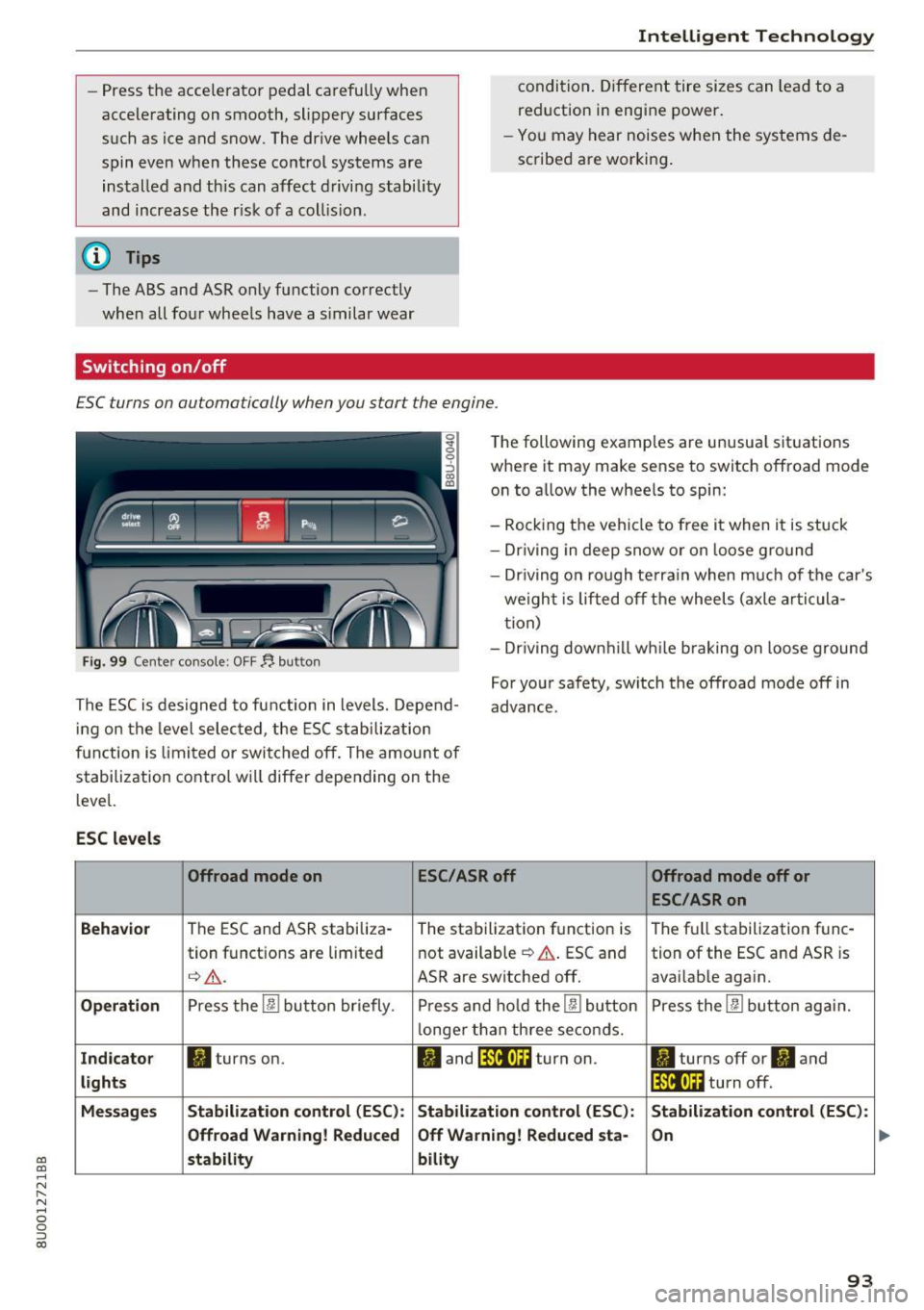
ESC turns on automatically when you start the engine .
Fig. 99 Center console: OFF~ button
The following examples are unusual situations
where it may make sense to switch offroad mode
on to allow the wheels to spin:
- Rocking the vehicle to free it when it is stuck
- Dr iving in deep snow or on loose ground
- Driving on rough terrain when much of the car's
weight is lifted off the wheels (axle articula
tion)
- Dr iving downh ill wh ile braking on loose ground
The ESC is designed to function in levels. Depend
ing on the level selected , the ESC stabilization
function is limited or switched off. The amount of
stabilization control will differ depending on the
level. For your safety, switch the offroad mode off in
advance.
ESC
levels
Offroad mode on ESC/ASRoff Offroad mode off or
ESC/ASRon
Behavior
The ESC and ASR stabiliza- The stabilization function is The full stabilization func-
tion functions are limited not available
~ A. ESC and tion of the ESC and ASR is
q_,& _ ASR are switched off. avai lable again.
Operation Press the 00 button briefly. Press and hold the 00 button Press the 00 button again.
l onger than three seconds.
Indicator II turns on. II and lf'tii•Ui turn on. ltl turns off or II and
lights lfilf•l~i turn off.
Messages Stabilization control (ESC): Stabilization
control (ESC): Stabilization control (ESC):
Offroad Warning! Reduced Off Warning! Reduced
sta-
On
stability bility
93
Page 96 of 236
Intelligent Technology
_&. WARNING
You should only switch offroad mode on or
switch ESC/ ASR off if your driving abilities
and the traff ic conditions perm it. There is a
r isk of slid ing.
- The stabilization function is limited when
offroad mode is switched on. The driving
wheels co uld spin and the vehicle could
swerve , especially on slick or slippery road
surfaces.
- T here is no vehicle stab ilizat ion when ESC/
ASR are switched off .
Hill descent assist
Applies to: vehicles with hill hold assist
Hill descent assist makes it possible to drive
down a hill at a constant speed.
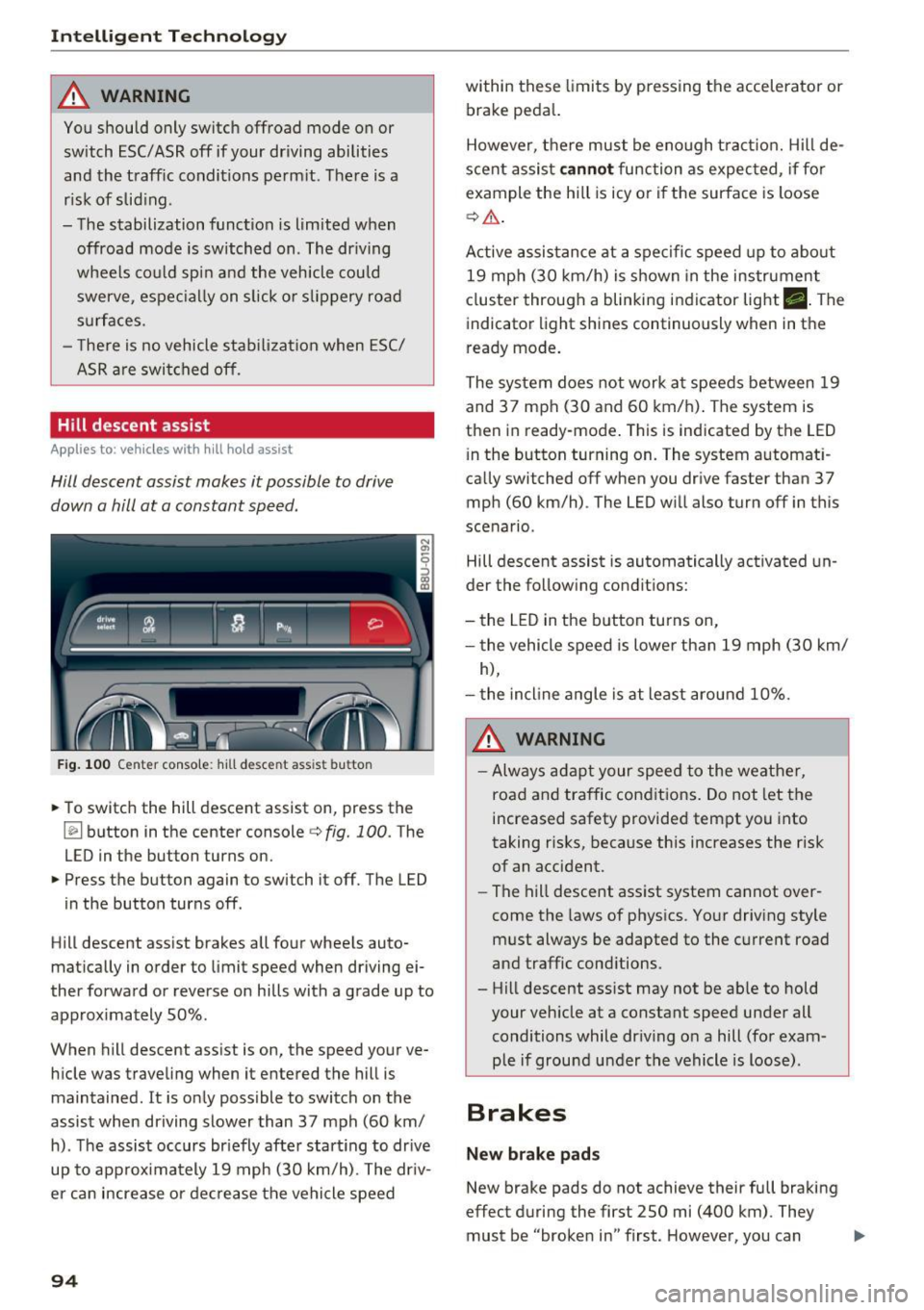
Fig . 100 Center console: hill descent assist button
.,. To switch the hill descent assist on, press the
~ button in the center console c:> fig. 100. The
LED in the button turns on.
.,. Press the button again to switch it off. The LED
in the button turns off.
Hill descent assist brakes all four wheels auto
matically in order to limit speed when driving ei
ther forward or reverse on hills with a grade up to
approx imately 50%.
When hill descent assist is on, the speed your ve hicle was traveling when it entered the hill is
maintained. It is only possible to switch on the
assist when driving slower than 37 mph (60 km/
h). The assist occurs br iefly after start ing to drive
up to approximately 19 mph (30 km/h). The driv
er can increase or decrease the vehicle speed
94
within these limits by pressing the accelerator or
brake peda l.
However, there must be enough tract ion. Hill de
scent assist
cannot function as expec ted, if fo r
example the hill is icy or if the surface is loose
c:>,& .
Active assistance at a specific speed up to about
19 mph (30 km/h) is shown in the instrument
cluster through a blinking indicator light •. The
indicator light shines continuously when in the
ready mode.
The system does not work at speeds between 19
and 37 mph (30 and 60 km/h). The system is
then in ready-mode . This is indicated by the LED
i n the button turning on. The system automat i
ca lly switched off when you drive faster than 37
mph (60 km/h) . The LED will also turn off in this
scenario.
Hill descent assist is automatically activated un
der the following conditions:
- the LED in the button turns on,
- the vehicle speed is lower than 19 mph (30 km/
h),
- the incline angle is at least around 10%.
_&. WARNING
-Always adapt your speed to the weather,
road and traffic conditions. Do not let the
increased safety provided tempt you into
taking risks, because this increases the risk
of an accident .
-
-The hill descent ass ist system cannot over
come the laws of physics. Your driving style
must always be adapted to the current road
and traffic conditions.
- Hill descent ass ist may not be ab le to hold
your vehicle at a constant speed under all
conditions while dr iv ing on a hill (for exam
ple if ground u nder the vehicle is loose).
Brakes
New brake pads
New brake pads do not achieve their full braking
effect during the first 250 mi (400 km). They
must be "broken in" first. However, you can ..,.
Page 97 of 236
00
00
......
"' ,....
"' ...... 0 0 :::,
00
compensate for the slightly reduced bra king
force by pressing firmly on the brake peda l. Avoid
heavy braking during the break -in period .
Operating condit ion s and dr iving habits
The brakes on today's automobiles a re sti ll s ub
ject to wear, depend ing largely on ope rating con
ditions and driving habits¢& . On vehicles that
are either driven most ly in stop-and -go city traf
fic or are driven hard, the brake pads should be
checked by your authorized Aud i dealer more of
ten than specified in the
Warran ty & Mainte
n anc e boo kle t .
Failure to have your brake pads
inspected can resu lt in reduced brake perform
ance.
On steep slopes, you should use the braking ef
fect of the eng ine. This way, you prevent unnec
essary wear on the brake system . If you must use
your brakes, do not hold the b rakes down cont in
uously. P ump t he b rakes at intervals.
Operating no ise
Noises may occur when braking depend ing on the
speed, braking force and outs ide cond itions such
as tempe rature and humidity .
Effect of water or road salt
In certain situations, for example after driving
through water, in heavy ra in, after overnight con
densat ion or after washing your car, the braking
effect can be reduced by mo isture or ice on the
brake rotors and brake pads . The brakes must be
"dr ied" fi rst w it h a few careful brake applica
tions .
At highe r speeds and with the windsh ield w ipers
turned on, the brake pads press aga inst the brake
rotors for a short amount of time. This action,
which is not felt by the d river, happens a t regular
i nte rvals and ens ures a better reaction time fo r
the brakes in wet weather.
The bra king effect can also be redu ced if you are
d riving on salted roads and you do not apply t he
b ra kes fo r long pe riods of time. The layer of sa lt
on the brake rotors and brake pads m ust be worn
off first when the b rakes are applied¢& .
Intellig ent Technology
Corrosion
Leaving t he vehicle pa rked fo r lo ng periods of
t ime, low mileage and avoiding heavy braking
can contrib ute to corrosion on the brake rotors
and to dirty brake pads .
If you usua lly avoid heavy bra king or if there is
corrosion present, occasiona l heavy braking at
high speeds is recommended to clean the brake
rotors and pads¢& .
Brake system malfunction
if you no tice that the b rake peda l t ravel has sud
denly
gotten larger, then a b rake c ircuit may have
f ailed ¢ & .
Low brake fluid level
When the brake fluid level is low, malfu nctions in
the b rake system may occur. The b rake fl uid level
is e lec tron ically moni tored.
Brake booster
The brake booster amplifies the pressure you ap
ply to the brake pedal.
It only works when the en
gine is running~ &.
Brake lining wear statu s
Brake lining wear may be checked by visual in
spect ion of the condition of the brake pads
t h rough the openings in the wheel. If necessary,
the wheel may be removed for this i nspection
¢ page 198, Replacing wheels .
,&. WARNING
-New brake pads don't have the bes t stop
ping power and m ust be "broken-in" during
the initial 250 mi (400 km) . You
can com
pensate for this by pressing the brake pedal
more firmly . This a lso applies later when
new pads are installed.
- You shou ld perform braking maneuvers for
the purpose of cleaning the brake system
only if road condit ions permit. Other road
users must not be put at r isk - you may
cause an accident!
- Before descending a steep grade, reduce
speed a nd sh ift transmission into a lower
95
Page 98 of 236
Intelligent Technology
gear or lower driving range. Do not ride the
brakes or hold the pedal down too long or
too often. This could cause the brakes to get hot and diminish braking efficiency .
- Do not "ride the brakes" by resting your foot
on the pedal when you do not intend to
brake. This may cause the brakes to over
heat, premature wear and increased stop
ping distance.
- Under certain climatic and operating condi
tions such as passing through water, driving in heavy rain or after washing the vehicle ,
the effectiveness of the brakes can be re
duced . In winter, ice can accumulate on the
brake pads, linings, discs and drums . Care
fully apply brakes for a test. Brakes will dry and ice coatings will be cleaned off after a
few careful brake applications.
- Driving for an extended period of time on
salt-covered roads without using your
brakes can also affect braking efficiency .
Clean off accumulated salt coating from
brake discs and pads with a few careful
brake applications .
- If you damage the front spoiler, or if you in
stall a different spoiler, be sure the air flow
to the front brakes is not obstructed. Other
wise the brake system could overheat reduc
ing the effectiveness of the entire brake sys
tem.
- Failure of one brake circuit will impair the
braking capability resulting in an increased
stopping distance. Avoid driving the vehicle
and have it towed to the nearest authorized
Audi dealer or qualified workshop.
- Never let the vehicle roll to a stop with the
engine shut off.
- If the brake booster is not working, the
brake pedal must be pressed considerably
harder to make up for the lack of booster
assistance.
96
Electromechanical
steering
The electromechanical steering supports the
driver's steering movements .
Power steering adapts electronically based on
the vehicle speed .
Indicator lights and messages
• Steering fault! Do not drive vehicle!
If this indicator light turns on and stays on and
this message appears, the power steering may
have failed.
Do
not continue driving . See an authorized Audi
dealer or authorized Audi Service Facility for as
sistance.
If the indicator light turns on, the steering wheel
may be more difficult to move or more sensitive
than usual. The steering wheel may also be at an
angle when driving straight.
Drive slowly to an authorized Audi dealer or au
thorized Audi Service Facility to have the mal
function corrected .
(;r, lj Steering lock: System fault! Please contact
dealer.
There is a malfunction in the electronic steering
lock.
Drive to an authorized Audi dealer or authorized
Audi Service Facility immediately to have the malfunction corrected.
A WARNING
Have the system malfunction corrected as
soon as possible by an authorized Audi dealer
or authorized Audi Service Facility, as this in
creases the risk of an accident .
{!) Tips
If the . or 'T j indicator light only stays on
for a short time, you may continue driving.
-