air condition AUDI Q3 2017 Owner´s Manual
[x] Cancel search | Manufacturer: AUDI, Model Year: 2017, Model line: Q3, Model: AUDI Q3 2017Pages: 236, PDF Size: 58.93 MB
Page 20 of 236
Instruments and indicator lights
component in your engine system has been as
signed a code. In case of a ma lfunction, the com
ponent w ill be identif ied and the fau lt stored as a
code in the control module memory.
The MI L light may a lso ill uminate if there is a
leak in the on-board f uel vapor recovery system.
If the light ill uminates after a refueling, stop the
veh icle and make sure the fuel filler cap is prop
erly closed (on ly vehicles with gasoline engine)
¢ page 157 .
In order to make an accurate d iagnosis, the stor
ed data can on ly be displayed using special diag
nostic equipment (generic scan too l for 0BD) .
In order to connect the specia l diagnostic equip
ment, p ush the plug into the Data Link Connector
(DLC). The DLC is located to the right of the hood
release ¢
fig. 5.
Your authorized Audi dealer or qualified work
shop can interpret the code and perform the nec
essary repair.
A WARNING
Do not use the diagnostic connector for per
sonal use. Incorrect usage can cause malfunc
tions, which can increase the risk of a colli
sion!
Electronic speed limiter
Your veh icle may be facto ry equipped with ti res
that are r ated for a maxim um speed of 130 mph
(210 km/h) . This is less than the maxim um speed
of yo ur vehicle. To reduce the risk of sudden tire
fa ilur e and loss of control if the veh icle is operat
ed at excessive speeds, your vehicle a lso has an
electronic speed limiter. The electronic speed lim iter prevents your vehicle from going faster
than the t ire speed rating . For more information
¢ page 171 .
If the engine contro l unit receives faulty vehicle
ro ad speed s ignals, the Malfunction Indicator
Lamp (MIL)
¢4 will illum inate . If this occurs,
contact the nearest authorized Audi dealer for
assistance .
18
A WARNING
--
Always observe the posted speed limits and
adjust your speed to suit preva iling road, traf
fic and weather conditions. Never drive your
vehi cle faster than the maximum speed rating
of the ti res insta lled.
Page 25 of 236
Opening and closing
Central locking
Description
You can lock and unlock the veh icle centrally . You
have the following options:
- Remote control key
c> page 25,
-Sensors in the door handles* c> page 26,
-Inner central locking switch c> page 2 7, or
- Lock cylinder on the driver's door
c> page 28.
Turn signals
The turn s ignals flash tw ice when you un lock the
veh icle and flash once when you lock the vehicle.
If the vehicle is unlocked and the flashing contin
ues, then
- one of the doors or the luggage compa rtment
lid is open,
- the ignition is still switched on, or
- the P selector lever position (vehicles with au -
tomat ic transmission*) is not engaged.
Auto Lock
The Auto Lock function locks all doors and the
luggage compartment lid once the speed has ex
ceeded approximately 9 mph (15 km/h) .
T he vehicle can be unlocked if the opening func
tion in the central locking system switch is used,
one of the door handles is pulled or the ignition key is removed.
In the event of a crash with airbag deployment,
the doors will also automatically unlock to allow
access to the vehicle.
Selective door unlocking
The doors and luggage compartment lid will lock
when they close. You can set in the Infotainment
system if
only the driver's door or the entire vehi
cle shou ld unlock when unlocking
c> page 27 ,
Setting the central locking system.
Unintentionally locking yourself out
~ The following conditions prevent you from lock-.....,
~ ing your remote control key in the vehicle: N ...... 0 0
:::,
00
Opening and closing
- If the driver's door is open, the vehicle cannot
be locked by pressing the
fi'.J button on the re
mote contro l key or touching the locking sen
sor* on a door.
- When locking using the
ffi button in the central
locking switch, the vehicle will not lock if a door
is open
c> page 27.
- If the most recently used convenience key* is in
the luggage compartment, the luggage com
partment lid automatically unlocks again after
closing it
c> page 28. The emergency flashers
blink four times.
Do not lock your vehicle with the remote control
key or convenience key* until all doors and the
luggage compartment lid are closed . This helps
to prevent you from locking yourself out acc iden
tally .
A WARNING
- When you leave the vehicle, always remove
the ignition key and take it with you. This
will prevent passengers (children, for exam
ple) from accidenta lly being locked in the
vehicle should they accidentally press the
power locking switch in the front doors.
- Do not leave children inside the vehicle un
supervised. In an emergency it would be im
possible to open the doors from the outside
without the key.
(D Tips
- Do not leave valuables unattended in the ve
hicle. A locked vehicle is not a safe!
- The LED in the driver's door rail blinks when
you lock the vehicle . If the LED lights up for
approximately 30 seconds after locking,
there is a malfunction in the central locking
system . Have the problem corrected by an
authorized Audi dealer or authorized Audi
Service Facility.
23
Page 41 of 236
Automatic dimming rearview mirror*
• Press the button @to switch the dimming
function on the mirror on or off. If the indicator
light @ turns on, the interior and exterior mir
rors* are dimmed when light shines on them
(for example headlights shining from a vehicle
behind you) .
A WARNING
If the glass on an automatic dimming mirror
breaks, electrolyte can leak out . This liquid
can irritate the skin, eyes and respiratory sys
tem. If there is contact with the fluid, flush
immediately with plenty of water. Consult a
physician if necessary.
- Repeated or long-term exposure to electro
lyte fluid can lead to irritation of the air
ways, especially in people with asthma or
other respiratory conditions. Take deep
breaths immediately after leaving the vehi
cle or, if this is not possible, open all of the
doors and windows as wide as possible.
- If electrolyte fluid enters the eyes, flush
them thoroughly with a large amount of
clean water for at least 15 minutes and then
seek medical attention.
- If electrolyte fluid comes into contact with
the skin, flush the affected area with clean
water for at least 15 minutes and then clean
with soap and water and seek medical at
tention. Clean affected clothing and shoes
thoroughly before wear ing again .
- If the fluid was swallowed and the person is
conscious, flush the mouth with water for at
least 15 minutes. Do not induce vomiting
unless this is recommended by medical pro
fessionals. Seek medical attention immedi
ately.
(D Note
If the glass on an automatic dimming mirror
breaks, electrolyte can leak out. This liquid
damages plastic surfaces and paint. Clean
this liquid as quickly as possible, for example
a:,
~ with a wet sponge.
N r--. N .... 0 0 ::, a:,
Lights and Vision
(D Tips
-If the light reaching the rearview mirror is
obstructed, the automatic dimming mirror
will not function correctly,
- The automatic dimming mirrors do not dim
when the interior lighting is turned on or
the reverse gear is selected.
Sun visors
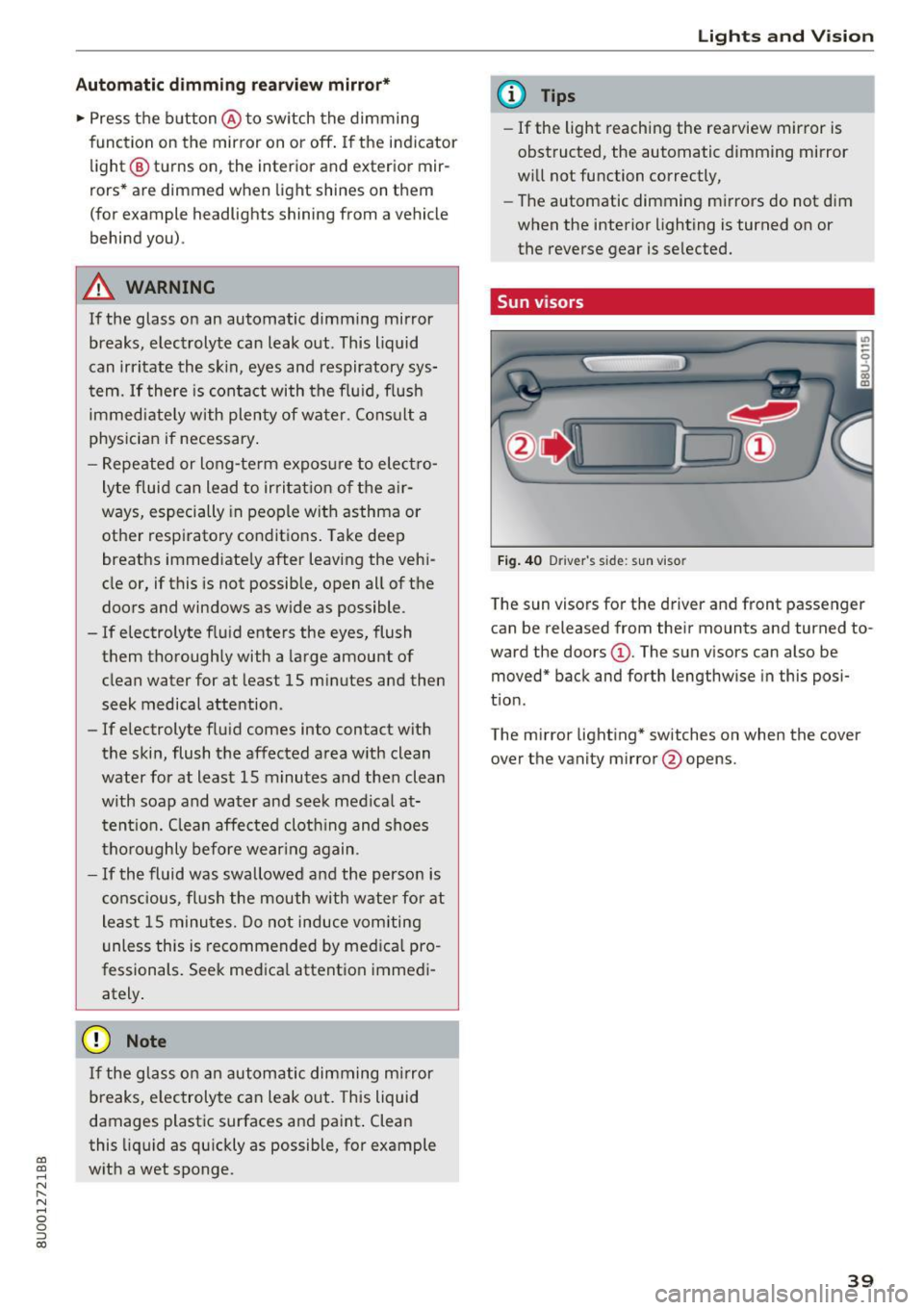
Fig. 40 Driver 's s ide: sun viso r
The sun visors for the driver and front passenger
can be released from their mounts and turned to
ward the doors
(D . The sun visors can also be
moved* back and forth lengthwise in this posi
tion.
The mirror lighting* switches on when the cover over the vanity mirror @opens.
39
Page 55 of 236
00
00
......
"' ,-...
"' ...... 0 0 :::,
00
Warm and cold
Climate control system
Description
Depending on the vehicle equipment, different
systems could be installed:
- manual climate control system* or
- automatic climate control system"
The climate control system warms, cools and re moves humidity from the air in the vehicle interi
or.
It is the most effective when the windows and
panorama glass roof" are closed. If there is a
build-up of heat inside the vehicle, ventilation
can help to speed up the cooling process .
Pollutant filter
The pollutant filter removes pollutants such as
dust and pollen from the air.
Key recognition*
The automatic climate control* settings are stor
ed and assigned to the remote control key that is
in use.
A WARNING
Reduced visibi lity is dangerous and can cause
accidents.
- For safe driving it is very important that all
windows be free of ice, snow and condensa
tion.
- Completely familiarize yourself with the
proper use and function of the heating and
ventilation system and especially how to de
fog and defrost the windows.
- Never use the windshield wiper/washer sys
tem in freezing weather until you have
Warm and cold
warmed the windshield first, using the heat
ing and ventilation system. The washer solu
tion may freeze on the windshield and re
duce visibility .
(D Note
-If you suspect that the air conditioner has
been damaged, switch the system off to
avoid further damage and have it inspected
by a qualified dealership .
- Repairs to the Audi air conditioner require
special technical knowledge and special
tools. Contact an authorized Audi dealer for
assistance .
® For the sake of the environment
By reducing the amount of fuel you use, you
also reduce the amount of pollutants emitted
int o the air.
(D Tips
-To prevent interference with the heating
and cooling output and to prevent the win
dows from fogging over, the air intake in
front of the windshie ld must be free of ice,
snow or leaves.
- Condensation from the cooling system* can
dr ip and fo rm a pudd le of water under the
vehicle . T his is normal and does not mean
there is a leak.
- The energy management system may tem
porarily switch off certain functions, such as
the seat heating* or rear window defogger .
These systems are avai lable again as soon
as the energy supply has been restored .
53
Page 59 of 236
IAUTOI Switching automatic mode on and off
Automatic mode ma inta ins a constant tempera
ture ins ide the vehicle. Air temperature, airflow
and air distribution are controlled automatically.
- I -Adjusting the temperature
The vehicle inte rior temperature can be adjusted
for the driver and the front passenger us ing the
l eft/rig ht knob. Temperatures can be set be
tween a range o f 60 °F ( +16 °() and 84 °F
(+28 °C) . Outside of this range,
LO or HI will ap
pear in the climate control system display. At
both of these settings, the climate contro l sys
tem runs continuously at maximum cooling or
heating power. There is no temperature regula
tion .
~ Adjust ing the blower
You can adjust the vo lume of air generated by the
blower to your preference. Use the left
l!:I button
to decrease the air speed, and use the right
lj]
button to increase the air speed . The blower
should always run at a low sett ing to prevent the
windows from fogging and to ensure a continu
ous exchange of air ins ide the veh icle. To have
the airflow regulated automatically, press the
IAUTO! button.
~/l;o!/ h0! Adjusting air distribution
You can manually select the vents where the air
will flow. The buttons can be pressed individually
or in combination with each other. To have the air
d is tribution regulated automatical ly, press the
IAUTO ! button.
~ Adjusting the seat heating*
Pressing the button switches the seat heating on
at the h ighest setting (level 3). The LEDs indicate
the temperature level. To reduce the tempera
ture, press the butto n again . To switch the seat
heating off, press the button repeatedly until the
LED turns off.
Afte r approximately 10 minutes, the seat heating
a utomatically switches from level 3 to level 2.
00
~ I@ MAXI Switching the defroster on and off
"' ,....
~ The windshield and s ide windows are defrosted 0
g or cleared of condensation as quickly as possible.
00
Warm and cold
The maximum amount of air flows mainly from
the vents below the windshield . Recirculation
mode switches off. The temperature should be
set at +72°F (22°() or higher.
T he
!AUTOI button switches the defroster off.
llilil REAR! Switching the rear window defogger
on and off
T he rear window defogge r on ly operates when
the engine is running and will be automatically
switched off after approximate ly 10 minutes .
Synchronization
If you press the
IAUTO I button longer, you can
transfe r the d river temperature setting to the
front passenger. Synchronization is switched off
as soon as the temperature for the front pas
senger's s ide is changed.
Air vents
You can open o r close the center and rear vents in
the cockpit and the vents in the rear center con
sole using the ridged thumbwheels . The levers
adjust the direction of the airflow from the vents.
Switching the temperature measurement
units
T he temperature display can be switched be
tween°( and °F. Press and hold the
l ,e,,: ,.I button
r=;, fig. 67 and turn the knob on the driver's side to
- for three seconds.
A WARNING
-
-You shou ld not use the recirculation mode
for an extended period of time since no
fresh air is drawn in. With the air-condition
ing switched off, the windows can fog up,
which increases the risk of an acc ident.
- Indiv iduals w ith reduced sensit iv ity to pain
or temperature could develop burns when
using the seat heating* function. To reduce
the risk of injur y, these individua ls should
not use seat heating*.
0 Note
To avoid damaging the seat heating* ele
ments, do not kneel on the seats or place
heavy pressure on one area of the seat.
57
Page 61 of 236

00
00
......
"' ,....
"' ...... 0 0 :::,
00
consumption to zero (fuel shut-off during decel
eration).
Shift efficiently
An effective way to save fuel is to upshift earlier .
Staying in a gear too long uses fuel unnecessari
ly. Press down on the accelerator pedal slowly
and avoid "kick-down".
Avoid full acceleration
You should rarely travel at the maximum vehicle
speed. High speeds cause a disproportionately
high increase in fuel consumption, emissions and
traffic noise. Slower driving saves fuel.
Reduce idling time
There are benefits to stopping the engine, for ex
ample when at railroad crossings or traffic lights
with longer red lights. Stopping the engine for
30-40 seconds already saves more fuel than the
amount of extra fuel needed to restart the en
gine.
It takes a very long time in idle to warm the en
gine up to operating temperature . Wear and
emissions are especially high in the warm-up
phase. Therefore, you should begin driving im
mediately after starting the engine. Avoid high
RPMs while doing this.
Have maintenance performed regularly
By having maintenance performed regularly on
your vehicle, you can help to reduce fuel con
sumption before you even start to drive. The maintenance condition of your vehicle not only
affects traffic safety and long-term value but al
so impacts
fuel consumption. A poorly main
tained engine can lead to fuel consumption that
is 10% higher than normal.
Also check the
oil level when refueling. The oil
consumption
depends largely on the engine load
and speed . It is normal for the oil consumption
of a new engine to reach its lowest point only af
ter a certain amount of use. Therefore, the oil
consumption can only be properly judged after
approximately 3,000 miles (5,000 km) have been
driven.
Driving
Fewer short trips
The engine and catalytic converter have to reach
their optimal
operating temperature to reduce
fuel consumption and noxious emissions effec
tively.
Just after starting, a cold engine in a mid-size car
only achieves a fuel economy of 6-8 mpg
(30-40 l/100 km). After about a half a mile, fuel
economy climbs to 12 mpg (20 l/100 km). After
about 2.5 mi
(4 km), the engine is at its proper
operating temperature and fuel economy has
reached a normal level. So you can see that you
should avoid short trips whenever possible .
The
outside temperature is also critical in this re
gard. Your car consumes more fuel in the winter
than in the summer.
@ Note
Do not leave engine idling unattended after
starting. If warning lights should come on to indicate improper operation, they would go
unheeded. Extended idling also produces
heat, which could result in overheating or
other damage to the vehicle or other proper
ty.
(D Note
- Have your vehicle maintained properly and
in accordance with the service recommenda
tions in your Warranty & Maintenance book
let. Lack of proper maintenance as well as
improper use of the vehicle will impair the
function of the emission control system and could lead to damage.
- Do not alter or remove any component of
the Emission Control System unless ap
proved by the manufacturer.
- Do not alter or remove any device, such as
heat shields, switches, ignition wires,
valves, which are designed to protect your
vehicle's Emission Control System and other
important vehicle components .
(j) Tips
The consumption estimates as published by
ENVIRONMENTAL PROTECTION AGENCY
(EPA) and Transport Canada may not
59
Page 62 of 236
Driving
correspond to you r actua l consumption on the
road, which will vary depending upon vehicle
load and speed, road and weather conditions,
trip length, etc.
Steering
Adjusting the steering wheel position
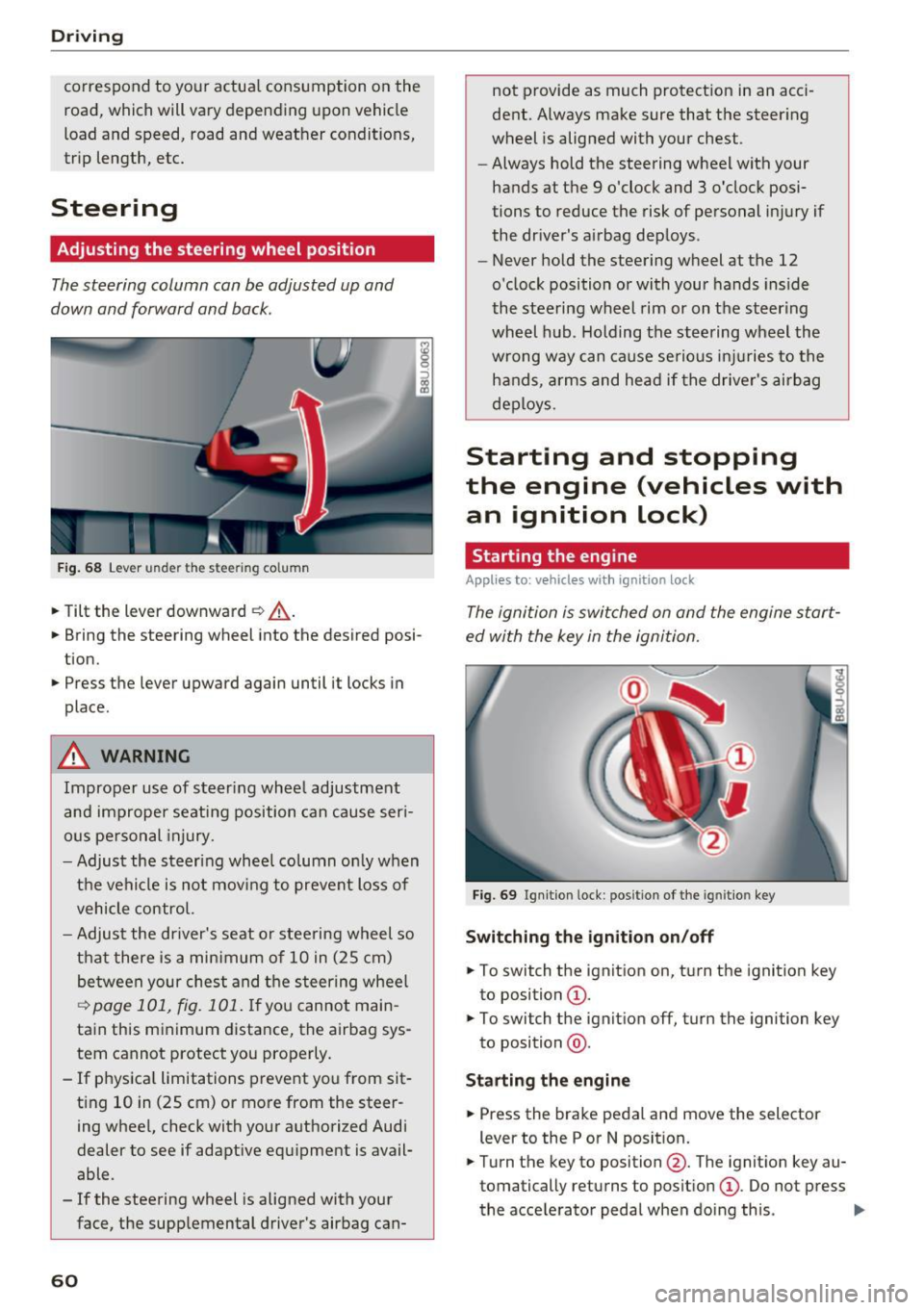
The steering column can be adjusted up and
down and forward and back.
F ig . 68 Lever u nde r the stee ring column
.,. Tilt the lever downward ¢ _A.
.,. Bring the steering wheel into the desired posi
tion .
.,. Press the lever upward again until it locks in
place .
.&_ WARNING
Improper use of steer ing whee l adjustment
and improper seating position can cause ser i
ous pe rsonal injury.
- Adjust the steering wheel column on ly when
the vehicle is not mov ing to prevent loss of
vehicle control.
- Adjust the driver's seat o r steering wheel so
that there is a minimum of 10 in (25 cm)
be tween your chest and t he s teering wheel
~ page 101, fig. 101 . If yo u cannot main
tain this minimum distance, the airbag sys
tem cannot protect you properly.
- If physica l limitations prevent you from sit
t ing 10 in (25 cm)
or more from the steer
ing wheel, check with your authorized Audi
dealer to see if adaptive equipment is avail
able .
- If the steering wheel is aligned with your
face, the supplemental driver's airbag can-
60
not provide as much protect ion in an acci
dent. Always make sure that the steer ing
wheel is aligned with your chest.
- Always hold the steering wheel with your
hands at the 9 o'clock and 3 o'clock posi
tions to reduce the risk of personal in jury if
the driver's airbag deploys .
- Never hold the steering wheel at the 12
o'clock position or with your hands inside
the steering wheel rim or on t he steering
wheel hub . Holding the steering wheel the
wrong way can cause serious in juries to the
h an ds, arm s and head if the drive r's airbag
deploys.
Starting and stopping
the engine (vehicles with an ignition lock)
Starting the engine
Applies to: vehicles wit h ignition lock
The ignition is switched on and the engine start
ed with the key in the ignition.
Fig. 69 Ign it ion lock : pos ition of the ig ni tio n key
Switching the ignition on/off
.,. To switch the ignition on, turn the ignition key
to position
(D .
.,. To switch the ignit ion off, turn the ignition key
to position @.
Starting the engine
.,. Press the brake pedal and move the selector
lever to the P or N posit ion.
.,. Turn the key to position @. The ignit ion key au
tomatically returns to posit ion
(D . Do not press
the accelerator peda l when doing this . ..,.
Page 78 of 236
Trailer towing
Sp eed
The higher the speed, the more d ifficult it be
comes for the driver to contro l the rig. Do not
dr ive at the maximum permissible speed. Reduce
your speed even more if load, w eather or wind
conditions are unfavorable -particularly when
going downhill.
Red uce vehicle speed
immediatel y if the trai le r
shows the s lightest sign of swaying .
Do not try
to stop the swayin g by ac cele rating.
Observe speed limits . In some areas, speeds for
vehicles towing trailers are lower than for reg ular
ve hicles.
A lways apply b rakes early . When dr iving down
hi ll, shi ft into a lower gear to use the engine
braking effect to slow the vehicle. Use of the
brakes a lone can cause them to overheat and fail.
Coolant temperature
The coolant temperatu re gauge ¢ page 8 must
be observed ca refully . If the needle moves close
to the upper end of the scale, reduce speed im
mediately and/or turn off the air conditioner .
I f t he coolan t temperature warn ing light i n the
instr ument cluster s tarts flashing ., pull off
the road, stop and let the engine
idle for about
two minutes to prevent heat bu ild-up .
A WARNING
Anyone not properly restrained in a moving
vehicle is at a much greater risk in an acci
dent . Never let anyone ride in your car who is
not properly wearing the restraints provided
by Audi .
Trailer towing
information
Important to know
Your veh icle hand les different ly when tow ing a
tra iler because of the additional weight and dif
fe rent weight d istr ibut ion . Safety, performance
and economy w ill great ly depend on how careful
ly you load you r trailer and operate your rig .
76
Before you actually tow your trailer, practice
turning, stopping and backing up in an area away
from traffic . Keep pract icing unt il yo u h ave be
come comp lete ly familiar w ith the way your vehi
cle-tra iler combination behaves and responds.
Backing up is difficult and requires practice .
Backing up w ith a trailer generally req uires steer
i ng action opposite to that when backing up your
vehicle without a trailer.
Maintain a greater distance between your vehicle
and the one in front of you . You will need more
room to stop. To compensate for the trailer, you
will need a larger than normal turning radius.
When passing, remember that you cannot accel erate as fast as you normally wou ld because of
the added load. Make sure you have enough room
to pass. After passing, allow p lenty of room for
your trailer before changing lanes again.
Avo id jerky starts, sharp turns or rapid lane
changes.
(D Tips
- Do not tow a trailer during the break-in peri
od of your veh icle.
- If you tow a trai ler, your Audi may requi re
more frequent maintenance due to the ex
tra load
¢ page 218.
' Parking on a slope
Do not park on a slope with a trailer. If it cannot
be avoided, do so only after doing the following:
When parking:
.,. App ly the foot bra ke .
.,. Have someone place cho cks under bot h the ve
hicle and the trailer wheels .
.,. With choc ks in place, slowly release the brakes
until the wheel chocks absorb the load.
.,. Turn the wheels towards the curb .
.,. App ly the parking brake .
.,. Move the selector lever to P .
When restarting after parking :
.,. App ly the foot brake .
.,. Start the eng ine .
.,. Move the se lector lever to D/S.
Page 83 of 236
00
00
......
"' ,....
"' ...... 0 0 :::,
00
Side assist functions at speeds above approxi
mately 19 mph (30 km/h).
@ Vehicles that are approaching
In certain cases, a vehicle will be classified as
critical for a lane change even if it is still some
what far away. The faster a vehicle approaches,
the sooner the display in the exterior mirror will
turn on.
@ Vehicles traveling with you
Vehicles traveling with you are indicated in the
exterior mirror if they are classified as critical for
a lane change. All vehicles detected by side assist
are indicated by the time they enter your "blind
spot", at the latest.
© Vehicles you are passing
If
you slowly pass a vehicle that side assist has
detected (the difference in speed between the
vehicle and your vehicle is less than
9 mph (lS
km/h)), the display in the exterior mirror turns
on as soon as the vehicle enters your blind spot.
The
display will not turn on if you quickly pass a
vehicle that side assist has detected (the differ
ence in speed is greater than 9 mph (15 km/h)).
Functional limitations
The radar sensors are designed to detect the left
and right adjacent lanes when the road lanes are
the normal width . In some situations, the display
in the exterior mirror may turn on even though
there is no vehicle located in the area that is criti
cal for a lane change. For example:
-If the lanes are narrow or if your are driving on
the edge of your lane. If this is the case , the
system may have detected a vehicle in another
lane that is
not adjacent to your current lane.
-If you are driving through a curve. Side assist
may react to a vehicle that is one lane over
from the adjacent lane .
- If side assist reacts to other objects (such as
high or displaced guard rails).
- In poor weather conditions. The side assist
functions are limited.
Do not cover the radar sensors
c!:> fig. 84 with
stickers, deposits, bicycle wheels or other ob-
Assist
jects, because they will impair the function. Do
not use side assist when towing a trailer. For in
formation on cleaning, see
c!:>page 191.
A WARNING
-- Always pay attention to traffic and to the
area around your vehicle. Side assist cannot replace a driver's attention. The driver alone
is always responsible for lane changes and
similar driving maneuvers .
- Improper reliance on the side assist system can cause collisions and serious personal in
jury:
- Never rely only on side assist when chang
ing lanes.
- Always check rear view mirrors to make
sure that it is safe to change lanes.
- Side assist cannot detect all vehicles under
all conditions- danger of accident!
- Please note that side assist indicates there
are approaching vehicles, or vehicles in your
blind spot, only after your vehicle has
reached a driving speed of at least 19 mph
(30 km/h).
- In certain situations, the system may not
function or its function may be limited. For
example:
- if vehicles are approaching or being left
behind very quickly. The display may not
turn on in time.
- in poor weather conditions such as heavy
rain, snow or heavy mist.
- on very wide lanes, in tight curves or if
there is a rise in the road surface. Vehicles
in the adjacent lane may not be detected
because they are outside of the sensor
range.
(I) Note
The sensors can be displaced by impacts or
damage to the bumper, wheel housing and
underbody. This can impair the system. Have
an authorized Audi dealer or authorized Audi
Service Facility check their function.
-
81
Page 101 of 236
00
00
......
"' ,....
"' ...... 0 0 :::,
00
is designed to record data re lated to vehicle dy
namics and safety systems for a short period of
time, typically 30 seconds or less . The EDR in this
vehicle is designed to record such data as :
- How various systems in you r vehicle were oper
ating;
- Whether or not the driver and passenger safety
belts were buckled/fastened;
- How fa r (if at all) the dr iver w as depressing the
acce lerator and/or brake peda l; and,
- How fast the ve hicle was travel ing.
These data can help prov ide a better understand
ing of the c ircumstances in which c rashes and in
juries occur. NO TE: E DR data are reco rded by your
ve hicl e only if a non -triv ia l crash si tuation occurs;
no data are recorded by the EDR under norma l
driving conditions and no pe rsonal data (e.g.,
name, gender , age, and crash location) are re
corded. However, other parties, such as law en
forcement, could combine the EDR data w ith the
type of personally identifying data routine ly ac
qu ired during a crash invest igation.
To read data recorded by an EDR, specia l equip
ment is required, and access to the ve hicle or the
EDR is needed. In addit ion to the vehicle manu
facturer, other parties, such as law enforcement,
that have the special equ ipment, can read the in
formation if they have access to the vehi cle or the
E DR.
Some state laws restrict the retr ieval or down
loadi ng of data stored by ED Rs installed i n a vehi
cle for the express purpose of retrieving data af
ter a n accident o r crash event wi tho ut t he own
e r' s consent.
Aud i will not access the EDR and/or s imilar data
or give it to othe rs -
- unless the vehicle owner (or lessee if the vehi
cle has been leased) agrees; or
- upon the off icia l request by the police; o r
- upon the order of a court of law or a govern-
ment agency; o r
- for the defense of a laws uit throug h the judicial
discovery process.
- Audi may also use the data for research about
vehicle operation and safety performance or
Intellig ent Technology
prov ide the data to a third pa rty for research
purposes witho ut identifying the specific vehi
cle or informat ion about the ident ity o f its own
er or lessee and only after the recorded veh icle
data has been accessed.
Vehicle control m odules
You r vehicle is also eq uipped with a number of
electronic control modules for various vehicle
systems, such as engine management, emiss ion
contro l, airbags, and safety be lts.
These electronic contro l modu les record data
during norma l vehicle operation that may be
needed by trained techn ic ians for diagnostic and
repa ir purposes. The recording capab ility of these
modules is lim ited to data (no sound is record
ed) . Only a small amount of data is actua lly re
corded over a very limited period of time, or stor
ed when a system fault is detected by a contro l
module . Some of the da ta stored may relate to
vehicle speed, direction, or b raking, as well as re
strain t system use and per formance in the eve nt
of a crash . Stored data can also on ly be read and
down loade d with specia l equipment that is di
rectly connected to the vehicle.
(D Tips
Your vehicle may be equipped wit h Au di con
nect. Your use of certai n Audi connect fea
tures requires wire less serv ices that are pro
v ided by a third party wireless telecommuni
cations provide r. For details regarding how in
formation obtained throug h Aud i connect is
collected, p rocessed, transmitted, used, and
s hared, please see you r contra ct w ith the
wireless tele co m mun ications pr ovi der and the
"Abou t A udi con nect" t ab in yo ur vehicle's
M MI:
I MENU ! button > Audi connect > About
Audi connect .
99