key AUDI Q3 2018 User Guide
[x] Cancel search | Manufacturer: AUDI, Model Year: 2018, Model line: Q3, Model: AUDI Q3 2018Pages: 230, PDF Size: 57.03 MB
Page 32 of 230
Opening and clo sin g
Child safety lock
The child safety lock prevents the rear doors
from being opened from the inside and the rear
power windows from be operated .
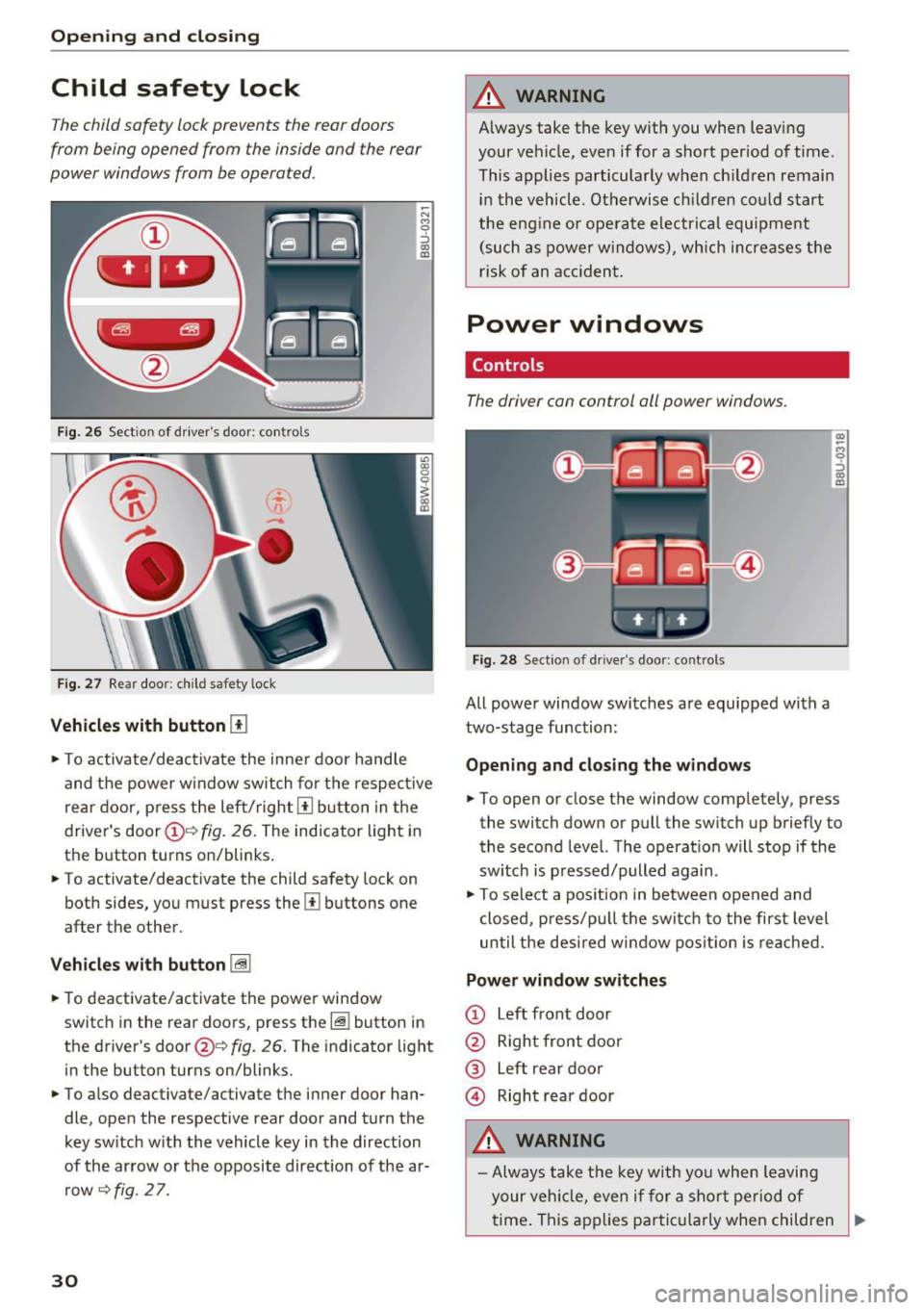
Fig. 26 Sect ion of driver's doo r: co ntrols
F ig. 27 Rear door: c hild safety lock
Vehicles with button [TI
~ N M 9 ::J
co
(D
., To activate/deactivate the inne r door handle
and the power w indow switch for the respective
rea r door, p ress the left/right
[II b utton in the
driver's door(!)'=~
fig. 26. The indicator light in
the button turns on/blinks.
., To activate/deactivate the child safety lock on
both sides, you must press the
Ii] buttons one
after the other.
V eh icl es with button [@
., To deactivate/activate the power window
switch in the rear doors, press the~ button in
the driver's door@¢
fig. 26. The indicator light
in the button turns on/blinks.
., To also deactivate/activate the inner door han
dle, open the respective rear door and turn the key sw itch w ith the vehicle key in the direction
of the arrow or the opposite direction of the ar row
~ fig. 2 7.
30
A WARNING
A lways take the key with you when leaving
your vehicle, eve n if for a short period of time .
This applies particularly w hen ch ildren remain
in the vehicle . Otherwise ch ildren cou ld start
the engine or ope rate electr ical equ ipment
(such as power w indows), which increa ses the
risk of an acciden t.
Power windows
Controls
The driver con control oil power windows.
Fig. 28 Section of driver's door: controls
All powe r window switches are equipped with a
two-stage function:
Openin g and clos in g the w ind ows
(I) ~
9 ::J (I)
(D
., To open or close the window completely, press
the switch down or pull the switch up briefly to
the second level. The operat ion will stop if the
sw itch is p ressed/pulled again .
., To select a position in between opened and
closed, p ress/pu ll the switch to the first level
until the des ired window posit ion is reached.
Power window switches
CD Left front door
@ Right front door
® left
rear door
© Right rear door
A WARNING
- Always take the key with yo u when leaving
your veh icle, even if for a sho rt period of
.
time . This applies parti cularly when children ..,
Page 33 of 230
a
co
...... N r--. N .... 0 0 ::, co
remain in the vehicle. Otherwise, children
could start the engine or operate electrical
equipment (such as power windows), which
increases the risk of an accident .
- Pay careful attention when closing the win
dows. Pinching could cause serious injuries.
- When locking the vehicle from outside, the vehicle must be unoccupied since the windows can no longer be opened in an emer
gency .
(D Tips
After switching the ignition off, you can still
open and close the windows for approximate
ly 10 minutes. The power windows do not
sw itch off until the driver's door or front pas
senger's door has been opened .
Convenience opening/closing
All of the windows and the panorama glass roof
can be opened/closed at the same time .
Convenience opening feature
"'Hold the key in the open position in the driver's
door lock until all of the windows are in the de
sired position and the panorama glass roof is
tilted open .
Convenience closing feature
"'Hold the key in the lock position in the driver's
door lock until all the windows and the panora
ma glass roof are closed .
When the panorama glass roof is opened/closed,
the electric sunshade also opens/closes.
A WARNING
Never close the windows or panorama glass
roof carelessly or in an uncontrolled manner,
because this increases the risk of injury.
Correcting power window malfunctions
You can reactivate the one-touch up/down func
tion if it malfunctions.
"'Pull the power window switch up until the win
dow is completely raised.
-
Open ing and closing
"'Release the switch and pull it up again for at
least one second .
"' Press the power window switch until the w in
dow is completely lowered.
"' Release the switch and press it again for at
least one second . Now you can close the win
dow as usual.
Panorama glass roof
Description
Applies to : veh icles with pano rama glass roof
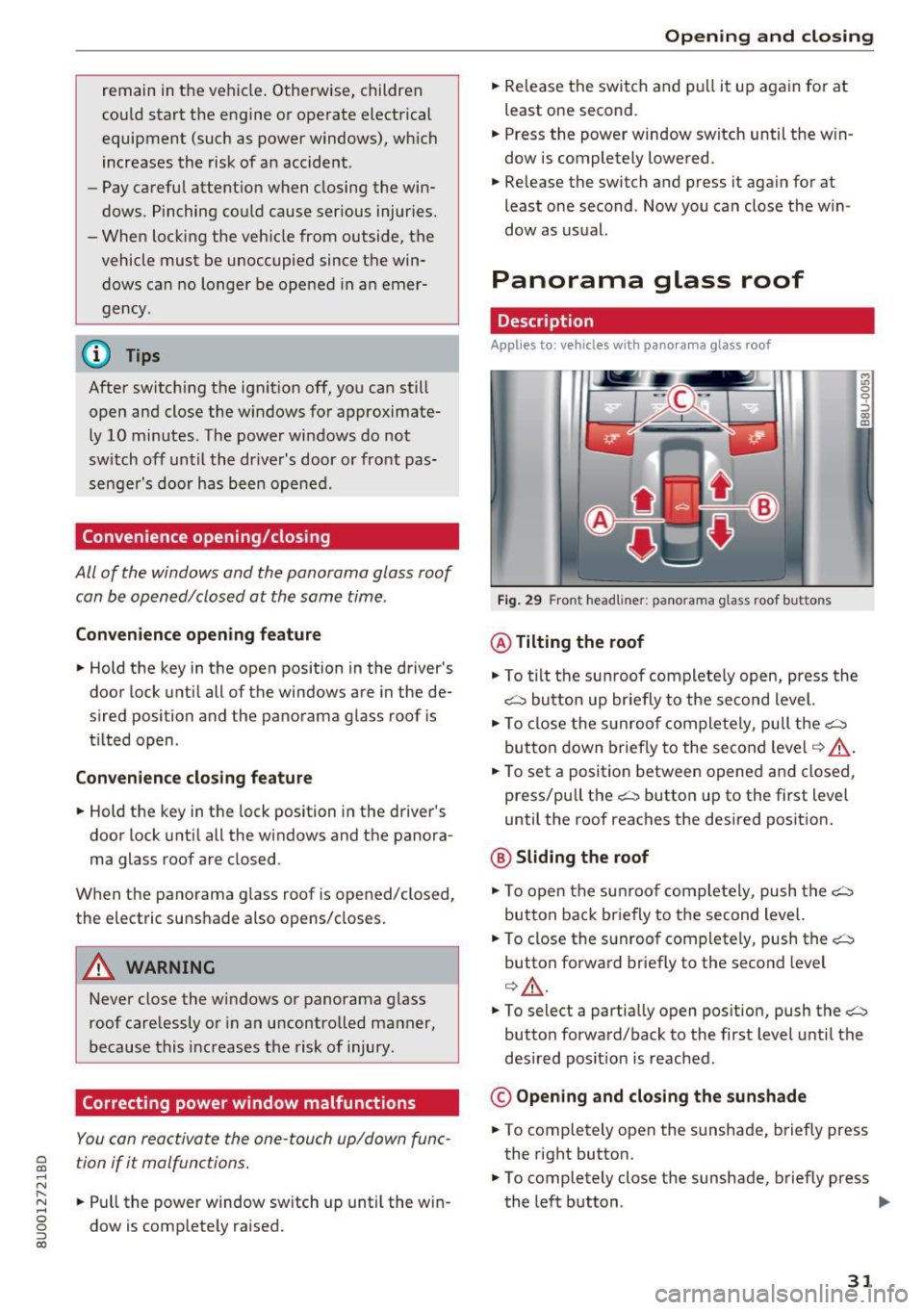
Fig. 29 F ront headline r: pa norama glass roof buttons
@ Tilting the roof
"'To tilt the sunroof complete ly open, press the
~ button up briefly to the second level.
"' To close the sunroof completely, pull the~
button down briefly to the second level
¢ ,&. .
"'To set a position between opened and closed ,
press/pull the~ button up to the first level
until the roof reaches the desired position.
@ Sliding the roof
"'To open the sunroof completely, push the~
button back briefly to the second level.
"' To close the sunroof completely, push the~
button forward briefly to the second level
¢ ,&. .
M ~., 0
0
:, (X) m
"'To select a partially open position, push the~
button forward/back to the first level until the
desired posit ion is reached .
© Opening and closing the sunshade
"'To completely open the sunshade, briefly press
the right button.
"' To completely close the sunshade, briefly press
the left button . ..,
31
Page 34 of 230
Opening and closin g
"'T o stop the sunshade, press the corresponding
button again .
You can still ope rate the panorama glass roof for
about 10 minutes after the ignition is switched
off . The switch is deactivated once the driver's or
front passenger's door is opened .
A WARNING
To reduce the risk of injury, always pay atten
tion when closing the panorama glass roof.
Always take the ign ition key with you when
leaving the vehicle .
(D Note
Always close the panorama glass roof when
leaving your veh icle. Rain can cause damage
to the inter ior equipment of your vehicle, par
ticularly the electronic equipment .
@ Tips
-For informat ion about convenience open
i ng/closing, see
c:> page 31.
- The panorama glass roof will only open
down to -4°F (-20°).
Emergency closing the panorama glass roof
Applies to: vehicl es with panorama glass roof
If an object is detected when closing, the panora
ma glass roof will open again automatically . In
this case, you can then close it with the power
emergency clos ing function.
"' Pull the respective button
c:> page 31, fig . 29
within five seconds after the roof opens auto
matically and hold until the panorama glass
roof* is closed.
If you release the switch early, the panorama
g lass roof will open again .
32
Page 38 of 230
Lights and Vision
and the ignition is switched on . The illum ina
tion reduces automatica lly and eventually
turns
off as brightness outs ide decreases.
This function reminds the driver to turn the
low beams on at the appropriate time.
Vision
Adjusting exterior mirrors
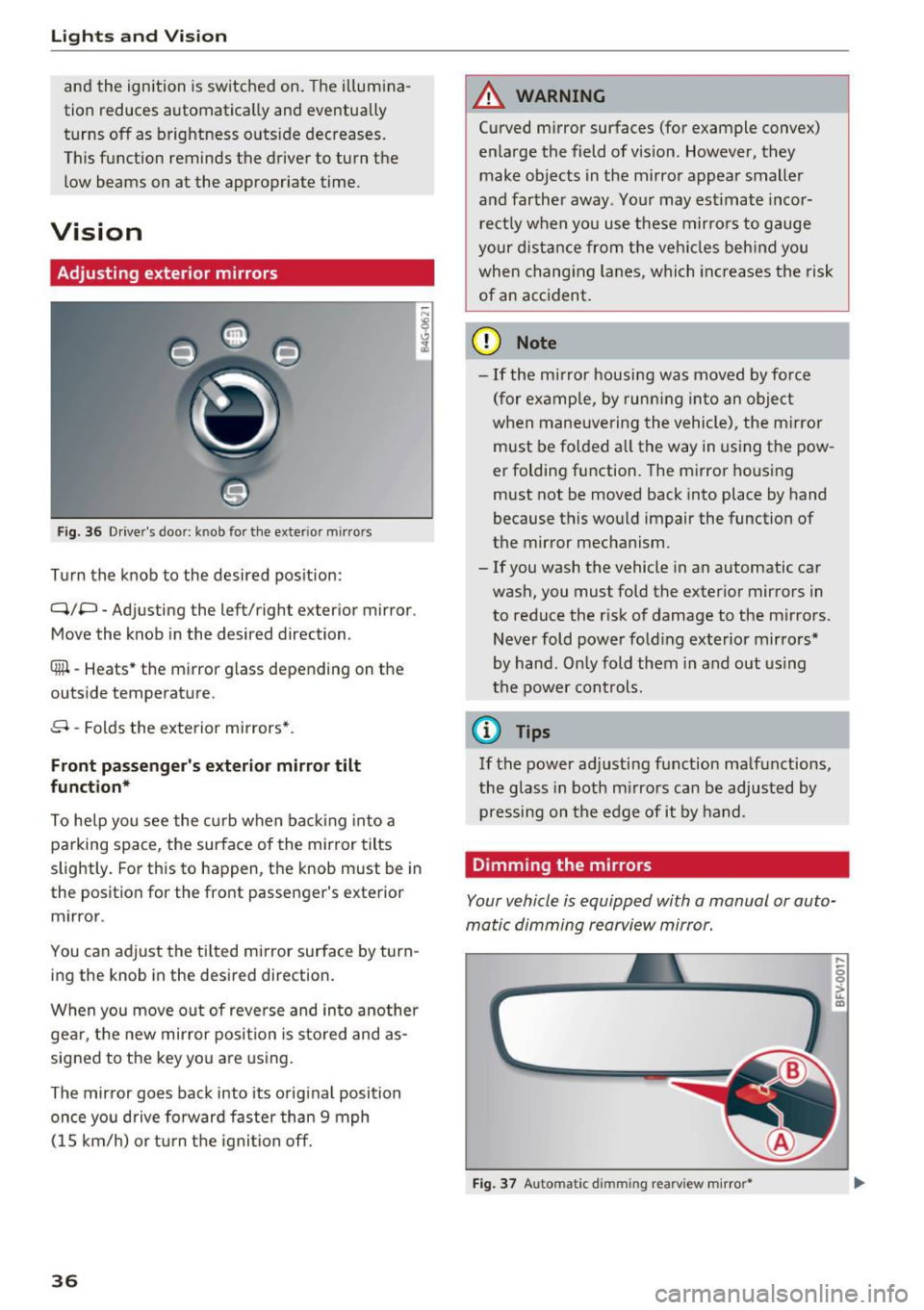
F ig . 36 Driver's door: knob for th e exterior m irrors
Tu rn the knob to the desired pos ition:
q;p -Adjusting the left/right exterior mirror .
Move the knob in the desired direction .
®l-Heats* the mirror glass depending on the
outside temperat ure.
8 -Folds the exte rior mirrors*.
Front passenger's exterior mirror tilt
function*
To he lp you see the curb w hen ba cking into a
parking space, the surface of the mirror tilts
slightly. For this to happen, the knob must be in
the position for the front passenger's exterior
mirror.
You can adjust the tilted mirror surface by turn
ing the knob in the desired direction.
W hen you move o ut of reve rse and in to another
gear, the new mir ror posi tion is sto red and as
sig ned to the key you are using.
The mir ror goes bac k into its o riginal position
once you drive fo rward faster than 9 mph
(1 5 km/h) or t urn t he igni tion
off.
36
A WARNING
Curved mirror surfaces (for example convex)
enla rge the field of vision. However, they
make ob jects in the mirro r appear smaller
a nd farther away. Your may est imate inco r
rect ly w hen you use these mirro rs to gauge
your distan ce from the veh icles beh ind you
when chang ing lanes, whi ch in cr eases the risk
of an acc ident .
(D Note
-If the m irror housing w as moved by fo rce
(for examp le, by run ning into an object
when maneuve ring the vehicle), the m irror
must be fo lded a ll the way in using t he pow
er folding function. The mirror hous ing
must not be moved back into place by hand
because this wo uld impair the function of
the mir ror mechanism.
- If you wash the vehicle in an automatic car
wash, you must fold the exter ior mirrors in
to reduce the r isk of damage to the m irro rs.
Never fold power fo lding exterior mirro rs*
by han d. Only fold them in and out using
t h e power con trols.
(D Tips
If the power ad justi ng function ma lf u nctions,
the glass in both m irrors can be adjusted by
pr essi ng on t he edge of it by ha nd.
Dimming the mirrors
Your vehicle is equipped with a manual or auto
matic dimming rearview mirror.
,._
0 0
> u. m
F ig. 37 Automatic d imm ing rearview m irror *
Page 44 of 230
Sea ts and stor age
Seats and storage
General information
A WARNING
See c::> page 9 7, Driving safety for important
information, tips, suggestions and warnings
that you should read and follow for your own
safety and the safety of yo ur passengers .
Front seats
Manual seat adjustment
Appl ies to vehicles with manual adiustable seats
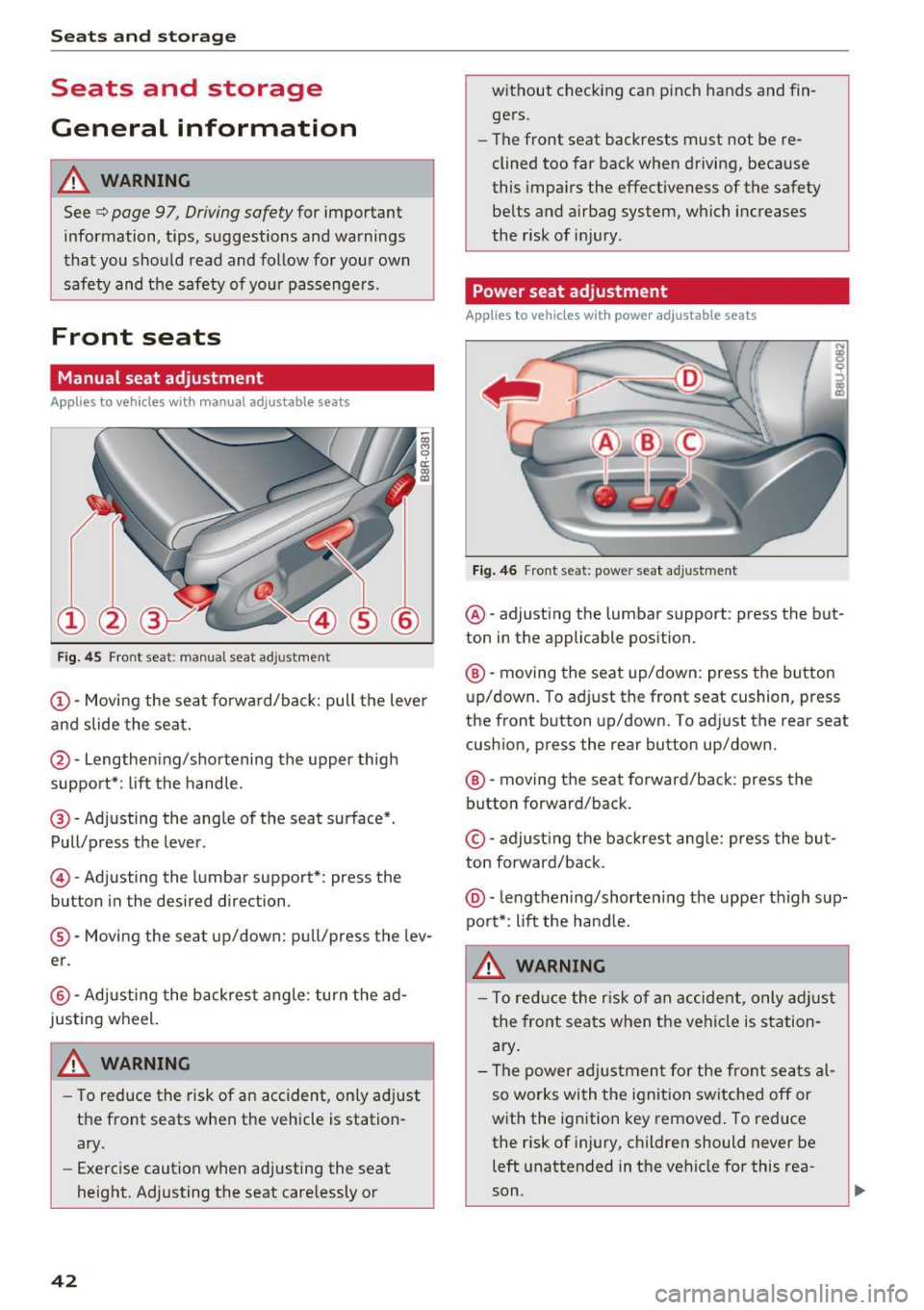
Fig. 45 Front seat: manual seat ad justme nt
@ -Moving the seat fo rward/back: pull the lever
and slide the seat.
@ -Lengthening/shortening the upper thigh
support*: lift the handle.
@ -Adjusting the angle of the seat surface*.
Pull/press the lever.
© -Adjusting the lumbar support*: press the
button in the desired direction .
®-Moving the seat up/down: pull/press the lev
er.
@ -Adjusting the backrest angle : turn the ad
justing wheel.
WARNING
- To reduce the risk of an accident, on ly adjust
the front seats when the vehicle is station
ary.
- Exercise caution when adjusting the seat
height. Adjusting the seat care lessly or
42
w ithout checking can p inch hands and fin
gers.
- The front seat backrests must not be re
clined too far back when driving, because
this impa irs the effectiveness of the safety
belts and airbag system, which increases
the risk of inj ury .
Power seat adjustment
App lies to vehicles w it h power adjustab le seats
Fig . 46 Front seat: power seat adjustment
@ -adjusting the lumbar support : press the but
ton in the applicable position.
® -moving the seat up/down: press the button
up/down. To adjust the front seat cushion, press
the front button up/down. To adjust the rear seat
cushion, press the rear button up/down.
® -moving the seat forward/back : press the
button forward/back.
© -adjust ing the backrest ang le: press the bu t
ton forward/back .
@-leng thening/shorten ing the uppe r thigh sup
port*: li ft the hand le.
A WARNING
- To reduce the r is k of an accident, only adjust
the front seats when t he vehicle is station
ary .
- The power adj ustment for the front seats al
so works wi th the ignit ion sw itched off or
with the ignition key removed . To reduce
the risk of injury, children should never be
left unattended in the vehicle for this rea
son .
Page 47 of 230
a
co
...... N r--. N .-< 0 0 ::, co
A WARNING
The sockets and the electrical accessories connected to them only funct ion when the igni
tion is switched on . Incorrect usage can lead
to ser ious injuries or b urns . To reduce the risk
of injur ies, neve r leave child ren unat tended i n
t he vehicle with the veh icle key .
CD Note
-To reduce the risk of damage to the vehicle
electrical system, never attempt to charge
the veh icle bat tery by connect ing accesso
ries that prov ide power, such as solar pa ne ls
or battery chargers, to the 12 Volt sockets.
- To reduce the risk of damage to the sockets,
on ly use plugs that fit cor rect ly.
@ Tips
The vehicle battery d rains when accessories
are turned on b ut the engine is off .
Storage
Cup holders
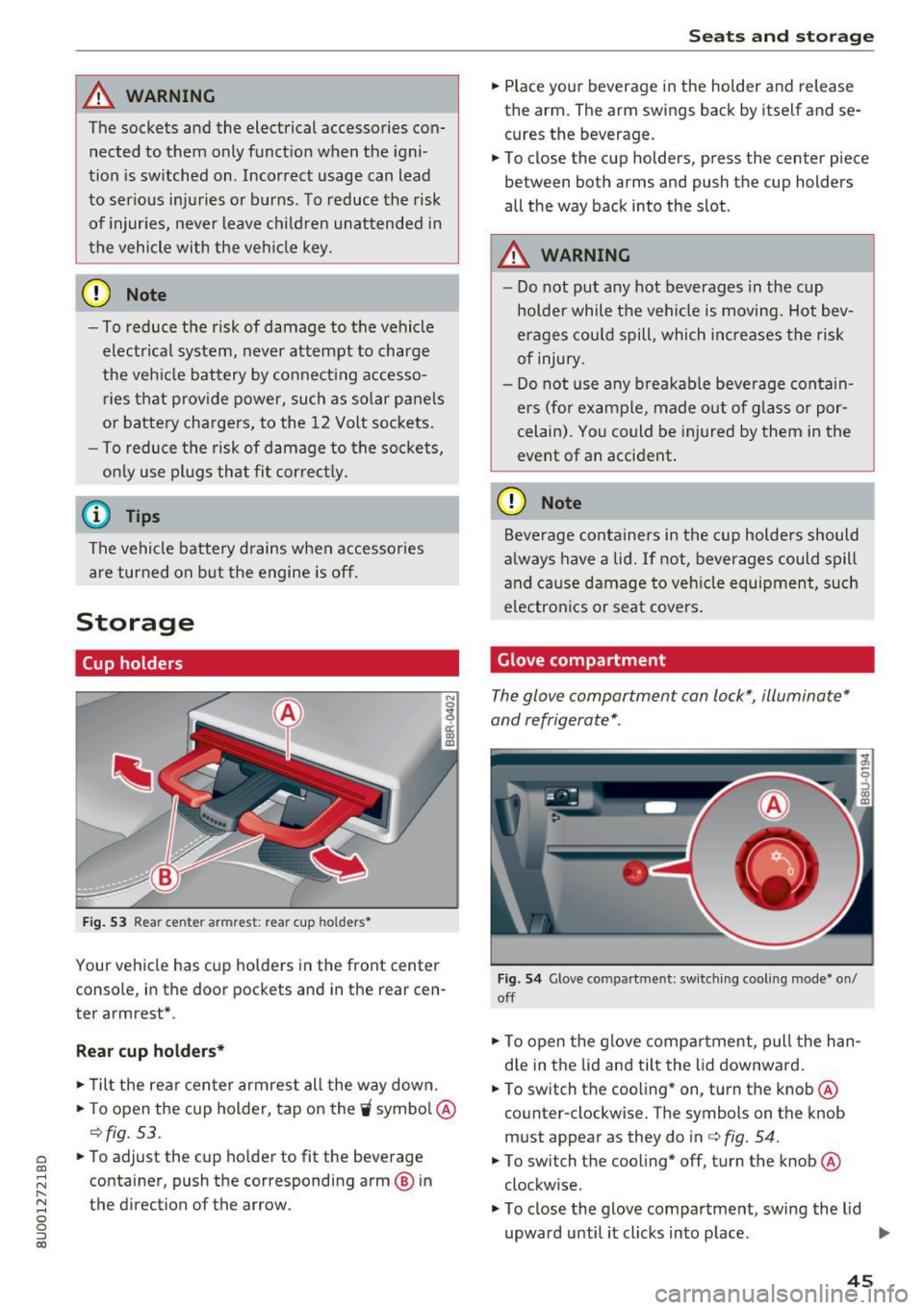
Fig. 53 Rea r ce nter a rmrest: rea r cup holders•
Your vehicle has cup holders in the front center
console, in the door pockets and in the rear cen
ter armrest *.
Rear cup holder s*
.. Til t the rear center armrest all the way down .
.. To open the cup holder, tap on the
'i symbo l@
c:::> fig. 53.
.. To adjust the cup ho lder to fit the beverage
container, push the corresponding arm @ in
the direction of the arrow .
Seats and storage
.. Place your beverage in the holder and release
the arm. The arm swings back by itself and se
cures the beverage.
.. To close the cup holders , press the center piece
between both arms and push the cup holders
all the way back into the slot .
A WARNING
--
-Do not put any hot beverages in the cup
holder while the vehicle is moving. Hot bev
erages could spill, which increases the risk
of injury.
- Do not use any b reakab le beve rage contain
e rs (for example, made out of g lass or por
celain). Yo u could be injured by them in the
event of an accident .
CD Note
Beverage containers in the cup holders should
a lways have a lid.
If not, beverages could spill
and cause damage to veh icle equipment, such
electron ics or seat covers .
Glove compartment
The glove compartment can lock*, illuminate*
and refrigerate* .
Fig. 54 G love co mpart m en t: sw itching cooling mode * on /
off
.. To open the glove compa rtment, pull the han
d le in the lid and tilt the lid downward .
.. To switch the cooling* on, turn the knob@·
co unter -clockwise . T he symbols on the knob
must appear as they do in c:::>
fig. 54.
.. To switch the cooling* off, turn the knob @
clockw ise .
.. To close the glove compartment, swing the lid
upward until it clicks in to p lace . ..,.
45
Page 53 of 230
0 co ......
"' ,-...
"' ...... 0 0 :::,
00
Warm and cold
Climate control system
Description
Depending on the vehicle equipment, different
systems could be installed:
- manual climate control system or
- automatic climate control system"
The climate control system circu lates, warms or
cools, and removes humidity from the air in the
vehicle interior. It is the most effective when the windows and panorama glass roof" are closed. If
there is a build-up of heat inside the vehicle, ven
tilation can help to speed up the cooling process .
Pollutant filt er
The pollutant filter removes pollutants such as
dust and pollen from the air.
Key rec ogn ition *
The automatic climate cont ro l system* settings
are stored and assigned to the remote control
key that is in use.
A WARNING
Poor visibility can lead to accidents.
- For safer driving, keep all windows free of
ice, snow and fog .
- Become familiar with the correct use and
function of the climate control system as
quickly as poss ible, espec ially with the de
frosting and defogging functions.
- When the temperature is below freezing,
only use the windshield washer system after
the windsh ield has been warmed by the cli
mate control system. The washer fluid could
Warm and c old
freeze on the windshield and impair visibili
ty.
@ Note
- If you suspect that the climate contro l sys
tem is damaged, switch the system off to
prevent further damage and have it checked
by an authorized Aud i dealer or authorized
Audi Service Facility.
- Repairs to the Audi climate control system
require special technical knowledge and
special tools. See an authorized Audi dea ler
or authorized Aud i Service Fac ility.
@) For the sake of the environment
- To save fuel, turn off the climate control
system cooling mode by pressing the A/C
button. This will also reduce emissions . The
cl imate control system is off when the LED
in the button turns off.
- In vehicles w ith the efficiency program*,
you can find other consumptio n information
and more economy tips
¢ page 20.
(D Tips
- To prevent interference with the heat ing
and cooling output and to prevent the win
dows from fogging over, the air intake in
fro nt of the windshie ld must be free of ice
,
snow or leaves.
- Condensation from the cooling system* can
dr ip and fo rm a pudd le of water under the
vehicle. This is norma l and does not mean
there is a leak .
- The energy management system may tem
porarily switch off certain functions, s uch as
the seat heating* or rear window defogger .
These systems are avai lable aga in as soon
as the energy supply has been restored.
5 1
Page 62 of 230
Driving
Starting and stopping
the engine (vehicles with
an ignition lock)
Starting the engine
A pp lies to: vehicl es w ith igni tion lock
The ignition is switched on and the engine start
ed with the key in the ignition .
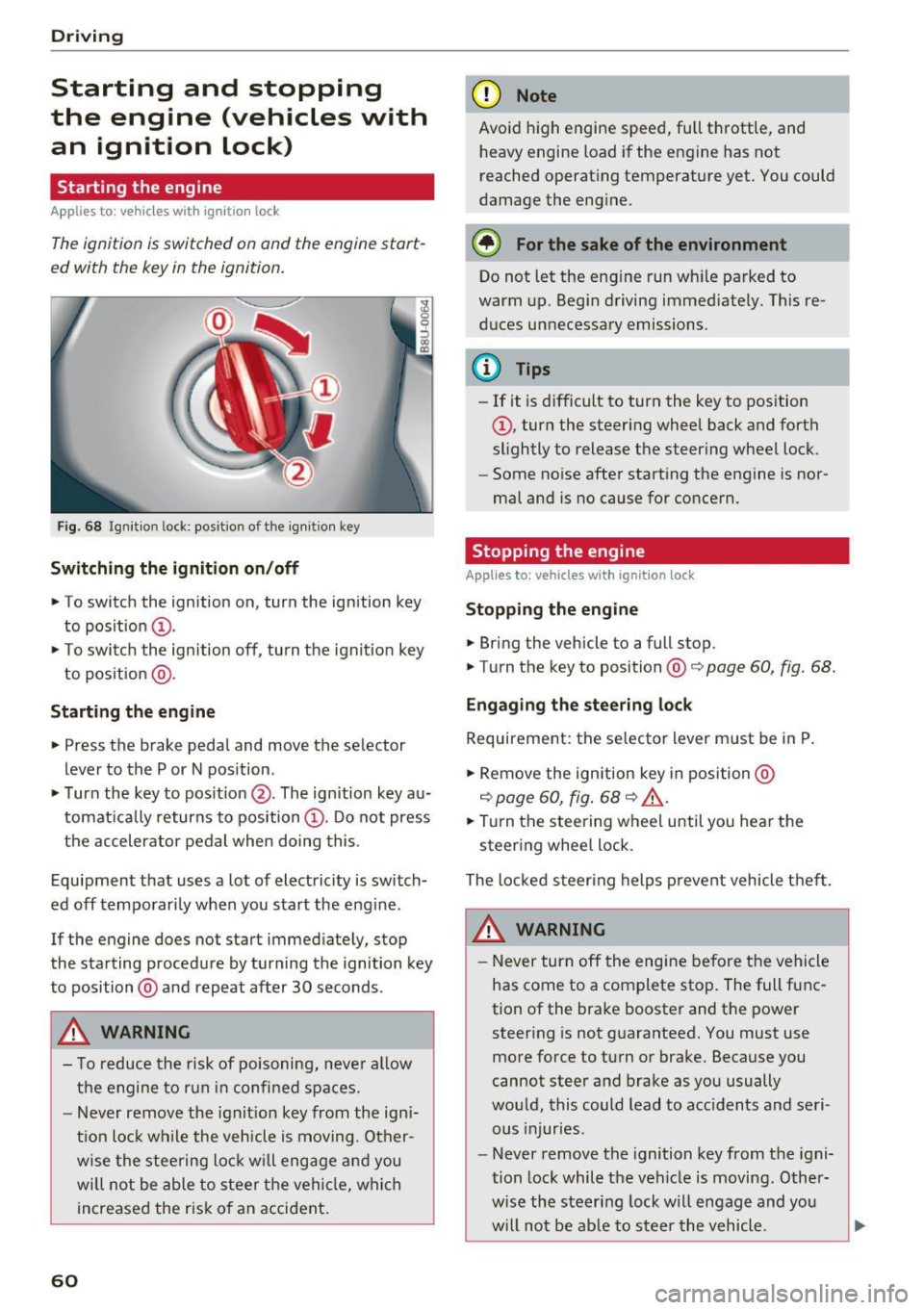
Fig. 68 Ignition lock: position of the ign it ion key
Sw itch ing the ignit ion on /off
• To switch the ignition on, turn the ignition key
to posit ion
(D .
• To switc h the ignition off, turn the ignit io n key
to posit ion @.
Starting the engine
• Press the brake pedal and move the selector
lever to the P or N pos ition.
• Turn the key to posit ion @. The ignition key au
tomat ica lly returns to position
(D . Do not press
the accelerator pedal when doing this.
Equipment that uses a lot of electricity is switch
ed off temporari ly when you start the eng ine .
If the engine does not start immediately, stop
the starting procedure by turning the ignition key
to position @and repeat after 30 seconds .
&, WARNING
- To reduce the risk of poisoning, neve r al low
the engine to run in confined spaces.
- Never remove the ign it ion key from the ign i
t ion loc k while the veh icle is moving. Other
wise the stee ring lock w ill engage a nd you
will not be able to stee r th e vehicle, whi ch
increased the r isk of an accident .
60
(D Note
Avoid high engine speed, full throttle, and
heavy engine load if the engine has not
reached operat ing temperat ure yet. You could
damage the engine.
® For the sake of the environment
Do not let the eng ine run wh ile parked to
warm up. Begin driving immediate ly. This re
d uces unnecessary emissions .
(D Tips
-If it is d ifficult to turn the key to position
(D , turn the steering wheel back and forth
slightly to release the steering wheel lock.
- Some no ise after starting the engine is nor
ma l and is no cause for conce rn.
Stopping the engine
Applies to: vehicles with ignition lock
Stop ping the engin e
• Bring the vehicle to a full stop.
• Turn the key to position@co
page 60, fig. 68.
Engag ing the ste ering lock
Requirement: the se lector lever m ust be in P .
• Remove the ignition key in position @
co
page 60, fig. 68 co ,& .
• Tur n the steering whee l until yo u hear the
steer ing whee l lock.
The locked steer ing helps p revent vehicle t hef t.
&, WARNING
- Never turn off the engi ne be fore the vehicle
has come to a complete stop. The full func
tion of the brake booster and the power steer ing is not g uaranteed. You must use
more force to turn or brake. Because you
cannot steer and brake as you usually
wou ld, this could lead to acc idents a nd seri
ous injuries.
- Never remove the ignition key from the igni
tion lock while the veh icle is moving . Other
w ise the steering lock will engage and you
w ill not be ab le to s teer the vehicle.
Page 63 of 230
a
co
...... N r--. N .-< 0 0 ::, co
-Always take the key with you whenever you
leave your vehicle. Otherw ise, the engine
could be started or electrical equ ipment
such as the power windows could be operat
ed . This can lead to serious injury.
- For safety reasons, always park the vehicle
with the se lector lever in the P position .
Otherwise, there is the r is k that the vehicle
cou ld roll unintentionally.
CD Note
If the engine has been under heavy load for
an exte nded per iod of t ime, heat bu ilds up in
the engi ne compartment after the engine is
sw itched off an d there is a risk of damaging
t he engi ne. For this re ason, let the eng ine r un
for at idle fo r ap proxim ately two minu tes be
fore shutting it off .
(D Tips
For up to 10 minu tes after stopp ing the en
g ine, the r adiator fan may t urn o n again a uto
matically or it may con tinue to run (eve n if
the ignition is switched off) for the following
reasons :
- The coolant tempera ture is inc reasing due
to trapped heat .
-If the engine is warm and the engine com
partment also heats up from strong sun
light .
Drivi ng
Starting and stopping
the engine (vehicles with
a convenience key)
Starting the engine
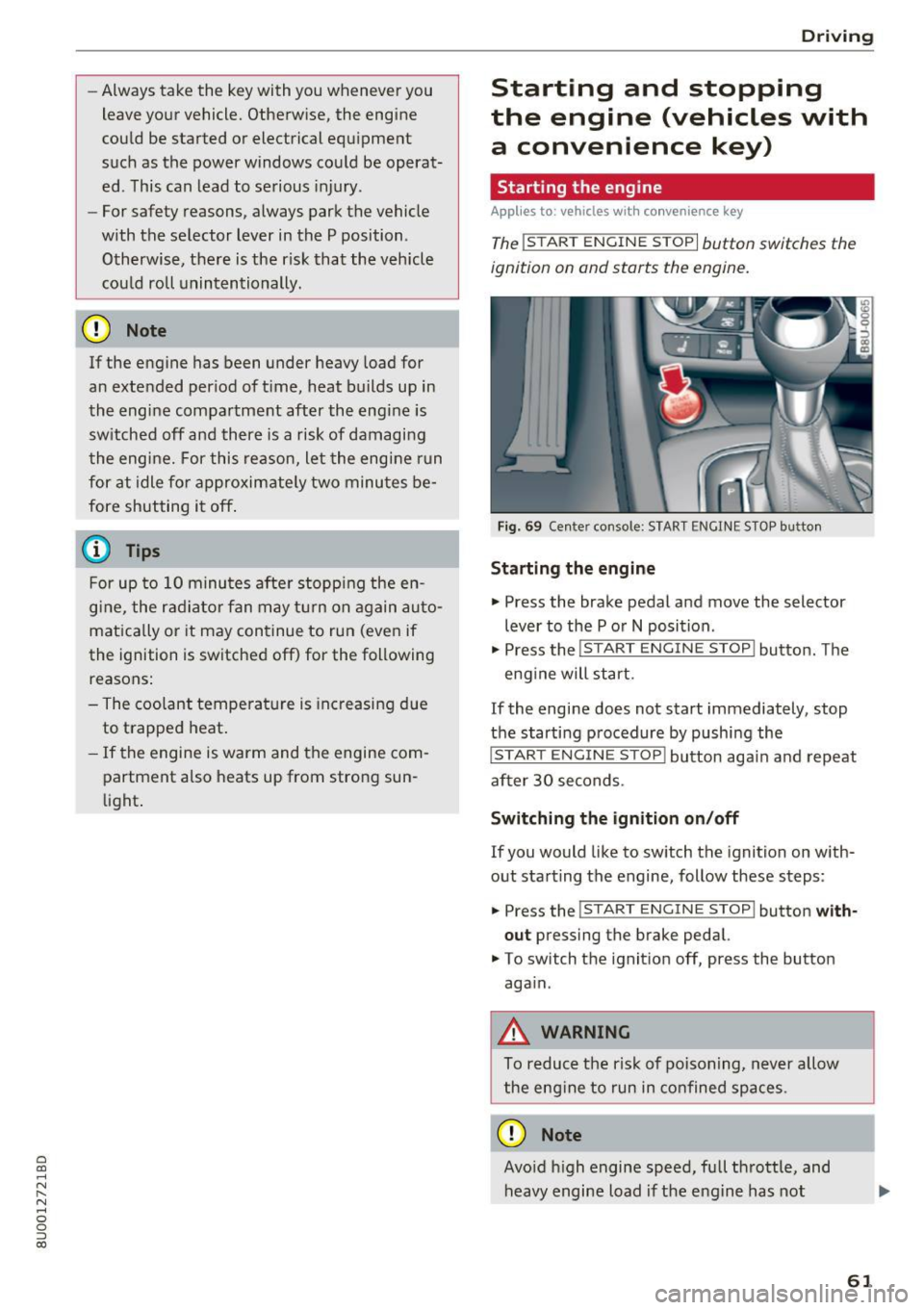
Applies to: vehicles with convenience key
The !START ENGINE STOPI button switches the
ignition on and starts the engine.
Fig. 69 Ce nter console: START ENGI NE ST OP butto n
Starting the engine
• Press the brake pedal and move the selector
lever to the P o r
N position .
• Press the
!START ENGINE STOP! button. The
eng ine will start.
If the engine does not start immediately, stop
the starti ng procedure by pushi ng the
!START EN GINE STOP! button aga in and repeat
after 30 seconds .
Switching the ignition on /off
If you would like to sw itch the ignition on with
out starting the engine, follow these steps:
• Press the
!S T ART ENGINE STOP! button with
out
press ing the brake pedal.
• To switch th e ignit ion off, press the button
aga in.
_&. WARNING
-
To reduce the ris k of poisoning, never allow
t he eng ine to run in confined spaces .
CD Note
Avoid h igh engine speed, full thrott le, and
heavy engine load i f th e eng ine has not
-
61
Page 64 of 230
Driving
reached operating temperature yet. Yo u could
damage the engine .
@ For the sake of the environment
Do not let the engine r un while par ked to
warm up . Begin driving immediately . This re
duces unnecessary emissions .
@ Tips
Some noise after starting the engine is nor
mal and is no cause for concern.
Stopping the engine
A pp lie s to: ve hicles w ith conve nien ce key
~ Bring the vehicle to a fu ll stop.
~ Move the selector lever into the P position.
~ Press the I STAR T ENGINE ST OPI button
¢ page 61, fig. 69 .
Engaging the stee ring lock1
)
The steering locks when you turn the engine off
using the !STAR T ENGINE ST OP I button and
open the dr iver's door.
The locked steering he lps prevent vehicle theft.
Emergency off function*
If it is absolutely necessary, the engine can also
be turned
off while driv ing at speeds starting at
4 mph (7 km/h). To switch the engine
off, press
the lS T AR T
ENGINE ST OPlbutton twice in a row
b riefly or press and hold for longer than two sec
onds .
.8_ WARNING
- Never turn off the engine before the veh icle
has come to a complete stop. The brake
booster and power steering only work when
the engine is running. If the engine is
off,
you have to use more force when steer ing or
braking . Because you cannot steer and brake
as you usually wou ld, this could lead to acci
dents and serious injuries.
- Always ta ke the key with you whenever you
leave you r vehicle. Othe rw ise, the engine
l) This fun ction is not availab le in all coun tries.
62
could be started or electrical equipment
such as the power windows could be operat
ed. Th is can lead to serious injury.
- For safety reasons, always park the vehicle
with the selector lever in the P position.
Otherwise, there is the risk that the vehicle
could roll unintentionally .
(D Note
If the engine has been under heavy load for
an extended period of time, heat builds up in
the eng ine compartment after the engine is
switched
off and there is a r isk of damag ing
the eng ine . For th is reason, let the engine run
for at idle for approximately two minutes be
fo re shutti ng it
off.
(D Tips
For up to 10 minutes after stopping the en
gine, the radiator fan may turn on again auto
matically or it may continue to run (even if
the ign ition is switched off) for the following
r easons:
- The coolant temperature is increas ing due
to trapped heat.
-If the eng ine is warm and the engine com
partment a lso heats up from strong sun
light.