key AUDI Q3 2018 Owner's Manual
[x] Cancel search | Manufacturer: AUDI, Model Year: 2018, Model line: Q3, Model: AUDI Q3 2018Pages: 230, PDF Size: 57.03 MB
Page 65 of 230

a
co
...... N r--. N
'"' 0 0 ::, co
Starting the engine when there is a
malfunction
Applies to: vehicles with conven ience key
Other circumstances can cause the engine not to
start, such as the battery in the remote control key has drained , there is interference with the
key or there is a system malfunction .
Fig . 7 0 Steering co lumn /remote co ntro l key: st arting t he
en gine if there is a malfunc tion
Req uiremen t: the message No k ey identified .
See owne r's manual
must be disp layed and the
II indicator light m ust be on.
.,. Hold the remo te contro l key ve rtic ally in the lo
c ation ind ic a ted
y>l) c::> fig. 70 .
.,. Press the brake peda l.
.,. Press the
I ST AR T ENGINE STOP I button. The
engine will start.
.,. Drive to an authorized Audi dealer or author
iz ed Audi Service Facility immediately to have
the mal function corrected .
@ Tips
You can view the message again by pressing
the
I START ENGINE STOP ! button.
Messages
Turn off ignit io n. Battery discharging
This message appears and a warning tone sounds
if you open the driver's doo r when the ignition is
switched on .
Press brake pedal to start engine
This message appears if you do not step on the
b rake pedal to sta rt the eng ine o n a vehicle wi th
a n autom atic transm ission.
D rivi ng
Plea se engage Nor P.
This message appears when sta rt ing o r stopping
t h e e ngine if t he se lecto r lever is no t in the Nor P
pos ition. The e ngine will not star t/stop.
IS Is key in the vehicle?
The ind icator light turns on and this message ap
pears if the convenience key* was removed from
t h e veh icle when the e ngine was ru nning. If the
convenience key is no longer in the veh icle , you
c annot sw itch the ignition on or sta rt the eng ine
o nce you stop i t. You also canno t loc k the vehicle
from the o utside.
Shift to P, vehicle can roll away . Doors c an only
be lo cked in P .
This message appears for safety reasons if the
selector lever for the au tomatic transm ission is
not in the P position after the ignition is switched
off . M ove the selector leve r to the P posi tion.
Otherwise the ve hicle is not pro tec ted from ro ll
ing and i t cannot be locked .
II No key identified. See owner's manual.
This message appears if there is no conven ience
key* inside the vehicle or if the system does not
recognize the key . The co nvenience key may not
be recognized, for example, if it is covered by an
obje ct tha t
disrup ts the signa l (such as a br ief
c ase), or if the key b attery is we ak. El ectro nic de
vi ces such as cell phones c an also inte rfe re wi th
the signal.
T o still be ab le to start or stop the engine, refer
to
i=:> page 63 .
Electromechanical
parking brake
Fig. 71 Cen te r conso le : pa rk in g b rake
63
Page 67 of 230
-Always take the vehicle key with you when
leaving your vehicle, even i f for a short pe ri
od of time. Th is app lies particu larly when
children rema in i n the vehicle. Otherwise,
children could start the engi ne, release the
par king brake or operate elect rical equip
me nt su ch as powe r windows, which in
cr eases t he risk of an a ccident.
- No one, esp ecially chi ldren, sho uld rema in
in t he ve hicl e w hen it is locked. Locked
doo rs m ake i t more difficul t for emergency
wor ke rs to ge t into the ve hicle, which puts
lives at risk.
(D} Tips
- When stop ping at a traff ic signa l or stop
p ing in c ity tr aff ic, you c an set the p arking
br ake ma nually . The vehi cle does not h ave
to be held with the b rake pedal. The park ing
brake elim inates the tendency to cree p
when a selector lever position is engaged.
As soon as you press the accelerator pedal,
t h e pa rking brake releases automatically
and you r vehicle starts to move
c:> page 65.
- Occasiona l noises when the park ing brake is
set and re leased a re normal and are not a
cause for concer n.
- The park ing brake goes th rough a se lf-test
cycle at regular intervals when t he vehicle is
stoppe d. A ny noises associated w it h this a re
no rma l.
-If there is a power fa ilure, the pa rking brake
will not set if i t is re leased, a nd it w ill not
r ele ase if it is set
c:> .&. . See a n auth oriz ed
A udi dealer or au thorized A ud i Service Fa
cility for assista nee .
Starting from a stop
Various conven ien ce and safety functions may be
ava ila bl e when the vehicle begins driv ing, de
pending on vehicle equipment .
Starting on hills with the parking brake set
0
~ Req uirement: the dr iver's doo r must be closed. ,....
8 .,. To start driving comfortab ly when o n a hill, set
g the parking brake and begin dr iv ing as usual. 00
D riving
The braking force of the parking b rake does not
release a utomatically until the whee ls bui ld up
enoug h driving force .
Starting on hills with hill hold assist
Hill hold assis t makes it easier to s tart on hills.
Requirement: the driver's door must be closed
and the engine must be runn ing .
.,. To act ivate h ill hold assist, press and hold the
brake pedal for severa l seco nds. The vehicle
m ust be in an u phill d irec tion of travel.
After re leas ing the brake pedal, the braking pow
er is maintained for a brief moment¢&. to pre
vent the veh icle from ro lling back when start ing .
During this t ime, you can easily begin to move
you r vehicle .
.8, WARNING
Applies to: veh icles with hill hold assist
-If you do not beg in d riving immed iate ly or
the engi ne stalls after releasing the bra ke
pedal, your veh icle may begin to roll bac k
ward. Press the brake peda l or set the park
ing b rake immediately .
- The intelligent technology of hill hold assist
cannot ove rcome the limitat ions imposed by
natural p hys ica l laws. The i ncreased comfort
offe red by hill ho ld assist should not cause
you to ta ke safety r isks.
- Hill hold ass ist cannot hold the vehicle i n
p lace on a ll hills (for example, if the groun d
is s lippery or icy).
- To reduce the r isk o f an accident, always
make sure th e vehi cle is s ituated safe ly
while s ta tionary.
Driving offroad
General information
Applies to : vehicles with offroad mode
The electronic stab ilizat io n control (ESC) func
tions we re enhanced for d riving offroad . ESC off
road mode can be activated in driving sit uat ions
i n which a whee l lock o r a d ifferential lock func
t io n is needed ¢
page 90. T he hill descent as-
s ist is a lso available, wh ich au tomatically brakes
II),
65
Page 69 of 230
a
co
...... N r--. N .-< 0 0 ::, co
When a moderate driving s tyle is used, the
transmission selects the most economical driving
mode. The transm iss ion upsh ifts at a lower RPM
and downshifts at a higher RPM to improve fuel
efficiency .
The transmission switches to a sporty mode after a kick-down or when the driver uses a
spo rt y
dri ving st yle
character iz ed by quick accelerator
pedal movements, heavy acceleration, frequent
changes in speed and traveling at the maximum
speed .
If desired , the driver can also select the gears
manually (tip tronic mode ) ¢ page 70, Manual
shifting (tiptronic mode) .
Power is transferred using a torque converter.
Selector lever positions
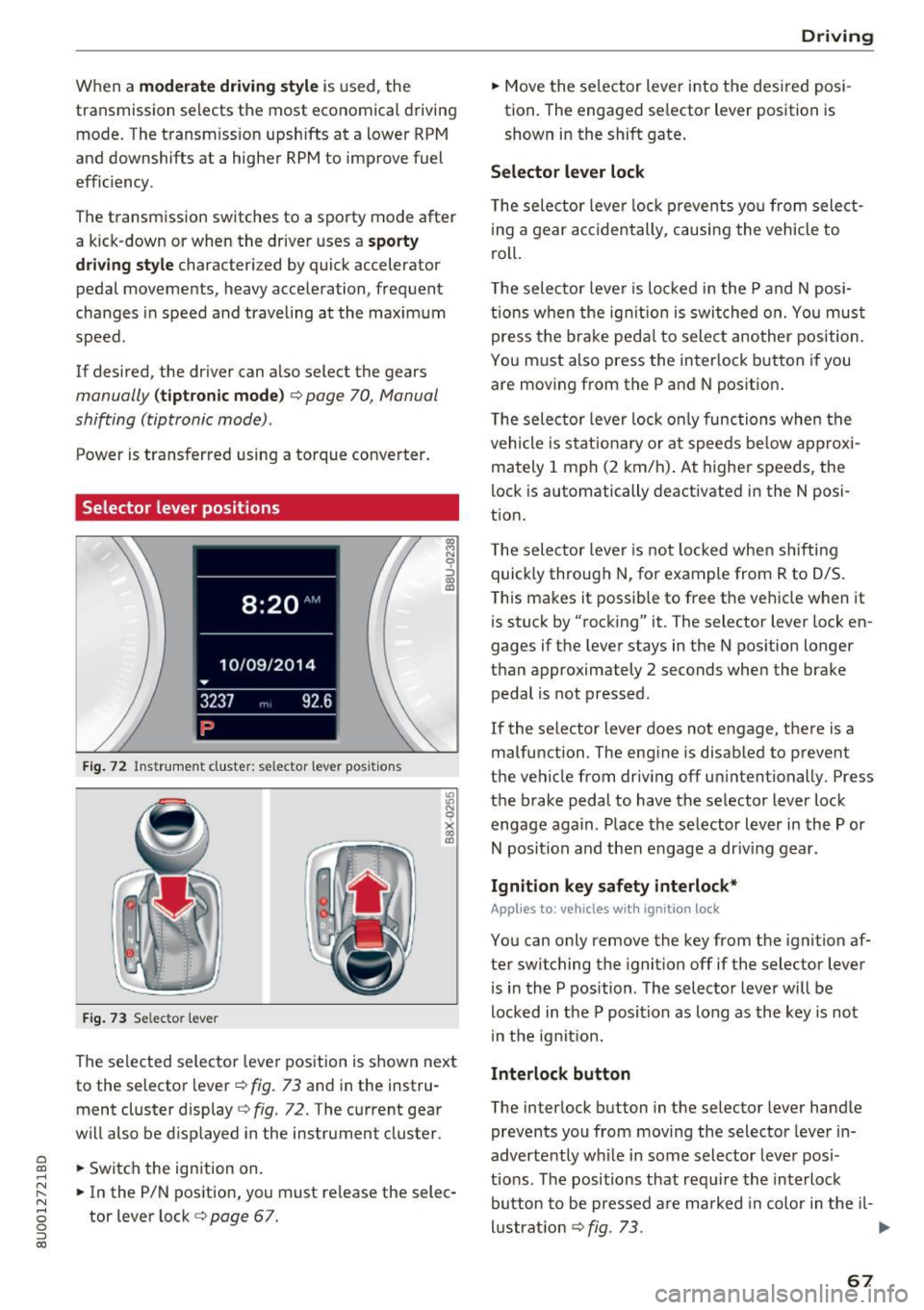
Fig. 72 Inst rument cluste r: selector leve r pos it ions
F ig. 7 3 Selec tor lever
The selected selector lever position is shown next
to the selector lever ¢
fig. 73 and in the instru
ment cluster display
¢ fig . 72. The current gear
will also be d isp layed in the instrument cluster.
.. Switch the ign ition on.
.. In the P/N position, you must release the selec
tor lever lock ¢
page 67.
Drivi ng
.. Move the selector lever into t he des ired posi
tion. The engaged se lector lever position is
shown in the shift gate .
Selector lever lock
The selec tor leve r lock p revents yo u from select
i ng a gear accidentally, causing the vehicle to
roll.
T he selector leve r is lo cked in the P and N posi
ti ons when the ig nit ion is switched on. You mus t
press the brake peda l to sele ct another position.
You must also press the interlock button if you are moving from the P and N position.
T he selec tor leve r lock o nly functions when the
vehicle is stat ionary or at speeds be low approxi
mately 1 mph (2 km/h) . At higher speeds, the
lock is automatically deactivated in the N posi
tion.
T he selec tor leve r is not locked whe n shifting
quick ly through N, for example from R to 0/S.
This makes it possib le to free the vehicle when it
is stuck by "rocking" it. The selector lever lock en
gages if the lever stays in the N pos ition longer
than approximately 2 seconds when the brake peda l is not pressed .
If the selector lever does not engage, there is a
malfunction . The engine is disabled to prevent
the vehicle from driv ing off un intent ionally. Press
the brake pedal to have the se lector lever lock
engage again . Place the selector lever in the P or
N position and then engage a dr iv ing gear.
Ignition key safety interlock*
Applies to: vehicles with ignition lock
You can only remove the key from the ignition af
ter switching the ignition off if the selector lever
is in the P position . The selector leve r will be
locked in the P position as long as the key is not
in the ignit ion.
Interlock button
The interlock button in the selector lever handle
prevents you from movi ng the selector lever in
advertently wh ile in some selector lever posi
tio ns. The positions that requ ire the interlock
button to be pressed a re marked in color in the il-
l u strat io n ¢
fig. 73. .,.
67
Page 71 of 230
0 co ......
"' ,....
"' ...... 0 0 :::,
00
wait for the engine to slow down to idle
before selecting Dor S.
- If there is a power failure, the selector lever
will not move out of the P position. The
emergency release can be used if this hap
pens
¢ page 72.
Driving tips
Starting the engine
~ The selector lever must be in the P or the N po
sition.
Starting from a stop
~ Press and hold the brake pedal.
~ Press and hold the lock button in the selector
lever handle, select the desired selector lever
position such as D ¢
page 67 and release the
lock button.
~ Wait a moment until the transmission shifts .
You will notice a slight movement when the gear engages .
~ Release the brake pedal and press the accelera-
tor pedal ¢,&. .
Various convenience functions are available for
starting on hills
¢ page 65 .
Stopping temporarily
~ Press the brake pedal to stop the vehicle, for
example at a traffic light. Do not press the ac
celerator pedal when doing this .
~ To prevent the vehicle from rolling when you
start driving, set the parking brake when stop
ping on steep hills ¢
8. and ¢0.
~ The parking brake will release automatically
and the vehicle will start moving once you press
the accelerator pedal.
Stopping/parking
If the selector lever is not in the P position when
you open the driver's door, the vehicle could roll.
In vehicles with a convenience key*, the message
Shift to P and turn off ignition, or vehicle can
roll away
appears.
~ Press and hold the brake pedal¢,&. .
~ Set the parking brake .
~ Select the P selector lever position .
Driving
Under certain circumstances, (such as driving in
the mountains or towing a trailer), it may be use
ful to switch temporarily to the manual shift pro
gram in order to adjust the gears to the driving
conditions by hand
¢page 70.
On inclines, activate the parking brake first and
then move the selector lever to the P position
¢
page 64. This prevents the locking mechanism
from being loaded too heavily and will make it
easier to move the selector lever out of the P po
sition.
A WARNING
= -- The vehicle can roll even when the engine is
switched off.
- Unintended vehicle movement can lead to
serious injuries .
- Never leave your vehicle with the engine
running while in gear. If you must leave
your vehicle when the engine is running, set
the parking brake and move the selector lev
er to the P position.
- Power is still transmitted to the wheels
when the engine is running at idle. To pre
vent the vehicle from "creeping", you must
keep your foot on the brake in all selector
lever positions (except P) when the engine is
running.
- Do not inadvertently press the accelerator
pedal when the vehicle is stopped if a gear is
engaged. Otherwise the risk of an accident
increases because the vehicle will start to
move immediately, even if the parking brake
is set.
- To reduce the risk of an accident, do not
press the accelerator pedal when changing
the selector lever position while the vehicle
is stationary and the engine is running.
- Never engage the R or P selector level posi
tions while driving. It could cause a crash.
- Before driving down a steep slope, reduce your speed and shift into a lower gear in tiptronic mode.
- Do not ride the brakes or press the brake
pedal too often or too long when driving
downhill. Constant braking causes the
brakes to overheat and substantially ..,.
69
Page 82 of 230

Assistance systems
Switching on and off
Applies to: vehicles w ith Aud i s ide ass ist
F ig. 83 Driver's door : side ass ist bu tto n
.,. Press the button to switch the system on and
off <=>
& in General information on page 79.
The LED in the button turns on when side assist
is sw itched on.
Adjusting the display brightness
Applies to: ve hicles w ith Aud i side ass is t
The display brightness can be adjusted in the In
fotainment system .
.,. Se lect : the ICARI function button > (Car) Sys
tems *
control button > Driver assist > Audi
side ass ist .
The display brightness adjusts automatically to
the br ightness of the surroundings, both in the
i n formation and in the warning stage. In very
dark or very br ight surroundings, the automat ic
adjustment will set the d isplay to the minimum
or maximum level. In such cases, you may notice
no change when adjusting the brightness, or the
change may only be noticeable once the sur
ro undings change .
Adj ust the brightness to a level where the display
in the information stage will no t disrupt your
view ahead. If you change the brightness, the dis
p la y in the exter ior mirror wi ll briefly show the
brightness level in the information stage . The
brightness of the warning stage is linked to the
brightness in the information stage and is adjust
ed along with the information stage.
80
@ Tips
-Side assist is not active while you are mak
ing the adjustment.
- Your settings are automatically stored and
assigned to the remote control key bei ng
used.
Messages
App lies to : vehicles wi th Audi side ass ist
If side assist sw itches off by itself, the LED in the
button turns off and a message will appear in the
i nstrument cluster display:
Audi side assist: Unavailable . Sensor vision
The radar sensor vision is impaired. Do not cover
the area in front of the sensors with bike whee ls,
stickers, dirt or other objects. Clean the area in
front of the sensors, if necessary
i::> page 78,
fig. 82 .
Audi side assist: Unavailable.
Side assist cannot be switched on at this time be
cause there is a malfunction (for example, the
battery charge level may be too low).
Audi side assist: System fault!
The system cannot gua rantee that it will detect
vehicles correct ly and it has switched off. The
sensors have been moved or are fa ulty . Have the
system checked by an authorized Aud i dealer or
authorized Aud i Serv ice Facility soon .
Audi side assist: Unavailable when towing
Side assist switches off automatically when a fac
tory- installed trailer hitch is connected to the
electrical connector on the trailer. There is no
guarantee the system will switc h off when using
a retrofitted trailer hitch. Do not use side assist
when towing a trailer.
Audi drive select
Introduction
Applies to : vehicles wit h Audi drive se lec t
Drive select makes it possible to experience dif
ferent types of vehicle sett ings in one veh icle.
The driver can select from three modes,
Comfort , ..,.
Page 90 of 230

Parking sy stem s
(D Tips
-The warning tones can also be adjusted d i
rect ly from the visua l display or the rearv iew
camera image*. Simply press the
S ettings
control button.
- Changed settings are act ivated when the
parking system is switched on again.
- The settings are automatically stored and
assigned to the remote control key that is in
use.
Error messages
A pp lies to: ve hicles w ith parkin g system plus/rearview cam·
e ra
There is an error in the system if the LED in the
P,#A button is bl inking and yo u hear a continuous
alarm for a few seconds after switching on the parking system or when the parking system is al
ready act ivated. If the error is not corrected be
fore you switch off the ig nition, the LED in the
p,,; A
button will blink the next t ime you sw itch on the
pa rking system by s hift ing into reverse .
If a sensor is faulty, the~ symbol will appear in
front of/behind the vehicle in the Infotainment
d isplay. If a rear sensor is faulty, only obstacles
that are in areas @ and @ are displayed
¢page 83, fig. 85. If a front sensor is faulty, on ly
obstacles that a re in areas © and @are dis
p layed.
Drive to an authorized Aud i dea ler or authorized
Aud i Serv ice Facility immediately to have t he
malfunct io n corrected.
Trailer hitch
App lies to: ve hicles w ith parkin g system plus/rearview cam
era a nd trail er hitc h
For veh icles using the trailer socket, the parking
system rear sensors are not activated when you
shift into reverse gear or whe n you press the
p,, ;A
button . This results in the follow ing restr ictions .
Parking system plus*
There is no d istance warning for the rear. The
front sensors remain activated . The visual display
sw itches to tra iler mode .
88
Parking sy stem plus and rearview c amera *
There is no distance warning for the rear. The
front sensors remain activated . The visua l display
switches to trailer mode . The rearview camera
image will not show the orientation lines and the
blue surfaces.
(D Tips
Tra iler hitches that are not installed at the
factory may cause the parking system to mal
funct ion or they may restr ict its function.
Page 111 of 230
a
co
...... N r--. N
'"' 0 0 ::, co
A WARNING
Not wearing safety belts or wearing them im
properly increases the risk of serious personal
injury and death. Safety belts can work only
when used correctly.
-Always fasten your safety belts correctly be fore driving off and make sure all passen
gers are correctly restrained.
- For maximum protection, safety belts must
always be positioned properly on the body.
- Never strap more than one person, includ
ing small children, into any belt.
- Never place a safety belt over a child sitting
on your lap.
- Always keep feet in the footwell in front of
the seat while the vehicle is being driven.
- Never let any person ride with their feet on
the instrument panel or sticking out the
window or on the seat.
- Never remove a safety belt while the vehicle
is moving . Doing so will increase your risk of
being injured or killed.
- Never wear belts twisted.
- Never wear belts over rigid or breakable ob-
jects in or on your clothing , such as eye
glasses, pens, keys, etc., as these may cause
injury.
- Never allow safety belts to become dam
aged by being caught in door or seat hard
ware.
- Do not wear the shoulder part of the belt
under your arm or otherwise out of position .
- Several layers of heavy clothing may inter
fere with correct positioning of belts and re
duce the overall effectiveness of the system.
- Always keep belt buckles free of anything
that may prevent the buckle from latching
securely .
- Never use comfort clips or devices that cre
ate slack in the shoulder belt. However, spe
cial clips may be required for the proper use
of some child restraint systems.
- Torn or frayed safety belts can tear, and
damaged belt hardware can break in an acci
dent. Inspect belts regularly.
If webbing,
bindings, buckles, or retractors are dam-
Safety belts
aged, have belts replaced by an authorized
Audi dealer or qualified workshop.
- Safety belts that have been worn and loaded
in an accident must be replaced with the
correct replacement safety belt by an au
thor ized Audi dealer. Replacement may be
necessary even if damage cannot be clearly
seen. Anchorages that were loaded must al
so be inspected.
- Never remove, modify, disassemble, or try
to repair the safety belts yourself.
-Always keep the belts clean. Dirty belts may not work properly and can impair the func
tion of the inertia reel~
table Interior
cleaning on page 187.
Safety belts
Fastening safety belts
Safety first -everybody buckle up!
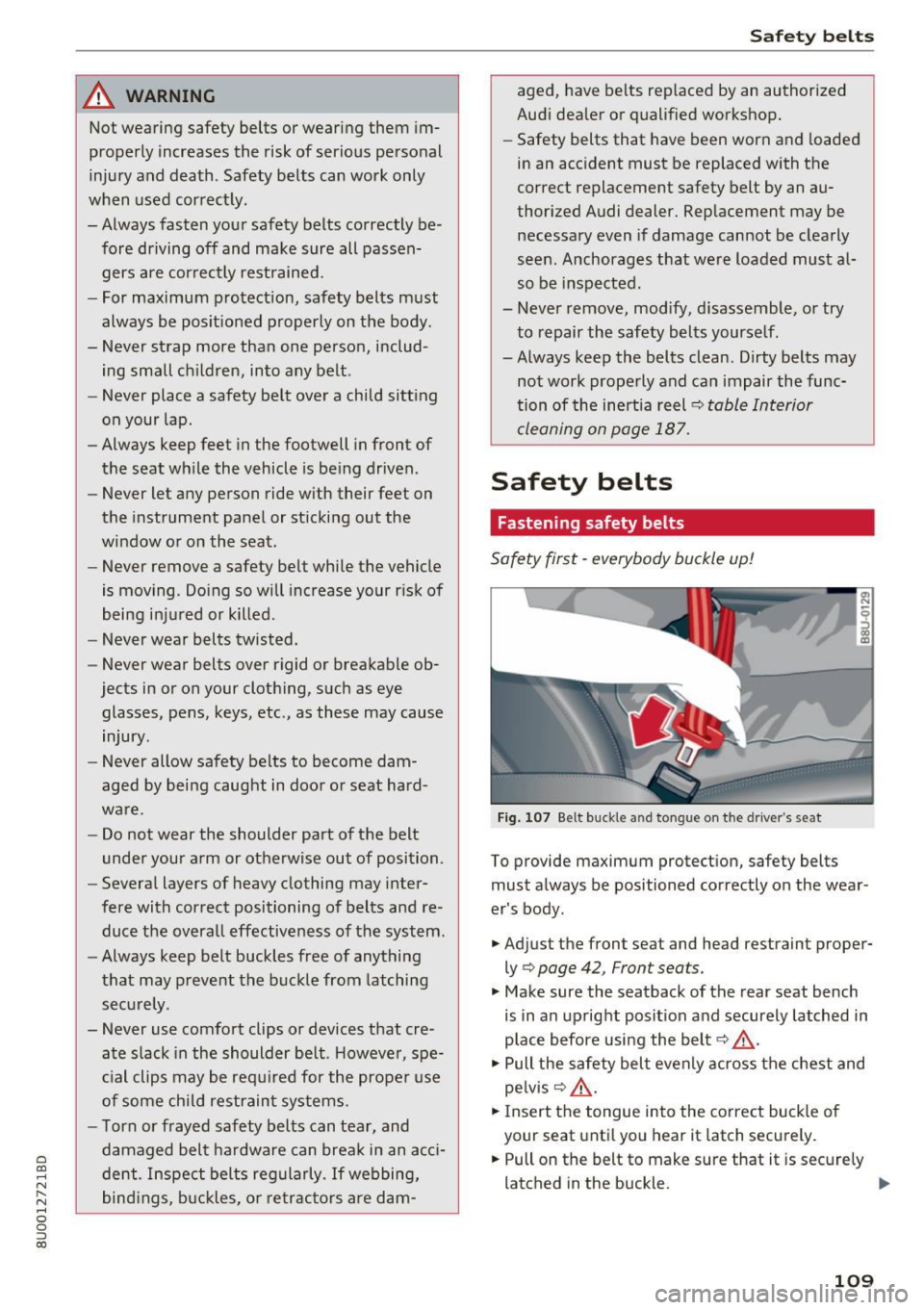
Fig. 107 Belt buckle and tongue on t he driver 's seat
To provide maximum protection, safety belts
must always be positioned correctly on the wear
er's body .
.. Adjust the front seat and head restraint proper
ly ¢
page 42, Front seats.
.. Make sure the seatback of the rear seat bench
is in an upright position and securely latched in
place before using the belt¢,&. .
.. Pull the safety belt evenly across the chest and
pelvis¢ ,&. .
.. Ins ert the tongue into the correct buckle of
your seat until you hear it latch securely.
.. Pull on the belt to make sure that it is securely
latched in the buckle .
IIJ,,
109
Page 112 of 230
Safe ty belts
Autom ati c s afet y belt retr actors
Every safety belt is equ ipped with an automa tic
be lt retractor on the shoulder belt. This feature
locks the belt when the belt is pulled out fast,
during hard braking and in a n accident . The belt
may a lso lock when you drive up or down a steep
hill or through a sharp curve. Dur ing normal driv
ing the belt lets you
move freely .
Safety belt p ret en sion ers
Safety belts w ith pretensioners he lp to tighten
the safety belt and remove s lack when the pre
tensioners are activated ¢
page 112. The func
tion of the pretensioner is monitored by a warn ing light
¢ page 14.
Con vertib le loc king retract or
Every safety belt except the one on the driver
seat is equipped with a convertible locking retrac
tor that
m ust be used when the safety belt is
used to attach a child safety seat. Be sure to read
the impo rtant information about this feature
¢ page 144.
.&_ WARNING
Improperly pos itioned safety be lts can cause
ser ious injury in an accident
¢page 110,
Safety belt position.
- Safety belts offer optimum protection only
when the seatback is upright and belts are
properly positioned on the body.
- Always make sure that the rear seat bac k
rest to which the center rea r safety belt is
attached is secure ly latched whenever the
rear center safety belt is being used. If the
backrest is not securely latched, the passen
ger will move forward with the backrest dur
ing sudden braking, in a sudden maneuver
and especially in a crash.
- Never attach the safety belt to the buckle for another seat. Attaching the belt to the
wrong buckle wi ll reduce safety belt effec
t iveness and can cause serious persona l in
jury.
- A passenger who is not properly restrained can be seriously in ju red by the safety be lt it
self when it moves from the stronger parts
110
of the body into critical areas like the abdo men.
- Always lock the convertible locking retractor
when you are securing a child safety seat in
the vehicle ¢
page 146.
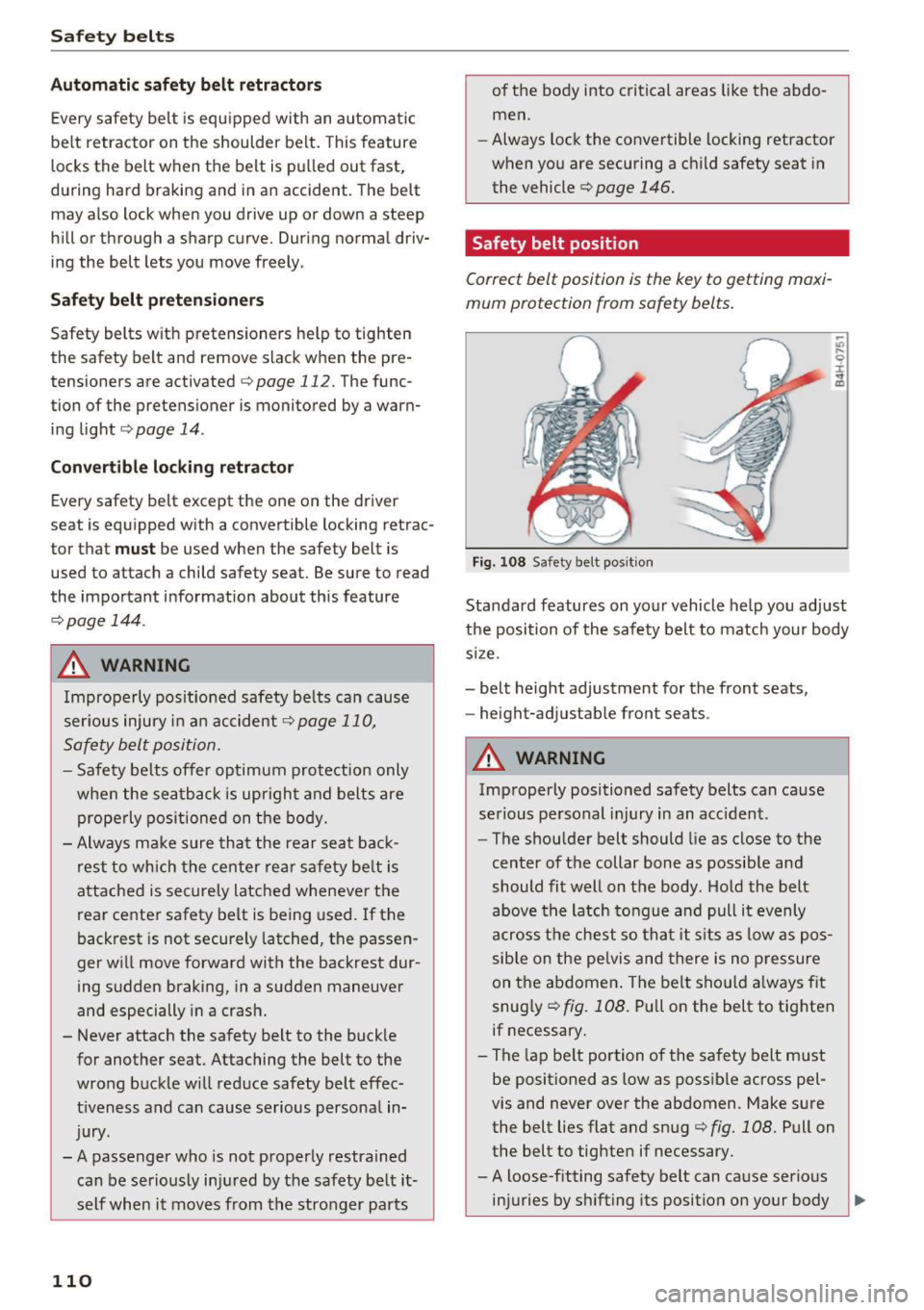
Safety belt position
Correct belt position is the key to getting maxi
mum protection from safety belts .
Fig. 108 Safety belt pos it ion
-"' .... 9 I ... a,
Standard features on your vehicle help you adjust
the position of the safety belt to match your body
s ize.
- belt height adjustment for the front seats,
- height-adjustab le front seats .
.&_ WARNING
Improperly positioned safety belts can cause
serious personal injury in an acc ident .
- The shoulder belt should lie as close to the
center of the collar bone as possib le and
should fit well on the body. Hold the belt
above the latch tongue and pull it evenly
across the chest so that it s its as low as pos
sib le on the pe lvis and there is no p ressure
on the a bdomen . The belt sho uld a lways f it
snug ly ¢
fig. 108. Pull on the belt to tig hten
if necessary .
- The lap be lt portion of the safety belt must
be positioned as low as possible across pel
vis and never
over the abdomen. Make sure
the belt lies flat and snug ¢
fig. 108. Pull on
the belt to tighten if necessary.
- A loose-fitting safety belt can ca use serious
injuries by sh ifting its position on your body ..,_
Page 215 of 230
0 co ......
"' ,....
"' ...... 0 0 :::,
00
today's automobiles, have steadily reduced the
scope of maintenance and repairs which can be
carried out by vehicle owners.
Also, safety and
environmental
concerns place very strict limits
on the nature of repairs and adjustments to en
gine and transmission parts which an owner can perform .
Maintenance, adjustments and repairs usually re
quire special tools, testing devices and other
equipment available to specially trained work
shop personnel in order to assure proper per
formance, reliability and safety of the vehicle and
its many systems.
Improper maintenance, adjustments and repairs
can impair the operation and reliability of your
vehicle and even void your vehicle warranty .
Therefore, proof of servicing in accordance with
the maintenance schedule may be a condition for upholding a possible warranty claim made within
the warranty period.
Above all , operational safety can be adversely af
fected, creating unnecessary risks for you and
your passengers.
If in doubt about any servicing, have it done by
your authorized Audi dealer or any other properly equipped and qualified workshop. We strongly urge you to give your authorized Audi dealer the
opportunity to perform all scheduled mainte nance and necessary repairs. Your dealer has the
facilities, original parts and trained specialists to keep your vehicle running properly .
Performing limited maintenance yourself
The following pages describe a limited number of
procedures which can be performed on your vehi
cle with ordinary tools, should the need arise and
trained personnel be unavailable. Before per
forming any of these procedures, always thor
oughly read all of the applicable text and careful ly follow the instructions given . Always rigorously
observe the
WARNINGS provided .
Before you check anything in the engine com
partment, always read and heed all WARNINGS
c::> .&. and c::> .&. in Working in the engine compart
ment on page 155. Consumer Information
A WARNING
-
Serious personal injury may occur as a result
of improperly performed maintenance, ad
justments or repairs .
- Always be extremely careful when working
on the vehicle. Always follow commonly ac
cepted safety practices and general com
mon sense. Never risk personal injury.
- Do not attempt any of the maintenance,
checks or repairs described on the following
pages if you are not fully familiar with these
or other procedures with respect to the ve
hicle, or are uncertain how to proceed.
- Do not do any work without the proper tools
and equipment. Have the necessary work
done by your authorized Audi dealer or an
other properly equipped and qualified work
shop.
- The engine compartment of any motor vehi cle is a potentially hazardous area. Never
reach into the area around or touch the radi
ator fan.
It is temperature controlled and
can switch on suddenly - even when the en
gine is off and the ignition key has been re
moved. The radiator fan switches on auto
matically when the coolant reaches a certain
temperature and will continue to run until
the coolant temperature drops.
- Always remove the ignition key before any
one gets under the vehicle.
- Always support your vehicle with safety
stands if it is necessary to work underneath
the vehicle . The jack* supplied with the vehi
cle is not adequate for this purpose and
could collapse causing serious personal in
jury.
- If you must work underneath the vehicle
with the wheels on the ground, always make
sure the vehicle is on level ground, that the
wheels are always securely blocked and that the engine cannot be started.
- Always make sure the transmission selector
lever (automatic transmission) is in P (Park
position) and the park brake is applied.
213
Page 217 of 230
0 co ....
"' ,-...
"' .... 0 0 :::,
00
Technical Modifications
Our guidelines must be complied with when tech
nical modifications are made .
Always consult an authorized Audi dealer before
starting work on any modificat ions.
This will he lp ensure that vehicle function, per
formance and safety are not impaired
c> ..&. .
Attempting to work on e lectronic components
and the software used with them can cause ma l
functions. Because of the way electronic compo nents are interconnected with each other, such
malfunct ions can also have an adverse affect on
other systems that are not directly involved. This
means that you risk both a substa ntial reduction
in the operational safety of your veh icle and an
i n creased wea r of ve hicle pa rts
c::> ,.&. .
Author ized Audi dealers w ill perform this work in
a profess ional and competent manner or, in spe
cial cases, refer you to a professional company
that spec ializes in such modific atio ns.
.&, WARNING
Improper repairs and mod ifi cat ions can
change the w ay veh icle systems work and
cause damage to the veh icle and ser ious per
sonal injury.
(D Note
If emergency repa irs mus t be pe rformed else
where, have the vehicle exam ined by an au
thorized A udi dealer as soon as possib le .
Declaration of
compliance for telecom munications equipment
and electronic systems
The manufacturer is not liable for rad io m alfu nc
tions t hat are caused by unauthori zed changes to
the equipment.
Equipment
The fol low ing equipmen t comp lies w it h FCC sec
tion 15 and RSS-Gen:
Consumer Inf ormation
- Audi adapt ive cr uise control*
- Aud i side assist*
- Electronic immob ilize r
- Remote control key
- Cell phone package*
FCC Part 15.19
This device complies with part 15 of the FCC
Rules . Operation is subject to the fo llowing two
condit ions: (1) This device may not cause harmful
interference, and (2) this device must accept any
interference rece ived, includ ing interference that
may cause undesired operation .
FCC Part 15.21
Changes or mod ificat ions not express ly approved
by the party responsible for compliance could
vo id the user's authority to operate the equ ip
ment .
RSS-Gen
This device complies with Industry Canada's li
cence-exempt RSSs. Operation is subject to the
follow ing two conditions:
(1) This dev ice may not cause interference; and
(2) This dev ice m ust accept any interference, in
clud ing interfe rence that may cause undes ired
operation of the dev ice .
CNR-Gen
Le present appareil est conforme aux CNR d'ln
dustrie Canada applicables aux appare ils radio
exemp ts de licence . L'explo itat ion est autor isee
aux deux conditions su ivantes:
1) l'appareil ne do it pas produire de b rouillage;
2) l'appareil do it accepter tout brouillage radioe
lectr ique subi, meme si le brouillage est suscept i
ble d'en compromettre le fonct ionnement .
215