stop start AUDI Q3 2018 User Guide
[x] Cancel search | Manufacturer: AUDI, Model Year: 2018, Model line: Q3, Model: AUDI Q3 2018Pages: 230, PDF Size: 57.03 MB
Page 62 of 230
Driving
Starting and stopping
the engine (vehicles with
an ignition lock)
Starting the engine
A pp lies to: vehicl es w ith igni tion lock
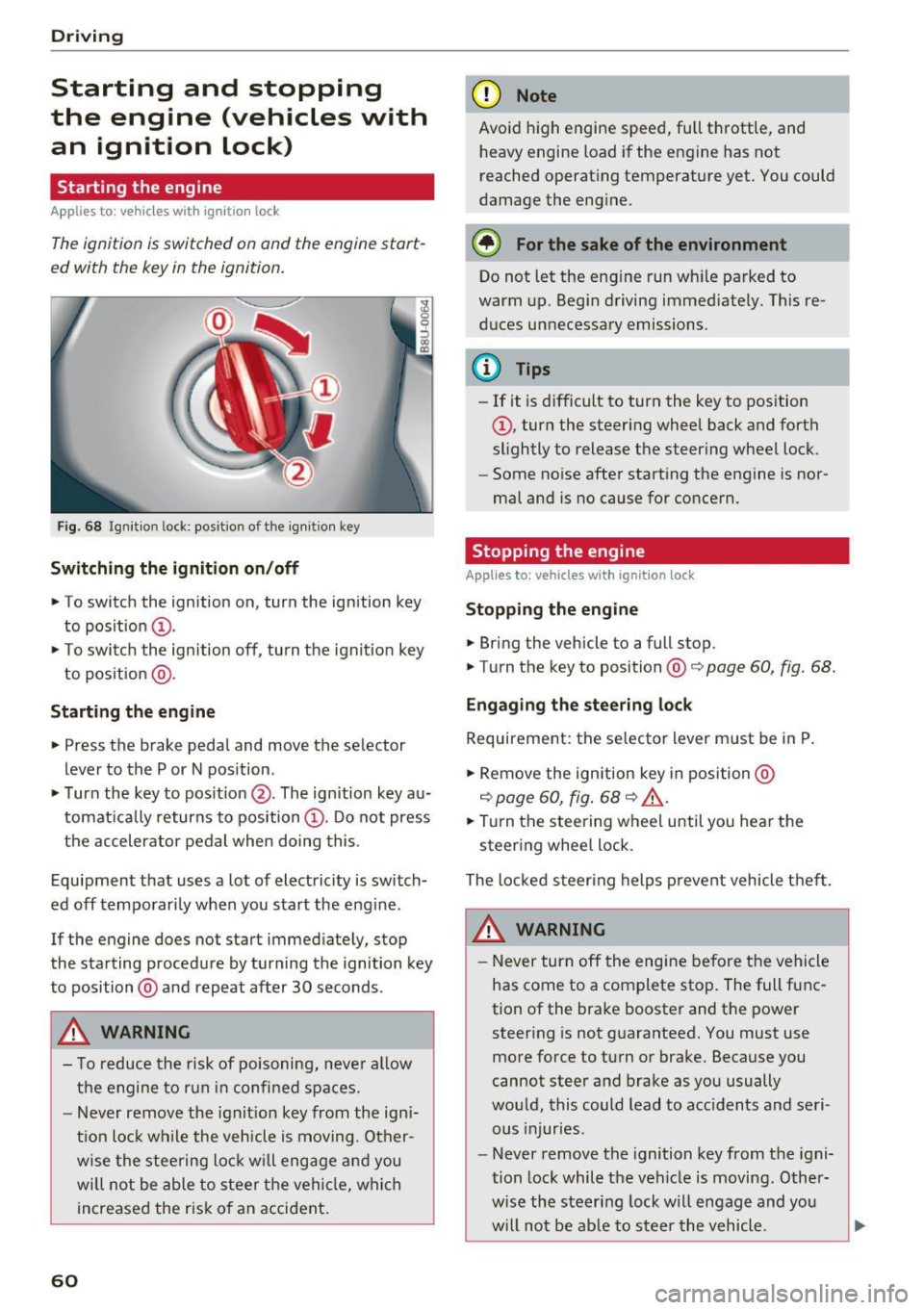
The ignition is switched on and the engine start
ed with the key in the ignition .
Fig. 68 Ignition lock: position of the ign it ion key
Sw itch ing the ignit ion on /off
• To switch the ignition on, turn the ignition key
to posit ion
(D .
• To switc h the ignition off, turn the ignit io n key
to posit ion @.
Starting the engine
• Press the brake pedal and move the selector
lever to the P or N pos ition.
• Turn the key to posit ion @. The ignition key au
tomat ica lly returns to position
(D . Do not press
the accelerator pedal when doing this.
Equipment that uses a lot of electricity is switch
ed off temporari ly when you start the eng ine .
If the engine does not start immediately, stop
the starting procedure by turning the ignition key
to position @and repeat after 30 seconds .
&, WARNING
- To reduce the risk of poisoning, neve r al low
the engine to run in confined spaces.
- Never remove the ign it ion key from the ign i
t ion loc k while the veh icle is moving. Other
wise the stee ring lock w ill engage a nd you
will not be able to stee r th e vehicle, whi ch
increased the r isk of an accident .
60
(D Note
Avoid high engine speed, full throttle, and
heavy engine load if the engine has not
reached operat ing temperat ure yet. You could
damage the engine.
® For the sake of the environment
Do not let the eng ine run wh ile parked to
warm up. Begin driving immediate ly. This re
d uces unnecessary emissions .
(D Tips
-If it is d ifficult to turn the key to position
(D , turn the steering wheel back and forth
slightly to release the steering wheel lock.
- Some no ise after starting the engine is nor
ma l and is no cause for conce rn.
Stopping the engine
Applies to: vehicles with ignition lock
Stop ping the engin e
• Bring the vehicle to a full stop.
• Turn the key to position@co
page 60, fig. 68.
Engag ing the ste ering lock
Requirement: the se lector lever m ust be in P .
• Remove the ignition key in position @
co
page 60, fig. 68 co ,& .
• Tur n the steering whee l until yo u hear the
steer ing whee l lock.
The locked steer ing helps p revent vehicle t hef t.
&, WARNING
- Never turn off the engi ne be fore the vehicle
has come to a complete stop. The full func
tion of the brake booster and the power steer ing is not g uaranteed. You must use
more force to turn or brake. Because you
cannot steer and brake as you usually
wou ld, this could lead to acc idents a nd seri
ous injuries.
- Never remove the ignition key from the igni
tion lock while the veh icle is moving . Other
w ise the steering lock will engage and you
w ill not be ab le to s teer the vehicle.
Page 63 of 230
a
co
...... N r--. N .-< 0 0 ::, co
-Always take the key with you whenever you
leave your vehicle. Otherw ise, the engine
could be started or electrical equ ipment
such as the power windows could be operat
ed . This can lead to serious injury.
- For safety reasons, always park the vehicle
with the se lector lever in the P position .
Otherwise, there is the r is k that the vehicle
cou ld roll unintentionally.
CD Note
If the engine has been under heavy load for
an exte nded per iod of t ime, heat bu ilds up in
the engi ne compartment after the engine is
sw itched off an d there is a risk of damaging
t he engi ne. For this re ason, let the eng ine r un
for at idle fo r ap proxim ately two minu tes be
fore shutting it off .
(D Tips
For up to 10 minu tes after stopp ing the en
g ine, the r adiator fan may t urn o n again a uto
matically or it may con tinue to run (eve n if
the ignition is switched off) for the following
reasons :
- The coolant tempera ture is inc reasing due
to trapped heat .
-If the engine is warm and the engine com
partment also heats up from strong sun
light .
Drivi ng
Starting and stopping
the engine (vehicles with
a convenience key)
Starting the engine
Applies to: vehicles with convenience key
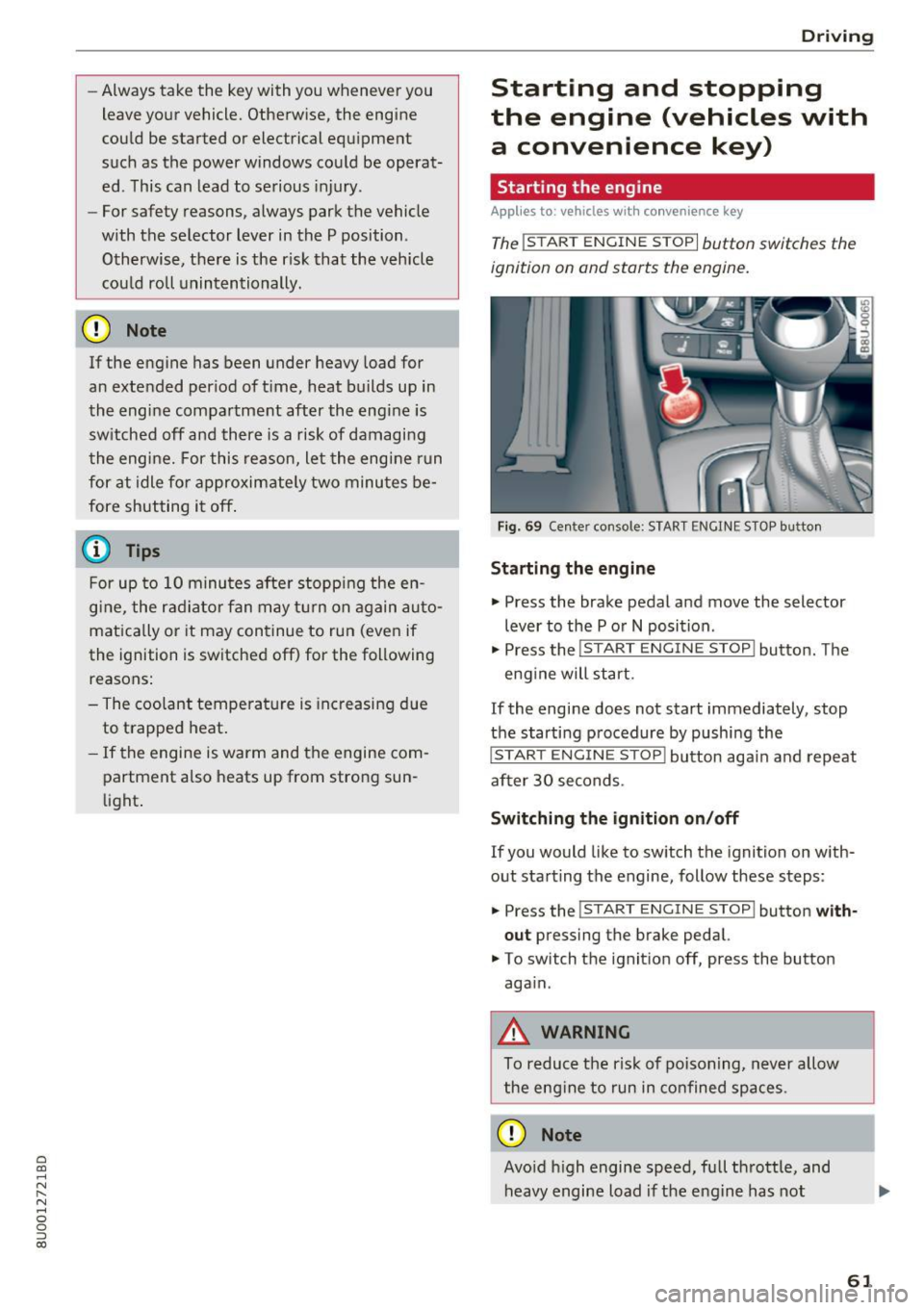
The !START ENGINE STOPI button switches the
ignition on and starts the engine.
Fig. 69 Ce nter console: START ENGI NE ST OP butto n
Starting the engine
• Press the brake pedal and move the selector
lever to the P o r
N position .
• Press the
!START ENGINE STOP! button. The
eng ine will start.
If the engine does not start immediately, stop
the starti ng procedure by pushi ng the
!START EN GINE STOP! button aga in and repeat
after 30 seconds .
Switching the ignition on /off
If you would like to sw itch the ignition on with
out starting the engine, follow these steps:
• Press the
!S T ART ENGINE STOP! button with
out
press ing the brake pedal.
• To switch th e ignit ion off, press the button
aga in.
_&. WARNING
-
To reduce the ris k of poisoning, never allow
t he eng ine to run in confined spaces .
CD Note
Avoid h igh engine speed, full thrott le, and
heavy engine load i f th e eng ine has not
-
61
Page 64 of 230
Driving
reached operating temperature yet. Yo u could
damage the engine .
@ For the sake of the environment
Do not let the engine r un while par ked to
warm up . Begin driving immediately . This re
duces unnecessary emissions .
@ Tips
Some noise after starting the engine is nor
mal and is no cause for concern.
Stopping the engine
A pp lie s to: ve hicles w ith conve nien ce key
~ Bring the vehicle to a fu ll stop.
~ Move the selector lever into the P position.
~ Press the I STAR T ENGINE ST OPI button
¢ page 61, fig. 69 .
Engaging the stee ring lock1
)
The steering locks when you turn the engine off
using the !STAR T ENGINE ST OP I button and
open the dr iver's door.
The locked steering he lps prevent vehicle theft.
Emergency off function*
If it is absolutely necessary, the engine can also
be turned
off while driv ing at speeds starting at
4 mph (7 km/h). To switch the engine
off, press
the lS T AR T
ENGINE ST OPlbutton twice in a row
b riefly or press and hold for longer than two sec
onds .
.8_ WARNING
- Never turn off the engine before the veh icle
has come to a complete stop. The brake
booster and power steering only work when
the engine is running. If the engine is
off,
you have to use more force when steer ing or
braking . Because you cannot steer and brake
as you usually wou ld, this could lead to acci
dents and serious injuries.
- Always ta ke the key with you whenever you
leave you r vehicle. Othe rw ise, the engine
l) This fun ction is not availab le in all coun tries.
62
could be started or electrical equipment
such as the power windows could be operat
ed. Th is can lead to serious injury.
- For safety reasons, always park the vehicle
with the selector lever in the P position.
Otherwise, there is the risk that the vehicle
could roll unintentionally .
(D Note
If the engine has been under heavy load for
an extended period of time, heat builds up in
the eng ine compartment after the engine is
switched
off and there is a r isk of damag ing
the eng ine . For th is reason, let the engine run
for at idle for approximately two minutes be
fo re shutti ng it
off.
(D Tips
For up to 10 minutes after stopping the en
gine, the radiator fan may turn on again auto
matically or it may continue to run (even if
the ign ition is switched off) for the following
r easons:
- The coolant temperature is increas ing due
to trapped heat.
-If the eng ine is warm and the engine com
partment a lso heats up from strong sun
light.
Page 65 of 230

a
co
...... N r--. N
'"' 0 0 ::, co
Starting the engine when there is a
malfunction
Applies to: vehicles with conven ience key
Other circumstances can cause the engine not to
start, such as the battery in the remote control key has drained , there is interference with the
key or there is a system malfunction .
Fig . 7 0 Steering co lumn /remote co ntro l key: st arting t he
en gine if there is a malfunc tion
Req uiremen t: the message No k ey identified .
See owne r's manual
must be disp layed and the
II indicator light m ust be on.
.,. Hold the remo te contro l key ve rtic ally in the lo
c ation ind ic a ted
y>l) c::> fig. 70 .
.,. Press the brake peda l.
.,. Press the
I ST AR T ENGINE STOP I button. The
engine will start.
.,. Drive to an authorized Audi dealer or author
iz ed Audi Service Facility immediately to have
the mal function corrected .
@ Tips
You can view the message again by pressing
the
I START ENGINE STOP ! button.
Messages
Turn off ignit io n. Battery discharging
This message appears and a warning tone sounds
if you open the driver's doo r when the ignition is
switched on .
Press brake pedal to start engine
This message appears if you do not step on the
b rake pedal to sta rt the eng ine o n a vehicle wi th
a n autom atic transm ission.
D rivi ng
Plea se engage Nor P.
This message appears when sta rt ing o r stopping
t h e e ngine if t he se lecto r lever is no t in the Nor P
pos ition. The e ngine will not star t/stop.
IS Is key in the vehicle?
The ind icator light turns on and this message ap
pears if the convenience key* was removed from
t h e veh icle when the e ngine was ru nning. If the
convenience key is no longer in the veh icle , you
c annot sw itch the ignition on or sta rt the eng ine
o nce you stop i t. You also canno t loc k the vehicle
from the o utside.
Shift to P, vehicle can roll away . Doors c an only
be lo cked in P .
This message appears for safety reasons if the
selector lever for the au tomatic transm ission is
not in the P position after the ignition is switched
off . M ove the selector leve r to the P posi tion.
Otherwise the ve hicle is not pro tec ted from ro ll
ing and i t cannot be locked .
II No key identified. See owner's manual.
This message appears if there is no conven ience
key* inside the vehicle or if the system does not
recognize the key . The co nvenience key may not
be recognized, for example, if it is covered by an
obje ct tha t
disrup ts the signa l (such as a br ief
c ase), or if the key b attery is we ak. El ectro nic de
vi ces such as cell phones c an also inte rfe re wi th
the signal.
T o still be ab le to start or stop the engine, refer
to
i=:> page 63 .
Electromechanical
parking brake
Fig. 71 Cen te r conso le : pa rk in g b rake
63
Page 66 of 230

Driving
Your vehicle is equipped with an electromechani
cal parking brake @
c> fig. 71. The parking brake
is designed to prevent the vehicle from rolling
un intent ionally and replaces the hand brake .
Setting/manuall y releasing the pa rking
brake
... Pull the(®) switch to set the parking brake . The
LED in the sw itch turns on. The -(USA mod
els) . (Canada models) indicator light also
turns on in the instrument cluster display .
.,. To release the parking brake manually, press
the b rake o r accelerato r pedal whi le the igni
tion is switched on and p ress t he
C®) switch a t
the same time. The L ED in t he b utton and t he
i ndica tor light in the display turn off .
Releasing the parking brake automatically
Requirement: the dr iver's door must be closed,
the dr iver's safety be lt must be latched and the
pa rking brake must be set.
... To start driving and re lease the park ing brake
automat ica lly, press the accele rato r pedal as
us ua l.
In addi tion to releasing the park ing brake auto
mat ically, other convenience and safety funct ions
are available whe n you start driving
c> page 65,
Starting from a stop .
Preventing the automatic parking brake
release
The vehicle could begin rolling unintentionally ,
dependi ng on the h ill or if towing a trailer .
... To preve nt the parking brake from releasing au
tomat ica lly, pull and hold the®) sw itch and
press the accelerator pedal. The park ing b rake
remains set and prevents the veh icle from ro ll
in g backward.
.,. Yo u can re le ase the(®) switch aga in once you
are sure that you are g iv ing eno ugh dr iv ing
force to the wheels by pressing the accele rator
pedal.
Emergency braking function
You can use the emergency bra king f unct ion in an
emergen cy situ ation , or if the stand ard bra ke op
era tion mal func tions or is disabled.
64
... Pull and ho ld the C®) swi tc h.
... As soon as you re lease the
C®> switch or acceler-
ate, the braking stops.
P ulli ng and ho ld ing t he
C®) switch wh ile driving
the veh icle activates the eme rgency braking func
tion . The ve hicle is bra ked at a ll four wheels by
activating the hydraulic b rake system . The bra k
i ng effect is sim ilar to heavy brak ing
c> ,&. .
To reduce the risk of act ivat ing t he emergency
bra kin g by mista ke, a warning tone (buzzer)
sounds when the
C®) sw itch is p ulled . Eme rgency
braking stops as soon as the© switch is released
or the accelerator pedal is pressed.
Park ing
... Press the brake peda l to stop the ve hicle.
... Pull the
C®> switch to set the par king brake .
... Place the selecto r lever in the P position .
... Turn the engine off
c> ,&. .
... Turn the steering w heel when parking on in
clines so that the w heels w ill roll into the curb
if the vehicle starts moving.
8,,. WARNING
- Do not press the a ccele ra to r peda l inadve r
tently if a ge ar i s selected whe n the vehicle
is st ationary an d th e engine is running . Oth
erwise, the vehicle will s tart to move imme
diate ly and this could result i n an accident.
- Eme rgency brak ing s hou ld only be used i n
an emergency, when the norma l bra ke pe dal
has failed or the bra ke peda l is obstructed .
During eme rgency brak ing, your vehicle will
brake s imilar to heavy braking. ESC and the
associated components (ABS, ASR, EDL)
cannot ove rcome the laws of physics .
Around curves a nd whe n road or wea ther
conditions a re bad, a full brake applicat io n
can ca use the veh icle to skid or the rear end
to swerve, w hich incr eases the ris k of an ac
cident.
- I f th e power s upply fail s, you cannot set the
parking br ake if it is released. In this case,
pa rk the vehicle on leve l ground and secure
it by p lacing the selector leve r in the P posi
tion. See an authorized A udi dealer or au -
thorized A udi Service Fac ility for assistance.
IIJ.
Page 67 of 230
-Always take the vehicle key with you when
leaving your vehicle, even i f for a short pe ri
od of time. Th is app lies particu larly when
children rema in i n the vehicle. Otherwise,
children could start the engi ne, release the
par king brake or operate elect rical equip
me nt su ch as powe r windows, which in
cr eases t he risk of an a ccident.
- No one, esp ecially chi ldren, sho uld rema in
in t he ve hicl e w hen it is locked. Locked
doo rs m ake i t more difficul t for emergency
wor ke rs to ge t into the ve hicle, which puts
lives at risk.
(D} Tips
- When stop ping at a traff ic signa l or stop
p ing in c ity tr aff ic, you c an set the p arking
br ake ma nually . The vehi cle does not h ave
to be held with the b rake pedal. The park ing
brake elim inates the tendency to cree p
when a selector lever position is engaged.
As soon as you press the accelerator pedal,
t h e pa rking brake releases automatically
and you r vehicle starts to move
c:> page 65.
- Occasiona l noises when the park ing brake is
set and re leased a re normal and are not a
cause for concer n.
- The park ing brake goes th rough a se lf-test
cycle at regular intervals when t he vehicle is
stoppe d. A ny noises associated w it h this a re
no rma l.
-If there is a power fa ilure, the pa rking brake
will not set if i t is re leased, a nd it w ill not
r ele ase if it is set
c:> .&. . See a n auth oriz ed
A udi dealer or au thorized A ud i Service Fa
cility for assista nee .
Starting from a stop
Various conven ien ce and safety functions may be
ava ila bl e when the vehicle begins driv ing, de
pending on vehicle equipment .
Starting on hills with the parking brake set
0
~ Req uirement: the dr iver's doo r must be closed. ,....
8 .,. To start driving comfortab ly when o n a hill, set
g the parking brake and begin dr iv ing as usual. 00
D riving
The braking force of the parking b rake does not
release a utomatically until the whee ls bui ld up
enoug h driving force .
Starting on hills with hill hold assist
Hill hold assis t makes it easier to s tart on hills.
Requirement: the driver's door must be closed
and the engine must be runn ing .
.,. To act ivate h ill hold assist, press and hold the
brake pedal for severa l seco nds. The vehicle
m ust be in an u phill d irec tion of travel.
After re leas ing the brake pedal, the braking pow
er is maintained for a brief moment¢&. to pre
vent the veh icle from ro lling back when start ing .
During this t ime, you can easily begin to move
you r vehicle .
.8, WARNING
Applies to: veh icles with hill hold assist
-If you do not beg in d riving immed iate ly or
the engi ne stalls after releasing the bra ke
pedal, your veh icle may begin to roll bac k
ward. Press the brake peda l or set the park
ing b rake immediately .
- The intelligent technology of hill hold assist
cannot ove rcome the limitat ions imposed by
natural p hys ica l laws. The i ncreased comfort
offe red by hill ho ld assist should not cause
you to ta ke safety r isks.
- Hill hold ass ist cannot hold the vehicle i n
p lace on a ll hills (for example, if the groun d
is s lippery or icy).
- To reduce the r isk o f an accident, always
make sure th e vehi cle is s ituated safe ly
while s ta tionary.
Driving offroad
General information
Applies to : vehicles with offroad mode
The electronic stab ilizat io n control (ESC) func
tions we re enhanced for d riving offroad . ESC off
road mode can be activated in driving sit uat ions
i n which a whee l lock o r a d ifferential lock func
t io n is needed ¢
page 90. T he hill descent as-
s ist is a lso available, wh ich au tomatically brakes
II),
65
Page 70 of 230
Driving
P - Park
This selector lever position prevents the vehicle
from rolling. You can only shift into Park when
the vehicl e is
stationary ¢&. .
To shift in and out of the P selector lever posi
tion, press the interlock button in the selector
lever
while pressing the brake pedal.
R- Reverse
Only shift into reverse gear when the vehicle is
stationary and the engine is running at idle
speed ¢&, .
To select the R selector lever position, press the
interlock button
while pressing the brake pedal.
N - Neutral
The transmission is in idle in this position.
To engage the N selector lever position, press the
button on the selector lever and shift into the N
position.
To
move from selector lever position out of N,
you must press the brake pedal and the vehicle
must be traveling less than 1 mph (2 km/h) or be
stationary.
DIS -Normal position for driving forward
In the D/S selector lever position, the transmis
sion can be operated either in the normal D mode
or in the S sport mode. To select the S sport
mode, pull the selector lever back briefly. Pulling
the lever back again will select the normal D
mode. The instrument cluster display shows the
selected driving mode .
In the
normal mode D, the transmission auto
matically selects the suitable gear ratio. It de
pends on engine load, vehicle speed and driving
style.
The engine's power reserves are used fully in the
Sport mode S. Shifting may become noticeable
when accelerating.
To
move from selector lever position N to D, you
must press the brake pedal and the vehicle must
be traveling less than 1 mph (2 km/h) o r be sta
t ionary ¢&, .
68
A WARNING
-
Read and follow all WARNINGS.
-The vehicle can roll
even if the ignition is
switched off.
- Never select R or P while driving, because
this increases the risk of an accident.
- Power is still transmitted to the wheels
when the engine is running at idle. To pre
vent the vehicle from "creeping", you must keep your foot on the brake in all selector
lever positions (except P) when the engine is
running .
- Do not inadvertently press the accelerator
pedal when the vehicle is stopped if a gear is
engaged . Otherwise, the vehicle will imme
diately start to
move -sometimes even if
the parking brake is firmly applied. This in
creases the risk of an accident.
- To reduce the risk of an accident, do not
press the accelerator pedal when changing
the selector lever position while the vehicle
is stationary and the engine is running.
- Never leave your vehicle with the engine
running while in gear. If you must leave
your vehicle when the engine is running, set
the parking brake and move the selector lev
er to the P position.
- Before you or other persons open the hood
and work on a running engine, the selector
lever must be in the P position and the park ing brake must be applied to reduce the risk
of an accident . Always read and follow the
applicable warnings ¢
page 155, Working
in the engine compartment.
- Read and following all WARNINGS¢&. in
Driving tips on page 69 .
(D Note
Never let the vehicle roll downhill with engine
off and the selector lever in the N position,
because this could damage the automatic
transmission and catalytic converter.
(D Tips
- If you accidentally select N while driving,
take your foot off the accelerator pedal and .,.
Page 71 of 230
0 co ......
"' ,....
"' ...... 0 0 :::,
00
wait for the engine to slow down to idle
before selecting Dor S.
- If there is a power failure, the selector lever
will not move out of the P position. The
emergency release can be used if this hap
pens
¢ page 72.
Driving tips
Starting the engine
~ The selector lever must be in the P or the N po
sition.
Starting from a stop
~ Press and hold the brake pedal.
~ Press and hold the lock button in the selector
lever handle, select the desired selector lever
position such as D ¢
page 67 and release the
lock button.
~ Wait a moment until the transmission shifts .
You will notice a slight movement when the gear engages .
~ Release the brake pedal and press the accelera-
tor pedal ¢,&. .
Various convenience functions are available for
starting on hills
¢ page 65 .
Stopping temporarily
~ Press the brake pedal to stop the vehicle, for
example at a traffic light. Do not press the ac
celerator pedal when doing this .
~ To prevent the vehicle from rolling when you
start driving, set the parking brake when stop
ping on steep hills ¢
8. and ¢0.
~ The parking brake will release automatically
and the vehicle will start moving once you press
the accelerator pedal.
Stopping/parking
If the selector lever is not in the P position when
you open the driver's door, the vehicle could roll.
In vehicles with a convenience key*, the message
Shift to P and turn off ignition, or vehicle can
roll away
appears.
~ Press and hold the brake pedal¢,&. .
~ Set the parking brake .
~ Select the P selector lever position .
Driving
Under certain circumstances, (such as driving in
the mountains or towing a trailer), it may be use
ful to switch temporarily to the manual shift pro
gram in order to adjust the gears to the driving
conditions by hand
¢page 70.
On inclines, activate the parking brake first and
then move the selector lever to the P position
¢
page 64. This prevents the locking mechanism
from being loaded too heavily and will make it
easier to move the selector lever out of the P po
sition.
A WARNING
= -- The vehicle can roll even when the engine is
switched off.
- Unintended vehicle movement can lead to
serious injuries .
- Never leave your vehicle with the engine
running while in gear. If you must leave
your vehicle when the engine is running, set
the parking brake and move the selector lev
er to the P position.
- Power is still transmitted to the wheels
when the engine is running at idle. To pre
vent the vehicle from "creeping", you must
keep your foot on the brake in all selector
lever positions (except P) when the engine is
running.
- Do not inadvertently press the accelerator
pedal when the vehicle is stopped if a gear is
engaged. Otherwise the risk of an accident
increases because the vehicle will start to
move immediately, even if the parking brake
is set.
- To reduce the risk of an accident, do not
press the accelerator pedal when changing
the selector lever position while the vehicle
is stationary and the engine is running.
- Never engage the R or P selector level posi
tions while driving. It could cause a crash.
- Before driving down a steep slope, reduce your speed and shift into a lower gear in tiptronic mode.
- Do not ride the brakes or press the brake
pedal too often or too long when driving
downhill. Constant braking causes the
brakes to overheat and substantially ..,.
69
Page 72 of 230
Driving
reduces braking performance, increases
braking distance or causes complete failure
of the brake system.
- If you must stop on an incline, always hold
the vehicle in place with the foot brake or
parking brake to prevent it from rolling
back.
- Never hold the vehicle on an incline with a
slipping clutch. The clutch opens automati
cally when it becomes too hot from the
overload . The . indicator light turns on
and a message appears~
page 71 when
the clutch is overloaded.
- Read and following all WARNINGS
9 &, .
(D Note
-When stopping on an incline, do not try to
hold the vehicle in place by pressing the ac
celerator pedal while a driving gear is se lected . This can cause the automatic trans
mission to overheat and can damage it. Set
the parking brake or press the brake pedal
to prevent the vehicle from rolling.
- Allowing the vehicle to roll when the engine
is stopped while the selector lever is in the
N position will damage the automatic trans
mission, because it is not lubricated under
those circumstances ~
page 205, Towing
with a tow truck.
- The transmission can overheat and be dam
aged under certain driving and traffic condi
tions su ch as frequent starts, creeping for a
long time, or stop-and-go traffic. If the.
indicator light turns on, stop the vehicle at
the next opportunity and let the transmis
sion cool down
~ page 71.
H ill descent contr ol
The hill descent control system assists the driver
when driving down hills .
Hill descent contro l is activated when the selec
tor lever is in the Dor S position and you press
the brake pedal. The transmission automatically
selects a gear that is suitable for the hill. Hill de
scent control tries to maintain the speed ach
ieve d at the time of braking, within physical and
70
technical limitations. If may still be necessary to
adjust the speed with the brake pedal.
Hill descent control switches off once the hill lev
els out or you press the accelerator pedal.
&_ WARNING
Hill descent control cannot overcome physical
limitations, so it may not be able to maintain
a constant speed under all conditions. Always
be ready to apply the brakes .
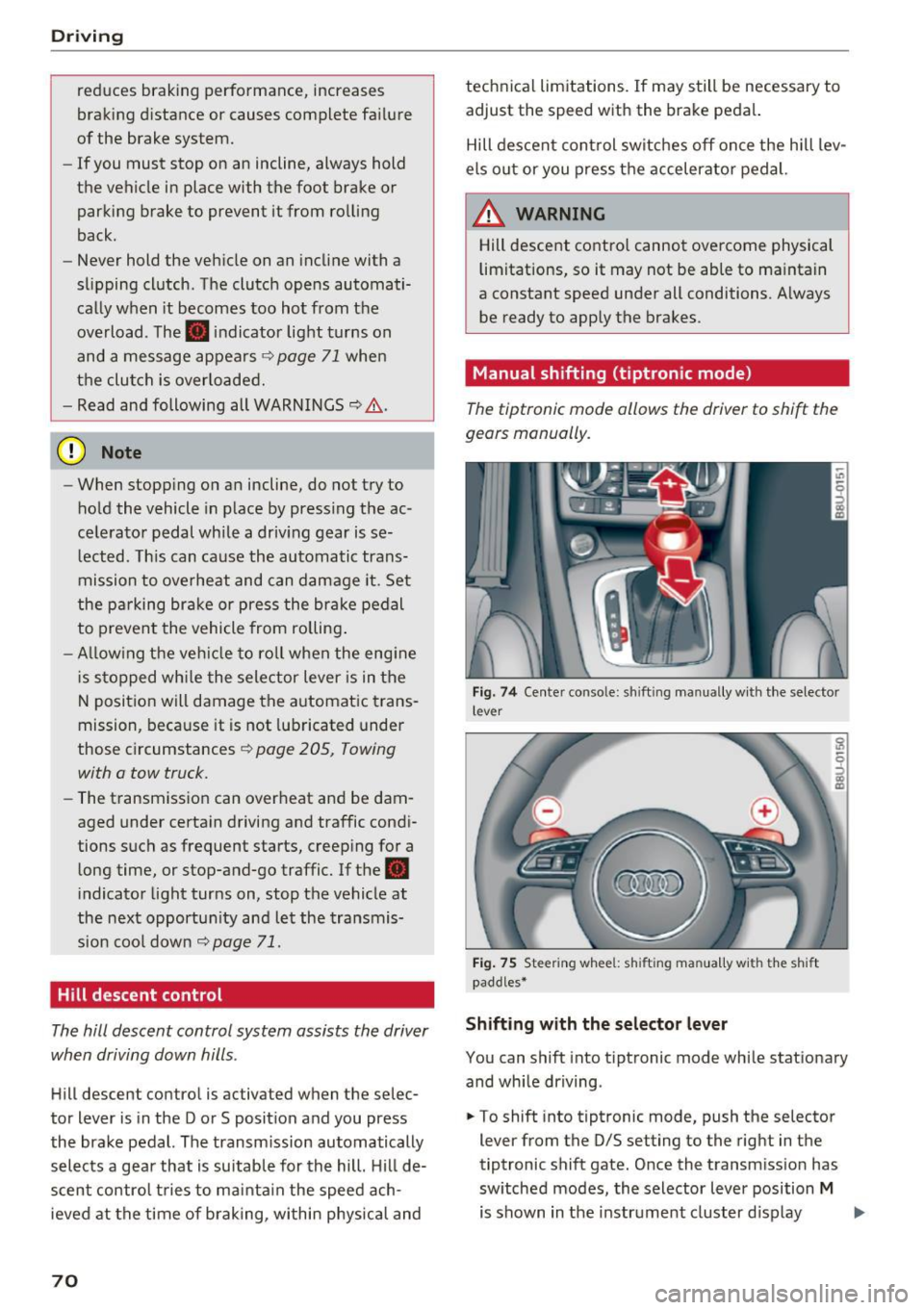
Manual shifting (tiptronic mode }
The tiptronic mode allows the driver to shi~ the
gears manually .
Fig. 7 4 Center console: sh ift ing manually w ith the selector
l ever
Fig. 75 Steering whee l: sh ift ing ma nuall y wi th th e s hift
paddles*
Shifting with the selector lever
You can shift into tiptronic mode while stationary
and while driving .
.. To shift into tiptronic mode, push the selector
lever from the 0/S setting to the right in the
tiptronic shift gate. Once the transmission has
switched modes, the selector lever position
M
is shown in the instrument cluster display .,..
Page 89 of 230
Parking on the r ight is described here . It is identi
cal when parking on the left.
I f the re is an obstacle next to the pa rking space
(such as a wa ll), refer to "Information for par king
next to obstacles" ¢
page 87.
~ Activate the tu rn s ignal.
~ Pos ition your vehicle next to a parked veh icle in
front of the desired parking space. The d istance
to this vehicle should be approximately 3 ft. (1
m) .
~ Turn the Infotainment system on and sh ift into
reverse gear. The parking system is turned on
and the
Cr oss park ing view is displayed.
~ Press the control button on the Infotainment
unit
(D ¢ fig . 94 . The Parall el parking view is
displayed .
~ Backup and align you r vehicle so the b lue a rea
@ borders on the rear end of the veh icle be
hind you or on the parking space line
¢ .&. in
General information on page 85,
¢ -Ol) in Gen
eral information on page 85 .
The blue area rep
resents an extension of the veh icle's outline by
approxim ately 16 ft (5 meters) to the rear. The
long side of the blue area shou ld be on the
curb . The entire blue area must fit into the
park ing space.
~ With the veh icle stopped, turn the steer ing
whee l to the r ight as far as it w ill go.
~ Bac k in to the park ing space unti l the b lue curve
¢ fig. 95 tou ches the curb¢.&. in Gen eral in
formation on page 85, ¢(Din General infor
mation on page 85 .
Stop the vehicle.
~ With the vehicle stopped, turn the steer ing
wheel to the left as far as it will go .
~ Continue to back into the parking space un til
the veh icle is parked parallel to the curb¢&.
in General information on page 85 , ¢ (Din
General information on page 85.@
ma rks the
rea r bumpe r. Stop t he veh icle, a t the la test,
when the red or ien tat io n line @ borders an ob
ject . Keep an eye on the front o f your vehicle
whi le doing this.
Parking next to obstacles
~ I f the re is an obstacle (such as a wall) next to the ......
~ pa rking space, pos ition the vehicle so t here is
8 mo re space on that side. Posi tion the long s ide of
g the blue s urface so that the re is sufficient space 00
Parking sy stem s
from the obstacle. The surface must not be
touching . You will a lso need to start turning the
stee ring wheel earlier . The bl ue curve
r:=:> fig . 95
must not touch the obstacle and shou ld have suf
ficien t room .
@ Note
Keep eno ugh distance from the curb to re
duce the risk of damage to the r ims.
(D Tips
The left or right orientation lines and surfaces
will be d isp layed , depend ing on the tu rn sig
nal be ing used.
Adjusting the display
and the warning tones
Applies to : vehicles wit h parking system pl us/rearview cam
era
The display and warning tones can be adjus ted in
the Infotainment.
~ Select: the I CAR I funct ion button > ( C ar) Sys
tems *
control but ton > Driver assist > Parking
aid .
Display
On * -
an optical display is shown for the parking
system p lus, a rearview came ra image is shown
for parking system plus with rearview camera*.
Off -when the parking system is switched off,
o n ly audib le signals are given .
Signal tones
Front volume* -
vol ume for the front area
Rear volume -volume for the rear area
Front frequency * -frequency for the front area
Rear frequency -frequency for the rea r a rea
Music volume while parking -when the par kin g
system is turned on, the vo lume of the audio/v id
eo source is lowered
The newly se lected level is demonstrated briefly
by the sound gene ra to r. .,.
87