brake AUDI Q3 2018 Owner's Manual
[x] Cancel search | Manufacturer: AUDI, Model Year: 2018, Model line: Q3, Model: AUDI Q3 2018Pages: 230, PDF Size: 57.03 MB
Page 75 of 230
0 co ......
"' ,-...
"' ...... 0 0 :::,
00
Trailer towing
Driving with a trailer
General information
Your vehicle is primarily intended for transport ing people and luggage . However, if you drive
with a trailer , follow the technical requirements,
the operation and driving tips, and the legal reg
ulations.
Driving with a trailer affects the vehicle's fuel
consumption, performance and wear.
It also re
quires higher concentration from the driver.
A WARNING
Do not transport any people in a trailer due to
the risk of fatal injury.
Technical requirements
Certain requirements must be met when towing
a trailer.
Trailer hitch
Only use a trailer hitch with a removable ball hitch mount and ball hitch. The trailer hitch must
be permitted for the vehicle , the trailer and the
permitted total weight of the trailer being
pulled. Above all, it must be securely and safely
attached to the vehicle trailer.
Never mount a trailer hitch on the bumper. The
trailer hitch must be mounted in a way that does
not impair the function of the bumper. Do not
make any changes to the exhaust system and the
brake system.
Check regularly if the trailer hitch is securely mounted. Always follow the instructions given by
the trailer hitch manufacturer.
Trailer brakes
If the trailer has its own brake system, then fol
low the manufacturer specifications. However,
the brake system on the trailer must never be
connected to the vehicle brake system.
Trailer towing
Engine cooling system
Driving with a trailer means a higher load on the
engine and the cooling system. The cooling sys
tem must be designed for additional load and
contain enough coolant
c::> (D .
A WARNING
-
-Never mount a "weight-distributing" or
"load-balancing" trailer coupler as the trail
er hitch . The vehicle was not designed for
these types of trailer hitches . The trailer
hitch can malfunction and the trailer can
break off from the vehicle.
- If the trailer is equipped with electronic
brakes, these brakes cannot be activated by
a factory-installed control system, which in
creases the risk of an accident.
- To reduce the risk of injury, always remove
the ball hitch mount if no trailer is mount
ed.
(D Note
Longer inclines cannot be driven without a
suitable cooling system, especially if the out
side temperatures are high. otherwise, this
increases the risk of engine damage.
' Operating instructions
Several things must be noted when towing a
trailer.
Towing capacity
The permitted towing capacity for trailers with
out brakes is 1,650 lbs (750 kg).
The permitted towing capacity for trailers with brakes is 2,200 lbs (1,000 kg) .
These values apply to roads with up to 12% in
cline.
Tongue weight
The maximum permitted tongue weight of the
trailer drawbar on the trailer hitch ball head may
not be exceeded. ..,.
73
Page 77 of 230
0 co ......
"' ,-...
"' ...... 0 0 :::,
00
Bra kes
Brake i n a t imely man ner. Downsh ift before driv
ing downhill so that the engine can assist wit h
braking
~ .&. .
When using a tra ile r with ove rru n b rakes, first
b ra ke gen tly the n qu ickly . T his red uces the risk of
je rking wh ile braking if the trailer wheels loc k up.
Engine coolant temperature
P ay a ttention specifica lly to the coolant tempera
ture d isp lay when t here are high ou tside tempe r
a tures, a nd when dr iv ing on long inclines
~ page 8. Shift to a highe r gear in a t imely m an
n e r.
,&. WARNING -
Constant b raking causes the brakes to ove r
heat and substant ia lly reduces b raking per
formance, increases braking distance or caus es complete fa ilure of the brake system .
Trailer towing
75
Page 79 of 230
0 co ......
"' ,....
"' ...... 0 0 :::,
00
@ Tips
The cruise control system cannot maintain
the speed cons istently if you are driving on
steep hills. The vehicle weight ca uses the
speed to increase. Due to th is, shift into a
lower gear in t ime or apply the brakes .
Changing the speed
Applies to: vehicles with cruise control system
• To inc rease or decrease the speed in incre
me nts, p ush the lever tow ard
010 c> page 76,
fig. 78.
• To in cr ease o r decrease the speed qu ickly , hol d
the leve r in the
010 direction un til the de
si red spee d is displayed .
Overriding the speed
Applies to: vehicles with cru ise control system
You can a lso press the accelerator pedal down to
i ncrease you r speed, for example if you want to
pass someone. The speed you set earlier w ill re
sume as soo n as you release the accelerator ped
al.
However, if you are driving cons iderably faster
than the stored speed for a long period of time,
the cruise cont rol system wi ll temporarily switch
off . Th e
A;[l)~i4 (USA models) !l'I (Canada mod
e ls) indica to r li ght in the inst rument cluste r
turns off and the stored speed is m ain taine d.
Preselecting a speed
Applies to: vehicles with cruise control system
You can pre-select your desired spe ed when the
v e hicle is sta tionary.
.,. Switch the ign ition on .
.. Pull the lever into position ©
c> page 76,
fig. 78 .
.,. To inc rease o r decrease the speed, push the lev -
er towar d
010 .
.. To store the speed disp laye d, re lease the lever .
This f unct io n ma kes it poss ib le, for examp le, to
save the spee d yo u wan t be fo re dr iving on the
hig hway. On ce on t he h ighw ay, activa te the
Assistance systems
cruise contro l system by p ulling the lever towa rd
the position ©-
Switching off
Applies to: vehicles with cruise control system
Deact ivating temporarily
• Press the brake pe dal, or
• Press the lever into position @ (not clicked into
place)
c> page 76, fig . 78, o r
• Dr ive for longer t han five minutes at more than
6 mph (10 km/h) above the sto red speed .
Switching off completely
• Press the lever into position @(clicked into
place), or
• Switch the ignit ion off.
T he speed you stored will be maintained if the
c ruise contro l has been switched o ff temporarily.
To resume the stored speed, re lease the bra ke
pedal and pull the lever into pos ition ©-
Switching t he ignition off w ill erase the stored
speed.
A WARNING ,_
You should only resume the sto red speed if it
i s not too high fo r existing t raff ic conditions.
Ot he rw ise you can inc rease the risk of an acci
dent.
77
Page 91 of 230
Intelligent Technology Electronic stabilization
control (ESC)
Description
Ele ctronic stabilization control (ESC) supports
driver safety . It reduces the risk of slipping and
improves d riving stability. ESC detects critica l sit
uations such as the vehicle oversteering and un
dersteer ing or the wheels are spinning. The vehi
cle is stabilized by apply ing the brakes or reduc
ing engine torque . When the ESC engages, the
G1 indicator light b links in the instrument clus
ter.
T he follow ing systems are integrated in the ESC:
Ant i-loc k bra king s ystem (ABS)
ABS prevents the whee ls from locking when brak
ing. The vehicle can still be steered even during
hard brak ing. Apply steady pressure to the brake
pedal. Do not pump the pedal. A pulsing in the
b rake pedal indicates that the system is act ing to
stabilize the vehicle .
Brak e a ssist s ystem
The brake assist system can decrease braking dis
tance. It increases brak ing power when the driver
presses the brake pedal quickly in emergency sit
uations . You must press and hold the brake pedal
unti l the dangerous sit uat io n is ove r.
Anti-Slip Regulation (ASR )
ASR reduces eng ine power when the drive wheels
begin spinning and ad apts the force to the road
conditions . This makes it easier to start, acceler
ate and dr ive up hills .
Electronic differential lock (EDL )
The EDL applies the brakes to a whee l that starts
spinning and transfers the drive power to the
other driving wheel or wheels ( if the veh icle is
equ ipped w ith all wheel dr ive*) . This function is
n ot available at higher speeds .
0 ~ In extreme cases, EDL automatically switches off
~ to keep the brake on the braked wheel from over-N
8 heat ing . The vehicle is still work ing correctly . EDL 0
:::,
00
Intellig ent Technology
will swi tch on again automatically when condi
tions have returned to normal.
Steering recommendation
T he ESC he lps to s tabilize the vehicle by cha nging
t h e steer ing torque .
Selective wheel torque control
Se lective wheel torque control is used when driv
i ng on curves . The front whee l on the ins ide of
t h e curve or both wheels on the i nside of the
c ur ve are braked se lectively as needed. This al
lows mo re prec ise dr iving in c urves .
Automatic post -collision braking system
The "automat ic post -collis ion braking system"
can help to reduce the risk of sliding and of addi
tiona l co llisions after an accident.
If the a irbag
contro l modu le detects a collision above a certa in
vehicle speed, the ve hicle is br ake d by the ESC.
The vehicle does not brake automatically if:
- the dr iver presses the acce lerator pedal, or
- the bra king fo rc e generated by the pressed
brake pedal is greater than the braking force
that would be in itiated by the system, or
- the ESC, the brake system or the veh icle electri
cal system are not functioning.
A WARNING
- The ESC and its integrated systems cannot
overcome the lim its imposed by natura l
phys ica l laws. This is especially impo rtant
on slippery or wet roads. If the systems be
gi n a cting to s tabilize yo ur vehicle, you
should immedi ately alter your speed to
match the road and traffic conditions. Do
not let the inc reased safety provided tempt
you into taking risks. This could increase
your r isk o f a collis ion.
- Please note the r isk of a coll is ion increases
when dr iv ing fast, especially t hrough curves
and on slippery or wet roads, and when dr iv
ing too close to objects ahead. The ESC and
its integrated systems cannot always pre
vent co llisions - there is st ill a risk of acci
dents!
89
Page 93 of 230
A WARNING
You should only switch offroad mode on or
switch ESC/ ASR off if your driving abilities
and the traffic conditions perm it. There is a
risk of s lid ing .
- The stabilization function is limited when
offroad mode is switched on . The driving
wheels could spin and the vehicle could
swerve, especially on slick or s lippery road
surfaces.
- There is no vehicle stabilization when ESC/
ASR are switched off.
Hill descent assist
Appl ies to: vehicles with hill hold assist
Hill descent assist makes it possible to drive
down a hill at a constant speed.
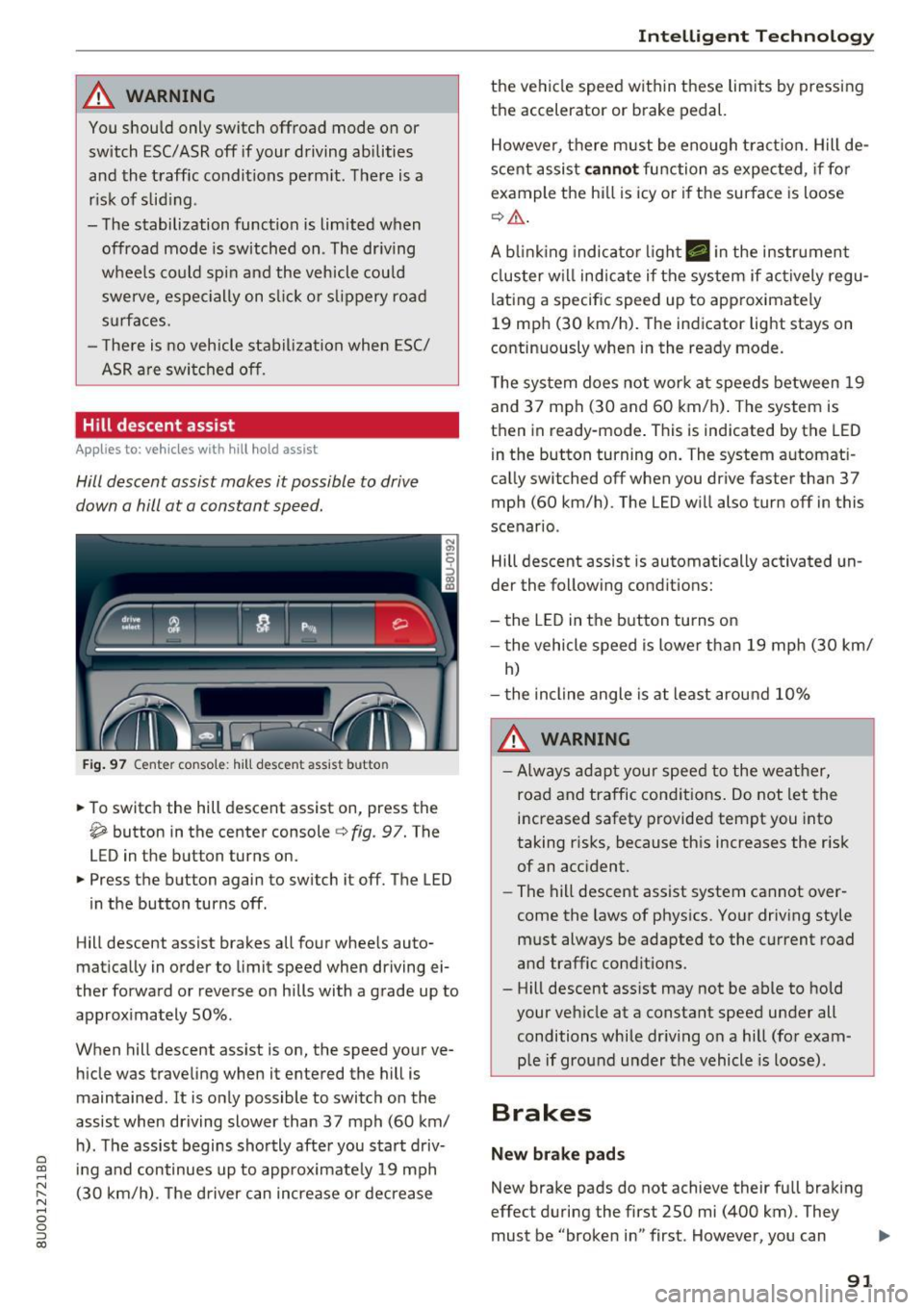
Fig. 97 Center console : hill descent assist butto n
• To switch the hill descent assist on, press the
~ button in the center console c} fig. 97. The
LED in the button turns on.
• Press the button again to switch it off. The LED
in the button turns off .
Hill descent assist brakes all four whee ls auto
matically in order to limit speed when driving ei
ther forward or reverse on hills with a grade up to
approximately 50% .
When hill descent assist is on, the speed your ve hicle was traveling when it entered the hill is
maintained . It is only possible to switch on the
assist when driving slower than 37 mph (60 km/
h). The assist begins shortly after you start driv-
e '.:: ing and continues up to approximate ly 19 mph
N r--. (30 km/h) . T he driver can increase or decrease N .... 0 0 ::, (X)
Intelligent Technology
the vehicle speed within these limits by pressing
the accelerator or brake pedal.
However, there must be enough tract ion. Hill de
scent assist
cannot function as expected, if for
example the hill is icy or if the surface is loose
¢,&. .
A blinking indicato r light. in the instrument
cluster will indicate if the system if actively regu
lating a specific speed up to approximately
19 mph (30 km/h). The indicator light stays on
continuously when in the ready mode.
The system does not work at speeds between 19
and 37 mph (30 and 60 km/h) . The system is
then in ready-mode . This is indicated by the LED
in the button turning on. The system automat i
cally switched off when you drive faster than 37
mph (60 km/h) . The LED will also turn off in this
scenario .
Hill descent assist is automatically activated un
der the following conditions:
- the LED in the button turns on
- the vehicle speed is lowe r than 19 mph (30 km/
h)
- the incline angle is at least around 10%
A WARNING
-
-Always adapt your speed to the weather,
road and traffic conditions. Do not let the
increased safety provided tempt you into
taking risks, because this increases the risk
of an accident.
- The hill descent assist system cannot over
come the laws of physics. Your driving style
must always be adapted to the current road
and traffic conditions .
- Hill descent ass ist may not be able to hold
your vehicle at a constant speed under all
conditions while dr iving on a hill (for exam
p le if ground under the vehicle is loose).
Brakes
New brake pads
New brake pads do not achieve their full braking
effect during the first 250 mi (400 km) . They
must be "broken in" first . However, you can
IJ,,
91
Page 94 of 230
Intelligent Technology
compensate for the slightly reduced brak ing
force by pressing firmly on the brake peda l. Avoid
heavy b raking during the break -in per iod .
Wear
Brake pad wear depends largely on the way the
veh icle is driven and on operat ing cond it ions.
This is especially t rue if you are driving frequently
in the city and on c urves or with a sporty driving
style.
Operating noise
Noises may occur when br aking depend ing on the
speed, b raking force and outs ide cond itions such
as temperature and humidity.
Effect of water or road salt
I n ce rtain s ituations, fo r example after driving
through water, in heavy ra in, afte r ove rnig ht con
densat ion or after washing your car, the braking
effe ct can be red uced by moisture or ice on the
b rake rotors and brake pads. The brakes must be
"dr ied" first with a few careful brake applica
tions.
At highe r speeds and with the windshie ld wipers
turned on, the brake pads press against the brake rotors for a short amount of time . This action,
which is not felt by the driver, happens at regular
intervals and ensures a better reaction time for
the brakes in wet weather.
The braking effect can also be reduced if you are
driving on salted roads and you do not apply the brakes for long periods of time. The laye r of salt
on the brake rotors and brake pads must be worn
off first when t he brakes a re applied ¢ ,& .
Corros ion
L eaving the vehicle par ked for long periods of
time, low mi leage and avo id ing heavy brak ing
can contribute to corrosion on the brake rotors
and to d irty b rake pads .
If you usually avoid heavy b raking or if there is
corros ion present, occasional heavy braking at
h igh speeds is recommended to clean the brake
rotors and pads¢,&.
92
Brake system malfunction
if you no tic e th at the b rake peda l t ravel has sud
denly gotten larger, then a brake ci rc u it may have
failed ¢.&. .
Low brake fluid level
When the b rake fluid level is low, malfunctions in
t h e b rake system may occur. The b rake fl uid leve l
i s e lec tron ically moni to red.
Brake booster
The brake booster amplifies the pressure you ap
ply to the brake pedal. It only works when the en
gine is runni ng ¢ ,& .
.8, WARNING
-On ly app ly the bra kes for the p urpose o f
cleaning the brake sys tem w hen road and
t raffic conditions permi t. You mus t not en
danger other roa d users . This increases the
risk of an accident.
-
- Never let the ve hicl e roll whi le the engine is
stopped because t his increases the risk of an
accident .
(D Note
- Never let the brakes "rub'' by pressing the
peda l lightly when braking is not actually
necessary . This causes t he b rakes to over
heat and increases braking distance and
causes wear.
- Be fore driving downhill a long d istance on a
steep hill, decrease your speed and select a lower gear. This makes use of the engine
brak ing effect and relieves the brakes . If
you need to bra ke add itiona lly, bra ke in in
te rvals and not cont inuous ly.
(D Tips
- If the brake booster is not working, you
must press the b rake peda l with much more
forc e than normal.
- If you retrofit your veh icle with a front spo il
er , wheel covers or sim ila r i tems, make su re
t h at the air flow to the fro nt wheels is not
inter rup ted. O therwise t he b rake system
c an be come too hot.
Page 97 of 230
0 co ......
"' ,....
"' ...... 0 0 :::,
00
With th e engin e switched off
The vehicle battery will d rain if yo u use I nfota in
ment f unctions such as listening to the radio
while the engine is switched off .
The vehicle 's ability to start may be impaired by
the energy use, a message will appear in the In
fotainment system disp lay .
The message ind icates that the system will
switch off au tomati cally soon. If you wou ld like
to continue using the funct ions, you must s tart
the engine.
With the engine running
Although electrical energy is gene rated whi le
d riving, the vehicle battery can drain. This can
h appen if l ittle energy is gene rated but much is
used, and the charge leve l of the veh icle ba ttery
is not optima l.
To restore the ba lance of energy, components
that requ ire large amo unts of energy are tempo
r ar ily scaled bac k or switched off. Heating sys
tems in part icular requi re a g reat deal of energy.
If
yo u notice, for example, that the seat heating*
or rear window defogger is not working, then it
has been temporarily reduced or switched off.
These systems are available again as soon as the
e nergy supply has been restored.
In addition, you may notice that the idle speed
has slightly increased. That is norma l and no
cause for concern. By increasing the idling speed,
the add itional required energy will be generated
and the vehicle battery will be cha rged.
Notice about data
recorded by the Event
Data Recorder and
vehicle control modules
Event Data Recorder
This vehicle is equipped with an Event Data Re
corder (EDR). The main purpose of an EDR is to
record, in certain crash or near crash-like situa
tions, such as an a irbag deployment or hitting a
road obstacle, data that will assist in understand
in g how a veh icle's systems performed. The EDR
Intellig ent Technology
is des igned to record data related to vehicle dy
namics and safety systems for a short period of
t ime, typ ica lly 30 seconds or less. The EDR in this
vehicle is designed to record such data as:
- How various systems in your vehicle were oper
ating;
- W het her o r not the drive r and passenge r safety
be lts were buckled/fastened;
- How far (if at all) the driver was depressing the
accelerator and/or brake pedal; and,
- How fast the vehicle was traveling.
These data can help provide a better understand
i ng of the circumstances in wh ich crashes and in
j u ries occur. NOT E: EDR da ta a re recorded by your
vehicle on ly if a non-trivial crash s ituation occurs;
no data are re co rded by the E DR under normal
driving conditions and no persona l data (e .g .,
name, gender, age, and crash location) are re
corded. However, other parties, such as law en
forcement, could comb ine the EDR data with the
type of personally identifying data rout inely ac
quired during a crash investigation .
To read data recorded by an EDR, special equ ip
ment is required, and access to the vehicle or the
EDR is needed. In addition to the ve hicle manu
fact urer, other pa rt ies, such as law e nforcement,
that have the special eq uipment, can read the in
fo rmat ion if they have access to the vehicle or the
ED R.
Some state laws restrict the retrieval o r down
load ing of data sto red by ED Rs installed in a ve hi
cle for the exp ress purpose of retriev ing data af
te r an a ccident or cras h event without the ow n
er's consent .
Audi will not access the EDR and/or sim ila r data
o r give it to others -
- unless the ve hicle owner (or lessee if the vehi
cle has been leased) agrees; or
- upon the official request by the police; or
- upon the order of a court of law or a govern-
ment agency; or
- for the defense of a lawsuit thro ugh t he judicia l
discovery process.
- Audi may a lso use the data for research abo ut
veh icle operation and safety performance or .,,.
95
Page 103 of 230
0 co ......
"' ,....
"' ...... 0 0 :::,
00
critical areas of the body . Improper seating posi
tions also increase the risk of serious injury and
death when an airbag deploys and strikes an oc
cupant who is not in the proper seating position.
A driver is responsible for the safety of all vehicle
occupants and especially for children . Therefore:
~ Never allow anyone to assume an incorrect
seating position when the vehicle is being used
c> &, .
The following bulletins list only some sample po
sitions that will increase the risk of serious injury
and death. Our hope is that these examples will
make you more aware of seating positions that
are dangerous .
Therefore, whenever the vehicle is moving:
-never stand up in the vehicle
- never stand on the seats
- never kneel on the seats
- never ride with the seatback reclined
- never lie down on the seats
- never lean up against the instrument panel
- never sit on the edge of the seat
- never sit sideways
- never lean out the window
- never put your feet out the window
- never put your feet on the instrument panel
- never rest your feet on the seat cush ion or back
of the seat
- never ride in the footwell
- never ride in the cargo area
A WARNING
Improper seating positions increase the risk
of serious personal injury and death whenever
a vehicle is being used.
-Always make sure that all vehicle occupants
stay in a proper seat ing pos ition and are
properly restrained whenever the vehicle is
being used.
Driving safety
Pedal area
Pedals
T he pedals must always be free to move and
must never be interfered with by a floor mat or
any other object.
Make sure that all pedals move freely without in
terference and that nothing prevents them from
returning to their original positions .
Only use floor mats that leave the pedal area free
and can be secured with floor mat fasteners .
If a brake circuit fails, increased brake pedal trav
el is required to bring the vehicle to a full stop.
A WARNING
--Pedals that cannot move freely can cause loss
of vehicle control and increase the risk of seri
ous injury.
- Never place any objects in the driver's foot
well. An object could get into the pedal area
and interfere with pedal function. In case of
sudden braking or an accident, you would
not be able to brake or acce lerate!
-Always make sure that nothing can fall or
move into the driver's footwell.
Floor mats on the driver side
Always use floor mats that can be securely at tached to the floor mat fasteners and do not in
terfere with the free movement of the pedals.
~ Make sure that the floor mats are properly se
cured and cannot move and interfere with the pedals
c> &, .
Use only floor mats that leave the pedal area un
obstructed and that are firmly secured so that
they cannot slip out of position . You can obtain
suitable floor mats from your author ized Audi
dealer.
Floor mat fasteners are installed in your Audi .
Floor mats used in your vehicle must be attached
to these fasteners . Properly securing the floor
101
Page 104 of 230
Driving safety
mats will prevent them from sliding into posi
tions that could interfere with the pedals or im
pair safe operation of your vehicle in other ways.
A WARNING
Pedals that cannot move freely can result in a
loss of vehicle control and increase the risk of
serious personal injury.
- Always make sure that floor mats are prop
erly secured.
- Never place or install floor mats or other
floor coverings in the vehicle that cannot be
properly secured in place to prevent them
from slipping and interfering with the ped als or the ability to control the vehicle.
- Never place or install floor mats or other
floor coverings on top of already installed
floor mats. Addit ional floor mats and other
coverings will reduce the size of the pedal
area and interfere with the pedals.
- Always properly reinstall and secure floor
mats that have been taken out for cleaning.
- Always make sure that objects cannot fall
into the driver footwell while the veh icle is
moving. Objects can become trapped under
the brake pedal and accelerator pedal caus
ing a loss of vehicle control.
Storing cargo correctly
Loading the luggage compartment
All luggage and other objects must be properly
stowed and secured in the luggage compart
ment.
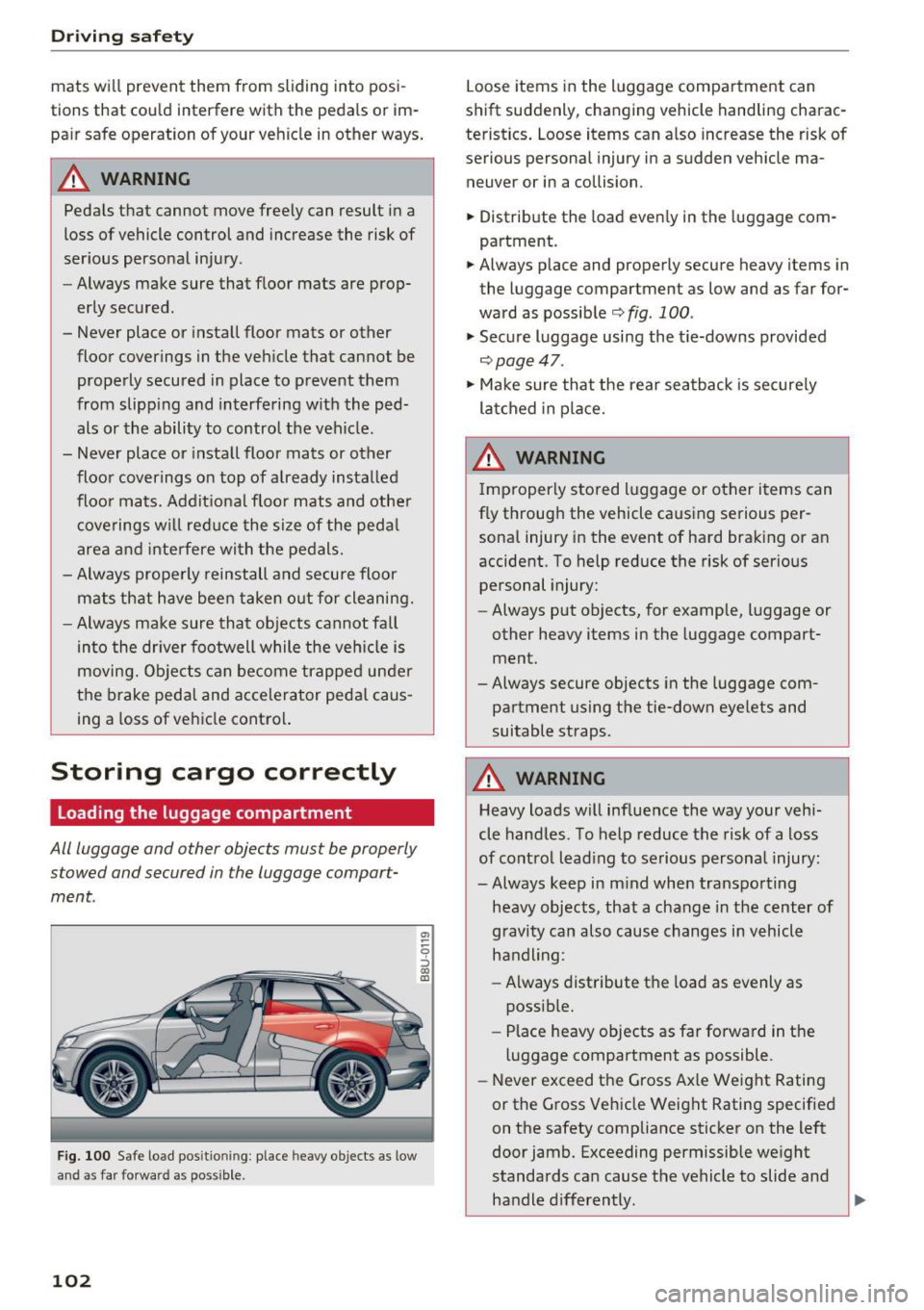
Fig. 100 Safe load pos itio nin g: place heavy objects as low
and as far forward as possible.
102
a, ~ ~ 0
::i 00 OJ
Loose items in the luggage compartment can
shift suddenly, changing vehicle handling charac
teristics. Loose items can also increase the risk of
serious personal injury in a sudden vehicle ma
neuver or in a collision.
.,. Distribute the load evenly in the luggag e com
partment.
.,. Always place and properly secure heavy items in
the luggage compartment as low and as far for
ward as possible
¢fig . 100 .
.,. Secure luggage using the t ie-downs provided
¢ page 47.
.,. Make sure that the rear seatback is securely
latched in place.
A WARNING
Improperly stored luggage or other items can
fly through the vehicle causing serious per sonal injury in the event of hard braking or an
accident. To help reduce the risk of serious personal injury:
- Always put objects, for example, luggage or
other heavy items in the luggage compart
ment.
-Always secure objects in the luggage com
partment using the tie-down eyelets and
suitable straps.
A WARNING
Heavy loads will influence the way your vehi
cle handles. To help reduce the risk of a loss
of control leading to serious personal injury:
-Always keep in mind when transporting heavy objects, that a change in the center of
gravity can also cause changes in vehicle
handling:
- Always distribute the load as evenly as
possible.
- Place heavy objects as far forward in the
luggage compartment as possible.
- Never exceed the Gross Axle Weight Rating
or the Gross Vehicle Weight Rating specified
on the safety compliance sticker on the left
door jamb. Exceeding permissible weight
standards can cause the vehicle to slide and
handle differently.
Ill>-
Page 158 of 230
Checking and Filling
-Never open the cap on the coolant expan
sion tank when the engine is warm. The
cooling system is under pressure.
- To protect your face, hands, and arms from
hot steam or coolant, cover the cap with a
large cloth when opening.
- Do not remove the engine cover under any circumstances. This increases the risk of
burns.
- If tests need to be performed with the en
gine running, there is additional danger due
to moving components (such as the ribbed belt, alternator and radiator fan) and from
the high-voltage ignition system.
- Do not under any circumstances give gas in
advertently (for example, by hand from the
engine compartment) if the vehicle is sta
tionary but the engine is running and a gear
is engaged. Otherwise, the vehicle will start
to move immediately and this could result
in an accident.
- Pay attention to the following warnings list
ed when work on the fuel system or on the
electrical equipment is required.
- Do not smoke .
- Never work near open flames.
- Always have a working fire extinguisher
nearby.
- All work on the battery or electrical system
in your vehicle can result in injuries, chemi
cal burns, accidents or burns. Because of
this, all work must be performed
only by an
authorized Audi dealer or authorized Audi
Service Facility.
- To reduce the risk of electric shock and in
jury, never touch the following components when the engine is running or is being start
ed:
- Ignition cable
- Other components in the electronic high-
voltage ignition system
- If you must check or perform work on the
engine while it is running:
- Set the parking brake and place the selec
tor lever in the P (park) position first .
- Always proceed with extreme caution so
that clothing, jewelry or long hair do not
156
become caught in the radiator fan, fan
belt or other moving components or do
not come into contact with hot compo
nents. Tie back long hair before beginning
work and do not wear clothing that can
hang down into the engine .
- Limit your exposure to exhaust and chemi cals to as short a time as possible
¢ &, .
A WARNING
California Proposition 65 Warning:
- Engi ne exhaust, some of its constituents,
and certain vehicle components contain or
emit chemicals known to the State of Cali
fornia to cause cancer and birth defects and
reproductive harm . In addition, certain flu
ids contained in vehicles and certain prod
ucts of component wear contain or emit
chemicals known to the State of California
to cause cancer and birth defects or other reproductive harm .
- Battery posts, terminals and related acces
sories contain lead and lead compounds,
chemicals known to the State of California
to cause cancer and reproductive harms.
Wash hands after handling.
@ Note
When filling fluids, be sure not to mix the flu
ids up. Otherwise severe malfunctions and en
gine damage will occur .
@ For the sake of the environment
You should regularly check the ground under
your vehicle in order to detect leaks quickly. If there are visible spots from oil or other fluids,
bring your vehicle to an authorized Audi deal
er or authorized Audi Service Facility to be
checked.