light AUDI Q3 2019 Owners Manual
[x] Cancel search | Manufacturer: AUDI, Model Year: 2019, Model line: Q3, Model: AUDI Q3 2019Pages: 280, PDF Size: 72.73 MB
Page 236 of 280
Wheels
check your tires as soon as possible, and inflate
them to the proper pressure. Driving ona signifi-
cantly under-inflated tire causes the tire to over-
heat and can lead to tire failure. Under-inflation
also reduces fuel efficiency and tire tread life,
and may affect the vehicle's handling and stop-
ping
ability.
Please note that the TPMS is not a substitute for
proper tire maintenance, and it is the driver's re-
sponsibility to maintain correct tire pressure,
even if under-inflation has not reached the level
to trigger illumination of the TPMS low tire pres-
sure telltale.
Your vehicle has also been equipped with a TPMS
malfunction indicator to indicate when the sys-
tem is not operating properly. The TPMS mal-
function indicator is combined with the low tire
pressure telltale. When the system detects a
malfunction, the telltale will flash for approxi-
mately one minute and then remain continuously
illuminated. This sequence will continue upon
subsequent vehicle start-ups as long as the mal-
function exists.
When the malfunction indicator is illuminated,
the system may not be able to detect or signal
low tire pressure as intended. TPMS malfunctions
may occur for a variety of reasons, including the
installation of replacement or alternate tires or
wheels on the vehicle that prevent the TPMS
from functioning properly. Always check the
TPMS malfunction telltale after replacing one or
more tires or wheels on your vehicle to ensure
that the replacement or alternate tires and
wheels allow the TPMS to continue to function
properly.
If the tire pressure monitoring indicator
appears
The tire pressure indicator in the instrument
cluster informs you if the tire pressure is too low
or if there is a system malfunction.
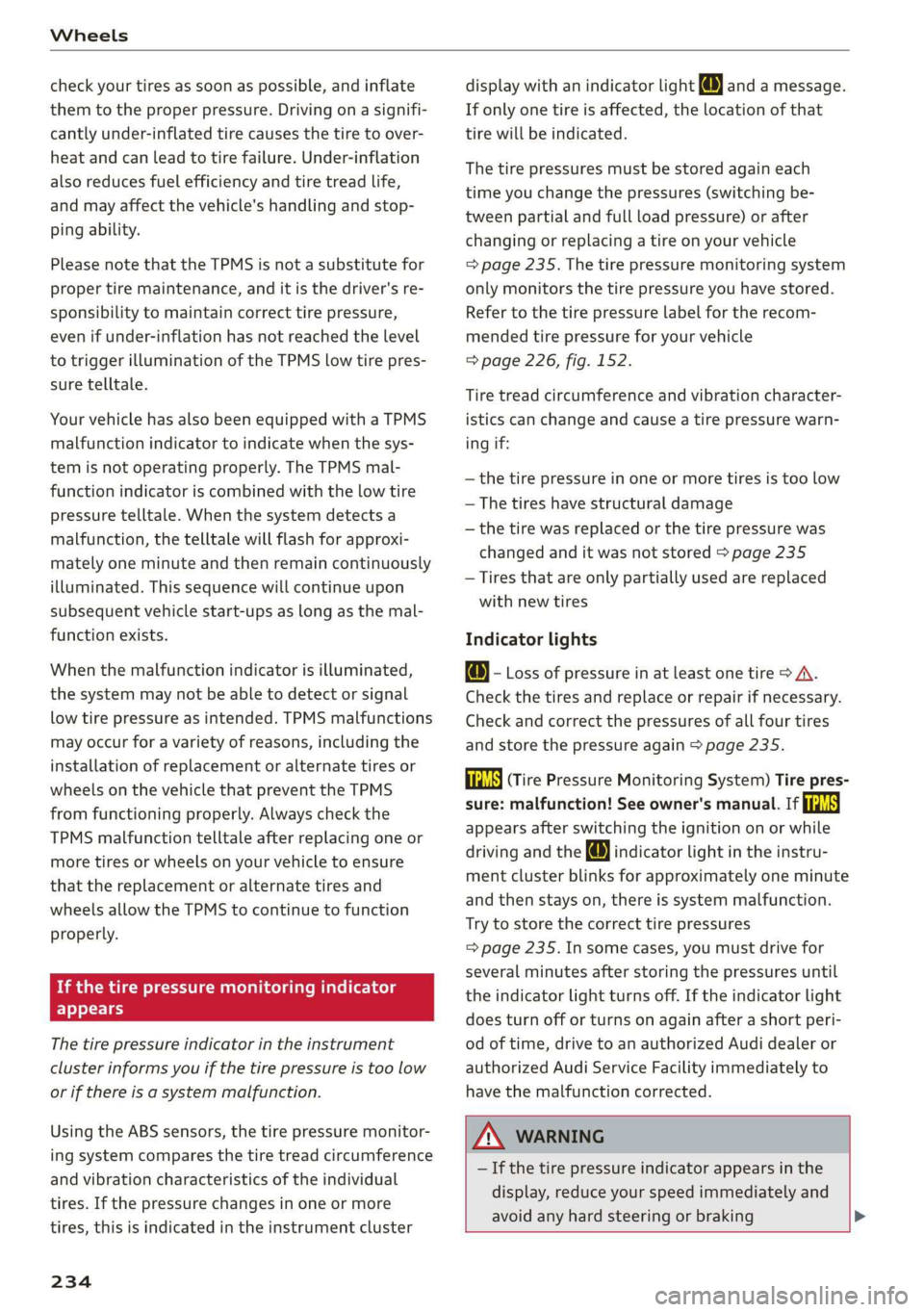
Using the ABS sensors, the tire pressure monitor-
ing system compares the tire tread circumference
and vibration characteristics of the individual
tires. If the pressure changes in one or more
tires, this is indicated in the instrument cluster
234
display with an indicator light @ and a message.
If only one tire is affected, the location of that
tire will be indicated.
The tire pressures must be stored again each
time you change the pressures (switching be-
tween partial and full load pressure) or after
changing or replacing a tire on your vehicle
=> page 235. The tire pressure monitoring system
only monitors the tire pressure you have stored.
Refer to the tire pressure label for the recom-
mended tire pressure for your vehicle
=> page 226, fig. 152.
Tire tread circumference and vibration character-
istics can change and cause a tire pressure warn-
ing if:
—the tire pressure in one or more tires is too low
— The tires have structural damage
— the tire was replaced or the tire pressure was
changed and it was not stored > page 235
— Tires that are only partially used are replaced
with new tires
Indicator lights
@ - Loss of pressure in at least one tire > A\.
Check the tires and replace or repair if necessary.
Check and correct the pressures of all four tires
and store the pressure again > page 235.
/TPMS| (Tire Pressure Monitoring System) Tire pres-
sure: malfunction! See owner's manual. If i
appears after switching the ignition on or while
driving and the @ indicator light in the instru-
ment cluster blinks for approximately one minute
and then stays on, there is system malfunction.
Try to store the correct tire pressures
= page 235. In some cases, you must drive for
several minutes after storing the pressures until
the indicator light turns off. If the indicator light
does turn off or turns on again after a short peri-
od of time, drive to an authorized Audi dealer or
authorized Audi Service Facility immediately to
have the malfunction corrected.
ZA\ WARNING
— If the tire pressure indicator appears in the
display, reduce your speed immediately and
avoid any hard steering or braking
Page 238 of 280
Care and cleaning
Care and cleaning
General information
Regular, proper care helps to maintain your vehi-
cle's value. It can also be a requirement when
submitting warranty claims for corrosion damage
and paint defects on the body.
The required cleaning and care products can be
obtained from an authorized Audi dealer or au-
thorized Service Facility. Read and follow the in-
structions for use on the packaging.
ZA\ WARNING
— Using cleaning and care products incorrectly
can be dangerous to your health.
— Always store cleaning and care products out
of reach of children to reduce the risk of poi-
soning.
@ For the sake of the environment
— Preferably purchase environmentally-friend-
ly cleaning products.
— Do not dispose of leftover cleaning and care
products with household trash.
Car washes
The longer that deposits such as insects, bird
droppings, tree sap or road salt remain on the ve-
hicle, the more the surface can be damaged. High
temperatures such as those caused by sunlight
increase the damaging effect.
Before washing, rinse off heavy deposits with
plenty of water.
Stubborn deposits such as bird droppings or tree
sap are best removed with plenty of water anda
microfiber cloth.
Also, wash the underside of your vehicle once
road salt stops being used for the season.
Pressure washers
When washing your vehicle with a pressure wash-
er, always follow the operating instructions pro-
vided with the pressure washer. This is especially
important in regard to the pressure and spraying
distance. Do not aim the spray directly at the
236
seals on the side windows, doors, lids or the sun-
roof* or at tires, rubber hoses, insulating materi-
al, sensors* or camera lenses*. Keep a distance of
at least 16 in (40 cm).
Do not remove snow and ice with a pressure
washer.
Never use cone nozzles or high pressure nozzles.
The water temperature must not be above 140 °F
(60 °C).
Automatic car wash
Spray off the vehicle before washing.
Make sure that the windows and roof* are closed
and the windshield wipers are off. Follow instruc-
tions from the car wash operator, especially if
there are accessories attached to your vehicle.
If possible, use car washes that do not have
brushes.
Washing by hand
Clean the vehicle starting from the top and work-
ing down using a soft sponge or cleaning brush.
Use solvent-free cleaning products.
Washing vehicles with matte finish paint by
hand
To avoid damaging the paint when washing, first
remove dust and large particles from your vehi-
cle. Insects, grease spots and fingerprints are
best removed with a special cleaner for matte
finish paint.
Apply the product using a microfiber cloth. To
avoid damaging the paint surface, do not use too
much pressure.
Rinse the vehicle thoroughly with water. Then
clean using a neutral shampoo and a soft micro-
fiber cloth.
Rinse the vehicle thoroughly again and let it air
dry. Remove any water residue using a chamois.
ZA WARNING
— Only wash the vehicle when the ignition is
off and follow the instructions from the car
wash operator to reduce the risk of acci-
dents.
Page 239 of 280
83A012721BA
Care and cleaning
—To reduce the risk of cuts, protect yourself
from sharp metal components when wash-
ing the underbody or the inside of the wheel
housings.
— After washing the vehicle, the braking effect
may be delayed due to moisture on the
brake rotors or ice in the winter. This in-
creases the risk of an accident. The brakes
must be dried first with a few careful brake
applications.
@) Note
— If you wash the vehicle in an automatic car
wash, you must fold the exterior mirrors in
to reduce the risk of damage to the mirrors.
Power folding exterior mirrors* must only
be folded in and out using the power folding
function.
—To reduce the risk of damage to the rims
and tires, compare the width between the
wheels on your vehicle with the distance be-
tween the guide rails in the car wash.
—To reduce the risk of damage, compare the
height and width of your vehicle with the
height and width of the inside of the car
wash.
—To reduce the risk of paint damage, do not
wash the vehicle in direct sunlight.
—To reduce the risk of damage, do not wash
decorative decals* with a pressure washer.
—To reduce the risk of damage to the surface,
do not use insect removing sponges, kitchen
sponges or similar items.
— Matte finish painted vehicle components:
—To reduce the risk of damage to the sur-
face, do not use polishing agents or hard
wax.
— Never use protective wax. It can destroy
the matte finish effect.
— Do not place any stickers or magnetic
signs on vehicle parts painted with matte
finish paint. The paint could be damaged
when the stickers or magnets are re-
moved.
@) For the sake of the environment
Only wash the vehicle in facilities specially de-
signed for that purpose. This will reduce the
risk of dirty water contaminated with oil from
entering the sewer system.
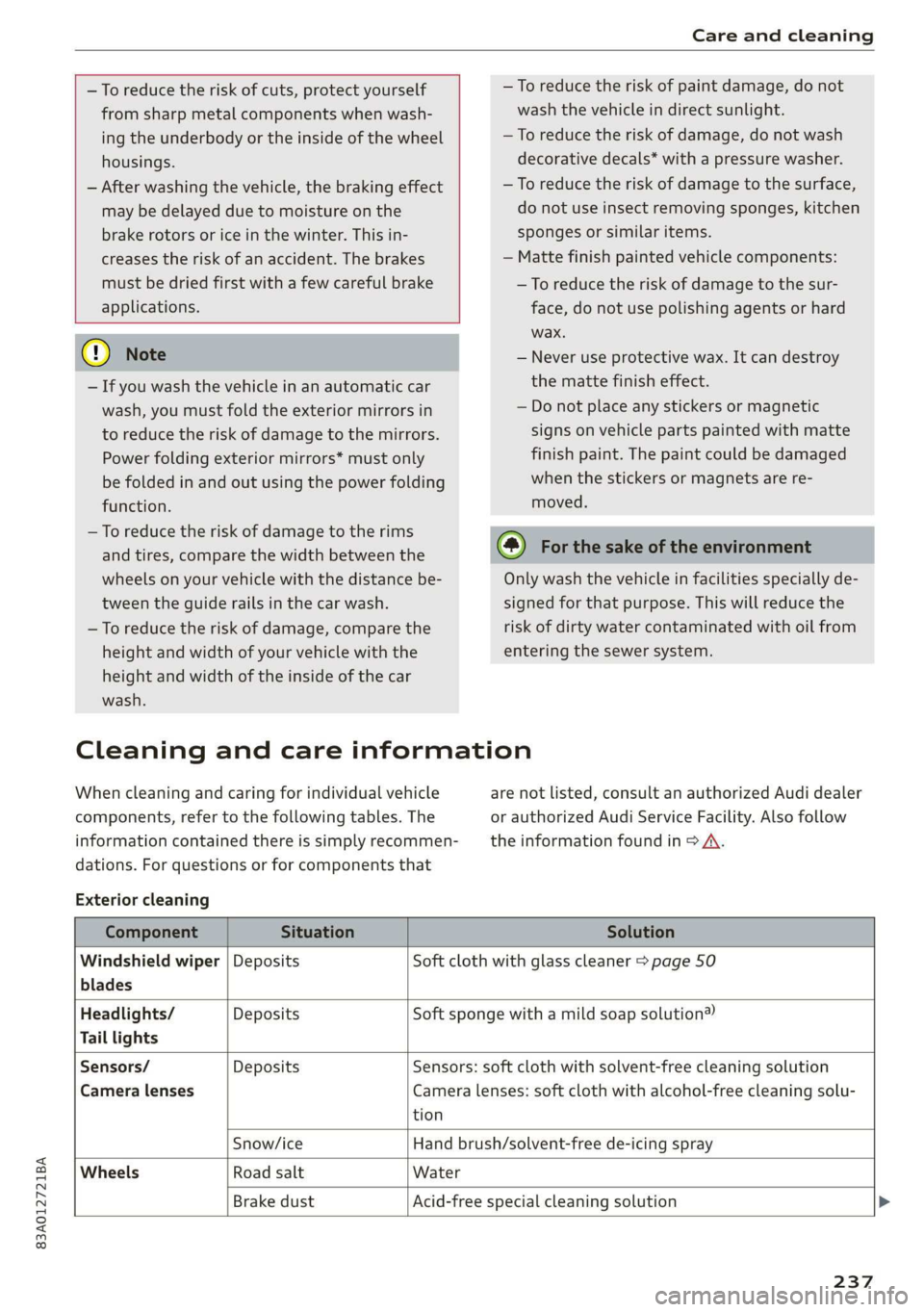
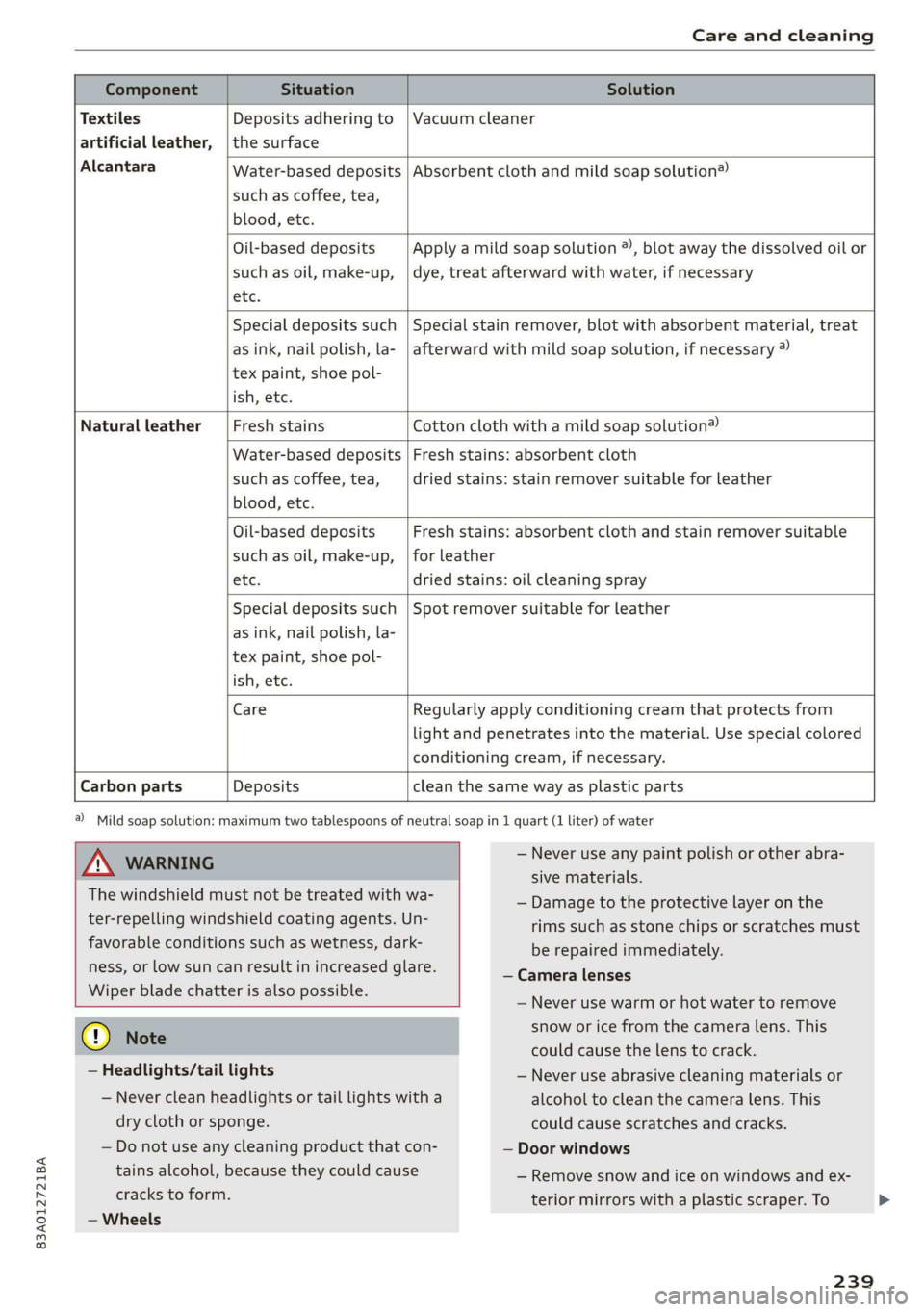
Cleaning and care information
When cleaning and caring for individual vehicle
components, refer to the following tables. The
information contained there is simply recommen-
dations. For questions or for components that
Exterior cleaning
are not listed, consult an authorized Audi dealer
or authorized Audi Service Facility. Also follow
the information found in > A.
Component Situation Solution
Windshield wiper | Deposits Soft cloth with glass cleaner > page 50
blades
Headlights/ Deposits Soft sponge with a mild soap solution®
Tail lights
Sensors/ Deposits Sensors: soft cloth with solvent-free cleaning solution
Camera lenses Camera lenses: soft cloth with alcohol-free cleaning solu-
tion
Snow/ice Hand brush/solvent-free de-icing spray
Wheels Road salt Water
Brake dust Acid-free special cleaning solution >
237
Page 241 of 280
83A012721BA
Care and cleaning
Water-based deposits
such as coffee, tea,
blood, etc.
Component Situation Solution
Textiles
Deposits adhering to | Vacuum cleaner
artificial leather, | the surface
Alcantara Absorbent cloth and mild soap solution®
Oil-based deposits
such as oil, make-up,
etc.
Apply a mild soap solution ®), blot away the dissolved oil or
dye, treat afterward with water, if necessary
Special deposits such
as ink, nail polish, la-
tex paint, shoe pol-
ish, etc.
Special stain remover, blot with absorbent material, treat
afterward with mild soap solution, if necessary ®
Natural leather Fresh stains Cotton cloth with a mild soap solution®
Water-based deposits
such as coffee, tea,
blood, etc.
Fresh stains: absorbent cloth
dried stains: stain remover suitable for leather
Oil-based deposits
such as oil, make-up,
etc.
Fresh stains: absorbent cloth and stain remover suitable
for leather
dried stains: oil cleaning spray
Special deposits such
as ink, nail polish, la-
tex paint, shoe pol-
ish, etc.
Spot remover suitable for leather
Care Regularly apply conditioning cream that protects from
light and penetrates into the material. Use special colored
conditioning cream, if necessary.
Carbon parts Deposits clean the same way as plastic parts
a) Mild soap solution: maximum two tablespoons of neutral soap in 1 quart (1 liter) of water
Z\ WARNING
The windshield must not be treated with wa-
ter-repelling windshield coating agents. Un-
favorable conditions such as wetness, dark-
ness, or low sun can result in increased glare.
Wiper blade chatter is also possible.
— Never use any paint polish or other abra-
sive materials.
— Damage to the protective layer on the
rims such as stone chips or scratches must
be repaired immediately.
— Camera lenses
— Never use warm or hot water to remove
@) Note
— Headlights/tail lights
— Never clean headlights or tail lights with a
dry cloth or sponge.
— Do not use any cleaning product that con-
tains alcohol, because they could cause
cracks to form.
— Wheels
snow or ice from the camera lens. This
could cause the lens to crack.
— Never use abrasive cleaning materials or
alcohol to clean the camera lens. This
could cause scratches and cracks.
— Door windows
— Remove snow and ice on windows and ex-
terior mirrors with a plastic scraper. To
239
Page 242 of 280
Care and cleaning
avoid scratches, move the scraper only in
one direction and not back and forth.
— Never remove snow or ice from door win-
dows and mirrors using warm or hot water
because this could cause cracks to form.
— To avoid damage to the rear window de-
fogger, do not apply any stickers on the
heating wires on the inside of the window.
— Decorative parts/trim
— Never use chrome care or cleaning prod-
ucts.
— Paint
—To reduce the risk of scratches, the vehicle
must be free of dirt and dust before pol-
ishing or waxing.
— To prevent paint damage, do not polish or
wax the vehicle in direct sunlight.
—To reduce the risk of paint damage, do not
polish away rust spots.
— Remove cosmetics and sunscreen immedi-
ately - these could damage the paint.
— Decorative decals
—To reduce the risk of damage, do not use
any rough powder or abrasive cleaning
products.
—To reduce the risk of damage, do not pol-
ish decorative decals that have a matte or
printed finish.
— Due to the risk of damage, do not use an
ice scraper to remove snow and ice on win-
dows with decorative decals on them.
— Displays/instrument cluster
— Make sure that the display and instrument
cluster are switched off and have cooled
down before cleaning. To switch off the
center display, select on the MMI home
screen: SETTINGS > Display & brightness
> MMI > Screen cleaning.
— Displays, the instrument cluster, and the
trim surrounding it must not be cleaned
with dry cleaning methods because they
could become scratched.
— Make sure no fluids enter the spaces be-
tween the instrument cluster and the
trim, because that could cause damage.
— Controls
240
— Make sure that no fluids enter the con-
trols, because this could cause damage.
— Safety belts
— Do not remove the safety belts to clean
them.
— Never clean safety belts or their compo-
nents chemically or with corrosive fluids
or solvents and never allow sharp objects
to come into contact with the safety belts.
This could cause damage to the belt web-
bing.
—If there is damage to the webbing, the
connections, the retractors or the buckles,
have them replaced by an authorized Audi
dealer or authorized Audi Service Facility.
—Textiles/artificial leather/Alcantara
— Never treat artificial leather/Alcantara
with leather care products, solvents, floor
polish, shoe polish, spot remove or similar
products.
— Have a specialist remove stubborn stains
to prevent damage.
— Never use steam cleaners, brushes, hard
sponges, etc. when cleaning.
— Do not turn on the seat heating* to dry
the seat.
— Objects with sharp edges, such as zippers
or rivets on clothing or belts, can cause
damage to the surface.
— Open hook and loop fasteners, for exam-
ple on clothing, can damage seat covers.
Make sure hook and loop fasteners are
closed.
— Natural leather
— Never treat leather with solvents, floor
polish, shoe polish, spot remover or simi-
lar products.
— Objects with sharp edges, such as zippers
or rivets on clothing or belts, can cause
damage to the surface.
— Never use steam cleaners, brushes, hard
sponges, etc. when cleaning.
— Do not turn on the seat heating* to dry
the seat.
—To help prevent the leather from fading,
do not leave the vehicle in direct sunlight >
Page 243 of 280
83A012721BA
Care and cleaning
for long periods of time. If leaving the ve-
hicle parked for long periods of time, you
should cover the leather to protect it from
direct sunlight.
@) Tips
— Insects are easier to remove from paint that
has been freshly waxed.
— Regular waxing can prevent rust spots from
forming.
— Decorative decals can age due to environ-
mental conditions, which can result in dam-
age such as brittleness. The color may fade
if exposed to excessive sunlight.
Placing your vehicle out
of service
If you would like to take your vehicle out of serv-
ice for a long period of time, contact an author-
ized Audi dealer or authorized Audi Service Facili-
ty. They will advise you of important measures,
such as corrosion protection, service, and storage
procedures. Also follow the information about
the vehicle battery > page 212.
241
Page 246 of 280
Emergency assistance
> Find the marking on the sill that is closest to
the tire that will be changed > fig. 157. Behind
the marking, there is a lifting point on the side
sill for the vehicle jack.
> Raise the vehicle jack under the lifting point on
the side sill until the bracket on the jack @)
completely covers the notch on the vehicle.
> Align the vehicle jack so the bracket @ covers
the notch and the base (2) is flat on the ground.
The base @) must be directly under the mount-
ing point @.
> Install the rod on the vehicle jack: Insert the
rod into the opening on the handwheel. Turn
the crank to the left or right to secure it.
> Continue raising the vehicle jack with the crank
until the wheel lifts off the ground slightly.
ZX WARNING
— To reduce the risk of injury, make sure no
one is in the vehicle before raising it.
— Make sure the vehicle jack is stable. The risk
of
injury is increased when the ground is
slippery or soft, because the vehicle jack
could slide or sink.
— Only raise your vehicle with the vehicle jack
provided by the factory. If you use a vehicle
jack designed for another vehicle, your vehi-
cle could slip and cause injury.
— Position the vehicle jack only at the desig-
nated mounting points on the side sill and
align the jack. Otherwise, the vehicle jack
could slip and cause an injury if it does not
have sufficient hold on the vehicle.
—To reduce the risk of injury, do not raise any
other vehicles or other loads using the vehi-
cle jack provided by the factory.
— To reduce the risk of an accident, never start
the engine when the vehicle is raised.
—To reduce the risk of injury, support the vehi-
cle securely with suitable stands if work is to
be performed underneath the vehicle.
@) Note
Do not lift the vehicle by the sill. Position the
vehicle jack only at the designated mounting
points on the side sill. Otherwise, your vehicle
could be damaged.
244
Removing and installing a wheel
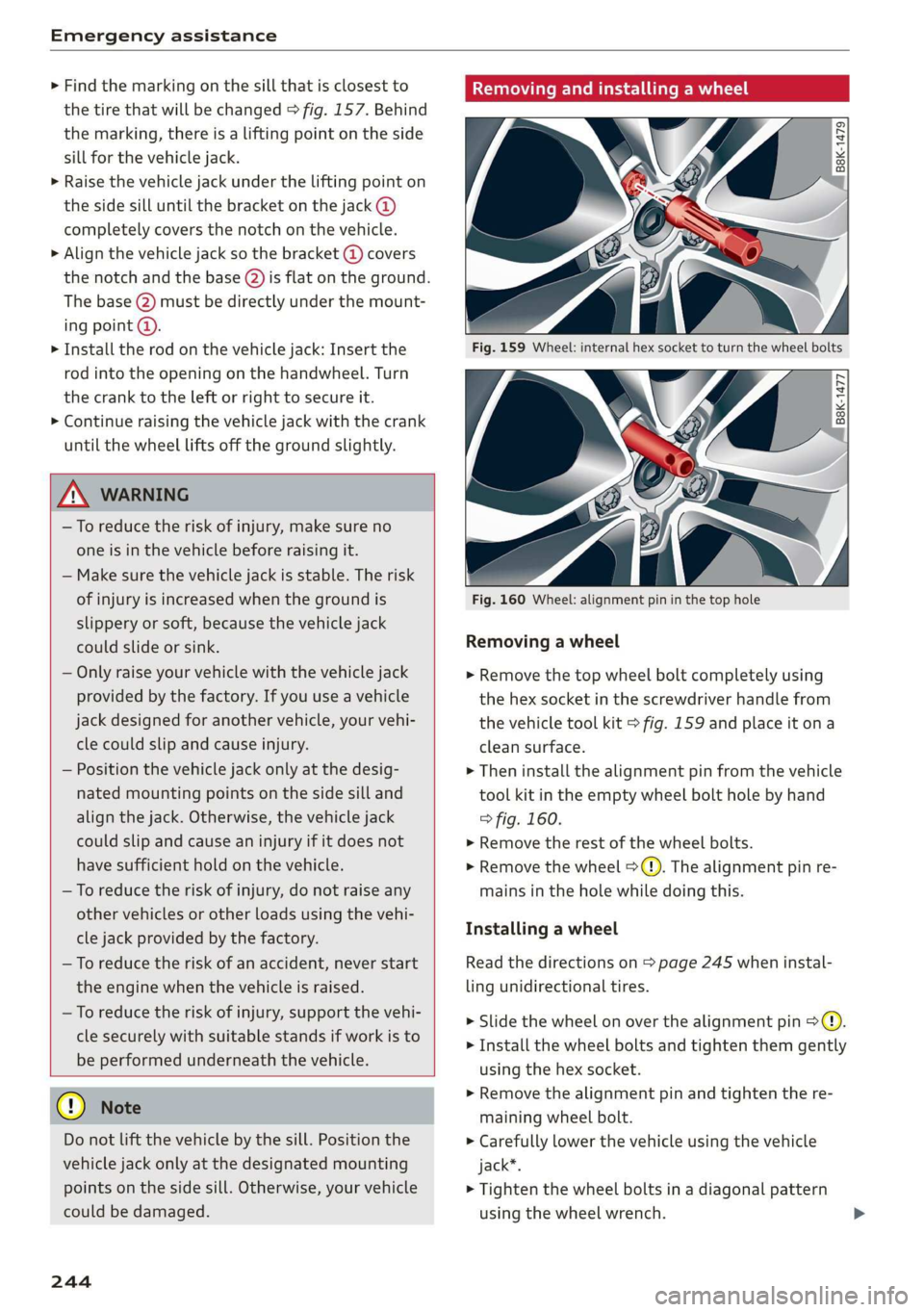
Fig. 159 Wheel: internal hex socket to turn the wheel bolts
|
©
B8k-1477
Fig. 160 Wheel: alignment pin in the top hole
Removing a wheel
> Remove the top wheel bolt completely using
the hex socket in the screwdriver handle from
the vehicle tool kit > fig. 159 and place it ona
clean surface.
> Then install the alignment pin from the vehicle
tool kit in the empty wheel bolt hole by hand
> fig. 160.
> Remove the rest of the wheel bolts.
> Remove the wheel >(). The alignment pin re-
mains in the hole while doing this.
Installing a wheel
Read the directions on > page 245 when instal-
ling unidirectional tires.
> Slide the wheel on over the alignment pin >@.
> Install the wheel bolts and tighten them gently
using the hex socket.
> Remove the alignment pin and tighten the re-
maining wheel bolt.
> Carefully lower the vehicle using the vehicle
jack*.
> Tighten the wheel bolts in a diagonal pattern
using the wheel wrench.
Page 249 of 280
83A012721BA
Emergency assistance
Starting the engine
Both jump start cables must be connected in the
correct order.
S
g = & oO
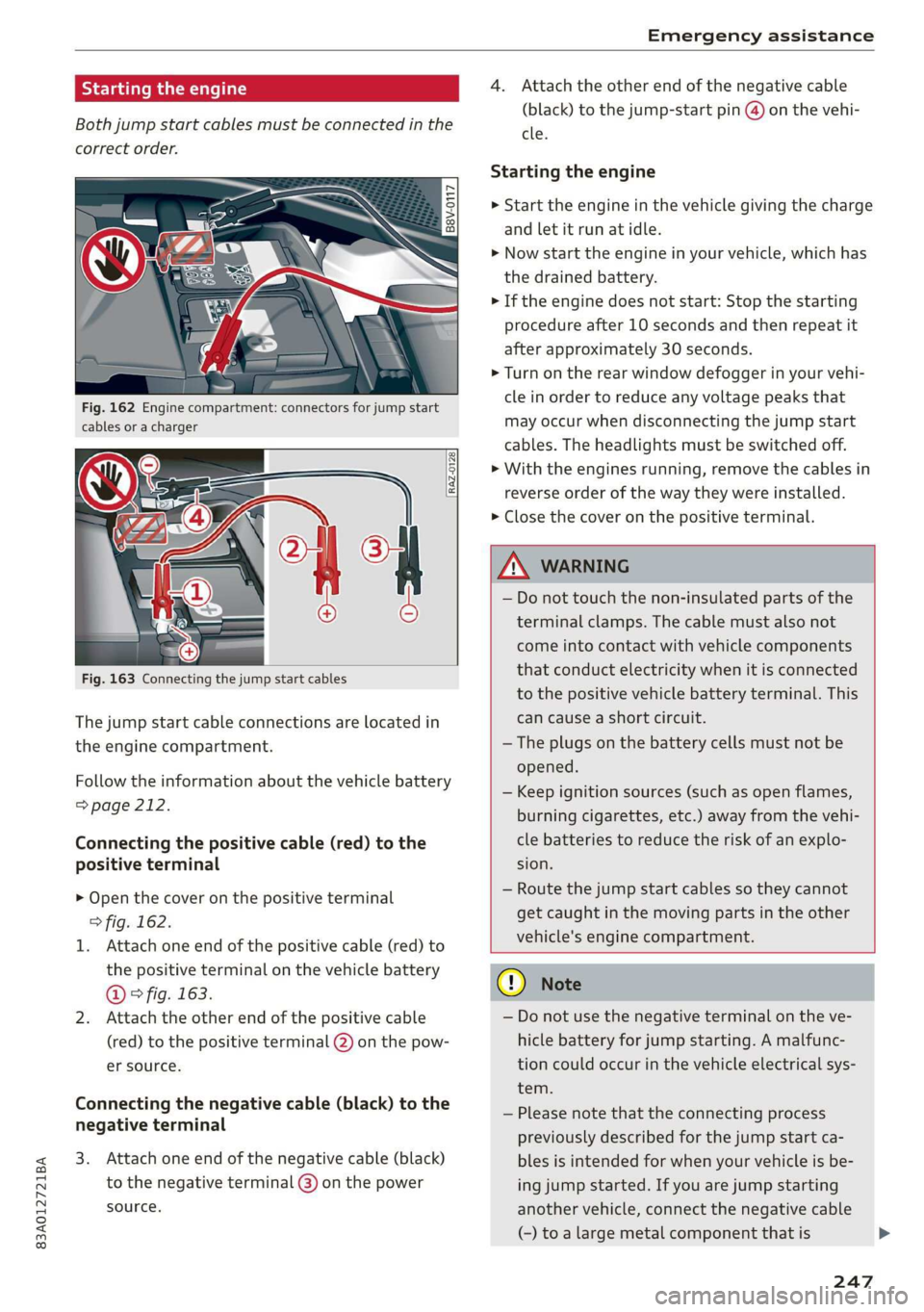
Fig. 162 Engine compartment: connectors for jump start
cables or a charger
RAZ-0128
Fig. 163 Connecting the jump start cables
The jump start cable connections are located in
the engine compartment.
Follow the information about the vehicle battery
=> page 212.
Connecting the positive cable (red) to the
positive terminal
> Open the cover on the positive terminal
> fig. 162.
1. Attach one end of the positive cable (red) to
the positive terminal on the vehicle battery
@ ° fig. 163.
2. Attach the other end of the positive cable
(red) to the positive terminal @ on the pow-
er source.
Connecting the negative cable (black) to the
negative terminal
3. Attach one end of the negative cable (black)
to the negative terminal @) on the power
source.
4. Attach the other end of the negative cable
(black) to the jump-start pin @ on the vehi-
cle.
Starting the engine
> Start the engine in the vehicle giving the charge
and let it run at idle.
> Now start the engine in your vehicle, which has
the
drained battery.
> If the engine does not start: Stop the starting
procedure after 10 seconds and then repeat it
after approximately 30 seconds.
> Turn on the rear window defogger in your vehi-
cle in order to reduce any voltage peaks that
may occur when disconnecting the jump start
cables. The headlights must be switched off.
> With the engines running, remove the cables in
reverse order of the way they were installed.
> Close the cover on the positive terminal.
ZA WARNING
— Do not touch the non-insulated parts of the
terminal clamps. The cable must also not
come into contact with vehicle components
that conduct electricity when it is connected
to the positive vehicle battery terminal. This
can cause a short circuit.
— The plugs on the battery cells must not be
opened.
— Keep ignition sources (such as open flames,
burning cigarettes, etc.) away from the vehi-
cle batteries to reduce the risk of an explo-
sion.
— Route the jump start cables so they cannot
get caught in the moving parts in the other
vehicle's engine compartment.
q@ Note
— Do not use the negative terminal on the ve-
hicle battery for jump starting. A malfunc-
tion could occur in the vehicle electrical sys-
tem.
— Please note that the connecting process
previously described for the jump start ca-
bles is intended for when your vehicle is be-
ing jump started. If you are jump starting
another vehicle, connect the negative cable
(-) to a large metal component that is
247
Page 253 of 280
83A012721BA
Fuses and bulbs
Fuses and bulbs
Fuses
Seale mie
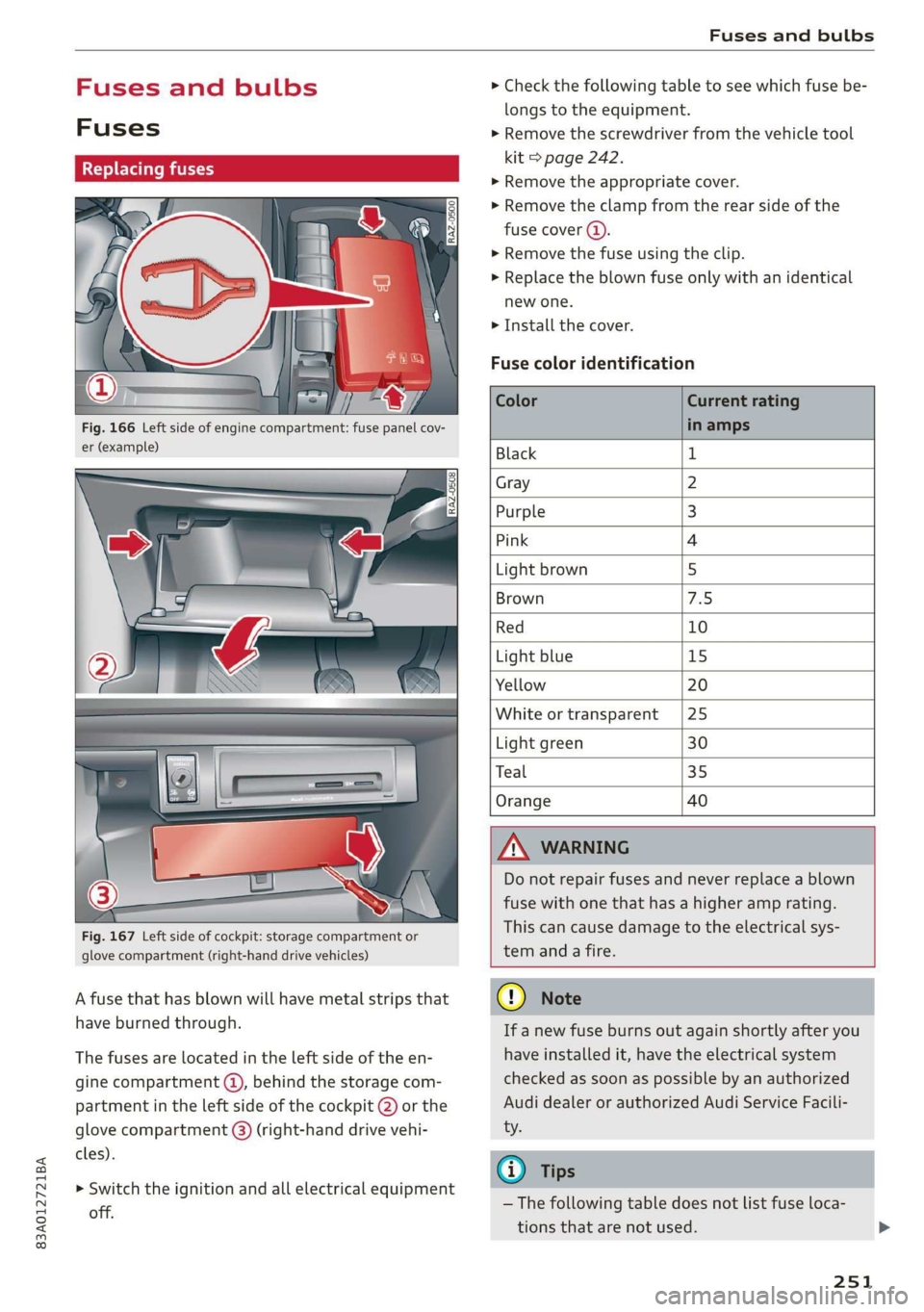
Fig. 166 Left side of engine compartment: fuse panel cov-
er (example)
Fig. 167 Left side of cockpit: storage compartment or
glove compartment (right-hand drive vehicles)
A fuse that has blown will have metal strips that
have burned through.
The fuses are located in the left side of the en-
gine compartment @), behind the storage com-
partment in the left side of the cockpit @) or the
glove compartment (@) (right-hand drive vehi-
cles).
> Switch the ignition and all electrical equipment
off.
> Check the following table to see which fuse be-
longs to the equipment.
> Remove the screwdriver from the vehicle tool
kit > page 242.
> Remove the appropriate cover.
> Remove the clamp from the rear side of the
fuse cover ().
> Remove the fuse using the clip.
>» Replace the blown fuse only with an identical
new one.
> Install the cover.
Fuse color identification
Black 1
Gray 2
Purple 3
Pink 4
Light brown 5
Brown AS:
Red 10
Light blue 15
Yellow 20
White or transparent |25
Light green 30
Teal 35
Orange 40
) Do not repair fuses and never replace a blown
fuse with one that has a higher amp rating.
This can cause damage to the electrical sys-
tem anda fire.
@)
If a new fuse burns out again shortly after you
have installed it, have the electrical system
checked as soon as possible by an authorized
Audi dealer or authorized Audi Service Facili-
— The following table does not list fuse loca-
tions that are not used.
251
Page 254 of 280
Fuses and bulbs
Some of the equipment listed in the follow-
ing tables applies only to certain model ver-
sions or certain optional equipment.
No. | Equipment
Stability Control (ESC), engine control
17
module
le of e
OVye OVOVO
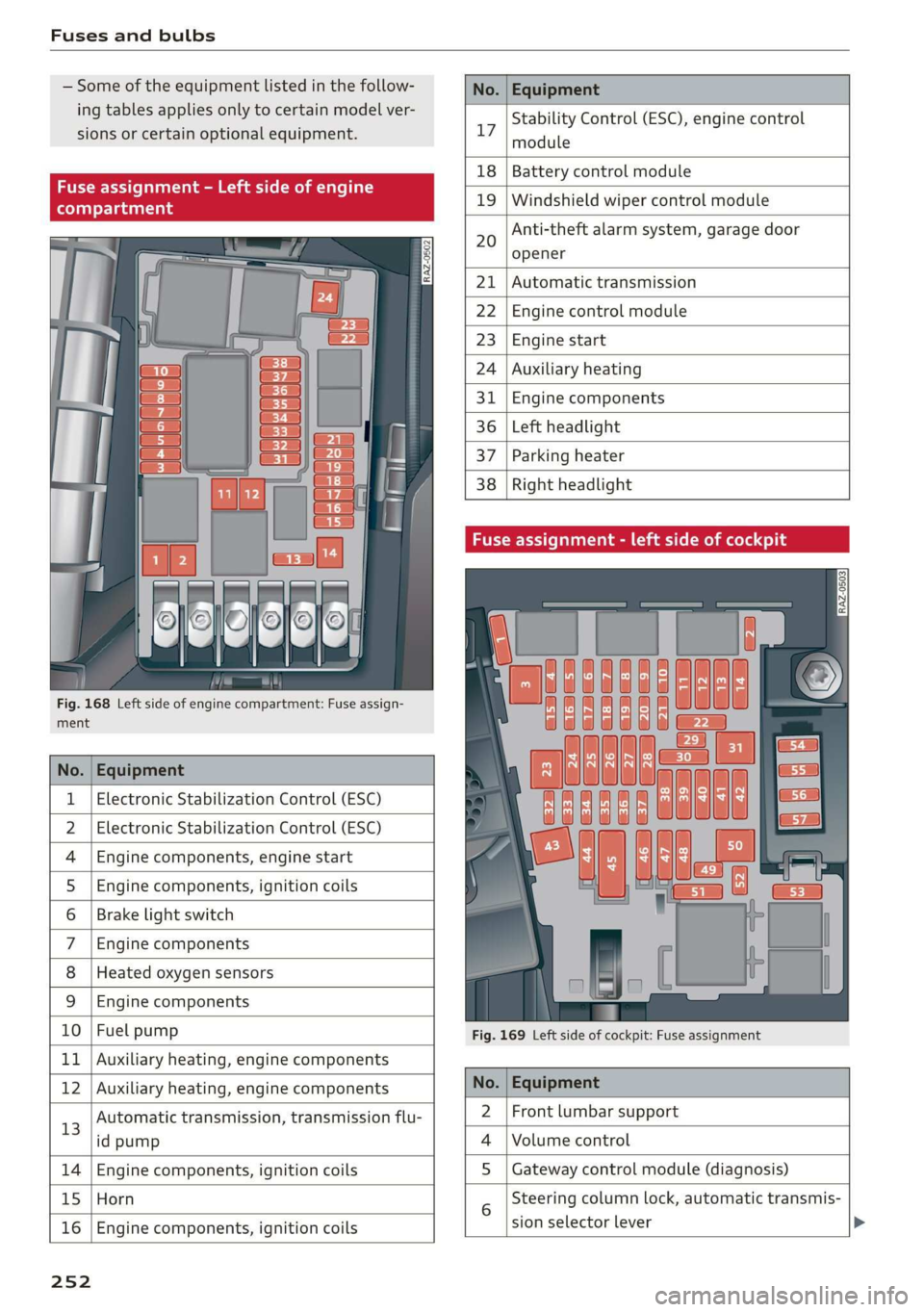
Fig. 168 Left side of engine compartment: Fuse assign-
RAZ-0502
18 | Battery control module
19 | Windshield wiper control module
Anti-theft alarm system, garage door
opener
20
Automatic transmission
Engine control module
Engine start
Auxiliary heating
Engine components
Left headlight
Parking heater
Right headlight
ment
No. | Equipment
1 | Electronic Stabilization Control (ESC)
2 | Electronic Stabilization Control (ESC)
4 |Engine components, engine start
5 |Engine components, ignition coils
6 | Brake light switch
7 |Engine components
8 | Heated oxygen sensors
9 | Engine components
10 | Fuel pump
11 | Auxiliary heating, engine components
Fig. 169 Left side of cockpit: Fuse assignment
bh N Auxiliary heating, engine components No. | Equipment
13
Automatic transmission, transmission flu-
id pump
2 |Front lumbar support
Volume control
14 Engine components, ignition coils S | Gateway control module (diagnosis)
15 Horn
16
Engine components, ignition coils
sion selector lever
25 2
Steering column lock, automatic transmis-