diagram AUDI Q3 2019 User Guide
[x] Cancel search | Manufacturer: AUDI, Model Year: 2019, Model line: Q3, Model: AUDI Q3 2019Pages: 280, PDF Size: 72.73 MB
Page 165 of 280
83A012721BA
Navigation
Selecting contacts as destinations
Applies to: vehicles with MMI and navigation system
You can navigate directly to contacts.
Requirement: an address with navigation data or
a navigation destination must already be as-
signed to a contact > page 168.
> Applies to: MMI: Select on the home screen:
NAVIGATION > (8) > Contacts > a contact.
> Press on an address.
> Check the address and change it, if necessary.
Start navigation > page 161, Entering an ad-
dress.
Route guidance will be activated and the map will
be displayed > page 165, fig. 126.
Additional functions for contacts in navigation
can be found under > page 168.
@ Tips
— Addresses that have been imported from
your mobile device into the MMI can also be
used as a destination.
— Ifa contact is grayed out in the directory,
this contact has neither a destination nor an
address assigned to it.
Loading received destinations and routes
Applies to: vehicles with navigation system and Audi connect
Infotainment
You can search for destinations or routes in the
myAudi app and send to the vehicle.
Requirement: the MMI and the mobile device
must be connected to the Internet > page 154,
Audi connect. You must have the myAudi app in-
stalled on your mobile device.
» Send a destination or route in the myAudi app
to the vehicle.
> Applies to: MMI: Select on the home screen:
NAVIGATION > (Ga) > Received dests. & routes.
> Make sure you are logged into the vehicle and
the myAudi app with the same myAudi account.
The received destination and routes will be
loaded automatically.
> Navigating to a destination: press on a desti-
nation.
> Deleting destinations: select: Z > one or more
entries or Select all > Delete > (Done).
@) Note
Read the information about Audi connect, and
be sure to note the connectivity costs section
=@ in General information on page 154.
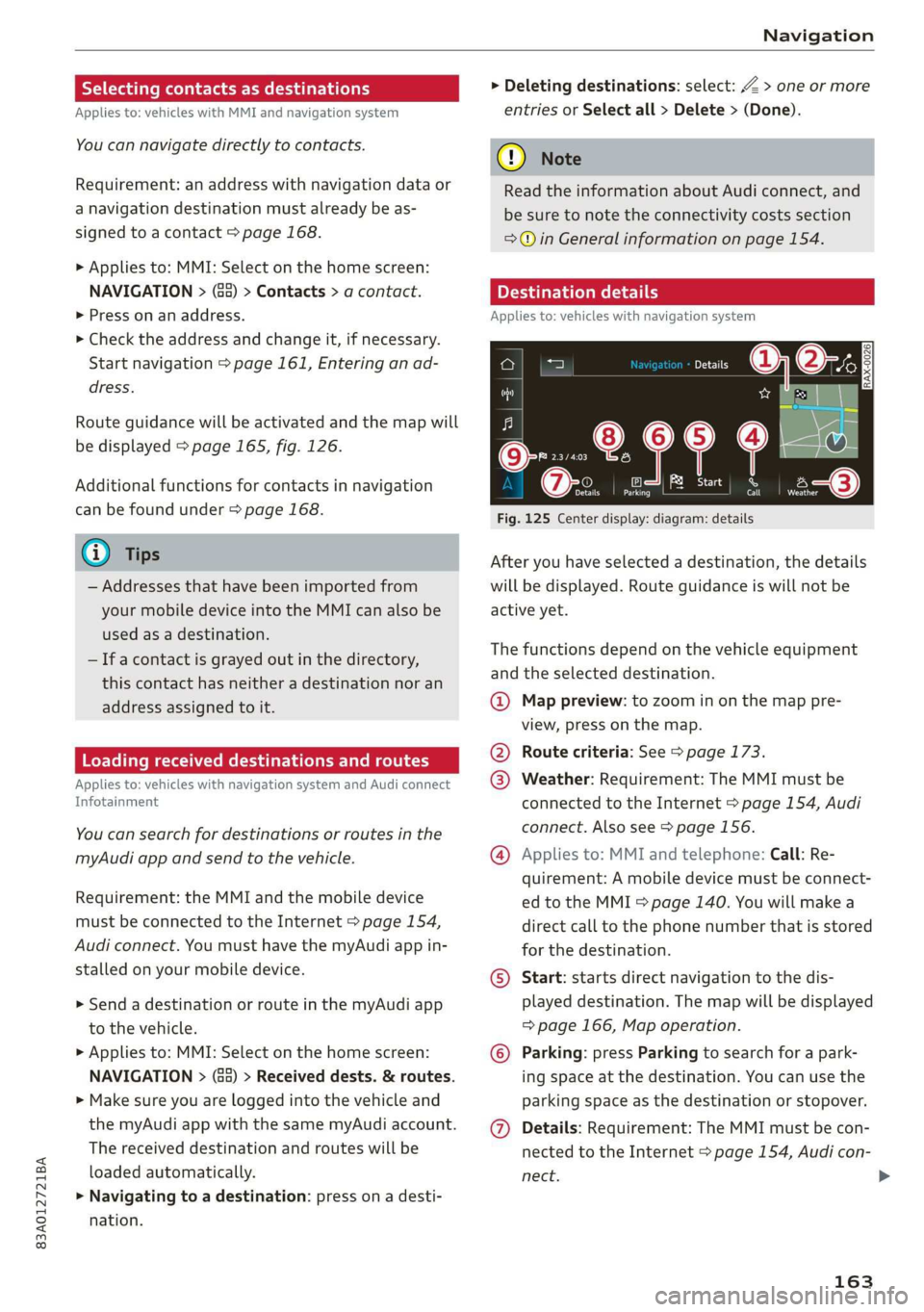
Destination details
Applies to: vehicles with navigation system
72.
Seu & a
ec rr
Rate)
og
Fig. 125 Center display: diagram: details
After you have selected a destination, the details
will be displayed. Route guidance is will not be
active yet.
The functions depend on the vehicle equipment
and the selected destination.
@ Map preview: to zoom in on the map pre-
view, press on the map.
@ Route criteria: See > page 173.
@ Weather: Requirement: The MMI must be
connected to the Internet > page 154, Audi
connect. Also see > page 156.
@® Applies to: MMI and telephone: Call: Re-
quirement: A mobile device must be connect-
ed to the MMI > page 140. You will make a
direct call to the phone number that is stored
for the destination.
©) Start: starts direct navigation to the dis-
played destination. The map will be displayed
=> page 166, Map operation.
© Parking: press Parking to search for a park-
ing space at the destination. You can use the
parking space as the destination or stopover.
@ Details: Requirement: The MMI must be con-
nected to the Internet > page 154, Audi con-
nect.
163
Page 167 of 280
83A012721BA
Navigation
Map
Map functions
Applies to: vehicles with navigation system
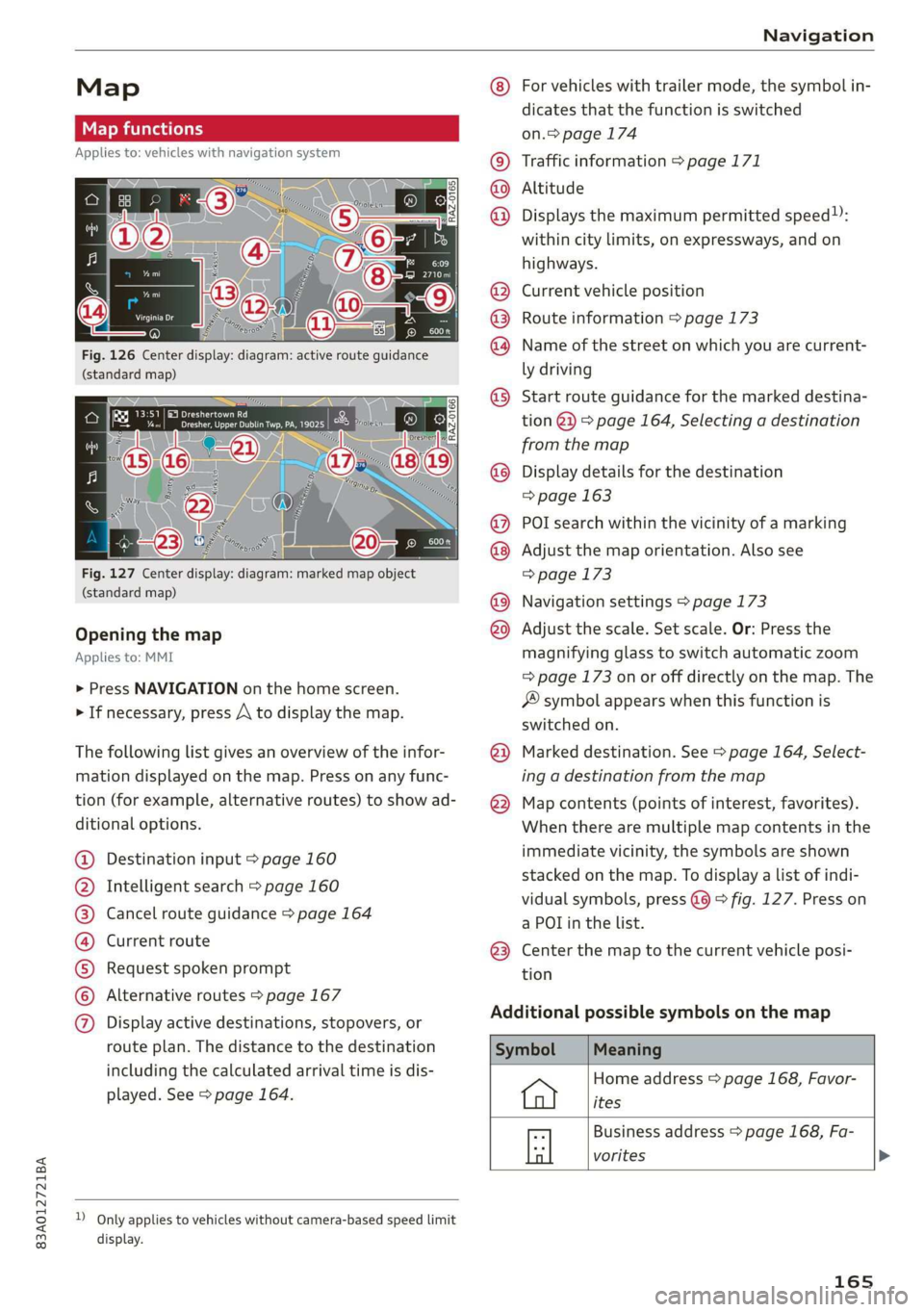
Fig. 126 Center display: diagram: active route guidance
(standard map)
Fig. 127 Center display: diagram: marked map object
(standard map)
Opening the map
Applies to: MMI
> Press NAVIGATION on the home screen.
> If necessary, press A to display the map.
The following list gives an overview of the infor-
mation displayed on the map. Press on any func-
tion (for example, alternative routes) to show ad-
ditional options.
Destination input > page 160
Intelligent search > page 160
Cancel route guidance > page 164
Current route
Request spoken prompt
Alternative routes > page 167
CGOOOOLOHO Display active destinations, stopovers, or
route plan. The distance to the destination
including the calculated arrival time is dis-
played. See > page 164.
D_ Only applies to vehicles without camera-based speed limit
display.
OOo
®
®0O®8
®®
O88
@
®
®
@
For vehicles with trailer mode, the symbol in-
dicates that the function is switched
on.> page 174
Traffic information > page 171
Altitude
Displays
the maximum permitted speed):
within city limits, on expressways, and on
highways.
Current vehicle position
Route information > page 173
Name of the street on which you are current-
ly driving
Start
route guidance for the marked destina-
tion @}) > page 164, Selecting a destination
from the map
Display details for the destination
=> page 163
POI search within the vicinity of a marking
Adjust the map orientation. Also see
=> page 173
Navigation settings > page 173
Adjust the scale. Set scale. Or: Press the
magnifying glass to switch automatic zoom
=> page 173 on or off directly on the map. The
® symbol appears when this function is
switched on.
Marked destination. See > page 164, Select-
ing a destination from the map
Map contents (points of interest, favorites).
When there are multiple map contents in the
immediate vicinity, the symbols are shown
stacked on the map. To display a list of indi-
vidual symbols, press @@ > fig. 127. Press on
a POT in the list.
Center the map to the current vehicle posi-
tion
Additional possible symbols on the map
Home address > page 168, Favor-
ites
Business address > page 168, Fa-
a vorites >
165
Page 169 of 280
83A012721BA
Navigation
calculated arrival time, and a direction arrow for
the upcoming maneuver will be displayed in the
right speedometer. If there is no upcoming ma-
neuver, the distance to the next maneuver will be
displayed.
@® Lane recommendation
Personal route
assistance
Applies to: vehicles with navigation system and personal
route assistance
Your MMI can learn the routes that you drive fre-
quently (such as your daily commute to work and
back) and suggest route guidance based on the
current vehicle position.
When the function is switched on, the MMI re-
cords the routes driven regardless of whether or
not you are using navigation.
Without starting route guidance, your MMI
checks the traffic conditions and shows possible
traffic incidents for the possible routes to be driv-
en.
Opening personal routes
Requirement: personal route assistance must be
switched on > page 174. Route guidance must
not be active. A notification is displayed.
> The MMI displays up to three suggestions.
Press on a suggestion. Route guidance will
start.
Better routes
If there are major traffic incidents, the MMI will
display a notification regardless of the selected
menu. If the MMI has calculated a better route,
you can select it as the route.
> Press on the notification.
As soon as you switch off personal route assis-
tance, your personal routes will no Longer be re-
corded. Routes that were already stored remain
stored.
Deleting personal routes
> Applies to: MMI: Select on the home screen:
NAVIGATION > & > Personal route assistance
> Delete recordings from the last 24 hours or
Delete all personal routes and destinations.
@ Tips
If personal route assistance is switched off
and you press F&, the personal route assis-
tance settings will be displayed > page 174.
Alternative routes
Applies to: vehicles with navigation system
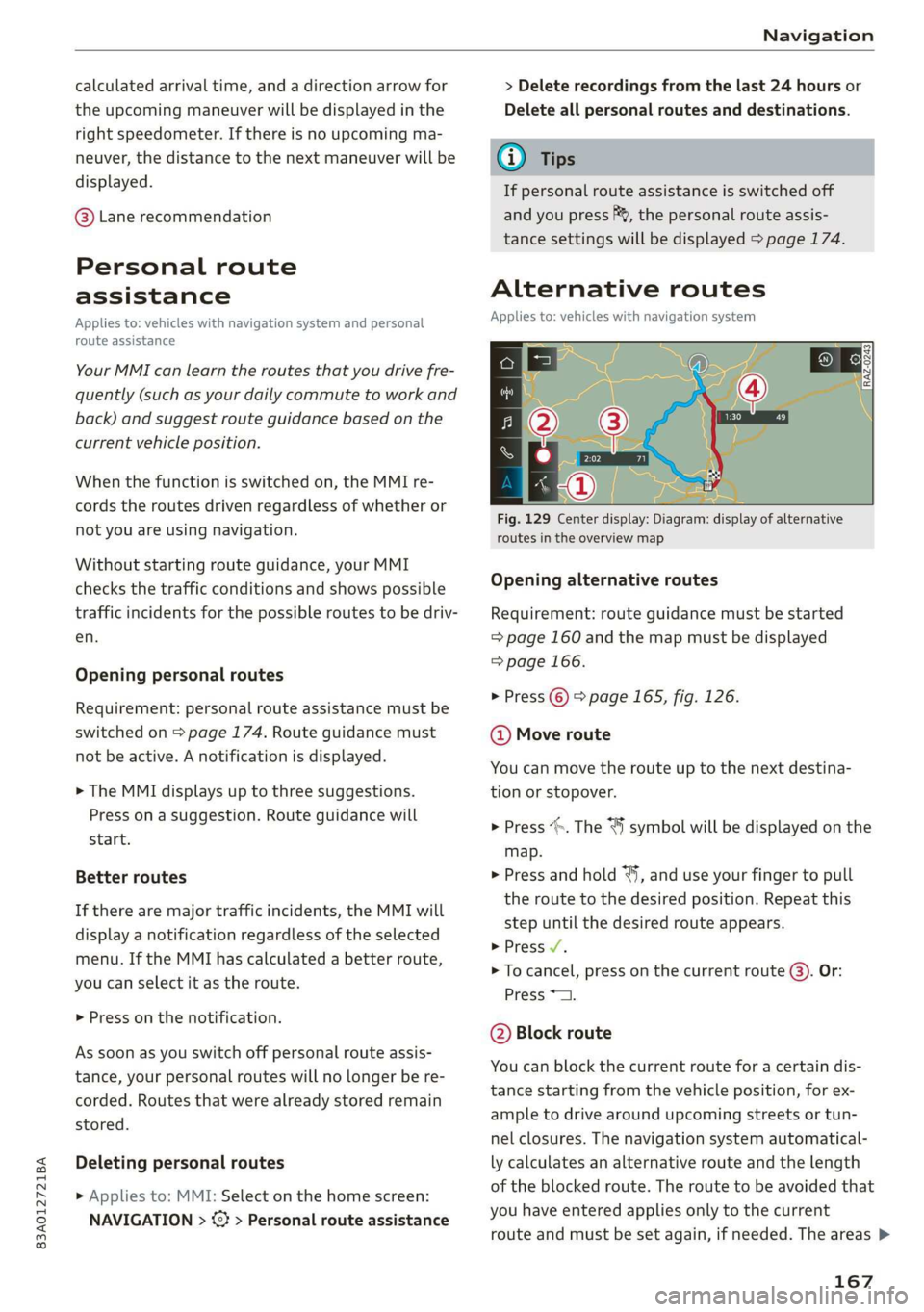
Fig. 129 Center display: Diagram: display of alternative
routes in the overview map
Opening alternative routes
Requirement: route guidance must be started
= page 160 and the map must be displayed
=> page 166.
> Press ©) > page 165, fig. 126.
@ Move route
You can move the route up to the next destina-
tion or stopover.
> Press “». The ¥ symbol will be displayed on the
map.
> Press and hold “, and use your finger to pull
the route to the desired position. Repeat this
step until the desired route appears.
> Press V.
> To cancel, press on the current route ©. Or:
Press *2.
@ Block route
You can block the current route for a certain dis-
tance starting from the vehicle position, for ex-
ample to drive around upcoming streets or tun-
nel closures. The navigation system automatical-
ly calculates an alternative route and the length
of the blocked route. The route to be avoided that
you have entered applies only to the current
route and must be set again, if needed. The areas >
167
Page 173 of 280
83A012721BA
Navigation
Start map update
Requirement: a map update for your vehicle must
be onan SD card or a USB flash drive.
> Insert the SD card in your vehicle's SD card
reader > page 182. Or: connect the USB flash
drive to the Audi music interface > page 184.A
notification for a map update will appear in the
center display.
> Press on the notification. Or: access the notifi-
cation in the notification center on > page 20
and press on the notification. The update pack-
age is shown.
> Press Next. The status of the installation is
shown in the center display.
> When the update has ended, a notification will
be displayed.
Map updates settings
Applies to: vehicles with navigation system and Audi connect
Infotainment
> Applies to: MMI: Select on the home screen:
SETTINGS > System maintenance.
Automatic online map update: map updates are
automatically downloaded and installed when
this function is switched on.
@) Note
Read the information about Audi connect, and
be sure to note the connectivity costs section
=>@ in General information on page 154.
Traffic information
Introduction
Applies to: vehicles with navigation system
50}
RAX-0020] MA PR eae niches ni
eee en
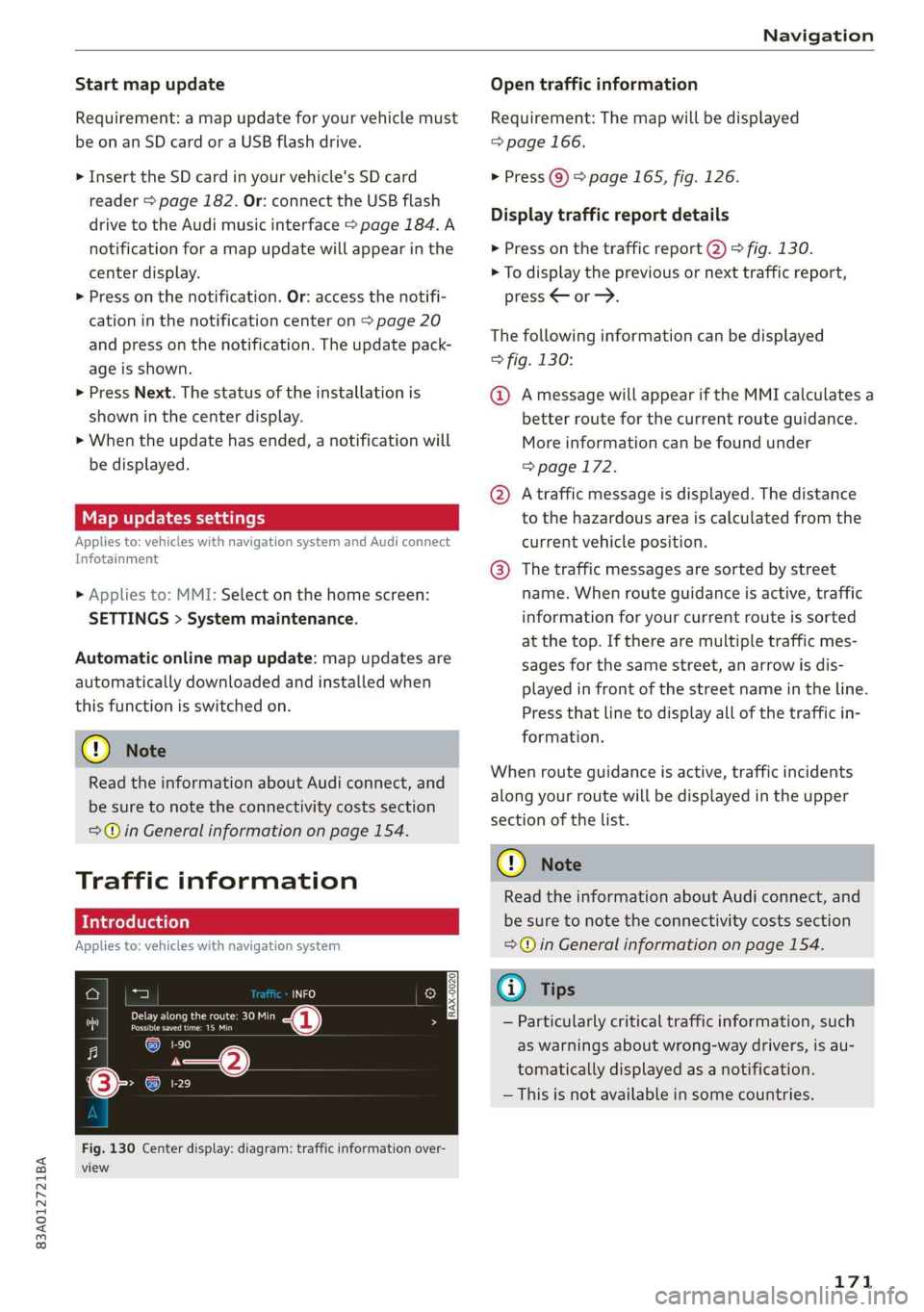
Fig. 130 Center display: diagram: traffic information over-
view
Open traffic information
Requirement: The map will be displayed
=> page 166.
> Press Q) > page 165, fig. 126.
Display traffic report details
> Press on the traffic report @) > fig. 130.
> To display the previous or next traffic report,
press < or.
The following information can be displayed
> fig. 130:
@ Amessage will appear if the MMI calculates a
better route for the current route guidance.
More information can be found under
=> page 172.
@ Atraffic message is displayed. The distance
to the hazardous area is calculated from the
current vehicle position.
@® The traffic messages are sorted by street
name. When route guidance is active, traffic
information for your current route is sorted
at the top. If there are multiple traffic mes-
sages for the same street, an arrow is dis-
played in front of the street name in the line.
Press that line to display all of the traffic in-
formation.
When route guidance is active, traffic incidents
along your route will be displayed in the upper
section of the list.
@) Note
Read the information about Audi connect, and
be sure to note the connectivity costs section
=@ in General information on page 154.
(i) Tips
— Particularly critical traffic information, such
as warnings about wrong-way drivers, is au-
tomatically displayed as a notification.
— This is not available in some countries.
171
Page 207 of 280
83A012721BA
Checking and Filling
to make sure it is latched correctly. The hood
is latched if the front corners cannot be lift-
close it, because driving when the hood is
not latched increases the risk of an accident.
ed.
— If you notice that the hood is not latched
while you are driving, stop immediately and
Engine compartment overview
The most important check points.
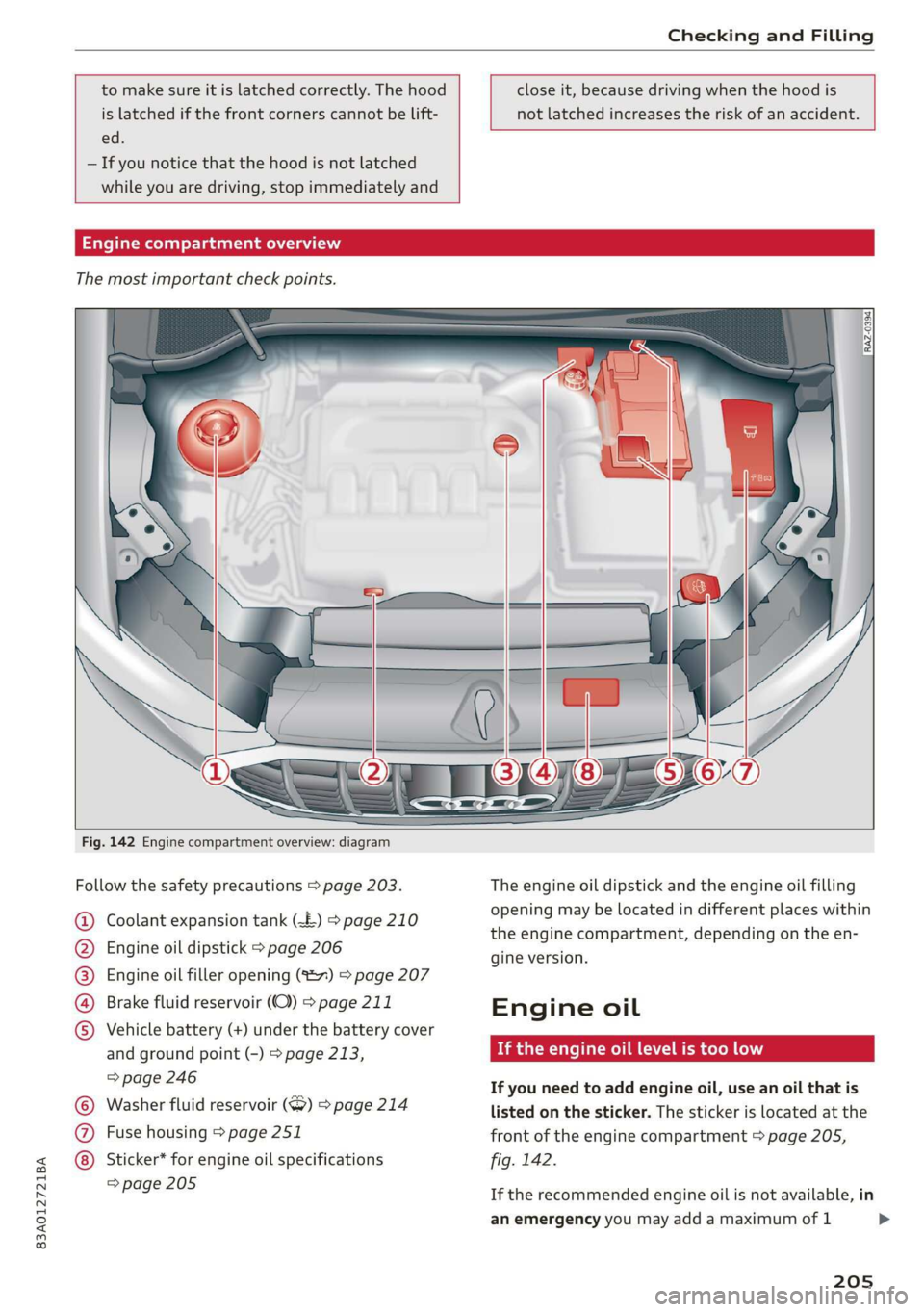
Fig. 142 Engine compartment overview: diagram
Follow the safety precautions > page 203.
Coolant expansion tank (£) > page 210
Engine oil dipstick > page 206
Engine oil filler opening (827) > page 207
Brake fluid reservoir (OC) > page 211
Vehicle battery (+) under the battery cover
and ground point (-) > page 213,
=> page 246
Washer fluid reservoir (>) > page 214
Fuse housing > page 251
©O®OOO
©C® Sticker* for engine oil specifications
=> page 205
The engine oil dipstick and the engine oil filling
opening may be located in different places within
the engine compartment, depending on the
gine version.
Engine oil
If the engine oil level is too low
ene
If you need to add engine oil, use an oil that is
listed on the sticker. The sticker is located at the
front of the engine compartment > page 205,
fig. 142.
If the recommended engine oil is not available, in
an emergency you may add a maximum of 1
205
>
Page 212 of 280
Checking and Filling
— If the appropriate coolant additive is not
available in an emergency, do not add any
other additive. You could damage the en-
gine. If this happens, only use water and re-
store the correct mixture ratio with the
specified coolant additive as soon as possi-
ble.
— Only refill with new coolant.
— Radiator sealant must not be mixed with
the coolant.
Adding coolant
RAZ-0539
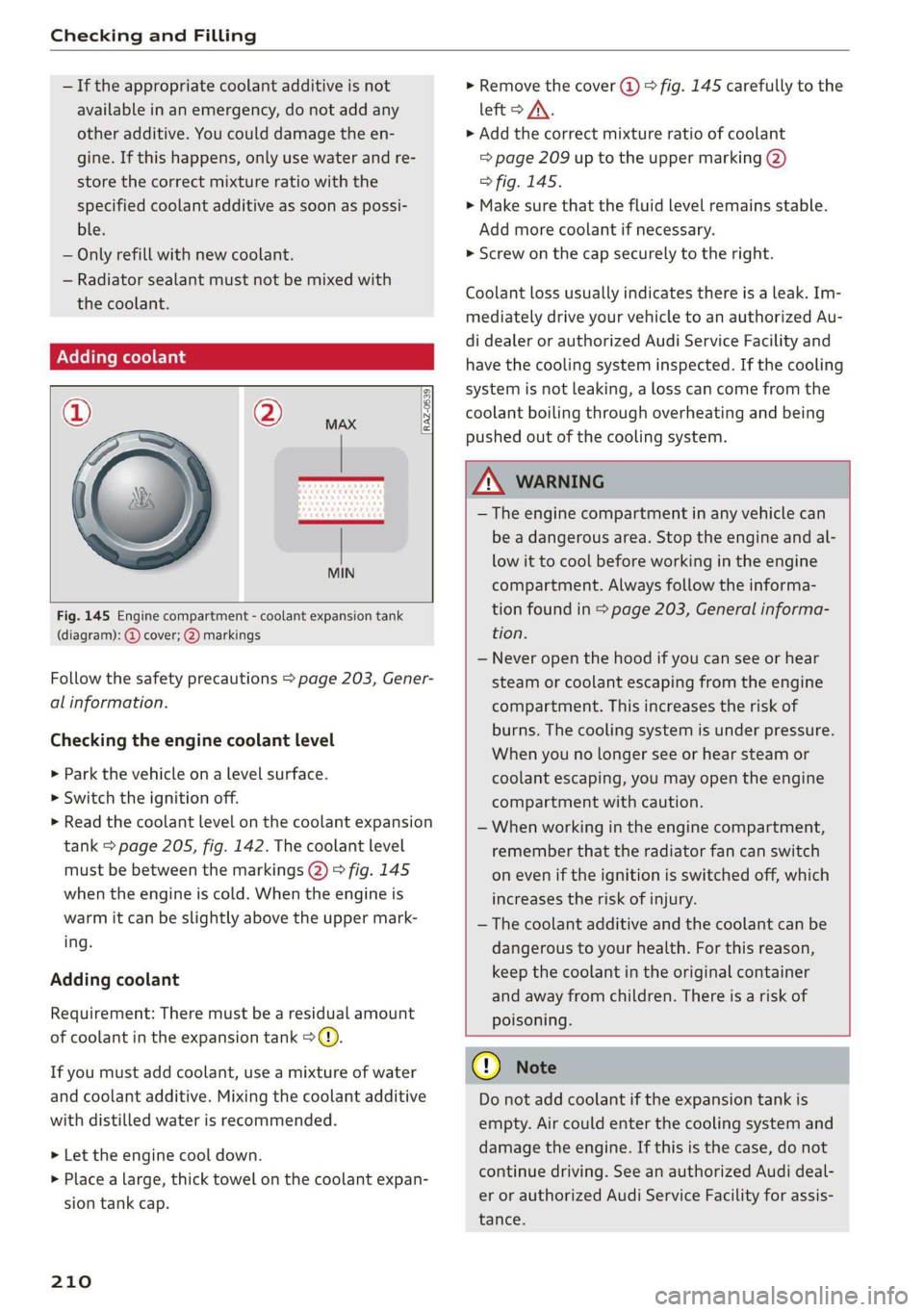
Fig. 145 Engine compartment - coolant expansion tank
(diagram): @ cover; @) markings
Follow the safety precautions > page 203, Gener-
al information.
Checking the engine coolant level
>» Park the vehicle on a level surface.
> Switch the ignition off.
> Read the coolant level on the coolant expansion
tank > page 205, fig. 142. The coolant level
must be between the markings @) 9 fig. 145
when the engine is cold. When the engine is
warm it can be slightly above the upper mark-
ing.
Adding coolant
Requirement: There must be a residual amount
of coolant in the expansion tank >@).
If you must add coolant, use a mixture of water
and coolant additive. Mixing the coolant additive
with distilled water is recommended.
> Let the engine cool down.
> Place a large, thick towel on the coolant expan-
sion tank cap.
210
» Remove the cover (@) > fig. 145 carefully to the
left > AX.
» Add the correct mixture ratio of coolant
> page 209 up to the upper marking @)
> fig. 145.
> Make sure that the fluid level remains stable.
Add more coolant if necessary.
> Screw on the cap securely to the right.
Coolant loss usually indicates there is a leak. Im-
mediately drive your vehicle to an authorized Au-
di dealer or authorized Audi Service Facility and
have the cooling system inspected. If the cooling
system is not leaking, a loss can come from the
coolant boiling through overheating and being
pushed out of the cooling system.
ZA WARNING
— The engine compartment in any vehicle can
be a dangerous area. Stop the engine and al-
low it to cool before working in the engine
compartment. Always follow the informa-
tion found in > page 203, General informa-
tion.
— Never open the hood if you can see or hear
steam or coolant escaping from the engine
compartment. This increases the risk of
burns. The cooling system is under pressure.
When you no longer see or hear steam or
coolant escaping, you may open the engine
compartment with caution.
— When working in the engine compartment,
remember that the radiator fan can switch
on even if the ignition is switched off, which
increases the risk of injury.
— The coolant additive and the coolant can be
dangerous to your health. For this reason,
keep the coolant in the original container
and away from children. There is a risk of
poisoning.
@) Note
Do not add coolant if the expansion tank is
empty. Air could enter the cooling system and
damage the engine. If this is the case, do not
continue driving. See an authorized Audi deal-
er or authorized Audi Service Facility for assis-
tance.