engine oil AUDI Q3 2019 User Guide
[x] Cancel search | Manufacturer: AUDI, Model Year: 2019, Model line: Q3, Model: AUDI Q3 2019Pages: 280, PDF Size: 72.73 MB
Page 211 of 280
83A012721BA
Checking and Filling
— Maintain enough distance when you are re-
moving the oil drain plug. While doing this,
keep your forearm parallel to the ground to
reduce the risk of hot oil dripping down your
arm.
— Drain the oil into a container designed for
this purpose that is large enough to hold the
full amount of oil in your engine.
— Engine oil is poisonous. Always store out of
reach of children.
— Prolonged contact of used engine oil with
the skin may cause skin damage. Always
wash oil off immediately with soap and wa-
ter to protect your skin.
@) Note
Do not mix any additives with the engine oil.
Additives may cause engine damage that is
not covered by your New Vehicle Limited War-
ranty.
() For the sake of the environment
— Before changing the engine oil, make sure
you can dispose of the used engine oil cor-
rectly.
— Engine oil must always be disposed of cor-
rectly. Do not dump it in the yard, in the for-
est, or in open water, river channels, or sew-
ers.
— Have your used engine oil recycled by bring-
ing it to a used oil collection site or contact
a gas station.
Cooling system
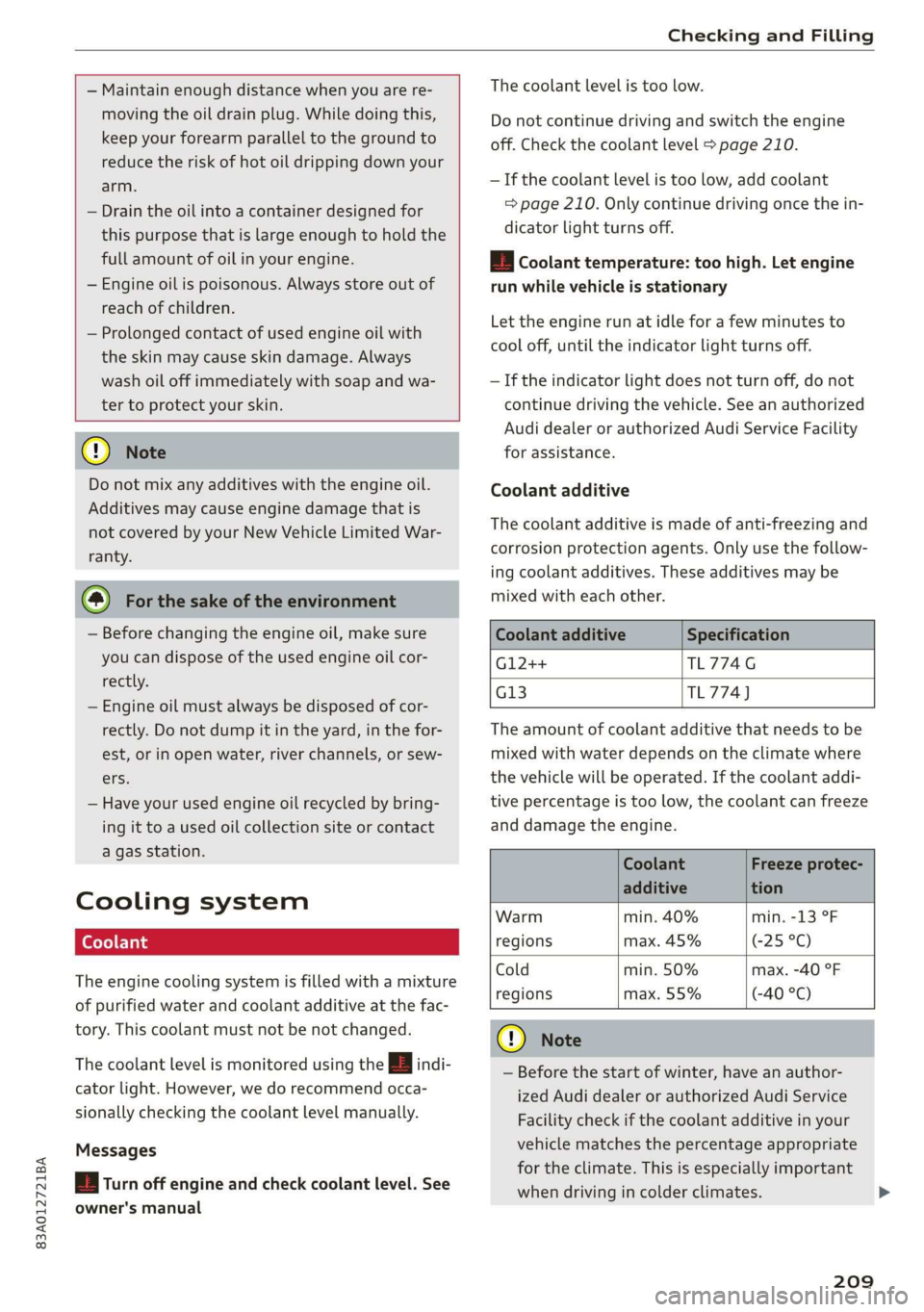
The engine cooling system is filled with a mixture
of purified water and coolant additive at the fac-
tory. This coolant must not be not changed.
The coolant level is monitored using the B indi-
cator light. However, we do recommend occa-
sionally checking the coolant level manually.
Messages
& Turn off engine and check coolant level. See
owner's manual
The coolant level is too low.
Do not continue driving and switch the engine
off. Check the coolant level > page 210.
— If the coolant level is too low, add coolant
=> page 210. Only continue driving once the in-
dicator light turns off.
/_E| Coolant temperature: too high. Let engine
run while vehicle is stationary
Let the engine run at idle for a few minutes to
cool off, until the indicator light turns off.
— If the indicator light does not turn off, do not
continue driving the vehicle. See an authorized
Audi dealer or authorized Audi Service Facility
for assistance.
Coolant additive
The coolant additive is made of anti-freezing and
corrosion protection agents. Only use the follow-
ing coolant additives. These additives may be
mixed with each other.
Coolant additive
G12++
G13
Specification
TL774G
TL774)
The amount of coolant additive that needs to be
mixed with water depends on the climate where
the vehicle will be operated. If the coolant addi-
tive percentage is too low, the coolant can freeze
and damage the engine.
Coolant Freeze protec-
additive tion
Warm min. 40% min. -13 °F
regions max. 45% (-25 °C)
Cold min. 50% max. -40 °F
regions max. 55% (-40 °C)
CG) Note
— Before the start of winter, have an author-
ized Audi dealer or authorized Audi Service
Facility check if the coolant additive in your
vehicle matches the percentage appropriate
for the climate. This is especially important
when driving in colder climates.
209
Page 212 of 280
Checking and Filling
— If the appropriate coolant additive is not
available in an emergency, do not add any
other additive. You could damage the en-
gine. If this happens, only use water and re-
store the correct mixture ratio with the
specified coolant additive as soon as possi-
ble.
— Only refill with new coolant.
— Radiator sealant must not be mixed with
the coolant.
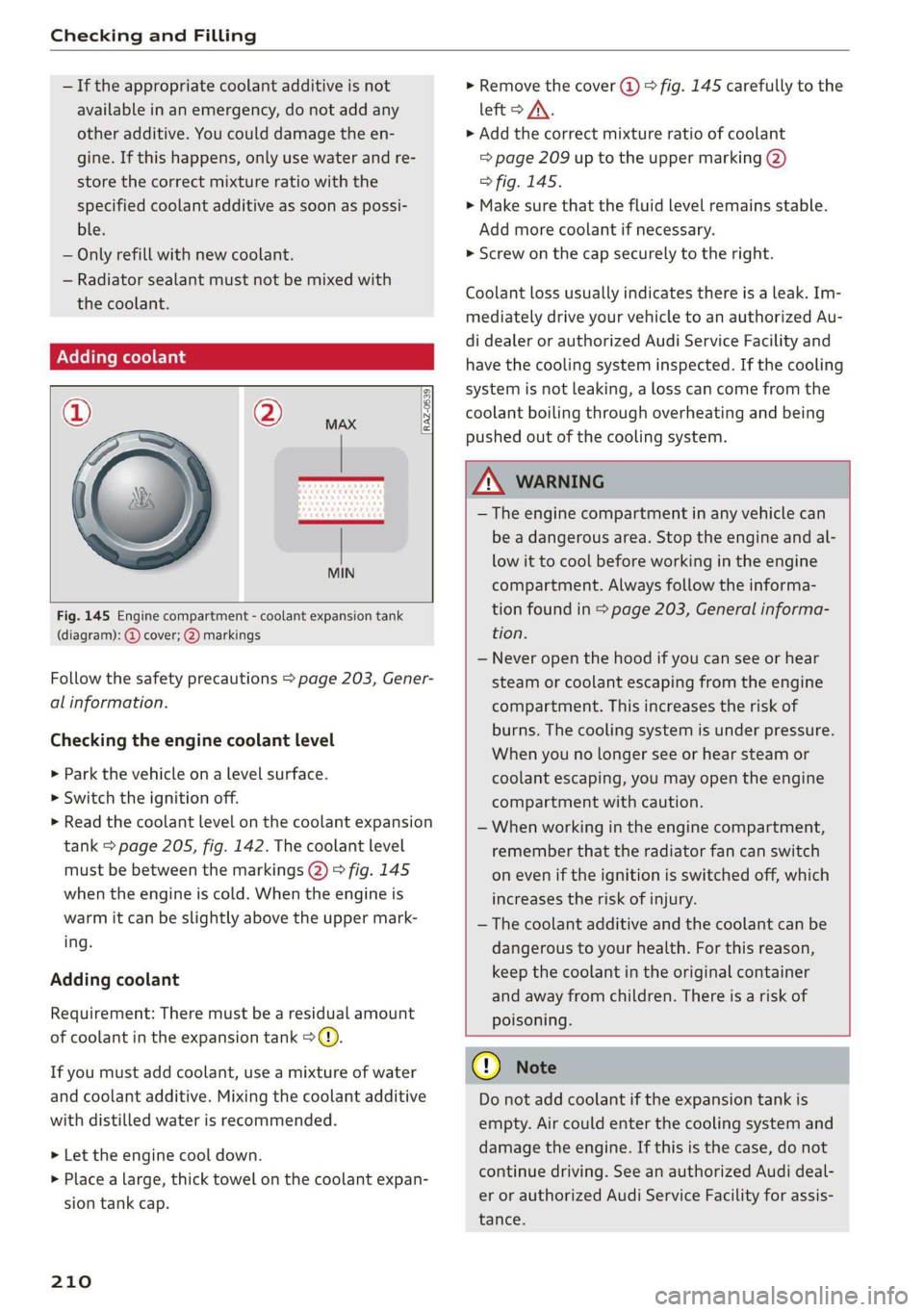
Adding coolant
RAZ-0539
Fig. 145 Engine compartment - coolant expansion tank
(diagram): @ cover; @) markings
Follow the safety precautions > page 203, Gener-
al information.
Checking the engine coolant level
>» Park the vehicle on a level surface.
> Switch the ignition off.
> Read the coolant level on the coolant expansion
tank > page 205, fig. 142. The coolant level
must be between the markings @) 9 fig. 145
when the engine is cold. When the engine is
warm it can be slightly above the upper mark-
ing.
Adding coolant
Requirement: There must be a residual amount
of coolant in the expansion tank >@).
If you must add coolant, use a mixture of water
and coolant additive. Mixing the coolant additive
with distilled water is recommended.
> Let the engine cool down.
> Place a large, thick towel on the coolant expan-
sion tank cap.
210
» Remove the cover (@) > fig. 145 carefully to the
left > AX.
» Add the correct mixture ratio of coolant
> page 209 up to the upper marking @)
> fig. 145.
> Make sure that the fluid level remains stable.
Add more coolant if necessary.
> Screw on the cap securely to the right.
Coolant loss usually indicates there is a leak. Im-
mediately drive your vehicle to an authorized Au-
di dealer or authorized Audi Service Facility and
have the cooling system inspected. If the cooling
system is not leaking, a loss can come from the
coolant boiling through overheating and being
pushed out of the cooling system.
ZA WARNING
— The engine compartment in any vehicle can
be a dangerous area. Stop the engine and al-
low it to cool before working in the engine
compartment. Always follow the informa-
tion found in > page 203, General informa-
tion.
— Never open the hood if you can see or hear
steam or coolant escaping from the engine
compartment. This increases the risk of
burns. The cooling system is under pressure.
When you no longer see or hear steam or
coolant escaping, you may open the engine
compartment with caution.
— When working in the engine compartment,
remember that the radiator fan can switch
on even if the ignition is switched off, which
increases the risk of injury.
— The coolant additive and the coolant can be
dangerous to your health. For this reason,
keep the coolant in the original container
and away from children. There is a risk of
poisoning.
@) Note
Do not add coolant if the expansion tank is
empty. Air could enter the cooling system and
damage the engine. If this is the case, do not
continue driving. See an authorized Audi deal-
er or authorized Audi Service Facility for assis-
tance.
Page 217 of 280
83A012721BA
Checking and Filling
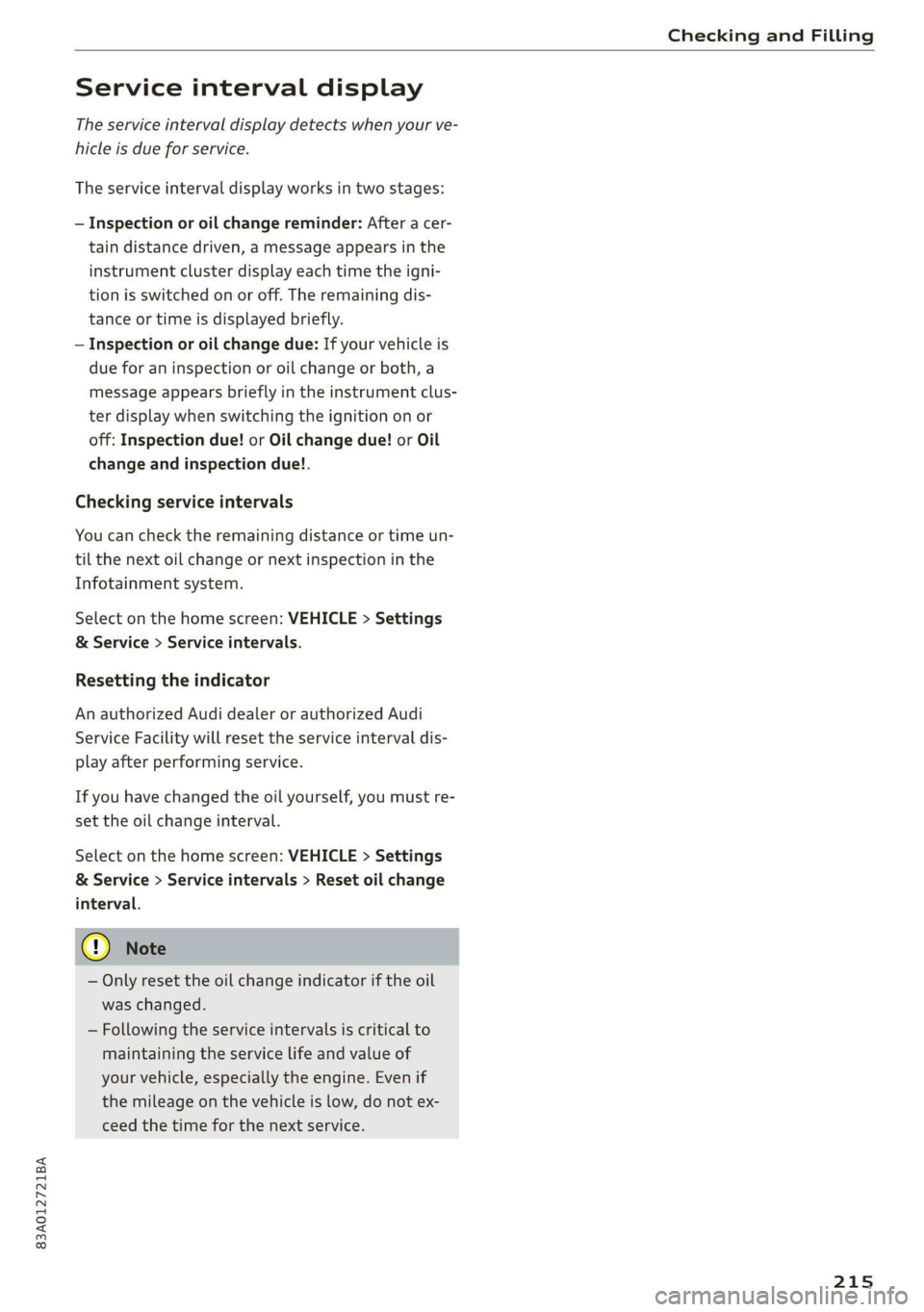
Service interval display
The service interval display detects when your ve-
hicle is due for service.
The service interval display works in two stages:
— Inspection or oil change reminder: After a cer-
tain distance driven, a message appears in the
instrument cluster display each time the igni-
tion is switched on or off. The remaining dis-
tance or time is displayed briefly.
— Inspection or oil change due: If your vehicle is
due for an inspection or oil change or both, a
message appears briefly in the instrument clus-
ter display when switching the ignition on or
off: Inspection due! or Oil change due! or Oil
change and inspection due!.
Checking service intervals
You can check the remaining distance or time un-
til the next oil change or next inspection in the
Infotainment system.
Select on the home screen: VEHICLE > Settings
& Service > Service intervals.
Resetting the indicator
An authorized Audi dealer or authorized Audi
Service Facility will reset the service interval dis-
play after performing service.
If you have changed the oil yourself, you must re-
set the oil change interval.
Select on the home screen: VEHICLE > Settings
& Service > Service intervals > Reset oil change
interval.
@) Note
— Only reset the oil change indicator if the oil
was changed.
— Following the service intervals is critical to
maintaining the service life and value of
your vehicle, especially the engine. Even if
the mileage on the vehicle is low, do not ex-
ceed the time for the next service.
215
Page 230 of 280
Wheels
Make sure that the tire designa-
tion on your tire matches the des-
ignation on the tire pressure label
and the tire pressure table.
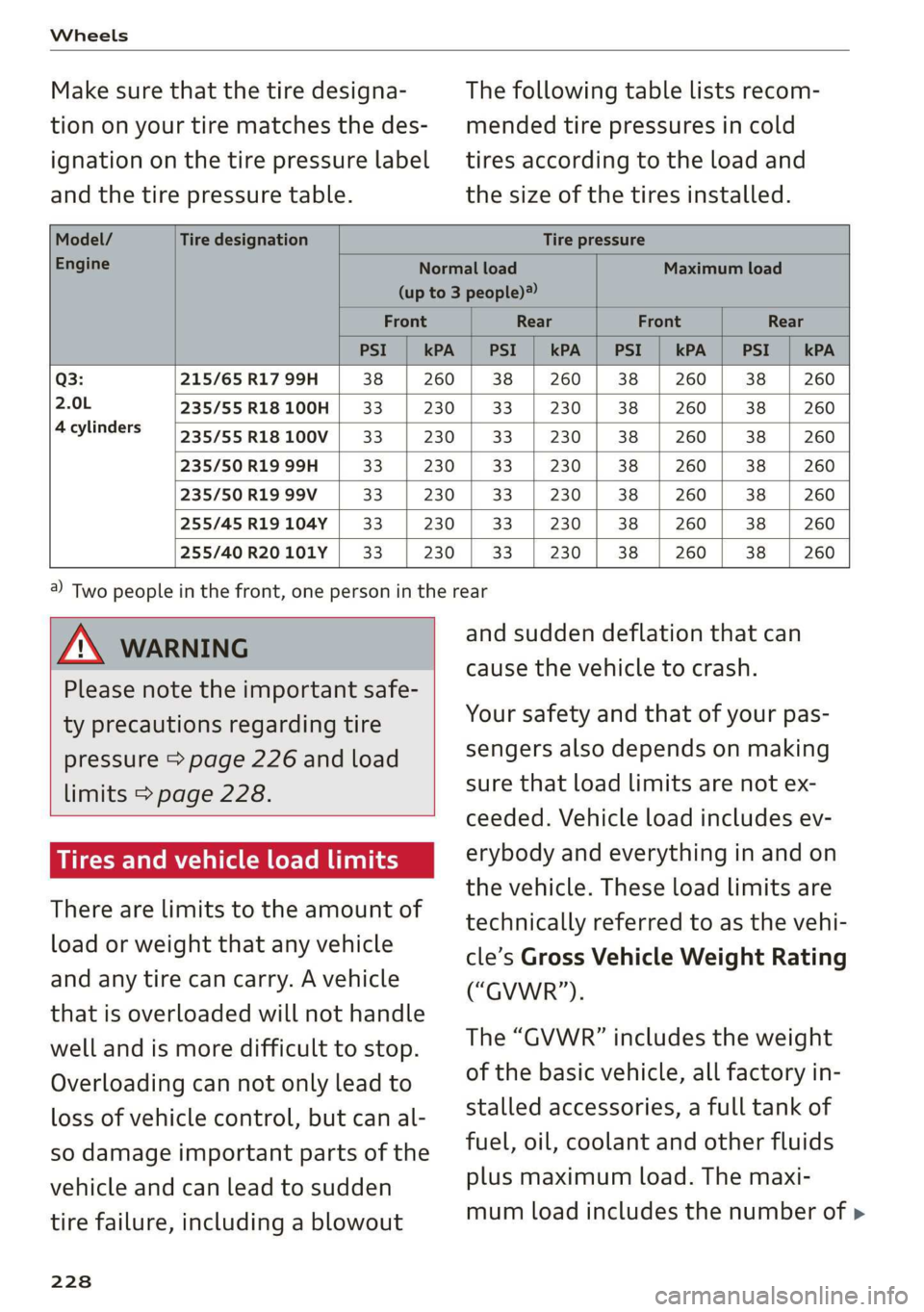
The following table lists recom-
mended tire pressures in cold
tires according to the load and
the size of the tires installed.
Model/ Tire designation Tire pressure
Engine Normal load Maximum load
(up to 3 people)?
Front Rear Front Rear
PSI | kPA | PSI | kPA | PSI | kPA | PSI | kPA
Q3: 215/65 R17 99H 38 | 260 | 38 | 260 | 38 | 260 | 38 | 260
2.0L 235/55R18100H | 33 230 | 33 | 230 | 38 | 260 | 38 | 260
4cylinders /535755R18100V| 33 | 230 | 33 | 230 | 38 | 260 | 38 | 260
235/50 R19 99H 33 230 | 33 | 230 | 38 | 260 | 38 | 260
235/50 R19 99V 33 230 | 33 | 230 | 38 | 260 | 38 | 260
255/45 R19104Y | 33 230 | 33 | 230 | 38 | 260 | 38 | 260
255/40 R20101Y | 33 230 | 33 | 230 | 38 | 260 | 38 | 260
AN WARNING
Please note the important safe-
ty precautions regarding tire
pressure > page 226 and load
limits > page 228.
Tires and vehicle load limits
There are limits to the amount of
load or weight that any vehicle
and any tire can carry. A vehicle
that is overloaded will not handle
well and is more difficult to stop.
Overloading can not only lead to
loss of vehicle control, but can al-
so damage important parts of the
vehicle and can lead to sudden
tire failure, including a blowout
228
@) Two people in the front, one person in the rear
and sudden deflation that can
cause the vehicle to crash.
Your safety and that of your pas-
sengers also depends on making
sure that load limits are not ex-
ceeded. Vehicle load includes ev-
erybody and everything in and on
the vehicle. These load limits are
technically referred to as the vehi-
cle’s Gross Vehicle Weight Rating
(“GVWR”).
The “GVWR” includes the weight
of the basic vehicle, all factory in-
stalled accessories, a full tank of
fuel, oil, coolant and other fluids
plus maximum load. The maxi-
mum load includes the number of >
Page 254 of 280
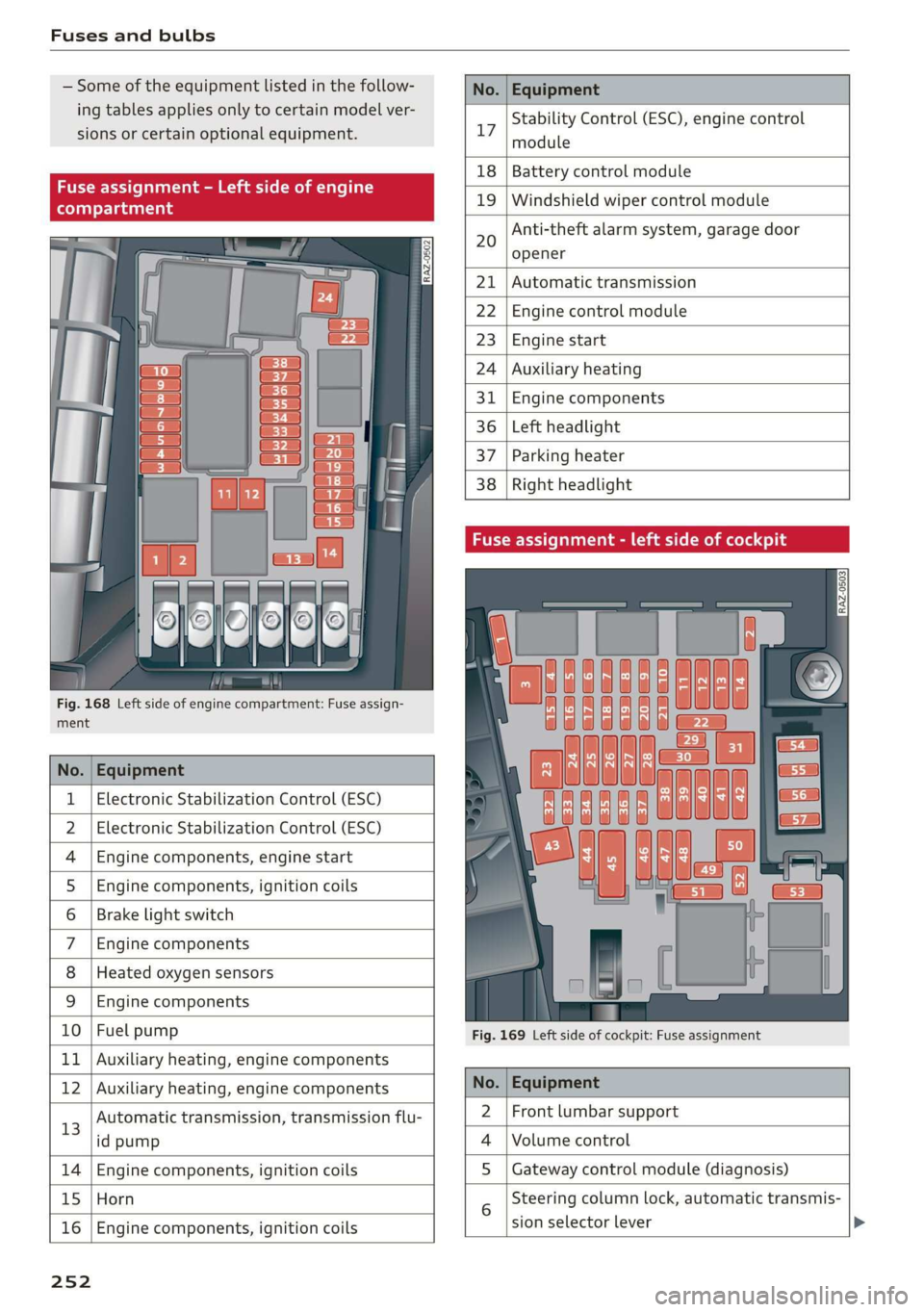
Fuses and bulbs
Some of the equipment listed in the follow-
ing tables applies only to certain model ver-
sions or certain optional equipment.
No. | Equipment
Stability Control (ESC), engine control
17
module
le of e
OVye OVOVO
Fig. 168 Left side of engine compartment: Fuse assign-
RAZ-0502
18 | Battery control module
19 | Windshield wiper control module
Anti-theft alarm system, garage door
opener
20
Automatic transmission
Engine control module
Engine start
Auxiliary heating
Engine components
Left headlight
Parking heater
Right headlight
ment
No. | Equipment
1 | Electronic Stabilization Control (ESC)
2 | Electronic Stabilization Control (ESC)
4 |Engine components, engine start
5 |Engine components, ignition coils
6 | Brake light switch
7 |Engine components
8 | Heated oxygen sensors
9 | Engine components
10 | Fuel pump
11 | Auxiliary heating, engine components
Fig. 169 Left side of cockpit: Fuse assignment
bh N Auxiliary heating, engine components No. | Equipment
13
Automatic transmission, transmission flu-
id pump
2 |Front lumbar support
Volume control
14 Engine components, ignition coils S | Gateway control module (diagnosis)
15 Horn
16
Engine components, ignition coils
sion selector lever
25 2
Steering column lock, automatic transmis-
Page 270 of 280
Index
Electroniciimmobilizetiiecs:. 2 sive 6 oes «2 ane 32
Electronic Stabilization Control............ 98
Embedded SIM’ card « savers ¢ « sways x 2 caw 9 a 155
Emergency assistance ..........eeeeveee 242
Emergency braking function.............. 91
Emergency call... .. 2... eee eee eee 146
Emergency flashers...............00000 45
Emergency mode.............-.000e00ee 85
Emergency operation
Doors... . eee 30
Fuel tillerdoop': = suo « s sense « = woe & 2 as 202
Luggage compartment lid............... 37
Panoramic glass roof.............000005 40
Emissions control system..............- 202
EMGNQy'CONSUIMIENSS. « » weceim o 9 eesmee «. oneness 15
Energy management.............-.00005 87
Engine
Breakingin........... 2... eee ee eee eee 86
GOGlANE sexes + = seme 5 3 fmeu so eee E Ea EE 209
EMe@rgeney:Stopis oo sis oo merce 2 2 warars & wane 80
Jump starting....................00. 246
Start/Stop system sss + ¢ eevee & x eaies ys ae 87
Starting/Stopping’« « «se. ss eees ee ew os 80
Engine compartment
Opening/closing the hood.............. 204
Overview... 2... cece eee eee 205
Safety precautions............-.00000e 203
Engine oil
AGING essa is 2 woxwon so sesma oe oraess ww mene 205
Changing.......-...... cee eee eee eee 208
Checking oil level... 02.2... cece eee 205
CONSUMPELON: ¢ & smc o sores.» o saws @ 3 cosas 205
TOdicatOrlight » serie «0 ose » mauesee © veer 206
Replacement interval................. 215
Engine sound
Audi GriveS@leCt s cas + = waves © » seaneie +» wee 96
Engine Start/Stop mode
refer to Start/Stop system........... 87, 88
Engine start system ...... cece ese eeee vee 81
Engine stop
refer to Start/Stop system........... 87, 88
Environment
Unleaded gasoline.................... 199
eSIM
refer to Embedded SIM card............ 155
Event Data Recorder (EDR).............. 255
268
Exterior lighting: «cscs + come + = over © = ove 43
EXteniOn MIRPONS sic omer ov mew @ wae a 8 47
Folding settings...............-.000005 29
External voice operation................. 25
E
Factory default settings
Multi Media Interface................. 196
Fast forwarding and rewinding (media file). 185
Fast forwarding (media files)............ 185
FaStrOute’s « sesces so scene vo meses 6 8 aeenes va 160
Favorites
Bluetooth. ......... 20.0.0... cece eee 197
NaWiGatiOliess ¢ ssa s + eeu & ¥ Rams & x BES 162
Tele PON ascna x a vow ve meas oo een ow ae 144
Federal Communications Commission (FCC) . 261
File formats (media drives) .............. 190
Folding the rear seats.............-.0005 75
For the sake of the environment
Disposing of engine oil................ 208
Fueling sis «2 encve 2 @ sovioe xo aename 2 6 come 3 ore 200
Leaks... eee eee eee eee 204
Forward gear
(EEF tO GESTS < = oss ¢ s Sues & ¥ ware = a ea ss 82
Free text search
Medldies « « cas 4 caw < were & & pee 6 x ees 189
Radio... 2... ee eee 177
also refer to Intelligent search.......... 160
Freeze protection
COOlAnt « sews s = sees ss ees s eee es BE 209
Front center armrest.................0.. 55
LO 199
Additives: : zoxs ss qewu so seen 2 y BeeE a Fe 200
CUrreNnt:CONSUMPTION’: « « sicsers s 6 covers a 6 sewnaie 14
Fuel gauge......... 2. eee eee eee eee ny
Fuel tank capacity.
Gasolines. « «ssw se cmon x mene © x ete w «aoe 199
Reducing fuel consumption............. 86
Fueling
FUL TILLERAOOF ec ¢ < eacee sy were se aecee ev 200
Fuel filler door emergency release....... 202
Fuel tank capacity...............00005 264
Fuse.aSSiQnMentis « ¢ wscce x owes oo stemme 2 oe 252
G
Garage:dooropene tiie. ov savas i x wracne ow anvenes 40
Page 273 of 280
83A012721BA
Index
Operating « « secs + x sess 6 ot wees v aeaueee w & cams 12
Programming buttons...............00. 26
Voice recognition system.............-. 24
Multi Media Interface................... 18
Menus and symbols...............--00. 19
Operating ....... 0... cee ee eee eee 16,19
Switching on or off...........-....-00. 18
Muting (mute)............. 0002s 26
MmyAUdi..... eee eee eee 27,155
myAudi navigation................. 159, 163
N
Natural leather care/cleaning............ 239
Navigation susie c+ asco xv anti © oreo wn oan 159
Better route ......... 0.0... e cece 172
GalliniGis: s vem sv news ss tee ov eee see 163
Changing the scale. ......... cece eves 163
also refertoMap............-000 eee 165
Navigation database
Version information...............04- 197
Navigation (instrument cluster).......... 166
SY 260
Notification:cemter’. csiccis . « sessue oo ernuous oo weet 20
Oo
Octane rating (gasoline)................ 199
OMOMCLER wisi & 2 mace & oO + ¥ eOER oH ERED « 14
Resetting...............0..0..000000. 14
Office address
refer to Business address.............. 168
Offroad
refer to Offroad driving...............5. 93
Offroad ArivVinG!s + = sss <= evan ¢ = Hares ¢ = Hom 93
Oil
refer to Engine oils = acs 22 ees ee eees ee 205
On-board computer................-.04. 14
On Board Diagnostic System (OBD)... 202, 255
Online destination
refer to Point of interest............... 162
Online map
refer to Satellite map................. 169
Online: Mediates. «vies ss wees ss wees @ vee 183
OnliMePAdIO sx « weam x gogo gx mem Ge Se 178
also refer to Online radio.............. 178
Online services
refertoconnect...........0+-008 154,155
Online system update.................. 196
OPO bes » sccmesnse © axensies wo > vase @ 8 meme = = com 28
Automatic luggage compartment lid...... 36
Convenience opening................085 39
Fuel filler door........ 0... c eee eee ee 200
Hood... 0... eee ee 204
Luggage compartmentlid............... 35
Luggage compartment lid with foot motion . 37
Panoramic glass roof................... 39
Sunshade (FOOT): « 2 some a @ ears oo eee a eae 39
Wind OWS 3s « cence wv cmermes a a smenees oa omemee es 38
Opening and closing
refer to Unlocking and locking........ 28, 33
Operating
Instrument cluster.................00. 12
Multifunction steering wheel............ 12
Multi Media Interface ...... 0 cece eee 16,19
Text input......... 0.00.00... eee eee 22
Touch displays: « veces s eae x > wee se ree 16
Optional equipment number............. 263
Options
Media’. » 2 seas 2 4 segue 2s sete go ewe te ee 189
NAVIQAtIOMsc i « sunsais « x wrens o 0 suessun w seats 1 172
Radio... 2.6... cece eee cee eee eee 180
Overview (cockpit) ............00 eee eee ee 6
P
Paint damage.......... cece eee eee eee 238
Paintmumbe ttc 5 cscs 2 x ennme o « cereus 6 2 sownate 1 263
PANIC: DUttONY « & cresce: 6 0 cemmmes an awawons 1 a anos 32
Pani@ TUMGtion. « secs x x covers 2 2 serie ¥ 3 aoa © 3 32
Panorama glass roof...............-.05. 39
Panoramic glass roof
Convenience opening and closing......... 39
Emergency closing..............0eeeeae 40
QuickOpening << : sree ¢ = veces s eee se we 40
Park assist... 0.0.0... cc cece eee eee eee 136
Parking aid... ... 2... eee ee eee 127
Cleaning the sensors and camera........ 237
Parking space search.................. 134
Peripheral cameraS......- 0.0. - eee eee 129
Rearview Cameraiew. ss ews a vee as bees 129
Trailee views. 2s swavece x x sens « anamens a a amenees oo 130
271