heating AUDI Q3 2019 User Guide
[x] Cancel search | Manufacturer: AUDI, Model Year: 2019, Model line: Q3, Model: AUDI Q3 2019Pages: 280, PDF Size: 72.73 MB
Page 113 of 280
83A012721BA
Driver assistance
Changing the cruise control speed
Applies to: vehicles with cruise control system
> To increase or decrease the cruise control speed
in increments, tap the lever toward @)/G)
=> page 110, fig. 91.
> To increase or decrease the cruise control speed
continuously, press and hold the lever to-
ward @/().
Overriding or deactivating the cruise
control speed
Applies to: vehicles with cruise control system
You can override or deactivate the cruise control
system. When you deactivate the system, your
cruise control speed will be stored and you can
resume that speed.
Requirement: the system must be switched on
and activated.
Overriding
> To temporarily override the cruise control
speed, press the accelerator pedal.
> Once you release the accelerator pedal, the sys-
tem will adjust back to the stored cruise control
speed.
If you override the cruise control system for a
long period of time, the cruise control system
will be deactivated. The indicator light will be
displayed and the cruise control speed will be
saved.
Deactivating
> To deactivate the cruise control speed, press
the lever toward (2) (not locked into place)
=> page 110, fig. 91.
> Press the brake pedal.
ZA\ WARNING
Resting your foot on the accelerator pedal
could override the cruise control. This will pre-
vent braking interventions by the system.
Seem Leal
Applies to: vehicles with cruise control system
When you switch the system off completely, the
cruise control speed will be deleted.
Requirement: the system must be switched on.
> To switch the system off, press the lever toward
@ (locked into place) > page 110, fig. 91, or
> Switch the ignition off.
Applies to: vehicles with cruise control system
Gk / 3) Speed control system: currently un-
available. See owner's manual
If the indicator light turns on and this message
appears, the cruise control system has been deac-
tivated. There is a temporary malfunction, for ex-
ample the brakes are overheating. Switch the
cruise control system on again later.
Adaptive speed/cruise
assist
General information
Applies to: vehicles with adaptive cruise assist
Depending on the vehicle equipment, the adap-
tive cruise assist may consist of the following
functions:
The adaptive speed/cruise assist (called only
adaptive cruise assist in the vehicle display and in
the rest of the Owner's Manual) consists of a
speed and distance control system. It assists the
driver by both regulating the speed and main-
taining the set distance to the vehicle driving
ahead, within the limits of the system. If the sys-
tem detects a vehicle driving ahead, the adaptive
cruise assist can brake and accelerate your vehi-
cle within the limits of the system. On open roads
with no traffic, it functions like a cruise control
system. The stored speed is maintained. When
approaching a vehicle driving ahead, the adaptive
cruise assist automatically brakes to match that
vehicle's speed and then maintains the set dis-
tance as much as possible. As soon as the system
does not detect a vehicle driving ahead, adaptive
cruise assist accelerates up to the set speed.
111
Page 204 of 280
Checking and Filling
® Note
— Remove fuel that has overflowed onto any
vehicle components immediately to reduce
the risk of damage to the vehicle.
— Never drive until the fuel tank is completely
empty. The irregular supply of fuel that re-
sults from that can cause engine misfires.
Uncombusted fuel will enter the exhaust
system and increase the risk of damage to
the catalytic converter.
@ For the sake of the environment
— Do not overfill the fuel tank, otherwise fuel
can leak out when the vehicle is warming
up.
— Fuel should never enter the sewer system or
come into contact with the ground.
@ Tips
The fuel filler door on your vehicle does not
lock if you lock the vehicle from the inside us-
ing
the central locking switch.
Fuel filler door emergency release
If the central locking system is faulty, the fuel
filler door can be unlocked manually.
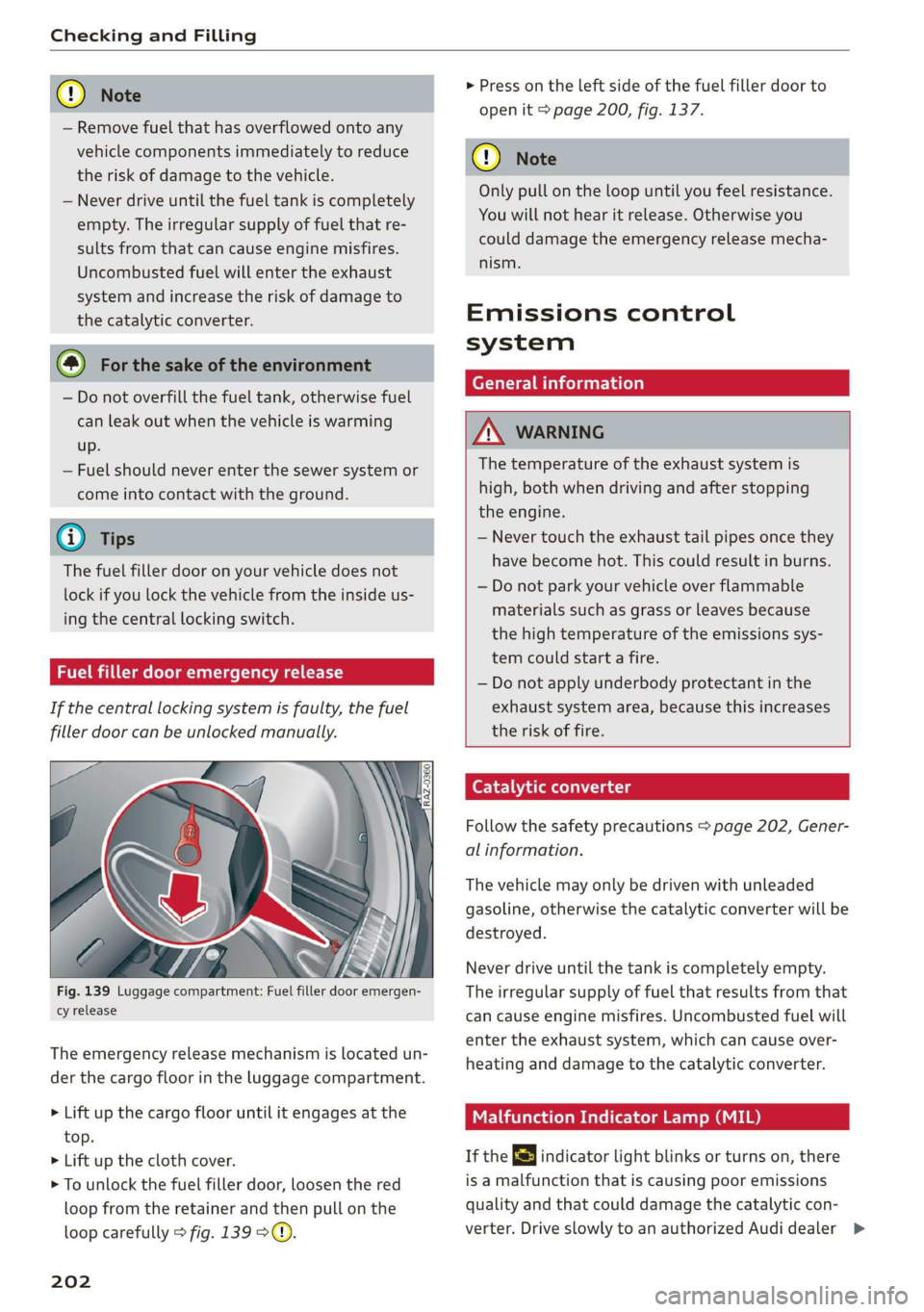
Fig. 139 Luggage compartment: Fuel filler door emergen-
cy release
The emergency release mechanism is located un-
der the cargo floor in the luggage compartment.
> Lift up the cargo floor until it engages at the
top.
> Lift up the cloth cover.
> To unlock the fuel filler door, loosen the red
loop from the retainer and then pull on the
loop carefully > fig. 139 °@.
202
> Press on the left side of the fuel filler door to
open it > page 200, fig. 137.
@) Note
Only pull on the loop until you feel resistance.
You will not hear it release. Otherwise you
could damage the emergency release mecha-
nism.
Emissions control
system
General information
ZN WARNING
The temperature of the exhaust system is
high, both when driving and after stopping
the engine.
— Never touch the exhaust tail pipes once they
have become hot. This could result in burns.
— Do not park your vehicle over flammable
materials such as grass or leaves because
the high temperature of the emissions sys-
tem could start a fire.
— Do not apply underbody protectant in the
exhaust system area, because this increases
the risk of fire.
Catalytic converter
Follow the safety precautions > page 202, Gener-
al information.
The vehicle may only be driven with unleaded
gasoline, otherwise the catalytic converter will be
destroyed.
Never drive until the tank is completely empty.
The irregular supply of fuel that results from that
can
cause engine misfires. Uncombusted fuel will
enter the exhaust system, which can cause over-
heating and damage to the catalytic converter.
Malfunction Indicator Lamp (MIL)
If the S indicator light blinks or turns on, there
is a malfunction that is causing poor emissions
quality and that could damage the catalytic con-
verter. Drive slowly to an authorized Audi dealer >
Page 212 of 280
Checking and Filling
— If the appropriate coolant additive is not
available in an emergency, do not add any
other additive. You could damage the en-
gine. If this happens, only use water and re-
store the correct mixture ratio with the
specified coolant additive as soon as possi-
ble.
— Only refill with new coolant.
— Radiator sealant must not be mixed with
the coolant.
Adding coolant
RAZ-0539
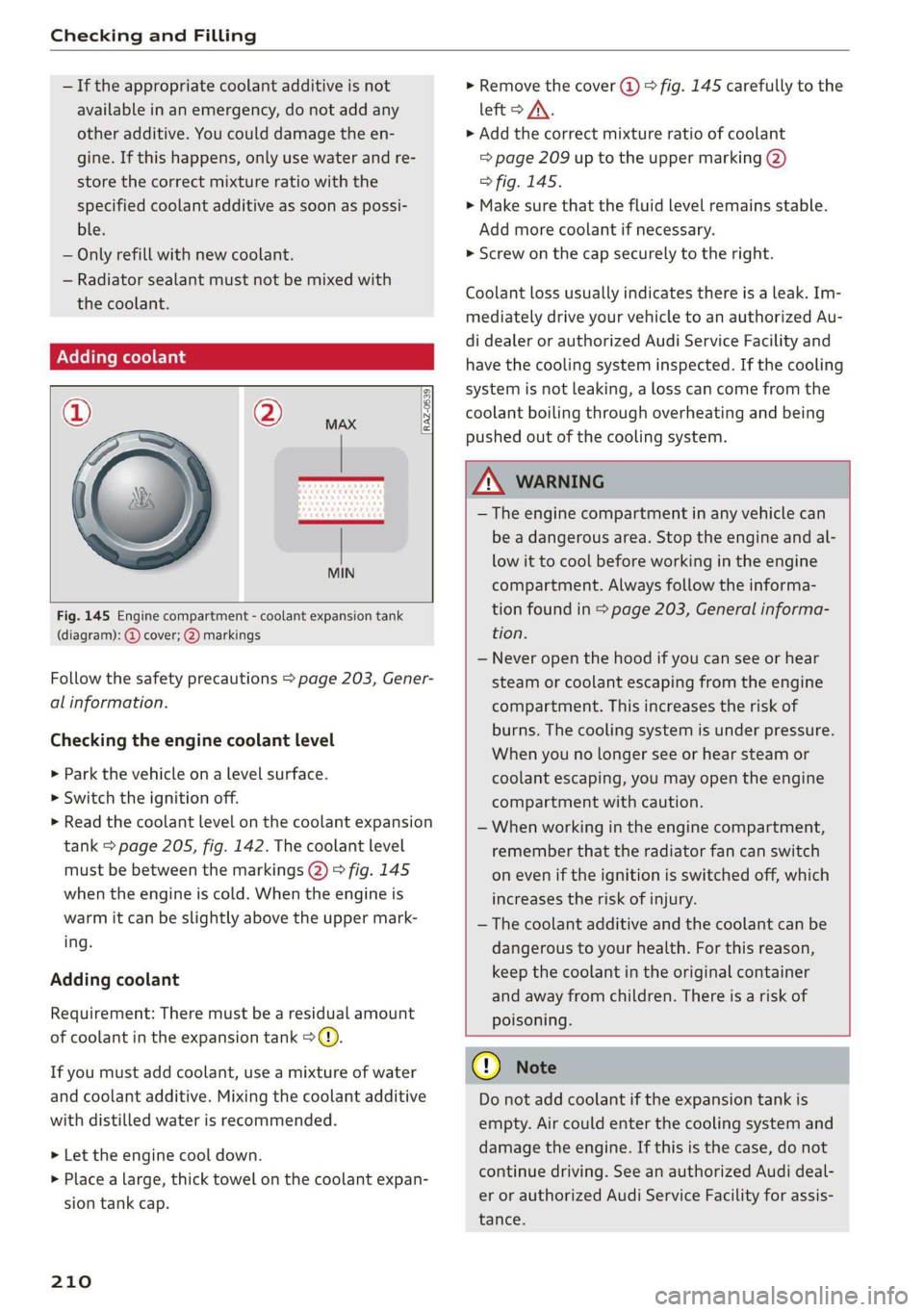
Fig. 145 Engine compartment - coolant expansion tank
(diagram): @ cover; @) markings
Follow the safety precautions > page 203, Gener-
al information.
Checking the engine coolant level
>» Park the vehicle on a level surface.
> Switch the ignition off.
> Read the coolant level on the coolant expansion
tank > page 205, fig. 142. The coolant level
must be between the markings @) 9 fig. 145
when the engine is cold. When the engine is
warm it can be slightly above the upper mark-
ing.
Adding coolant
Requirement: There must be a residual amount
of coolant in the expansion tank >@).
If you must add coolant, use a mixture of water
and coolant additive. Mixing the coolant additive
with distilled water is recommended.
> Let the engine cool down.
> Place a large, thick towel on the coolant expan-
sion tank cap.
210
» Remove the cover (@) > fig. 145 carefully to the
left > AX.
» Add the correct mixture ratio of coolant
> page 209 up to the upper marking @)
> fig. 145.
> Make sure that the fluid level remains stable.
Add more coolant if necessary.
> Screw on the cap securely to the right.
Coolant loss usually indicates there is a leak. Im-
mediately drive your vehicle to an authorized Au-
di dealer or authorized Audi Service Facility and
have the cooling system inspected. If the cooling
system is not leaking, a loss can come from the
coolant boiling through overheating and being
pushed out of the cooling system.
ZA WARNING
— The engine compartment in any vehicle can
be a dangerous area. Stop the engine and al-
low it to cool before working in the engine
compartment. Always follow the informa-
tion found in > page 203, General informa-
tion.
— Never open the hood if you can see or hear
steam or coolant escaping from the engine
compartment. This increases the risk of
burns. The cooling system is under pressure.
When you no longer see or hear steam or
coolant escaping, you may open the engine
compartment with caution.
— When working in the engine compartment,
remember that the radiator fan can switch
on even if the ignition is switched off, which
increases the risk of injury.
— The coolant additive and the coolant can be
dangerous to your health. For this reason,
keep the coolant in the original container
and away from children. There is a risk of
poisoning.
@) Note
Do not add coolant if the expansion tank is
empty. Air could enter the cooling system and
damage the engine. If this is the case, do not
continue driving. See an authorized Audi deal-
er or authorized Audi Service Facility for assis-
tance.
Page 214 of 280
Checking and Filling
The starting ability may be impaired.
If this message turns off after a little while, the
vehicle battery charged enough while driving.
If this message does not turn off, drive immedi-
ately to an authorized Audi dealer or authorized
Audi Service Facility.
ZA WARNING
When there is an electrical system malfunc-
tion, vehicle functions may not work and driv-
ing stability may be limited, which increases
the risk of an accident. Stop driving and
switch the engine off. See an authorized Audi
dealer or authorized Audi Service Facility for
assistance.
Battery
rae Le cel)
Because of the complex power supply, all work on
batteries such as disconnecting, replacing, etc.,
should only be performed by an authorized Audi
dealer or authorized Audi Service Facility > A.
Multiple batteries with different technologies
may be installed in your vehicle:
— Vehicle battery (for example, for starting the
engine, basic power supply) > page 213, Lead
battery or > page 213, Other battery types
— Auxiliary battery (for example, for recuperation
or optional equipment) > page 213, Other bat-
tery types
Not running the vehicle for long periods of
time
The battery will gradually drain if the vehicle
does not run for long periods of time. To ensure
that the vehicle can still be started, the electrical
equipment will be reduced or switched off
= page 87. Some convenience functions, such as
interior lighting or power seat adjustment, may
not be available under certain circumstances.
These convenience functions will be available
again once you switch the ignition on and start
the
engine.
Even when electrical equipment is switched off,
the equipment can still drain the battery if the
212
vehicle is not driven for long periods of time.
Deep draining results in a chemical reaction that
destroys the inside of the battery. The battery
must be charged every month to prevent this
= page 213. Contact an authorized Audi dealer or
authorized Audi Service Facility for more infor-
mation.
Winter operation
Cold weather places higher demands on the bat-
tery. This results in reduced starting ability. Have
the battery checked by an authorized Audi dealer
or authorized Audi Service Facility before cold
weather begins.
ZA\ WARNING
All work on the battery or electrical system in
your vehicle can result in injuries, chemical
burns, accidents, or burns. Because of this, all
work must be performed only by an author-
ized Audi dealer or authorized Audi Service Fa-
cility.
ZA WARNING
California Proposition 65 Warning:
— Battery posts, terminals and related acces-
sories contain lead and lead compounds,
chemicals known to the State of California
to cause cancer and reproductive harms.
Wash hands after handling.
C) Note
— If the vehicle will be parked for long periods
of time, protect the battery against the cold
so that it will not be destroyed by “freezing”
= page 213, Charging the battery.
— There are electrical components under the
cargo floor behind a trim panel that warm
up during operation. To reduce the risk of
the components overheating, do not store
objects such as blankets under the cargo
floor. If the components overheat, they will
switch off temporarily. This will be indicated
by a message that will be displayed in the
instrument cluster until the temperature re-
turns to normal.
Page 242 of 280
Care and cleaning
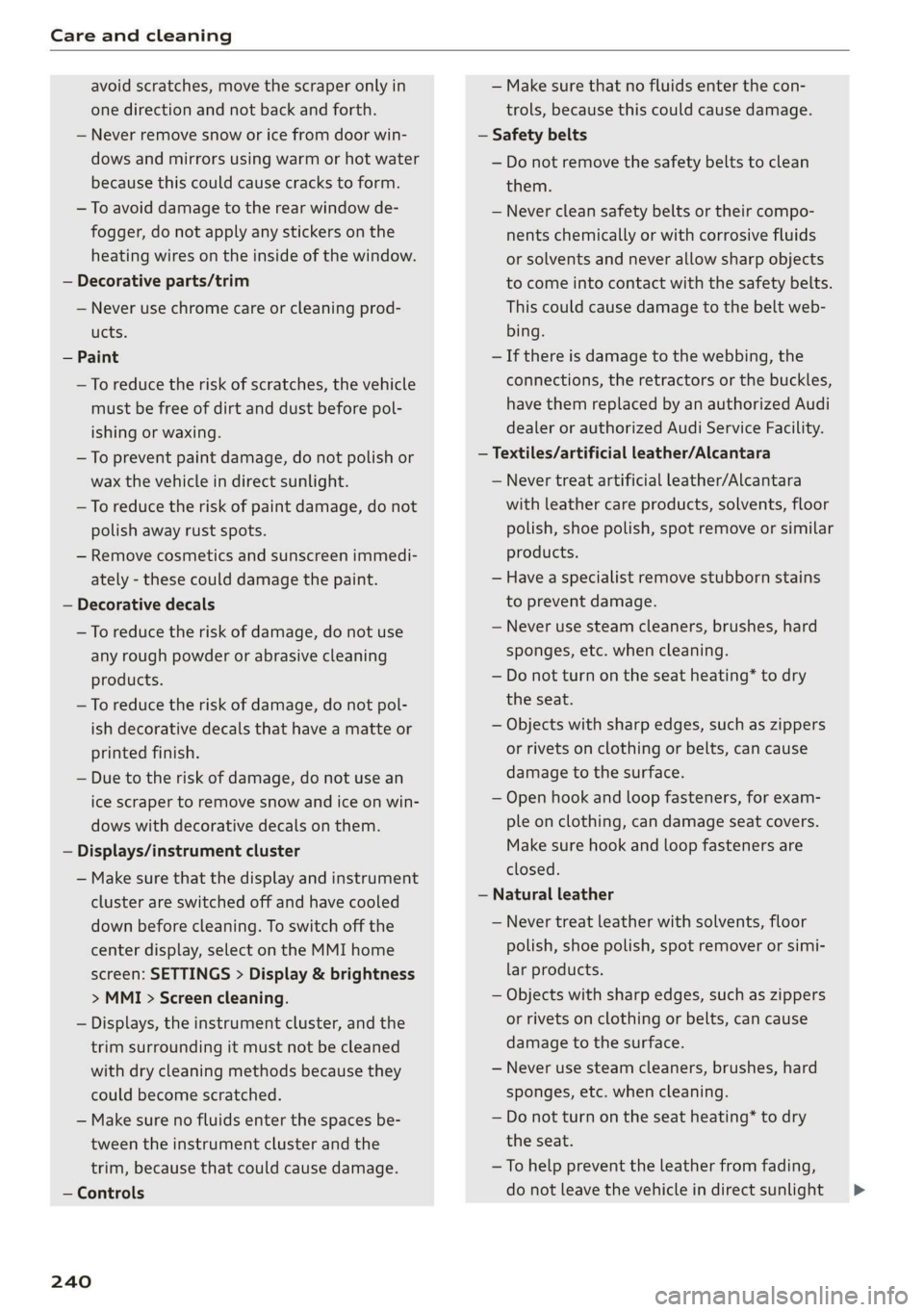
avoid scratches, move the scraper only in
one direction and not back and forth.
— Never remove snow or ice from door win-
dows and mirrors using warm or hot water
because this could cause cracks to form.
— To avoid damage to the rear window de-
fogger, do not apply any stickers on the
heating wires on the inside of the window.
— Decorative parts/trim
— Never use chrome care or cleaning prod-
ucts.
— Paint
—To reduce the risk of scratches, the vehicle
must be free of dirt and dust before pol-
ishing or waxing.
— To prevent paint damage, do not polish or
wax the vehicle in direct sunlight.
—To reduce the risk of paint damage, do not
polish away rust spots.
— Remove cosmetics and sunscreen immedi-
ately - these could damage the paint.
— Decorative decals
—To reduce the risk of damage, do not use
any rough powder or abrasive cleaning
products.
—To reduce the risk of damage, do not pol-
ish decorative decals that have a matte or
printed finish.
— Due to the risk of damage, do not use an
ice scraper to remove snow and ice on win-
dows with decorative decals on them.
— Displays/instrument cluster
— Make sure that the display and instrument
cluster are switched off and have cooled
down before cleaning. To switch off the
center display, select on the MMI home
screen: SETTINGS > Display & brightness
> MMI > Screen cleaning.
— Displays, the instrument cluster, and the
trim surrounding it must not be cleaned
with dry cleaning methods because they
could become scratched.
— Make sure no fluids enter the spaces be-
tween the instrument cluster and the
trim, because that could cause damage.
— Controls
240
— Make sure that no fluids enter the con-
trols, because this could cause damage.
— Safety belts
— Do not remove the safety belts to clean
them.
— Never clean safety belts or their compo-
nents chemically or with corrosive fluids
or solvents and never allow sharp objects
to come into contact with the safety belts.
This could cause damage to the belt web-
bing.
—If there is damage to the webbing, the
connections, the retractors or the buckles,
have them replaced by an authorized Audi
dealer or authorized Audi Service Facility.
—Textiles/artificial leather/Alcantara
— Never treat artificial leather/Alcantara
with leather care products, solvents, floor
polish, shoe polish, spot remove or similar
products.
— Have a specialist remove stubborn stains
to prevent damage.
— Never use steam cleaners, brushes, hard
sponges, etc. when cleaning.
— Do not turn on the seat heating* to dry
the seat.
— Objects with sharp edges, such as zippers
or rivets on clothing or belts, can cause
damage to the surface.
— Open hook and loop fasteners, for exam-
ple on clothing, can damage seat covers.
Make sure hook and loop fasteners are
closed.
— Natural leather
— Never treat leather with solvents, floor
polish, shoe polish, spot remover or simi-
lar products.
— Objects with sharp edges, such as zippers
or rivets on clothing or belts, can cause
damage to the surface.
— Never use steam cleaners, brushes, hard
sponges, etc. when cleaning.
— Do not turn on the seat heating* to dry
the seat.
—To help prevent the leather from fading,
do not leave the vehicle in direct sunlight >
Page 254 of 280
Fuses and bulbs
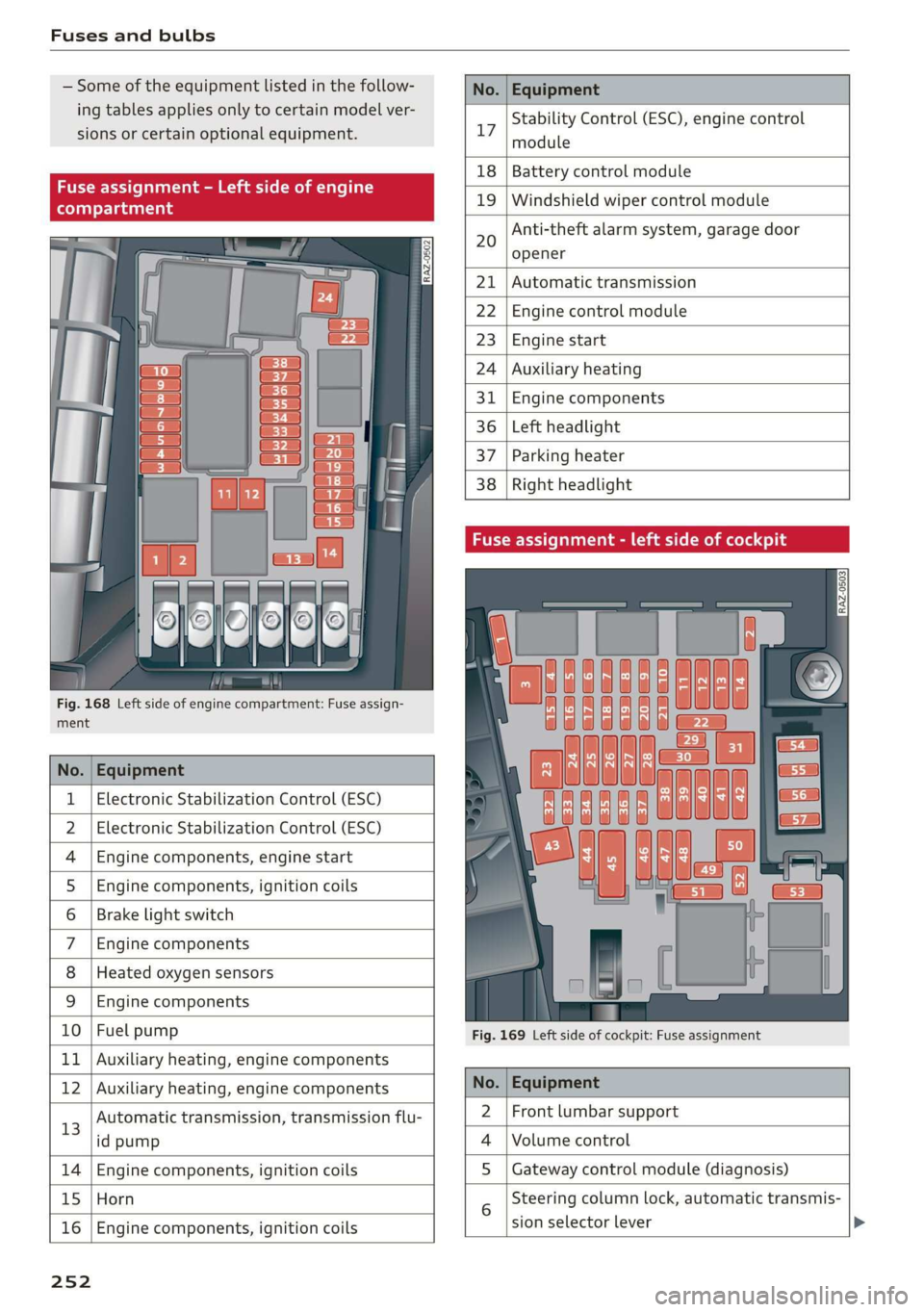
Some of the equipment listed in the follow-
ing tables applies only to certain model ver-
sions or certain optional equipment.
No. | Equipment
Stability Control (ESC), engine control
17
module
le of e
OVye OVOVO
Fig. 168 Left side of engine compartment: Fuse assign-
RAZ-0502
18 | Battery control module
19 | Windshield wiper control module
Anti-theft alarm system, garage door
opener
20
Automatic transmission
Engine control module
Engine start
Auxiliary heating
Engine components
Left headlight
Parking heater
Right headlight
ment
No. | Equipment
1 | Electronic Stabilization Control (ESC)
2 | Electronic Stabilization Control (ESC)
4 |Engine components, engine start
5 |Engine components, ignition coils
6 | Brake light switch
7 |Engine components
8 | Heated oxygen sensors
9 | Engine components
10 | Fuel pump
11 | Auxiliary heating, engine components
Fig. 169 Left side of cockpit: Fuse assignment
bh N Auxiliary heating, engine components No. | Equipment
13
Automatic transmission, transmission flu-
id pump
2 |Front lumbar support
Volume control
14 Engine components, ignition coils S | Gateway control module (diagnosis)
15 Horn
16
Engine components, ignition coils
sion selector lever
25 2
Steering column lock, automatic transmis-
Page 255 of 280
83A012721BA
Fuses and bulbs
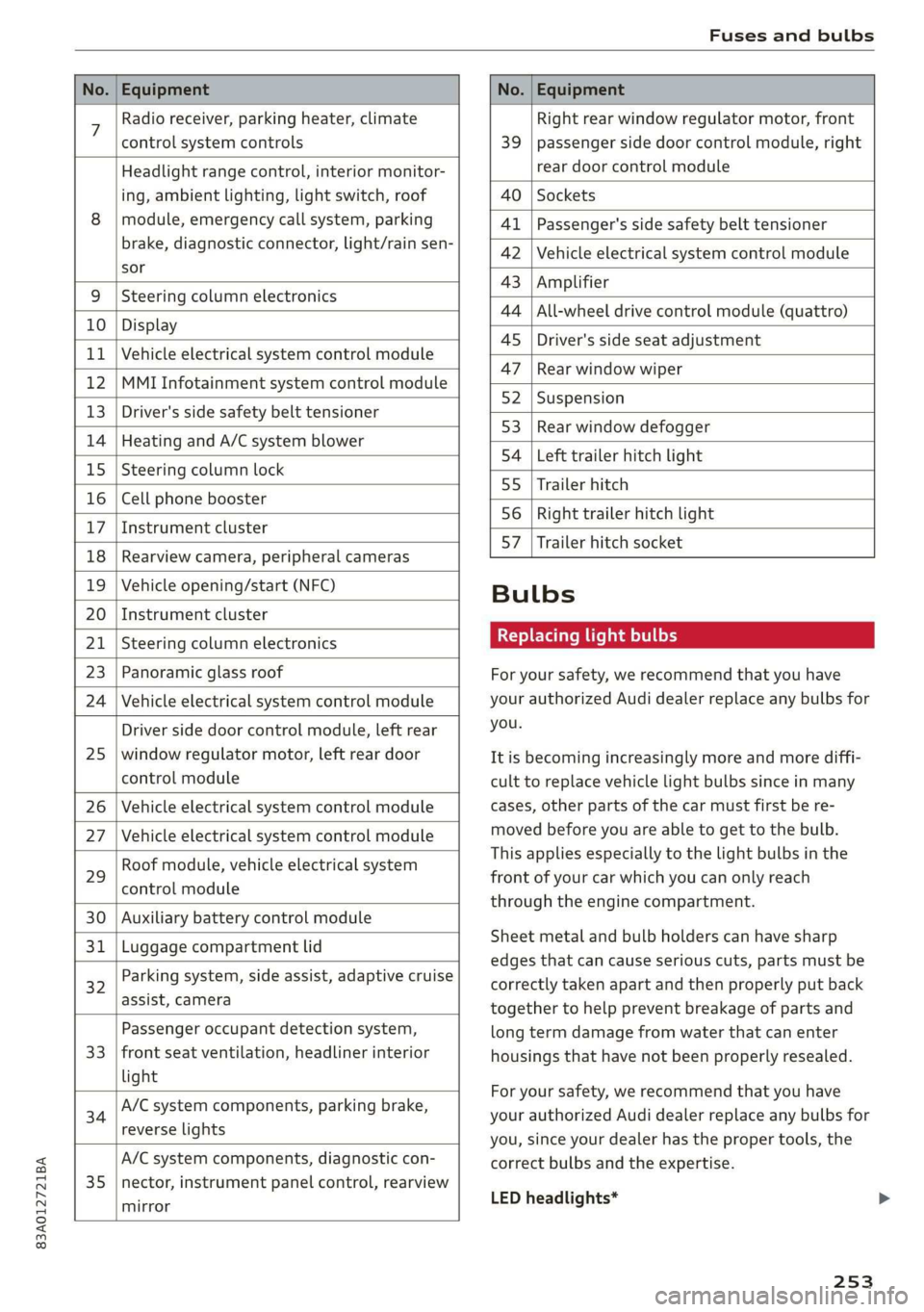
No. | Equipment No. | Equipment
7 Radio receiver, parking heater, climate Right rear window regulator motor, front
control system controls 39 | passenger side door control module, right
Headlight range control, interior monitor- rear door control module
ing, ambient lighting, light switch, roof 40 | Sockets
8 | module, emergency call system, parking 41 |Passenger's side safety belt tensioner
brake, diagnostic connector, light/raih'sen- 42 |Vehicle electrical system control module
sor
= - 43 |Amplifier
9 |Steering column electronics
- 44 | All-wheel drive control module (quattro)
10 | Display
- - 4S | Driver's side seat adjustment
11 | Vehicle electrical system control module
: 47 | Rear window wiper
12 |MMI Infotainment system control module
- ; - 52 | Suspension
13 | Driver's side safety belt tensioner
- 53 | Rear window defogger
14 | Heating and A/C system blower
: 54 | Left trailer hitch light
15 | Steering column lock
55 | Trailer hitch
16 | Cell phone booster
56 | Right trailer hitch light
17
|Instrument cluster
- - 57 | Trailer hitch socket
18 | Rearview camera, peripheral cameras
19 | Vehicle opening/start (NFC) Bulbs
20 | Instrument cluster
21 | Steering column electronics BETS Ae ha tele
23 | Panoramic glass roof For your safety, we recommend that you have
24 | Vehicle electrical system control module your authorized Audi dealer replace any bulbs for
Driver side door control module, left rear YOU
25 | window regulator motor, left rear door It is becoming increasingly more and more diffi-
control module cult to replace vehicle light bulbs since in many
26 | Vehicle electrical system control module cases, other parts of the car must first be re-
27 | Vehicle electrical system control module meved before youre able to get to the bulb:
HooFmodule,vehieleeleckrical system This applies especially to the light bulbs in the
29 front of your car which you can only reach
control module :
through the engine compartment.
30 | Auxiliary battery control module
: Sheet metal and bulb holders can have sharp
31 | Luggage compartment lid .
: - - - - edges that can cause serious cuts, parts must be
ey) Rarking system, side assist, adaptive cruise correctly taken apart and then properly put back
assist, Cameta together to help prevent breakage of parts and
Passenger occupant detection system, long term damage from water that can enter
33 | front seat ventilation, headliner interior housings that have not been properly resealed.
light
; ingbrak For your safety, we recommend that you have
34 aa io tll Deeg renee your authorized Audi dealer replace any bulbs for
reverseilights you, since your dealer has the proper tools, the
A/C system components, diagnostic con- correct bulbs and the expertise.
35 |nector, instrument panel control, rearview
mirror
LED headlights*
253
Page 276 of 280

Index
Software information
Legalinformation..............0.0005 197
Software version (MMI)
Version information.................. 197
Sound
refer to Adjusting the sound............ 195
Space-saving spare tire (compact spare tire) . 245
SParGuites = 5 mane < 5 Hane & BES GF Heme G = He 245
Speedometer........... 0. cece eee eee ee 11
Speed warning systeM...... 0... e eee eee 108
Start/Stop systeM......... 0.0 cece eee 87
Switching offandon...............0--- 88
Starting to drive............ cee eee eee 82,92
Starting (engine).................. eee 88
Steering... 6... eee cee eee ee 97
Audi drive select...............000000. 96
alsoreferto Steering: « «cans se cas vs cae 97
St@ering lock: s < sass ss peas ss ewe s 80, 81,97
Steering wheel
ACjUSEING sie © 2 wenn oe ware 2 oe = eeeD oo 56
Adjusting manually..................0- 56
SHITE Paddles « ssras + ¢ aime & ¥ cease 3 x eS ae 84
Steering wheel heating................. 79
also refer to Multifunction steering wheel. . 12
Steps for determining correct load limit... 230
Stopover (navigation) ................-. 164
StOPPiNG (ENGINE) we. o 6 sees eo owen oo er a a 88
StOraG@ zs 5 « wewe ¢ 5 sews & eee s eo ee 73, 74
Storage bag = sess + eae% ¢ = Hees « ¢ eee ¥ gore 73
Storage compartment................... 73
Stored stations
Feferto FAVOrites . xen s « wows 2 x om s 2 oe 177
Streaming
refer to Online media................. 183
SubWOOfEr’s casaz x s saws 2 & mewn 2 9 wei 3 owe 245
Sunshade
refer to Sunshade (roof)..............-. 39
Sunshade ((0Of) sieisie es sssvee sv wae ov eww w 39
SUN'WISOIS » saw + game g » yeu gs ream ao eee se 48
SUSPENSION sacs 3 3 neue ss eooey 4 Fao 3 & BOERS 96
Audi drive select..............02--000- 96
Swap Call sswiec «2 nein 2 v eve 2 o aren ¥ a ee 147
Symbols
274
System Settings « vce ss cece wv serene vv ereseee 195
T
Tachomete@ tics: a 2 esse se crac sv ew 2 oo i, 13
Tail lights
Cleaning... ...... cee cece 237
Techinicalidatiay, « « wssess sa senine aw soanine 0 w avews 263
Technical modifications................. 258
Telephones « vases s eee ss gern se oes x es 139
Audi phone box..............2-0000ee 141
Dialing anumber.................2005 146
Options during aphonecall............ 147
PlayiMgeMUsie « cemese x o snenece « semen « 0 svete « 182
Temperature display
Coolant... 6... cece eee eee eee eee 11
Temperature display (outside temperature).. 14
TexXteINPUt s sncsene a + soccnme w 6 avon » 6 soem © w veneer 22
Text messages
Message options................00005 147
SOttinGS
scan « = seuss « y peux 2 ¢ eG «ee 147
also refer to Text messages............ 147
Tie*dowtise « » sams 2 2 gee 2 qamom ¢ « ween & 3 eee 75
Tightening specification
Wheel. Bolt staves 2 vscsie oo wna 2 0 onivaue w ¥ emus 245
Tightening specification (wheel bolts) .... . 245
Tit@ss « ¢ ewes = ¢ qews + 2 pew se eg ae a a 14
tiptronic
refer to Manual shifting................ 84
TPES = scwssn 2 > wrsee oo mie 2 oe ov ER wo 216
CHAM GIIAG psu + vssnnas ov ensues © & enetane oH wtmuene © 242
Loose wheel warning.............-.... 231
LOWsprovile
tires » www 2 2 caww a e wees s 2 xe 232
Service UiFE an avenina 0 a sneane a 4 axmuane «9 sme 225
Tire pressure... 2.2... 0c eee eee eee eee 226
Tire pressure monitoring system.... 233, 234
Tire pressure table.................0.. 227
Tire pressure (trailer towing)........... 101
Treadwear indicators...............0.. 225
Unidirectional...............0.2. 218, 245
Uniform tire quality grading............ 233
Tires and wheels
Glossary of tire and loading terminology... 219
Tires and vehicle load limits............ 228
TO0ks ¢ cies « 2 spams ¢ 2 caw «epee ¥ ore x 8 242
Top tether anchor (securing the child safety
SQAE) se 2 a cwcvese + savers eo vases =H ateeoes =H cree a 69
Page 278 of 280
Index
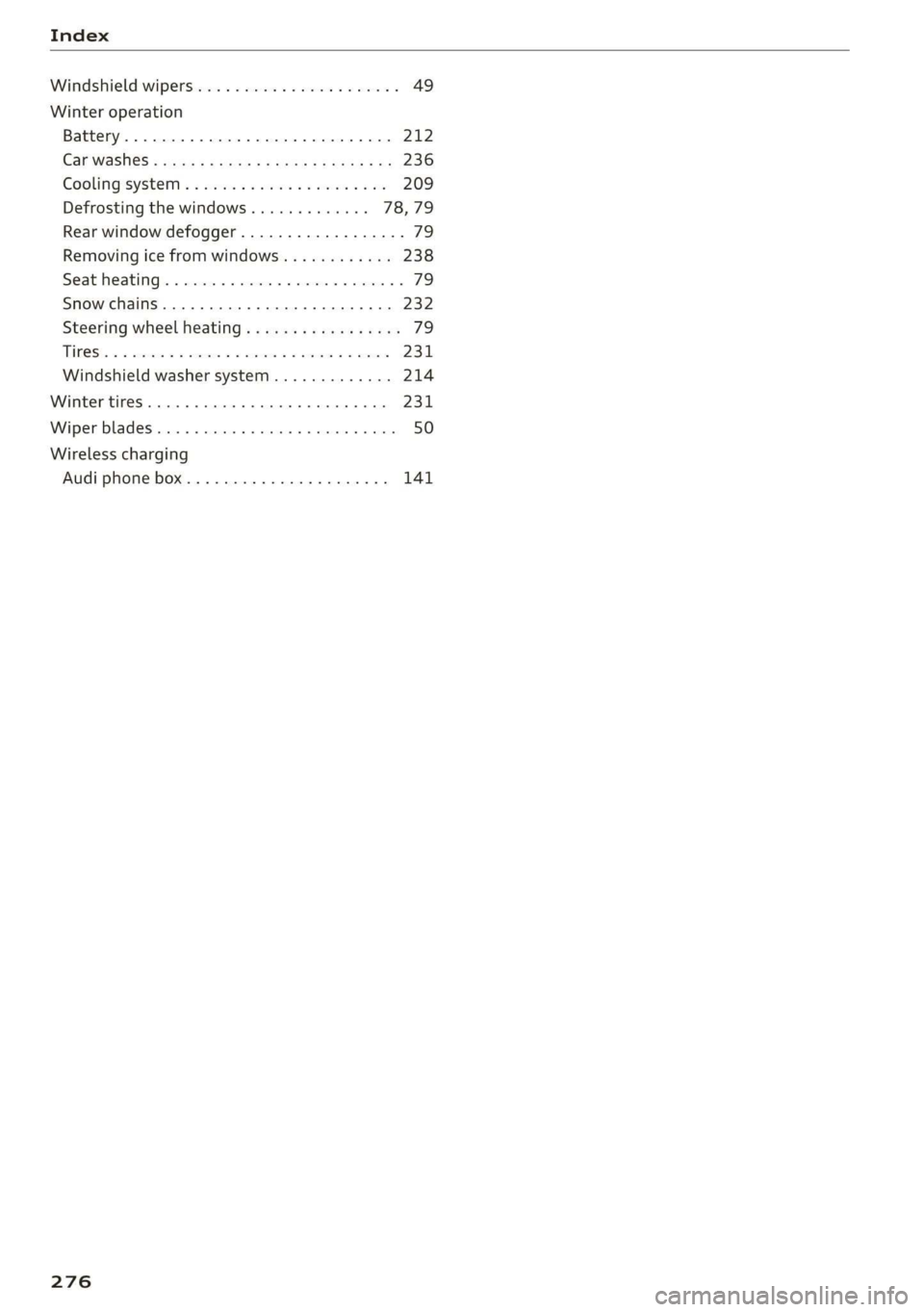
Windshield wipers...............-0.000- 49
Winter operation
Battery. ........ 0... eee eee 212
Car washes « cnn 3 < seus a 2 Been Fa eR a Be 236
Cooling’system « @ ses so sea 6 omen ea oe 209
Defrosting the windows............. 78,79
Rear window defogger................-- 79
Removing ice from windows............ 238
Seat heating......... 0... cee eee eee 79
Snow chains.............00 0c eee eee 232
Steering wheel heating................. 79
TIROS 5: 5 & cence 6 o camera eo aemene we nate @ we mee 231
Windshield washer system............. 214
Winter tires... 0.0... cece eee eee eee 231
Wiper blades........... 0.000 cece eee eee 50
Wireless charging
Audi phone box..............-0000005 141
276