key AUDI Q3 2019 User Guide
[x] Cancel search | Manufacturer: AUDI, Model Year: 2019, Model line: Q3, Model: AUDI Q3 2019Pages: 280, PDF Size: 72.73 MB
Page 36 of 280
Opening and closing
@) Tips
— Only use the vehicle key when you can see
the
vehicle.
— The vehicle can only be locked when the "P”
selector lever position is engaged.
— Do not use the vehicle key to lock and un-
lock when you are inside the vehicle. Other-
wise, you could trigger the anti-theft
alarm*. If this happens, press the @ unlock
button.
@ Tips
Applies to: vehicles with convenience key
— When unlocking or locking the vehicle, the
convenience key cannot be more than ap-
proximately 4 feet (1.5 m) away from the
door handle or luggage compartment.
— Unlocking with the convenience key (keyless
access) can be deactivated > page 33.
— To prevent the vehicle battery from dis-
charging, the energy management gradual-
ly switches off convenience functions that
are not needed. You then may no longer be
able to unlock your vehicle with the sensors.
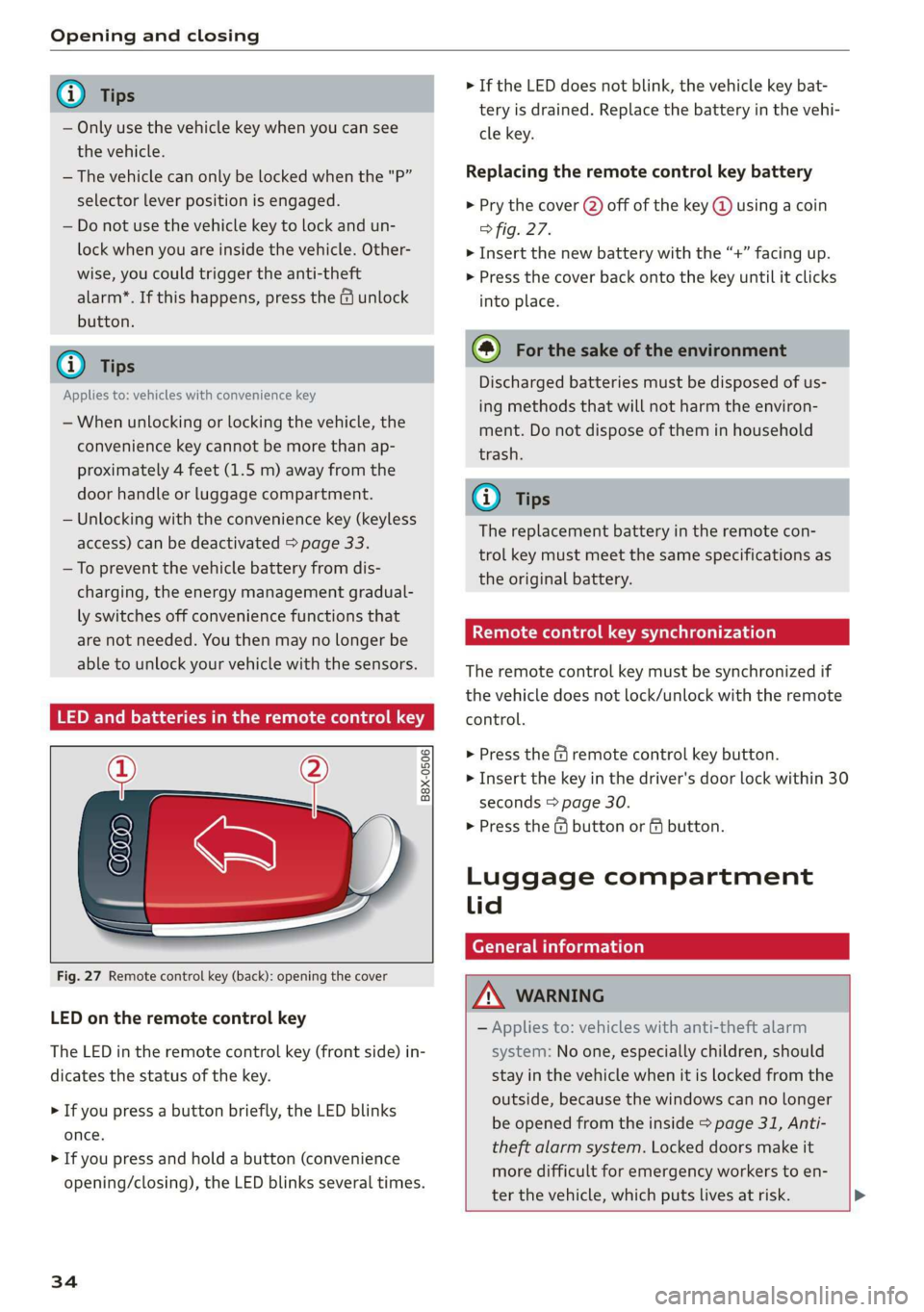
LED and batteries in the remote control key
B8X-0506
Fig. 27 Remote control key (back): opening the cover
LED on the remote control key
The LED in the remote control key (front side) in-
dicates the status of the key.
> If you press a button briefly, the LED blinks
once.
> If you press and hold a button (convenience
opening/closing), the LED blinks several times.
34
> If the LED does not blink, the vehicle key bat-
tery is drained. Replace the battery in the vehi-
cle key.
Replacing the remote control key battery
> Pry the cover (2) off of the key @ using a coin
fig. 27.
> Insert the new battery with the “+” facing up.
> Press the cover back onto the key until it clicks
into place.
@) For the sake of the environment
Discharged batteries must be disposed of us-
ing
methods that will not harm the environ-
ment. Do not dispose of them in household
trash.
G) Tips
The replacement battery in the remote con-
trol key must meet the same specifications as
the original battery.
etree wate ee Cele)
The remote control key must be synchronized if
the vehicle does not lock/unlock with the remote
control.
> Press the f remote control key button.
> Insert the key in the driver's door lock within 30
seconds > page 30.
> Press the ( button or fj button.
Luggage compartment
lid
General information
ZA WARNING
— Applies to: vehicles with anti-theft alarm
system: No one, especially children, should
stay in the vehicle when it is locked from the
outside, because the windows can no longer
be opened from the inside > page 31, Anti-
theft
alarm system. Locked doors make it
more difficult for emergency workers to en-
ter the vehicle, which puts lives at risk. >
Page 37 of 280
83A012721BA
Opening and closing
— Always close and lock the luggage compart-
ment lid and the doors when the vehicle is
not in use. Otherwise someone such as a
child could enter the vehicle through the
luggage compartment and become locked
inside it. To reduce the risk of injury, do not
allow children to play in or around the vehi-
cle.
—To reduce the risk of injuries by pinching,
make sure that no one is in the operating
area of the luggage compartment lid, in-
cluding the hinge areas and the upper and
lower edge of the luggage compartment lid.
—
After closing the luggage compartment lid,
make sure that it is latched. The luggage
compartment lid could open suddenly while
driving, which would increase the risk of an
accident.
— Never drive with the luggage compartment
lid ajar or open, because poisonous gases
from the surrounding area can enter the ve-
hicle interior and increase the risk of asphyx-
iation.
— Applies to: vehicles with power-operated or
sensor-controlled luggage compartment lid:
If there is a luggage rack (such as a bicycle
rack) on the luggage compartment lid, the
luggage compartment lid may not open
completely under certain circumstances or it
could close by itself if open due to the extra
weight. Therefore, the open luggage com-
partment lid must be given additional sup-
port or the cargo must first be removed
from the luggage rack.
— Applies to: vehicles with power-operated or
sensor-controlled luggage compartment lid:
Pay careful attention when closing the lug-
gage compartment lid. Otherwise, you could
cause serious injury to yourself or others de-
spite the pinch protection.
Q) Note
The luggage compartment lid can bump into
objects such as the garage ceiling when open-
ing and become damaged.
G) Tips
When the vehicle is locked, the luggage com-
partment lid can be unlocked separately by
pressing the << button on the vehicle key.
The luggage compartment lid locks automati-
cally when it is closed again.
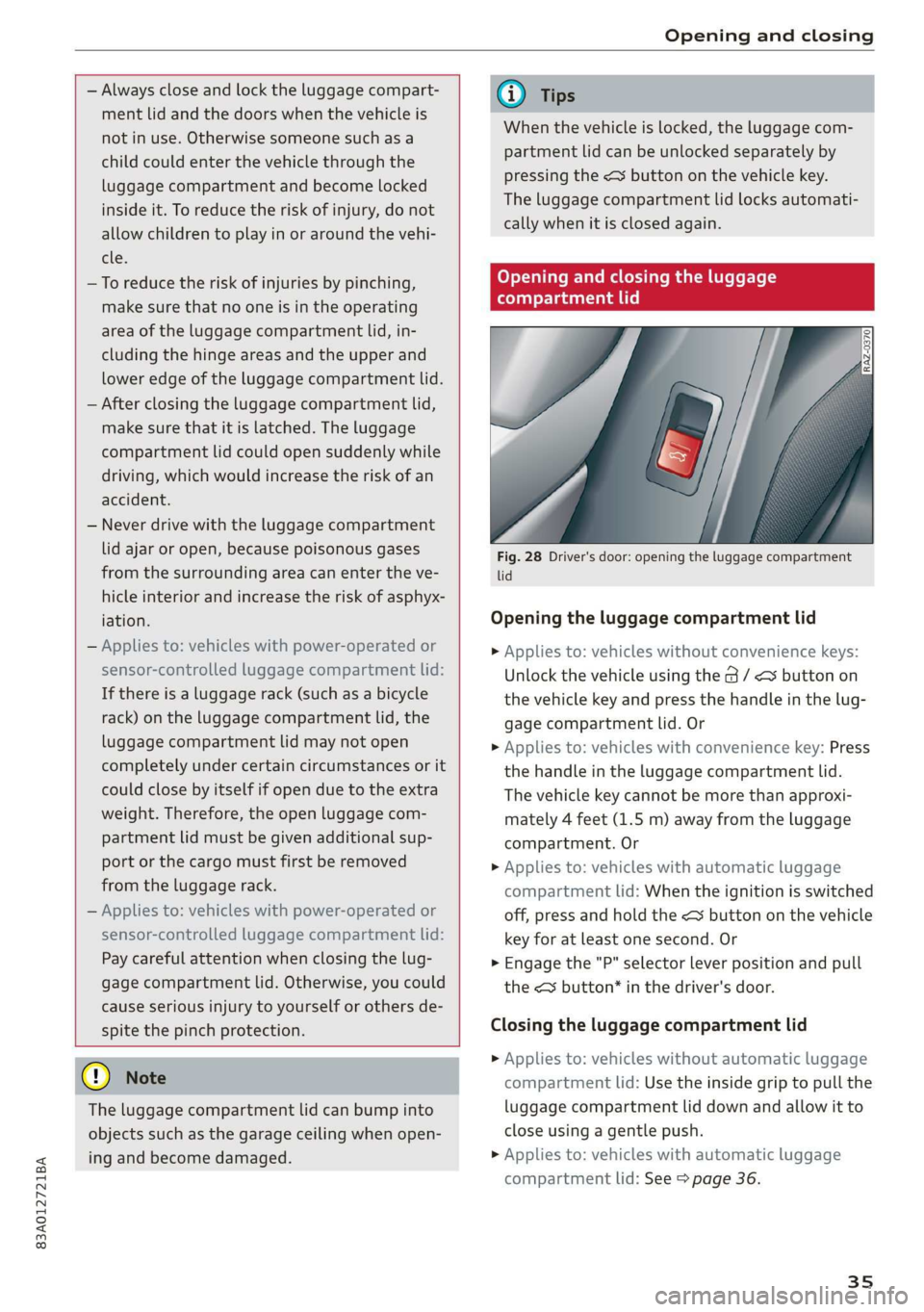
Opening and closing the luggage
compartment lid
Fig. 28 Driver's door: opening the luggage compartment
lid
Opening the luggage compartment lid
> Applies to: vehicles without convenience keys:
Unlock the vehicle using the G / < button on
the vehicle key and press the handle in the lug-
gage compartment lid. Or
> Applies to: vehicles with convenience key: Press
the handle in the luggage compartment lid.
The vehicle key cannot be more than approxi-
mately 4 feet (1.5 m) away from the luggage
compartment. Or
> Applies to: vehicles with automatic luggage
compartment lid: When the ignition is switched
off, press and hold the <3 button on the vehicle
key for at least one second. Or
> Engage the "P" selector lever position and pull
the << button’ in the driver's door.
Closing the luggage compartment lid
> Applies to: vehicles without automatic luggage
compartment lid: Use the inside grip to pull the
luggage compartment lid down and allow it to
close using a gentle push.
> Applies to: vehicles with automatic luggage
compartment lid: See > page 36.
35
Page 38 of 280
Opening and closing
Automatic luggage compartment lid
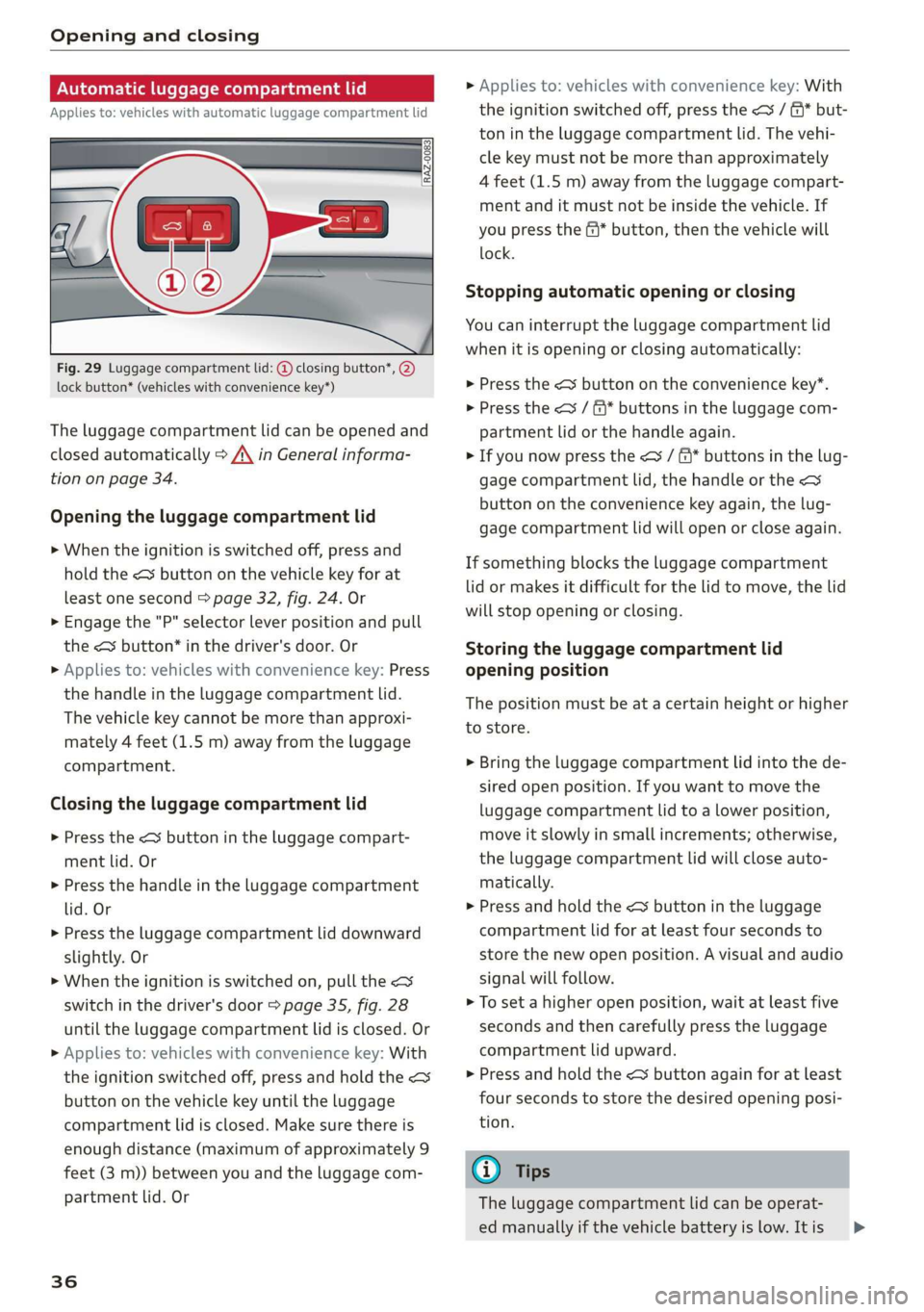
Applies to: vehicles with automatic luggage compartment lid
Fig. 29 Luggage compartment lid: @ closing button*, @)
lock button* (vehicles with convenience key*)
The luggage compartment lid can be opened and
closed automatically > A\ in General informa-
tion on page 34.
Opening the luggage compartment lid
> When the ignition is switched off, press and
hold the < button on the vehicle key for at
least one second > page 32, fig. 24. Or
> Engage the "P" selector lever position and pull
the < button* in the driver's door. Or
» Applies to: vehicles with convenience key: Press
the handle in the luggage compartment lid.
The vehicle key cannot be more than approxi-
mately 4 feet (1.5 m) away from the luggage
compartment.
Closing the luggage compartment lid
> Press the <% button in the luggage compart-
ment lid. Or
> Press the handle in the luggage compartment
lid. Or
> Press the luggage compartment lid downward
slightly. Or
> When the ignition is switched on, pull the <>
switch in the driver's door > page 35, fig. 28
until the luggage compartment lid is closed. Or
> Applies to: vehicles with convenience key: With
the ignition switched off, press and hold the <
button on the vehicle key until the luggage
compartment lid is closed. Make sure there is
enough distance (maximum of approximately 9
feet (3 m)) between you and the luggage com-
partment lid. Or
36
» Applies to: vehicles with convenience key: With
the ignition switched off, press the < / f)* but-
ton in the luggage compartment lid. The vehi-
cle key must not be more than approximately
4 feet (1.5 m) away from the luggage compart-
ment and it must not be inside the vehicle. If
you press the @* button, then the vehicle will
lock.
Stopping automatic opening or closing
You can interrupt the luggage compartment lid
when it is opening or closing automatically:
> Press the < button on the convenience key”.
> Press the
partment lid or the handle again.
> If you now press the < / f* buttons in the lug-
gage compartment lid, the handle or the
button on the convenience key again, the lug-
gage compartment lid will open or close again.
If something blocks the luggage compartment
lid or makes it difficult for the lid to move, the lid
will stop opening or closing.
Storing the luggage compartment lid
opening position
The position must be at a certain height or higher
to store.
> Bring the luggage compartment lid into the de-
sired open position. If you want to move the
luggage compartment lid to a lower position,
move it slowly in small increments; otherwise,
the luggage compartment lid will close auto-
matically.
> Press and hold the <3 button in the luggage
compartment lid for at least four seconds to
store the new open position. A visual and audio
signal will follow.
> To set a higher open position, wait at least five
seconds and then carefully press the luggage
compartment lid upward.
> Press and hold the <3 button again for at least
four seconds to store the desired opening posi-
tion.
@ Tips
The luggage compartment lid can be operat-
ed manually if the vehicle battery is low. It is >
Page 39 of 280
83A012721BA
Opening and closing
necessary to use more force when doing this.
Move the lid slowly to reduce the amount of
force needed.
Opening and closing the luggage
compartment lid with foot motion (kicking
movement)
Applies to: Vehicles with sensor-controlled luggage compart-
ment lid
BGA-0025
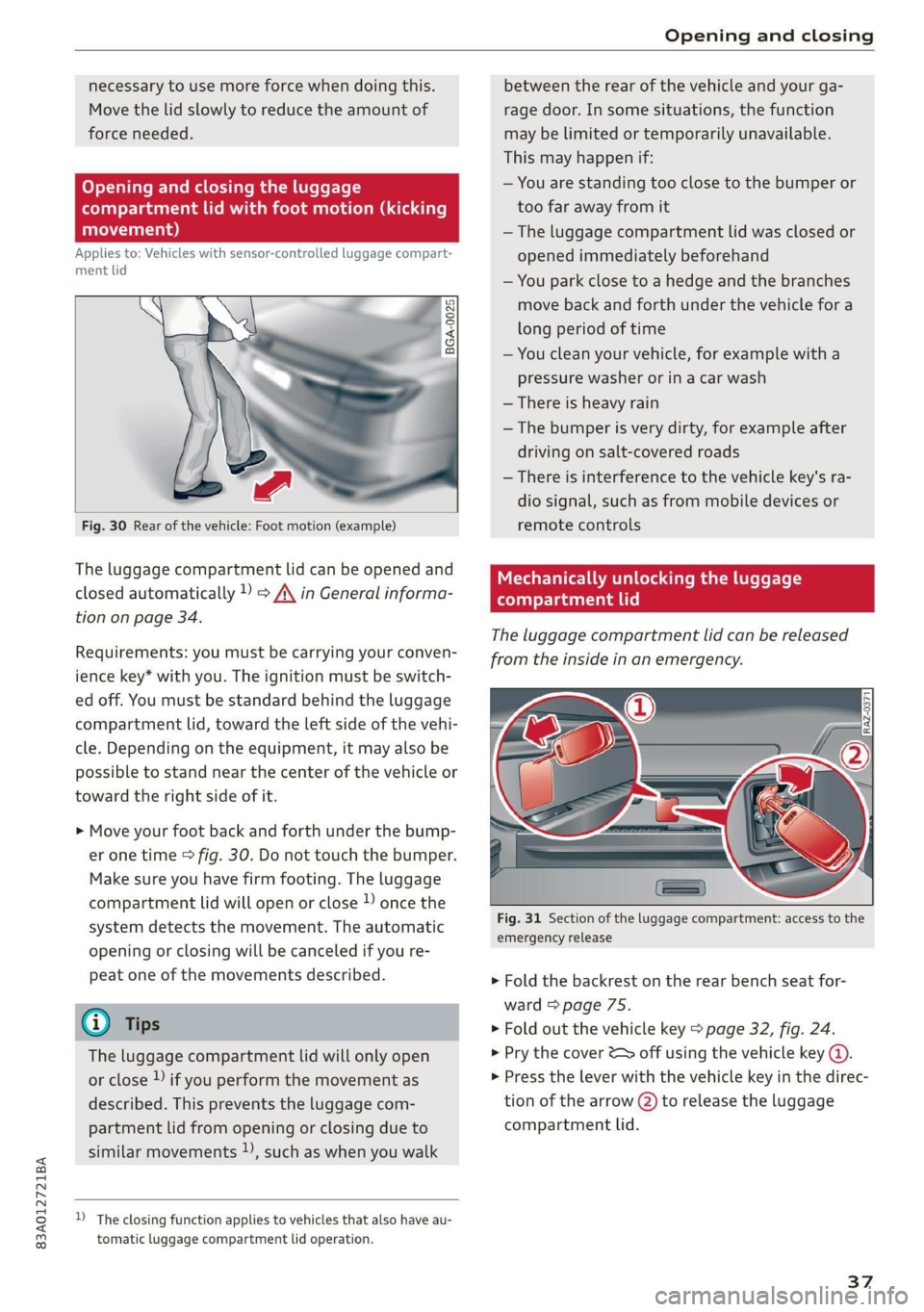
Fig. 30 Rear of the vehicle: Foot motion (example)
The luggage compartment lid can be opened and
closed automatically 1) > A\ in General informa-
tion on page 34.
Requirements: you must be carrying your conven-
ience key* with you. The ignition must be switch-
ed off. You must be standard behind the luggage
compartment lid, toward the left side of the vehi-
cle. Depending on the equipment, it may also be
possible to stand near the center of the vehicle or
toward the right side of it.
> Move your foot back and forth under the bump-
er one time > fig. 30. Do not touch the bumper.
Make sure you have firm footing. The luggage
compartment lid will open or close )) once the
system detects the movement. The automatic
opening or closing will be canceled if you re-
peat one of the movements described.
@ Tips
The luggage compartment lid will only open
or close ) if you perform the movement as
described. This prevents the luggage com-
partment lid from opening or closing due to
similar movements )), such as when you walk
D_ The closing function applies to vehicles that also have au-
tomatic luggage compartment lid operation.
between the rear of the vehicle and your ga-
rage door. In some situations, the function
may be limited or temporarily unavailable.
This may happen if:
— You are standing too close to the bumper or
too far away from it
— The luggage compartment lid was closed or
opened immediately beforehand
— You park close to a hedge and the branches
move back and forth under the vehicle for a
long period of time
— You clean your vehicle, for example with a
pressure washer or in a car wash
— There is heavy rain
—The bumper is very dirty, for example after
driving on salt-covered roads
— There is interference to the vehicle key's ra-
dio signal, such as from mobile devices or
remote controls
Mechanically unlocking the luggage
compartment lid
The luggage compartment lid can be released
from the inside in an emergency.
Fig. 31 Section of the luggage compartment: access to the
emergency release
> Fold the backrest on the rear bench seat for-
ward > page 75.
> Fold out the vehicle key > page 32, fig. 24.
> Pry the cover & off using the vehicle key ().
> Press the lever with the vehicle key in the direc-
tion of the arrow @) to release the luggage
compartment lid.
37
Page 40 of 280
Opening and closing
Child safety lock
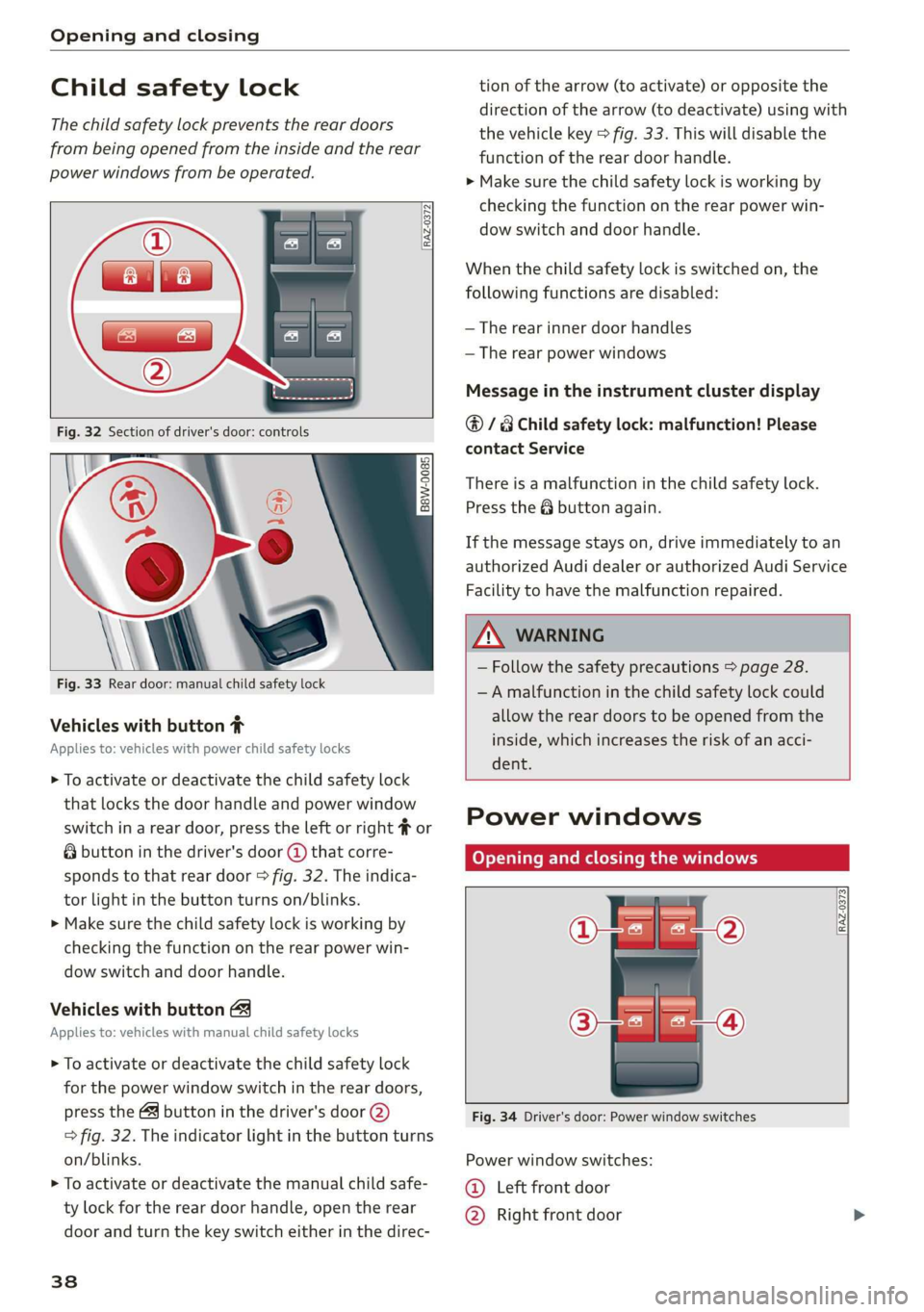
The child safety lock prevents the rear doors
from being opened from the inside and the rear
power windows from be operated.
RAZ-0372
B8W-0085
Fig. 33 Rear door: manual child safety lock
Vehicles with button #
Applies to: vehicles with power child safety locks
> To activate or deactivate the child safety lock
that locks the door handle and power window
switch in a rear door, press the left or right # or
& button in the driver's door @ that corre-
sponds to that rear door > fig. 32. The indica-
tor light in the button turns on/blinks.
> Make sure the child safety lock is working by
checking the function on the rear power win-
dow switch and door handle.
Vehicles with button
Applies to: vehicles with manual child safety locks
> To activate or deactivate the child safety lock
for the power window switch in the rear doors,
press the 4 button in the driver's door @)
> fig. 32. The indicator light in the button turns
on/blinks.
> To activate or deactivate the manual child safe-
ty lock for the rear door handle, open the rear
door and turn the key switch either in the direc-
38
tion of the arrow (to activate) or opposite the
direction of the arrow (to deactivate) using with
the vehicle key > fig. 33. This will disable the
function of the rear door handle.
> Make sure the child safety lock is working by
checking the function on the rear power win-
dow switch and door handle.
When the child safety lock is switched on, the
following functions are disabled:
— The rear inner door handles
— The rear power windows
Message in the instrument cluster display
@/8 Child safety lock: malfunction! Please
contact Service
There is a malfunction in the child safety lock.
Press the @ button again.
If the message stays on, drive immediately to an
authorized Audi dealer or authorized Audi Service
Facility to have the malfunction repaired.
ZA WARNING
— Follow the safety precautions > page 28.
—A malfunction in the child safety lock could
allow the rear doors to be opened from the
inside, which increases the risk of an acci-
dent.
Power windows
Opening and closing the windows
[RAZ-0373
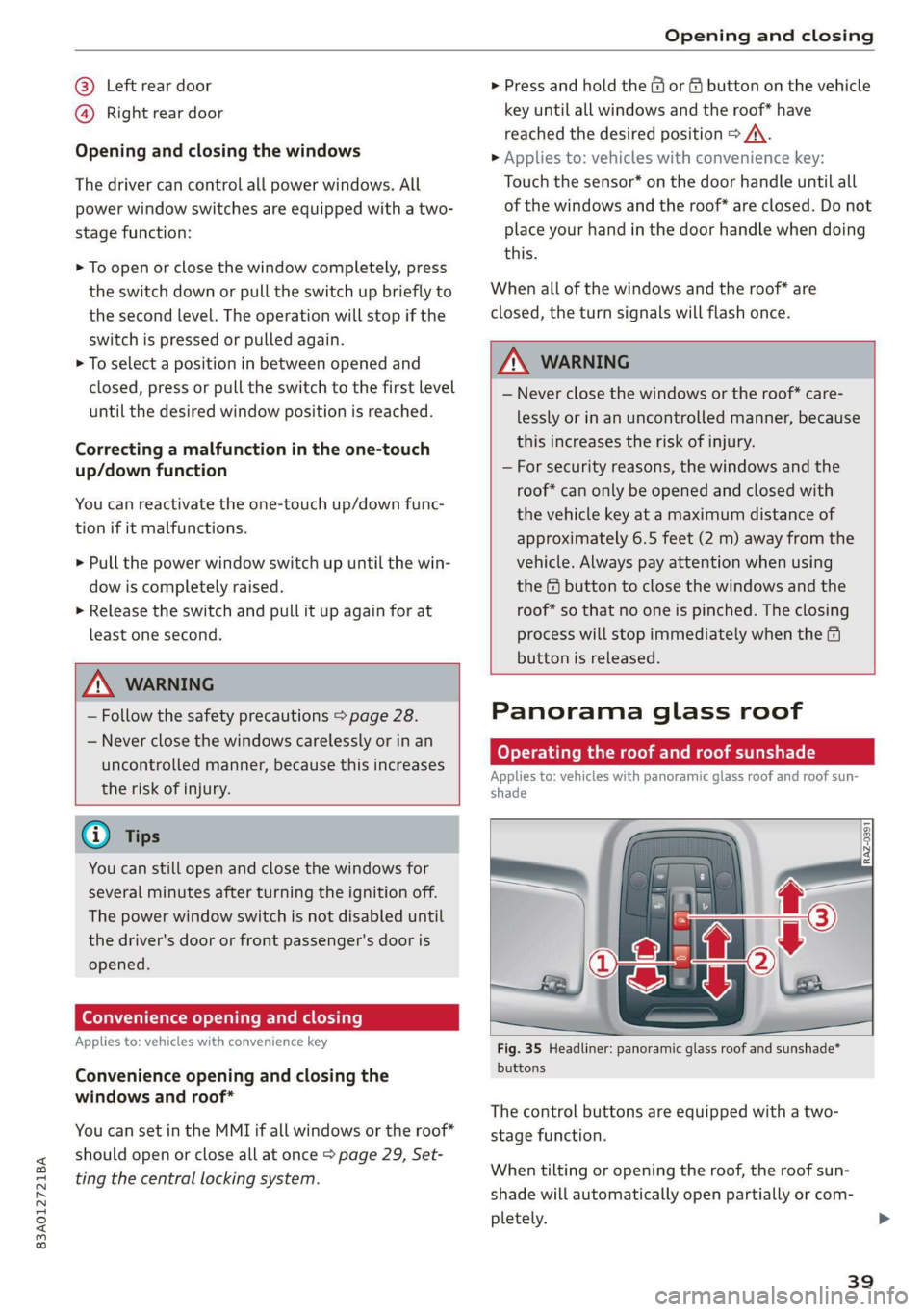
Fig. 34 Driver's door: Power window switches
Power window switches:
©@ Left front door
@ Right front door
Page 41 of 280
83A012721BA
Opening and closing
@® Left rear door
@® Right rear door
Opening and closing the windows
The driver can control all power windows. All
power window switches are equipped with a two-
stage function:
> To open or close the window completely, press
the switch down or pull the switch up briefly to
the second level. The operation will stop if the
switch is pressed or pulled again.
> To select a position in between opened and
closed, press or pull the switch to the first level
until the desired window position is reached.
Correcting a malfunction in the one-touch
up/down function
You can reactivate the one-touch up/down func-
tion if it malfunctions.
> Pull the power window switch up until the win-
dow is completely raised.
> Release the switch and pull it up again for at
least one second.
Z\ WARNING
— Follow the safety precautions > page 28.
— Never close the windows carelessly or in an
uncontrolled manner, because this increases
the risk of injury.
@) Tips
You can still open and close the windows for
several minutes after turning the ignition off.
The power window switch is not disabled until
the driver's door or front passenger's door is
opened.
Convenience opening and closing
Applies to: vehicles with convenience key
Convenience opening and closing the
windows and roof*
You can set in the MMI if all windows or the roof*
should open or close all at once > page 29, Set-
ting the central locking system.
> Press and hold the &@ or fj button on the vehicle
key until all windows and the roof* have
reached the desired position > /A\.
> Applies to: vehicles with convenience key:
Touch the sensor* on the door handle until all
of the windows and the roof* are closed. Do not
place your hand in the door handle when doing
this.
When all of the windows and the roof* are
closed, the turn signals will flash once.
ZN WARNING
— Never close the windows or the roof* care-
lessly or in an uncontrolled manner, because
this increases the risk of injury.
— For security reasons, the windows and the
roof* can only be opened and closed with
the vehicle key at a maximum distance of
approximately 6.5 feet (2 m) away from the
vehicle. Always pay attention when using
the f button to close the windows and the
roof* so that no one is pinched. The closing
process will stop immediately when the f
button is released.
Panorama glass roof
CeyeY Tee latnre maa Malel mie Mele arTe(]
Applies to: vehicles with panoramic glass roof and roof sun-
shade
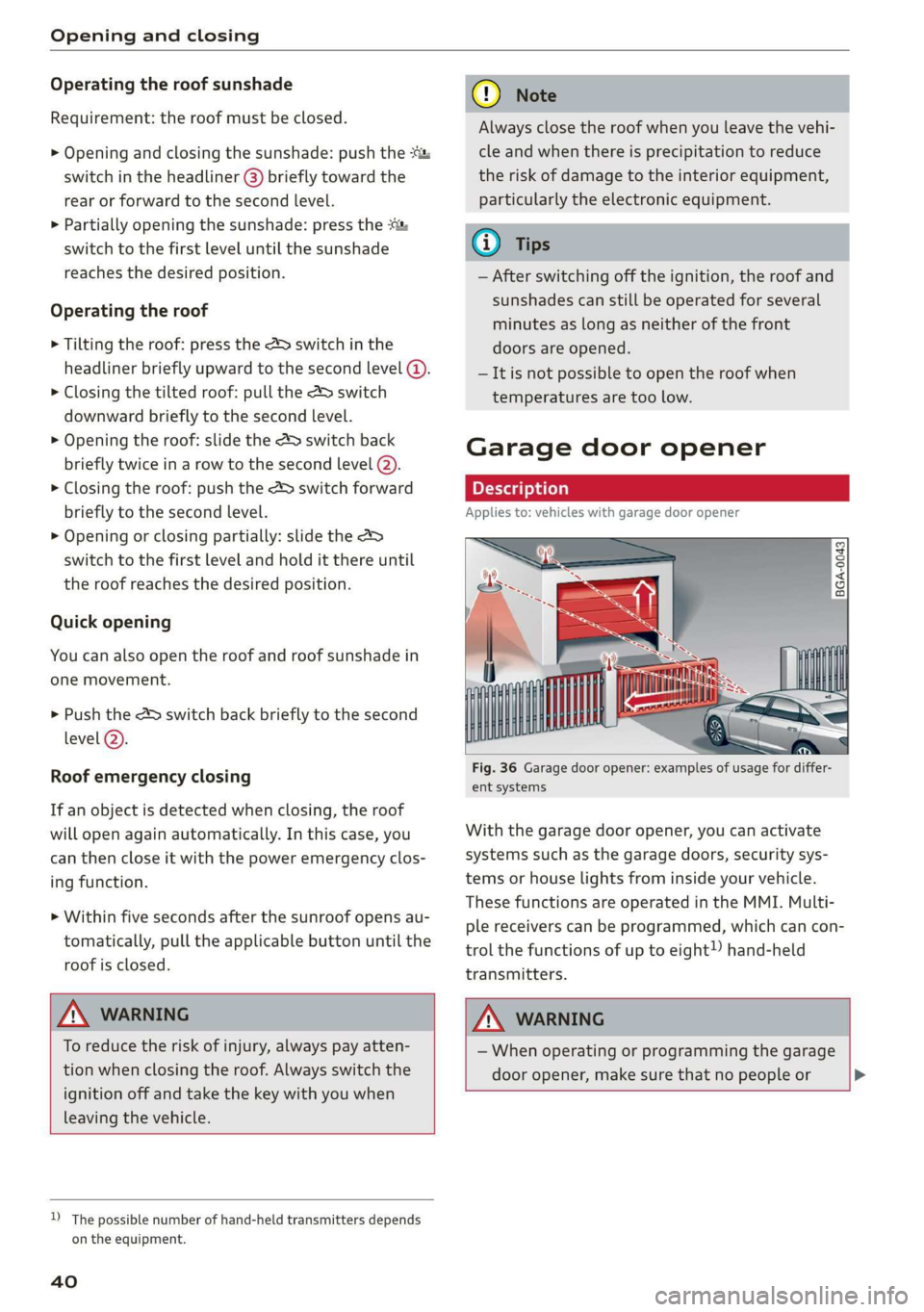
Fig. 35 Headliner: panoramic glass roof and sunshade*
buttons
The control buttons are equipped with a two-
stage function.
When tilting or opening the roof, the roof sun-
shade will automatically open partially or com-
pletely.
39
Page 42 of 280
Opening and closing
Operating the roof sunshade
Requirement: the roof must be closed.
> Opening and closing the sunshade: push the
switch in the headliner @) briefly toward the
rear or forward to the second level.
> Partially opening the sunshade: press the -&&
switch to the first level until the sunshade
reaches the desired position.
Operating the roof
> Tilting the roof: press the 4S switch in the
headliner briefly upward to the second level @).
> Closing the tilted roof: pull the A> switch
downward briefly to the second level.
> Opening the roof: slide the 2> switch back
briefly twice in a row to the second level @).
> Closing the roof: push the &> switch forward
briefly to the second level.
> Opening or closing partially: slide the A>
switch to the first level and hold it there until
the roof reaches the desired position.
Quick opening
You can also open the roof and roof sunshade in
one movement.
> Push the 4S switch back briefly to the second
level @).
Roof emergency closing
If an object is detected when closing, the roof
will open again automatically. In this case, you
can then close it with the power emergency clos-
ing function.
> Within five seconds after the sunroof opens au-
tomatically, pull the applicable button until the
roof is closed.
ZA WARNING
To reduce the risk of injury, always pay atten-
tion when closing the roof. Always switch the
ignition off and take the key with you when
leaving the vehicle.
D_ The possible number of hand-held transmitters depends
on the equipment.
40
Q®) Note
Always close the roof when you leave the vehi-
cle and when there is precipitation to reduce
the risk of damage to the interior equipment,
particularly the electronic equipment.
Gi) Tips
— After switching off the ignition, the roof and
sunshades can still be operated for several
minutes as long as neither of the front
doors are opened.
— It is not possible to open the roof when
temperatures are too low.
Garage door opener
Applies to: vehicles with garage door opener
i) + 3
2 4
go a
Fig. 36 Garage door opener: examples of usage for differ-
ent systems
With the garage door opener, you can activate
systems such as the garage doors, security sys-
tems or house lights from inside your vehicle.
These functions are operated in the MMI. Multi-
ple receivers can be programmed, which can con-
trol the functions of up to eight!) hand-held
transmitters.
ZA\ WARNING
— When operating or programming the garage
door opener, make sure that no people or >
Page 60 of 280
Sitting correctly and safely
> Insert a suitable tool such as the the vehicle key
or mechanical key into the release point on the
base (@) and press the button (2). Pull the head
restraint out of the backrest at the same time
> AZ in General information on page 57.
Installing the headrests
Applies to: vehicles with removable head restraints
> Fold the backrest forward slightly > page 75.
> Slide the posts on the head restraint down into
the guides until the posts click into place.
> Press the button @) and slide the head restraint
all the way down. It should not be possible to
remove the head restraint from the backrest
without pressing the button.
Safety belts
Each seat is equipped with a three-point safety
belt. Safety belts that are worn correctly are the
most effective way to reduce the risk of serious or
fatal injuries in a collision. Therefore, wear your
safety belt correctly and make sure that all vehi-
cle passengers are also wearing their safety belts
correctly when the vehicle is moving.
Even though your vehicle is equipped with an air-
bag system, every vehicle passenger must still al-
ways wear the appropriate safety belt. In addi-
tion to their normal protective function, safety
belts also hold vehicle occupants in the correct
seating position in the event of a collision so that
the airbags can deploy correctly and provide addi-
tional protection. Safety belts provide protection
during collisions when the airbags do not deploy
or if they have already deployed.
Z\ WARNING
The risk of serious or fatal injury increases if
the safety belt is not fastened, if it is worn in-
correctly, or if it is damaged.
— All vehicle occupants, including the driver,
must fasten their safety belts correctly be-
fore every trip and must always keep their
safety belts fastened during the trip, regard-
less of whether the seat is equipped with an
airbag or not. This also applies to children
58
that are seated in a child safety seat that is
appropriate for their weight and age and
that is secured with a safety belt.
In the event of a collision, vehicle occupants
that are not wearing safety belts could be
propelled through the vehicle interior and
collide with vehicle components, such as the
steering wheel, instrument panel, wind-
shield, or doors. In some situations, vehicle
occupants could also be ejected from the ve-
hicle. Vehicle occupants in the rear seats
who do not wear safety belts not only en-
danger themselves, but also other people in
the vehicle.
Only one person may be fastened with a
safety belt at a time. Never secure more
than one person, including children, with a
single safety belt.
Never allow children or infants to ride on an-
other person's lap and be belted into the
safety belt with them.
Insert the belt buckle only in the belt latch
belonging to the corresponding seat, so that
the protective function is not impaired.
To ensure the maximum protective function
of the safety belts, all vehicle passengers
must sit in the correct seating position
=> page 53.
Check the condition of your vehicle’s safety
belts regularly. If you find damage to the
belt webbing, the belt connections, the re-
tractor, or the buckle, have the damaged
safety belt replaced by an authorized Audi
dealer or authorized Audi Service Facility.
The safety belts must not be removed or
modified in any way. Do not attempt to re-
pair the safety belts yourself.
Safety belts that are strained during an acci-
dent, and thus stretched, must be replaced
by an authorized Audi dealer or authorized
Audi Service Facility.
Page 74 of 280
Stowing and using
Stowing and using
Power sources
When the ignition is switched on, you may be
able to use the electric power sources for exter-
nal devices, depending on the vehicle equipment.
12 volt sockets
You can connect electrical accessories to the 12
volt sockets. The power usage must not exceed
120 watts.
The 12 volt sockets are labeled with the 12V
symbol. They are located in the front center con-
sole, in the rear*, and in the left floor panel in the
luggage compartment*.
USB ports
Applies to: vehicles with USB port
You can charge mobile devices using the USB
ports. The USB ports are labeled with the «> or
(4 symbol or CHARGE ONLY.
ZX WARNING
— To reduce the risk of fatal injury, store all
connected devices securely when driving so
that they do not move around inside the ve-
hicle when braking or in the event of an acci-
dent.
— Incorrect usage can lead to serious injuries
or burns. To reduce the risk of injuries, never
leave children unattended in the vehicle
with the key.
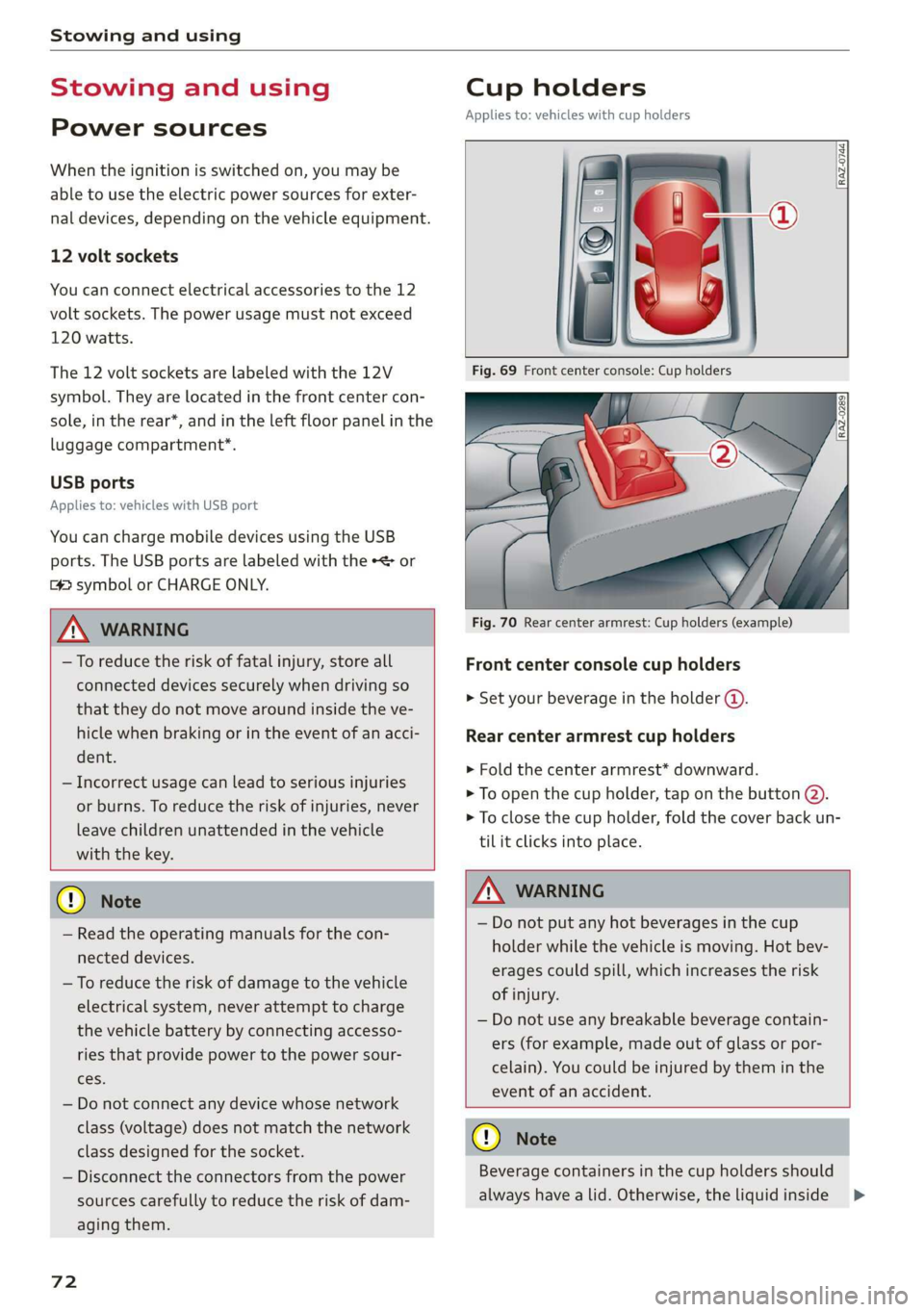
Cup holders
Applies to: vehicles with cup holders
RAZ-0744,
Fig. 70 Rear center armrest: Cup holders (example)
Front center console cup holders
> Set your beverage in the holder ().
Rear center armrest cup holders
> Fold the center armrest* downward.
> To open the cup holder, tap on the button @).
> To close the cup holder, fold the cover back un-
til it clicks into place.
© Note
— Read the operating manuals for the con-
nected devices.
— To reduce the risk of damage to the vehicle
electrical system, never attempt to charge
the vehicle battery by connecting accesso-
ries that provide power to the power sour-
ces.
— Do not connect any device whose network
class (voltage) does not match the network
class designed for the socket.
— Disconnect the connectors from the power
sources carefully to reduce the risk of dam-
aging them.
72
Z\ WARNING
— Do not put any hot beverages in the cup
holder while the vehicle is moving. Hot bev-
erages could spill, which increases the risk
of injury.
— Do not use any breakable beverage contain-
ers (for example, made out of glass or por-
celain). You could be injured by them in the
event of an accident.
CG) Note
Beverage containers in the cup holders should
always
have a lid. Otherwise, the liquid inside
>
Page 75 of 280
83A012721BA
Stowing and using
could spill and cause damage to the vehicle
equipment.
Additional storage
You will find a variety of storage compartments
and holders at various locations in the vehicle.
— Glove compartment: The glove compartment
can be locked* using the vehicle key > page 32.
— Holders for a notepad and a pen in the glove
compartment
— Storage compartment in the cockpit on the
driver's side
— Storage compartments in the door trim panel
— Storage compartment* under the left front seat
— Storage compartment under the front center
armrest*
— Storage compartment* under the right front
seat
— Net* behind the front seats
— Storage compartment* at the end of the rear
center console
— Garment hooks in the rear
— Storage compartments next to the rear bench
seat
— Bag hooks* in the luggage compartment
ZA WARNING
—To reduce the risk of injury, make sure all
storage compartments are always closed
while driving.
— Loose objects can be thrown around the ve-
hicle interior during sudden driving or brak-
ing maneuvers, which increases the risk of
an accident. Store objects securely while
driving.
— Only use the storage compartments in the
door trim panels to store small objects that
will not stick out of the compartment and
impair the range of the side airbags.
— Only lightweight clothing should be hung
from the garment hooks in the vehicle. The
pockets of the clothing must not contain any
heavy, breakable, or sharp-edged objects.
Such objects endanger vehicle occupants
and increase the risk of injury during sudden
driving or braking maneuvers or in an acci-
dent, especially if the airbags deploy.
— Make sure your view toward the rear is not
blocked, for example by hanging clothing or
objects in the vehicle.
G) Tips
Applies to: vehicles with Wi-Fi:Do not place
any metal objects in the storage compart-
ment* on the end of the rear center console,
because they could impair the Wi-Fi antenna
function.
Luggage compartment
General information
All pieces of luggage or objects must be securely
fastened in the luggage compartment. Note the
following to maintain good vehicle handling:
> Distribute the load evenly in the luggage com-
partment.
> Stow heavy luggage as far forward in the lug-
gage compartment as possible.
» Use non-elastic cords attached to the tie-downs
to secure objects.
ZA WARNING
— The luggage compartment cover must al-
ways be securely fastened when in use to re-
duce the risk of an accident.
— The storage compartment must not be used
to transport heavy objects, hard objects, or
animals. Such objects endanger vehicle oc-
cupants and increase the risk of injury dur-
ing sudden driving or braking maneuvers or
in an accident.
— Loose objects can be thrown around the ve-
hicle interior during sudden driving or brak-
ing maneuvers, which increases the risk of
an accident. Always stow objects securely in
the luggage compartment and secure them
at the tie-downs. Use straps suitable for
heavy objects.
—If pieces of luggage or objects are secured
to the tie-downs with unsuitable or dam-
aged straps, this can increase the risk of
73