key AUDI Q3 2019 Owner's Manual
[x] Cancel search | Manufacturer: AUDI, Model Year: 2019, Model line: Q3, Model: AUDI Q3 2019Pages: 280, PDF Size: 72.73 MB
Page 81 of 280
83A012721BA
Warm and cold
The air vents are adjustable > page 79.
Air vents are located under the front seats and on
the end of the center console to heat the rear of
the vehicle. You can adjust the amount of air and
the air distribution using the thumbwheels.
& Defrosting
The windshield and side windows are defrosted
or cleared of condensation as quickly as possible.
The maximum amount of air flows mainly from
the vents below the windshield. Recirculation
mode switches off. The temperature should be
set at +72°F (22°C) or higher. The temperature is
controlled automatically. In the § setting, the
A/C cooling mode switches on automatically, de-
pending on the outside air temperature.
The AUTO button switches the defroster off.
<= Recirculation mode
In recirculation mode, the air inside the vehicle is
circulated and filtered. This prevents the unfil-
tered air outside the vehicle from entering the
vehicle interior. The recirculation mode can be
turned on manually or automatically”.
Switching recirculation mode on and off: Press
the <> button.
Automatic recirculation mode®*: The air quality
sensor that is designed for diesel and gasoline
exhaust automatically switches the recirculation
mode on or off depending on the level of pollu-
tants in the outside air. Auto recirculation can be
switched on or off.
Applies to: MMI: Select on the home screen: Ve-
hicle > Climate control > Auto recirculation.
You can press either the <, AUTO or §% button
to switch recirculation mode off.
@ Rear window defogger
The rear window defogger only operates when
the engine is running. It switches off automati-
cally after approximately 10 to 20 minutes, de-
pending on the outside temperature.
To prevent the rear window defogger from
switching off automatically, press and hold the
® button for more than two seconds. This re-
mains stored up to approximately 15 minutes af-
ter turning off the ignition.
a Seat heating*
The seat heating temperature can be set at mul-
tiple levels. Press af once to switch on the highest
level. Press af again to decrease the heat output
one level at a time. The seat heating is off when
the LED in the button is off.
Adjusting the vents
You can open or close the center and rear vents in
the cockpit as well as the vents in the rear center
console using the thumbwheels. The levers ad-
just the direction of the airflow from the vents.
Steering wheel heating
Sy ieee Keli
Applies to: vehicles with steering wheel heating
> Press the @ © page 26, fig. 19 button on the
multifunction steering wheel to switch the
steering wheel heating on and off.
@) Tips
The steering wheel heating settings are stor-
ed automatically and assigned to the vehicle
key that is in use.
Te
Applies to: vehicles with steering wheel heating
@& Steering wheel heating: on / Steering wheel
heating: off
This message appears if you switched the steer-
ing wheel heating on or off by pressing the but-
ton on the multifunction steering wheel.
79
Page 82 of 280
Driving
Driving
Starting the vehicle
eta
Applies to: vehicles with convenience key
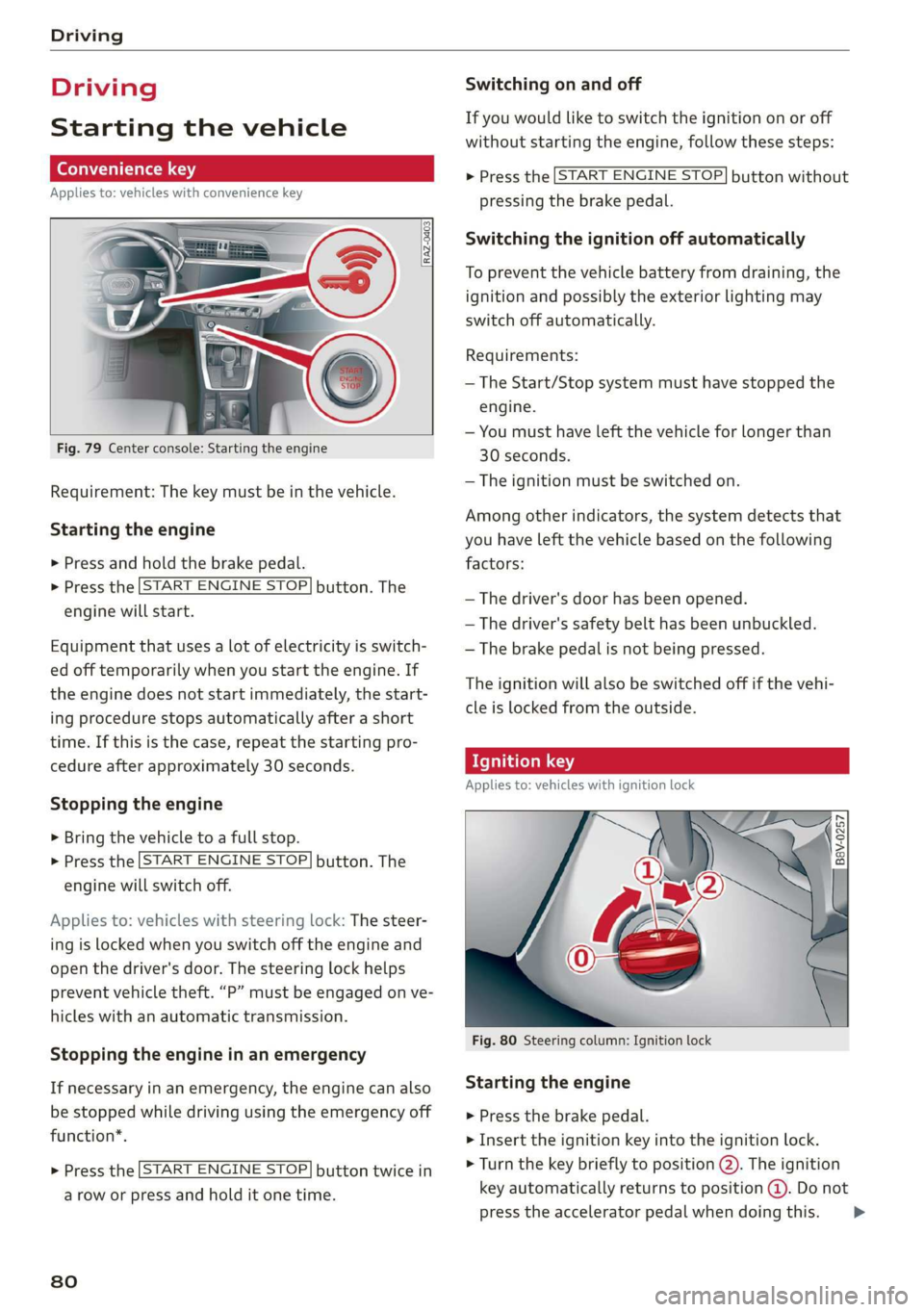
Fig. 79 Center console: Starting the engine
Requirement: The key must be in the vehicle.
Starting the engine
> Press and hold the brake pedal.
> Press the [START ENGINE STOP.
engine will start.
button. The
Equipment that uses a lot of electricity is switch-
ed off temporarily when you start the engine. If
the engine does not start immediately, the start-
ing procedure stops automatically after a short
time. If this is the case, repeat the starting pro-
cedure after approximately 30 seconds.
Stopping the engine
> Bring the vehicle to a full stop.
> Press the [START ENGINE STOP
engine will switch off.
button. The
Applies to: vehicles with steering lock: The steer-
ing is locked when you switch off the engine and
open the driver's door. The steering lock helps
prevent vehicle theft. “P” must be engaged on ve-
hicles with an automatic transmission.
Stopping the engine in an emergency
If necessary in an emergency, the engine can also
be stopped while driving using the emergency off
function*.
START ENGINE STOP > Press the button twice in
a row or press and hold it one time.
80
Switching on and off
If you would like to switch the ignition on or off
without starting the engine, follow these steps:
START ENGINE STOP > Press the button without
pressing the brake pedal.
Switching the ignition off automatically
To prevent the vehicle battery from draining, the
ignition and possibly the exterior lighting may
switch off automatically.
Requirements:
— The Start/Stop system must have stopped the
engine.
— You must have left the vehicle for longer than
30 seconds.
— The ignition must be switched on.
Among other indicators, the system detects that
you have left the vehicle based on the following
factors:
— The driver's door has been opened.
— The driver's safety belt has been unbuckled.
— The brake pedal is not being pressed.
The ignition will also be switched off if the vehi-
cle is locked from the outside.
eT
Applies to: vehicles with ignition lock
ny 6 a =
> @ oO
Fig. 80 Steering column: Ignition lock
Starting the engine
» Press the brake pedal.
> Insert the ignition key into the ignition lock.
> Turn the key briefly to position @). The ignition
key automatically returns to position @. Do not
press the accelerator pedal when doing this. >
Page 83 of 280
83A012721BA
Driving
> The engine will start and the vehicle will then
be ready to drive.
Equipment that uses a lot of electricity is switch-
ed off temporarily when you start the engine. If
the engine does not start immediately, stop the
starting procedure by turning the ignition key to
position © and repeat after 30 seconds.
If it is difficult to turn the key to position @, turn
the steering wheel back and forth slightly to re-
lease the steering lock.
Stopping the engine
> Bring the vehicle to a full stop.
> Turn the key to position @). The engine will
switch off.
Activating the steering lock
Applies to: vehicles with steering lock
The steering lock helps prevent vehicle theft.
> Remove the ignition key.
> Turn the steering wheel until the steering
wheel audibly locks.
Switching the ignition on or off
If you would like to switch the ignition on or off
without starting the engine, follow these steps:
> Switching on: turn the key to position @.
> Switching off: turn the key to position ©.
Z\ WARNING
Never remove the ignition key from the igni-
tion lock while the vehicle is moving. Other-
wise, the steering lock could engage and you
would not be able to steer the vehicle, which
increases the risk of an accident.
General information
more force to steer and brake the vehicle.
The fact that you cannot steer and brake as
usual may increase the risk of accidents and
serious injuries.
— If you leave the vehicle, switch the ignition
off and take the key with you. This applies
particularly when children remain in the ve-
hicle. Otherwise, children could start the ve-
hicle or operate electrical equipment (such
as power windows), which increases the risk
of an accident.
— Always select the “P” selector lever position
when parking the vehicle; otherwise, the ve-
hicle could roll away.
Z\ WARNING
—To reduce the risk of asphyxiation, never al-
low the engine to run in confined spaces.
— Never turn off the engine before the vehicle
has come to a complete stop. Switching it
off before the vehicle has stopped may im-
pair the function of the brake booster and
power steering. You would then need to use
@) Note
— Avoid high engine speed, full throttle, and
heavy engine load if the engine has not
reached operating temperature yet. You
could damage the engine.
— If the engine has been under heavy load for
an extended period of time, heat builds up
in the engine compartment after the engine
is switched off and there is a risk of damag-
ing the engine. For this reason, let the en-
gine run at idle for approximately two mi-
nutes before shutting it off.
G) Tips
— Brief noises are normal when starting and
stopping the vehicle and are no cause for
concern.
—For up to 10 minutes after stopping the en-
gine, the radiator fan may turn on again au-
tomatically or it may continue to run, even if
the ignition is switched off.
— It may not be possible to start the vehicle in
extremely low temperatures.
Messages
BE Engine start system: malfunction! Please
contact Service
There is a malfunction in the engine starting sys-
tem. Drive immediately to an authorized Audi
dealer or authorized Audi Service Facility to have
the malfunction repaired.
81
>
Page 84 of 280
Driving
B Remote control key: key not detected. Is the
key still in the vehicle?
The vehicle key was removed from the vehicle
while the engine is running. If the vehicle key is
no longer in the vehicle, you cannot switch the ig-
nition on or start the engine once you stop it. You
also cannot lock the vehicle from the outside.
Remote control key: hold back of key
against the designated area. See owner's man-
ual
The battery in the vehicle key may be drained or
there may be a malfunction. To start the vehicle,
you must also hold the vehicle key against the lo-
cation shown ?) & page 80, fig. 79.
If the malfunction remains, drive immediately to
an authorized Audi dealer or authorized Audi
Service Facility to have the malfunction correct-
ed.
When driving
Starting to drive, stopping, and parking
Starting from a stop
» Press and hold the brake pedal.
> Start the engine.
> Select a gear.
> Release the parking brake.
> Release the brake pedal. The vehicle may roll.
> Press the accelerator pedal to accelerate.
Stopping and parking
> Bring the vehicle to a full stop and press and
hold the brake pedal.
> Set the parking brake.
> Select the “P” selector lever position to secure
the vehicle from rolling away.
> Switch off the ignition before leaving the vehi-
cle.
> Turn the steering wheel when parking on in-
clines so that the wheels will roll into the curb
if the vehicle starts moving.
On hills, activate the parking brake first and then
shift into the "P" selector lever position. This pre-
vents too much stress from being placed on the
locking mechanism.
82
AN WARNING
—To reduce the risk of an accident, always se-
cure your vehicle from rolling.
— The vehicle can roll even when the engine is
switched off.
— Unintended vehicle movement can lead to
serious injuries.
— Do not inadvertently press the accelerator
pedal when the vehicle is stationary. Other-
wise the risk of an accident increases be-
cause the vehicle will start to move immedi-
ately, even if the parking brake is set.
C) Note
If you have to stop on an incline, always press
the brake pedal to hold the vehicle in place to
reduce the risk of the vehicle rolling back-
ward. Do not try to hold the vehicle in place
by pressing and holding the accelerator pedal.
The transmission can overheat, which increas-
es the risk of damage.
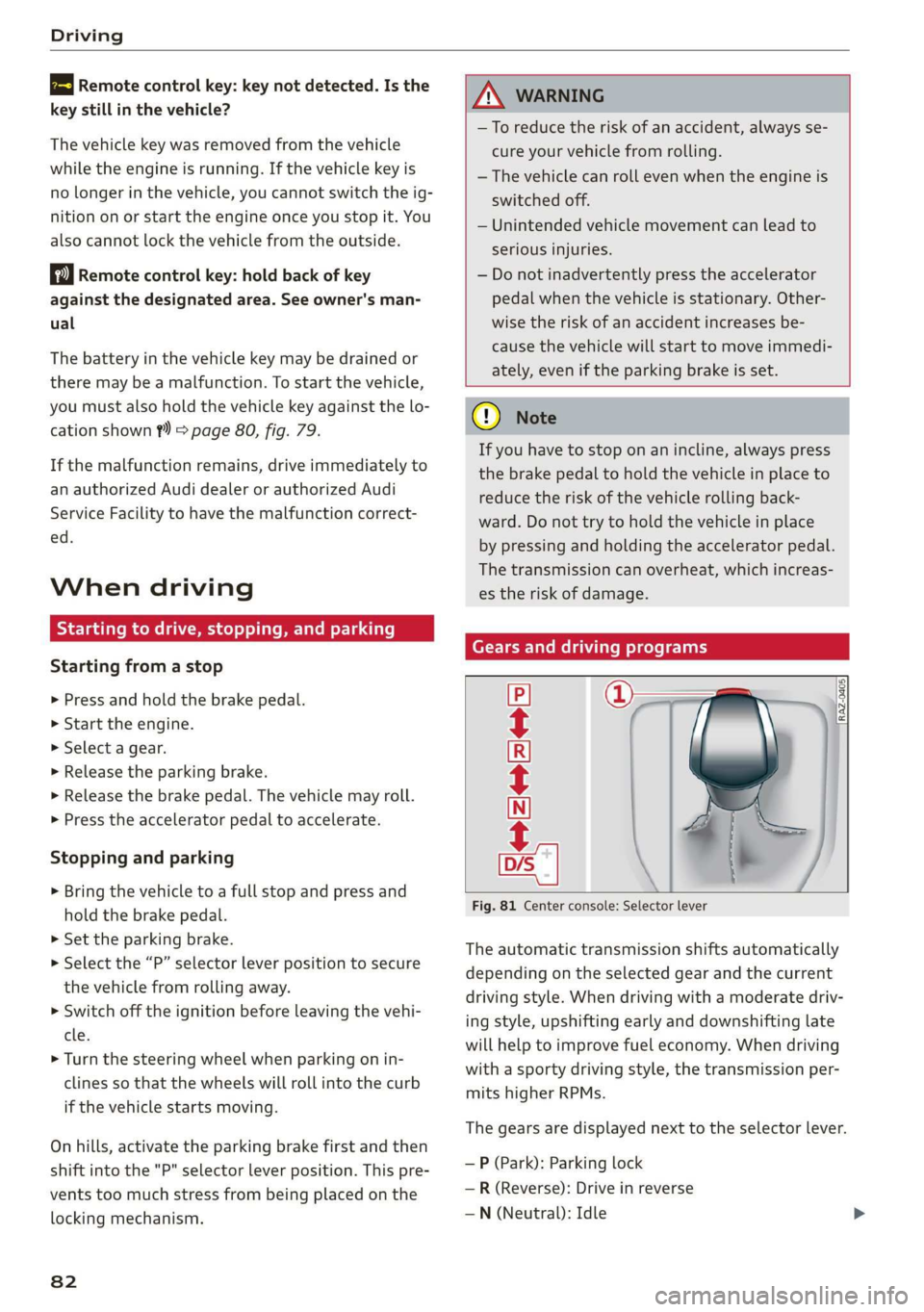
Gears and driving programs
=i
Fig. 81 Center console: Selector lever
CECRSE
The automatic transmission shifts automatically
depending on the selected gear and the current
driving style. When driving with a moderate driv-
ing style, upshifting early and downshifting late
will help to improve fuel economy. When driving
with a sporty driving style, the transmission per-
mits higher RPMs.
The gears are displayed next to the selector lever.
— P (Park): Parking lock
—R (Reverse): Drive in reverse
—N (Neutral): Idle
Page 93 of 280
83A012721BA
Driving
> To start driving and release the parking brake
automatically, press the accelerator pedal as
usual.
In addition to releasing the parking brake auto-
matically, other convenience and safety functions
are available when you start driving > page 92,
Hold assist.
Preventing the automatic parking brake
release
The vehicle could begin rolling unintentionally,
depending on the hill or if towing a trailer.
> To prevent the parking brake from releasing au-
tomatically, pull and hold the switch and
press the accelerator pedal. The parking brake
remains set and prevents the vehicle from roll-
ing backward.
> You can release the ©) switch again once you
are sure that you are giving enough driving
force
to the wheels by pressing the accelerator
pedal.
Emergency braking function
You can use the emergency braking function in an
emergency situation, or if the standard brake op-
eration malfunctions or is disabled.
> Pull and hold the ©) switch.
> As soon as you release the ©) switch or acceler-
ate, the braking will stop.
Pulling and holding the ©) switch while driving
the vehicle activates the emergency braking func-
tion. The vehicle is braked at all four wheels by
activating the hydraulic brake system. The brak-
ing effect is similar to heavy braking > A\.
To reduce the risk of activating the emergency
braking by mistake, a warning tone (buzzer)
sounds when the ©) switch is pulled. Emergency
braking stops as soon as the ©) switch is released
or the accelerator pedal is pressed.
Parking
> Press the brake pedal to stop the vehicle.
> Pull the ©) switch to set the parking brake.
> Select “P”.
> Turn the engine off > A\.
> Turn the steering wheel when parking on in-
clines so that the wheels will roll into the curb
if the vehicle starts moving.
ZA\ WARNING
— Do not press the accelerator pedal inadver-
tently if a gear is selected when the vehicle
is stationary and the engine is running. Oth-
erwise, the vehicle will start to move imme-
diately and this could result in an accident.
— Emergency braking should only be used in
an emergency, when the normal brake pedal
has failed or the brake pedal is obstructed.
During emergency braking, your vehicle will
brake similar to heavy braking. ESC and the
associated components (ABS, ASR, EDL) can-
not overcome the laws of physics. Around
curves and when road or weather conditions
are bad, a full brake application can cause
the vehicle to skid or the rear end to swerve,
which increases the risk of an accident.
— Always set the parking brake when leaving
your vehicle, even if for a short period of
time. If the parking brake is not set, the ve-
hicle could roll away, increasing the risk of
an accident.
— If the power supply fails, you cannot set the
parking brake if it is released. In this case,
park the vehicle on level ground and secure
it by engaging the "P” gear. Contact an au-
thorized Audi dealer or authorized Audi
Service Facility for assistance.
— If you leave the vehicle, switch the ignition
off and take the key with you. This applies
particularly when children remain in the ve-
hicle. Otherwise, children could start the ve-
hicle, release the parking brake, or operate
electrical equipment such as power win-
dows, which increases the risk of an acci-
dent.
— No one, especially children, should remain in
the vehicle when it is locked. Locked doors
make it more difficult for emergency work-
ers to get into the vehicle, which puts lives
at risk.
91
Page 142 of 280
Telephone
Setup
Connecting a mobile device to the MMI
Applies to: vehicles with telephone
Requirement
The vehicle must be stationary and the ignition
must be switched on.
The Bluetooth settings must be open on your
mobile device during the connection setup.
The Bluetooth function and visibility of the MMI
= page 197 and mobile device must be switched
on.
The mobile device that will be connected must
not be connected to any other Bluetooth device.
The MMI must only be connected to one mobile
device.
Connecting a cell phone using Bluetooth
» Applies to: MMI: Select on the home screen:
PHONE
> Follow the system instructions. The available
Bluetooth devices will be displayed after sever-
al seconds.
>» Press on the desired mobile device in the list of
displayed Bluetooth devices.
> To update the list, press O.
> A PIN for a secure Bluetooth connection will be
generated.
> Confirm the PIN on your mobile device, or
> Enter the PIN for connecting on your cell
phone. The time allowed for entering the PIN is
limited to approximately 30 seconds.
> If necessary, enter your SIM card PIN in the
MMI.
Connecting a mobile device via USB
> Applies to: MMI: Select on the home screen:
PHONE
> Follow the system instructions.
After connecting successfully
After connecting successfully, information about
the connected profiles will appear. You can also
change the profiles later > page 197.
In addition, the mobile device contacts will be
automatically loaded into the MMI. This process
140
can take several minutes, depending on the num-
ber of contacts.
@) Note
Always follow the information found in
=> page 154.
G) Tips
— You can apply additional settings to con-
nected mobile devices under Connected de-
vices > page 196.
— You can also search for the MMI on your mo-
bile device using the Bluetooth device
search.
— You only have to pair your device one time.
Bluetooth devices that are already paired
automatically connect to the MMI when the
Bluetooth function is switched on, when
they are within range, and when the ignition
is switched on. The last connected mobile
device is given first priority.
— Authorizing the MMI connection on your
mobile device will make it possible to con-
nect automatically.
— Pay attention to any system prompts dis-
played on your mobile device or the MMI,
for example if the system should connect
automatically in the future. Depending on
the mobile device, you may also need to
download contacts and confirm access to
your messages separately.
— You will receive the PIN (SIM) and the PUK
(Personal Unlocking Key) along with the SIM
card from your cell phone service provider.
If you enter a PIN (SIM) incorrectly multiple
times in a row, the SIM card will be locked
and must be unlocked by entering the PUK.
— When leaving the vehicle, the Bluetooth
connection to the mobile device will auto-
matically disconnect. Depending on your
mobile device, phone calls in progress may
be automatically redirected from the MMI
to your mobile device so that you can con-
tinue the call on your phone.
— You can obtain more information from your
mobile device service provider or from your
mobile device user guide. For information
on using the telephone, visit www.audiusa. >
Page 197 of 280
83A012721BA
Additional settings
Additional settings
System settings
Introduction
General settings are described in this chapter.
You can find specific settings in the chapters
about
those settings. The available settings de-
pend on the vehicle equipment.
Date and time
> Applies to: MMI: Select on the home screen:
SETTINGS > General > Date & time.
Possible settings:
— Set date and time automatically
— Date format
— Use 24h time format
— Automatic time zone
— Time zone
— Automatic daylight saving time
— Manual daylight saving time
CERT Taal lat ae ay
> Applies to: MMI: Select on the home screen:
SETTINGS > General > Measurement units.
Possible settings:
— Speed
— Distance
— Temperature
— Pressure
— Consumption (engine)
— Volume
Language and keyboard
> Applies to MMI: Select on the home screen:
SETTINGS > Language & keyboard.
Language
You can change the languages for the display,
navigation announcements, and the voice recog-
nition system.
Keyboard
See > page 22.
Requirement: an audio source must be selected.
> Applies to MMI: Select on the home screen:
SETTINGS > Sound.
Possible settings:
— Treble
— Bass
— Balance/fader
— Speed-dependent volume control
— Subwoofer
— Surround Level
Focus
You can optimize the sound distribution for vari-
ous locations in the vehicle.
3D effect
You can adjust the intensity of the 3D effect.
With the Medium setting, you will hear an opti-
mal 3D effect for all sources.
Announcements and tones
> Applies to: MMI: Select on the home screen:
SETTINGS > Announcements & tone.
Possible settings:
— Volume of announcements
— Welcome sound
ZA\ WARNING
To reduce the risk of an accident, adjust the
volume of the audio system so that audible
signals from outside the vehicle, such as po-
lice and fire sirens, can be heard easily at all
times.
G) Tips
The volume is automatically adjusted to a pre-
set level when the MMI is switched on.
195
Page 259 of 280
83A012721BA
Data privacy
— If the transmission of data is limited, it will
have the following effects on the exchange
of data for Audi connect services, if equip-
ped:
— Stored destinations (favorites, last desti-
nations) are only stored in the vehicle. If
you allow transmission of data again,
these destinations will be synchronized via
the myAudi account. To prevent synchroni-
zation of destinations, delete the destina-
tions before you allow data to be trans-
mitted again.
PNT Reel
Applies to: vehicles with Audi connect Infotainment
AUDI AG collects, uses, stores and shares your
personal information, such as contact data, vehi-
cle data, usage data, driving data and precise ge-
olocation, in order to provide you with the prod-
ucts and services you have purchased or request-
ed, and for a number of other purposes, for ex-
ample, to track quality issues, to performance
and safety, to meet our internal compliance or le-
gal requirements and to market to customers
and potential customers. For a more complete
list of the data we collect, how we use it and with
whom we share it, please visit your Audi nation-
al/sales region website at www.audi.com.
The collection, use and sharing may vary depend-
ing on your model and model year, your subscrip-
tion status, or the service offering. For example,
collection, use and sharing may vary between Au-
di connect services, if you have designated a key
user, or if you are driving a model equipped with
persistent data logging. Please review the com-
plete Privacy Statement to understand our data
handling practices with respect to a particular
service.
You can find additional information about our da-
ta privacy practices in your MMI.
> Applies to: MMI: On the home screen, select:
SETTINGS > General > Legal notes > About Au-
di connect.
Information about our privacy practices in con-
junction with the mobile Audi connect applica-
tion can be found in the Application’s Privacy
Statement.
For additional information about the privacy
practices relating to Audi connect, myAudi, or
other websites, applications or online services as
well as your obligations with respect to using
these services, and for additional information re-
garding Audi connect terms and conditions,
please visit your Audi national/sales region web-
site at www.audi.com.
257
Page 263 of 280
83A012721BA
Accessories and technical changes
or write to:
Administrator NHTSA
1200 New Jersey Ave.,
S.E. West Building
Washington, DC
20590.
You can also obtain other infor-
mation about motor vehicle safe-
ty from http://www.safercar.gov.
Applicable to Canada
If you live in Canada and you be-
lieve that your vehicle has a de-
fect that could cause a crash, in-
jury or death, you should immedi-
ately inform Transport Canada,
Defect Investigations and Recalls.
You should also notify Audi Cana-
da.
Canadian customers who wish to
report a safety-related defect to
Transport Canada, Defect Investi-
gations and Recalls, may either
call Transport Canada toll-free at:
Tel.: 1-800-333-0510 or
Tel.: 1-819-994-3328 (Ottawa re-
gion and from other countries)
TTY for hearing impaired:
1-888-675-6863
or contact Transport Canada by
mail at:
Transport Canada
Motor Vehicle Safety Investiga-
tions Laboratory
80 Noel Street
Gatineau, QC
J8Z OA1
For additional road safety infor-
mation, please visit the Road
Safety website at:
English:
http://www.tc.gc.ca/eng/
motorvehiclesafety/menu.htm
French:
http://www.tc.gc.ca/fra/
securiteautomobile/menu.htm
Declaration of
compliance for telecom-
munications equipment
and electronic systems
The manufacturer is not liable for radio malfunc-
tions that are caused by unauthorized changes to
the equipment.
Equipment
The following equipment complies with FCC sec-
tion 15 and RSS-Gen:
— Adaptive cruise assist*
— Remote control key
— Cell phone package*
— Garage door opener (HomeLink)*
— Side assist*
— Rear cross traffic assist*
— WLAN hotspot*
FCC Part 15.19
This device complies with part 15 of the FCC
Rules. Operation is subject to the following two
conditions: (1) This device may not cause harmful >
261
Page 268 of 280
Index
Brake fluid
Checking the brake fluid level........... 211
Brakes... 2... eee eee 89
BrakevassiSt': scase < « seme 2s ae a eee eB: 98
Brakerflidl: «2 cso 2 assim 2 a conse oo emai 9 2A,
Emergency braking function............. 91
New brake pads..............---000-0- 89
Break-in security feature...........-....- 31
Breaking in
New brake pads « sews ss aemy ss ese : eam « 89
New tires: si iwi 2s amie 4 amiss ao oriee a a 223
Browser
refer to Mediacenter................4. 186
BULBS. asceone 2 o seems 2 a cuasenie wo weviens Eww we 253
BUSINESS. Address wie ss aren os ams a oo 168
Cc
California Proposition 65 Warning........ 204
Battery specific...............00.000. 212
Calllist. 00.0... cece eee ene 144, 146
Capacities
Fueltank.....................000005 264
Washer fluid reservoir...............-. 264
Cargo floor... 2.2... eee 76
Cargo net... .... eee eee eee eee ee eee 75
Car key... icc eeeeeeeee 32
Car phone
Serial number (IMEI) ...............05- 151
SWitching Oficws : s sesa s pave a i demas ere 150
Using the car phone function........... 139
GCarwashiss « wes 2 2 awe so wae oo een oe cee 236
Gatalyticconverter', env = s weve sv eewe x vow 202
Cell phone
refer to Telephone ...........eeeee eens 139
Cell phone compartment
refer to Audi phone box............... 141
Central locking.............0 eee eee eee 28
Auto Lock... 2... 0. eee eee eee 28
Convenience key..........-: cece eee ees 33
Convenience opening and closing......... 39
Luggage compartment lid............... 35
Mechanically unlocking and locking....... 30
MeSSAGES wissians oo severe » o scwnare oo acatave ow owen 30
Remote control key.............--.0005 33
SGtting « = sews ¢ o neves ¢ e fewS & e Eetes xo ees 29
Vehicle Key) cress i 2 sccue o 2 eseueve © v eweaue ov erecene 33
266
Central locking switch.................0. 29
Ceramic brakeSrisscs «oases x » owen & 8 averse «0 ae 89
Certificationia: « 2 mews «x enw «2 mews 4 2 eR 261
Charging
refer to Power sourceS...........-000005 72
Charging the battery (mobile devices). 141, 184
Child safety lock
Power windows.........--.00 eee eee ee 38
Rear doors... .... 2... cece ee eee eee 38
Child
safety seats ......... cc cece eee eee ee 66
Securing to the top tether anchor........ 69
Securing with a safety belt.............. 69
Securing with LATCH.................-. 68
Cleaning... ... cece eee eee eee 236
Cleaning Alcantara...............000005 239
Cleaning artificial leather............... 239
Cleaning carbon parts.............. 238, 239
Clédning controls’: « sess << esas x ¥ oes go oe 238
Cleaning decorative parts andtrim........ 238
Cleaning exhaust tail pipes.............. 238
Cleaning plastic parts.................. 238
Cleaning textiles..................000. 239
Climate control system............-..0-- 77
Closing
Automatic luggage compartment lid...... 36
Convenience closing..........0.eeeeees
HOGG sw = aosune x 3 casas 2 smawesce w cuaangos o aeRees
Luggage compartment lid
Luggage compartment lid with foot motion . 37
PanoramicglassirOof wsi« 6 2 susie « e sowsere 9 & 3 39
Sunshade (roof) ..............000000 eee 39
WiTidOWS%: + © sees x ¢ sees co eR i 8 ee Ee 38
Cockpit dimming ..............000e sees 47
Cockpit (overview) .........--.00 022 e eee ee 6
Colornumber..............00c eee e eens 263
Compact:sparestire:. . « sesces so comin ov cesta» 245
COMPArLtMeNtSccses vs ssc ve ees vo meeT vw oes 7
Compass inthe mirror...............0005 51
Compliance:ss + ¢ saws ss eee se cas s ewes 261
Configuration wizard « « « wwe se eee ae came x 18
COMMECE ccscg s Haws ss Here sy HeeE FE ORE Ee 154
Data plans: «= sssen ss cen ov ewan eo crn o 157
Data Privacy..... 0.0... cece eee eee eee 257
INfOtaiiMeNtsen « 3 scam x x em as Ree FS 155
Infotainment services..............0048 155