phone AUDI Q3 2019 Owners Manual
[x] Cancel search | Manufacturer: AUDI, Model Year: 2019, Model line: Q3, Model: AUDI Q3 2019Pages: 280, PDF Size: 72.73 MB
Page 5 of 280
83A012721BA
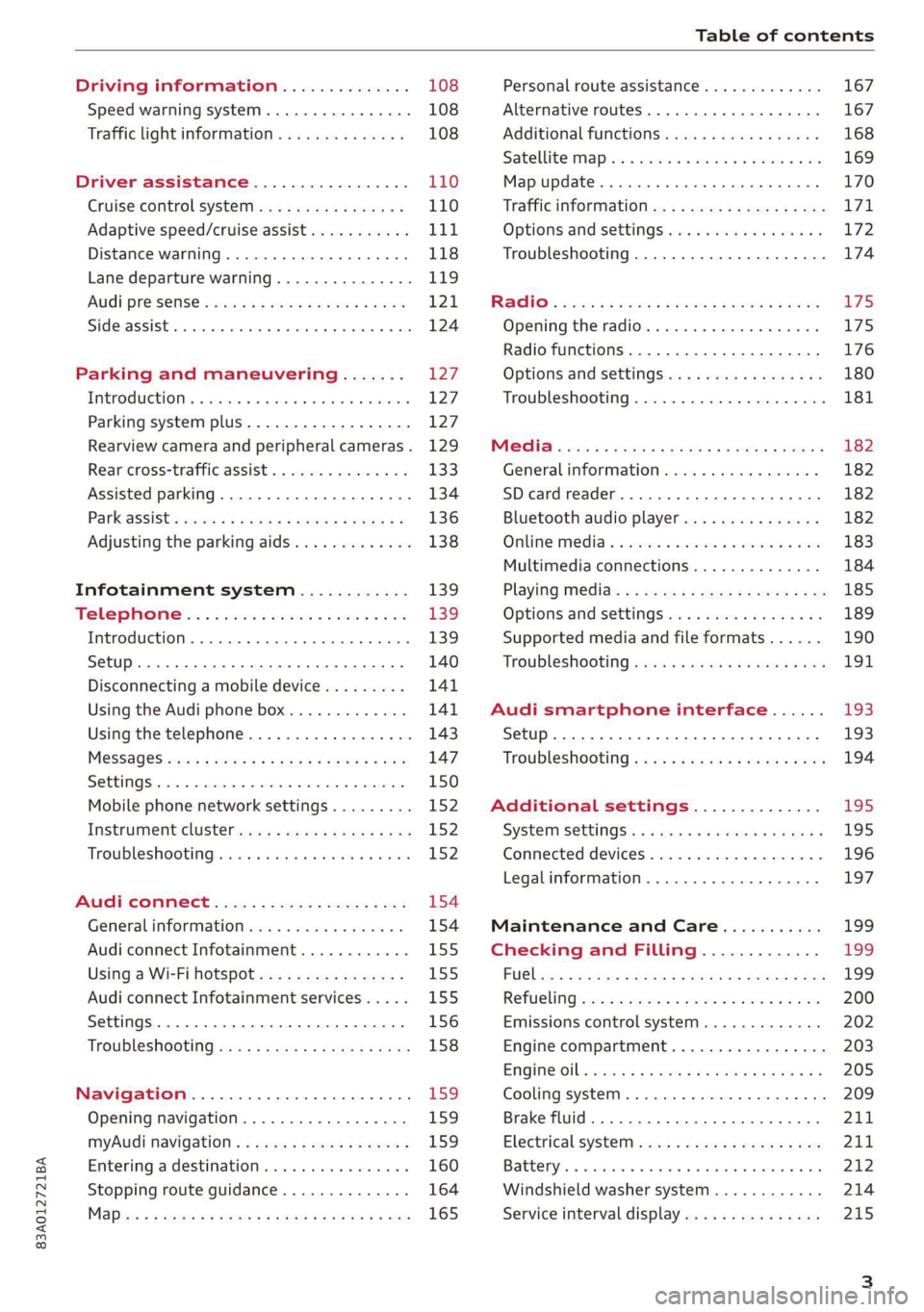
Table of contents
Driving information.............. 108
Speed warning system.........-..000- 108
Traffic light information.............. 108
Driver assistance................. 110
Cruise control systeM.......... 000 eee 110
Adaptive speed/cruise assist........... 111
Distance warning.................005 118
Lane departure warning............... 119
AUdi PrOSONsSe & seis + 2 mews 2» nee 2 oem 121
Side assist... 2... eee eee eee eee 124
Parking and maneuvering....... 127
IMtroduetion « x cicvers < e ersuens + x enavane oo saree 127
Parking system plus...............04. 127
Rearview camera and peripheral cameras. 129
Rear cross-traffic assist. ............-. 133
Assisted parking .............0.00005- 134
Parkassist': sexs « s neem sg aes + e wae 2 136
Adjusting the parking aids............. 138
Infotainment system............ 139
Telephone
Introduction
Setup..........
Disconnecting a mobile device......... 141
Using the Audi phone box............. 141
Using the telephone................0. 143
MESSAGES crus + ¢ ween ¢ 3 eeuen xy eee 4 2 ae 147
SOttiMGSicraice o saaneme « u eneneve © icameneies © eyeaeite 150
Mobile phone network settings......... 152
Instrument cluster.............2-.00. 152
Troubleshooting sais . eves 6 coarse es cae 152
AU CONMECE ces ¢ s xeee x 2 ews a i ee 154
Generalinformation................. 154
Audi connect Infotainment............ 155
Using a Wi-Fi hotspot................ 155
Audi connect Infotainment services..... 155
Settings............0 0.0000... 0000. 156
Troubleshooting sass ss eee ss ees ss ees 158
IIS VIG ABI. 5 cccccas os cones o enemies aoe 15S:
Opening navigation.................. 159
myAudi navigation.................0. 159
Entering adestination................ 160
Stopping route guidance.............. 164
Maize: = 2 sews ¢ 2 Som & eee Ee ees Fe eee 165
Personal route assistance............. 167
Alternative routes............02e000 167
Additional functions................. 168
Satellite mapiee e «sons e siemens ae aacens 2 4 ve 169
Map update............. 0. eee eee eee 170
Tratficintoritiationie: « : waa: xs seen 6 2 eu LZ)
Options and settings.............000e 172
Troubleshooting...............-.000- 174
R&GIO’: onic cs wea ss wens se eee & o Hews 175
Opening the radio................04. 175
Radio functions..................-4. 176
Options and settings...............0. 180
Troubleshooting.................0005 181
MG@Gias = acs ¢ = secs s © seme « s Seems so SeURS 182
General information ................. 182
SD card reader..........0.-..00 eee 182
Bluetooth audio player.............0. 182
Online Medias « ssi + exes ae omens oo veer 183
Multimedia connections.............. 184
Playing tedia. = s sees s 2 sees se wees ee 185
Options and settings...............0. 189
Supported media and file formats...... 190
Troubleshooting «ess 2s secu se vee ss ees 191
Audi smartphone interface...... 193
Setup... ee eee eee eee eee 193
Troubleshooting............ee eee eee 194
Additional settings.............. 195
SySteMm Settings: < saws ss sews se eee & 195
Connected devices............ 0 cee ee 196
Legal information................... 197
Maintenance and Care........... 199
Checking and Filling............. 199
FUGlaias s os08,8 & aay @ § aovon & § Sanne 8 OF eee 199
RePUCLING: is «a cms so ewes oe ese vB seen 200
Emissions control system............. 202
Engine compartment................. 203
EMGIMeiOils: acre « ¢ qaiea & © meee s 2 seNoN 8 Es 205
Cooling system. ............--00 00 eee 209
Brake fluid... . 0... eee eee eee 211
Electrical system.........--.0----05- 211
Battery. =o cecness « ommnaine « 0 omecwne 6 3 oats = oe 212
Windshield washer system............ 214
Service interval display............... 215
Page 8 of 280
Quick access
Quick access
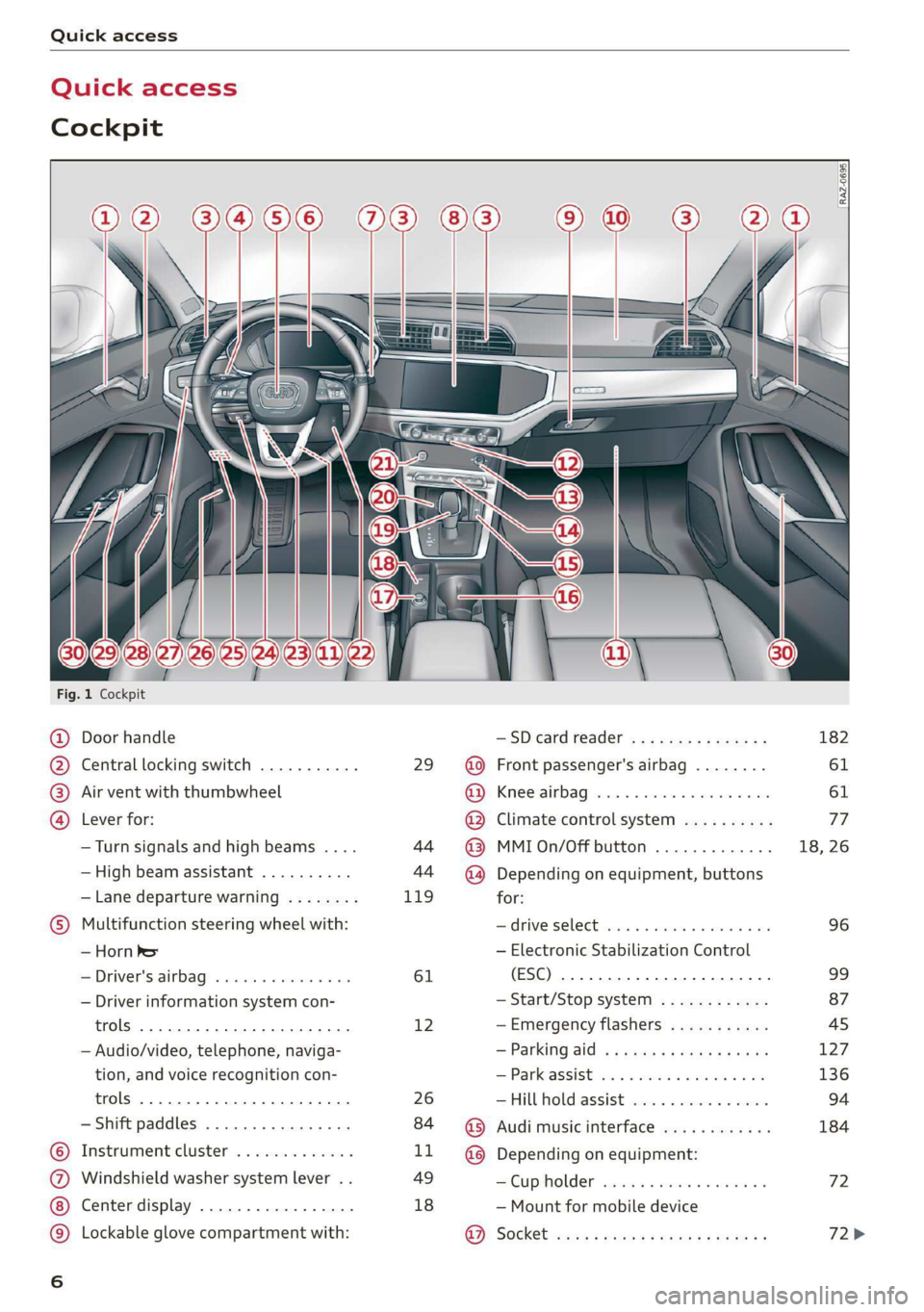
Cockpit
3 g|
3
q
i
Fig. 1 Cockpit
@ Door handle —SDcardreader ............... 182
@ Central locking switch ........... 29 @ Front passenger's airbag ........ 61
® Air vent with thumbwheel @ Knee airbag ...............2... 61
@ Lever for: @ Climate control system .......... 77
—Turn signals and high beams .... 44 @ MMIOn/Off button ............. 18, 26
— High beam assistant .......... 44 ~@) Depending on equipment, buttons
— Lane departure warning ........ 119 for:
© Multifunction steering wheel with: Sdrive SELECE causss 6 6 soaaye os mess 6 wee 96
— Horn be — Electronic Stabilization Control
— Driver's airbag .............4. 61 (ESC) 2... ee eee eee eee 99
— Driver information system con- — Start/Stop system ............ 87
trols 2... ee eee eee eee 12 —Emergency flashers ........... 45
— Audio/video, telephone, naviga- = Parking atd) « « sews « 2 aaeny a © caune 127
tion, and voice recognition con- —Parkassist ..............000- 136
trols 2.0... eee eee 26 —Hill hold assist ............0.. 94
— Shift paddles ................ 84 @ Audi music interface ............ 184
© Instrument cluster ............. LL @ Depending on equipment:
@ Windshield washer system lever . . 49 —Cupholder ..............0005 72
Center display ................. 18 — Mount for mobile device
© Lockable glove compartment with: 9). Socket sassy 2 yasy ss cane a & wae ae 72>
oa
Page 9 of 280
83A012721BA
Quick access
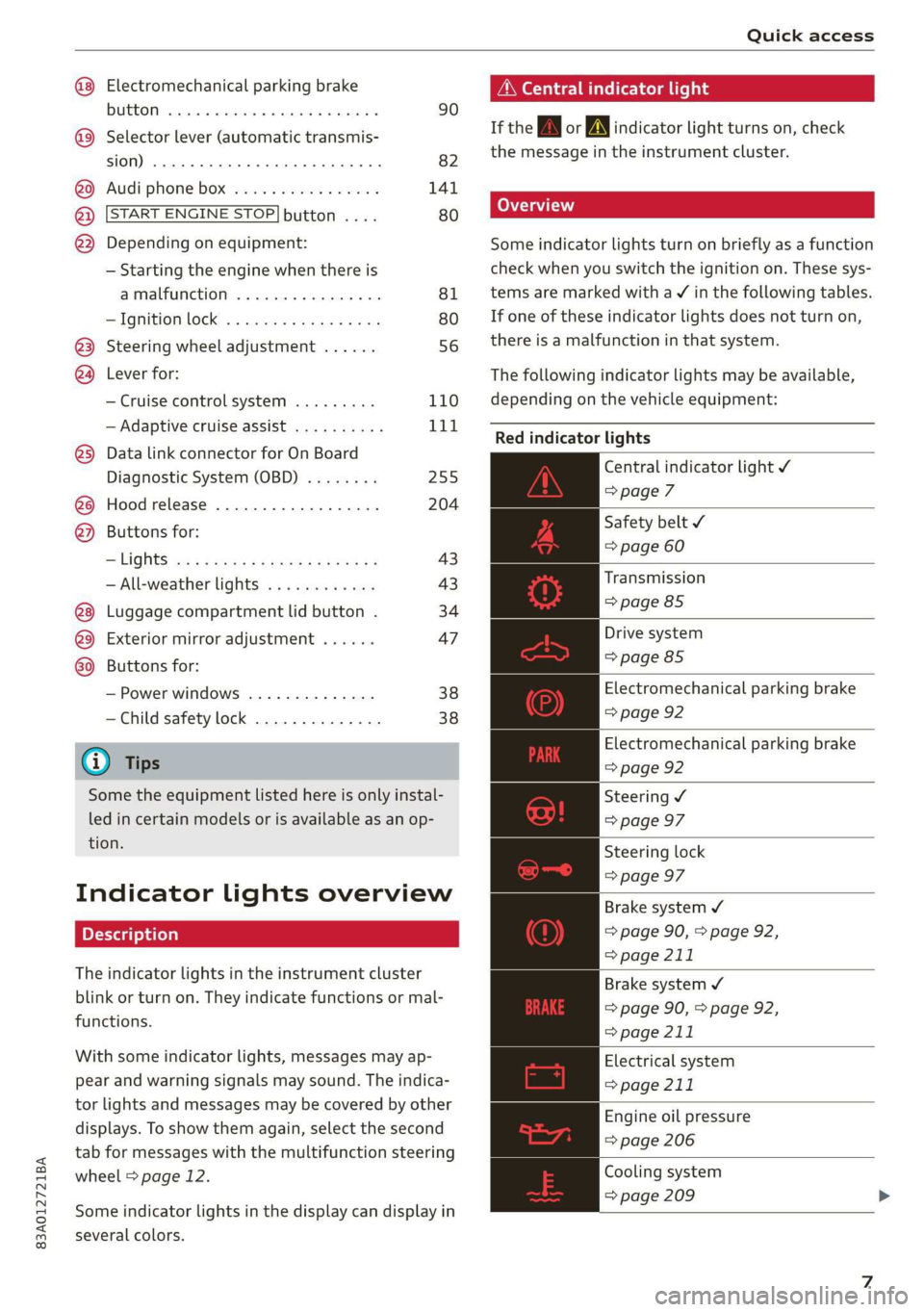
Electromechanical parking brake
button ......... cece eee eee 90
Selector lever (automatic transmis-
SION) 26... eee ee eee eee 82
Audi phone Dox esessie so seas & 6 cere 141
START ENGINE STOP] button .... 80
Depending on equipment: ®®®
— Starting the engine when there is
amalfunction ............0005 81
—Ignition lock ................. 80
@3) Steering wheel adjustment ...... 56
@4 Lever for:
— Cruise control system ......... 110
— Adaptive cruise assist .......... 111
@) Data link connector for On Board
Diagnostic System (OBD) ........ 255
@8 Hood release .............0.0.. 204
@) Buttons for:
—~ CIGKES! mu: ¢ ¢ sem x ¢ etme Fo cee 43
—All-weather lights ............ 43
Luggage compartment lid button . 34
@3 Exterior mirror adjustment ...... 47
G0 Buttons for:
— Power windows .............. 38
—Child safety lock .............. 38
@ Tips
Some the equipment listed here is only instal-
led in certain models or is available as an op-
tion.
Indicator lights overview
The indicator lights in the instrument cluster
blink or turn on. They indicate functions or mal-
functions.
With some indicator lights, messages may ap-
pear and warning signals may sound. The indica-
tor lights and messages may be covered by other
displays. To show them again, select the second
tab for messages with the multifunction steering
wheel > page 12.
Some indicator lights in the display can display in
several colors.
A\ Central indicator light
If the wa or A indicator light turns on, check
the message in the instrument cluster.
Some indicator lights turn on briefly as a function
check
when you switch the ignition on. These sys-
tems are marked with a V in the following tables.
If one of these indicator lights does not turn on,
there is a malfunction in that system.
The following indicator lights may be available,
depending on the vehicle equipment:
Red indicator lights
Central indicator light ¥
=>page 7
Safety belt
=> page 60
Transmission
=> page 85
Drive system
=> page 85
Electromechanical parking brake
=> page 92
Electromechanical parking brake
=> page 92
Steering ¥
=> page 97
Steering lock
=> page 97
Brake system ¥
=> page 90, > page 92,
=> page 211
Brake system 4
=> page 90, > page 92,
=> page 211
Electrical system
=> page 211
Engine oil pressure
=> page 206
Cooling system
=> page 209
Page 14 of 280
Instrument cluster
— You can select the units used for tempera-
ture, speed, and other measurements
=> page 195.
— Speeds are displayed in mph (miles per
hour) or km/h (kilometers per hour).
— If there is a malfunction in the instrument
cluster, DEF will appear in the trip odometer
display. Have the malfunction corrected as
soon as possible.
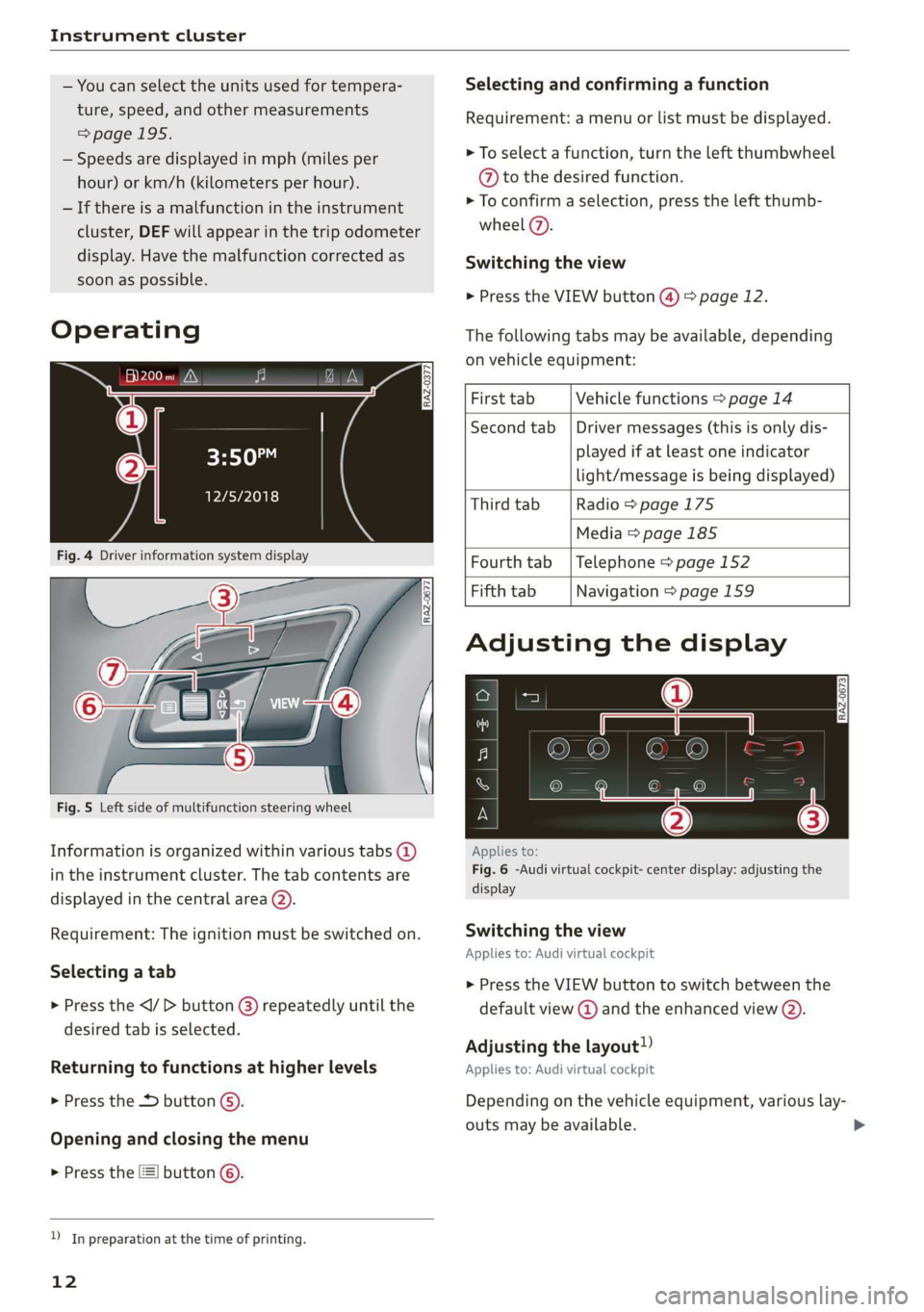
Operating
eH) hee
12/5/2018
Selecting and confirming a function
Requirement: a menu or list must be displayed.
> To select a function, turn the left thumbwheel
@ to the desired function.
> To confirm a selection, press the left thumb-
wheel (7).
Switching the view
> Press the VIEW button @) > page 12.
The following tabs may be available, depending
on vehicle equipment:
First tab Vehicle functions > page 14
Second tab | Driver messages (this is only dis-
played if at least one indicator
light/message is being displayed)
Third tab Radio > page 175
Media
> page 185
Fig. 4 Driver information system display Fourth tab | Telephone > page 152
Fifth tab Navigation > page 159
Fig. 5 Left side of multifunction steering wheel
Information is organized within various tabs @)
in the instrument cluster. The tab contents are
displayed in the central area (2).
Requirement: The ignition must be switched on.
Selecting a tab
> Press the button @) repeatedly until the
desired tab is selected.
Returning to functions at higher levels
> Press the 5 button @).
Opening and closing the menu
> Press the [=] button ©.
) In preparation at the time of printing.
12
Adjusting the display
S|
IS Ny S| cc
Applies to:
Fig. 6 -Audi virtual cockpit- center display: adjusting the
display
Switching the view
Applies to: Audi virtual cockpit
> Press the VIEW button to switch between the
default view @ and the enhanced view (2).
Adjusting the layout!)
Applies to: Audi virtual cockpit
Depending on the vehicle equipment, various lay-
outs may be available.
Page 18 of 280
Touch display
Touch displa Pressing and pulli
General touch display
operation
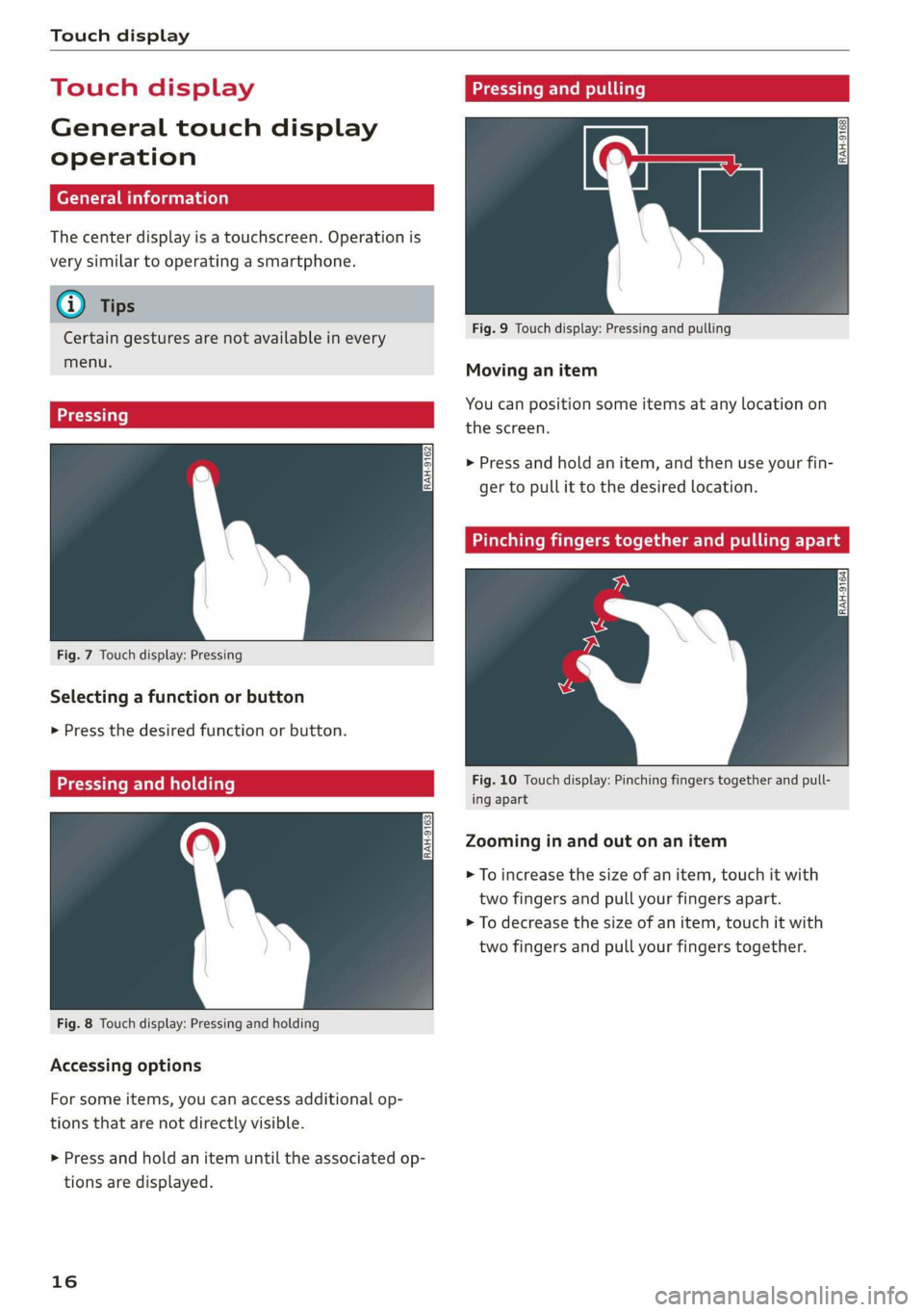
The center display is a touchscreen. Operation is
very similar to operating a smartphone.
@) Tips
Certain gestures are not available in every
menu.
Fig. 9 Touch display: Pressing and pulling
Moving an item
You can position some items at any location on
Eee Soke . the screen.
> Press and hold an item, and then use your fin-
ger to pull it to the desired location.
Fig. 7 Touch display: Pressing
Selecting a function or button
> Press the desired function or button.
relat: Fig. 10 Touch display: Pinching fingers together and pull-
— ing apart
Zooming in and out on an item
> To increase the size of an item, touch it with
two fingers and pull your fingers apart.
> To decrease the size of an item, touch it with
two fingers and pull your fingers together.
Fig. 8 Touch display: Pressing and holding
Accessing options
For some items, you can access additional op-
tions that are not directly visible.
> Press and hold an item until the associated op-
tions are displayed.
16
Page 20 of 280
Touch display
> If the Date & time button is not displayed,
swipe upward or downward with one finger un-
til it appears.
> Press the Date & time button.
@ Tips
If a menu or symbol is in parentheses in the
path, for example, (General) or (423), then it is
an optional menu item that does not need to
be used in every system.
Settings
> Applies to MMI: Select on the home screen:
SETTINGS > Display & brightness > MMI.
Possible settings:
— Brightness
— Audio feedback during touch input
Multi Media Interface
sic laitet inmate)
Audi recommends performing certain Infotain-
ment system functions, such as entering a desti-
nation, only when the vehicle is stationary. Al-
ways remember: Take a break from using your In-
fotainment system if needed for the benefit of
your safety and the safety of others on the road.
ZA\ WARNING
Only use the Infotainment system when road,
traffic, weather, and visibility conditions per-
mit and always in a way that allows you to
maintain complete control over your vehicle.
@ Tips
Certain functions are not available while driv-
ing.
Switching on or off
Switching the MMI on or off
> To switch the MMI off, press and hold the vol-
ume knob > page 26, fig. 20 until all Infotain-
ment functions are switched off.
18
> To switch the MMI on, press the volume knob.
Restarting the MMI
> Press and hold the volume knob for at least 10
seconds.
Switching the center display on or off
> To switch the center display off, press [Jin the
notification center > page 20.
> To switch the center display on, touch the dis-
play or press LwJagain.
Introduction
You can display and operate Infotainment system
and vehicle functions using the touch display in
the Multi Media Interface, abbreviated MMI.
Configuration wizard
After starting for the first time, the configuration
wizard helps you to set up the vehicle, for exam-
ple to set the desired system language and con-
nect a telephone.
> Follow the instructions in the center display.
> Applies to: MMI: To access the configuration
wizard at a later time, select on the home
screen: HELP > Configuration wizard.
Tool tips
Tool
tips are displayed on the center display after
starting for the first time. They introduce various
MMI functions to you.
> Follow the instructions in the center display.
> Applies to: MMI: To access the tool tips at a lat-
er time, select on the home screen: SETTINGS
> Help > Show tool tips.
> Applies to: MMI: To receive additional tool tips,
select on the home screen: HELP > Tool tips >
Basic information or Expert information.
Page 22 of 280
Touch display
@) Tips
The position of © cannot be adjusted.
Display area
You can freely change the location of the buttons
on the home screen display area.
Configuring the display area
> Press and hold a button on the home screen
display area.
> To adjust the placement of the buttons, pull
them to the desired locations.
Switching between menu pages
If a menu contains multiple menu pages, Feit is
displayed in the display area. The white bar
shows the location of the current menu page.
> To switch between menu pages, swipe your fin-
ger to the right or left.
yeh mele) EN]
Of 8 68 of
8 OB OB om
[RAZ-0513,
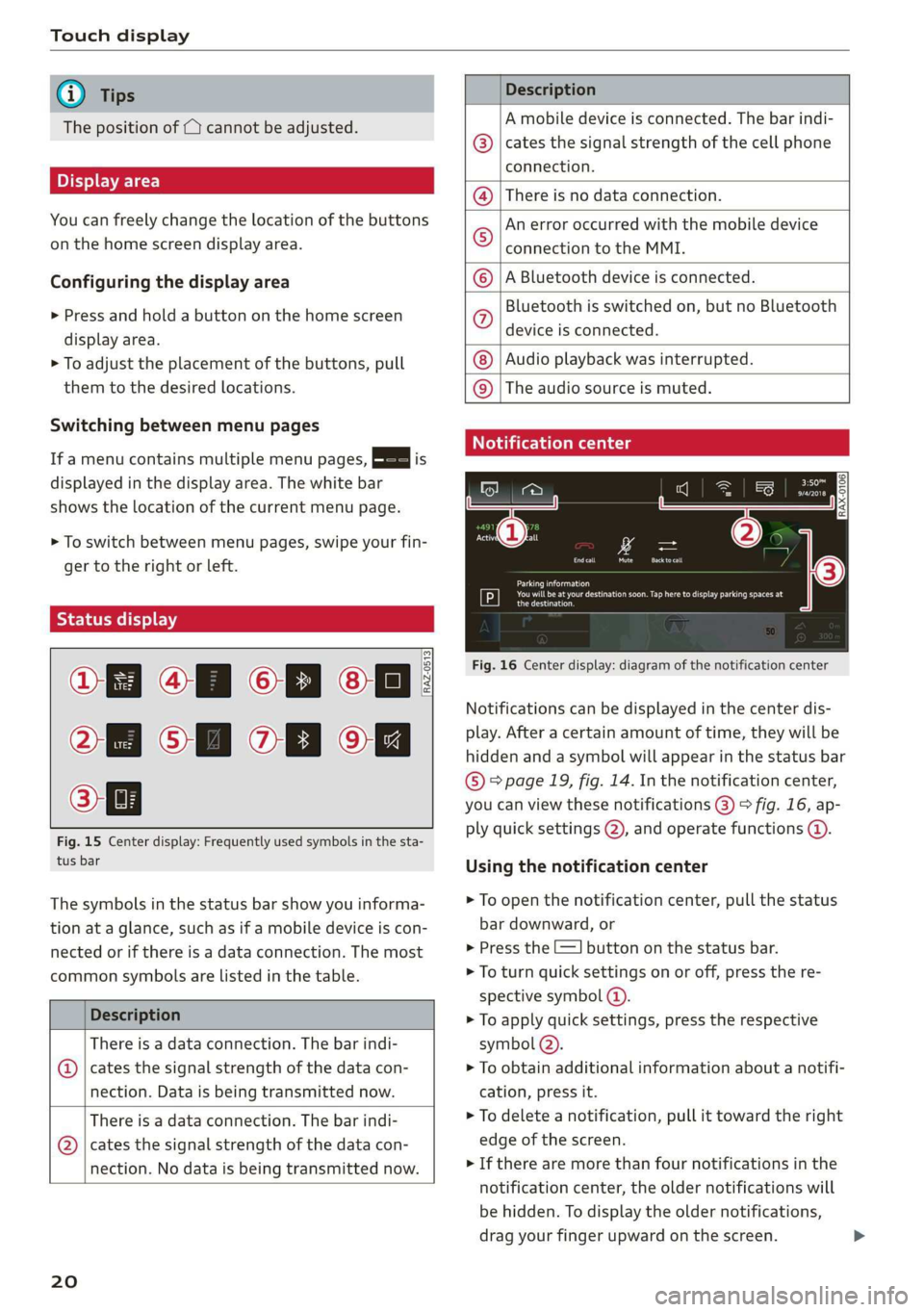
Fig. 15 Center display: Frequently used symbols in the sta-
tus bar
The symbols in the status bar show you informa-
tion at a glance, such as if a mobile device is con-
nected or if there is a data connection. The most
common symbols are listed in the table.
Description
There is a data connection. The bar indi-
@ | cates the signal strength of the data con-
nection. Data is being transmitted now.
There is a data connection. The bar indi-
@ | cates the signal strength of the data con-
nection. No data is being transmitted now.
20
Description
A mobile device is connected. The bar indi-
cates the signal strength of the cell phone
connection.
There is no data connection.
An error occurred with the mobile device
connection to the MMI.
A Bluetooth device is connected.
Bluetooth is switched on, but no Bluetooth
device is connected.
Audio playback was interrupted.
©O|©|
© |E|
©
|@|
@
The audio source is muted.
Notification center
RAX-0106
Parking information
aeons
Regier
Fig. 16 Center display: diagram of the notification center
Notifications can be displayed in the center dis-
play. After a certain amount of time, they will be
hidden and a symbol will appear in the status bar
® page 19, fig. 14. In the notification center,
you can view these notifications @) > fig. 16, ap-
ply quick settings (2), and operate functions @.
Using the notification center
> To open the notification center, pull the status
bar downward, or
> Press the E=] button on the status bar.
> To turn quick settings on or off, press the re-
spective symbol ().
> To apply quick settings, press the respective
symbol (2).
> To obtain additional information about a notifi-
cation, press it.
> To delete a notification, pull it toward the right
edge of the screen.
> If there are more than four notifications in the
notification center, the older notifications will
be hidden. To display the older notifications,
drag your finger upward on the screen.
Page 26 of 280
Voice operation
Voice operation
General information
You can operate many functions in the vehicle
easily using voice commands.
Using the voice operation system effectively
> Speak clearly and distinctly at a normal volume.
Speak louder when driving faster.
> Emphasize the words in the commands evenly
and do not leave long pauses.
> Close the doors, the windows, and the sunroof*
to reduce background noise. Make sure that
passengers are not speaking when you are giv-
ing a voice command.
> Do not direct the vents toward the hands-free
microphone, which is in the roof headliner near
the front interior lights.
> Only the driver should speak to the system, be-
cause the handsfree microphone is aimed to-
ward this seating position.
ZA\ WARNING
— Direct your full attention to driving. As the
driver, you have complete responsibility for
safety in traffic. Only use the functions in
such a way that you always maintain com-
plete control over your vehicle in all traffic
situations.
— Do not use voice operation in emergencies
because your voice may change in stressful
situations. The system may take longer to
dial the number or may not be able to dial it
at all. Dial the emergency number manually.
@ Tips
There are no voice guidance* prompts when a
dialog is active.
24
Voice recognition system
Applies to: vehicles with voice recognition system
See
Dat)
Where is a
Connect
Diala
coy
Es
ea
cog
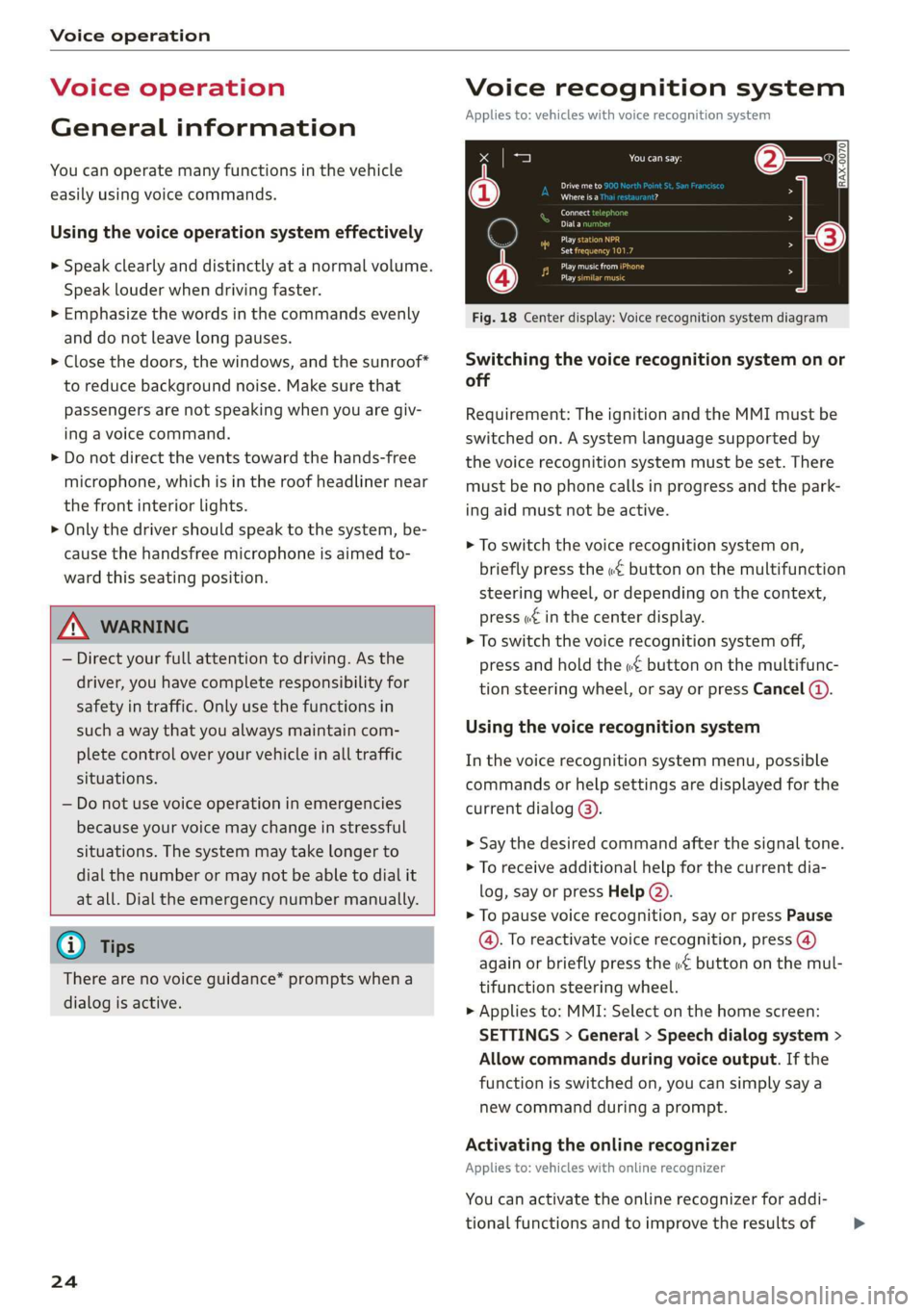
Fig. 18 Center display: Voice recognition system diagram
Switching the voice recognition system on or
off
Requirement: The ignition and the MMI must be
switched on. A system language supported by
the voice recognition system must be set. There
must be no phone calls in progress and the park-
ing aid must not be active.
> To switch the voice recognition system on,
briefly press the «€ button on the multifunction
steering wheel, or depending on the context,
press w£ in the center display.
> To switch the voice recognition system off,
press and hold the « button on the multifunc-
tion steering wheel, or say or press Cancel (a).
Using the voice recognition system
In the voice recognition system menu, possible
commands or help settings are displayed for the
current dialog @).
> Say the desired command after the signal tone.
> To receive additional help for the current dia-
log, say or press Help (2).
> To pause voice recognition, say or press Pause
@. To reactivate voice recognition, press (@)
again or briefly press the «€ button on the mul-
tifunction steering wheel.
> Applies to: MMI: Select on the home screen:
SETTINGS > General > Speech dialog system >
Allow commands during voice output. If the
function is switched on, you can simply say a
new command during a prompt.
Activating the online recognizer
Applies to: vehicles with online recognizer
You can activate the online recognizer for addi-
tional functions and to improve the results of >
Page 27 of 280
83A012721BA
Voice operation
voice recognition. When there is an active Inter-
net connection, the spoken command is evaluat-
ed in the vehicle and online.
> When you switch on the voice recognition sys-
tem for the first time, a menu for the online
recognizer opens. Or:
> Applies to: MMI: Select on the home screen:
SETTINGS > General > Speech dialog system >
Consent to speech dialog system online recog-
nizer.
> Read the licensing agreements and accept
them.
@) Note
Read the information about Audi connect, and
be sure to note the connectivity costs section
=@ in General information on page 154.
External voice operation
Applies to: vehicles with external speech dialog system
You can access and control the voice operation on
a connected mobile device through your vehicle.
Switching external voice operation on or off
Requirement: The ignition and the MMI must be
switched on. A cell phone must be connected to
the MMI with the Handsfree profile > page 140.
The mobile device being connected must have
voice control that can be controlled externally.
There must be no phone calls in progress and the
parking aid must not be active.
> To switch on the external voice operation, press
and hold the «€ button longer on the multifunc-
tion steering wheel.
> To switch the external voice operation off, press
and hold the «€ button on the multifunction
steering wheel or press @) 9 page 24, fig. 18.
Using external voice operation
» Say the desired command after the signal tone.
> To reactivate voice recognition when it is
paused, press the wf button briefly on the mul-
tifunction steering wheel or press (4)
=> page 24, fig. 18.
@) Tips
AUDI AG simply provides access to control
your mobile device with voice operation and
does not assume any responsibility for the
content and commands within the external
voice control.
25
Page 28 of 280
Global functions
Global functions
Additional function
buttons
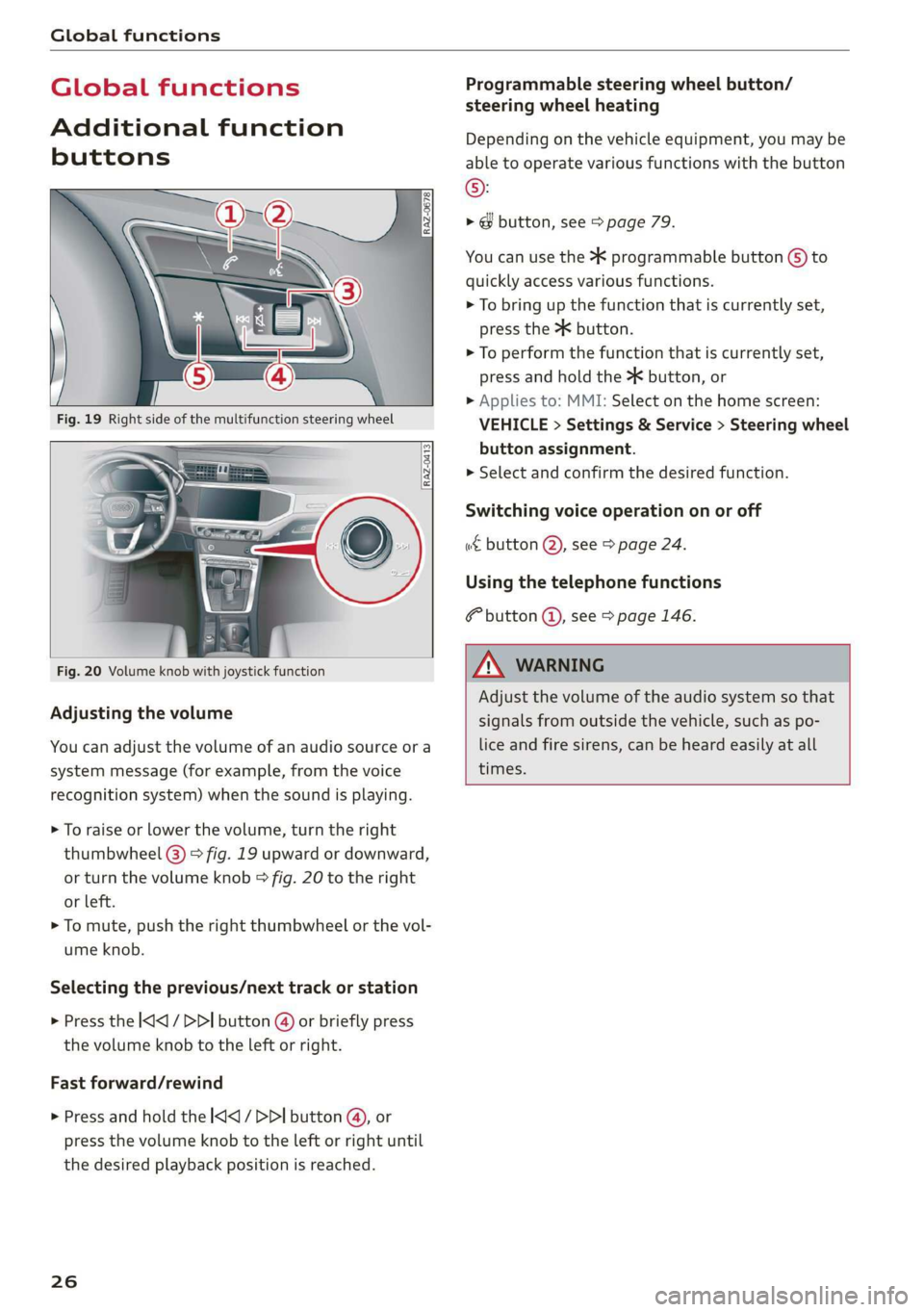
Fig. 20 Volume knob with joystick function
Adjusting the volume
You can adjust the volume of an audio source or a
system message (for example, from the voice
recognition system) when the sound is playing.
> To raise or lower the volume, turn the right
thumbwheel @) > fig. 19 upward or downward,
or turn the volume knob > fig. 20 to the right
or left.
> To mute, push the right thumbwheel or the vol-
ume knob.
Selecting the previous/next track or station
> Press the |<] / DDI button @ or briefly press
the volume knob to the left or right.
Fast forward/rewind
> Press and hold the
the desired playback position is reached.
26
Programmable steering wheel button/
steering wheel heating
Depending on the vehicle equipment, you may be
able to operate various functions with the button
©:
> @ button, see > page 79.
You can use the > programmable button G) to
quickly access various functions.
> To bring up the function that is currently set,
press the >K button.
> To perform the function that is currently set,
press and hold the >K button, or
> Applies to: MMI: Select on the home screen:
VEHICLE > Settings & Service > Steering wheel
button assignment.
>» Select and confirm the desired function.
Switching voice operation on or off
w& button @), see > page 24.
Using the telephone functions
F button @), see > page 146.
A VARNING
Adjust the volume of the audio system so that
signals from outside the vehicle, such as po-
lice and fire sirens, can be heard easily at all
times.