door lock AUDI Q3 2020 User Guide
[x] Cancel search | Manufacturer: AUDI, Model Year: 2020, Model line: Q3, Model: AUDI Q3 2020Pages: 278, PDF Size: 72.66 MB
Page 37 of 278
83A012721BB
Opening and closing
— Always close and lock the luggage compart-
ment lid and the doors when the vehicle is
not in use. Otherwise someone such as a
child could enter the vehicle through the
luggage compartment and become locked
inside it. To reduce the risk of injury, do not
allow children to play in or around the vehi-
cle.
—To reduce the risk of injuries by pinching,
make sure that no one is in the operating
area of the luggage compartment lid, in-
cluding the hinge areas and the upper and
lower edge of the luggage compartment lid.
—
After closing the luggage compartment lid,
make sure that it is latched. The luggage
compartment lid could open suddenly while
driving, which would increase the risk of an
accident.
— Never drive with the luggage compartment
lid ajar or open, because poisonous gases
from the surrounding area can enter the ve-
hicle interior and increase the risk of asphyx-
iation.
— Applies to: vehicles with power-operated or
sensor-controlled luggage compartment lid:
If there is a luggage rack (such as a bicycle
rack) on the luggage compartment lid, the
luggage compartment lid may not open
completely, or it may close by itself if open
due to the extra weight. Therefore, the open
luggage compartment lid must be given ad-
ditional support or the cargo must first be
removed from the luggage rack.
— Applies to: vehicles with power-operated or
sensor-controlled luggage compartment lid:
Pay careful attention when closing the lug-
gage compartment lid. Otherwise, you could
cause serious injury to yourself or others de-
spite the pinch protection.
©) Note
The luggage compartment lid can bump into
objects such as the garage ceiling when open-
ing and become damaged.
@ Tips
When the vehicle is locked, the luggage com-
partment lid can be unlocked separately by
pressing the <3 button on the vehicle key.
The luggage compartment lid locks automati-
cally when it is closed again.
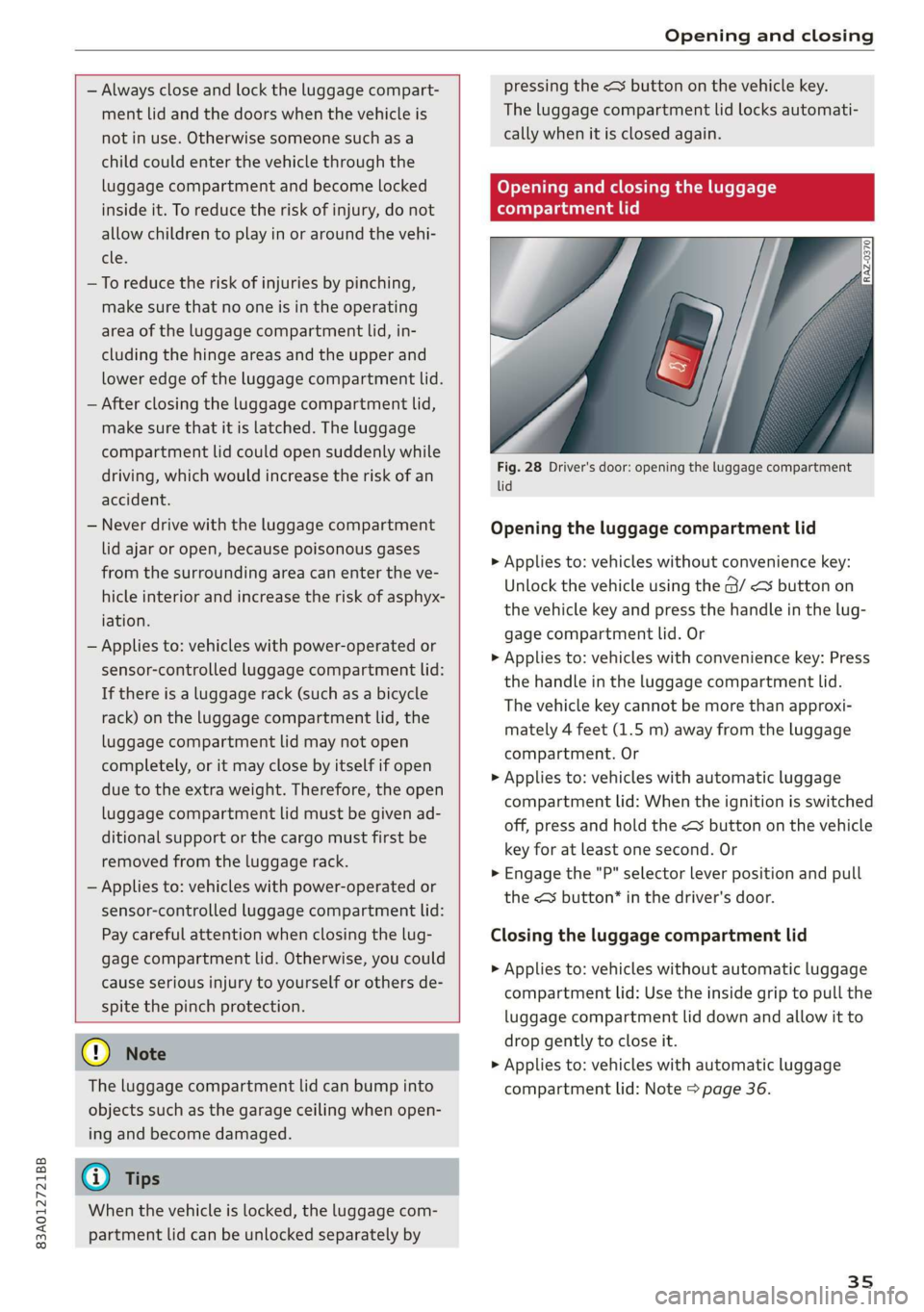
Opening and closing the luggage
compartment lid
Fig. 28 Driver's door: opening the luggage compartment
lid
Opening the luggage compartment lid
> Applies to: vehicles without convenience key:
Unlock the vehicle using the @/ < button on
the vehicle key and press the handle in the lug-
gage compartment lid. Or
> Applies to: vehicles with convenience key: Press
the handle in the luggage compartment lid.
The vehicle key cannot be more than approxi-
mately 4 feet (1.5 m) away from the luggage
compartment. Or
> Applies to: vehicles with automatic luggage
compartment lid: When the ignition is switched
off, press and hold the << button on the vehicle
key for at least one second. Or
> Engage the "P" selector lever position and pull
the <3 button* in the driver's door.
Closing the luggage compartment lid
> Applies to: vehicles without automatic luggage
compartment lid: Use the inside grip to pull the
luggage compartment lid down and allow it to
drop gently to close it.
> Applies to: vehicles with automatic luggage
compartment lid: Note > page 36.
35
Page 38 of 278
Opening and closing
Automatic luggage compartment lid
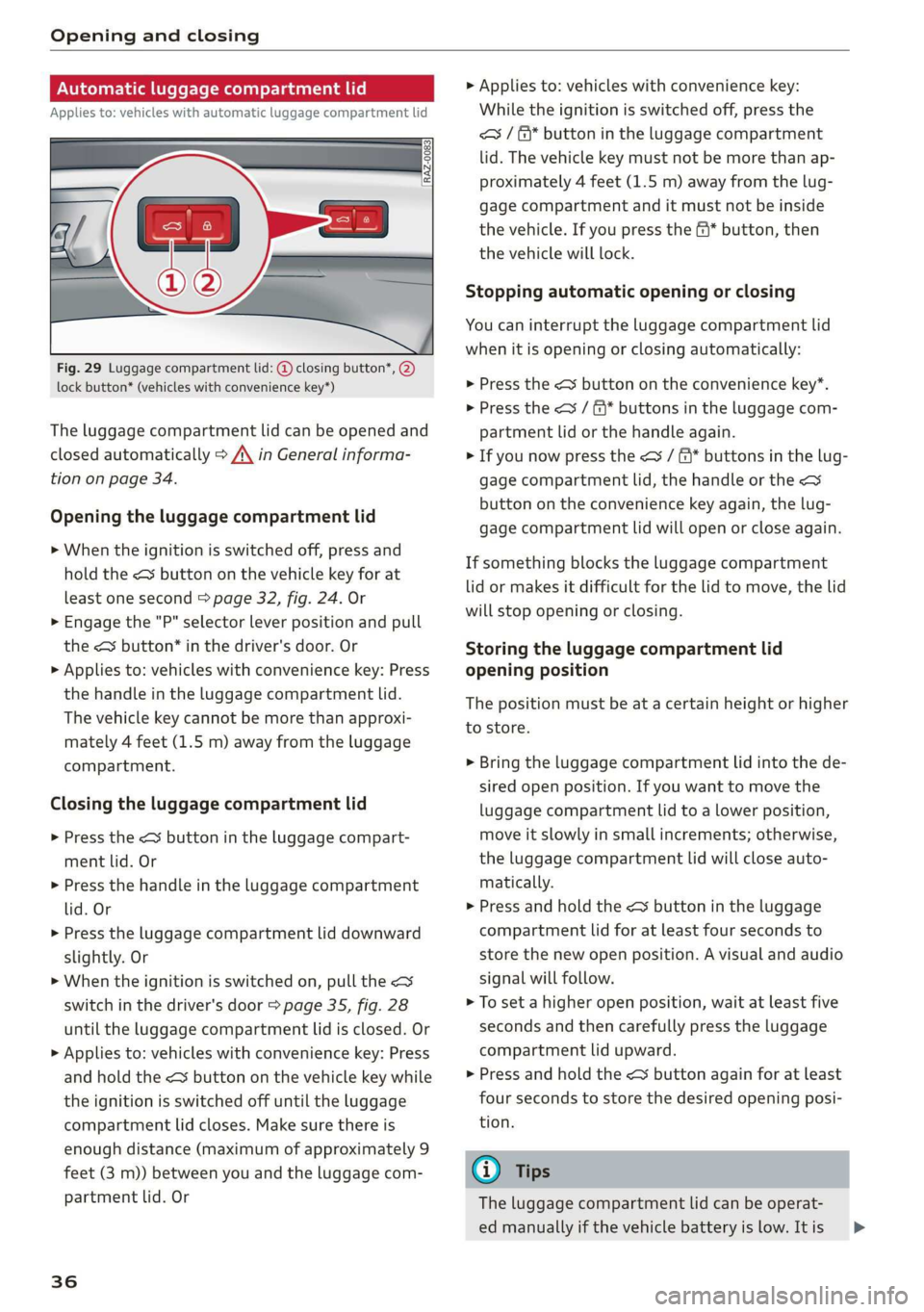
Applies to: vehicles with automatic luggage compartment lid
Fig. 29 Luggage compartment lid: @ closing button*, @)
lock button* (vehicles with convenience key*)
The luggage compartment lid can be opened and
closed automatically > A\ in General informa-
tion on page 34.
Opening the luggage compartment lid
> When the ignition is switched off, press and
hold the < button on the vehicle key for at
least one second > page 32, fig. 24. Or
> Engage the "P" selector lever position and pull
the <3 button* in the driver's door. Or
> Applies to: vehicles with convenience key: Press
the handle in the luggage compartment lid.
The vehicle key cannot be more than approxi-
mately 4 feet (1.5 m) away from the luggage
compartment.
Closing the luggage compartment lid
> Press the <% button in the luggage compart-
ment lid. Or
> Press the handle in the luggage compartment
lid. Or
> Press the luggage compartment lid downward
slightly. Or
> When the ignition is switched on, pull the <>
switch in the driver's door > page 35, fig. 28
until the luggage compartment lid is closed. Or
> Applies to: vehicles with convenience key: Press
and hold the < button on the vehicle key while
the ignition is switched off until the luggage
compartment lid closes. Make sure there is
enough distance (maximum of approximately 9
feet (3 m)) between you and the luggage com-
partment lid. Or
36
> Applies to: vehicles with convenience key:
While the ignition is switched off, press the
<= / &* button in the luggage compartment
lid. The vehicle key must not be more than ap-
proximately 4 feet (1.5 m) away from the lug-
gage compartment and it must not be inside
the vehicle. If you press the f* button, then
the vehicle will lock.
Stopping automatic opening or closing
You can interrupt the luggage compartment lid
when it is opening or closing automatically:
> Press the < button on the convenience key*.
> Press the << / f* buttons in the luggage com-
partment lid or the handle again.
> If you now press the <3 / &* buttons in the lug-
gage compartment lid, the handle or the <
button on the convenience key again, the lug-
gage compartment lid will open or close again.
If something blocks the luggage compartment
lid or makes it difficult for the lid to move, the lid
will stop opening or closing.
Storing the luggage compartment lid
opening position
The position must be at a certain height or higher
to store.
> Bring the luggage compartment lid into the de-
sired open position. If you want to move the
luggage compartment lid to a lower position,
move it slowly in small increments; otherwise,
the luggage compartment lid will close auto-
matically.
> Press and hold the < button in the luggage
compartment lid for at least four seconds to
store the new open position. A visual and audio
signal will follow.
> To set a higher open position, wait at least five
seconds and then carefully press the luggage
compartment lid upward.
> Press and hold the < button again for at least
four seconds to store the desired opening posi-
tion.
G) Tips
The luggage compartment lid can be operat-
ed manually if the vehicle battery is low. It is >
Page 39 of 278
83A012721BB
Opening and closing
necessary to use more force when doing this.
Move the lid slowly to reduce the amount of
force needed.
Opening and closing the luggage
compartment lid with foot motion (kicking
movement)
Applies to: vehicles with sensor-controlled luggage compart-
ment lid
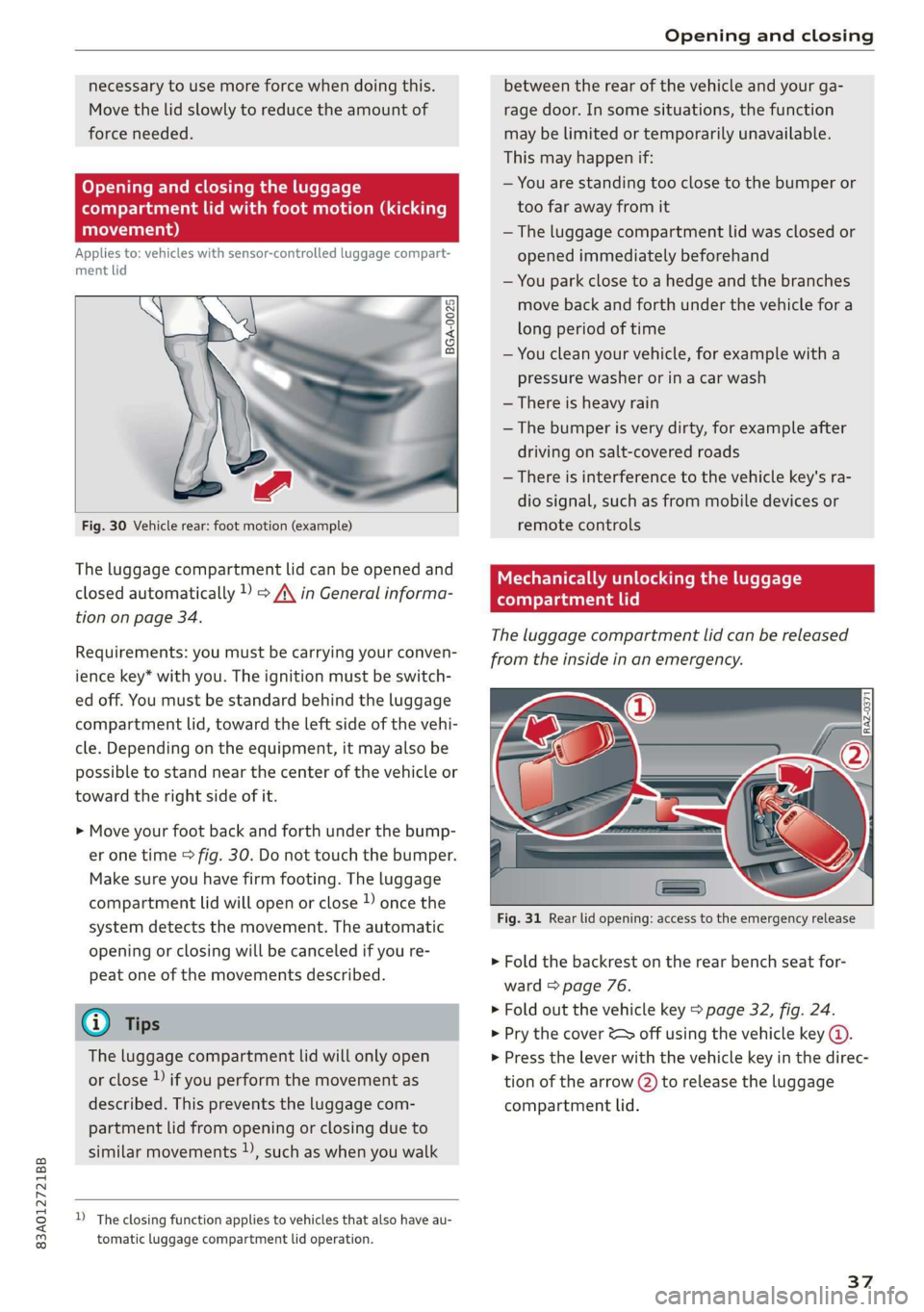
BGA-0025
Fig. 30 Vehicle rear: foot motion (example)
The luggage compartment lid can be opened and
closed automatically 1) => A\ in General informa-
tion on page 34.
Requirements: you must be carrying your conven-
ience key* with you. The ignition must be switch-
ed off. You must be standard behind the luggage
compartment lid, toward the left side of the vehi-
cle. Depending on the equipment, it may also be
possible to stand near the center of the vehicle or
toward the right side of it.
> Move your foot back and forth under the bump-
er one time > fig. 30. Do not touch the bumper.
Make sure you have firm footing. The luggage
compartment lid will open or close )) once the
system detects the movement. The automatic
opening or closing will be canceled if you re-
peat one of the movements described.
@ Tips
The luggage compartment lid will only open
or close ) if you perform the movement as
described. This prevents the luggage com-
partment lid from opening or closing due to
similar movements )), such as when you walk
D_ The closing function applies to vehicles that also have au-
tomatic luggage compartment lid operation.
between the rear of the vehicle and your ga-
rage door. In some situations, the function
may be limited or temporarily unavailable.
This may happen if:
— You are standing too close to the bumper or
too far away from it
— The luggage compartment lid was closed or
opened immediately beforehand
— You park close to a hedge and the branches
move back and forth under the vehicle for a
long period of time
— You clean your vehicle, for example with a
pressure washer or in a car wash
— There is heavy rain
—The bumper is very dirty, for example after
driving on salt-covered roads
— There is interference to the vehicle key's ra-
dio signal, such as from mobile devices or
remote controls
Mechanically unlocking the luggage
compartment lid
The luggage compartment lid can be released
from the inside in an emergency.
Fig. 31 Rear lid opening: access to the emergency release
» Fold the backrest on the rear bench seat for-
ward > page 76.
> Fold out the vehicle key > page 32, fig. 24.
> Pry the cover & off using the vehicle key (@.
> Press the lever with the vehicle key in the direc-
tion of the arrow (2) to release the luggage
compartment lid.
37
Page 40 of 278
Opening and closing
Child safety lock
The child safety lock prevents the rear doors
from being opened from the inside and the rear
power windows from being operated.
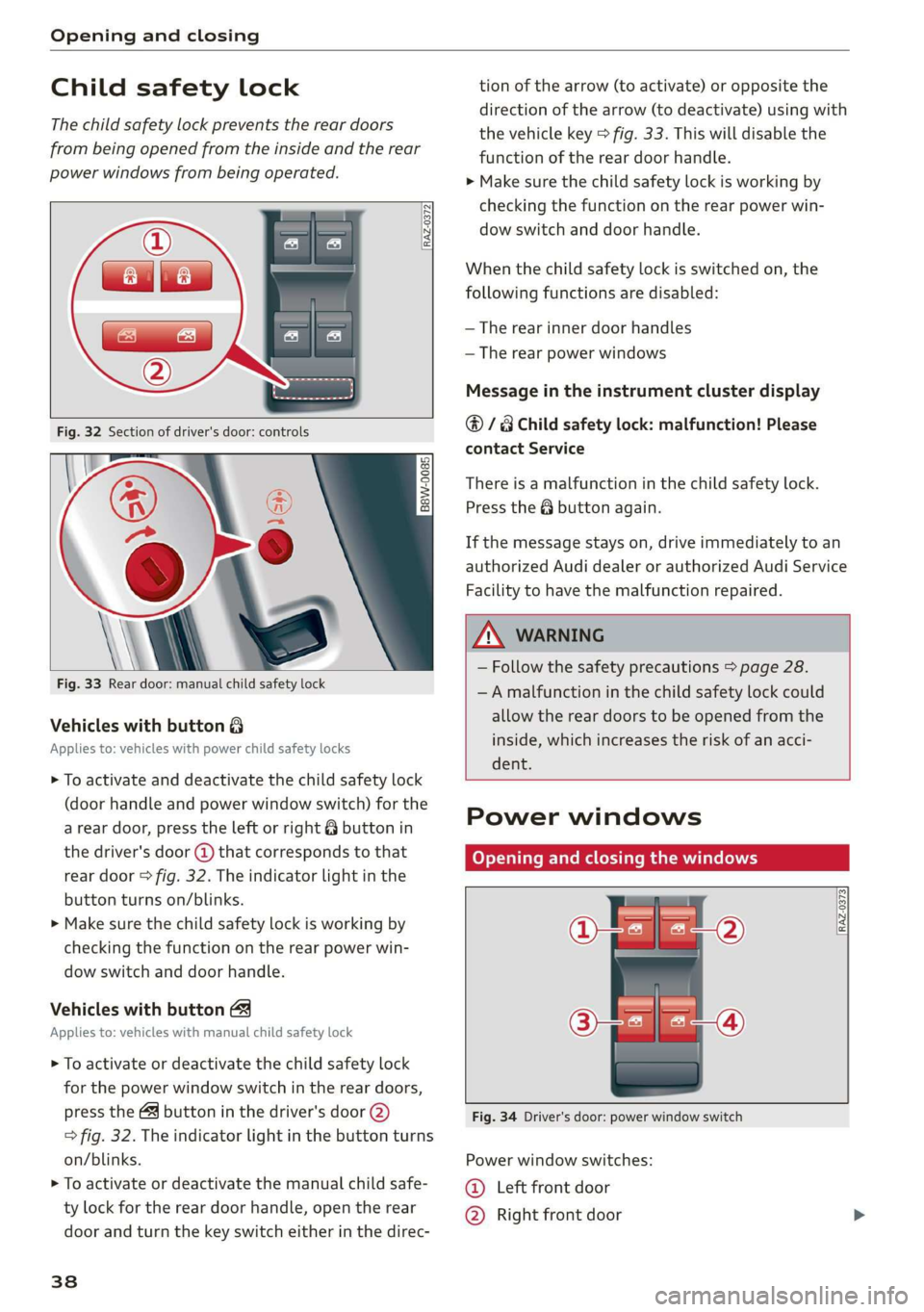
RAZ-0372
B8W-0085
Fig. 33 Rear door: manual child safety lock
Vehicles with button 8
Applies to: vehicles with power child safety locks
> To activate and deactivate the child safety lock
(door handle and power window switch) for the
a rear door, press the left or right 8 button in
the driver's door @ that corresponds to that
rear door > fig. 32. The indicator light in the
button turns on/blinks.
> Make sure the child safety lock is working by
checking the function on the rear power win-
dow switch and door handle.
Vehicles with button
Applies to: vehicles with manual child safety lock
> To activate or deactivate the child safety lock
for the power window switch in the rear doors,
press the 4 button in the driver's door @)
> fig. 32. The indicator light in the button turns
on/blinks.
> To activate or deactivate the manual child safe-
ty lock for the rear door handle, open the rear
door and turn the key switch either in the direc-
38
tion of the arrow (to activate) or opposite the
direction of the arrow (to deactivate) using with
the vehicle key > fig. 33. This will disable the
function of the rear door handle.
> Make sure the child safety lock is working by
checking the function on the rear power win-
dow switch and door handle.
When the child safety lock is switched on, the
following functions are disabled:
— The rear inner door handles
— The rear power windows
Message in the instrument cluster display
@/8 Child safety lock: malfunction! Please
contact Service
There is a malfunction in the child safety lock.
Press the @ button again.
If the message stays on, drive immediately to an
authorized Audi dealer or authorized Audi Service
Facility to have the malfunction repaired.
ZA WARNING
— Follow the safety precautions > page 28.
—A malfunction in the child safety lock could
allow the rear doors to be opened from the
inside, which increases the risk of an acci-
dent.
Power windows
Opening and closing the windows
[RAZ-0373
Fig. 34 Driver's door: power window switch
Power window switches:
©@ Left front door
@ Right front door
Page 41 of 278
83A012721BB
Opening and closing
@® Left rear door
@® Right rear door
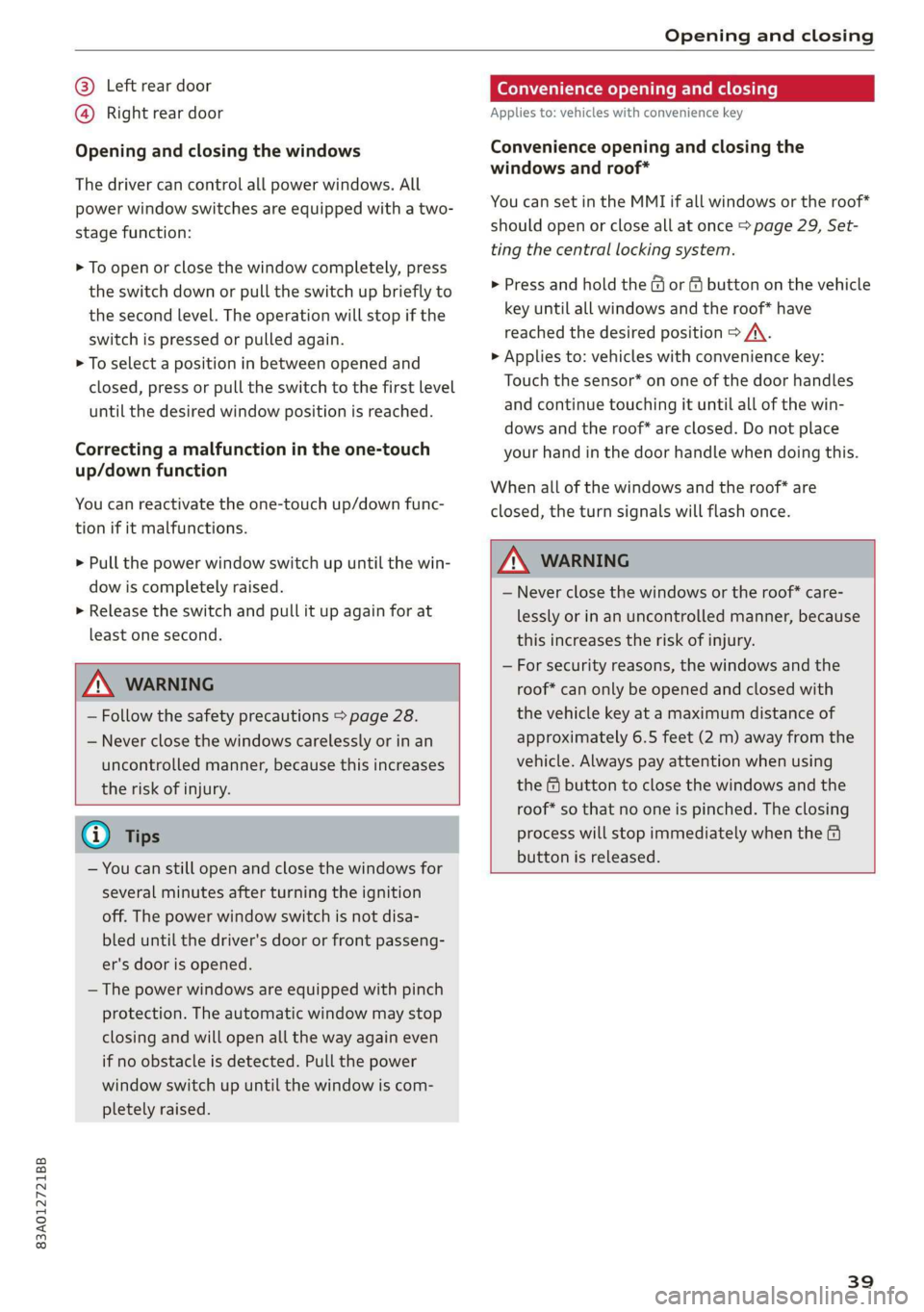
Opening and closing the windows
The driver can control all power windows. All
power window switches are equipped with a two-
stage function:
> To open or close the window completely, press
the switch down or pull the switch up briefly to
the second level. The operation will stop if the
switch is pressed or pulled again.
> To select a position in between opened and
closed,
press or pull the switch to the first level
until the desired window position is reached.
Correcting a malfunction in the one-touch
up/down function
You can reactivate the one-touch up/down func-
tion if it malfunctions.
> Pull the power window switch up until the win-
dow is completely raised.
> Release the switch and pull it up again for at
least one second.
Z\ WARNING
— Follow the safety precautions > page 28.
— Never close the windows carelessly or in an
uncontrolled manner, because this increases
the risk of injury.
@) Tips
— You can still open and close the windows for
several minutes after turning the ignition
off. The power window switch is not disa-
bled until the driver's door or front passeng-
er's door is opened.
— The power windows are equipped with pinch
protection. The automatic window may stop
closing and will open all the way again even
if no obstacle is detected. Pull the power
window switch up until the window is com-
pletely raised.
Convenience opening and closing
Applies to: vehicles with convenience key
Convenience opening and closing the
windows and roof*
You can set in the MMI if all windows or the roof*
should open or close all at once > page 29, Set-
ting the central locking system.
> Press and hold the & or & button on the vehicle
key until all windows and the roof* have
reached the desired position > /A\.
> Applies to: vehicles with convenience key:
Touch the sensor* on one of the door handles
and continue touching it until all of the win-
dows and the roof* are closed. Do not place
your hand in the door handle when doing this.
When all of the windows and the roof* are
closed, the turn signals will flash once.
Z\ WARNING
— Never close the windows or the roof* care-
lessly or in an uncontrolled manner, because
this increases the risk of injury.
— For security reasons, the windows and the
roof* can only be opened and closed with
the vehicle key at a maximum distance of
approximately 6.5 feet (2 m) away from the
vehicle. Always pay attention when using
the &@ button to close the windows and the
roof* so that no one is pinched. The closing
process will stop immediately when the &
button is released.
39
Page 48 of 278
Lights and Vision
Operating the headlight flasher
> To operate the headlight flashers, pull the lever
back @) > page 45, fig. 37. If the high beam as-
sistant is activated, but the high beams were
not turned off, the high beam assistant remains
activated.
ZA\ WARNING
— Follow the safety precautions and note the
limits of the assist systems, sensors, and
cameras > page 105.
— High beam assistant is only intended to as-
sist the driver. The driver is still responsible
for controlling the headlights and switching
them manually depending on light and visi-
bility conditions.
— High beams can cause glare for other driv-
ers, which increases the risk of an accident.
For this reason, only use the high beams or
the headlight flasher when they will not cre-
ate glare for other drivers.
Adjusting the exterior lighting
You can adjust the exterior lighting separately.
The settings depend on the vehicle equipment.
> Applies to: MMI: Select on the home screen:
VEHICLE > Light & Visibility > Exterior light-
ing.
Automatic headlights
You can adjust the following settings in the Auto-
matic
headlights menu:
Activation time - You can adjust if the headlights
switch on Early, Medium, or Late based on the
sensitivity of the light sensor.
High beam assistant - You can switch the high
beam assistant on and off.
Entry/exit lighting
When it is dark, selecting Entry/exit lighting will
illuminate the area around the vehicle when un-
locking the vehicle and after switching off the ig-
nition and opening the driver's door. The entry/
exit lighting only works when it is dark and the
light switch is in the AUTO light function.
46
Daytime running lights
USA models: the daytime running lights can be
switched on and off.
Canada models: this function cannot be switched
off. They activate automatically each time the ig-
nition is switched on.
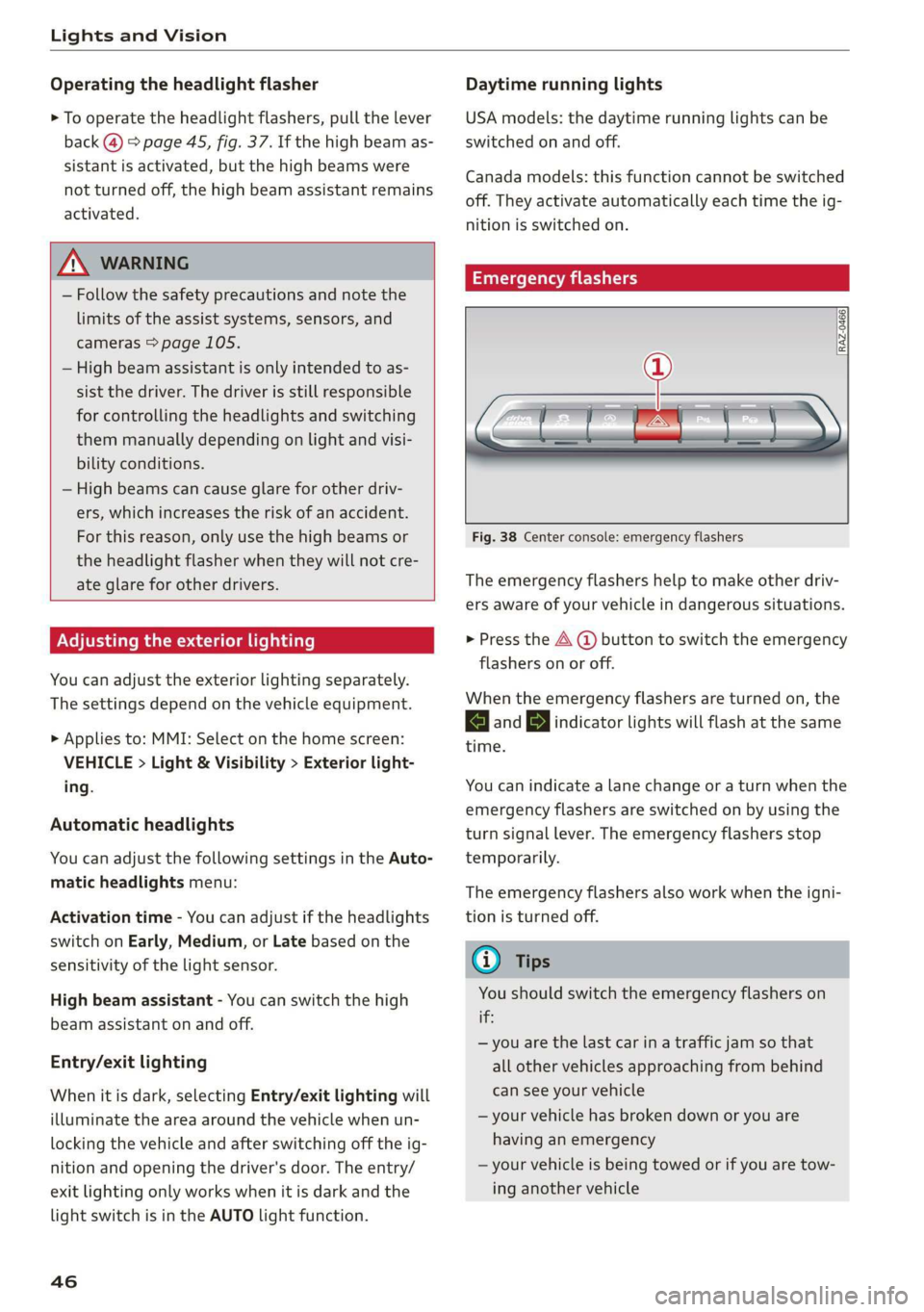
Emergency flashers
[RAZ-0466]
Fig. 38 Center console: emergency flashers
The emergency flashers help to make other driv-
ers aware of your vehicle in dangerous situations.
> Press the A (@ button to switch the emergency
flashers on or off.
When the emergency flashers are turned on, the
|<] and B indicator lights will flash at the same
time.
You can indicate a lane change or a turn when the
emergency flashers are switched on by using the
turn signal lever. The emergency flashers stop
temporarily.
The emergency flashers also work when the igni-
tion is turned off.
G) Tips
You should switch the emergency flashers on
if:
— you are the last car ina traffic jam so that
all other vehicles approaching from behind
can see your vehicle
— your vehicle has broken down or you are
having an emergency
— your vehicle is being towed or if you are tow-
ing another vehicle
Page 49 of 278
83A012721BB
Lights and Vision
If the 8; indicator light turns on, a bulb has
failed. The displayed message indicates the cause
and possible solutions. If one of the messages
does not turn off, drive immediately to an author-
ized Audi dealer or authorized Audi Service Facili-
ty to have the malfunction repaired.
BB) Audi adaptive light: malfunction! See own-
er's manual
Adaptive light* is not working. The headlights
still function. Drive immediately to an authorized
Audi dealer or authorized Audi Service Facility to
have the malfunction repaired.
High beam assistant: malfunction! See own-
er's manual
You can still switch the high beams on or off
manually. Drive immediately to an authorized
Audi dealer or authorized Audi Service Facility to
have the malfunction repaired.
High beam assistant: currently unavailable.
Camera view restrict. due to environm. condi-
tions
This message appears if the camera's visual field
is blocked. The system will switch itself off. Try
switching the systems on again Later.
automatic headlights: malfunction! See
owner's manual
The light/rain sensor is malfunctioning. The low
beams remain switched on at all times for safety
reasons with the AUTO light function. Drive im-
mediately to an authorized Audi dealer or author-
ized Audi Service Facility to have the malfunction
repaired.
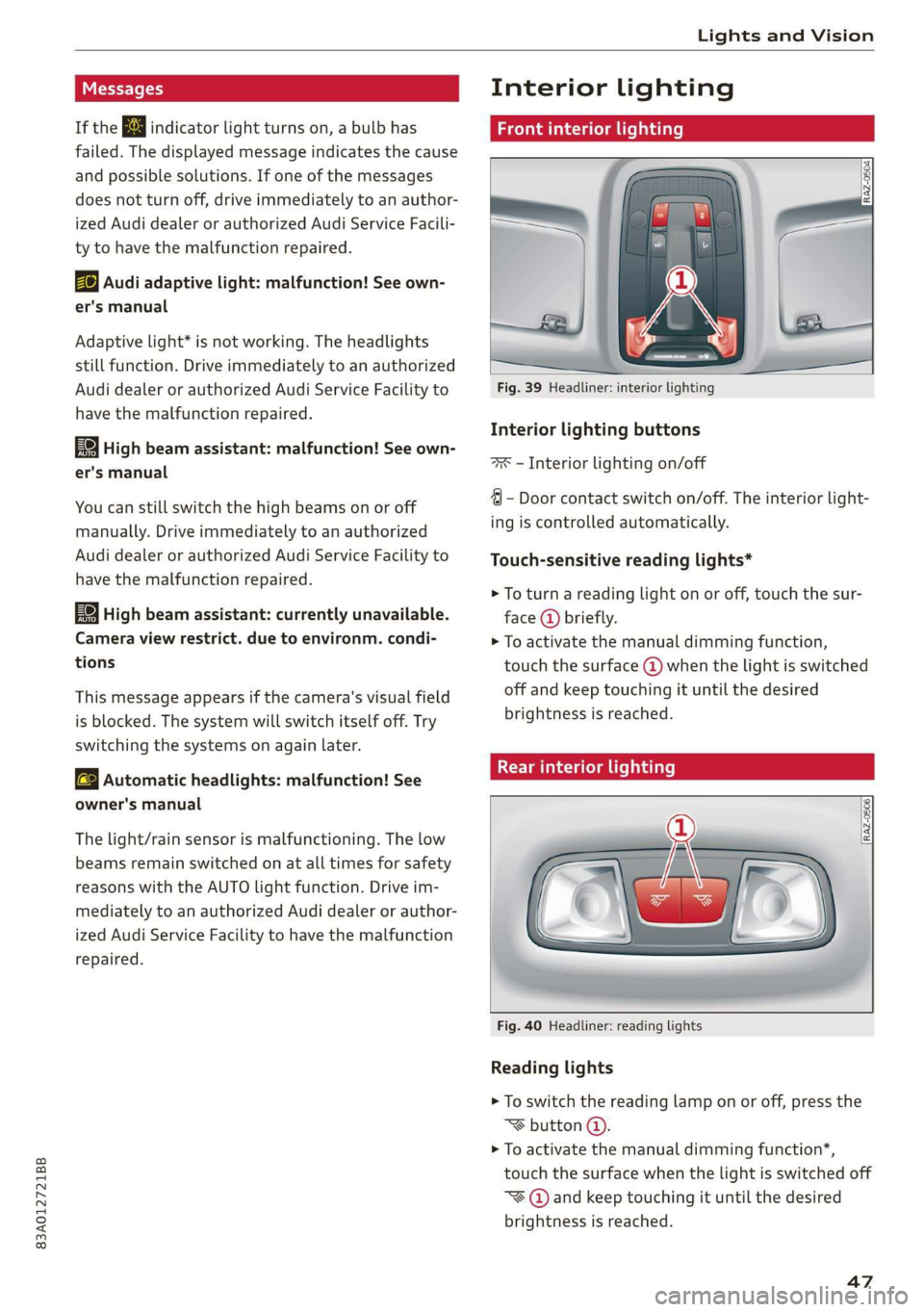
Interior lighting
Front interior lighting
Fig. 39 Headliner: interior lighting
Interior lighting buttons
ax — Interior lighting on/off
4 - Door contact switch on/off. The interior light-
ing is controlled automatically.
Touch-sensitive reading lights*
> To turn a reading light on or off, touch the sur-
face @ briefly.
> To activate the manual dimming function,
touch the surface @) when the light is switched
off and keep touching it until the desired
brightness is reached.
Rear interior lighting
Fig. 40 Headliner: reading lights
Reading lights
> To switch the reading lamp on or off, press the
‘ button @.
> To activate the manual dimming function*,
touch the surface when the light is switched off
~¥@ and keep touching it until the desired
brightness is reached.
47
Page 50 of 278
Lights and Vision
Interior lighting
Applies to: vehicles with interior lighting
The ambient lighting turns on when the ignition
is switched on. The ambient lighting is deactivat-
ed when the light function is OFF.
You can adjust the interior lighting individually.
The settings depend on the vehicle equipment.
> Applies to: MMI: Select on the home screen:
VEHICLE > Light & Visibility > Interior light-
ing.
Possible settings:
— Color
— Brightness
PE ayaa
You can adjust the instrument and display illumi-
nation separately. The settings depend on the ve-
hicle equipment.
> Applies to: MMI: Select on the home screen:
SETTINGS > Display & brightness.
Possible settings:
— Cockpit dimming
—MMI
— Virtual cockpit
Vision
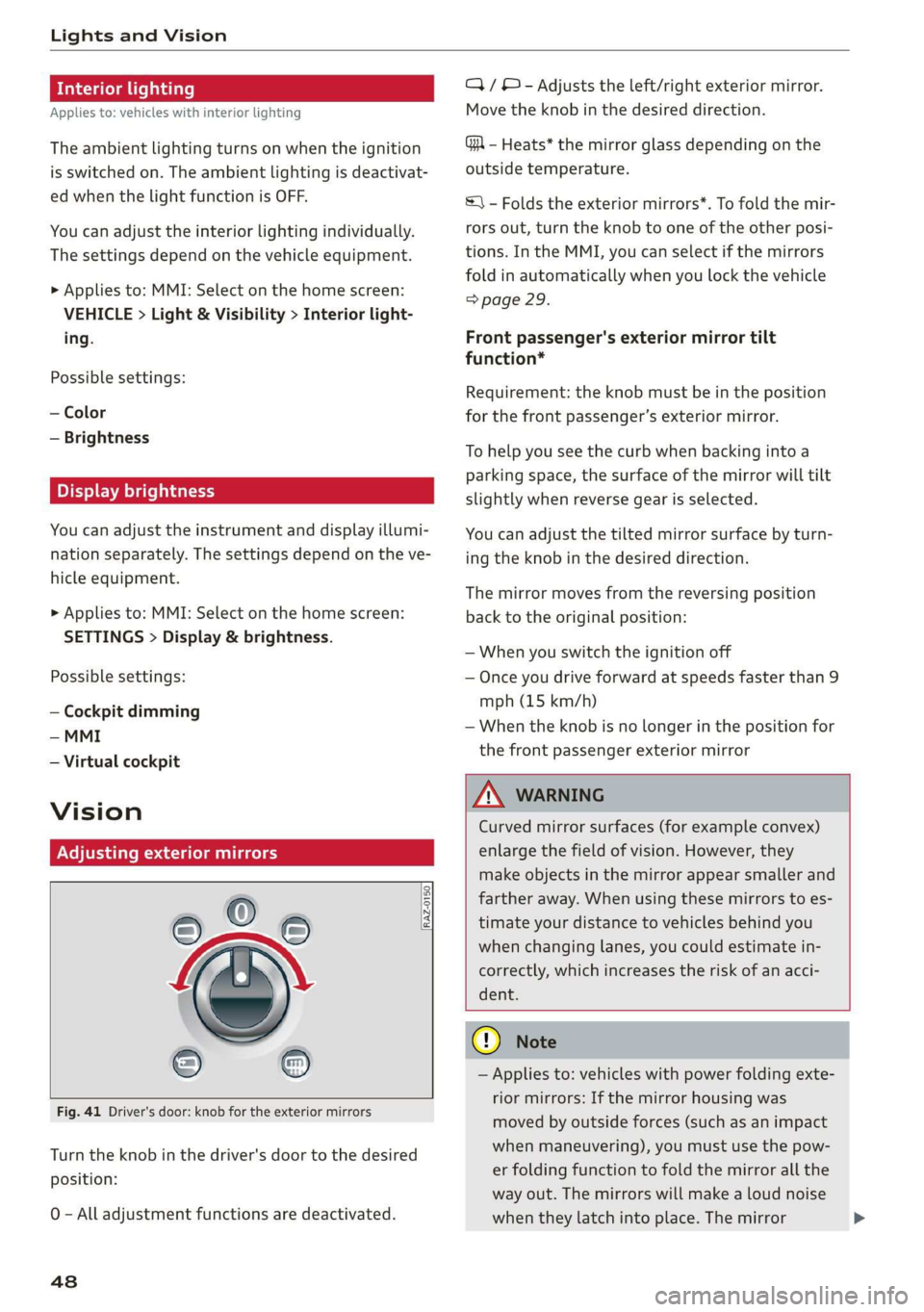
Adjusting exterior mirrors
RAZ-0150.
Fig. 41 Driver's door: knob for the exterior mirrors
Turn the knob in the driver's door to the desired
position:
0 - All adjustment functions are deactivated.
48
Q/ © - Adjusts the left/right exterior mirror.
Move the knob in the desired direction.
GA - Heats* the mirror glass depending on the
outside temperature.
©) - Folds the exterior mirrors*. To fold the mir-
rors out, turn the knob to one of the other posi-
tions. In the MMI, you can select if the mirrors
fold in automatically when you lock the vehicle
=> page 29.
Front passenger's exterior mirror tilt
function*
Requirement: the knob must be in the position
for the front passenger’s exterior mirror.
To help you see the curb when backing into a
parking space, the surface of the mirror will tilt
slightly when reverse gear is selected.
You can adjust the tilted mirror surface by turn-
ing the knob in the desired direction.
The mirror moves from the reversing position
back to the original position:
— When you switch the ignition off
— Once you drive forward at speeds faster than 9
mph (15 km/h)
—When the knob is no longer in the position for
the front passenger exterior mirror
Z\ WARNING
Curved mirror surfaces (for example convex)
enlarge the field of vision. However, they
make objects in the mirror appear smaller and
farther away. When using these mirrors to es-
timate your distance to vehicles behind you
when changing lanes, you could estimate in-
correctly, which increases the risk of an acci-
dent.
@ Note
— Applies to: vehicles with power folding exte-
rior mirrors: If the mirror housing was
moved by outside forces (such as an impact
when maneuvering), you must use the pow-
er folding function to fold the mirror all the
way out. The mirrors will make a loud noise
when they latch into place. The mirror
Page 64 of 278
Sitting correctly and safely
Safety belt retractor
The safety belts are equipped with an automatic
belt retractor. This automatic retractor allows the
safety belt to be pulled all the way out when the
belt is pulled slowly. However, the automatic re-
tractor locks during sudden braking maneuvers.
It also locks the belts when accelerating, driving
uphill, and driving around curves.
Belt force limiter
Safety belts with belt force limiters reduce the
force placed on the body by the safety belts dur-
ing a collision.
Safety belt pretensioners
In certain driving situations, safety belts may be
tightened with reversible belt tensioners when
you start driving. If the safety belt is too loose, it
will be tightened so that the belt will rest closer
to the body.
In some collisions, pyrotechnic belt tensioners
may secure the safety belts so that they cannot
loosen. This reduces forward movement by the
vehicle passengers.
ZA WARNING
The pyrotechnic system can only provide pro-
tection during one collision. If the pyrotechnic
belt tensioners deploy, the pretensioning sys-
tem must be replaced by an authorized Audi
dealer or authorized Audi Service Facility.
@) Tips
Smoke may be released when pyrotechnic belt
tensioners deploy. This is not a sign of a vehi-
cle fire.
Airbag system
Z\ WARNING
— If you have not fastened your safety belt,
you are in an incorrect seating position, or
you are too close to the airbag system, the
airbag system will not be able to protect
you. This increases the risk of serious or fa-
tal injuries. Make sure that every vehicle
passenger has their safety belt correctly fas-
tened and is sitting in a correct seating posi-
tion > page 54. This is necessary regardless
of whether the seat is equipped with an air-
bag or not.
Never place your feet on the instrument
panel, out of the window, or on the seat sur-
faces. To help ensure that the airbag system
can deploy correctly, never bend forward or
lean on the door or the side window. Other-
wise, serious and possibly fatal injuries can
occur if the airbags deploy.
People, animals, or objects between the
passengers and the airbag system can inter-
fere with the correct deployment of the air-
bag or can be thrown through the vehicle in-
terior, increasing the risk of serious or fatal
injuries. Make sure that nothing is located
between the vehicle occupants and the air-
bag system. Do not secure or transport any
objects within the deployment zone of the
airbag systems, especially on the steering
wheel, on the instrument panel, on the
doors, on the windows, or in the footwell.
Never put stickers on the airbag system cov-
ers or cover them with any objects.
Only lightweight clothing should be hung
from the garment hooks in the vehicle. Do
not use clothes hangers to hang clothing.
The pockets of the clothing must not con-
tain any heavy, breakable, or sharp-edged
objects. This could impair the effectiveness
of the side curtain airbags.
You must not use seat or protective covers
that are not specifically approved for use on
Audi seats with side airbags. Since the side
airbags deploy from the seat backrest, such
covers could impair the protective function
of the side airbags.
Damage to the original seat covers in the
side airbag deployment area must always be
repaired by an authorized Audi dealer or au-
thorized Audi Service Facility.
Airbag system components are installed at
various locations in your vehicle. Incorrect
work or repairs on the vehicle could damage
the airbag system components or impair
62
Page 76 of 278
Stowing and using
could spill and cause damage to vehicle
equipment.
Additional storage
Depending on the vehicle equipment, there may
be a variety of storage areas, compartments, and
retainers at various locations in the vehicle.
— Glove compartment: the glove compartment
can be locked using the vehicle key > page 32.
— Holders for a notepad and a pen in the glove
compartment
— Storage compartment in the cockpit on the
driver's side
— Storage compartments in the door trim panel
— Storage compartment under the left front seat
— Storage compartment under the front center
armrest
— Storage compartment under the right front
seat
— Net behind the front seats
— Storage compartment at the end of the rear
center console
— Garment hooks in the rear
— Storage compartments next to the rear bench
seat
— Bag hooks in the luggage compartment
Z\ WARNING
—To reduce the risk of injury, make sure all
storage compartments are always closed
while driving.
— Loose objects can be thrown around the ve-
hicle interior during sudden driving or brak-
ing maneuvers, which increases the risk of
an accident. Store objects securely while
driving.
— Only use the storage compartments in the
door trim panels to store small objects that
will not stick out of the compartment and
impair the function of the side airbags.
— Only lightweight clothing should be hung
from the garment hooks in the vehicle. The
pockets of the clothing must not contain any
heavy, breakable, or sharp-edged objects.
Such objects endanger vehicle occupants
and increase the risk of injury during sudden
driving or braking maneuvers or in an acci-
dent, especially if the airbags deploy.
— Make sure your view toward the rear is not
blocked, for example by hanging clothing or
objects in the vehicle.
G) Tips
Applies to: vehicles with Wi-Fi:Do not place
any metal objects in the storage compart-
ment* on the end of the rear center console,
because they could impair the Wi-Fi antenna
function.
Luggage compartment
General information
All pieces of luggage or objects must be securely
fastened in the luggage compartment. Note the
following to maintain good vehicle handling:
> Distribute the load evenly in the luggage com-
partment.
> Stow heavy luggage as far forward in the lug-
gage compartment as possible.
>» Use non-elastic cords attached to the tie-downs
to secure objects.
ZA\ WARNING
— The luggage compartment cover must al-
ways be securely fastened when in use to re-
duce the risk of an accident.
— The storage compartment must not be used
to transport heavy objects, hard objects, or
animals. Such objects endanger vehicle oc-
cupants and increase the risk of injury dur-
ing sudden driving or braking maneuvers or
in an accident.
— Loose objects can be thrown around the ve-
hicle interior during sudden driving or brak-
ing maneuvers, which increases the risk of
an accident. Always stow objects securely in
the luggage compartment and secure them
at the tie-downs. Use straps suitable for
heavy objects.
—If pieces of luggage or objects are secured
to the tie-downs with unsuitable or dam-
aged straps, this can increase the risk of
74