service AUDI Q3 2020 User Guide
[x] Cancel search | Manufacturer: AUDI, Model Year: 2020, Model line: Q3, Model: AUDI Q3 2020Pages: 278, PDF Size: 72.66 MB
Page 34 of 278
Opening and closing
Keys
[RAZ-0369
RAZ-0728
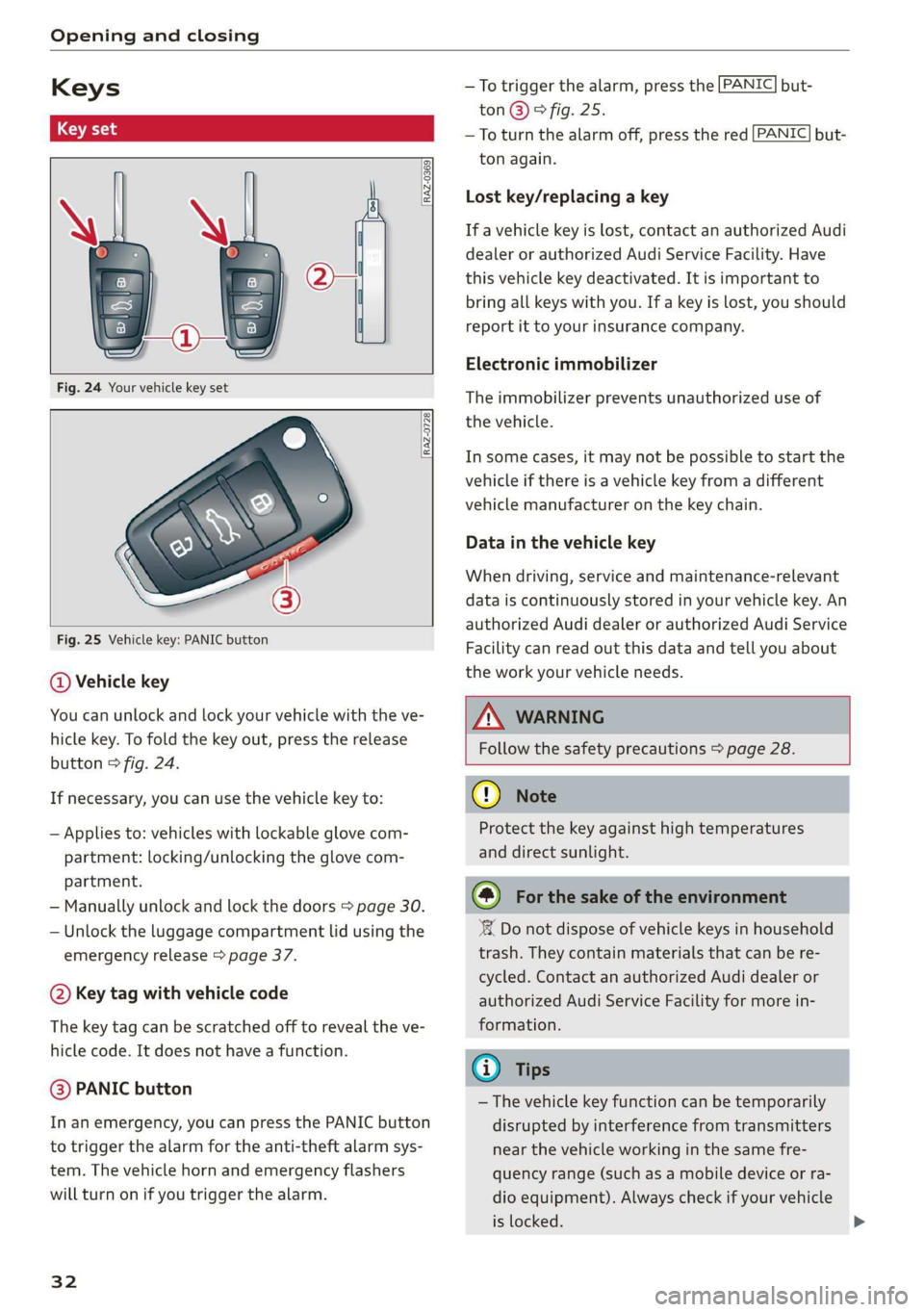
Fig. 25 Vehicle key: PANIC button
@ Vehicle key
You can unlock and lock your vehicle with the ve-
hicle key. To fold the key out, press the release
button © fig. 24.
If necessary, you can use the vehicle key to:
—
Applies to: vehicles with lockable glove com-
partment: locking/unlocking the glove com-
partment.
— Manually unlock and lock the doors > page 30.
— Unlock the luggage compartment lid using the
emergency release > page 37.
@ Key tag with vehicle code
The key tag can be scratched off to reveal the ve-
hicle code. It does not have a function.
@ PANIC button
In an emergency, you can press the PANIC button
to trigger the alarm for the anti-theft alarm sys-
tem. The vehicle horn and emergency flashers
will turn on if you trigger the alarm.
32
—To trigger the alarm, press the [PANIC] but-
ton@)® fig. 25.
—To turn the alarm off, press the red [PANIC] but-
ton again.
Lost key/replacing a key
If a vehicle key is lost, contact an authorized Audi
dealer or authorized Audi Service Facility. Have
this vehicle key deactivated. It is important to
bring all keys with you. If a key is lost, you should
report it to your insurance company.
Electronic immobilizer
The immobilizer prevents unauthorized use of
the vehicle.
In some cases, it may not be possible to start the
vehicle if there is a vehicle key from a different
vehicle manufacturer on the key chain.
Data in the vehicle key
When driving, service and maintenance-relevant
data is continuously stored in your vehicle key. An
authorized Audi dealer or authorized Audi Service
Facility can read out this data and tell you about
the work your vehicle needs.
Z\ WARNING
Follow the safety precautions > page 28.
@ Note
Protect the key against high temperatures
and direct sunlight.
@) For the sake of the environment
‘ Do not dispose of vehicle keys in household
trash. They contain materials that can be re-
cycled. Contact an authorized Audi dealer or
authorized Audi Service Facility for more in-
formation.
@ Tips
— The vehicle key function can be temporarily
disrupted by interference from transmitters
near the vehicle working in the same fre-
quency range (such as a mobile device or ra-
dio equipment). Always check if your vehicle
is locked.
Page 35 of 278
83A012721BB
Opening and closing
— You can view the number of keys program-
med to the vehicle by selecting on the home
screen: VEHICLE > Settings & Service > Ve-
hicle information.
— For an explanation on conformity with the
FCC regulations in the United States and the
Industry Canada regulations, see
=> page 259.
Unlocking and locking the vehicle
RAZ-0025
1
\ ’
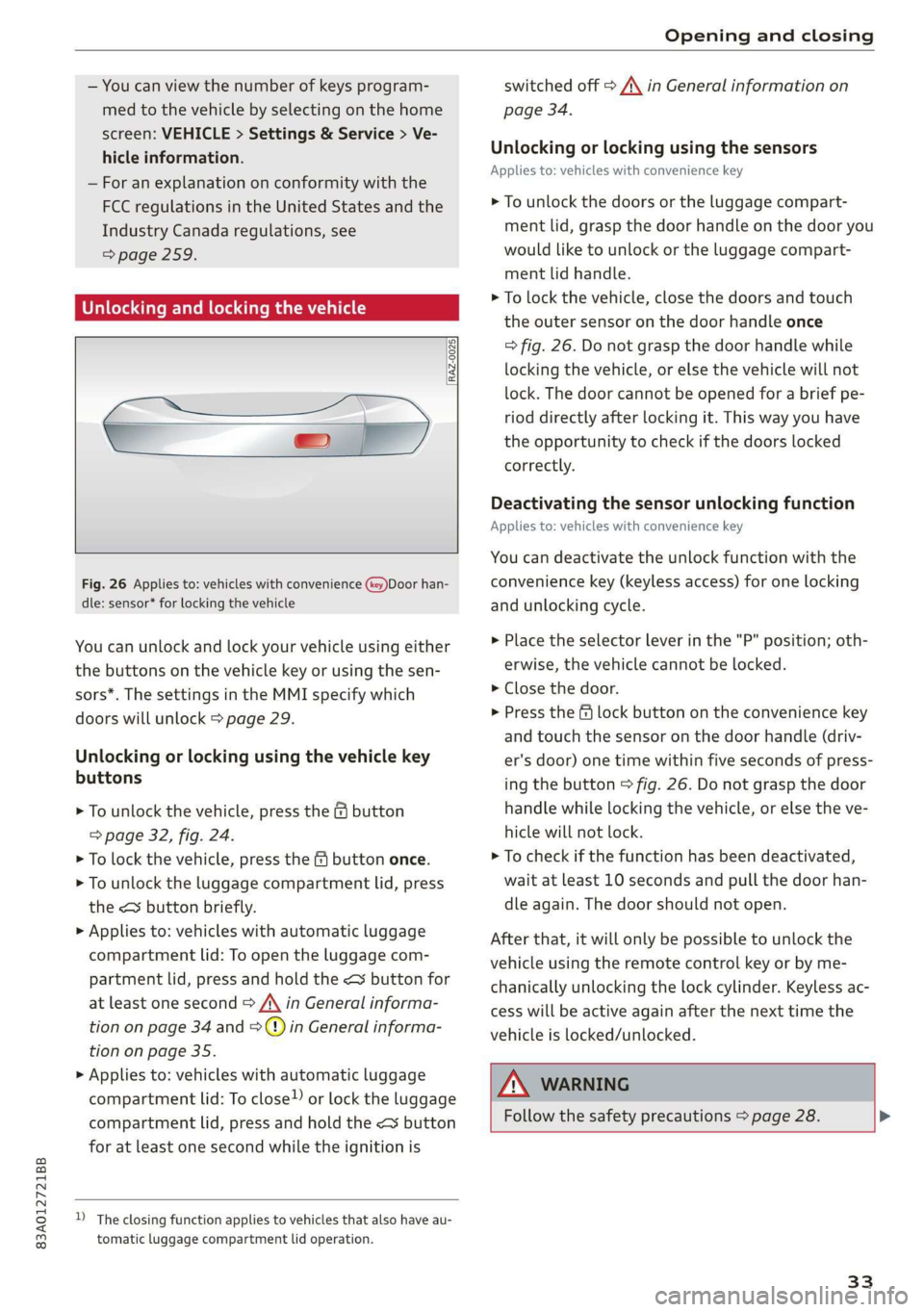
Fig. 26 Applies to: vehicles with convenience (key)Door han-
dle: sensor* for locking the vehicle
You can unlock and lock your vehicle using either
the buttons on the vehicle key or using the sen-
sors*. The settings in the MMI specify which
doors will unlock > page 29.
Unlocking or locking using the vehicle key
buttons
> To unlock the vehicle, press the G button
=> page 32, fig. 24.
> To lock the vehicle, press the & button once.
> To unlock the luggage compartment lid, press
the < button briefly.
> Applies to: vehicles with automatic luggage
compartment lid: To open the luggage com-
partment lid, press and hold the < button for
at least one second > /\ in General informa-
tion on page 34 and =>) in General informa-
tion on page 35.
> Applies to: vehicles with automatic luggage
compartment lid: To close) or lock the luggage
compartment lid, press and hold the << button
for at least one second while the ignition is
D_ The closing function applies to vehicles that also have au-
tomatic luggage compartment lid operation.
switched off > A\ in General information on
page 34.
Unlocking or locking using the sensors
Applies
to: vehicles with convenience key
> To unlock the doors or the luggage compart-
ment lid, grasp the door handle on the door you
would like to unlock or the luggage compart-
ment lid handle.
> To lock the vehicle, close the doors and touch
the outer sensor on the door handle once
=> fig. 26. Do not grasp the door handle while
locking the vehicle, or else the vehicle will not
lock. The door cannot be opened for a brief pe-
riod directly after locking it. This way you have
the opportunity to check if the doors locked
correctly.
Deactivating the sensor unlocking function
Applies to: vehicles with convenience key
You can deactivate the unlock function with the
convenience key (keyless access) for one locking
and unlocking cycle.
> Place the selector lever in the "P" position; oth-
erwise, the vehicle cannot be locked.
> Close the door.
> Press the f lock button on the convenience key
and touch the sensor on the door handle (driv-
er's door) one time within five seconds of press-
ing the button > fig. 26. Do not grasp the door
handle while locking the vehicle, or else the ve-
hicle will not lock.
> To check if the function has been deactivated,
wait at least 10 seconds and pull the door han-
dle again. The door should not open.
After that, it will only be possible to unlock the
vehicle using the remote control key or by me-
chanically unlocking the lock cylinder. Keyless ac-
cess will be active again after the next time the
vehicle is locked/unlocked.
ZA WARNING
Follow the safety precautions > page 28. >
33
Page 40 of 278
Opening and closing
Child safety lock
The child safety lock prevents the rear doors
from being opened from the inside and the rear
power windows from being operated.
RAZ-0372
B8W-0085
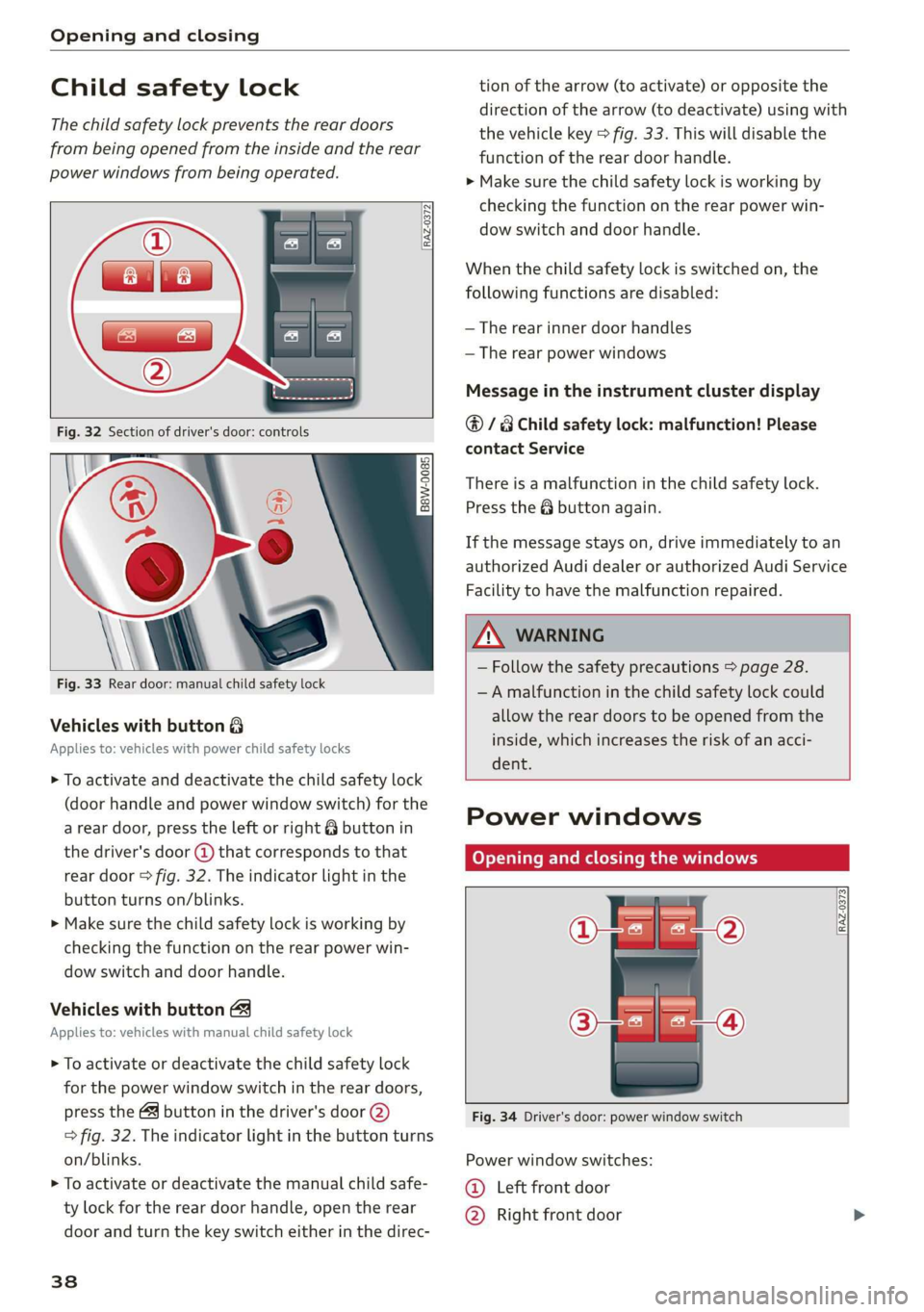
Fig. 33 Rear door: manual child safety lock
Vehicles with button 8
Applies to: vehicles with power child safety locks
> To activate and deactivate the child safety lock
(door handle and power window switch) for the
a rear door, press the left or right 8 button in
the driver's door @ that corresponds to that
rear door > fig. 32. The indicator light in the
button turns on/blinks.
> Make sure the child safety lock is working by
checking the function on the rear power win-
dow switch and door handle.
Vehicles with button
Applies to: vehicles with manual child safety lock
> To activate or deactivate the child safety lock
for the power window switch in the rear doors,
press the 4 button in the driver's door @)
> fig. 32. The indicator light in the button turns
on/blinks.
> To activate or deactivate the manual child safe-
ty lock for the rear door handle, open the rear
door and turn the key switch either in the direc-
38
tion of the arrow (to activate) or opposite the
direction of the arrow (to deactivate) using with
the vehicle key > fig. 33. This will disable the
function of the rear door handle.
> Make sure the child safety lock is working by
checking the function on the rear power win-
dow switch and door handle.
When the child safety lock is switched on, the
following functions are disabled:
— The rear inner door handles
— The rear power windows
Message in the instrument cluster display
@/8 Child safety lock: malfunction! Please
contact Service
There is a malfunction in the child safety lock.
Press the @ button again.
If the message stays on, drive immediately to an
authorized Audi dealer or authorized Audi Service
Facility to have the malfunction repaired.
ZA WARNING
— Follow the safety precautions > page 28.
—A malfunction in the child safety lock could
allow the rear doors to be opened from the
inside, which increases the risk of an acci-
dent.
Power windows
Opening and closing the windows
[RAZ-0373
Fig. 34 Driver's door: power window switch
Power window switches:
©@ Left front door
@ Right front door
Page 43 of 278
83A012721BB
Opening and closing
These functions are operated in the MMI. Multi-
ple receivers can be programmed, which can con-
trol the functions of up to eight!) hand-held
transmitters.
ZA WARNING
— When operating or programming the garage
door opener, make sure that no people or
objects are in the area immediately sur-
rounding the equipment. People can be in-
jured or property can be damaged if struck
when closing.
— Do not allow yourself to be distracted from
traffic by the viewing and operating the dis-
plays.
G) Tips
— If you sell your vehicle, reset all settings to
the factory default settings > page 194.
— For an explanation on conformity with the
FCC regulations in the United States and the
Industry Canada regulations, see
=> page 259.
@) Tips
Before you program your system to the ga-
rage door opener, first check the compatibili-
ty:
— Ask an authorized Audi dealer or authorized
Audi Service Facility or check at www.
homelink.com. You can also find more infor-
mation about HomeLink there.
— You can display information about Home-
Link (compatibility level/status/country
code/HomeLink generation) in the MMI:
— Select on the home screen: VEHICLE > Set-
tings & Service > Garage door opener > (0.
Applies to: vehicles with garage door opener
Requirements: the remote control transmitter
must be programmed > page 41, the vehicle
must be within range of the system, and the igni-
tion must be switched on.
D_ The possible number of hand-held transmitters depends
on the equipment.
There are multiple options to open or close the
system (such as the garage door).
> To display the ra button (garage door opener
button) for the garage door opener, press the
[£) button in the status bar > page 20.
> If you have only programmed one remote con-
trol transmitter, press the r@ button in the sta-
tus bar on the display > page 19. Or
> If you have programmed multiple remote con-
trol transmitters, press the ra button in the
status bar on the display > page 19 and then
press the button for the respective system. Or
> If you have configured the programmable
steering wheel button*, press the K button
= page 26 and then press the respective button
for the system. Or
> Applies to: vehicles with GPS pairing: If you
have programmed Location pairing, press the
respective button in the center display (notifi-
cation center > page 20). As you approach the
system, the button is displayed on the MMI. Or
> When reverse gear is selected, the parking sys-
tem* / rearview camera* / peripheral camera*
will appear in the display. To display the but-
tons of the first three garage door openers,
press the E=] button in the status bar and then
press the button for the respective system.
If transmission was successful, the message:
Send to: XXX will appear.
Applies to: vehicles with garage door opener
You can program both fixed code and rolling code
systems in the MMI using the procedure that is
described.
Requirement: the ignition must be switched on.
Programming the system
Requirement: the hand transmitter must be
present and the vehicle must be within range of
the system (such as the garage door) that you
would like to program. If you program more than
three remote control transmitters, assign the
41
>
Page 44 of 278
![AUDI Q3 2020 User Guide Opening and closing
first three spots to the systems that you would
also like to use when driving in reverse.
> To display the rd button for the garage door
opener, press the [=] button in the](/img/6/57625/w960_57625-43.png "AUDI Q3 2020 User Guide Opening and closing
first three spots to the systems that you would
also like to use when driving in reverse.
> To display the rd button for the garage door
opener, press the [=] button in the")
Opening and closing
first three spots to the systems that you would
also like to use when driving in reverse.
> To display the rd button for the garage door
opener, press the [=] button in the status bar
=> page 20.
> If you are programming the garage door opener
for the first time, press the 2 button on the
display. Follow the instructions in the MMI. Or
> If you would like to program other systems, se-
lect on the home screen: VEHICLE > Settings &
Service > Garage door opener. Select the de-
sired button: @). Follow the instructions in the
MMI.
> If you would like to reprogram systems that are
already programmed, select on the home
screen: VEHICLE > Settings & Service > Garage
door opener. Press the Z button and select 7
for the system to be reprogrammed. Select:
Program. Follow the instructions in the MMI.
With some systems, the garage door opener will
be immediately available after programming.
With other systems, the garage door opener
must also be synchronized.
Synchronizing!)
Requirement: the hand transmitter must already
be programmed and the vehicle must be within
range of the system (such as the garage door).
If the system synchronization is performed di-
rectly after the programming procedure, follow
the instructions on the MMI.
If you would like to sync at a later time:
> Select on the home screen: VEHICLE > Settings
& Service > Garage door opener.
> Press the button for the system that you would
like to synchronize.
> Follow the instructions in the MMI.
GPS pairing
Applies to: vehicles with GPS pairing
For easier operation, you can program your sys-
tem's location.
> Select on the home screen: VEHICLE > Settings
& Service > Garage door opener.
D_ Only applies to rolling code systems
42
> Press the Z button.
> Press the 7 button for the system your vehicle
is facing.
> Select: Location pairing.
> Follow the instructions in the MMI.
Only a maximum of three systems can be dis-
played in the notification center > page 20. If
you would like to have all systems displayed,
press 49.
Renaming programmed systems
You can rename the programmed systems indi-
vidually.
> Select on the home screen: VEHICLE > Settings
& Service > Garage door opener.
> Press the Z button.
> Press the button for the system that you
would like to rename.
> Select: Rename.
> Follow the instructions in the MMI.
Deleting programmed systems
The programmed systems can be deleted individ-
ually or all at once.
> Select on the home screen: VEHICLE > Settings
& Service > Garage door opener.
> Press the Z button.
> To delete an individual system, press the L]
button for the desired system. If the checkmark
V is set, select: Delete.
> To delete all systems, select: All > Delete.
G) Tips
— Make sure the batteries in the hand trans-
mitter are charged before starting the pro-
gramming process.
— The programming process may take up to
30 seconds. It may be necessary for the
hand transmitter to be pressed again in the
meantime.
— The garage door opener may need to be
synchronized with the system after pro-
gramming. Follow the manufacturer's in-
structions for doing this.
Page 45 of 278
83A012721BB
Opening and closing
In some cases, the system may need to be
programmed in a different mode (“D mode”).
— Switch the ignition on.
— Select on the home screen: VEHICLE > Set-
tings & Service > Garage door opener.
— Press and hold the desired button @).
— Select Yes, in D mode and follow the in-
structions on the MMI.
43
Page 47 of 278

83A012721BB
Lights and Vision
fog over due to the temperature difference
between the inside and outside. They will
clear shortly after switching them on. This
does not affect the service life of the light-
ing.
— When the parking lights are switched on
and the ignition is switched off, the 200: sym-
bol appears in the light switch module.
Turn signal and high beam lever
©
gS
©
Fig. 37 Lever: switching on the turn signal and high beams
The lever operates the turn signals, the high
beams and the headlight flasher.
Turn signals @ >
The turn signal activates when you move the lev-
er into a turn signal position when the ignition is
switched on. The respective a or B indicator
light flashes.
@ - Right turn signal
@ - Left turn signal
The turn signal blinks three times if you tap the
lever (convenience turn signal).
If an indicator light blinks twice as fast as usual,
a turn signal bulb has failed. Carefully drive to an
authorized Audi dealer or authorized Audi Service
Facility immediately to have the malfunction cor-
rected.
High beams ZO and headlight flasher
> Move the lever to the corresponding position:
@® - High beams on (vehicles with high beam as-
sistant*) > page 45
@ - High beams off or headlight flasher
The 0) indicator light in the instrument cluster
will turn on.
Z\ WARNING
High beams can cause glare for other drivers,
which increases the risk of an accident. For
this reason, only use the high beams or the
headlight flasher when they will not create
glare for other drivers.
thm Teel
Applies to: vehicles with high beam assistant
The high beam assistant automatically turns the
high beams on or off depending on the surround-
ing conditions.
A camera on the rearview mirror mount can de-
tect light sources from other road users. The high
beams switch on or off automatically depending
on the position of vehicles driving ahead and on-
coming vehicles, the vehicle speed as well as oth
er environmental factors and traffic conditions.
Switching on the high beam assistant
Requirement: the automatic headlights must be
set and the high beam assistant must be switch-
ed on > page 46.
> To activate the high beam assistant, tap the
lever forward @) > page 45, fig. 37. The M4 in-
dicator light appears in the instrument cluster
display and the high beams are switched on or
off automatically. If the high beams were com-
pletely or partially switched on, the Ea indica-
tor light will turn on.
Switching the high beams on or off manually
If the high beams did not switch on or off auto-
matically as expected, you may switch them on or
off manually instead:
> To switch the high beams on manually, tap the
lever
forward @) > page 45, fig. 37. The EJ in-
dicator light turns on.
> To switch the high beams off manually, pull the
lever
back @) > page 45, fig. 37. The high beam
assistant is deactivated.
4s
Page 49 of 278
83A012721BB
Lights and Vision
If the 8; indicator light turns on, a bulb has
failed. The displayed message indicates the cause
and possible solutions. If one of the messages
does not turn off, drive immediately to an author-
ized Audi dealer or authorized Audi Service Facili-
ty to have the malfunction repaired.
BB) Audi adaptive light: malfunction! See own-
er's manual
Adaptive light* is not working. The headlights
still function. Drive immediately to an authorized
Audi dealer or authorized Audi Service Facility to
have the malfunction repaired.
High beam assistant: malfunction! See own-
er's manual
You can still switch the high beams on or off
manually. Drive immediately to an authorized
Audi dealer or authorized Audi Service Facility to
have the malfunction repaired.
High beam assistant: currently unavailable.
Camera view restrict. due to environm. condi-
tions
This message appears if the camera's visual field
is blocked. The system will switch itself off. Try
switching the systems on again Later.
automatic headlights: malfunction! See
owner's manual
The light/rain sensor is malfunctioning. The low
beams remain switched on at all times for safety
reasons with the AUTO light function. Drive im-
mediately to an authorized Audi dealer or author-
ized Audi Service Facility to have the malfunction
repaired.
Interior lighting
Front interior lighting
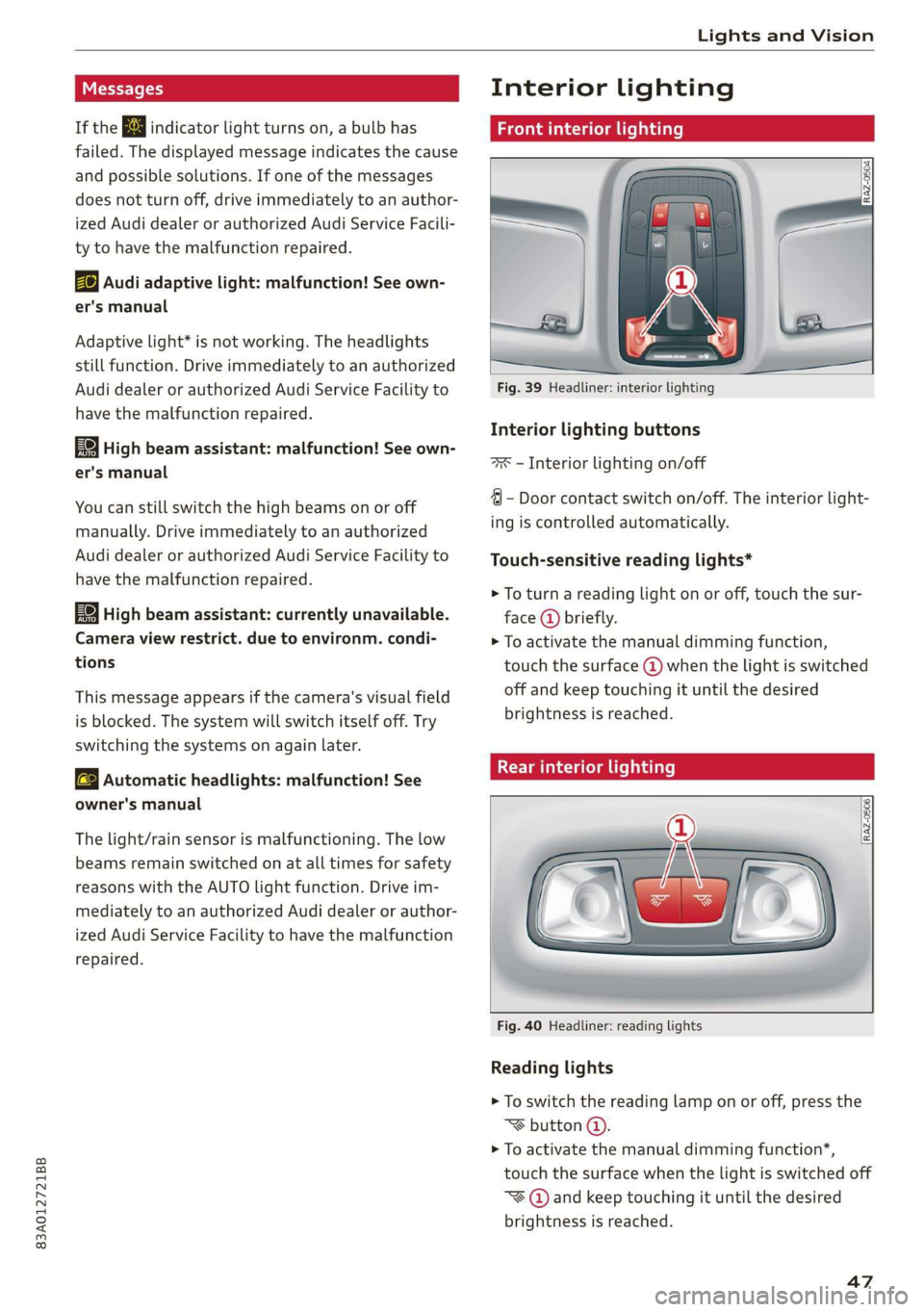
Fig. 39 Headliner: interior lighting
Interior lighting buttons
ax — Interior lighting on/off
4 - Door contact switch on/off. The interior light-
ing is controlled automatically.
Touch-sensitive reading lights*
> To turn a reading light on or off, touch the sur-
face @ briefly.
> To activate the manual dimming function,
touch the surface @) when the light is switched
off and keep touching it until the desired
brightness is reached.
Rear interior lighting
Fig. 40 Headliner: reading lights
Reading lights
> To switch the reading lamp on or off, press the
‘ button @.
> To activate the manual dimming function*,
touch the surface when the light is switched off
~¥@ and keep touching it until the desired
brightness is reached.
47
Page 53 of 278
83A012721BB
Lights and Vision
@) Note
— If there is frost, make sure the windshield
wiper blades are not frozen to the wind-
shield. Switching on the windshield wipers
when the blades are frozen to the wind-
shield can damage the wiper blades.
— Prior to using a car wash, the windshield
wiper system must be switched off (lever in
position @). This prevents the wipers from
switching on unintentionally and causing
damage to the windshield wiper system.
@ Tips
— The windshield wipers switch off when the
ignition is switched off. You can activate the
windshield wipers after the ignition is
switched on again by moving the windshield
wiper lever to any position.
— Worn or dirty windshield wiper blades result
in streaking. This can affect the rain sensor
function. Check your windshield wiper
blades regularly.
— The washer fluid nozzles for the windshield
washer system are heated when the ignition
is on if the outside temperature is low.
— When stopping temporarily, such as at a
traffic light, the speed of the windshield
wipers automatically reduces by one level.
(eC ene a Rec NTT Smo) Ley
B8V-0696|
Ae
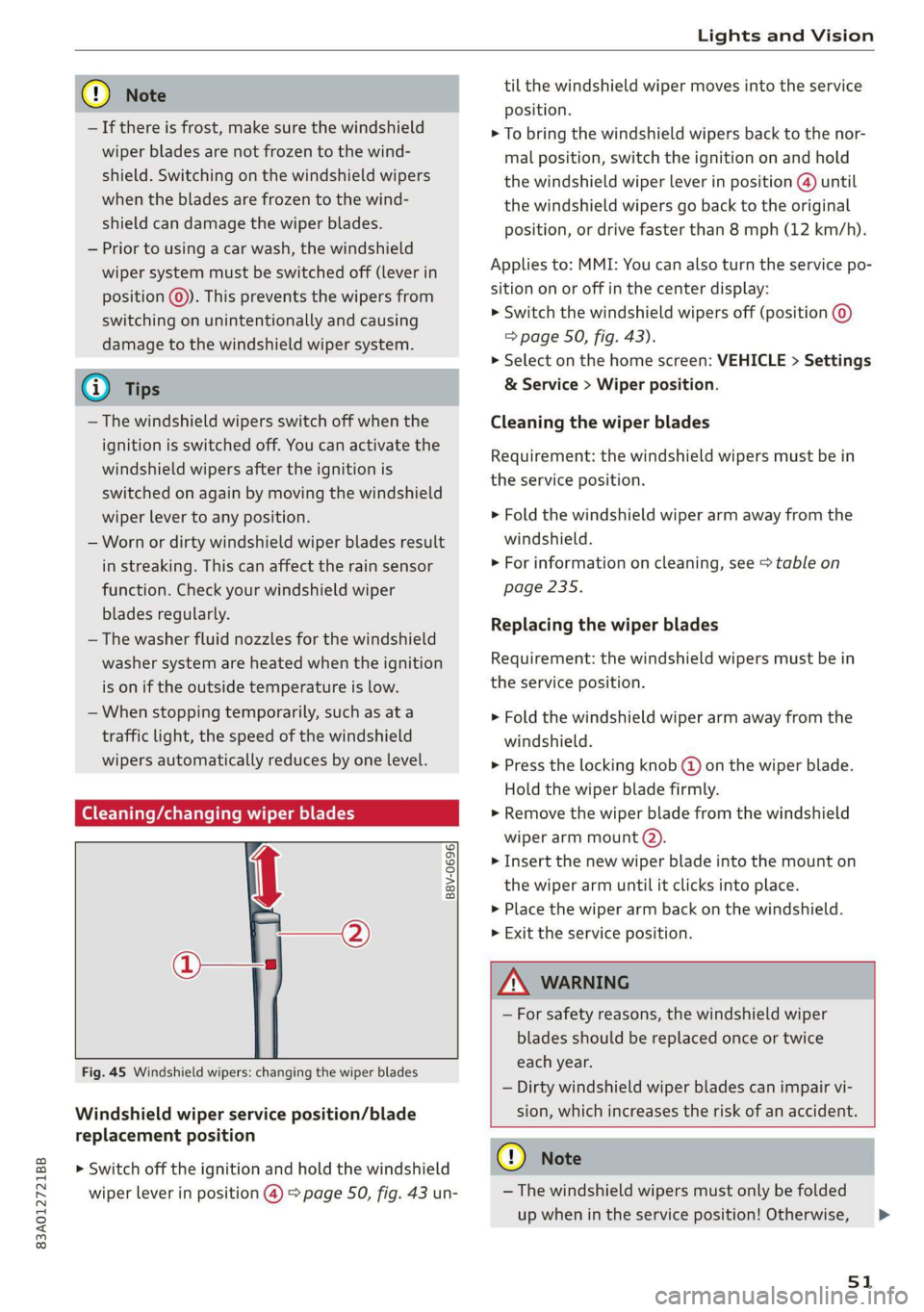
Fig. 45 Windshield wipers: changing the wiper blades
Windshield wiper service position/blade
replacement position
> Switch off the ignition and hold the windshield
wiper lever in position @) > page 50, fig. 43 un-
til the windshield wiper moves into the service
position.
> To bring the windshield wipers back to the nor-
mal position, switch the ignition on and hold
the windshield wiper lever in position @) until
the windshield wipers go back to the original
position, or drive faster than 8 mph (12 km/h).
Applies to: MMI: You can also turn the service po-
sition on or off in the center display:
> Switch the windshield wipers off (position @
=> page 50, fig. 43).
> Select on the home screen: VEHICLE > Settings
& Service > Wiper position.
Cleaning the wiper blades
Requirement: the windshield wipers must be in
the service position.
> Fold the windshield wiper arm away from the
windshield.
>» For information on cleaning, see > table on
page 235.
Replacing the wiper blades
Requirement: the windshield wipers must be in
the service position.
> Fold the windshield wiper arm away from the
windshield.
> Press the locking knob (@) on the wiper blade.
Hold the wiper blade firmly.
> Remove the wiper blade from the windshield
wiper arm mount (2).
> Insert the new wiper blade into the mount on
the wiper arm until it clicks into place.
> Place the wiper arm back on the windshield.
> Exit the service position.
ZA WARNING
— For safety reasons, the windshield wiper
blades should be replaced once or twice
each year.
— Dirty windshield wiper blades can impair vi-
sion, which increases the risk of an accident.
@) Note
— The windshield wipers must only be folded
up when in the service position! Otherwise,
51
>
Page 54 of 278
Lights and Vision
you risk damaging the paint on the hood or
the windshield wiper motor.
— You should not move your vehicle or press
the windshield wiper lever when the wiper
arms are folded up from the windshield. The
windshield wipers would move back into
their original position and could damage the
hood and windshield.
G) Tips
— You can also use the service position, for ex-
ample, if you want to protect the windshield
from icing by using a cover.
— You cannot activate the service position
when the hood is open.
(eT) anging the rear wiper blade
B8R-0380
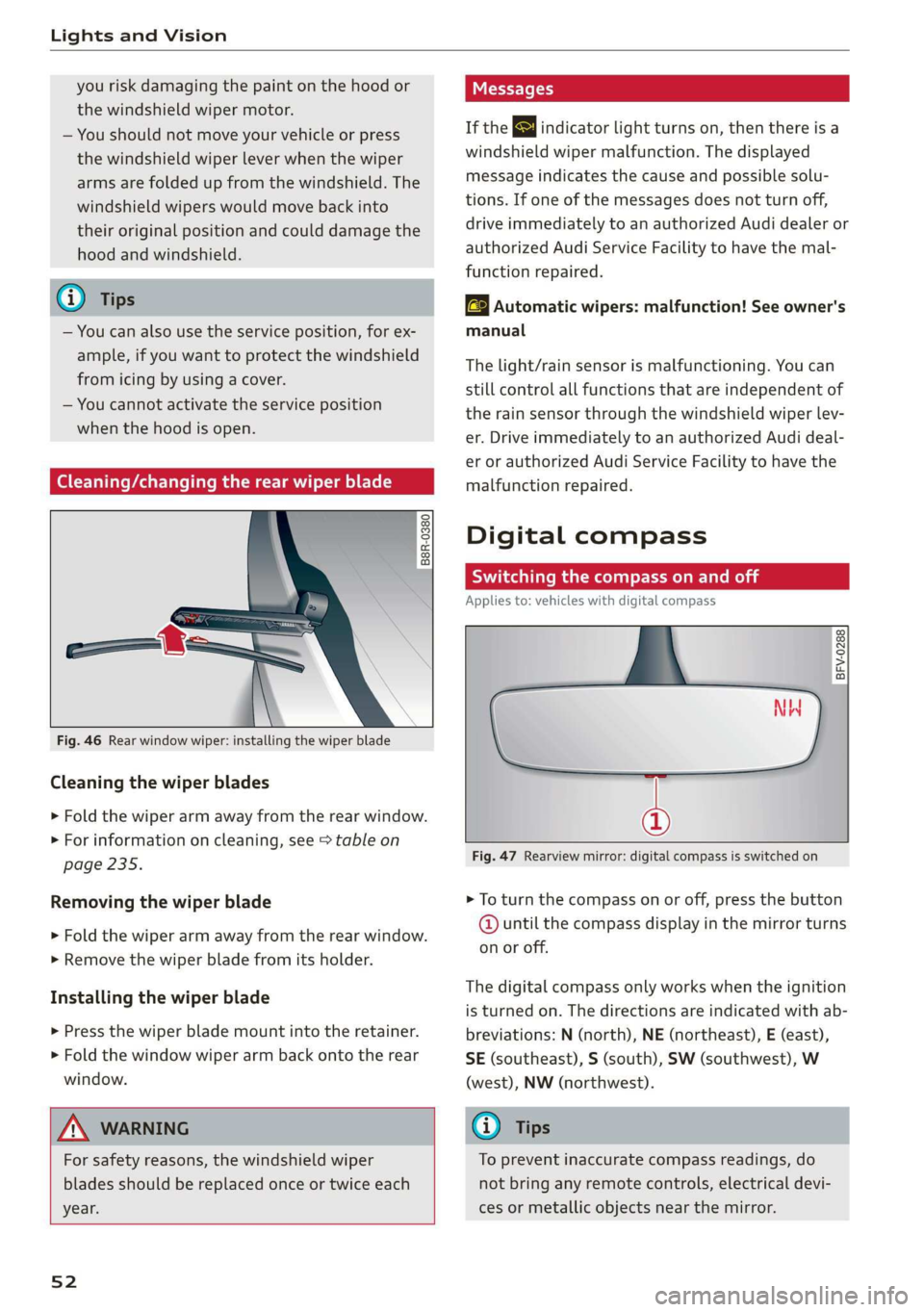
Fig. 46 Rear window wiper: installing the wiper blade
Cleaning the wiper blades
> Fold the wiper arm away from the rear window.
> For information on cleaning, see > table on
page 235.
Removing the wiper blade
> Fold the wiper arm away from the rear window.
> Remove the wiper blade from its holder.
Installing the wiper blade
> Press the wiper blade mount into the retainer.
> Fold the window wiper arm back onto the rear
window.
ZA\ WARNING
For safety reasons, the windshield wiper
blades should be replaced once or twice each
year.
52
Messages
If the & indicator light turns on, then there is a
windshield wiper malfunction. The displayed
message indicates the cause and possible solu-
tions. If one of the messages does not turn off,
drive immediately to an authorized Audi dealer or
authorized Audi Service Facility to have the mal-
function repaired.
aS Automatic wipers: malfunction! See owner's
manual
The light/rain sensor is malfunctioning. You can
still control all functions that are independent of
the rain sensor through the windshield wiper lev-
er. Drive immediately to an authorized Audi deal-
er or authorized Audi Service Facility to have the
malfunction repaired.
Digital compass
Scare mal eee Mel
Applies to: vehicles with digital compass
BFV-0288
a
Fig. 47 Rearview mirror: digital compass is switched on
> To turn the compass on or off, press the button
@ until the compass display in the mirror turns
on or off.
The digital compass only works when the ignition
is turned on. The directions are indicated with ab-
breviations: N (north), NE (northeast), E (east),
SE (southeast), S (south), SW (southwest), W
(west), NW (northwest).
(i) Tips
To prevent inaccurate compass readings, do
not bring any remote controls, electrical devi-
ces or metallic objects near the mirror.