service AUDI Q3 2020 Service Manual
[x] Cancel search | Manufacturer: AUDI, Model Year: 2020, Model line: Q3, Model: AUDI Q3 2020Pages: 278, PDF Size: 72.66 MB
Page 101 of 278
83A012721BB
Driving dynamic
@) Tips
If the & or a indicator light only stays on
for a short time, you may continue driving.
All wheel drive (quattro)
Applies to: vehicles with all wheel drive
The all-wheel drive system distributes the driving
power variably to the front and rear axle to im-
prove the driving characteristics. It works togeth-
er with selective wheel torque control, which can
activate when driving through curves
=> page 100.
The all-wheel drive system is designed for high
engine power. Your vehicle is exceptionally pow-
erful and has excellent driving characteristics
both under normal driving conditions and on
snow and ice. Always read and follow safety pre-
cautions > A\.
ZA WARNING
— Even in vehicles with all wheel drive, you
should adapt your driving style to the cur-
rent road and traffic conditions to reduce
the risk of an accident.
— The braking ability of your vehicle is limited
to the traction of the wheels. In this way, it
is not different from a two wheel drive vehi-
cle. Do not drive too fast because this in-
creases the risk of an accident.
— Note that on wet streets, the front wheels
can “hydroplane’” if driving at speeds that
are too high. Unlike front wheel drive
vehicles, the engine RPM does not increase
suddenly when the vehicle begins hydro-
planing. Adapt your speed to the road condi-
tions to reduce the risk of an accident.
Messages
iT-3| All wheel drive: malfunction! You can con-
tinue driving. Please contact Service
Drive immediately to an authorized Audi dealer
or authorized Audi Service Facility to have the
malfunction repaired.
it} All wheel drive: too hot. Please adapt driv-
ing style. See owner’s manual
The transmission temperature has increased sig-
nificantly due to the sporty driving manner. Drive
in a less sporty manner until the temperature re-
turns to the normal range and the indicator light
switches of.
Electronic Stabilization
Control
Electronic Stabilization Control (ESC) supports
driver safety. It reduces the risk of slipping and
improves driving stability. ESC detects critical sit-
uations, such as if the vehicle is oversteering or
understeering, or if the wheels are spinning. The
brakes are applied or the engine torque is re-
duced in order to stabilize the vehicle.
If the Eq indicator light blinks while driving, the
ESC is actively regulating.
If the BA indicator light turns on, the system has
switched the ESC off. In this case, you can switch
the ignition off and then on to switch the ESC on
again. The indicator light turns off when the sys-
tem is fully functional.
If the B indicator light turns on, ESC was limit-
ed or switched off manually > page 100.
The following systems are integrated in the ESC:
Anti-lock braking system (ABS)
ABS prevents the wheels from locking when brak-
ing. The vehicle can still be steered even during
hard braking. Apply steady pressure to the brake
pedal. Do not pump the pedal. A pulsing in the
brake pedal indicates that the system is acting to
stabilize the vehicle.
Brake assist
The brake assist system can decrease braking dis-
tance. It increases braking power when the driver
presses the brake pedal quickly in emergency sit-
uations. You must press and hold the brake pedal
until the dangerous situation is over. Depending
on the activated driver assistance systems, the >
99
Page 103 of 278
83A012721BB
Driving dynamic
— To completely reactivate the ESC stabilization
function, press the button again. The indicator
light turns off.
Switching off ESC
—To switch off the ESC, press and hold the Sor
button for more than three seconds. The B
and Ea indicator lights turn on.
— To completely reactivate the ESC stabilization
function, press the button again. The indicator
lights turn off.
ZA WARNING
— When the ESC is switched off or limited,
there will be no vehicle stabilization or it will
be limited. The driving wheels could spin
and the vehicle could swerve, especially on
slick or slippery road surfaces, which in-
creases the risk of an accident.
— Because of the increased risk of an accident,
only drive with the ESC switched off or Limit-
ed when it is necessary. Reactivate the ESC
as soon as possible.
G) Tips
— If the ESC is limited, switched off, or mal-
functioning, systems with an automatic
braking intervention function may not be
fully available.
— If malfunctions occur in other systems or
certain driver assist systems are active, the
ESC must be switched on by the system. The
ESC
may switch on automatically and can-
not be operated with the button.
BA fs A BB & Stabilization control (ESC/
ABS): malfunction! See owner's manual
There is a malfunction in the ABS or EDL. This al-
so causes the ESC to malfunction. The brakes still
function with their normal power, but ABS is not
active.
Drive to an authorized Audi dealer or authorized
Audi Service Facility immediately to have the
malfunction corrected.
101
Page 105 of 278
83A012721BB
Trailer towing
Having the tongue weight too low affects the ve-
hicle's handling. For driving safety, always using
the maximum permitted tongue weight is recom-
mended, but not exceed it. Distributing the cargo
in the trailer correctly will help to achieve this
weight.
You can determine the tongue weight using a
tongue weight scale, a bathroom scale, or a pub-
lic weigh station, for example.
The permitted tongue weight of your vehicle can
be found in the vehicle documentation or in
=> page 262.
Load distribution
Poor cargo load and distribution can negatively
impact vehicle handling. Load the trailer based
on the following criteria as much as possible:
— Store objects in the vehicle luggage compart-
ment, if possible. The vehicle should always
carry the heaviest possible load and the trailer
should have the lightest possible load.
— Distribute the load in the trailer so that the
heavy objects are as close to the axle as possi-
ble.
— Secure objects so that they do not slide.
— Utilize the maximum permitted tongue weight
if possible.
Tires
Set the tire pressure on your vehicle for a “full
load”; see the tire pressure sticker > page 224. If
necessary, also adjust the tire pressure on the
trailer according to the manufacturer's specifica-
tions.
The trailer and the vehicle should be equipped
with winter tires when driving in winter tempera-
tures.
Outside mirrors
If you cannot see the traffic behind the trailer
with the standard exterior mirrors, then you
must attach additional exterior mirrors. Adjust
them so you have a sufficient visibility behind
you.
Exterior lighting
Follow the legal regulations for lighting on your
trailer that are applicable in the country where
you are operating the vehicle. Contact an author-
ized Audi dealer or authorized Audi Service Facili-
ty for more information.
Before you start driving, check all lighting equip-
ment on the trailer while it is hitched to the vehi-
cle.
The headlight range control automatically ad-
justs the light range of the headlights.
Safety chains
Make sure the safety chains are correctly applied
when pulling a trailer. The chains should hang
enough so that the trailer can drive around
curves. However, they must not touch the
ground.
() Note
Attachments retrofitted on the vehicle may
cause damage, especially on the trailer hitch
ball head. In cases of damage, have the func-
tion checked by an authorized Audi dealer or
authorized Audi Service Facility.
@) Tips
— Block the wheels with chocks when parking
on inclines if the trailer is loaded.
— Having the vehicle inspected between the
inspection intervals is recommended if you
tow a trailer frequently.
— Avoid driving with a trailer during the vehi-
cle break-in period.
Driving with a trailer
Driving with a trailer requires extra caution.
Speed
Adhere to the legal speed limits. Follow the legal
regulations that are applicable in the country
where you are operating the vehicle.
As the speed increases, the driving stability of
the trailer decreases. Therefore you should not
exceed the maximum legal speed limit when
103
>
Page 109 of 278
83A012721BB
Assist systems
@) Tips
— The coverage areas of the sensors > fig. 85
are diagrams and do not represent a true-
to-scale image of the sensor ranges. The ra-
dar sensors are designed to detect the left
and right adjacent lanes when the road
lanes are the normal width.
— The sensors and the areas around them
must not be obstructed because this can im-
pair the function of the systems that de-
pend on them. Make sure that the sensors
are free of snow, ice, and other deposits. Do
not use any accessories, stickers, or other
objects that extend into the range of the
sensors.
— Do not use a license plate bracket different
from the one installed by the factory in the
front of the vehicle, because it may impair
the function of some systems.
— The sensors can shift from an accident,
manual force, impacts, or from damage to
the radiator grill, bumper, wheel housing,
or underbody. Do not continue using the as-
sistance systems if the sensors have shifted,
because this is unsafe. Have an authorized
Audi dealer or authorized Audi Service Fa-
cility check their function.
— The function of the sensors may be limited
when light and visibility conditions are poor,
for example when driving into a tunnel,
when there is glare, or when there are re-
flective objects.
— External ultrasonic sensors, such as those in
other vehicles, can interfere with the sen-
sors.
—The side area ©)* is detected and evaluated
when passing. There may have been
changes to the surrounding area after
switching the ignition off and on again, af-
ter opening the doors, or if the vehicle is left
stationary for a period of time. In this case,
the area will appear black until the area has
been detected and evaluated.
— For an explanation on conformity with the
FCC regulations in the United States and the
Industry Canada regulations, see
=> page 259.
CO Vane Mey (TAU
[RAzZ-0211
[RAZ-0381
Fig. 88 Diagram: coverage area of the rearview camera
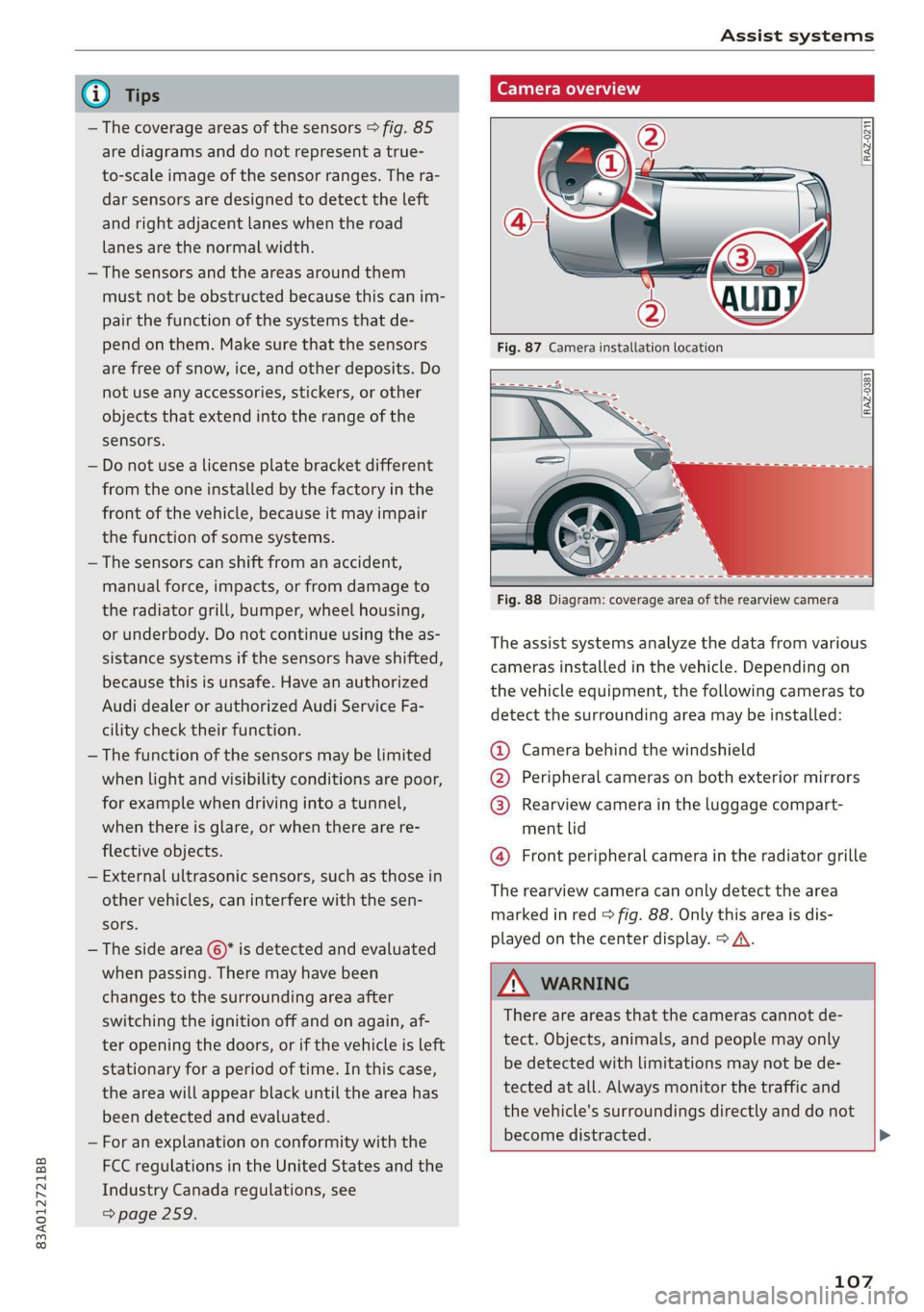
The assist systems analyze the data from various
cameras installed in the vehicle. Depending on
the vehicle equipment, the following cameras to
detect the surrounding area may be installed:
@ Camera behind the windshield
@ Peripheral cameras on both exterior mirrors
@ Rearview camera in the luggage compart-
ment lid
@ Front peripheral camera in the radiator grille
The rearview camera can only detect the area
marked in red > fig. 88. Only this area is dis-
played on the center display. > A\.
ZA WARNING
There are areas that the cameras cannot de-
tect. Objects, animals, and people may only
be detected with limitations may not be de-
tected at all. Always monitor the traffic and
the vehicle's surroundings directly and do not
become distracted. >
107
Page 110 of 278
Assist systems
CG) Note — Use the image on the display to assist you
only if it shows a good, clear picture. For ex-
— Obstacles may disappear from the measure- ample, the image may be affected by the
ment range when approaching them, even if sun shining into the lens, by dirt on the
they were already detected. Under certain lens, or if there is a malfunction.
circumstances, the detection and display of
certain surfaces and objects may be limited:
— The camera view on the display portrays an
enlarged and distorted image. Under cer-
— Items and objects above the coverage tain circumstances, objects may appear dif-
area, for example cars parked bumper-to- ferent and unclear on the display.
bumper, half-open garage doors, or hang-
ing objects that do not touch the ground
— Low obstacles
—Thin or narrow objects, such as barrier
chains, foliage, poles or fences
— Projecting objects, such as trailer draw
bars
— Objects with certain surfaces and struc-
tures, such as fabric
@) Tips
— The coverage areas of the cameras > fig. 87
and > fig. 88 are diagrams and do not repre-
sent a true-to-scale image of the camera
coverage areas.
— The cameras and the areas around them
must not be obstructed because this can im-
pair the function of the systems that de-
pend on them. Make sure that the sensors
are free of snow, ice, and other deposits. Do
not use any accessories, stickers, or other
objects that extend into the range of the
sensors.
— Do not use a license plate bracket different
from the one installed by the factory in the
front of the vehicle, because it may impair
the function of some systems.
— The camera can shift from an accident, man-
ual force, impacts, or from damage to the
radiator grill, bumper, wheel housing or un-
derbody. Have an authorized Audi dealer or
authorized Audi Service Facility check their
function.
— The function of the cameras may be limited
when light and visibility conditions are poor,
for example when driving into a tunnel,
when there is glare, or when there are re-
flective objects.
108
Page 111 of 278
83A012721BB
Driving information
Driving information
Speed warning system
Applies to: vehicles with speed warning system
The speed warning system helps the driver to
stay below a specified maximum speed. A warn-
ing threshold can be set for this purpose.
Once the speed slightly exceeds the stored
threshold, the speed warning system will alert
the driver with an indicator in the instrument
cluster and a warning tone. Once the speed drops
below the stored maximum speed, the indicator
will turn off.
Setting a threshold is recommended if you would
like to be reminded when you reach a certain
maximum speed. Situations where you may want
to do so include driving in a country with a gener-
al speed limit or if there is a specified maximum
speed for winter tires.
G) Tips
Regardless of the speed warning system, you
should always monitor your speed using the
speedometer and make sure you are following
the legal speed limit.
Setting the warning threshold
Applies to: vehicles with speed warning system
> Applies to: MMI: Select on the home screen:
VEHICLE > Driver assistance > Speed warning.
Applies to: vehicles with speed warning system
cy Manually set XX warning threshold ex-
ceeded
The stored speed was exceeded.
Traffic light information
Applies to: vehicles with traffic light information
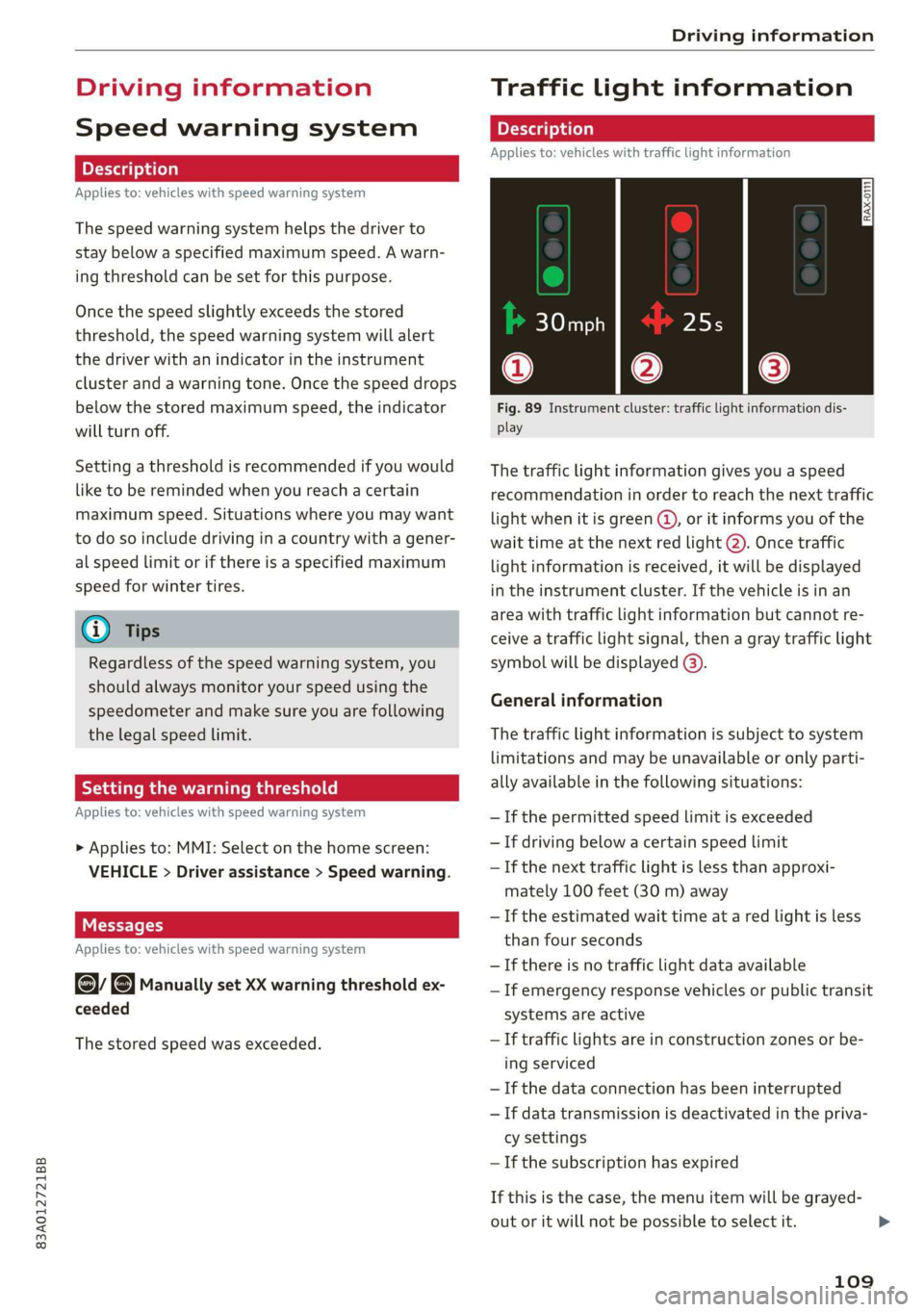
Fig. 89 Instrument cluster: traffic light information dis-
play
The traffic light information gives you a speed
recommendation in order to reach the next traffic
light
when it is green @, or it informs you of the
wait time at the next red light 2). Once traffic
light information is received, it will be displayed
in the instrument cluster. If the vehicle is in an
area with traffic light information but cannot re-
ceive a traffic light signal, then a gray traffic light
symbol will be displayed @).
General information
The traffic light information is subject to system
limitations and may be unavailable or only parti-
ally available in the following situations:
—If the permitted speed limit is exceeded
— If driving below a certain speed limit
— If the next traffic light is less than approxi-
mately 100 feet (30 m) away
—If the estimated wait time at a red light is less
than four seconds
— If there is no traffic light data available
— If emergency response vehicles or public transit
systems are active
— If traffic lights are in construction zones or be-
ing serviced
—If the data connection has been interrupted
— If data transmission is deactivated in the priva-
cy settings
—If the subscription has expired
If this is the case, the menu item will be grayed-
out or it will not be possible to select it.
109
>
Page 121 of 278
83A012721BB
Driver assistance
ZA\ WARNING
Follow the safety precautions and note the
limits of the assist systems, sensors, and
cameras > page 105.
Adjusting the adaptive cruise assist
Applies to: vehicles with adaptive cruise assist
You can adjust the adaptive cruise assist to your
own preferences. The settings depend on the ve-
hicle equipment.
> Applies to: MMI: Select on the home screen:
VEHICLE > Driver assistance > Adaptive cruise
assist.
Possible settings:
Applies to: vehicles without Audi drive select
Driving program - Depending on the selected
driving program and distance, the vehicle han-
dling will be adjusted from Sport to Moderate.
Applies to: vehicles with Audi drive select
Vehicle handling will be adjusted based on the
set distance and the selected Audi drive select
mode > page 97.
Store last distance - The last distance that was
set will be stored after the ignition is switched
off. If the distance is not stored, distance
(time distance of approximately 1.8 seconds) is
automatically preset every time the ignition is
switched on.
Messages
Applies to: vehicles with adaptive cruise assist
If or sq is displayed when there is a malfunc-
tion, the adaptive cruise assist functions may be
unavailable or limited.
A message that indicates the cause and possible
solution may appear with some displays. The
weather conditions may be too poor or a sensor
may be covered. Clean the area in front of the
sensors > page 106, fig. 86 and try to turn on
the systems again later.
If the malfunction remains, drive to an author-
ized Audi dealer or authorized Audi Service Facili-
ty immediately to have the malfunction correct-
ed.
Please take over!
This message appears if the vehicle rolls back
when starting on a slight incline, even though the
systems are active. Press the brake pedal to pre-
vent the vehicle from rolling or starting to move.
The message will also appear, for example, if the
steering power from the system is not sufficient
and adaptive cruise assist is switched off.
Distance warning
Applies to: vehicles with distance warning
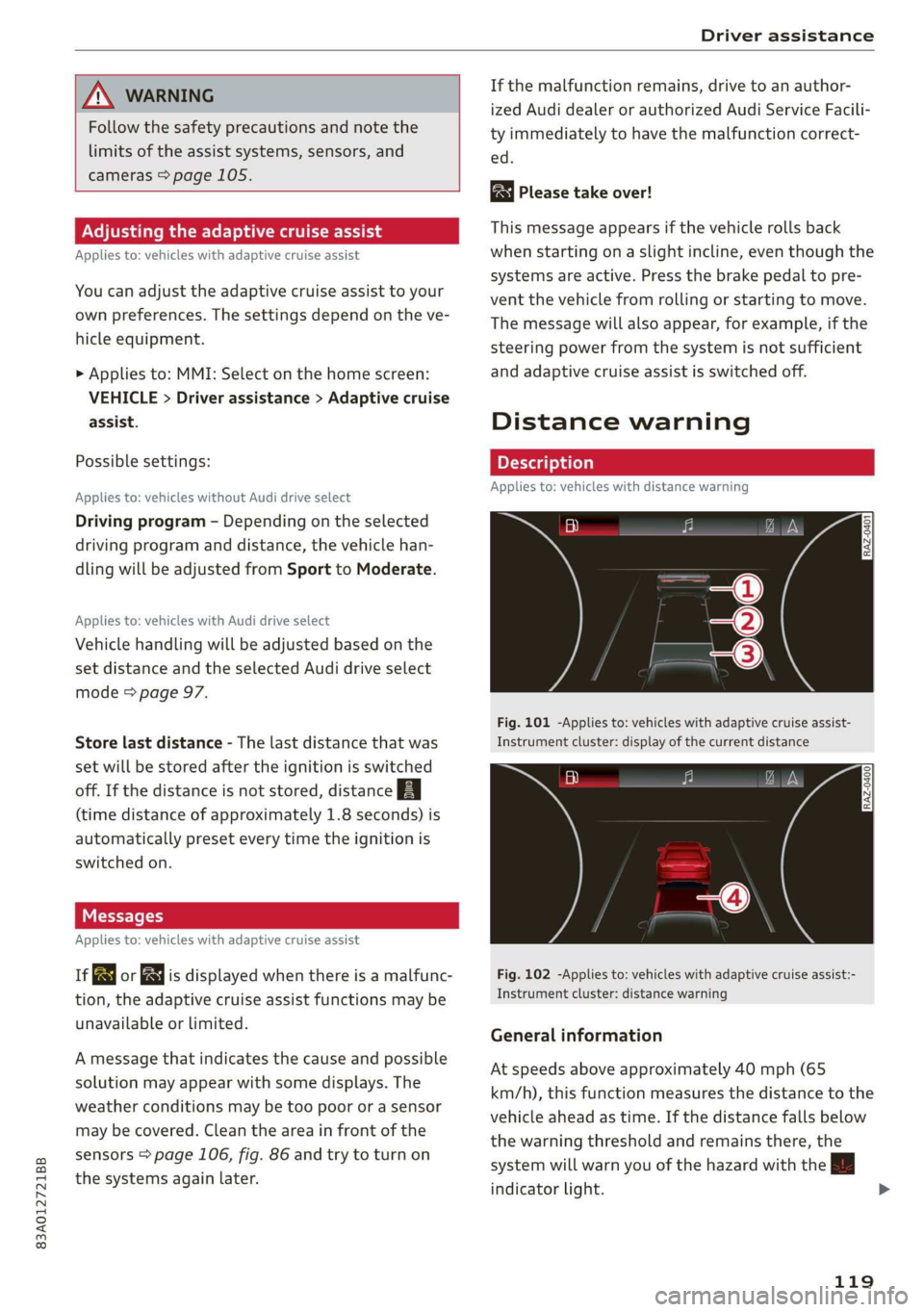
Fig. 101 -Applies to: vehicles with adaptive cruise assist-
Instrument cluster: display of the current distance
[RAZ-0400]
Fig. 102 -Applies to: vehicles with adaptive cruise assist:-
Instrument cluster: distance warning
General information
At speeds above approximately 40 mph (65
km/h), this function measures the distance to the
vehicle ahead as time. If the distance falls below
the warning threshold and remains there, the
system will warn you of the hazard with the |
indicator light.
119
>
Page 122 of 278
Driver assistance
Image in the Driver assistance display
Applies to: vehicles with adaptive cruise assist
The display only appears if the Driver assistance
display is selected on the on-board computer
=> page 14 and the adaptive cruise assist is not
actively controlling the vehicle.
@ Detected vehicle driving ahead
@ Use the markings to help you estimate the
distance to an obstacle. Each marking repre-
sents approximately one second.
@®) Set warning threshold. Depending on the set-
tings, the display will be colored in from the
bottom to the top.
@ You will be warned as soon as you fall below
the set distance.
Adjusting the distance warning
The system can be switched on or off in the MMI
and you can customize the distance warning
threshold. The settings depend on the vehicle
equipment.
— Applies to: MMI: Select on the home screen:
VEHICLE > Driver assistance > Distance warn-
ing.
Messages
irk or is displayed when there is a malfunc-
tion, the distance warning functions may be un-
available or may be limited.
A message that indicates the cause and possible
solution may appear with some displays. The
weather conditions may be too poor or a sensor
may be covered. Clean the area in front of the
sensors > page 106, fig. 86 and try to turn on
the systems again later.
If the malfunction remains, drive to an author-
ized Audi dealer or authorized Audi Service Facili-
ty immediately to have the malfunction correct-
ed.
Z\ WARNING
Follow the safety precautions and note the
limits of the assist systems, sensors, and
cameras > page 105.
120
G) Tips
— The driver is always responsible for adhering
to the regulations applicable in the country
where the vehicle is being operated.
— You may fall below the warning threshold
briefly when passing or when quickly ap-
proaching a vehicle driving ahead. There is
no warning in this scenario. A warning is giv-
en only if you fall below the warning thresh-
old for an extended period of time.
Lane departure warning
General information
Applies to: vehicles with lane departure warning
The lane departure warning can detect lane
marker lines within the limits of the system. If
you are approaching a detected lane marker and
it appears likely that you will leave the lane, the
system can warn you with corrective steering and
a steering wheel vibration, if necessary.
The system functions in the speed range of ap-
proximately 40 mph - 155 mph (65 km/h -
250 km/h).
Applies to: vehicles with lane departure warning
and without side assist: Even if the system is
ready, it will not warn you if you activate a turn
signal before crossing the lane marker line. In
this case, it assumes that you are changing lanes
intentionally.
Applies to: vehicles with lane departure warning
in combination with side assist: If the turn signal
is activated, the lane departure warning is ready,
and a lane change has been classified as critical
by the lane departure warning due to vehicles
traveling beside you or due to approaching
vehicles, then a noticeable corrective steering
movement will occur briefly before exiting the
lane. This will attempt to keep your vehicle in the
lane.
Z\ WARNING
Follow the safety precautions and note the
limits of the assist systems, sensors, and
cameras > page 105.
Page 124 of 278
Driver assistance
ZA WARNING
— Follow the safety precautions and note the
limits of the assist systems, sensors, and
cameras > page 105.
— The system warns the driver that the vehicle
is leaving the lane using corrective steering.
The driver is always responsible for keeping
the vehicle within the lane.
— Corrective steering may not occur at all in
certain situations, such as during heavy
braking. Always be ready to intervene.
G) Tips
— Always keep your hands on the steering
wheel. The driver is always responsible for
adhering to the regulations applicable in
the country where the vehicle is being oper-
ated.
— The system does not provide any corrective
steering or steering wheel vibrations if it de-
tects that you are passing another vehicle.
Neem CCM R Clear}
Applies to: vehicles with lane departure warning
You can switch the optional steering wheel vibra-
tion warning for the lane departure warning on
and off. The settings depend on the vehicle
equipment.
— Applies to: MMI: Select on the home screen:
VEHICLE > Driver assistance > Lane departure
warning > Vibration warning.
Messages
Applies to: vehicles with lane departure warning
ray of AY is displayed when there is a malfunc-
tion, the lane guidance functions may be unavail-
able or may be limited.
A message that indicates the cause and possible
solution may appear with some displays. The
weather conditions may be too poor or the cam-
era may be covered. Clean the area in front of the
camera > page 107, fig. 87 and try to turn on the
systems again later.
If the malfunction remains, drive to an author-
ized Audi dealer or authorized Audi Service Facili-
122
ty immediately to have the malfunction correct-
ed.
Audi pre sense
Introduction
Applies to: vehicles with Audi pre sense
Within the limits of the system, the Audi pre
sense functions can initiate measures in certain
driving situations to protect the vehicle occu-
pants and other road users. Depending on the ve-
hicle equipment, various Audi pre sense systems
may
be installed:
— Audi pre sense basic can react during emergen-
cy and dangerous braking maneuvers and un-
stable driving situations (such as oversteering
or understeering).
— Audi pre sense front can detect an impending
frontal impact and react with warnings, braking
interventions, and preemptive safety measures
for the vehicle occupants.
Audi pre sense preemptive safety measures
Applies to: vehicles with Audi pre sense
Depending on the vehicle speed and the vehicle
equipment, the following functions may be initi-
ated in certain situations:
— Visual and audio warnings
— Reversible tensioning of the front safety belts
— Closing the windows and panoramic glass roof
ZA WARNING
Follow the safety precautions and note the
limits of the assist systems, sensors, and
cameras > page 105.
@ Tips
— Depending on the dangerous situation that
is detected and the selected Audi drive se-
lect* mode, all preemptive safety measures
may not be initiated under certain circum-
stances. Certain functions can be adjusted
or skipped if necessary.
— Audi pre sense may also be limited or un-
available under certain circumstances, for
example if:
Page 127 of 278
83A012721BB
Driver assistance
If the malfunction remains, drive to an author-
ized Audi dealer or authorized Audi Service Facili-
ty immediately to have the malfunction correct-
ed.
Side assist
pled f ola Cola)
Applies to: vehicles with side assist
8 5 N g é
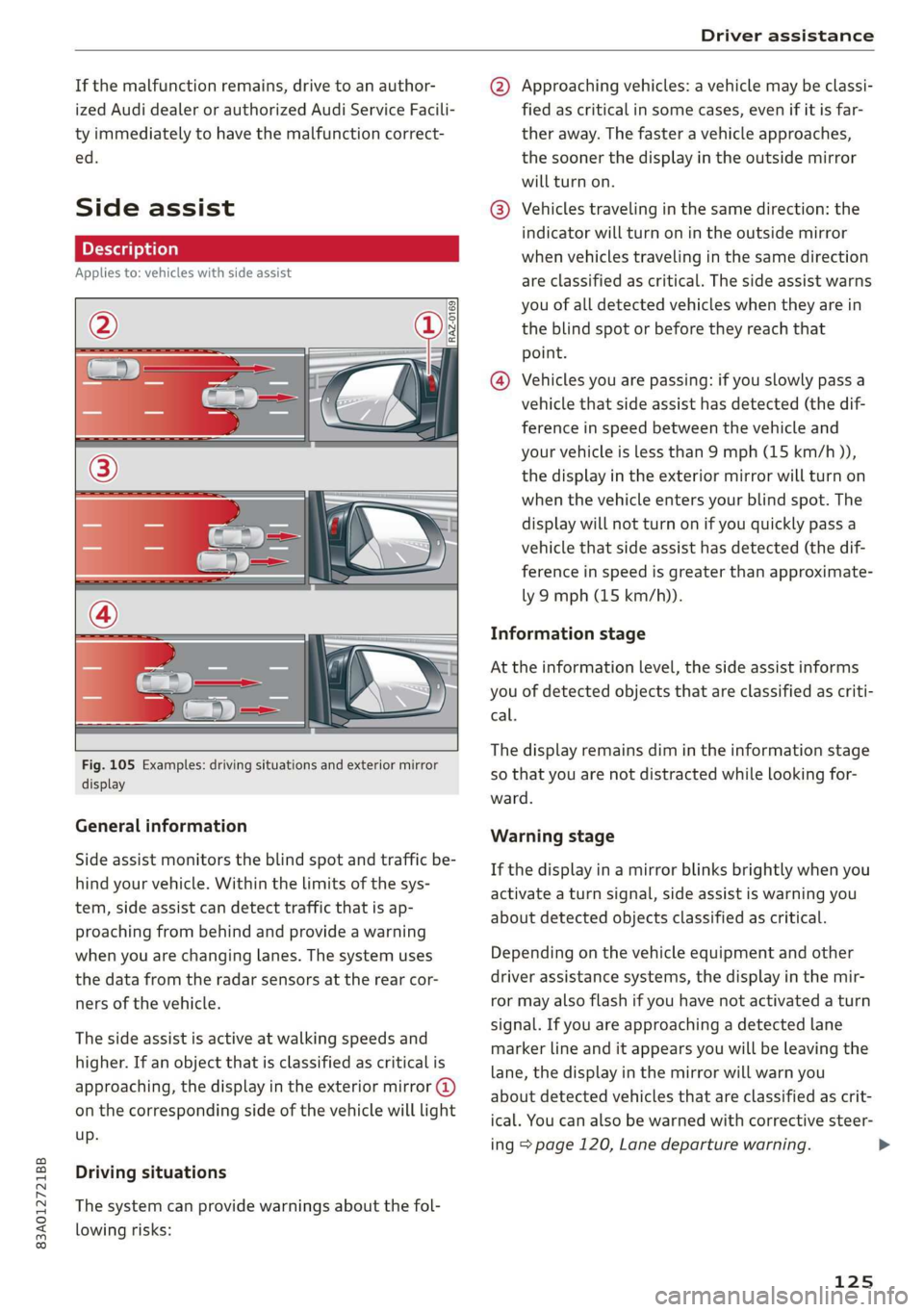
Fig. 105 Examples: driving situations and exterior mirror
display
General information
Side assist monitors the blind spot and traffic be-
hind your vehicle. Within the limits of the sys-
tem, side assist can detect traffic that is ap-
proaching from behind and provide a warning
when you are changing lanes. The system uses
the data from the radar sensors at the rear cor-
ners of the vehicle.
The side assist is active at walking speeds and
higher. If an object that is classified as critical is
approaching, the display in the exterior mirror @)
on the corresponding side of the vehicle will light
up.
Driving situations
The system can provide warnings about the fol-
lowing risks:
@ Approaching vehicles: a vehicle may be classi-
fied as critical in some cases, even if it is far-
ther away. The faster a vehicle approaches,
the sooner the display in the outside mirror
will turn on.
® Vehicles traveling in the same direction: the
indicator will turn on in the outside mirror
when vehicles traveling in the same direction
are classified as critical. The side assist warns
you of all detected vehicles when they are in
the blind spot or before they reach that
point.
@® Vehicles you are passing: if you slowly pass a
vehicle that side assist has detected (the dif-
ference in speed between the vehicle and
your vehicle is less than 9 mph (15 km/h )),
the display in the exterior mirror will turn on
when the vehicle enters your blind spot. The
display will not turn on if you quickly pass a
vehicle that side assist has detected (the dif-
ference in speed is greater than approximate-
ly 9 mph (15 km/h)).
Information stage
At the information level, the side assist informs
you of detected objects that are classified as criti-
cal.
The display remains dim in the information stage
so that you are not distracted while looking for-
ward.
Warning stage
If the display in a mirror blinks brightly when you
activate a turn signal, side assist is warning you
about detected objects classified as critical.
Depending on the vehicle equipment and other
driver assistance systems, the display in the mir-
ror may also flash if you have not activated a turn
signal. If you are approaching a detected lane
marker line and it appears you will be leaving the
lane, the display in the mirror will warn you
about detected vehicles that are classified as crit-
ical. You can also be warned with corrective steer-
ing page 120, Lane departure warning.
125